
The compressor release setting decides how a track moves after every peak, and choosing it well is one of the quickest ways to make compression sound musical instead of obvious. This article focuses on practical choices: how to approach recovery time on vocals, drums, bass and buses, how to spot pumping, and how to use simple tempo maths as a starting point.
Why the Compressor Release Setting Matters
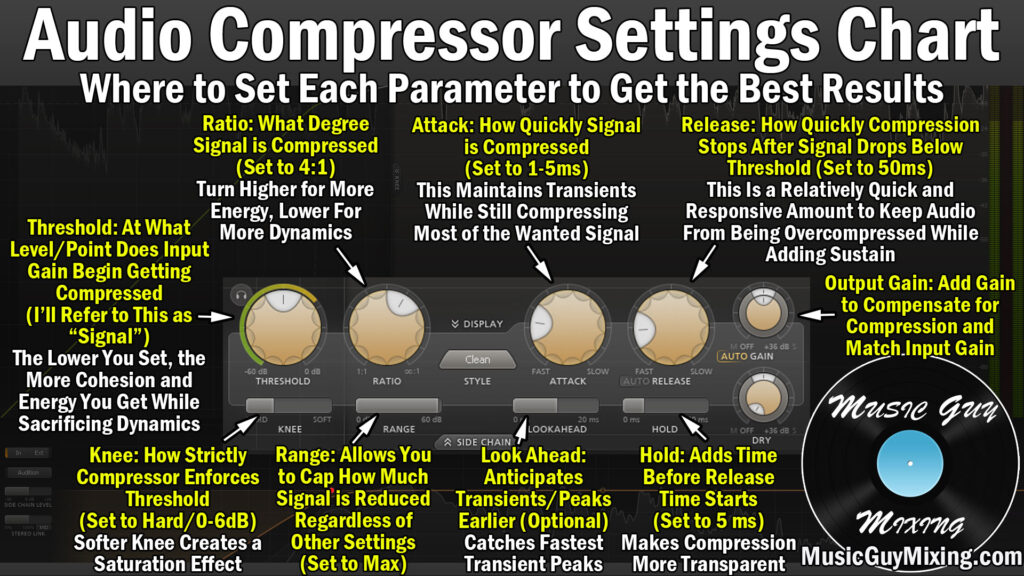
Once a loud note pulls the gain down, the processor needs time to return to unity. That recovery period colours everything that follows the transient: the sustain of a snare, the tail of a sung word, the decay of a piano chord. Set it in tune with the music and the part feels controlled yet alive. Set it badly and you hear one of two problems.
Because so much depends on it, the compressor release setting deserves as much attention as threshold and ratio. If recovery is too quick, the gain wobbles audibly and low notes can distort. If recovery is too slow, gain reduction never resets, the part sounds flat, and the next transient arrives already turned down.
For a broader primer on how a dynamics processor works, Sound On Sound’s long-running Compression Made Easy feature remains a solid reference.
Start With the Tempo
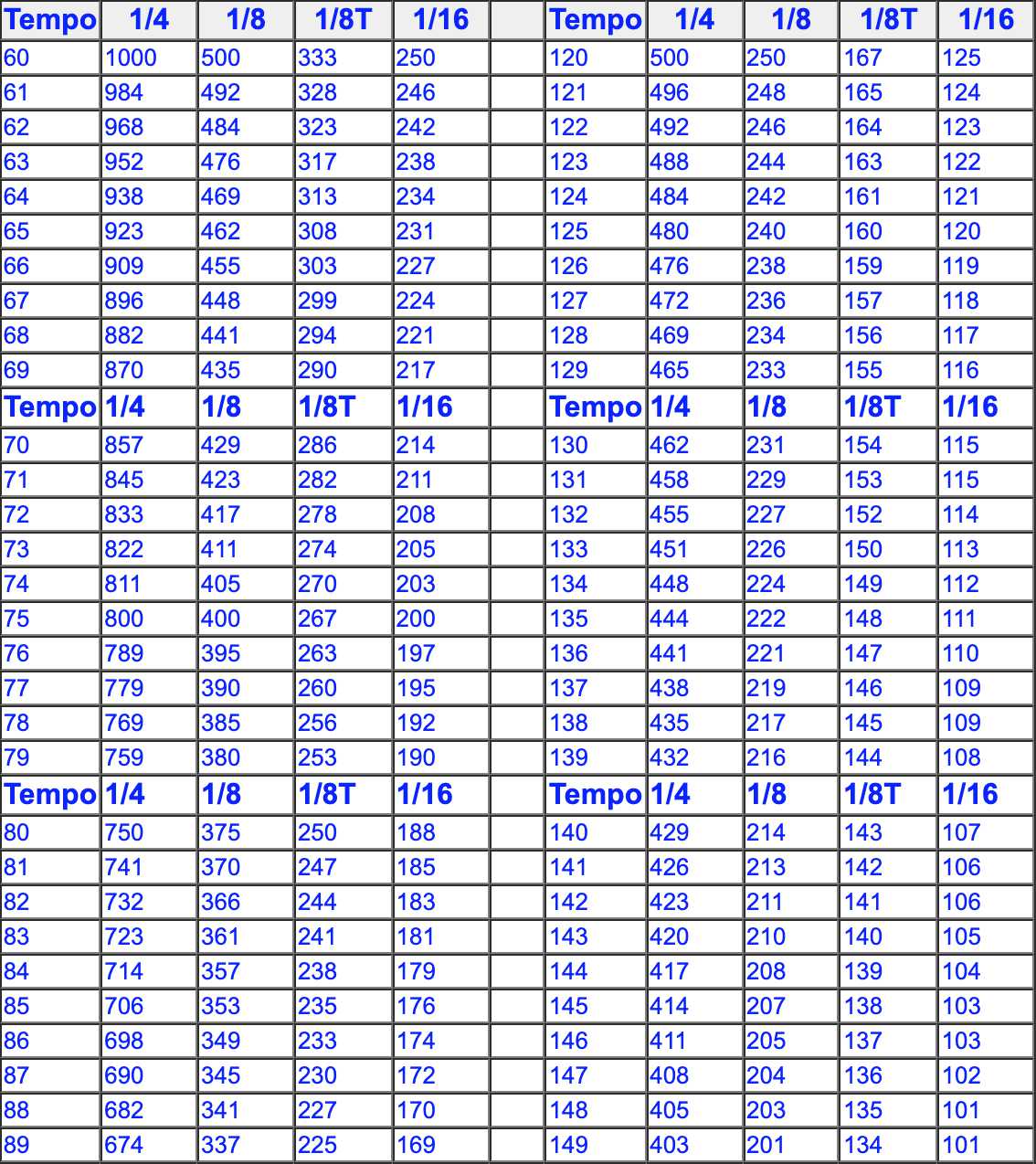
Recovery that lines up with the beat sounds natural, because the processor resets in time for the next accent. To find a starting value, divide 60,000 by the song’s BPM. That gives the length of one quarter note in milliseconds.
- At 90 BPM: quarter note 667 ms, eighth note 333 ms, sixteenth note 167 ms.
- At 120 BPM: quarter note 500 ms, eighth note 250 ms, sixteenth note 125 ms.
- At 140 BPM: quarter note 429 ms, eighth note 214 ms, sixteenth note 107 ms.
Choose the note value that matches the spacing of the hits you are controlling. A kick on every beat at 120 BPM suggests something under 500 ms; a hi-hat pattern in sixteenths suggests a shorter value. Remember that hardware and plugins define their time constants differently, so the number on the dial is a guide, not a guarantee.
Vocals
Singers move between soft and loud phrases, and the goal is usually to keep words intelligible without making breaths jump forward. Begin around 60 to 120 ms. If the end of each phrase seems to swell up, slow things down. If loud lines sound choked and the vocal never recovers between phrases, speed things up. Many engineers split the job between two units: a fast peak catcher doing 2 to 3 dB and a slower, smoother stage doing a few more. An auto or program-dependent mode is often a good fit here, since it handles short syllables and long held notes differently.
Drums

Drums reward careful timing because their hits are short and evenly spaced.
- Kick: let the gain return just before the next kick. Too short on a long, sub-heavy kick can cause clicking or distortion.
- Snare: a quicker recovery lifts the body and ring after the crack, giving a fatter sound. A slower one keeps the snare tighter.
- Overheads: moderate values preserve cymbal decay. Very quick ones make cymbals wash and swell.
- Drum bus: time it to the groove so the kit breathes; watch the meter return near zero between bars.
Bass
Low notes have long wavelengths. A 40 Hz cycle lasts 25 ms, so very short recovery times can track individual cycles and create harmonic distortion. For bass guitar and synth bass, start around 150 to 300 ms and shorten carefully while listening for grit. If you need tight note-to-note control, it may be better to use a slower attack and more ratio than an extremely quick recovery. Our guide on how to compress bass goes deeper into bass-specific settings.
Mix Bus and Group Buses
Bus processing should be gentle, usually 1 to 3 dB. Slower values, from about 300 ms upward, or an auto mode, let the whole mix move together without obvious ducking. A common approach is to set recovery so the meter bounces in time with the kick and snare, then back off until you cannot quite hear the processor working, only the cohesion it adds.
Spotting and Using Pumping
Pumping is the audible rise in level after each loud event as gain recovers. It is most noticeable on sustained sounds such as pads, reverbs and cymbals that sit under a loud kick. To check for it, listen to the quiet elements, not the trigger. If the pad or reverb tail swells after every kick and you did not want that, lengthen the recovery or lower the amount of gain reduction.
When you do want pumping, as in many dance and pop styles, set a fast attack, enough gain reduction to be clear, and a recovery that matches a quarter or eighth note. Sidechaining from the kick keeps the movement locked to the beat.
A Listening Routine That Works
- Set ratio and threshold to get a clear amount of reduction, more than you plan to keep.
- Sweep the recovery control from its slowest to its fastest position and note where the part sounds most alive.
- Back off the threshold to a more reasonable amount and fine-tune.
- Watch the gain reduction meter to confirm it resets between hits or phrases.
- Bypass with matched output level and compare honestly.
Exaggerating first makes the effect easier to hear, and dialing back afterwards keeps the result subtle.
Save any compressor release setting you like as a user preset with a note about the tempo and source, so you have a head start on the next session. Over time you will build a personal library of starting points that suit your genre and your favourite processors, which is faster and more reliable than any generic chart.
Quick Reference
Use this compressor release setting list as a starting point only, then refine in the full mix.
- Vocals: 60 to 120 ms or auto.
- Kick: just shorter than the gap between kicks.
- Snare: 50 to 120 ms.
- Bass: 150 to 300 ms.
- Drum bus: timed to the groove.
- Mix bus: 300 ms or longer, or auto.
Final Thoughts
There is no universal compressor release setting. The right value depends on tempo, the length of the notes and how much movement the arrangement can handle. Use the tempo maths to get close, use the gain reduction meter to confirm the processor resets, and trust what you hear in the full mix to decide the last few milliseconds.