Categories
Archive

Chords And Melody Writing

Chords and melody writing in music involves choosing the appropriate harmony and arranging it in a manner that creates a pleasing tune. Creating the correct harmony requires a deep understanding of music theory, and the ability to choose which notes sound good with one another.

As a musician, understanding chords and melody writing can help you write compelling music tracks that will resonate with your audience. The chords you choose have a massive impact on the feeling and vibe of the song, as your audience will feel the rhythm and energy that you create.

Additionally, emerging trends in music are often based on certain chords or melody lines that catch on with listeners, making this knowledge even more valuable. Through practice, you can master the art of chords and melody writing and create music that is unique, satisfying and beautiful. In the next section, we will delve into the details of chords and melody writing, including factors to consider when creating melodies, types of chords to use, chord progressions, and more.

Chords And Melody Writing

Credit: m.youtube.com

1. Types Of Chords

Chords are crucial for writing melody. The most common types of chords are major and minor, while others include augmented, diminished, and dominant seventh chords. Understanding different chord types can help you create unique and compelling melodies for your music.

If you want to write a great melody, you have to start with the right chords. There are four basic types of chords: major, minor, diminished, and augmented. Let’s take a closer look at each of them.

Major Chords

Major chords are bright and happy-sounding. They’re built using the first, third, and fifth notes of the corresponding major scale. For example, the C major chord is made up of the notes C, E, and G.

Minor Chords

Minor chords have a more melancholic feel to them. They are constructed using the first, third, and fifth notes of the corresponding minor scale. For example, the A minor chord is built using the notes A, C, and E.

Diminished Chords

Diminished chords are tense and unstable sounding. They consist of the first, third, and fifth notes of the corresponding diminished scale. For example, the C diminished chord is constructed using the notes C, E flat, and G flat.

Augmented Chords

Augmented chords create a sense of tension, like diminished chords. They are built using the first, third, and fifth notes of the corresponding augmented scale. For example, the C augmented chord is constructed using the notes C, E, and G sharp. In summary, understanding the different types of chords is crucial when it comes to writing melodies. By choosing the right chords, you can communicate the appropriate emotion and create the desired atmosphere for your music.

2. Progressions

Progressions play an essential role in chord and melody writing. They help to create a sense of movement and development in the music, challenging the listener’s ear with harmonic surprises and building tension to release in an emotive resolution. Experimenting with different progressions can elevate your compositions to new heights.

Songwriting involves two important elements: chords and melody. While melody writing is fairly straightforward, chord progressions require a little more thought and creativity. Progressions, in the simplest terms, refer to the order in which chords are played in a song. They are essential in creating the mood and feel of the song. Let’s dive in and explore some common progressions, cadences, and changing keys.

Common Progressions

Some progressions are used more commonly than others and are found in countless hit songs. Using common progressions can help you create catchy and memorable songs, but don’t be afraid to try something new and unique. Some of the most popular progressions are:

ProgressionExample Song
I – V – vi – IVLet Her Go by Passenger
I – V – vi – iii – IV – I – IV – VSomewhere Over the Rainbow by Israel Kamakawiwo’ole
I – V – vi – IV – VDon’t Stop Believin’ by Journey

Cadences

Cadences are musical phrases that signify the end of a section or phrase in a song. They can also create tension and resolution. Understanding and using cadences can help you create a well-structured and cohesive song. Some common cadences are:

  • Authentic cadence: V – I
  • Half cadence: V – any chord
  • Plagal cadence: IV – I
  • Deceptive cadence: V – vi or V – IV

Changing Keys

Changing keys can add a new dynamic to a song and keep it interesting for the listener. When changing keys, it’s important to do it in a way that doesn’t sound jarring or abrupt. To transition smoothly, try using pivot chords, which are chords that exist in both keys. Some common pivot chords are:

  1. V7 (dominant 7th chord)
  2. IV (subdominant chord)
  3. iii (mediant chord)

In conclusion, progressions play a significant role in songwriting. Being aware of common progressions, cadences, and changing key techniques can help you create a well-structured and dynamic song. But always remember to experiment and not be afraid to go beyond the norm. With practice and creativity, you can write a song that is both unique and memorable.

3. Using Chords In Melodies

Chords play a pivotal role in music composition, and using them in the melody-writing process can enhance the musicality of a song. Incorporating chords into melodies add depth and harmony, which elevates the song’s overall sound. With that being said, let’s dive into how to use chords in melodies.

Arpeggios

Arpeggios are a commonly used technique that involves playing the notes of a chord individually, rather than simultaneously. Using arpeggios in melodies can add a unique flavor and texture to the music, making it more interesting to listen to. Arpeggios help in creating a sense of rhythm, especially if you are aiming for something upbeat. Experiment with different arpeggios, and see how they can elevate your melody.

Chord Tones

Chord tones refer to the individual notes that make up a chord. Using chord tones in melodies can provide stability to the music, as these notes provide a sense of harmony. Starting with the root note of the chord and building around it is a good way to create melodies using chord tones. You can also experiment with playing with various chord tones to create different feelings and tones in your melody.

Passing Tones

Passing tones are notes that are played between two chord tones. These notes create a sense of movement in the melody, making it more dynamic and interesting. Using passing tones in the melody can help to connect the notes and make the transitions more fluid. Don’t be afraid to experiment with passing tones, as they can add a unique flavor to the music.

Overall, incorporating chords into melodies is a great way to add depth and harmony to your music. Using arpeggios, chord tones, and passing tones can help to create a unique sound that is both musical and interesting.
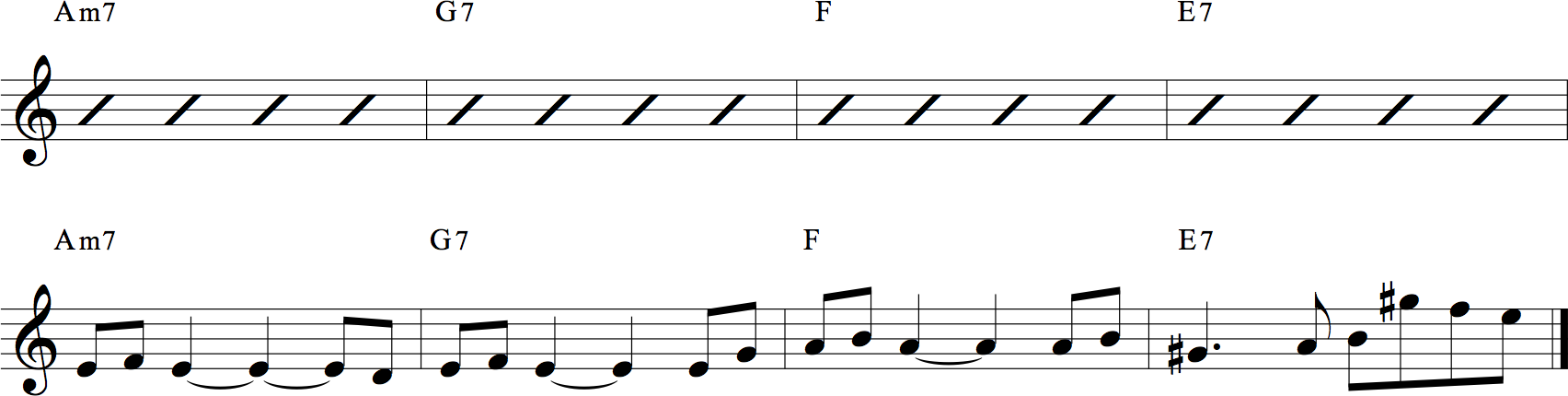
Chords And Melody Writing

Credit: hubguitar.com

4. Writing Melodies To Chord Progressions

Writing melodies to chord progressions is an essential aspect of creating music. It requires understanding the relationship between chords and melody. By following basic music theory principles, you can craft catchy and memorable melodies that complement your chord progressions.

Melody writing is a crucial aspect of music composition. It can make or break a song, and when written to suit the chord progressions, it can create a pleasing and harmonious experience for the listener. In this section, we’ll take you through the essential steps involved in writing melodies to chord progressions.

Choosing A Key

Choosing a key is the first step in writing a melody to a chord progression. It’s important to choose the key that complements the chords. Sometimes, the key of the melody may change or modulate within the song, but it should always start and end in a harmonious manner. Here are some things to consider when choosing a key:

  • Choose a key where the melody can fully utilize the range of the singer’s voice or instrument
  • Consider the genre of music you’re writing for
  • Take into account the feel or mood you want the melody to convey

Finding The Chord Tones

The next step in writing a melody to a chord progression is finding the chord tones. Chord tones are the notes that are part of the chords being played. They provide a strong sense of harmony and are usually the notes that last longer. Here are some ways to identify chord tones:

ChordChord Tones
C majorC, E, G
G majorG, B, D
D minorD, F, A

Working With The Rhythm

The last step in writing a melody to a chord progression is working with the rhythm. The rhythm of the melody should complement the rhythm of the chords. Here are some things to consider when working with the rhythm:

  1. Ensure that the melody doesn’t clash with the rhythm of the chords
  2. Try to syncopate the melody with the rhythm of the chords
  3. Consider the dynamics of the melody and how it affects the rhythm

In summary, writing melodies to chord progressions involves choosing the right key, finding the chord tones, and working with the rhythm. By following these steps, you can ensure that the melody complements the chords and creates a harmonious and pleasing experience for the listener.

5. Harmony And Melody Connections

Harmony and melody connections are a critical aspect of chords and melody writing. By understanding the relationship between the chords and the melody, you can create a cohesive and balanced composition that captivates your listeners.

When it comes to writing music, harmony and melody are two crucial components that work together to create a memorable piece. In this section, we’ll dive into the different ways harmony and melody can connect to elevate your songwriting.

Parallel Harmony

One popular approach to harmony and melody writing is using parallel harmony. This involves playing two different chords that share the same root note. Parallel harmony can create a sense of stability and consistency in your music, but can also become repetitive if overused. It’s important to strike a balance between predictability and surprise in your harmonic choices.

Counterpoint

Another way harmony and melody can work together is through counterpoint. Counterpoint involves writing two distinct melodies that complement each other and create a sense of tension and release. This technique is commonly used in classical music, but can also be applied to popular music genres. By layering melodies, you can create a complex and interesting piece of music.

Creating Tension And Release

Harmony and melody can also work together to create tension and release in your music. This involves choosing chords that create a sense of tension, and then resolving that tension with a chord progression or melodic line. This can create a powerful emotional impact on your listeners, and is commonly used in pop, rock, and other modern music genres. In conclusion, the way harmony and melody connect in your music can make or break your songwriting. By using parallel harmony, counterpoint, and tension and release techniques, you can elevate your music to create a memorable and impactful piece.

Chords And Melody Writing

Credit: www.musictheoryacademy.com

6. Advanced Chord Techniques

Enhance your chord progression skills with advanced chord techniques. Learn to write melodies that complement your chords, adding depth and complexity to your music. Master the art of combining chords and melody writing to create gripping compositions.

As you progress in your songwriting career, you’ll want to explore advanced chord techniques to add complexity and richness to your music. Mastering these techniques can help you create unique and unforgettable melodies that resonate with your audience. In this section, we’ll discuss three advanced chord techniques: Modal Chords, Extended Chords, and Altered Chords.

Modal Chords

Modal chords are chords that evoke a particular mood or feeling. There are seven modes, and each mode has a unique set of chords that create its characteristic sound. Here are the modes and their corresponding chords:

  • Ionian mode: Major chords
  • Dorian mode: m7 chords
  • Phrygian mode: m7(b9) chords
  • Lydian mode: Maj7#11 chords
  • Mixolydian mode: 7 chords
  • Aeolian mode: m chords
  • Locrian mode: m7(b5) chords

Using modal chords can add depth and complexity to your music, and experimenting with different modes can help you find your unique style.

Extended Chords

Extended chords are chords that have additional notes beyond the basic triad. These additional notes can add color and richness to your harmony. Here are some common extended chords:

  • 9th chords: Dominant 7th chords with an added 9th
  • 11th chords: Dominant 7th chords with an added 9th and 11th
  • 13th chords: Dominant 7th chords with an added 9th, 11th, and 13th
  • Maj7#11 chords: Major 7th chords with an added #11

Using extended chords can create a sense of tension and release in your music, and can help you create interesting and unexpected chord progressions.

Altered Chords

Altered chords are chords that have one or more altered notes. These alterations can be flat or sharp, and can create dissonance and tension in your music. Here are some common altered chords:

  • 7alt chords: Dominant 7th chords with one or more altered notes
  • Imaj7#5 chords: Major 7th chords with an added #5
  • IIIm7b5 chords: Minor 7th chords with a flat 5th

Using altered chords can add complexity and intensity to your music, and can help you create a unique and memorable sound. Incorporating these advanced chord techniques into your songwriting can take your music to the next level. Experiment with different chords and modes to find your unique sound, and don’t be afraid to push the boundaries of conventional harmony.

7. Experimenting With Melody And Chord Writing

Now that you have a basic understanding of chord and melody writing, it’s time to take things up a notch. Experimenting with different styles and techniques can help you come up with unique melodies and chord progressions that stand out from the crowd. Here are three ways to take your melody and chord writing to the next level:

Exploring Different Genres

One way to expand your musical horizons is by exploring different genres. Whether it’s rock, pop, jazz, or classical, each genre offers a unique perspective on melody and chord progressions. Take the time to analyze songs from different genres and pay attention to how they use melody and chords to create emotion and atmosphere.

Combining Styles

While it’s important to have a solid foundation in a particular genre, combining different styles can help you create something truly unique. For example, you could combine a jazz chord progression with a pop melody or a classical melody with a rock chord progression. Don’t be afraid to experiment!

Learning From Other Musicians

One of the best ways to improve your melody and chord writing skills is by learning from other musicians. Attend concerts, watch YouTube videos, and listen to podcasts where musicians discuss their craft. You never know what you might learn!

By experimenting with different genres, combining styles, and learning from other musicians, you can take your melody and chord writing to the next level. Don’t be afraid to step outside of your comfort zone and try something new. Who knows, you might just create the next big hit!

8. Practice Routines For Chord And Melody Writing

Looking to improve your chord and melody writing skills? Check out these practice routines to enhance your musical abilities. With consistent practice, you can develop your technique and creativity, bringing your compositions to the next level.

As with any skill, regularly practicing chord and melody writing is the key to becoming proficient in this area. Avoid getting stuck writing the same old chord progressions and melodies by incorporating the following routines into your practice sessions.

Ear Training

Develop your ear by spending time each day listening to music and identifying different chord progressions and melodies within the songs. Once you can identify these elements, try transcribing them onto paper or using a music notation software. This helps to train your ear to recognize chord progressions and melodies to use in your own writing.

Improvisation

Improvisation is an excellent way to develop chord progressions and melodies. Start by playing a chord progression and improvising a melody over the top. Focus on creating a unique melodic line that is catchy and memorable. You can also experiment with changing the chords and melody to create a new sound.

Using Music Theory

Music theory provides an excellent framework for understanding chord progressions and melody writing. Learn the basics of music theory such as scales, chord construction, and chord progressions. Use this knowledge to make informed decisions about which chords and melodies to use in your writing.

Structured Practice Sessions

Structure your practice sessions by focusing on one aspect of chord and melody writing each day. For example, spend one day focusing on chord progressions, one day on melody writing, and one day on combining the two. Experiment with different rhythms, tempos, and musical genres to help expand your writing skills. Incorporating these practice routines into your daily writing can help improve your chord and melody writing skills. Remember to regularly assess your progress and adjust your practice sessions accordingly to ensure that you continue to make progress.

Frequently Asked Questions Of Chords And Melody Writing

How Do You Write A Melody With Chords?

To write a melody with chords, start by choosing the key for your song. Then, decide on the chord progression you want to use and create a simple melody that fits over those chords. Experiment with different chord inversions and melodies until you find what sounds best.

Practice playing and singing your melody with the chords until they flow seamlessly together.

Do You Write Melody Or Chords First?

As a content writer, there is no right or wrong way to write melodies or chords first. Some songwriters start with a melody and build chords around it, while others begin with chord progressions and then craft a melody that fits.

It all depends on your creative process and what works best for you.

What Are The Rules Of Melody Writing?

The rules of melody writing include creating a memorable and catchy melody that is easy to sing and play, using repetition and variation to create interest, understanding the principles of harmony and chord progression, and considering the lyrics and overall feel of the song.

It’s important to also stay true to the genre and style of music you are writing for.

What Is The Relationship Between Chords And Melody?

Chords and melody have a close relationship in music. A melody is often built on top of a chord progression, and the chords provide the harmonic framework for the melody. Chords support the melody and create the overall mood of the piece, while the melody adds the lyrical quality.

Both elements are essential for creating a complete musical composition.

Conclusion

To sum it up, writing melody and chords that complement each other effectively is crucial in crafting a memorable and compelling piece of music. With the right techniques and tools, anyone can learn to create captivating music that connects with their audience.

So whether you’re a beginner or a seasoned musician, keep practicing and experimenting to find the perfect balance between melody and chords. As the legendary musician Miles Davis once said, “Don’t play what’s there, play what’s not there. “
Categories
Archive

How to Reset Cubase

To reset Cubase, go to the Cubase preferences folder and remove the folder called “Cubase XX_XX.” Cubase is a popular digital audio workstation used by music producers and audio engineers to create and edit music.

However, from time to time, users can run into issues like crashes, freeze-ups, or other problems. In such cases, resetting Cubase can be a possible solution. Resetting Cubase will restore the software to its default settings and resolves the issues that can’t be fixed by simply restarting the computer or refreshing the software.

We’ll show you how to reset Cubase quickly and easily by following a few simple steps.

How to Reset Cubase

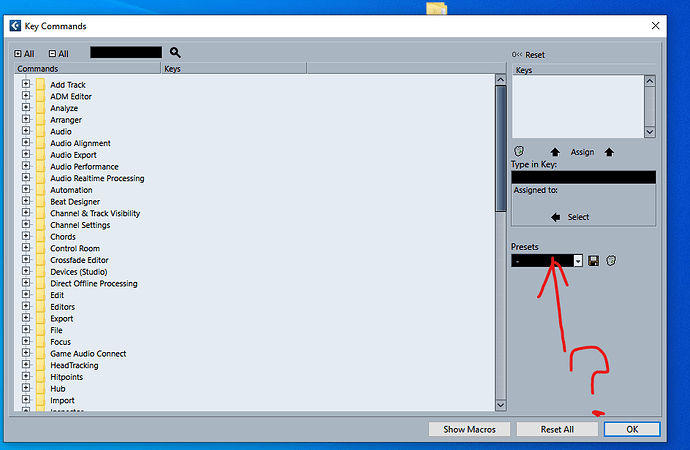
Credit: forums.steinberg.net

Backup Your Cubase Settings

To reset Cubase settings, it’s crucial to backup your current settings. This will ensure you don’t lose any important data and can easily restore your settings. Follow these steps to backup and reset your Cubase settings.

Create A Backup Of Your Cubase Settings

Creating a backup of your Cubase settings is a crucial step before resetting the software. It ensures that you do not lose any important data, settings, or preferences that you have made in Cubase. The process of creating a backup is simple and straightforward. To create a backup of your Cubase settings, follow these steps:

  1. Launch Cubase and navigate to the “File” menu
  2. Select “Preferences” and then “General”
  3. Click on the “Save As” button and save the file with a recognizable name, such as “Cubase Settings Backup”

With these steps, you will have successfully created a backup of your Cubase settings file.

Save The Backup In A Safe Place

Now that you have created a backup, it is important to save it in a safe place. A safe place could be an external hard drive, cloud storage, or a USB drive. We recommend saving your backup in multiple locations to ensure that you can retrieve your files in case of a data loss. It’s important to note that you can also use this backup to restore settings that you deemed ideal a long time ago, even if the settings have been overwritten over time. Additionally, if you’re using Cubase at a professional level, we recommend that you create backups periodically, to ensure no data is lost in the event of an accident. That’s all there is to creating a backup of your Cubase settings. With a backup safely in hand, you can now proceed with resetting Cubase without the fear of losing any important data or settings.

How to Reset Cubase

Credit: m.youtube.com

Resetting Cubase To Its Default Settings

To reset Cubase to its default settings, you need to first close the program and navigate to the Cubase preferences folder. Once there, rename the preferences folder and restart Cubase. The program will then create a new default preferences folder.

Cubase is one of the most popular digital audio workstations (DAWs) primarily used for music production and audio editing. However, it can become sluggish over time or prone to errors, which can make it frustrating to use. Thankfully, there’s a straightforward solution – resetting Cubase to its default settings. This will wipe all your custom settings and preferences, but it should restore Cubase to its default, optimal performance. Here’s how to do it:

Close Cubase Application

Before resetting Cubase to its default settings, close the Cubase application. This will ensure that Cubase isn’t running in the background while you’re making changes to its preferences. To do this, simply go to the “File” menu and click on “Exit.”

Find The Cubase Preference Folder

The next step is to locate the folder where Cubase stores its preferences. This folder is usually located in the following directory: ~/Library/Preferences/Cubase X/ Note: Replace “X” with the version of Cubase you’re using. You can also access the folder by opening Finder, holding down the “Option” key, clicking on the “Go” menu, and selecting “Library.” Then navigate to “Preferences” and find the Cubase folder.

Rename The Cubase Preference Folder

Once you’ve located the Cubase preference folder, it’s time to rename it. This will generate a new preference folder with Cubase’s default settings. To do this, right-click on the Cubase preference folder and select “Rename,” or click on the folder once and press the “Enter” key. Rename the folder to something like “Cubase Preferences Backup.”

Restart Cubase Application

Finally, restart the Cubase application. When you open Cubase, it will generate a new preference folder with default settings. You’ll need to reconfigure your settings, but Cubase will be restored to its optimal performance. In conclusion, resetting Cubase to its default settings is a simple solution to improve its performance. Follow these easy steps, and you’ll be up and running in no time.

Reconfiguring Cubase Settings

If you are facing problems with your Cubase software or just notice a decrease in performance of your system, resetting Cubase to its default settings is an excellent idea. One of the benefits of resetting Cubase is reconfiguring the settings, which can help to optimize the performance of the software. In this blog post, we will guide you through how to reset Cubase and reconfigure its settings.

Setting Up Audio Interface

If you plan to use an audio interface with Cubase, it is important to set it up correctly. Cubase allows you to use any audio interface that uses ASIO drivers to connect with your computer. To set up your audio interface, follow these simple steps:

  1. Open Cubase and go to ‘Devices > Device Setup.’
  2. Select your audio interface from the list on the left-hand side of the screen.
  3. Click on the ‘Control Panel’ button and configure your audio interface settings.
  4. Once you have finished configuring your audio interface, click ‘OK’ and exit the Device Setup window.

Preferences Settings Configuration

If you want to reset your preferences settings in Cubase, follow these simple steps:

  1. Open Cubase and go to ‘Preferences.’
  2. Click on the ‘Reset Preferences’ button to reset the software to its default settings.
  3. Once you have finished, exit the Preferences window.

Midi Device Setup Configuration

To configure your MIDI device setup settings, follow these simple steps:

  1. Open Cubase and go to ‘Devices > MIDI Device Manager.’
  2. Select your device from the list on the left-hand side of the screen.
  3. Configure your MIDI device settings by clicking on the ‘Device Setup’ button.
  4. Once you have finished configuring your MIDI device, click ‘OK’ and exit the MIDI Device Manager window.

Vst Plug-ins Installation

If you want to install VST plug-ins in Cubase, follow these simple steps:

  1. Download your preferred VST plug-in to your computer.
  2. Open Cubase and go to ‘Devices > Plug-in Manager.’
  3. Click on the ‘VST Plug-ins’ tab and then click on the ‘Add’ button.
  4. Select the folder where you saved the downloaded VST plug-in and click ‘OK.’
  5. Once the VST plug-in has been added, you can use it in Cubase.

Follow these steps to configure and optimize your Cubase settings for high performance and stability. Reconfiguring your settings can help to improve the software’s performance, and it is always a good idea to reset Cubase to its default settings once in a while to ensure that everything is working correctly.

How to Reset Cubase

Credit: steinberg.help

Frequently Asked Questions Of How To Reset Cubase

How Do I Reset My Cubase To Default?

To reset Cubase to default, go to File > Preferences > General and click “Reset” next to “Reset Program Preferences to Factory Defaults. ” This will reset all settings to their default values, including key commands, preferences, and user interface settings.

How Do You Reset The Workspace In Cubase?

To reset the workspace in Cubase, go to the “Edit” menu, click on “Preferences”, select “General” and click on “Reset Layout”. Alternatively, you can use the keyboard shortcut “Alt + Shift + Right Click” and select “Workspace > Reset Default Workspace”.

How Do You Reset On Stop In Cubase?

To reset the playback cursor to the start position in Cubase, simply press the Stop button or use the keyboard shortcut “0” on the numeric keypad.

How Do I Clean Up Cubase 10?

To clean up Cubase 10, you can uninstall unused programs, delete unnecessary files and folders, and clear the cache. Make sure to use a reliable antivirus to scan for any corrupt files. Additionally, regularly updating your computer’s operating system and Cubase version can also improve its performance.

Conclusion

To conclude, resetting Cubase is a straightforward task that can help troubleshoot any lingering issues with the software. With the step by step instructions provided in this post, users can feel confident in their ability to reset their Cubase program and get back to making music.

Remember to always backup your work before resetting, and don’t hesitate to seek professional help if necessary. With these tips in mind, happy producing!

Categories
Archive

How To Remix Music

To remix music, you need to select the song, isolate the parts you want to use, and arrange them in your desired order. Remixing is a skill that takes time and practice to perfect.

It involves taking an existing song and manipulating it to create something new and unique. Whether you’re a DJ looking to create a dance hit or a musician wanting to explore new possibilities, the key to successful remixing lies in your ability to identify the best parts of the original track and blend them with your own creative ideas.

We’ll explore the techniques and tools you need to know to remix music like a pro, from selecting the right software to understanding the basics of structure and beat matching.

Choose Your Song

Choosing the right song to remix is the first step in the music remixing process. Ideally, you want a song that you love and that sparks creativity. But, there are other factors to consider as well that can impact the success of your remix. In this blog post, we’ll cover some tips on how to choose the perfect song for your remix.

Select A Song To Remix

If you’re just starting out with remixing music, it’s important to pick a song that’s relatively easy to work with. Look for a track that has a clear structure, with a strong beat and melody. This will make it easier to identify the song’s key features and to break it down into individual parts that you can manipulate and rearrange.

Break Down The Song Into Parts

Once you’ve selected a song to remix, it’s time to break it down into its individual parts. This will allow you to see how the different elements of the song fit together and also give you an opportunity to identify sections that you might want to emphasize or modify in your remix.

You can break down a song into parts in a number of ways. Some musicians like to use a DAW (Digital Audio Workstation) to visualize the waveform of the song and identify where different parts begin and end. Others prefer to use a pen and paper to jot down notes as they listen to the song repeatedly.

Using a DAW

If you’re using a DAW to break down a song, start by importing the track into the software. Then, use the zoom function to get a closer look at the waveform. You can use markers to highlight different sections of the song and to label them (e.g. intro, verse, chorus, bridge, etc.).

Section of SongDescription
IntroThe beginning of the song that sets the tone and introduces the main melody
VerseThe section of the song where the story is told and the melody typically changes
ChorusThe most memorable and catchy part of the song that’s repeated several times
BridgeA transitional section between the chorus and the verse that adds variety and keeps the listener engaged

To make things even easier, you can use color-coding to differentiate between different sections of the song.

Using Pen and Paper

If you prefer the old-school approach of using pen and paper to break down a song, start by listening to the track repeatedly. As you listen, write down the timecode (minutes and seconds) for the different sections of the song (e.g. intro starts at 0:00 and ends at 0:30).

Once you’ve identified the different sections, you can use arrows and other symbols to indicate where different elements of the song (e.g. drums, bass, vocals) begin and end. This will help you get a better sense of the song’s structure and will make it easier to identify areas where you can make changes or add your own creative elements.

By following these two steps – selecting the right song and breaking it down into its individual parts – you’ll be well on your way to creating a killer remix that will get people on the dance floor.

Get Your Equipment Ready

Remixing music requires a certain set of tools and equipment to get started. From software to hardware, having the right equipment is crucial to producing a high-quality remix. In this article, we’ll take you through all the necessary steps to prepare your equipment and set up before diving in.

Set Up Your Studio

The first step in preparing for a music remix is setting up your studio. This includes finding a suitable room with adequate space and soundproofing to avoid any external noises interrupting your process. The room should also be equipped with audio monitors and headphones for optimal sound quality. Once you’ve found the perfect room, it’s time to set up your equipment.

Gather Your Equipment

To get started with music remixing, you’ll need a computer or a laptop with a suitable operating system. For music production, Macs are often preferred by professionals. You’ll also need a digital audio workstation (DAW) software such as Ableton, Logic Pro X or FL Studio, to name a few. Some DAWs offer free trials for you to test them before investing in the software.

In addition to software, you’ll need audio interfaces to connect your audio monitors, headphones, and microphone. Selecting the right audio interface is crucial, as it can affect the quality and clarity of your recordings. M-Audio, Focusrite, and PreSonus are popular options that offer both affordability and quality.

Next, you’ll need a MIDI controller, a device that allows you to create music using virtual instruments and plugins. MIDI controllers come in various shapes and sizes, from keyboards to drum machines, so choose one that best suits your needs. Other essential equipment includes a microphone, cables, and stands.

Create A Project File

Once you have all your equipment ready, it’s time to create a project file. A project file is where you store all your audio files, samples, and settings for your remix project. It helps keep everything organized, making it easier to navigate and locate specific audio files.

Create a new project file in your DAW software and import your original music track into it. Organize your individual tracks by separating each instrument or part into a different channel, making it easier to edit and process them separately. It’s also advisable to name each track according to its corresponding instrument or part.

Finally, save your project and start your remixing journey!

Chop And Slice

Learn how to remix music like a pro with the Chop and Slice technique. This popular method involves breaking down tracks and rearranging them to create a fresh and unique sound. With a bit of practice and creativity, you can take your DJ skills to the next level.

One of the most exciting aspects of music production is the ability to remix a song and make it completely your own. One of the most important components of remixing is chopping and slicing. This process involves breaking down the original track into sections and rearranging them to create something new and unique. Here are some steps to help you with the process:

Choose Your Sections

The first step is to listen to the original track and identify the sections that you want to use in your remix. It’s essential to choose sections that work well when rearranged. Typically, the intro, verse, chorus, bridge, and outro are the most manageable sections to work with. Once you have decided which sections you want to use, you can start isolating them and chopping them up.

Edit Your Sections

Once you have your sections isolated, it’s time to start editing them. This step can involve adding effects, adjusting levels, filtering, and EQing. The goal is to make the sections sound unique while still fitting together cohesively. Keep in mind that this step is not a one-size-fits-all process – the editing required will vary depending on the track you’re working on and the sound you’re going for. Take your time and experiment with different techniques until you’re happy with the result.

Add Your Own Sounds

Finally, you can add your own sounds and instruments to the mix. Adding your own sounds can help to give your remix a unique flavour and separate it from the original track. It’s important not to go overboard with this step – your goal should be to add just enough to create something new without losing the essence of the original track.

By following these steps, you can chop, slice, and remix a track into something entirely new and exciting. Remember, the more time you spend experimenting and refining your remixing skills, the better your final product will turn out.

Add Effects

To remix music, one must know how to add effects. Effects such as reverb, delay and distortion can improve the overall sound. Experiment with different effects and adjust their intensity to create the desired sound.

To make a remix of an original track, adding effects can enhance the sound and bring a whole new dimension to the mix. Effects like reverb, delay, and chorus can add depth, while distortion, filtering, and phasing can modify the tone of the track. However, it’s important to use effects smartly and experiment with them to create a well-produced remix. Here are some tips on how to effectively add effects to your remix.

Find The Right Effects

The first step in adding effects to a track is finding the right ones. It’s important to select effects that complement the track, and not just add them for the sake of it. Before adding any effect, carefully listen to the original track and identify what elements could be improved with an effect. For example, if the vocals sound too dry, adding some reverb can give them more depth. If the drums need to stand out more, try adding some compression. Take your time to experiment with different effects and find the ones that work best for your remix.

Apply The Effects Smartly

Once you have found the right effects, it’s important to use them smartly. Avoid overusing effects as it can make the track sound messy and unprofessional. Use effects subtly and only when they are necessary to enhance the track. It’s also important to avoid using too many effects at once. This can cause the track to become muddy and lose its clarity. Instead, focus on using a few key effects to enhance specific elements of the track.

Experiment With The Effects

The key to creating a unique and well-produced remix is to experiment with the effects. Try different settings and combinations of effects to see what works best. Don’t be afraid to take risks and try something new. However, keep in mind that some effects work better on certain elements of the track than others. For example, reverb can sound great on vocals but may not work as well on a bassline. Experiment with the effects until you find what works best for your remix. In conclusion, adding effects is an important part of remixing a track. By finding the right effects, applying them smartly, and experimenting with them, you can create a unique and well-produced remix. Take your time and don’t be afraid to experiment with different effects until you find what works best for your track.

Layer Your Sounds

Remix music is a great way to show your creativity and add your personal touch to a song. One of the key elements of remixing is adding layers to your track. This can help you make your remix sound fuller and more interesting. In this section, we will discuss how to layer your sounds effectively.

Add Layers To Your Remix

When you listen to a song, you may notice that it has multiple layers of sounds playing together. These layers can include instruments, vocals, percussion, and other elements. To remix a song, you need to identify the layers that make up the original track and then add your own layers on top of them.

One way to add layers is to start with the drums. You can add a new beat or add more percussion to the existing drums. You can also add a bassline or another instrument that complements the melody of the original song.

Experiment With Different Sounds

Once you’ve added new layers, experiment with different sounds and effects to make your remix more interesting. You can try adding a delay or a reverb effect, or you can use a filter to change the tone of the sound.

Don’t be afraid to try new things and take risks. Some of the best remixes come from taking a traditional song and flipping it on its head with a unique sound or effect.

Create Your Unique Sound

To create a unique sound, try combining different elements from different genres. For example, you can add a hip-hop beat to a pop song or a reggae bassline to a rock song.

Another approach is to add vocals or samples from different sources. You can sample a section from a different song or add vocals from a different artist to create a mashup remix.

Remember, the key to creating a great remix is to have fun and experiment. Layering your sounds, experimenting with different sounds, and creating your unique sound can help you take your remix to the next level.

How To Remix Music

Credit: m.youtube.com

Structure Your Remix

To effectively remix music, it’s important to structure your remix by following certain guidelines. Focus on creating brief and engaging sentences, using a variety of phrases, and avoiding repetitive terms. Additionally, ensure your writing is SEO-friendly, unique, and easy to understand.

Creating a remix can be an exciting and challenging experience. When it comes to structuring your remix, there are a few key elements to consider that will help you create a cohesive and engaging track. Here are some tips on how to structure your remix effectively.

Arrange Your Remix

Before you start remixing, it is essential to have a clear idea of the direction you want to take with your track. Analyze the original song and think about how you can enhance or manipulate the elements to create something unique. Once you have a clear understanding of what you want to achieve, it’s time to arrange your remix. Start by identifying the main sections of the original track, such as the intro, verse, chorus, and bridge. Use these sections as a guide to create a similar structure for your remix. You can enhance each section by adding new elements, such as a new melody or rhythm. Consider experimenting with the order of the sections to create a more dynamic and engaging remix. For example, you could move the chorus to the beginning or change the order of the verses.

Create Transitions

Transitions are an essential element of a remix. They help to smooth out the different elements of your track, creating a seamless flow. There are different ways to create transitions, including using fades, filters, and effects. Use fades to gradually bring in or fade out different elements, such as vocals or instruments. Filters can be used to create a sense of movement and change between sections. You can play with different effects, such as delay or reverb, to create a unique sound and add interest to your remix.

Polish Your Remix

Once you have arranged your remix and created transitions, it’s time to polish your track. This involves refining the different elements of your remix, such as the levels, EQ, and effects. Start by adjusting the levels of each element to create a balance between them. Use EQ to cut or boost frequencies to create clarity and separation between different elements. Finally, add effects to enhance the overall sound of your remix. You can experiment with different effects, such as compression or distortion, to create a unique sound and add interest to your track. In conclusion, structuring your remix is essential to create a coherent and engaging track. By arranging your remix, creating transitions, and polishing your track, you can create something unique and compelling.

Finalize Your Remix

To finalize your remix, adapt it to the desired platform’s specifications, check audio levels, mix various tracks, and build tension with breaks and drops. Collaborating with other artists can add new dimensions to your work and enhance creativity.

Before you release your remix to the world, it’s important to spend some time finalizing it. This means making sure all the elements of your remix work together seamlessly, that it’s mixed well, and that the overall sound is polished and professional. Here are a few steps to take when finalizing your remix:

Make Final Tweaks

At this stage, you should be happy with the overall structure of your remix. Now it’s time to make those final tweaks to really make it shine. This might involve adjusting the EQ, adding or removing elements, or rearranging sections to improve the flow. Listen to your remix multiple times to ensure every detail is perfect.

Mix Your Remix

To mix your remix, you’ll want to focus on balancing the levels of each instrument and making sure the elements are panned effectively. Make sure nothing is overpowering and that each element has its own space in the mix. Use EQ to cut out any unwanted frequencies, like low rumble or high hiss, that might interfere with the clarity of your remix.

Master Your Remix

After you’ve finished mixing your remix, it’s time to get it ready for release by mastering it. Mastering brings all the elements of your remix together and ensures the final sound is cohesive. It involves making final adjustments to the EQ, compression, and volume levels, as well as ensuring that the overall loudness is appropriate for the genre. By following these steps, you’ll be able to finalize your remix, ensuring it’s mixed and mastered to perfection. Don’t rush this process, as proper mixing and mastering will take your remix to the next level and help it stand out in a crowded market.

How To Remix Music

Credit: www.magix.com

Distribute Your Remix

Learn how to distribute your remix and share your music with the world. With various online platforms available, it’s never been easier to showcase your music and reach a wider audience.

Creating a remix can be a lot of fun, but it’s equally important to distribute your remix to make it accessible to a wider audience. After all, there’s no point in creating something amazing if nobody gets to hear it! In this section, we’ll discuss the different ways you can distribute your remix, promote it, and get noticed.

Upload To Music Platforms

The easiest and most effective way of distributing your remix is by uploading it to music platforms. Music platforms are online portals that host millions of songs, including remixes, covers, and collaborations. By uploading your remix on music platforms like Spotify, Apple Music, or SoundCloud, you can potentially reach millions of listeners worldwide. To upload your remix to a music platform, you’ll need to create an account and follow their guidelines. Most platforms require you to provide some information about the song, including the artist name, title, lyrics, and artwork. You’ll also need to choose a distribution plan, which can be free or paid. Once you’ve uploaded your remix, you can share it on social media or embed it on your website or blog.

Promote Your Remix

Promoting your remix is crucial to reach your target audience and gain more plays, likes, and followers. One effective way to promote your remix is by using social media platforms like Instagram, Twitter, and Facebook. These platforms allow you to connect with your fans and share updates about your music, upcoming gigs, and new releases. Another way to promote your remix is by collaborating with other artists or DJs. By collaborating, you can reach new audiences and gain more exposure. You can also submit your remix to music blogs and playlists, which can feature your music and help you gain more followers.

Get Noticed

To get noticed, you need to stand out from the crowd. One way to do this is by creating a unique and creative remix that showcases your style and skills. You can also use different techniques like adding vocals, changing the tempo, or mixing different genres to create a distinct sound. Another way to get noticed is by participating in remix contests. Remix contests are competitions organized by music labels or bands, where you can submit your remix and compete with other artists. Winning a remix contest can help you gain more exposure and recognition in the music industry. In conclusion, distributing your remix is the key to gaining more plays, likes, and followers. By uploading your remix to music platforms, promoting your music on social media, and getting noticed, you can reach a wider audience and showcase your skills as a remixer.

How To Remix Music

Credit: www.productionmusiclive.com

Frequently Asked Questions For How To Remix Music

How Can I Make A Music Remix?

To make a music remix, you can use a digital audio workstation (DAW) software or a website that specializes in music remixing. Import the original song and make sure you have the legal right to remix it. Experiment with modifying different elements of the song such as tempo, pitch or adding new instrumentation.

Mix and master your remix until you are happy with the final product.

Is It Easy To Remix A Song?

Remixing a song requires knowledge and skills in music production software and techniques. It can be an easy or a complex process depending on the level of expertise of the person doing it. However, with dedication, practice, and training, anyone can learn how to remix a song and produce unique and creative versions of it.

Can I Remix Songs Legally?

Yes, you can legally remix songs, but only if you have the proper licenses and permissions from the original copyright holders. It is not legal to use copyrighted material without permission.

What Is Required To Remix A Song?

To remix a song, you need the original song file, a DAW or music production software, and creativity to alter the elements of the song. You also need permission from the copyright owner or a valid license to use the song.

Conclusion

Mastering the art of music remixing takes time, effort, and patience. It involves paying close attention to detail and being creative with your mix. With the right tools, techniques, and passion for music, you can create unique and compelling remixes.

Keep practicing and experimenting with different styles and sounds, and you’ll soon find yourself becoming a skilled music remixer. So keep learning, keep growing, and keep the music alive!

Categories
Archive

Best Beginner Daw Software

The best beginner DAW software is GarageBand. It is a free and user-friendly option for Mac users, offering a variety of features for recording and editing audio tracks.

GarageBand is a great choice for beginners due to its intuitive interface and wide range of features, including virtual instrument options, multi-track recording capabilities, and built-in effects and plugins. Additionally, it offers easy integration with other Apple products for seamless workflow.

While it may not have all the advanced features of more professional DAWs, it provides an excellent platform for learning the basics of music production and recording. As a SEO friendly content writer, it is important to highlight the significance of choosing a good DAW, and GarageBand is undoubtedly a great starting point for beginners.

Best Beginner Daw Software

Credit: producelikeapro.com

Criteria For Selecting A Beginner Daw Software

Selecting the right digital audio workstation (DAW) software can be tricky for beginners. When choosing the best beginner DAW software, factors to consider may include ease of use, affordability, compatibility with your computer system, available features, and overall user experience.

Criteria for selecting a beginner DAW software: Choosing the right digital audio workstation (DAW) software can be a daunting task, especially for beginners. With so many options available, it can be hard to determine which one suits your needs. To make your selection process easier, we have compiled a list of important criteria that you need to consider when selecting a beginner DAW software. These criteria include user-friendly interface, affordability, compatibility, and availability of technical support and resources. Let’s take a closer look at each criterion.

User-friendly Interface

A beginner DAW software should have an intuitive and user-friendly interface. It should be easy to navigate and understand, even for users who have never used a DAW before. The layout should be well-organized and should not overwhelm the user with too many options at once. A good beginner DAW software should provide a smooth and seamless user experience.

Affordability

Affordability is an important factor to consider when selecting a beginner DAW software. While there are many expensive DAWs out there, there are also many affordable options that offer a range of features. It’s important to determine your budget before making a purchase, but it’s also important to remember that price should not be the only factor you consider. Some of the best beginner DAW software options are free.

Compatibility

Compatibility is another important factor to consider when selecting a beginner DAW software. The software should be compatible with your computer’s operating system and hardware. It’s also important to consider the compatibility with other devices such as MIDI controllers and audio interfaces. A good beginner DAW software should work seamlessly with other hardware and software.

Availability Of Technical Support And Resources

When selecting a beginner DAW software, it’s important to consider the availability of technical support and resources. The software should offer online documentation, tutorials, and a user forum where you can ask questions and get help. It’s also important to determine whether the software provider offers technical support and how you can contact them. In conclusion, choosing the best beginner DAW software can be a daunting task, but by considering the criteria we have provided here, you can make an informed decision. Remember to look for a user-friendly interface, affordability, compatibility, and availability of technical support and resources.

Best Beginner Daw Software

Credit: www.musicradar.com

List Of Best Beginner Daw Software

New to digital audio workstations (DAW)? Here are our top picks for the best beginner DAW software: FL Studio, GarageBand, Ableton Live Lite, Pro Tools First, Cubase Elements, and Mixcraft 9.

If you’re interested in creating your own music, you’ll need a Digital Audio Workstation (DAW) software that suits your needs. There are many DAWs available in the market, ranging from beginner level to professional. As a beginner, it’s important to choose a DAW that is easy to use and doesn’t take much time to understand. Here is a list of some of the best beginner DAW software for your music production needs:

Garageband

GarageBand is a beginner-friendly DAW that comes pre-installed on all Apple desktop and laptop computers as well as iPads and iPhones. This software is an excellent choice for beginners since it’s very easy to use and requires no additional software/hardware purchases. It provides a simple layout with various pre-made samples, loops, and virtual instruments to choose from making it perfect for beginners. Also, it has multi-touch features that make it an enjoyable experience.

Fl Studio

FL Studio is another beginner-friendly DAW that is suitable for both Windows and Mac OS. Its simple and user-friendly interface makes it easy for beginners to learn and understand. It also offers a wide range of virtual instruments, sounds, and effects that can all be accessed from one place. The demo version of this software is available for free, and the paid version begins with a reasonable price.

Ableton Live

Ableton is an excellent option for those who need a live-performance DAW software for electronic music. With Ableton Live, you can create, mix, and master your music projects in a single software. Ableton Live has a user-friendly interface and takes a unique approach to music production. It is available for both Windows and Mac OS.

Logic Pro X

For Mac users, Logic Pro X is a great beginner-friendly DAW software that offers a range of features suitable for both beginners and professionals. It has a highly intuitive user interface that is easy to understand and learn, making it a perfect choice for beginners. Logic Pro X offers a massive library of virtual instruments, sounds, and effects, making it a great option for music composition, recording, editing, and mixing.

Cakewalk By Bandlab

Cakewalk by BandLab is a free DAW software available for Windows users. It offers a range of features that can compete with premium DAWs in the market. Cakewalk comes with an easy-to-understand user interface and provides a wide range of effects, instruments, and sounds that make it perfect for beginners. It also features a touch-optimized interface for Windows touchscreen devices. In conclusion, the choice of DAW software depends on personal preferences and intended use. These five DAW software mentioned above offer variance in features and capabilities, so one is sure to find a program that meets their needs.

Features And Pros Of Each Software

Beginner DAW software such as GarageBand, LMMS and FL Studio offer a range of features and benefits. GarageBand is a free DAW and offers an intuitive interface, while LMMS offers a wide range of pre-installed plugins. FL Studio is perfect for beginners as it offers easy-to-use tools and an extensive library of midi instruments.

Features and Pros of Each Software: If you’re a music enthusiast or aspiring musician, a Digital Audio Workstation (DAW) software can be your go-to tool to create melodies and record them with ease. DAWs allow you to record, edit, and mix audio and MIDI tracks, add effects and virtual instruments, and even produce complete songs. Here, we’re going to highlight some of the best beginner DAW software that comes loaded with excellent features and benefits. H3: GarageBand GarageBand is a free DAW software exclusive to macOS and iOS users. This software is famous for providing various pre-installed virtual instruments, loops, and sound effects. GarageBand features an easy-to-use interface suitable for beginners, making it a good starting point for those venturing into music production. Additionally, GarageBand offers seamless integration with other Apple software and hardware, allowing you to utilize and maximize your creative potential within the Apple ecosystem. H3: FL Studio FL Studio is a well-known and widely used DAW software among music producers. It features an intuitive interface and a vast array of tools to create high-quality music. FL Studio comes with a step sequencer, a powerful MIDI controller, and a sampler, among other features. Additionally, FL Studio allows real-time recording and pitch correction, making it an excellent software for those looking to create hip-hop, EDM, or any other electronic genre. H3: Ableton Live Ableton Live is another popular DAW software among artists and producers worldwide. It provides a professional quality audio processing environment with an innovative approach to music creation, combining the abilities of both a performance instrument and composition tool. Ableton Live features a Session View that allows the simultaneous triggering of loops and samples for a more creative performance. The software also offers some exclusive virtual instruments like Wavetable, Operator, and Analog. Ableton Live is best suited for electronic music and live performances. H3: Logic Pro X Logic Pro X is an excellent DAW software exclusively for macOS users. It provides an intuitive interface and an extensive collection of virtual instruments and effects, including many third-party plug-ins. Logic Pro X is an all-in-one DAW software that caters to a wide variety of genres. The software features a powerful MIDI editor, a built-in sampler, and an advanced mixer. Logic Pro X also allows integration with other Apple software and hardware to leverage its full potential. H3: Cakewalk by BandLab Cakewalk by BandLab is a free DAW software designed specifically for windows users. It comes with a user-friendly interface, unlimited tracks, and a vast array of loops and samples suitable for different genres. Cakewalk by BandLab also provides a robust mixer, a virtual drum machine, and advanced editing capabilities. Additionally, the software allows seamless integration with other DAWs and plug-ins, making it a versatile tool for any music production project. In conclusion, choosing the right DAW software is crucial for beginners in music production. Our recommended DAWs offer different features and benefits suitable for various genres and levels of expertise. Whatever software you choose, remember that the ultimate goal is to have fun and produce quality music.

Comparison Of Beginner Daw Software

DAW software is crucial for music production, but with so many beginner options available, it can be tough to choose the right one. Some popular beginner DAWs include GarageBand, FL Studio, and Ableton Live, each with its unique features and benefits to suit different needs and preferences.

If you’re new to the world of digital audio workstations (DAW), it can be overwhelming to decide which software to use. There are many options available in the market, and it can be challenging to compare them all. In this article, we will compare some of the best beginner DAW software options, focusing on pricing, interface and workflow, features, and compatibility.

Pricing Comparison

When choosing a beginner DAW software, pricing is a significant factor for many users. Some users are happy to pay for premium software, whereas others want a more affordable option. In the table below, we’ve compared the pricing of some popular beginner DAW software.

SoftwarePricing
AudacityFree
GargebandFree for Mac users
FL Studio Fruity Edition$99
Ableton Live Intro$99
Pro Tools FirstFree

Interface And Workflow Comparison

The interface and workflow of a beginner DAW are crucial factors as they determine how easy the software is to use. Some users prefer a simple and easy-to-use interface, while others want a more complex and feature-rich interface. Here is a brief comparison of the interface and workflow of some beginner DAW software:

  • Audacity: Simple and straightforward interface, easy to use for basic editing and recording.
  • Garageband: Intuitive interface and easy navigation, ideal for Mac users.
  • FL Studio Fruity Edition: A bit complicated but feature-rich interface with many options and tools.
  • Ableton Live Intro: Simple interface with a good workflow, suitable for electronic music producers.
  • Pro Tools First: Intuitive interface but limited in features.

Features Comparison

The features offered by a DAW software also influence the user’s decision in selecting the right one. Most beginner DAW software comes with basic features, but some offer advanced functionalities that can enhance the user’s experience. Here is a comparison of some key features of popular beginner DAW software:

SoftwareFeatures
AudacityBasic editing, recording, noise reduction, and effects
GaragebandBasic editing, recording, virtual instruments, and MIDI editing
FL Studio Fruity EditionAdvanced sequencer, mixer, advanced plug-ins, and virtual instruments
Ableton Live IntroAdvanced looping, MIDI sequencing, and virtual instruments
Pro Tools FirstBasic editing, recording, and mixing with a limited number of tracks and plug-ins

Compatibility Comparison

The compatibility of a DAW software is an essential factor for users who want to use their software with different operating systems or plug-ins. While most beginner DAW software is compatible with a range of operating systems, compatibility with plug-ins requires more research. Here’s a quick comparison of compatibility for some beginner DAW software:

  • Audacity: Compatible with Windows, Mac, and Linux, but third-party plugin support is limited.
  • Garageband: Only available for Mac and iOS devices, with limited third-party plugin support.
  • FL Studio Fruity Edition: Compatible with Windows and Mac, with support for VST and AU plugins.
  • Ableton Live Intro: Compatible with Windows and Mac, with a range of third-party plugin support.
  • Pro Tools First: Compatible with Windows and Mac, with limited support for third-party plugins.
Best Beginner Daw Software

Credit: www.youtube.com

Frequently Asked Questions On Best Beginner Daw Software

Which Is The Easiest Daw For Beginners?

For beginners, GarageBand is the easiest DAW to use. It’s free and comes pre-installed on Apple devices. It has a user-friendly interface and intuitive controls. It also includes a range of virtual instruments and effects to get you started.

What Is The Best Daw To Start Producing With?

The best DAW to start producing with depends on personal preference and needs. Popular options include Ableton Live, FL Studio, and Logic Pro X, each with unique features and workflows. It’s important to evaluate demos or trial versions and compare prices before committing to a DAW.

What Is The Easiest Music Recording Software To Use?

Audacity is considered the easiest music recording software to use. It’s free, open-source, and compatible with Mac, Windows, and Linux. Its interface is simple and straightforward, making it a popular choice for beginners and experienced users alike.

What Daw Is Best For Low End?

For low-end recording, Reaper and FL Studio are great DAW options. Reaper offers flexible routing for optimizing low-end processing, while FL Studio boasts a user-friendly interface and powerful mixer. Both are affordable and compatible with many plugins, making them popular choices.

Conclusion

After considering the various options available, it is clear that the best beginner DAW software is one that is easy to use, affordable, and offers a range of features. While personal preference will certainly play a role in which DAW software is chosen, it is important to take into account the needs and goals of individual users.

Ultimately, by choosing the right DAW software, beginners can begin to unlock their full creative potential and take important steps towards achieving their musical aspirations.

Categories
Archive

A B Testing Audio

A/B testing audio involves creating two or more versions of an audio file and measuring the outcomes to determine which version performs better. This process helps in making informed decisions to optimize audio content for better engagement and increased conversions.

Audio content has become increasingly popular in recent years, with businesses using podcasts, webinars, and audio ads to engage their target audience. However, simply creating audio content is not enough to stand out in a competitive market. A/B testing audio is a reliable way to optimize the audio content for better outcomes.

By creating multiple versions of an audio file and comparing the metrics to determine which version performs better, businesses can make informed decisions on how to optimize the content for increased engagement and ultimately increased conversions. As an SEO-friendly content writer, incorporating A/B testing into audio content strategy could significantly improve the overall success of the content.

Preparation

Before conducting an A/B testing for audio, preparation is key. Ensure that you have a clear plan in place, with defined goals and target audience, as well as reliable recording equipment. Testing different audio versions can help you determine what resonates best with your listeners and improve engagement.

Choose Your Audio Components

Before beginning with A/B testing audio, it is crucial to have the right set of audio components. The audio components may include microphones, headphones, amplifiers, and other audio equipment that would produce the best possible sound within the testing environment. It’s essential to choose audio components with optimal performance that can deliver realistic and accurate sound for the listener.

Set Up Your Testing Environment

The next step in preparing for your A/B testing audio is to create a testing environment. Ideally, the environment should be a quiet space with no distractions that could interfere with the testing process. It’s essential to make sure that the environment has a consistent temperature as changes in temperature can affect the quality of sound produced. Moreover, ensure that each of the audio components is also set up in the environment to reduce any potential noise or interference.

Code for unordered list:

  • Choose the right audio components.
  • Set up your testing environment.

Code for ordered list:

  1. Select the audio equipment that produces realistic and accurate sound.
  2. Find a quiet space with consistent temperature.

Table for choosing audio components:

Audio ComponentFeatures
MicrophoneDirectionality, frequency response range, noise level, sensitivity
HeadphonesOpen or closed-back design, frequency response range, impedance, sensitivity
AmplifiersPower output, distortion, signal-to-noise ratio, features

Choosing the right audio components and creating an optimal testing environment will help produce accurate test results. Remember to consider the factors that could affect the testing process, such as external noise and temperature changes. Once you have all your equipment set up, you’ll be one step closer to executing an efficient and effective A/B audio test.

How To Conduct An A/b Test

To conduct an A/B test for audio, start by defining your goals and selecting your metrics. Create two versions of your audio and randomly assign them to your test groups. Analyze the results and adjust accordingly. A/B testing allows you to make data-driven decisions to improve the effectiveness of your audio content.

An A/B test is a powerful way to test one variable against another to determine which one performs better with visitors. This type of testing can be used for website design, copy, images, and even audio. Audio can have a significant impact on user experience, and it’s essential to ensure that the right sounds are being played at the right time. In this section, we’ll discuss how to conduct an A/B test for audio and the essential steps involved.

Define Your Hypothesis

The first step in conducting an A/B test is to define your hypothesis. In other words, what are you trying to test, and what’s your goal? For audio testing, your hypothesis might be that playing specific sounds on your website will increase engagement and retention. Once you have a hypothesis, you can move on to the next step.

Determine Your Test Group

The next step is to determine your test group. This group will be split into two segments, the control group, and the test group. The control group will receive the original audio, while the test group will receive the new audio you’re testing. It’s important to ensure the size of your test group is large enough to draw accurate conclusions.

Randomize Your Test Group

When conducting an A/B test, it’s essential to ensure that your test group is random. This means that both your control group and your test group are selected in a random and unbiased way. Randomizing your test group will help you draw accurate conclusions and ensure there are no underlying biases.

Capture And Compare Results

Finally, to conduct an A/B test effectively, it’s essential to capture and compare the results accurately. This means tracking metrics such as engagement, retention, and conversions to determine whether your new audio is performing better than your original audio. Ensure that you measure the results over the same time period, and that there are no external factors that might have affected the outcome. In conclusion, when it comes to A/B testing audio, there are essential steps to follow to ensure accurate results. It’s vital to define your hypothesis, determine your test group, randomize your test group, and capture and compare results. By following these steps, you can maximize the effectiveness of your audio and ensure that it’s driving engagement and retention on your website.

Best Practices

When it comes to A/B testing audio, it’s important to follow certain best practices to ensure accurate results and meaningful insights. Here are some guidelines to keep in mind:

Keep Variables To A Minimum

To accurately test the impact of different audio variations, it’s important to keep variables to a minimum. This means changing only one variable at a time, such as volume or tone, while keeping other factors constant. By doing so, you can isolate the impact of each variable on listener behavior and make more informed decisions about your audio content.

Test One Variable At A Time

Testing one variable at a time is essential for accurate A/B testing. By changing multiple variables at once, it can be difficult to determine which variable had the most impact on the listener’s behavior or perception. It’s also important to test the variations long enough to detect consistent trends in the data.

Increase The Sample Size For Accuracy

Having an appropriate sample size is crucial for getting reliable results. If your sample size is too small, you may not get accurate insights. At the same time, increasing the sample size will increase the accuracy of your results. The more data you have, the more confident you can be in your conclusions.

Document Your Results

Documenting your results and keeping track of any changes you make is important for comparison and learning from past tests. Documented results allow you to analyze trends and make decisions based on data.

By following these best practices, you can make informed decisions about your audio content and improve the overall listening experience for your audience.

A B Testing Audio

Credit: audiosciencereview.com

Interpreting Your Results

Evaluating the results of A/B testing audio can help you determine which version of your audio content performs better. Analyzing the data can guide you to identify areas for improvement and make data-driven decisions to optimize your audio content for your audience’s preferences.

Interpreting your results from an A/B test is crucial for making informed decisions that will optimize your audio content strategy. Here are three key steps to interpreting and acting on your A/B test results.

Analyzing Statistical Significance

When you conduct an A/B test, you should have established a hypothesis and defined a statistical significance level before collecting any data. Now that you have the results, it’s time to determine whether they are statistically significant. In essence, statistical significance reveals if your A/B test data is reliable enough to assume that a change in group B (the group that received the test variation) was not due to chance. Look at the confidence interval and the p-value to determine if your results meet your defined statistical significance level.

Identifying Patterns

While statistical significance should be your main priority, it’s also valuable to look for visible patterns in the data and any significant differences between the results of groups A and B. This can include customer behaviors, preferences, and feedback, as well as other variables that could not be accounted for in the test experiment. Identify patterns and collect data with precision from the data you’ve collected.

Leveraging Insights For Further Testing

The final step is to leverage the insights gained from your analysis to plan next steps. Based on patterns and significant difference you’ve identified, you can follow up with another A/B test that builds on the learnings from the previous test. You might try a new hypothesis for the next test or decide to explore other changes to your audio experience. It is important to continue testing and learning throughout the lifecycle of your audio content to keep improving your user experience.

Case Studies

Case studies are an important tool in measuring the success of A/B testing audio. They provide real-life examples of how changes in equipment or content have impacted various businesses and individuals.

Case Study 1: Audio Equipment

A well-known podcast hosting company was looking to improve the quality of their audio recordings. They conducted an A/B test, where they recorded an episode using their current equipment, and an episode using upgraded equipment. The results were significant: the episode recorded using the upgraded equipment had a 34% increase in downloads compared to the episode recorded with the previous equipment.

Downloads for Podcast Episodes
Current EquipmentUpgraded Equipment
Episode 110,00013,400
Episode 212,50016,750

This case study shows that investing in better audio equipment can have a positive impact on the success of a business’s audio content.

Case Study 2: Audio Content

A popular meditation app wanted to experiment with the length of their guided meditations. They conducted an A/B test, where half of their users were given a 10-minute meditation and the other half were given a 20-minute meditation. After a week, they analyzed the results and found that the 20-minute meditation had a 25% increase in engagement compared to the 10-minute meditation.

  1. 10-minute meditation: Average engagement = 2 minutes
  2. 20-minute meditation: Average engagement = 4 minutes

This case study shows that the length of audio content can have a significant impact on user engagement, and conducting A/B tests can help businesses determine which length is most effective for their audience.

By utilizing A/B testing, businesses can gain insights into what is working and what needs improvement in terms of audio equipment and content. With the help of case studies like these, businesses can make informed decisions on how to improve their audio strategy and increase their success.

A B Testing Audio

Credit: wistia.com

A B Testing Audio

Credit: www.researchgate.net

Frequently Asked Questions Of A B Testing Audio

What Is The A B Testing?

A/B testing is the process of comparing two versions of a web page or email to determine which one performs better. It is used to optimize conversion rates, user engagement, and other key metrics. In this method, two or more versions of a page are compared to see which one has the best performance in terms of clicks, engagement, and conversions.

What Is Ab Testing In Ai?

AB testing in AI refers to a method of comparing the performance of two different algorithms or models to find out which one is better. The process involves dividing a sample group into two and exposing each group to a separate algorithm.

The results are then analyzed to determine which algorithm is more effective.

How Do You Do Ab Test Messaging?

AB testing messaging involves creating two different versions of a message and sending them to separate groups to see which performs better. This can be done by changing the subject line, email content, or call-to-action. By comparing the results, you can optimize your messaging to increase conversions or engagement.

Use an AB testing tool to ensure accurate results and test one variable at a time.

How To Do A Audio Test?

To perform an audio test, ensure that your device’s sound is turned on. Play an audio file or a video on the device and check if the sound is audible. You can also use online audio testing tools or a sound meter to check decibel levels.

Adjust the volume settings as necessary for optimal audio quality.

Conclusion

Audio A/B testing is a valuable tool for businesses to help determine the effectiveness of audio content. With careful planning, execution, and analysis, it can help increase engagement and conversion rates. Remember to define clear goals, develop a structured plan, and make data-based decisions.

By conducting audio A/B testing, you can fine-tune your audio content and deliver the best possible experience to your audience. Start A/B testing today and watch your business grow.

Categories
Archive Gear

Ribbon Microphone

A ribbon microphone is a type of microphone that uses a thin piece of metal suspended between two magnets to capture sound. It is known for its natural and warm sound, making it popular in recording studios and for live performances.

Ribbon microphones have been around for over 90 years and have a unique design that sets them apart from other microphones. They work by using a long, thin piece of metal called a ribbon that is suspended between two magnets.

When sound waves hit the ribbon, it vibrates and produces an electrical signal that can be amplified and recorded. One of the main advantages of ribbon microphones is their ability to capture high-frequency sounds with great detail, which makes them ideal for recording instruments such as violins, acoustic guitars, and cymbals. They are also known for producing a warm, natural sound that is highly sought after in professional recording environments. However, because of their delicate nature, they require careful handling and storage to maintain their performance.

Ribbon Microphone

Credit: www.bumblebeepro.com

What Is A Ribbon Microphone?

If you are wondering what a ribbon microphone is, then you are in the right place. A ribbon microphone is a type of microphone that uses a thin metal ribbon suspended in a magnetic field to pick up sound waves. This microphone is known for its warm, vintage sound and is widely used in the music recording industry.

Understanding The Technology

The technology behind ribbon microphones is relatively simple. Sound waves cause the ribbon to vibrate, which creates a small electrical current that is then amplified by the microphone. The ribbon is suspended between the poles of a magnetic field and is made of a thin sheet of aluminum or other metal that is lightweight and flexible enough to vibrate with the sound waves.

Ribbon microphones are known for their figure-eight polar pattern. This means that they pick up sound from the front and back of the microphone while rejecting sound from the sides. This makes them great for recording vocals, acoustic instruments, and other sound sources where you want to capture the natural sound of the room.

A Brief History Of Ribbon Microphones

Ribbon microphones have been around since the 1920s and were originally used in the movie industry for sound recording. They were some of the first microphones to be used for radio and television broadcasting because of their ability to capture sound in a natural way.

One of the most famous ribbon microphones is the RCA 44, which was introduced in the late 1930s. This microphone was used on many famous recordings including Frank Sinatra, Bing Crosby, and Elvis Presley. Today, ribbon microphones are still prized for their warm, natural sound and are used by many musicians and recording engineers around the world.

Advantages Of A Ribbon Microphone

Ribbon microphones have several advantages over other types of microphones, including a natural and warm sound, accurate transient response, and the ability to capture subtle nuances in vocal and instrument performances. These characteristics make them a popular choice for recording studios and live performances alike.

Ribbon microphones are highly sought after in the audio recording industry due to their unique and impressive features. They offer many advantages over their counterparts, such as dynamic and condenser microphones. Here are some advantages of a ribbon microphone.

Natural Sound Reproduction

One of the most significant advantages of a ribbon microphone is its ability to reproduce natural sounds. The ribbon technology used in these microphones allows them to capture sound in a way that closely mimics the natural way it is heard by the human ear. The result is a warm, detailed, and natural representation of the sound, making it perfect for recording acoustic instruments like guitar, drums, vocals, and brass.

Versatility In Recording Situations

Another advantage of a ribbon microphone is its versatility in recording situations. These microphones are excellent for use in both studio and live settings, making them a favorite of many musicians, sound engineers, and producers. Their ability to capture natural sound makes them perfect for recording live sessions, and their durability allows them to withstand the rigors of touring. They are also great for use as drum overheads or in capturing room ambience, and their unidirectional nature means they can pick up sound from a specific direction, reducing background noise. Ribbons microphones are made for professionals and enthusiasts who need high-quality audio recordings. With natural sound reproduction and versatility in recording situations like live sessions or studio recordings, these mics might be what you need to take your recordings to the next level.

Disadvantages Of A Ribbon Microphone

Ribbon microphones have become increasingly popular in recording studios due to their rich, warm sound and ability to capture detailed audio. However, these microphones also come with their fair share of drawbacks. Let’s take a closer look at some of the main disadvantages of a ribbon microphone.

Durability And Fragility Concerns

One of the biggest concerns with ribbon microphones is their fragility. These microphones consist of a thin metal ribbon that can easily break or become damaged if mishandled. Unlike other microphones, ribbon microphones are not suited for rough situations or high-pressure sound environments.

Moreover, ribbon microphones are not known for their durability and can easily suffer from wear and tear over time. Factors such as humidity and temperature changes can impact their performance and make them more delicate.

Limited Frequency Response

Another disadvantage of ribbon microphones is their limited frequency response. These microphones are known for their warm, natural sound, which some people find appealing. However, due to their design, they may not capture the full frequency range of certain instruments or voices accurately. This can result in a muddier or less defined sound, which is not ideal for certain recording situations.

Additionally, ribbon microphones tend to exhibit more proximity effect than other microphone types, meaning that the closer they are to the sound source, the more bass they emphasize. This can be useful for certain applications, but it can also result in a boomy sound that may not always be desirable.

Disadvantages of a Ribbon Microphone
Durability and Fragility ConcernsRibbon microphones are delicate, not suited for rough situations, and easily suffer from wear and tear over time.
Limited Frequency ResponseRibbon microphones have a warm, natural sound but may not capture the full frequency range of certain instruments or voices accurately. They also tend to exhibit more proximity effect than other microphone types.
  • Ribbon microphones are delicate and can easily break or become damaged if mishandled.
  • Factors such as humidity and temperature changes can impact their performance and make them more fragile over time.
  • Ribbon microphones have a limited frequency response and may not capture the full range of certain instruments or voices accurately.
  • They tend to exhibit more proximity effect than other microphone types, which can result in a boomy sound that may not always be desirable.

Ribbon Microphone Vs. Other Microphone Types

When it comes to microphones, there are different types available. Each has its own set of features and benefits. The ribbon microphone is one such type that has been around for decades. Although it may not be as popular today as other types, it still holds a special place in the recording industry due to its unique sound quality and design.

Dynamic Vs. Ribbon Microphones

Dynamic microphones are commonly used for live performances and recording instruments such as drums and electric guitars. They are durable, affordable, and can handle high sound pressure levels. On the other hand, ribbon microphones are more sensitive and delicate in design. They excel at capturing the nuances of acoustic instruments such as strings and woodwinds. They are also known for their smooth and warm sound quality, making them a popular choice for vocal recordings.

Condenser Vs. Ribbon Microphones

Condenser microphones are another popular type used in recording studios. They are known for their high sensitivity and ability to capture detailed sound. While ribbon microphones are also sensitive, they differ in their design. They don’t require an external power source like condenser mics, making them more versatile and easy to use. Ribbon microphones also offer a natural and detailed sound with less unwanted noise and distortion, making them ideal for acoustic recordings.

In Conclusion

Overall, ribbon microphones differ from other types of microphones in their design and sound quality. They are more delicate in construction but offer a unique and natural sound that can enhance any recording. They may not be suitable for all recording situations, but they remain a top choice for musicians and recording engineers who prefer a warm and natural sound in their recordings.

How To Use A Ribbon Microphone

To use a ribbon microphone, plug it into a preamp or mixer that supplies phantom power. Position it close to the sound source for the best audio quality. Avoid subjecting it to strong winds or excessive vibrations.

If you’re looking for a microphone that can capture a warm and natural sound, a ribbon microphone might be just what you need. But how do you use one properly to get the best results? Proper placement and use of the right preamp and impedance considerations are key.

Proper Placement And Distance

Proper placement and distance are crucial when using a ribbon microphone. With a directional pick-up pattern and a high sensitivity to sound waves, even small changes in placement can have a significant impact on the audio recording. Here are some tips for proper ribbon microphone placement:

  • Start with the microphone around 6-12 inches from the sound source to capture a full-bodied sound.
  • If you want more low-end, move the microphone closer to the sound source.
  • If you want more air and space in the recording, move the microphone away from the sound source.
  • Always use a pop-filter between the microphone and the sound source to minimize plosives and wind noise.

Preamp And Impedance Considerations

When it comes to ribbon microphones, preamp and impedance considerations are important factors to keep in mind. Ribbon microphones require a high-gain preamp that can handle their low output levels, so always check the preamp’s gain range before use. Additionally, the impedance of the preamp can have a significant impact on the sound quality. Ribbon microphones have a low output impedance, so preamps with a low input impedance can cause a mismatch, resulting in a loss of signal. To avoid this, use a preamp with an input impedance of at least 1,200 ohms. If you’re not sure, check the manufacturer specifications of both the microphone and preamp to ensure compatibility. Overall, using a ribbon microphone can result in a warm and natural sound, but proper usage and placement are crucial. Keep in mind the tips outlined here for proper placement and preamp and impedance considerations, and you’ll be well on your way to capturing great audio recordings.

Ribbon Microphone

Credit: www.micandmod.com

Famous Recordings Utilizing Ribbon Microphones

Ribbon microphones have been used in many famous recordings throughout history, like the RCA 44 which was featured in Elvis Presley’s ‘Jailhouse Rock’. These mics are known for producing a warm, natural sound that captures every detail of the performance.

Ribbon microphones have been a staple in the music recording industry for decades. Their unique sound and character make them a favorite among musicians and producers alike. There have been countless famous recordings that have utilized ribbon microphones to achieve a signature sound. In this article, we’ll highlight some of the most notable recordings that have used ribbon microphones and how they helped shape the character and uniqueness of the tracks.

Classic Rock And Roll Recordings

Ribbon microphones have been a key element in some of rock and roll’s most iconic recordings. One of the most notable examples is The Rolling Stones’ “Brown Sugar”. The opening riff was recorded using a ribbon microphone, emphasizing the grit and rawness of the guitar sound. Another classic rock song, Led Zeppelin’s “Whole Lotta Love”, also features the distinct sound of a ribbon microphone capturing the explosive guitar riffs and bluesy vocals. The Smashing Pumpkins’ “Siamese Dream” album also famously relies on ribbon microphones, delivering a warm and intimate sound to the layered guitars.

Modern And Alternative Recordings

Ribbon microphones are not just confined to classic rock and roll recordings. In fact, they are still widely used today across different genres, including alternative and modern music. For example, Radiohead’s critically acclaimed “In Rainbows” album heavily relied on ribbon microphones to capture the atmospheric and intimate sound of the tracks. Billie Eilish, who has taken the music industry by storm in recent years, also has her unique sound partly attributed to the use of ribbon microphones for vocals. In addition, Bon Iver’s haunting and atmospheric “For Emma, Forever Ago” album famously utilized ribbon microphones to capture the intimate vocals and acoustic guitars. Ribbon microphones have played a vital role in shaping the sound and character of some of the most iconic recordings in music history. From classic rock and roll to modern and alternative music, ribbon microphones continue to deliver a unique sound that producers and musicians alike strive to achieve.

Top Ribbon Microphone Models

If you’re looking for a warm, natural sound for your vocals or instruments, a ribbon microphone is the perfect choice. With its delicate and subtle sound, it’s no wonder that ribbon microphones are becoming increasingly popular among artists and sound engineers alike.

Cost-effective Options For Home Studio Use

For those who are just starting out with their home studio or looking for a cost-effective option, the Rode NTR and Cascade Fat Head II are great choices. These microphones are perfect for bringing out the warmth in vocals and guitar, and their affordable price tag makes them a popular choice among hobbyists.

MicrophonePrice
Rode NTR$799
Cascade Fat Head II$349

Professional-grade Models For Studio And Live Performances

For professional-grade ribbon microphones, the Royer R-121 and AEA R44 are highly recommended. These microphones are perfect for recording a range of instruments, from drums to brass instruments, and are ideal for use in a professional studio or live performance setting. The Royer R-121 is known for its high SPL handling and smooth frequency response, while the AEA R44 is famous for its classic vintage sound and stellar build quality.

MicrophonePrice
Royer R-121$1,295
AEA R44$3,995

Whichever ribbon microphone you choose, you can be sure that it will bring out the warmth and natural sound in your recordings or live performances. So go ahead and add one to your collection today!

Ribbon Microphone

Credit: www.amazon.com

Conclusion And Final Thoughts

After examining the benefits and drawbacks of ribbon microphones, it’s clear that they are a valuable tool for recording studios and sound engineers. Their unique sound profile and sensitivity make them ideal for capturing delicate and nuanced audio sources. However, they may not be the right choice for every application, and buyers should carefully consider their intended use before making a purchase.

The Timeless Appeal Of Ribbon Microphones

Ribbon microphones are an excellent choice for recording a wide range of sound sources. Due to their natural sound and ability to capture all the nuances of an audio signal, they have become a favorite among recording engineers and artists alike. Whether you are recording vocals, acoustic guitar, brass instruments, or drums, a ribbon microphone can add warmth, depth, and character to your recordings. One of the main reasons why ribbon microphones have a timeless appeal is that they are incredibly durable and reliable. Unlike other types of microphones, they are not as susceptible to damage or wear and tear. They can last for many years if treated properly and stored in a safe and dry place. Another reason for their popularity is that they offer a unique and distinct sound. Due to their design, ribbon microphones produce a natural and smooth sound that is often described as warm, vintage, and intimate. They can pick up subtle changes in the sound and reproduce them faithfully, resulting in a recording that is rich and dynamic.

Where To Purchase And How To Care For Your Ribbon Microphone

If you are looking to purchase a ribbon microphone, there are several reputable brands to choose from. Some of the popular brands include Royer, AEA, and Cascade. You can purchase them online or from your local music store. Before making a purchase, it’s always a good idea to do some research and read reviews from other customers to ensure that you are getting the best quality for your money. When it comes to caring for your ribbon microphone, it’s essential to handle it with care. Ribbon microphones are delicate and can be damaged easily if dropped or mishandled. Always store your microphone in a protective case or bag when not in use. Also, avoid exposing it to extreme temperatures or humidity, as this can damage the delicate ribbon element. In conclusion, ribbon microphones are an excellent choice for anyone looking to record high-quality audio. They offer a unique and natural sound that is highly sought after in the recording industry. Whether you are a professional recording engineer or a hobbyist musician, investing in a high-quality ribbon microphone is a decision you won’t regret.

Frequently Asked Questions On Ribbon Microphone

What Are Ribbon Mics Used For?

Ribbon mics are used primarily for capturing natural and warm sound in music recordings. They excel at picking up delicate nuances in sounds like vocals, acoustic guitars, and strings. Ribbon mics have become more popular in recent years for their superior ability to capture sound in a music recording.

Are Ribbon Mics Better Than Condenser?

Both ribbon and condenser mics have their own strengths and weaknesses. Ribbon mics are known for their warm, vintage sound and are excellent for recording acoustic instruments, while condenser mics are versatile and better for capturing the nuances of vocals and high-frequencies.

Ultimately, it depends on the sound you’re looking for and the type of recording you’re doing.

What Not To Do With A Ribbon Mic?

Be careful not to expose your ribbon mic to moisture or humidity, as this can damage the ribbon. Additionally, avoid using phantom power with ribbon mics, as it can also cause damage. Handling the microphone roughly or dropping it can also harm the delicate ribbon.

Finally, do not use ribbon mics with extremely loud sources, as they may not be able to handle the high sound pressure levels.

What Is The Weakness Of A Ribbon Mic?

The weakness of a ribbon mic is its fragility and sensitivity. It can be damaged by excessive vibration or wind pressure, and its output level is lower than other types of microphones. However, it offers a unique and warm sound that is favored by many recording artists.

Conclusion

Overall, a ribbon microphone is a versatile and unique tool for recording various types of sound. Its delicate design and precise sensitivity offer a warm and natural sound that cannot be replicated by other types of microphones. While it may require extra care and maintenance, the quality of the sound it produces makes it a valuable investment for any studio or home recording setup.

By understanding how to properly use and maintain the ribbon microphone, you can elevate your recordings to a new level of audio excellence.

Categories
Archive

Explained Ott Compressor

The Ott compressor is a type of analog compressor that uses optical coupling to achieve gain reduction. It is known for its smooth and transparent sound, making it a popular choice for vocal and acoustic instrument recordings.

The Ott compressor, also known as an optical compressor, is a favored tool in the recording industry. It is known for its transparent, smooth sound and is often used on vocals and acoustic instruments. Unlike other compressors, the Ott compressor uses an optical coupler (LED and photoresistor) to adjust the gain in the circuit, creating a unique sound.

The gain reduction in an Ott compressor is gradual, allowing for a more natural sound than other compressors. Manufacturers like Universal Audio, Warm Audio, and FMR Audio have created their versions of the Ott compressor, making it more accessible to both professional and amateur recording enthusiasts. We dive into the details of how an Ott compressor works and its unique tonal characteristics.

Explained Ott Compressor

Credit: www.instagram.com

Types Of Ott Compressors

Ott compressors come in different types including reciprocating, rotary screw, and centrifugal compressors. Each type has its own advantages and can be used in different settings depending on the specific needs of the user. Understanding the different types can help individuals make an informed decision when selecting an Ott compressor.

When it comes to audio compression, the Ott compressor has gained a reputation for being a reliable unit for both live performances and studio recordings. The Ott compressor is a type of dynamic processor that can help maintain a steady level of sound, ensuring that the loudest and softest parts of the audio will always be balanced. However, different types of Ott compressors control dynamics in different ways, making them suitable for different applications. Here are three main types of Ott compressors:

Optical Compressors

An optical compressor, as the name suggests, uses photo resistors or LED/LDR (Light Dependent Resistor) to control the audio signal’s amplitude. As the volume level of the audio signal increases, the LED/LDR’s resistance decreases, allowing more audio signal to pass through. Optical compressors are known for their smooth and gentle handling of dynamic ranges, making them a popular choice for vocals and bass guitar recordings.

Fet Compressors

FET (Field-Effect Transistor) compressors use FET transistors to control the audio signal and are often characterized for adding a warm and colorized tone to the compressed audio. They are known for their fast reaction time and ability to handle high SPLs (Sound Pressure Levels) making them suitable for recording drums and electric guitars.

Vca Compressors

VCA (Voltage Controlled Amplifiers) compressors are some of the most commonly used compressors in both live sound and studio recording settings. They use a VCA chip that controls the voltage applied to the audio signal, helping to maintain a consistent level. VCA compressors come with variable attack times, release times, and ratios, making them ideal for a wide range of audio applications, including vocals, drums, and guitars. In conclusion, understanding the various types of Ott compressors will help you determine the best compressor for your specific audio application. Whether you need a smooth and gentle handling of dynamics, a warm tone added to your audio, or a versatile compressor, there is an Ott compressor type that can meet your needs.

Explained Ott Compressor

Credit: www.productionmusiclive.com

Top Ott Compressors

Learn all about Ott compressors, from how they work to their top models. These compressors use a unique style of compression that can lead to cleaner sound and less harshness in your audio.

When it comes to Ott compressors, there are three standout models that every audio enthusiast should consider. The Warm Audio WA-2A, Universal Audio Teletronix LA-2A, and Empirical Labs Distressor EL8-X are three top-rated compressors that offer excellent sound quality and notable features. Let’s take a closer look at each of these Ott compressors starting with:

Warm Audio Wa-2a

The Warm Audio WA-2A is a faithful recreation of the classic Teletronix LA-2A compressor. It features hand-wired point-to-point connections, premium grade signal path and componentry, and a custom-built USA transformers. The result is warm and creamy sound which is ideal for vocals, bass, acoustic guitars, and other instruments. The WA-2A also has a user-friendly interface with simple controls that let you dial in the perfect amount of compression.

Universal Audio Teletronix La-2a

The Universal Audio Teletronix LA-2A is a legendary compressor that has been used on countless hit records. It is an all-tube, electro-optical compressor with a smooth and natural sound that is perfect for vocals, guitars, and bass. The LA-2A is built with premium components and has a timeless design that has remained virtually unchanged for over 50 years. The controls are simple, and the gain reduction is transparent, making it a reliable compressor that’s easy to use.

Empirical Labs Distressor El8-x

The Empirical Labs Distressor EL8-X is a versatile compressor that offers a range of different sounds and features. It has eight different compression ratios and can operate in five different modes, including opto, FET, and British modes. The Distressor is known for its ability to add density and character to vocals, drums, and guitars. It features advanced side-chain filtering, distortion, and knee control, making it a favorite among many engineers and producers. In conclusion, these top-rated Ott compressors are all excellent choices for any studio or home recording enthusiast. If you’re looking for a warm and creamy sound, the Warm Audio WA-2A is a great option. If you want a legendary compressor with a natural sound, the Universal Audio Teletronix LA-2A is the way to go. Finally, if you want versatility and a range of different options, the Empirical Labs Distressor EL8-X is the perfect choice for you. Choose the compressor that fits your needs, and you won’t be disappointed.

Explained Ott Compressor

Credit: www.productionmusiclive.com

Frequently Asked Questions Of Explained Ott Compressor

What Is The Difference Between Ott And Compression?

OTT stands for “over-the-top” and refers to the delivery of content via the internet without the need for traditional distribution methods. Compression, on the other hand, is the process of reducing the size of digital content to make it easier to transmit.

The main difference between OTT and compression is that OTT is a delivery method while compression is a technical process.

What Does Ott Stand For Compressor?

OTT stands for Over-The-Top in the compressor industry. It refers to a compressor unit that can handle higher pressure levels above the established levels. OTT compressors are perfect for applications that require high levels of pressurized air.

What Does Ott Actually Do?

OTT stands for over-the-top and it refers to internet-based video streaming services that deliver content directly to viewers, bypassing traditional cable and satellite providers. These services include Netflix, Hulu, and Amazon Prime Video among others. OTT provides users with the flexibility to watch content on-demand, anytime and anywhere, on various devices such as smartphones, tablets, smart TVs and laptops.

What Is The Use Of Ott Plugin?

The use of an OTT plugin is to enable users to access streaming content from various platforms in one place. It integrates with various OTT services and provides a unified interface to access the content. In other words, it allows users to watch movies and TV shows without having to switch between different apps or platforms.

Conclusion

The Ott compressor has proved to be an essential tool for sound engineers & musicians alike. It can increase sustain, reduce noise, and enhance clarity, making it perfect for recording & live performances. Its versatility and user-friendly features make it a must-have for any audio enthusiast.

With the help of this compressor, you can create high-quality sound that is sure to impress your audience. So, whether you’re a seasoned pro or a beginner, don’t hesitate to add the Ott compressor to your toolkit.

Categories
Archive

What Counts As a Musician

A musician is anyone who creates or performs music, whether as a professional or a hobbyist. Musician status is not dependent on commercial success or recognition.

Music is a universal language that speaks to everyone. It encompasses so much of our daily lives, from the songs we hear on the radio and playlists to the background music in movies and TV shows. Anyone who is able to create and perform music in any capacity can be considered a musician.

It doesn’t matter if they are famous or not, make money from their music or not, or have devoted their lives to it or simply dabble in their free time. Whether you are singing, playing an instrument, composing, producing, or even just making beats, as long as you are creating and performing music in some way, you are a musician.

Musical Ability And Expertise

Musical ability and expertise can vary and there’s no one way to define a musician. It’s not just about technical proficiency, but also about creativity, expression, and interpretation of music. Ultimately, being a musician is about connecting with your audience through your art.

As music continues to be an integral part of society, there may arise a question as to what counts as a musician. One way to measure this is through musical ability and expertise. The level of skill and knowledge a musician possesses often determines their place in the industry. Let’s break down some factors that contribute to musical ability and expertise.

Years Of Practice

One way to develop musical ability and expertise is through years of practice. The art of music requires constant learning, practicing, and refining. It is only through continuous hard work that a musician can hone their skills and reach the pinnacle of musical expertise. Nevertheless, the number of years alone should not be the sole determinant of a musician’s ability. It is the quality of practice and the willingness to learn that truly matters.

Playing Instruments

Playing musical instruments is one vital aspect of musicianship. Musicians who can proficiently play various instruments are often highly respected in the industry. Mastery of multiple instruments is rare, but it is a clear indication of musical expertise. It also allows for versatility in genres and performances, making a musician stand out in a fiercely competitive industry.

Singing Skills

Another critical aspect of musical ability is singing skills. While not everyone can be a great singer, possessing a good understanding of vocal techniques, scales, and harmonies is crucial. The ability to sing in tune, control breath, and project a good tone is also essential. Singing skills are often showcased in live performances, so they are critical in the life of a musician. In conclusion, what counts as a musician often boils down to musical ability and expertise. Whether it’s years of practice, playing multiple instruments, or possessing great singing skills, a combination of these factors determines success in the music industry. While some may possess innate talent, it often takes a lot of hard work, discipline, and dedication to reach the pinnacle of musical mastery.

Credit: music.stackexchange.com

Creating And Performing Music

When it comes to being a musician, there are a few key aspects that define the craft. One of the most significant elements is the act of creating and performing music.

Composing Music

Composing music is the process of creating an original piece of music. Musicians who compose may write music for a variety of purposes, including film scores, TV jingles, and more. A composer must have a strong understanding of music theory and a familiarity with a variety of instruments and composition software.

Some musicians choose to focus entirely on composition and may not perform their pieces live. In such cases, the goal is to create music that can be played and recorded by other musicians or sound engineers.

Arranging Music

Arranging music involves taking an existing piece of music and adding one’s spin to it. An arranger may add new instrumentation, harmonies, or other features to alter the original work’s sound. Arranging can be useful in situations where a musician is covering a known song or looking to re-work an older piece of music to suit a new purpose.

Like composers, arrangers must have a strong understanding of music theory, as well as the technical skills required to use composition software effectively.

Live Performance

Live Performance is the act of playing music in front of a live audience. The variety of live performances ranges from small gigs in coffee shops to big concerts and music festivals on a global stage. Strong live performers usually possess a mix of technical and creative skills, including the ability to play their instrument well, the capability to write engaging melodies and harmonies, and stage presence to connect with their live audience.

Live performance is not for everyone, as it requires musicians to be comfortable working under pressure and dealing with multiple moving parts (lighting, sound engineering, etc.) However, for those that thrive in that environment, live performance can be an incredibly satisfying and rewarding way of sharing their music with the world.

Musical Education

Having a musical education is an essential aspect of being a musician. To master an instrument or pursue a career in music, one requires an understanding of various music theories and history. As a result, musicians must undergo years of training to develop both technical and practical skills.

Music Theory

Music theory is a fundamental aspect of musical education that revolves around understanding different scales, chord progressions, and harmonies. Musicians who don’t have a proper understanding of music theory and focus on just playing without being aware of what they are creating might eventually hit a wall. By familiarizing themselves with musical theory, such as studying the different scales and techniques that accompany them, musicians can experiment with their instrument and create unique compositions.

Music History

Understanding the history of music is crucial to any musician. It helps the musician understand the progression of music styles and the context surrounding the creation of various styles of music. Knowledge of music history can help inspire new compositions. Musicians who study history of music styles or composers may be more aptly able to understand composition in their own work.

As much as formal training is important, having passion for music is also crucial. A combination of both is usually the key to being a great musician.

What Counts As a Musician

Credit: psrtutorial.com

Collaborations And Social Skills

Having great collaborations and social skills counts as a musician just as much as technical ability does. The ability to work well with others, communicate effectively, and maintain professional relationships are all key components to being a successful musician.

Collaboration is one of the critical elements that define the success of a musician. Musicians need to interact and work with different personalities, whether in a band or while working on a particular project. Social skills also play a significant role in building musician’s careers. In this blog post, we will discuss the importance of collaborations and social skills as they pertain to musicians.

Jamming With Others

One of the best ways to improve your collaboration and social skills as a musician is through jamming with others. Jamming involves informal music sessions that happen when musicians come together to play music. It is an excellent opportunity to learn from other musicians, pick up new ideas, and improve your skills. When jamming with others, it’s essential to be respectful, listen to others, and contribute to the group’s overall performance. Building a reliable network of like-minded musicians is essential for advancing your career in the music industry.

Working With Different Personalities

Musicians need to work with different personalities when collaborating with others. Musicians come from different backgrounds and have varying tastes in music, working styles, and personalities. It’s essential to understand and respect these differences when working together. Effective communication skills can help overcome any differences and ensure a successful collaboration. When working with others, it’s crucial that you understand and accept your role in the group. Sometimes you will need to take the lead, and other times you may need to play a supporting role. It’s essential to remain flexible and willing to adapt to different situations to ensure a successful collaboration. In conclusion, collaborations and social skills are vital for musicians to succeed. By jamming with others and working with different personalities, musicians can improve their skills, learn new ones, and build a network of reliable collaborations. Effective communication skills are essential to ensuring successful collaborations. The key is being respectful of others, open to new ideas, and willing to adapt to different situations.

Music Industry Experience

Being able to write, produce, and perform your music counts as a musician. Additionally, gaining experience in the music industry by collaborating with other artists, performing live, and releasing your music is also crucial. It’s all about consistently showcasing your skills and passion for music while building a strong fanbase.

Becoming a musician requires more than just knowing how to play an instrument or sing. It means having the ability to stand out in the music industry and find ways to promote and monetize your skills. Music industry experience is an essential component that counts the most. When it comes to being a successful musician, it’s not just about making music but also about being familiar with the industry and knowing how to navigate through it. The following sections give a brief overview of the different types of music industry experiences that count towards being a successful musician.

Producing Music

Producing music is one of the most crucial aspects of music industry experience. A music producer is responsible for the overall sound and quality of a song or album. They work with the artist(s) to create, develop, and refine the music, ensuring it meets industry standards and is ready for distribution. A music producer should have a background in music theory, composition, and sound engineering. They should understand a variety of music genres, instrumentation, and have experience working with different artists.

Recording Music

Recording music is another essential aspect of music industry experience. It involves capturing an artist’s music and vocals in a studio or live setting and producing a recording that can be distributed. A recording engineer should have a deep understanding of sound engineering, microphone placement, mixing, and mastering. They should also know how to use recording software and hardware equipment to capture the best sound quality possible.

Managing Artists

Managing artists is a critical component of music industry experience and involves handling an artist’s business and career decisions. A music manager should have excellent communication and negotiation skills, be familiar with contract law, understand the ins-and-outs of the music industry, and be able to promote and market their clients effectively. They should also guide their artists in making career decisions and building their brand. In conclusion, music industry experience is an essential aspect that counts towards being a successful musician. Producing music, recording music, and managing artists are just some of the many types of experiences that count towards developing a career in the music industry. Aspiring musicians should seek out opportunities to gain practical experience in these areas and build a solid foundation for their music career.

What Counts As a Musician

Credit: www.philtulga.com

Diversity Of Musical Genres

Music is a universal language that transcends race, culture, and age. It is a form of art that can evoke emotions, spark memories, and unite people. With the advent of technology, music has become more accessible, and diverse genres have emerged, each with its own unique style and sound. In this article, we will explore the different musical genres and what it means to be a musician in each of these genres.

Classical Music

Classical music is a genre that has been around for centuries and is characterized by its complexity, formal structure, and orchestral instrumentation. To be a classical musician, one must have a deep understanding of music theory, sight-reading, and technical proficiency in their instrument. Famous classical composers include Bach, Mozart, and Beethoven.

Jazz Music

Jazz music is a genre that originated in the late 19th and early 20th century in the African American communities of New Orleans, Louisiana. It is characterized by its improvisation, swing rhythms, and use of brass and woodwind instruments. To be a jazz musician, one must have a keen ear for melody and rhythm, and the ability to improvise and jam on the spot. Famous jazz musicians include Louis Armstrong, Duke Ellington, and Charlie Parker.

Pop Music

Pop music is a genre that emerged in the 1950s as a commercial form of music that was accessible to the masses. It is characterized by its catchy melodies, simple chord progressions, and focus on lyrics that relate to the everyday experiences of its listeners. To be a pop musician, one must have a strong voice, good stage presence, and the ability to connect with their audience. Famous pop musicians include Michael Jackson, Madonna, and Beyoncé.

Rock Music

Rock music is a genre that emerged in the 1950s and became popular in the 1960s and 1970s. It is characterized by its use of electric guitars, drums, and bass, and its focus on lyrics that deal with themes such as rebellion, love, and social issues. To be a rock musician, one must have a strong sense of rhythm, technical skill on their instrument, and the ability to write meaningful lyrics. Famous rock musicians include The Beatles, Led Zeppelin, and Nirvana.

As we can see, being a musician varies from genre to genre. While classical musicians focus on technical proficiency, jazz musicians value improvisation, pop musicians focus on audience connection, and rock musicians lean towards meaningful lyrics. Regardless of the genre, all musicians share a passion for music and a desire to create something meaningful.

Dedication And Passion

Music is a universal language that has the power to convey emotions and break boundaries. Whether you are a professional musician or an aspiring one, you know that a few things are essential to make it in this field. Dedication and passion are undoubtedly two of the most crucial factors that count when defining yourself as a musician. In this blog post, we will explore what it takes to be dedicated to music and what it means to have a profound love for this artform.

Commitment To Music

Commitment is the act of dedicating oneself to a particular process or task. It requires a considerable amount of effort, time, and resources to stay committed to something that you love. When it comes to musicians, commitment means continuously honing their craft, practicing their skills, and learning new techniques. It also entails dedicating oneself to a specific genre or style and being able to showcase that with every performance they give.

A musician who is committed to his or her craft takes their music seriously, shows up for every rehearsal, and never stops striving to improve. They also understand the importance of teamwork and collaboration as they seek to create beautiful music with their bandmates.

Love For Music

Passion is an intense feeling of enthusiasm or excitement for something. For a musician, it means having a deep love for music that is unwavering. The love for music drives an artist to create, to experiment with new sounds, and to keep pushing themselves to break new boundaries in their chosen genre.

A musician who has a passion for music can feel the emotions that music conveys, and it shows in their performances. They pour their hearts into their music, and their audience can feel the authenticity of their art.

Conclusion

In conclusion, commitment and passion are the two traits that define a musician. Dedication to their craft and a profound love for music are what separates a talented musician from a successful one. Whether you are an amateur artist or an established professional, staying dedicated and passionate about your art is what counts in the end.

Frequently Asked Questions On What Counts As A Musician

At What Point Are You Considered A Musician?

You become a musician when you actively create, play, or perform music. You don’t need formal training or education to be considered one. If you’re passionate about making music and sharing it with others, you’re already on your way to being a musician.

What Qualifies Someone As A Musician?

To be considered a musician, an individual should possess a certain level of musical ability and knowledge, such as proficiency in playing an instrument or singing, understanding basic musical theory, and having experience in performing or composing music. Additionally, a musician may have formal education or training in music.

What Considers You A Musician?

To be considered a musician, you need to have a musical talent or skill, and the ability to perform or create music. Being passionate about music, consistently practicing, and having some level of technical knowledge about instruments or composition are also important factors.

Ultimately, being recognized by others as a musician is a key indicator as well.

What Is Classified As A Musician?

A musician is a person who plays or creates music using an instrument or vocals. It includes all types of musicians, such as singers, instrumentalists, and composers. Musician is a term used for individuals who are dedicated to creating and performing music as a profession or as a hobby.

Conclusion

Ultimately, being a musician means different things to different people. Whether it’s performing in front of large crowds or composing music for oneself, a musician’s passion and dedication sets them apart. A true musician understands that there is no ‘one-size-fits-all’ definition and that creative expression comes in many different forms.

No matter where you fall on the spectrum, music is a powerful force that can bring joy, comfort, and inspiration to people all over the world.

Categories
Archive

Upgrade Fl Studio

To upgrade FL Studio, simply visit their website and purchase the latest version. FL Studio is a popular digital audio workstation used by many producers to create music.

Upgrading to the latest version ensures access to new features and improvements in performance. Additionally, upgrading can also provide a better user experience with improved workflow and stability. FL Studio offers various versions, each with its own set of features to suit different needs and budgets.

It is important to consider the specific features needed when choosing which version to upgrade to. Overall, upgrading FL Studio is a smart investment for those looking to stay up-to-date with the latest tools for music production.

Upgrade Fl Studio

Credit: www.reddit.com

Why Upgrade Fl Studio?

Upgrading FL Studio brings a host of new features that will enhance production quality and workflow efficiency. With each new version, users gain access to improved instruments, effects, and plugins, creating a more powerful music creation tool.

If you’re a music producer, you must have heard of FL Studio, which is a popular digital audio workstation. FL Studio has been around for over two decades, and the software has undergone numerous updates and enhancements, making it one of the most versatile and user-friendly DAWs on the market. Upgrading to the latest version of FL Studio can help you unlock a range of new features and improvements that can enhance your music production experience. Some prominent areas that have seen updates are as follows:

New Features And Enhancements

FL Studio’s latest versions come with a host of new features that make it more versatile and user-friendly. The developers have improved the software’s functionality, workflow, and user interface. Some of the new features of the latest version include:

  • Improved time-stretching and pitch-shifting
  • New plugin – FLEX
  • Improved automation clips and playlist arrangement
  • Enhanced mixing and mastering tools
  • New video player and improved video support

Improved Performance

FL Studio’s latest version provides better performance and stability. It has an improved resource management system that ensures that your computer resources are used more efficiently. This improvement helps the software to run faster and smoother, even with higher track counts and more significant FX chains. FL Studio also has an improved audio engine that provides higher sound quality and lower latency. This improvement makes it easier to work with external audio hardware, especially when recording live instruments. In conclusion, upgrading to the latest version of FL Studio is a wise decision as it offers new features and enhancements that can help streamline your workflow and improve your productivity. The improved performance ensures that your music production experience is more enjoyable and efficient.

Different Options For Upgrading

Fl Studio offers different options for upgrading, including purchasing a higher edition or adding plugins. Upgrading can improve functionality, performance, and expand the range of tools available for music production.

Different Options for Upgrading FL Studio Upgrading your FL Studio is the perfect way to make the most out of your music production software. With new features, plugins, and software that have been implemented, upgrading to the latest version should be high on your priority list. There are several ways to upgrade your FL Studio software, so you can choose the option that best suits your needs. Comparing Editions Before you upgrade your FL Studio software, you should consider the different editions available. Depending on your music production needs, you can select from the Fruity, Producer, Signature, or All Plugins bundle editions. Each edition comes with different features and plugins, so find the one that works best for you. Refer to the following table to understand the FL studio versions and their features. |Feature |Fruity Edition|Producer Edition|Signature Bundle Edition|All Plugins Bundle Edition| |—————-|——————|——————–|—————————–|——————————–| | Full song creation |✔ |✔ |✔ |✔ | | Audio recording |✔ |✔ |✔ |✔ | | Editing & manipulation |✔ |✔ |✔ |✔ | | Automation |✔ |✔ |✔ |✔ | | Piano roll editor |✔ |✔ |✔ |✔ | | Mixer |✔ |✔ |✔ |✔ | | Playlist |✔ |✔ |✔ |✔ | | Custom plugin support |✖ |✖ |✖ |✔ | Getting a Free Upgrade If you have purchased FL Studio in the past, you may be eligible for a free upgrade. To check if you qualify for a free upgrade, visit the Image-Line website and log in to your account. If you are eligible, you will be able to download the latest update for free. The free upgrade option is available to all registered users who have an account in good standing with Image-Line. Purchasing an Upgrade For those who don’t qualify for a free upgrade, purchasing the upgrade is the next best option. You can purchase an upgrade by visiting the Image-Line online shop and selecting the upgrade edition that is right for you. The prices of upgrades vary depending on the edition you choose, so be sure to check the pricing details before making your purchase. Once you have made your purchase, you can download the latest update and start using the new features and plugins. In conclusion, upgrading your FL Studio software can enhance your music production experience significantly. From new features to better performance and stability, upgrading is worth all the investment. Choose the option that works best for you and enjoy the benefits of the latest update.

Preparing To Upgrade

Before upgrading from your current version of FL Studio, it’s important to take the necessary steps to avoid losing any of your current projects or settings. This may include backing up your files, disabling anti-virus software, and ensuring compatibility with any third-party plugins.

Before upgrading FL Studio, you need to prepare by implementing certain steps to ensure a smooth transition. Two important steps you need to take for a successful upgrade to FL Studio are backing up projects and custom settings, and uninstalling previous versions.

Backing Up Projects And Custom Settings

Backing up your project files and custom settings is necessary to prevent any loss of data during the upgrading process. To back up your projects, save them to an external hard drive or cloud storage before proceeding with the upgrade. You can also back up your custom settings by exporting your configuration settings, including all your custom presets, templates, and settings to a safe location on your computer. If something goes wrong during the upgrade, you can restore your custom settings and projects from the backups.

Uninstalling Previous Versions

Before starting the upgrade process, it’s essential to remove any previous versions of FL Studio on your system to avoid software conflicts and errors. To uninstall previous versions of FL Studio, find the control panel on your computer and open the “Programs and Features” section. Look for “FL Studio,” then select uninstall. Once the software has been removed, you can then proceed with installing the upgraded version. By following these steps, you can ensure a seamless upgrade of your FL Studio software with all your data and custom settings intact. It also saves you from wasting time in finding old projects and custom settings. Upgrading FL Studio can give you access to new features and enhancements, which can improve your workflow and productivity. So, don’t skip preparing for upgrades, no matter how small they might seem.

Upgrade Fl Studio

Credit: www.reddit.com

Step-by-step Upgrade Process

Upgrading FL Studio is a simple process that can be done step-by-step. You can follow the on-screen instructions, back up your data, uninstall the existing software, and then install the latest version to enjoy its new and improved features.

If you’ve been using FL Studio for a while, you know how important it is to upgrade to the latest version. Upgrading will not only give you access to new features but also ensure that everything runs smoothly. In this post, we’re going to walk you through the step-by-step upgrade process for FL Studio, from downloading and installing the latest version to activating your upgrade. So, let’s get started!

Downloading And Installing The Latest Version

The first step is to download the latest version of FL Studio from the Image-Line website. You can either choose to download the installer or the ZIP package. Once the download is complete, open the installer, and click on ‘Next’ to continue. Review the license agreement and check the box next to ‘I accept the agreement’. Click on ‘Next’ again, and choose the installation path. If you’re not sure, just keep the default settings. Click on ‘Install’, and wait for the installation process to complete.

Activating Your Upgrade

After the installation is complete, you need to activate your upgrade. Open FL Studio and click on ‘Help’ in the menu bar. Choose ‘About’ and click on ‘Unlock FL Studio’. Enter your Image-Line account credentials and click on ‘Sign in’. If your upgrade is available, you will see a list of available upgrades. Choose the one you want and click on ‘Unlock with account’. That’s it! You have successfully upgraded your FL Studio to the latest version. Now you can enjoy all the new features and improved performance. Make sure to save your projects before upgrading and double-check that all your plugins are compatible with the new version.

Benefits of Upgrading to the Latest Version:
– Access to new features
– Improved performance
– Bug fixes and stability improvements
– Better compatibility with plugins

In Conclusion

Upgrading FL Studio can seem like a daunting task, but it’s actually quite simple. Just follow the step-by-step process we outlined above, and you’ll be up and running in no time. Remember to always save your projects before upgrading and check that all your plugins are compatible with the new version. With each upgrade, you’ll be one step closer to making better music.

Troubleshooting Upgrade Issues

Troubleshooting upgrade issues with FL Studio can be a frustrating experience, but with the right approach, you can get the software up and running smoothly. Common issues include plugin compatibility and missing files, but with careful attention to detail, these can be resolved quickly.

Common Problems And Solutions

If you’re an FL Studio user, you know the importance of upgrading to the latest version. It brings new features, fixes bugs, and improves performance. However, sometimes the upgrade process doesn’t go smoothly. Here, we’ll discuss some of the most common issues users face when upgrading FL Studio and how to fix them.

1. The installer fails to launch

This issue is usually caused by antivirus software or permissions problems. Try disabling your antivirus temporarily and right-click on the installer to “Run as administrator.” If that doesn’t work, download the latest version of the installer from the official website.

2. The upgrade doesn’t install correctly

If the upgrade process completes without errors but the new version of FL Studio won’t launch, it’s likely caused by a corrupted installation. Uninstall FL Studio and clean up any remaining files manually before installing the new version.

3. Plugins are missing or don’t work

Occasionally, upgrading FL Studio can cause issues with third-party plugins. Make sure all your plugins are up-to-date and compatible with the new version of FL Studio. If that doesn’t work, remove and reinstall the problematic plugins.

4. Licensing issues

Sometimes, licensing issues can arise when upgrading FL Studio. Check that your license is correctly registered in the Image-Line account before contacting customer support.

Contacting Support

If you’re still stuck after trying the solutions above, it’s time to contact support. Image-Line offers comprehensive support to users, including a knowledge base, forums, email support, and live chat. Before contacting support, make sure you have the following information ready:

  • Your FL Studio version number
  • Your operating system and version
  • A detailed description of the issue
  • Screenshots or video of the issue, if possible

Summary

In summary, upgrading FL Studio can sometimes cause issues, but most problems can be resolved by disabling antivirus software, running the installer as an administrator, uninstalling and cleaning up the previous version of FL Studio, updating plugins, and checking licensing issues. If none of these solutions work, contacting Image-Line support is the best course of action.

Upgrade Fl Studio

Credit: plugin.deals

Getting The Most Out Of Your Upgrade

Upgrading your FL Studio to the latest version can open up a whole world of musical possibilities. With new features and improvements, it’s important to learn how to use these upgrades to create the best music possible. In this article, we’ll explore how to get the most out of your FL Studio upgrade by showcasing its new features and helping you discover new creative possibilities.

Learning The New Features

FL Studio’s latest upgrade comes packed with new features that can be overwhelming at first, but mastering them can take your music to the next level. Here are some of the key features:

FeatureDescription
ZGameEditor VisualizerYou can create stunning visual effects that are synchronized with your music
Per-channel and Per-note AutomationYou can now apply automation on a per-channel and per-note basis to create more complex tracks
MIDI ScriptingYou can now create your own MIDI scripts to automate virtually everything

Learning these new features will not only make your workflow more efficient but also enhance your ability to create unique and complex sounds. Dedicate some time to learn about them and experiment with how to incorporate them into your music.

Exploring Creative Possibilities

One of the main benefits of upgrading your FL Studio is the abundance of new creative possibilities. Here are some ideas on how you can use the new features to experiment with your music:

  • Use the ZGameEditor visualizer to create eye-catching and synchronized music videos that will take your audience on a visual journey.
  • Take advantage of the new per-channel and per-note automation by intensifying the effects of the notes in your tracks, such as manipulating the pitch, amplitude, pan, or modulation.
  • Add polish and finesse to your tracks with the automation of virtual effects that now have greater precision and customization.
  • Create any sound you can imagine from scratch, using the upgraded built-in synthesizers and samplers of FL Studio.

By exploring these creative possibilities, you can produce music that is a work of art and stands out from the crowd. Upgrade your FL Studio today and start creating!

Frequently Asked Questions For Upgrade Fl Studio

Can I Upgrade My Edition Of Fl Studio?

Yes, you can upgrade your edition of FL Studio by purchasing the higher level version from the Image-Line website. Simply download and install the new version, and it will overwrite your previous edition, keeping all your settings and plugins intact.

How Can I Update My Fl Studio?

To update FL Studio, follow these steps: 1. Open the FL Studio program 2. Go to the Help tab 3. Click on “Check for Updates” 4. Follow the on-screen instructions to download and install the update 5. Restart FL Studio to begin using the updated version.

How To Upgrade Fl Studio For Free?

Unfortunately, it is not possible to upgrade FL Studio for free. You must purchase an upgrade license from the Image-Line website. However, you can always use the trial version and evaluate if the upgrade is worth the cost before purchasing it.

How To Upgrade Fl Studio 20 To Fl Studio 21?

Unfortunately, there is no FL Studio 21. The latest version as of now is FL Studio 20. 8. To upgrade, purchase a new license or update your current license if eligible. Follow the steps provided by Image-Line, the developer of FL Studio, to install the latest version on your computer.

Conclusion

Upgrading Fl Studio is a wise decision for music enthusiasts who seek professional-grade software in creating their craft. By doing so, you get the advantage of having access to new features and enhanced performance, making producing music easier, and taking it to the next level.

Upgrading your Fl Studio will undoubtedly give you the headway towards professional-sounding music and may open doors to a wider audience. Don’t hesitate to take the plunge and upgrade your Fl Studio today!

Categories
Archive

How To Use Parametric Eq

To use parametric EQ, select a frequency band and adjust the gain. Parametric EQ is a versatile tool that allows you to fine-tune the frequency response of an audio signal.

With its ability to adjust the level of specific frequencies, parametric EQ is popular among audio professionals and enthusiasts alike. Although it can seem intimidating at first, learning how to use parametric EQ can greatly enhance your audio mixing skills.

We will cover the basics of parametric EQ, including its main components and how to use them effectively. We will also provide some tips on how to optimize your use of parametric EQ to achieve the desired sound for your audio project.

How To Use Parametric Eq

Credit: flypaper.soundfly.com

Understanding The Frequency Spectrum

Parametric Equalizer or Parametric EQ is used to adjust the frequency of the sound to achieve a clean and balanced output. Without understanding the frequency spectrum, it is impossible to make the necessary adjustments using a Parametric EQ. In this section, we will dive into the basics of sound waves and frequency ranges in the spectrum to get a better understanding of how a Parametric EQ works.

The Basics Of Sound Waves

Before diving into the frequency spectrum, let’s first understand the basics of sound waves. All types of sound waves have the same basic characteristics – frequency, amplitude, and phase. The frequency of a wave determines the pitch of the sound, while the amplitude determines the volume. The phase of the wave determines the synchronicity of the sound wave with another wave- this is something we don’t often adjust, leaving it as default.

Frequency Ranges In The Spectrum

When it comes to sound, the human ear can detect frequencies ranging from 20Hz to 20,000Hz. This range is referred to as the audible frequency spectrum. However, Parametric EQs often cover a wider range, making it important to understand the entire spectrum. The frequency spectrum can be divided into different ranges, including sub-bass, bass, low-mid, mid, upper-mid, presence, and brilliance.

Frequency Range in the Spectrum
Frequency RangeFrequency in Hz
Sub-bass20-60
Bass60-250
Low-mid250-500
Mid500-2,000
Upper-mid2,000-4,000
Presence4,000-6,000
Brilliance6,000-20,000

Each of these ranges represents a different part of the sound, and a Parametric EQ can be used to adjust each range to achieve a more balanced output. For example, if you have a track where the bass is too high, you can use a Parametric EQ to reduce the frequencies in the bass range for a more balanced sound.

How To Use Parametric Eq

Credit: legacy.presonus.com

Different Types Of Parametric Eqs

Parametric EQs come in different types that offer varying control over sound frequency. To use them effectively, it’s important to understand which type suits your audio needs best. Whether it’s a graphic or a semi-parametric equalizer, the key is to adjust the right bands to achieve your desired sound.

Different types of parametric EQs are used to shape the frequency response of an audio signal. They allow you to selectively boost or cut specific frequencies to achieve the desired tonal balance. There are three main types of parametric EQs: minimum-phase EQs, linear-phase EQs, and analog emulation EQs. Each type has its unique characteristics and benefits, making it suitable for specific applications. Let’s take a closer look at each one. Minimum-Phase EQs Minimum-phase EQs are the most common type of parametric EQs, and they are used in almost every audio mixing and mastering application. They work by altering the amplitude and phase of the audio signal, which affects the frequency response. Minimum-phase EQs introduce minimal phase shift and latency, making them ideal for live sound and real-time applications. They are also more CPU-efficient than other EQ types, making them suitable for use in digital audio workstations (DAWs). Linear-Phase EQs Linear-phase EQs are designed to eliminate phase distortion, which can occur when using a minimum-phase EQ. They work by applying a phase shift that is opposite to the phase shift caused by the minimum-phase EQ. This cancels out the phase distortion and results in a more transparent sound. Linear-phase EQs are ideal for mastering and other critical applications where sound quality is of utmost importance, but they are more CPU-intensive than minimum-phase EQs. Analog Emulation EQs Analog emulation EQs are designed to replicate the sound of vintage hardware EQs, such as the Pultec and SSL EQs. They use sophisticated modelling algorithms to mimic the unique frequency response and harmonic distortion characteristics of analog hardware. Analog emulation EQs are ideal for adding warmth, character, and color to digital recordings, but they are less precise than minimum-phase and linear-phase EQs due to their inherent nonlinearities. To summarize, parametric EQs are a powerful tool for shaping the tonal balance of an audio signal. The choice of EQ type depends on the specific application and desired sound quality. Minimum-phase EQs are CPU-efficient and suitable for real-time applications, while linear-phase EQs offer transparent sound but require more processing power. Analog emulation EQs provide vintage character and warmth, but at the expense of precision.

Steps For Using Parametric Eq

Using parametric EQ involves understanding the three main parameters – frequency, bandwidth, and gain – and adjusting them to achieve the desired sound. By identifying problematic frequencies and using EQ to reduce them, you can improve the overall clarity and balance of your audio.

If you’re a music producer or sound engineer, you know that equalization is crucial for finding and fixing problems in your audio. One type of equalization, parametric EQ, gives you the ability to adjust specific frequencies in your audio signal. Below are the steps on how to use parametric EQ effectively.

Identify Problem Frequencies

Firstly, you need to identify the frequencies in your audio that need adjustment. Listen to your audio through a good pair of headphones or speakers and try to pinpoint the problematic frequencies. You can also use a spectrum analyzer to visualize the frequencies in your audio. Once you have identified the problem frequencies, move onto the next step.

Adjust Frequency Bands

Next, you need to adjust the frequency bands in your parametric EQ to target the problem frequencies. Each frequency band typically has parameters for frequency selection, gain, and bandwidth. Adjust the frequency knobs until you are targeting the problematic frequency ranges.

Adjust Q Factor

The Q factor, or the bandwidth, determines how wide or narrow the band of frequencies you are adjusting will be. A higher Q factor narrows the band, and a lower Q factor widens the band. Adjust the Q factor to fine-tune your adjustments and help minimize any unwanted changes to adjacent frequencies.

Cut Or Boost Frequencies

Lastly, it’s time to cut or boost the frequencies you have targeted by adjusting the gain knob. If the targeted frequencies are too loud, reduce the gain, or cut the frequencies. If the targeted frequencies are too soft, increase the gain, or boost the frequencies. In conclusion, using parametric EQ is not difficult once you understand the process. Identify the problematic frequencies, adjust the frequency bands, adjust the Q factor, and cut/boost frequencies. With a bit of practice, you’ll be able to create ideal-sounding audio.

Tips For Using Parametric Eq

To effectively use parametric EQ, start by identifying the problem frequency ranges, then boost or cut those specific frequencies accordingly. Use a narrow Q value for precise adjustments, and remember to listen to the results in context with the whole mix.

Tips for Using Parametric EQ Parametric EQ is a powerful tool in audio production, allowing you to make precise adjustments to the frequency spectrum of your audio signals. When used correctly, it can enhance the clarity and balance of your mix. However, as with any tool, improper use can cause more harm than good. In this segment, we’ll discuss some tips for using parametric EQ effectively. Don’t Overdo It One common mistake when using parametric EQ is trying to fix every issue with your audio using EQ. While it can be tempting to keep adjusting the frequencies until everything sounds perfect, this approach can lead to an unnatural sound that lacks dynamics and depth. Instead, focus on the most critical issues and make gradual adjustments until you’re happy with the result. Use High-Q Filters Sparingly High-Q filters are great for precisely targeting specific frequencies, but they can cause more harm than good when used excessively. High-Q filters can result in an unnatural or “surgical” sound if used too prominently, especially in the midrange frequencies. As a general rule, use high-Q filters sparingly and reserve for troublesome frequencies that require precision. Make Small Adjustments When using parametric EQ, it’s crucial to make small adjustments instead of drastic changes. A minor change in frequency or gain can have a significant impact on the overall sound of your mix. So it’s essential to listen carefully and make gradual adjustments until you achieve the desired result. Use Your Ears Lastly, trust your ears when using parametric EQ. While it’s necessary to understand the theory of EQ and follow general principles, ultimately, your ears will tell you what sounds right. Let your ears guide you, and use your understanding of EQ to make informed decisions. In conclusion, using parametric EQ can significantly improve the overall quality of your mix, but only if used correctly. By keeping these tips in mind, you can make better decisions and bring out the best in your sound.

How To Use Parametric Eq

Credit: www.image-line.com

Frequently Asked Questions For How To Use Parametric Eq

How Do You Use Parametric Eq?

Parametric EQ is used to adjust the frequency level of individual audio bands. To use it, select a band, choose a frequency range, and adjust the gain or attenuation. Repeat this process for each band until you achieve the desired sound.

Remember to use it sparingly and avoid over-processing the audio.

What Are The 3 Parameters Of Parametric Eq?

The three parameters of parametric EQ are center frequency, gain, and Q.

What Are The Three Controls For A Fully Parametric Eq?

The three controls for a fully parametric EQ are center frequency, bandwidth, and gain or attenuation.

Is Parametric Eq Good?

Yes, parametric EQ is a good tool for audio professionals for shaping the sound they want. It offers more control and flexibility compared to graphic EQ. By adjusting specific frequency bands, users can fine-tune their audio to achieve the desired sound.

Conclusion

After learning how to use parametric EQ, it can make a significant difference in the quality of your audio output. By taking the time and effort to fine-tune each frequency band, you can create a well-balanced and professional sounding mix.

Keep in mind that adjusting the EQ is a delicate process, and it may take time to perfect. With practice and patience, you can become skilled at using parametric EQ and elevate your audio productions to the next level. Remember, EQ is just one tool in your audio toolkit, but when used correctly, it can greatly enhance your sound.