Categories
Archive

Should I Use A Click Track

Using a click track is a personal preference when recording music. Some musicians and producers swear by it, while others find it restrictive.

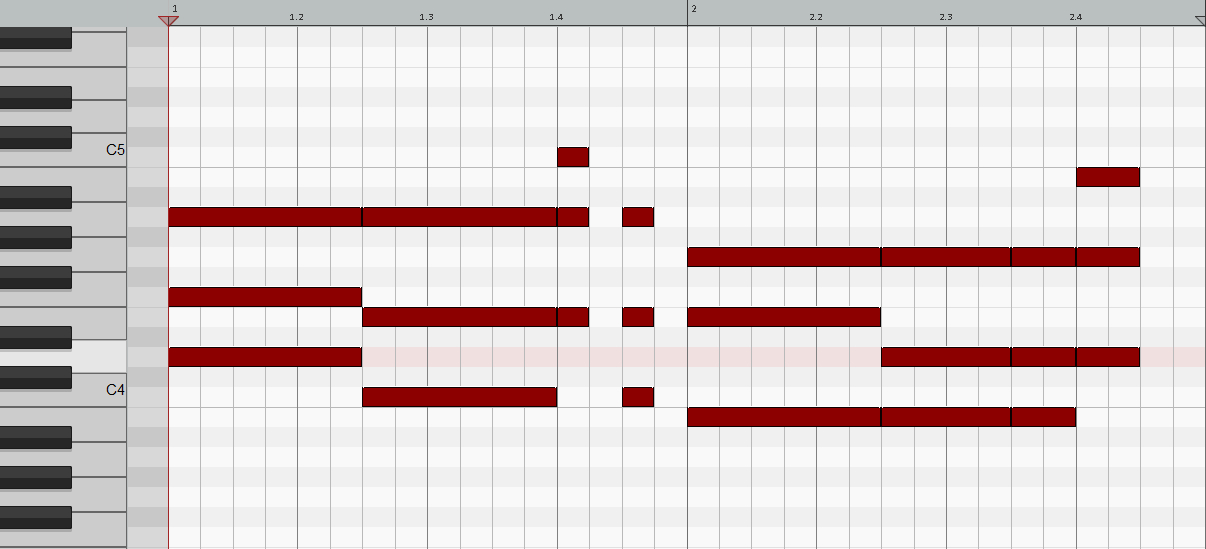
Ultimately, it depends on your workflow and style of recording. A click track is a tool used to keep time during a recording session. It’s an audible metronome that plays in the musician’s ear while they play or sing. The click sound is a consistent beat that helps musicians keep time and maintain a consistent tempo throughout the song.

However, some musicians find it distracting and prefer to record without one. We’ll discuss the pros and cons of using a click track and help you decide if it’s right for your recording process.

Should I Use A Click Track

Credit: worshiponline.com

Pros Of Using A Click Track

Click tracks can greatly benefit musicians and performers by providing a steady rhythm and improving timing accuracy during live performances and recording sessions. It can also help with songwriting and arranging by allowing for precise tempo changes and easily mapping out song structures.

Playing in a band is all about timing and rhythm. If you want to stay in sync with your bandmates and ensure a consistent performance, using a click track is highly recommended. In this blog post, we will be discussing the benefits of using a click track, focusing on two key areas: improved timing and rhythm, and how it makes it easy to stay in time with the band.

Improved Timing And Rhythm

Using a click track improves your timing and rhythm. Essentially, it’s a metronome that you can hear while playing. Rather than relying on someone else to keep time or your internal sense of timing, a click track provides a constant beat that ensures you’re playing in time with the music. This is especially important when it comes to studio recordings, where precision is paramount. Whether it’s the drummer keeping the beat or a guitarist providing a rhythmic drone, everyone in the band should play to a click track.

Easy To Stay In Time With The Band

Using a click track makes it easy to stay in time with the band. It’s especially useful during rehearsals, where everyone in the band can practice together, playing to the same beat. The click track is audible to everyone in the band, so they can follow the rhythm and play in sync with each other. This is especially helpful if you’re playing with new band members or musicians who are not quite familiar with your style.

More Consistent Performances

By using a click track, your band can ensure more consistent performances. This is simply because everyone in the band is playing in sync with each other and to the same beat. There’s no deviation from the original tempo or rhythm of the song, so every performance will sound the same, with no unwanted changes in tempo or timing. In a live setting, a consistent performance can make all the difference in creating a great musical experience for the audience. In conclusion, using a click track has many benefits that should not be ignored. By providing a consistent beat and rhythm, click tracks help improve a band’s overall performance and ensure the music is played with precision. It’s certainly worth considering if you want to take your music to the next level.

Cons Of Using A Click Track

Using a click track can sometimes hinder the natural flow and creativity of a musician, leading to a robotic or mechanical sound. In addition, relying solely on a click track can prevent flexibility in live performances, making it difficult to adapt to changes.

A click track, also known as a metronome, is commonly used in music production to keep musicians in time with one another. While it has its benefits, there are also some downsides to using a click track that should be considered before deciding to use one.

Less Room For Musical Expression

One of the main drawbacks of using a click track is that it can limit the amount of musical expression in a performance. When playing with a click track, musicians must stick to a set tempo, which can make it difficult to add dynamics or change the tempo to fit the mood of a song. This can result in a performance that feels rigid and lacks the emotional impact that comes from a live, organic performance.

Can Be Distracting

In addition to inhibiting musical expression, a click track can also be distracting to some musicians. Musicians may become overly focused on keeping time with the click and lose sight of the overall performance. This can lead to a lack of spontaneity and creativity in the music.

Requires Practice And Preparation

Using a click track requires a significant amount of practice and preparation. Musicians must be able to play consistently in time with the click and be comfortable with the technology used to produce the click track. This can be time-consuming and may take away from time that could be spent focusing on other aspects of the performance.

Conclusion

While using a click track can have its benefits, it is important to consider the potential drawbacks before deciding to use one. It is ultimately up to each individual musician to decide what works best for them and their music.

When To Use A Click Track

Click tracks are a crucial component of recording music in a studio setting. These tools are used to create a consistent musical tempo, helping to keep tracks on beat and in sync. However, click tracks are not always necessary, and there are many situations where they may not be useful or even desirable. Here are some instances when you should consider using a click track:

In The Studio

When recording in a studio, a click track is a must-have for most musicians and producers. By keeping all of the instruments and vocals in sync, a click track can help create a polished and professional recording. It’s important to choose the right click track speed and sound to match the style of music being recorded, but once it’s set up, the click track can be a valuable tool throughout the recording process.

For Live Performances

While click tracks are traditionally used in the studio, many musicians also rely on them during live performances. By syncing up electronic elements, backing tracks, and visuals, click tracks can help create a more immersive and engaging live experience. However, it’s important to use click tracks sparingly during live performances, as they can also make the performance feel robotic and unengaging if used too heavily.

For Certain Musical Styles

Finally, click tracks are often used for certain musical styles that rely heavily on precise timing and rhythm. For example, electronic dance music (EDM) often relies on click tracks to create a consistent beat and tempo. Similarly, some metal, punk, and hardcore bands use click tracks to ensure that their fast, technical playing stays in sync throughout a song.

Pros of using a click track:Cons of using a click track:
Helps ensure consistent tempo and timing.Can make recording and performance more polished and professional.Useful for certain musical styles and genres.Can make performances feel robotic and unengaging.Requires careful setup and adjustment to match the musical style and tempo.May not be necessary or desirable for all recording or performance situations.

If you’re unsure whether or not to use a click track, it’s important to consider the style of music you’re creating and the context in which it will be performed. While click tracks can be a valuable tool in many situations, they should never be used as a crutch to compensate for poor timing or musicianship. Ultimately, the decision to use a click track should be based on the needs of the song and the preferences of the musicians and producers involved.
Should I Use A Click Track

Credit: upayasound.com

Alternatives To Using A Click Track

If you’re looking to add variety to your music productions, ditching the click track can be a great way to experiment with timing and dynamics. Alternatives like using a human drummer or playing to a loop can help create a more natural and expressive feel in your recordings.

If you are not a big fan of using a click track, you are not alone. In fact, some musicians find it too restrictive and robotic, leading to robotic-sounding music. Fortunately, there are alternative ways to keep time while playing.

Internal Timekeeping

One way to keep time without relying on a click track is with your internal timekeeping. This alternative requires you to have good rhythm, so it may not work for everyone. You can practice this skill by tapping your foot or counting the beats in your head. To ensure that you keep track of the tempo, listen to recordings of music that has a consistent beat and try to memorize it.

Band Communication

Communication is key in any band. In the absence of a click track, ensure that everyone in the band is on the same page regarding the tempo and rhythm. You can achieve this by discussing the song’s tempo before rehearsal or playing, either by counting the beats in unison or by playing together as a group.

Using A Drummer Or Metronome

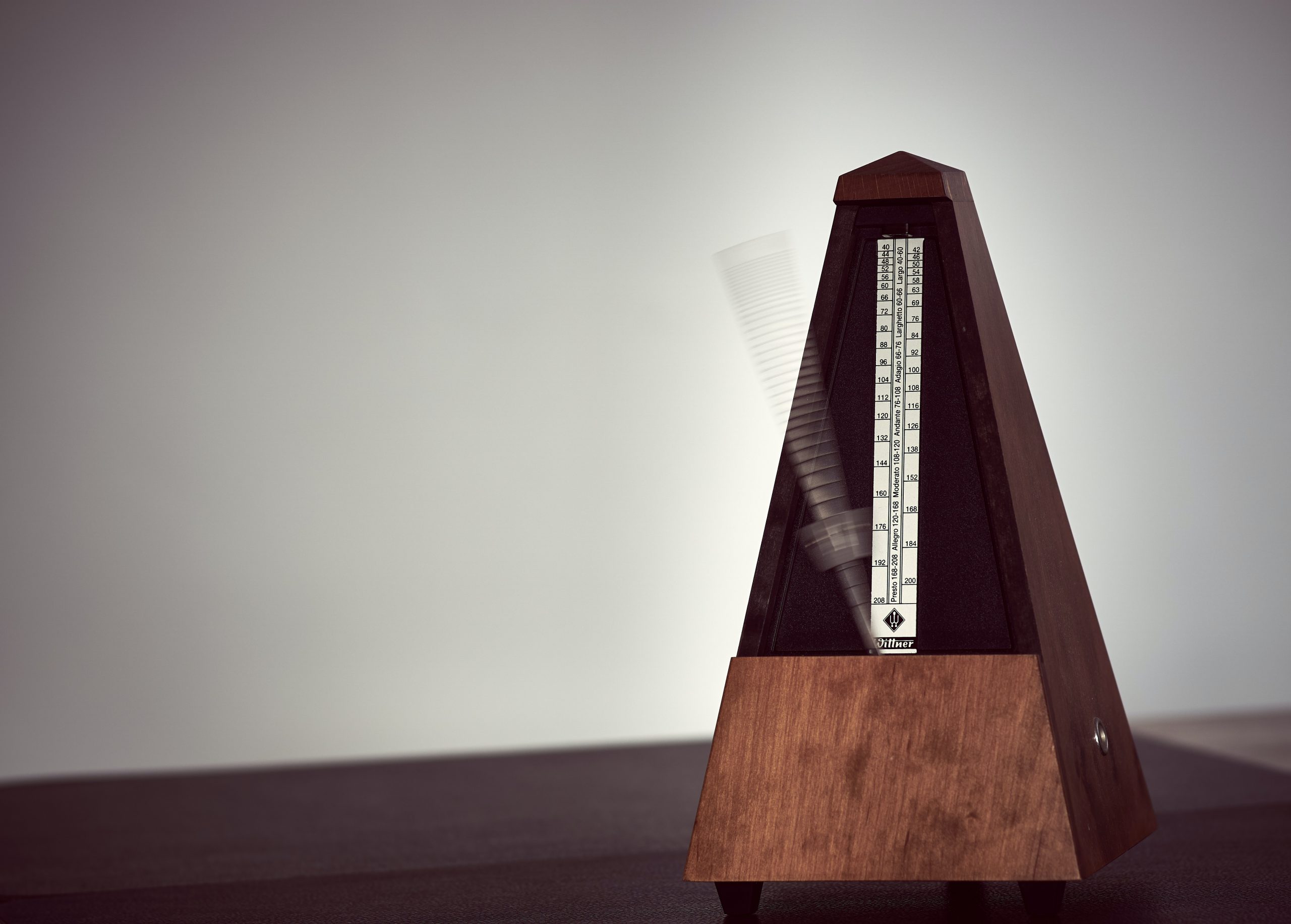
If you’re in a band, having a drummer who can keep time is a good alternative to using a click track. A good drummer can intuitively adapt to the tempo changes and fluctuations within the music. If you don’t have a drummer, you can use a metronome. Although it might sound more robotic, a metronome is still an excellent tool to keep the tempo steady. Using any of these alternatives to using a click track can help you to create more organic-sounding music while still keeping you on the beat. Of course, there are situations where a click track might be more appropriate, such as recording music for film or TV. However, these alternatives are worth exploring.

Should I Use A Click Track

Credit: www.mixinglessons.com

Frequently Asked Questions On Should I Use A Click Track

Are Click Tracks Necessary?

Yes, click tracks are necessary for recording music. They help musicians stay in time and keep the tempo consistent throughout the entire recording. Without click tracks, it would be more difficult to synchronize different parts of a song and ensure that it sounds cohesive.

What Is The Point Of A Click Track?

A click track is a metronome-like tool used in music production to keep a consistent tempo during recording. It helps to ensure that all musicians and tracks are in sync and can be edited easily. Click tracks also allow for precise editing and overdubbing of music tracks.

Is The Click Track Method Still Used?

Yes, the click track method is still used in music production. It’s a popular tool for staying on rhythm and timing, particularly in recording sessions and live performances. Click tracks can be customised to the specific needs of the song, and there are various software and equipment options available.

Does Metallica Use A Click Track?

Yes, Metallica uses a click track during live performances to keep the tempo consistent. They also use it during recording sessions to maintain timing accuracy and synchronize multiple tracks.

Conclusion

Ultimately, the decision to use a click track is up to the individual artist and their musical intentions. While it can provide a sense of rhythmic consistency and stability, it may also limit creative expression and spontaneity. It is important to weigh the pros and cons and experiment with different recording techniques to determine what works best for each unique situation.

At the end of the day, the most important thing is to create music that feels authentic and true to oneself.

Categories
Archive Gear

Basic Vocal Reverb Effects

Basic vocal reverb effects add depth and dimension to a singer’s voice, creating a natural, spacious sound in a recording or live performance. Reverb simulates the effect of a singer’s voice being heard in a large, reflective space, adding character to the sound.

Vocal reverb effects are essential for any singer looking to add depth and dimension to their sound. Reverb is a critical tool in creating a natural, spacious recording or live performance, simulating the sensation of singing in a large, reflective room.

By using various reverb settings, singers can add character and distinctive qualities to their voice, whether they want to create a warm, natural sound or a bright, angelic tone. In this blog post, we’ll explore the different types of reverb effects and how singers can best incorporate them into their music.

Basic Vocal Reverb Effects

Credit: www.izotope.com

Types Of Reverb

Reverb is a crucial effect that helps add depth, dimension, and space to vocal recordings. There are different types of reverb that you can use to create different moods and textures. It’s important to understand these types of reverb to use them effectively in your vocal recordings.

Spring Reverb

Spring reverb was first used in guitar amps and is used in many classic recordings. It’s an analog effect that uses a spring to create a reverberant sound. This type of reverb has a distinct sound and is characterized by a boingy, metallic sound.

Plate Reverb

A plate reverb is a type of mechanical reverb that uses a thin metal plate to create the effect. Plate reverb has a smoother and more natural sound than spring reverb and is well-suited for vocals. It can be adjusted to create a wide range of effects, from subtle warmth to a more pronounced, echoey sound.

Hall Reverb

Hall reverb is a simulation of the reverb that occurs in a large room or concert hall. This type of reverb is often used in classical music productions and adds depth and space to vocal recordings. It has a distinctive sound characterized by a long decay with a rich and natural tone.

Room Reverb

Room reverb is a simulation of the reverb that occurs in a smaller, more confined space. It has a shorter decay time than hall reverb and can be used to create a more intimate sound. Room reverb is great for adding a natural-sounding ambience to vocal recordings and creating a sense of space.

Using Reverb With Vocals

Adding reverb effects to vocals can enhance the overall sound of a mix and create a more spacious and professional feel. Basic vocal reverb effects can be achieved through adjusting parameters such as decay time, pre-delay, and wet/dry mix.

When it comes to achieving a professional-sounding vocal track, using reverb is a crucial step. Reverb adds space and depth to your vocals, making them sound like they were recorded in a more natural environment. In this section, we will discuss the basics of using reverb with vocals.

Setting Up The Reverb

The first step in using reverb with vocals is setting up your reverb effect. Most digital audio workstations (DAWs) come with built-in reverb plugins, or you can use third-party plugins. Create a new reverb track and add your chosen reverb plugin. You can also use a reverb bus and send your vocal track to it.

Adjusting The Reverb Time

The reverb time is the length of the reverb tail. A longer reverb time will make your vocals sound like they were recorded in a bigger room or space, while a shorter reverb time will give a tighter and more focused sound. Adjusting the reverb time will depend on the type of song and the style you want to achieve.

Using Eq To Enhance The Reverb

Equalization (EQ) can also be applied to the reverb to enhance the desired sound. Use a high-pass filter on the reverb to cut out any unwanted low-end frequencies that may muddy up the mix. You can also use a low-pass filter to reduce any harsh or bright frequencies. Adjusting the EQ of the reverb can give it a more natural and polished sound.

Adding Depth With Delay

Delay can be used to add depth and movement to your vocals. Create a new delay track and set the delay time to match the tempo of your song. Adjust the feedback, mix and volume levels to create a desired effect. Using a delay effect can also add a sense of space and dimension to your vocals. In conclusion, using reverb with vocals is a crucial step to achieving a professional-sounding vocal track. By setting up the reverb, adjusting the reverb time, using EQ to enhance the reverb, and adding depth with delay, you can create space and depth to make your vocals stand out.

Common Reverb Mistakes To Avoid

Vocal reverb is an effect that can add depth and dimension to your vocals, making them sound fuller and more professional. However, using reverb improperly can quickly turn your otherwise great-sounding vocals into a mess. Here are some common reverb mistakes to avoid when applying reverb effects to your vocals.

Using Too Much Reverb

Too much of anything can be harmful, and the same applies to reverb. Using too much reverb can make your vocals sound washed out and distant, which can make it difficult for your listeners to understand the lyrics. Instead, use reverb sparingly and find the right balance between wet (reverb) and dry (no reverb) signals.

Not Adjusting The Reverb Time

Reverb time refers to the length of time it takes for the reverb to decay. Not adjusting the reverb time can lead to muddy and distorted vocals. Longer reverb times are ideal for ballads or slow songs, while shorter reverb times work well for fast-paced tracks or songs with heavy instrumentals.

Forgetting To Eq The Reverb

Applying EQ to the reverb helps to ensure that it doesn’t clash with the vocal frequency range, making it sound more natural and not overpowering. Neglecting to EQ the reverb can make the vocals sound muffled and unbalanced. It’s important to listen to the vocals and adjust the reverb EQ until you find the right balance.

Using The Wrong Type Of Reverb

Not all types of reverb are created equal, and using the wrong one can have disastrous effects on your vocals. For instance, a plate reverb might sound great on guitars but may not be suitable for vocals. Conversely, a hall reverb might be too spacious for guitar and can leave it sounding thin. Choose the right type of reverb for the vocals, considering the mood and tone of the song.

By avoiding these common reverb mistakes, you’ll be able to add the right amount of reverb effect to your vocals, making them sound fuller and professional, and enhances the overall track.

Basic Vocal Reverb Effects

Credit: www.izotope.com

Famous Tracks With Great Vocal Reverb

Vocal reverb is an essential part of any song that features vocals. It can give depth, dimension, and continuity to the vocals, making them sound fuller and richer. However, it’s important to use it in moderation as too much reverb can make the vocals sound distant and muddy. Some of the most famous tracks of all time have used vocal reverb to great effect and here are some examples:

Example Track 1

The first track that comes to mind when discussing great vocal reverb is “Yesterday” by The Beatles. It features a lush reverb effect that gives Paul McCartney’s vocals a dreamy, ethereal quality. The reverb also adds a sense of nostalgia, fitting perfectly with the song’s introspective lyrics.

Example Track 2

Another great track that showcases the power of vocal reverb is “Unchained Melody” by The Righteous Brothers. The song is legendary for its soaring vocals and the reverb adds to the grandeur of the performance, making it even more emotional and impactful. The reverb also mimics the sound of a large concert hall, adding to the sense of drama and spectacle.

Example Track 3

The final track that we’ll discuss is “God Only Knows” by The Beach Boys. This song is famous for its beautiful harmonies and intricate vocal arrangements, and the reverb plays a crucial role in giving them a sense of space and dimension. The vocals sound as though they were recorded in a vast cathedral, adding to the song’s sense of grandeur and majesty.

These tracks are just a few examples of the incredible power of vocal reverb. When used correctly, it can add depth, emotion, and richness to any vocal performance, elevating it to new heights of musical beauty.

Basic Vocal Reverb Effects

Credit: www.amazon.com

Frequently Asked Questions On Basic Vocal Reverb Effects

What Is The Best Reverb Effect For Vocals?

The best reverb effect for vocals is subjective and depends on personal preference. Some popular options include: Lexicon PCM Native Reverb Plug-in, Valhalla VintageVerb, Waves IR1 Convolution Reverb, and Soundtoys Little Plate.

What Are The Effects Of Reverb Vocals?

Reverb vocals add depth and space to a track, making it sound livelier. It can create a sense of intimacy or detachment, depending on the amount and type of reverb used. Reverb also helps to blend vocals with backing tracks, resulting in a more cohesive and polished sound.

What Are The Basic Vocal Effects?

There are several basic vocal effects that singers can use to add variation to their performances. These include vibrato, falsetto, growling, screaming, and breathiness.

What Are The Basics Of Reverb?

Reverb is the name given to the effect of sound waves reflecting off surfaces in an enclosed space. It has two main components: the early reflections which come from surfaces close to the sound source, and the later reflections which are more diffused and come from further away.

Reverb can be added artificially using reverb plugins and hardware units during the mixing process. Understanding the basics of reverb is important for creating a natural, balanced sound.

Conclusion

Vocal reverb effects play a significant role in adding color, depth, and dimension to your recordings. By understanding the different types of reverb effects and their respective settings, you can easily achieve a professional-sounding result. Remember that reverb is a powerful tool that can make or break your vocal tracks, so always experiment and find the perfect balance that suits your tastes.

With these tips in mind, you’ll be able to add some reverb to your vocals like a pro.

Categories
Archive

Top Free Kontakt Libraries

Here is an example of an accurate, to-the-point answer in two sentences: “Top free Kontakt libraries include LABS by Spitfire Audio, Iowa Piano by bigcat instruments and Project Pegasus by Soundiron. Each of these libraries offers a unique collection of sounds for composers and producers to use in their projects.”

Now for the Kontakt is one of the most popular and versatile software samplers used by musicians and producers. With its expansive library of sounds and intuitive interface, it has become a go-to tool for creating music across a wide range of genres.

While there are many high-quality paid libraries available, there are also some great free options that can rival their paid counterparts. We’ll take a closer look at some of the top free Kontakt libraries available to composers and producers.

Top Free Kontakt Libraries

Credit: m.youtube.com

Top 5 Free Kontakt Libraries

If you’re a music composer or producer looking for options to enhance your sound and take it to the next level, top-quality virtual instruments are an essential part of your toolkit. While premium Kontakt libraries can be quite expensive, there are plenty of free ones out there that can help you achieve incredible results without breaking the bank. Here are the top 5 free Kontakt libraries that you should check out:

Spitfire Audio Labs

Spitfire Audio LABS is a collection of unique and inspiring virtual instruments that you can use in your compositions for free. This library includes everything from strings and choirs to pianos and synths, and the sounds are of the highest quality. The LABS interface is straightforward to use, and Spitfire Audio releases new sounds regularly, making it an excellent option for those who like to keep their compositions fresh and varied.

Versilian Studios Chamber Orchestra 2

If you’re looking for an orchestral sound with a free price tag, Versilian Studios Chamber Orchestra 2 should be on your list. This library includes over 1500 samples of various orchestral instruments, including strings, woodwinds, and brass, and it has an authentic sound that will make your compositions truly epic. The interface is easy to use, making it an excellent option for both beginner and advanced composers.

Projectsam Free Orchestra

The ProjectSAM Free Orchestra Kontakt library is a collection of tools that can help you bring your musical compositions to life. It includes a wide variety of orchestral sounds, such as woodwinds, brass, and percussion, as well as synthesized sounds that you can use to add depth and dimension to your tracks. The sounds have been recorded by professional musicians, ensuring that the quality is excellent.

Soniccouture Free

Soniccouture Free is a high-quality library of physical and tuned percussion instruments that you can download for free. This library includes a wide variety of drum machines, gongs, bells, cymbals, and more, all with a realistic sound that will give your tracks a unique character. The interface is simple to use, and the sounds are of exceptional quality, making it an excellent option for those looking to add some percussion to their compositions.

Performance Samples

The Performance Samples Kontakt library includes high-quality sounds of various orchestral instruments. This library is perfect for those looking for a premium sound at no cost. The library includes a wide range of articulations, from harmonics to spiccato, and it has an intuitive interface that will allow you to achieve great results quickly. The sounds in this library have been recorded in an excellent way and will add depth and expression to your compositions.

Top Free Kontakt Libraries

Credit: bedroomproducersblog.com

Top Free Kontakt Libraries

Credit: m.youtube.com

Frequently Asked Questions On Top Free Kontakt Libraries

Which Kontakt Library Is Best?

The best Kontakt library depends on individual preferences and needs. There are various high-quality Kontakt libraries available, each with unique features, sounds, and functions. It’s recommended to research and compare different options to find the one that suits your requirements best.

How To Get Kontakt Libraries For Free?

Unfortunately, it’s not recommended to get kontakt libraries for free due to piracy issues. You should always purchase them from reputable sources such as Native Instruments or verified third-party sellers to ensure the library’s authenticity and legality.

What Is The Best Free Guitar Library For Kontakt?

The best free guitar library for Kontakt is the Ample Guitar M Lite II. It includes 530 MB of samples with a variety of articulations and playing styles. The intuitive interface makes it easy to use and customize. Plus, it’s compatible with both Mac and Windows operating systems.

Which Kontakt Player Is Free?

The Kontakt 6 Player is the free version of the Kontakt Player software. It allows users to play and manipulate samples without the need for the full Kontakt library.

Conclusion

To wrap up, we’ve covered the top free Kontakt libraries available for download. Each library offers a unique selection of sounds, instruments, and effects for producers and composers alike. By using these libraries, you can enhance your music production workflow and bring new creative possibilities to your music.

With so many great options to choose from, there’s no reason not to try them out and experiment with new sounds in your tracks. Keep creating and exploring, and above all, have fun!

Categories
Archive Gear

Pro Tools First Grid Mode

Pro Tools First Grid Mode is a feature that allows you to sync audio and MIDI clips to a specified tempo. With Grid Mode enabled, users can easily manipulate audio and MIDI clips to match the rhythm of their project.

Pro Tools First is a popular digital audio workstation that offers a variety of features and tools to help users create professional-quality music. One of its most useful features is the Grid Mode, which allows you to sync audio and MIDI clips to a specific tempo.

This feature is especially helpful for users who want to create music that is consistent in pace and rhythm. We will delve deeper into Pro Tools First Grid Mode, how it works, and how you can use it to create your own music. So, if you’re a music producer or audio engineer looking to improve your workflow, keep reading!

Activating Grid Mode In Pro Tools First

Pro Tools First Grid mode allows you to edit audio files according to the rhythm of the song or recording. It allows you to snap audio clips to a specific grid, making it easier to make precise edits. Activating Grid Mode in Pro Tools First is easy, and you can use it for rhythm-based editing.

Step-by-step Guide:

  1. Open your Pro Tools First project file.
  2. Select the Track containing your audio file that you want to edit.
  3. Click on the Edit Window to activate it.
  4. Look for the Grid Mode option, which is located at the top of the Edit Window.
  5. Click on the Grid Mode option to activate it.
  6. Select a grid value from the Grid Value menu. This value determines how much the audio clips will snap to the grid. You can choose between whole notes, half-notes, quarter-notes, eighth-notes, sixteenth-notes, and thirty-second notes.
  7. You can also adjust the tempo of the grid and make it match the tempo of the song or recording.
  8. You are now ready to edit your audio files using Grid mode.

Using Grid Mode For Rhythm-based Editing:

Grid mode is ideal for rhythm-based editing as it allows you to snap audio clips to the beat of the song or recording. You can easily move, trim, cut, and paste audio clips while maintaining the rhythm of the song.

For instance, if you want to clean up a drum track, you can use Grid mode to line up the snare hits with the grid. This will allow you to make precise edits and tighten up the track. Similarly, you can use Grid mode to align vocal tracks, guitars, or any other instrument that needs to be in rhythm with the song.

In conclusion, activating Grid mode in Pro Tools First is a simple process that allows you to edit audio files according to the rhythm of the song. Using Grid mode for rhythm-based editing ensures that your audio clips stay in sync with the song or recording, making your edits more accurate and precise.

Pro Tools First Grid Mode

Credit: www.mixinglessons.com

Benefits Of Grid Mode In Pro Tools First

As a beginner in music production, it’s essential to have an easy-to-use editing tool that can help you create precise rhythmic patterns. This is where Pro Tools First Grid Mode comes into play, allowing you to edit audio with precision, set rhythmic patterns, and simplify the editing process.

Precision Editing:

With Pro Tools First Grid Mode, you can edit your music with extreme precision, ensuring that every beat is aligned with precision. Grid mode helps you create accurate and consistent edits that can help improve the overall sound quality of your music. The grid lines in grid mode provide reference points for audio editing, making sure every clip is in time with the rhythm.

Ability To Set Rhythmic Patterns:

Grid mode in Pro Tools First gives you the ability to set rhythmic patterns that match the tempo of your music. The rhythm you set determines the timing of your clips, ensuring that they match the beat. By using the grid lines, you can match the rhythm of your audio clips with the beat, making your music sound more consistent and professional.

Ease Of Use For Beginners:

Pro Tools First Grid Mode is incredibly easy to use, even for beginners. It simplifies the editing process by providing clear reference points, easing your work in creating complex rhythmic sections. With a simple click and drag, you can seamlessly align your audio clips with the beat and create an impressive sound. It helps make sound production more accessible for beginners, allowing them to create professional-quality music in minutes.

Overall, the Pro Tools First Grid Mode is an essential tool for music production industry professionals and beginners alike. It can help you edit your music with precision, set rhythmic patterns, and make editing easier. It’s an incredibly user-friendly tool that can help you improve your sound quality, making your music sound more professional than ever before.

Tips For Using Grid Mode In Pro Tools First

Learn how to maximize your efficiency in Pro Tools First by utilizing the Grid Mode. This powerful feature allows you to quickly and precisely arrange your audio components according to your desired timing and rhythm, resulting in a smoother workflow and a more polished finished product.

Tips for using Grid Mode in Pro Tools First Pro Tools First is widely considered a powerhouse in music production software. One of the features that make it popular among musicians and producers is Grid Mode, which allows for accurate timing adjustments to align musical elements flawlessly. Below are some useful tips for using Grid Mode in Pro Tools First to elevate your productions. Zooming in for precise edits To make precise edits, zooming in is crucial. Simply press the “Z” key on your keyboard to activate the zoom tool and click and drag across the section you want to edit. The waveform will be magnified, allowing you to visualize and edit on a sample-by-sample level. It’s a valuable tool when you need to hand-align beats for a tight rhythmic feel. Utilising snap settings Snap settings can help you move each beat into place without the need for manual adjustment on each individual track. To ensure accurate snaps, open the Snap to Grid button (magnet icon) on the top toolbar and select the note-value that fits your track’s timing. When you move your cursor, it will automatically snap elements to the grid lines for the set note-value. Avoid over-reliance by disengaging snap mode to make adjustments to the rhythmic feel when necessary. Respecting the original groove, ensuring each When using Grid Mode, it’s important to ensure your timing adjustments don’t alter the rhythmic feel of the original recording. By maintaining a natural feel, you’ll have a more human performance that grooves with its intended energy. To achieve this, consider slowing down the playback to identify the natural rhythm of the track’s groove. When you come around to lining up audio elements, adjusting snaps and editing to grid lines, you could produce a tight and refined version of the initial recording while maintaining the feel of the original groove. Utilise Grid Mode to perfect the timing of vocal samples, guitar plucks, drum hits, and other audio elements. While it may take some practice to get the hang of it, with this feature, you’ll be able to produce a perfect rhythmic and refined tune that’s all of your own.

Pro Tools First Grid Mode

Credit: www.vennaudio.com

Advanced Techniques With Grid Mode

Pro Tools First users can elevate their editing game with the help of Grid Mode. This advanced technique allows for seamless audio alignment and manipulation for a more polished final product.

Pro Tools First Grid Mode is a powerful tool for musicians and producers who want to create complex and intricate patterns. With advanced techniques, you can produce music with incredible precision and accuracy to take your music production to the next level. In this post, we’ll focus on some advanced techniques with Grid Mode, namely changing time signature mid-session, combining Grid Mode with MIDI editing, and creating complex patterns.

Changing Time Signature Mid-session

Changing the time signature is never an easy task, and it becomes even harder when you want to do it in the middle of a session. With Grid Mode, you can change the time signature of your session with ease. Simply locate the time signature ruler at the top of the screen and click it. Then, select the new time signature that you want. Pro Tools First Grid Mode will perform the change automatically, without affecting your existing MIDI or audio recordings. It is a simple but powerful feature that can save you time and effort.

Combining Grid Mode With Midi Editing

When it comes to MIDI editing, Grid Mode is a fantastic tool that helps you align and snap your MIDI notes with incredible precision. You can also take advantage of the other MIDI editing features in Pro Tools First, such as the ability to move, cut, and copy MIDI notes within your session. When you combine Grid Mode with MIDI editing, you get a comprehensive set of editing tools that can help you achieve the results you want.

Creating Complex Patterns, Ensuring Each

With Grid Mode, you can create complex patterns with ease. Start by defining the tempo and time signature of your session. Then, use the Grid Mode to snap your MIDI notes align to the beat or grid. You can also use Grid Mode to create complex polyrhythms by setting different grid values for different instruments. Creating complex rhythms becomes easy when you use Pro Tools First Grid Mode. In conclusion, Pro Tools First Grid Mode is a powerful tool for music producers and musicians. By taking advantage of its advanced features like changing time signature mid-session, combining Grid Mode with MIDI editing, and creating complex patterns, you can produce music with incredible precision and accuracy. With Grid Mode, you can focus on your creativity and let the tool do the work.

Troubleshooting Grid Mode In Pro Tools First

To troubleshoot the Grid mode in Pro Tools First, first ensure you have the right edition for your needs and that it has been upgraded with the necessary updates. Then, adjust the Beat Grid’s position to match tempo changes and audio fluctuations to keep your tracks in sync with the desired tempo.

Finally, use the Grid mode to quantize your beats and align them with the bars and beats of your track.

If you are new to Pro Tools First and its Grid Mode, you might encounter some challenges while trying to use it. But worry not; in this post, we will explore troubleshooting tips to help you overcome any hurdles that come your way.

Common Issues And Solutions

Here are some typical problems you may encounter while using Grid Mode in Pro Tools First and solutions to resolve them.

ProblemSolution
No audio is playingEnsure that the audio track is not muted. You can also check if your computer’s sound settings are okay
Grid is not working as expectedCheck the snap and grid settings on the Edit window of Pro Tools First and adjust them accordingly.
Grid lines are not visibleEnsure that the view grid option is selected on the Edit window toolbar.

Resetting Grid Mode Preferences

If you are still having issues with Grid Mode in Pro Tools First despite trying the solutions above, you may want to reset Grid Mode preferences. Here is how to do it:

  1. Press and hold the left Shift + Left Option + Left Control keys while opening Pro Tools First
  2. Continue holding the keys until the Prompt window appears
  3. Click “OK” and release the keys
  4. Pro Tools will open with default preferences.

Conclusion

Grid Mode in Pro Tools First is a fantastic tool that enables you to be more precise when editing audio files. However, you may experience some challenges using it. The common issues and solutions highlighted above will help you overcome these obstacles, and if all fails, resetting Grid Mode preferences might help.

Pro Tools First Grid Mode

Credit: www.amazon.com

Frequently Asked Questions On Pro Tools First Grid Mode

How Do I Turn On Grid Mode In Pro Tools?

To turn on grid mode in Pro Tools, simply go to the View menu and select “Edit Window Grid” or “Mix Window Grid,” depending on the window you’re working in. You can also use the keyboard shortcut Command+2 on a Mac or Control+2 on a PC.

This will enable the grid mode in Pro Tools.

Why Can’t I See The Grid In Pro Tools?

To view the grid in Pro Tools, press the “Option+Command+G” keys on a Mac, or “Alt+Control+G” on a PC. If the grid is still not visible, go to the “View” menu and select “Edit Window Views,” then check the box next to “Grid” to enable it.

What Is The Shortcut For Grid Mode In Pro Tools?

The shortcut key for Grid mode in Pro Tools is the “Command” key for Mac or “Ctrl” key for Windows along with the “G” key.

How Do I Turn Off Snap To Grid In Pro Tools?

To turn off snap to grid in Pro Tools, go to the “Options” menu and select “Preferences. ” Under the “Editing” tab, uncheck the “Grid” option under “Operations. ” You can also toggle snap to grid on and off using the “S” key on your keyboard.

Conclusion

Pro Tools First Grid Mode is a powerful tool that offers great flexibility in audio editing. With its intuitive interface and easy-to-grasp layout, this software helps users achieve their goals with greater precision and efficiency. For beginners and hobbyists, this is a great way to get started without breaking the bank.

And for professionals, it’s a valuable addition to your existing toolkit. Whether you’re recording, mixing or mastering, Grid Mode is definitely a feature worth exploring. So go ahead and give it a spin – you won’t be disappointed!

Categories
Archive

Practice Mixing

Practice mixing is essential for improving your mixing skills. It involves experimenting with various audio levels to achieve a balanced and enjoyable sound.

Mixing requires patience and attention to detail, as well as knowledge of different techniques and tools. As a musician or audio engineer, you will benefit greatly from honing your mixing abilities through regular practice. With dedication and persistence, you can create professional-quality mixes that enhance the impact of your music and captivate your audience.

We will explore some helpful tips and strategies to help you get started and make the most of your mixing practice sessions.

Practice Mixing

Credit: www.youtube.com

Importance Of Mixing

Mixing is a critical element of music production that involves blending multiple audio tracks into one cohesive track. It is a process that significantly impacts the overall sound quality of a song. Mixing is essential for both amateur and professional musicians. Here are some reasons why mixing is crucial:

Enhances Sound Quality

One of the main reasons mixing is essential is that it can enhance the sound quality of a track. Audio tracks recorded in different environments and with different equipment usually have varying sound quality. Mixing allows you to eliminate unwanted noise and emphasize specific highlights in each track. With proper mixing, the overall sound quality of a track can be significantly improved, which can make it more pleasurable for the listener.

Lends Professional Touch

Incorporating proper mixing techniques helps create a professional and polished sound that can help make a track stand out. A well-mixed track sounds like it was produced by professionals and lends credibility to the musician or producer. Having professional-sounding music can attract more established music industry figures, such as record labels, producers, and agents, and enable a musician to gain a larger audience.

Overall, mixing is an essential component of music production that can improve the quality and sound of a track. Whether you’re an amateur or professional musician, incorporating mixing techniques can help take your music to the next level and make it stand out in a crowded and competitive market.

Basic Guidelines

When practicing mixing, it’s important to pay attention to the levels of each instrument or element in the mix. Make sure that no single instrument or element is overpowering the others. It’s also important to consider the stereo field and panning to create a balanced and cohesive overall sound.

Mixing is the process of balancing and adjusting individual audio tracks to create a final stereo mix that sounds good on various playback systems. It’s a complex process that involves technical skills and creative artistry. By following some basic guidelines, you can create mixes that sound professional and polished. In this post, we’ll explore a few essential tips that will help you get started with mixing.

Understanding Track Structure

Before you start mixing, it’s essential to understand the structure of the individual tracks. You need to identify the different elements of a song, such as the vocals, drums, bass, guitar, and keyboards, and understand their roles in the mix. This will help you to balance the levels, EQ, and dynamics of each track to create a cohesive sound.

Balancing Eq And Dynamics

EQ and dynamics are two critical parameters that affect the overall sound of a mix. EQ helps you to adjust the tonal balance of each track by boosting or cutting certain frequencies. Dynamics refer to the changes in volume level over time. When you balance the EQ and dynamics of each track, you can create a mix that has clarity, punch, and dynamics.

Panning

Panning is the process of placing each track in the stereo field. By panning, you can create a sense of space and separation between the different tracks. It’s essential to pan instruments in a way that complements the overall sound of the mix. For example, panning drums closer to the center and guitars wider can create a balanced and comfortable stereo image.

Adding Reverb And Delay

Reverb and delay are two essential effects that add depth and character to a mix. Reverb simulates the reflections of sound in a room, creating a sense of space and ambiance. Delay creates echoes that can be used for rhythmic effects or to add a sense of depth to vocals and guitars. When used appropriately, these effects can add a lot of character to a mix. In conclusion, by following these basic guidelines, you can create mixes that sound professional and polished. It’s essential to understand the structure of the tracks, balance the EQ and dynamics, pan the tracks correctly, and add appropriate effects. With practice and patience, you’ll be able to create mixes that sound great on any playback system.

Tips For Effective Mixing

To become an effective mixer, it’s essential to practice often. Experiment with different techniques, learn from mistakes, and refine your skills. Consistent practice builds confidence and allows you to create high-quality mixes that stand out from the rest.

If you are a music producer or audio engineer, you know that mixing is a crucial process that can make or break your final product. Although mixing can be a challenging task, there are several tips that can help you to mix effectively. In this post, we will discuss the essential tips for effective mixing, which include starting with a clean mix, taking breaks frequently, getting feedback from others, and using reference tracks.

Start With Clean Mix

Before you start mixing, it is essential to ensure that you have a clean mix. A clean mix means that all the tracks in the project are well recorded, labeled, and organized. Having a clean mix will eliminate any unwanted noise and make it easier to identify and fix any issues in the project. You must also ensure that each track has its equalization settings, such as volume, panning, and effects. Starting with a clean mix will save you a lot of time during the mixing process.

Take Breaks Frequently

Mixing requires a lot of concentration, which can be exhausting. Don’t try to mix everything at once. You need breaks to rest your ears and mind. Taking frequent breaks will help you to maintain a fresh perspective and make better decisions while mixing. It would be best to take a break for every hour you spend mixing.

Get Feedback From Others

As much as you are proud of your work, it is essential to get feedback from other people. Feedback allows you to identify the strengths and weaknesses of your mix and improve it. You can seek feedback from other music producers, audio engineers, or anyone in the music industry who can give you honest feedback. Encourage them to be specific and objective about what they liked and didn’t like about the mix.

Reference Tracks

Reference tracks can be an invaluable tool during the mixing process. They help you to compare your mix to commercially released songs in a similar genre. It will help you to understand how professional mixes sound and compare them to your mix. You can identify elements of professional mixes that you can apply to your mix, such as compression, EQ, reverb, and panning. In conclusion, mixing requires practice, and by following these tips, you can improve your mixing skills. Remember to start with a clean mix, take breaks frequently, get feedback from others and use reference tracks. These tips are not exhaustive, and there are more tips you can add to your workflow to improve your mixing skills further.

Common Mistakes To Avoid

When practicing mixing, some common mistakes to avoid include ignoring the importance of leveling, EQing, and compression. It’s also essential to use high-quality sounds and avoid overcrowding tracks with too many elements. Taking breaks and listening on various devices can also lead to better results.

Mixing is both an art and a science. It’s not just about adjusting the levels of tracks and adding effects. However, as with any art, there are certain mistakes that beginners make. Here we discuss the most common mixing mistakes and how to avoid them.

Overprocessing

One of the most common mistakes that beginners make is overprocessing. It can be tempting to add multiple effects to every track, but this can lead to an unnatural sound and even cause phase issues. Instead of applying every effect in the book, use your ears and decide which ones work best for each track.

Ignoring The Importance Of Gain Staging

Gain staging refers to the process of setting the levels of each track in your mix. If your levels are too low, you risk losing fidelity. If they’re too high, you risk clipping and distortion. Gain staging may be a tedious process, but it’s crucial for a clean and balanced mix.

Lack Of Attention To Stereo Field

The stereo field is the imaginary space where each instrument sits in a mix. A lack of attention to the stereo field can lead to a cluttered and muddy mix. Panning can help create a sense of space and separation between tracks. So, take a moment to pan each track and ensure that each instrument has its own space in your mix. In conclusion, these are just a few of the common mixing mistakes that beginners make. By avoiding these mistakes and taking the time to thoughtfully mix your tracks, you can achieve a professional-sounding mix that stands out. Remember, that mixing is a skill that takes time and practice to perfect.

Mixing Techniques

In music production, mixing refers to the process of blending different elements of an audio recording to create a final mix that sounds balanced and cohesive. As a mixing engineer, it is essential to have a variety of techniques to achieve this desired mix. In this post, we will explore some popular methods, including frequency masking, parallel compression, sidechain compression, and automation.

Frequency Masking

Frequencies can sometimes compete in a mix, resulting in masking, which occurs when one frequency covers or hides another. To prevent this, you need to identify and adjust the frequency range of each element to find its sweet spot. EQ can be helpful in tackling this, but it requires a careful ear and experience to master. For instance, if the kick drum is clashing with the bass guitar, you can use EQ to cut the frequency of the kick drum slightly, so it doesn’t overlap with the bass. By doing this, both instruments can be heard distinctly without fighting for space in the mix.

Parallel Compression

Parallel compression is a mixing technique where you blend a compressed and uncompressed signal to achieve more control over the dynamic range of a track. You achieve this by duplicating the track you want to compress and compressing the duplicate track heavily. This compressed duplicate track can be mixed back in with the original track to create a fuller and more impactful sound.

Sidechain Compression

Sidechain compression is a technique where you use a compressor on one track to manipulate the dynamics of another track. For instance, you can use a sidechain compressor on the bass guitar track to reduce its volume briefly every time the kick drum hits, allowing the kick drum to punch through the mix without clashing with the bass.

Automation

Automation is the method of controlling parameters like volume, panning, effects, and EQ over time to achieve dynamic changes in a mix. It can be used to add variety and interest to your mix, making it more engaging for the listener. For example, you could automate the volume of a guitar solo to make it quieter during the verse and louder during the chorus, creating a more dramatic effect.

In conclusion, these four mixing techniques are just some of the many methods you can use to achieve a balanced and cohesive mix. Every mix is unique, and depending on the track, you may need to use one or several of these techniques, in addition to your creativity and experience as a mixing engineer. Practicing these techniques will help you develop your skills, and you will soon be able to achieve the desired mix in no time.

Practice Mixing

Credit: marymcandrew.com

Tools And Technologies

Practice mixing requires a range of tools and technologies to help create a polished end result. From mixing consoles and speakers to digital audio workstations and plugins, there are numerous resources available to assist in the mixing process. It’s important to experiment with different tools and develop a personalized workflow that works best for you.

When it comes to mixing music, music producers and sound engineers rely heavily on different tools and technologies to help them achieve the best results possible. Some of the most important tools in mixing include Digital Audio Workstations, Plugins and Effects, and Mixing Consoles.

Digital Audio Workstations

Digital Audio Workstations (DAWs) are software programs used to record, edit, and mix audio files. They come with a range of tools and features, including virtual instruments, MIDI editors, and audio effects. Popular DAWs include Ableton Live, Logic Pro X, and Pro Tools.

Plugins And Effects

Plugins and effects are essential tools in mixing. They are used to enhance the sound quality, add depth and texture, or fix any issues in an audio track. Some popular plugins and effects include EQ (equalizer), reverb, delay, compression, and noise reduction. Many DAWs come with their own plugins and effects, and third-party plugins are also available.

Mixing Consoles

Mixing consoles, also known as mixing desks or boards, are used to control and adjust the levels, panning, and effects of multiple audio sources. They are commonly used in live sound and studio recording sessions. Modern digital consoles can also be used as standalone units or controlled from a computer or tablet. Overall, with the help of these essential tools and technologies, sound engineers and music producers can achieve the perfect mix of their music.

Practice Mixing

Credit: m.youtube.com

Frequently Asked Questions For Practice Mixing

Where Can I Find Multitracks To Practice Mixing?

Multitracks for practicing mixing can be found on several websites, including The Pro Audio Files, Mixing Secrets, and Cambridge Music Technology. These websites offer multitracks of popular songs in various genres for users to practice mixing and mastering skills.

How Can I Practice Audio Mixing At Home?

To practice audio mixing at home, you can start by investing in a digital audio workstation and a good set of headphones. Consult online resources and tutorials to learn the basics of mixing techniques. Experiment with different software and equipment to develop your skills.

Finally, practice regularly and seek feedback from other musicians or professionals.

How Do You Teach Yourself To Mix?

To teach yourself to mix, start by practicing with a basic software or equipment. Study the basics of volume levels, frequency ranges, and EQ. Enhance your skills by researching techniques from different sources, experimenting with different tracks and sounds, and seeking feedback from other professionals.

With patience, practice, and a willingness to learn, anyone can become an expert mixer.

How Much Is Professional Mixing?

The cost of professional mixing can vary depending on factors such as the provider’s experience, the complexity of the project, and the length of the track. On average, expect to spend anywhere from $100 to $1000 per song.

Conclusion

Incorporating mixing into your musical practice routine is a must-do for any aspiring producer, DJ, or musician. With today’s technology, the tools are readily available to explore and improve your mixing skills. By carefully following these guidelines and consistently practicing, you can take your mixes to the next level and stand out in a crowded industry.

Remember, mixing is an important aspect of the music creation process, and the ability to do it well is a valuable asset. So, get started today and watch your skills grow!

Categories
Archive

Keys On The Piano

The keys on a piano consist of both white and black keys arranged in a specific pattern. Playing the piano involves striking these keys in various combinations to produce a desired melody or harmony.

Piano keys are labeled with letters and numbers to indicate their specific pitches, and they are grouped into octaves. Beginners typically start by learning notes and finger positioning on the basic white keys before moving on to mastering more complex pieces that incorporate black keys.

From classical music to pop tunes, the piano is a versatile instrument that can evoke a range of emotions and connect with a variety of audiences. We will explore the different parts of the piano keyboard and discuss the basics of learning to play this beautiful instrument.

Keys On The Piano

Credit: www.julieswihart.com

Parts Of A Piano Keyboard

Whether you are a seasoned pianist or just starting on your musical journey, it is essential to understand the different parts of the piano keyboard. The keyboard is the most prominent feature on a piano and consists of black and white keys arranged in a specific pattern.

White Keys

The white keys, also known as naturals, are the most recognizable parts of the piano keyboard. There are 52 white keys on a full-sized piano keyboard and 36 on smaller keyboards. These keys are arranged in groups of two and three that repeat across the keyboard. The white keys are named after the first seven letters of the alphabet, starting with A and ending with G.

Black Keys

The black keys, known as sharps and flats, are the smaller keys positioned between the white keys. There are 36 black keys on a full-sized piano keyboard and 25 on smaller keyboards. The black keys are named after the white keys they are positioned adjacent to and are used to play semitones, or half-steps.

The black keys are arranged in groups of two and three to correspond with the groupings of the white keys. These groups of black keys form patterns of two and three that repeat across the keyboard. Understanding the arrangement of the black keys is essential to playing scales and arpeggios.

Learning the different parts of the piano keyboard is the foundation for playing the piano. With an understanding of the arrangement of the white and black keys, you can start to play simple melodies and begin your journey to becoming a proficient pianist.

Musical Notation

Musical notation is the written language of music enabling musicians to play together. The keys on the piano correspond to specific notes and are represented by letters and symbols on sheet music, allowing for easy playability.

Musical notation is the system musicians use to write and read music. It is made up of symbols and markings that represent musical sounds and rhythms. When it comes to playing the piano, understanding how to read musical notation is crucial. In order to do this, you must first identify the notes on the keys.

Identifying The Notes On The Keys

At first glance, the keys on a piano can seem overwhelming. However, with a basic understanding of musical notation, identifying the notes becomes much easier. Each key on a piano corresponds to a specific musical note. The standard piano has 88 keys, which include white and black keys. The white keys represent the notes A, B, C, D, E, F, and G. The black keys represent the sharp or flat versions of these notes.

Note Value

Once you’ve identified the notes on the keys, the next step is understanding note value. Note value refers to the length of time a note is played. In musical notation, each note has a specific shape that indicates its value. A whole note represents four beats, a half note represents two beats, a quarter note represents one beat, an eighth note represents half a beat, and a sixteenth note represents a quarter of a beat.

Putting It All Together

Now that you understand how to identify the notes on the keys and the different values they can hold, you’re ready to read and play sheet music. Sheet music is a written representation of music that uses musical notation. In sheet music, notes and rhythm are written on a series of five horizontal lines called a staff. The notes are placed on the staff according to their pitch and duration, and the duration is indicated by the shape of the note. By understanding the basics of musical notation and practicing reading sheet music, you can play any song on the piano. It takes time and patience to master the piano, but with a solid foundation in musical notation, you’ll be well on your way to becoming a skilled pianist.

Playing Techniques

Mastering the keys on the piano requires understanding playing techniques, such as proper finger placement and hand positioning. By practicing these skills regularly, you can improve your playing abilities and create beautiful music.

When it comes to playing the piano, mastering the playing techniques is crucial. Proper hand positioning and finger placement can make a significant difference in how well one can play the instrument. In this section, we will discuss the importance of hand positioning and finger placement, providing tips for beginners to improve their playing skills.

Hand Positioning

When sitting on the piano bench, your arms should be level with the keyboard, and your hands should be relaxed. Keep your elbows close to your body, and your wrists slightly raised but not locked. Keep your fingers curved, with your fingertips touching the keys. Maintain this position while playing to avoid injury and increase control over the keys.

Finger Placement

Finger placement is crucial to playing the piano as it enables you to play the right notes and chords. Starting with the thumb, each finger has a designated number from 1 to 5. The thumb is finger 1, followed by the index finger (2), middle finger (3), ring finger (4), and the little finger (5). Practice playing simple scales and exercises to strengthen your fingers and familiarize yourself with the correct finger placement. Remember to keep your fingers curved and avoid pressing too hard on the keys.

Practice Tips

– Practice hand and finger warm-up exercises before playing to reduce the risk of injury. – Focus on finger independence by practicing individual finger exercises. – Start with simple pieces and gradually work your way up to more complex songs. – Practice playing with both hands simultaneously to strengthen your coordination. – Take breaks to avoid fatigue and prevent injuring your hands and wrists. By mastering proper hand positioning and finger placement, you can significantly improve your piano playing skills. Remember, practice makes perfect, so don’t be discouraged if progress seems slow at first. Keep practicing and eventually, you will be able to play the piano with ease.

Basic Piano Chords

Learning basic piano chords is crucial for any beginner. It’s important to understand the keys on the piano so you can easily identify notes and create beautiful music.

If you’re just starting out on the piano, understanding the basics of piano chords is crucial. Basic piano chords are the foundation of every song, and mastering them will help you learn more complex chords as you progress in your playing. In this post, we’ll be focusing on two types of basic piano chords: major chords and minor chords.

Major Chords

Major chords are some of the most commonly used chords in music. They’re used in pop, rock, classical, and all other genres. Major chords are built on the first, third, and fifth notes of a major scale. For example, C major chord is made up of the notes C, E, and G. Here’s a table showing some common major chords:

ChordNotes
C MajorC, E, G
D MajorD, F#, A
E MajorE, G#, B

Minor Chords

Minor chords are another essential type of chord. They’re often used to give songs a melancholy or sad sound. To create a minor chord, start with a major chord and flatten the third note. For example, C minor chord is made up of the notes C, Eb, and G. Here’s a table showing some common minor chords:

ChordNotes
C MinorC, Eb, G
D MinorD, F, A
E MinorE, G, B

Learning these basic piano chords is a great start to playing piano. As you continue to practice, you’ll begin to understand how chords work together to create melodies and harmonies. With enough practice, you’ll be able to create your own music using these basic chords or even more complex ones.

Playing Piano Sheet Music

Playing the piano requires fundamental skills, and one of them is reading and interpreting sheet music. If you want to play the piano proficiently, you must learn how to read music sheets with ease and precision. In this post, we will explore the basics of reading music and how to translate sheet music into piano keys.

Reading Sheet Music

During the first few lessons of piano, the teacher will teach you how to read sheet music. Each sheet has horizontal lines and vertical spaces that represent the different notes in a song. To represent different keys on the piano, sheet music uses different signs and symbols. When you read sheet music, you will see different signs that represent the notes of the melody, the duration of the note played, the speed and volume of the music, and the type of key changes.

Translating Sheet Music To Piano

After you learn how to read sheet music, it’s time to translate what you have read into keys on the piano. The skill to interpret sheet music to piano is essential for playing different melodies fluently. While sheet music may appear confusing initially, it is actually quite simple once you know how to decipher it. One way of translating sheet music onto the piano is by understanding the correlation between the sheet music notation and piano keys. You can easily identify the piano keys that correspond with each note in the sheet music by using a chart that shows the correlation between the notes of the music sheet and the piano keys.

Another critical element of interpreting sheet music to piano keys is the ability to recognize the melody and harmonies of a song. When you can hear the melody in your head, you can analyze the sheet music and translate it to the piano keys that correspond to each note. This ability takes a lot of practice and effort, but with time, it becomes second nature to piano players.

Overall, playing piano sheet music is a fundamental skill that every beginner piano player must learn. With a thorough understanding of reading sheet music and how to translate it to the piano keys, you can play different tunes fluently and enhance your musical abilities. Practice consistently, and before you know it, you will conquer the keys of the piano.

Keys On The Piano

Credit: m.youtube.com

Common Beginner Mistakes

Beginner piano players often make mistakes when it comes to the keys on the piano. Specifically, they tend to struggle with identifying and remembering the different notes on the instrument, which can hinder their progress when it comes to learning to play melodies and chords.

With practice and guidance, beginners can overcome these challenges and become confident piano players.

As a beginner learning to play the piano, it’s common to make mistakes that can hinder your progress. In this blog post, we will be discussing some of the common beginner mistakes that many people make when learning to play the piano. By understanding these mistakes, you can avoid them and progress faster in your learning journey.

Neglecting Scales And Arpeggios

One of the most common mistakes that beginners make when learning the piano is neglecting to practice scales and arpeggios. Often, beginners want to jump right into playing their favorite songs and may not see the importance of practicing scales and arpeggios. However, practicing these exercises regularly can help you develop better finger dexterity and hand coordination. Make sure to practice scales and arpeggios in every key, and at different tempos, making it easier for you to play songs when advanced to intermediate level.

Excessive Reliance On Sheet Music

Another mistake that beginners make is relying too much on sheet music. While sheet music is an important tool for learning how to play the piano, relying on it exclusively can hinder your progress. It can also lead to weak sight-reading skills, which will make it harder for you to play music on the fly. To avoid this mistake, make sure to practice playing by ear. This can be done by listening to a song and trying to recreate it on the piano without looking at the sheet music. This exercise can help you develop better aural skills and make it easier for you to improvise your own music.

Conclusion

By avoiding these common beginner mistakes, you can progress faster in your learning journey and become a better piano player. Remember, practice and patience are key to improving your piano playing skills, so keep at it, and you’ll be playing like a pro in no time!

Practice Techniques And Tips

Learn to master the keys on the piano with these practice techniques and tips. Start with proper hand positioning and gradually progress to playing scales and chords. Consistent practice and dedication will lead to improving your skills and mastering the art of piano playing.

Playing the piano can be both rewarding and challenging. While it requires a lot of practice, there are certain techniques and tips that can help you learn more effectively and efficiently. Here are some key ways to improve your piano skills.

Consistency And Regularity

The key to becoming proficient at playing the piano is consistent and regular practice. However, it’s not just about the time spent practicing, but also the quality of the practice sessions. Shorter, concentrated practice sessions are often more effective than longer, less focused ones. Consider setting a regular practice schedule and staying committed to it.

Enlisting The Help Of A Piano Teacher

Working with a piano teacher can provide you with valuable feedback and guidance. A professional piano teacher can identify your strengths and weaknesses, and adjust your practice techniques accordingly. They can also provide you with tailored exercises and support you as you progress. Working with a piano teacher doesn’t have to be expensive or time-consuming. You can seek online resources, video tutorials, and affordable in-person lessons. By investing in a reliable source of quality guidance and support, you can more effectively achieve your goals.

Supplementing Practice Techniques With Key Tools

There are also numerous tools and resources available that can help you improve your piano skills. These include metronomes for tracking time and rhythm, ear-training apps, and recording software to help you visualize your progress. Consider which tools could be useful to you and incorporate them into your practice routine.

Conclusion

Improving your piano skills takes time, dedication, and consistent effort. By incorporating these practice techniques and tips into your routine and seeking the support of a teacher or valuable tools, you can work towards becoming a more accomplished pianist.

Keys On The Piano

Credit: www.pinterest.com

Frequently Asked Questions For Keys On The Piano

What Are The 12 Keys In Piano?

The 12 keys in a piano are the 7 white keys (A, B, C, D, E, F, G) and the 5 black keys (A#, C#, D#, F#, G#). These keys repeat in pattern across the piano’s keyboard. The different keys allow for playing different notes and creating varied melodies.

What Are Keys In Piano?

Keys in piano refer to the set of white and black rectangular pieces that are pressed to produce sound. These keys make up the 88-note keyboard on a standard piano, with seven octaves plus a few additional notes. Tones vary between each key, allowing musicians to play melodies and chords with different sounds.

What Are The 88 Keys On A Piano?

A piano typically has 88 keys, consisting of 52 white keys and 36 black keys. The keys represent various musical notes and are arranged in repeating patterns of 12 keys.

What Are The 52 Keys On A Piano?

A piano has 52 white and black keys, including the seven octaves and extra notes. The keys are arranged in groups of two and three to create musical scales and chords.

Conclusion

After reading this blog post, you should now have a better understanding of the keys on the piano. The piano is an important instrument to learn, and it all starts with understanding the basics. From C to B, each key serves a unique purpose and helps to create beautiful melodies.

By practicing regularly and improving your skills, you can reach new heights in your piano playing abilities. Remember to keep these key principles in mind, and keep playing!

Categories
Archive

Eq Frequency Guide

EQ frequency guide provides information on the frequency range of different instruments and vocal ranges for equalization. In this guide, you can find the frequency range for different instruments, such as drums, guitar, bass, piano, and vocals, along with a brief explanation on how to adjust the EQ for each instrument or range.

Below are some additional details on what you can expect to learn from an EQ frequency guide. An EQ frequency guide is an essential tool for musicians, sound engineers, and producers. Understanding how to identify and adjust the various frequencies in a mix can make a significant difference in the overall sound quality.

With an EQ frequency guide, you can learn how to remove unwanted frequencies, enhance the desired ones, and add clarity to a mix. We will explore the significance of an EQ frequency guide, how to use it effectively, and why it is essential to have one in your arsenal as a music professional.

Eq Frequency Guide

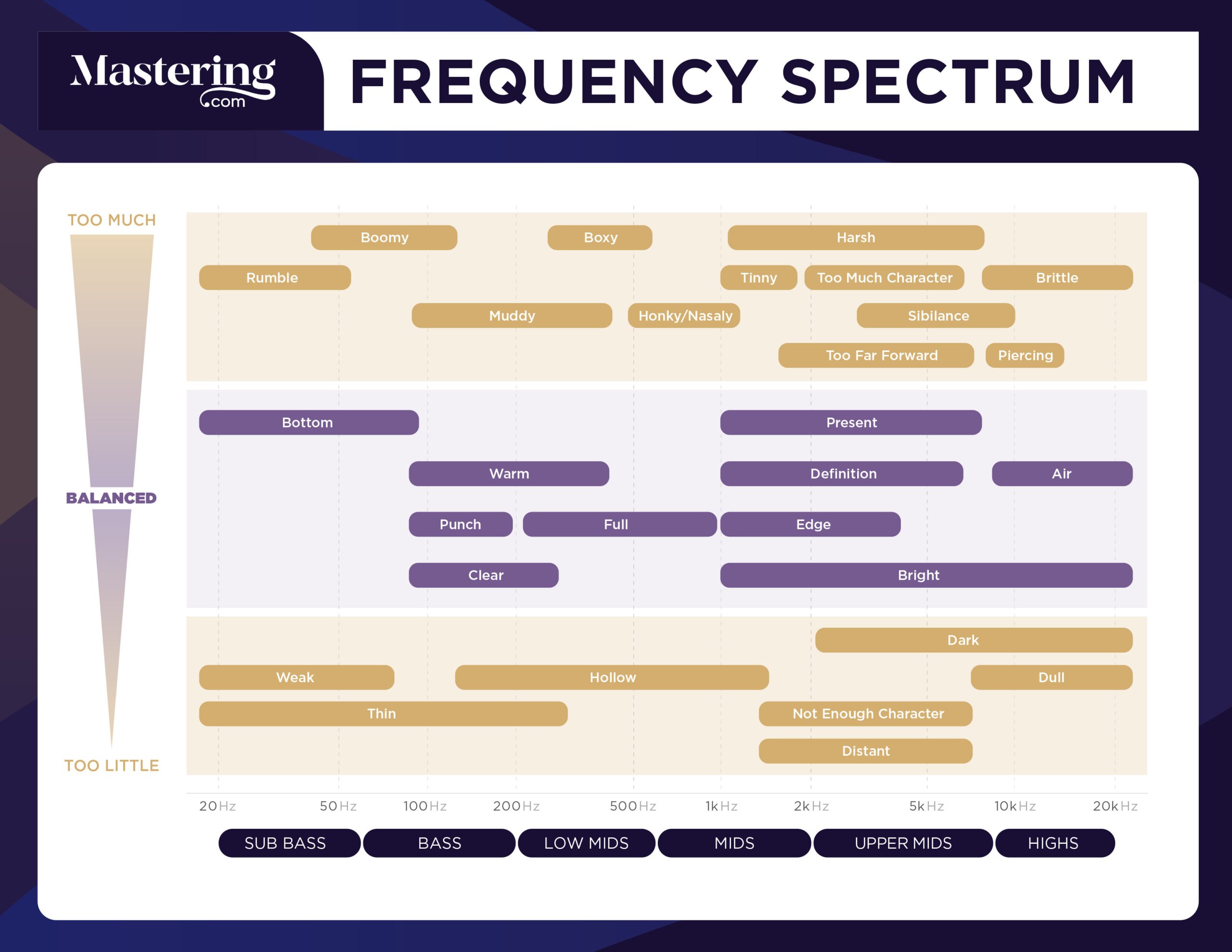
Credit: mastering.com

What Is Eq Frequency?

EQ frequency refers to equalization, a process used to adjust sound by increasing or decreasing specific frequencies. An EQ frequency guide can help you understand what frequencies to adjust for different instruments or vocals, resulting in a better mix and overall sound quality.

Frequency Spectrum Basics

The frequency spectrum refers to the range of frequencies that an instrument can produce. It is typically measured in hertz (Hz), which is a unit of frequency that indicates the number of cycles per second. The human ear can detect sounds that range from 20 Hz to 20 kHz, while certain animals can detect sounds beyond this range. Understanding the frequency spectrum is important when it comes to audio production, as different instruments and sounds will produce different frequencies.

Defining Eq Frequency

EQ or equalization relates to the process of adjusting the balance between different frequency components within an audio signal. This enables sound engineers to fine-tune the overall sound of a recording or a live performance. EQ can be applied in many ways, such as boosting the bass frequencies of a kick drum or reducing the high frequencies of a guitar amplifier. When adjusting the EQ of an audio signal, you are essentially manipulating the frequency spectrum to achieve a desired effect. EQ frequency refers to the individual frequencies that are being adjusted. For example, a boost at 1kHz would increase the volume of that frequency. In conclusion, understanding EQ frequency is crucial when it comes to audio production, as it allows engineers to tailor the sound to their specific needs. By understanding the basics of the frequency spectrum and how EQ works, you can begin to craft your own unique sound.

Eq Frequency Guide

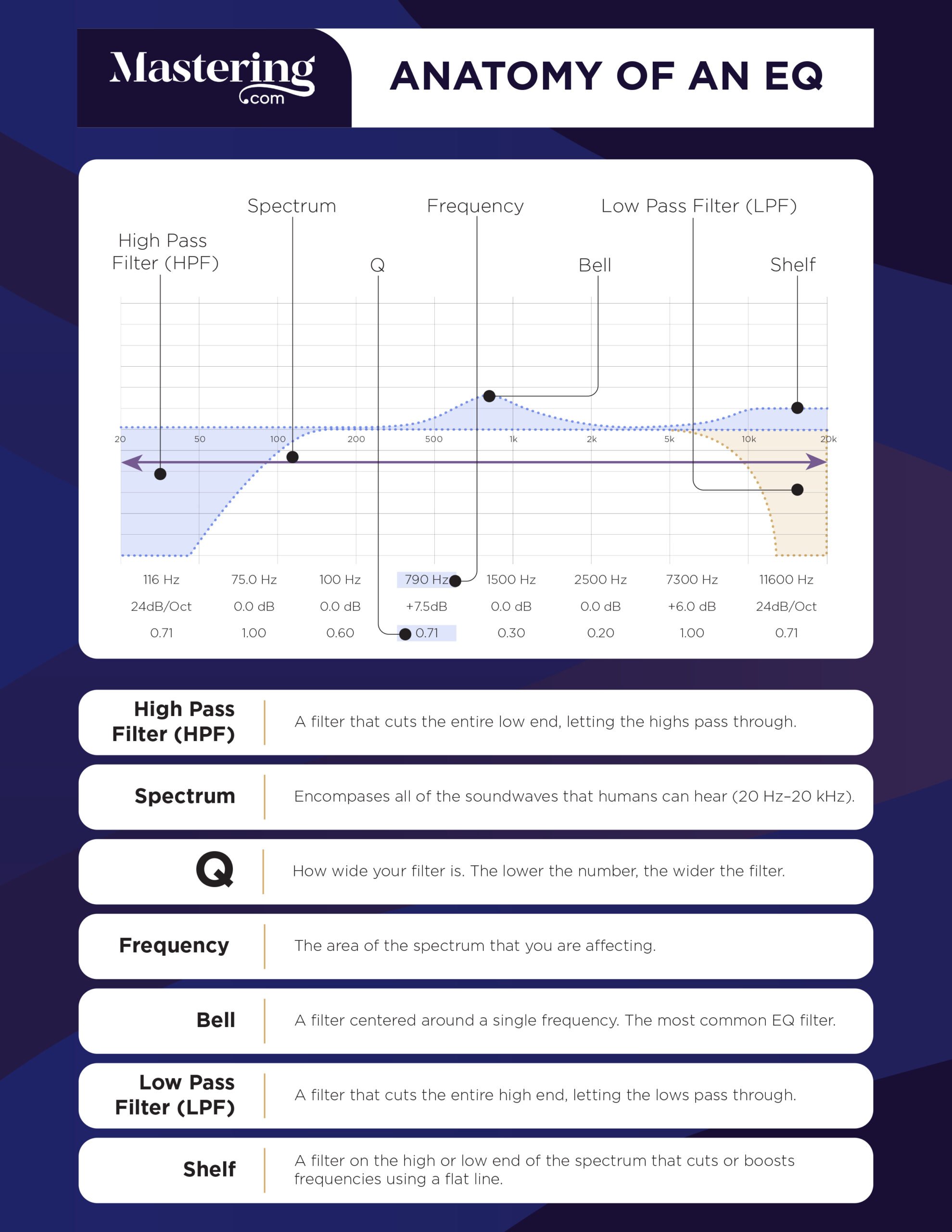
Credit: www.audio-issues.com

Eq Frequency Ranges

EQ frequency ranges refer to the different frequencies that can be adjusted on an equalizer. Understanding these ranges is crucial for achieving the desired balance in audio production and mastering.

An essential aspect of music production is equalization (EQ). EQ is a tool that helps in manipulating the frequencies of audio tracks. The ability to understand and recognize the various frequency ranges is essential for effective use of EQ. In this blog post, we will discuss the EQ Frequency Guide, focusing on the subheading: EQ Frequency Ranges. We will explore the different frequency ranges such as low frequencies, low-mid frequencies, mid frequencies, high-mid frequencies and high frequencies, including their characteristics and usage.

Low Frequencies

Low frequencies are the bass elements that occupy the lowest part of the frequency spectrum. These frequencies can range from 20Hz to 200Hz, and they are responsible for producing the fundamental tones of kick drums, bass guitars, and other types of bass instruments. Low frequencies give the music a sense of power and weight. However, excessive low frequencies can make the mix muddy and cluttered, resulting in a loss of clarity. Reducing low frequencies can be helpful in eliminating unwanted noises, but care should be taken to ensure that the mix doesn’t sound thin and weak.

Low-mid Frequencies

The low-mid frequencies range from 200Hz to 500Hz. These frequencies are responsible for creating the warmth and depth of instruments like drums, guitars, and pianos. They are also responsible for the body of vocals. Too much low-mid frequency can make the mix sound boomy and boxy, while not enough can make it thin and weak. Therefore, a careful balance of low-mid frequency is essential for a clear and balanced mix.

Mid Frequencies

Mid frequencies range from 500Hz to 2000Hz. These frequencies bring out the presence and clarity of instruments like vocals, guitars, and horns. Too much mid frequency can cause ear fatigue, while not enough can make the mix sound hollow and lifeless. Finding the right balance of mid frequencies is critical in creating a clear and present mix.

High-mid Frequencies

High-mid frequencies range from 2000Hz to 4000Hz. These frequencies are responsible for creating the definition and clarity of instruments like cymbals, snare drums, and hi-hats. They also bring out the attack and sharpness of guitars and other instruments. Too much high-mid frequency can cause ear fatigue and make the mix sound harsh and shrill. On the other hand, not enough high-mid frequency can make the mix sound dull and lifeless.

High Frequencies

High frequencies range from 4000Hz to 20,000Hz. These frequencies give the mix the air and sparkle, resulting in a bright and lively sound. They bring out the shimmer of cymbals, the brilliance of strings, and the sizzle of percussion instruments. However, excessive high frequency can cause ear fatigue and make the mix sound harsh and piercing. Therefore, it is essential to strike a balance between high frequency and other frequencies to produce a well-balanced mix. Understanding the EQ frequency ranges is essential in creating a balanced and transparent mix. Effectively using EQ to manage the frequencies is a critical skill for any music producer or audio engineer. By carefully considering the characteristics and usage of each frequency range, one can produce a mix that is both clear and captivating.

Identifying Eq Issues

EQ frequency guide helps in identifying issues related to emotional intelligence in individuals. By understanding different frequencies of EQ, individuals can assess their own emotional intelligence and work on areas that need improvement.

Identifying EQ Issues: EQ frequency is essential to achieving a perfect mix, but it can be challenging if you don’t know what to look or listen to. To identify EQ issues, you must understand frequencies and their effects on our ears. Here, we will examine some of the most common EQ issues that you may encounter in your mixing process. Muddiness: Muddiness is a common problem in the low-mid frequencies between 200-500 Hz. The muddiness issue implies a lack of definition and clarity in the mix, which can make it dull. To address muddiness, you need to pinpoint the problematic frequency range and subtract it using an EQ’s band. Boxiness: Boxiness occurs around 400 Hz to 600 Hz, and it’s a resonance problem that creates a boxy sound in the mix. It’s common in recordings made in small rooms with square walls. To fix boxiness, try cutting around the resonance frequency using a narrow band. Honkiness: Honkiness is a nasal, annoying sound mainly from the mid-range frequencies between 600-1000 Hz. You can fix honkiness by using a narrow band to cut the problematic frequency range and then adjusting the bandwidth until it sounds natural. Harshness: Harshness is a problem that occurs around 2-4 kHz, and it creates a sharp, unpleasant sound. It’s common in vocal recordings, and you can fix it by cutting the frequency range using a narrow band and then adjusting the attenuation to achieve a natural sound. Tininess: Tininess is a problem that occurs in the high-frequency range, around 8-12 kHz. It produces a thin, brittle sound and can make the mix sound harsh and amateurish. To fix tininess, increase the frequency range using a wide band and adjust the gain until it blends naturally into the mix. In summary, understanding how frequencies affect our ears is crucial in identifying and fixing EQ issues. By addressing muddiness, boxiness, honkiness, harshness, and tininess, you can achieve a crisp, clear, and professional sound in your mix.

Fixing Eq Issues

Fixing EQ issues can be a challenging task, especially for beginners. The EQ frequency guide can help you identify and correct any issues with the sound quality of your audio to ensure it sounds balanced and clear to your audience.

If you are an audio engineer or music producer, you know the importance of EQ in achieving a good mix. However, sometimes things don’t sound as good as you want them to, and this is where the EQ frequency guide comes in.

Using Low-cut Filters

One common issue that may arise when EQing is the presence of unwanted low frequencies. Using low-cut filters is an easy and effective way to remove those frequencies. Simply set the filter at the frequency below where you want to keep the audio, and the filter will remove the rest.

Using Hi-cut Filters

On the other hand, if you are dealing with unwanted high frequencies, you can use hi-cut filters. Set the filter at the frequency above where you want to keep the audio, and it will remove the rest.

Using Bell Filters

Bell filters allow you to boost or cut a specific frequency range. They are particularly useful for balancing the frequencies of individual instruments in a mix. For example, if a guitar sound is too thin, you can use a bell filter to boost the midrange frequencies of the guitar to make it sound fuller.

Using Wide-q Filters

Wide-Q filters are similar to bell filters, but with a broader range. They are useful for making more significant adjustments to the overall sound of your mix. For example, if you feel like the overall mix is too boxy, you can use a wide-Q filter to cut the low-mid frequencies. In conclusion, using EQ can be tricky, but with the EQ frequency guide, fixing issues is manageable. Try out these techniques, and you will notice significant improvements in your mixes.

Tips For Using Eq Effectively

To use EQ effectively, it’s important to understand the frequency ranges of different instruments and vocals. A basic EQ frequency guide can help you achieve a better mix by allowing you to boost or cut certain frequencies to bring out the best in your music.

Using an EQ Frequency Guide can be incredibly helpful when it comes to mixing music, especially when trying to balance different sounds in a mix. But it’s important to keep in mind that EQ is a powerful tool that can easily be overused, resulting in a mix that sounds overly processed or unnatural. To avoid these pitfalls, here are some tips for using EQ effectively:

Less Is More

It’s tempting to want to EQ every track in a mix, but this can quickly lead to an overly processed sound. Instead, try to be selective about which tracks you EQ and how much you EQ them. In many cases, subtle adjustments are all that’s needed to make a track sit better in a mix. Remember, less is often more when it comes to EQ.

Don’t Solo Eq

Another common mistake when it comes to EQing is to solo individual tracks while making EQ adjustments. While this might make it easier to hear what you’re doing, it can also lead to a mix that sounds unnatural. After all, your mix won’t be heard in isolation – it will be heard as part of a larger piece of music. To ensure your mix sounds natural, make EQ adjustments while listening to the entire mix.

Always Use Your Ears

While an EQ Frequency Guide can be helpful, it’s important to remember that every mix is unique. What sounds good in one mix might not sound good in another. As such, it’s important to always use your ears when EQing. Trust your intuition and make adjustments based on what sounds good to you.

Take Breaks

Finally, it’s important to take breaks when EQing. Your ears can quickly become fatigued when you’re listening to music for extended periods of time, which can make it difficult to make accurate EQ adjustments. Take frequent breaks and give your ears a rest. This will help ensure that you’re making the best possible EQ adjustments. By following these tips, you’ll be well on your way to using an EQ Frequency Guide effectively to create great-sounding mixes. Remember to be selective in your EQ adjustments, avoid solo EQing, trust your ears, and take breaks when needed. Happy mixing!

Eq Frequency Guide

Credit: mastering.com

Frequently Asked Questions On Eq Frequency Guide

What Frequencies Should I Eq Out?

It depends on the specific audio. EQ out frequencies that sound harsh or muddy. Cut low end below 30Hz to reduce rumble. Roll off high end above 16kHz to prevent hiss. Narrow cuts around trouble frequencies are more effective than broad ones.

Always trust your ears, not charts.

What Is Eq Frequency Chart?

An EQ frequency chart is a visual representation of the frequency range that an audio equalizer can adjust. It displays the frequency bands, their corresponding frequencies in Hertz, and the amount of boost or cut that can be applied to each band.

This helps sound engineers adjust and balance the different frequencies in an audio mix.

What Should I Set My Eq To?

Setting EQ depends on the type of music you are listening to and personal preferences. Start by setting all frequencies to zero and adjust each band to enhance or reduce specific frequencies based on the music. Trust your ears and experiment until you find the perfect balance.

What Is 400 Hz In Equalizer?

In equalizers, 400 Hz is a frequency range that can be adjusted to boost or cut certain frequencies in audio. It can affect the warmth and clarity of sounds. A precise setting of 400 Hz can make a big difference in the overall sound quality of the audio.

Conclusion

Eq Frequency Guide provides an in-depth understanding of how equalization works and how it can be used in music production. By understanding the different frequency ranges and their impact on sound, you can achieve a more balanced and polished final product.

Whether you’re a professional musician or just starting, this guide will help you take your mixes to the next level. Remember to experiment with different EQ settings and trust your ears to achieve the best results.

More in our EQ guide.

Categories
Archive

How To Draw Midi Chords

To draw MIDI chords, select a chord type, choose a root note, and create the chord by adding other notes. Drawing MIDI chords involves selecting the chord type, picking a root note, and adding the necessary notes to create your chord.

This can be done using a variety of MIDI editors or DAWs such as Ableton Live or Logic Pro. With MIDI chords, even beginner musicians can quickly create complex chord progressions and melodies to enhance their music. Read on to learn more about how MIDI chords work and some tips for creating your own.

Creating The Chord Progression

Drawing midi chords may seem daunting, but with the right tools, it can be both fun and easy. Start by creating the chord progression to build a solid foundation for your composition. With practice, you can master the art of creating beautiful melodies and harmonies using midi chords.

Creating the Chord Progression: Creating MIDI chords may sound difficult at first, but with some practice and understanding, it can be easily achieved. In this section, we will focus on creating the chord progression. We will start with understanding basic chords and then move on to adding variations and extensions to chords. We will also cover creating inversions and voicings, allowing you to create a unique and interesting chord progression. Understanding Basic Chords: Before we dive into creating chords, it’s important to understand what basic chords are. A chord is a combination of notes played simultaneously to create harmony and add depth to a melody. Basic chords are formed using triads, which consist of three notes played together. The three notes are usually the first, third, and fifth notes of a scale. Adding Variations and Extensions to Chords: Now that we have a basic understanding of chords, let’s dive into adding variations and extensions to them. A variation changes the basic chord’s structure, while an extension adds additional notes to the basic chord to create a more complex sound. Some popular variations include suspended chords, diminished chords, and augmented chords. On the other hand, some common extensions include seventh chords, extended chords, and suspended chords. Creating Inversions and Voicings: Creating inversions and voicings is crucial to create a unique and interesting chord progression. Inversions are created by rearranging the notes of a chord to create a different order or arrangement. Voicings, on the other hand, refer to the way the notes of a chord are spread out or played across different octaves. Creating inversions and voicings allow you to create a more complex and interesting chord progression. In conclusion, creating MIDI chords is a crucial skill for anyone who wants to create their own music. Understanding basic chords, adding variations and extensions, and creating inversions and voicings can help you create a unique and interesting chord progression. With some practice and understanding, you can create beautiful and catchy music using your MIDI chords.

How To Draw Midi Chords

Credit: forum.ableton.com

Programming Midi Chords

To draw MIDI chords, start by opening a new MIDI clip and adding a virtual instrument. Once you’ve created a new MIDI clip, select the chord drawing mode and use your mouse or keyboard to add chords to the timeline.

Finally, adjust the chord length and the velocity of each note to create your desired sound.

If you are a music producer or composer, midi chords can be an essential tool in your arsenal. Midi chords allow you to create complex chord progressions with ease, and they can be used in various genres such as EDM, house, and pop. In this article, we will explore different ways to draw midi chords. We will discuss how to use a midi keyboard, programming in a midi editor, and using chord progression tools.

Using A Midi Keyboard

You can use a midi keyboard to draw midi chords. A midi keyboard is a controller that sends midi signals to your computer or midi device. To use a midi keyboard, follow these steps:

  1. Connect your midi keyboard to your computer or midi device.
  2. Open your DAW or midi editor.
  3. Select your preferred sound or plugin.
  4. Choose the chord you want to draw on your midi keyboard.
  5. Press and hold the keys that you want to use for the chord.
  6. Record the chord into your midi editor.
  7. Repeat the process for different chords and notes.

Programming In A Midi Editor

If you don’t have a midi keyboard, you can program midi chords directly in your midi editor or DAW. Programming midi chords allows you to have more control over the timing and velocity of each note. Here’s how you can program midi chords:

  1. Open your DAW or midi editor.
  2. Select your preferred sound or plugin.
  3. Go to the midi editor and select the pencil or draw tool.
  4. Draw the chord you want to use on the midi editor.
  5. Edit the timing and velocity of each note to your preference.
  6. Repeat the process for different chords and notes.

Using Chord Progression Tools

If you’re not a music theory expert, using chord progression tools can be a lifesaver. Chord progression tools allow you to create chord progressions without any knowledge of music theory. Here are some chord progression tools you can use:

  • Cthulhu by Xfer Records
  • Cthulhu Chords by ADSR Sounds
  • Scaler by Plugin Boutique
  • Chordz by CodeFN42

Using these chord progression tools is simple. All you have to do is select the key, scale, and chord progression you want to use. The tool will then generate the chords for you. In conclusion, drawing midi chords can be done in various ways, such as using a midi keyboard, programming in a midi editor, and using chord progression tools. Each method has its benefits, so choose the one that works best for you. With midi chords, creating complex chord progressions has never been easier.

Adding Other Elements To The Track

To add more elements to your MIDI track, start by selecting the notes you want to turn into a chord, then holding down the ‘Ctrl’ key while dragging them to a new location. You can also create variations by editing the chord’s velocity, duration, or by playing with the rhythm.

With these tools at your disposal, you can create unique, complex chord progressions that sound great.

Creating Melodies And Harmonies

To make your MIDI chords more interesting, you can add melodies and harmonies to your track. Creating a melody involves selecting a series of notes that sound good together and playing them in a certain order. You can use the same process to create harmonies, which involve playing multiple notes together to create a fuller, richer sound.

Choosing The Right Sounds

Selecting the right sounds to complement your MIDI chords is essential to bring depth and texture to your track. Experiment with different types of instruments to find the perfect sound. Choose sounds that complement each other rather than competing for attention, making sure that each sound blends with the other elements in the track.

Adding Drums And Percussion

Adding drums and percussion to your MIDI chords creates a solid rhythmic foundation to your track. Consider the tempo and style of your track when selecting drums and percussion. A slower tempo track might work well with a soft snare pattern while a faster track might work with a peppy kick and fast-paced snare pattern. To make sure everything comes together as a cohesive whole, play around with various combinations of instruments, melodies, and harmonies. Once your MIDI track is complete, share it with the world and don’t forget to give your track an interesting and SEO optimized title.

How To Draw Midi Chords

Credit: www.youtube.com

How To Draw Midi Chords

Credit: hackmusictheory.com

Frequently Asked Questions Of How To Draw Midi Chords

How Do You Write Midi Chord Progressions?

To write MIDI chord progressions, start by deciding on a key and selecting chord inversions that fit your desired sound. Create a pattern for your progression and add variations to keep it interesting. Experiment with different rhythm and note lengths, and use tools like arpeggiators or sequencers to enhance your progression.

With practice, you can create unique and compelling chord progressions to suit any style or genre.

What Is The Chord Midi Effect?

The chord MIDI effect is a plugin used in digital audio workstations to manipulate MIDI data and create chords. It allows users to play complex chords through a single key or trigger, saving time and improving workflows. The effect is popular in electronic music production but can be used in any genre.

What Is A Chord In Piano?

A chord in piano is a group of three or more notes played together at the same time. These notes create a harmony that is pleasing to the ear. Chords can be simple or complex, and are an essential element in playing the piano.

What Is The Basic Definition Of A Chord In Music?

A chord in music is the sound created by playing two or more notes simultaneously. It is essentially a group of notes played together to create harmony and melody. Chords are the building blocks of music and are used in various genres, including pop, rock, jazz, and classical.

Conclusion

To conclude, drawing MIDI chords may seem overwhelming at first, but with the right techniques and tools, it can become a breeze. Remember to start with simple chords, listen to your music and experiment with different variations. Utilizing plugins and other resources can also help elevate your chords to the next level.

With practice and persistence, you’ll be creating complex and captivating MIDI chord progressions in no time. Keep honing your skills and exploring new ideas to unleash your full creative potential. Happy creating!

Categories
Archive

Best Free Delay Plugins

The best free delay plugins are Tal-Reverb-4, TDR Feedback Compressor II, Voxengo Tempo Delay, and Valhalla Freq Echo. Delay plugins add depth and character to music tracks, but acquiring the best ones can become a financial burden for some users.

Hence, our team has compiled a list of the best free delay plugins available in the market to save you the trouble. These plugins provide professional results. We will discuss the top-notch free delay plugins available for the music producers that can give a high performance without costing a dime.

Our list includes plugins that offer various features, including filter, modulation, and feedback options, which can enhance the music project to the next level. Let’s dive into each plugin and see how it can help produce excellent music.

Best Free Delay Plugins

Credit: m.youtube.com

Top Free Delay Plugins

Discover the best free delay plugins that can help you achieve diverse effects while working on your tracks. These plugins offer a range of features such as customizable delay time, feedback, filter, and modulation options, which can elevate your music production to another level.

Delay plugins are a great way to add depth and space to your audio tracks, regardless of whether you’re producing music or recording podcasts. As a content creator, you don’t necessarily have to break the bank to access these plugins. In fact, some of the best delay plugins on the market are available for free. Here are the top three free delay plugins that will help elevate your audio quality.

Plugin 1: Tal-dub-iii

Tal-Dub-III is a great free delay plugin that comes with a ton of features and options. This plugin has two delay lines that can be used in either series or parallel mode, allowing you to create complex delay patterns. It has a high-pass filter and a low-pass filter that can be applied to the delayed signal, as well as a feedback loop that can be tweaked to create longer delay times. The plugin also has a saturation knob that can add warmth and grit to your signal.

Plugin 2: Valhalla Freq Echo

Valhalla Freq Echo is a frequency shifter, combined with an analog-style echo. It can create everything from subtle chorus effects to extreme pitch-shifting delays. This plugin is perfect for producers and musicians looking to create experimental sounds. It has a simple user interface with three modes of operation, allowing you to switch between frequency shifting, echo, or a combination of both. It also has a built-in LFO with a range of wave shapes that can be used to modulate the delay time, providing some interesting modulation effects.

Plugin 3: Super Delay Feedback

Super Delay Feedback is an excellent free delay plugin created by CodeFN42. This plugin is simple to use, with only a few parameters, making it perfect for beginners. It has a delay time control that ranges from 20ms to 1000ms, a feedback control that determines the amount of echo in the delayed signal, and a mix control that determines the balance between the dry and wet signal. It also has a stereo width control that can be used to create a wider sound image. Overall, this plugin is an excellent choice for those looking for a simple delay plugin that gets the job done. In conclusion, these three free delay plugins are excellent tools for content creators who want to add depth and space to their audio tracks. Whether you’re a producer, musician, or podcaster, these plugins can help elevate your audio quality without breaking the bank. So download them and start adding some delay effects to your tracks today!

Features To Look For In A Delay Plugin

When searching for the best free delay plugins, there are several essential features to consider. Firstly, it’s important to look for plugins that offer a range of delay types, including tape, analog and digital delay. Additionally, features such as tempo sync, feedback control and modulation options can add depth and character to your sound.

Delay plugins are an essential tool when it comes to producing high-quality audio. With so many delay plugins available, it can be a challenge to know which one to choose. In this article, we’ll discuss the features that you should consider when selecting a delay plugin. Here are some important features to look for in a delay plugin:

Delay Time Range

One of the essential features of a delay plugin is the range of delay times that it offers. A good delay plugin must provide the ability to adjust the delay time according to the music. Therefore, before selecting a delay plugin, ensure that it has an adequate delay time range, allowing you to create the delay effect you are looking for.

Feedback Control

Feedback control is another critical feature of a delay plugin. This feature determines how long the delay will continue after the initial signal has been produced. A good delay plugin should allow you to adjust the feedback control according to your needs. It should allow you to create either subtle or more extreme effects.

Filtering

Filtering is another essential feature to consider. A good delay plugin should offer filtering options that allow you to shape the sound and frequency range of the delayed signal. This feature ensures that the delayed signal complements the original sound. Therefore, you should look for a delay plugin that provides flexible filtering options.

Wet/dry Mix Control

The Wet/Dry Mix control feature enables you to control the level of the wet signal (the delayed signal) versus the dry signal (the initial or unprocessed signal). A good delay plugin should provide a Wet/Dry Mix Control feature that allows fine-tuning of the signal levels, ensuring that the delay effect blends well with the original signal. In conclusion, when looking for a delay plugin, ensure to check if it has the features mentioned above. A delay plugin with flexible filtering options, a wide range of delay times, feedback control, and a Wet/Dry Mix Control feature will help you achieve the desired effect and produce high-quality audio.

How To Choose The Right Delay Plugin

Choosing the right delay plugin can elevate the quality of your music production. Explore the best free delay plugins available and consider factors such as sound quality, features, and compatibility with your software before making a decision.

Delay plugins are immensely popular among music producers, and for a good reason. These plugins can add a unique character to your tracks, making them sound more polished and professional. With an overwhelming number of delay plugins available in the market, selecting the right one can be a daunting task. In this article, we’ll discuss some key criteria you should consider when choosing the best free delay plugin for your specific needs.

Identify Your Needs

Before you start searching for a delay plugin, you need to assess your production needs. Consider what features you require and what type of music you are producing. If you are looking for a simple and versatile delay plugin that can be used across multiple genres, then a plugin like TAL Dub III or Valhalla Freq Echo is a great option. On the other hand, if you are looking for more specific delays like vintage tape delays, then plugins like Vulf Compressor or Abby Road Chambers may be more suitable.

Check Compatibility With Daw

Compatibility with your DAW is another crucial factor to consider when choosing a free delay plugin. Ensure that the plugin you select is compatible with your DAW software by checking its specifications. Some delay plugins may only work with specific DAWs or may require advanced technical skills to set up correctly. To avoid any frustration, check the compatibility of the plugin before downloading.

Read Reviews

One of the best ways to select a delay plugin is by reading reviews from other music producers. This will give you a better understanding of the plugin’s performance, sound quality, reliability, and ease of use. Reviews can also help you identify any potential issues with particular plugins. However, keep in mind that reviews can be subjective, and what works for someone else may not work best for you. When selecting the right free delay plugin, ensure that the plugin aligns with your specific production needs, is compatible with your DAW software and that you have read trusted reviews. By considering these factors, you’ll be one step closer to finding the perfect delay plugin to add shimmer and depth to your tracks.

Installation And Setup

The installation and setup process of free delay plugins can be a bit tricky for beginners. However, with the right guidance and resources, it can be completed easily. Here are some of the best free delay plugins that can be set up quickly and deliver high-quality results when used in your music productions.

One of the biggest advantages of using free delay plugins is that they are easy to install and set up. All you need to do is download the plugin and install it on your digital audio workstation (DAW). Here’s a step-by-step guide on how to install and set up your free delay plugin:

Download And Installation Process

The first step is to find a reliable website that offers the free delay plugin you are interested in downloading. Once you have found the website, click on the download link and save the plugin file to your computer. Next, open your DAW and locate the plugin installation folder. This folder is usually located under the “Plugins” folder in your DAW’s installation directory. Once you have located the folder, copy and paste the plugin file into the folder. After the plugin file has been copied into the installation folder, open your DAW and scan for new plugins. This will vary depending on the DAW you are using, but most DAWs have an option to scan for new plugins under the “Plugin Manager” or “Preferences” menu. Once the scan is complete, the new delay plugin should appear in your list of available plugins.

Daw Setup

Once the plugin has been installed, it’s time to set it up in your DAW. The first step is to create a new audio track and assign the delay plugin as an insert effect on the track. This can be done by simply dragging and dropping the plugin onto the track or by selecting it from the list of available plugins. After the plugin has been added to the track, you can adjust the delay settings to your liking. This includes adjusting the delay time, feedback, and mix levels. Most free delay plugins come with a range of presets that you can use as a starting point, or you can create your own custom delay settings. In conclusion, installing and setting up a free delay plugin is a simple process that can be done in just a few steps. With a little bit of practice, you can create unique and interesting delay effects that will take your audio productions to the next level.

Tips For Using Delay Plugins

Learn to effectively use delay plugins in your music production with our list of the best free delay plugins. Incorporate different types of delays and experiment with settings such as feedback and modulation to achieve unique sounds.

Delay plugins are essential tools for adding depth, space, and dimension to your audio tracks. They can produce various creative effects, such as echo, reverb, and slapback. However, using delay plugins effectively requires some know-how. Here are some tips to help you make the most of your delay plugins.

Experiment With Different Settings

The beauty of delay plugins lies in their versatility and flexibility. You can achieve a wide range of effects by tweaking the settings. Therefore, don’t be afraid to experiment with different parameters, such as delay time, feedback, and mix. Try out different delay types, such as tape, digital, and analog. Be creative and see what sounds good to your ears.

Use Delay To Create Depth And Space

One of the most common uses of delay plugins is to create a sense of space and depth. You can add spatial effects, such as stereo widening or panning, to your tracks to make them sound fuller and wider. You can also use delay as a reverb alternative to create a sense of space. By adjusting the delay time, feedback, and mix, you can create a subtle or pronounced echo effect that can make your tracks sound like they were recorded in a bigger room.

Automate Parameters For Creative Effects

Another way to enhance your audio tracks with delay plugins is to automate the parameters. Automating the delay time, feedback, or mix can create interesting rhythmic patterns or textures that add movement and variation. You can also automate the parameters to create creative effects, such as reverse delay or filter sweeps. The possibilities are endless, so don’t be afraid to experiment with automation. In conclusion, delay plugins are powerful audio tools that can transform your tracks in endless ways. By experimenting with different settings, using delay to create depth and space, and automating parameters for creative effects, you can take your audio production to the next level. Remember to keep an open mind and have fun.

Best Free Delay Plugins

Credit: www.audiopluginguy.com

Best Free Delay Plugins

Credit: www.productionmusiclive.com

Frequently Asked Questions Of Best Free Delay Plugins

What Is The Best Plugin For Slapback Delay?

The best plugin for slapback delay is subjective to personal preference, as each plugin has its own unique features and sound. Some popular options include Waves H-Delay, Soundtoys EchoBoy, and FabFilter Timeless. It’s best to try out a few different plugins and see which one works best for your specific needs.

What Are Delay Plugins?

Delay plugins are audio processing tools that add a repeating echo effect to the sound being played. They allow for dynamic manipulation of the delay time and feedback amount, creating interesting sonic textures and adding depth to audio mixes. They are commonly used in music production and sound design.

What Is A Tape Delay?

A tape delay is an audio effect that was commonly used in the earlier days of recording music. It involves recording a sound onto a length of tape and playing it back after a short delay to create an echo effect.

What Are Delay Plugins?

Delay plugins are music production software that create the effect of echoing or repeating sound. They can be used on various audio sources such as vocals, drums, and guitars to add depth and dimension to the sound.

Conclusion

Overall, these best free delay plugins offer exceptional sound quality and versatility to enhance any mix. From the classic analog effects to modern DSP-based emulations, there are endless options to explore. By incorporating these plugins into your workflow, you can achieve greater control and precision over delay effects, all without breaking the bank.

Don’t hesitate to try them out and see how they can transform your music production game. The world of delays is waiting for you!

Categories
Archive

Top Free Vst Piano Plugins

Some top free VST piano plugins include LABS Soft Piano, Iowa Piano, and Keyzone Classic. These plugins offer high-quality piano sounds and a range of features for free.

Music production can be an expensive hobby, but finding the right plugins can make all the difference. We will highlight some of the best free VST piano plugins available. These plugins can help add depth and texture to your music productions, without breaking the bank.

Whether you are looking for a classic grand piano sound or a more experimental and unique tone, there is sure to be a plugin on this list that will suit your needs. So, read on to discover some of the top free VST piano plugins for your music productions.

Top Free Vst Piano Plugins

Credit: surgesounds.com

Top Free Vst Piano Plugins

Discover the top free VST piano plugins that can enhance your music production. These plugins provide high-quality sounds and are easy on the budget, making them an ideal choice for music makers who want to create stunning piano tracks without breaking the bank.

Improve your music with these top free VST piano plugins!

Pianos are versatile musical instruments that can be used in different genres of music. However, a traditional piano may not always be available to everyone, and hence, the need for a virtual instrument arises. Fortunately, many free VST piano plugins can replicate the sound of a real piano, which can be used by music enthusiasts to create high-quality music.

Piano One

Piano One is a powerful and popular VST piano plugin that features a highly-detailed piano sampling for an authentic sound. It has up to seven selectable velocity zones that allow for a wide range of expression and dynamics. You can also tune and adjust various parameters such as sympathetic resonance, reverb, and EQ to get the perfect sound.

4front Piano

4Front Piano is a self-explanatory plugin with a simple interface that is easy to use. It is modeled on a Yamaha C7 Grand Piano and features a crystal clear tone that makes it perfect for classical and jazz music. 4Front Piano has a sustain pedal that adds realism to the sound.

Keyzone Classic

Keyzone Classic is an easy-to-use sample-based VST piano plugin. It has a simple interface with four fundamental controls that allow you to tweak the sound in real-time. The plugin includes five different types of pianos, each with its own unique sound character.

Vs Upright 1

VS Upright 1 is a classic piano plugin that emulates the sound of an upright piano. It features a simple interface with controls for volume, tone, and decay, making it easy to use. The plugin is perfect for capturing the warm and intimate sound of an upright piano.

Dpiano-a

DPiano-A is a free piano plugin that features a high-quality sound engine with an intimate and delicate tone. It has realistic key and pedal noises that add to the authenticity of the sound. The plugin also features a built-in reverb that adds depth and dimension to the sound.

Amore Grand Piano

Amore Grand Piano is a premium quality piano plugin that is available for free. It has a complex sound engine that produces a rich and full-bodied tone. The plugin features three different sample sets, each with its own unique characteristics, allowing you to choose the sound that best fits your project.

Labs Soft Piano

LABS Soft Piano is a free VST piano plugin by Spitfire Audio. It features an intimate, delicate, and expressive sound that is perfect for cinematic and ambient music. The plugin is incredibly easy to use with just one control knob that adjusts the reverb.

Iowa Grand Piano

Iowa Grand Piano is an excellent VST piano plugin that features the sound of a Steinway grand piano. It has a detailed sound engine and realistic key and pedal noises that add to the authenticity of the sound. The plugin also has a simple interface with controls for attack, decay, and release times. In conclusion, there are many free VST piano plugins that can satisfy your piano needs. With the right plugin, you can create high-quality music that sounds just like a real piano. Try out some of the above-listed plugins and enjoy the rich and authentic sound of a piano.

Top Free Vst Piano Plugins

Credit: m.youtube.com

Top Free Vst Piano Plugins

Credit: www.productionmusiclive.com

Frequently Asked Questions On Top Free Vst Piano Plugins

What Is The Best Free Piano Vst?

The best free piano VST is the LABS Soft Piano by Spitfire Audio. It is a high-quality virtual instrument with a warm and resonant sound. It can be used with any music production software and is perfect for adding a realistic piano sound to your compositions.

What Plugins To Use For Piano?

For piano plugins, popular choices are Native Instruments’ “The Giant” and “The Maverick,” as well as Spectrasonics’ “Keyscape” and Addictive Keys’ “Studio Grand. ” It ultimately depends on personal preference and intended use, so it’s worth experimenting with different options to find the perfect fit.

Is Piano One Still Free?

Yes, Piano One is still available for free.

What Is The Best Free Plugin?

The best free plugin depends on your specific needs. For SEO, Yoast SEO is highly recommended. For forms, Contact Form 7 works well. For security, Wordfence Security is a popular choice. For caching, WP Super Cache and W3 Total Cache are both effective options.

Research carefully and choose the plugin that best suits your website’s requirements.

Conclusion

Overall, these top free VST piano plugins provide a variety of options for musicians and producers to add realistic and high-quality piano sounds to their music. Whether you’re looking for a basic sound or more advanced features, there’s a plugin available for you.

By using any of these VST piano plugins, you can take your music to the next level without breaking the bank. Keep experimenting and exploring to find the perfect fit for your music production needs.