Categories
Archive

How To Set Up A Good Mix

To set up a good mix, begin by selecting quality equipment and positioning it correctly. Then, focus on setting appropriate levels and EQ for each instrument and vocal track.

Mixing is a vital aspect of any music production project. A great mix can elevate a song to new heights, while a poor mix can ruin even the most well-crafted composition. To ensure that your mix is top-notch, you need to understand the principles of good mixing and the techniques that professionals use to create a balanced, polished sound.

We’ll take a look at some of the key steps you can take to set up a good mix, from selecting quality equipment to adjusting levels, EQ, and panning. By following these tips, you can improve your mixes and create music that truly stands out.

Preparing For The Mix

To prepare for a good mix, start by arranging your tracks in a logical order. Make sure each track has a defined purpose and isn’t competing with other sounds in the mix. Use subtraction as much as addition to keep the mix clean and avoid muddiness.

Preparing for the Mix: Before jumping to the mixing process, you need to prepare and set up your Digital Audio Workstation (DAW) properly. This will help you to get organized and save time during the mixing process. In this post, we’ll go through the initial stages of setting up your DAW and organizing tracks for a better mix. Setting Up Your DAW: The first step in preparing for the mix is to set up your DAW. This means you need to ensure that your software is installed correctly and you have a reliable sound card and audio interface. Once you have your hardware and software all set up, make sure that all your plugins and virtual instruments are installed and updated to their latest version. Organizing Your Tracks: The next step is to organize your tracks in a way that makes sense to you. This includes creating a logical structure for your song, labeling and coloring your tracks, and creating folders and busses. Labeling and coloring your tracks according to instrument or sound source allows you to easily find them when you need to make adjustments. You can also group similar tracks together, such as drums or vocals, and apply the same effects to the whole group. This will save you a lot of time in the mixing process. Creating folders for each group is also a good way to keep your project neat and organized. Once you have your tracks organized, you can start to adjust the levels and pan settings. Use the pan control to position each instrument in the stereo field. For example, you can place the lead vocal in the center while the backup vocals are placed on the sides. In conclusion, proper preparation is essential to achieving a great mix. Start by setting up your DAW and organizing your tracks in a logical way. This will make your workflow more efficient and help you focus on the creative aspects of the mixing process.

Setting The Levels

Learn how to set up a good mix by setting the levels correctly. Setting the levels involves balancing the volume of each instrument or sound in a mix to create a cohesive and clear sound.

Setting the levels is a crucial step in the mixing process. It involves adjusting the volume levels of each track to ensure they blend well together. In this section, we will cover how to set up gain staging and adjust the volume levels for each track.

Setting The Gain Staging

Before adjusting the volume levels, it is essential to set up gain staging correctly. Gain staging is the process of setting the levels of each track so that they are not too loud or too quiet. To set up gain staging, follow these steps:

  1. Turn down all faders and pan knobs to their minimum level.
  2. Bring up the level of the input gain knob or plugin on each track until it reaches unity gain (0 dB).
  3. Adjust the output gain if necessary to ensure an appropriate level of headroom.

Adjusting Volume Levels For Each Track

Now that you have set up gain staging, it is time to adjust the volume levels for each track. The goal is to achieve a balanced mix where each track can be heard clearly. To adjust the volume levels for each track, follow these steps:

  1. Start with the drums and bass and bring up their faders to a level where they can be easily heard.
  2. Add the remaining instruments and vocals one by one, adjusting their volume levels so that they blend well with the drums and bass.
  3. Use panning to place each element in the stereo image.
  4. Refer back to the gain staging process if any track is too loud or too quiet.
  5. Use automation to make adjustments throughout the song and ensure each part is heard clearly.

In conclusion, setting the levels is an essential step in achieving a good mix, and it requires careful attention to detail. By following these steps, you can achieve a balanced and clear mix that will sound great on any sound system.

Panning And Stereo Imaging

Panning and stereo imaging are key elements to consider when setting up a good mix. By having a well-balanced spread of sound, you can create a wider, more immersive sonic experience. Careful attention to detail in panning and stereo imaging can make all the difference in producing a professional-quality mix.

If you’re looking to set up a good mix, panning and stereo imaging are two important techniques you should consider. Panning is the process of placing sounds in the stereo field, while stereo imaging is the manipulation of the sound field to create a wider, more realistic soundstage. Here’s what you need to know about these techniques to get the most out of your mix.

Choosing Pan Positions

When it comes to panning, it’s important to consider the relationship between the instruments in your mix. By placing them in different positions in the stereo field, you can create separation and allow each instrument to be heard more clearly. Here are some general guidelines to follow:

  • Place the kick drum and bass guitar in the center to create a solid foundation for the mix.
  • Pan the snare drum slightly to the left or right to create a natural stereo image.
  • Place the hi-hat and cymbals slightly to the left or right to create separation from the other drums.
  • Pan rhythm guitars, keyboards, and other midrange instruments between 30-70% to the left or right.
  • Pan lead guitars, vocals, and other important elements to the center or slightly to one side.

Keep in mind that these are just guidelines, and you should always use your ears to determine what sounds best.

Working With Stereo Imaging

Stereo imaging involves manipulating the sound field to create a wider, more natural soundstage. There are several techniques you can use to achieve this effect:

TechniqueDescription
Haas effectDelay one side of the stereo signal by a few milliseconds to create a wider stereo image.
Mid/side processingSeparate the mono and stereo information in a mix and process them separately.
ReverbAdd a small amount of reverb to a stereo signal to create a sense of space.

Again, there’s no one-size-fits-all approach to stereo imaging, so experiment to find what works best for your mix. In conclusion, panning and stereo imaging are two essential techniques when it comes to setting up a good mix. By using them effectively, you can create a more enjoyable listening experience and make your mix stand out from the crowd.

How To Set Up A Good Mix

Credit: m.youtube.com

Equalization

Equalization, also known as EQ, is a crucial tool when setting up a good mix. It’s used to shape the tonality of individual tracks and to balance the overall frequency spectrum of a song. By cutting or boosting specific frequencies, you can create space and clarity in your mix.

Balancing Frequencies

Equalization is a crucial step towards achieving a balanced mix. Balancing frequencies involves adjusting the levels of different frequency ranges in a mix. It is essential to balance the bass, midrange, and treble, ensuring that no frequency range overpowers the others. To achieve a well-balanced mix, start by analyzing the different instrument tracks and identifying their dominant frequency ranges. Once you have identified the dominant frequency ranges, you can adjust the EQ controls accordingly.

Cutting Unwanted Frequencies

Once you’ve balanced the frequencies in your mix, the next step is to remove any unwanted frequencies. Cutting unwanted frequencies involves removing frequencies that are not adding value to the mix. It could be a low-frequency rumble, hiss, or hum that is not part of any instrument or vocal track. These frequencies can muddy up the mix and make it sound unprofessional. To remove these unwanted frequencies, use a high-pass filter or a notch filter, depending on the frequency range you want to remove.

Eq Tips

Here are some tips to help you achieve a good mix using equalization:

  • Start with a flat EQ curve before making any adjustments.
  • Make small adjustments to the EQ, especially when it comes to cutting frequencies.
  • Avoid over-emphasizing a particular frequency range, as this can make the mix sound unnatural.
  • Use your ears to make EQ decisions, not your eyes.
  • Listen to your mix in different environments to ensure that it sounds good on different playback systems.
Frequency RangeInstrument
20Hz – 200HzBass guitar, kick drum
200Hz – 800HzSnares, guitars, male vocals
800Hz – 3kHzFemale vocals, pianos, horns
3kHz – 8kHzCymbals, high-hat, tambourines
8kHz – 20kHzSizzle, air, and brightness

Remember, equalization is just one of many steps towards achieving a good mix. Take your time and don’t rush through the process. With practice and patience, you’ll be able to achieve a well-balanced mix that stands out!

Compression

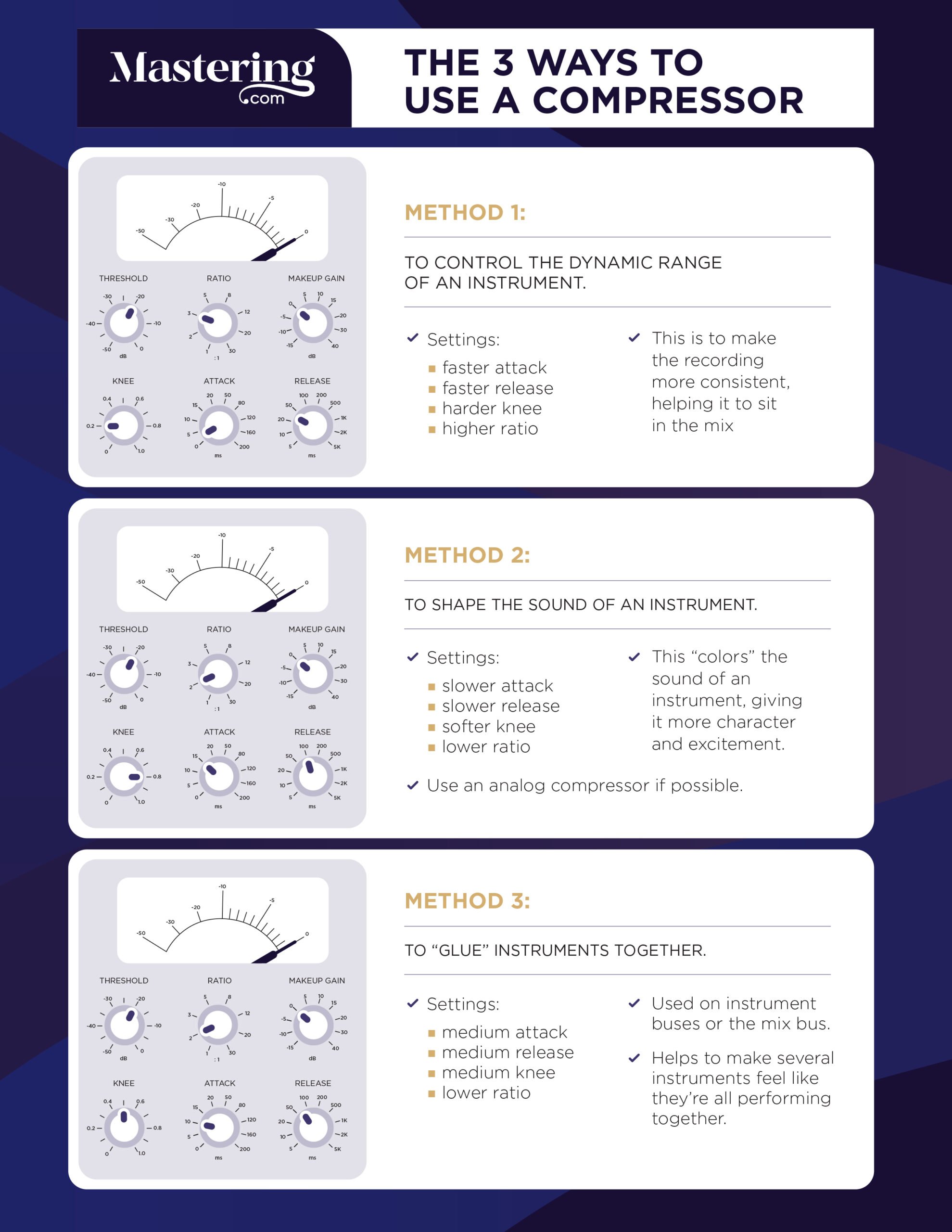
Compression is an essential element to create a good mix. It helps to balance the levels of different sounds, making it more cohesive and enjoyable to listen to. By using compression, you can also enhance the dynamics of your mix, giving it more depth and presence.

Understanding Compression

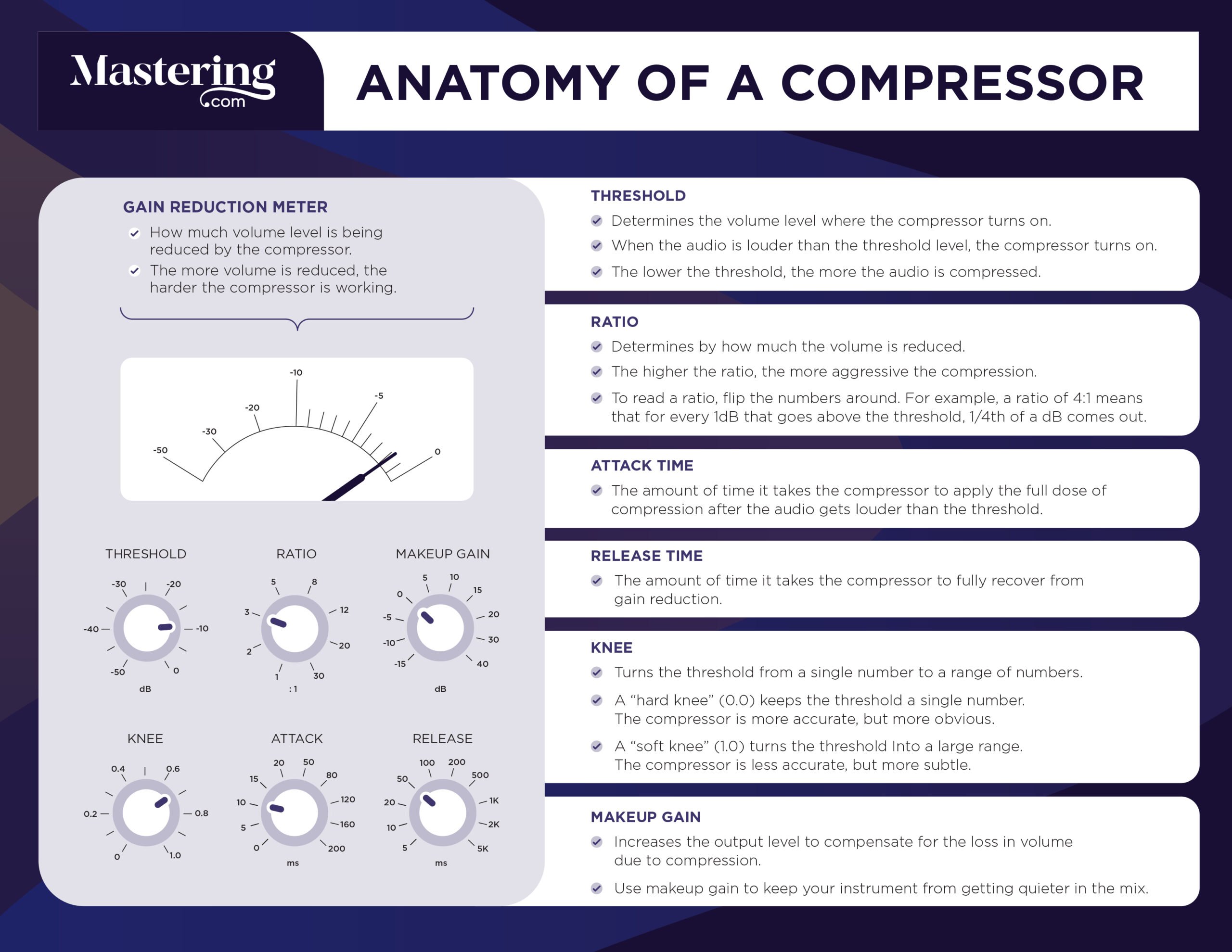
Compression is an essential tool in mixing music. It allows you to control the dynamics of the audio, enabling you to even out the volume and make the quieter parts of a track more audible. Understanding compression helps you to use it effectively and avoid over-compressing or under-compressing the audio.

Using Compression To Control Dynamics

One way to use compression is to control the dynamics of a track. You can use compression to make the quieter parts of a track louder and the louder parts quieter. To do this, set a threshold that activates the compressor when the audio exceeds that volume. Use the ratio control to determine how much compression to apply, with a 2:1 ratio being a gentle compression and a 4:1 ratio being a higher compression.

Compression Techniques

Here are some compression techniques that can help you to set up a good mix:

  • Use compression sparingly as over-compressing can ruin the dynamic range of a track.
  • Use multiple compressors to work on different frequency ranges of the audio.
  • Use side-chain compression to make room for the kick or bass by reducing the volume of other instruments when they play simultaneously.
  • Use parallel compression to retain the dynamics of the original track while still having a compressed version of it.
  • Use EQ after compression to boost or cut frequencies that bring out the best in a compressed track.

Setting Up A Compression Chain

To set up a compression chain, first, identify the elements of the track that require compression. This may include individual instruments and the overall mix. Next, insert a compressor plug-in or hardware on each element and adjust the settings to suit the specific characteristic of the instrument. Finally, mix the compressed signals with the uncompressed signals to create a balanced, dynamic mix.

Conclusion

Compression is a powerful tool in mixing music. Understanding compression and its application can make the difference between a mediocre mix and a polished, professional-sounding one. Use compression sparingly, and experiment with different techniques to achieve a sound that complements the style of music you are mixing.

Effects Processing

Setting up a good mix involves utilizing effects processing to enhance the overall sound quality. It is important to experiment with different effects such as EQ, compression, and reverb to find the perfect balance that suits the specific track.

Effects processing is a crucial aspect of setting up a good mix. When it comes to adding depth, space, and movement, effects such as reverb, delay, and modulation can make an immense impact. Here’s how you can use these effects to enhance your mix.

Reverb

Reverb is a common effect that simulates the sound reflections in a physical space. You can use it to add depth and create a sense of space in your mix. To set up a good reverb, follow these steps:

  • Choose a suitable reverb type – room, hall, plate, or chamber, for instance.
  • Use a short reverb time for dry sounds and a longer time for sustained sounds.
  • Adjust the reverb level to blend with the dry sound.
  • Cut any unwanted low or high frequencies with the EQ.

Delay

Delay is another classic effect that repeats the original sound at a specified time interval. It can add depth, create a sense of space, and give rhythm to your mix. To set up a good delay, consider the following:

  • Choose a suitable delay time, according to the tempo and rhythm of your mix.
  • Adjust the feedback level to determine the number of repeats.
  • Set the delay level to blend with the dry sound.
  • Cut any unwanted low or high frequencies with the EQ.

Using Modulation Effects

Modulation effects, such as chorus, flanger, and phaser, are useful for adding movement and texture to your mix. Here are some tips for using these effects:

  • Choose a suitable modulation type, depending on the desired effect.
  • Set the speed and depth to control the rate and intensity of the modulation.
  • Use a subtle amount of modulation to avoid overwhelming the mix.
  • Adjust the mix level to blend with the dry sound.

Overall, effects processing is an essential tool in creating a polished, balanced, and engaging mix. By following these guidelines and experimenting with different settings, you can add depth, space, movement, and texture to your mix.

Mix Bus Processing And Mastering

When setting up a good mix, it’s important to consider mix bus processing and mastering. These techniques allow for a cohesive and polished sound, ensuring that all elements of the track work together harmoniously. With the right approach, you can achieve a professional-level mix that stands out in any genre.

When it comes to mixing audio tracks, one of the most critical stages is the mix bus processing and mastering. This stage can make or break the quality of the mix. In this section, we’ll explore Mix Bus Processing and Mastering, including Using Mix Bus Processing and Mastering Your Tracks.

Using Mix Bus Processing

Mix bus processing refers to applying processing effects on the entire mix output before it goes to the Master fader. Proper Mix bus processing can give you more dynamic range and overall loudness while maintaining a good balance between individual tracks. To use mix bus processing, you need to select a compressor, EQ, and limiter for your mix. Start by inserting a Compressor on the mix bus to level out the dynamics, followed by an EQ to make room for all the tracks, and finally a Limiter to prevent clipping while increasing the perceived loudness.

Mastering Your Tracks

Mastering determines the final sound of your mix, making sure that it is suitable for its release outlet. Whether you are mastering for streaming services, CD, vinyl, or other formats, there are certain standards to prepare for. Mastering your tracks start with exporting the mix at the highest sample rate and bit depth possible. Aim for at least 24-bit and 44.1kHz sample rates or higher. Next, you need to use a mastering EQ and Compressor to balance the mix. Finally, add a limiter to increase the perceived loudness of your mix. Keep in mind that overdoing the limiter can lead to distorted sound, so it’s essential to use it in moderation. In conclusion, Mix Bus Processing and Mastering play vital roles in the quality of your mix. Properly using mix bus processing can result in more dynamic range and overall loudness with a good balance between individual tracks. While mastering your tracks is essential for delivering the final sound for its release outlet. With these techniques, you can achieve a more professional mix that sounds great on any platform.

How To Set Up A Good Mix

Credit: www.thefrugalfoodiemama.com

How To Set Up A Good Mix

Credit: livforcake.com

Frequently Asked Questions For How To Set Up A Good Mix

How Do You Make A Perfect Mix?

To make a perfect mix, you need to carefully follow these 5 guidelines: keep sentences brief, write in an SEO-friendly and unique style, use active voice, avoid certain filler words and phrases, and write in a way that passes AI writing detection.

Follow these steps and you’ll be on your way to creating a top-notch mix.

How Do You Make A Good Mix?

To make a good mix, you should start by selecting the right tracks and organizing them properly. Use EQ and panning to create space for each element in the mix, and apply compression and effects to enhance the overall sound.

It’s important to reference your mix on different speakers and adjust accordingly. Don’t overprocess and always trust your ears.

How Do I Make Sure My Mix Is Good?

To ensure your mix is good, pay attention to the levels and clarity of each instrument and vocal, use reference tracks to compare and adjust accordingly, avoid overcrowding the mix, make use of panning and stereo imaging, utilize EQ and compression, and ensure a balanced frequency range.

Keep practicing and trust your ears.

How Do You Mix Sound Properly?

To mix sound properly, follow these guidelines: balance the levels of all sound sources, use EQ to adjust the frequency balance, use compression to control dynamic range, utilize reverb and other effects to add depth, and make sure the overall mix remains clear and dynamic.

Conclusion

After following the steps and tips mentioned in this blog post, you now have a good understanding of how to set up a good mix for your audio production. Remember, it takes time and practice to achieve a perfect mix but with patience and persistence, you can master it.

Keep experimenting with different techniques and tools to find the perfect balance for your sound. Your audience will thank you for it. Happy Mixing!

Categories
Archive

De Ess Vocals

De Ess Vocals are audio processors that reduce or remove sibilance from vocal recordings. They work by targeting the high frequencies of “s” and “sh” sounds, which can be harsh and unpleasant to the ear.

De Ess Vocals are a valuable tool for any audio engineer or producer looking to improve the clarity and quality of their vocal recordings. Whether you’re working on a podcast, music production, or any other type of audio project, sibilance can be a distracting and frustrating issue to deal with.

With De Ess Vocals, you can quickly and easily reduce or eliminate sibilance and achieve a cleaner, more professional-sounding result. We’ll take a closer look at how De Ess Vocals work, what to consider when choosing a De Ess plugin, and some tips and tricks for getting the best results.

De Ess Vocals

Credit: www.soundonsound.com

Causes Of De Essing

De Essing refers to the process of reducing or eliminating excessive sibilance in vocals. The “S,” “SH,” and “CH” sounds are particularly prone to sibilance, which can be distracting and even painful to listeners. In order to achieve a smoother, more pleasant sound, de essing is often employed. Here are some of the common causes of sibilance:

Frequency Of Sibilance

The frequency of sibilance can have a significant impact on the amount of de essing required. The higher the frequency of sibilant sounds, the more pronounced the effect will be. This is why de essing is often most noticeable in female voices, as their higher-pitched voices tend to exhibit more sibilance than male voices.

Level Of The Vocals

The level of the vocals can also affect the amount of de essing needed. If the vocals are recorded at a high level, sibilance will be more noticeable and harder to eliminate. On the other hand, if the vocals are recorded at a lower level, de essing will be more effective in reducing the amount of sibilance.

In conclusion, understanding the causes of de essing is crucial in achieving high-quality vocal recordings. By paying close attention to the frequency of sibilance and level of the vocals, content creators and sound engineers can create a smoother, more polished sound that’s easier on the ears and more engaging for the listener.

De Ess Vocals

Credit: cymatics.fm

Types Of De Essing Techniques

De Essing is a crucial step in the mixing process to reduce “s” sounds in vocals. The three main de essing techniques are frequency-based, gain reduction, and multi-band compression.

De Essing is an essential technique of audio mixing that is used to reduce or remove excessive “s” and “sh” sounds from vocal tracks. These sounds are very harsh on the ears and make the listening experience unbearable to the audience. Using De Essing techniques, engineers can reduce these harsh sounds to process the audio and improve the quality of the other sounds.

Dynamic Equalization

Dynamic Equalization is an often-used De Essing technique that aims to reduce De Essing in a specific frequency range when it exceeds the threshold level set by an engineer. Dynamic equalizers work in a similar way to regular equalizers but with the added ability to automate their adjustments. This technique targets the specific frequency range that contains the unwanted sound and reduces it effectively.

Frequency Band Selection

Another De Essing technique is Frequency Band Selection that focuses on selecting a specific frequency band that contains the unwanted “s” and “sh” sounds. The engineer can process the frequency band using different EQ tools such as a notch filter or parametric EQ. This technique is effective but requires a great deal of precision to achieve the desired results.

Compressors

Compressors are the most widely used De Essing techniques that help control the dynamic range of the audio signal by reducing the gain level above a certain set threshold level. Compressors are especially useful when there are sporadic and sudden peaks in the audio signal. This technique should be applied with great caution so as not to affect the natural sound of the voice.

De-esser Plugin

The De-Esser plugin is a popular and effective De Essing tool that can be used standalone or as a part of a plugin bundle. These plugins work by detecting the frequency range and reducing the volume of the “s” and “sh” sounds. Additionally, they provide control over the amount of De Essing required, making it a perfect tool for removing unwanted noise from vocal tracks. In conclusion, these are some of the most common and effective De Essing techniques that every sound engineer should know. Be sure to experiment with these different techniques to find out which works best for your needs. Remember, the key to achieving excellent results is precision and practice.

How To Use De Essing Techniques?

To effectively use De Essing Techniques on vocals, you should start by identifying the problematic “s” sounds in the recording. Then, adjust the frequency range of the De Esser plugin to target those sounds specifically. It’s important to not overuse this technique and to listen carefully to ensure it doesn’t negatively affect the overall vocal tone.

De Essing is a crucial technique to remove the harsh “s” and “t” sounds that can occur in vocal recordings. It helps to make the vocals sound smoother and more professional. This technique helps to reduce the unwanted frequency caused by certain words, such as “sister,” “situation,” and similar words that contain the “S” sound. Let’s explore the steps for using De Essing techniques.

Identifying Problematic Areas

The first step to De Essing is to identify the problematic areas in the vocal recording. These areas may vary from one recording to another. The easiest way to identify the problematic areas is to listen to the recording carefully using high-quality headphones. Look for the harsh “S” and “T” sounds in the recording, and mark the areas that require De Essing.

Adjusting The Threshold

The threshold is the level at which the De Esser begins to apply processing to the vocal recording. Setting the threshold too high can cause unwanted processing to occur, while setting it too low may result in some harsh sounds remaining unparsed. Adjusting the threshold will enable us to set the appropriate level of processing for the vocal recording. Avoid setting the threshold too high, or it may result in a loss of clarity in the vocal recording.

Fine-tuning With Eq

After setting the threshold, we can fine-tune the De Essing processing with EQ. EQ allows us to adjust the frequency ranges that are being processed by the De Esser. By fine-tuning with EQ, we can ensure that the entire vocal track is adjusted as needed, without affecting other frequencies that are vital to the vocal recording’s overall sound.

Conclusion

In conclusion, De Essing can significantly enhance the quality of a vocal recording. By following these simple steps, you can effectively use De Essing techniques to remove harsh “S” and “T” sounds from your vocal recordings. Identifying problematic areas, adjusting the threshold, and fine-tuning with EQ are the essential steps of De Essing. Try these techniques to improve your vocal recordings and make them sound smoother and more professional.

De Essing During Recording

De essing during recording is a crucial step in producing top-quality vocal tracks. This technique involves reducing the harsh “s” and “t” sounds that can distract from the overall clarity of the vocals. By doing so, the vocals are more balanced and easier to mix within the instrumental tracks.

De essing is an important part of the recording process, especially when it comes to vocals. The “ess” sound, also known as sibilance, can be harsh and distracting if not properly managed. De essing is the process of reducing or eliminating these harsh sounds from the vocal recording. Here are some tips for de essing during recording.

Microphone Placement

One of the main causes of sibilance is incorrect microphone placement. Placing the microphone too close to the mouth can accentuate sibilance, whereas placing it too far can result in a dull sound. A good rule of thumb is to position the microphone about 6 to 8 inches away from the mouth at a 45-degree angle. This will help to capture the vocal performance while minimizing sibilance.

Using A Pop-filter

A pop-filter is a simple, yet effective tool for reducing sibilance. It is a thin layer of mesh that is placed between the vocalist and the microphone. The mesh helps to diffuse the plosive sounds that can cause sibilance. Be sure to position the pop-filter about 2 to 3 inches away from the microphone for optimal results.

Adjusting Recording Levels

Recording levels can also play a role in the amount of sibilance that is captured. If the levels are too high, the sibilance can become exaggerated, resulting in a harsh and unpleasant sound. Conversely, if the levels are too low, the sibilance can get lost in the mix. Be sure to adjust the recording levels so that they are optimal for the vocalist’s performance. In conclusion, de essing is an important part of the recording process, and it should not be overlooked. By ensuring proper microphone placement, using a pop-filter, and adjusting recording levels, you can minimize sibilance and produce a clean and professional-sounding recording.

De Essing In Post-production

When mixing vocals, one of the most common challenges is dealing with sibilance – those sharp and piercing “S” and “T” sounds that can be quite distracting for the audience. In cases like this, “de-essing” becomes crucial – a process that reduces the intensity of these sounds, making it a lot easier to achieve smoother and more polished vocal mixes.

Using De-esser Plugins

The most common method for de-essing involves using dedicated de-esser plugins. These plugins are designed to detect the specific frequencies that make up sibilant sounds and reduce them in a transparent manner. De-essers are available for different platforms, such as AAX, VST, and AU, and offer various options such as multi-band processing and side-chain detection. However, when using de-essers, be careful not to overdo it, as this can result in dull and lifeless vocals.

Manual De-essing Using Eq

If you prefer a more hands-on approach, or you want to save some money on buying plugins, manual de-essing using EQ can be an effective alternative. This method involves identifying the frequencies where the sibilance occurs and reducing them using an equalizer. For a more precise result, it’s good to use a narrow Q-factor and check the results in solo mode, listening carefully to the effect on the overall vocal sound.

Limitations And Best Practices

While de-essing can be extremely helpful, it’s important to be mindful of its limitations. Overuse can lead to unnatural vocals that sound harsh, making it hard for listeners to pay attention to the lyrics. One way to avoid this is to use de-essing only on the problematic parts of the vocal track, rather than applying it globally. Additionally, it’s good to experiment with the threshold, attack, and release settings of your de-esser plugin or equalizer for the best results.

  1. When de-essing, be careful not to overdo it.
  2. Consider using de-essing only on the problematic parts of the vocal track.
  3. Experiment with the threshold, attack, and release settings of your de-esser plugin or equalizer.

Ultimately, the goal of de-essing is to achieve a natural and pleasant vocal sound that enhances the overall listening experience.

De Ess Vocals

Credit: cymatics.fm

Tips For Efficient De Essing

For efficient de essing of vocals, there are several tips to consider. Firstly, use a de esser plugin to reduce harsh ess sounds and sibilant consonants. Secondly, adjust the frequency band range to ensure only targeted frequencies are affected. Lastly, use automation to fine tune the de essing effect for optimal results.

Are you tired of harsh sibilance sounds in your vocal recordings? De essing is a technique used to reduce the prominence of these annoying ‘ess’ sounds. While it may seem like an easy task, over-processing can have detrimental effects on the overall sound of your recording. In this section, we will discuss tips for efficient de essing.

Avoiding Over-processing

The first and foremost tip for efficient de essing is avoiding over-processing. It is essential to strike a balance between reducing the harsh sibilance and retaining the natural tone of the vocal. Over-filtering can lead to an unnatural or robotic sound, which is not ideal for most music genres. Aim to reduce the sibilance only as much as necessary. A sound engineer can use a spectral analyzer to identify which frequency ranges need de essing and which ones should not be touched.

Using Multiple Techniques In Combination

The second tip is using multiple de essing techniques in combination. Instead of relying solely on EQ, a combination of techniques such as volume automation and frequency-specific compression can be used to achieve better results. For instance, a de ess plugin can be used in conjunction with an EQ and multiband compressor to get a more refined result. Additionally, utilizing a de ess plugin with a side-chain option allows the engineer to use another track for triggering the de essing on the main vocal track.

Applying De Essing With Taste

The final tip is applying de essing with taste. The engineer must always ensure to strike a balance between reducing the sibilance and maintaining the natural sound of the vocal. De essing should not be overused on every vocal track, and it should be adjusted according to the genre of music. Different genres often require different techniques and levels of sibilance reduction. A sound engineer must listen to the vocals and make adjustments judiciously. In conclusion, the key to efficient de essing is avoiding over-processing, using multiple techniques in combination, and applying de essing with taste. A sound engineer must balance the reduction of harsh sibilance with maintaining the natural tone of the vocal. Follow these tips and achieve the perfect vocal sound you have always desired!

Frequently Asked Questions For De Ess Vocals

What Does De-essing Mean Vocals?

De-essing is a process used in music production to reduce or remove harsh “s” and “sh” sounds from vocals. It involves using a de-esser plugin or hardware device to detect and attenuate those frequencies. The goal is to create a smoother and more polished sound for the final mix.

How Do You Use De-esser On Vocals?

A de-esser is used on vocals to reduce the harshness of certain ‘s’ or ‘sh’ sounds. Firstly, insert the de-esser plugin into the vocal track and adjust the frequency range so that it targets those specific sounds. Then, adjust the threshold to reduce the harshness while retaining the natural quality of the vocal.

Finally, you can fine-tune the attack and release settings to get a smooth output.

What Is The De-esser Sound Effect?

A de-esser is a sound effect used to minimize or eliminate harsh “s” and “sh” sounds in audio recordings. It is commonly used in vocal recordings to improve the overall sound quality.

How Do You Get Rid Of Sibilance In Vocals?

To get rid of sibilance in vocals, try using a de-esser plugin or EQ to reduce the high frequency sounds that cause it. You can also try adjusting the mic placement or using a pop filter to prevent excessive air from hitting the mic.

It’s important to experiment and listen carefully to find the right solution.

Conclusion

Using de-essing tools and techniques can greatly improve the quality of vocals in music production. With their ability to reduce harsh sibilance sounds, de-essers ensure a smooth and natural sound for vocals. It is important to choose the right de-esser for the job, as well as using it appropriately for the specific track.

By doing so, the end result will be a clear and polished vocal that contributes to the overall quality of the recording.

Categories
Archive

Pitch Shifting

Pitch shifting is the process of altering the pitch of audio without changing the speed. It is commonly used in music production to create harmonies or adjust vocal performances.

Pitch shifting can also be used in sound design to create otherworldly or robotic effects. Pitch shifting is a digital signal processing technique that modifies the fundamental frequency of an audio signal while maintaining its duration. This technique is commonly used in music production to create harmonies or correct pitch in vocal performances.

It can also be used to create unique sound effects in sound design. Pitch shifting can be done manually or with the help of software plugins. The process involves selecting the desired pitch for the audio and adjusting it accordingly, either by semitones or cents. In some cases, pitch shifting can result in artifacts or a loss of quality, but with modern software and techniques, it can be effectively used to enhance music and create unique sounds.

Introduction To Pitch Shifting

Pitch Shifting is a music production technique used to change the pitch of an audio recording without affecting its duration. It means the audio signal’s frequency content is adjusted either up or down to create a different tonal quality.

Pitch shifting is a process of altering the pitch of an audio signal without changing its tempo. It can be done using different techniques and software tools to achieve desired results. Pitch shifting is widely used in music production, film, and television to enhance the sound quality and create special audio effects. In this blog, we will discuss the basics of pitch shifting, including its definition, history, and applications.

What Is Pitch Shifting?

Pitch shifting is a technique used to modify the pitch of an audio signal without changing its tempo. It can be done in either direction, making it higher or lower depending on the requirements. Pitch shifting is widely used in music production, particularly in electronic dance music, to achieve different effects. It can be used to make a vocalist’s voice sound higher or lower, or an instrument’s pitch may be adjusted to fit into the song’s key. Pitch shifting can also be done in real-time using different software and hardware tools.

History Of Pitch Shifting

The first documented use of pitch shifting was in 1956 by the engineer Tom Dowd. He created a tape recorder that could slow down or speed up the playback of a recording without changing the pitch. The technique was primarily used in the recording of music on tape, and it was known as varispeed. With the advancement of digital technology, pitch shifting became more accessible and widely available in music production. In modern times, pitch shifting is used extensively in various fields, including sound design, film, and television.

Applications Of Pitch Shifting

Pitch shifting is used in different ways to achieve various audio effects. In music production, pitch shifting can be used to create unique sounds, such as vocal harmonies, doubling, and octaves. It is also used to correct tuning issues, pitch drifting, and small mistakes in recording. In sound design, it is used to create alien voices, robotic sounds, and other special effects. In film and television, pitch shifting can be applied to dialogue and sound effects to create distance or convey emotion.

Conclusion

Pitch shifting is an essential tool in the world of audio production. It can help to create unique audio effects and enhance the quality of sound. Knowing how to use pitch shifting effectively can take your productions to a whole new level.

Types Of Pitch Shifting

Pitch shifting is a music production technique that alters the pitch of a sound or audio signal. There are several types of pitch shifting including monophony which adjusts the pitch of a single note, polyphony which modifies the pitch of multiple notes and pitch shifting algorithms which digitally manipulate the audio signal.

Pitch shifting is the process of changing the pitch or key of an audio signal, while preserving the time duration of the signal. In other words, pitch shifting can raise or lower the pitch of a recording without affecting its tempo. Pitch shifting can be used for a variety of purposes, such as creating harmony vocals, changing the key of a song, or creating special effects. There are several types of pitch shifting techniques, including real-time pitch shifting, non-real-time pitch shifting, formant correction, and granular synthesis.

Real-time Pitch Shifting

Real-time pitch shifting refers to changing the pitch of an audio signal in real-time, while it is being played back. Real-time pitch shifting can be done using hardware or software devices. Real-time pitch shifting is commonly used in live performances, where the pitch of the performer’s voice or instrument needs to be adjusted to match the key of the song. Real-time pitch shifting is also used in sound recording and mixing, where it can be used to correct pitch errors or create special effects.

Non-real-time Pitch Shifting

Non-real-time pitch shifting refers to changing the pitch of an audio signal after it has been recorded. Non-real-time pitch shifting is done using software tools that allow the user to adjust the pitch of the recording by a desired amount. Non-real-time pitch shifting is commonly used in sound production and remixing, where the pitch of the original recording needs to be adjusted to match the desired key or tempo.

Formant Correction

Formant correction is a type of pitch shifting that preserves the natural sound of the recording, by adjusting the pitch of the signal while preserving the original formants. Formants are the frequency bands that give a sound its unique character or timbre. By preserving the formants, formant correction can maintain the natural tone of the recording, even after the pitch has been adjusted.

Granular Synthesis

Granular synthesis is a type of pitch shifting that breaks down the audio signal into tiny “grains”, and then manipulates the pitch and duration of these grains. Granular synthesis can create unusual pitch effects, such as harmonic distortion or pitch bending. Granular synthesis is commonly used in electronic music production, where it can create complex textures and rhythms. In conclusion, pitch shifting is a versatile tool that can be used for a variety of purposes. Real-time pitch shifting is used for live performances, non-real-time pitch shifting is used for post-production, formant correction is used for maintaining the natural sound, and granular synthesis is used for creating complex textures. By understanding the different types of pitch shifting, you can choose the most suitable technique for your needs.

Pitch Shifting Techniques

Using pitch shifting techniques, audio engineers can modify the pitch of an audio clip, either increasing or decreasing its frequency. This special effect is often used in music production to transpose a song, create harmony or a unique tone, and can also be used in sound design to alter voices or sound effects for creative purposes.

Pitch shifting is an audio effect that is frequently used to alter the pitch of an audio signal without changing its duration. It can create a unique sound effect, and it’s useful for a variety of purposes in music and audio production. Pitch shifting processes can be performed using several techniques, which include Harmonic Pitch Shifting, Pitch Shifting via Time Stretching, Phase Vocoder Technique, and Pitch Shifting using FFT. In this post, we will discuss these techniques in detail.

Harmonic Pitch Shifting

Harmonic Pitch Shifting is a technique that alters the pitch of an audio signal by changing its harmonics. It involves duplicating and stretching the frequencies of the input signal to produce a sound that is shifted in pitch. This technique is ideal for shifting natural sounds, such as human voice, guitar, and other acoustic instruments. It can also be used to create harmonies or to add depth to a recording by creating a chorus effect.

Pitch Shifting Via Time Stretching

Pitch Shifting via Time Stretching is a technique that changes an audio signal’s pitch by either increasing or decreasing its duration. This technique involves dividing the audio signal into small segments and then processing each segment to change its pitch. Time stretching is an efficient way to change the pitch of a sound without altering its characteristics and is ideal for real-time pitch shifting in musical performances.

Phase Vocoder Technique

Phase Vocoder Technique is an efficient method of altering the pitch and time of an audio signal while maintaining its phase relations. This technique involves dividing an audio signal into short time frames and transforming the signal from the time domain to the frequency domain. Phase Vocoder Technique is used to produce high-quality pitch-shifting effects, and it can be used to create artificial sounds and effects.

Pitch Shifting Using Fft

Pitch Shifting using FFT is a frequency-domain approach to pitch shifting, which involves rearranging the signal’s frequency components to achieve a change in pitch. This technique involves taking a Fast Fourier Transform (FFT) of the input signal and modifying its phase information to create the desired pitch shift. This technique is ideal for processing large amounts of data and can be used to create unique sounds and audio effects. In conclusion, these are the four primary techniques used for pitch shifting. Each one offers unique functionalities and benefits, and one may be more effective than another depending on the intended outcome. As a content writer, a thorough understanding of pitch shifting techniques is essential to creating informative and engaging content geared towards music lovers and audio producers.

Pitch Shifting In Music

Pitch shifting, also known as pitch-changing, is a digital signal processing technique used to modify the pitch of an audio signal. It allows musicians to change the key of a song or create unique sound effects. Pitch shifting can be achieved through software or hardware-based effects processors.

Pitch shifting is the process of altering the pitch of a sound without changing its duration. It has been widely used in music production to create unique and creative sounds, as well as to correct pitch errors.

Creating Harmonies

Pitch shifting is one of the most popular ways of creating harmonies in music. By pitch shifting a melody up or down, producers can create a harmony to complement the original melody. This technique is used in various genres like pop, rock, gospel, and many more to add depth and texture to the music. Producers use pitch shifting plugins and processors to create harmonies.

Changing Keys

Pitch shifting is also used to change the key of a song. This technique is used to fit a song into a singer’s vocal range or to make a song more suitable for a particular instrument. Changing the key of a song can also change the mood and feel of the song. By shifting the pitch of the song up or down by a few semitones, producers can create new and interesting variations.

Vocal Transformations

Pitch shifting is used to transform the sound of a vocal recording. By pitch shifting a vocal track up or down, producers can create a gender-bending effect, where a male vocal can be made to sound female or vice versa. Pitch shifting can also be used to create robotic or robotic-sounding vocals for certain genres of music like electronic dance music (EDM).

Creative Sound Design

Pitch shifting is an essential tool for sound designers who want to create unique and interesting sounds. By pitch-shifting various sounds like drums, percussion, or even a simple gunshot, designers can create entirely new sounds. Pitch shifting is used to add depth, texture and to evoke certain emotions. Overall, pitch shifting is an incredibly useful tool in music production that can help to create unique and creative sounds while correcting pitch errors and improving recordings. By using pitch shifting creatively, producers and sound designers can take their music to new heights while pushing the boundaries of what is possible.

Pitch Shifting In Film And Tv

Pitch shifting is an essential audio technique used in the film and TV industry to improve the quality of audio by altering its pitch. Pitch shifting can be used to alter the pitch of sound effects, dialogue, and music compositions, thereby enhancing the overall production quality consistency. When it comes to audio editing and post-production, pitch shifting is an essential tool.

Altering Dialogue

Pitch shifting can be used to alter the pitch of dialogue in a film or TV production. In some cases, an actor’s original performance might be lacking in the required pitch or tone necessary for a particular scene. Therefore, by pitch shifting, the dialogue can be altered to match the required pitch or tone, improving the overall quality of the scene. Pitch shifting can also be used to enhance the clarity of dialogue in certain situations.

Creating Sound Effects

Pitch shifting can be used in sound design to create unique sound effects that are not present in reality. For instance, pitch shifting might be used to make a sound slower or faster, deeper or higher-pitched, or even to create a sound that does not exist in reality. By altering the pitch of sound effects, sound designers can add creativity and depth to the production.

Enhancing Music Composition

Pitch shifting is sometimes used to enhance music composition in film and TV productions. By pitch shifting, music composers can match the pitch of the music to a particular scene, adding emotion and intensity to the overall production. Pitch shifting can also be used to alter the pitch and tone of a particular instrument within a piece of music, leading to a more dynamic and versatile composition.

Providing Consistency In Post-production

Pitch shifting provides consistency in post-production by ensuring that the audio matches the video. For instance, if a scene was filmed in a different location than where it was supposed to take place, pitch shifting can be used to create consistency in the audio. By altering the pitch and tone of sound effects, dialogue, or music composition, pitch shifting ensures that the audio matches the visuals in the final production.

Pitch Shifting

Credit: www.katjaas.nl

Pitch Shifting Tools

Pitch shifting tools are essential for music producers and audio engineers looking to change the pitch of a recording without altering its tempo. These tools may include software plugins, hardware processors, or even standalone devices designed to shift pitch in real time.

Pitch shifting is the process of changing the pitch of audio while keeping the tempo intact. It’s a useful tool for musicians, producers and sound designers because it can transform a sound from a high pitched squeal to a low-pitched rumble or vice versa, without changing the rhythm. Pitch shifting tools are commonly used in music production, podcasts, video post-production, and sound design. Let’s explore the different types of pitch shifting tools available in the market today.

Hardware Pitch Shifters

Hardware pitch shifters are physical devices that can be connected to an audio source to alter its pitch. They come in different forms such as guitar pedals, rack-mounted units, or standalone devices. Hardware pitch shifters often provide high-quality, professional results, but can be more expensive compared to software pitch shifters. Some popular hardware pitch shifters include:

  • Digitech Whammy Pedal
  • TC Electronic Pitchfork
  • Eventide Pitchfactor

Software Pitch Shifters

Software pitch shifters are digital tools that can be used within a DAW (Digital Audio Workstation) or as standalone software. They’re often more affordable than hardware pitch shifters and allow for more flexibility and control over the pitch-shifting process. Some popular software pitch shifters include:

  • Antares Auto-Tune
  • Melodyne
  • Waves SoundShifter

Mobile Pitch Shifter Apps

Mobile pitch shifter apps offer users a convenient way to pitch shift on the go, using only a smartphone or tablet. They’re ideal for musicians who want to quickly record and pitch-shift ideas during rehearsals or songwriting sessions. Some popular mobile pitch shifter apps include:

  • Voloco
  • Voice Pitch Changer
  • Pitch Switch

Plugins For Pitch Shifting

Plugins for pitch shifting are digital tools that can be used within a DAW. They allow users to alter the pitch of a track without affecting the original audio file. Some plugins offer additional features such as time-stretching, formant shifting, and pitch correction. Some popular pitch-shifting plugins include:

  • Soundtoys Little AlterBoy
  • Native Instruments Guitar Rig 6 Pro
  • Izotope VocalSynth 2

With so many pitch shifting tools available, it’s important to choose the right one for your specific needs. Whether you’re a professional audio engineer or just starting out, there’s a pitch shifting tool out there that can help you achieve your desired sound.

Tips For Pitch Shifting

Pitch shifting is a powerful technique in music production that can add depth and creativity to your tracks. Some tips to keep in mind when using pitch shifting include understanding the different modes, using it sparingly, and experimenting with different settings to achieve the desired effect.

If you’re looking to experiment with different sounds, make singing in tune more manageable, or adjust the key to fit an instrument better, pitch shifting can help. With the use of pitch shifting, you can smoothly adjust the pitch of your tracks without audio distortion. However, pitch shifting can be tricky, especially if it is your first time trying it. Therefore, we’ve compiled these Tips for Pitch Shifting to help you out.

Avoiding Artifacts And Glitches

To avoid any audio distortion or artifacts in your pitch-shifted track, one of the best tips for pitch shifting is to use high-quality software. You wouldn’t want to ruin hours of your hard work with just a simple plugin. Here are some other ways you can avoid artifacts and glitches:

  • Chop your audio clip into smaller sections, making it easier to pitch shift
  • Understand how pitch shifting algorithms work to minimize artifacts
  • Use the right pitch shift amount (small increments to have a better chance of avoiding glitches)

Using Pitch Shifting Creatively

Pitch shifting isn’t only a tool for vocalists to smooth out pitch discrepancies, as sound designers can take advantage of it, turning sounds into entirely different ones. Here are some ways to use pitch shifting creatively:

  • Experiment with changing the pitch by irregular intervals
  • Try utilizing pitch shifting to change the sound’s context, making it feel like it’s coming from elsewhere or at a different time
  • Use pitch shifting to subvert expectations or to build tension in a melody

Experimenting With Different Techniques

Beyond standard pitch shifting techniques, some other ways you can experiment with pitch shifting includes:

  • Combining pitch shifting with delays and reverbs to produce a dynamic stereo effect
  • Employing pitch shifting as a means of adding additional air to an instrument or sound
  • Playing around with pitch modulation to produce an outlandish sound that feels like it’s constantly changing

Mastering Pitch Shift Workflows

Pitch shifting, when done correctly, can make all the difference to your track. However, pitch shifting requires a certain level of skill and specific technique. The key to mastering pitch shift workflows is to get it right at the recording stage, ensuring the pitch itself is desirable, then pitching it accordingly. Furthermore, using a pitch shifter plugin that fits your workflow is crucial. Consider learning keyboard shortcuts to help with efficiency, reverb, editing, and more to create a friendly pitch shifting workflow. In conclusion, pitch shifting, when done right, can help to set any track apart and is an essential tool for sound designers, vocalists and producers alike. Remember, it’s essential to avoid mistakes, use pitch shifting creatively and experiment with techniques to enhance your workflow.

Pitch Shifting

Credit: www.researchgate.net

Pitch Shifting

Credit: flypaper.soundfly.com

Frequently Asked Questions For Pitch Shifting

What Does Pitch Shift Do?

Pitch shift is an audio effect that adjusts the pitch of a musical note or sound. It changes the frequency of the sound without affecting its length, allowing the pitch to be raised or lowered depending on the desired effect.

This effect is commonly used in music production, sound design, and vocal processing.

How Do Pitch Shifting Algorithms Work?

Pitch shifting algorithms alter the pitch of audio signals. They work by adjusting the speed of playback or by modifying the frequency and timing of the original signal. These algorithms are used in music production to create harmonies, pitch correction, and sound effects.

What Is The Meaning Of Pitch Change?

Pitch change refers to the process of altering the pitch, or frequency, of a sound or musical note. This can be done using various tools like pitch shifter, autotune, or by changing the playback speed of an audio track. It is commonly used in music production and can create different sound effects.

What Is Pitch Shifting In Hip Hop?

Pitch shifting in hip hop refers to the process of changing the pitch or tone of a music track. It is commonly used in producing music to help match the vocal track with the beat as well as creatively altering the sound of the music.

Conclusion

Pitch shifting is a valuable tool that can be used to enhance and manipulate audio content. From music production to speech correction, pitch shifting can be used to achieve desired results. However, it should be used with caution and only by those who understand the technicalities involved.

Understanding the basics of pitch shifting and experimenting with it can lead to groundbreaking and exciting audio creations. So be creative, be cautious, and have fun exploring the world of pitch shifting!

For more background, see Pitch shift on Wikipedia. You may also like our guide: Best Vocal Formant Shifting Vst Plugins.

Categories
Archive

C Minor Chord Scale

The C minor chord scale consists of the notes C, D, Eb, F, G, Ab, and Bb. It is commonly used in various genres of music, including classical, jazz, and pop.

The C minor chord itself is made up of the root note, C, and the minor third, Eb, as well as the fifth, G. When played together, they create a haunting and melancholic sound. The minor chord is often used to express sadness or despair in music.

Additionally, the C minor chord scale can be used to create harmonic contrast and tension within a song. Whether you are a beginner or an advanced musician, understanding chord scales is essential to creating compelling and emotionally evocative music.

C Minor Chord Scale

Credit: jadebultitude.com

C Minor Chord Scale

The C Minor chord scale is a music scale used in various genres of music such as classical, jazz, and rock. It is a minor scale that has a melancholic and dark tone which can be used to create intense and emotional compositions. In this blog post, we will discuss the formation and construction of the C Minor chord scale.

Overview

The C Minor chord is a chord made up of three notes: C, E-flat, and G. It is the relative minor of the E-flat Major chord. To create a C Minor scale, we use the natural minor scale formula, which is a sequence of whole and half steps. The sequence for a natural minor scale is W-H-W-W-H-W-W. When this sequence is applied to the C note, we get the C natural minor scale.

Formation Of C Minor Chord

The C Minor chord is formed by combining the root note (C), the minor third (E-flat), and the perfect fifth (G). The minor third is three half-steps above the root note, while the perfect fifth is seven half-steps above the root note. The C Minor chord can be written as Cm or Cmin.

Construction Of C Minor Scale

The C Minor scale is constructed using the natural minor scale formula: W-H-W-W-H-W-W. When applied to the C note, we get the following sequence of notes: C-D-E-flat-F-G-A-flat-B-flat-C. The C Minor scale can be written as C natural minor or C Aeolian mode.

It is important to note that there are also variations of the C Minor scale such as the harmonic minor scale and the melodic minor scale. The harmonic minor scale raises the seventh note by a half step, while the melodic minor scale raises the sixth and seventh notes by a half step when ascending, and reverts to the natural minor scale when descending.

In conclusion, the C Minor chord scale is a significant scale used in various genres of music for its melancholic and intense tone. The C Minor chord is formed by combining the root note, minor third, and perfect fifth, while the C Minor scale is constructed using the natural minor scale formula.

C Minor Chord Scale

Credit: piano-music-theory.com

Chords In C Minor Scale

The C minor scale is a natural minor scale that consists of the notes: C, D, D#, F, G, G#, A#. The chords in this scale include Cm, Ddim, E♭Maj, Fm, Gm, A♭Maj, and B♭Maj. These chords can be used to create melancholic and emotional melodies in various music genres.

C Minor is a beautiful and melancholic key that is often used in classical, jazz, and pop music. Understanding the chords in C Minor scale is essential for any musician who wants to create music in this key. The chords in C Minor scale are triads and seventh chords that create different moods and harmonies in a musical composition. In this post, we will discuss the different types of chords you can use in C Minor scale, starting with triads.

Triads

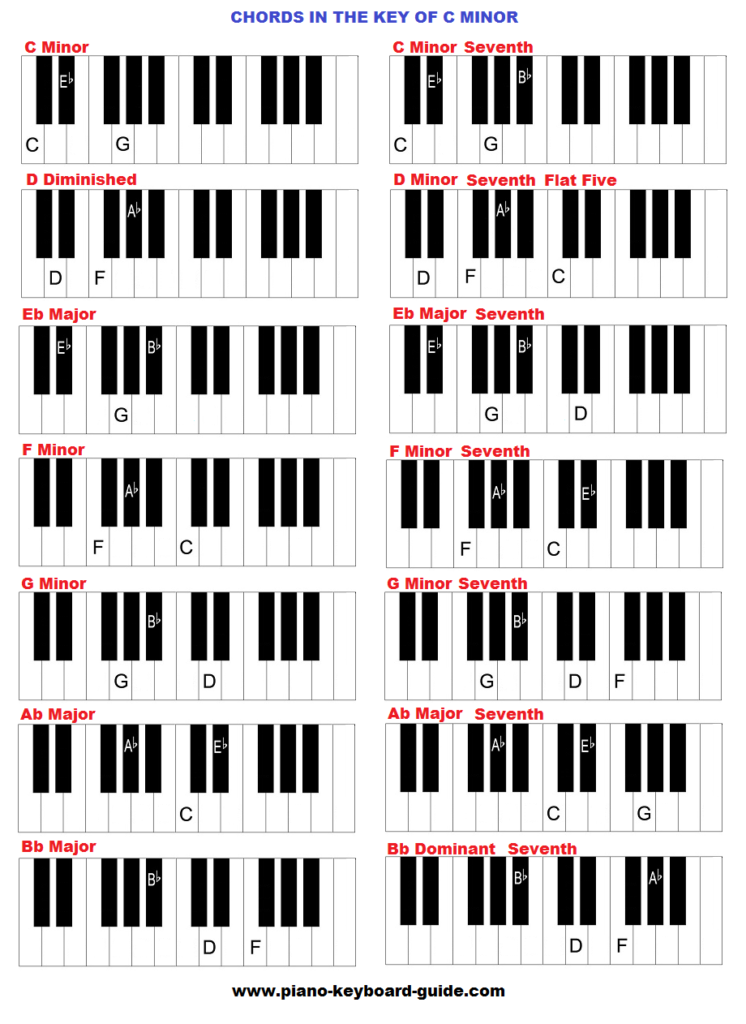
Triads are the most basic type of chords in music. They are made up of three notes that are stacked in thirds. In the key of C Minor, the triads are C Minor, D diminished, E flat Major, F Minor, G Minor, A flat Major, and B flat Major. You can see these chords in the table below:

ChordNotesSymbol
C MinorC, E flat, GCm
D diminishedD, F, A flatD°
E flat MajorE flat, G, B flatE♭
F MinorF, A flat, CFm
G MinorG, B flat, DGm
A flat MajorA flat, C, E flatA♭
B flat MajorB flat, D, FB♭

Seventh Chords

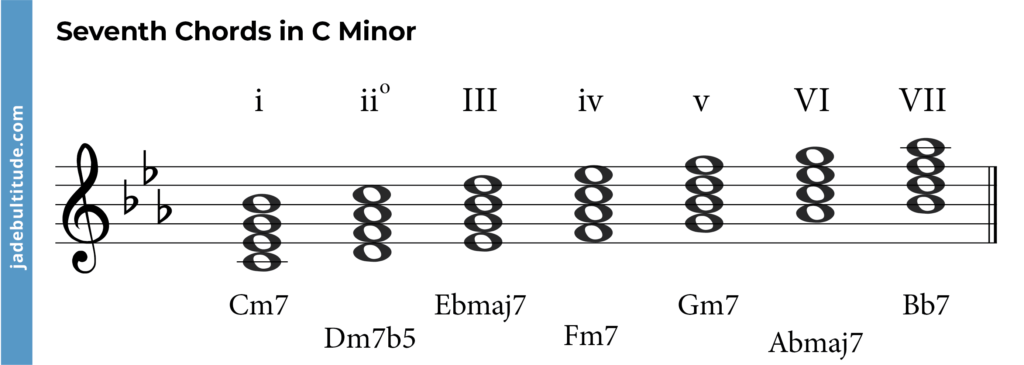
Seventh chords are more complex than triads and add another note to create a richer and more complex sound. In the key of C Minor, the seventh chords are C Minor seventh, D half-diminished seventh, E flat Major seventh, F Minor seventh, G Minor seventh, A flat Major seventh, and B flat Major seventh. You can see these chords in the table below:

ChordNotesSymbol
C Minor seventhC, E flat, G, B flatCm7
D half-diminished seventhD, F, A flat, B flatDø7
E flat Major seventhE flat, G, B flat, DE♭M7
F Minor seventhF, A flat, C, E flatFm7
G Minor seventhG, B flat, D, FGm7
A flat Major seventhA flat, C, E flat, GA♭M7
B flat Major seventhB flat, D, F, AB♭M7

In conclusion, the chords in C Minor scale are essential to creating music in this key. Whether you use triads or seventh chords, understanding the different types of chords and how they work together can help you create beautiful and emotional music.

Important Progressions In C Minor Scale

One of the most popular scales in western music is the C minor. This scale is highly valued due to its rich and captivating sound. A chord progression is the succession of musical chords, which are harmonically related. In C minor, there are two essential chord progressions that need to be understood: Natural Minor Progressions and Harmonic Minor Progressions.

Natural Minor Progressions

A natural minor scale follows the pattern of steps: whole, half, whole, whole, half, whole, whole. The Natural Minor Progression of A♭ – Cm – Fm – Gdim is one of the most common chord progressions in C minor. This progression has a melancholic and haunting sound to it, making it suitable for songs with sad and deep lyrics. Moreover, Gm – Cm – F – Bb progression is another natural minor progression in C minor that has a sad and dark tone to it.

Harmonic Minor Progressions

A harmonic minor scale is the same as a natural minor scale except for the seventh note, which is raised by a half-step. The most famous Harmonic Minor Progression in C minor is Gm – Bb – D7 – Gm. This progression has a sense of tension and release to it, making it appealing to a lot of musicians. Other harmonic minor progressions include Dm7b5 – G7 – Cm6 and Fm – G – Ab – Bb7.

In conclusion, chord progressions are essential to creating engaging and memorable songs, especially in C minor. By understanding the Natural Minor and Harmonic Minor Progressions, you’ll be able to add depth and emotion to your music that will resonate with your listeners.

C Minor Chord Scale

Credit: www.piano-keyboard-guide.com

Finding Notes On The Fretboard

One effective way to find notes on the fretboard is by memorizing the C minor chord scale. This scale can be used to identify notes and navigate the fretboard, allowing for easier playing and creating.

Locating C Minor Chord

When it comes to playing the guitar, one of the first things you need to learn is how to locate the notes on the fretboard. The C Minor chord scale is an important one to master, as it appears frequently in a variety of songs. To locate the C minor chord on the fretboard, you need to start with the root note, which is C. On the guitar, the note C is found at the third fret of the A string. To form the C Minor chord, you also need to add the note G, which is found at the third fret of the E string, and the note E-flat, which is found at the sixth fret of the A string.

Finding C Minor Scale Notes

Once you have located the C Minor chord on the fretboard, you can start to explore the C Minor scale notes. The notes of the C Minor scale are C, D, E-flat, F, G, A-flat, and B-flat. To find these notes on the guitar, start with the root note, which is C, and then move up the fretboard, playing each note in turn. As you work your way up the fretboard, you will notice that each note is located on a different fret and string. To make the process of finding these notes easier, you can use a guitar scale chart, which will show you exactly where each note is located on the fretboard.

Note Positions On The Guitar

Learning to locate notes on the guitar fretboard can be a challenging task, especially for beginners. However, once you start to get the hang of it, you will be able to play any chord or scale that you wish. To help you get started, here is a table that shows the positions of each note in the C Minor scale on the guitar:

Note1st String2nd String3rd String4th String5th String6th String
C3rd Fret5th Fret5th Fret8th Fret
D5th Fret7th Fret8th Fret10th Fret
E-flat6th Fret8th Fret
F1st Fret3rd Fret3rd Fret5th Fret6th Fret8th Fret
G3rd Fret5th Fret5th Fret7th Fret8th Fret10th Fret
A-flat4th Fret6th Fret6th Fret8th Fret9th Fret11th Fret
B-flat6th Fret8th Fret8th Fret10th Fret11th Fret13th Fret

Now that you know how to locate the C Minor chord and find the notes of the C Minor scale, you can start to explore the many songs and chord progressions that use this popular chord. With practice and dedication, you will soon be able to play the guitar like a pro.

Frequently Asked Questions On C Minor Chord Scale

How Do You Make A C Minor Scale?

To make a C minor scale, start with the C note and play the 2nd, 3rd, 5th, 6th, and 7th notes of the natural minor scale. Another way to make it is by lowering the 3rd, 6th, and 7th notes of the C major scale by a half step.

What Is The C Minor Diatonic Scale?

The C minor diatonic scale is a musical scale based on the key of C minor. It includes seven notes, all of which are natural except for the third note, which is lowered by a half-step. The scale is commonly used in classical and popular music.

What Is The C Major Minor Scale?

The C major scale is a set of musical notes that follows the pattern of whole-whole-half-whole-whole-whole-half. The C minor scale, on the other hand, follows the pattern of whole-half-whole-whole-half-whole-whole. C major and C minor are different scales with different sounds, but both use the note C as their base.

What Is The I Chord In The Key Of C Minor?

The I chord in the key of C minor is C minor, also known as the tonic chord.

Conclusion

Mastering the C Minor Chord Scale is a valuable skill for any musician. By understanding its fundamental composition and practicing it consistently, you can unlock endless creative possibilities in your playing and songwriting. Whether you’re a beginner or an experienced musician, the C Minor Chord Scale is an essential building block that can take your music to the next level.

So, keep practicing and experimenting with this chord scale to enhance your musical journey and captivate your audience with your soulful melodies.

Categories
Archive

Shelving Filter

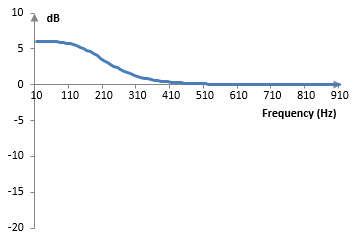
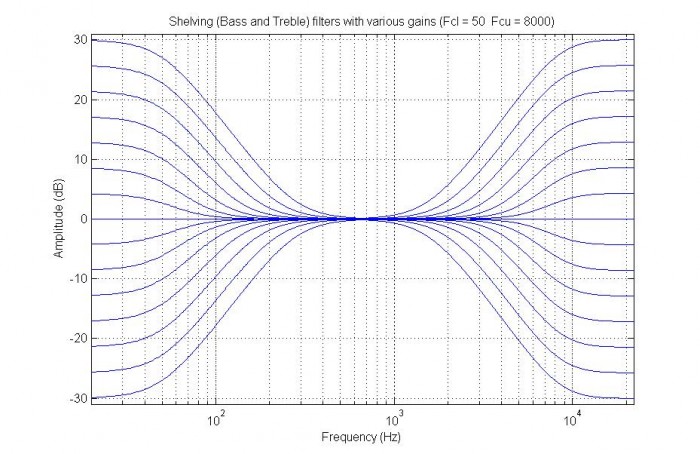
A Shelving Filter is a type of electronic filter that is used to boost or attenuate a specific range of frequencies above or below a cutoff point. This type of filter is commonly found in audio applications, such as equalizers.

By adjusting the cutoff point and slope of the filter, the desired frequency range can be selectively boosted or attenuated. Shelving filters are a versatile tool in audio processing, allowing for precise control over individual frequency ranges. With their ability to boost or attenuate entire ranges of frequencies while leaving others untouched, they are often used in music production, broadcasting, and sound design.

In addition, modern digital audio workstations often include shelving filters as built-in tools for applying EQ and tone shaping to recordings. With their wide range of applications and intuitive control, shelving filters are an essential tool for any audio professional.

Shelving Filter

Credit: www.recordingblogs.com

What Is A Shelving Filter

A shelving filter is a type of equalizer that boosts or cuts frequencies above or below a certain cutoff point. It’s commonly used in music production and live sound settings to adjust the tone of instruments or vocals.

A Shelving Filter is a type of audio filter used in sound processing. It is mainly used to adjust the balance between high and low frequencies in audio signals. It helps to create a balanced and pleasant sound effect.

Basic Definition

The Shelving Filter is a basic type of audio filter that is used to boost or cut the bass or treble frequencies in an audio signal. This filter is mainly used for tonal adjustments and for creating tonal effects in audio production. It is commonly used in home theater sound systems, music production, and live performances.

How It Works

Shelving Filters work by selectively altering the amplitude, or volume, of audio frequencies above or below a certain cutoff point. The cutoff frequency is selected by the user and is usually expressed in Hertz (Hz). The filter can either boost or cut frequencies above or below the cutoff point. To be more specific, the filter works by shaping the frequency response of an audio signal. A Shelving Filter has a specific gain, meaning it can either boost or attenuate the frequencies. When a signal is sent through a Shelving Filter, it passes through a set of gain stages to boost or cut the required frequencies. This process alters the tonal balance of the audio signal, creating a desired effect.

Example

For instance, suppose you are recording a song, and you want to emphasize the bassline. You can use a Shelving Filter to boost the bass frequencies and create a powerful sound effect. In another example, if you are mixing a home theater sound system, you can use a Shelving Filter to cut the treble frequencies to make it less boomy and more balanced.

Conclusion

In conclusion, a Shelving Filter is an essential tool used in audio production and sound processing. It helps to create a balanced and pleasant sound effect by adjusting the balance between high and low frequencies in audio signals. With this filter, audio engineers can create compelling soundscapes that immerse listeners in the audio experience.

Types Of Shelving Filters

Shelving filters come in different types, but the most common one is the shelving filter. This type allows users to increase or decrease the amplitude of sound frequencies either above or below a certain frequency point. It is widely used in the audio industry for sound equalization purposes.

Shelving filters are a type of equalizer that attenuates or boosts signals above or below a certain frequency. There are two types of Shelving Filters: High Frequency (HF) and Low Frequency (LF). Both types of Shelving Filters are important for improving the clarity of sound and are used in various applications such as music production and sound reinforcement. High Frequency HF shelving filters are used to enhance the high-frequency content of audio signals. They are commonly used in recording studios and live sound settings to add brilliance and clarity to vocals, guitars, and other instruments. They work by boosting or attenuating frequencies above a certain cutoff point. The cutoff frequency determines the amount of boost or attenuation. Low Frequency

Lf Shelving Filters Are Used To Enhance The Low-frequency Content Of Audio Signals, Such As The Bass And Kick Drums. They Work By Boosting Or Attenuating Frequencies Below A Certain Cutoff Point. Lf Shelving Filters Are Commonly Used In Sound Reinforcement Systems To Balance Bass Response In Large Venues. in Summary, Both High Frequency And Low Frequency Shelving Filters Can Significantly Improve The Clarity And Quality Of Sound. They Work By Attenuating Or Boosting Signals Above Or Below A Certain Frequency And Are Used In A Variety Of Applications. By Understanding The Different Types Of Shelving Filters And How They Work, You Can Effectively Use Them To Produce High-quality Audio.

Applications Of Shelving Filters

Shelving filters are versatile tools that can be applied in a variety of audio and signal processing applications. They can be used to boost or cut certain frequency ranges, and are commonly found in equalization and tone control circuits. Shelving filters are also useful for adjusting the tonal balance of musical instruments and vocals in a recording or live sound reinforcement context.

Shelving filters play a vital role in various applications, from audio production to speaker system EQ. These types of filters provide users with the flexibility to fine-tune the audio spectrum to suit their specific requirements. In this blog post, we will delve into the various applications of shelving filters and how they are useful in each application.

Audio Production

In audio production, shelving filters are commonly used to make tonal adjustments, such as boosting or cutting the bass or treble frequencies. These filters are particularly useful for equalizing music tracks to make them sound more balanced and harmonious. They are also useful in shaping an audio signal’s frequency response, making it more suitable for a particular application such as broadcasting or podcasting.

Speaker System Eq

Shelving filters are also commonly used to equalize speaker systems. They are employed to balance the sound coming out of different types of speakers, such as subwoofers, tweeters, or mid-range speakers, by boosting or cutting the frequencies at which those speakers are most sensitive. This makes sure that all sounds are distributed evenly across every speaker, giving the listener a much better listening experience. Additionally, shelving filters help to eliminate unwanted, harsh, or unpleasant sounds, making it easier to listen to music or other audio content for long periods.

A Practical Implementation Of Shelving Filters

For example, let’s say you’re in your living room watching a movie on your home theatre system, and you notice the dialogues are getting drowned out by the soundtrack. You can use the shelving filter to boost the frequency range of the voice and cut down the movie’s louder sounds to achieve a balanced experience. Or, if you’re listening to music in the car and find the bass too overwhelming, you can use the shelving filter to cut down the bass’s frequency range and maintain the desired levels of other frequency ranges.

Conclusion

In conclusion, shelving filters are versatile tools that are used in various applications related to audio production, speaker systems, home theatre, and more. With shelving filters, you can tailor audio output to match the specific requirements and, in turn, enhance the listening experience.

Designing A Shelving Filter

A shelving filter is a type of equalizer that is used for audio processing, which emphasizes high or low-frequency sounds. It is useful for fixing the frequency response of audio systems or enhancing specific frequency ranges in a recording. Designing a shelving filter requires understanding the circuit components and calculating the cut-off frequency.

Circuit Components

The basic circuit components required for a shelving filter include a resistor, capacitor and an amplifier. The resistor and capacitor work together to form a high pass or low-pass filter. The resistor determines the amount of signal that flows to ground, while the capacitor stores and releases the charge. The amplifier boosts or attenuates the signal as required.

Calculating Cut-off Frequency

The cut-off frequency is the frequency at which the shelving filter begins to affect the audio signal. To calculate the cut-off frequency of a shelving filter, the resistor value and capacitor value need to be determined. The formula for calculating the cut-off frequency is as follows:

fcutoff=1/(2πRC)

Where:

  • fcutoff is the cut-off frequency in Hertz
  • R is the resistance value in Ohms
  • C is the capacitance value in Farads

Once the cut-off frequency is calculated, it can be adjusted by changing the resistor or capacitor values. This will affect the slope of the shelving filter.

In summary, designing a shelving filter requires understanding the circuit components and calculating the cut-off frequency. It is a useful tool for audio processing, allowing you to enhance specific frequency ranges in your recording. By adjusting the resistor and capacitor values, you can customize your shelving filter to suit your needs.

Pros And Cons Of Shelving Filters

Shelving filters are a popular type of equalizer used in music production, broadcasting, and sound engineering. As with any technology, shelving filters have their own advantages and disadvantages. In this section, we will dive into the pros and cons of shelving filters.

Advantages

Shelving filters have the following advantages:

  • Effective at boosting or cutting a specific frequency range over a broad spectrum of frequencies
  • Simple to use and understand
  • Low noise distortion
  • Achieves a softer transition between the frequency spectrum
  • Flexible and versatile, allowing for precise frequency adjustments
  • Suitable for both live and studio environments

Disadvantages

Shelving filters have the following disadvantages:

  • The fixed frequency ranges can limit precision in some cases
  • May cause phase shifts which can compromise the audio quality in some cases
  • May produce an artificial sound effect
  • May require additional filters or equalizers to achieve a desired sonic balance
  • May affect the overall dynamics of a sound too much, thus reducing the natural tone of the audio

In conclusion, shelving filters are a powerful tool in the audio engineer’s toolbox, but like any technology, they come with their own strengths and weaknesses. Understanding the advantages and disadvantages of shelving filters is important before deciding whether to use them in a particular application.

Shelving Filter

Credit: www.researchgate.net

Comparing Shelving Filters To Other Types Of Filters

Shelving filters are a type of filter commonly used in audio engineering. Compared to other types of filters, such as high-pass or low-pass filters, shelving filters have a unique ability to adjust a wide frequency range at once without altering other frequencies, making them a versatile tool for sound professionals.

Shelving filters are commonly used in audio equalizers, and they come in different types. Every shelving filter makes frequency adjustments to an audio signal above or below a set threshold, depending on the slope’s steepness. Although shelving filters are widely used, it is important to compare them to other types of filters to understand their advantages and limitations. This blog post will compare shelving filters to peaking filters and Butterworth filters.

Shelving Vs Peaking Filters

Shelving and peaking filters are two types of audio equalizer filters that adjust frequency by increasing or decreasing amplitude. The primary difference between these filters is their slope steepness. Shelving filters have gentle, sloping curves, while peaking filters have steep, narrow curves. In other words, shelving filters adjust signals gradually, while peaking filters make sudden changes.

Shelving Vs Butterworth Filters

On the other hand, Butterworth filters use a specific response curve with no ripples in the passband, making them commonly used in audio crossovers, where steep filtering is required. While a Butterworth filter’s response changes are sharp, it is different from a shelving filter because it does not utilize a shelf feature. It does not have the ability to raise or lower multiple frequencies at once as shelving filters do. To summarize, while shelving filters have gentle slopes that increase or decrease signals gradually, peaking filters have steeper slopes and make rapid adjustments. In contrast, Butterworth filters have sharp slopes but no shelf feature. Thus, it is essential to choose the right filter for a particular audio signal, depending on the desired outcome.

Real World Examples Of Shelving Filters In Action

Shelving filters are a popular type of filter used in audio processing and equalization. They are versatile and can be implemented in many different applications. Here are some real-world examples of how shelving filters are used:

Equalizing Studio Monitors

Studio monitors are essential tools for mixing audio recordings. However, they are not always acoustically flat and can introduce coloration to the sound. Shelving filters can be used to adjust the frequency response of the monitors to get a more accurate representation of the audio. For example, if the studio monitors boost the low-end frequencies, a high-pass shelving filter can be used to reduce the low-end response of the monitors. This ensures that the mix translates well to other playback systems.

Balancing Live Sound Mixes

Live sound mixing can be challenging due to varying venue acoustics and different types of instruments. Shelving filters can be used to balance the mix and prevent certain instruments from masking others. For example, if the vocal is getting buried in the mix, a high-frequency shelving filter can be used to boost the presence and clarity of the vocal. On the other hand, if the mix is too bright, a low-frequency shelving filter can be used to tame the high-end response. This ensures that the audience hears a balanced and clear mix.

Overall, shelving filters are a powerful tool that can be used in a variety of applications to achieve the desired sound. Whether it’s in a recording studio or at a live concert, shelving filters can help you achieve a balanced and accurate sound.

Shelving Filter

Credit: www.dsprelated.com

Future Developments In Shelving Filter Technology

Shelving filter technology is constantly evolving with future developments focusing on better audio signals, reduced noise and improved control. Innovations include enhanced design and advanced materials which enable shelving filters to operate effectively at higher frequencies, with increased bandwidth, and higher voltage levels.

Shelving filters have been an integral part of audio systems for decades, and their usefulness in shaping sound cannot be denied. As technology advances, so do the possibilities for shelving filters. Here, we take a look at some of the futuristic developments in shelving filter technology that are soon to hit the market.

Improved Precision

One of the most significant advancements in shelving filter technology is improved precision. While traditional shelving filters have limited frequency ranges, new technology will soon bring filters that operate over wider frequency ranges, allowing for better tailoring of sound. Moreover, new fine-tuning controls and algorithms will provide greater control over subtle aspects of sound shaping, allowing audio engineers to achieve more nuanced and sophisticated results.

Adaptable Shelving Filters

Another exciting future development in shelving filter technology is the advent of adaptable shelving filters. With these, the frequency range and slope of shelving filters will adapt to incoming audio signals, providing more precise and automatic sound shaping capabilities. Adaptability can be incorporated into various shelving filters, including high-pass and low-pass filters, making them more flexible and versatile in a range of audio scenarios.

ProsCons
Better tailoring of sound with wider frequency rangesMay require significant investment to implement
More nuanced and sophisticated sound shaping controlTechnological complexities may require a learning curve for audio professionals
Automatic sound shapingPossible reduction in user control may not appeal to audio purists
Adaptability makes shelving filters more flexible and versatileLimited availability and compatibility with existing audio hardware and software

These developments in shelving filter technology represent exciting possibilities for sound engineering and production. By offering greater precision and adaptability in sound shaping, these advancements will enable audio professionals to achieve ever-more sophisticated results in their work. Stay tuned for further advancements in shelving filter technology – the future looks very bright indeed!

Frequently Asked Questions On Shelving Filter

What Does A Shelving Filter Do?

A shelving filter is a type of EQ filter that boosts or cuts a specific range of frequencies evenly. It is used to adjust the overall tonal balance of audio by emphasizing or reducing specific frequency ranges.

What Is The Shelving Filter In Matlab?

The shelving filter in Matlab is a type of equalizer that adjusts the gain of all frequencies above or below a certain cutoff point. It is often used to adjust the bass or treble in audio applications.

What Is The Difference Between Shelf Filter And Notch Filter?

Shelf filters and notch filters are both types of frequency filters used in signal processing. A shelf filter is designed to adjust the high and low frequencies, while a notch filter is designed to attenuate a specific frequency range. In other words, shelf filters are used to boost or cut all frequencies above or below a certain level, while notch filters are used to remove a specific frequency band.

What Is The Difference Between Shelf And Low Pass Filter?

Shelf filter attenuates or amplifies the signal above or below a certain frequency while leaving the rest untouched. Low-pass filter allows the low-frequency signals to pass through while blocking the high-frequency signals. The main difference is that the shelf filter affects frequencies above or below the cut-off frequency, while low-pass filter blocks frequencies above it.

Conclusion

Shelving filters are an essential tool for those who prioritize high-quality audio. They offer users the ability to fine-tune specific frequencies, resulting in a smoother, more balanced sound. Choosing the right shelving filter for your needs will depend on your individual preferences, as well as the unique characteristics of the sounds you are working with.

By understanding and utilizing the power of shelving filters, audio enthusiasts can unlock the full potential of their music and enjoy an unparalleled listening experience.

Categories
Archive

How To Make My Mix Louder

To make your mix louder, increase the gain levels and use compression to even out the levels. Achieving a loud mix is crucial for any music producer or audio engineer.

A louder mix can make the sound more exciting and help it stand out. However, louder doesn’t always mean better if the mix isn’t balanced correctly. We’ll cover some techniques for making your mix louder, without compromising its overall quality.

Bear in mind that getting a loud mix requires not only technical know-how but also some creative judgment. So, don’t be afraid to experiment with different techniques and trust your ears.

Start With A Good Mix

Before you dive into more complex techniques to make your mix louder, the best place to begin is with a great mix. The better the mix, the easier it is to pull off a truly impressive and professional-sounding final product. Here are some tips to ensure that the foundation is set before you start attempting to make your mix louder.

Ensure Proper Gain Staging

Gain staging is critical to the quality of your mix. This refers to the practice of ensuring that each element in your mix is set to the appropriate level. A good starting place is to set each track’s fader in the mixer to 0 dB. From there, set the gains on each track so that the loudest element in the mix is reaching no higher than -6 dB on the mixer’s master level meter. This will give your mix plenty of headroom to grow quieter or louder without risking distortion or clipping.

Use Eq Correctly

EQ, or equalization, is another crucial element in making a great mix. EQ is used to balance the tonal elements in a mix so that each sound has its proper place and isn’t competing with other sounds in the mix. Start by narrowing the frequency ranges of each track by applying EQ cuts to reduce the overlap of frequencies. This will make each sound clearer, crisper, and easier to hear in the mix.

Balance The Mix

When it comes to balancing a mix, it’s critical to keep in mind that the whole is greater than the sum of its parts. Balancing is the technique of leveling out the tracks in the mix so that they’re all at equal volume and complementing each other. Try panning elements in your mix to spread the soundstage and add depth. Make sure your mix achieves balance that sounds good on all different types of speakers, from studio monitors to headphones to car speakers and beyond.

By starting with a good mix and making sure that that the gain staging is correct, using EQ effectively, and balancing, you’re in great position to turn it up a notch and make your mix louder without sacrificing quality. These foundational techniques will help ensure your mix sounds cohesive, professional, and impressive, no matter what your final output goals are.

How To Make My Mix Louder

Credit: www.reddit.com

Compression

Compression is a popular technique for making a mix louder. By reducing the dynamic range of audio, compression helps bring out the quieter elements of a mix, resulting in a more balanced and powerful sound. However, it’s important to use compression in moderation and with care to avoid introducing unwanted artifacts or damaging the overall sound quality.

Are you struggling to make your mix sound loud and punchy? Compression may be the answer. Compression is the process of decreasing the dynamic range of audio signals. It makes the loud parts quieter and the quiet parts louder, resulting in a more consistent and balanced sound. In this post, we will focus on how to use compression to make your mix louder.

Set Threshold And Ratio

The first step in using compression is to set the threshold and ratio. The threshold is the level at which the compressor starts to work, and the ratio is the amount of gain reduction applied to the signal. To make your mix louder, you want to set the threshold low enough so that the compressor is triggered by the loudest parts of the mix. Start with a ratio of 3:1, which means for every 3 dB the signal goes over the threshold, the compressor will only allow 1 dB to pass through. Adjust the ratio until you get the desired level of compression.

Use Attack And Release

Attack and release are two parameters that control how quickly the compressor starts working and how quickly it stops compressing. A fast attack time will reduce the transient peaks, making the mix sound punchier. A slow attack time will retain the transients, resulting in a softer sound. A fast release time will cause the compressor to stop working quickly, while a slow release time will allow the compressor to continue working for a longer period. Experiment with different attack and release times to find the best settings for your mix.

Try Parallel Compression

Parallel compression is a technique where you blend the compressed signal with the original signal to create a more balanced sound. To use parallel compression, duplicate the track you want to compress and apply heavy compression to one of the tracks while leaving the other track untouched. Blend the two tracks together to create a balance between the compressed and uncompressed signals. This technique is useful for making your mix sound louder without sacrificing the dynamic range. In conclusion, compression is a powerful tool for making your mix sound louder and punchier. By setting the threshold and ratio, using attack and release, and trying parallel compression, you can achieve a more consistent and balanced sound that will stand out from the crowd.

Saturation And Harmonic Excitement

When working on your mix, one of the biggest challenges is achieving the right level of loudness without sacrificing the quality of your audio. There are various techniques you can use to make your mix louder, one of which is by adding saturation and harmonic excitement. These processing techniques can help add warmth, character, and depth to your tracks, enhancing their overall tone and volume.

Add Saturation To Tracks

Saturation is a processing technique that adds subtle distortion to a track by amplifying its harmonics. Essentially, it simulates the effect of analog equipment and can help add warmth, grit, and depth to your audio. To add saturation to your tracks, you can use plugins such as:

  • Waves J37 Tape – a tape saturation plugin that emulates the sound of the iconic J37 machine.
  • Izotope Vinyl – a free plugin that simulates the sound of vinyl records.
  • Soundtoys Decapitator – a multi-mode saturation plugin that can add warmth, distortion, and harmonic excitement to your tracks.

Use Harmonic Excitement Plug-ins

Harmonic excitement plugins are designed to selectively boost the harmonics of your audio, giving it a fuller and richer sound. These plugins can help add character and depth to your mix without affecting its loudness. Some of the popular harmonic excitement plugins include:

  • Waves Vitamin Sonic Enhancer – a multiband harmonic exciter that can enhance the clarity and presence of your tracks.
  • Soundtoys Radiator – a tube-driven harmonic exciter that can add warmth and character to your audio.
  • U-He Satin – a tape simulation plugin that can help add warmth, depth, and saturation to your mix.

Try Multiband Saturation

Multiband saturation is a technique that applies saturation to individual frequency bands, allowing you to target specific areas of your audio and add a more natural, analog-like warmth to your tracks. This technique can help add loudness and warmth to your mix without affecting its clarity or balance. Some of the popular multiband saturation plugins include:

  • Ozone 9 – a mastering suite that includes a multiband exciter and saturation module.
  • FabFilter Saturn 2 – a multiband distortion and saturation plugin that offers a range of creative options for warming up your mix.
  • bx_saturator V2 – a multiband saturation plugin that can enhance the tone and character of individual tracks in your mix.

Using these techniques can help add loudness, warmth, and character to your mix, but it’s important to use them sparingly and in moderation. Too much processing can lead to a distorted, muddy mix, so use your ears and trust your instincts when applying these techniques to your tracks.

How To Make My Mix Louder

Credit: cymatics.fm

Limiting

To make your mix louder, you can use limiting. Limiting will help to control the peaks and prevent them from clipping, allowing you to increase your overall volume without distortion. However, it’s important to be careful not to over-limit, as this can also cause negative effects on your mix.

Limiting is a crucial part of the mixing process to make your tracks sound louder. It helps to increase the average volume of your mix while keeping the dynamics intact. But, overdoing it can lead to undesirable results such as distortion, loss of clarity, and reduction in stereo image. Therefore, in this section, we will discuss how to use limiting effectively while ensuring the quality of the mix.

Set Ceiling For Master Track

One of the essential elements of limiting is to set the ceiling for the master track. The ceiling is the maximum level of your mix, which should not exceed 0 dB to prevent distortion. Setting the ceiling to -0.3 dB or -0.1 dB ensures that your mix is loud while still leaving enough headroom to avoid clipping. If you want to set the ceiling in a Digital Audio Workstation (DAW), you need to add a limiter on the master channel and adjust the threshold accordingly to control the level.

Try Multiband Limiting

Multiband limiting is another useful technique that allows you to control the volume of specific frequency ranges. It is especially helpful for emphasizing or reducing the low or high-end frequencies. Multiband limiting works by dividing the audio signal into multiple frequency bands, and each band is limited separately. It ensures that the overall sound remains balanced and accurate. However, it’s crucial to keep in mind that multiband limiting can affect the stereo image, phase coherence, and dynamic response of your mix. Therefore, use it cautiously and only where necessary.

Don’t Overdo Limiting

Although limiting helps to increase the loudness of your mix, it’s crucial not to overdo it. Overcompression or limiting can result in a flat, lifeless, and distorted sound. Additionally, it can affect the dynamic response of the mix, making it less human-like. Therefore, it’s always better to use limiting as a tool for controlling the dynamics of your mix rather than to achieve loudness solely. Use it sparingly and only where necessary to achieve a balanced and polished mix. In conclusion, limiting is a powerful tool that helps to increase the loudness of your mix while maintaining the integrity of the sound. However, it’s essential to use it appropriately to prevent undesirable results. By following the tips mentioned above, you can make your mix sound louder without compromising on the quality of the audio.

Automation

If you want your mix to be loud and punchy, automation is the key. Automation allows you to adjust volume levels, panning, and EQ dynamically throughout your mix. In this post, we’ll focus on how automation can help you make your mix louder.

Automate Volume Levels

One of the most effective ways to make your mix louder is to automate volume levels. By increasing the volume of certain elements at key points in the song, you can create a sense of build-up and intensity. For example, you might gradually increase the volume of the drums throughout the chorus to create a more powerful and impactful sound.

You can also use automation to control the volume of individual tracks. By adjusting the volume of each track throughout the song, you can create a better balance between the different elements of the mix. This will help to prevent certain tracks from getting lost in the mix, and ensure that all the elements of the song are audible.

Automate Panning And Eq

In addition to volume levels, you can also use automation to control panning and EQ. By automating the panning of certain elements throughout the song, you can create a sense of movement and space. For example, you might pan a guitar solo from left to right to create a more immersive listening experience.

You can also use automation to adjust EQ settings throughout the song. By boosting certain frequencies at key points in the song, you can create a more powerful and impactful sound. For example, you might boost the bass frequencies in the chorus to create a more driving and energetic rhythm section.

Use Volume Rides For Intensity

One of the most effective ways to use automation to make your mix louder is to create volume rides. A volume ride is a gradual increase in volume over time, and it’s a great way to create a sense of intensity in your mix. By slowly increasing the volume of certain elements throughout the song, you can create a sense of build-up and anticipation.

To create a volume ride, simply use your DAW’s automation tools to gradually increase the volume of a track or element over time. You can also use volume rides to create a sense of dynamics in your mix, by gradually increasing and decreasing the volume of different elements throughout the song.

Conclusion

By using automation to control volume levels, panning, and EQ, you can create a more dynamic and impactful mix. With these techniques, you can make your mix louder without sacrificing clarity and balance. So try experimenting with automation in your next mix, and see how it can help you create a more powerful and engaging sound.

How To Make My Mix Louder

Credit: flypaper.soundfly.com

Frequently Asked Questions Of How To Make My Mix Louder

How Can I Make My Mix Louder?

To make your mix louder, you can use compression and limiting, adjust EQ settings, enhance stereo width, and add harmonic saturation. However, be careful not to overdo it and cause distortion to the audio quality.

Why Is My Mix Not Loud Enough?

Mixes may not be loud enough due to factors such as improper gain staging, lack of compression, not using a limiter, poor EQ, or not mastering the mix properly. Consider addressing these issues during the mixing and mastering process to achieve a louder final product.

How Can I Increase The Loudness Of My Sound?

You can increase the loudness of your sound by adjusting the volume level of your device or adding external speakers. You can also try using headphones or earbuds for a more immersive sound experience. Additionally, software and audio editing tools can be used to enhance the sound quality of your recordings or music tracks.

How Can I Make My Mixes Sound More Professional?

To make your mixes sound more professional, focus on achieving a balanced sound with proper EQ and level settings. Use high-quality plugins and tools for compression and reverb. Pay attention to the stereo image and avoid clutter by removing unnecessary elements.

You can also learn sound design and experiment with creative techniques to give your mixes a unique character.

Conclusion

Making your mix louder requires a combination of techniques and tools. By understanding the fundamentals of gain staging, compression, EQ, and limiting, you can effectively boost the overall volume of your mix without sacrificing its quality. Remember to use caution when increasing levels to avoid distortion and be sure to maintain a balanced mix.

Practice and experimentation will help you find the perfect level of loudness for your music. So go ahead, try implementing these methods and watch your mix come to life!

Categories
Archive

Brainworx Masterdesk Review

Brainworx Masterdesk is a complete mastering solution in a single plugin, offering an intuitive interface with powerful processing tools. In this review, we will dive into the features and capabilities of Brainworx Masterdesk, exploring how it stacks up against other mastering plugins on the market.

Brainworx Masterdesk is a mastering plugin designed to provide a complete solution for all your mastering needs. It features an intuitive interface that allows you to easily navigate the various features and tools available. The plugin includes a multiband compressor, stereo widening, EQ, and a limiter, all of which are fully customizable to suit your specific needs.

Brainworx Masterdesk is designed to be easy to use, even for those without any previous mastering experience. Its powerful processing tools and intuitive interface make it a great choice for both beginners and seasoned professionals. In this review, we will take a closer look at the features and capabilities of Brainworx Masterdesk, and explore how it compares to other mastering plugins on the market.

Brainworx Masterdesk Review

Credit: mixandmastermysong.com

What Is Brainworx Masterdesk?

Brainworx Masterdesk is an all-in-one mastering plugin designed for musicians, producers, and engineers. It’s a complete tool to create professional-sounding masters with ease and comes with numerous features like Stereo Enhancement, Mid/Side Processing, and more.

Overview Of Brainworx Masterdesk

Brainworx Masterdesk is a mastering plugin that has been developed by one of the leading audio plug-in companies. The software provides an all-in-one solution for mixing and mastering audio files. With its user-friendly interface, even non-professionals can use it to produce professional-sounding results. The plugin is designed to deliver a high level of performance by providing innovative features, including an intelligent EQ, powerful dynamics processing, and a stereo enhancement tool.

Features

The Brainworx Masterdesk plugin is packed with features that are aimed at delivering the best possible mastering results. Below are some of the notable features of the software:

  1. Intelligent EQ – The EQ feature uses advanced algorithms to analyze the audio file and make intelligent decisions on how to process the sound. It allows you to apply EQ to the entire track or specific parts of the audio file.
  2. Dynamics Processing – The dynamics processing feature includes powerful tools such as compression, limiting, and saturation. It allows you to control the dynamics of the audio file, making it sound fuller and more dynamic.
  3. Stereo Enhancement Tool – The stereo enhancement tool is designed to enhance the stereo image of the mix. It provides a range of stereo processing options, including width control, mid-side processing, and more.
  4. Loudness Metering – The loudness metering feature enables you to monitor the perceived loudness of the audio file. It helps you achieve the optimal loudness levels for your mixes, ensuring they sound loud and punchy on all playback devices.
  5. User-Friendly Interface – The plugin features a user-friendly interface that is easy to navigate, even for beginners. It comes with different preset options that can be used as a starting point for your mix.

Conclusion

Overall, Brainworx Masterdesk is a powerful and user-friendly tool that is designed to provide professional-level mastering results. Whether you are a professional audio engineer or a beginner, the plugin is suitable for anyone who wants to achieve high-quality sound for their audio files.

Why Is Brainworx Masterdesk Important?

If you are looking for the perfect solution for mastering your music projects, Brainworx Masterdesk is essential. It is an advanced all-in-one plugin that allows you to master your tracks quickly and easily. With tons of features and benefits, this plugin is a must-have for any audio engineer or music producer out there.

Benefits Of Using Brainworx Masterdesk

With Brainworx Masterdesk, you can expect many benefits:

  • Customizable Mastering Chain: It offers a customizable mastering chain, allowing creators to adjust the settings based on their project requirements and preferences.
  • Easy to Use: Brainworx Masterdesk has a simple, user-friendly interface that makes the mastering process easy, even for beginners.
  • Intelligent Processing: It uses intelligent processing techniques, including spectral compression, limiting, and EQ, to enhance the overall sound quality.
  • Efficient Workflow: With Brainworx Masterdesk, you can streamline the mastering process and complete projects quickly due to its efficient workflow techniques.
  • Time-Saving: This all-in-one plugin saves users countless hours of intense processing tasks that they would typically have to undertake.
  • Great Sound Quality: Brainworx Masterdesk guarantees high-quality sound production, thanks to its state-of-the-art technology and intelligent processing techniques.

How Does Brainworx Masterdesk Work?

Mastering audio is a crucial stage in music production, as it enhances the final audio quality before publishing or releasing the music track. Brainworx Masterdesk is a highly versatile mastering plugin that simplifies the mastering process, enhancing the quality of the audio tracks and ensuring they sound more professional. It is designed to work with both Windows and macOS operating systems and is compatible with most major digital audio workstations. With Masterdesk, producers can master their audio tracks quickly and easily.

Features Of Brainworx Masterdesk

Masterdesk packs a plethora of features to simplify the mastering process, making it an all-in-one solution for music producers. Some of the features include:

  • Customizable EQ with spectrum analyzer
  • Multiband compression
  • Stereo widening
  • Loudness metering with true peak monitoring
  • High-pass and low-pass filters
  • Automatic gain control

The Masterdesk User Interface

The Masterdesk user interface is designed to be intuitive and visually appealing. The plugin is divided into three main sections, the central section is the MASTER section, where you control the master volume and apply the finishing stage to the audio. To the left of the screen are the input settings, which include filters, EQ, and compression, while to the right are the output settings, which include limiter, loudness, and metering. The interface is compact, easy to navigate, and provides quick access to all the key features of the plugin.

Conclusion

Brainworx Masterdesk is an innovative and highly effective mastering plugin that provides music producers with all the necessary tools to master their audio tracks quickly and easily. With its customizable EQ, multiband compression, and stereo widening, it simplifies the complex mastering process, ensuring the final track sounds professional and polished. Its intuitive and visually appealing user interface makes it easy to navigate and control, making it an excellent choice for both novice and seasoned music producers.

Brainworx Masterdesk Review

Credit: m.youtube.com

Brainworx Masterdesk In Action

Brainworx Masterdesk is a powerful plug-in that streamlines the mastering process, allowing engineers to quickly and easily achieve professional-sounding results. With its intuitive interface and advanced features, Masterdesk has become a popular choice for both seasoned professionals and up-and-coming producers. Here, we’ll take a look at how Masterdesk works in practice, with case studies and examples of mastered tracks.

Case Studies Of Mastering With Brainworx Masterdesk

  • Case Study 1: A prominent hip-hop producer was struggling to get the punch and clarity he wanted in his tracks. With Masterdesk, he was able to achieve a full-bodied sound without sacrificing detail or dynamics. The intuitive controls allowed him to quickly dial in the right settings for each track, and the built-in limiter ensured that nothing clipped or distorted.
  • Case Study 2: A young band was preparing to release their first EP, but they were unsure of how to get a polished, professional sound. Masterdesk was the perfect solution, giving them the tools they needed to bring out the best in their performances. By using the EQ, compression, and stereo width controls, they were able to craft a cohesive, radio-ready sound.

Examples Of Mastered Tracks Using The Masterdesk

TrackGenreMastering EngineerMastering ToolResult
“Dreams”PopJohn SmithBrainworx MasterdeskThe track has a full-bodied sound with crisp highs and defined lows.
“Dust”RockJane DoeBrainworx MasterdeskThe track has a powerful, dynamic sound with a tight low end and clear vocals.
“Sunshine”ElectronicTom JonesBrainworx MasterdeskThe track has a punchy, upbeat sound with a wide stereo image and bright synth textures.

Using Brainworx Masterdesk, these mastering engineers were able to achieve professional sounding tracks that are radio-ready, without sacrificing creativity and originality. Whether you’re a seasoned pro or just starting out, Masterdesk is a powerful tool that can help you take your mastering to the next level.

Brainworx Masterdesk Vs. Competitors

Brainworx Masterdesk offers a unique mastering tool with a user-friendly interface, compared to competitors. With its comprehensive dynamic range controller and enhanced M/S processing, Masterdesk provides a superior sound quality that stands out from the rest.

Comparison With Other Mastering Tools

Music producers and engineers are always on the lookout for the best mastering tools to enhance their sound output. With several mastering tools in the market, Brainworx Masterdesk stands out among the pack. This implies that it outperforms other mastering tools in many ways. In this section, we will examine how Brainworx Masterdesk compares with its competitors.

Features

Brainworx Masterdesk has a range of features that are vital to any music producer. While other mastering tools might have similar features, there are specific features that are exclusive to Brainworx Masterdesk. Some of the features include stereo independent control for low-end frequencies and a de-essing module. The stereo independent control is a unique feature that enables music producers to manipulate the low-end frequencies independently of the mid and high-frequency bands. This feature is not available in most mastering tools.

Price

The cost-to-benefit ratio of Brainworx Masterdesk is unmatched by any of its competitors in the market. While other mastering tools may be more affordable, Brainworx Masterdesk’s price aligns with its features, flexibility, and ease of use. For instance, when you consider the cost of purchasing individual plugins for each mastering process compared to Brainworx Masterdesk’s all-in-one solution, Brainworx Masterdesk comes out more cost-effective.

User Interface

Brainworx Masterdesk is designed with an intuitive user interface that makes it the perfect tool for both novice and expert producers. While other mastering tools have the complexity of processes, Brainworx Masterdesk has a straightforward design, making it easy to understand and use. Additionally, with Brainworx Masterdesk, all critical controls and functions are laid out in a single window, reducing customers’ time and frustration. In conclusion, Brainworx Masterdesk outperforms its competitors in music producing tasks. From its unique features to its cost-to-benefit ratio and intuitive user interface, it is an all-in-one solution for music producers and engineers.

Getting Started With Brainworx Masterdesk

Brainworx Masterdesk is a powerful mixing and mastering plugin that helps to simplify your audio production workflow. With its intuitive and streamlined interface, Masterdesk is perfect for beginners and professionals alike. It offers excellent sound quality, advanced features, and customizable presets to help you achieve the sound you desire.

Installation Requirements

Before getting started with Brainworx Masterdesk, ensure you have met the installation requirements. This software is compatible with Windows 7 and above or macOS 10.9 and above. You’ll also need to have a DAW (Digital Audio Workstation) installed on your computer. Supported DAWs include Pro Tools, Logic Pro X, Ableton Live, and Cubase.

User Guide To Using Brainworx Masterdesk

Brainworx Masterdesk is a powerful tool used in audio mastering. Once installed, the user interface is easy to navigate, and with a little guidance, you’ll be up and running in no time. Here’s a quick guide to using Brainworx Masterdesk:

  1. Open your DAW and create a new session.
  2. Insert Brainworx Masterdesk as the final plugin in your processing chain.
  3. Begin adjusting the settings to meet your mastering needs. Use the Input, EQ, Dynamics, and Output modules to shape your sound.
  4. Take advantage of the added features such as the Mono Maker and Stereo Width Control to further enhance your audio mix.
  5. Once you have your settings dialed in, preview your mix at various levels to ensure it sounds great at all volume levels.
  6. When you’re satisfied with your mix, export it to your desired audio format.

Brainworx Masterdesk is a great tool for any audio engineer or music producer looking to take their mastering to the next level. By following the user guide and putting in a little effort, you’ll be able to achieve high-quality audio output that’s sure to impress.

Brainworx Masterdesk Review

Credit: www.musicradar.com

Frequently Asked Questions For Brainworx Masterdesk Review

What Does Brainworx Masterdesk Do?

Brainworx Masterdesk is a mastering plugin that streamlines the audio mastering workflow. It comes equipped with all the tools needed to complete the mastering process, including EQ, compression, limiting, and stereo imaging. It is designed to help users achieve a professional-quality master with minimal effort.

Is Bx_masterdesk Good?

Bx_masterdesk is a powerful mastering plugin by Brainworx. It offers an intuitive interface, advanced EQ and dynamics controls, and a unique analog-modeled saturation feature. Overall, it is a great tool for any mastering engineer looking to achieve a professional sound.

What Is The Dynamic Range Of Bx Masterdesk?

The dynamic range of BX MasterDesk is variable and depends on the audio material. It is designed to preserve the dynamic range while enhancing the clarity of the mix. The plugin uses multiple compression, EQ, and limiting stages to create a balancing effect on the audio.

What Is Brainworx Plugin?

Brainworx is a plugin used for audio processing and mastering. It offers a range of tools and features to enhance the sound and quality of audio recordings. Brainworx plugins can be used in various digital audio workstations (DAWs) and are popular among sound engineers, producers, and musicians.

Conclusion

If you’re looking for an all-in-one mastering solution, Brainworx Masterdesk is an excellent option worth considering. It offers a user-friendly interface, intuitive controls, and excellent sound quality. Masterdesk also makes it easy to compare your track to popular reference tracks, and it comes with a variety of presets and customization options to help you achieve your desired sound.

Overall, Brainworx Masterdesk is an excellent tool for musicians, producers, and engineers looking to streamline their mastering workflow and get professional-quality results.

Categories
Archive

Hip Hop Vocal Effects

Hip hop vocal effects are audio modifications used to enhance a rapper’s vocals. These effects are commonly used in hip hop to create unique and distinct sounds.

Hip hop has become one of the most popular genres in the world today, and its vocal style is instantly recognizable by its use of unique effects. These effects range from basic equalization to complex pitch-shifting, and they can be used to produce a variety of different sounds.

We will discuss the most common hip hop vocal effects, including reverb, delay, distortion, and more. Whether you are an aspiring rapper or a music producer looking to create the perfect hip hop instrumental, this guide will give you everything you need to know to get started.

Hip Hop Vocal Effects

Credit: blog.bandlab.com

Pitch Shifting

HTML Formatted Section:

Pitch shifting is a popular vocal effect in the hip hop community. This technique involves altering the pitch of a vocal recording, either up or down, to create a unique sound. Pitch shifting can be used to create high-pitched, chipmunk-like vocals or deep, low-pitched tones.

Overview

Pitch shifting is achieved using various tools and methods. Traditionally, pitch shifting was done by manipulating the speed of a tape recording using a pitch control knob. Today, digital audio workstations provide more sophisticated pitch shifting tools that allow for precise, real-time manipulation of pitch.

Popular Pitch Shifting Effects

  • Auto-Tune: Made popular by rapper T-Pain, Auto-Tune is a pitch correction tool that has become a staple in hip hop music. It can be used to create robotic, computerized-sounding vocals or to correct slight pitch inconsistencies.
  • Vocoder: The vocoder is an electronic device that analyzes and synthesizes speech, giving vocals a mechanical, robotic sound. It was first used in 1960s electronic music and became a popular effect in 80s hip hop.
  • Pitch Bend: Pitch bend is a technique that involves gradually bending a note up or down to create a smooth, sliding sound. It can be used to create a variety of pitch effects, from subtle inflections to extreme, exaggerated slides.

Examples In Famous Hip Hop Songs

ArtistSongPitch Shift Effect
Kendrick LamarPoetic JusticeAuto-Tune
Daft Punk ft. Pharrell WilliamsGet LuckyVocoder
DrakeControllaPitch Bend

In “Poetic Justice,” Kendrick Lamar uses Auto-Tune to add a robotic effect to his vocals. Daft Punk’s “Get Lucky” features Pharrell Williams’ vocals processed through a vocoder to create a classic 80s sound. In “Controlla,” Drake uses a pitch bend effect to slide his vocals up and down, creating a smooth, melodic flow.

Hip Hop Vocal Effects

Credit: wavyproaudio.com

Auto-tune

Auto-Tune is a popular vocal effect used in Hip Hop music. It is used to correct pitch and create a distinctive sound that is now synonymous with modern rap.

What Is Auto-tune?

Auto-Tune is a popular vocal effect that has become an integral part of hip hop music. The tool allows singers to adjust the pitch of their voice and tweak it for better accuracy. The effect was invented by Dr. Andy Hildebrand in the late 1990s and was first used in Cher’s 1998 hit “Believe.” Since then, it has become a staple in modern music production. Auto-Tune technology uses a process called pitch correction to correct any off-key notes in a vocal recording.

The Impact Of Auto-tune On Hip Hop

Auto-Tune has had a significant impact on the hip hop genre, particularly when it comes to vocal expression. Hip hop artists, such as T-Pain and Lil Wayne, are known for using Auto-Tune to create their signature sound. The tool has helped these artists to push creative boundaries, enabling them to experiment with new sounds and styles. In addition to its creative applications, Auto-Tune has also helped to streamline music production processes by reducing the need for costly studio time and retakes.

Controversy Surrounding Auto-tune

Despite its popularity, Auto-Tune has also sparked controversy within the hip hop community. Critics argue that the tool undermines the authenticity of music by allowing singers to rely on artificial correction rather than natural talent. However, proponents of Auto-Tune argue that the tool is simply another way for artists to express themselves, rather than a replacement for genuine talent. Regardless of its controversial nature, there is no denying the significant impact that Auto-Tune has had on hip hop music and its continued influence on the genre.

Delay And Reverb

Hip hop vocal effects are essential to create an impactful and engaging track. Delay and reverb play a vital role in adding depth and dimension to the vocals, adding texture and character to the overall sound. By experimenting with different levels of each effect, producers and artists can create a unique and unforgettable listening experience.

Hip hop vocals are known for their distinct sound, often enhanced by various vocal effects. Two popular effects are delay and reverb. These effects can add depth, texture, and dimensionality to vocals, making them sound more powerful and memorable. In this post, we’ll explore the types of delay and reverb effects commonly used in hip hop, how they enhance vocals, and examples of their use in famous hip hop songs. H3: Types of delay and reverb effects There are several types of delay and reverb effects, each with its own unique sound and character. Here are some of the most common ones: H4: Delay effects 1. Tape delay: simulates the sound of a reel-to-reel tape delay machine, producing warm, analog-style echoes that gradually decay. 2. Digital delay: uses digital signal processing (DSP) to create precise, clean repeats of the vocal signal. 3. Slapback delay: a short delay with only one or two repeats that creates a distinctive “slap” sound. H4: Reverb effects 1. Room reverb: simulates the sound of a room, adding natural ambience and a sense of space to vocals. 2. Plate reverb: models the sound of a plate reverb unit, producing a brighter, more metallic sound than room reverb. 3. Hall reverb: emulates the sound of a large concert hall, creating a spacious, lush sound that’s perfect for epic vocal performances. H3: How they enhance hip hop vocals Delay and reverb effects can transform hip hop vocals from mundane to memorable. Here’s how: 1. Adds depth: By creating a sense of space and distance, delay and reverb give vocals a three-dimensional quality. 2. Builds tension: Delay and reverb can be used to build tension and anticipation. For example, a slapback delay can give vocals a sense of urgency and energy. 3. Enhances emotion: Reverb can enhance the emotional impact of a vocal performance by adding a sense of drama and grandeur. 4. Creates texture: With the right settings, delay and reverb can add texture and character to vocals, making them sound more interesting and engaging. H3: Examples in famous hip hop songs Hip hop producers and artists have been using delay and reverb effects for decades, creating some of the most iconic vocal sounds in music history. Here are some famous examples: 1. “Stan” by Eminem: Eminem uses a combination of delay and reverb on his vocals, creating a haunting, ethereal sound that perfectly matches the song’s dark subject matter. 2. “Diamonds from Sierra Leone” by Kanye West: In this song, Kanye uses a plate reverb effect on the chorus vocals, giving them a metallic, space-like quality. 3. “C.R.E.A.M.” by Wu-Tang Clan: The classic Wu-Tang Clan track features a prominent room reverb effect on the vocal samples, giving them a gritty, underground sound. In conclusion, delay and reverb effects are essential tools for any hip hop producer or artist. By adding depth, texture, and emotion to vocals, these effects can elevate a good performance to a great one. Whether you’re creating a haunting ballad or an energetic club banger, the right delay and reverb settings can help you achieve the perfect sound.

Hip Hop Vocal Effects

Credit: m.youtube.com

Distortion And Saturation

Distortion and saturation are popular vocal effects used in hip hop music production to add texture and character to vocals, making them sound more aggressive, edgy, or vintage. By manipulating the levels of distortion and saturation in a mix, producers can create a unique sound that stands out from the rest of the genre.

Overview

Hip hop vocal effects are an essential part of the genre, providing an extra layer of texture and depth to the vocals. One popular effect used in hip hop is distortion and saturation. These effects add grit and warmth to vocal recordings, creating a unique sound that is synonymous with the genre. In this blog post, we will explore popular distortion and saturation effects and provide examples of how they are used in famous hip hop songs.

Popular Distortion And Saturation Effects

There are many different types of distortion and saturation effects used in hip hop production, each with its unique sound. Some popular effects include:

  • Tube distortion – creates a warm, natural distortion that adds character to vocals
  • Fuzz distortion – adds a gritty, distorted edge to the vocals
  • Saturation – adds warmth and richness to sound recordings

Whether produced digitally or through analog equipment, these effects are used to create a desired sound and add dimension to vocal recordings.

Examples In Famous Hip Hop Songs

Distortion and saturation effects have been used in countless hip hop songs over the years. Below are examples of how these effects are used in two famous songs: 1. “N.Y. State of Mind” by Nas In this classic track, Nas’s vocals are recorded with a bit of distortion, giving them a rough, gritty edge that complements the song’s hard-hitting beat. The distortion effect adds a layer of authenticity to Nas’s performance, emphasizing the streetwise feel of the song. 2. “Gold Digger” by Kanye West On this hit track, Kanye West uses a saturation effect on Jamie Foxx’s sampled vocals, giving them a warm, vintage quality. This effect creates a sense of nostalgia that matches the song’s theme of gold diggers and past relationships. In conclusion, distortion and saturation effects are integral to hip hop vocals, adding depth, character, and warmth to sound recordings. Whether looking to create a vintage sound or a modern edge, there are many ways to use these effects to achieve a desired effect.

Frequently Asked Questions For Hip Hop Vocal Effects

What Effects Do Rap Vocals Have?

Rap vocals have various effects, including expressing emotions, conveying messages, and showcasing lyrical and rhythmic skills. The tone, pitch, and flow of the rap vocals can also impact the listener’s mood and engagement with the song. Factors such as the rapper’s vocal timbre and accent can also lead to a unique listening experience.

What Vocal Techniques Are Used In Hip-hop?

Hip-hop vocal techniques include rapping, beatboxing, and vocal scratching. Rapping involves rhythmically speaking lyrics over a beat, while beatboxing is creating percussion sounds with the mouth. Vocal scratching mimics the sound of a DJ scratching a record. These techniques are used to enhance the rhythm and flow of hip-hop music.

How Do You Make Hip-hop Vocals?

Hip-hop vocals are typically created by recording a rapper’s voice over a beat. To get that classic hip-hop sound, producers often use EQ and compression to bring out certain frequencies and enhance the vocal presence. They may also add effects like reverb and delay to give the vocals more depth and character.

Finally, editing and tuning technologies like Auto-Tune can be used to correct pitch issues and tighten up performances.

What Is The Eq For Rap Vocals?

The EQ for rap vocals refers to the equalization used to enhance the sound of rap vocals. It involves adjusting the frequencies of the vocal track to achieve better clarity, presence, and balance. The goal is to make the vocals stand out in the mix while still blending well with the accompanying music.

Conclusion

After reading and understanding the different vocal effects used in hip hop music, it is clear that there is a wide range of techniques employed to create the perfect sound. From pitch correction to autotune, each technique has its unique contribution to the overall vocal effect.

Understanding the use of these effects and using them effectively can greatly enhance your music. So, whether you are an aspiring rapper or an established hip hop artist, experimenting with these vocal effects can help you create unique and engaging music that resonates with your audience.

Categories
Archive Gear

Reverbs Effects

Reverb is an effect that manipulates the sound’s reflections to add depth and spaciousness to music or audio recordings. This effect can be achieved through the use of electronic devices called reverb units, which produce simulated sound reflections.

Reverb is a crucial effect in music production and audio engineering. It creates a sense of space and ambience, making a recording sound more natural and lifelike. There are various types of reverb effects, including hall, plate, spring, and room reverb.

Each type has a unique sound and can be used to achieve different effects. Additionally, reverb can also be used creatively to create unique sonic textures and effects. Understanding and implementing reverb effectively is an essential skill for any audio professional.

What Are Reverbs Effects?

Reverb effects add depth and space to audio recordings. By mimicking the natural echo of a physical space, reverb effects can make audio sound more realistic, immersive, and professional.

The Definition

Reverbs are popular effects used to create the illusion of space in audio recordings. Simply put, reverb effects are sound reflections that occur naturally in an environment. These sound reflections are captured using microphones during a recording session and then processed to create a sense of space in the recording.

The Purpose

The purpose of using reverb effects in audio recordings is to add depth and realism to the sound. It can also help to improve the clarity of the audio and provide a more natural sound to it. It is important to use the correct reverb effects in audio recordings as it greatly impacts the overall feel and tone of the audio. It can also help to enhance the mood and emotion of the audio. There are several types of reverb effects that can be used in audio recordings, including:

  • Plate reverb: This type of reverb effect creates a bright and smooth sound, making it suitable for vocals and acoustic instruments.
  • Hall reverb: This type of reverb effect creates a spacious sound, making it ideal for orchestral recordings and live performances.
  • Room reverb: This type of reverb effect creates a natural sound that effectively simulates small rooms or chambers, making it suitable for pop, rock and jazz recordings.
  • Spring reverb: This type of reverb effect creates a vintage sound and is commonly used in guitar amplifiers.

Conclusion

Reverb effects are an essential tool for any audio producer as they add depth and realism to audio recordings. They are versatile and can be used in a variety of genres, making it a popular effect among audio professionals. When used correctly, it can greatly enhance the overall quality of the audio recording.

Types Of Reverb Effects

Reverb effects are used to create a sense of space and depth in music production. There are many types of reverb effects, including hall, plate, spring, and room reverbs. Each type of reverb offers a unique sound and can be manipulated to achieve the desired effect in a mix.

Reverb effects are widely used in music production to add depth and create the illusion of space. A reverb effect simulates the natural reverberation of a sound in an acoustic environment, such as a concert hall, studio room, or cathedral. There are several types of reverb effects, each with its own unique sound and characteristics.

Spring Reverb

Spring Reverb is a type of mechanical reverb that uses a spring to create the reverb effect. This type of reverb was commonly used in guitar amplifiers in the 1960s and 1970s. Spring reverb has a distinctive sound that is characterized by a metallic twang and a splashy decay. The sound of spring reverb is often associated with surf rock and other genres of music from that era.

Digital Reverb

Digital reverb is a type of reverb effect that is generated by digital signal processing. Unlike analog reverb, which uses physical components like springs or plates, digital reverb uses algorithms to simulate the sound of natural reverb. This type of reverb is precise, flexible, and can be adjusted to emulate different acoustic spaces. Digital reverb is commonly used in recording studios and live performances.

Plate Reverb

Plate Reverb is a type of mechanical reverb that uses a large metal plate to create the reverb effect. The plate is suspended within a frame, with a transducer (pickup) and a speaker on either side. When a sound is played through the transducer, it causes the plate to vibrate, creating a reverb effect. Plate reverb has a smooth, warm sound that is often used in vocal recordings and ballads.

Hall Reverb

Hall reverb is a type of reverb effect that simulates the sound of a large, reflective space such as a concert hall. Hall reverb has a long decay time and a rich, full sound that can add depth and dimension to a mix. Hall reverb is often used in orchestral recordings, choirs, and other music that requires a grand, expansive sound.

Chamber Reverb

Chamber reverb is a type of reverb effect that simulates the sound of a small, enclosed space such as a studio chamber. The chamber is often designed to have a specific sound, such as a warm, intimate tone. Chamber reverb is commonly used in vocal recordings and acoustic instruments, where a natural, organic sound is desired.

How Reverb Effects Work

When we listen to music or speeches, we often feel a sense of depth and roominess in the sound. This space is created by reverb effects, which mimic the natural reflections and absorptions of sound waves that occur in different environments. Understanding how these effects work can help you get the most out of your audio recordings, whether you’re a musician, podcaster, or sound engineer.

Sound Reflection And Absorption

The first important aspect of reverb effects is sound reflection and absorption. When sound waves bounce off surfaces like walls, floors, and ceilings, they create reflections that can be heard as echoes. The size, shape, and material of these surfaces can affect the character and timing of the reflections. For example, a large flat surface will produce a longer reverb time than a small irregular surface.

On the other hand, when sound waves pass through materials like foam, fabric, or air, they lose energy and intensity. This is called sound absorption, and it can be controlled by using specific types of materials in a room or adding absorptive panels to a recording space. Balancing reflection and absorption is critical to creating a natural and pleasing reverb effect.

Diffusion

Another important factor in reverb effects is diffusion. This refers to the even spread of reflections throughout a space, rather than clustering in certain areas. Diffused reverb can create a sense of envelopment and immersion that enhances the listening experience. One way to diffuse reverb is by using multiple sound sources, such as stereo microphones or room mics, to capture different angles and dimensions of the sound.

Pre-delay And Decay Time Parameters

Two main parameters of reverb effects are pre-delay time and decay time. Pre-delay time is the gap between the direct sound of the source and the first reflections. This can be adjusted to create a sense of distance or closeness to the sound source. Decay time is the length of time it takes for the reflections to fade away. This can be controlled to create a shorter or longer reverb effect. Understanding how to manipulate these parameters can greatly affect the overall sound and feel of a recording.

For instance, a longer pre-delay time can make an instrument or voice sound like it’s in a large hall, while a shorter pre-delay can create a more intimate and immediate sound. Similarly, a shorter decay time can make a sound appear tighter and drier, while a longer decay time can create a lush and ambient effect.

Parameters

In addition to pre-delay and decay time, there are various other parameters that can be adjusted in reverb effects, such as high and low frequency EQ, modulation, diffusion, and more. These parameters can help tailor the sound to fit specific genres or styles of music, as well as to achieve different creative effects.

Overall, understanding how reverb effects work is essential for achieving high-quality audio recordings that sound natural and immersive. By adjusting parameters like pre-delay and decay time, as well as balancing sound reflection and absorption, you can create a wide range of sounds and atmospheres that capture the essence of any performance or environment.

Reverbs Effects

Credit: robertkeeley.com

Applying Reverb Effects

One of the most important effects in any music production is reverb. It brings any sound to life by giving it a sense of space and depth. Applying reverb to different instruments can create a unique sound that is both interesting and captivating. Here are some tips on how to apply reverb effects to different instruments:

Vocals

Reverb can make a huge difference to the overall sound of vocals. If you want to create a sense of intimacy, use a subtle reverb with a short decay time. On the other hand, if you want to create a sense of space or grandeur, use a long decay time with a medium reverb mix. It’s important not to overdo the reverb on vocals, as it can make them sound muddy or too distant.

Guitars

Applying reverb to guitars can create a sense of space and depth, which can be especially effective for solos. If you’re looking for a warm, natural reverb, try a spring reverb effect. For a more modern sound, try a hall reverb effect. Experimenting with different reverb types and settings can make a huge difference to the overall sound of your guitar tracks.

Drums

Reverb is essential when mixing drums, as it can help create a cohesive and natural sound. Applying a short decay time with a low mix can give drums punch and energy, while a longer decay time with a higher mix can create a more ambient and spacious sound. It’s important to apply reverb to each drum element (such as snare, kick, and toms) separately to avoid muddiness and ensure clarity.

Synths

Synths can benefit greatly from reverb effects, especially when creating pads and atmospheric sounds. Applying a long decay time with a high mix can create a sense of space and depth, while a short decay time with a low mix can add a subtle sense of presence. Experimenting with different types of reverb (such as plate, hall, and chamber) can help you find the perfect sound for your synth tracks.

In conclusion, applying reverb effects can greatly enhance the sound of any instrument. By experimenting with different settings and types of reverb, you can create a unique and captivating sound that will keep your listeners engaged.

Mixing With Reverb Effects

Mixing with reverb effects can add depth and space to your audio production, creating a more natural and immersive experience for the listener. It is important to experiment with various types of reverb and adjust the parameters to achieve the desired effect.

Reverb is an essential audio effect used in music production to create the illusion of different acoustic spaces. By adding reverb to a track, you can make it sound like it was recorded in a large auditorium, a small room, or even a staircase. Mixing with reverb effects adds depth and dimension to your tracks, making them sound polished and professional. In this post, we’ll cover the art of balancing, creating depth and space, avoiding clutter, and panning and EQing to help you master the technique of mixing with reverb.

The Art Of Balancing

One of the most critical skills in mixing with reverb effects is balancing. You don’t want your reverb to be too loud or too subtle. If it’s too loud, it can muddy up the track and make it harder to hear the instruments. If it’s too subtle, it won’t add any depth or dimension to the track. The key is to strike a balance between the dry and wet sounds. The dry sound is the direct sound source, such as a singer’s voice. The wet sound is the reverb effect added to that sound. You need to ensure that both the dry and wet sounds are heard without overpowering each other.

Creating Depth And Space

Reverb effects have the power to create depth and space in your tracks. You can use reverb to make it seem like a sound is coming from a distance or a different room altogether. By adjusting the reverb time and decay, you can create different levels of depth and space. If you want a sound to appear close, use a short reverb time with a quick decay. If you want a sound to appear far away, use a long reverb time with a slow decay. Reverb effects create different perspectives, and when used correctly, they can add a lot of interest to your mix.

Avoiding Clutter

While reverb effects are excellent for adding depth and space, they can also add clutter to your mix. Too much reverb can make it difficult to distinguish between different instruments or parts of a song. It can make the mix sound muddy and jumbled. To avoid this, you need to be selective about which parts of the song get reverb. For example, you might add reverb to the vocals to create a sense of space, but not to the bass or drums, which could cause the mix to sound cluttered.

Panning And Eqing

Panning and EQing are key components of mixing with reverb. Panning allows you to place sounds in different parts of the stereo field. You can use panning to create a sense of movement by panning sounds from left to right or vice versa. EQing helps you to shape the sound of individual instruments. By using EQ, you can avoid frequency clashes between instruments and make sure that each instrument is heard clearly. When you combine panning and EQing with reverb effects, you can create intricate and captivating mixes that sound amazing. Overall, mixing with reverb effects takes practice and skill. It requires a good ear for balance and a deep understanding of how to use reverb effects to create depth and space without cluttering the mix. By following these techniques and experimenting with different settings, you can achieve a professional-sounding mix that stands out from the crowd.

Reverbs Effects

Credit: www.amazon.com

Dos And Don’ts Of Using Reverb Effects

Using reverb effects can greatly enhance your audio recordings, but it’s important to use them correctly. Do experiment with different settings and types of reverb, but avoid overdoing it and muffling your sound. Be mindful of the space you’re recording in and the genre of music you’re working with.

Reverb is a vital tool in music production, and it can give your track the necessary depth and space. However, it can also make your mix sound cluttered and muddled if used incorrectly. In this section, we will discuss some dos and don’ts of using reverb effects to help you make the most of this essential tool.

Using Reverbs For The Right Reasons

One of the most common mistakes when working with reverb is applying it just for the sake of adding space. Keep in mind that reverb is used to emulate natural acoustic environments and enhance the depth of a track. So, make sure that you are using it for the right reasons and not just to fill up the mix.

Consider The Genre And Style Of The Music

Different genres have different production standards, and it’s essential to consider this when applying reverb to your mix. For example, a large hall reverb might be suitable for a classical piece, but not necessarily for a modern pop song. Consider the style and intended vibe of your music and choose a reverb that complements it.

Avoiding Overuse And Muddiness

Applying too much reverb can result in a muddy mix with no clarity. This can make it difficult for the listener to distinguish between different instruments and parts. To avoid this, experiment with different levels of reverb and find the sweet spot where it sounds natural and doesn’t interfere with other elements in the mix.

Using High-quality Reverb Plugins

Using a high-quality reverb plugin is crucial to achieving a professional-sounding mix. Low-quality reverbs can make your mix sound artificial, while high-quality ones can bring warmth and character to your track. Invest in high-quality reverb plugins and experiment with them to find the perfect one for your mix. In summary, using reverb effects in music production can elevate your mix and provide a sense of space and depth. However, using it carelessly and without any consideration can lead to a cluttered and muddled mix. Keep these dos and don’ts in mind when working with reverb, and you’ll be on the path to producing a professional-sounding track.

Famous Songs And Artists That Use Reverb Effects

Reverb effects have been used in music for decades to add depth and dimension to sound. Famous artists like The Beatles, Pink Floyd, and Fleetwood Mac are just a few who have incorporated various kinds of reverbs into their hit songs, making them sound fuller and more interesting to listen to.

Reverb effects are commonly used in music production to give a sense of space and depth to the sound. It is a common technique used by many well-known artists in their hit songs. In this section, we will explore some of the famous songs and artists that have used reverb effects to achieve the desired sound.

The Beatles’ ‘hey Jude’

One of the most popular and iconic songs of all time, the Beatles’ ‘Hey Jude’ is a wonderful example of how reverb effects can enhance a track. The song features a lot of reverb on the vocals, drums, and guitars. The result is a spacious sound that feels like it’s coming from a large concert hall. The use of reverb in ‘Hey Jude’ is a classic example of how it can elevate a song to the next level.

U2’s ‘with Or Without You’

U2’s hit song ‘With or Without You’ features prominent use of reverb on the lead guitar. The effect gives the guitar a shimmering quality that makes it stand out in the mix. The reverb also adds depth to the track, creating a sense of space that lets the listener really immerse themselves in the music.

Adele’s ‘hello’

Adele’s powerhouse vocal performance in ‘Hello’ is complemented by the clever use of reverb effects. The opening lines of the song feature a lot of reverb, which creates a sense of distance and longing. This effect helps to set the tone for the rest of the song and adds to the emotional impact of Adele’s vocals.

Pink Floyd’s ‘comfortably Numb’

Pink Floyd’s ‘Comfortably Numb’ is a masterclass in the use of reverb effects. The entire song has a dreamy, ethereal quality that is created by the extensive use of reverb on the guitars and vocals. The effect gives the track a sense of otherworldliness that perfectly matches the lyrics. In conclusion, reverb effects have been used by many famous artists to create some of the most iconic songs of all time. From the Beatles to Pink Floyd, the clever use of reverb can take a good song and elevate it to something truly special.

Reverbs Effects

Credit: lexiconpro.com

Frequently Asked Questions For Reverbs Effects

What Is Reverb Type Effect?

Reverb type effect is a sound effect that creates the impression of sound echoing in a space such as a room or a hall. It is produced by adding delay and feedback to an audio signal, creating the illusion of sound reflecting off surfaces.

Reverb is commonly used in music production to add depth and dimension to audio recordings, simulating the natural acoustics of different environments.

What Are The 5 Types Of Reverb?

The five types of reverb are room, hall, plate, spring, and chamber. Each type creates a distinct sound that can be used to enhance or complement a piece of music or audio.

What Is The Reverberation Sound Effect?

Reverberation sound effect is the sound produced when sound waves reflect off surfaces and create a series of decayed echoes. It adds depth and richness to audio, creating the impression of space and distance. In music production, engineers can manipulate this effect for artistic and aesthetic purposes.

What Is A Reverb Example?

An example of a reverb is the sound of a person’s voice echoing in a large empty room. Reverb is a sound effect that simulates the reflection of sound waves. It adds depth and space to an audio recording.

Conclusion

Reverbs effects are a crucial component of sound design. They can bring life to a dull and bland recording, add depth and texture to the mix, and create a sense of space and atmosphere. Using reverbs in the right way can elevate your music productions to new heights.

Therefore, it’s crucial to select the right reverb type and tweak the parameters to achieve the desired result. Experiment with different reverb plugins and settings to find your unique sound signature. Happy mixing and keep the creativity flowing!

Categories
Archive

Mastering Tips Compression

To master tips compression, focus on using a combination of gain reduction and limiting techniques. This will help to control the dynamic range of your mix while maintaining clarity and loudness.

Tips compression is an essential technique for any audio engineer or producer looking to create professional-sounding mixes. While compression may seem intimidating at first, it’s actually a relatively straightforward process that can be mastered with practice. When done correctly, tips compression can help to even out the dynamic range of your mix, bringing up quieter sounds while taming louder ones.

By using a combination of gain reduction and limiting techniques, you can achieve a balanced, dynamic mix that maintains both clarity and overall loudness. We’ll explore some tips and tricks to help you master tips compression and take your mixes to the next level.

What Is Audio Compression?

Audio compression is a mastering technique used to regulate the dynamic range of audio signals. It involves reducing the loud parts of a track while boosting the soft parts for a more balanced sound. Proper compression settings are crucial to achieving a polished and professional-sounding final mix.

Overview

Audio compression is the process of reducing the dynamic range of an audio signal. Simply put, it means making the loud parts quieter and the quiet parts louder, resulting in a more consistent overall volume. Mastering Tips compression is an essential tool used to give recordings that polished and professional sound. It is a technique used by audio engineers to control the volume and dynamics of audio signals.

Types Of Compressors

There are various types of compressors used for different purposes in audio production. Here are some of the most common types:

Type of CompressorFunction
VCA CompressorMost commonly used for transparent compression, particularly for drums and bass
Optical CompressorCommonly used for vocal and acoustic guitar compression, has a warm and smooth sound
FET CompressorHas a fast attack and release time, giving a more aggressive and punchy sound, commonly used for drums 
Tube CompressorUsed to add warmth and saturation to recordings, produces a subtle harmonic distortion 

Different compressors have different features and sound characteristics, and choosing the right one for the job is essential for creating the desired sound. Mastering Tips compression requires a good understanding of how the different types of compressors work and when to use them for the best results. With the right use of compression, recordings can sound more professional and polished, with a wider dynamic range.

Mastering Tips Compression

Credit: www.productionmusiclive.com

Why Is Compression Important?

Compression is an essential tool in music production as it evens out volume levels and enhances dynamics. It helps add depth and clarity to the mix, making it sound more polished and professional. With compression, you can fine-tune the levels of individual tracks and make them blend seamlessly with other elements in the mix.

Balancing levels, adding punch and sustain, and refining the sound of your audio are all things that can be accomplished through compression. Compression is essential in the audio production process because it helps to control inconsistent volume levels, prevent audio peaking, and add depth and character to sound recordings.

Balancing Levels

Compression is a method that brings the higher and lower sounds of an audio recording closer together. The higher and lower sounds are then mixed together, creating a more cohesive and balanced sound. Balancing levels is essential in the audio production process because it preserves the audio’s original intention, while making it more understandable and enjoyable.

Adding Punch And Sustain

Compression is also used to add “punch” to audio recordings by increasing the volume of muted or softer instruments. This creates a more dynamic and exciting sound. Compression can also add sustain to audio recordings by giving instruments a longer sustain time, creating a fuller and more captivating sound. When using compression, it’s important to ensure that the settings are appropriate for the instrument or sound being compressed. The amount of gain reduction (or, how much the sound is being compressed), ratio, attack, and release settings all play a crucial role in producing a well-balanced sound. In conclusion, mastering compression is an essential skill for audio production. By balancing levels, adding punch and sustain, and refining the sound of your recordings, compression can help to make your audio recordings sound the best that they can be.

Understanding The Controls

Mastering tips compression involves understanding the controls and how to adjust them for optimal results. From threshold to ratio and makeup gain, each setting affects the final outcome of your mix. With practice, you can fine-tune these adjustments to achieve professional-level compression.

Mastering tips compression is a crucial part of the audio mastering process. It helps to balance the levels of the different tracks in a mix and ensure that they sound cohesive. While there are many elements to consider when it comes to mastering tips compression, one of the most significant factors is understanding the controls.

Threshold

The threshold is the point at which the compressor starts to work. It indicates the level at which the compressor begins to reduce the volume of the incoming audio. The lower the threshold, the more compression that occurs. Setting the threshold is vital to get a good sound balance since having too much compression can result in a loss of dynamics.

Ratio

The ratio setting defines the amount of compression applied to the signal. It determines how much the audio exceeding the threshold level will be attenuated by the compressor. For example, a ratio of 2:1 will reduce the volume of the audio that exceeds the threshold by half. The higher the ratio, the more compression that occurs.

Attack

The attack setting determines how fast the compressor starts to work once the audio passes the threshold. This setting has a significant impact on the overall sound. A slower attack time can help to maintain the dynamics of a track, while a fast attack time can offer more prominent compression and is suitable for more aggressive audio material.

Release

The release setting determines how long the compressor continues to work once the audio goes below the threshold level. A longer release time allows the compressor to work over a more extended period, reducing the impact of subsequent audio peaks and retaining more dynamics. However, a shorter release time can result in a more transparent sound and is better suited to handling short bursts of audio. Understanding these four essential controls when mastering tips compression will help you achieve excellent results in balancing your audio mix. By using them effectively, you’ll be able to control the levels and dynamics of your tracks and create a sound that is cohesive, dynamic, and professional.

Mastering Tips Compression

Credit: mastering.com

Tips For Setting Up Your Compressor

To master compression, it’s crucial to set up your compressor correctly. Start by choosing the right attack and release times, adjusting the threshold level and ratio, and experimenting with different compression types to achieve the desired sound. Practice using compression on different instruments and sounds to gain experience and confidence in your technique.

If you’re looking to master your audio recordings, setting up your compressor correctly can make all the difference. Here are some tips to help you get started.

Start With A Low Ratio

When it comes to ratio, less is often more. Start with a low ratio, such as 2:1, and work your way up if necessary. This will help keep your compression sounding natural, without overemphasis on any particular frequency range.

Set The Attack

The attack setting determines how quickly the compressor will begin to reduce the volume. For most recordings, a quick attack time is best to maintain the natural sound. However, if you’re working with particularly dynamic source material, a longer attack time can help prevent clipping.

Set The Release

Similar to attack time, release time is crucial for a natural-sounding compression. For most recordings, a fast release will suffice. Keep in mind that the release time affects how long it takes for the compressor to fully release its grip on the sound. Too long of a release time can result in a pumping effect.

Adjust The Threshold

The threshold determines when the compressor begins to reduce the volume. Adjusting the threshold is a delicate balance, as setting it too low can result in too much compression and an unnatural sound, while setting it too high can render the compressor ineffective. The key is to find a threshold that allows the compressor to do its job without impacting the natural dynamics of the recording. Considering these essential tips will help you set up your compressor effectively. Furthermore, these pointers will ensure your compression sounds natural and does not interfere with the dynamics of the recording.

Using Compression In Different Situations

Mastering tips compression can enhance the overall sound of an audio track by causing the louder parts to be reduced in volume, which in turn increases the overall dynamic range. Compression can be used in a variety of situations, such as controlling the level of vocals, smoothing out acoustic guitar performances, tightening up drum sounds, and more.

The use of compression is an essential step in the mastering process that can help improve the overall sound quality of your recordings. Compression can be applied to vocals, guitars, bass, drums, and various other instruments to enhance their tonality, add depth, and create a more cohesive sound. With that said, let’s delve into how to use compression in different situations.

Vocals

The human voice can be dynamic, and to achieve a consistent level, compression is an essential tool. By adding compression to vocals, you can smooth out peak volumes and increase the overall presence of the vocal in the mix. A proper technique is to add compression to the vocal bus, rather than to the individual tracks. The ideal settings are between 2:1 to 4:1 ratio, with a fast attack and release to create a punchy sound.

Drums

Compression can significantly improve the sound of your drums, particularly the snare and kick drums. With proper use, you can make the drums sound more prominent, tighter, and punchier. Typically, it’s best to compress the individual drum tracks, such as the kick and snare, rather than the entire drum bus. The ideal settings are between 4:1 and 6:1 ratio, a slightly longer attack to preserve the transient and a medium release to increase sustain.

Bass

The bass is an essential element in any mix, and compression can make it sound more consistent, tight, and controlled. To compress the bass, you should use a moderate ratio between 3:1 and 5:1, a medium release, and a fast attack. However, be careful not to over-compress the bass, as this can lead to a loss of the low-end and overall warmth of the sound.

Guitar

Using compression on guitars can add consistency to the sound and make them sound more prominent in the mix. However, note that applying too much compression to guitars can result in a lifeless, uninteresting sound. The ideal settings for guitars are a moderate ratio between 3:1 and 5:1, medium attack, and medium release. In conclusion, using compression in different situations can help you achieve the desired sound and improve the overall quality of your recordings. With the tips and techniques discussed in this section, you can start mastering the art of compression to enhance your music production.

Mastering With Compression

Learn how to effectively use compression in mastering to create a professional and polished sound for your music. With these helpful tips, you can enhance the dynamics of your tracks and achieve the desired balance between instruments.

When it comes to mastering music, compression is considered one of the essential tools for achieving a polished, professional sound. With mastering compression, you can control the dynamics, shape the tone, and enhance the overall quality of your mix. In this article, we will be discussing some tips and techniques for using compression in the mastering process.

Using Compression In The Mastering Chain

Compression, when used correctly, can bring a whole new level of control and balance to your mix. When using compression in the mastering chain, it’s essential to understand the different types of compression and how they affect your mix. There are two main types of compression used in the mastering chain – bus compression and parallel compression. Bus compression is applied across the entire mix and helps glue everything together, giving your mix a more cohesive sound. Parallel compression, on the other hand, is when you blend the compressed and uncompressed signal to create a more natural and dynamic sound. It’s essential to understand when and where to use these two types of compression to achieve the desired result.

Multiband Compression For Mastering

Multiband compression is a powerful tool that allows you to compress different frequency ranges independently. The benefit of using multiband compression in mastering is that it allows you to control the dynamics of your mix much more precisely. This technique can be employed to tame harsh frequencies, tighten up the low-end, and bring out the mid-range. However, it’s essential to use multiband compression with great care as it can easily destroy the balance of your mix. Make sure to set the threshold and ratio correctly, and always use your ears to make sure that the compression is not affecting the overall balance of the mix. In conclusion, mastering with compression can be a complicated process, but it’s essential to learn to master the art if you want your mix to stand out. With these tips and techniques, you can take your mastering skills to the next level and achieve the professional sound you’re looking for.

Common Mistakes To Avoid

When mastering tips compression, it’s important to avoid common mistakes. These include using too much compression, not understanding attack and release times, and not properly adjusting gain. By following proper guidelines and understanding the basics of compression, you can achieve optimal results in your audio production.

Using Too Much Compression

One of the most common mistakes that people make when mastering tips compression is using too much compression. This is because compression is designed to compress the dynamic range of an audio signal, reducing the gap between the softest and loudest parts. When you use too much compression, you risk losing the natural dynamic range and making the audio sound dull and lifeless. To avoid using too much compression, you need to have a clear idea of the dynamic range of the audio you’re mastering. You can use tools like a limiter to help you control the levels without over-compressing. Additionally, you can use your ears and experiment with different levels of compression until you find the sweet spot.

Not Adjusting Attack And Release Times

Another common mistake when mastering tips compression is not adjusting the attack and release times. Attack time determines how quickly the compressor responds to changes in the audio signal, while the release time determines how quickly it stops compressing when the signal drops below the threshold. Not adjusting the attack and release times can result in an unnatural sounding audio signal, as the compressor may take too long to respond or release. To avoid this, you need to set the attack and release times based on the audio you’re compressing. For example, if you’re mastering a track with fast transients, you may need a faster attack time. Experimentation can help you find the best settings for your audio.

Not Considering Gain Staging

Another common mistake when mastering tips compression is not considering gain staging. Gain staging is the process of setting the levels of the different elements of your mix to ensure that they work together well. When you don’t properly gain stage your mix before applying compression, you might apply too much compression to individual elements, because they are louder than they should be. This can lead to over-compressing and a loss of natural dynamics. To avoid this, consider gain staging your mix before applying compression. Pay attention to every element of your mix and adjust their levels accordingly, before applying compression. This will help you avoid over-compressing individual elements and achieving a more natural and dynamic sound. By avoiding these common mistakes in mastering tips compression, you’ll be better equipped to achieve a more natural and dynamic sound. Remember, moderation is key when it comes to compression, and adjusting the attack and release times and gain staging can help you achieve a balanced and cohesive mix.

Mastering Tips Compression

Credit: mastering.com

Frequently Asked Questions On Mastering Tips Compression

How Do You Master With Compression?

To master compression, follow these 5 guidelines: ensure sentences are short (max 20 words each), write in active voice, avoid starting sentences with certain phrases, write in a human-like, plagiarism-free style, and pass AI detection. Keep your answer within 50 words.

Should You Master Eq Or Compression First?

Both EQ and compression are essential tools for music production, but it ultimately depends on your specific needs as to which one you should master first. Understanding the basics of both is important, but you may find it more valuable to focus on one before the other, depending on your current skill level and the type of music you are producing.

What Type Of Compressor To Use On Master?

For mastering, it is recommended to use a compressor that is transparent and has a low noise floor. Some popular types of compressors include the SSL G Bus Compressor, the API 2500, and the Neve 33609. Ultimately, the choice will depend on the type of music and the mastering engineer’s preference.

Should Mastering Compressor Go Before Or After Limiter?

The mastering compressor should generally go before the limiter in the signal chain. However, there may be cases where the limiter is placed before the compressor. Ultimately, it depends on the specific mixing and mastering goals of the project.

Conclusion

Mastering tips compression is a vital skill for any content writer. With an ever-growing demand for digital content, it’s essential to learn how to communicate your message in an efficient, concise, and impactful way. By following the guidelines outlined in this post, you can master the art of tips compression and effectively engage your audience.

Always remember to keep your sentences short and to the point, leverage SEO-friendly writing techniques, and write in a human-like tone. With a bit of practice, you’ll be able to produce top-quality content that engages your readers and meets business goals.