Categories
Archive Audio Production

How To Make Your Drums Bang: A Powerful Guide

To make your drums bang, focus on tuning, proper mic placement, and EQ adjustments. Achieve a powerful sound by experimenting with different settings and techniques for your drum kit.


Enhance your drum tracks with dynamic processing and effects to make them stand out in your mix. Developing a keen ear for drum production will help you create impactful and engaging drum tracks that resonate with your audience. By following these steps, you can elevate your drum sound and make them truly bang in your music production.


Let’s explore some key tips and tricks to help you achieve that desired drum sound that will captivate your listeners and enhance the overall quality of your music.


Choosing The Right Drum Kit

Choosing the Right Drum Kit is crucial for getting the best sound out of your setup.

Acoustic Vs. Electronic

Each type has its own unique features and benefits. Let’s explore the differences.

Considerations For Acoustic Kits

  • Sound Quality: Acoustic kits deliver a rich, authentic sound.
  • Maintenance: Regular tuning and upkeep are required for optimal performance.
  • Volume: Acoustic drums are louder and may require soundproofing.

Considerations For Electronic Kits

  • Portability: Electronic kits are lighter and easier to transport.
  • Sound Options: Expansive library of digital sounds and effects.
  • Noise Level: Ideal for quiet practice sessions with volume control.

Setting Up Your Drum Kit

Arranging Your Drums And Cymbals

Position your drums based on your comfort and playing style.

  • Place the bass drum in the center, slightly angled towards you.
  • Arrange the toms above the bass drum for easy reach.
  • Set up the snare drum at the center front for optimal performance.
  • Position the hi-hat and cymbals within easy access of your drumsticks.

Choosing The Right Drumsticks And Pedals

Drumsticks and pedals play a crucial role in your drumming experience.

  1. Select drumsticks that match your playing style and genre.
  2. Opt for pedal types that suit your foot technique and speed.
  3. Ensure the drumsticks are comfortable and durable for long sessions.
  4. Test different pedals to find the one that enhances your drumming skills.


Mastering Basic Drumming Techniques

When it comes to making your drums bang, mastering basic drumming techniques is essential. By understanding the grip and posture and learning the essential drumming patterns, you can enhance your drumming skills and create more impactful beats. Let’s dive into these crucial aspects of drumming to help you take your drumming to the next level.

Understanding Grip And Posture

Having the correct grip and posture while playing the drums is fundamental. It ensures efficiency and prevents fatigue and discomfort that can hinder your performance. Your grip on the drumsticks should be firm but relaxed, allowing for natural movement. Sit with a straight back, keeping your arms at a comfortable angle to the drums, and position the drumsticks at a balanced point for optimal control.

Learning Essential Drumming Patterns

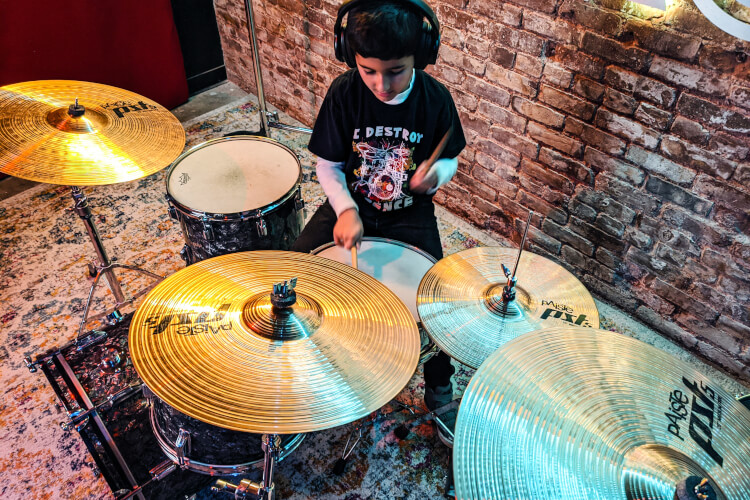
Learning essential drumming patterns lays the foundation for creating dynamic and engaging rhythms. Start with basic patterns, such as the single-stroke roll, double-stroke roll, and paradiddle, to build coordination and speed. Practice these patterns with a metronome to develop precision and timing, essential for creating impactful beats.
How To Make Your Drums Bang: A Powerful Guide


Credit: www.schoolofrock.com


Exploring Advanced Drumming Skills

Welcome to the exciting world of advanced drumming skills. As a drummer, learning and mastering advanced techniques can take your drumming to a whole new level. In this section, we will delve into two essential aspects of advanced drumming: polyrhythms and odd time signatures, and incorporating dynamics and ghost notes. These skills will help you make your drums bang with groove and creativity. So, let’s get started!

Polyrhythms And Odd Time Signatures

Polyrhythms and odd time signatures add complexity and interest to your drumming, allowing you to create captivating rhythms. Polyrhythms involve playing two or more rhythms simultaneously, while odd time signatures refer to beats that do not conform to the usual 4/4 or 3/4 time signatures.

To incorporate polyrhythms into your drumming, consider the following tips:

  • Practice each rhythm separately, ensuring you are comfortable with them individually.
  • Start by playing one rhythm with your dominant hand while simultaneously playing another rhythm with your non-dominant hand or foot.
  • Gradually increase the speed and complexity as you become more proficient.
  • Experiment with different combinations of rhythms to create unique patterns.

When it comes to odd time signatures, approaching them with confidence and a sense of musicality is key. Here are some strategies to help you navigate odd time signatures:

  1. Internalize the time signature by counting or tapping along to establish a solid foundation.
  2. Break down the beats into smaller subdivisions to understand the underlying structure.
  3. Practice playing simple drum patterns within the odd time signature to build familiarity.
  4. Experiment with accents and syncopation to add depth and groove to your rhythms.

Incorporating Dynamics And Ghost Notes

Dynamics and ghost notes are vital elements in bringing life and expression to your drumming. They create a sense of dynamics, contrast, and texture within your beats.

When incorporating dynamics into your drumming, consider the following techniques:

  • Vary the volume of your drum hits by playing softer or harder.
  • Experiment with crescendos and decrescendos to build intensity and release.
  • Utilize accent patterns to emphasize specific beats or create syncopation.

Ghost notes, on the other hand, are subtle and quiet notes that add complexity and groove to your drumming. To incorporate ghost notes effectively:

  1. Practice playing ghost notes by striking the drums softly and lightly.
  2. Focus on maintaining a consistent rhythm while integrating ghost notes into your beats.
  3. Experiment with placing ghost notes in different parts of the measure for added flavor.

By mastering dynamics and ghost notes, you can bring your drumming to life and make it more engaging and dynamic for both yourself and your audience.

Enhancing Your Drum Sound

When it comes to creating an impactful drum sound, there are various techniques you can implement to make your drums truly bang. One of the key aspects of enhancing your drum sound is experimenting with drum tuning. By adjusting the tension of the drumheads, you can achieve the desired pitch and resonance. Additionally, drum dampening and muffling techniques can further refine your drum sound, reducing unwanted overtones and creating a more focused and controlled tone. Let’s explore these techniques in detail.

Experimenting With Drum Tuning

Drum tuning is an art that allows you to optimize the sound of each drum in your kit. By adjusting the tension of the drumheads, you can alter the pitch and resonance of the drum. Here are some tips to help you experiment with drum tuning:

  • Start by loosening all the tension rods of the drumhead.
  • Tighten each tension rod gradually in a criss-cross pattern.
  • Tap near the tension rod after each adjustment to listen for changes in pitch.
  • Continue tweaking the tension rods until you achieve the desired pitch and tone.

Remember, the drumheads should be evenly tensioned to avoid any unwanted imbalances. Experimenting with different drum tuning techniques not only allows you to find the perfect sound for your drums but also helps you to create unique and personalized tones for different musical styles.

Utilizing Drum Dampening And Muffling Techniques

To further enhance your drum sound and achieve a more focused and controlled tone, you can utilize drum dampening and muffling techniques. These techniques help to reduce unwanted overtones and sustain, resulting in a tighter and more pronounced sound. Here are some effective ways to dampen and muffle your drums:

  • Use gel pads or moon gels to control ringing and overtones.
  • Place a small towel or cloth on the drumhead to dampen the resonance.
  • Apply drum-specific muffling products, such as drum rings or foam pads, to achieve specific sound characteristics.

Remember, the amount of dampening or muffling you apply depends on the desired sound and musical context. It’s always a good idea to experiment with different combinations and placements to find the sweet spot for each drum in your kit.

How To Make Your Drums Bang: A Powerful Guide


Credit: www.facebook.com


How To Make Your Drums Bang: A Powerful Guide


Credit: www.schoolofrock.com


Frequently Asked Questions Of How To Make Your Drums Bang


How Can I Make My Drums Sound Louder?


To make your drums sound louder, you can try tuning them to a lower pitch, using larger drumsticks, or adding dampening techniques such as muffling or using drum rings. Experimenting with different drum heads and adjusting the placement of your drums in the room can also help enhance their volume.


What Are Some Techniques To Make Drums Sound Punchy?


To make your drums sound punchy, you can start by using a combination of microphones close to the drumheads and overhead mics to capture the overall sound. Additionally, consider using compression and EQ to emphasize the attack and presence of the drums.


Using techniques like parallel compression and transient shaping can further enhance their punchiness.


How Can I Improve The Tone Of My Drums?


To improve the tone of your drums, start with selecting the right drum heads for your desired sound. Experiment with different drum head combinations, such as using a coated head on the snare for a warmer tone. Tuning your drums to their optimal pitch and using appropriate mics and positioning for recording can also contribute to a better tone.


Experimenting with room acoustics and using proper drum dampening techniques can further enhance the tone.


What Are Some Tips For Achieving A Tight Drum Sound?


To achieve a tight drum sound, begin by properly tuning your drums to remove any unwanted overtones. Use a drum head with a coating or a muffling ring to control the sustain and reduce unwanted ring. Tighten the snare wires appropriately to achieve snappy and tightly controlled snare sound.


Employing close miking techniques, such as using a close microphone for each drum, can also help in achieving a tight sound.


Conclusion


To sum up, making your drums bang requires the right techniques and tools. By paying attention to tuning, using quality heads, and experimenting with different miking methods, you can elevate the sound of your drums. Remember to practice and be open to trying new things to find your unique sound.


Keep on drumming!

Categories
Archive Audio Production

How Long Does Anchor Take to Upload to Spotify? Discover the Time It Takes!

Anchor typically takes around 24 hours to upload podcast episodes to Spotify. This process ensures swift accessibility for listeners.


Creating engaging podcast content is just the first step. Ensuring your episodes reach your audience through various platforms, such as Spotify, is crucial for expanding your reach. One significant platform for podcast distribution is Anchor, a podcast hosting service. Anchor simplifies the process of distributing your podcast episodes to various platforms, including Spotify.


Understanding the timeline involved in uploading your content to Spotify via Anchor is essential for planning your podcast release strategy effectively. Let’s delve into the details of how long it takes Anchor to upload your podcasts to Spotify and how you can optimize this process for maximum impact.


Uploading To Anchor

Uploading your podcasts to Anchor is a seamless process, allowing you to share your content with the world quickly.

Creating And Editing Your Podcast

Before you upload to Anchor, create and edit your podcast episodes using their intuitive tools.

Uploading Process

To upload to Anchor:

  • Create an Anchor account
  • Click on the ‘Upload’ button
  • Select the audio file from your device
  • Add episode details and cover art
  • Click ‘Publish’ to share your podcast on Spotify
How Long Does Anchor Take to Upload to Spotify? Discover the Time It Takes!


Credit: www.digitalsavageexperience.com


Uploading To Spotify


Anchor takes approximately 24 hours to upload your podcast to Spotify, allowing your content to reach a wider audience and gain more exposure on this popular streaming platform.

Integration With Anchor

When uploading to Spotify, Anchor integrates seamlessly with the platform for a user-friendly experience.

Verification And Distribution Time

Verification and distribution time on Spotify after uploading through Anchor are typically efficient.

Factors Affecting Upload Time


The time it takes for an anchor to upload to Spotify can be affected by various factors. Network connectivity, file size, and server load can all impact upload times. To ensure a smooth upload process, it’s important to consider these factors and optimize file settings accordingly.

Factors Affecting Upload Time Podcast Length When uploading your content to Spotify, the length of your podcast episode plays a significant role in determining the upload time. Generally, shorter episodes will upload more quickly than longer ones due to the time required for processing and indexing. Spotify’s system processes and analyzes each episode to ensure its quality and compliance with their standards, resulting in longer processing times for longer episodes. This can significantly impact the time it takes for your podcast to become available on the platform. File Size and Format The file size and format of your podcast also play a crucial role in determining the upload time to Spotify. Larger file sizes often require more time to upload, especially if you have a slower internet connection. In addition to size, the format of your podcast file can influence upload time. While Spotify supports various file formats such as MP3 and WAV, certain formats may require additional time for conversion and processing, resulting in longer upload times. Ensuring your file is optimized for Spotify’s requirements can help minimize unnecessary time spent on processing and uploading. In conclusion, the upload time of your podcast to Spotify can be influenced by various factors, including podcast length, file size, and format. Understanding and optimizing these elements can help reduce upload times and ensure your content reaches your audience efficiently.

How Long Does Anchor Take to Upload to Spotify? Discover the Time It Takes!


Credit: www.facebook.com


Tips For Faster Upload

If you’ve ever uploaded audio files to Spotify, you may be familiar with the wait time it takes for your anchor to appear on the platform. While the upload duration largely depends on various factors, including file size and internet speed, there are a few key strategies you can follow to make the process faster. By optimizing your audio files and using an efficient internet connection, you can reduce the upload time and get your content out to the world in no time.

Optimizing Audio Files

When it comes to uploading audio files to Spotify, file optimization plays a crucial role in speeding up the process. By keeping a few factors in mind, you can ensure that your files are in the best format and quality for a faster upload. Here’s what you can do:

  1. Choose the right file format: Formats like MP3 and WAV are widely supported and can help minimize the upload time.
  2. Compress your files: Reduce the file size by compressing your audio files without compromising on the quality. This can be done using various audio editing tools.
  3. Trim unnecessary silence: If your audio files have long stretches of silence, consider trimming them to keep the file size smaller.
  4. Optimize metadata: Make sure to fill in the appropriate metadata for your audio files, including title, artist name, and album art. This helps Spotify process your files more efficiently.

Using An Efficient Internet Connection

Your internet connection speed directly impacts the time it takes to upload your anchor to Spotify. To ensure a faster upload, follow these tips:

  • Use a high-speed internet connection: If possible, connect to a broadband or fiber-optic network for faster upload speeds.
  • Avoid uploading during peak hours: Uploading during periods of high internet traffic may lead to slower upload speeds. Try to schedule your uploads during off-peak hours for better results.
  • Use a wired connection: While Wi-Fi is convenient, a wired connection can provide a more stable and faster upload speed for your anchor.
  • Close unnecessary applications and downloads: Closing any background applications or downloads can help prioritize internet bandwidth for your anchor’s upload.

By optimizing your audio files and using an efficient internet connection, you can significantly reduce the time it takes for your anchor to upload to Spotify. Implement these tips to ensure a smoother and quicker upload process, allowing your content to reach your audience faster.


How Long Does Anchor Take to Upload to Spotify? Discover the Time It Takes!


Credit: medium.com


Frequently Asked Questions On How Long Does Anchor Take To Upload To Spotify


How Long Does It Take For A Podcast Episode To Upload To Spotify?


Typically, it takes a few minutes to upload a podcast episode to Spotify.


How Long Does It Take For Anchor To Process?


Anchor typically processes within 24 to 48 hours. It may vary depending on the volume of requests.


Why Is My Podcast Not Showing Up On Spotify?


Your podcast may not appear on Spotify due to technical issues with your RSS feed. Check your submission status on Spotify for any errors. Ensure your podcast meets Spotify’s content guidelines and metadata requirements. If all is in order, reach out to Spotify’s support team for further assistance.


How Long Does It Take For A Podcast To Show Up On Spotify From Podbean?


Podcasts on Podbean typically appear on Spotify within 24 hours.


Conclusion


In this blog post, we’ve explored the process of uploading an anchor to Spotify. We’ve learned how long it takes and the factors affecting the upload duration. By understanding these elements, you can better plan and manage your content on this platform.


With patience and optimization, you can maximize your reach and impact on Spotify.

Categories
Archive Audio Production

Best Way to Mix Music on a Mac: Master Your Studio Sound

For the best way to mix music on a Mac, utilize software like GarageBand or Logic Pro. These programs offer intuitive interfaces and powerful features for professional-grade mixing.


Mixing music on a Mac can be a rewarding experience, whether you are a beginner or a seasoned musician. With the right software tools and a creative mindset, you can create dynamic and polished sounds that reflect your unique style.


We will explore the best techniques and strategies for mixing music on a Mac, covering everything from basic setup to advanced mixing tips. By following these guidelines, you can enhance the quality of your music productions and elevate your skills as a music mixer. Let’s dive into the world of music mixing on a Mac and unleash your creativity.

Best Way to Mix Music on a Mac: Master Your Studio Sound


Credit: www.sweetwater.com


Choosing The Right Software

Think about your music mixing requirements before choosing the software.

Research various software options available for music mixing on a Mac.

Best Way to Mix Music on a Mac: Master Your Studio Sound


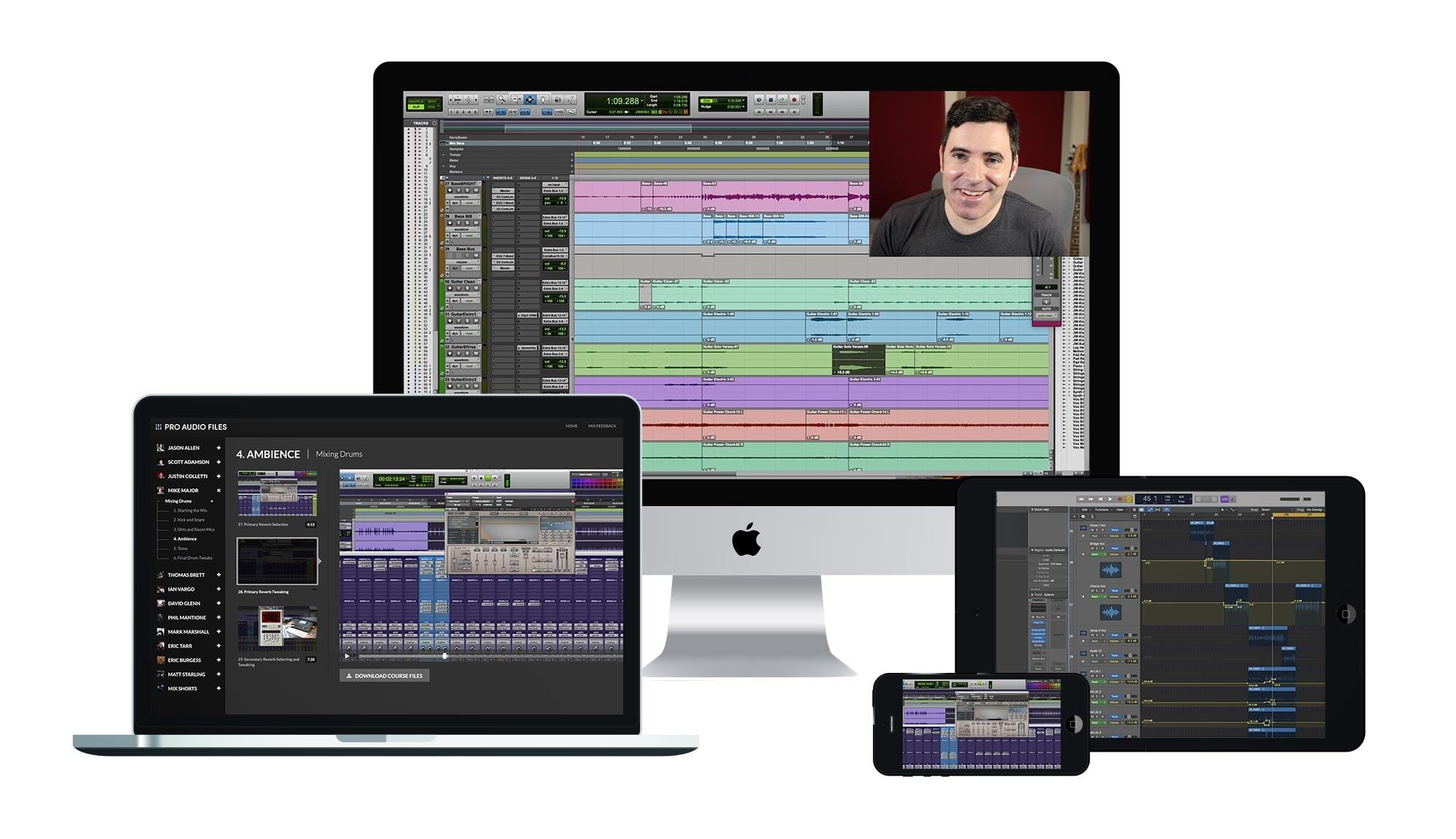
Credit: members.theproaudiofiles.com


Setting Up Your Studio

Setting up your studio is crucial for a smooth music mixing process on your Mac.

Optimizing Your Space

Keep your studio clutter-free, with good lighting and proper ventilation for an optimal work environment.

Investing In Quality Equipment

Quality speakers, headphones, and cables are essential for accurate sound representation.

Understanding Sound Mixing Techniques


Learn the best sound mixing techniques for Mac to create top-quality music. Get insights on the latest tools and methods for seamless music mixing on your Mac. Master the art of mixing audio to produce professional-sounding music with ease.

Understanding Sound Mixing Techniques When it comes to mixing music on a Mac, understanding sound mixing techniques is essential for producing high-quality audio. Whether you’re a beginner or a seasoned professional, mastering the art of sound mixing can take your music production to the next level. Let’s delve into two fundamental sound mixing techniques that can help you achieve a polished and professional sound.

Balancing Levels And Frequencies

Balancing levels and frequencies is a crucial aspect of sound mixing. Achieving a balanced mix involves adjusting the volume of individual tracks to ensure that no element overpowers the others. Moreover, attending to frequencies is essential for creating a well-rounded and harmonious sound. By identifying and addressing frequency clashes, you can prevent muddiness and ensure that each instrument occupies its own sonic space within the mix.

Utilizing Effects And Plugins

Utilizing effects and plugins can elevate your sound mixing to the next level. Experimenting with reverbs, delays, and equalization allows you to add depth, dimension, and character to your mix. Additionally, incorporating specialized plugins such as compressors and limiters enables you to control dynamics and ensure a polished and professional sound. In conclusion, understanding sound mixing techniques is vital for achieving exceptional results when mixing music on a Mac. By mastering the art of balancing levels and frequencies and effectively utilizing effects and plugins, you can enhance the overall quality of your music productions.

Mastering Your Mix

Once you have completed the process of mixing your music on a Mac, the next step is to focus on mastering your mix. Mastering is the final stage in the professional music production process that ensures your mix sounds polished, balanced, and ready for distribution. It involves refining the sound and preparing your music for distribution on platforms like streaming services and radio.

Refining The Sound

To refine the sound of your mix during the mastering stage, you will need to optimize the overall dynamics, frequency balance, and stereo imaging of your song. Here are some essential steps and techniques to help you refine your mix:

  1. Equalization (EQ): Use EQ to enhance the tonal balance of different elements in your mix. This involves adjusting the frequency content of each instrument or vocal to ensure they mesh well together and complement one another.
  2. Compression: Apply compression to control the dynamic range and add cohesion to your mix. Compression helps to even out the levels of different elements and bring out the details in your music.
  3. Stereo Widening: Use stereo widening techniques to create a wider and more spacious soundstage. This technique enhances the stereo image of your mix, making it sound more immersive and captivating.
  4. Harmonic Excitement: Add harmonic excitement using techniques like saturation, harmonic distortion, or exciters. This can help to enhance the warmth and character of your mix, making it more engaging to the listener.
  5. Limiting: Apply limiting to ensure that the overall volume of your mix is consistent and competitive with other commercially released tracks. This helps to eliminate any unwanted volume spikes and ensures that your music is optimized for different playback systems.

Preparing For Distribution

Once you have refined the sound of your mix, it is crucial to prepare your music for distribution on various platforms. Here are some important aspects to consider:

  • Metadata: Make sure to add accurate and relevant metadata to your music files. This includes information such as track titles, artist names, album artwork, and copyright information. This metadata helps music platforms organize and categorize your music correctly.
  • File Formats: Convert your finalized mix into appropriate file formats for distribution. Common formats include WAV and MP3 files. It is important to choose the right format for different platforms, ensuring compatibility and maintaining audio quality.
  • Mastering for Streaming: Consider mastering your mix specifically for streaming platforms. Streaming services utilize loudness normalization algorithms, so it is essential to optimize your mix’s RMS and peak levels to ensure consistent playback across different devices and platforms.
  • Quality Control: Before distributing your music, conduct a thorough quality control check. Listen to your mix on various playback systems to ensure that it sounds good in different environments. This step helps identify any potential issues before your music reaches your audience.

By mastering your mix and preparing it for distribution on a Mac, you can ensure that your music sounds professional and captivating to your listeners. Remember to continuously refine your skills and experiment with different techniques to achieve the best possible results for your music.

Taking Your Music To The Next Level

If you’re a musician or aspiring DJ, you know that mixing music is an essential skill to take your artistry to the next level. With a Mac, you have access to powerful tools and software that can help you create professional-grade mixes. Whether you’re collaborating with others or looking for ways to stay inspired and creative, this article will guide you through the best methods of music mixing on a Mac.

Collaborating With Others

Collaboration can bring a whole new dimension to your music. Working with other musicians, producers, or DJs allows you to combine your unique talents and create something truly remarkable. Fortunately, there are several tools available for Mac users that make collaborating with others a breeze.

One great option is the GarageBand software, which comes pre-installed on your Mac. With its intuitive interface and robust features, GarageBand allows you to easily share your music projects with others. You can invite fellow musicians to contribute their parts, edit and rearrange the tracks, and even collaborate in real-time using iCloud. This way, you can harness the power of teamwork to elevate your music to new heights.

In addition to GarageBand, there are other software applications like Ableton Live and Logic Pro X that offer extensive collaboration features. These programs provide seamless integration with popular music production platforms, allowing you to share your projects and receive feedback from fellow artists. By collaborating with others, you can learn from their perspectives, draw inspiration, and create music that truly stands out.

Staying Inspired And Creative

As a musician, staying inspired and creative is vital for consistently producing quality music. Fortunately, there are several strategies you can implement on your Mac to keep those creative juices flowing.

Explore new genres: Sometimes, the best way to spark inspiration is to venture outside your comfort zone. Use your Mac to explore different music genres, listen to tracks from various artists, and analyze their mixing styles. By exposing yourself to diverse musical influences, you can uncover new techniques and ideas to apply to your own work.

Experiment with effects and plugins: Mac users have access to a wide range of effects and plugin libraries. From EQs and compressors to reverbs and delays, these tools can add depth and uniqueness to your mixes. Don’t be afraid to experiment and try different combinations to find the perfect sound that resonates with your creative vision.

Participate in online communities: The internet is a treasure trove of resources for musicians. Engage with online communities, forums, and social media groups dedicated to music production. Interacting with fellow musicians and industry professionals can provide valuable insights, feedback, and even collaborative opportunities. Use platforms like Reddit, SoundCloud, and Discord to connect with like-minded individuals and fuel your creative energy.

By embracing collaboration, exploring new genres, and leveraging the power of technology, you can confidently take your music to the next level on your Mac. Whether you’re creating a groundbreaking mix or striving to become the next big DJ, your dedication, talent, and the right tools will set you on the path to success.

Best Way to Mix Music on a Mac: Master Your Studio Sound


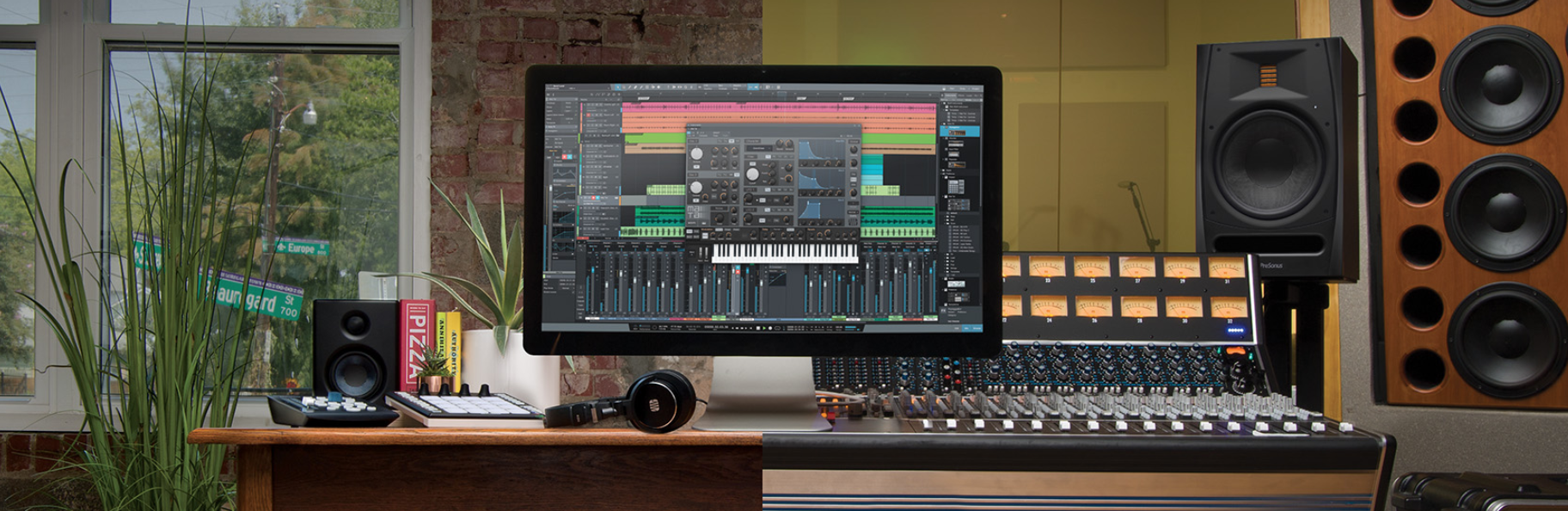
Credit: legacy.presonus.com


Frequently Asked Questions For Best Way To Mix Music On A Mac


Can You Mix Music On A Mac?


Yes, you can mix music on a Mac using various software like GarageBand, Logic Pro, or Ableton Live.


What Is The Best Way To Create Music On Mac?


The best way to create music on Mac is to use music production software like Logic Pro X or GarageBand. These programs offer powerful tools for recording, editing, and mixing music. Additionally, Mac’s high performance capabilities make it ideal for music production.


Which Software Is Best For Music Mixing?


The best software for music mixing is subjective, but popular options include Pro Tools, Ableton Live, and Logic Pro. Consider your budget, preferred workflow, and specific features needed for your music production. Experiment with different software to find the best fit for your style and needs.


How Do I Make Free Music Mixes On My Mac?


To create free music mixes on your Mac, you can use software like iTunes or GarageBand. Simply import your music files, arrange them in a playlist or edit them using GarageBand’s mixing tools, and then export your mix as a new audio file.


Enjoy mixing music hassle-free on your Mac!


Conclusion


Mixing music on a Mac can be a seamless and enjoyable process with the right tools and knowledge. By utilizing top-notch software and understanding the technical aspects, you can create professional-quality mixes that showcase your musical talents. With the steps outlined in this blog post, you’re now equipped to elevate your music production to new heights.


Categories
Archive Audio Production

Does Fl Studio Mobile Come With Fl Studio? Unveiling the Dynamic Duo!

No, Fl Studio Mobile does not come with Fl Studio. Fl Studio Mobile is a separate app.


Fl Studio Mobile is a powerful music production application that allows users to create and edit music on their mobile devices. While Fl Studio Mobile does not come with Fl Studio, it is designed to work seamlessly with its desktop counterpart.


Users can easily transfer projects between the two platforms, making it convenient for music producers to work on their projects on the go. Fl Studio Mobile offers a range of features, including virtual instruments, effects, and a user-friendly interface, making it a popular choice for music production on mobile devices. Whether you are a beginner or an experienced producer, Fl Studio Mobile provides a versatile and portable solution for creating music on the go.

Does Fl Studio Mobile Come With Fl Studio? Unveiling the Dynamic Duo!


Credit: www.linkedin.com


Fl Studio Mobile

FL Studio Mobile is a versatile music production app that brings the powerful features of FL Studio to mobile devices. It offers a range of tools and functions to help users create, edit, and mix music on the go.

Features Of Fl Studio Mobile

FL Studio Mobile comes equipped with a plethora of features designed to offer a comprehensive music production experience on mobile devices. Some of the notable features of FL Studio Mobile include:

  • Intuitive interface for easy navigation and control
  • High-quality synthesizers, drum kits, and samples
  • Step sequencer for creating rhythms and patterns
  • MIDI controller support for enhanced functionality
  • Audio recording and editing capabilities

Compatibility With Different Devices

FL Studio Mobile is designed to be compatible with a wide range of devices, including smartphones and tablets running on popular operating systems such as iOS and Android. Whether you’re using an iPhone, iPad, or an Android device, FL Studio Mobile ensures seamless performance and functionality across different platforms.

Fl Studio

FL Studio, also known as FruityLoops, is a digital audio workstation (DAW) developed by Image-Line. It is a popular software used by music producers and DJs to create, edit, and mix music tracks. FL Studio Mobile is a mobile version of the software, allowing users to work on their music projects on the go.

Key Features Of Fl Studio

FL Studio offers a wide range of features including powerful audio editing tools, virtual instruments, live performance capabilities, and support for third-party plugins. The software supports multiple file formats and allows for intuitive music composition.

Workflow Advantages

FL Studio streamlines the music production process with its user-friendly interface and efficient workflow. It offers flexible routing options and quick access to key functions. Seamless integration with FL Studio Mobile ensures seamless project transfer for uninterrupted creativity.

Integration Of Fl Studio Mobile And Fl Studio

`The integration of FL Studio Mobile and FL Studio provides seamless connectivity between the mobile and desktop versions, allowing users to work on their music projects across different devices effortlessly.`

`benefits Of Using The Dynamic Duo`

    ` `

  • `Effortlessly switch between devices for a flexible workflow.`
  • ` `

  • `Access your projects on the go with FL Studio Mobile.`
  • ` `

  • `Sync all changes in real time between the mobile and desktop versions.`
  • ` `

`how To Sync And Transfer Projects`

    ` `

  1. `Open both FL Studio Mobile and FL Studio on your devices.`
  2. ` `

  3. `Ensure both devices are connected to the same network.`
  4. ` `

  5. `Select the project you want to transfer and click on the sync button.`
  6. ` `

  7. `Your project will be instantly updated on both versions.`
  8. ` `

Does Fl Studio Mobile Come With Fl Studio? Unveiling the Dynamic Duo!


Credit: djlifemag.com


Does Fl Studio Mobile Come With Fl Studio? Unveiling the Dynamic Duo!


Credit: m.facebook.com


Frequently Asked Questions Of Does Fl Studio Mobile Come With Fl Studio


Do You Get Fl Studio Mobile Free With Fl Studio?


Yes, FL Studio Mobile does not come free with FL Studio.


Do You Have To Buy Fl Studio Mobile Separately?


No, you don’t have to buy FL Studio Mobile separately.


Is Fl Studio Mobile The Same As Fl Studio?


No, FL Studio Mobile is not the same as FL Studio. FL Studio Mobile is the mobile version of FL Studio, allowing you to create music on your mobile device. FL Studio, on the other hand, is the full-featured software for music production on desktop.


Can You Link Fl Mobile To Fl Studio?


Yes, you can link FL Mobile to FL Studio. This allows you to easily transfer and work on your projects across both platforms, providing a seamless workflow.


Conclusion


To sum up, Fl Studio Mobile does not come with the full version of Fl Studio. While Fl Studio Mobile offers a range of features for music production on the go, it is a separate app from the desktop version.


For a seamless transition and full functionality, purchasing the desktop version is recommended.


Categories
Archive Audio Production

How Much Does YouTube Music Really Pay Artists Per Stream?

Youtube Music pays artists approximately $0.003 to $0.005 per stream. This rate can vary based on several factors.


With the rise of digital music streaming platforms like Youtube Music, artists have a new avenue to share their music with a global audience. However, the payment structure can be complex, leading to questions about how much artists actually earn per stream on the platform.


Understanding how Youtube Music compensates artists for their music plays is crucial for musicians seeking to monetize their work effectively. We will explore the payment rates on Youtube Music, factors influencing earnings, and tips for artists to maximize their streaming revenue.


Youtube Music Payout Model

The YouTube Music Payout Model is essential for understanding how artists are compensated for their music on the platform. Let’s take a closer look at the YouTube Music Payout Model in terms of Revenue Generation and the impact of Advertising vs. Subscriptions.

Revenue Generation

YouTube Music generates revenue through ads and premium subscriptions.

Advertising Vs. Subscriptions

  • Advertising: Artists receive payment based on ad views and engagement.
  • Subscriptions: Artists earn from premium users streaming their music.
How Much Does YouTube Music Really Pay Artists Per Stream?


Credit: www.songme.com


Factors Affecting Artist Payout


Youtube music artist payouts per stream are influenced by several factors. These include the artist’s contract with the label, the streaming service’s payment model, the listener’s location, and the duration of the song. These factors collectively determine how much an artist earns from their music on Youtube.

Factors Affecting Artist Payout Streaming Royalties In terms of streaming royalties, YouTube Music pays artists per stream, but the exact amount can vary based on numerous factors. Listeners’ Geography The geographical location of the listeners impacts how much an artist earns per stream. For example, if a song is more popular in a country where the average streaming rate is higher, the artist is likely to earn more per stream in that location. Moreover, the specific terms of the agreement between YouTube Music and the artist or their record label can also influence the payout per stream. Additionally, factors like the popularity of the artist, the total number of streams generated, and the duration of user engagement with the content can all play a role in determining how much an artist earns per stream. Furthermore, other elements such as the user’s subscription status, advertising revenue, and the revenue-sharing model employed by YouTube Music also impact the final payout to the artist. It’s essential for artists to consider these factors when evaluating their earnings from streaming services like YouTube Music.


Comparison With Other Platforms

When it comes to the earnings from streaming music, it’s essential for artists to understand the differences between various platforms. Comparing YouTube Music with other leading streaming services provides valuable insights into the revenue potential for artists.

Youtube Music Vs. Spotify

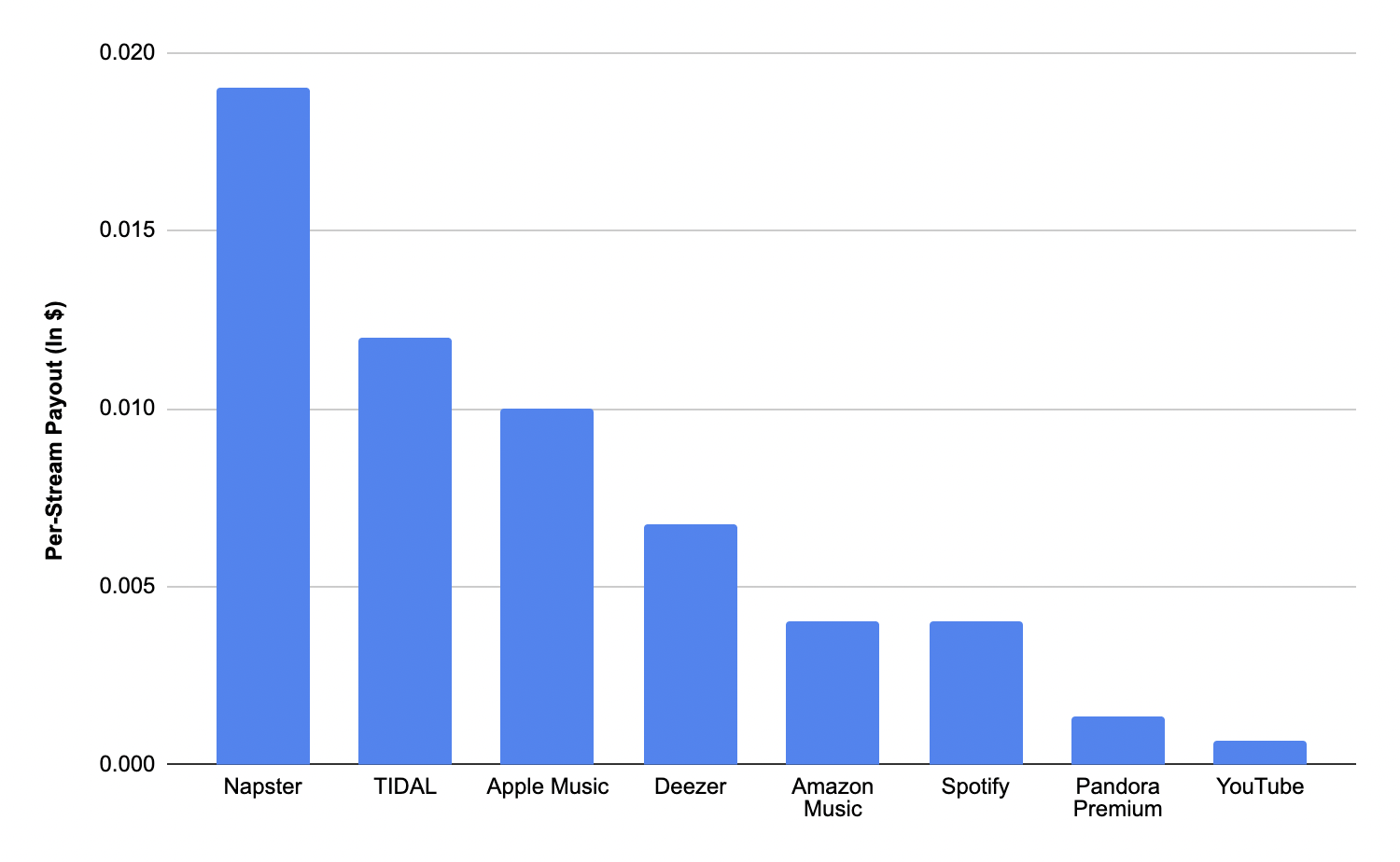
YouTube Music and Spotify are two major players in the music streaming industry. In terms of artist payouts, YouTube Music generally pays less per stream compared to Spotify. As of 2021, YouTube Music pays around $0.004 per stream, while Spotify pays an average of $0.003 for free users and $0.006 to $0.0084 for premium subscribers. This means that artists may earn slightly more from Spotify streams as compared to YouTube Music.

Youtube Music Vs. Apple Music

When comparing YouTube Music with Apple Music, the payout structure is again different. Apple Music tends to pay artists higher royalties per stream than YouTube Music. On average, Apple Music pays around $0.0078 per stream, which is considerably higher than YouTube Music’s payout. Therefore, in terms of per-stream earnings, artists may find Apple Music to be more lucrative compared to YouTube Music.

Challenges For Artists

Creating music is more than just a passion for artists; it’s a way of life. However, artists face numerous challenges, especially when it comes to monetizing their work on platforms like YouTube Music. In this article, we will explore two significant challenges that artists encounter in the digital age.

Monetizing Views

One of the main challenges for artists on YouTube Music is monetizing their views. While the platform offers an opportunity for artists to reach a vast audience, the revenue generated from streaming is often considerably lower than expected. This is due to various factors, including the complexity of the royalty system and the platform’s algorithm for calculating payments.

Artists receive a fraction of a cent per stream, and in order to generate significant revenue, they must accumulate a substantial number of views. This puts emerging artists at a disadvantage, as they may struggle to gain the same exposure as established musicians, making it harder for them to earn a livable income solely from streaming their music. Artists must explore additional revenue streams, such as live performances, merchandise sales, and brand partnerships, to supplement their earnings from YouTube Music.

Impact Of Piracy

Another major challenge faced by artists on YouTube Music is the impact of piracy. With the ease of access to music on the internet, piracy continues to thrive, resulting in considerable financial losses for artists. Pirated copies of their music can be readily uploaded and shared on platforms like YouTube, where they garner millions of views, but without any revenue going to the artists themselves.

This not only undermines the artists’ ability to monetize their work but also diminishes the incentive for them to create new music. Why invest time and effort into producing high-quality content if others can freely distribute and consume it without compensating the artists?

Furthermore, piracy affects artists’ overall visibility and marketability. When unauthorized copies of their music are easily accessible, it becomes challenging for artists to differentiate themselves from the vast sea of content available. This hinders artists’ ability to attract attention, gain new fans, and secure lucrative opportunities, ultimately impacting their career trajectory.

In conclusion, while YouTube Music offers a platform for artists to share their music with the world, challenges remain in terms of monetization and combating piracy. Artists must find innovative ways to navigate these hurdles and diversify their revenue streams to ensure a sustainable career in an increasingly digital landscape.

The Future Of Youtube Music Payments

With the rise of streaming platforms, the way artists earn revenue from their music has shifted dramatically. YouTube Music, one of the leading platforms in the industry, has been a topic of interest when it comes to artist payments per stream. As the music industry continues to evolve, understanding the future of YouTube Music payments is crucial for artists seeking fair compensation for their work.

Emerging Trends

Several emerging trends are shaping the future of YouTube Music payments. These trends reflect the transformation happening within the music industry, as it adapts to new digital platforms and a growing audience base. Here are some key trends to keep an eye on:

  • An increased emphasis on streaming revenue as the primary source of income for artists.
  • Integration of blockchain technology to ensure transparent and fair payment distribution.
  • The rise of alternative revenue streams, such as brand partnerships and live performances.

These emerging trends present both opportunities and challenges for artists navigating the world of YouTube Music payments. Staying informed and adaptable will be essential for success in this ever-changing landscape.

Artist-tech Platform Relationships

Artist-tech platform relationships play a crucial role in shaping YouTube Music payments. As artists increasingly rely on streaming platforms for income, forming mutually beneficial partnerships becomes paramount. Tech platforms have the opportunity to support artists by:

  1. Exploring innovative revenue-sharing models to better compensate artists for their work.
  2. Providing advanced analytics to help artists understand and engage with their audience.
  3. Investing in artist development programs that foster growth and success.

Building strong artist-tech platform relationships will be essential in ensuring fair compensation for artists and fostering a sustainable music industry ecosystem.

How Much Does YouTube Music Really Pay Artists Per Stream?


Credit: www.digitalmusicnews.com


How Much Does YouTube Music Really Pay Artists Per Stream?


Credit: routenote.com


Frequently Asked Questions For How Much Does Youtube Music Pay Artists Per Stream


How Much Is 1,000 Streams On Youtube Music?


1,000 streams on YouTube Music typically earn artists around $4-$5, depending on various factors.


Does Youtube Music Pay Artists Better?


Yes, YouTube Music generally pays artists better than other streaming platforms due to higher revenue shares.


How Many Music Streams Does It Take To Make $100?


It takes around 70,000 to 100,000 music streams to make $100. The exact amount varies depending on the streaming platform and the artist’s contract.


What Is The Highest Paying Music Streaming Platform?


Spotify is currently the highest paying music streaming platform, offering artists fair royalty rates.


Conclusion


It’s clear that YouTube Music’s artist payouts vary significantly. With the potential for low royalties per stream, it’s crucial for artists to diversify their revenue streams. However, with strategic marketing and broadening their platforms, artists can maximize their earnings from streaming.


Understanding these nuances is essential for success in the digital music landscape.

Categories
Archive

How Much Does YouTube Music Pay Per 1,000 Streams: Revealing the Earnings

Youtube Music pays around $0.003 to $0.005 per 1,000 streams. This can vary based on location and popularity of the artist.


In today’s digital age, music streaming has become an integral part of our daily lives. With platforms like Youtube Music offering a vast library of songs at our fingertips, artists have found new ways to share their music with audiences worldwide.


But the question remains, how much does an artist actually earn from streaming their music on Youtube Music? We will delve into the details of how Youtube Music pays artists for their streams and explore the factors that affect the payout rates. Let’s uncover the specifics behind how Youtube Music compensates artists for their musical creations.


The Basics Of Youtube Music Payments

Understanding how YouTube Music pays per 1,000 streams is crucial for artists and content creators. Let’s delve into the YouTube Music Streaming Model and the Determining Factors for Payments.

Youtube Music Streaming Model

  • YouTube Music operates on a system of ads and subscriptions.
  • Artists earn revenue from ads shown during their music videos.
  • Subscribers contribute to artists’ earnings with each stream.

Determining Factors For Payments

  1. Listener’s Location: Different regions have varying payment rates.
  2. Duration of Stream: Longer streams lead to higher payouts.
  3. Engagement: Interactions like likes and shares can affect earnings.
How Much Does YouTube Music Pay Per 1,000 Streams: Revealing the Earnings


Credit: www.travelpayouts.com


Comparison To Other Streaming Platforms


YouTube Music pays an average of $0. 004 per stream, which is lower than other streaming platforms. This payment rate varies widely, with factors such as location and listening history impacting the final amount. When compared to competitors, YouTube Music’s payment per 1,000 streams is notably lower.

Youtube Music Vs. Spotify

YouTube Music and Spotify pay different rates per 1,000 streams.

Youtube Music Vs. Apple Music

YouTube Music and Apple Music also offer varying rates per play. Comparison to Other Streaming Platforms YouTube Music pays an average of $0.008 per stream, whereas Spotify pays around $0.00437. Apple Music tends to pay a higher rate than both, at $0.00783 per stream. When we compare YouTube Music to Spotify and Apple Music, it is evident that Apple Music pays the highest rate per stream. YouTube Music falls in between the two platforms in terms of payment structure. Stream 1,000 plays on YouTube Music, you could expect to earn $8. On Spotify, the same number of streams would result in a payment of around $4.37. Apple Music, on the other hand, would pay approximately $7.83 for the same number of streams.

Streaming Platform Payment per 1,000 Streams
YouTube Music $8
Spotify $4.37
Apple Music $7.83

In comparison, YouTube Music pays better than Spotify but falls slightly below Apple Music in terms of payment per 1,000 streams.


Insights Into Payment Rates

YouTube Music’s payment rates per 1,000 streams have been a focus of interest for both artists and music enthusiasts. Understanding the payment rates can shed light on the potential revenue and viability of a music career through the platform. Let’s delve into the various aspects of YouTube Music earnings and industry averages for payments.

Different Types Of Youtube Music Earnings

YouTube Music offers multiple avenues for artists and content creators to make money, including:

  • Ad Revenue from YouTube Music Videos
  • Subscription and Ad Revenue from YouTube Music Premium
  • YouTube Content ID Match Earnings


Industry Averages For Payments

The payment rates for YouTube Music streams vary and are influenced by factors such as region, user engagement, and the monetization model. On average, YouTube Music pays around $0.003 to $0.005 per stream. It is important to note that these figures are estimates and actual rates may fluctuate.

Strategies For Maximizing Earnings


Learn effective strategies to boost earnings on YouTube Music through maximizing per 1,000 stream payments. Understand the payment structure to optimize revenue and increase earnings potential. Tailoring your approach to generating more streams can significantly impact your overall income on the platform.

In order to maximize your earnings on YouTube Music, it’s important to employ effective strategies that optimize your content and leverage promotional opportunities. By implementing these strategies, you can increase your chances of earning more money from your music streams. Let’s explore some key strategies for maximizing your earnings on YouTube Music.

Optimizing Content For Better Payments

When it comes to earning money through streaming on YouTube Music, optimizing your content is crucial. Here are some tips to help you improve your earnings:

  • Produce high-quality music that resonates with your target audience.
  • Create engaging album artwork and thumbnails that entice listeners to click on your tracks.
  • Write compelling descriptions and titles that accurately represent your music.
  • Include relevant keywords in your video tags to improve discoverability.
  • Encourage viewers to like, comment, and share your content, as this can contribute to higher earnings.
  • Upload your music in high-quality formats to enhance the listening experience for your audience.

Leveraging Youtube Music Promotion

YouTube Music offers several promotional features that can help you reach a wider audience and potentially increase your earnings. Consider leveraging these promotional tools:

  1. YouTube Music Ads: Invest in ads to reach a larger number of potential listeners.
  2. Collaborations: Collaborate with other artists or influencers to tap into their fan base and expand your reach.
  3. Playlists: Submit your tracks to popular playlists on YouTube Music to increase exposure and gain new listeners.
  4. Premieres and Livestreams: Host premieres and livestream events to generate buzz and engage with your audience.
  5. Social Media Promotion: Utilize social media platforms to promote your music and drive traffic to your YouTube Music channel.

By strategically utilizing these promotional features, you can increase the visibility of your music and potentially enhance your earnings on YouTube Music.

The Future Of Youtube Music Payments

As the popularity of streaming services continues to rise, artists and content creators are turning to platforms like YouTube Music to monetize their work. However, one common question remains: How much does YouTube Music pay per 1,000 streams? In this article, we will delve into the intricacies of YouTube Music payments and explore the future trends and projections. We will also discuss the impact of industry changes on artists’ earnings.

Trends And Projections

With the proliferation of music streaming platforms, the music industry has undergone significant transformations in the past decade. YouTube Music, being one of the most widely-used platforms, attracts millions of users daily. This influx of users translates to a vast number of streams and potential revenue for artists. However, it’s crucial to consider the current payment structure and its potential for growth.

As of now, YouTube Music pays an average of $0.003 per stream, which means an artist would earn $3 for every 1,000 streams. While this might seem relatively low, it’s important to note that the revenue generated from streaming services like YouTube Music is not solely dependent on the number of streams. Factors such as country demographics, ad revenue, and premium subscriptions also contribute to an artist’s earnings.

The future of YouTube Music payments holds promise for artists. With continued growth in the number of subscribers and the platform’s increasing popularity, it is expected that payments per 1,000 streams will gradually increase. Additionally, YouTube Music has recently introduced features such as Super Chat, channel memberships, and merchandise shelf, which offer alternative revenue streams for creatives. These developments indicate that artists can diversify their income sources and potentially earn more from their work.

Impact Of Industry Changes

The music industry is a dynamic landscape, constantly adapting to new technologies and consumer behaviors. Recent changes, such as the rise of self-publishing and direct-to-fan platforms, have empowered artists to take control of their careers. This shift in power dynamics has prompted streaming services like YouTube Music to reevaluate their payment structures and explore new avenues for revenue distribution.

One notable change is the increasing emphasis on user engagement metrics. Instead of solely relying on the number of streams, YouTube Music and other platforms are now incorporating factors such as watch time, likes, and shares into their payment algorithms. This change encourages artists to create engaging and compelling content, ultimately increasing their chances of earning higher revenue per stream.

Furthermore, advancements in technology, such as blockchain and smart contracts, offer potential solutions to transparency and fairness issues in the music industry. With blockchain’s ability to track and verify transactions, artists can have better visibility into their earnings from streaming platforms. This transparency fosters trust and may lead to improvements in payment schemes across the board.

In conclusion, the future of YouTube Music payments looks promising for artists and content creators. Despite the current relatively low payout per stream, there are positive trends and projections that indicate a potential increase in earnings. With industry changes and technological advancements, artists can expect more transparency, engagement-driven payments, and new revenue streams from platforms like YouTube Music.

How Much Does YouTube Music Pay Per 1,000 Streams: Revealing the Earnings


Credit: www.wsj.com


How Much Does YouTube Music Pay Per 1,000 Streams: Revealing the Earnings


Credit: www.businessinsider.com


Frequently Asked Questions On How Much Does Youtube Music Pay Per 1 000 Streams


How Much Does Youtube Music Pay For 1 Stream?


YouTube Music pays approximately $0. 004 to $0. 008 for one stream. Payment varies based on region and other factors.


How Much Does Youtube Pay For A Song?


YouTube pays artists around $0. 00074 to $0. 00084 per stream for a song. Keep in mind that the exact amount can vary based on factors like location and type of YouTube account.


How Much Does Youtube Music Pay Per Stream 2023?


YouTube Music pays an average of $0. 003 per stream in 2023.


How Many Music Streams Does It Take To Make $100?


It varies, but on average, an artist needs around 250,000 music streams to earn $100.


Conclusion


Understanding the payment structure for YouTube music is crucial for artists and content creators. By recognizing the factors influencing earnings, individuals can make informed decisions. It’s evident that the level of income from streaming varies, but with the right strategies, it’s possible to maximize revenue from YouTube’s music platform.

Categories
Archive Audio Production

How Much Does Fl Studio Cost: Unveiling the Affordable Powerhouse

Fl Studio costs range from $99 to $899, depending on the version and features included. Fl Studio, a popular digital audio workstation, offers various versions tailored to different user needs.


From the affordable Fruity Edition to the top-of-the-range All Plugins Bundle, users can choose the package that suits their production requirements and budget. The cost of Fl Studio includes lifetime free updates, allowing users to access the latest features and improvements.


With its intuitive interface and powerful tools, Fl Studio is a favorite among music producers, composers, and DJs worldwide. Whether you are a beginner or a seasoned professional, Fl Studio offers a versatile and comprehensive solution for all your music creation needs at a competitive price point.


The Power Of Fl Studio


FL Studio offers various pricing options, including a free trial, a discounted academic version, and paid editions ranging from $99 to $899. This versatile software caters to different budget and feature needs, making it accessible for both amateur and professional music producers.

affordable And Powerful

FL Studio strikes the perfect balance between affordability and power. Its features cater to both beginners and experts in music production.

features And Capabilities

  • Extensive library of plugins: From synthesizers to effects, FL Studio has an array of tools.
  • Seamless audio editing: Easily manipulate sound with precision and ease.
  • Intuitive interface: User-friendly layout for efficient workflow.
  • Advanced music production tools: Edit, mix, and master tracks with professional-grade capabilities.
  • Real-time recording: Capture your creativity instantaneously.

FL Studio empowers musicians with its versatile features, making it a popular choice in the industry.

How Much Does Fl Studio Cost: Unveiling the Affordable Powerhouse


Credit: www.soundonsound.com


Fl Studio Pricing Tiers

If you are considering purchasing FL Studio, it’s essential to know about the FL Studio Pricing Tiers. This software offers various pricing options to cater to different needs and budgets.

Comparing Options

When evaluating FL Studio Pricing Tiers, it’s crucial to compare the available options to choose the one that suits you best. The software offers different tiers with varying features and price points to accommodate users with diverse requirements.

Individual Vs. Bundle Pricing

FL Studio provides both individual and bundle pricing options. The individual pricing allows users to purchase specific features or editions based on their preferences and needs. On the other hand, the bundle pricing combines multiple features or editions at a discounted rate, providing more value for money.


Additional Fl Studio Costs

If you are considering purchasing FL Studio, it’s essential to factor in additional costs that may arise beyond the initial software purchase. These additional expenses can include plugins and add-ons, as well as the cost of upgrades and support. Understanding these additional FL Studio costs will help you make an informed decision and ensure that you have a comprehensive understanding of your financial commitment to the software.

Plugins And Add-ons

FL Studio offers a wide range of plugins and add-ons that can enhance the functionality and features of the software. These plugins and add-ons are designed to cater to different music production needs, ranging from virtual instruments to audio effects.

  • Plugins and add-ons can be purchased individually, with prices varying depending on the specific product.
  • Popular FL Studio plugins and add-ons include SynthMaker, Drumaxx, and Gross Beat.
  • It’s important to consider the cost of plugins and add-ons when budgeting for FL Studio, as they can significantly impact the overall expenses.

Upgrades And Support

FL Studio regularly releases updates and new versions to improve performance, introduce new features, and ensure compatibility with the latest operating systems. Additionally, users have the option to purchase support plans for technical assistance and access to exclusive content.

  1. Upgrades to newer versions of FL Studio may involve additional costs, depending on the user’s current license and the extent of the upgrade.
  2. Support plans provide users with timely technical assistance, tutorials, and access to premium content, which can be beneficial for those seeking ongoing guidance and resources.


Credit: issuu.com


Maximizing Value

Maximizing Value

When it comes to purchasing software, getting the most value for your money is always a top priority. FL Studio is a popular digital audio workstation that offers powerful features for music production. To ensure you are maximizing the value of your FL Studio purchase, there are a few strategies you can employ.

Optimizing Your Purchase

Before diving into the cost of FL Studio, it’s important to understand that the software offers multiple editions, each with different price points and features. By carefully evaluating your needs, you can choose the edition that best suits your requirements, thus optimizing your purchase. To help you make an informed decision, below is a breakdown of the different FL Studio editions and their prices:

Edition Price
Fruity Edition $99
Producer Edition $199
Signature Bundle $299
All Plugins Bundle $899

By carefully evaluating the features offered in each edition and aligning them with your specific needs and budget, you can optimize your purchase and get the most value out of it.

Utilizing Free Resources

In addition to the different editions of FL Studio, there are also various free resources available that can help you maximize the value of your software. These resources include:

  • Online tutorials: Numerous video tutorials and guides are available on platforms like YouTube, helping you learn and master different aspects of FL Studio without spending any additional money.
  • Community support: FL Studio has a strong community of users who actively participate in forums and online communities. By joining these communities, you can get valuable insights, tips, and tricks from experienced users, enhancing your overall experience with the software.
  • Free plugins and samples: FL Studio’s user-friendly ecosystem encourages developers to create and share free plugins and sample packs. These resources can help expand your creative capabilities without any additional cost.

By utilizing these free resources, you can enhance your productivity and creativity without stretching your budget.

Making The Decision

When it comes to choosing a music production software, one of the most important factors to consider is the cost. This is no different when it comes to FL Studio, one of the most popular music production software available in the market. Whether you are a beginner or an experienced producer, understanding how much FL Studio costs is essential in making an informed decision. In this article, we will delve into the various factors you need to consider before deciding on the right FL Studio version for your needs.

Considering Your Needs

Before deciding on the cost of FL Studio, it is crucial to assess your specific needs as a music producer. Each version of FL Studio comes with different features and capabilities, catering to different levels of expertise. For beginners or hobbyists, the Fruity Edition might be a suitable choice, offering a cost-effective option with basic features to get started.

However, for more advanced producers or those looking to explore a wider range of possibilities, the Producer Edition or Signature Bundle might be worth considering. These versions offer a more extensive set of features, such as audio recording, advanced plugins, and additional sample libraries.

Long-term Investment

While the cost of FL Studio is an important consideration, it is also essential to think about it as a long-term investment. Investing in a higher-priced version might initially seem daunting, but it could save you money in the long run by providing the necessary tools and features for your music production journey.

Moreover, as your skills and ambitions as a music producer grow, you may find yourself wanting to upgrade to a more advanced version of FL Studio. By considering your long-term goals, you can make a cost-effective decision that allows for future expansion without having to purchase additional software.

To ensure you are making the right decision for your long-term investment, take some time to research the different features and capabilities offered by each FL Studio version. Compare them to your current needs and potential future requirements, making a well-informed decision that delivers the best value for your money.

Ultimately, the cost of FL Studio is not just about the upfront price but also about the return on investment in terms of features, capabilities, and long-term usability. By considering your needs and evaluating it as a long-term investment, you can confidently choose the right FL Studio version that aligns with your goals and budget.

Remember, regardless of the version you choose, FL Studio is a powerful music production software that can help you achieve your creative vision. Understanding the cost and benefits will allow you to make an informed decision that sets the foundation for your music production journey.

How Much Does Fl Studio Cost: Unveiling the Affordable Powerhouse


Credit: blog.truefire.com


Frequently Asked Questions On How Much Does Fl Studio Cost


How Much Does It Cost To Buy Fl Studio?


The cost to buy FL Studio varies based on the edition, ranging from $99 to $899.


Is Fl Studio Actually Free?


FL Studio offers a free trial version with limited features. To access full functionality, a purchase is required.


Is Fl Studio 100% Free?


No, FL Studio is not 100% free. It offers a free trial, but to access all features, a paid license is required.


Can I Get Fl Studio For Free As A Student?


No, FL Studio is not available for free to students. It is a paid software and requires a license to use.


Conclusion


FL Studio is a versatile music production software with pricing options to suit different needs. Whether you’re a beginner or a professional, there is an FL Studio version for you. The cost varies, but the features and tools are worth the investment for music creators.


Consider your requirements and budget to choose the best option for you.

Categories
Archive Audio Production

How to Master FL Studio for Beginners: Unlock Your Musical Potential

To use FL Studio for beginners, start by learning basic functions and experimenting with different features. Explore tutorials for guidance.\ For aspiring music producers looking to dive into the world of music creation, FL Studio is a powerful digital audio workstation offering a wide array of tools and features.


Whether you’re creating beats, recording vocals, or producing entire songs, FL Studio provides a user-friendly interface to unleash your creativity. By following step-by-step tutorials and experimenting with various plugins and effects, beginners can quickly grasp the basics of music production using FL Studio.


This versatile software allows you to compose, mix, and arrange music seamlessly, making it an ideal platform for both beginners and experienced producers alike.

How to Master FL Studio for Beginners: Unlock Your Musical Potential


Credit: www.macprovideo.com


Getting Started With Fl Studio

Getting started with FL Studio can seem overwhelming for beginners, but with the right guidance, you can quickly grasp the basics and start creating your own music. Let’s dive into the essentials of setting up FL Studio to kickstart your music production journey.

Choosing The Right Version

There are several versions of FL Studio available, each tailored to different needs and budgets. Decide on the version that aligns with your goals and resources to make the most of your music production experience.

Setting Up Your Workspace

  • Organize your plugins, instruments, and tools for easy access.
  • Customize your workspace layout to suit your workflow preferences.
  • Adjust the settings and preferences to optimize performance.
How to Master FL Studio for Beginners: Unlock Your Musical Potential


Credit: www.amazon.com


Understanding The User Interface

Navigating The Dashboard

Upon opening FL Studio, take note of the dashboard layout. The top bar contains various menus. On the left, the browser section organizes files. The main workspace in the center is where music production takes place.

Tools And Functions Overview

The left sidebar houses the channel rack to add instruments. The piano roll below is for creating melodies. The mixer allows adjusting individual track volumes. The top toolbar contains tools for editing and arranging music.

Creating Your First Track

If you’re new to FL Studio, creating your first track can seem like a daunting task. However, by breaking it down into manageable steps, you can easily get started on your music production journey. In this guide, we’ll walk you through the process of creating your first track using FL Studio, from laying down the beat to layering instruments and effects.

Laying Down The Beat

First, start by laying down the foundational beat of your track. In FL Studio, this is often done using the Step Sequencer or the Piano Roll. You can either use pre-existing drum samples or create your own custom beats. Experiment with different rhythms and patterns to find the sound that suits your track best.

Layering Instruments And Effects

Once you have your basic beat, it’s time to layer in instruments and effects to add depth and complexity to your track. Start by selecting instruments from the FL Studio library or importing your own samples. Layer multiple instruments to create a rich, full sound, and experiment with effects such as reverb, delay, and modulation to add texture and color to your music.

Exploring Advanced Features


Learn to employ FL Studio by delving into advanced features. This tutorial provides step-by-step guidance for beginners to master the software’s advanced capabilities, unlocking a world of creative possibilities in music production.

Exploring Advanced Features In this section, we will delve into the advanced features of FL Studio that will allow you to take your music production skills to the next level. By understanding and utilizing these features, you will be able to add complexity and creativity to your tracks, making them stand out from the crowd. Let’s explore two key advanced features: Automation and Modulation and MIDI Editing and Sampling.

Automation And Modulation

One of the most powerful capabilities of FL Studio is its automation and modulation features. Automation allows you to control various parameters of your tracks over time, giving you precise control and creating dynamic and evolving sounds. With FL Studio’s easy-to-use automation tools, you can automate parameters like volume, panning, filters, and even effects. This enables you to bring your tracks to life, adding movement and emotion to your music. Simply right-click on the parameter you want to automate, create an automation clip, and then draw in your desired changes directly on the clip. It’s that simple! In addition to automation, FL Studio offers a wide range of modulation options. Modulation allows you to add depth and complexity to your sounds by manipulating various aspects of your instruments and effects. With FL Studio’s modulation tools, you can create subtle or extreme changes in pitch, timbre, and other parameters. By combining automation and modulation, you can create intricate and evolving sounds that capture your listeners’ attention.

Midi Editing And Sampling

FL Studio provides powerful MIDI editing and sampling capabilities, allowing you to customize and enhance your musical ideas. With its intuitive piano roll editor, you can easily edit MIDI notes, modify their timing, length, velocity, and much more. This gives you precise control over your melodies, chords, and rhythms, enabling you to craft your tracks exactly the way you want them. You can also quantize your MIDI notes to enhance their timing and create a more polished and professional sound. Alongside MIDI editing, FL Studio also offers comprehensive sampling functionality. This allows you to import and manipulate audio samples, giving you endless possibilities for creating unique sounds. With FL Studio’s slicing and chopping tools, you can dissect samples, rearrange them, and create entirely new compositions. You can also apply effects, manipulate the pitch and timing, and loop samples to create catchy hooks or atmospheric textures. Whether you’re a producer looking to create your own beats or a composer seeking to experiment with different sounds, FL Studio’s MIDI editing and sampling features will empower you to make your musical vision a reality, By exploring these advanced features of FL Studio, you can unlock a world of creative possibilities and elevate your music production skills. Automation and modulation allow you to breathe life into your tracks, while MIDI editing and sampling give you the flexibility to customize and tailor your sounds. So, don’t hesitate to experiment and push the boundaries of your music with FL Studio’s advanced features. Happy producing!

Mastering And Exporting Your Music

Once you have composed an amazing track in FL Studio, the next step is to master and export your music. Mastering is crucial to achieve professional sound quality, ensuring that your compositions sound polished and balanced across different audio systems. In this section, we will explore the process of mastering your tracks and exporting the final composition in FL Studio.

Achieving Professional Sound Quality

To achieve professional sound quality for your music, follow these tips:

  1. Use Equalization (EQ): Apply EQ to balance the frequencies in your mix. Cut out unwanted frequencies and boost the ones that bring out the best in your composition.
  2. Control Dynamics with Compression: Apply compression to even out the dynamics of your mix. This helps to bring the levels of different elements in your composition together.
  3. Add Space with Reverb: Use reverb to create depth and space in your mix. Experiment with different reverb settings to find the ideal ambiance for your composition.
  4. Enhance your Mix with Effects: Incorporate effects like delay, chorus, and distortion to add character and uniqueness to your tracks. However, use them sparingly and purposefully.
  5. Check the Stereo Image: Ensure that your mix is well balanced across the stereo field. Use panning, stereo widening, and imaging tools to create a wide and immersive sound.
  6. Utilize Limiting: Apply limiting to increase the overall loudness of your mix. However, be cautious not to overdo it, as excessive limiting can result in distortion.

Exporting Your Final Composition

Once you are satisfied with the mastering of your music, it’s time to export the final composition. FL Studio provides various options to customize the export settings:

Export Format Description
WAV/AIFF The lossless formats that preserve the highest audio quality. Ideal for further processing or professional distribution.
MP3 A compressed audio format that reduces file size but sacrifices a bit of audio quality. Suitable for online platforms and sharing.
FLAC A lossless format similar to WAV/AIFF but with smaller file size. Great for archiving or distribution on platforms that support it.
Ogg Vorbis A compressed format similar to MP3 but with slightly better audio quality at lower bitrates. Suitable for online platforms.

Choose the export format based on your requirements and the platform where you intend to share or distribute your music. Experiment with different formats to find a balance between audio quality and file size.

Once you have selected the desired export settings, simply click on the “File” menu in FL Studio, choose “Export” and then “Audio File.” Select the destination folder and specify the file name, format, and other settings. Finally, click “Export” to create your final music file.

Congratulations! You have successfully mastered and exported your music in FL Studio. Now you can proudly share your exceptional compositions with the world.

How to Master FL Studio for Beginners: Unlock Your Musical Potential


Credit: www.macprovideo.com


Frequently Asked Questions For How To Use Fl Studio For Beginners


Is Fl Studio Easy For Beginners?


FL Studio is user-friendly for beginners due to its intuitive interface and extensive tutorials available.


Is Fl Studio A Good Daw For Beginners?


Yes, FL Studio is a good DAW for beginners due to its user-friendly interface and extensive features.


How Do You Mix In Fl Studio For Beginners?


To mix in FL Studio for beginners, arrange your tracks in the mixer, adjust levels and panning, add effects, and use the mixer tools for balancing. Experiment with stock and third-party plugins and always trust your ears. Keep practicing and refer to tutorials for more guidance.


Which Version Of Fl Studio Is Best For Beginners?


FL Studio Producer Edition is the best version for beginners due to its user-friendly interface and comprehensive features. It offers a wide range of tools for music creation and editing, making it ideal for beginners to start their journey in music production.


Conclusion


FL Studio offers a user-friendly platform for beginners to make music. Its intuitive interface, plethora of features, and extensive resources make it an ideal choice for aspiring musicians. By following the tips and techniques we’ve discussed, you can start creating your own music in no time.


Embrace the journey and let your creativity flow!


Categories
Archive

Autotune Sounds Robotic : Unveiling the Artificial Charm

Autotune causes a robotic sound due to pitch correction altering the natural voice’s intonation and timbre. While some artists intentionally use this effect for stylistic purposes, others may find it detracts from the authenticity of the vocals.


Autotune has become a pervasive tool in the music industry, with both critics and enthusiasts having mixed opinions on its impact. Understanding the nuances of autotune and how it affects the overall sound of a recording can help musicians make informed decisions about incorporating this technology into their music.


We will explore the reasons behind autotune’s robotic sound and its implications for modern music production.

https://www.tiktok.com/api/img/?itemId=7338909738203139370&location=0&aid=1988


Credit: www.tiktok.com


The Evolution Of Autotune


Autotune has evolved over the years, and while it has become synonymous with robotic sounds, artists have embraced this effect to add a unique touch to their music. The evolution of autotune has seen it transcend from robotic tones to a creative tool for artists to experiment with their sound, pushing the boundaries of music.

The Evolution of Autotune Autotune, a tool used in music production, has experienced a significant evolution over the years. From its Early Development to widespread Mainstream Adoption, Autotune has transformed the music industry.

Early Development

In the late 90s, engineer Dr. Andy Hildebrand developed Autotune. This revolutionary technology was initially used to correct pitch inaccuracies in recordings. During its early stages, Autotune was mainly employed in studio settings. Artists gradually started to experiment with its capabilities in enhancing vocal performances.

Mainstream Adoption

As technology advanced, Autotune became a mainstream tool in the music industry. Its distinctive sound became synonymous with pop and electronic music. Artists like T-Pain popularized the use of Autotune to create robotic vocal effects. This trend sparked a new wave of creativity in music production. In conclusion, Autotune’s Evolution showcases its growth from a simple pitch correction tool to a revolutionary sound effect in modern music.

Autotune Sounds Robotic  : Unveiling the Artificial Charm


Credit: pitchfork.com


Understanding Autotune Technology

Autotune technology is widely used in the music industry to correct pitch inaccuracies in vocal recordings. It is a groundbreaking tool that can enhance vocal performances by automatically adjusting the pitch of a singer’s voice.

Pitch Correction Process

Autotune works by analyzing the pitch of the vocals and making subtle corrections to ensure they are in tune. This process involves detecting the pitch of each note sung and modifying it to match the desired key.

Sound Manipulation

Aside from pitch correction, Autotune can also be used for creative sound manipulation. It allows producers to apply unique effects to vocals, such as robotic or futuristic sounds, by intentionally altering the pitch and timing of the voice.

The Impact On Music Industry

Shaping Contemporary Music

Autotune, widely used in the music industry, has undeniably shaped contemporary music. The technology allows for the manipulation of pitch and tone, enabling artists to achieve a flawless, robotic sound. This has led to the emergence of new music genres and has had a significant impact on popular music.

Controversies And Debates

The use of Autotune in music has stirred controversies and debates within the industry and among listeners. Critics argue that it diminishes artistic skill and authenticity, while supporters highlight how it enhances creative expression. Artists’ reliance on Autotune has sparked discussions about the genuine talent of performers and the purity of musical production.

Artistic Expression Vs. Artificial Precision

Autotune, the audio processing software that corrects pitch and timing issues in vocal recordings, has seen widespread use in the music industry. While it has undeniably reshaped the modern sound of pop music, Autotune’s effects often come under scrutiny for sounding robotic or artificial. This raises an intriguing debate between the desire for artistic expression and the pursuit of artificial precision in music production.

Balancing Authenticity

Authenticity is a crucial aspect of any art form, including music. When it comes to using Autotune, artists must find a delicate balance between enhancing their vocal performance and maintaining the raw emotions and vulnerabilities that make their music relatable. While Autotune can help polish imperfections, overuse can strip away the human element, leaving listeners disconnected.

Artists must tread carefully, using Autotune as a tool rather than a crutch. The goal should be to enhance their natural talent and communicate their emotions effectively, while still retaining the genuine essence of their voice. By maintaining authenticity, artists can create a more immersive and captivating listening experience for their audience.

Exploring Creative Boundaries

On the other side of the debate lies the potential for Autotune to push the boundaries of creative expression. This software opens doors for artists to experiment with unique vocal styles and effects that were previously unachievable. Autotune’s distinct robotic sound can be intentionally embraced as an artistic choice, introducing futuristic elements into music that provoke intrigue and captivate listeners.

By intentionally harnessing the robotic nature of Autotune, artists can explore new creative dimensions and break traditional molds. They have the freedom to experiment with unconventional melodies, harmonies, and vocal manipulations that challenge established norms and provide a fresh and innovative listening experience.

However, it is important for artists to exercise caution and ensure that the presence of Autotune does not overpower the entire song, overshadowing other musical elements. It should enhance the creative vision without becoming the sole focus of the production.

In conclusion, the debate between artistic expression and artificial precision in the context of Autotune is a thought-provoking one. Balancing authenticity allows artists to maintain a connection with their audience while exploring creative boundaries. When used wisely, Autotune can serve as a valuable tool that enhances artistic expression, adding a new layer of depth to modern music.


Challenging The Notion Of Robotic Sound

In the world of music production, autotune has gained quite a reputation for its ability to transform a singer’s voice, often resulting in a robotic sound. However, it’s time to challenge this notion and take a deeper look at autotune’s capabilities. While many may assume that autotune inherently produces a robotic sound, there are ways to humanize this technology and unlock its futuristic possibilities.

Humanizing Autotune

Autotune is often criticized for its role in creating a robotic sound, but in reality, it can be a powerful tool for enhancing a singer’s performance. Rather than solely relying on default settings, producers can use autotune with precision to subtly correct pitch and tone. By employing a more nuanced approach, autotune can help accentuate the natural nuances and emotions of the singer’s voice, resulting in a more human-like sound. This allows artists to retain their unique style while still benefiting from the advantages of autotune.

Futuristic Possibilities

While autotune is commonly associated with a robotic sound, it also holds immense potential for creating innovative and futuristi

Autotune Sounds Robotic  : Unveiling the Artificial Charm


Credit: fastercapital.com


Frequently Asked Questions For Autotune Sounds Robotic


Why Do Autotune Sounds Robotic?


Autotune sounds robotic because it is designed to correct pitch and timing errors in vocal recordings. This correction process can create a synthetic and artificial sound, which some people perceive as robotic or unnatural.


How Does Autotune Work?


Autotune works by analyzing the pitch of a vocal recording and then automatically adjusting it to match the desired musical scale or key. It uses algorithms to detect and correct pitch errors in real-time, resulting in a smoother and more polished vocal performance.


Can Autotune Be Used For Creative Purposes?


Yes, autotune can be used creatively to achieve unique and artistic vocal effects. Artists often use autotune as a stylistic choice to create a futuristic or electronic sound, in genres like pop or hip-hop. When used intentionally, autotune can add depth and character to a song.


Conclusion


While autotune is a useful tool for pitch correction, it can result in a robotic sound if overused. To maintain a natural and authentic vocal quality, it’s important to use autotune sparingly and with artistic intention. By understanding its impact on the overall sound, artists can achieve a balanced and polished result.

Categories
Archive Audio Production

How to Upload Music to Spotify And Make Money: The Ultimate Guide

To upload music to Spotify and make money, use a music distributor like DistroKid or TuneCore. Create a Spotify for Artists account to track your music’s performance and earnings.


Music artists and creators can easily upload their music to Spotify and start earning money through streaming royalties. By following a few simple steps, your music can reach millions of listeners on Spotify’s platform, and with the right marketing strategies, you can increase your visibility and potential earnings.


Utilizing the tools provided by Spotify for Artists, you can analyze your audience demographics, track your streaming numbers, and access valuable insights to help you grow your music career. This guide will walk you through the process of uploading your music to Spotify and making money from your creative endeavors.


Choosing The Right Distribution Service

When it comes to uploading your music to Spotify and monetizing your art, selecting the right distribution service is crucial. Researching distribution options and comparing features and benefits can help you make an informed choice.

Researching Distribution Options

Research various distribution services to find the one that aligns with your needs. Consider factors like pricing, royalty distribution, and reach.

Comparing Features And Benefits

Compare the features and benefits of different services. Look for tools that aid in promotion, analytics, and revenue tracking.

How to Upload Music to Spotify And Make Money: The Ultimate Guide


Credit: www.linkedin.com


Preparing Your Music For Upload

Preparing Your Music for Upload to Spotify is crucial for ensuring your tracks meet the platform’s standards. This involves focusing on two key aspects: Audio Quality and Format, and Metadata and Cover Art.

Audio Quality And Format

  • Quality should be high and meet Spotify’s standards.
  • Preferred formats include MP3 or WAV.
  • Ensure consistent volume levels across tracks.

Metadata And Cover Art

  1. Add important details like track title, artist name, etc.
  2. Include a descriptive bio in the metadata.
  3. Upload high-resolution cover art for each track.

Creating A Spotify Artist Account


To start making money on Spotify by uploading your music, create a Spotify Artist account. By following the simple steps to register and verify your profile, you can then access Spotify for Artists. This will empower you to upload your music, track its performance, and monetize your work effectively.

Signing Up Or Logging In

To get started with your Spotify artist account, navigate to the Spotify for Artists website and click on the “Sign Up” or “Log In” button located at the top right corner of the page. If you are new to Spotify for Artists, select “Sign Up” and follow the prompts to create your account. If you already have a personal Spotify account, simply log in using your existing credentials.

Completing Your Profile

Once you have successfully logged in or signed up, the next step is to ensure that your artist profile is complete and compelling. This includes uploading a high-quality profile picture and header image, writing a captivating bio, and providing social media links. Make sure to include relevant keywords and tags that describe your music and genre to optimize your profile for search. “`

Uploading Your Music To Spotify


Discover how to easily upload your music to Spotify and start earning money from your tracks. By following simple steps, you can share your music with a global audience and generate income through streaming royalties. Start monetizing your music on Spotify today.

Using A Distribution Service

Once your music is ready to be shared with the world, you have several options for uploading it to Spotify. One of the easiest and most popular methods is using a distribution service. These services act as intermediaries between you and the streaming platform, handling the technical aspects of uploading and distributing your music. Not only do they simplify the process, but they also provide additional features and opportunities to help you promote and monetize your songs. When using a distribution service, start by creating an account on their website. You’ll be asked to provide some basic information about yourself and your music. After that, you can upload your tracks in the desired format, along with accompanying artwork and metadata. Metadata is crucial as it helps listeners discover and identify your music, so make sure to include accurate details like song title, genre, and artist name. Once your music is uploaded, the distribution service will take care of the rest. They will ensure that your songs are delivered to Spotify and made available for streaming on the platform. Additionally, they may offer options to distribute your music to other major streaming services like Apple Music or Amazon Music, giving you an even wider reach. Using a distribution service has many advantages. Firstly, it saves you time and effort by handling all the technicalities involved in distributing your music. Furthermore, these services often provide valuable marketing and promotional tools, such as personalized artist profiles and playlist pitching services. These features can help you gain exposure, attract new listeners, and increase your chances of making money on Spotify.

Manual Upload On Spotify For Artists

If you prefer a more hands-on approach, you can choose to manually upload your music using the Spotify for Artists platform. This direct method allows you to have more control over the uploading process and provides access to additional in-depth insights and analytics about your music’s performance. To get started with manual upload, you’ll first need to create an account on Spotify for Artists if you haven’t already. Once you’re logged in, navigate to the “Music” tab and select “Release” to begin uploading your tracks. You’ll be prompted to enter the necessary information, such as the song title, artist name, and release date. Ensure that all the details are accurate and up-to-date to avoid any confusion or discrepancies. After filling in the required information, you can proceed to upload your music files. Spotify accepts various file formats, including MP3 and WAV. In addition to the audio files, you’ll also need to upload the cover artwork for your release. Make sure the artwork is visually appealing and represents your music appropriately to attract potential listeners. Once your music is uploaded, Spotify for Artists allows you to manage and customize your artist profile. You can add a bio, update your profile picture, and even link your social media accounts to enhance your online presence. Furthermore, you can access valuable data and insights about your music’s performance, including the number of streams, listener demographics, and geographic locations. Whether you choose to use a distribution service or upload your music manually through Spotify for Artists, getting your songs on Spotify is a vital step towards reaching a wider audience and generating income. Consider your options, take advantage of the available resources, and start sharing your music with the world.

Promoting Your Music On Spotify


Learn how to easily upload your music to Spotify and start earning money through your passion. Using simple steps, you can reach a wide audience and monetize your music on this popular platform. Elevate your music career by getting your tracks on Spotify today.

Utilizing Social Media

One of the most effective ways to promote your music on Spotify is by utilizing social media platforms. Social media allows you to reach a wide audience and engage with your fans on a personal level. Here are a few tips to get the most out of your social media promotion:

  1. Create engaging and shareable content: Share snippets of your music, behind-the-scenes videos, and updates on your social media profiles. This will keep your fans interested and encourage them to share your content with their followers.
  2. Use hashtags: Hashtags help increase the discoverability of your posts. Research popular music-related hashtags and include them in your posts to reach a larger audience.
  3. Interact with your followers: Respond to comments, likes, and direct messages. Engaging with your fans will make them feel valued and build a loyal following.

Collaborating With Playlists And Influencers

Another effective way to promote your music on Spotify is by collaborating with playlists and influencers. These collaborations can help expose your music to a wider audience and increase your chances of getting noticed. Here’s how you can collaborate:

  • Pitch your music to playlist curators: Research and find playlists that cater to your genre. Reach out to the curators with a personalized pitch, showcasing why your music would be a great fit for their playlist.
  • Collaborate with influencers: Look for influencers who have a significant following and align with your music genre. Offer them exclusive access to your music or collaborate on a project to promote your music to their followers.
  • Participate in music-related communities: Join online communities and forums that focus on music promotion. Engage with other artists, share your music, and collaborate on projects.

How to Upload Music to Spotify And Make Money: The Ultimate Guide


Credit: houseoftracks.com


How to Upload Music to Spotify And Make Money: The Ultimate Guide


Credit: bandzoogle.com


Frequently Asked Questions On How To Upload Music To Spotify And Make Money


Can You Make Money Releasing Music On Spotify?


Yes, you can make money by releasing music on Spotify through streams and royalties.


How Much Does Spotify Pay Per 1,000 Streams?


Spotify pays an average of $3 to $5 for every 1,000 streams.


Can I Earn Money On Spotify?


Yes, you can earn money on Spotify. Artists and creators can generate revenue through streaming royalties, music sales, merchandise, and live performances.


Does It Cost Money To Upload Music To Spotify?


No, it does not cost money to upload music to Spotify. Artists can distribute their music for free using a digital music aggregator.


Conclusion


Uploading your music to Spotify can be a lucrative endeavor, providing exposure and a potential source of income. By following the outlined steps and staying engaged with your audience, you can maximize your opportunities on the platform. With a strategic approach and ongoing dedication, you can harness the power of Spotify to propel your music career forward.