Categories
Archive Audio Production

What is the Difference between Mixing And Mastering Music : Unlock the Sonic Secrets

Mixing involves blending individual audio tracks, balancing levels, and adding effects, while mastering is the final step of refining the overall sound quality of a music track. It focuses on preparing the song for distribution and ensuring it sounds consistent across different playback systems.


Music mixing allows for adjusting individual elements like vocals and instruments, while mastering fine-tunes the entire mix for a polished, professional sound. These processes are crucial for achieving a well-balanced and cohesive final product that is ready for release to the audience.


Let’s explore the key differences between mixing and mastering music in more detail.


The Art Of Mixing Music

Music mixing is a crucial step in the production process that involves blending individual tracks to create a cohesive and balanced sound.

The Role Of A Mix Engineer

A mix engineer is responsible for adjusting levels, panning, and effects to enhance the overall quality of the music.

Key Elements Of Music Mixing

  • Balancing levels of different tracks
  • Equalizing frequencies for clarity
  • Panning to create spatial depth
  • Adding effects for texture
  • Dynamic processing for consistency
What is the Difference between Mixing And Mastering Music : Unlock the Sonic Secrets


Credit: www.amazon.com


The Science Of Mastering Music

Mastering is the final step in the music production process. It involves enhancing the overall sound quality of the song to ensure it is polished and ready for distribution.

The Role Of A Mastering Engineer

  • Mastering engineers are responsible for fine-tuning the audio elements, ensuring uniform levels, and optimizing the overall sonic characteristics of the music.
  • Their role is critical in achieving a professional and cohesive sound across an entire album or playlist.

Key Elements Of Music Mastering

  1. Equalization: Adjusting the frequency balance to enhance clarity and tonal balance.
  2. Compression: Controlling dynamics and ensuring consistency in volume levels.
  3. Stereo Enhancement: Widening the stereo image for a more immersive listening experience.
  4. Loudness: Optimizing the overall volume levels for a competitive and impactful sound.

Mastering is a blend of technical expertise and artistic sensibility, aimed at delivering a final product that meets industry standards and captivates listeners.

Distinguishing The Two Processes

Mixing and mastering are two crucial processes in music production, each serving a distinct purpose in enhancing the quality and impact of a song. Understanding the differences between these processes is essential for aspiring musicians and producers. Let’s delve into distinguishing the goals of mixing and mastering and recognizing the tools and techniques used in each phase.


Understanding The Goals Of Mixing And Mastering

Mixing focuses on blending individual tracks together to create a cohesive and balanced sound. It involves adjusting the levels, panning, and adding effects to each element within a song, such as vocals, drums, and instruments. The primary objective of mixing is to ensure that every element sits well within the overall sound spectrum, creating a pleasing and coherent sonic experience.

Recognizing The Tools And Techniques Used

Mastering, on the other hand, involves the optimization of the final mix. It aims to enhance the overall sonic characteristics of the track, ensuring that it is consistent and polished. This process may include adjusting the overall volume, equalization, compression, and adding final touches to maximize the clarity and impact of the music. Mastering also prepares the track for distribution across various formats, ensuring it translates well across different playback systems.

Impact On The Sonic Landscape


Mixing and mastering are two distinct stages in the music production process. Mixing involves adjusting individual tracks to create a balanced and cohesive sound, while mastering focuses on enhancing the overall audio quality through compression, equalization, and other techniques. The difference lies in the specific goals and techniques used at each stage to impact the sonic landscape.

How Mixing Impacts Sound

Mixing plays a crucial role in shaping the sound of a music track. It involves blending multiple audio elements, such as vocals, instruments, and effects, into a cohesive and balanced mix. The process allows for controlling the volume, panning, and equalization of individual tracks, emphasizing certain elements and de-emphasizing others.

With mixing, the sonic landscape of a song can be transformed, giving it depth, clarity, and a sense of space. By adjusting the levels of each instrument or vocal, the mix engineer brings out the desired characteristics, ensuring that no element overpowers the others. This creates a well-defined and harmonious sonic experience for the listeners.

Moreover, mixing involves the application of various audio effects like reverb, delay, compression, and EQ to shape and enhance the sound. These effects help in adding texture, dimension, and impact to the mix, making it more dynamic and engaging. The art of mixing ensures that every element in the track is distinct, yet interconnected, resulting in a polished and professional sound.

How Mastering Enhances Sound

While mixing focuses on the individual tracks, mastering takes a broader approach to optimize the final mix as a whole. It involves processing the stereo mixdown of a song, preparing it for distribution across different platforms and formats.

Mastering brings out the true potential of a mix, enhancing its overall sonic quality and ensuring it sounds consistent and balanced across various playback systems. By using audio processing tools and techniques, the mastering engineer modifies the tonal balance, stereo image, and dynamics of the mix.

During the mastering process, the audio is carefully examined and refined to address any imperfections or issues that may negatively impact the listener’s experience. This includes cleaning up any unwanted noise, adjusting the overall loudness, and ensuring the appropriate level of compression and limiting is applied.

A well-mastered track, therefore, stands out and competes effectively in the crowded music landscape, captivating listeners and translating the artist’s vision into a sonically satisfying experience.

The Collaborative Process

When it comes to the music production process, mixing and mastering play crucial roles in ensuring a high-quality sonic experience. While both processes involve manipulating audio, it is important to understand the key differences between them. In this blog post, we will dive deeper into the world of music production to explore the relationship between mixing and mastering engineers and how they collectively achieve the desired sonic quality.

The Relationship Between Mixing And Mastering Engineers:

Although mixing and mastering are two distinct stages in music production, they rely heavily on collaboration between mixing and mastering engineers. Mixing engineers are responsible for blending individual tracks together, fine-tuning their levels, and adding effects to create a cohesive sound. They focus on achieving balance, clarity, and cohesion in the mix.

Mixing Engineers Mastering Engineers
Create the initial mix by adjusting levels, panning, and adding effects. Focus on polishing the final mix, making it sound consistent across different playback systems.
Enhance the dynamics, clarity, and depth of each individual track. Ensure the overall loudness and tonal balance of the entire album or EP.
Work closely with the artist or producer to achieve their artistic vision. Prepare the final mix for distribution, making it commercially viable.

Achieving The Desired Sonic Quality:

Understanding the distinction between mixing and mastering is crucial as they serve different purposes in achieving the desired sonic quality. Mixing focuses on the individual elements of a track, whereas mastering addresses the overall sonic characteristics of an entire album or EP. While mixing engineers work meticulously to enhance each track’s dynamics, clarity, and depth, mastering engineers ensure the final mix is sonically balanced, polished, and ready for distribution.

  • Mixing involves adjusting levels, panning, and adding effects to create a cohesive sound.
  • Mastering concentrates on fine-tuning the final mix to make it consistent across various playback systems.
  • Mixing engineers collaborate with artists and producers to bring their artistic vision to life.
  • Mastering engineers prepare the final mix for commercial release, ensuring it meets industry standards and sounds great on any platform.

Both mixing and mastering engineers, though distinct in their roles, rely on open communication and a shared understanding of the sonic vision. Through this collaborative process, they contribute their unique expertise and skills, enhancing the music’s quality and bringing it to life in the most captivating way possible. By recognizing the importance of both stages, artists and producers can ensure their music reaches its full potential, delivering an exceptional sonic experience to the listeners.
What is the Difference between Mixing And Mastering Music : Unlock the Sonic Secrets


Credit: www.upwork.com


What is the Difference between Mixing And Mastering Music : Unlock the Sonic Secrets


Credit: www.sweetwater.com


Frequently Asked Questions For What Is The Difference Between Mixing And Mastering Music


Which Is Harder Mixing Or Mastering?


Mixing is generally considered harder than mastering as it involves balancing various tracks. Mastering focuses on final touches and enhancing overall sound quality.


Does Mixing And Mastering Make A Big Difference?


Mixing and mastering can significantly improve the overall quality of a music track. It enhances clarity, balances levels, and adds depth.


What Is Difference Between Mixing And Mastering A Song?


Mixing is the process of blending individual tracks together, adjusting levels and adding effects. Mastering is the final step, where the overall sound is polished and balanced for distribution. Both are essential for achieving professional sound quality in a song.


What Is The Purpose Of Mastering A Song?


Mastering a song enhances the overall sound quality, volume levels, and consistency of audio tracks. It ensures that the song sounds its best on different devices, platforms, and environments. Mastering also involves making technical adjustments to achieve a polished and professional sound.


Conclusion


While mixing and mastering are both vital in music production, they serve different purposes. Mixing focuses on blending individual tracks, while mastering ensures a polished, professional sound for the entire song. Understanding these distinctions can help musicians and producers achieve the best possible results in their work.

 

Categories
Archive Audio Production

Which is Better: Fl Studio vs Pro Tools – Unveiling the Superior DAW

Pro Tools is better for professional audio recording while FL Studio is popular for music production. When choosing between FL Studio and Pro Tools, it’s essential to consider your specific needs and preferences as a music producer or audio engineer.


Both software offer unique features and capabilities that cater to different aspects of music creation. FL Studio, known for its intuitive interface and extensive library of virtual instruments, is favored by electronic music producers. On the other hand, Pro Tools is the industry standard for recording, editing, and mixing audio in professional studios worldwide.


Understanding the strengths and limitations of each software can help you make an informed decision based on your workflow and production goals.


Comparing Fl Studio And Pro Tools


FL Studio and Pro Tools both offer powerful tools for music production, but the choice between them ultimately depends on individual preferences and specific needs. FL Studio is favored for its user-friendly interface and extensive native plugins, while Pro Tools is renowned for its industry-standard recording and mixing capabilities.


Both have their strengths, so it’s essential to weigh the features that matter most to you.

User Interface And Workflow

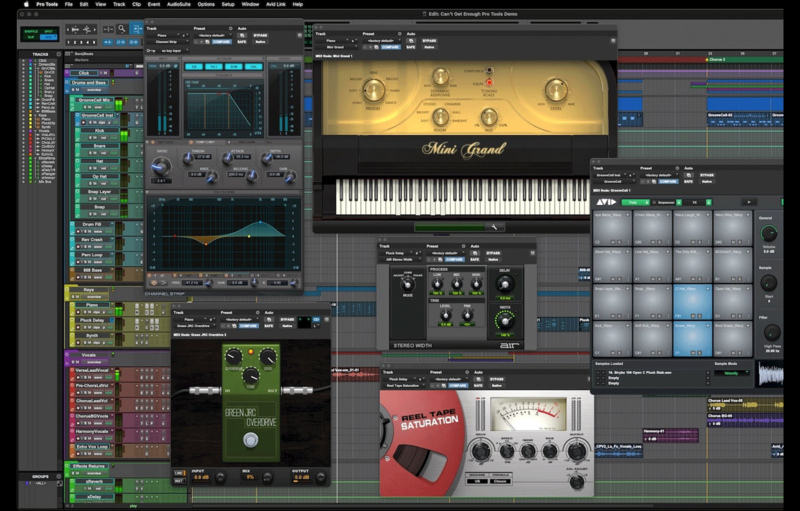
FL Studio offers a user-friendly interface with a pattern-based sequencer, ideal for electronic music production. Pro Tools, on the other hand, has a more traditional layout that appeals to professional engineers.

Audio Editing Capabilities

FL Studio excels in MIDI functionality and loop-based music creation, while Pro Tools is renowned for its precise audio editing tools and industry-standard audio recording capabilities.

Which is Better: Fl Studio vs Pro Tools - Unveiling the Superior DAW


Credit: www.groove3.com


Instrument And Effect Plugins

In the realm of music production software, the debate between FL Studio and Pro Tools often comes down to their capabilities in utilizing instrument and effect plugins. Let’s delve into how these two giants fare when it comes to this crucial aspect.

Availability And Quality

FL Studio: Known for its vast library of plugins, offering a wide range of instrument and effect options.

Pro Tools: While Pro Tools has a solid selection of built-in plugins, its library may be more limited compared to FL Studio.

Integration With Third-party Plugins

FL Studio: Allows seamless integration with various third-party plugins, expanding the user’s sonic capabilities.

Pro Tools: Requires more effort to integrate third-party plugins, as compatibility can sometimes be an issue.


Recording And Mixing Features

FL Studio and Pro Tools are two popular digital audio workstations (DAWs) with distinctive features for recording and mixing music. Let’s delve into the recording and mixing capabilities of both platforms to determine the better fit for your audio production needs.

Track Recording And Management

When it comes to track recording and management, FL Studio offers a user-friendly interface, allowing for quick and efficient multi-track recording. Its pattern-based sequencing enables flexible arrangement and easy manipulation of musical elements.

Mixing Tools And Automation

Pro Tools stands out in the realm of mixing tools and automation. Its industry-standard mixing features, such as advanced automation capabilities and efficient audio editing, provide precise control over the mixing process, ensuring professional-grade results.

Compatibility And System Requirements


Compare Fl Studio and Pro Tools in terms of compatibility and system requirements to determine the best choice for your music production needs. Consider the software’s compatibility with your operating system and hardware to ensure optimal performance for your projects.

Operating System Compatibility

When it comes to choosing between FL Studio and Pro Tools, considering compatibility and system requirements is crucial. Both software offer support for popular operating systems, but there are some differences to note.

FL Studio: This powerful digital audio workstation (DAW) is compatible with Windows and macOS, making it suitable for a wide range of users. Whether you’re running Windows 7, 8, or 10, or macOS 10.11 or later, you can use FL Studio without any issues.

Pro Tools: On the other hand, Pro Tools is primarily designed for macOS users, although it does offer limited support for Windows. If you’re a Windows user, Pro Tools 2020.11 is compatible with Windows 10, but versions prior to that are not officially supported. macOS users can take advantage of the latest Pro Tools releases with ease.

Hardware And Performance Demands

When deciding between FL Studio and Pro Tools, it’s important to consider the hardware and system performance demands of each software. Here’s what you need to know:

FL Studio: Known for its efficient performance, FL Studio can run on modest hardware configurations. If you have a Windows computer with at least 2GB of free disk space and 4GB of RAM, you can run FL Studio smoothly. macOS users will need at least 10GB of free disk space and 4GB of RAM to enjoy a seamless experience.

Pro Tools: Pro Tools, being a professional-grade software, demands a bit more from your hardware. For Windows users, at least 16GB of RAM and an Intel Core i5 processor or better is recommended. Mac users, on the other hand, should have at least 16GB of RAM and an Intel Core i7 or better. Additionally, Pro Tools requires a significant amount of disk space, so make sure you have ample storage available.

In conclusion, both FL Studio and Pro Tools offer compatibility with various operating systems, but FL Studio may be a better choice for Windows users while Pro Tools is more suited to macOS users. When it comes to system requirements, FL Studio is less demanding than Pro Tools, making it a viable option for those with lower-spec hardware. However, if you’re a professional seeking advanced features and aren’t concerned about the hardware demands, Pro Tools is worth considering.

Cost And Support


When comparing the cost and support of Fl Studio versus Pro Tools, it is important to consider your specific needs and preferences. Fl Studio may be more budget-friendly with a strong user community, while Pro Tools offers robust customer support and industry-standard features.

Pricing Structure And Bundled Content

In terms of cost, both FL Studio and Pro Tools offer different pricing structures to cater to varying budgets and needs. FL Studio follows a straightforward pricing model, with different editions available, including Fruity Edition, Producer Edition, and Signature Bundle. Each edition offers different features and is priced accordingly. On the other hand, Pro Tools offers various subscription plans, including Pro Tools | First (a free version with limited features), Pro Tools (standard version), and Pro Tools | Ultimate (with advanced features and functionalities). Additionally, Pro Tools offers bundled content, such as virtual instruments, effects plugins, and sample libraries, which can be a valuable addition to your music production toolkit.

Customer Support And Community Resources

When it comes to customer support, both FL Studio and Pro Tools excel in providing assistance and resources to their users. FL Studio offers extensive documentation, tutorials, forums, and a knowledge base on their website. In addition, they have a dedicated customer support team that you can reach out to for any queries or technical issues. Pro Tools, too, offers a wealth of resources, including documentation, video tutorials, and a vibrant user community. Their support team is readily available to address any concerns or troubleshooting needs. Having access to reliable customer support and active community resources can make a significant difference in your music production journey, allowing you to overcome challenges and learn from experienced users. In conclusion, both FL Studio and Pro Tools have distinct pricing structures and provide excellent support to their users. Whether you prefer FL Studio’s straightforward pricing and bundled content or Pro Tools’ subscription plans and extensive resources, both DAWs offer the necessary tools and assistance for your music production needs. The choice ultimately depends on your workflow preference, budget, and the features that best align with your creative goals. Whichever option you choose, both FL Studio and Pro Tools possess the potential to elevate your music production game.

Which is Better: Fl Studio vs Pro Tools - Unveiling the Superior DAW


Credit: www.adsrsounds.com


Which is Better: Fl Studio vs Pro Tools - Unveiling the Superior DAW


Credit: www.producerspot.com


Frequently Asked Questions For Which Is Better Fl Studio Or Pro Tools


Should I Use Pro Tools Or Fl Studio?


Choose Pro Tools for professional recording, editing, and mixing. FL Studio is popular for electronic music production. Both are great for different uses.


Do Professionals Use Fl Studio?


Yes, professionals do use FL Studio. It is a popular digital audio workstation for music production.


What Daw Do Most Professionals Use?


Most professionals use Digital Audio Workstations or DAWs like Pro Tools, Logic Pro, Ableton Live, or Studio One.


Is Pro Tools Still The Best Daw?


Yes, Pro Tools is still considered one of the best DAWs due to its industry-standard features and professional-grade capabilities. Its advanced tools and seamless workflow make it a top choice for many music professionals and enthusiasts.


Conclusion


Ultimately, the choice between FL Studio and Pro Tools depends on your specific needs and preferences. FL Studio is great for electronic music production, while Pro Tools excels in professional recording and mixing. Consider your workflow, budget, and desired features to make the right decision for your music production journey.

Categories
Archive Audio Production

Is FL Studio Fruity Edition Worth It? Unveiling the Power Within

The FL Studio Fruity Edition is worth it for beginners or those with basic music production needs. If you are just starting out or require fundamental features, the Fruity Edition offers a cost-effective option with essential tools for creating music.


With its user-friendly interface and solid functionalities, this entry-level version provides a good foundation for learning music production. While it may lack some advanced features found in higher-tier editions, the FL Studio Fruity Edition can still be a valuable tool for aspiring music producers to hone their skills and unleash their creativity.


Whether you are a hobbyist or a beginner exploring music production, this edition can be a suitable starting point before considering an upgrade to a more comprehensive version of FL Studio.

Is FL Studio Fruity Edition Worth It? Unveiling the Power Within


Credit: reverb.com


Features

FL Studio Fruity Edition offers a range of unique features that cater to both beginners and intermediate music producers.

Unique Features

Innovative piano roll for precise note editing.

Step sequencer for easy rhythm creation.

Multi-touch support for intuitive control.

Automation clips for dynamic changes.

Plugin delay compensation for seamless mixing.

Limitations And Downsides

  • Limited to 125 audio tracks and 64 internal audio effects.
  • Does not include advanced plugins like Edison or Newtone.
  • Not suitable for complex orchestral compositions.
Is FL Studio Fruity Edition Worth It? Unveiling the Power Within


Credit: issuu.com


User Experience

Exploring the User Experience of FL Studio Fruity Edition sheds light on its usability and overall satisfaction among music producers.

Ease Of Use

  • Intuitive Interface: FL Studio Fruity Edition features a user-friendly layout.
  • Smooth Navigation: Users can easily access different functions and tools.

User Feedback

  1. Positive Responses: Many users appreciate the simplicity and functionality of the software.
  2. Enhanced Creativity: FL Studio Fruity Edition empowers users to express their musical ideas effortlessly.


Comparisons

When considering purchasing music production software, it’s essential to make informed decisions. Understanding the differences between FL Studio Fruity Edition and its alternatives can help you determine if it’s worth the investment. Let’s delve into the comparisons to see how FL Studio Fruity Edition stacks up against other versions and its competitors.

Fl Studio Fruity Edition Vs. Other Versions

FL Studio Fruity Edition is a streamlined version of the popular music production software. Compared to the Producer and Signature editions, Fruity Edition offers a more cost-effective entry point for beginners and those with basic production needs. Its limitations in terms of advanced features such as audio recording and plugin capabilities make it suitable for those focusing primarily on MIDI sequencing and beat creation.

Fl Studio Fruity Edition Vs. Competitors

Compared to its competitors, FL Studio Fruity Edition holds its ground as a formidable music production tool. Its intuitive user interface and versatile step sequencer provide a unique approach to music creation. While it may lack certain features found in more expensive DAWs, its affordability and ease of use make it an attractive option for aspiring producers and beatmakers.

Is FL Studio Fruity Edition Worth It? Unveiling the Power Within


Credit: www.thehypemagazine.com


Frequently Asked Questions For Is Fl Studio Fruity Edition Worth It


What Does Fl Studio Fruity Edition Do?


FL Studio Fruity Edition is a music production software that allows users to compose, arrange, and mix music. It offers a range of features including virtual instruments, effects, and a user-friendly interface. With FL Studio Fruity Edition, you can create professional-quality music tracks in a simple and intuitive way.


Is Fl Studio Fruity Edition Good For Beginners?


FL Studio Fruity Edition is ideal for beginners. It is user-friendly, making it easy to learn and navigate. With its intuitive interface and extensive tutorials, beginners can quickly create their own music. Additionally, it offers a wide range of features and tools, allowing beginners to explore and experiment with different sounds and styles.


What Edition Of Fl Studio Is The Best To Buy?


The best edition of FL Studio to buy depends on your needs and budget. The Fruity Edition is great for beginners, while the Producer and Signature Editions offer more advanced features. Evaluate your requirements and choose the edition that aligns with your music production goals and budget.


Can I Record With Fl Studio Fruity Edition?


Yes, you can record audio in FL Studio Fruity Edition using its built-in recording feature.


Conclusion


To wrap it up, Fl Studio Fruity Edition is a worthwhile investment for music producers. Its affordability and powerful features make it perfect for beginners and professionals alike. With its intuitive interface and wide range of tools, it can help users take their music production to the next level.


Grab it now and experience the magic.

Categories
Archive Audio Production

What is Music Mixing And Mastering: Unlock the Sonic Potential!

Music mixing involves blending individual tracks together to create a cohesive sound, while mastering refines the overall audio quality of the mixed tracks. Professional mixing and mastering are essential steps in the music production process to ensure the final product is polished and ready for distribution.


From adjusting volume levels to enhancing sound clarity, these techniques can make a significant difference in how a song is perceived by listeners. Mixing focuses on balance and the spatial placement of elements within a mix, while mastering involves fine-tuning the overall audio to achieve a consistent sound across different playback systems.


Both processes require skill and an understanding of audio engineering principles to achieve optimal results.

What is Music Mixing And Mastering: Unlock the Sonic Potential!


Credit: www.facebook.com


The Basics Of Music Mixing

The Role Of Mixing

Music mixing is pivotal in blending various audio elements to create a cohesive sound. The role of mixing entails adjusting volume levels, applying effects, and enhancing the overall balance of a track.

Elements Of A Mix

Key elements of a mix include vocals, instruments, drums, and effects. Each element is carefully layered and processed to achieve clarity and depth within the overall sound.

Understanding Mastering

Understanding Mastering: Mastering is a crucial step in music production that ensures the final audio is polished, consistent, and ready for distribution.

The Purpose Of Mastering

Mastering enhances the overall sound quality, ensuring that the music sounds its best on all playback systems, from headphones to speakers.

Key Mastering Processes

  1. Equalization: Balancing frequencies to optimize the tonal balance of the music.
  2. Compression: Smoothing out the dynamic range to make the music more cohesive.
  3. Stereo Enhancement: Creating a wider stereo image for a more immersive listening experience.
  4. Loudness Maximization: Making sure the volume level is consistent and competitive with other tracks.
  5. Sequencing: Arranging the songs in the correct order for the best flow and cohesion.


Importance Of Mixing And Mastering

When it comes to creating a professional and polished sound for your music, mixing and mastering play a crucial role in achieving that desired outcome. These two processes are essential for ensuring that your music sounds coherent, balanced, and of the highest quality.

Enhancing Sound Quality

Music mixing and mastering are vital for enhancing the overall sound quality of a recording. During the mixing phase, various elements such as vocals, instruments, and effects are combined and adjusted to create a harmonious blend. This process allows for the correction of any imperfections in the audio, resulting in a more polished and cohesive sound.

Ensuring Cohesiveness

Another crucial aspect of music mixing and mastering is ensuring cohesiveness throughout the entire track or album. This involves making sure that each individual part of the music, such as vocals, instruments, and effects, seamlessly fits together to create a unified and smooth listening experience for the audience. Proper mastering further ensures that the overall audio levels are balanced and consistent, making the music ready for distribution across various platforms.

What is Music Mixing And Mastering: Unlock the Sonic Potential!


Credit: www.facebook.com


Common Mixing And Mastering Techniques

In the world of music production, mixing and mastering are crucial steps that ensure your songs sound professional and polished. Mixing involves blending different audio tracks together and creating a balanced and cohesive sound. On the other hand, mastering takes the final mix and applies the necessary enhancements to achieve optimum quality for distribution.

Equalization

Equalization, commonly known as EQ, is an essential mixing and mastering technique. It involves adjusting the frequency content of audio signals to achieve the right balance and clarity. EQ can be used to boost or cut specific frequencies, controlling the overall tonal quality of instruments or vocals.

There are different types of EQs, such as parametric, graphic, and shelving EQs. Each type offers unique features and controls to cater to specific needs. For example, parametric EQs allow precise adjustments with parameters like frequency, bandwidth, and gain, while graphic EQs use sliders to alter frequency bands.

Compression

Compression is another vital technique used in both mixing and mastering processes. It helps control the dynamic range of audio signals by reducing the volume of louder parts and amplifying the quieter sections. By doing so, compression ensures a more consistent and balanced sound.

A compressor applies automatic gain control to audio signals by analyzing their levels and applying gain reduction when needed. This technique helps bring out details in quiet parts and prevent distortion or clipping in louder sections. Compressors also add warmth, punchiness, and character to the audio, making it more engaging and pleasing to the ear.

Reverb And Effects

Reverb and effects play a significant role in enhancing the spatial and textural qualities of audio during the mixing and mastering stages. Reverb simulates the natural acoustic environment, adding depth and dimension to the sound. It can create the illusion of the audio being recorded in different spaces, such as concert halls, churches, or smaller rooms.

Effects like delay, chorus, and modulation add richness and interest to the audio. Delay produces echoes by repeating the original sound at specific intervals. Chorus creates a swirling, thickened sound by duplicating the original signal and modulating its pitch slightly. Modulation effects like flanger or phaser produce unique, swirling, or sweeping sounds to add movement and uniqueness to the track.

By utilizing reverb and effects appropriately, you can transform your mix into a captivating and immersive sonic experience, enriching the overall listening experience for your audience.

Tools For Effective Mixing And Mastering


Music mixing and mastering involve blending and refining audio tracks for optimal sound quality. Effective tools aid in achieving balanced levels, clarity, and depth in the final output. These tools are crucial for producers and engineers to deliver professional-sounding music to their audience.

When it comes to music production, mixing and mastering play a crucial role in enhancing the overall quality of a song. These processes involve adjusting and balancing the individual elements of a track to create a polished and professional sound. To achieve this, music producers utilize various tools that help them in the mixing and mastering process.

Digital Audio Workstations (daws)

Digital audio workstations, commonly referred to as DAWs, are software applications that allow music producers to record, edit, and mix audio tracks. With the advancements in technology, there are several DAWs available in the market, each offering a range of features to suit different needs and preferences. Some popular DAWs include:

  • Ableton Live
  • Pro Tools
  • Logic Pro
  • FL Studio

These DAWs provide a user-friendly interface and a wide array of tools and effects to manipulate audio. They allow music producers to import various audio files, adjust different parameters such as volume, panning, and EQ, and apply various audio effects to create the desired sound. DAWs also provide a platform to arrange and sequence different elements of a song, helping producers to bring their creative vision to life.

Plugins And Processing Tools

In addition to DAWs, plugins and processing tools play a vital role in the mixing and mastering process. These tools are software-based and can be integrated within DAWs to expand their capabilities. Plugins enable music producers to access a wide range of effects, virtual instruments, and processors, enhancing the creative possibilities during mixing and mastering. Some commonly used plugins and processing tools include:

Plugin/Processing Tool Function
Equalizers (EQs) Adjust the frequency balance of audio
Compressors Control the dynamic range of audio
Reverbs Add ambiance and create spatial effects
Delays Create echoes and rhythmic effects
Limiters Prevent audio from exceeding a certain level

These plugins and processing tools provide music producers with precise control over the audio elements, allowing them to shape the sound according to their preferences. Additionally, they offer various presets and settings that can be applied to achieve specific tonal characteristics or effects. The combination of DAWs and plugins enables music producers to create professional and polished mixes and masters of their tracks. In summary, the tools used for effective mixing and mastering in music production include digital audio workstations (DAWs) and plugins/processing tools. DAWs provide a platform to record, edit, and mix audio, while plugins and processing tools offer a range of effects and processors to enhance the sound. By utilizing these tools, music producers can achieve the desired quality and clarity in their tracks, ensuring an engaging and enjoyable listening experience for the audience.

What is Music Mixing And Mastering: Unlock the Sonic Potential!


Credit: www.instagram.com


Frequently Asked Questions On What Is Music Mixing And Mastering


What Does Mixing And Mastering Mean In Music?


Mixing is balancing and adjusting individual tracks in a song. Mastering is the final step where all tracks are combined and polished for a cohesive sound.


Which Is Harder Mixing Or Mastering?


Mixing is generally considered harder than mastering due to its complexity and the need for a keen ear for detail in balancing tracks effectively. Mastering involves fine-tuning the overall sound but is seen as a more straightforward process.


Does Mixing And Mastering Make A Big Difference?


Yes, mixing and mastering can make a significant difference in the quality of audio tracks. Proper mixing ensures balanced sound elements, while mastering polishes the final mix for a professional, cohesive sound. Both processes are crucial for a polished and impactful audio production.


What Is The Purpose Of Mastering Music?


Mastering music enhances its sound quality, volume, and overall balance, resulting in a polished final product. It optimizes the tracks for different playback systems and formats, ensuring that the music is consistent and enjoyable across various platforms.


Conclusion


Music mixing and mastering are crucial processes for creating high-quality audio. Understanding the differences and importance of each can greatly improve the overall sound of a musical piece. With the right techniques and tools, musicians and producers can elevate their music to new heights and deliver an exceptional listening experience to their audience.

Categories
Archive Audio Production

Can You Upload Music to Spotify Without a Distributor? Learn How!

Yes, you can upload music to Spotify without a distributor using their new feature Spotify for Artists. This tool allows independent artists to directly upload their music to the platform.


In today’s digital age, independent musicians have more opportunities to share their music and reach a global audience. With platforms like Spotify for Artists, artists have the freedom to release music on their own terms, without the need for a third-party distributor.


This user-friendly tool empowers artists to take control of their music career and connect with fans worldwide. By utilizing these innovative tools, artists can navigate the music industry independently and showcase their talent to a broader audience.


Credit: aristake.com


Getting Your Music On Spotify

Consider using a digital music distributor for easy access to Spotify.

Popular options include DistroKid, TuneCore, and CD Baby.

Spotify also offers a direct upload option for artists without a distributor.

Create a Spotify for Artists account and follow the prompts to upload your music.

Ensure your music meets Spotify’s quality standards for compatibility.

Using A Digital Music Distributor

When uploading music to Spotify without a distributor, one efficient way is to utilize a digital music distributor.

Selecting The Right Distributor

A reliable digital music distributor can simplify the process of getting your music on Spotify.

  • Look for distributors with a user-friendly interface
  • Consider the pricing and features offered

Uploading Your Music

After selecting a suitable distributor, it’s time to start uploading your music to Spotify.

  1. Create an account with the chosen distributor
  2. Follow the platform’s guidelines for uploading music

Ensure your music meets Spotify’s requirements for quality and format before submission.

By utilizing a digital music distributor, you can easily upload your music to Spotify without the need for a third-party.

Understanding Spotify’s Direct Upload Option


Spotify’s direct upload option allows artists to upload music without using a distributor. This feature provides independent musicians with the opportunity to release their music directly on the platform, bypassing the need for a third-party distributor. By utilizing this service, artists can maintain control over their music and reach a global audience through Spotify.

Understanding Spotify’s Direct Upload Option Eligibility Criteria To utilize Spotify’s direct upload feature, artists need to meet specific eligibility criteria. The first requirement is that you must hold the rights to the music you intend to upload. This means that the music should be original and not infringe on any copyrights. Additionally, you need to have a verified Spotify for Artists account to be eligible for direct uploads. This verification ensures that you have control over your artist profile on the platform. Uploading Your Music Directly Once you meet the eligibility criteria, you can proceed to upload your music directly to Spotify. The process begins by logging into your Spotify for Artists account and selecting “Upload” from the dashboard. You will then be prompted to provide the necessary details about the release, such as the title, cover art, release date, and genre. After filling out the required information, you can upload the music files directly from your computer. It’s important to ensure that your music files adhere to Spotify’s formatting and quality guidelines to ensure a smooth upload process. Once the upload is complete, your music will undergo Spotify’s content review process before being made available to listeners on the platform.

Promoting Your Music On Spotify

Utilizing the power of Spotify for Artists and engaging your audience are essential steps to effectively promote your music on Spotify. In this section, we will discuss how you can take advantage of the features provided by Spotify for Artists to enhance your reach and drive more exposure to your music.

Utilizing Spotify For Artists

If you want to make the most out of your presence on Spotify, then you need to dive into the world of Spotify for Artists. This platform provides musicians with valuable insights, tools, and resources to manage their music and engage with their fans.

Here’s how you can utilize Spotify for Artists to promote your music:

  1. Create an Artist Profile: Your artist profile on Spotify acts as your digital hub. Make sure to create a compelling bio, upload high-quality images, and provide links to your social media accounts and website.
  2. Customize Your Profile: To stand out from the crowd, you can customize your profile by adding a header image and selecting a standout artist-picked track.
  3. Verify Your Profile: By verifying your profile, you gain access to additional features like artist playlists and the ability to submit upcoming releases to Spotify’s editorial team for consideration.
  4. Utilize the Insights: Spotify for Artists provides you with valuable insights about your listeners, such as where they are located and what playlists they are discovering your music on. Use this data to tailor your promotional efforts and target specific markets.
  5. Promote Your Playlists: Creating playlists is a fantastic way to showcase your musical taste and share your favorites with your fans. Be sure to promote these playlists across your social media channels to increase engagement and follower count.

Engaging Your Audience

Engaging with your audience is crucial to sustain and grow your fan base on Spotify. Here are a few strategies to foster meaningful connections and keep your listeners coming back for more:

  • Interact on Social Media: Stay active on social media platforms by responding to comments, sharing updates about your music, and showing appreciation to your fans. This engagement will help cultivate a loyal following and encourage fans to listen to your music on Spotify.
  • Collaborate with Other Artists: Collaborating with other artists can expose your music to new audiences and help you tap into their fan base. Consider reaching out to artists with a similar style or genre to work together on a song or playlist.
  • Run Contests and Giveaways: Everyone loves freebies! Running contests or giveaways on your social media channels can boost your Spotify plays and increase engagement. Encourage listeners to follow your Spotify profile and stream your music for a chance to win exclusive merchandise or concert tickets.
  • Promote Your Spotify Link: Add your Spotify link to your website, email signature, and any other promotional materials. Make it easy for fans to find and stream your music on Spotify.

By harnessing the power of Spotify for Artists and engaging your audience effectively, you can take significant strides in promoting your music and reaching new fans on Spotify. Start implementing these strategies today and watch your Spotify presence soar!


Maximizing Your Spotify Presence

When it comes to sharing your music with the world, having a strong presence on Spotify is crucial. With over 345 million monthly active users, it’s a platform that can significantly boost your reach and help you connect with fans. The good news is, you don’t necessarily need a distributor to upload your music to Spotify. In this blog post, we will explore the various ways you can maximize your Spotify presence without relying on a distributor.

Optimizing Your Profile

Your Spotify profile is the first impression you make on potential listeners, so it’s important to optimize it to grab their attention. Here are some key tips to ensure your profile stands out:

  • Create a compelling bio: Write a concise and engaging biography that highlights your unique story as an artist. Be sure to include relevant keywords that reflect your music style and genre.
  • Choose an eye-catching profile image: Select a visually appealing image that accurately represents your brand or identity as an artist. This will help you create a memorable visual presence on Spotify.
  • Curate your playlists: Showcase your musical taste by creating playlists that feature your own tracks along with songs from other artists in your genre. This not only adds depth to your profile but also helps you connect with other musicians.
  • Add detailed track information: Provide accurate and comprehensive information about each of your tracks, including titles, featured artists, and genres. This will make it easier for listeners to discover your music through search filters and recommendations.

Collaborating And Networking

Collaborating with other artists and networking within the music industry can have a significant impact on your Spotify presence. Here’s how you can leverage collaborations and networking to expand your reach:

  • Reach out to fellow artists: Identify artists who share a similar style or audience and reach out to them. Collaborating on a track or featuring on each other’s playlists can help you tap into their existing fan base and gain exposure.
  • Attend music events and conferences: Network with industry professionals, such as producers, record label representatives, and music bloggers, at events and conferences. Building relationships with these individuals can open doors to valuable opportunities and potential partnerships.
  • Engage with your audience: Actively respond to comments, messages, and interactions from your listeners. Show genuine interest in their feedback and build a loyal fan base by creating a connection with your audience.
  • Promote your music on social media: Leverage the power of social media platforms to share your Spotify tracks, engage with fans, and collaborate with other artists. Utilize hashtags relevant to your genre and regularly post content that showcases your music and personality.

Can You Upload Music to Spotify Without a Distributor? Learn How!


Credit: www.wikihow.com


Can You Upload Music to Spotify Without a Distributor? Learn How!


Credit: www.ac3filter.net


Frequently Asked Questions On Can You Upload Music To Spotify Without A Distributor


Can I Upload Music Without A Distributor?


Yes, you can upload music without a distributor on certain platforms like SoundCloud or Bandcamp.


Do You Need A Distributor To Upload Music To Spotify?


No, you can upload music directly to Spotify without the need for a distributor.


How Do I Add Music To Spotify Without A Distributor For Free?


You can upload your music to Spotify for free through an independent music distributor or aggregator. Some offer free distribution options for artists.


Can You Independently Upload Music To Spotify?


Yes, you can independently upload your music to Spotify without the need for a record label.


Conclusion


In today’s blog post, we’ve explored the process of uploading music to Spotify without a distributor. By understanding the steps involved and utilizing the right tools and resources, independent artists can successfully share their music with a global audience. With careful planning and perseverance, it’s possible to navigate the music industry without the need for a traditional distributor.

Categories
Archive Audio Production

How Much Does Spotify Charge to Upload Music? Discover the Cost-effective Option

Spotify charges nothing for artists to upload music. It’s free for all musicians.


For independent musicians, uploading music to Spotify is completely free, making it a cost-effective way to showcase their work to a global audience. By removing barriers like fees for uploads, Spotify empowers artists to share their talent with fans worldwide.


This democratization of the music industry allows for greater inclusivity and diversity in the music landscape. As streaming platforms like Spotify continue to shape the music industry, this approach benefits both artists and listeners alike.


Credit: cymatics.fm


Cost Of Uploading Music To Spotify

Cost of Uploading Music to Spotify: Understanding the expenses involved in getting your music on Spotify is crucial for musicians. Let’s explore the Spotify’s Distribution Fee and how Royalties and Revenue Sharing work.

Spotify’s Distribution Fee

When you upload your music to Spotify through a distributor, such as DistroKid or TuneCore, there is typically a distribution fee involved.

Royalties And Revenue Sharing

Spotify pays artists through royalties based on the number of streams their music receives. The revenue sharing model means that artists earn a percentage of the revenue generated by their streams.

Comparison With Other Platforms

When considering music distribution costs, it’s important to compare Spotify’s pricing with other platforms.

Alternative Music Distribution Costs

Let’s take a look at a simple comparison table of the costs associated with distributing music on different platforms:

Platform Cost to Upload Music
Spotify $0
Apple Music $19.99/year
Amazon Music $7.99/month

Benefits Of Choosing Spotify

  • No upfront cost: Uploading music to Spotify is free of charge.
  • Wide audience reach: Spotify has a large user base, increasing visibility for your music.
  • Analytical insights: Spotify provides data on listener analytics for better understanding.

Understanding Spotify’s Payment Model


Spotify’s payment model charges artists and labels a flat fee to upload their music. There are no additional fees for each release, but the platform takes a cut of the royalties from streams. This model allows artists to reach a wider audience without incurring high upfront costs.

Understanding Spotify’s Payment Model As an independent musician or band, navigating the world of music distribution and streaming platforms is essential for success in the digital age. Spotify is undoubtedly one of the most prominent players in this arena, offering artists the opportunity to have their music heard by millions of listeners. However, it’s crucial to understand the payment model employed by Spotify to determine how much it charges to upload music and how artists are compensated for their work. Insight into Spotify’s Payment Structure Spotify’s payment structure revolves around the concept of streaming royalties, which is the primary method through which artists earn revenue on the platform. Each time a user streams a song, a fraction of a cent is paid to the rights holders, which may include the artist, record label, and other parties involved. However, it’s important to note that this payment is not fixed and can vary based on several factors. Factors Affecting Earnings Several factors can influence an artist’s earnings on Spotify. These include the number of streams, the user’s subscription tier, and the artist’s royalty rate. The following table provides a concise overview of the main factors affecting an artist’s earnings on Spotify: | Factor | Description | |———————-|——————————————————-| | Number of Streams | The more a song is played, the more an artist earns. | | User’s Subscription | Premium subscribers may generate higher royalties. | | Artist’s Royalty | Artists with a higher royalty rate receive more income. | Understanding these factors is critical for artists looking to maximize their earnings on the platform. By strategizing and actively promoting their music, artists can increase their streams and, consequently, their revenue. In conclusion, grasping Spotify’s payment model is crucial for musicians seeking to take advantage of the platform’s immense potential as a distribution channel. By understanding the factors that influence earnings and actively promoting their music, artists can position themselves for success on Spotify.

How Much Does Spotify Charge to Upload Music? Discover the Cost-effective Option


Credit: www.wired.com


Tips For Cost-effective Music Distribution

Maximizing Revenue On Spotify

As an independent artist or small record label, it’s essential to maximize your revenue on Spotify. Here are a few strategies to boost your earnings:

  • Focus on creating high-quality, engaging music that resonates with your target audience.
  • Regularly release new tracks or albums to maintain a steady stream of content and keep your listeners engaged.
  • Collaborate with other artists or feature guest artists on your songs to widen your reach and attract new listeners.
  • Invest time in building your presence on social media platforms to increase your fan base and generate more streams.
  • Create unique marketing strategies that grab attention, such as organizing giveaways or exclusive content for your fans.
  • Consider utilizing Spotify’s playlist pitching tools to reach a larger audience and increase your chances of getting featured.

Utilizing Promotional Tools

Spotify offers various promotional tools that can help you get your music noticed:

  • Spotify for Artists: Sign up for a Spotify for Artists account to access valuable insights about your listeners and tailor your promotional efforts accordingly.
  • Spotify Ads: Consider running targeted ads on Spotify to reach potential listeners who might be interested in your music.
  • Playlist Placement: Submit your tracks to relevant playlists curated by Spotify or influential playlist curators to gain more exposure.
  • Collaborative Playlists: Create collaborative playlists that allow your fans and followers to add their favorite songs, increasing engagement and attracting new listeners.
  • Social Media Integration: Utilize Spotify’s sharing features to seamlessly promote your music on social media platforms like Instagram, Facebook, and Twitter.

Note: Remember, when utilizing promotional tools, it’s important to stay authentic and genuine. Focus on building meaningful connections with your audience rather than solely chasing numbers.

Conclusion And Recommendations

In conclusion, Spotify offers a variety of options when it comes to uploading music, each with its own pricing structure. It’s important to consider your budget and goals when selecting the right distribution option for your music. To summarize the cost considerations and provide guidance for choosing the right option, here are some key points to keep in mind:

Summary Of Cost Considerations

If you’re an independent artist or a band on a tight budget, Spotify’s free upload option may be appealing. You can distribute your music to Spotify and retain 100% of your rights, without incurring any upfront charges. However, keep in mind that there are certain limitations with this option, such as limited access to detailed analytics and the inability to pitch your music to Spotify’s editorial playlists.

For those looking for more comprehensive features and greater control over their music, Spotify’s paid upload options are worth exploring. Their most popular option, Spotify for Artists, allows you to deliver your music to Spotify and provides additional benefits such as access to detailed analytics, the ability to pitch your music to editorial playlists, and artist customization options. The cost for this option starts at $9.99 per month.

If you’re a label or distributor looking to upload music on behalf of multiple artists, Spotify offers a separate option called Spotify for Labels & Distributors. With this option, you can upload music for multiple artists under one account and access additional label-specific features. The pricing for this option is tailored based on your specific needs, so it’s best to contact Spotify directly for more information.

Guidance For Choosing The Right Distribution Option

When choosing the right distribution option for your music, consider the following recommendations:

  1. Assess your goals and budget: Determine your priorities and how much you’re willing to invest in distributing your music on Spotify.
  2. Evaluate the features: Consider the features and benefits offered by each option, such as analytics, playlist pitching, and customization options.
  3. Consider your level of control: Decide how much control you want over your music and whether you’re comfortable with any limitations that come with the free upload option.
  4. Explore label-specific needs: If you’re a label or distributor, reach out to Spotify for information on their label-specific option, which may better suit your needs.

By carefully considering these cost considerations and following the guidance provided, you can make an informed decision on how to upload your music to Spotify in a way that aligns with your goals as an artist or a label. Remember, the right distribution option can help you reach a wider audience and amplify your music’s presence on the platform.

How Much Does Spotify Charge to Upload Music? Discover the Cost-effective Option


Credit: houseoftracks.com


Frequently Asked Questions For How Much Does Spotify Charge To Upload Music


Does It Cost Money To Upload Music To Spotify?


Uploading music to Spotify is free; however, there are fees through digital distributors for distribution.


Does It Cost Money To Download Songs On Spotify?


Downloading songs on Spotify requires a premium subscription, which costs money. Free accounts do not allow downloads.


Can I Upload My Own Music To Spotify?


Yes, you can upload your own music to Spotify through a verified distributor or aggregator.


Is Uploading To Spotify As An Artist Free?


Uploading music to Spotify as an artist is free of charge.


Conclusion


Understanding the cost of uploading music on Spotify is vital for artists. By considering the different pricing options and their corresponding benefits, musicians can make informed decisions to maximize their exposure within the platform. As the music industry continues to evolve, staying abreast of services like Spotify will help artists navigate the digital landscape efficiently.


Categories
Archive Audio Production

Is FL Studio Worth It for Beginners? Unleash Your Music Production Potential!

For beginners, FL Studio is worth it due to its user-friendly interface and extensive features. As a popular digital audio workstation, FL Studio offers a multitude of tools and functions suitable for those starting out in music production.


From its intuitive layout to its wide range of plugins and instruments, FL Studio provides a solid foundation for beginners to learn and grow their skills. Additionally, its affordable price point makes it accessible to aspiring producers looking to kickstart their music production journey without breaking the bank.


With FL Studio, beginners can easily dive into the world of music production and start creating their own tracks with confidence.

Is FL Studio Worth It for Beginners? Unleash Your Music Production Potential!


Credit: ise.edu.al


Getting Started With Fl Studio

Before diving into FL Studio, beginners should consider the suitable version based on their needs.

Follow these steps to install and set up FL Studio:

  1. Download the FL Studio software from the official website.
  2. Run the installer and follow the on-screen instructions.
  3. Choose the desired installation location on your computer.
  4. Complete the installation process and launch FL Studio.
Is FL Studio Worth It for Beginners? Unleash Your Music Production Potential!


Credit: www.amazon.com


Understanding Fl Studio’s Interface

Navigating The Workspace

When you open FL Studio, the interface may seem overwhelming. But fear not, it’s designed for efficiency.

The interface is split into sections: Toolbar, Channel Rack, Piano Roll, Playlist, Mixer, and Browser.

  • Toolbar offers quick access to essential functions.
  • Channel Rack is where you add instruments and samples.
  • Piano Roll is used for composing melodies and chords.
  • Playlist is where you arrange your music.
  • Mixer controls volume, effects, and more.
  • Browser helps you navigate your files and plugins.

Key Features And Functions

FL Studio’s interface gives you power and flexibility as a beginner. Learn these key features:

  • Customizable workflow lets you arrange tools to suit your needs.
  • Intuitive drag-and-drop functionality simplifies music creation.
  • Powerful virtual instruments and effects for professional sound.
  • Automation features for dynamic changes in your tracks.
  • Support for third-party plugins expands your creative possibilities.

Learning The Basics Of Music Production

Learning the basics of music production is an exciting journey for beginners delving into FL Studio. This powerful software opens up a world of creativity, enabling aspiring producers to bring their musical visions to life. As a beginner, understanding the fundamentals of music production is key to creating professional-sounding tracks. Let’s explore the essential aspects of FL Studio and how it can benefit newcomers in their music production endeavors.

Creating Beats And Melodies

Creating beats and melodies is a fundamental part of music production. FL Studio offers a user-friendly interface that allows beginners to experiment with various drum patterns, synth sounds, and melody arrangements. Its intuitive piano roll and step sequencer provide a seamless workflow for arranging and layering beats and melodies. With FL Studio’s built-in instruments and sample libraries, beginners can easily explore different musical styles and genres.

Understanding Effects And Mixing

Understanding effects and mixing is crucial for shaping the overall sound of a track. FL Studio provides a wide range of audio effects, including reverb, delay, compression, and equalization, allowing beginners to enhance their productions. The mixer interface in FL Studio offers comprehensive control over individual track levels, panning, and effects routing. As beginners grasp the concept of effects and mixing, they can craft their music with clarity and depth, setting the stage for professional-sounding results.

Exploring Advanced Techniques


FL Studio offers a wide range of advanced techniques suitable for beginners, making it a valuable investment. The software provides an intuitive interface and a wealth of resources for learners to explore music production, making it a worthwhile choice for those starting out in the field.

Introduction: Exploring Advanced Techniques

Once you’ve mastered the basics of FL Studio as a beginner, it’s time to take your skills to the next level by diving into advanced techniques. These techniques will enable you to create unique and professional-sounding tracks, pushing the boundaries of your creativity. In this section, we will explore two key areas of advanced techniques in FL Studio: advanced sound design and utilizing automation and modulation.

Advanced Sound Design

Advanced sound design is all about pushing the limits of FL Studio’s vast library of sounds and plugins to create your own unique sonic palette. With an array of synthesizers, effects, and sample manipulation tools at your disposal, the possibilities are endless.

By combining different synthesis techniques, such as subtractive, FM, and wavetable synthesis, you can create complex and intricate sounds that will make your tracks stand out. Experimenting with various effects like reverb, delay, and distortion allows you to shape and sculpt your sounds to fit perfectly into your mix.

Another key aspect of advanced sound design is exploring different sampling techniques. By manipulating samples and applying various processing tools, you can transform ordinary sounds into extraordinary ones. Additionally, learning how to create your own sampled instruments opens up a whole new world of sonic possibilities.

Utilizing Automation And Modulation

Automation and modulation are powerful tools in FL Studio that allow you to add movement and dynamics to your tracks. Using automation, you can control various parameters over time, such as volume, panning, filter cutoff, and more. This enables you to create subtle or drastic changes that bring your tracks to life.

Modulation, on the other hand, involves using tools like LFOs (low-frequency oscillators) and envelopes to modulate different parameters. Whether it’s applying vibrato to a lead melody or adding rhythmic movement to a bassline, modulation can add depth and expression to your music.

FL Studio provides a range of ways to automate and modulate your tracks, from drawing in automation curves and envelopes to using powerful modulation plugins like Fruity Formula Controller and Peak Controller.

In conclusion, exploring advanced techniques in FL Studio opens up a world of possibilities for beginners. With advanced sound design techniques, you can create your own unique sounds and instruments, while utilizing automation and modulation allows you to add movement and dynamics to your tracks. So, don’t be afraid to experiment and push the boundaries of your creativity in FL Studio!


Optimizing Your Workflow And Output

When it comes to music production, having a smooth workflow and efficient output is crucial. Whether you are just starting out with FL Studio or have been using it for a while, there are various ways to optimize your workflow and improve the quality of your music. In this section, we will explore some valuable tips for efficient production and how to export and share your music seamlessly.

Tips For Efficient Production

1. Organize Your Project: Keeping your project organized is key to maintaining a streamlined workflow. Create dedicated folders for your samples, plugins, and project files. This will make it easier to find what you need quickly and avoid wasting precious time.

2. Utilize Keyboard Shortcuts: Learning and using keyboard shortcuts can significantly speed up your production process. FL Studio provides a wide range of keyboard shortcuts for various functions, such as copying, pasting, zooming, and more. Take the time to familiarize yourself with these shortcuts and make use of them in your workflow.

3. Create Templates: Templates are a fantastic way to save time and ensure consistency in your projects. Set up a template with the basic elements (drums, synths, effects) that you typically use in your tracks. This way, you can start a new project with everything already in place, allowing you to focus on creativity.

Exporting And Sharing Your Music

1. Choose the Right File Format: When exporting your music from FL Studio, it’s essential to choose the appropriate file format. While WAV files provide the highest audio quality, they can be large in size. If you want to share your music online, consider using compressed formats like MP3 or AAC to reduce file size without compromising too much on quality.

2. Set the Export Options: FL Studio offers various export options to fine-tune your exported audio. Take the time to explore these options, such as bit depth, sample rate, and dithering, to ensure your music sounds its best when played on different systems.

3. Don’t Forget Metadata: Adding metadata to your exported music is essential, especially if you plan to distribute it online. Include relevant information such as the track title, artist name, album, genre, and even artwork. This metadata helps with organization and improves the overall listening experience for your audience.

4. Share Your Music Online: FL Studio offers seamless integration with various online platforms, making it easy to share your music with the world. Take advantage of these features and upload your tracks to streaming platforms, social media, or your own website. Don’t forget to engage with your audience and promote your music across different channels.

Is FL Studio Worth It for Beginners? Unleash Your Music Production Potential!


Credit: www.toolify.ai


Frequently Asked Questions On Is Fl Studio Worth It For Beginners


Should I Get Fl Studio As A Beginner?


FL Studio is beginner-friendly, offering a user-friendly interface and vast tutorials. It’s a great choice for learning music production.


Is Fl Studio Worth It As A Hobby?


Yes, FL Studio is worth it as a hobby due to its user-friendly interface and vast capabilities for music production.


Is Fl A Good Beginners?


FL is a good choice for beginners because of its user-friendly interface and extensive features. It’s easy to learn and offers flexibility for creativity. The community support and vast resources also make FL a great starting point for beginners in music production.


Is It Worth It To Pay For Fl Studio?


Yes, it is worth paying for FL Studio. It is a powerful music production software favored by professionals, offering a wide range of features and plugins for creating high-quality music. It is user-friendly and versatile, making it suitable for both beginners and experienced producers.


Conclusion


FL Studio is a valuable tool for beginners due to its user-friendly interface and affordable price. Its extensive features and wide range of plugins make it a great choice for aspiring music producers. While the learning curve may be steep, the benefits and potential for growth make it a worthy investment for anyone serious about music production.

Categories
Archive Audio Production

How Long Does Tunecore Take to Upload to Spotify: A Fast and Efficient Process

Tunecore typically takes around 24 hours to upload music to Spotify. This process can vary.


Are you an aspiring musician eager to share your music with the world through platforms like Spotify? Tunecore makes it smooth and efficient for artists to upload their tracks to Spotify, reaching a broader audience. In this digital age, having your music available on streaming platforms is crucial for gaining exposure and connecting with fans worldwide.


The partnership between Tunecore and Spotify streamlines the process, allowing artists to focus on creating music while reaching a broader audience with just a few clicks. Let’s delve deeper into the benefits and timeframe of uploading music to Spotify via Tunecore.

How Long Does Tunecore Take to Upload to Spotify: A Fast and Efficient Process


Credit: www.charlescleyn.com


The Tunecore Platform

Benefits Of Using Tunecore

  • Global distribution to major music platforms.
  • Ability to keep 100% of your music royalties.
  • Insightful analytics and reports to track your music performance.

Tunecore’s Processing Time

Tunecore usually takes 24-48 hours to upload music to Spotify.

In some cases, it may take slightly longer due to verification processes.

Quick and efficient processing enhances your music’s reach.

Optimizing your music distribution for faster uploads is essential.

How Long Does Tunecore Take to Upload to Spotify: A Fast and Efficient Process


Credit: www.soundon.global


Uploading To Tunecore

When it comes to uploading your music to Tunecore for distribution to Spotify, the process can be straightforward yet crucial for maximizing your reach as an artist. Understanding how to effectively upload your music to Tunecore ensures a smooth and efficient distribution process to platforms like Spotify.

Preparing Your Music Files

  • Organize your music files in the required format for smooth uploading.
  • Ensure your files are of high quality to maintain the integrity of your music.
  • Correctly name your files to avoid any confusion during the uploading process.

Metadata Setup

  • Add essential information about your music, such as track titles and artist names.
  • Include relevant genre tags to help your music reach the right audience on Spotify.
  • Verify all metadata entries for accuracy before proceeding with the upload.

By following these steps, you can streamline the process of uploading your music to Tunecore and ultimately reaching your audience on platforms like Spotify.


The Spotify Distribution Process


Tunecore typically takes about 2-5 business days to upload music to Spotify. The process involves submission review and then distribution to the platform. Upon approval, your music can go live on Spotify within a few days, showcasing your work to a wider audience.

The Spotify Distribution Process Tunecore’s Integration with Spotify It’s important to understand that Tunecore’s integration with Spotify allows musicians to distribute their music to the platform with ease. Tunecore acts as a bridge between the artists and Spotify, streamlining the distribution process. Through this integration, musicians can ensure that their tracks are seamlessly available to Spotify’s massive audience, reaching potential fans worldwide. Timeline for Music Availability on Spotify Once the music has been uploaded to Tunecore, artists are often curious about the expected timeline for their music to be available on Spotify. On average, it takes about 1-2 weeks for Tunecore to process and deliver the music to Spotify. However, the actual timeline may vary based on various factors such as the volume of music being processed at a given time and other technical considerations. In most cases, the process can be broken down into the following steps: 1. Uploading the music to Tunecore: Artists upload their music to Tunecore’s platform, providing all the necessary metadata and information. 2. Processing and verification: Tunecore will process and verify the content to ensure it meets the necessary requirements for distribution. 3. Delivery to Spotify: Once verified, Tunecore delivers the music to Spotify for availability on the platform. It’s important for artists to plan ahead and consider this timeline when scheduling their releases or promotional activities. By understanding the distribution process and the expected timeline, artists can effectively plan their marketing and promotional strategies around the release of their music on Spotify.

Optimizing Your Music Release

When you are ready to release your music to the world, it’s essential to optimize the process to ensure a smooth and efficient upload. Tunecore, a popular music distribution platform, allows you to easily distribute your music to various streaming platforms, including Spotify. As an independent artist, understanding how long it takes for your music to be uploaded to Spotify through Tunecore is crucial.

Utilizing Tunecore’s Tools

Tunecore provides artists with a range of tools that can help streamline the music upload process to Spotify. By taking advantage of these tools, you can reduce the time it takes for your music to go live on the platform.

Here are some essential tools offered by Tunecore:

Tool Description
Track Management Tunecore allows you to easily manage your music tracks, including uploading and editing metadata such as song titles, artists, and album artwork.
Release Scheduling You can schedule your music release date in advance, ensuring that your songs are uploaded to Spotify precisely when you want them to go live.
Detailed Reporting Tunecore provides detailed reports on the status of your music upload, allowing you to track the progress and stay informed during the process.

Promotional Strategies

While Tunecore takes care of the technical aspects, optimizing your music release also involves implementing effective promotional strategies. After all, you want your music to be discovered by as many listeners as possible.

Consider the following promotional strategies to maximize the impact of your music release:

  1. Create engaging social media content to build excitement and anticipation among your followers.
  2. Reach out to music bloggers and influencers who might be interested in featuring your music on their platforms.
  3. Submit your music to popular playlists on streaming platforms, including Spotify, to increase visibility.
  4. Collaborate with other artists or producers to expand your audience and reach.
  5. Engage with your fans by responding to comments, messages, and reviews, showing your appreciation for their support.

By implementing these promotional strategies alongside the powerful tools provided by Tunecore, you can optimize your music release for success. Remember, the key is to leverage both the technical aspects and the marketing efforts to ensure that your music reaches as many ears as possible.

Monitoring And Analyzing Performance


Uploading time from TuneCore to Spotify varies, typically taking 24-48 hours for music to appear. Monitor the process ensuring a smooth transition for analyzing performance and maximizing visibility on the platform. Tracking the upload progress allows for timely adjustments and optimization strategies.

As an independent artist, it’s essential to monitor and analyze the performance of your music on Spotify. By doing so, you can gain valuable insights into your audience, track engagement levels, and make data-driven decisions to enhance your music career. Tunecore not only facilitates the process of uploading your music to Spotify, but it also provides robust tools for monitoring and analyzing your music’s performance on the platform.

Tracking Your Music’s Performance On Spotify

Tracking the performance of your music on Spotify allows you to understand how your audience is responding to your releases. It is the key to making informed decisions about promotion, collaborations, and future releases. Tunecore simplifies this process by offering detailed tracking and analytics features. To track your music’s performance on Spotify using Tunecore, follow these steps: 1. Log in to your Tunecore account and navigate to the “Analytics” section. 2. Click on the “Spotify” tab to access specific Spotify analytics. 3. Explore the various metrics available, such as streams, listeners, and playlist placements. 4. Monitor your music’s growth and engagement levels over time. 5. Identify trends and patterns to understand which songs are resonating with your listeners.

Leveraging Tunecore’s Reporting Features

In addition to tracking your music’s performance, Tunecore offers powerful reporting features that provide comprehensive insights into your Spotify activity. These reports can help you identify areas of improvement, fine-tune your promotional strategies, and identify potential opportunities. Here are some key features of Tunecore’s reporting capabilities: 1. Monthly Reports: Tunecore generates detailed reports that summarize your monthly Spotify activity. These reports include streaming data, playlists placements, and listener demographics. 2. Playlist Tracking: Tunecore allows you to track playlist placements and updates, providing visibility into how your music is performing within playlists. 3. Geographic Data: Gain insights into which regions are streaming your music the most. Identify areas where you have a strong fanbase and consider targeting these markets with localized marketing efforts. By leveraging Tunecore’s reporting features, you can make data-driven decisions to maximize your music’s reach and optimize your overall streaming strategy. Regularly analyzing your data will help you understand your audience better and develop effective promotional tactics. Remember, tracking and analyzing your music’s performance on Spotify is an ongoing process. By using Tunecore’s tools and reporting features, you can stay informed about your music’s impact and make the necessary adjustments to reach new heights in your music career. So, dive into the data, find your insights, and craft a strategy that aligns with your goals!

How Long Does Tunecore Take to Upload to Spotify: A Fast and Efficient Process


Credit: mugibson.medium.com


Frequently Asked Questions Of How Long Does Tunecore Take To Upload To Spotify


How Long Does It Take For Tunecore To Upload?


It typically takes TuneCore 1-2 days to upload music to online platforms.


How Long Does It Take For My Song To Upload To Spotify?


It usually takes 24-72 hours for a song to upload and appear on Spotify.


Why Is My Song Not Uploading On Tunecore?


The song may not be uploading on TuneCore due to technical issues or incorrect file format. Ensure the file is in a supported format (e. g. MP3), and check for any error messages during the upload. Contact TuneCore support for assistance with troubleshooting the problem.


How Much Does Spotify Pay Per 1000 Streams?


Spotify pays around $3 to $5 per 1000 streams, but it can vary based on various factors.


Conclusion


Tunecore’s upload process to Spotify may take up to two weeks. It’s important to plan ahead and allow sufficient time for the release. Utilizing a thorough understanding of the upload process can help streamline the timeline. Ultimately, staying informed and proactive is key.

Categories
Archive Audio Production

Mixing Music Checklist: Essential Tips for Perfect Harmonies

To prepare for mixing music, ensure you have a clean recording, organize files logically, check levels, panning, and EQ. Proper planning and setup are essential for a successful mixing process.


When followed carefully, this checklist will help you achieve a polished and professional-sounding mix. Mixing music requires attention to detail, a keen ear, and technical skill to bring out the best in every track. By following a structured checklist, you can streamline your workflow and avoid common mistakes during the mixing process.


This guide will walk you through the fundamental steps to set you on the right path towards creating high-quality mixes that capture the essence of your music. Let’s dive into the key elements of a comprehensive mixing checklist to help you achieve a professional sound that stands out.

Mixing Music Checklist: Essential Tips for Perfect Harmonies


Credit: www.sweetwater.com


The Importance Of Harmonious Mixing

When mixing music, harmonious balance is crucial for creating a professional sound.

It involves blending different sound elements seamlessly to produce a cohesive and pleasing auditory experience.

Balancing Different Sound Elements

Mixing requires adjusting levels of vocals, instruments, and effects to prevent any one element from overpowering others.

  • Balance vocals with instruments to ensure clarity and unity in the overall sound.
  • Adjust levels of bass, midrange, and treble frequencies for a well-rounded mix.

Creating A Cohesive Sound

Harmonious mixing involves making sure each element fits together seamlessly in the music production.

  • Use effects like reverb and delay to create spatial depth and cohesion in the mix.
  • Ensure transitions between sections are smooth and natural for a coherent listening experience.
Mixing Music Checklist: Essential Tips for Perfect Harmonies


Credit: www.pioneerdj.com


Setting The Foundation With Levels And Panning

Mixing music involves setting the right foundation with levels and panning. These two elements play a crucial role in creating a balanced and dynamic sound.

Adjusting Volume Levels

1. Start by ensuring each track is at an appropriate volume to prevent any distortion.

2. Adjust volume levels to highlight key elements while keeping others in the background.

3. Maintain a balance so that no instrument or sound overwhelms the mix.

Utilizing Panning Techniques

1. Experiment with panning to create a sense of space and depth in your mix.

2. Pan instruments to various positions in the stereo field for a more immersive listening experience.

3. Avoid extreme panning that can result in an unbalanced or disorienting mix.

Fine-tuning With Eq And Compression

When it comes to fine-tuning your music, mastering the art of EQ and compression is crucial. These tools give you the power to sculpt your sound, bringing out the best in each individual track and ensuring a balanced and professional final product.

Sculpting The Frequency Spectrum

EQ is essential for carving out space in the frequency spectrum. Use it to remove muddiness, enhance clarity, and highlight the best qualities of each instrument or vocal. Pay attention to the bass, mids, and highs, ensuring they all have their own defined space without conflicting with each other.

Applying Dynamics Control

Compression is your go-to for controlling the dynamics of your music. It helps even out peaks and valleys in the audio, providing a consistent volume level and bringing forward subtle details that may have been lost in the mix. By using compression effectively, you can ensure that every element of the track sits in the mix just right.

Mixing Music Checklist: Essential Tips for Perfect Harmonies


Credit: www.facebook.com


Adding Depth And Dimension With Reverb And Delay

When it comes to mixing music, one of the key elements in creating a professional and immersive sound is the use of reverb and delay effects. These versatile tools have the ability to enhance spatial presence and incorporate time-based effects, adding a sense of depth and dimension to your mixes. In this article, we will discuss how you can use reverb and delay effectively in your mixes to achieve a more captivating and dynamic sound.

Enhancing Spatial Presence

Reverb is an essential effect that can help create a realistic sense of space and depth in your mix. It simulates the reflections of sound in different environments, such as a concert hall or a small room. By adjusting the reverb settings, you can control how much space your audio occupies and the sense of distance between different elements. When using reverb, it’s important to consider the characteristics of the sound source and the desired atmosphere of your mix. For example, a vocal track may benefit from a shorter and tighter reverb, while a guitar or piano may benefit from a longer and more spacious reverb. Experiment with different reverb types and settings to find the perfect balance that enhances the spatial presence of your mix.

Incorporating Time-based Effects

Delay is another powerful tool that can add depth and texture to your mix. It repeats the audio signal after a certain amount of time, creating an echo-like effect. The timing and feedback settings of the delay can dramatically change the character of the sound, from subtle and natural repetitions to complex and rhythmic patterns. By adjusting the delay settings, you can create a sense of movement and space, making your mix more engaging. Experiment with different delay times, feedback levels, and rhythmic patterns to find the right balance that enhances your mix without overpowering the original sound.

When using reverb and delay together, it’s important to consider the overall balance and coherence of your mix. Ensuring that the effects complement each other and the other elements in your mix is crucial for achieving a cohesive and professional sound. Remember to use these effects sparingly and with intention, as excessive use can result in a cluttered and distracting mix. With practice and careful attention to detail, reverb and delay can transform your mix, adding depth, dimension, and a captivating sonic experience for your listeners.


Polishing The Mix With Automation And Final Checks

Before finalizing your music mix, it’s crucial to focus on refining volume and effect changes, and ensuring a cohesive overall balance. By using automation and conducting final checks, you can take your mix to the next level and give it a polished professional quality.

Refining Volume And Effect Changes

When it comes to refining volume and effect changes, you want to make sure every element in your mix is balanced and clear. Adjusting the volume levels of individual tracks will help create a smooth blend of sounds.

Consider using automation tools to fine-tune volume changes, such as gradually fading in or out specific instruments or vocals. This technique adds dynamic depth and enhances the overall listening experience.

Additionally, applying effects such as EQ, compression, and reverb can significantly enhance the sound quality and overall impact of your mix. However, it’s essential to use these effects subtly and purposefully, not overpowering the original sound.

Ensuring Cohesive Overall Balance

To achieve a cohesive overall balance, every element in your mix should work harmoniously together. Here are a few essential checks to ensure the overall balance:

  1. Listen to your mix on different audio devices (such as headphones, speakers, and car stereo) to ensure it sounds well-balanced across different platforms.
  2. Pay attention to the frequency range of each instrument or sound. Make sure they are not clashing with each other in any frequency range, causing muddiness or overwhelm.
  3. Consider using a spectral analyzer tool to visually identify any frequency imbalances and make necessary adjustments.

By attending to these aspects of your mix, you’ll achieve a polished and cohesive sound that captivates your listeners and leaves a lasting impression.

Frequently Asked Questions On Mixing Music Checklist


What Are The 5 Elements Of Mixing Music?


The 5 elements of mixing music are: 1. EQ – adjusting frequencies of sounds 2. Compression – controlling the dynamic range of audio 3. Reverb – adding space and depth to the mix 4. Panning – distributing audio across the stereo field 5.


Level balancing – adjusting the volume of each track


What Do I Need To Start Mixing Music?


To start mixing music, you need a computer with music software, decent headphones or studio monitors, and creativity.


How Do You Mix Songs Perfectly?


To mix songs perfectly, adjust levels, EQ, and panning, use effects sparingly, match BPMs, and ensure smooth transitions.


What Order Should You Mix?


Mix in the order of liquids first, followed by dry ingredients. Start with the primary liquid, then slowly add the dry ingredients while stirring. This helps ensure a smooth and well-blended mixture.


Conclusion


To sum up, utilizing a comprehensive checklist when mixing music is crucial for a seamless and professional outcome. By familiarizing yourself with the essential elements, maintaining organization, and being attentive to detail, you can enhance the overall quality of your music production.


Stay diligent and committed to refining your skills, and you’ll undoubtedly see significant improvements in your mixes.

Categories
Archive Audio Production

How Much Does It Cost to Upload Songs to Spotify: A Complete Pricing Guide

Uploading songs to Spotify generally costs nothing, as it’s free for artists and labels. However, to distribute music successfully, one can opt for Spotify for Artists or a music distribution service with fees.


This can range from $9. 99 to $30 per release, offering broader reach and analytics tools for managing music content. Additionally, investing in professional music promotion services can enhance visibility and engagement with potential listeners. Ultimately, determining the cost will depend on the specific needs and goals of the artist or label when considering Spotify as a platform for showcasing their music to a wider audience.

How Much Does It Cost to Upload Songs to Spotify: A Complete Pricing Guide


Credit: bandzoogle.com


Cost Breakdown

Initial fee of approximately $20 to $50 to upload your music to Spotify. Monthly fee to keep your songs live on the platform.

Extra services like music promotion, album artwork design may have additional charges. Precise costs vary based on provider.

How Much Does It Cost to Upload Songs to Spotify: A Complete Pricing Guide


Credit: riverside.fm


Distribution Fees

When considering uploading your songs to Spotify, one of the essential factors to take into account is the distribution fees. These fees vary based on the package you choose and the services included. Understanding the different packages and their associated costs can help musicians and record labels make informed decisions about how to distribute their music on Spotify.

Standard Package

If you opt for the standard distribution package, you can expect to pay a one-time setup fee, typically ranging from $20 to $50. Additionally, some distributors might charge a small fee for each song you upload. With this package, your music will be available on Spotify and other major streaming platforms, allowing you to reach a wider audience without breaking the bank.

Premium Package

For those looking for premium distribution services, there are providers that offer more comprehensive packages with additional features such as playlist pitching, marketing support, and detailed analytics. The cost of the premium package can range from $50 to $100 or more. While it may require a higher upfront investment, the premium package offers a range of valuable tools and resources that can help promote and monetize your music on Spotify.

Additional Services

When it comes to uploading songs to Spotify, the cost is not just limited to the basic fee. Spotify offers additional services that can help artists promote their music and maximize their revenue. These services include marketing tools and royalty collection, which play a crucial role in gaining exposure and ensuring proper compensation for your work.

Marketing Tools

Spotify provides a range of marketing tools to help artists reach a wider audience and increase their fan base. These tools include:

  1. Playlist Placement: Spotify offers artists the opportunity to have their songs featured in popular playlists, giving them a chance to be discovered by thousands, if not millions, of listeners.
  2. Artist Profile Customization: With Spotify, artists can customize their artist profiles to reflect their unique brand and connect with fans on a deeper level. This includes adding a profile picture, bio, and even linking social media accounts.
  3. Verified Artist Status: By getting verified on Spotify, artists can establish credibility and authenticity. This badge helps fans easily identify legitimate artist profiles, boosting their trust and engagement.
  4. Promotional Opportunities: Spotify offers various promotional opportunities, such as sponsoring playlists or participating in exclusive events, which can significantly increase an artist’s visibility within the platform.

Royalty Collection

Ensuring artists receive the royalties they deserve is a top priority for Spotify. The platform employs sophisticated technology and partnerships with performance rights organizations worldwide to collect and distribute royalties accurately. Here are some key aspects of royalty collection on Spotify:

  • Performance Royalties: Spotify pays artists and rights holders for each stream their songs receive. The amount varies depending on the country, the number of streams, and other factors. These performance royalties are a significant source of revenue for artists.
  • Metadata Management: Spotify relies on accurate metadata to assign royalties correctly. This includes information like songwriting and producing credits, so it’s important for artists to ensure their music’s metadata is up to date.
  • Transparency: Spotify provides artists with detailed royalty reports, allowing them to track their earnings and make informed decisions about their music career. This transparency helps artists understand how their streaming income is generated.
  • Direct Licensing: In addition to performance royalties, Spotify offers direct licensing opportunities for artists to further monetize their music. This includes licensing tracks for use in advertisements, movies, and TV shows.

With these additional services, Spotify goes beyond being just a music streaming platform. It empowers artists by providing them with the tools and resources necessary to succeed in the ever-changing music industry.

Factors Influencing Costs

When considering how much it costs to upload songs to Spotify, there are several factors that can influence the overall expense. Understanding these factors can help musicians and content creators make informed decisions and plan their budget effectively.

Number Of Tracks

The number of tracks you plan to upload will directly impact the cost. Whether you have a single song or an entire album, each track usually incurs a separate fee. It’s important to consider your release strategy and the number of tracks you want to submit to Spotify.

Promotional Needs

Promotion plays a crucial role in gaining visibility in the crowded music industry. Many artists invest in marketing and promotional campaigns to increase their chances of success. However, these promotional needs come at an additional cost. Whether you plan to hire a marketing agency or run your own marketing campaign, it’s essential to factor in these expenses when estimating the overall cost of uploading songs to Spotify.


Comparison With Other Platforms

Comparison with Other Platforms:

Spotify Vs. Apple Music

When it comes to comparing the cost of uploading songs to Spotify and Apple Music, it is essential to consider the fee structures of both platforms. Spotify offers a user-friendly approach by allowing artists to upload their music at no charge. However, artists who wish to maintain their distribution through a music aggregator or service will incur a fee. Conversely, Apple Music charges a yearly subscription fee for access to their music distribution services.

Spotify Vs. Tidal

Looking at the cost comparison between Spotify and Tidal, Spotify remains competitive as it enables artists to upload their music without any upfront costs. On the other hand, Tidal provides a similar service but with a higher subscription fee for maintaining music distribution. Both platforms may have different commission structures, which should be considered when choosing the most cost-effective option for artists.

How Much Does It Cost to Upload Songs to Spotify: A Complete Pricing Guide


Credit: www.wired.com


Frequently Asked Questions On How Much Does It Cost To Upload Songs To Spotify


How Much Money Does It Cost To Put A Song On Spotify?


To put a song on Spotify, artists need a distributor. The cost for distribution varies, typically around $9. 99 per single or $29. 99 for an album.


How Much Does It Take To Upload A Song On Spotify?


To upload a song on Spotify, it typically costs $9. 99 per month for a standard distribution plan.


Can I Upload My Own Music To Spotify?


Yes, you can upload your own music to Spotify using a verified Spotify for Artists account.


What Is The Cheapest Way To Put Music On Spotify?


The most affordable way to get your music on Spotify is to use a music distribution service like TuneCore or DistroKid. These platforms allow you to upload and distribute your music to Spotify and many other streaming platforms for a small fee.


Conclusion


The cost of uploading songs to Spotify can vary depending on your needs and goals. Understanding the pricing structure and factors involved in the process is crucial for musicians and recording artists. By carefully considering the fees and benefits, you can make informed decisions about sharing your music with global audiences on this popular streaming platform.