To bounce audio is to render tracks, effects and automation from your DAW into a new audio file. You do it to deliver a finished mix, to send stems to a collaborator or mastering engineer, to free up CPU, or to commit to a sound. This guide explains the main types of bounce, the export settings that matter, and generic steps for Ableton Live, FL Studio, Logic Pro, Pro Tools and Reaper.
Ways to Bounce Audio
There are three common kinds of render:
Full mix export: the whole session summed to a stereo file, usually from the master output.
Stem export: groups of tracks rendered separately, such as drums, bass, vocals and music, each lined up from the same start point so they can be reassembled elsewhere.
Bounce in place: a single track or region rendered to a new audio track inside the project, often to commit virtual instruments or heavy plugins.
Some DAWs also offer freezing, which renders a track temporarily to save processing power but lets you unfreeze and edit later. Freezing is reversible; a true bounce in place creates fixed audio.
Whichever method you choose, it is good practice to bounce audio to a dedicated folder inside the project so renders stay with the session and are easy to find later. Keep the original MIDI or unprocessed tracks muted and hidden rather than deleted, in case you need to change a part.
Export Settings That Matter
File format
WAV and AIFF are uncompressed and are the standard for mixing, mastering and archiving. MP3 and AAC are lossy formats for previews and quick sharing. If a file is going to be processed further, deliver WAV or AIFF.
Sample rate
Export at the project’s native sample rate unless the recipient asks otherwise. Common rates are 44.1 kHz and 48 kHz, with 48 kHz typical for video work. Converting rates adds a processing step, so do it once, at the end, if at all.
Bit depth
For files that will be mixed or mastered further, 24-bit fixed or 32-bit float preserves headroom and detail. A 32-bit float file can even hold peaks above 0 dBFS without clipping, which is useful for stems. For a final 16-bit master, such as a CD-standard file, apply dither.
Dither
Reducing bit depth discards the lowest bits of each sample and creates quantisation error. Dither adds a very low level of noise that turns that error into benign hiss rather than harsh distortion. The Wikipedia article on dither covers the theory, and our post what is dither and does it matter explains when to use it. Apply dither only once, at the final reduction in bit depth, and do not dither 24-bit or float stems that are headed for more processing.
Level and headroom
Leave headroom on mixes going to mastering, with peaks a few decibels under 0 dBFS, and avoid a limiter on the master unless asked. Check the master meter for clipping before you render.
Length and tails
Set the render range to include reverb and delay tails. A common mistake is cutting the export at the last note so the final echo is chopped off. Add a bar or two of silence, or use the DAW’s tail option. For stems, start every file at the same point, usually bar 1, so they line up when imported.
How to Bounce Audio in Popular DAWs
Menu names change between versions, so check your DAW’s manual if something looks different.
Ableton Live
Full mix: File > Export Audio/Video. Choose Rendered Track: Main (Master in older versions), set the range, sample rate, bit depth and dither, then Export.
Stems: in the same window choose All Individual Tracks, or select specific tracks first and choose Selected Tracks Only.
In place: right-click a track and use Freeze Track, then Flatten to commit. Recent versions also include Bounce Track in Place.
FL Studio
Full mix: File > Export > WAV file, choose a location, then pick Song mode, quality and bit depth in the render window.
Stems: route instruments to separate mixer tracks, then enable Split mixer tracks in the render window.
In place: use the mixer’s Render to wave file option for armed tracks, or Consolidate in the Playlist.
Logic Pro
Full mix: File > Bounce > Project or Section, then choose PCM format, resolution, sample rate and dither in the dialog.
Stems: File > Export > All Tracks as Audio Files, choosing whether to include effects and volume or pan automation.
In place: right-click a track or region and choose Bounce in Place.
Pro Tools
Full mix: File > Bounce Mix (Bounce to Disk in older versions). Select the output bus, file type, bit depth and sample rate. Recent versions offer offline bouncing, which renders faster than real time.
Stems: select multiple sources in the bounce dialog where supported, or bounce each group bus in turn.
In place: use Commit or Track Bounce to render tracks to new audio inside the session.
Reaper
Full mix: File > Render. Set Source to Master mix, define the bounds, then choose format, sample rate and bit depth.
Stems: set Source to Stems (selected tracks) or use the master plus stems option.
In place: select items and use Apply track/take FX to items as new take, or render tracks to stem tracks from the track context menu.
A Pre-Export Checklist
Before you bounce audio for anyone else, run through this list.
Unmute or remove tracks deliberately; check solo buttons are off.
Confirm the render range includes count-ins, intros and full tails.
Match sample rate to the project; choose 24-bit or 32-bit float for further work.
Dither only for a final 16-bit file.
Name files clearly with the song title, stem name, tempo and sample rate.
Listen back to every rendered file before sending.
Keep an archive copy of the session, so you can bounce audio again if a client asks for a revision.
Final Thoughts
A clean bounce is the last step that turns a session into something you can share. Choose the right type of render, keep the format and resolution suitable for the next stage, leave room for tails, and dither only at the end. Once those habits are in place, you can bounce audio from any DAW quickly and with confidence.
To add vocals to your song, record your vocals separately and then mix them into your instrumental track in a Digital Audio Workstation (DAW). This allows for precise control of the volume, EQ, and effects of the vocals in relation to the instrumental track.
Additionally, you can use techniques such as double tracking, harmonies and vocoders for added vocal texture and depth. With a little practice, anyone can add professional sounding vocals to their songs. Just follow these simple steps and let your creativity flow.
Your vocal performance is the most important aspect of your song, as it’s the part that listeners will connect with and remember the most. So, it’s essential to get the recording right. Once you have a solid take, you can move on to mixing and adding effects. We’ll explore the process of adding vocals to your song and provide tips on how to make your vocals stand out and sound professional. So, grab your microphone and let’s get started.
Choosing The Right Microphone
When it comes to recording vocals for your song, choosing the right microphone is crucial. A high-quality microphone can make the difference between a raw, unpolished sound and a professional-sounding recording. In this article, we’ll explore the different types of microphones you can choose from and help you decide which type is right for your recording needs.
Dynamic Microphones
Dynamic microphones are a popular choice for vocal recording due to their durability and versatility. These microphones are typically less expensive than other types, and they don’t require any external power source. The design of a dynamic microphone makes it ideal for recording loud vocals or instruments like electric guitars and drums.
However, dynamic microphones are generally less sensitive than other types. They can also produce a sound that is less detailed compared to what you may get with a condenser microphone. Specifically, they tend to have a narrower frequency response range and a lower sensitivity level.
Condenser Microphones
If you’re looking for a more detailed, nuanced sound, a condenser microphone may be the best choice for you. These microphones are more sensitive than dynamic microphones and can capture a wider frequency range.
However, condenser microphones require an external power source to operate, which can be a disadvantage when recording in a remote location. Additionally, they may pick up unwanted background noise or electrical interference if not properly shielded.
Ribbon Microphones
Ribbon microphones are another excellent choice for vocal recording, offering a unique sound that is warm, smooth, and natural. These microphones use a thin strip of metal to pick up sound vibrations, making them incredibly sensitive and responsive to changes in sound and movement.
However, ribbon microphones are expensive and may be prone to damage from rough handling or loud sound sources. They may also require additional equipment or preamp to work properly with your recording setup.
Choosing the right microphone for your vocal recording is an essential part of creating a professional-sounding track. Whether you opt for a dynamic microphone, a condenser microphone, or a ribbon microphone, each type offers its unique advantages and drawbacks. Take time to consider your recording needs, and invest in a high-quality microphone that will help you bring your music to life.
Credit: m.youtube.com
Setting Up Your Recording Environment
Recording vocals can be challenging, but with the right setup, you can achieve a professional sound. The first step in recording vocals is to ensure that your recording environment is optimized for quality sound. The goal is to create a space that is as isolated and acoustically sound as possible.
Soundproofing Your Space
Soundproofing is the process of preventing sound from entering or leaving a room. This is important because sound can interfere with your recording, leading to a less than desirable final product. There are various techniques you can use to soundproof your recording space:
Use acoustic foam to cover walls, and ceilings to reduce sound reflections.
Install soundproof curtains or blankets to absorb sound waves.
Seal any gaps around doors, windows, or electrical outlets.
Optimizing Your Room’s Acoustics
Acoustics refers to the way sound behaves in a space. An optimally acoustically designed space should have minimal echoes, reverberation, or other unwanted sounds that could affect your recording. Here are some tips to optimize your room’s acoustics:
Choose a room with minimum echo, often a smaller room works best.
Place absorbent materials, such as carpets, curtains, or furniture, to minimize reflections.
Use diffusers, such as bookshelves or sound panels, to spread the sound through the room.
With the right soundproofing and optimization, your recording space can create a controlled environment for high-quality sound. Taking the time to set up your environment correctly before recording vocals can save you time and ensure you get the best results possible from your recording.
Selecting The Right Recording Software
Selecting the right recording software is crucial when it comes to adding vocals to your song. Look for a program that allows you to easily record and edit your vocals, as well as add effects to enhance your sound. Make sure to research and compare different options before making a final decision.
Selecting the right recording software is one of the most crucial steps in the process of adding vocals to your song. With so many options available, it can be overwhelming to select the appropriate software. Different software programs offer different features and functionalities that suit your needs and requirements. In this section, we will discuss the various factors that you need to consider when choosing your software program for adding vocals to your song.
Daws Vs. Recording Programs
When it comes to selecting the right recording software, you have two main options to choose from: Digital Audio Workstations (DAWs) and Recording Programs. DAWs are comprehensive software programs that provide a wide range of features and tools for audio recording, editing, and mixing. Examples of popular DAWs include Ableton Live, Logic Pro X, and Pro Tools. Recording programs, on the other hand, are more limited in their functionality and are designed primarily for recording audio. Examples of popular recording programs include Audacity and GarageBand.
Factors To Consider When Choosing Your Software
Here are some factors that you need to consider when selecting the right recording software for adding vocals to your song:
Compatibility: Ensure that the software you select is compatible with your computer operating system and hardware.
Features: Look for software that offers the features you need, such as audio editing tools, virtual instruments, plugins, and effects.
Budget: Determine your budget for the software and find a program that suits your financial constraints.
Usability: Look for software that is easy to use and intuitive. Complicated software programs can make the recording process challenging and time-consuming.
Support: Ensure that the software you select comes with good customer support and has online documentation available if you need help.
Keep these factors in mind when choosing your software program, and you’ll be well on your way to creating high-quality vocals for your song. Remember, the right software will make all the difference in the final product.
Recording Your Vocals
To add vocals to your song, recording them properly is crucial. Make sure you have a good microphone and a quiet space to record in. Experiment with different positions and distances from the mic to find the optimal sound for your voice.
Recording vocals can be a challenging task, especially if you are not a professional singer. But with the right techniques and equipment, you can capture a great vocal performance that elevates your song. In this section, we will explore some recording techniques and tips that can help you record your vocals like a pro.
Recording Techniques
Recording techniques play a vital role in capturing a great vocal performance. Here are some techniques you can try:
Double Tracking: This technique involves recording two vocal parts that are almost identical and then panning them hard left and right. This creates a fuller sound and adds a professional touch to your recording.
Layering: Layering involves recording multiple takes of the same vocal part and blending them together to create a more polished sound. You can also use this technique to add harmonies and ad-libs to your song.
Comping: Comping involves recording multiple takes and then selecting the best sections from each take to create a final vocal track. This technique helps you create a flawless vocal performance.
Tips For Capturing The Best Vocal Performance
Capturing a great vocal performance requires more than just having a good microphone. Here are some tips that can help you capture the best vocal performance:
Warm-up: Warm-up your voice before recording. Sing some scales and do some vocal exercises to ensure that your voice is ready to perform.
Mic Placement: Place the mic at the right distance and angle to capture a clear and balanced vocal sound.
Headphones: Use headphones to monitor your performance while recording. This helps you hear your voice clearly and adjust your performance accordingly.
Breathing: Take deep breaths and exhale slowly while singing. This helps you control your breathing and improve your vocal technique.
Emotion: Focus on conveying the emotion of the song through your vocals. This helps you connect with the audience and create a memorable performance.
With these techniques and tips, you can record vocals that enhance your song and connect with your audience. Experiment with different techniques and find the ones that work best for you. Remember, the key to a great vocal performance is practice, patience and passion.
Editing Your Vocal Tracks
Editing your vocal tracks can be the key to adding the perfect vocals to your song. By using a combination of EQ, compression, and effects, you can enhance the quality and clarity of your vocals and make them sound more professional.
Editing Your Vocal Tracks is a crucial step in producing a high-quality song. It can make or break the sound of your vocals. Fine-tuning your vocals can give it a polished and professional touch. In this article, we’ll be discussing two key aspects of editing your vocal tracks, which are Adjusting Pitch and Timing, and Applying Effects and Processing.
Adjusting Pitch And Timing
Pitch and timing are two essential elements in music production. They can cause a significant impact on the overall quality of your track. Correcting pitch inaccuracies and timing issues can ensure that your vocals are in sync with the rest of the music. Using a pitch correction tool can help smoothen out any rough patches in your vocals, making them sound more fluid and balanced. Similarly, timing correction tools can enhance the rhythm and tempo of your vocals. Once you have corrected pitch and timing errors, it’s essential to check that they are in sync with the rest of the music. Make sure to listen to your vocals and the music together and make adjustments if required.
Applying Effects And Processing
After adjusting pitch and timing, the next step is to add effects to your vocals. This can be reverb, delay, compression, or any other effect that you think will enhance the overall sound. Reverb can add depth and space to the vocals, making them sound larger than life. Delay can add an echo effect, giving the vocals a sense of ambiance and atmosphere. Compression can help control the dynamics of the vocals, bringing up the quieter parts and leveling out the louder parts. It’s important to remember not to overdo it with the effects. Applying too many effects can overwhelm the vocals, making them sound unnatural. Use your judgement to decide what fits best for the vocals and the track.
Conclusion
Editing your vocal tracks can bring your song to life. Adjusting pitch and timing, and applying effects and processing can transform a raw recording into a polished and professional track. By following these steps, you can ensure that the vocals are in sync with the rest of the music while also enhancing its overall sound.
Mixing Your Song
If you want to take your song to the next level, adding vocals is a great way to do so. Once you’ve recorded your vocals, you need to mix them into your song. Mixing your song can be a bit tricky, but with a few tips and tricks, it can be a seamless process. In this article, we will discuss how to mix your song and create space for the vocals, balance levels, and use panning and EQ.
Creating Space For The Vocals
When adding vocals to your song, it’s important to create space for them in the mix. This means adjusting the levels of other instruments to ensure that the vocals stand out. One way to do this is by using panning. By placing different elements of your song in different parts of the stereo field, you can create space for the vocals. For example, you can pan a guitar to one side and a keyboard to the other, leaving the center of the mix free for the vocals.
Balancing Levels
Another important aspect of mixing your song is balancing levels. This means adjusting the volume levels of each individual track to ensure that they are all audible and working together in harmony. To do this, start by soloing each track and adjusting its level until it sounds good on its own. Then, gradually add in the other tracks, adjusting their levels as you go.
Panning And Eq
Panning and EQ are two powerful tools that you can use to get the most out of your mix. Panning lets you place instruments and sound effects in different parts of the stereo field, while EQ lets you shape the frequency response of each individual track. When it comes to panning, try to create a sense of space and balance by placing different elements in different parts of the stereo field. As for EQ, use it to cut out any unwanted frequencies and enhance the parts of the track that you want to be more prominent.
Mastering Your Finished Song
Enhancing your finished song with vocals is a crucial step in music production. It helps bring the emotions of the song to life and adds depth to the melody. Follow these tips to master adding vocals to your song and create a well-balanced, harmonious masterpiece.
Preparing Your Track For Mastering
Before mastering your finished song with vocals, it’s important to ensure that your track is mixed and balanced correctly. This means that all of the individual elements of your song, such as drums, bass, and synths have been carefully mixed and equalized to create a cohesive sound. To prepare your track for mastering, start by exporting an uncompressed mix of your song in high resolution WAV or AIFF format. This will provide the audio engineer with a clear audio signal to work with during the mastering process.
Final Tips And Techniques
When it comes to mastering your track with vocals, there are a few final tips and techniques you can follow to ensure your song sounds its best. Firstly, it’s important to be aware of the loudness levels of your track. While having a loud and punchy track may sound great, it’s important to ensure that your song is not over-compressed as this can lead to distortion and a loss of dynamic range. Secondly, it’s a good idea to listen to your track on a variety of different sound systems to ensure that it sounds good on all devices. This could include listening on studio monitors, headphones, and even on your car stereo. Finally, it’s worth considering getting a professional mastering engineer to work on your track. A professional audio engineer will have the experience and knowledge to take your track to the next level and ensure that your vocals sound their best. In conclusion, mastering your finished song with vocals is an essential step in creating a high-quality track. By following these tips and techniques, you can ensure that your vocals sound their best and your track is ready to be released to the world.
Credit: www.airgigs.com
Promoting And Sharing Your Music
Adding vocals to your song is a great way to make it stand out, but getting your music heard by a wider audience is equally important. Here are some key strategies to promote and share your music:
Creating A Buzz
If you want to get people talking about your music, creating a buzz is the key. Some effective tactics include:
Sharing teasers on social media platforms like Twitter and Instagram to build excitement for your new release.
Collaborating with influencers and other artists, who can help promote your music to their fanbase.
Submitting your music to blogs and websites that cover your genre, encouraging them to feature your music.
Building A Fanbase
A loyal fanbase is essential for any musician looking to make a name for themselves. Here are some ways to build your fanbase:
Engaging with your fans by responding to comments and messages in a timely manner.
Offering exclusive content, such as behind-the-scenes videos and early access to new tracks, to your most dedicated fans.
Playing live shows and touring; this gives fans an opportunity to see you perform in person and connect with you on a personal level.
Marketing Your Music
To get your music in front of as many people as possible, you’ll need to invest in some marketing efforts, such as:
Creating a professional website that showcases your music and allows fans to purchase your music and merchandise.
Running social media ads; this can help get your music in front of people who may not have discovered it otherwise.
Using platforms like Spotify, Apple Music, and Amazon Music to distribute your music and reach a wider audience.
Credit: www.adorama.com
Frequently Asked Questions For Adding Vocals To Your Song
How Do You Add Vocals To Music?
To add vocals to music, you can use a recording software or app, connect a microphone to your computer, and record your vocals with the music playing in the background. After recording, you can edit, mix, and master the vocals to fit the music perfectly.
You can also use plugins or effects to enhance the vocals and eliminate unwanted background noise.
How Do You Fit Vocals Into A Song?
Fitting vocals into a song is crucial for a well-balanced sound. Start by determining the key and tempo of the song, then identify where the vocals will fit best. Record multiple takes and experiment with effects and mixing to achieve the desired sound.
Always prioritize the emotion and storytelling in the vocals.
Where Can I Get Vocals For My Song?
You can get vocals for your song from various sources such as hiring a professional singer, collaborating with other artists, using online vocal libraries, or purchasing pre-recorded vocal samples. It’s important to choose the option that best fits your budget and project goals.
How Can I Increase The Vocal Sound Of A Song?
To increase the vocal sound of a song, you can try these techniques: adjust the EQ to boost mid-range frequencies, use compression to even out dynamics, add reverb or other effects, double-track the vocals, and try using a different microphone or preamp combination.
Experimenting with these methods can help you find the best results for your song.
Conclusion
Adding vocals to your song can take it from good to great, and it doesn’t have to be a daunting task. By following these steps and tips, you can create a standout vocal performance that will elevate your music to the next level.
Remember to practice and experiment with different techniques to find what works best for you. With patience, dedication, and creativity, you can produce a song that resonates with your audience and leaves a lasting impact. Start incorporating these tips into your music-making process today and watch your vocals soar.
A spectrum analyzer is a device that measures the strength of different frequencies in a signal. It is commonly used in the fields of electronics and telecommunications.
Spectrum analyzers are essential tools for analyzing and troubleshooting electronic devices and systems. They work by detecting the different frequencies in a signal and displaying them graphically on a screen. This allows engineers and technicians to analyze the performance of a system and identify any issues or interference.
Spectrum analyzers are used in a variety of applications, from testing radio and TV broadcasts to examining the output of electronic components such as semiconductors and transistors. They are also used in the development of wireless technology, such as Wi-Fi and Bluetooth, as well as in the aerospace and defense industries. With their ability to detect and analyze the entire frequency spectrum of a signal, spectrum analyzers are an essential tool for any electronic engineer or technician.
Types Of Spectrum Analysers
There are different types of spectrum analysers, each designed to suit specific needs. By understanding the different types of analysers, you can determine which one is best suited for your needs.
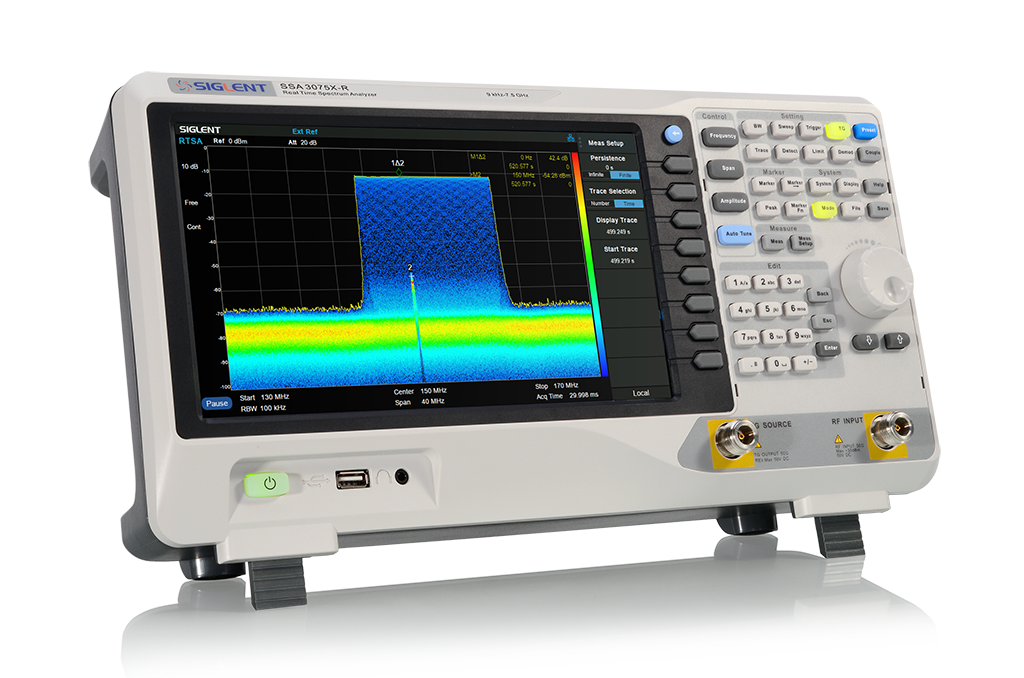
A real-time spectrum analyser is a type of analyser that is capable of displaying the spectrum of a continuous signal in real-time, without the need for any sweeping or scanning. This type of analyser is commonly used in applications where the signal is changing rapidly and needs to be analysed in real-time. Real-time analysers are commonly used in audio and video production, radio and television broadcasting, and telecommunications.
A swept-tuned spectrum analyser is a type of analyser that relies on a sweeping or scanning mechanism to produce a spectrum display. The analyser sweeps a range of frequencies and measures the amplitude of the signal at each frequency point. Swept-tuned analysers are commonly used in radio frequency applications, where they can be used to measure the frequency response of components, detect interference, and analyse modulated signals.
Within swept-tuned spectrum analysers, there are two different types – superheterodyne and vector signal analysers. Superheterodyne spectrum analysers use an intermediate frequency to downconvert the signal to a lower frequency, while vector signal analysers are capable of analysing both the amplitude and phase of a signal.
Overall, the choice of spectrum analyser depends on the application requirements, such as the frequency range, dynamic range, resolution bandwidth, sensitivity, and accuracy required.
Credit: micronix-jp.com
Real-time Spectrum Analysers
Spectrum Analyser is a vital tool for electronic engineers and enthusiasts to identify and analyze radio frequency (RF) signals. Spectrum analyzers help in measuring the strength, frequency, bandwidth, and power of an RF signal. They range from basic, low-frequency analyzers to advanced instruments designed for complex communication systems. In this blog, we will discuss one such type of Spectrum analyzer, Real-time Spectrum Analyzers.
Working
In Real-time Spectrum Analyzers, the input signal is digitized into samples and processed through FFT algorithm. The signal is then displayed in real-time on a graphical user interface. These Spectrum Analyzers are capable of covering a wide frequency range and provide a high-speed update rate, making them ideal for monitoring and analyzing rapidly changing RF signals.
Applications
Real-time Spectrum Analyzers have vast applications in various fields, including telecommunications, aerospace and defense, research and development, and broadcasting. Some of the common uses of Real-time Spectrum Analyzers are:
Monitoring wireless signals to identify and locate interference sources.
Analyzing the performance of advanced communication systems such as 5G, Wi-Fi, and satellite communication.
Measuring phase noise and jitter in oscillators and other electronic circuits.
Studying the frequency response of filters and amplifiers, including their linearity and gain.
Testing and validating antennas and their radiation patterns.
In conclusion, Real-time Spectrum Analyzers are advanced instruments with fast update rates and high sensitivity, making them perfect for analyzing complex RF signals. They have a broad range of applications, from monitoring wireless communications to analyzing the performance of electronic circuits.
Swept-tuned Spectrum Analysers
Swept-tuned spectrum analyzers are powerful instruments used for frequency analysis in different industries, including aerospace, telecommunications, and defense. They work by scanning through a range of frequencies and identifying signals with high accuracy, making them essential tools in RF and microwave measurements.
Spectrum analysers are essential tools for analyzing and visualizing RF signals. One type of spectrum analyser is swept-tuned, which performs a sweeping action across a range of frequencies. Swept-tuned spectrum analysers are also known as swept spectrum analyzers, swept-frequency spectrum analysers, or simply swept analyzers. In this section, we’ll discuss how swept-tuned spectrum analysers work and their applications.
Working
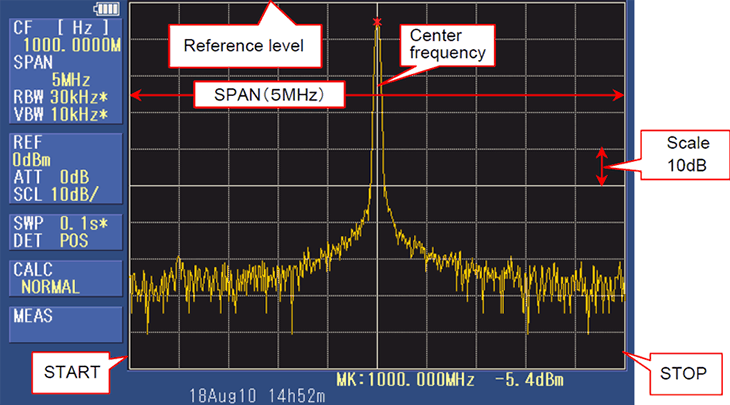
Swept-tuned spectrum analysers operate by sweeping a signal or a section of the frequency spectrum under test at different frequencies one after the other. The process generates an output display that shows the amplitude (power or strength) of each frequency component. Swept-tuned spectrum analysers use local oscillator circuits to heterodyne the input signal down to a lower, more manageable frequency for further processing. A swept-tuned spectrum analyser with a resolution bandwidth of 1 kHz and a frequency range from 100 MHz to 1 GHz will sweep frequencies from 100 MHz to 1 GHz at 1 kHz intervals.
Applications
Swept-tuned spectrum analysers are used in a variety of applications such as:
RF and microwave circuit analysis
Wireless system design and development
EMI/EMC pre-compliance testing and debugging
Satellite communication testing
Signal monitoring and analysis
Swept-tuned spectrum analysers are also used for testing and analyzing the components of electronic equipment such as filters, amplifiers, and mixers. Swept-tuned spectrum analysers are also used for signal measurements and frequency response testing. Wherever a signal needs to be examined over a range of frequencies, a swept-tuned spectrum analyser is an ideal tool.
Conclusion
Swept-tuned spectrum analysers are versatile tools that can provide valuable information about the frequency spectrum under test, making them essential in numerous applications such as wireless system design, RF circuit analysis, and EMI/EMC testing. By sweeping a signal over a range of frequencies and measuring the resulting signals, swept-tuned spectrum analysers allow electronics engineers to gain insights into the components of electronic equipment and to examine signals over a wide range of frequencies.
Credit: www.siglent.eu
Important Factors To Consider
When considering a Spectrum Analyzer, it’s important to take into account factors such as frequency range, resolution bandwidth, and dynamic range. Other important factors include input/output interfaces and portability. Ensuring that the Spectrum Analyzer meets your specific needs is imperative for accurate and efficient analysis.
Important Factors to Consider If you are looking for an instrument that can analyze the frequency spectrum, then a spectrum analyzer is an ideal choice. It provides detailed information about the frequency distribution of signals. However, when you are considering buying one, it is important to understand several key factors which affect its quality. In this post, we will discuss four important factors to consider: Frequency Range, Resolution Bandwidth, Sensitivity, and Dynamic Range.
Frequency Range
Frequency Range is one of the critical factors that determines the usability of a spectrum analyzer. It decides how high or low the frequency range the analyzer can capture. Different analyzers come with different frequency ranges and thus it’s important to select the one that suits your requirements. Generally, the frequency range varies from a few Hz to a few GHz.
Resolution Bandwidth
Resolution Bandwidth (RBW) is the frequency width of the filter that is applied to the signal during measurement. In other words, it specifies the smallest signal that the analyzer can resolve. The RBW value of a spectrum analyzer can be set manually or automatically. The smaller the value, the more accurate the measurement. A common range of RBW varies from a few Hz to a few MHz.
Sensitivity
Sensitivity is another important factor that determines the quality of the analyzer. It is the minimum signal level that the analyzer can detect and measure. Sensitivity is usually measured in units of dBm or µV. A high sensitivity ensures that the analyzer can detect weak signals that might not be visible to the naked eye.
Dynamic Range
Dynamic Range is the ratio between the smallest and the largest signals that the analyzer can measure. It determines how well the analyzer can handle both weak and strong signals. A good dynamic range indicates that the analyzer can capture the entire spectrum range effectively. It is usually measured in dB, and a higher value indicates better quality. In conclusion, while choosing a spectrum analyzer, it’s important to consider factors such as frequency range, resolution bandwidth, sensitivity, and dynamic range. By carefully considering these factors, you can choose an analyzer that is suitable for your needs.
Applications Of Spectrum Analysers
Spectrum analysers play a crucial role in measuring the frequency and amplitude of different signals in a variety of applications. This includes testing and developing new electronic devices like cellular phones, Wi-Fi modems, and radar systems. They are also used in music production to ensure that sound frequencies are properly balanced.
Spectrum analysers are essential tools for engineers, technicians, and hobbyists involved in the design, development, and testing of electronic systems. They are widely used in a variety of applications to measure and analyse the frequency spectrum of signals.
Audio Analysis
Spectrum analysers are used extensively to measure audio signals and analyse their frequency content. They are used in the design and development of audio equipment, such as amplifiers, mixers, and speakers. Spectrum analysers help engineers and technicians to identify and eliminate distortions, noise, and other unwanted frequency components from the audio signal. They are also used in audio production and recording to achieve high-quality sound output.
Wireless Communication
Spectrum analysers are critical tools for wireless communication systems. They are used to measure the frequency spectrum of wireless signals and ensure that they are operating within the assigned frequency band. Spectrum analysers can detect interference from other wireless signals and help engineers and technicians troubleshoot wireless communication problems. They are used in the design and development of wireless communication systems, such as cellular networks, radio systems, and satellite communication.
Satellite Communication
Spectrum analysers are used in satellite communication to measure the frequency spectrum of signals transmitted and received by the satellite. They play a crucial role in the design, development and testing of satellite communication systems. Spectrum analysers help engineers and technicians to investigate and resolve signal interference, distortion and other issues related to satellite communication.
Signal Monitoring
Spectrum analysers are used to monitor signals continuously over time, to detect any changes that may occur in the signal frequency content. They are used to monitor signals in a variety of settings, such as radio and television broadcasting, telecommunication, and military communications. Spectrum analysers help in early detection and correction of signal issues, thereby improving the quality of communication and decreasing the likelihood of communication failure. In summary, spectrum analysers are essential tools used in a wide variety of applications, from audio analysis to satellite communication and signal monitoring. Whatever the task at hand, the spectrum analyser is a versatile and indispensable tool for those working with electronic systems.
Tips For Choosing The Right Spectrum Analyser
Choosing the right spectrum analyser can be a daunting task, but with some careful consideration, it can be simplified. Look for features such as frequency range, resolution bandwidth, and measurement speed, as well as consider your budget and intended application to make the best decision.
If you’re looking for a spectrum analyser, you know there are a ton of options out there. It can be overwhelming to choose the right one, especially if you’re not sure what you need. Here are some tips to help you choose the right spectrum analyser for your needs.
Determine Your Needs
The first step in choosing the right spectrum analyser is to determine what you need it for. This will help you determine what features are necessary and what the budget will be. Here are some questions to ask yourself:
What frequency range do I need?
What is my maximum input power?
What level of sensitivity do I need?
How often will I be using the device?
Once you have an idea of what you need, you can start to narrow down your options.
Consider Your Budget
Spectrum analysers come in a wide range of prices, from a few hundred dollars to tens of thousands of dollars. It’s important to consider your budget when choosing a device. Here are some things to think about:
What is your maximum budget?
Are you willing to invest in a higher-end device that may have additional features and better performance?
Do you need any additional accessories, such as software or cables?
By considering your budget, you can narrow down your options further.
Check For The Required Features
Once you have an idea of what you need and what your budget is, it’s time to start looking at specific devices. Here are some features to consider:
Feature
Description
Frequency Range
Determine the minimum and maximum frequency range you need.
Sensitivity
Determine the minimum level of sensitivity you need.
Dynamic Range
Determine the minimum and maximum power levels you need.
Resolution Bandwidth
Determine the minimum resolution bandwidth you need.
Portability
Determine if portability is a requirement and if so, what size and weight is acceptable.
By checking for these features, you can find a device that meets your needs.
Conclusion
Choosing the right spectrum analyser can seem overwhelming, but by determining your needs, considering your budget, and checking for the required features, you can find a device that meets your needs.
Credit: signalhound.com
Frequently Asked Questions On Spectrum Analiser
Who Would Use A Spectrum Analyzer?
A spectrum analyzer is used by engineers, technicians, and hobbyists to analyze the frequency spectrum of signal sources. It is commonly used in the fields of telecommunications, audio engineering, and electronics manufacturing to troubleshoot, design and test radio frequency devices.
What Is Spectral Analysis Used For?
Spectral analysis is used to study the properties of sound and light waves. It helps in identifying the various frequencies present in a given signal, and can be used to determine the composition of substances based on their spectral patterns.
What Does An Optical Spectrum Analyzer Do?
An optical spectrum analyzer analyzes the spectral characteristics of light. It measures the intensity of light at various frequencies along the electromagnetic spectrum. This device helps to identify the wavelength, frequency, and power of light to provide detailed insights into the properties of the light source.
What Are The Two Types Of Spectrum Analyzer?
The two types of spectrum analyzer are real-time spectrum analyzers and swept-tuned spectrum analyzers.
Conclusion
The Spectrum Analyzer is an essential tool for sound technicians, audio engineers, music producers and enthusiasts who are working with sound frequency. This device has the ability to visualize sound frequency and signal strength in real-time, allowing users to identify and resolve audio-related issues with ease.
The Spectrum Analyzer’s effectiveness in identifying and troubleshooting technical problems has made it a top choice in the audio industry. So, if you are looking for a reliable and affordable tool to optimize your sound system, the Spectrum Analyzer is definitely worth investing in.
This list of artists focuses on influential music producers and producer-artists, grouped by genre. Studying the people who shaped modern music is one of the best ways to sharpen your own production skills. Each entry notes a widely recognized contribution, so you know where to start listening. Use the list as a study guide: pick one artist, listen closely to their key work, and try to recreate elements of their sound in your DAW.
The list is not exhaustive. It highlights artists whose influence is widely documented, so their key records are easy to find on any streaming service.
Pop and Rock Producers
George Martin
George Martin produced the vast majority of the Beatles’ recordings and is often called “the fifth Beatle.” His orchestral arrangements and studio experimentation helped turn the recording studio into a creative instrument.
Quincy Jones
Quincy Jones produced Michael Jackson’s Off the Wall, Thriller and Bad. Thriller is widely cited as one of the best-selling albums of all time.
Max Martin
Swedish songwriter-producer Max Martin has written or co-written a huge number of chart-topping pop hits for artists including Britney Spears, Katy Perry, Taylor Swift and The Weeknd.
Nile Rodgers
Nile Rodgers co-founded Chic and produced records for David Bowie (Let’s Dance) and Madonna (Like a Virgin). He also collaborated with Daft Punk on “Get Lucky.”
Rick Rubin
Rick Rubin co-founded Def Jam Recordings. He is known for his stripped-back production across hip-hop, rock and country, working with Run-DMC, the Beastie Boys, Red Hot Chili Peppers and Johnny Cash.
Butch Vig
Butch Vig produced Nirvana’s Nevermind and is the drummer and co-founder of the band Garbage.
Hip-Hop Producers
Dr. Dre
Dr. Dre was a member of N.W.A. His album The Chronic popularized the G-funk sound. He also helped launch the careers of Snoop Dogg and Eminem.
J Dilla
J Dilla is famous for his loose, “drunk” off-grid drum programming and soulful sampling. His album Donuts remains a landmark of beat-making.
Timbaland
Timbaland is known for his unusual rhythms and inventive sound design on records for Missy Elliott, Aaliyah and Justin Timberlake.
Pharrell Williams
Pharrell Williams is one half of the production duo The Neptunes with Chad Hugo. He produced a long run of hip-hop and pop hits with minimal, percussive arrangements.
Kanye West
Before his solo career, Kanye West produced tracks for Jay-Z’s The Blueprint. He became known for his sped-up “chipmunk soul” samples.
Metro Boomin
Metro Boomin is one of the defining producers of modern trap. He’s known for dark, cinematic beats and his collaborations with Future and 21 Savage.
Electronic Music Producers
Giorgio Moroder
Giorgio Moroder co-wrote and produced Donna Summer’s “I Feel Love.” Its sequenced synth bass was hugely influential on disco, synth-pop and electronic dance music.
Frankie Knuckles
Frankie Knuckles is often called “the Godfather of House Music” for his role in developing house in Chicago.
Juan Atkins, Derrick May and Kevin Saunderson
This trio, known as the Belleville Three, is credited with pioneering Detroit techno.
Daft Punk
The French duo blended house, disco and funk on albums like Homework and Discovery. Their filtered, sample-based sound influenced a generation of producers.
Aphex Twin
Richard D. James, known as Aphex Twin, is a leading figure in experimental electronic music and IDM. Selected Ambient Works 85–92 is a classic of ambient techno.
Skrillex
Skrillex helped bring a heavy, aggressive style of dubstep to mainstream audiences and has won multiple Grammy Awards.
Kraftwerk
The German group Kraftwerk pioneered electronic pop with synthesizers, drum machines and vocoders on albums like Autobahn and Trans-Europe Express.
Burial
Burial is known for the atmospheric, crackling textures and shuffled UK garage rhythms on Untrue.
Ambient and Experimental Producers
Brian Eno
Brian Eno coined the term “ambient music” with Ambient 1: Music for Airports. He also produced albums for Talking Heads, U2 and Coldplay.
Reggae and Dub Producers
King Tubby
Jamaican engineer King Tubby is credited as a pioneer of dub. He turned the mixing desk into an instrument with echo, reverb and dramatic muting.
Lee “Scratch” Perry
Lee “Scratch” Perry was a legendary producer known for experimental dub productions at his Black Ark studio. He also worked with Bob Marley and the Wailers.
R&B and Soul Producers
Jimmy Jam and Terry Lewis
This duo produced Janet Jackson’s Control and Rhythm Nation 1814, shaping the sound of modern R&B with punchy drum machines and synths.
How to Learn From These Artists
Active listening: focus on one element at a time, such as drums, bass or vocals.
Reference tracks: load a song into your DAW and compare tone, loudness and balance with your mix.
Recreate sounds: try rebuilding a bassline or drum pattern to understand the technique. Our Serum sound design tips can help.
Study arrangement: map out where sections start and which elements enter or drop out.
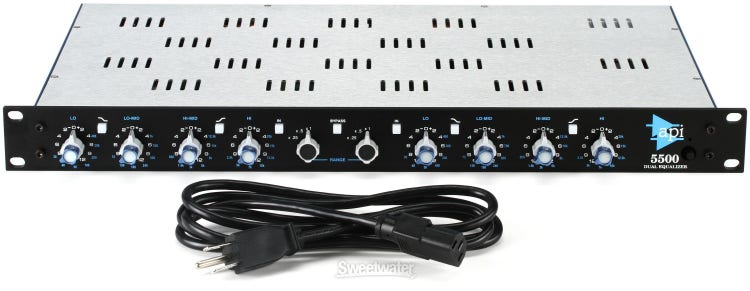
The API 5500 is a high-end equalizer for professional audio mastering. It offers exceptional sound quality and versatility for studio recording use.
The API 5500 is a premier equalizer for the professional recording industry. Its high-end features, precision, and sound quality make it ideal for mastering in a recording studio. The 5500 offers a range of frequencies and the ability to make fine adjustments to the sound.
It is durable and rugged, built to handle even the most demanding recording applications. With its classic design and modern features, the API 5500 is an essential tool for any serious audio professional.
Features Of Api 5500
The API 5500 is a versatile equalizer for any studio or live performance. It features dual equalization curves with nine selectable filter choices for precision and control over your sound. The unique band-pass filter is perfect for a range of applications and the analog design provides warmth to your audio.
The API 5500 is a four-band equalizer known for its signal path that ensures a quality sound output. This high-performance equipment is used to enhance audio recordings without sacrificing signal integrity. Furthermore, the device’s adjustable frequency range gives users the ability to tune their audio output exactly how they want it. Below are the main features that make the API 5500 a must-have for sound engineers.
Quality Sound
The API 5500 is specifically designed to provide the best possible sound quality. It has a low noise floor that ensures lower distortion, allowing for clean and clear audio output. Additionally, the 5500’s output transformer guarantees that the sound quality is unmatched.
Four Bands Of Equalization
This device comes equipped with four bands of equalization that allow users to adjust sound frequencies to their taste. Each of these bands has a gain control with a range of 12dB offering the flexibility to shape sound and voice.
Adjustable Frequency Range
The API 5500 has an adjustable frequency range from 20Hz to 20kHz, making it ideal for any recording situation. This wide range of frequencies also allows the user to process a wide variety of sound signals. In conclusion, the API 5500 is an excellent option for sound engineers who want to achieve quality sound. The four-bands of equalization and adjustable frequency range make the equipment suitable for use in a wide variety of sound recording situations.
Credit: audiosciencereview.com
Comparison With Other Equalizers
The Api 5500 Equalizer stands out from its competitors due to its unparalleled sonic clarity and the ability to adjust individual frequencies. Compared to other equalizers, the Api 5500 offers a more precise and customizable sound, making it a top choice for professional audio engineers and enthusiasts alike.
When it comes to mixing and mastering audio, having the right tool for the job is essential. The API 5500 is a high-quality equalizer that has gained popularity among audio engineers and music producers. However, when it comes to choosing an equalizer, there are several options on the market. In this article, we will compare the API 5500 with two other popular equalizers – Waves SSL E-Channel and Universal Audio’s Pulteq EQP-1A.
Versus Waves Ssl E-channel
The Waves SSL E-Channel is a software equalizer that emulates the sound of the legendary SSL 4000 console. It offers a simple and intuitive user interface and has gained popularity among users who prefer a digital workflow. However, when it comes to sound quality, the API 5500 is hard to beat. The API 5500 has a warm and musical sound that adds character to any mix. In contrast, the Waves SSL E-Channel can sound sterile and clinical. Additionally, the API 5500 has a wider frequency range and more precise controls than the Waves SSL E-Channel.
Versus Universal Audio’s Pulteq Eqp-1a
The Universal Audio’s Pulteq EQP-1A is a hardware equalizer that is prized for its musical and warm sound. It is a faithful reproduction of the classic Pultec EQP-1A and has been used on countless records. However, while the Pulteq EQP-1A adds warmth to a mix, it can also mask certain frequencies. The API 5500, on the other hand, offers more precise control over the frequencies and can help to bring out details in a mix that would otherwise be lost. Additionally, the API 5500 has a more modern sound than the Pulteq EQP-1A, which may appeal to users who prefer a more modern sound. In conclusion, while the API 5500 is not the only equalizer on the market, it is a high-quality tool that offers a warm and musical sound, precise controls, and a wide frequency range. When compared to the Waves SSL E-Channel and Universal Audio’s Pulteq EQP-1A, the API 5500 stands out for its precise control and modern sound. Whether you are mixing music or mastering audio, the API 5500 is a versatile tool that can help you achieve your desired sound.
Pros Of Api 5500
API 5500 is a legendary equalizer designed by Automated Processes Inc., known for its excellent sound quality and functionality. The device has garnered high praise from both professionals and enthusiasts in the audio industry. In this article, we will dive into some of the most outstanding benefits of API 5500, particularly its advanced equalization features, high-quality build, and great-sounding analog gear.
Advanced Equalization Features
The API 5500 boasts a range of advanced equalization features that make it a must-have device for audio professionals. It offers four overlapping frequency bands and seven switchable filter frequencies, ranging from 50 Hz to 15 kHz. This breadth of options allows for a broad range of tonal shaping and precision in audio corrections. API 5500’s filters are also highly musical, making it easy to sculpt the sound, even for beginners. Unlike digital equalizers, API 5500’s equalization is entirely passive, which means it doesn’t add any coloration to the sound and sound remains true to the original source.
High Quality Build
API 5500’s build quality is unmatched, and this is immediately apparent from its design. It has a sturdy and solid look, with a metal chassis that exudes an impression of durability. The knobs have a fantastic feel while adjusting the frequencies, giving users a sense of precision and control that only comes with top-of-the-line devices. Additionally, API 5500 is built to last, ensuring that users can make use of it for an extended period without the need for any repairs or part replacements.
Great Sounding Analog Gear
The API 5500 is highly regarded for its fantastic sound, making it a popular choice for recording, mixing, and mastering professionals worldwide. It is an invaluable tool when it comes to capturing and enhancing the harmonics present in both analog and digital sources. By utilizing the device’s discrete op-amp, transformer input, and output stages, the sound produced by API 5500 analog gear is richer, warmer, and more musical than many other units in the market. This benefit is particularly evident when used on drums, bass, and guitar tracks.
In conclusion, API 5500’s advanced equalization features, high-quality build, and great sounding analog gear make it a worthy investment for any recording professional seeking an equalizer that delivers both usability and exceptional sound quality.
Credit: www.sweetwater.com
Cons Of Api 5500
While there are many advantages to using the API 5500, it’s important to consider some of the disadvantages before making a purchase. Here are some cons of API 5500:
High Price Point
The API 5500 is a high-end product and comes with a correspondingly high price tag. At over $1000 per unit, it may not be accessible to everyone, particularly those with a limited budget. However, for those who require the highest quality sound and precision, the cost may be worth it.
Consumes A Lot Of Rack Space
Another issue with the API 5500 is that it consumes a lot of rack space. This can be a problem if you have limited space in your studio or live rig. Its size can also make it difficult to transport if you plan on using it for live performances, especially if you’re on a tight schedule.
Despite its drawbacks, the API 5500 offers exceptional sound quality, precise equalization, and versatile features that make it a valuable addition to any sound engineer’s toolkit. However, it’s important to weigh the pros and cons before making a purchase decision based on your specific needs and budget.
User Reviews For Api 5500
The API 5500 is a popular equalizer used by a wide range of sound engineers, music producers, and recording enthusiasts. If you’re interested in purchasing this device for your workspace, you might be wondering what others think about it. In this section, we’ll dive into user reviews from sound engineers and music producers, as well as sound recording enthusiasts.
Reviews From Sound Engineers And Music Producers
Sound engineers and music producers rely on the API 5500 to help them achieve their desired sound quality. According to reviews, this device is a go-to for many professionals. Here are some of the things they had to say:
Review
Feedback
“The API 5500 is a game changer.”
The API 5500 provides unmatched sound quality that enhances music production.
“I couldn’t imagine doing a mixing session without it.”
The API 5500 is a reliable device that has become an essential part of many people’s studios.
“The high frequencies are crisp and clear.”
The device delivers a remarkable sound quality that is unmatched by many others.
Reviews From Sound Recording Enthusiasts
If you’re a sound recording enthusiast, you might be wondering if the API 5500 is worth the investment. Here’s what others have said about their experiences with the device:
“I was skeptical at first, but after using the API 5500 to record a few sessions, I was blown away.”
“The frequency response is so much better than what I was getting before.”
“The device is user-friendly, even for someone like me who’s relatively new to sound recording.”
Overall, users raved about the API 5500’s sound quality, reliability, and user-friendliness. Despite its relatively high price point, many users believe that it’s worth the investment for the remarkable sound quality it provides.
Credit: m.youtube.com
Frequently Asked Questions For Api 5500 Review
What Is The Api 5500?
The API 5500 is a high-end equalizer that provides a range of powerful EQ tools for enhancing audio.
How Does The Api 5500 Work?
Using advanced algorithms, this equalizer boosts certain frequencies while reducing others to create a more balanced and powerful sound.
What Are The Benefits Of Using The Api 5500?
The API 5500 provides highly precise sound adjustment, making it a must-have tool for audio professionals seeking to create top-quality audio recordings.
Is The Api 5500 User-friendly?
Yes, this equalizer is designed with ease-of-use in mind, and provides a user-friendly interface for fast and simple sound adjustment.
Conclusion
The API 5500 is a highly versatile and efficient tool for audio engineers looking to enhance their projects. With its exceptional sound quality, flexible EQ settings, and user-friendly interface, the 5500 offers a seamless experience for professionals and beginners alike.
Its ability to tackle any genre or application makes it a must-have for anyone serious about achieving true audio perfection. Whether you’re producing music, recording podcasts, or mastering sound for film, the API 5500 is an investment worth making. Upgrade your audio game and hear the difference for yourself!
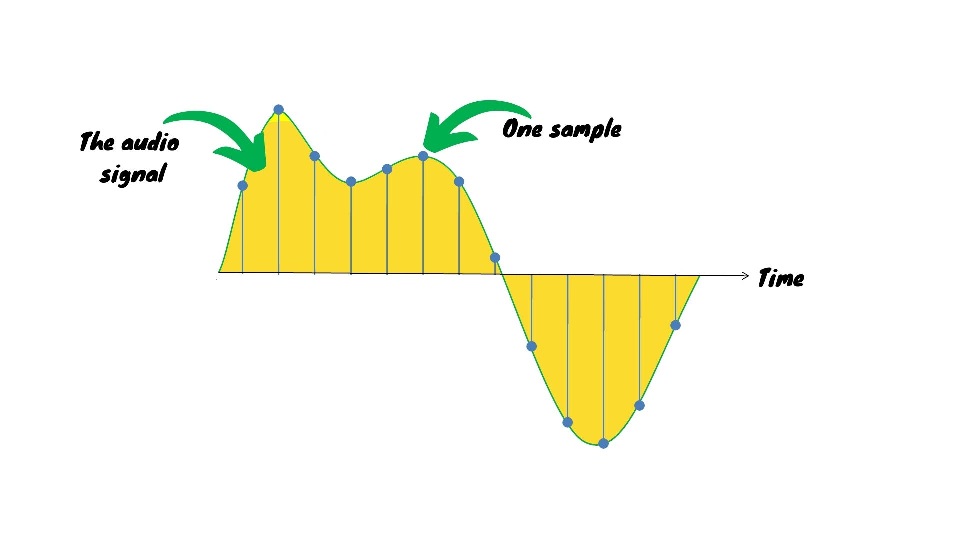
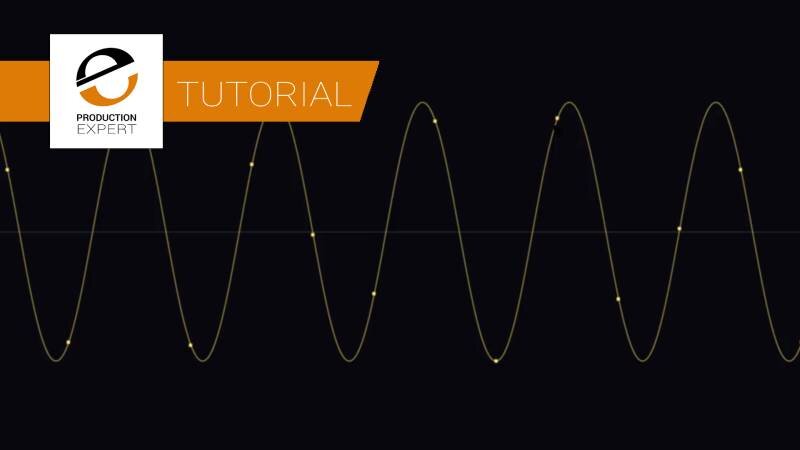
The sample rate for recording refers to the frequency at which audio recordings are sampled. It is a crucial factor in determining the quality of a recording.
A higher sample rate can result in better sound quality, but also increases file size and requires more processing power. The most commonly used sample rates for music production and audio recording are 44. 1 kHz and 48 kHz. However, higher sample rates, such as 96 kHz or 192 kHz, can provide greater detail and accuracy in sound reproduction.
It is important to choose a sample rate that is appropriate for the intended use of the recording. We will explore the importance of sample rates in recording and how to choose the right one for your projects.
Credit: www.joecrowtheaudiopro.com
Factors To Consider When Choosing Sample Rate
Choosing the right sample rate is essential for recording high-quality audio. Factors to consider include the desired sound quality, available storage space, and compatibility with editing software.
Factors to Consider When Choosing Sample Rate When it comes to digital recording, sample rate refers to the number of samples per second of audio that are recorded. The sample rate you choose can have a significant impact on the quality, storage space, and compatibility of your recordings. Here are the key factors to consider when choosing the best sample rate for your needs. Audio Quality The sample rate you select will determine the frequency response of your recordings. Higher sample rates provide a wider frequency range and more accurate representation of audio, especially in higher frequencies. For high-quality recordings, you should consider a sample rate of 48 kHz or higher. However, keep in mind that higher sample rates come with larger file sizes, requiring more storage space. Storage Space The sample rate you choose has a direct impact on the size of your audio files. The higher the sample rate, the larger your audio files will be. This means that if you’re on a limited storage budget, it’s best to use a lower sample rate. A sample rate of 44.1 kHz is commonly used for music recordings, but if you’re recording vocals or speech, you could get away with a 22.05 kHz sample rate. Compatibility The sample rate you choose must be compatible with the devices and software you intend to use to edit and playback your recordings. Most modern devices support a range of sample rates, so you shouldn’t experience any issues as long as you choose a commonly used sample rate. For instance, a sample rate of 48 kHz is supported by most recording software. In conclusion, selecting the right sample rate for your recording requires careful consideration of the audio quality, storage space, and compatibility. While higher sample rates may offer better audio quality, keep in mind the larger file sizes that come with them. Lastly, ensure that the sample rate you choose is supported by your recording device and editing software.
Credit: www.soundonsound.com
Common Sample Rates Used In Recording
Sample rate is the number of samples of audio carried per second, expressed in Hertz (Hz). It determines the quality of audio recordings. The higher the sample rate, the better the audio quality. Common sample rates used in recording include 44.1 kHz, 48 kHz, 88.2 kHz, and 96 kHz.
44.1 Khz
44.1 kHz is the sample rate used in CDs. It provides high-quality audio recordings and is supported by most digital audio equipment. It is a standard sample rate for audio recording in music production, podcasting, and other audio content. It is a reliable option for recording, editing, and producing quality audio.
48 Khz
48 kHz is the sample rate used in digital video production. It is also standard for audio recording in film soundtracks and TV broadcast productions. This sample rate provides high-quality audio recordings with improved frequency and dynamic range. It is a good option for recording studio-quality music and creating immersive sound experiences.
88.2 Khz
88.2 kHz is a high-resolution sample rate used in audiophile digital music repositories and high-quality audio recording applications. It provides high-fidelity audio recordings with superior clarity and details. This sample rate is useful for recording orchestral music, jazz, and other genres that require high dynamic range and fine nuances of sound.
96 Khz
96 kHz is the highest common sample rate used in professional audio recording. It provides ultra-high-quality audio recordings with exceptional clarity and accuracy. This sample rate is useful for recording classical music, opera, and other genres that require the highest level of audio performance.
Choosing the right sample rate depends on the intended use of your audio recording. Higher sample rates provide better audio fidelity but require larger file sizes and more processing power. Consider your project requirements and equipment capabilities when selecting your sampling rate.
How To Choose The Right Sample Rate For Your Recording
Choosing the appropriate sample rate is crucial in achieving high-quality recording results. It determines the accuracy of the recorded sound, with higher sample rates providing better sound quality but requiring more storage space and processing power. To find the right sample rate for your recording, you should consider your equipment, the type of recording you are making, and your intended final output.
Choosing the right sample rate for your recording is a crucial step in audio production. Sample rate refers to the number of samples per second taken from an audio signal and is measured in Hertz (Hz). A higher sample rate provides better quality audio, but it also requires more storage space. In this article, we’ll help you choose the right sample rate for your recording by considering three factors: the genre of music, the type of instrument, and the destination of the recording.
Genre Of Music
The genre of music you’re recording can have an impact on the sample rate you choose. If you’re recording classical or acoustic music, a higher sample rate (e.g. 96kHz) may be necessary to capture the nuances of the performance, as these genres are often recorded in more quiet environments. However, for genres such as hip-hop or EDM, a lower sample rate (e.g. 44.1kHz) can still produce high-quality audio that matches the production style.
Type Of Instrument
The type of instrument being recorded can also affect the sample rate you choose. For example, recording a solo vocalist may not require a high sample rate since the human voice doesn’t have the same frequency range as some instruments like a drum kit, piano, or strings. A low to medium sample rate like 44.1kHz or 48kHz can suffice for vocal recording. On the other hand, for percussive instruments like drums, a higher sample rate like 96kHz may be needed to capture the transient details of the instrument.
Destination Of The Recording
Consider the destination of the recording when choosing your sample rate. If you’re recording for CD release, then the standard sample rate of 44.1kHz with a bit depth of 16-bit is all you need. However, if you’re recording for film or video games, then a higher sample rate like 48kHz or even 96kHz (with 24-bit depth) may be necessary to ensure compatibility. In some cases, the destination may require lower sample rates, such as when streaming audio to mobile devices.
Conclusion
In conclusion, choosing the right sample rate for recording is based on the genre of music, type of instrument and the destination of the recording. By considering these factors, you can ensure that your recordings sound great and are compatible with various platforms. Remember that higher sample rates come with larger file sizes, so choose the sample rate that fits the recording’s needs without sacrificing quality.
Credit: www.production-expert.com
Frequently Asked Questions For Sample Rate For Recording
Is It Better To Record In 44.1 Or 48?
It depends on the intended use of the recording. For music, 48 kHz is generally preferred for higher fidelity. However, for audio that will only be used online or for speech, 44. 1 kHz is sufficient and produces smaller file sizes.
The main goal is to choose a sample rate that matches your project’s needs and requirements.
At What Sample Rate Should I Record?
Record at a sample rate of 44. 1 kHz or 48 kHz for most applications. These rates are standard for audio production and provide a good balance between audio quality and file size. However, you may need to adjust the sample rate based on the specific needs of your project or equipment.
Should I Record 48khz Or 96khz?
Recording at 48kHz will suffice for most applications. It is a standard sampling rate and produces good quality sound. However, if you plan to manipulate the audio extensively or want to capture more detail, 96kHz would be a better choice.
Keep in mind, higher sampling rates require more storage space.
What Is A Good Sample Size For Recording?
The minimum sample size needed for reliable recordings varies depending on the type and purpose of the recording. Generally, a sample size of at least 30 is considered acceptable, but the larger the sample size, the more accurate the results will be.
Conclusion
Recording with the appropriate sample rate is crucial for achieving high-quality audio output. Selecting the right sample rate and bit depth combo depends on the desired final output and the environment where it is used. These factors impact the overall consumer experience positively or negatively.
Understanding the importance of sample rate in recording enables artists and creators to deliver exceptional audio content. Optimize your audio recording’s quality by choosing the correct sample rate—the key to enhance your listeners’ audio experience.
To level match plugins, adjust the volume of each plugin until they sound the same. This ensures a balanced mix with no plugin overpowering the others.
Level matching plugins is a crucial step in achieving a balanced and professional sounding mix. It involves adjusting the volume of each plugin to match the perceived loudness, so no single plugin overpowers the others. Failure to level match plugins can lead to a skewed mix, where one plugin sounds louder than the rest, causing distortion, masking, and frequency imbalance.
Several methods can be used to level match plugins, including using a VU meter, LUFS meter, or loudness curves. Level matching plugins not only improves the overall sound of the mix, but it also simplifies the mixing process by giving each plugin an equal opportunity to contribute to the final sound.
Credit: forums.steinberg.net
Tools Required For Level Matching
To level match plugins, you’ll need certain tools such as a dB meter, pink noise generator, and EQ plugins. These tools ensure that your audio recordings have consistent levels, making it easier to mix and master.
Level matching is an essential technique that every sound engineer, music producer, and audio mixer must master. It helps achieve a consistent volume level within a mix, eliminating the need to constantly adjust the volume manually. However, to achieve the desired result, you need to have the right tools at your disposal. Here are some essential tools you’ll need for level matching.
Decibel Meter
A decibel meter, also known as a sound level meter, is an essential tool that measures the sound levels in a room. With a decibel meter, you can determine the exact amplitude of a sound signal and adjust it accordingly to achieve the desired level. There are several types of decibel meters available, but most are straightforward to use and do not require any technical expertise.
Audio Interface
An audio interface is critical for level matching when using a computer or a digital audio workstation (DAW). It is an external device that connects a computer to a microphone, musical instrument, or mixer. With an audio interface, you can achieve a high-quality sound recording and playback, and adjust the volume level of each track to a consistent level. There are several options available when choosing an audio interface, ranging from simple USB or FireWire devices to more complex setups with multiple inputs and outputs.
Daw
A digital audio workstation (DAW) is an essential tool for any music producer or audio mixer. It is software that allows you to record, edit, mix, and master audio tracks. With a DAW, you can easily level match multiple tracks and adjust their volume levels until they are consistent. There are several popular DAWs available, such as Pro Tools, Logic Pro X, Ableton Live, and FL Studio. In conclusion, level matching is a critical aspect of sound engineering and audio mixing, and having the right tools is essential to achieving the desired results. A decibel meter, audio interface, and DAW are just a few of the essential tools you’ll need to level match effectively. By using these tools, you can achieve a consistent volume level within your mix, resulting in a cleaner, more professional sound.
Credit: joeysturgistones.com
Setting Up For Level Matching
Level matching your plugins is crucial to achieve a well-balanced mix. To accomplish this, start by setting all your plugins to the same volume level and fine tune from there to guarantee accurate sound representation without any discrepancies in volume.
Before you level match plugins, it’s essential to prepare your setup correctly. In this section, we’ll guide you through connecting the audio interface, calibrating the decibel meter, and initializing DAW, ensuring your setup is correct.
Connecting The Audio Interface
To connect the audio interface, follow the steps below:
Connect the audio interface to your computer or laptop via USB.
Plug your headphones or speakers into the output jack of the audio interface.
Connect your microphone or line-in source to the audio interface input jack.
Ensure all connections are secure and correctly connected.
Calibrating Decibel Meter
Before getting started, you need to calibrate your decibel meter; follow the instructions below:
Turn on your decibel meter and switch it to the dBu setting.
Place the microphone at the same distance you’ll use it when audio levels are generating.
Play a 1 kHz sine wave tone through your speakers.
Adjust the level of the sine wave until the decibel meter reads 0 dBu.
Ensure you perform this calibration before every level matching session.
Initializing Daw
To initialize your DAW, follow the steps outlined below:
Open your DAW and create a new project.
Select the correct audio interface as the input and output device in your DAW settings.
Set the sample rate and bit depth to the same settings as your audio interface.
Ensure all tracks have no plugins, automation, or level adjustments applied.
By following these steps, you can be confident that your setup is correct, and you’re ready to start level matching plugins.
The Process Of Level Matching Plugins
The process of level matching plugins is an essential step to ensure your music or audio production is of excellent quality. By level matching, you achieve a balanced sound, which is desirable in music production. It ensures that the plugins you are using don’t affect the overall gain staging of the audio signal.
Preparing For Level Matching
Before you begin level matching your plugins, you first need to ensure that you have the right tools for the job. You will need a decibel meter, a noise generator, and a volume matcher. Before you start, ensure that all your plugins are properly set up and inserted into your DAW.
Matching Channel Levels
The first thing you need to do when level matching your plugins is ensure that all the channel levels are matched. This is a crucial step as it helps to ensure consistency in your mix. To match the channel levels of your plugins, insert them into your DAW one at a time and adjust the gain until the levels are matched.
Adjusting Plugin Settings
Once all the channel levels are matched, you can now proceed to adjust the plugin settings. At this point, you need to focus on adjusting the plugin’s settings to achieve the desired effect or sound. Ensure that you make gradual adjustments and keep checking that the overall volume is still consistent.
Finalizing Level Matching
After adjusting the plugin settings, it’s time to finalize the level matching process. At this point, you need to ensure that each plugin’s output level is the same as the input level. Check that the overall volume is consistent and make any necessary adjustments. Once you are satisfied with the results, save your work and move on to the next step in your music or audio production process.
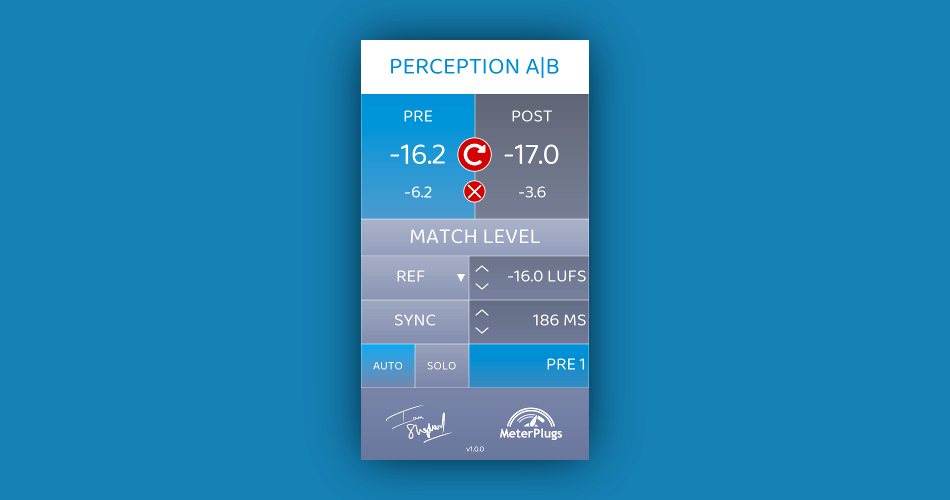
Credit: www.meterplugs.com
Tips On Effective Level Matching
Level matching plugins is crucial when it comes to producing high-quality audio. It ensures that all sound sources are balanced, and every instrument is heard clearly. For audio engineers and producers, level matching is a critical step in creating a well-mastered sound. In this article, we will share tips on effective level matching, which can help you achieve professional audio output.
Working In A Controlled Environment
The environment where you carry out level matching can have a significant impact on the quality of your audio output. For example, if you are working in a noisy or uncontrolled environment, it can be challenging to get accurate results when matching levels. You need to ensure that the environment is quiet and that there is no interference from external sound sources. A controlled environment allows for accurate level matching and guarantees that you get the best possible audio output.
A/b Testing
A/B testing is a technique that allows you to compare two different audio sources. It can be helpful when level matching because you can select two different sounds and compare them to determine which one sounds better. This technique ensures that you are not only matching the levels but also focusing on the quality of the audio. By comparing different sounds, you can achieve a well-mastered sound that is clearer, bright, and balanced.
Paying Attention To Dynamic Range
Dynamic range refers to the difference between the loudest and softest sounds in an audio recording. Paying attention to dynamic range when level matching is essential because it helps you achieve the right balance between the different sounds. You should ensure that all instruments sound natural and that the music is not compressed beyond the audible spectrum. Matching levels also gives the music greater clarity and makes it sound more expansive, giving it more impact.
Using Reference Tracks
Using reference tracks is one of the most effective methods of level matching. By comparing your mix with other similar sounds, you can determine whether your audio output needs tweaking. Reference tracks give you an idea of how loud and balanced your mix should sound. You can use a reference track that has similar instrumentation to your audio output. This ensures that you achieve an accurate balance between the different sounds, resulting in a well-mastered sound.
In conclusion, level matching is a vital step in the process of producing high-quality audio. By following these tips, you can achieve the right balance in your mix and produce a well-mastered sound. Working in a controlled environment, A/B testing, paying attention to dynamic range, and using reference tracks are just some of the ways to enhance your level matching and take your audio production to the next level.
Frequently Asked Questions On How To Level Match Plugins
How Do You Set Levels Before Mixing?
To set levels before mixing, ensure that the individual tracks have a clear, balanced level. This can be achieved by adjusting the fader, gain, or input level of each track. Use of a reference track can also help set the overall level for the mix.
It’s important to keep in mind the headroom and avoid clipping.
How Do I Level Match Plugins?
To level match plugins, start by setting up a gain structure. Then use a plugin like a gain or trim plugin to adjust each track’s gain until they have the same apparent loudness. Finally, make subtle adjustments to each plugin’s parameter to perfect the balance.
Why Is It Important To Level Match Plugins?
Level matching plugins ensures that the audio output level is consistent, which helps in avoiding any sudden jumps or dips in volume. When the plugins are not correctly level matched, they can cause phasing issues, resulting in poor audio quality.
What Are The Benefits Of Level Matching Plugins?
Level matching plugins can result in more accurate and clearer mixing results. It minimizes distortion and makes sure that each instrument and track sits well in the mix. It also helps in retaining the original dynamic range of the audio signal.
Conclusion
Through this blog post, we have learned about the importance of level matching plugins for enhancing the overall sound quality of our audio files. Level matching can help us achieve a balanced and consistent volume level, leading to better sound clarity and eliminating unwanted distortion.
From understanding the basics of level matching to exploring some essential plugins, we now have the necessary knowledge to start leveling our audio files like a pro. So let’s get started and take our audio productions to new heights!
Napster Pay Per Stream is a model where artists are paid by the stream each time their music is played on the Napster platform. This model is a fair and transparent way of compensating artists for their work.
The world of music streaming has revolutionized how people consume music. In the past, music was typically bought through physical media such as CDs or vinyl records. However, with the rise of digital platforms, the way people listen to music has changed dramatically.
As the industry evolves, so does the way artists are compensated for their work. One way of doing this is through the Napster Pay Per Stream model. This model is based on the idea that artists are paid a certain amount each time their music is streamed on the platform. It’s a fair and transparent way of compensating artists for their work, while also ensuring that users are able to access their favorite music easily and affordably. We’ll take a closer look at how Napster Pay Per Stream works and why it’s a good model for compensating artists in today’s digital age.
Credit: www.reddit.com
The Rise Of Napster
Napster’s pay-per-stream service revolutionized the music industry, allowing users to pay for individual songs rather than entire albums. It paved the way for modern streaming platforms, but faced legal battles from the traditional music industry.
Napster, a pioneer in peer-to-peer file sharing, played a significant role in changing the way people consume music. Its rise in the late 1990s and early 2000s led to a dramatic shift in the music industry, making it accessible to anyone with a computer and an internet connection. By offering a vast collection of digital music for free, Napster gained a massive following in a short time and posed a significant threat to traditional music sales.
The Evolution Of Music Streaming
The growth of Napster was fueled by the evolution of music streaming technology. Before Napster, music was predominantly distributed on physical formats such as vinyl, cassette tapes, and compact discs. However, with the arrival of digital music and the internet, music distributors began exploring new ways to deliver music to their customers. The first streaming services like Pandora and Spotify emerged in the early 2000s, almost a decade after Napster debuted.
The Emergence Of Napster
Napster made its debut in 1999 and quickly gained popularity among music lovers. This peer-to-peer file-sharing network allowed users to share digital music files with one another, all for free. It was convenient, fast, and user-friendly, earning the attention of millions of users worldwide. It was not surprising that the existing music industry stalwarts felt threatened by Napster’s success and began mounting pressure on the company to cease its operations.
The Pay Per Stream Model
With the legal battles mounting against Napster, the company was forced to shut down its free music-sharing service. However, the company rose from the ashes and rebranded itself as a monthly subscription service. Napster’s new service allowed users to access a vast library of music for a monthly charge, promising a high-quality audio experience along with exclusive content. This marked a tectonic shift in the music industry, as Napster pioneered the pay-per-stream model, which later became a standard revenue model across the industry. In conclusion, Napster’s rise was a watershed moment in music history and shaped the way we consume and pay for music today. With its innovative and user-friendly approach, it not only challenged, but also revolutionized the norms of the music industry and heralded a new era of music streaming.
Credit: www.reddit.com
Understanding Pay Per Stream
Napster’s pay per stream model allows users to pay for individual song streams instead of purchasing a full album or subscription. This provides users with more flexibility and control over their music listening experience.
The Concept Of Pay Per Stream
Pay Per Stream, as the name suggests, is a model that pays the content creator only when someone streams their content. This model is becoming increasingly popular, especially in the music industry, where artists get a fraction of a penny per stream. The concept is based on the idea that instead of paying for an entire album or song, people are paying for individual streams, making it an affordable and accessible way to consume content.
How It Works
The Pay Per Stream model works by tracking the number of times a particular content has been streamed. Content creators sign up for a service that provides them access to the Pay Per Stream model. They upload their content to the service, which then distributes it to various streaming platforms. When someone streams their content, the service tracks it and pays the content creator a fraction of a penny each time. The payments are usually made on a monthly basis, and the content creator can view their earnings through the provided dashboard.
Pros And Cons
Like any other model, Pay Per Stream has its pros and cons. Let’s take a look at them: Pros:
Accessible for everyone: Pay Per Stream provides an affordable and accessible way to consume content. With the rise of streaming platforms, people are moving away from traditional buying models, and Pay Per Stream provides a suitable alternative.
Higher revenue potential: Content creators have the potential to generate more revenue with Pay Per Stream since they get paid each time their content is streamed.
Easy tracking: Pay Per Stream provides an easy way for content creators to track their earnings and the number of times their content has been streamed.
Cons:
Low payment rates: Many streaming platforms pay a fraction of a penny per stream, which may not be enough for content creators to make a sustainable income.
Amount of streams: With Pay Per Stream, a content creator needs a large number of streams to generate significant revenue, which may not be easy to achieve, especially for new creators.
Difficult for independent creators: Getting access to Pay Per Stream services can be challenging for independent creators since many of these services have high entry barriers.
In conclusion, while Pay Per Stream has its pros and cons, it has proven to be a game-changer in the music industry, enabling content creators to generate more revenue and providing an affordable and accessible way for people to consume content.
Benefits For Artists And Labels
Napster’s Pay Per Stream platform offers artists and labels an affordable way to get their music heard by millions while being compensated fairly for their work. It’s an excellent opportunity for up-and-coming artists to build their fanbase and for established labels to expand their reach.
Napster Pay Per Stream is a music streaming platform that has been designed for both artists and labels, ensuring that the benefits for them are monumental. Below are the benefits for artists and labels with Napster’s Pay Per Stream.
Higher Revenues
For artists and labels, Napster guarantees higher revenues compared to other streaming platforms due to the fact that royalties are paid for every stream. This is beneficial for artists and record labels as they can significantly increase their cash flow.
Better Control And Transparency
Napster’s Pay Per Stream allows for better control and transparency for artists and record labels. It provides transparency in terms of the distribution of royalties and the calculation of the same. Additionally, artists and record labels have full control over their music and the distribution channels it appears on.
Easier Royalty Tracking
From an artist’s standpoint, navigating royalties can be a difficult and time-consuming task. Napster Pay Per Stream solves this problem by making royalty tracking easier. Artists and record labels receive continuous updates and can track their royalties in real-time, leaving no room for discrepancies or confusion between the two parties. Overall, Napster Pay Per Stream is a game-changer for artists and record labels alike. It provides a fair and transparent payment system, control over the music, and higher revenues, which are beneficial to all parties involved.
Benefits For Users
Since its inception, Napster Pay Per Stream has been a game-changer in the music streaming industry. Napster Pay Per Stream is a platform that enables music enthusiasts to stream and download a wide range of songs. By incorporating user-centric features, Napster Pay Per Stream offers numerous benefits for users.
Flexibility And Affordability
One of the significant benefits of Napster Pay Per Stream is the flexibility it provides to music lovers. Users can choose either a monthly subscription or a pay-per-song model, allowing them to listen to music as per their preferences. With Napster Pay Per Stream, users can purchase songs for as low as $0.99, making it an affordable platform for everyone.
Access To A Wide Range Of Music
Napster Pay Per Stream gives users access to millions of songs across multiple genres. Users can browse through the platform’s vast music library and enjoy their favorite tracks uninterruptedly. Whether you love classic rock or contemporary pop, Napster Pay Per Stream caters to all your musical needs.
High-quality Audio
Napster Pay Per Stream offers unmatched sound quality, allowing users to enjoy their favorite songs in the highest possible resolution. Users can choose to stream or download songs at a bitrate of up to 320 kbps, ensuring that every track sounds crystal clear. With this feature, users can immerse themselves in their favorite tunes as if they were listening to them in a recording studio.
Conclusion
Overall, Napster Pay Per Stream has revolutionized the music streaming industry by offering users an unprecedented level of flexibility, affordability, and access to a wide range of high-quality music. With so many benefits, it’s no wonder why Napster Pay Per Stream continues to be one of the most popular platforms among music enthusiasts.
Challenges And Criticisms
Challenges and Criticisms of Napster Pay Per Stream
Market Competitiveness
The music streaming industry is highly competitive with numerous players in the market, including Spotify, Pandora, and Apple Music. Napster, as a late entrant into the market, faces challenges in gaining market share among consumers who are already loyal to other platforms.
Napster’s main selling point is its pay-per-stream model, which may not be as appealing to consumers who are accustomed to unlimited streaming for a fixed monthly fee.
Pricing Strategies And Fairness
Napster’s pricing strategy has also been the subject of criticism. Some industry experts argue that the pay-per-stream model is unfair to artists, as they receive only a fraction of a penny for each stream. In contrast, subscription-based models tend to pay higher royalties to artists.
Additionally, some consumers have expressed frustration with the pay-per-stream model, as they may end up paying more for their music consumption compared to a fixed monthly fee model. This pricing strategy has the potential to alienate customers and hurt Napster’s competitiveness in the market.
Impact On Music Discovery
Another challenge Napster faces is the impact its pay-per-stream model can have on music discovery. With a subscription-based model, consumers are encouraged to explore and discover new music without fear of running up additional costs. However, with a pay-per-stream model, consumers may be less likely to take risks on new artists or songs.
This could have negative consequences for Napster, as music discovery is a key way to build a loyal customer base and differentiate themselves from other streaming platforms.
Credit: twitter.com
The Future Of Pay Per Stream
The music industry is constantly evolving and pay per stream services have become the new norm. Napster, one of the pioneers of online music sharing, has embraced this model and is expected to continue using it in the future. As technology advances, it’s likely that streaming services will become even more prevalent.
The music industry has undergone significant transformations in the past few years, and the advent of streaming services has played a major role in shaping the industry’s future. Napster, one of the pioneers of the digital music revolution, is set to introduce its Pay Per Stream service. The new service aims to revolutionize the industry, and it is expected to have a significant impact on the way that music is consumed and distributed. This blog post will explore the future of Napster’s Pay Per Stream service by examining its growth and expansion potential, innovations and industry developments, and alternative revenue models.
Growth And Expansion Potential
As one of the oldest digital music platforms, Napster has a significant user base, and the introduction of the Pay Per Stream service is likely to attract new users. The service will offer users the opportunity to access a vast library of songs and listen to their favorite tracks at a nominal fee per stream. With the introduction of Napster’s Pay Per Stream service, music lovers will no longer have to pay for full albums or subscriptions. Additionally, Napster plans to partner with other music platforms and expand its offering to new markets, thereby increasing its growth potential.
Innovations And Industry Developments
The introduction of the Pay Per Stream service is just one of the many innovations that Napster has planned for the future. Napster plans to integrate blockchain technology to increase the efficiency and transparency of its payments system. This integration will enable artists to receive real-time royalties for their streams while reducing transaction costs. Napster is also exploring other innovative technologies such as artificial intelligence, which will help users discover new music based on their listening patterns. Furthermore, Napster will use its vast database to offer personalized recommendations, which will enhance users’ listening experience.
Alternative Revenue Models
While the Pay Per Stream model is likely to make a significant impact on the industry, Napster is exploring other revenue models to supplement its income. Napster plans to partner with artists and offer them a percentage of the revenue generated through their streams. This model will be beneficial to both artists and Napster, as it encourages artists to promote their music on Napster’s platform while Napster earns a commission on their streams. Additionally, Napster is exploring the use of advertising and sponsorships as alternative revenue streams. In conclusion, the future of Napster’s Pay Per Stream service looks bright. It has the potential for significant growth, and its innovative approach to the industry is likely to attract new users. Furthermore, Napster’s exploration of alternative revenue models will enable the platform to diversify its income streams, ensuring its longevity in the ever-evolving music industry.
Frequently Asked Questions Of Napster Pay Per Stream
How Much Does 1,000 Streams Pay?
The amount paid for 1,000 streams depends on the platform and location. For instance, on Spotify, a thousand streams can pay around $4 depending on various factors. However, rates can vary significantly on other platforms.
How Much Does Tunecore Pay For 1 000 Streams?
TuneCore currently pays $0. 004 per stream, which equals $4 for every 1,000 streams.
How Many Music Streams Does It Take To Make $100?
It varies depending on the platform and the agreement with the artist or label. On average, it takes around 1200 streams on Spotify, 1500 on Apple Music, and 4000 on YouTube to earn $100.
Which Platform Pays The Most Per Stream?
Spotify pays the most per stream at an average rate of $0. 0038 per stream, followed by Apple Music at an average rate of $0. 0056 and Amazon Music at an average rate of $0. 00402 per stream.
Conclusion
The introduction of Napster Pay Per Stream is a remarkable feature that brings many benefits to both record labels and artists. With its transparent payment system, it guarantees a fair distribution of funds among rightful beneficiaries. Moreover, it eliminates the need for intermediaries by giving artists and record labels the power to monitor their earnings and correctly allocate them.
This incredible development will undoubtedly lead to more innovation in the music industry and ultimately a better experience for listeners. The future of music is bright with Napster Pay Per Stream.
Hip Hop Mastering Services provide top-notch audio mastering services for hip hop music. They have a team of experienced engineers who specialize in mastering hip hop tracks to make them sound polished and professional.
Hip hop music has evolved significantly since its inception, and with the rise of digital streaming platforms, it has become even more important for artists to release high-quality tracks. This is where Hip Hop Mastering Services comes in, providing artists with the tools and expertise necessary to make their music stand out in a crowded market.
Their services include standard mastering, stem mastering, and vinyl cutting, ensuring that they can cater to a wide range of artists’ needs. They also offer free sample mastering, allowing artists to test their services before committing to a full project. We’ll take a closer look at Hip Hop Mastering Services and explore how they can help artists take their music to the next level. We’ll examine their approach to mastering hip hop tracks and see why they are a go-to option for many artists in the industry.
The Process Of Mastering In Hip Hop Music
The process of mastering in hip hop music is a crucial step in releasing a top-quality finished product. Mastering is the final stage that comes after the mixing process. The goal of mastering is to ensure the tracks are pristine, enhance and unify the sound of the album, and ultimately translate well across all possible sound systems, whether it is a car stereo system or a professional sound system.
Equalization
Equalization is part of the mastering process, where an audio engineer subtly adjusts the various frequencies within a track. It tries to correct any imbalances in the mix and highlights specific frequencies to stand out. EQ is essential in hip hop because most hip hop tracks tend to sit toward the lower frequency range, and the vocal elements are typically in the mid-range frequency. The EQing process is used to help balance the split between these two critical sonic elements.
Compression
In hip hop mastering, compression is utilized to limit the loudest parts of the audio signal. Compression ensures that the overall volume of the track is leveled out from start to finish, providing a more cohesive and consistent sound. By using compression, the engineer can control dynamics and provide more detail in the music. Compression also helps to glue the sounds together and avoid any ear-piercing sounds from instruments such as a snare or kick.
Limiting
Limiting is a process of setting the highest volume a sound can reach without generating distortion. In hip hop, this is more important as we aim for a loud volume. Limiting makes sure that the loud sounds of a song remain within the threshold to prevent unpleasant distortion. It also helps in producing a louder track, which helps maximize the impact of the song in clubs, parties, and gatherings.
Conclusion
Mastering is a crucial yet often overlooked aspect of producing hip hop music. Excellent mastering ensures your tracks will sound broadcast-ready and allows your listeners to immerse themselves in the music, free from any distractions that would result from poor quality mastering. By employing equalization, compression, and limiting, audio engineers, and music producers can ensure that the final mix of their hip hop tracks will be dynamic, well-balanced, and captivating.
Credit: www.fiverr.com
Tips For Choosing The Right Hip Hop Mastering Service
Choosing the right hip hop mastering service can be a daunting task, but it’s crucial to achieving the sound you want. Look for a reputable provider with experience in hip hop music, listen to their previous work, and choose someone who understands your creative vision to ensure the best end result.
If you’re a hip hop artist, you know that mastering is a crucial part of the music production process, ensuring that your music sounds its best when played on different platforms. With so many hip hop mastering services available, choosing the right one can be overwhelming. Here are some tips to help you make the right choice.
Experience And Expertise
When looking for a hip hop mastering service, check their experience and expertise. Experienced audio engineers with specialized knowledge in hip hop mastering can make a significant difference in the quality of your music. Choose a service that has a proven track record of delivering high-quality hip hop tracks.
Affordability
While price shouldn’t be the only factor in your decision, it’s essential to choose a hip hop mastering service that’s affordable and within your budget. Many mastering services offer tiered pricing, so you can choose a package that meets your needs, whether you’re an up-and-coming artist or an established producer. Ensure that you check the pricing and packages before choosing a service.
Fast Turnaround Time
In the music industry, timing is crucial. Choose a hip hop mastering service that can offer a fast turnaround time without sacrificing quality. Most services will provide a turnaround time estimate, and you should choose one that aligns with your deadlines. A quick turnaround time ensures that you can release your music promptly, keeping your fans engaged. In conclusion, choosing the right hip hop mastering service is vital to ensuring that your music sounds its best. By considering these tips when choosing a service, you can select one that meets your needs, whether you’re a beginner or an established producer.
Top Hip Hop Mastering Services Available Today
Discover the top mastering services available today for hip hop music. With years of experience and advanced equipment, these experts can help enhance your tracks for a professional sound.
When it comes to hip hop music production, mastering is a crucial step to give your music a professional edge. Your music deserves to sound the best, and for that, you need the help of top-notch mastering services. Let’s take a look at some of the best Hip Hop Mastering Services that guarantee excellent results.
Abc Mastering
ABC Mastering is a globally recognized service provider that combines state-of-the-art equipment, techniques, and expertise to elevate your music to its highest level. They offer various mastering packages with exceptional levels of quality and attention to detail at a reasonable price. ABC Mastering guarantees a smooth and enjoyable experience throughout the process, providing their clients with nothing less than world-class services.
Electric Mastering
Electric Mastering is a London-based company that has been providing a range of mastering solutions for the music industry for over a decade. Their expert engineers can master any music genre, but they specialize in hip hop and are widely recognized for their unique expertise in the genre. Electric Mastering takes pride in offering transparent and affordable services, making it one of the top choices for artists on a tight budget.
The Mastering Palace
The Mastering Palace is a state-of-the-art facility that offers high-end mastering services. Their mastering engineers are equipped with a wealth of knowledge and experience in shaping sound quality to perfection. They provide excellent customer service, with on-time delivery and a hassle-free process. The Mastering Palace ensures your music will stand out in today’s crowded music industry with their exceptional mastering services. In conclusion, your music deserves the best mastering services available today. Whether you are a seasoned veteran or a newcomer in the music industry, these top Hip Hop Mastering Services are the best of the best, guaranteed to bring your music to life with exceptional sound quality.
Credit: majormixing.com
The Benefits Of Professional Hip Hop Mastering Services
Professional hip hop mastering services offer a wide range of benefits such as enhanced sound quality, loudness, and consistency across all tracks. They can also help to highlight the unique artistry and musicality of the artist’s work, creating a polished and professional final product.
If you’re a serious hip hop artist looking to grow your career, then it’s important to invest in professional mastering services. Mastering is the final step in the music production process that helps ensure your music is of the highest quality possible, and ready for distribution and streaming. In this blog post, we’ll explore the benefits of professional hip hop mastering services.
Improved Sound Quality
Professional hip hop mastering services can help improve the overall sound quality of your music. Mastering engineers use advanced tools and techniques to enhance the clarity and richness of your tracks, bringing out the best of each instrument and vocal. This results in music that sounds fuller, more vibrant, and more professional.
Consistency Across Tracks
One of the key benefits of professional hip hop mastering services is the ability to maintain consistency across all tracks. A mastering engineer can balance the volume and tonal quality of each track to ensure a consistent sound throughout the entire album or EP. This is especially important for hip hop artists who often release music in batches, such as mixtapes or albums.
Increased Loudness And Clarity
Professional hip hop mastering services can also help increase the loudness and clarity of your music. Mastering engineers use specialized software to carefully adjust the volume levels and EQ settings of each track, helping your music stand out on streaming platforms and in clubs. This helps ensure that your music is not only heard but also felt by your audience. Overall, investing in professional hip hop mastering services is crucial for any serious artist looking to take their music career to the next level. With improved sound quality, consistency across tracks, and increased loudness and clarity, your music will stand out and leave a lasting impression on your listeners.
Faqs About Hip Hop Mastering Services
Get answers to common questions about hip hop mastering services in this FAQ. Learn about the process, benefits, and what to look for in a mastering service provider. Improve the sound quality of your hip hop tracks with professional mastering.
If you’re new to the hip hop scene, you may be wondering what mastering is all about. As you prepare to release your music, you will need to make sure that it is polished and ready for the world to hear. Here, we will explore some frequently asked questions about hip hop mastering services.
What Is Mastering In Hip Hop Music?
Mastering is the final step in the process of producing a hip hop track. It involves fine-tuning the mix by adjusting the levels of individual tracks and ensuring that the overall sound is consistent and balanced. The goal of mastering is to enhance the quality of the sound and make it sound more professional.
How Much Does It Cost To Hire A Hip Hop Mastering Service?
The cost of hiring a mastering service varies depending on a variety of factors, including the experience of the engineer, the length of the track, and the complexity of the mix. On average, you can expect to pay anywhere from $50 to $500 per track for professional mastering services.
How Long Does The Hip Hop Mastering Process Typically Take?
The hip hop mastering process typically takes between 1 to 3 days for a single track. However, this can vary based on the complexity of the mix and the workload of the mastering engineer. It’s important to plan ahead and give yourself enough time to complete the mastering process to ensure that your music is ready for release. In conclusion, mastering is a crucial step in the process of producing a high-quality hip hop track. By working with a professional mastering service, you can ensure that your music is polished and ready for release. Keep in mind the costs and timeframes associated with mastering, and plan accordingly to ensure that your music is the best it can be.
Credit: www.fiverr.com
Frequently Asked Questions Of Hip Hop Mastering Services
How Much Are Mastering Services?
Mastering services can range in price depending on the service provider and level of service needed. Prices can range from $50 to $250 per track, with some providers offering discounted rates for larger projects. It’s best to do research and compare services and pricing to find the best fit for your needs.
How Much Do People Charge For Mastering?
The cost of mastering varies depending on the engineer’s experience, equipment used, and the number of tracks. Some charge per hour, while others provide package deals. A ballpark figure is between $50 to $150 per track, but it can range from $25 to $300 per hour.
How Much Does It Cost To Get A Song Professionally Mixed And Mastered?
The cost to professionally mix and master a song varies depending on the complexity and duration of the track. Prices can range from $100 to $500 per song. However, premium services can cost up to $1500 or more. Prices are usually determined by the engineer or studio and can vary.
How To Master Hip Hop Music?
To master hip hop music, focus on practicing and perfecting your rhythm, flow, and delivery. Study the history and evolution of the genre and listen to various artists for inspiration. Collaborate with other musicians and perform regularly to gain experience.
Stay true to yourself and your unique style while staying open to constructive criticism and feedback from others.
Conclusion
To conclude, if you are a hip hop artist looking to bring your music to the next level, then hip hop mastering services are an essential investment. With the right team of professionals and advanced technology, you can achieve a polished, dynamic sound that is sure to captivate your audience.
So take the leap and elevate your music with the help of hip hop mastering services. Your fans will thank you!
Overloud Tapedesk is a digital audio workstation plugin that emulates the sound and behavior of analog tape machines and consoles. Its unique approach to mixing and processing audio signals results in a warm and vintage tone that is highly sought after by many musicians and producers.
In today’s digital age, many music producers and sound engineers are turning to analog emulation plugins to give their recordings a warm and vintage sound. One such plugin is the Overloud Tapedesk, a digital audio workstation that emulates the behavior of analog tape machines and consoles.
By using a combination of tape and console emulation techniques, Tapedesk can add warmth and character to digital audio signals. But does it live up to the hype? In this review, we’ll dive into the features, sound quality, and ease of use of Overloud Tapedesk to help you decide if it’s worth adding to your audio toolkit.
Credit: mixandmastermysong.com
Introducing Overloud Tapedesk
Introducing Overloud Tapedesk – a digital audio workstation that provides an authentic analog sound. Overloud Tapedesk is designed to replicate the warmth and saturation of vintage analog tape recording systems and console workflows of the past.
What Is Overloud Tapedesk?
Overloud Tapedesk is a plugin that offers a complete analog mixing workflow, including tape emulation, mixing console emulation, and channel strip emulation. The plugin comes with six different consoles and two-inch tape machine emulations that help you achieve that unmistakable vintage analog sound.
How Does It Work?
The Overloud Tapedesk uses convolution technology to recreate the analog sound and behavior of vintage tape recording equipment such as Studer, Ampex, and Otari. The plugin features an adjustable tape speed, bias, and calibration to replicate the idiosyncrasies of individual tape machines. It also includes several customizable console emulations, each modeled after real analog mixing desks, so you can mix your tracks through your favorite vintage mixer.
The channel strips feature a collection of tools that are inspired by vintage hardware, including a modeled SSL mixing console EQ. The plugin is ideal for those who want to add warmth and character to their digital recordings, simulating the sound of vintage analog equipment with a user-friendly layout that doesn’t require extensive knowledge of signal flow.
Conclusion
With Overloud Tapedesk, you will be able to mix your tracks with the character of vintage analog tape and console equipment. The plugin is easy to use and offers a more intuitive workflow compared to traditional digital audio workstations. It’s perfect for music producers and engineers who want to achieve a more organic, warmer sound for their productions.
Credit: www.overloud.com
Advantages Of Overloud Tapedesk
Overloud Tapedesk offers a unique analog sound with its tape simulation plugins. Users can mix and master their tracks with the sound of vintage gear and add warmth to digital recordings. This plugin comes with a simple interface that allows for speedy workflow and customization for an optimal listening experience.
If you are a music producer, you know that sound quality and ease of use are critical factors when choosing audio tools. Overloud Tapedesk is an excellent audio plugin that can significantly improve your music production workflow. Let’s dive into some of the advantages of Overloud Tapedesk.
Increased Sound Quality:
One of the standout features of Overloud Tapedesk is its ability to provide a warm, vintage sound quality. This might be a little challenging to achieve with other plugins, but with Tapedesk, it is effortless. The plugin models the sound effect of a classic analog console that is highly sought after by some producers. This model creates a warm and rich sound that sounds incredibly authentic. The Tapedesk has a ton of features and tools that can help improve your sound quality significantly.
Ease Of Use:
As a music producer, you don’t want to be bogged down by complicated software controls. Overloud Tapedesk has a simple interface that makes it easy to use. This plugin is ideal for producers who want to add that classic tape sound quickly. You have full control over all the plugin’s parameters right from one page, which makes it extremely easy to adjust the settings to get your desired sound. Moreover, the plugin also comes loaded with a ton of presets that can help speed up your production time. In summary, Overloud Tapedesk is a must-have tool for any music producer looking to improve their sound quality and workflow. The vintage sound quality and ease of use make it a popular plugin choice among many producers. Whether you are a professional or just starting, this plugin is an excellent addition to your production toolset.
Features Of Overloud Tapedesk
Overloud Tapedesk offers a unique mixing experience aimed at giving users the feeling of working with analog gear. With its tape machine emulation, switchable EQ and compressor, it allows producers to achieve a warm and natural sound for their tracks.
Overloud Tapedesk is a powerful plugin that comes with a range of features that make it an excellent choice for musicians, music producers, and audio engineers. One of the standout features of this plugin is its simulated analog tape machine. Here’s a look at some of the other features that make Overloud Tapedesk worth checking out:
Simulated Analog Tape Machine
If you’re a fan of the warm, analog sound that vintage tape machines can produce, you’ll love Overloud Tapedesk. With its state-of-the-art tape machine simulator, this plugin can add warmth, harmonic richness, and subtle distortion to your tracks. Whether you’re working on a vocal recording, a drum mix, or a full band production, Tapedesk can help you achieve the vintage sound you’re after.
Channel Strip Controls
In addition to its tape machine features, Tapedesk also comes with a range of channel strip controls. These controls allow you to fine-tune your tracks with precision and get the sound you want. You can adjust the input level, the tape bias, and the harmonic distortion, among other things. If you’re working with drums, you can also use the built-in drum bus control to get the perfect mix.
Other Features
Tapedesk also comes with a range of other features that make it a versatile and powerful plugin. For example, it’s compatible with all major DAWs and supports VST, AU, and AAX formats. It also features a unique preamp section that allows you to simulate the sound of classic preamp circuits. And with its intuitive interface and user-friendly controls, Tapedesk is easy to use and can help you achieve the sound you’re after quickly and efficiently. Overall, if you’re looking for a plugin that can help you achieve a warm, analog sound and give you full control over your tracks, Overloud Tapedesk is definitely worth checking out. With its range of features, intuitive interface, and powerful performance, it’s a top choice for producers and engineers of all levels.
User Experience With Overloud Tapedesk
Overloud Tapedesk is a powerful mixing plug-in that brings the warmth and rich sound of analog tape to your digital audio workstation. Its intuitive interface and high-quality processing tools make it a favorite among recording engineers and producers. In this section, we’ll look at personal experiences with Overloud Tapedesk, as well as other user reviews.
Personal Experiences With Overloud Tapedesk
As a professional audio engineer, I have used Overloud Tapedesk extensively in my work. The tape emulation is incredibly realistic, adding a warmth and depth to my mixes that is hard to achieve with digital tools alone.
The workflow is intuitive, and the various modules are easy to use and replicate the characteristics of a real analog mixing console. I particularly love the tape saturation and compression modules, which add a subtle warmth and glue to my mixes.
Overloud Tapedesk works seamlessly with my other plug-ins and is stable and reliable. I highly recommend it to anyone looking to add a touch of vintage analog charm to their mixes.
Other User Reviews
User
Review
Jane D.
“I recently started using Overloud Tapedesk, and I have to say, I’m impressed. The presets are a great starting point, and the controls are easy to understand. The tape saturation and hiss modules are particularly impressive.”
John S.
“Overloud Tapedesk is a game-changer for me. The tape emulation is spot-on, and I love the way it adds character and warmth to my digital mixes. The interface is ergonomic and intuitive, and the different modules are well-designed and effective.”
Mike G.
“I’ve used a lot of different tape emulation plug-ins, but Overloud Tapedesk is by far my favorite. It has a rich, analog sound that is hard to find in digital plugins, and it’s incredibly easy to use. I highly recommend it.”
Comparing Overloud Tapedesk To Other Plugins
Overloud Tapedesk stands out from other plugins as it simulates the sound of analog gear. With its intuitive interface and easy-to-use controls, it allows users to mix tracks with warmth and character, making it a standout choice for audio professionals and enthusiasts alike.
Overloud Tapedesk is a plugin that simulates the warmth and character of analog tape recording. It’s known for its ability to bring a vintage analog sound to digital audio workstations, making it an attractive option for music producers and engineers. Let’s take a look at how Tapedesk compares to some other popular tape emulation plugins in the market.
Comparison To Slate Vtm
Slate Digital’s Virtual Tape Machines (VTM) is one of the most popular tape emulation plugins in the market. Both Tapedesk and VTM offer a lot of tonal shaping capabilities and warmth to digital audio recordings. However, the two plugins differ in their approach. Tapedesk aims to recreate the entire console workflow of a vintage tape machine, while VTM focuses more on tape saturation and harmonic distortion. Tapedesk also offers a set of vintage and modern EQs, compressors, and other effects, allowing for more intricate and nuanced routing. In contrast, VTM is more straightforward but still capable of delivering analog warmth to tracks.
Comparison To Waves J37
Waves J37 is another tape emulation plugin that many professionals swear by. The plugin simulates the sound of the legendary four-track recorder used by the Beatles at Abbey Road Studios. Like Tapedesk, Waves J37 offers a range of functions, including tape saturation, wow and flutter, and noise reduction. However, Tapedesk has a couple of added features that set it apart. The plugin allows for mixing multiple tracks within the same plugin, offering more control over the overall sound of the mix. Additionally, Tapedesk has a few workarounds to help avoid digital artifacts, while J37 can add some noise to tracks without any noise reduction. In summary, these three plugins all offer something different, but Tapedesk separates itself with a unique approach and additional features that make it stand out from the rest. Its ability to deliver a vintage analog sound with intricate routing and channel strip functionality makes it a solid option for any music producer or engineer looking for a unique and versatile tape emulation plugin.
Using Overloud Tapedesk In A Professional Setting
Overloud Tapedesk is a unique mixing and mastering plug-in that emulates the warmth and character of analog tape machines, making it a preferred choice for many studio engineers and music producers. Using Overloud Tapedesk in a professional setting can elevate your mixing and mastering game to a whole new level. In this article, we will show you how to incorporate Overloud Tapedesk into your professional work setting.
Mixing And Mastering With Overloud Tapedesk
The process of mixing and mastering may seem overwhelming especially when you have to consider how to balance the levels, EQ, and dynamics of different instruments to achieve a final cohesive sound. One way to simplify this process is by using Overloud Tapedesk. The plug-in replicates the sound of classic analog tape machines and provides a user-friendly interface that can be easily integrated into your workflow. With Overloud Tapedesk, you have control over the input/output gain, saturation, and the high and low-frequency curves of your mix, giving your tracks the warmth and depth of analog tapes.
Incorporating Overloud Tapedesk Into Professional Workflows
The beauty of Overloud Tapedesk is that it can be used in different stages of your workflow. You can use it during recording to capture that authentic analog sound or apply it during the mixing and mastering process. Additionally, Overloud Tapedesk is compatible with most DAWs, and you can easily insert it into your signal flow as a plug-in. You can also use it in combination with other mixing and mastering tools, such as compressors and equalizers, to achieve your desired sound.
Another way of incorporating Overloud Tapedesk into your workflow is by using it for sound design. The plug-in provides you with a multitude of creative options that can help you achieve unique sounds and textures. You can manipulate the saturation, noise, and distortion controls to create vintage tape hiss or add warmth to your digital recordings.
Conclusion
Using Overloud Tapedesk in a professional setting can enhance your mixing and mastering skills and help you achieve the sound you have been looking for. With its user-friendly interface and compatibility with most DAWs, Overloud Tapedesk is undoubtedly one of the best mixing and mastering plug-ins in the market. Incorporating it into your workflow can help you achieve that classic analog sound that will take your productions to the next level.
Overloud Tapedesk Price And Availability
Overloud Tapedesk is a premium analog tape emulation plugin that recreates the warmth and quality of vintage analog tape recorders. The software is compatible with most DAWs and is priced at $179. It is available for purchase on the official Overloud website.
If you’re looking for an analog tape emulation plugin that can give your digital recordings some vintage warmth, the Overloud Tapedesk might be just what you need. But how much does it cost, and where can you get it? In this review, we’ll explore the pricing options and availability of this plugin on different platforms.
Pricing Options
The Overloud Tapedesk is currently priced at $179, which is a bit higher than other similar plugins on the market. However, the Tapedesk offers a unique feature set that makes it stand out from the crowd, which may justify the higher price tag. If you’re not ready to commit to the full price, you can try the Tapedesk for free with a 14-day trial. This trial version gives you access to all the features of the plugin, so you can test it out before making a purchase decision.
Availability On Different Platforms
The Overloud Tapedesk is available as a plugin for most major digital audio workstations, including Pro Tools, Logic Pro, Cubase, and Ableton Live. It can be used on both Mac and PC platforms. Additionally, the Tapedesk is available as a standalone application for use with a variety of digital audio interfaces. This can be a useful option if you want to use the Tapedesk without a DAW, or if you want to integrate it into your hardware setup. In conclusion, the Overloud Tapedesk is a powerful and unique analog tape emulation plugin that is well worth the price if you’re looking for that vintage sound. With a 14-day free trial and compatibility with most major DAWs, it’s easy to give it a try and see if it’s right for you.
Credit: m.youtube.com
Final Thoughts On Overloud Tapedesk
Overloud Tapedesk is a plug-in that simulates all the characteristics of an analog tape machine in a customizable virtual environment. It is an audio processing tool that provides a vintage sound that improves the quality of any music genre. After testing this software, here are my final thoughts on Overloud Tapedesk.
Overall Pros And Cons
The Overloud Tapedesk is a unique tool that enhances vocals, drums, guitar, and bass sounds. Here are some of its advantages and disadvantages:
Pros
Cons
Provides a vintage sound to musicCustomizable virtual environmentEasy to use and understand interfaceUser-friendly
Expensive compared to other pluginsNot all the features are intuitiveOveruse of the tape saturation effect might cause distortion
Recommendations For Potential Buyers
If you are considering purchasing Overloud Tapedesk, here are some of my recommendations:
Try out the demo version before making any purchase
Take some time to understand the features and how they work
Be careful not to overuse the tape saturation effect to avoid distortion
Invest in presets that match the genre of music you are creating
Consider purchasing during the promotional periods to get a better bargain
Overall, Overloud Tapedesk is an excellent virtual tape machine plugin that delivers a unique sound to music. Its customizable virtual environment makes it ideal for music producers, sound engineers, and musicians. However, its high price may deter some buyers from acquiring the software.
Frequently Asked Questions For Overloud Tapedesk Review
Are Overloud Plugins Any Good?
Yes, Overloud plugins are good. They are highly regarded by professionals in the audio industry for their quality, versatility and reliability. Whether you are looking for plugins for mixing, mastering, or even guitar amp emulation, Overloud plugins are a great choice.
What Is Overloud Tapedesk?
Overloud Tapedesk is a software plugin that emulates the sound of analog tape recording. It offers a vintage, warm sound that adds character to your audio recordings.
How Does Overloud Tapedesk Work?
Overloud Tapedesk works by emulating the sound and characteristics of analog tape machines. It offers different tape types, tape speeds, and other parameters to customize your sound.
Can Overloud Tapedesk Be Used On Any Daw?
Yes, Overloud Tapedesk can be used on any DAW (Digital Audio Workstation) that supports VST, AU, or AAX formats.
Conclusion
Overloud Tapedesk is an excellent tool for those who desire an authentic vintage sound. This plugin delivers a wide range of tape emulation options, from subtle warmth to gritty distortion, all while preserving the dynamic range of the original sound.
Additionally, its intuitive interface and compatibility with major DAWs make it a convenient choice for any music producer. Give it a try and enjoy the warm, analog sound that Overloud Tapedesk brings to your mix.