Categories
Archive

Make Up Gain

Make up gain is the output level boost used after compression. Makeup Gain is the process of amplifying a track or a channel while mixing audio. In other words, it is the increase in signal level to compensate for an attenuation that occurred earlier in the processing chain.

During mixing and mastering, one must consider the intensity of audio tracks, ensuring that the signal level remains consistent throughout the mix. Makeup Gain has an essential role in this process, compensating for any loudness loss that occurred during equalization, compression, or other signal processing.

Applying Makeup Gain can help balance the sound in a mix, avoiding quieter signals from getting lost in the overall mix. It can also enable volume adjustment of a particular track without pushing it too hard and creating distortion. Ultimately, proper use of Makeup Gain can help achieve a more cohesive, well-balanced final audio product.

What Is Make Up Gain?

Make Up Gain is a feature found in compressors and limiters that applies additional gain to the signal once it has been reduced. This feature helps to bring back the lost volume after compression or limiting to achieve a consistent level throughout the audio track.

Make Up Gain is an important term that every audio engineer should know. In simple words, Make Up Gain can be defined as the process of increasing the level (loudness) of an audio signal after it has been compressed. It is a necessary step because compression can decrease the perceived loudness of an audio track. The Make Up Gain brings the audio track back to the desired loudness level without affecting the dynamic range and overall quality of the audio.

Definition Of Make Up Gain

Make Up Gain is the final stage in the compression process, where the output signal is amplified to bring it back to the desired level. It involves increasing the amplitude of the signal, which is reduced during compression. The amount of Make Up Gain applied depends on the input signal and the amount of compression applied. The goal of Make Up Gain is to match the level of the output signal to the rest of the mix, without introducing any distortion or artifacts.

Importance Of Make Up Gain

Make Up Gain is an essential tool in audio engineering, as it helps in maintaining the overall level and loudness of the audio track. Without the Make Up Gain, compressed tracks would sound quieter than the rest of the mix. This would make them difficult to hear and cause them to lose their impact. By applying the Make Up Gain appropriately, audio engineers can ensure that the compressed tracks are loud enough to be heard in the mix, without being overpowering or distorted. In conclusion, Make Up Gain plays a critical role in the audio compression process. It is a tool that helps audio engineers balance the levels of different tracks in a mix while preserving the dynamics and quality of the audio. Therefore, it is an essential tool that every audio engineer should know and understand.

Understanding Gain

Makeup gain is an important concept in audio engineering and processing. Understanding makeup gain is crucial for any audio engineer, as it can have a significant impact on how the final product sounds. One essential aspect of makeup gain is the understanding of gain itself. In this section, we will explore what gain is, the different types of gain, and the importance of gain in audio processing.

Definition Of Gain

Gain is the measure of a signal’s amplification from the input to the output in an audio processing device. It is the ratio of the output level to the input level, measured in decibels (dB). Gain is necessary to boost low-level signals to match the desired level for processing or amplification. Essentially, gain helps to increase the level of an audio signal without introducing unwanted distortion or noise.

Types Of Gain

There are several types of gain in audio processing:

Type of GainDescription
Input GainBoosts the level of the input signal to match the device’s operating level.
Output GainAmplifies the signal after processing to match the desired output level.
Makeup GainCompensates for the loss of loudness caused by processing.

Importance Of Gain In Audio Processing

Gain plays a crucial role in audio processing, as it can affect the quality of the final product. Proper gain staging is necessary to achieve the best results. When audio signals are too weak or too strong, it can lead to unwanted distortion and noise. Gain helps to ensure that the audio signal is at the correct level at each stage of processing, allowing for a smoother and cleaner sound.

Understanding gain is an essential part of audio engineering and processing. The right application of gain can help produce a high-quality audio product. Using the appropriate type of gain and level for each stage of processing ensures that the signal is clean, without added noise or distortion.

Working Of Make Up Gain

Make Up Gain is a critical component in audio processing that every sound engineer should understand. It plays a crucial role in maintaining the volume balance in an audio signal. Essentially, Make Up Gain is a process of amplifying the output signal to match the desired level.

Role Of Make Up Gain In Audio Processing

The primary role of Make Up Gain is to maintain consistency in the audio signal’s volume. It ensures that the sound maintains its quality and clarity throughout the mixing process. Make Up Gain allows the audio engineer to add an equal amount of gain to all frequencies in the audio signal.

Furthermore, Make Up Gain is used in audio compression, EQ, and other processing tools to achieve a target volume and dynamic range without compromising quality.

When To Use Make Up Gain

Make Up Gain is an essential tool in audio production, and it can be used in the following cases:

  • After applying compression to a track, adding makeup gain can restore the track’s output volume.
  • When EQ is applied to a track, Make Up Gain is used to restore the track’s gain level if EQ reduces its volume.
  • When multiple tracks are mixed, Make Up Gain helps maintain consistent volume levels across all tracks.

How To Use Make Up Gain In Different Scenarios

How to use Make Up Gain depends on the specific situation. Below are some scenarios where Make Up Gain can be used:

SituationTechnique
After adding compression to a trackAdd Make Up Gain to restore the track’s volume level.
Applying EQ to a trackIf the EQ lowers the volume, add Make Up Gain to compensate for the lost gain.
Mixing multiple tracksUse Make Up Gain to maintain consistent volume levels across all tracks.

Make Up Gain plays a significant role in audio processing. It helps maintain consistency in audio signals’ volume, ensuring that the quality and clarity of sound remain intact throughout the mixing process. By applying the appropriate Make Up Gain techniques in different scenarios, audio engineers can significantly improve their audio production output.

Common Mistakes In Using Make Up Gain

When using make up gain, there are common mistakes that people should avoid. For instance, using too much product, not blending properly, and not matching the shade with the skin tone can all lead to undesirable results. It is important to follow the instructions carefully and use the right products to achieve a flawless makeup look.

Common Mistakes in Using Make Up Gain Makeup is an art, and there is an array of tools used to make it an impactful experience. While applying makeup, makeup gain acts as one of the essential tools in achieving the desired look. But, in some instances, people use it inappropriately, which instead of making them look good, leads to disastrous results. In this article, we’ll highlight the common mistakes people make while using makeup gain, giving insights on how to avoid them. Overcompensation with Make Up Gain Many people tend to overcompensate for their insufficient makeup by adding an excess of makeup gain, making them look like a cakey mess. When overcompensating, the result is often a heavy, unnatural makeup look, masking the beauty of your natural skin. To avoid this mistake, make sure your foundation and concealer are in sync with each other, and opt for a makeup gain amount that just gives you a natural glow. It should not be used as a medium to hide the underlying makeup flaws. Misjudging the Amount of Gain Needed Another common mistake while using makeup gain is misjudging the amount needed to achieve the desired look. Many women apply an excessive amount, which again makes them look unnatural and unattractive. It is always recommended to start with a small amount and build it up gradually, according to the desired look. This way, you have leverage to adjust the makeup gain and achieve a natural, flawless, and beautiful look. Inappropriate Use of Make Up Gain Makeup gain is not meant to be used inappropriately, such as adding too much shimmer or highlighter to your face or applying it in areas of your face where it is not needed. This can ruin the makeup look, completely diminishing the potential of the makeup gain. Furthermore, adding too much of it on areas like the forehead, cheeks, bridge of the nose, or chin can lead to a shiny and oily appearance, which looks greasy and unappealing. Therefore, learning when and where to apply the makeup gain can elevate your makeup game to the next level. By using it effectively, it enhances your facial features and gives you a glowing complexion. In conclusion, makeup gain is an essential makeup tool. However, using it inappropriately can wipe off the beauty of your natural looks. Avoid overcompensating, misjudging the amount needed, or inappropriately using it for better outcomes. Keep in mind that the key to achieving a perfect look is to use makeup gain to enhance your facial features subtly.

Make Up Gain Vs Compression

Makeup gain and compression are two important concepts in audio production that can help you get the perfect sound for your track. They are often used together, but they have different purposes and effects. Understanding their differences and knowing when and how to use them is essential for creating professional-sounding audio. In this article, we’ll take a closer look at makeup gain and compression, and explore how to use these techniques to enhance your audio.

Difference Between Make Up Gain And Compression

Makeup gain and compression are often used in conjunction, but they serve different functions. Makeup gain is used to raise the overall level of a track or mix without altering its dynamic range. Compression, on the other hand, reduces the dynamic range of a signal by attenuating louder sounds and amplifying quieter sounds.

Compression is used to control the level of individual sounds, for example, to even out the volume of a vocal track or reduce the level of harsh cymbals. Makeup gain is then used to bring up the level of the overall track after compression has been applied.

When To Use Make Up Gain And When To Use Compression

  • Use compression when you need to control the dynamics of individual sounds or tracks, for example, to even out the volume of a vocal track or reduce the level of harsh cymbals.
  • Use makeup gain when you need to raise the overall level of a track or mix without altering its dynamic range.

How To Combine Make Up Gain With Compression

When combining makeup gain and compression, it’s important to understand the relationship between the two techniques. Here’s a general procedure for using makeup gain and compression together:

  1. Set your compressor settings to achieve the desired level of compression.
  2. Adjust the makeup gain to restore the overall level of the track or mix to its original level.
  3. Use your ears to determine whether you need to adjust the compressor or makeup gain further to achieve the desired sound.

Keep in mind that the relationship between makeup gain and compression depends on the specific compressor you’re using. Some compressors have makeup gain built-in, while others require you to adjust the makeup gain separately.
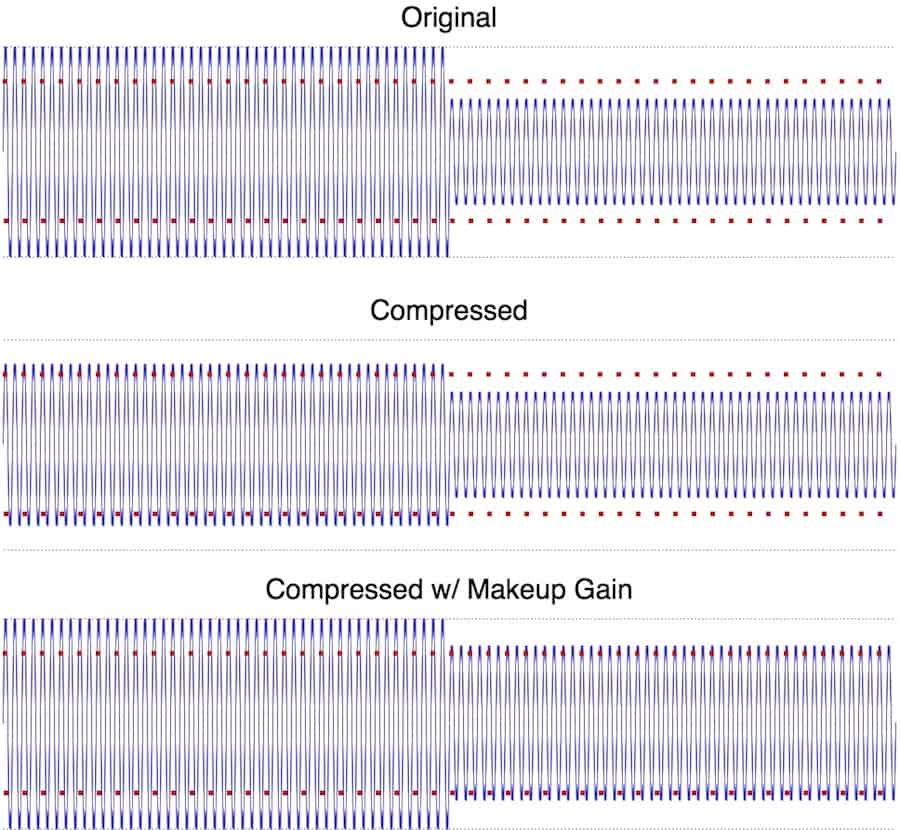
Make Up Gain

Credit: create.routenote.com

Tools For Adjusting Make Up Gain

Adjusting make up gain is made easy by using effective tools such as compressor plugins, equalizers and limiters. These tools help in controlling the loudness of your track.

Adjusting gain is essential to ensuring that your audio recordings sound their best. Make up gain is used to increase the volume of quieter sounds in an audio file. There are several tools that can help with adjusting make up gain, including digital audio workstations (DAWs), plugins, and hardware gain controllers.

Digital Audio Workstations (daws)

A digital audio workstation (DAW) is a software application used for recording, editing, and producing audio files. Within a DAW, there are several tools available for adjusting make up gain, such as faders and gain knobs. Faders control the overall volume of a track, while gain knobs control the gain of individual audio clips or tracks within a session.

Plugins And Tools For Make Up Gain

Plugins are additional software tools that can be added to a DAW to enhance its functionality. There are several plugins available specifically for adjusting make up gain. These include compressors, limiters, and equalizers. Compressors reduce the dynamic range of an audio file, making it easier to adjust the gain of quieter sounds. Limiters help prevent distortion by limiting the maximum volume of an audio file. Equalizers allow for more precise control over the frequency levels in an audio file.

Hardware Gain Controllers

Hardware gain controllers are physical devices used to adjust the gain of audio signals. These devices can be standalone or built into mixing consoles, preamps, or audio interfaces. Hardware gain controllers offer more tactile control over the gain of an audio signal and can be useful when recording live performances or for more precise adjustments. Additionally, some hardware gain controllers offer automation capabilities, allowing for more precise changes over time. Using a combination of these tools can make adjusting make up gain much more efficient and effective. With the right tools, you can take your audio recordings to the next level.

Best Practices For Make Up Gain

For optimal results when adjusting the levels of your audio, following best practices for make up gain can be extremely helpful. Proper usage of make up gain can add depth and balance to your sound, enhancing your overall listening experience.

Make Up Gain is a crucial feature in the world of audio mixing and mastering. With the help of Make Up Gain, you can enhance the overall quality of the audio and make it sound more natural and professional. But knowing how to use Make Up Gain properly is essential. In this article, we will discuss the best practices for Make Up Gain that will help you achieve the best possible results.

Using Make Up Gain In A Mix

When it comes to using Make Up Gain in a mix, it’s best to apply it only to the elements that need it. A common mistake is to apply too much gain to the entire mix, which can result in a distorted and unnatural sound. Instead, use Make Up Gain sparingly on individual tracks such as vocals or drums to smooth out any rough edges.

Avoiding Clipping With Make Up Gain

Clipping is a common issue that occurs when too much gain is applied to an audio signal, resulting in distortion. To avoid clipping when using Make Up Gain in your mix, it’s crucial to monitor the output levels. Keep a close eye on the levels and reduce the gain if the signal is close to clipping.

Using Make Up Gain For Mastering

Make Up Gain is a valuable tool in the mastering process. When mastering audio, the goal is to achieve a consistent and balanced sound across all tracks. Make Up Gain can help you to achieve this by increasing the overall loudness of the mix without sacrificing the dynamic range. However, it’s important to be cautious not to overuse Make Up Gain during mastering, as it can result in a loss of detail and clarity in the audio. In conclusion, Make Up Gain is a powerful tool when used correctly. By following these best practices, you can achieve a more professional and natural sound in your audio mixes and masterings. Remember to use Make Up Gain sparingly and monitor the output levels to avoid clipping. With these tips and tricks, you’ll be able to take your audio productions to the next level.

Make Up Gain

Credit: www.researchgate.net

Make Up Gain

Credit: www.soundonsound.com

Frequently Asked Questions On Make Up Gain

Should You Use Makeup Gain?

Yes, makeup gain can be useful in certain situations, such as when mixing and mastering audio. It allows you to increase the level of quieter sounds without boosting the overall volume too much. However, it should be used with caution to avoid distortion or other negative effects.

What Does Makeup Mean On Compressor?

The makeup on compressor indicates the amount of oil being added to the compressed air during operation. It helps to lubricate and cool the compressor and prolong its lifespan. It is important to monitor and maintain proper makeup levels to ensure efficient and safe compressor operation.

What Is The Difference Between Make Up Gain And Fader?

Makeup gain is a control used in audio processing to increase the level of a signal after it has been processed. A fader is a sliding control used to adjust the volume of an audio signal, typically on a mixing console or digital audio workstation.

In essence, makeup gain is used to increase the level of a signal while a fader is used to adjust the overall volume of a signal.

What Is The Gain Setting On A Compressor?

The gain setting on a compressor determines the level at which the compressor will start reducing the volume of the audio signal that exceeds that level. It basically controls the amount of compression applied to the signal.

Conclusion

Makeup can be a transformative tool that enhances natural beauty and boosts confidence. However, it’s important to remember that we don’t need it to feel beautiful. Makeup gain is all about using products that work for you and make you feel like the best version of yourself.

So, invest in quality products, experiment with colors and styles, and remember that true beauty comes from within. Keep practicing and perfecting your makeup skills, and enjoy the journey!

For more background, see Dynamic range compression on Wikipedia. You may also like our guide: How To Make Sample Packs.

Categories
Archive

Reverb Types

Reverb types are the different categories of reverb effects available in music production. Reverb types include room, hall, plate, spring and digital reverb.

In music production, creating an optimal reverb sound is vital to the final mix and audio quality. With the advancement of technology, various types of reverb effects have been introduced to enhance a recording’s sound quality. The most well-known types of reverb effects include room, hall, plate, spring, and digital reverb.

Each type of reverb has a specific sound characteristic that helps achieve a unique atmosphere for a specific music genre. Understanding the differences between these reverb types is crucial for music producers to select the right one to enhance a track’s overall sound quality. We will explore each type of reverb thoroughly.

Plate Reverb

Plate reverb is a type of reverb that uses a thin metal plate to create an artificial reverb effect by vibrating the plate using transducers. This type of reverb produces a bright and smooth sound and is commonly used in recording studios for vocals, drums, and guitars.

Plate Reverb is a type of artificial reverb that uses a thin metal plate to create a unique and vintage sound that has been used in many famous recordings. It was invented by engineers at Bell Labs in the 1950s and quickly became a staple in the recording industry. Plate Reverb is known for its warm and luxurious tone, making it a favorite of many producers and engineers. In this section, we’ll explore how Plate Reverb works and look at some famous recordings that have used this type of reverb.

How Plate Reverb Works

Plate Reverb works by sending an audio signal through a transducer onto a thin metal plate. The plate vibrates in response to the sound waves, and pickups on the plate capture the resulting reverberation. The sound is then amplified and mixed back into the original signal. The size and shape of the plate, as well as the materials it is made from, can affect the tone and character of the resulting reverb.

Famous Recordings With Plate Reverb

Plate Reverb has been used on countless recordings over the years, from classic rock to modern pop. Some of the most famous recordings that feature Plate Reverb include:

  • The Beatles’ “Tomorrow Never Knows”
  • Pink Floyd’s “Dark Side of the Moon”
  • Elvis Presley’s “Heartbreak Hotel”
  • The Rolling Stones’ “Sympathy for the Devil”

Each of these recordings uses Plate Reverb to create a unique and memorable sound. Whether it’s the otherworldly effect on “Tomorrow Never Knows” or the haunting ambience on “Dark Side of the Moon,” Plate Reverb has played a crucial role in shaping the sound of popular music.

Spring Reverb

Spring reverb is one of the most popular types of reverb effect used in music production. It was first introduced in the mid-1960s and is still widely used in modern music production. Spring reverb works by using a transducer to vibrate a spring, which creates an audio signal with a unique reverb sound.

How Spring Reverb Works

Spring reverb works by using a transducer, which is a device that converts one form of energy to another, to vibrate a spring. When audio signals are sent to the transducer, it vibrates the spring, which generates a dense and lively sound.

The output of the transducer is sent to the input of a amplifier, which boosts the audio signal and sends it to the output. As the signal passes through the spring, it bounces around, creating a unique and classic reverb sound. The length of the reverb decay can be adjusted using a control on the amplifier.

Classic Spring Reverb Units

The most iconic spring reverb units were produced by Fender. Fender’s spring reverb units were used on many classic rock and pop recordings from the 1960s onwards. They were commonly built into guitar amplifiers and were also available as standalone units.

Fender’s spring reverb units have a distinctive sound that is characterized by a bright and lively tone. The reverb sound has a strong mid-range, which is perfect for guitar solos and other lead instruments. Fender’s spring reverb units are still popular today and are used by many modern artists across various genres.

If you’re looking to add a classic reverb sound to your recordings, you can’t go wrong with a spring reverb unit. Whether you’re a guitar player looking for that classic surf rock tone or a producer looking to add some vintage reverb to your mix, the spring reverb is a reliable and popular choice.

Advantages of Spring ReverbDisadvantages of Spring Reverb
Creates a unique and classic reverb soundCommonly built into guitar amplifiersPerfect for lead instrumentsCan be noisyNot suitable for all genresMay require maintenance

Room Reverb

Room reverb is a type of reverb effect that can mimic the acoustic properties of a particular room or space. It is commonly used in music production to add a sense of depth and space to a recording. Room reverb can create a lively and organic sound that can enhance the overall mix of a track.

How Room Reverb Works

Room reverb works by simulating the reflections of sound waves in a particular space such as a hall, a chamber, or a studio. When sound waves are produced in a room, they bounce off the walls, ceiling, and floor, creating multiple reflections that blend together to create a natural reverb effect. Room reverb algorithms use complex mathematical formulas to calculate and simulate these reflections, creating a lifelike and believable spatial impression.

Recording Techniques For Room Reverb

The recording techniques used in capturing room reverb can greatly affect the overall quality of the effect. Here are some tips for recording room reverb effectively:

  • Experiment with microphone placement to capture the natural acoustics of the room. Placing the microphone closer to a reflective surface can create a more pronounced reverb effect.
  • Use a stereo pair of microphones to capture the three-dimensional space of the room.
  • Try to capture the room tone without other sound sources, as this can contaminate the natural reverb sound.
  • Recording in a high-quality recording space with good acoustics can greatly improve the overall sound of the room reverb.

By using these techniques, you can capture the natural and organic sound of a room reverb, enhancing the final mix of your music production.

Reverb Types

Credit: korneffaudio.com

Hall Reverb

Hall reverb is a popular type of reverb used in audio production. It creates a spacious, natural-sounding reverberation simulating the reverb of a big hall. This type of reverb can add depth and dimension to your recordings and is commonly used in vocals, drums, and guitars.

When it comes to creating a sense of space and depth in your audio recordings, nothing quite beats the classic sound of hall reverb. Hall reverb is a type of reverberation that emulates the sound of a large concert hall or auditorium, giving your audio an immersive quality that is perfect for certain types of music and audio content. Here, we’ll explore how hall reverb works, and how you can use it to create a realistic space in your recordings.

How Hall Reverb Works

Hall reverb is created by simulating the way sound waves behave in a large, reflective space like a concert hall or church. When sound is made in a hall, it bounces off the walls, ceiling, and floor, creating multiple echoes that blend together into a rich, warm reverb. Hall reverb plugins use complex algorithms to simulate this behavior, adding reflections to the dry signal in a way that mimics the way sound behaves in a real space. The best hall reverb plugins go beyond simple echo effects, offering control over parameters like decay time, early reflection intensity, and diffusion. This allows you to fine-tune the sound to suit your specific recording, and create custom reverb effects that enhance the natural space of the recording.

Creating Realistic Hall Reverb

To create realistic hall reverb in your recordings, start by choosing the right hall reverb plugin or physical reverb unit. Experiment with different decay times and reflection intensities to find the right balance between spaciousness and clarity. You should also consider how the room you’re recording in impacts the reverb effect. If you’re recording in a smaller room, for example, you may need to add more reverb to create the same sense of space as a larger hall. In addition, you can use EQ and filtering to shape the sound of the reverb. This can help prevent the reverb from becoming too cluttered or muddy, and help it fit more smoothly into the mix. Overall, hall reverb is a powerful tool for adding a sense of spaciousness and depth to your recordings. With the right setup and a bit of experimentation, you can create rich, immersive reverb effects that elevate your audio content to the next level.

Chamber Reverb

Chamber reverb is a type of reverb that mimics the sound of a large, reflective space like a chamber or a hall. When a sound is played in such a space, it bounces off the walls, ceiling, and floor numerous times before eventually dissipating into the air. Chamber reverb recreates this effect by using a combination of reflections and echoes.

How Chamber Reverb Works

Chamber reverb typically works by using a transducer to send a sound into a chamber or a simulated chamber environment. The sound then bounces off the walls and other reflective surfaces within the chamber before being captured by a microphone. The signal is then processed to simulate the sound of a natural reverb and added back into the original signal.

Chamber reverb can produce a warm and natural sound suitable for a variety of instruments, including drums, vocals, and guitars.

Examples Of Chamber Reverb Usage

1. Vocals: Chamber reverb is a popular choice for vocal tracks, adding a sense of depth and warmth to the sound. It can help create a sense of space that makes a vocal performance feel more natural and organic.

2. Drums: Chamber reverb can be used to add a sense of space and depth to drum tracks. It is particularly effective for creating a natural-sounding ambience for drums, making them sound as if they were recorded in a larger space.

3. Guitars: Chamber reverb can also be used on guitars to give them a warm and lively sound. With guitars, chamber reverb can help to create a more natural-sounding reverb that blends well with the overall sound of the track.

Conclusion

Chamber reverb is an essential tool for adding depth and character to recorded tracks. It is particularly effective for creating a natural and organic sound that can enhance the overall quality of a track. By understanding how chamber reverb works and its examples of usage, you can use it effectively to add more depth and warmth to your recordings.

Digital Reverb

Digital reverb is a popular effect used in music production, offering different types of reverb such as room, hall, and plate. Each type has its unique characteristics and can be adjusted to create different reverberations.

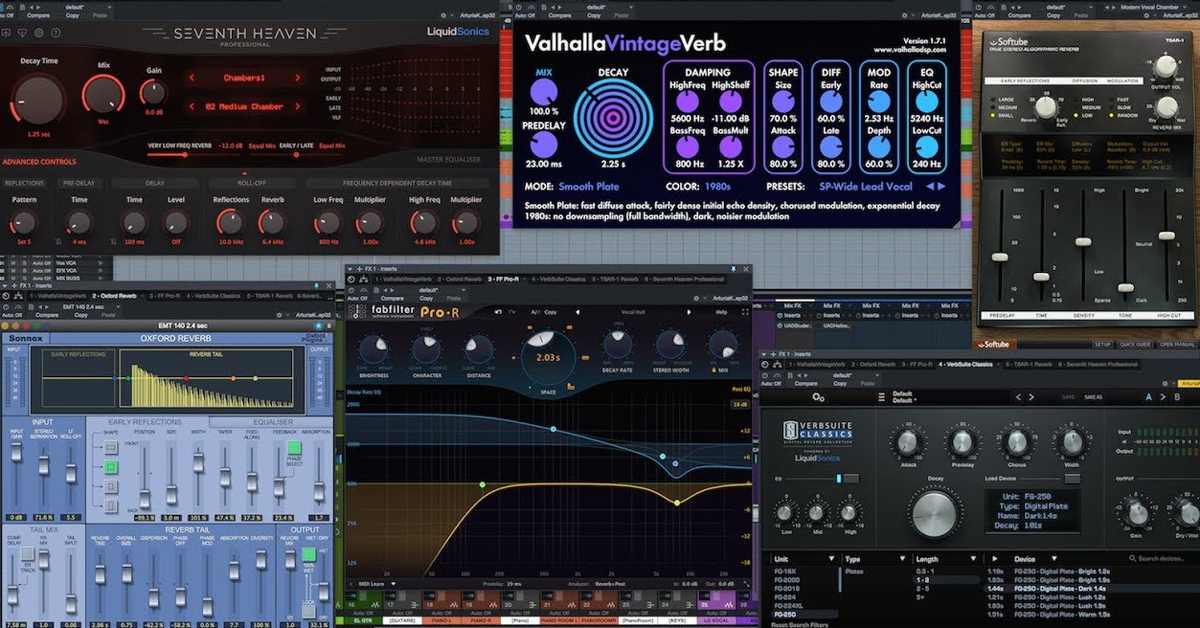
When it comes to creating a good audio mix, reverb is an essential tool. It can add an extra dimension to instrumental or vocal tracks by mimicking the natural sound of a room or hall. While there are many types of reverb available, digital reverb has quickly become a popular choice among audio engineers. In this article, we’ll discuss how digital reverb works, and explore some of its key advantages.

How Digital Reverb Works

Digital reverb is created using algorithms and software, which can be incorporated into a range of different audio equipment including mixing consoles and effect processors. It builds a virtual room or hall environment by first analyzing the incoming audio signal and then processing it accordingly. The algorithms used in digital reverb can be extremely complex. They take into account factors such as the size and shape of the virtual space, and the nature of the surfaces that sound waves come into contact with. By using complex mathematical formulas, digital reverb can create a wide range of different reverb effects, from short and snappy to long and drawn-out.

The Advantages Of Digital Reverb

There are several advantages to using digital reverb in your mixes. Here are just a few:

  • Flexibility: Digital reverb can be adjusted and fine-tuned to suit a wide range of different audio sources. This means that you can create a unique reverb effect for each track in your mix.
  • Consistency: Unlike some other types of reverb, digital reverb is consistent from one performance to the next. This means that you can rely on it to provide the same high-quality sound every time you use it.
  • Cost-effective: Digital reverb is often more affordable than other types of reverb. This is particularly true if you’re using a software-based digital reverb, as many digital audio workstations include reverb plug-ins as standard.

In conclusion, digital reverb is a powerful tool that can help you to create a professional-sounding audio mix. By understanding how it works and exploring its unique advantages, you can make the most of this innovative technology.

Convolution Reverb

Convolution reverb is one of the most popular reverb types used in audio production. This type of reverb creates a natural-sounding ambience by manipulating the characteristics of real acoustic spaces.

Convolution reverb is a special type of reverb that creates a realistic and natural-sounding acoustic space based on the mathematical process of convolution. Unlike other types of reverb, convolution reverb uses a pre-recorded impulse response to reproduce the acoustics of real-world spaces. In this section, we will explore how convolution reverb works and its pros and cons.

How Convolution Reverb Works

Convolution reverb technology takes a recording of a real impulse response, which is the sound created in a physical space in response to a short, loud noise, like a hand clap. The impulse response recording is then loaded into a convolution reverb processor, which applies the acoustic characteristics of the space to an audio signal, simulating the reverb effect. Convolution reverb is unique in its ability to create very realistic and natural-sounding reverb because it incorporates the actual acoustics of a space.

Pros And Cons Of Convolution Reverb

As with any type of reverb, convolution reverb has its advantages and drawbacks. Here are some pros and cons to consider: Pros:

  • Produces highly realistic and natural-sounding reverbs
  • Can replicate the acoustics of real-world spaces
  • Provides a more precise sound due to its dependence on measured data

Cons:

  • Requires large impulse response files, which require more processing power and memory capacity to use
  • May not be suitable for creative sound design or experimental soundscapes
  • Can lack the flexibility to shape the reverb effect due to reliance on the impulse response data

With these pros and cons in mind, convolution reverb is an excellent choice for situations that require a highly realistic and natural-sounding reverb. It’s especially useful for recording orchestral music, concert halls, churches, and other locations with unique acoustical properties. But, it may not be the best option if you want to shape the reverb effect in creative ways that go beyond replicating actual acoustic spaces.

Reverb Types

Credit: delicious-audio.com

Creative Reverb Techniques

Creative reverb techniques are essential to phase shaping sounds, altering room ambiances, and designing creative effects. There are many different types of reverb to choose from, including chamber, spring, plate, hall, and more, each offering its own unique sound and characteristics.

Reverb is a crucial component of any music production. It can help to create a sense of depth, space, and ambiance in your mix. At its most basic, reverb is a simple tool that replicates the natural sound reflections in a space. However, it becomes a creative tool when you start to experiment with different reverb types and settings.

Unconventional Uses For Reverb

Using reverb in non-traditional ways can be a potent technique for adding excitement and interest to your tracks. Here are some unconventional uses for reverb:

  • Distorted Reverb: Apply distortion to the reverb tail for a lo-fi, gritty sound effect.
  • Reverse Reverb: Reverse the reverb tail so that it fades-in, creating a reversed reverb effect.
  • Side-Chain Reverb: Use a side-chain compressor to trigger the reverb only when the main audio is not present. This can create a rhythmic pumping effect.
  • Filtering Reverb: Apply a high-pass or low-pass filter to the reverb tail, making it darker or brighter.

Innovative Reverb Processing

Reverb processing can bring unique and innovative ideas to your music creation process. Here are some techniques to make the most of your reverb processing:

  1. Multiband Processing: By splitting the reverb into multiple frequency bands, you can process each band separately, resulting in more control and fine-tuning.
  2. Pitch Shifting: Pitch shift the reverb tail up or down to add interesting harmonies and textures.
  3. Modulation: Adding modulation to the reverb, such as chorus or flanger effects, can add movement and depth to the mix.
  4. Gating: Applying a gate to the reverb tail can create rhythmic and stuttering effects.

By trying out some of these unconventional uses and innovative techniques, you can take your reverb processing to a whole new level. Experimentation is the key to finding unique ideas that will elevate your music production and make it stand out from the rest.

Reverb Types

Credit: theproaudiofiles.com

Frequently Asked Questions Of Reverb Types

How Many Different Types Of Reverb Are There?

There are several types of reverb such as spring reverb, plate reverb, room reverb, hall reverb, chamber reverb, and digital reverb.

What Are The Five Sources Of Reverb?

The five sources of reverb are plate, spring, hall, room, and chamber.

What Type Of Effect Is Reverb?

Reverb is a type of audio effect that adds depth and spaciousness to a sound. It simulates the natural echoing or reverberating sounds found in an actual physical space, like a room or hall. The result is a more immersive and realistic sound quality.

What Is A 4 Second Reverb Good For?

A 4 second reverb can add depth and ambience to various types of music and audio settings such as live performances, vocals, and instrument recordings. It is good for creating a sense of spaciousness and warmth.

Conclusion

Overall, the world of reverb types can be quite daunting, but knowing the differences between them can greatly improve your music production. Each type has its own unique characteristics and can add a particular depth to your sound. From the haunting echoes of plate reverb to the immersive experience of convolution reverb, there is a reverb type to suit any creative endeavor.

By experimenting and utilizing the different types, you can enhance the depth and richness of your soundscapes. So get creative and explore the world of reverb types!

Categories
Archive

How To Use Delay On Vocals

To use delay on vocals, set the delay time, adjust the feedback amount, and blend in the effect with the dry signal. Adding delay to vocals can create a sense of depth and add an ethereal quality to the sound, but careful adjustment is necessary to avoid muddiness or being too prominent in the mix.

Experiment with longer or shorter delay times, different feedback amounts, and panning options. Automation can also be used to add variations to the effect throughout the song. Keep in mind the overall texture and tone desired for the vocals and how the delay fits into the overall mix.

With practice and attention to detail, delay can be an effective tool in enhancing vocals in a mix.

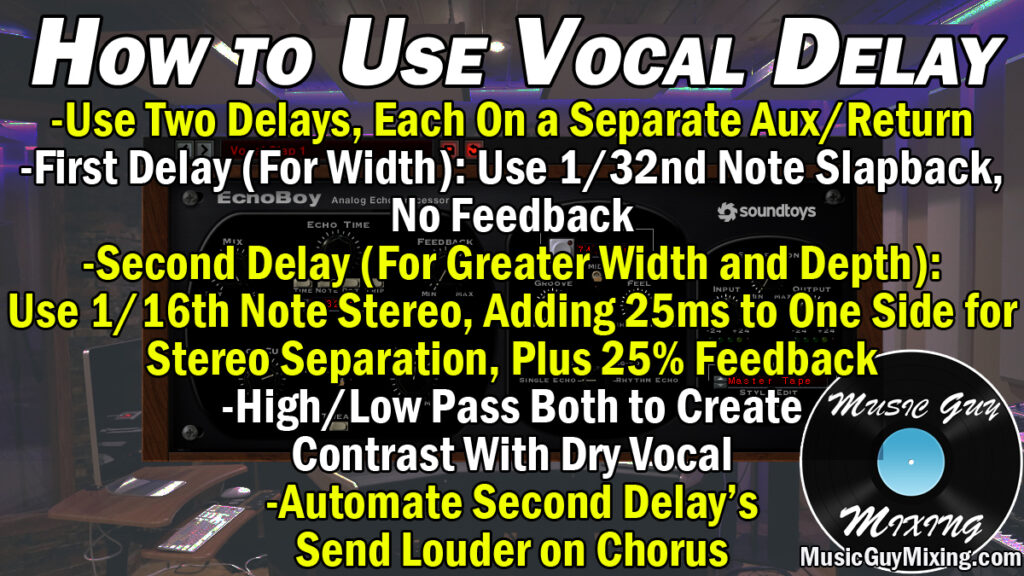
How To Use Delay On Vocals

Credit: www.musicguymixing.com

Understanding Delay On Vocals

Delay can add depth and character to vocal tracks, enhancing the overall sound and bringing it to life. By adjusting the delay time, feedback and mix, you can create an effect that sits perfectly within the mix and elevates your vocal recordings to new heights.

Using delay can instantly transform a vocal track and add depth and dimension to the overall mix, making it sound larger than life. But for someone who is new to music production, understanding what a delay is and how it works can be a bit daunting. In this blog post, we will break down everything you need to know about using delay on vocals. Let’s first take a look at the basics.

What Is Delay?

Delay is an effect in music production that creates an echo-like sound by repeating audio signals at a certain time interval called the delay time. In simpler words, when you play a sound, delay will repeat the sound after some time creating an echo or a repeated sound. The time between the original sound and the repeated sound is controlled by the delay time parameter. The number of repeats is controlled by the feedback parameter. The more feedback you have, the more echoes you will hear.

Benefits Of Using Delay On Vocals

Now that you know what a delay is let’s discuss some of the benefits of using delay on vocals:

  • Creates a sense of space – Adding delay to vocals can help create a sense of space and depth. It can give the effect of the vocalist singing in a large or spacious room.
  • Make vocals sound thicker – Adding delay to your vocal track makes it sound thicker by adding layers upon layers of sound to the original sound.
  • Adds excitement – By using delay, you can create interesting vocal effects that can add excitement to the track.
  • Emphasizes certain parts – By emphasizing specific parts of the vocals track with delay, you can draw attention to the words or parts of the vocals you want the listener to pay attention to.

Using delay can be very helpful to create a more interesting and dynamic vocal track. Don’t be afraid to experiment with the feedback and delay time settings to create unique sounds that complement the vocals in your mix.

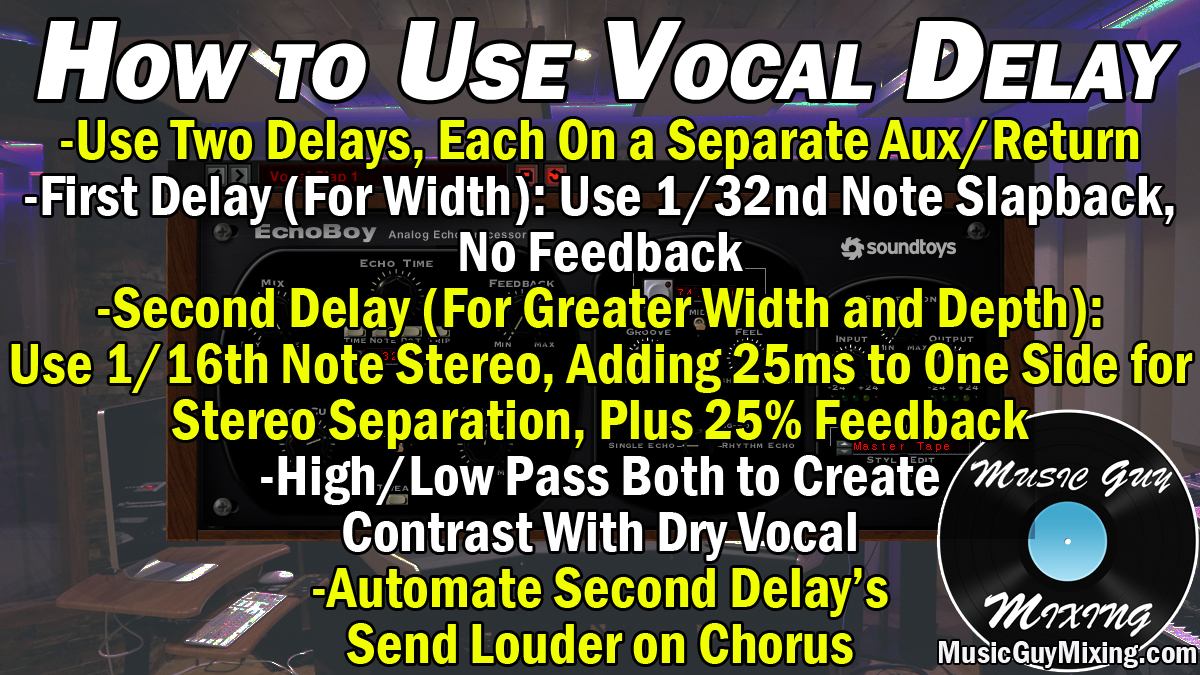
How To Use Delay On Vocals

Credit: www.musicguymixing.com

Setting Up The Delay Effect

To add depth and dimension to vocal tracks, using the delay effect can be a great strategy. First, set the delay time to a desired tempo, then adjust the feedback and mix knobs to fine-tune the effect. Play with the panning and EQ to complete the sound.

Delay is an essential effect in modern pop music productions. It is commonly used to create various vocal effects such as echoes, slapbacks, and simple repeats. The delay effect can add depth and ambience to your vocal tracks and make them sound more dynamic and interesting. In this post, we will discuss how to use delay on vocals by focusing on the subheading: Setting Up the Delay Effect.

Choosing The Right Delay Plugin

To set up the delay effect, you need to first choose the right delay plugin. There are different types of delay plugins available, such as analog emulations, digital delays, and tape delays. Each type of plugin has its unique sound and features. Therefore, you must choose a plugin that best suits your production style. For example, if you want a warm and vintage sound, you should choose an analog delay plugin.

Adjusting The Dry/wet Mix

To set up the delay effect, you must adjust the dry/wet mix. The dry signal is the original vocal signal, while the wet signal is the delayed signal. The dry/wet mix determines the balance between these two signals. For example, a 50:50 mix means that both signals have equal levels in the mix. You can adjust the dry/wet mix to your taste, depending on the desired effect and the style of the song.

Setting The Delay Time

Another crucial parameter in setting up the delay effect is the delay time. The delay time determines the amount of time between the original vocal signal and the delayed signal. You can set the delay time in milliseconds or note values, such as quarter notes, eighth notes, or sixteenth notes. You should choose a delay time that fits the tempo of the song and complements other elements of the production. For example, a short delay time of 50ms can create a slapback effect, while a long delay time of 800ms can create an echo effect.

Setting The Feedback And Eq

Finally, you need to adjust the feedback and EQ settings to fine-tune your delay effect. The feedback determines the number of repeats or echoes that the delayed signal creates. A high feedback setting can create a dense and repetitive effect, while a low feedback setting can create a subtle and natural effect. The EQ settings allow you to shape the tone of the delayed signal. For example, you can boost or cut certain frequencies to highlight or hide certain elements of the vocal. In conclusion, setting up the delay effect can enhance the quality and character of your vocal tracks. By choosing the right plugin, adjusting the dry/wet mix, setting the delay time, and adjusting the feedback and EQ settings, you can create various delay effects that suit your production style and musical vision.

Using Delay On Different Parts Of The Song

When it comes to producing a hit song, the use of effects on vocals is essential to create an outstanding sound. One such effect is delay, which adds depth and character to the vocals, making it sound more natural and attractive. In this post, we will discuss using delay on different parts of the song with H3 headings using HTML syntax. Let’s dive in.

Using Delay On The Verse

The verse is the first part of a song that usually establishes the melody and lyrics. Using delay on the verse can add depth and emphasize the lyrics and melody. A subtle delay effect can be used to create a sense of space, making it sound like the vocal is in a larger room. On the other hand, a more pronounced delay effect can be used to create a sense of urgency or anxiety, depending on the mood of the song.

Using Delay On The Chorus

The chorus is the part of a song that usually contains the hook that listeners remember. Using delay on the chorus can make the hook more memorable by creating a subtle echo effect that sticks in the listeners’ minds. Similar to the verse, subtle or more pronounced delay effects can be used to emphasize the lyrics and melody, depending on the mood of the song.

Using Delay On The Bridge

The bridge is a section of a song that connects the verse and chorus. Using delay on the bridge can create a sense of tension or anticipation for the listeners. A longer delay effect on the bridge can give a sense of distance or separation, creating a buildup to the chorus as the vocals become clearer as the effect fades away.

Using Delay On The Adlibs

Adlibs or vocal improvisations are additional vocals elements that are not part of the main melody or lyrics. Using delay on the adlibs can add a creative element to the song and make the vocals sound more unique. A more pronounced delay effect on adlibs can be used to create a sense of playfulness or experimentation, while a subtle delay effect can make the adlibs blend in with the rest of the vocals.

In conclusion, using delay on different parts of a song can add depth and create a memorable sound that keeps the listeners humming the melodies long after the song ends. When using delay on vocals, always consider the mood and feel of the song, and experiment with subtle or pronounced delay effects to find the sound that fits the vocals.

Creating Depth With Delay

Creating Depth with Delay is a crucial aspect of music production that can make your vocals sound polished and professional. By using delay effects, you can add an element of dimension to your vocal mix, which can create a sense of space and depth in the overall sound. Layering your delay effects, combining reverb and delay, and tweaking various delay parameters like feedback, time, and mix can help you achieve that desired depth in your vocal tracks.

Layering Delays

Layering delays can help you create a more complex and dynamic sound. By adding several delay effects to your track, you can create a sense of depth that single delays can’t produce. You can use different delay times or slightly varying parameters on each layer to create a more natural and evolving sound. You can also experiment with panning your delays to different parts of the stereo field to create a more three-dimensional effect.

Combining Reverb And Delay

Another way to add depth to your vocal track is by combining reverb and delay. By using reverb, you can create the illusion that your vocal is recorded in a larger space, which can make it sound more natural. Combining delay to your reverberant sound can produce a more complex, evolving soundscape. You can experiment with the different reverb types and tweak the mix of reverb and delay effects to find the sweet spot that fits your track.

Avoiding Common Mistakes

Delay is an essential effect in music production that can add depth and space to vocals. However, if not used correctly, it can also make your vocals sound muddy and unclear. Here are three common mistakes to avoid when using delay on vocals.

Using Too Much Delay

One common mistake is using too much delay, which can result in an overpowering and distracting effect. To avoid this, adjust the delay mix level to ensure that the effect is subtle and doesn’t overshadow the vocals. As a rule of thumb, the delay mix level should be between 10% to 15% for a natural-sounding delay effect.

Not Adjusting The Delay Time

Another mistake is not adjusting the delay time, which can lead to messy and dissonant vocals. The delay time refers to the duration between the original vocal and the delayed vocal. For a natural-sounding effect, the delay time should be synced to the tempo of the song. If your song has a tempo of 120 BPM, then the delay time should be set accordingly.

Clashing With Other Instruments

The third mistake to avoid is clashing with other instruments in the mix. The delay effect can muddy up the mix and clash with other instruments if they’re on the same frequency range. To avoid this, try using a high-pass filter on the delayed vocals to cut out the low-frequency range and leave room for other instruments in the mix.

By avoiding these common mistakes, you can use delay on vocals to enhance your mix and deliver a professional-sounding track that stands out from the rest.

How To Use Delay On Vocals

Credit: www.productionmusiclive.com

Frequently Asked Questions Of How To Use Delay On Vocals

How Do You Add Delay To Vocals?

To add delay to vocals, first insert a delay effect plugin on the vocal track. Adjust the delay time and feedback parameters to control the timing and intensity of the delay effect. Experiment with different settings until you achieve the desired result.

Should I Use Delay On Vocals?

Yes, using delay on vocals can add depth and dimension to your recordings. However, it should be used with caution and in moderation to avoid overpowering the vocals or creating dissonance. Experiment with different delay settings and EQ adjustments to find the right balance for your mix.

Is Tape Delay Good For Vocals?

Tape delay can be good for vocals as it adds depth and space to the sound. The effect can be subtle or dramatic, depending on the settings used. Many classic recordings have used tape delay to great effect on vocals, and it remains a popular technique in modern productions as well.

What Is The Delayed Voice Effect?

The delayed voice effect is an audio processing technique that produces an echo or reverberation effect on a recorded voice. It is often used in music production, film soundtracks, and voiceovers. The effect takes the original audio and plays it back a short time later, creating a repetition or doubling effect.

Conclusion

Using the delay effect on vocals can significantly enhance the sound of your song. It adds a sense of depth and dimension to the vocal performance, making it stand out in the mix. However, it is crucial to use the delay effect appropriately and not overdo it, as it can quickly become distracting and overpowering.

By keeping these tips in mind, you can effectively use delay to create a memorable and captivating vocal performance that will elevate your music to the next level.

Categories
Archive

Fl Studio Freebies

Fl Studio Freebies are available on the official FL Studio website, offering a range of free plugins and sounds. FL Studio is a popular Digital Audio Workstation (DAW) used for music production and offers users the ability to customize their workflow with a variety of plugins and expansions.

For producers and music creators looking for affordable options in the world of digital audio production, FL Studio Freebies can provide a great introduction to the software. The collection of available plugins and sounds is constantly expanding, offering users unique options for their projects.

These freebies are offers that every FL Studio user should check and take advantage of, as they help make the production journey less costly without sacrificing quality. From synths to drum loops and effects, there is always something new to discover with FL Studio Freebies.

Fl Studio Freebies

Credit: www.productionmusiclive.com

Fl Studio: A Quick Introduction

Get started with FL Studio by exploring its freebies, including plugins, presets, and samples. These tools can help you create unique sounds and improve your music-making skills.

FL Studio is a popular digital audio workstation and music production software loved by music producers and beatmakers around the world. It is a powerful tool that allows users to create, mix, and master their musical creations with ease. With the help of FL Studio, you can produce tracks in various genres, from hip-hop to electronic music, and everything in between.

What Is Fl Studio?

FL Studio (also known as FruityLoops) is a complete music production software developed by Image-Line. It was first released in 1997 and has since evolved into a versatile music production product used for recording, arranging, mixing, and mastering audio.

Who Uses Fl Studio?

FL Studio is used by music producers and DJs of all levels, from beginners to advanced professionals. Its intuitive interface and flexible workflow allow users to create music with ease, regardless of their level of expertise. It is also widely used in the music industry for its ability to create high-quality sound with its built-in VST and effects plugins.

Why Is It Popular?

FL Studio is popular because of its versatility, easy-to-use interface, and an extensive library of built-in plugins, samples, and effects. It also includes a wide range of virtual instruments that allow users to create their unique sound. The software’s compatibility with many third-party plugins gives users the freedom to customize their music and create their unique style. Additionally, it allows producers to share their music with the world with support for various file export formats, including MP3, WAV, and MIDI, making it easier for artists to collaborate with others.

The Pros And Cons Of Using Fl Studio

FL Studio is a popular digital audio workstation that offers a wide variety of freebies to its users. On the upside, these freebies include sound packs, presets, and plugins that enhance the quality and functionality of the software. However, on the downside, some of these freebies may not be up to the mark compared to paid options in terms of features and reliability.

FL Studio, also known as Fruity Loops, is a digital audio workstation that is easy to use. It is popular among music producers because of its vast library of plugins and affordability. However, like any other software, it has its pros and cons. In this article, we will discuss the advantages and disadvantages of using FL Studio.

Pros: User-friendly Interface

One of the biggest benefits of FL Studio is its user-friendly interface. Even if you are a beginner, it will not take you long to grasp the basics. You can drag and drop sounds, add effects, and create beats without any hassle. Its interface is both intuitive and adaptable, which makes it a preferred choice for many producers.

Pros: Vast Library Of Plugins

FL Studio has a vast library of plugins that makes it one of the most versatile audio workstations available. The stock plugins in Fruity Loops are sufficient to produce a hit record. The plugins range from synthesizers, to equalizers, to effects, and more. Additionally, because of its popularity, there are many third-party plugins available that you can add to your library for free or at a low cost.

Pros: Fruity Loops Is Affordable

Fruity Loops is affordable and easily accessible. You can start with the most basic version and gradually upgrade as you progress. Compared to other software, FL Studio is competitively priced, which makes it a popular choice for new producers.

Cons: Steep Learning Curve

Despite being user-friendly, FL Studio has a steep learning curve. It can take a bit more time and effort to master all of its features and tools. For beginners, it can be overwhelming to understand everything in the software. However, with some practice, patience, and dedication, you can learn how to use it like a pro.

Cons: Limited Third-party Integration

One major disadvantage of FL Studio is the limited third-party integration. Unlike some of its competitors, Fruity Loops does not have many options for integrating with other software or hardware. This can be frustrating if you are looking to work with specific plugins or MIDI controllers that are not compatible with FL Studio.

Cons: Poor Audio Recording Capabilities

Lastly, FL Studio’s audio recording capabilities are not as advanced as its competitors. Although it can record audio, its recording quality leaves a lot to be desired. If you are looking to record high-quality audio, you might have to use a separate program or equipment. In conclusion, FL Studio is a great choice for music producers who are on a budget and prefer a software that is easy to use. However, it does have its limitations, such as a limited integration with third-party software and poor audio recording capability. Nonetheless, if you are willing to put in the time and effort to master the software, you can create professional-quality music with FL Studio.

Maximizing Fl Studio: Tips And Tricks

Maximize your FL Studio experience with these must-have freebies. Explore the wide range of plugins, presets, and sound packs to take your music production to the next level. Don’t let money hold you back from unleashing your creativity.

If you have been using FL Studio, then you know that it is a powerful music production tool that can help you create music that sounds amazing. However, to get the most out of FL Studio, you need to understand how to maximize its potential through various tips and tricks. In this post, we will explore different ways you can use FL Studio freebies to create unique sounds, effectively use automation, and master the art of sampling.

Navigating The Mixer

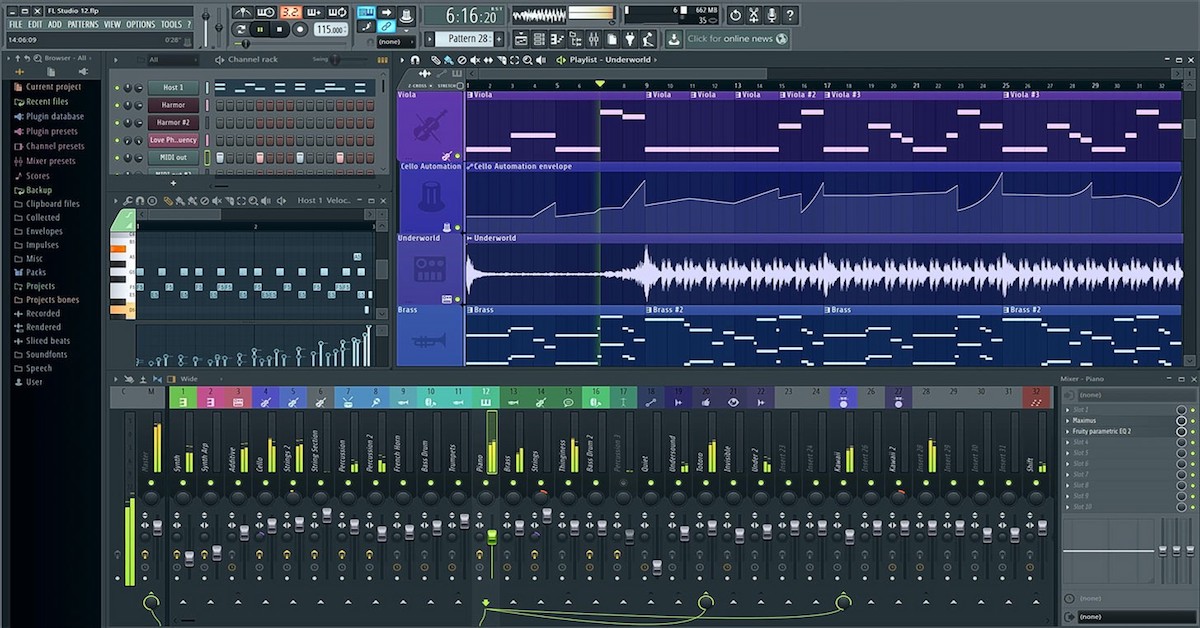
The Mixer is an integral part of FL Studio, and if you want to maximize its functions, you need to know how to navigate it efficiently. One way to do this is by organizing your mixer tracks by assigning colors to them. This way, you can quickly identify each track, making it easy to edit or manipulate them. Additionally, you can make use of track routing to streamline your mixing process.

Creating Unique Sounds With Sytrus

Sytrus is one of the most powerful native plugins in FL Studio, capable of creating unique and complex sounds. To get the most out of Sytrus, you can experiment with different attack, decay, sustain, and release settings. Additionally, you can layer different waveforms, add modulation, or use filters to create complex sounds that stand out.

Effectively Using Automation

Automation is one of the features that sets FL Studio apart from other DAWs. To use automation effectively, you need to know how to record and edit automation clips. You can also use time manipulation tools like Gross Beat to create complex gating and stuttering effects. With automation, you can add dynamics, movement, and variation to your music, making it sound more interesting.

Mastering The Art Of Sampling

Sampling is a crucial aspect of music production, and to master it, you need to know how to chop, stretch, and loop samples effectively. Additionally, you can use tools like Edison to edit your samples, apply effects, and extract sections. With the right sampling techniques, you can take ordinary sounds and turn them into unique and interesting elements in your music. In conclusion, FL Studio offers a vast range of possibilities for music creation, and by using the tips and tricks outlined above, you can maximize its potential and create music that sounds amazing. By mastering the Mixer, utilizing Sytrus and automation, and sampling effectively, you can take your music production skills to the next level.

Finding Freebies For Your Fl Studio Projects

FL Studio is a dynamic digital audio workstation that is widely popular among music producers and audio engineers. FL Studio has become the go-to tool for music creation with its exceptional features and capabilities. But, did you know that you can take your music production to the next level with FL Studio freebies?

What Are Fl Studio Freebies?

FL Studio freebies are additional plugins, samples, and templates that you can download and add to your projects entirely for free. These freebies can give your projects a professional touch and take them to the next level. Moreover, it saves time and effort as you don’t need to create everything from scratch.

Types Of Fl Studio Freebies

With FL Studio freebies, the possibilities are endless. Some of the popular types include:

  • Free Drum Samples
  • Free Synth Presets
  • Free Soundfonts
  • Free FX Plugins
  • Free MIDI Files

Where To Find Fl Studio Freebies

You can find FL Studio freebies on numerous websites, and it’s essential to use reliable sources to ensure safety and quality. Some of the popular websites to get your FL Studio freebies include:

1.Loopmasters
2.Plugin Boutique
3.Splice Sounds
4.Sample Magic

How To Effectively Use Fl Studio Freebies

FL Studio freebies can help speed up your workflow. As a music producer or audio engineer, incorporating these freebies into your projects can enhance the quality of your work and improve the overall outcome. However, it’s recommended to be selective when using these freebies and use them only when needed. Overuse can make your project cluttered and incoherent.

Free Fl Studio Plugins To Enhance Your Sound

If you’re a music producer, Fl Studio is a must-have tool in your arsenal. But did you know that you can enhance your sound quality even further by using free plugins? Yes, you read it right. There are tons of free Fl Studio plugins that can take your production game to the next level. Here are the top free plugins for mixing, mastering, synth sounds, and effects.

Top Free Plugins For Mixing

  • SPAN – A real-time audio analyzer that provides detailed spectral analysis.
  • OTT – A multiband compressor that works wonders on drums, bass, and vocals.
  • Code Red Free – A vintage-style EQ plugin that adds warmth and character to your mix.

Top Free Plugins For Mastering

  • SlickEQ – A transparent equalizer that allows you to make precise tweaks to your mix.
  • LoudMax – A limiter that helps you control the overall loudness of your track.
  • Invisible Limiter – A limiter that uses advanced algorithms to maximize loudness while retaining transients.

Top Free Plugins For Synth Sounds

  • TAL-Bassline – A monophonic bass synth that emulates the sound of classic hardware synths.
  • Zebralette – A powerful synth that allows you to create complex sounds with ease.
  • Dexed – A software synth that emulates the sound of the Yamaha DX7.

Top Free Plugins For Effects

  • Valhalla Freq Echo – A frequency shifter and delay that can create some interesting effects.
  • Tal-Reverb-4 – A versatile reverb plugin that can be used on anything from drums to vocals.
  • Bionic Supa Delay – A delay plugin that has a warm and analog-like sound.

With these free Fl Studio plugins, you can take your music production skills to the next level without breaking the bank. Don’t forget to experiment and find new ways to use them in your tracks. Happy producing!

Fl Studio Freebies

Credit: www.youtube.com

Free Fl Studio Samples: A Game-changer For Your Music Production

If you’re a music producer or beatmaker looking to elevate your game, you’re in luck! FL Studio offers an extensive library of free samples to help you create unique sounds and take your music to new heights. In this post, we’ll explore what samples are, the importance of using them, where to find creative and original samples, and how to use them to expand your sound library and create unique sounds.

What Are Samples And Why Are They Important?

Samples are short audio clips that you can use to create music. They can be instrumental or vocal and can range from drum sounds, chord progressions, instrument melodies, to sound effects. Samples can be a game-changer for your music production because they offer a wide range of ready-made audio elements that can save you time and inspire new creative ideas. You can use samples to create entire songs or add unique touches to your tracks, and they can be manipulated in a variety of ways to create new sounds.

Where To Find Creative And Original Samples

There are numerous websites that offer free and paid sample packs that you can download for use in FL Studio. Some popular options include Splice, Loopmasters, and Sample Magic. FL Studio itself also offers a range of free samples that you can access from the browser tab within the software. Look for sample packs that match your genre and style, and don’t hesitate to experiment with different sounds.

Using Samples To Expand Your Creative Sound Library

Using FL Studio samples is an effective way to expand your sound library and create unique sounds. To get started, try layering different samples on top of each other, adjusting the pitch and volume to create new sounds. You can also manipulate samples using effects such as reverb, delay, and distortion to create unique textures and tones. Additionally, try chopping up samples into smaller fragments and rearranging them to create new melodies or rhythms.

Manipulating Samples To Create Unique Sounds

Manipulating samples in FL Studio can help you create unique sounds and give your tracks a distinctive character. To manipulate samples, you can use a variety of tools and effects within the software. For example, you can use the Slice tool to break up a sample into smaller fragments, then rearrange them in a new sequence. You can also use the time-stretching feature to adjust the tempo of a sample or reverse it to create interesting effects. Don’t be afraid to experiment with different tools and effects until you find a sound that works for you.

Free Fl Studio Templates: Saving You Time And Energy

Discover a vast collection of free FL Studio templates that will save you time and energy. With these freebies, you can create professional quality music tracks in no time, without the hassle of starting from scratch. Access these tools and take your music creation to the next level today.

Free FL Studio Templates: Saving You Time and Energy Are you tired of starting your music production from scratch every time? Do you want to speed up your workflow and save time while creating quality music? FL Studio templates have come to your rescue! What are FL Studio Templates? FL Studio templates are pre-made projects that come with demos, presets, channels, and plugins that you can customize to match your project’s needs. Using a template (also called a project file) means that you don’t have to create a new project from scratch, saving you both time and energy. Choosing the Right Template for Your Project Choosing the right FL Studio Template for your project can be a daunting task. It’s crucial to ensure the template matches your preferences and the genre of music you’re working on. Templates are available for different genres and production styles like EDM, Pop, Hip-hop, and Trap, among others. When selecting a template, check the number of channels included, the file size, and the level of customization you require. Don’t settle for a template that doesn’t match your preferences; instead, find one that meets your exact needs. How to Personalize Templates for Your Needs Once you have selected an FL Studio template that suits your project, it’s time to customize it to your liking. Personalizing your template saves you the trouble of starting from scratch while still producing quality music. There are several ways to personalize your FL studio template. You can change the tempos, replace the samples, swap the synthesizers, rename channels and patterns, modify effects, among others. Remember, the goal is to incorporate your skills and expertise in the project while using a template to achieve maximum productivity. Creating Your Own Templates for Maximum Efficiency As much as finding the right FL Studio template is helpful, creating your templates is even better. Creating a template that suits your preferences and production style is easy and convenient. Start by organizing your existing projects to help you see the sequences you use most frequently. Use these sequences to create your own custom loops, patterns, and channels. Organize your creations and save them into a project file that you can use in your future projects. Conclusion Using FL Studio templates is a great way to achieve efficiency when producing quality music. With pre-made project files, you can save time, focus on creativity, and deliver quality music within a short time. By choosing the right template, personalizing it to your preferences, and creating your own templates, you’re sure to have maximum productivity while creating music with FL Studio.

Fl Studio Freebies

Credit: www.producersbuzz.com

Frequently Asked Questions On Fl Studio Freebies

What Does Free Fl Studio Give You?

FL Studio provides a free trial version that includes all the features of the paid version except for the ability to save projects. You can use the trial version to create and record music, use virtual instruments and effects, mix and master tracks, and more.

Once you’re ready to save your work, you’ll need to purchase the full version.

How Can I Get Fl Studio For Free?

FL Studio cannot be obtained for free legally. The only way to use the software is to purchase a license. Avoid downloading cracked versions as they can harm your computer and be illegal. Check for discounts, promotions, and free trials on the official FL Studio website.

Is Fl Studio Free Forever?

No, FL Studio is not free forever. It offers a free trial version with some limitations, but to use the full version, you need to purchase it. The cost of the software varies depending on the edition you choose and any additional plugins or sound packs.

Is It Legal To Sell Music Made From The Free Fl Studio?

Yes, it is legal to sell music made from the free FL Studio, as long as you own the necessary rights to the sounds used in the production. However, it is recommended to check the terms and conditions of the FL Studio license agreement for any restrictions on commercial use.

Conclusion

FL Studio freebies are a great way to enhance the production process without breaking the bank. Whether you’re in need of more samples, plugins, or presets, there are plenty of options to choose from. By taking advantage of these resources, you can unlock new creative possibilities and improve the overall quality of your music.

So, what are you waiting for? Start exploring the world of FL Studio freebies today!

Categories
Archive

Tidal Pay Per Stream

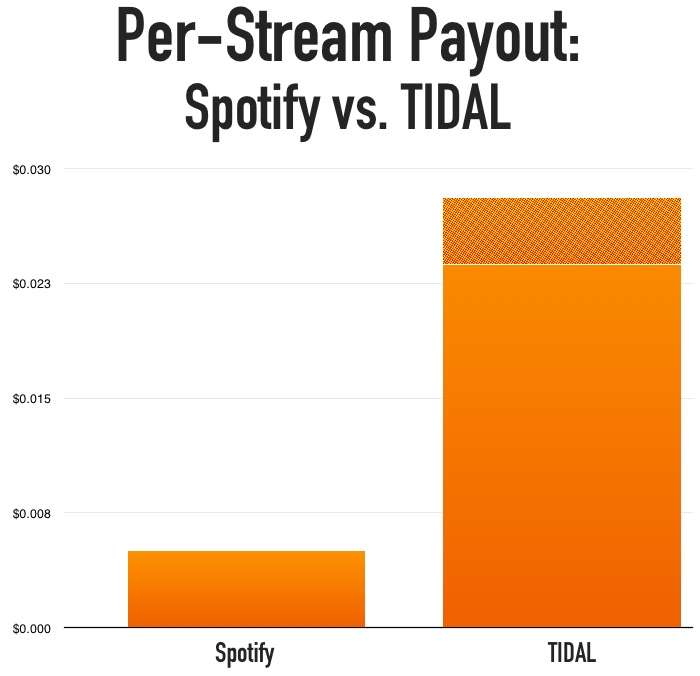
Tidal pays artists and record labels between $0.0125 and $0.002 depending on the listener’s location and subscription type per stream. Tidal has positioned itself as a premium music streaming service that offers high fidelity music, music videos, and original content such as podcasts and livestreams.

One of the critical components of the service is its payment structure. Unlike other streaming services that pay based on advertising revenue or monthly subscription fees, Tidal’s payment structure is based on a pay-per-stream model. This means that artists and labels receive a royalty every time one of their songs is played on Tidal.

The amount paid per stream varies based on the listener’s location and subscription type, but generally, it ranges between $0. 0125 and $0. 002. Despite criticism from some artists who claim that the pay is not high enough, Tidal remains a popular platform for fans of high-quality audio and exclusive content.

Tidal Pay Per Stream

Credit: dittomusic.com

Benefits Of Tidal Pay Per Stream

Tidal is a music streaming platform that offers a unique way for artists to earn revenue from their music through pay-per-stream. In this blog post, we’ll explore the many benefits of Tidal Pay Per Stream for artists.

Control For Artists

One of the main benefits of Tidal Pay Per Stream is that it gives artists more control over their music. With Tidal, artists can choose to release their music exclusively on the platform or release it on other platforms as well. This means that they have the power to decide how and where their music is heard, which can be a significant advantage in the competitive music industry.

More Revenue

Tidal Pay Per Stream offers artists the opportunity to earn more revenue from their music compared to other streaming platforms. This is because Tidal pays a higher royalty rate per stream than most other platforms. As a result, artists can see a significant increase in their earnings from their music on Tidal.

Better Trackable Metrics

Another benefit of Tidal Pay Per Stream is that it provides better trackable metrics for artists. Tidal provides detailed analytics about how their music is being streamed and who is listening to it. This information can be used by artists to better understand their audience and create more targeted marketing campaigns.

In conclusion, Tidal Pay Per Stream offers several valuable benefits to artists, including more control, higher revenue, and better trackable metrics. By leveraging these advantages, artists can create a more sustainable and successful career in the music industry.

Tidal Pay Per Stream

Credit: twitter.com

Challenges Of Tidal Pay Per Stream

Tidal Pay Per Stream is a streaming service that pays artists per stream. While this may be a great way for artists to earn more, Tidal Pay Per Stream faces several challenges that prevent it from being a viable streaming service for the masses.

Competition With Other Streaming Services

Tidal Pay Per Stream faces fierce competition from other streaming services like Spotify, Apple Music, and Amazon Music. These streaming services have a much larger user base, making it difficult for Tidal Pay Per Stream to compete. Moreover, these services offer a range of different plans and pricing, making them attractive to different types of listeners.

The music industry is constantly growing and evolving, and new streaming services are being launched every day. The competition makes it harder for Tidal Pay Per Stream to gain a foothold in the market, especially since it is still an emerging service.

Low Adoption Rate

Another challenge that Tidal Pay Per Stream faces is low adoption rates. Not many people know about Tidal Pay Per Stream, and even fewer people are using the service. This is partly due to the aforementioned competition and partly due to Tidal’s lack of marketing.

Without a considerable user base, artists will not earn much, making it less attractive to them. Without an appealing collection of artists, it’s unlikely that Tidal Pay Per Stream can attract many users. This is a classic chicken-and-egg problem that Tidal Pay Per Stream needs to solve to be successful.

Summary

Tidal Pay Per Stream is a great service that offers a unique way for artists to earn more. However, competition, low adoption rates, and a small user base make it challenging for Tidal Pay Per Stream to compete with more established streaming services. Tidal Pay Per Stream needs to find a way to overcome these challenges to succeed in an already crowded market.

https://www.youtube.com/watch?v=7I7dvnCNkg8

Tidal Pay Per Stream Vs Other Streaming Services

Streaming services have revolutionized the way we listen to music. With a few clicks, users can access millions of songs from various artists worldwide. Tidal is one of the most popular streaming platforms that pays attention to quality sound, providing users with HiFi and Master tidal music quality for a premium. In contrast, Tidal pay per stream has come as a unique way to support artists by paying them according to their streams. Let’s see how Tidal Pay Per Stream compares to other streaming giants.

Spotify

Spotify is the leading streaming platform, with over 354 million active monthly users globally. In Spotify, once you have a premium account, you can stream an unlimited amount of music for free without paying per stream. On the flip side, with Tidal Pay Per Stream, artists get paid for each stream, which encourages more quality streaming than quantity. Users who decide to support their favorites pay for what they consume.

Apple Music

Apple Music is another streaming platform that Tidal Pay Per Stream competes with. With Apple Music, it’s a bit different from Tidal as the artists’ pay comes from the subscription. Artists receive a percentage of the subscription revenue, depending on how much music is streamed through their service. On the flip side, Tidal Pay Per Stream pays for every stream, and the artist is guaranteed to get paid after each stream.

Deezer

Deezer is also one of the significant streaming platforms that compete with Tidal. It offers both ad-supported free streaming and premium services to users. However, Deezer does not offer a pay-per-stream option. Listeners who subscribe to Deezer have access to stream an unlimited amount of music for a flat rate. Contrary, Tidal Pay Per Stream gives a chance to music listeners to play a critical role in supporting artists by paying them according to their stream count.

In a nutshell, Tidal Pay Per Stream is an innovative and more artist-friendly way to stream music than the traditional subscription-based model. It takes into account the artists’ effort and encourages fans to support them by rewarding quality streaming. As a music lover, using Tidal, you can enjoy Hi-Fi and Master quality music, unparalleled playlists, and millions of songs. You’ll also feel better knowing that your stream counts towards supporting your favorite artist.

Future Of Tidal Pay Per Stream

Tidal’s Pay Per Stream model will likely face stiff competition from the likes of Spotify and Apple Music. However, with high quality, exclusive content and a loyal user base, Tidal may well emerge as a strong competitor in the music streaming industry.

Tidal Pay Per Stream is a streaming app that rewards artists for their hard work. It has been gaining traction slowly, thanks to its unique approach to supporting artists. The app allows fans to pay for each stream, with the revenue going straight to the artist. With the ever-changing landscape of the music industry, it is interesting to speculate on what the future holds for Tidal Pay Per Stream. In this article, we will discuss the possible partnerships and increased adoption among artists and listeners, ensuring the app’s longevity.

Possible Partnerships

One of the possible partnerships for Tidal Pay Per Stream is with other music streaming platforms. By working with other apps, Tidal Pay Per Stream can reach a wider audience and attract more artists. This could also help increase the revenue flow to the artists, as more people will be streaming their music. It is envisioned that Tidal Pay Per Stream could even partner with social media platforms, creating a collaborative space for music promotion.

Increased Adoption Among Artists And Listeners

As more musicians become aware of Tidal Pay Per Stream, more will join the platform, leading to greater adoption. Artists will be attracted to the app because it provides them with a stream of revenue that is more stable than other music apps. Meanwhile, listeners will be drawn to Tidal Pay Per Stream because it gives them greater control over how their money is being spent. The app’s unique concept of letting fans pay for each stream provides a mutual benefit for both the musicians and the listeners. Possible Benefits: – More artists will join the app, increasing user base – Fans will have greater control over their money – Revenue will be more stable for musicians In conclusion, the future of Tidal Pay Per Stream looks bright. With the promise of possible partnerships and increased adoption among artists and listeners, the app appears set to continue disrupting the music industry. The possibility of Tidal Pay Per Stream partnering with other music apps and social media platforms only adds to the excitement surrounding the app. It is clear that Tidal Pay Per Stream can be a game-changer in how musicians receive their royalties and how fans interact with their favorite music.

Tidal Pay Per Stream

Credit: www.digitalmusicnews.com

Frequently Asked Questions Of Tidal Pay Per Stream

How Much Does Tidal Pay Per 1,000 Streams?

TIDAL pays around $0. 006 to $0. 0084 per stream, meaning they pay $6 to $8. 4 per 1,000 streams. The rate varies based on the location of the listener and the type of subscription the user has.

How Many Streams For $1 Dollar On Tidal?

TIDAL pays out on a “per-stream” basis, so the amount an artist earns per stream varies based on the total number of streams they receive. Therefore, it is not fixed how many streams you can get for $1 on TIDAL.

Who Pays More Tidal Or Spotify?

Both TIDAL and Spotify pay a similar royalty rate of around $0. 004 to $0. 008 per stream. However, TIDAL has a higher payout rate for independent artists, whereas Spotify offers a more extensive catalog and user base, resulting in higher overall payouts.

Ultimately, it depends on the artist’s needs and goals.

Who Pays The Most Per Stream?

Spotify reportedly pays the most per stream, with an average of $0. 0032 per play. However, this can vary depending on individual contracts between artists and streaming platforms.

Conclusion

In reality, Tidal Pay Per Stream is a breakthrough in the music industry, giving artists a fair share of their hard work. For independent and aspiring musicians, opportunities to reach a wider audience are now more attainable. As technology evolves, music streaming companies continue to be a dynamic space.

Tidal’s forward-thinking approach to revolutionize the industry is something that other companies could follow. By fostering a supportive environment for artists and promoting transparency, Tidal has set the standard high for other music streaming platforms to follow.

Categories
Archive Gear

Mic Preamp

A mic preamp is an audio device that boosts the low-level signals from microphones to line-level signals that can be further processed by audio equipment. Mic preamps are essential for recording studios, live sound reinforcement, and broadcasting.

They improve the dynamic range, noise floor, and frequency response of microphones, resulting in cleaner and more professional-sounding audio. Mic preamps come in various types, ranging from standalone units to built-in circuitry in mixing consoles, audio interfaces, and digital recorders.

They can be tube-based or solid-state, with different input and output configurations, gain levels, impedance settings, and features such as phantom power, phase inversion, and filters. Choosing the right mic preamp depends on factors such as the type of microphone, the recording environment, the desired tonality, and the budget. A quality mic preamp can be a valuable investment for any audio enthusiast or professional.

Mic Preamp

Credit: www.amazon.com

What Is A Mic Preamp?

A mic preamp is an essential component of any professional recording studio setup. It is used to amplify and modify the low-level signal produced by a microphone, preparing it to be recorded or processed. Without a high-quality mic preamp, recorded sound can be muddy, noisy, or otherwise degraded.

Explanation Of Mic Preamp

A microphone preamp is an essential tool for any recording setup. It is a device that amplifies the low-level signal generated by a microphone, bringing it up to a level that can be recorded or used for live sound reinforcement. Mic preamps come in a variety of shapes and sizes, from standalone units designed to be used with external microphones, to preamp modules built into mixing consoles and audio interfaces.

How It Works?

A mic preamp works by taking the low-level signal produced by a microphone and boosting it to a higher level that can be used with other audio equipment. This signal boost not only amplifies the signal but also shapes its tonal characteristics. The mic preamp accomplishes this by applying gain to the signal, which increases the voltage level of the signal. It also applies a certain amount of equalization, or “EQ,” to the signal, which can shape its tonal balance to some extent. Most mic preamps offer a few basic controls, such as gain, output level, and high-pass filtering. Some may also offer EQ controls or other signal processing features.

Types Of Mic Preamps

There are two main types of mic preamps: Solid-State and Tube. Solid-state mic preamps use transistors and other solid-state components to amplify the signal. They tend to produce a clean and clear sound, with low noise and distortion. Tube mic preamps, on the other hand, use vacuum tubes to amplify the signal. They tend to produce a warmer, more colored sound, with some harmonic distortion that can be pleasing to the ear. In conclusion, a mic preamp is an essential tool for anyone looking to record or amplify sound. It can help you get the best possible sound from your microphone, and make sure that your recordings or live performances sound as good as possible.

Importance Of A Mic Preamp

If you want to record high-quality audio, a mic preamp is an essential component that you should have in your recording setup. A mic preamp is responsible for boosting the microphone’s signal level and helping it sound better by providing clarity and warmth to the sound. It also helps in preventing distortion, which can often ruin a recording.

Clarity And Warmth

One of the major benefits of using a mic preamp is that it provides clarity and warmth to the sound. When you record a voice or instrument, the signal that comes out of the microphone is generally weak and unbalanced. A good mic preamp can enhance the signal and add warmth to the sound so that it sounds more natural and pleasant to the ears. It can also help reduce noise and other unwanted artifacts that can detract from the quality of your recording.

Preventing Distortion

Distortion is a common problem that can occur when recording audio, especially if the signal level is too high. A mic preamp can help prevent distortion by providing an appropriate amount of gain to the microphone signal. With the right amount of gain, the signal remains clean and clear, and distortion is kept to a minimum. This is particularly important when recording vocals or other instruments with a wide dynamic range.

Overall, a mic preamp is an important tool that can help you achieve professional-sounding recordings. By providing clarity and warmth to the sound, and preventing distortion, it can help you capture audio that is rich, full, and natural-sounding. Investing in a high-quality mic preamp is definitely worth considering for anyone serious about recording.

Types Of Mic Preamp

Mic preamps are essential for capturing and amplifying the signal from a microphone. There are various types of mic preamps, including tube, solid-state, and hybrid models. Each type has its unique characteristics and tonal qualities, making them useful in different recording situations.

If you’re a musician or a recording engineer, you must have heard the term ‘mic preamp.’ Mic preamp or microphone preamplifier is the device that amplifies the signal from a microphone before it goes into a recording interface or mixer. Choosing the right mic preamp can make a significant difference in the quality of your recordings. There are primarily three types of mic preamps- tube preamps, solid-state preamps, and hybrid preamps. Let’s take a closer look at each of them.

Tube Preamps

Tube preamps or valve preamps use vacuum tubes to amplify the signal. They add warmth and harmonic distortion to the sound, producing a pleasant, vintage tone. They are perfect for recording vocals, guitars, basses, and other acoustic instruments. However, tube preamps are expensive, produce a lot of heat, and require regular maintenance. Here are some advantages and disadvantages of tube preamps: Advantages:

  • Warm, vintage sound.
  • Smooth and musical distortion.
  • Great for recording acoustic instruments.

Disadvantages:

  • Expensive to purchase and maintain.
  • Produce a lot of heat.
  • Require regular maintenance.

Solid-state Preamps

Solid-state preamps or transistor preamps use transistors instead of vacuum tubes to amplify the signal. They produce a clean, transparent tone without any distortion. They are ideal for recording electric guitars, drums, and other instruments that require a flat, uncolored sound. Solid-state preamps are affordable, reliable, and require less maintenance than tube preamps. Here are some advantages and disadvantages of solid-state preamps: Advantages:

  • Reasonably priced.
  • Reliable and durable.
  • Great for recording electric instruments.

Disadvantages:

  • Can sound sterile or too clean.
  • Lack the warmth and character of tube preamps.

Hybrid Preamps

Hybrid preamps combine the best of both worlds- the warmth and character of tube preamps and the transparency and reliability of solid-state preamps. They use a tube circuit in the input stage and a solid-state circuit in the output stage. They offer a wide range of tonal options, allowing you to dial in the perfect sound for your recording. However, hybrid preamps are expensive and may require more maintenance than solid-state preamps. Here are some advantages and disadvantages of hybrid preamps: Advantages:

  • The best of both worlds- warm and transparent sound.
  • Flexible tonal options.
  • Great for recording a variety of instruments.

Disadvantages:

  • Expensive to purchase and maintain.
  • May require more maintenance than solid-state preamps.

Choosing the right mic preamp depends on your personal preference, budget, and recording needs. Tube preamps are great for recording acoustic instruments, while solid-state preamps are ideal for recording electric instruments. Hybrid preamps offer the best of both worlds but come at a higher price and require more maintenance. Whichever mic preamp you choose, make sure it suits your style and helps you to achieve the sound you want.

Mic Preamp

Credit: www.apiaudio.com

Buying A Mic Preamp

A mic preamp is a crucial device for recording high-quality audio. Whether you are a professional musician, podcaster or YouTuber, investing in a good mic preamp can make a significant difference to the sound quality of your recordings. However, with so many options available in the market, selecting the right one can be daunting. In this article, we will provide you with some guidance on buying a mic preamp.

Features To Consider

Before purchasing a mic preamp, it’s essential to keep the following features in mind:

FeatureExplanation
GainGain is the amount of amplification a preamp provides to the microphone’s signal. Look for a preamp with high amplification if you are recording low-output microphones.
NoiseNoise is an unwanted part of any recording. Look for a mic preamp that has low noise levels.
ImpedanceImpedance refers to the resistance that the input of a preamp applies to the microphone’s output. Different microphones have different impedance levels. Ensure that the preamp’s impedance matches your microphone’s output.
ConnectivityMake sure the preamp you choose has the appropriate connectivity options for your recording setup.

Budget Options

Here are a few budget-friendly mic preamps that offer excellent quality:

  • ART Tube MP – A popular choice for budget-conscious users, the ART Tube MP provides warm and rich tube tone.
  • Focusrite Scarlett Solo – The Scarlett Solo is an affordable option with a high-quality preamp, providing low noise levels and high gain.
  • PreSonus AudioBox USB 96 – With two mic preamps, the AudioBox USB 96 is an ideal choice for recording vocals or instruments.

Remember, when it comes to audio equipment, quality should be the top priority. Always do your research and invest in gear that best suits your recording needs and budget.

Top Mic Preamps In The Market

The market offers a plethora of top-notch mic preamps that deliver exceptional sound quality. These preamps come with advanced features that help enhance the performance of your microphone, making it perfect for recording, streaming, or live performances.

Top Mic Preamps in the Market Mic preamps are crucial to capturing high-quality audio, whether you’re a musician, podcaster, or video content creator. Investing in a top-quality mic preamp can make a significant difference in the sound quality of your recordings. In this post, we’ve narrowed down the top three mic preamps in the market, that not only offer excellent sound quality but also value for money.

Product 1: Focusrite Scarlett Octopre

The Focusrite Scarlett OctoPre is an eight-channel mic preamp with exceptional sound quality. This mic preamp is known for its clarity and transparency, thanks to its 24-bit/192kHz A-D converter. The Scarlett OctoPre also offers a range of connectivity options, including ADAT, analog, and S/PDIF inputs/outputs, making it a versatile option for any recording setup. Furthermore, this preamp is designed to be used with the Focusrite Control software, where you can easily configure settings such as phase and low-cut filtering.

Product 2: Universal Audio Solo 610

The Universal Audio Solo 610 is a classic tube mic preamp that has been used in many studios worldwide. This mic preamp offers a warm and vintage sound that is perfect for recording vocals, guitars, and drums. The Solo 610 features a 610 tube preamp and a impedance transformer that contributes to its signature sound. Moreover, this preamp also comes with an adjustable gain control and a switchable high-pass filter.

Product 3: Audient Asp800

The Audient ASP800 is an eight-channel mic preamp that boasts a clean and detailed sound. This preamp features the world-renowned Audient console mic preamp and Burr-Brown converters, providing you with an audio quality similar to high-end recording studios. The ASP800 also has two JFET D.I. inputs, allowing you to connect instruments such as guitars and basses. Additionally, this preamp comes with two discrete headphone amplifiers, making it an ideal option for recording sessions with multiple musicians. Overall, investing in a top-quality mic preamp can make a significant difference in the audio quality of your recordings. Each of the mic preamps mentioned above is exceptional in its ways, offering unique advantages to users based on their individual needs. Choose the one that aligns with your recording setup and budget to ensure your recordings sound the best they can be.

Setting Up A Mic Preamp

Setting up a mic preamp requires connecting it to your audio interface or mixer, adjusting the gain level, and monitoring the sound. It enhances the quality and clarity of your recordings by boosting the signal of your microphone before it reaches your recording device.

When it comes to setting up a microphone preamp, the process might appear to be daunting. Nevertheless, it is an essential process that enables you to produce pleasing sounds. A mic preamp amplifies the weak signals from the microphone and converts them into a line-level signal, which you can record or transmit to another device. In this article, we will guide you through the process of setting up your microphone preamp.

Connecting To Equipment

The initial step in setting up a mic preamp is to connect it to your equipment. You should plug in your microphone XLR cable into your preamp’s input. After that, you need to connect the preamp output to your audio interface. Often, mic preamps have either analog or digital outputs. If it is an analog output, it requires a ¼ inch TRS or XLR cable. For digital output, you need to connect it to your interface with the provided USB or S/PDIF cable.

Adjusting The Settings

Next, you should adjust the settings of your microphone preamp. Before you connect your preamp to an active speaker or start recording, you need to first ensure that the gain, impedance, and phantom power settings are correct. Most mic preamps use phantom power to power microphones that need an external power source. Usually, you turn on phantom power on the preamp itself or from the audio interface. Additionally, ensure that the gain is high enough to capture the sound without any distortion. More so, set the impedance of your preamp to match your microphone’s impedance, which ensures that there is no loss of signal.

Tips For Setting Up A Mic Preamp

Here are some tips that will assist you in setting up your mic preamp.

  1. Always read the manual before setting up your preamp. This will give you insights into the essentials things to do.
  2. Avoid placing your mic preamp near other electrical devices to avoid interference.
  3. Before recording or transmitting sounds, ensure to do a test recording to check for any interference or distortions.
  4. Do not overload the preamp’s input as this can result in distortion.

In conclusion, setting up your mic preamp might seem like an intricate task but is relatively simple. Once you connect and adjust the settings, your mic preamp should start giving you the desired level of amplification. By following the tips mentioned above, your preamp’s setup should work seamlessly, and you will be able to produce excellent sounds.

Maintaining Your Mic Preamp

Maintaining your mic preamp is essential for ensuring high-quality audio recording. Regularly cleaning and checking for loose connections can prevent unwanted noise and distortion. A well-maintained mic preamp can prolong the lifespan of your equipment and enhance the overall sound of your recordings.

Maintaining Your Mic Preamp A mic preamp plays an essential role in any audio recording, amplifying the signal from the microphone to a level that can be manipulated by other equipment. To ensure that your mic preamp continues to work correctly, it is crucial to maintain it properly. This section will look at cleaning tips and troubleshooting issues that can occur with mic preamps. Cleaning Tips Regular cleaning of your mic preamp can help keep it free of dust and debris that can build up over time and cause issues. To clean your mic preamp, follow these simple steps: 1. Turn off and unplug the mic preamp before cleaning. 2. Use a soft, dry cloth to wipe down the exterior of the preamp. 3. Use a clean, soft-bristled brush to gently clean the knobs and switches. Be careful not to use too much force, as this can cause damage. 4. If there is grime or dirt build-up, use a small amount of rubbing alcohol on a cloth to gently clean these areas. 5. Allow the preamp to dry completely before plugging it back in and using it again. Troubleshooting Issues Even with proper maintenance, mic preamp issues can still occur. Here are a few common issues and troubleshooting steps: 1. No sound coming from the mic – Check to make sure that the mic is connected properly and that your preamp is turned on and set to the correct input. Also, ensure that the phantom power is turned on if your mic requires it. 2. Distorted or noisy sound – This issue can be caused by a faulty or dirty preamp or cable. Try cleaning the preamp, cable, and connectors. If the issue persists, test your equipment using different cables and microphones to determine if it is a problem with the preamp or another piece of equipment. 3. Preamp not powering on – Check that the power supply is connected correctly. If the issue continues, test the power supply with a different device to determine if it is faulty. By following these tips and troubleshooting steps, you’ll be able to maintain your mic preamp for optimal performance and high-quality audio recordings.

Mic Preamp

Credit: www.amazon.com

Frequently Asked Questions For Mic Preamp

What Does A Mic Preamp Do?

A mic preamp amplifies the signal coming from a microphone to a level that can be recorded or processed by other audio equipment. It provides gain and increases the overall level of the audio signal, which improves the clarity and quality of the recording.

Do I Really Need A Mic Preamp?

Yes, if you want to achieve professional sound quality, it is highly recommended to use a mic preamp. It boosts the low-level signal from your microphone to a line-level signal, which prevents noise and distortion and produces a clear and vibrant sound recording.

What Type Of Microphone Needs A Pre Amp?

A dynamic microphone or a ribbon microphone typically needs a preamp to produce adequate output levels. This is because they have weaker signals than condenser microphones and require amplification before going into a mixer or recording device.

Is Preamp Necessary For Vocals?

Yes, a preamp is necessary for vocals as it amplifies the signal from the microphone and improves its overall sound quality. Without a preamp, the vocals may sound weak and lack clarity. A good preamp can add warmth and depth to the vocals and make them stand out in a mix.

Conclusion

To sum up, choosing the right mic preamp is essential for achieving high-quality recordings. The preamp can make a significant difference in the sound of your vocals and instruments. It’s important to consider factors such as impedance, gain, and noise level when selecting a mic preamp.

By understanding these key aspects, you can make an informed decision and create professional-level recordings. Remember to shop around and read reviews to ensure you choose a mic preamp that meets your needs and budget. Happy recording!

Categories
Archive

La2A Hardware Vs Plugin

The La2A hardware and plugin each have their own advantages and disadvantages. The hardware provides a warm and organic sound but can be expensive, while the plugin is more affordable and easier to use but lacks the same analog feel.

La2A hardware and plugin have been widely debated among the music-production community. The La2A hardware has been used in studios for decades, and it is known for its warm and organic sound. However, due to the high demand for analog equipment, the hardware can be quite expensive and challenging to maintain.

On the other hand, the La2A plugin is more affordable and easier to use than the hardware, making it more accessible to home-studio producers. However, the plugin lacks the analog feel present in the hardware and can sometimes sound sterile. We will explore the differences between La2A hardware and plugin to help producers choose the best option for their recording needs.

Overview Of La2a Hardware

The La2A hardware is a classic compressor/limiter that adds warmth and character to sound recordings. It is often compared to plugin versions of the device, which aim to replicate its unique sound in a more convenient digital format. While plugins can be more affordable and easier to use, many producers and musicians swear by the authentic analog sound of the hardware.

La2A is a legendary analog compressor/limiter that has been a staple in music production for over half a century. It was first introduced in the 1960s and has since been used on countless hit records. The La2A is renowned for its smooth and natural compression, which is achieved through its optical gain reduction system. The hardware version is considered by some to be the holy grail of compressors, while the plugin version is a popular choice for those who want to achieve the same sound without the high cost of the hardware unit.

Design And Features

The La2A hardware unit has a distinctive look that sets it apart from other compressors. It has two large knobs for input and gain reduction, as well as smaller knobs for output and metering. The metering on the La2A is unique, with a large needle that responds to both input and gain reduction. One of the standout features of the La2A is its optical gain reduction system. This works by using a light-sensitive resistor to control the gain of the signal passing through the compressor. As the signal gets louder, the resistor becomes more resistant to the light, which reduces the gain of the signal passing through.

Sound Quality

The sound quality of the La2A hardware unit is often described as warm and natural. Its optical gain reduction system is the key to this sound, providing a smooth and transparent compression that is difficult to achieve with other compressors. The La2A plugin also aims to replicate this sound, although some argue that it doesn’t quite match up to the hardware version. However, the plugin is still a popular choice for those who want the La2A sound without the high cost of the hardware unit.

Pros And Cons

Pros of La2A Hardware:Cons of La2A Hardware:Pros of La2A Plugin:Cons of La2A Plugin:

La2A Hardware Vs Plugin

Credit: www.attackmagazine.com

Overview Of La2a Plugin

When it comes to choosing between using hardware or software-based processing for your audio projects, it can be a difficult decision to make. The La2A compressor is a classic piece of analog hardware equipment that has been used in studios for decades. Its warm, smooth sound has made it a favorite among many producers and engineers. In recent years, however, many developers have created software versions of the La2A compressor that emulate its sound and behavior. In this article, we will discuss the La2A plugin in detail and compare it to the hardware version.

Design And Features

The design of the La2A plugin is straightforward and simple. It typically consists of a single interface with just a few knobs and buttons. This minimalist design is intentional, as it reflects the original hardware unit. The plugin interface usually includes the input and output gain knobs, as well as the peak reduction knob that controls the compression level. Some plugins also include a switch that allows you to choose between the different “character” options, which vary the amount of harmonic distortion in the signal.

Sound Quality

In terms of sound quality, the La2A plugin is a very close emulation of the original hardware unit. Most developers use advanced modeling algorithms and digital signal processing techniques to recreate the sound and behavior of analog hardware. While there will always be some differences between software and hardware, the quality of recent plugins has reached a point where it can be almost impossible to distinguish the two without close listening.

Pros And Cons

ProsCons
– Cost-effective option compared to owning the hardware
– Easy to use and configure
– Takes up less physical space compared to the hardware
– More options and presets available
– Requires a computer with high processing power to run
– Can sound “too clean” compared to analog
– Can be tedious for users who prefer the tactile experience of adjusting hardware
– Plugins often need updating and maintenance

Ultimately, the decision to use a hardware La2A compressor or a software plugin comes down to personal preference and workflow. For those who want the classic analog sound and hands-on experience, hardware is the way to go. However, for those who want an affordable and easy-to-use alternative that still sounds great, a La2A plugin is a viable option.

Ease Of Use

The difference between La2A hardware and plugin has been a discussion among sound professionals for some time. One of the critical factors that affect the choice between these two is ease of use. This section examines the ease of use of the La2A Hardware and Plugin.

Hardware Vs. Plugin

When it comes to ease of use, there are significant differences between La2A hardware and plugin.

HardwarePlugin
Physical device, requires space, power, and manual operationSoftware-based, minimal physical space, and easy-to-access interface
Precise sound control for a professional audio engineerQuick and easy controls for even a non-sound professional
Expensive, requires maintenance and repairAffordable with free updates and minimal system requirements

Workflow Comparison

The workflow difference between La2A hardware and plugin also impacts ease of use.

  1. The hardware takes time to warm up, while the plugin is ready for use instantly.
  2. The use of a hardware device requires knowledge about audio-routing, while the plugin is easily accessible within the DAW (Digital Audio Workstation) workflow.
  3. The hardware requires cables and patching, while the plugin requires only a mouse or a controller device.
  4. The hardware may require more effort, tools, and time for use, while the plugin can work ‘plug-and-play’.

In conclusion, while La2A hardware offers precision and is favored by professional audio engineers, the plugin is easier to use, quicker, and affordable. This makes it more accessible to a broader range of users and fits well with modern workflow preferences. Your choice depends on your budget, workspace, and desired audio quality.

La2A Hardware Vs Plugin

Credit: m.youtube.com

Flexibility

When it comes to recording, processing, and editing audio, choosing the right gear is crucial. Among many audio processors available, the La2A is still one of the most popular tools due to its unique warmth and character. The La2A has been an essential device for many engineers and producers over the years. It’s clear, however, that with the development of new technology and the rise of software emulation, there is now a tough decision to make: to go for the physical hardware or the software plugin version of the La2A. In this blog post, we’ll focus on the flexibility aspect of both hardware and plugin versions and help you decide which works best for you.

Hardware Vs. Plugin

One of the primary concerns when choosing between the hardware and plugin version is the flexibility. Hardware units are fixed, and once you purchase them, you are limited to using them only in the studio. On the other hand, plugins offer much more flexibility which is crucial for some recording settings.

Customization Options

When it comes to customization, software plugins undoubtedly win. Unlike hardware, software offers an endless array of options to tweak and fine-tune the sound. You can customize things like attack, release, ratio, and threshold, among others, making it more flexible in a recording session. For instance, you can easily automate parameters of the plugin to create time-based effects, something that would obviously be impossible with hardware. Additionally, plugins often come with presets that can help you jumpstart your work and achieve desired sounds quickly.

On the other hand, hardware units are more straightforward in their design and operation. They can sometimes be limiting in terms of availability of features and customization options as they have a set circuitry that cannot be changed. However, the lack of features in the hardware versions can make it easier to get a great sound quickly, compared to a plugin, which might need a lot of parameter tweaking before it sounds great.

In conclusion, hardware and software offer different levels of flexibility. If you are limited by space, budget, or need to use the La2A on the go, then the plugin is the obvious choice. Hardware units have a unique way of handling dynamics and they are preferred by many users as they provide a more “authentic” sound. Whatever your choice, both the hardware and plugin versions have their advantages, and the decision ultimately depends on your individual preferences and needs.

Pricing

The La2A hardware and plugin options come with different pricing structures. While the plugin is more affordable, the hardware option features old-school analog warmth that can be worth the extra investment for certain types of music production. Ultimately, the choice between the two options depends on the individual needs and budget of the user.

When it comes to choosing between a hardware La2A compressor or a software plugin, pricing is often a key consideration. With the hardware being a physical unit and the plugin being a software product, the costs can vary significantly. This section will break down the costs of each option and explore whether they offer value for money.

Hardware Costs

The hardware La2A compressor is a classic studio staple that has been sought after for decades. It is a physical device that requires manufacturing, shipping, and handling – all of which contribute to the cost. The cost can vary depending on the condition and age of the unit, but brand new units can range anywhere from $2,500 to $4,000. These costs can be a significant investment for studios, especially for those just starting up.

Plugin Costs

In recent years, software plugins have become increasingly popular alternatives to hardware units. They offer the same functionality and sound quality as their physical counterparts, and at a fraction of the cost. Plugin costs can vary greatly, with some being free to download and others being priced at several hundred dollars. As with most things, you get what you pay for, so it is important to research and invest in high-quality plugins to get the best results.

Value For Money

When it comes to value for money, there is no one-size-fits-all answer. It ultimately depends on the needs and budget of the individual. For those who can afford it, investing in a hardware La2A compressor can be a valuable asset to their studio setup. However, for those on a tighter budget, investing in high-quality plugins can provide similar results without breaking the bank. It is important to consider the overall cost, longevity, and effectiveness of each option before making a decision.

Real-world Examples

The La2A hardware and plugin are two options available for music production and differ in terms of cost and performance. Real-world examples show that the hardware offers a warm analog sound while the plugin is more convenient and budget-friendly.

Real-World Examples: When it comes to recording and producing music, using the right equipment can make a world of difference in the quality of the final product. In recent years, there has been a great debate between using hardware or software plugins for various effects. One of the most contested comparisons is between the classic LA-2A hardware and its plugin counterpart. Here we will compare the real-world examples of hardware and plugin use in both professional studios and home studios. Hardware Use in Professional Studios: The LA-2A hardware is a renowned piece of equipment used in many professional studios around the world. It is widely considered to add warmth, depth and character to vocal recordings, guitars, and other instruments. By using analog circuitry and vacuum tubes, the LA-2A hardware imparts a unique sonic signature to the source material, creating a natural compression effect that gives recordings a sense of fullness and clarity. This is particularly valuable in high-end studios, where quality and attention to detail are paramount. Plugin Use in Home Studios: In contrast, plugin versions of the LA-2A have become more and more popular among home studio producers. These digital versions are convenient since they don’t require the expensive hardware and associated maintenance costs. The software version of the LA-2A plugin aims to emulate the original hardware, using various algorithms and software programming to replicate its analog sound. Despite some subtle differences, plugins have a significant advantage in terms of cost, integration, and flexibility. Comparing Results: Both the hardware and plugin versions of the LA-2A have pros and cons. However, the real question is, how do the results compare? In a side-by-side comparison, many producers found that the digital emulation was almost as good as the hardware itself. While the hardware may have a more organic sound, the plugin can be more precise. Furthermore, the plugin version of LA-2A adds to the convenience as it is entirely integrated into most DAWs. The hardware version of the LA-2A may require the need for additional equipment to be used, and recent hardware can cost thousands of dollars. In conclusion, whether to choose hardware or a plugin depends on various factors, such as budget, workflow, sonic aesthetic, and personal preferences. Based on real-world examples, we can state that while plugins are getting closer to their hardware counterparts, they still can’t perfectly match all the behaviours of how the hardware works. However, plugins remain a popular choice among the contemporary music producers, especially for home studios, where convenience and workflow dominate over sonic aesthetic.

La2A Hardware Vs Plugin

Credit: gearspace.com

Frequently Asked Questions Of La2a Hardware Vs Plugin

Why Is La-2a So Good?

The LA-2A is a high-quality compressor due to its unique analog circuit, which delivers warmth and character to audio. Its electro-optical design allows it to react quickly and smoothly to changes in the audio signal. Its simplicity makes it easy to use even for beginners.

What Is The Difference Between 1176 And La-2a For Vocals?

1176 is a FET compressor that can add punch and presence to vocals, while the LA-2A is an optical compressor that adds warmth and smoothness. Both are popular for vocals, but the choice depends on the desired sound and style of the song.

What Type Of Compressor Is La-2a?

The LA-2A compressor is a tube optical compressor.

How Do You Use 1176 And La-2a Together?

To use 1176 and LA-2A together, first insert the 1176 before the LA-2A in your signal chain. Use the 1176 to add fast, aggressive compression. Then use the LA-2A to add smooth, transparent compression. The combination of the two can create a professional and engaging sound.

Conclusion

After analyzing both the La2A hardware and plugin, it’s clear that both offer exceptional sound quality. While the hardware may be more expensive and require more space, it provides a unique analog warmth that’s hard to replicate with a plugin.

On the other hand, a plugin is more flexible, cost-effective, and convenient, making it a great choice for those looking to have a similar sound without the price tag of hardware. In the end, it all comes down to personal preference, workflow, and budget.

Categories
Archive

How To Use Saturation

Knowing how to use saturation is one of the quickest ways to make digital productions sound warmer, fuller and more exciting. In audio, saturation is the gentle distortion that happens when a signal pushes analog gear such as tape, tubes or transformers. It adds harmonics, softens peaks and makes sounds feel more present, often without making them noticeably louder.

What Saturation Does to a Sound

When a signal is driven into saturation, the circuit or algorithm starts to round off the tops of the waveform. That creates new harmonics, which are frequencies related to the original notes.

  • Even-order harmonics (2nd, 4th) tend to sound warm and smooth. They’re often associated with tube circuits.
  • Odd-order harmonics (3rd, 5th) tend to sound edgier and more aggressive. They’re associated with tape and transistor clipping.

Saturation also acts a little like a soft compressor, because peaks get rounded off. That’s why a saturated drum bus can feel denser and glued together. For the theory in more depth, read what audio saturation is.

Common Types of Saturation

Tape

Tape saturation softens transients, adds subtle compression and can add low-end warmth. Many tape emulations also model wow, flutter and hiss. It’s great on drums, buses and whole mixes.

Tube

Tube-style saturation adds richness and thickness, especially in the low mids. It suits vocals, bass and keys.

Transformer and Console

These are subtle colorations modeled on mixing desks and transformers. They’re often used lightly across many channels for a cohesive “analog” feel.

Clipping and Distortion

Harder clipping adds aggression and can raise perceived loudness on drums and 808s. Push it further and it becomes an obvious creative distortion.

How to Use Saturation Step by Step

  1. Set your input level. Most saturators react to how hard you drive them. Start with the drive low.
  2. Increase drive slowly until you hear the sound thicken, then back off slightly.
  3. Match the output level. Saturation often adds volume. Compensate so you’re judging tone, not loudness.
  4. Use the mix (dry/wet) control. Parallel saturation blends added harmonics with the clean transient.
  5. EQ after saturating if needed. Added harmonics can build up harsh highs or muddy low mids.

Where Saturation Works Best

Bass and 808s

Low bass notes can disappear on small speakers that can’t reproduce the fundamental. Saturation adds upper harmonics that the ear uses to “fill in” the missing low note, so the bass line stays audible on phones and laptops. It’s one of the most useful saturation tricks in modern production.

Drums

On a drum bus, tape or console saturation can glue the kit together and tame spiky transients. On snares, a little extra drive adds crack and body.

Vocals

Gentle tube saturation helps a vocal cut through a dense mix without heavy EQ boosts. Use the dry/wet control to keep it natural.

Synths and Pads

Soft saturation adds movement and analog character to sterile digital synths.

Mix Bus

A very light touch can add cohesion. Keep it subtle, because it affects every element.

For combining saturation on the low end, see how to glue kick and bass with saturation.

Common Saturation Mistakes

  • Saturating everything heavily. Stacked harmonics on every track lead to a harsh, fatiguing mix.
  • Not level-matching. Louder will always seem better at first listen.
  • Ignoring aliasing. Some digital saturators create unwanted high-frequency artifacts. Oversampling options can reduce this.
  • Losing transients. Too much tape-style saturation can flatten drums. Use parallel processing to keep punch.

Choosing a Saturation Plugin

You don’t need expensive tools to start. Many DAWs include a saturator, and plenty of free options exist. Our list of the best free saturation plugins is a good starting point. Look for a dry/wet control, output gain, a choice of saturation styles and oversampling.

Saturation vs Distortion vs Overdrive

These terms overlap, and plugin makers use them loosely. A useful way to think about them is as points on one scale:

  • Saturation is the subtle end. You feel the added warmth and density more than you hear obvious distortion.
  • Overdrive is the middle ground, often associated with guitar amps pushed just past clean. The grit is audible but still musical.
  • Distortion is the heavy end, where the waveform is clipped hard and the effect becomes a defining part of the sound.

The same plugin can often cover all three, depending on how hard you drive it. Start subtle in a mix, and save heavier settings for creative sound design.

A Quick Saturation Checklist

Before you move on from a saturated sound, run through a few quick checks. Bypass the plugin at matched volume and confirm the sound is genuinely better. Listen in the context of the full mix, not in solo. Check the low end on headphones and small speakers. Finally, make sure the harmonics haven’t made the high end harsh. If everything passes, you’ve used saturation well.

Frequently Asked Questions

Is saturation the same as distortion?

Saturation is a mild form of distortion. Saturation usually means subtle, musical harmonics, while distortion often refers to heavier, more obvious effects.

Should I saturate before or after compression?

Both work. Saturating before a compressor gives the compressor a denser signal. Saturating after adds color to the already-controlled sound. Try both and listen.

Can I use saturation in mastering?

Yes, but very gently. Small amounts can add cohesion and perceived loudness, while too much will make a master harsh.

Why does my bass sound louder on phones after saturation?

Saturation adds upper harmonics that small speakers can reproduce, so your ear perceives the bass note even when the speaker can’t play the fundamental.

For more background, see Distortion (music) on Wikipedia.

Categories
Archive

How To Mix A Vocal

To mix a vocal, first, make sure the vocal track is recorded clearly, then apply EQ, compression, and effects based on the style and genre of the song. Mixing vocals can be challenging, but with the right techniques and tools, you can produce a polished and professional sound.

Mixing a vocal is a crucial part of music production. It can make or break the quality of the song. In order to mix a vocal, you need to have a clear understanding of the sound you want to achieve, as well as the tools and techniques needed to achieve that sound.

Typically, you will start by focusing on the individual vocal track, making sure it is clear and without any unwanted background noise or distractions. From there, you will apply EQ, compression, and other effects that will enhance the overall sound and bring it to life. With a little practice and patience, you can become an expert at mixing vocals and taking your music to new heights.

How To Mix A Vocal

Credit: www.soundonsound.com

Setting Up Your Mixing Station

Setting up your mixing station for vocal mixing requires careful consideration of microphone placement, signal flow, and EQ settings. With the right tools and techniques in place, you can achieve a balanced and polished vocal mix that brings out the best in your performer’s voice.

Choosing The Right Environment

Creating a comfortable and conducive environment for mixing vocals is crucial in ensuring you obtain the best quality of sound. Aim to work in a quiet space that is free from distractions such as loud background noise, interruptions, or echoes. The basic setup should include a studio space, a desk, a computer, monitors, appropriate lighting, power strips, and sufficient space for your mixing console and outboard processors. Proper room acoustics and soundproofing treatments such as bass traps, diffusers, and absorbers should be in place to minimize room reflections and standing waves.

Getting Your Recording Set-up Right

Before you begin mixing your vocals, ensure that your recording equipment is properly connected and set up. Plug in your microphone, audio interface, and other necessary sound equipment and test them for connectivity. Check that your levels are correct, record in a quiet space, and be mindful of your recording techniques. For vocalists, consider the proximity effect and adjust your mic placement to capture the best sound. Recording in a less reverberant and drier room will also contribute to a cleaner vocal recording.

Setting Up Your Mixing Desk

When setting up your mixing desk, have a well-defined workflow to speed up the process. Arrange your workstation with all necessary gear within reach and with appropriate labels for routing. Ensure all levels are trimmed and calibrated to avoid clipping, mixing with too low audio levels, or other distortions that will affect your final mix. For vocal processing, you must have the essential tools such as equalizers, compressors, and, in some instances, reverb. Setting up sends and returns can help route each vocal track to specific aux busses to allow for more detailed adjustments later in the mixing process.

In conclusion:

Getting your vocal mix right is often a balancing act between technical skills, the right tools, and creativity. The first step in achieving a professional-sounding mix is setting up your mixing station correctly. By choosing the right environment, recording with the correct setup, and correctly setting up your mixing desk, you can control the variables to create an ideal setting for your project.

Preparing Your Vocal Files

Mixing vocals can be a daunting task, but with the right preparation, you can make the process a lot smoother. One of the most important aspects of vocal mixing is preparing your vocal files. In this section, we’ll cover the three steps to do just that.

Organizing Your Recording Sessions

The first step in preparing your vocal files is to organize your recording sessions. This means naming your tracks, labeling your takes, and making sure that everything is properly sorted before you begin mixing. One of the easiest ways to achieve this is to use a standard naming convention, such as [Artist Name] – [Song Title] – [Take Number]. Using a consistent naming convention will help you keep track of your takes and make sure that everything is in order.

Cleaning Up The Recorded Audio

The second step in preparing your vocal files is to clean up the recorded audio. This means removing any unwanted noise, clicks, pops, or other artifacts that may have been picked up during the recording process. One way to achieve this is to use a noise gate or noise reduction plugin to remove unwanted background noise. You can also use a de-esser plugin to tame any harsh sibilants or high-frequency sounds.

Editing And Compiling The Takes

The final step in preparing your vocal files is to edit and compile your takes. This means cutting and pasting the best parts of each take to create a final comp track. You can use tools like crossfades and fade-ins/outs to smooth out any transitions between takes. It’s important to listen to your comp track all the way through to make sure that everything sounds natural and there are no awkward transitions between takes.

By following these three steps, you’ll be well on your way to preparing your vocal files for mixing. With everything sorted, cleaned up, and compiled into a comp track, you can focus on the fun part – mixing!

Eq And Compression Best Practices For Vocals

Proper use of EQ and compression is essential for achieving a polished vocal mix. EQ should be used to remove unwanted frequencies and enhance the strengths of the vocal, while compression helps to control dynamics and add warmth. Following these best practices can greatly improve the sound quality of your vocal mix.

Optimizing your vocal tracks’ EQ and compression settings is essential to achieve a clear, polished sound. The correct use of these techniques will help you bring out the best in the vocals and create well-balanced mixes. In this section, we’ll cover some of the best practices for EQ and compression for vocal tracks.

Optimizing Your Eq Settings Using High-pass Filters

One essential EQ technique for vocals is using high-pass filters. High-pass filters are used to eliminate low-frequency content that can muddy up the mix. Vocals are typically in the mid-range frequency range, and reducing the low-end will help them stand out more. When using a high-pass filter, set the frequency filter between 100Hz to 200Hz, as this is where the low-end rumble usually resides. Adjust the cutoff frequency until you hear a clear difference in your mix.

Using Compressors To Control Dynamic Range

Compressors are essential tools for controlling the dynamic range of vocal tracks. Vocals have various volume levels, from soft whispers to powerful belting. Compression allows you to even out those levels, making them more consistent throughout the track. When setting the compressor, start with a medium attack and release time, a ratio of 2:1 to 4:1, and a threshold level that reduces only the loudest parts of the vocals. Adjust the settings until you achieve a smooth and balanced sound.

Using De-essers The Right Way

De-essers are used to reduce the harsh “S” and “T” sounds in vocals. However, using de-essers too aggressively can result in an unnatural and dull sound. To use them effectively, set the de-esser’s frequency range between 5kHz to 10kHz, as this is where most sibilance occurs. Adjust the threshold until the de-esser only affects the harsh sounds. Use a gentle reduction ratio, somewhere from 2:1 to 3:1, and a medium attack and release time to avoid unwanted artifacts. In conclusion, using the right EQ and compression settings is crucial in achieving a clear and polished sound in your vocal tracks. By following these best practices, you’ll be on your way to creating well-balanced mixes that stand out.

How To Mix A Vocal

Credit: www.supremetracks.com

Adding Special Effects

If you want to make your vocal tracks stand out from the crowd, adding special effects can help you achieve that. When used creatively and correctly, effects such as reverb, delays, chorus, flangers, and phasers can enhance the emotional impact of a vocal track and give it a unique character. In this guide, we’ll show you how to add special effects to your vocal mix and use them to your advantage.

The Secret To Using Reverb For Vocals

Reverb is one of the most commonly used effects in vocal mixing, and for good reason. When used properly, it can add depth, warmth, and space to a vocal track, making it sound more natural and polished. Here are some tips for using reverb on vocals:

  • Apply reverb to the sends: Instead of adding reverb directly to the track, create a send and apply reverb to that. This allows you to control the amount of reverb and blend it in with the dry signal to create a more nuanced effect.
  • Choose the right type of reverb: Different types of reverb have distinct characteristics, so choose one that fits the mood and style of your track. For example, a plate reverb creates a bright, clear sound, while a hall reverb creates a more spacious and ambient sound.
  • Adjust the decay time: The decay time determines how long the reverb lasts. For vocals, you generally want a shorter decay time to avoid muddiness.

How To Use Delay Effects Creatively

Delay is another effect that can add depth and space to a vocal track. It can create a sense of rhythm and movement, and even be used to create harmonies. Here are some tips for using delay on vocals:

  • Experiment with different delay times: Different delay times can create different effects. For example, a short delay time can create a slapback effect, while a longer delay time can create a rhythmic effect.
  • Try using a ping-pong delay: A ping-pong delay alternates between the left and right channels, creating a bouncing effect that can add movement and excitement to a vocal track.
  • Create harmonies with delay: By setting a delay time that corresponds to a musical interval (e.g. a third or a fifth), you can create a harmony effect that adds richness to the vocal.

Effectively Using Chorus, Flangers, And Phasers

Chorus, flangers, and phasers are modulation effects that can add depth, width, and movement to a vocal track. They work by modulating the pitch and frequency of the signal in different ways. Here are some tips for using these effects on vocals:

  • Use chorus to fatten up vocals: Chorus adds a thickening effect to vocals, making them sound fuller and richer. Be careful not to overdo it, as too much chorus can sound artificial.
  • Try flanging for a psychedelic effect: Flanging creates a sweeping, psychedelic effect that can add a unique character to a vocal track. Use it sparingly, as it can be overwhelming in large doses.
  • Use phasing for a subtle effect: Phasers create a subtle, swirling effect that can add a touch of depth and movement to a vocal track without overwhelming it.

Balancing And Panning Your Vocals

When it comes to mixing vocals, balancing and panning are two critical elements to achieve a professional-quality sound. Properly balancing your vocals makes sure they sit well within a mix and don’t overpower or get buried beneath other elements. On the other hand, panning ensures that each vocal track is distributed evenly throughout the stereo field, giving the mix width and depth.

Achieving Balance With Pan Knobs

To balance your vocals, the pan knobs are your best friend. They allow you to pan each track to the left, center, or right of the stereo field. An essential aspect of panning your vocals is to keep them relatively centered in the mix. You may have seen some producers panning vocals hard left and hard right, but this can lead to an unnatural sound and leave gaps in the middle of the mix.

Instead, pan the main vocal track to the center and adjust the pan of additional vocal tracks accordingly. Typically, you would pan backing vocals to the extremes, but this depends on the genre and desired effect.

Using Aux Channels And Sends Creatively

Another way to balance your vocals is to use auxiliary channels and sends creatively. Essentially, an aux channel is like a mixer within a mixer, allowing you to send multiple vocal tracks to a single channel. From there, you can add effects like compression, EQ, and reverb.

For example, you might want to apply a touch of reverb to the backing vocals only. You can achieve this by routing the backing vocals to an aux channel with a reverb plugin inserted. By adjusting the send level of each backing vocal track, you can control how much reverb is applied. This technique saves CPU power and keeps your mix tidy.

The Art Of Doubling And Panning Vocals

Doubling and panning vocals can create a sense of depth and richness in a mix. This technique involves copying a vocal track and applying slight variations to the original, such as a different tone or timing. Then, you can pan each track to opposite sides of the stereo field, creating a subtle stereo image.

However, be wary of overdoing the doubling and panning, as it can create a messy and distracting sound. Also, make sure to check your mix in mono mode, as any vocals that are too wide may disappear in mono playback.

Automation And Final Touches

For the final touches of mixing a vocal, automation is key. Use automation to control volume, EQ, and effects to ensure a balanced and polished sound. Make subtle adjustments to individual sections and notes to further improve the overall mix.

Automation and Final Touches: Once you’ve finished processing your vocal tracks, the final step in mixing vocals is to add automation and finishing touches. These steps allow you to fine-tune your mix and make it sound more polished and professional. Here are some tips to help you with automation and finishing touches for your vocal mix.

Creating Envelope Automation:

One way to add movement and dynamics to your vocal mix is by using envelope automation. This technique involves adjusting the volume envelope of your vocal track to create subtle changes in volume over time. You can use envelope automation to emphasize specific phrases, words, or syllables in the vocal performance. To create envelope automation, start by selecting the volume automation tool in your DAW. Then, draw in your desired volume changes directly on the waveform of your vocal track. Be sure to keep the changes subtle and gradual, as extreme volume changes can sound jarring and unnatural.

Adding Finishing Touches With Saturation And Analog Emulation Plugins:

To add warmth and depth to your vocal mix, try using saturation and analog emulation plugins. Saturation plugins simulate the sound of analog tape, adding subtle harmonic distortion and compression to your vocal track. Analog emulation plugins recreate the sound of vintage analog gear like compressors and EQs, providing a unique character to your mix. When using saturation and analog emulation plugins, be careful not to overdo it. Too much saturation or distortion can make your vocals sound muddy and cluttered. Start with small amounts and build up as needed, making sure your vocals retain their clarity and definition.

Bouncing Your Final Vocal Mix:

Once you’ve finished fine-tuning your mix, it’s time to bounce your final vocal track. Bouncing your mix involves exporting it as a single stereo file, which you can then use for mastering or final delivery. Before bouncing, be sure to check your levels and make any necessary adjustments. Ensure that your vocal track is balanced with the rest of your mix and that it sounds cohesive and polished. Once you’re happy with your mix, export it as a high-quality WAV or AIFF file, ready for mastering or final delivery. In conclusion, automation and finishing touches are crucial for a professional-sounding vocal mix. By using envelope automation, saturation and analog emulation plugins, and bouncing your final mix, you can elevate your vocal tracks and make them sound their best.

How To Mix A Vocal

Credit: emastered.com

Frequently Asked Questions For How To Mix A Vocal

What Are The 6 C’s Of Vocal Mixing?

The 6 C’s of vocal mixing are Clarity, Consistency, Compression, Character, Creative Effects, and Cutting out unwanted frequencies. These elements work together to create a professional and polished vocal sound in a mix.

How Do You Mix Voice Audio?

To mix voice audio, you need to adjust the levels of each track to achieve the desired overall sound. Use editing tools like EQ, compression, and noise reduction to clean up the audio and make it sound more professional. You can also add effects like reverb or delay to create a specific atmosphere.

Experiment with different settings until you’re satisfied with the final mix.

How Do You Send Vocals To Be Mixed?

To send vocals for mixing, you need to have the vocals recorded in a high-quality format, preferably with minimal background noise. Then, you can either upload the files to a designated online platform provided by the mixing engineer or send it through file-sharing websites such as Dropbox or WeTransfer.

It is also important to communicate with the mixing engineer regarding your requirements and expectations.

How Do You Mix Vocal Volume?

To mix vocal volume, use a digital audio workstation (DAW) to adjust the levels of the vocal recordings. Start by ensuring the vocals are properly recorded and edited. Use compression, EQ, and automation to adjust levels and balance the vocals with other elements in the mix.

Make sure to also consider the genre and style of the song when mixing vocals.

Conclusion

After following these tips, you should be able to mix your vocals like a pro! Remember to start by setting the levels and EQing your tracks, then add compression and reverb to give the vocals some depth. Don’t forget to use automation to adjust the volume levels throughout the track.

With practice and experimentation, you’ll be able to create polished, professional sounding mixes that will take your music to the next level. Happy mixing!

Categories
Archive Gear

Condenser Microphone

A condenser microphone is a type of microphone that uses a capacitor to convert sound waves into an electrical signal. It is widely used for professional recording, broadcasting, and live sound reinforcement applications due to its high sensitivity and clarity in capturing sound.

With its advanced technology, a condenser microphone has become an essential tool for musicians, podcasters, and sound engineers. Unlike other types of microphones that use a magnet and coil to convert sound waves into electrical signals, a condenser microphone uses a thin diaphragm and a charged capacitor to achieve high sound quality and sensitivity.

It can capture sound with greater detail and accuracy, making it perfect for recording vocals, acoustic instruments, and other sound sources that require precision. We’ll dive deeper into the features and benefits of a condenser microphone, and explore its various applications in the music and entertainment industry.

Condenser Microphone

Credit: www.hollyland.com

Types Of Condenser Microphones

Condenser microphones come in various types, including large-diaphragm, small-diaphragm, and electret condensers. These microphones are active, requiring DC power to operate, and are commonly used for recording vocals and acoustic instruments due to their clarity and sensitivity.

Types of Condenser Microphones When it comes to picking the right microphone for recording purposes, sound engineers and music producers have a lot of options. However, one type of microphone that is widely popular in the field of music production, broadcasting, and podcasting is the condenser microphone. These microphones are known for their sharp and clear sound quality, ability to capture even the slightest nuances of the sound and are also the preferred microphones for studio recordings. In this section, we will talk about the types of condenser microphones. Large Diaphragm Large diaphragm condenser microphones are one of the most commonly used mics in the studio. Their diaphragm size is typically 1 inch or larger. Due to their larger surface area, they capture more sound waves and have a broader frequency response range, which makes them ideal for recording vocals and larger instruments such as drums, bass, and guitar amps. They have a lower self-noise level, which means they can capture quieter sounds without producing noise interference. Small Diaphragm Small Diaphragm condenser microphones are often used for recording acoustic instruments such as violin, piano, and horns. These microphones have a smaller diaphragm size, typically less than 1 inch, which allows them to pick up high-frequency sounds with exceptional detail. Smaller diaphragm mics have a flatter frequency response compared to larger diaphragm microphones, which makes them suitable for recording classical music and other genres where an accurate representation of the sound is necessary. Tube Condenser Tube condenser microphones use vacuum tubes to amplify the sound. They produce a warm, rich, and full-bodied sound and add a subtle analog distortion that many producers and engineers find desirable. Tube mics are typically more expensive than other types of condenser, but they are worth the investment for vocal recordings, large jazz ensembles, and other music genres where warmth and harmonics are essential. In conclusion, each type of condenser microphone has its own unique characteristics, and the choice largely depends on the recording situation and what type of sound is desired. Understanding the differences between them can help sound engineers and music producers select the right microphone for their needs.

Condenser Microphone

Credit: www.amazon.com

How Condenser Microphones Work

Condenser microphones work by translating sound waves into electrical signals through a vibrating diaphragm and charged metal backplate. The diaphragm is sensitive to variations in air pressure, capturing the nuances of the sound and producing higher-quality audio than other types of microphones.

Condenser microphones have been around for over a century. They continue to be widely used today for both professional and personal purposes. But, have you ever wondered how they actually work? In this section, we will discuss the inner workings of condenser microphones, focusing specifically on the diaphragm and backplate, as well as Electret condenser vs. True condenser microphones.

Diaphragm And Backplate

At the core of a condenser microphone are two key components: the diaphragm and backplate. The diaphragm is a thin, flexible membrane that vibrates in response to sound waves, while the backplate is a stationary metal plate with an electric charge. The diaphragm and backplate are placed in close proximity to each other, with a small gap between them. When sound waves reach the diaphragm, it vibrates back and forth, causing the distance between the diaphragm and backplate to change. As the distance changes, the capacitance between the two components also changes. This variation in capacitance results in an electrical signal that is an exact replica of the sound waves that caused the vibration in the first place.

Electret Condenser Vs. True Condenser

There are two main types of condenser microphones: Electret condenser and True condenser. Electret condenser microphones utilize a special material called an electret, which has a permanent electrical charge. This eliminates the need for an external power source to supply the backplate with an electrical charge. Electret condenser microphones are often less expensive and more compact than true condenser microphones. True condenser microphones, on the other hand, require an external power source, typically in the form of phantom power, to supply the backplate with an electrical charge. This results in a more robust and precise signal, making true condenser microphones the preferred choice for professional audio recording studios. In conclusion, condenser microphones are an essential tool for many different audio applications. Understanding the inner workings of these microphones can help you choose the best microphone for your specific needs. Whether you choose an electret or true condenser microphone, it’s important to consider factors like sound quality, price, and convenience before making a decision.

Choosing The Right Condenser Microphone

Choosing the right condenser microphone can be a challenge for beginners. It’s important to consider factors such as polar patterns, frequency response and sensitivity when selecting the right microphone for your recording needs. Researching and comparing different options can help you make an informed decision.

When it comes to selecting the right condenser microphone, it’s important to consider several factors that can heavily influence your final decision. A condenser microphone can make a significant difference in the quality of sound you produce, whether recording vocals, instruments, podcasts, or other types of audio content. In this article, we’ll explore the essential factors to consider when selecting the most suitable condenser microphone for your needs.

Frequency Response

The frequency response is a crucial factor to consider when choosing a condenser microphone. It refers to the range of frequencies that a microphone is capable of capturing. If you’re recording vocals or instruments with different ranges of frequencies, you’ll need a microphone that can capture a wide range of frequencies. A microphone with a frequency response of 20Hz-20kHz is ideal for most recording applications. However, if you’re recording vocals, you may prefer a microphone with a frequency response of 80Hz-15kHz to reduce low-frequency noise.

Polar Pattern

The polar pattern of a microphone refers to the directional sensitivity of a microphone. There are three primary polar patterns to consider when choosing a condenser microphone, including cardioid, omnidirectional, and figure-eight. If you’re recording from a single source, such as a singer or an instrument, a cardioid polar pattern is ideal as it is directional and captures sound from the front of the microphone while rejecting sound from the sides and back. On the other hand, if you’re recording ambient sound or group vocals, an omnidirectional polar pattern is preferred as it captures sound from all directions equally.

Sensitivity And Spl Handling

The sensitivity of a microphone refers to the amount of sound pressure that it can convert into an electrical signal. The higher the sensitivity, the lower the sound pressure required to create a louder recording. If you’re recording louder sound sources, such as drums or electric guitars, you’ll need a microphone with a higher SPL handling capacity. A microphone with a sensitivity of 10-20mV/Pa and an SPL handling capacity of at least 140dB is ideal for louder sound sources. In conclusion, selecting the right condenser microphone requires careful consideration of various factors, including frequency response, polar pattern, sensitivity, and SPL handling. By choosing the most suitable microphone for your recording needs, you can ensure that your audio content stands out with the highest quality sound.

Applications Of Condenser Microphones

Condenser microphones are widely used in professional audio recording, live sound reinforcement, and broadcasting for their high sensitivity and frequency response. They can capture the nuances of acoustic instruments, vocals, and room ambience with exceptional clarity and detail.

Condenser microphones have become a popular choice for recording audio due to their ability to pick up sound with high sensitivity and accuracy. They are used in studios, live performances, and even for podcasting and voiceover. Let’s dive into each application and see how condenser microphones have contributed to enhancing the quality of audio recorded in each of these areas.

Studio Recording

In studio recording, condenser microphones are the preferred choice for capturing audio with precision and clarity. These microphones are commonly used for recording vocals, acoustic guitars, pianos, drums, and other acoustic instruments. The sensitivity and accuracy of condenser microphones make them ideal for picking up subtle nuances in sound, resulting in a more natural and realistic sound for recorded audio.

Live Performances

Condenser microphones are also used in live performances, especially for capturing the sound of choirs, instrumental ensembles, and orchestras. They are typically placed in front of the performers to capture the sound accurately, regardless of the distance or position of the performer from the microphone. Condenser microphones are also used for recording sound effects in theater productions, providing a natural and realistic sound.

Podcasting And Voiceover

Condenser microphones have revolutionized the way podcasting and voiceovers are produced, enabling professionals to record high-quality audio without the need for a professional recording studio. These microphones are perfect for recording podcasts, interviews, audiobooks, and even voiceovers for videos. With their exceptional accuracy and ability to render crisp vocals, condenser microphones ensure a professional sound quality. In conclusion, the applications of condenser microphones are diverse, with their high sensitivity and accuracy making them a preferred choice for recording audio for different purposes. Whether it’s for studio recording, live performances, or podcasting, condenser microphones have helped to enhance the quality of audio and revolutionize the way we produce and record sound.

Setting Up And Using A Condenser Microphone

Setting up and using a condenser microphone requires proper attention to detail. Begin by selecting the right type of microphone, then invest in a quality preamp and audio interface to ensure optimal results. Additionally, be sure to follow proper recording techniques such as mic positioning and gain adjustments to achieve professional-grade sound.

As a content creator, owning a high-quality microphone is essential in ensuring your audience hears you loud and clear. One popular option among podcasters, voice-over artists, and musicians is the condenser microphone. With its ability to capture detail and clarity in sound, these mics are a great investment. In this article, we will discuss the importance of setting up and using a condenser microphone. We will delve into the three main factors to consider when setting up your condenser mic: phantom power, distance and positioning, and the use of pop filters and wind screens.

Phantom Power

Before starting any recording, ensure that you have the necessary power supply for your microphone. Most condenser microphones require phantom power to operate. This power can be supplied by either a mixer, an audio interface, or an external power supply. When using a mixer or interface, ensure that phantom power is turned on during the recording process. Failure to supply your mic with the appropriate phantom power will result in a weak or non-existent signal.

Distance And Positioning

Proper distance and positioning of your condenser mic are vital in producing high-quality sound. Place the microphone at least 6 inches away from your mouth to avoid popping sounds, but still close enough to capture the detail in the sound. Position the mic at a 45-degree angle and slightly below your mouth. This technique will capture the fundamental frequencies of your voice or instrument while minimizing the capture of unnecessary breath and mouth noise. Adjust the positioning until you find the “sweet spot” that captures the best sound.

Pop Filters And Wind Screens

Pop filters and wind screens are essential accessories when using a condenser mic. Pop filters minimize or eliminate the popping sounds that occur when air hits the microphone’s diaphragm. Wind screens help reduce wind noise, rustling sounds, or breath sounds during outdoor recordings. Invest in a good quality pop filter and wind screen to ensure your recording stays clear and concise. In conclusion, having a professional setup that includes a high-quality condenser microphone is essential for recording high-quality audio. Remember to consider the necessary phantom power, distance and positioning, and the use of pop filters and wind screens when setting up and using your condenser microphone. By following these simple steps, you can achieve clear and concise recordings that will make your content stand out.

Maintaining And Troubleshooting A Condenser Microphone

Maintaining and troubleshooting a condenser microphone is crucial to ensure good audio quality. Regular cleaning and care, checking for loose connections, and adjusting the polar pattern can solve many issues. It’s important to properly handle and store the microphone to avoid damaging it.

Maintaining and Troubleshooting a Condenser Microphone Condenser microphones are popular in recording studios and live audio performances because of their clear and accurate sound reproduction. However, like any other equipment, these microphones require proper maintenance and troubleshooting to ensure continued optimal performance. In this section, we’ll discuss the essential tips for maintaining and troubleshooting a condenser microphone. Cleaning the Microphone Regular cleaning is vital for a condenser microphone, particularly if it’s frequently being used. Dirt, dust, and debris can obstruct the microphone’s diaphragm, leading to poor sound quality and low output levels. Here are some cleaning tips: – Use a clean, damp cloth to wipe the microphone body gently. – Avoid getting moisture on the microphone’s diaphragm as it may damage the microphone’s electronics. – Use an air blower to remove dust and dirt from the grille of the microphone. Storage and Handling How you store and handle a condenser microphone is essential in maintaining its optimal performance. These are some storage and handling tips: – Always store your microphone in a dry and cool place and avoid exposure to direct sunlight and moisture. – Transport your microphone in a hard case or a protective bag to prevent damage due to accidental bumps or drops. – Use a pop filter or windscreen to avoid harsh sounds and ensure you’re recording the voice without any plosives or harsh sounds. Common Issues and Fixes Despite proper maintenance, there may still be problems with your condenser microphone. Before sending it for repair or replacement, there are some common issues that you can fix: – Low output level: Check the microphone’s cable and connector for any damage or aging. Replace them if necessary. – Distorted sound: Check if the microphone’s diaphragm is damaged or clogged with dirt and debris. Clean it gently with a soft brush or replace it if it’s damaged. – Noisy signal: Check the microphone’s cables and connectors for looseness or damage. If they’re loose, tighten them, or replace them if they’re damaged. – Interference: Check if there are other electronic devices close to the microphone. Move the microphone to a different location or switch off other electronic devices that may cause interference. In conclusion, maintaining and troubleshooting a condenser microphone can seem daunting at first, but with proper care and attention, your microphone will continue to deliver excellent sound quality for years to come. Remember always to clean the microphone regularly, handle it with care, and troubleshoot common issues before seeking professional assistance.

Condenser Microphone

Credit: www.amazon.com

Frequently Asked Questions On Condenser Microphone

What Is A Condenser Mic Used For?

A condenser microphone is mainly used for recording high-quality audio such as music, vocals, podcasts, and voice-overs. It is preferred by professionals for its sensitivity, clarity, and ability to pick up a vast range of sound frequencies. The mic uses a capacitor for its mechanism and requires a power source.

What Is The Difference Between A Condenser Microphone And A Regular Microphone?

A condenser microphone is more sensitive and produces a higher-quality sound than a regular microphone. It uses an electrically charged diaphragm that converts sound waves into an electrical signal. A regular microphone, on the other hand, uses a magnetic diaphragm to create an electrical signal.

Condenser microphones are popular in studio and professional settings, while regular microphones are more commonly used in everyday situations.

What Are The Disadvantages Of A Condenser Microphone?

Condenser microphones can be costly and require an external power source such as batteries or phantom power. They are also more sensitive to handling noise and environmental factors such as humidity. Additionally, they can be prone to distortion when recording loud sounds and may pick up unwanted background noise.

Does A Condenser Mic Make You Sound Better?

Yes, a condenser mic can make you sound better due to its ability to capture a wider frequency range and produce a more detailed and accurate sound. It is also more sensitive to subtle nuances in the voice or instrument being recorded.

However, the overall quality of sound also depends on other factors such as the person’s technique and the quality of the recording equipment.

Conclusion

A condenser microphone is an essential tool for any audio professional or enthusiast. With its superior sensitivity and ability to capture sound with clarity, it is the preferred option for recording vocals, instruments, and even ambient noises. Investing in a quality condenser microphone can greatly enhance the overall quality of your audio recordings, making it a worthwhile investment for any serious audio producer.

By understanding the different types of condenser microphones and their various applications, you can ensure that you make the right choice when selecting a condenser microphone that meets your needs.