Delay is a powerful effect that can add depth, space, and texture to your music productions. It is a popular tool among producers and engineers for creating unique sonic experiences and enhancing the overall sound of a track. In this guide, we will explore how to use delay in FL Studio, one of the most popular DAWs (Digital Audio Workstations) among music producers.
Credit: www.facebook.com
Understanding Delay
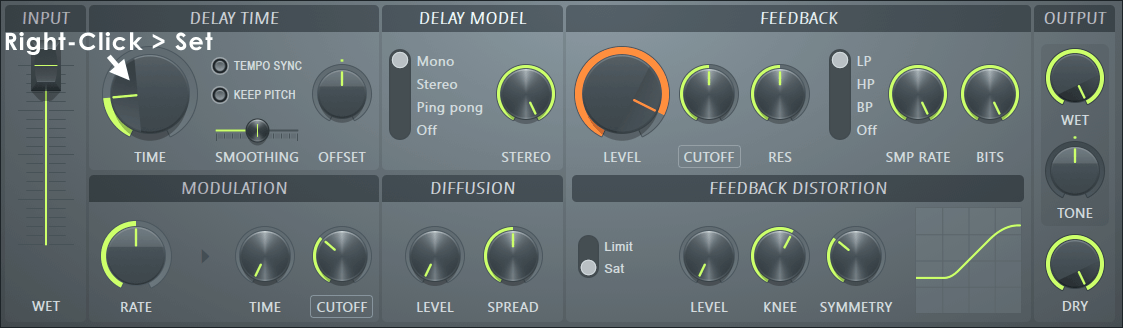
Delay is an effect that creates an echo-like repetition of a sound. It can simulate the natural reflections in a room or create abstract and rhythmic patterns. Understanding the three main parameters of delay will help you utilize this effect effectively in FL Studio:
Time: Determines the amount of time between each repetition of the sound.
Feedback: Controls the number of repetitions and their intensity. Higher feedback values create longer and more intense echoes.
Blend: Adjusts the balance between the original sound and the delayed repetitions.
Credit: www.image-line.com
Using Delay in FL Studio
FL Studio offers several ways to apply delay to your audio tracks. Let’s explore two of the most common methods:
Using The Delay Plugin
The Delay plugin in FL Studio provides a variety of options to shape your sound. To add the Delay plugin to a track, follow these steps:
Step
Action
1
Select the track you want to apply the delay to.
2
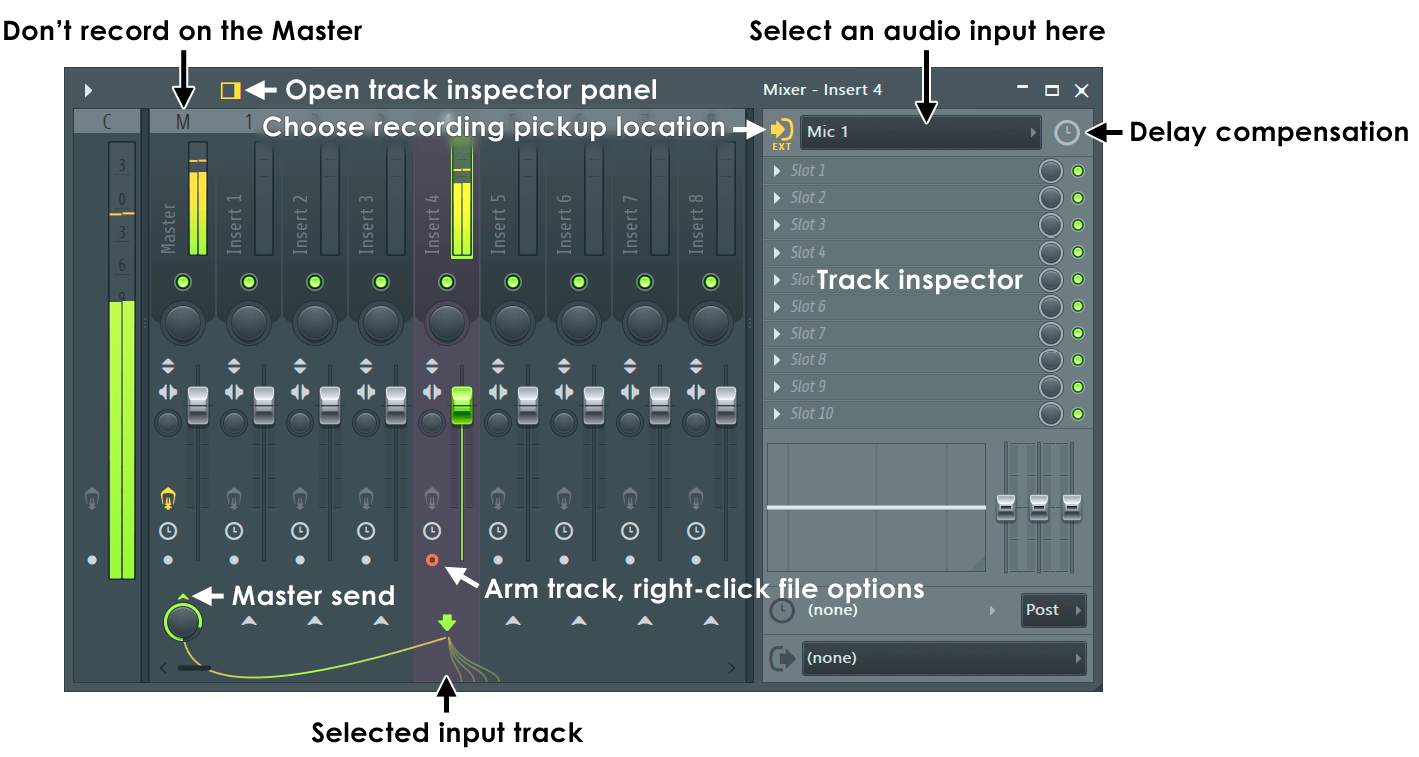
Open the Mixer view in FL Studio.
3
Locate the track you want to add the delay effect to.
4
Click on an empty effect slot, then choose “Delay” from the list of plugins.
5
Adjust the Time, Feedback, and Blend parameters to achieve the desired effect.
Experiment with different combinations of settings to find the perfect delay effect for your track. Don’t be afraid to get creative and try different time values, feedback amounts, and blend levels.
Using The Stereo Shaper Plugin
The Stereo Shaper plugin in FL Studio can also be used to create delay effects. Here’s how you can do it:
Step
Action
1
Select the track you want to add the delay effect to.
2
Open the Mixer view in FL Studio.
3
Locate the track you want to add the delay effect to.
4
Click on an empty effect slot, then choose “Stereo Shaper” from the list of plugins.
5
In the Stereo Shaper plugin, activate the “Delay” button.
6
Adjust the Delay Time and Feedback knobs to control the delay effect.
Using the Stereo Shaper as a delay effect gives you additional control over stereo width and panning.
Tips for Using Delay Effectively
Here are some tips to help you make the most out of the delay effect in FL Studio:
Use different delay settings for different elements in your mix to create depth and separation.
Experiment with different delay times to achieve rhythmic patterns or syncopated effects.
Combine delay with other effects like reverb or modulation for even more interesting textures.
Automate the delay parameters to create dynamic and evolving sounds over time.
Don’t overdo it – use delay sparingly and with intention to avoid cluttering your mix.
Mastering the delay effect takes time and experimentation. Take advantage of FL Studio’s flexibility and the numerous plugins available to find your unique sonic signature.
Frequently Asked Questions On Using Delay In Fl Studio : Mastering Creative Effects
What Is The Purpose Of Using Delay In Fl Studio?
Delay in FL Studio is used to create echoes or repetitions of the audio signal, adding depth and dimension to the sound.
How Can Delay Be Applied To Vocals In Fl Studio?
In FL Studio, delay can be applied to vocals by adjusting the delay time, feedback, and wet/dry mix in the mixer track.
What Are Some Creative Uses Of Delay In Music Production?
Creative uses of delay in music include creating rhythmic patterns, enhancing texture, and adding atmosphere to the audio mix.
Can Delay Be Used To Create Spatial Effects In Fl Studio?
Yes, delay can be used to create spatial effects by adjusting delay time, feedback, and using stereo or ping-pong delay modes.
Conclusion
Incorporating delay into your music productions can greatly enhance the overall sound and create exciting sonic landscapes. FL Studio offers various options for using delay, whether through the dedicated Delay plugin or creative applications of plugins like Stereo Shaper. By understanding the parameters and experimenting with different settings, you can add depth, space, and texture to your tracks, taking your music to the next level.
The Playlist is a key component of FL Studio, a popular digital audio workstation that has become a favorite among music producers and artists. It offers a versatile and powerful tool for organizing, arranging, and sequencing your music. In this article, we will explore how to effectively use the Playlist feature in FL Studio to optimize your music production workflow.
Credit: www.sweetwater.com
Credit: www.image-line.com
What is the Playlist in FL Studio?
The Playlist is where you assemble and arrange your patterns or audio clips to create your final composition. It functions as a visual sequencer, allowing you to place patterns and audio clips in the desired order, define their length, and specify their position within the song.
Organizing Your Tracks
When you start a new project in FL Studio, the Playlist initially appears empty. To begin, you can add patterns or audio clips to the Playlist by dragging and dropping them from the Browser or Channel Rack.
Once your patterns and audio clips are organized in the Playlist, you can easily reposition them by dragging them around. Additionally, you can use the right-click menu to cut, copy, and paste elements to different sections of your song.
One useful feature of the Playlist is the ability to layer multiple patterns or audio clips on the same track. This allows you to create complex and intricate compositions by overlaying different patterns and samples.
Arranging Patterns
FL Studio provides various tools to help you arrange patterns in the Playlist. You can use the Paintbrush tool to click and draw patterns into the Playlist, the Pencil tool to insert patterns at specific time points, or the Brush tool to paint patterns over a range of time.
You can also resize patterns by dragging their edges, allowing you to adjust their length and duration. This flexibility allows for easy experimentation and fine-tuning of your compositions.
Using Automation Clips
Automation is a powerful feature in FL Studio that allows you to control various aspects of your tracks, such as volume, panning, or the cutoff frequency of an effect, over time. Automation clips can be added to the Playlist alongside patterns and audio clips, enabling you to create dynamic and evolving compositions.
To create an automation clip, simply right-click on the desired parameter and select “Create automation clip.” A new automation clip will be added to the Playlist, which you can then edit using automation points to shape and control the parameter over time.
Playlist Workflow Tips
Here are some tips to enhance your workflow while using the Playlist in FL Studio:
Group related patterns and audio clips by color-coding them. This makes it easier to differentiate between different elements in your song.
Utilize the Playlist tools, such as the Split by channel button, to separate patterns or audio clips into individual tracks. This helps with organization and mixing.
Use the Magnifying Glass icon to zoom in or out of the Playlist, allowing for better precision when editing and arranging.
Take advantage of the Playlist’s Snap feature to align patterns and audio clips perfectly. This ensures a tight and synchronized composition.
Experiment with different arrangement ideas by duplicating sections of your song in the Playlist. This lets you compare and contrast different variations of your composition.
Frequently Asked Questions On Using The Playlist In Fl Studio: Tips For Maximum Efficiency
What Is A Playlist In Fl Studio?
A playlist in FL Studio is a feature where you arrange and organize patterns and audio clips to structure your music composition.
How To Create A Playlist In Fl Studio?
To create a playlist in FL Studio, simply drag and drop patterns or audio clips from the channel rack or browser onto the playlist window.
Can I Edit The Playlist In Fl Studio?
Yes, you can edit the playlist in FL Studio by adding, removing, and rearranging patterns and audio clips to customize your music arrangement.
What Is The Function Of The Playlist In Fl Studio?
The playlist in FL Studio functions as a timeline where you arrange and sequence your patterns and audio clips to create your music composition.
Conclusion
The Playlist in FL Studio is a versatile and powerful tool for organizing and arranging your music. By using its features effectively, you can streamline your workflow, enhance your creative process, and create professional-sounding compositions. Whether you are a beginner or an experienced music producer, mastering the Playlist feature will undoubtedly contribute to your success in FL Studio.
Sound design is a crucial aspect of music production that allows producers to create unique sounds that enhance the overall quality and creativity of their tracks. In this comprehensive guide, we will delve into the world of sound design specifically in FL Studio, one of the leading digital audio workstations (DAWs) in the industry.
The Basics of Sound Design
Before we can dive into sound design in FL Studio, it’s essential to understand the basics. Sound design involves manipulating various audio elements such as synthesizers, effects, samples, and recordings to create original and distinctive sounds.
In FL Studio, sound design is primarily achieved through the use of its powerful synthesizer plugins, sampling capabilities, and a wide range of audio effects. These tools provide endless possibilities for creating sounds that are tailored to your specific music production needs.
Credit: soundlister.com
Exploring FL Studio Synthesis
Synthesis is at the core of sound design, and FL Studio offers a variety of synthesis options to experiment with. From basic subtractive synthesis using the 3xOSC plugin to more advanced techniques like FM (Frequency Modulation) synthesis using plugins like Sytrus and FM8, FL Studio has it all.
With FL Studio’s graphical interface, you can visualize and manipulate the various elements of the synthesizer such as oscillators, filters, envelopes, and LFOs (Low-Frequency Oscillators). This allows for precise control over the sound you are creating.
Utilizing Sampling Techniques
Aside from synthesis, FL Studio also excels in sampling capabilities. Sampling involves taking snippets of existing audio, such as drum hits or vocal phrases, and manipulating them to create unique sounds. FL Studio’s SliceX and Edison plugins offer powerful tools for sampling and manipulating audio.
By experimenting with techniques like time stretching, pitch-shifting, and reversing, you can transform ordinary samples into extraordinary sounds. FL Studio’s versatile sampler, DirectWave, further enhances the sampling capabilities by allowing you to map samples across a MIDI keyboard for further creative possibilities.
Enhancing Sounds with Audio Effects
Once you have created or sampled a sound, it’s time to enhance it using audio effects. FL Studio provides a vast array of effects plugins, including EQs, compressors, reverb, delay, distortion, and many more. These effects allow you to shape and mold your sounds to fit perfectly within your mix.
Experimenting with different combinations of effects and tweaking their parameters can lead to endless sound design possibilities. The effects can be applied directly to individual sounds or to the overall mix to add depth, character, and sonic interest to your productions.
Credit: www.amazon.com
Sound Design Tips and Tricks
Here are some tips to keep in mind when exploring sound design in FL Studio:
Experiment with different synthesis techniques and plugin presets to discover new sounds.
Layer multiple sounds together to create complex textures and unique timbres.
Use automation to add movement and variation to your sounds.
Learn keyboard shortcuts to streamline your workflow and save time.
Take advantage of FL Studio’s mixer and routing options to create spatial effects and complex soundscapes.
Don’t be afraid to break the rules and think outside the box when designing sounds.
By following these tips and continuously exploring the vast possibilities of FL Studio’s sound design capabilities, you will be able to create your own signature sounds that set your music apart from the rest.
Frequently Asked Questions For Understanding Sound Design In Fl Studio : Mastering Audio Magic
What Is Sound Design In Music Production?
Sound design involves creating and manipulating sounds to achieve a particular musical or sonic effect. It is essential for adding depth and character to music.
How Does Sound Design Enhance Music Quality?
Sound design enhances music quality by adding unique textures, depth, and creativity to the sound, making it more engaging and impactful for the listener.
Why Is Sound Design Important In Fl Studio?
Sound design is vital in FL Studio as it allows producers to craft custom sounds and textures, giving their music a distinct and professional quality.
What Tools Are Commonly Used For Sound Design In Fl Studio?
Common tools for sound design in FL Studio include synthesizers, samplers, effects processors, and audio editing tools, offering a wide range of creative possibilities.
Conclusion
Understanding sound design in FL Studio is a crucial skill for any music producer. With its powerful synthesizers, sampling capabilities, and extensive collection of audio effects, FL Studio offers a versatile platform for crafting unique sounds.
By experimenting, exploring different synthesis methods, delving into sampling techniques, and utilizing audio effects, you can unleash your creativity and develop your own distinct sound palette. Remember to keep practicing, stay open to new ideas, and most importantly, have fun with sound design in FL Studio.
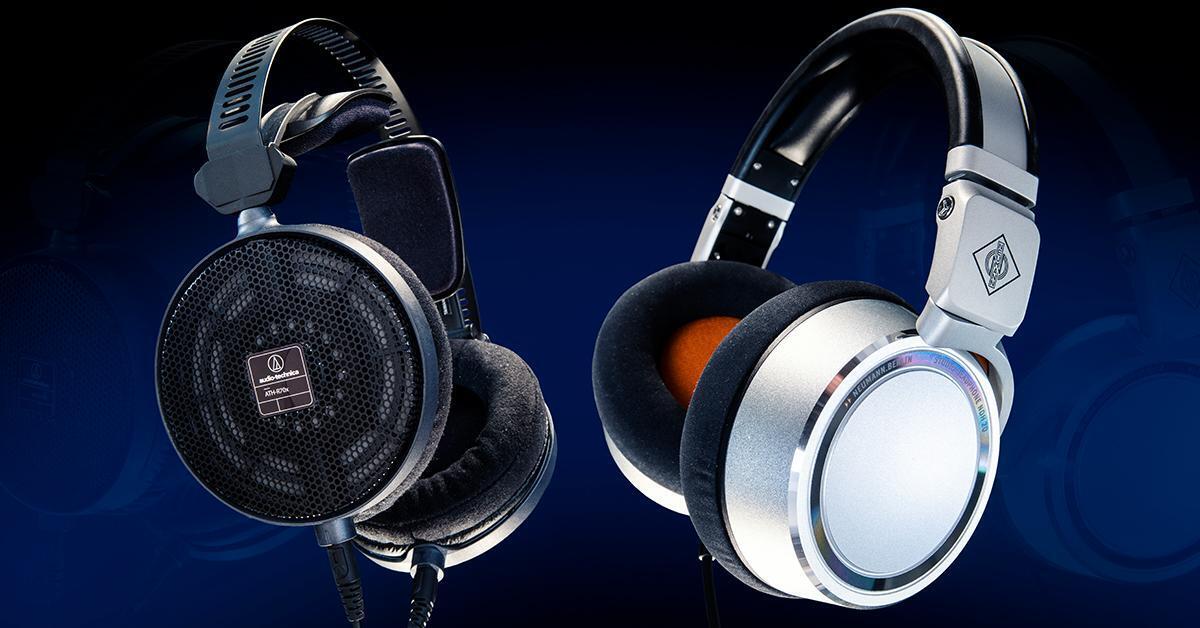
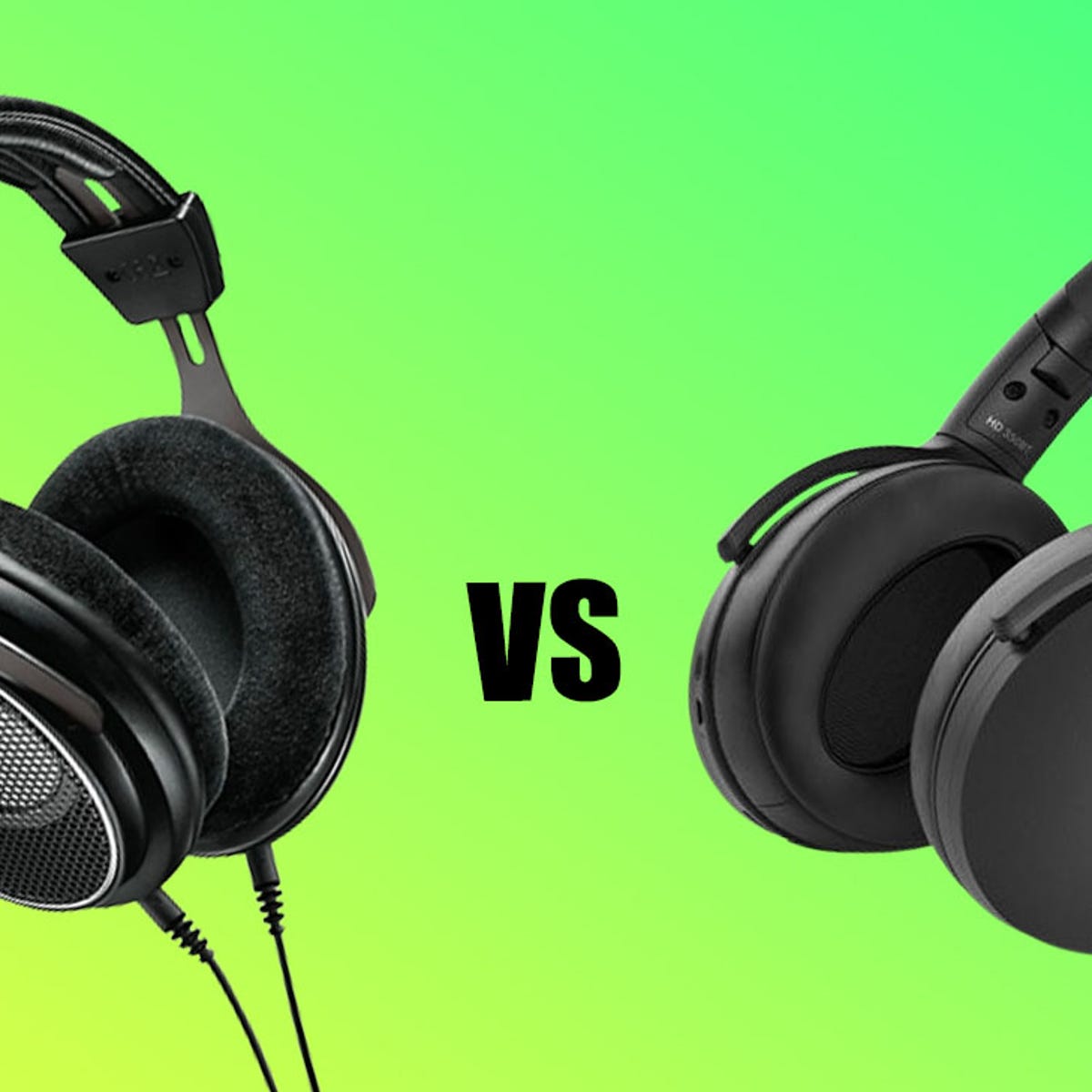
Open back headphones have become increasingly popular among audio professionals and enthusiasts for their unique qualities and benefits. Unlike closed-back headphones that have a sealed ear cup design, open back headphones have perforated ear cups that allow sound to escape. In this article, we will explore the advantages of using open back headphones for audio production.
1. Enhanced Soundstage
One of the major benefits of using open back headphones for audio production is the expanded soundstage. The open design allows air and sound to flow freely, resulting in a more natural and spacious sound reproduction. This wider soundstage enables audio producers to better perceive the stereo imaging and positioning of instruments and vocals within a mix, resulting in more accurate sound reproduction.
2. Improved Acoustic Transparency
Open back headphones offer better acoustic transparency compared to closed-back headphones. They allow ambient sounds to mix with the audio playback, creating a more realistic and immersive listening experience. This transparency is particularly useful for audio professionals who need to accurately judge the interaction between different elements in a mix, such as the balance between instruments, vocals, and effects.
3. Reduced Ear Fatigue
Long hours of audio production can put a strain on the ears, especially when using closed-back headphones. The sealed design of closed-back headphones can lead to a buildup of pressure inside the ear cups, causing discomfort and fatigue. Open back headphones, on the other hand, provide better ventilation and airflow, reducing the risk of ear fatigue even during extended listening sessions or recording sessions.
Credit: www.sweetwater.com
4. Natural Sound Reproduction
Open back headphones are known for their accurate and natural sound reproduction. The perforated ear cups and open design allow air to circulate, preventing sound pressure from building up. This results in a more balanced and transparent audio playback, allowing audio producers to hear the subtle nuances and details in their mixes.
5. Better Mixing Decisions
When it comes to audio production, making accurate mixing decisions is crucial. Open back headphones provide a more accurate representation of the audio being mixed, allowing audio producers to make more informed decisions regarding levels, panning, and effects. The improved soundstage and acoustic transparency of open back headphones contribute to a more precise and detailed listening experience.
6. Ideal for Critical Listening
Open back headphones are often favored for critical listening and mastering tasks. Their ability to capture the subtle details and nuances in audio makes them an excellent tool for evaluating recordings, identifying flaws, and applying necessary corrections. Audio mastering engineers, in particular, rely on open back headphones to achieve the best possible clarity and accuracy in their final mixes.
Credit: www.zdnet.com
7. Room for Customization
Another advantage of open back headphones is the ability to modify or replace specific components, such as ear pads and cables. This level of customization allows users to tailor the headphones according to their comfort and audio preferences. It also ensures that the headphones can adapt to changing needs and remain a reliable tool throughout the audio production process.
Frequently Asked Questions On What Are The Benefits Of Using Open Back Headphones For Audio Production?
Are Open Back Headphones Good For Audio Production?
Yes, open back headphones are ideal for accurate sound reproduction and natural sound staging.
How Do Open Back Headphones Differ From Closed Back?
Open back headphones allow air and sound to pass through, providing a more natural sound. Closed back headphones isolate sound, creating a more confined audio experience.
Why Are Open Back Headphones Preferred For Mixing And Mastering?
Open back headphones offer a wider soundstage and more accurate sound reproduction, making them ideal for critical listening tasks like mixing and mastering.
What Are The Benefits Of Using Open Back Headphones For Audio Production?
Open back headphones provide a more natural and spacious sound, accurate frequency response, and reduced listening fatigue, making them ideal for audio production.
Conclusion
Open back headphones offer a range of benefits that make them a popular choice for audio production. The enhanced soundstage, improved acoustic transparency, reduced ear fatigue, natural sound reproduction, better mixing decisions, suitability for critical listening, and customization options all contribute to their appeal among audio professionals. By choosing open back headphones, audio producers can achieve more accurate and detailed sound reproduction, leading to better quality mixes and an improved overall audio production experience.
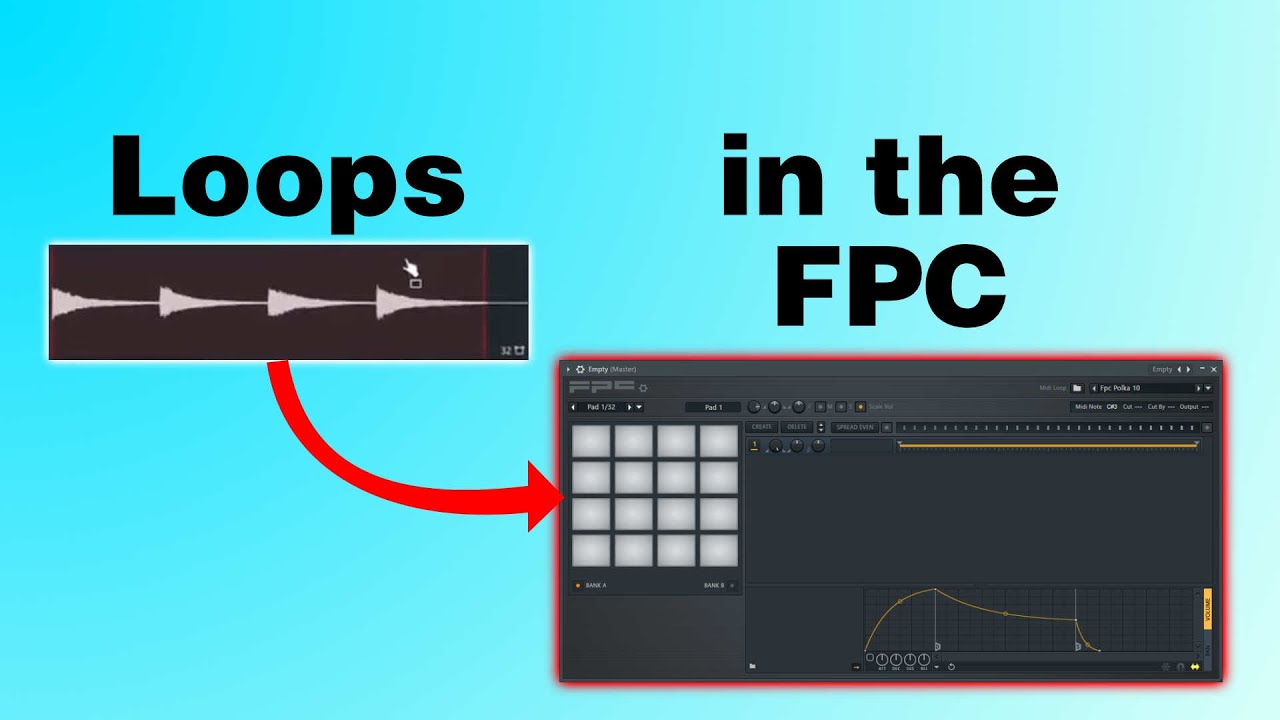
If you are a music producer or just getting started with music production, you’ve probably heard of FL Studio. It’s a popular digital audio workstation that offers a wide range of features for music creation and production. One of the standout features of FL Studio is the FPC Drum Machine. In this article, we will explore how to effectively use the FPC Drum Machine to create amazing beats and enhance your music production.
What is the FPC Drum Machine?
The FPC Drum Machine is a powerful drum sampler and sequencer plugin that comes bundled with FL Studio. It allows you to load and manipulate drum sounds using a graphical interface. The FPC Drum Machine offers a range of features that make it a versatile tool for creating unique drum patterns and beats.
Getting Started with the FPC Drum Machine
1. Opening the FPC Drum Machine: To access the FPC Drum Machine, simply add it to your FL Studio project by selecting it from the plugin list. Once added, the FPC interface will appear on your screen.
2. Loading Drum Sounds: The FPC Drum Machine allows you to load your own drum samples or choose from the included libraries. To load a drum sound, click on one of the empty pads in the FPC interface, then click on the “Load sample” button and browse for the desired sound file on your computer. Repeat this process for all the sounds you want to use.
3. Creating Drum Patterns: The FPC Drum Machine has a built-in sequencer that allows you to create drum patterns easily. To add a drum sound to the sequencer, simply click on the desired pad in the FPC interface. You can then arrange the sounds by adjusting the step sequencer grid, creating variations in timing and intensity.
Credit: www.youtube.com
Credit: diymusic.co.uk
Exploring Advanced Features
1. Mixer Channels: The FPC Drum Machine provides individual mixer channels for each drum sound. This allows you to apply effects, adjust volume, pan, and more for each sound independently. To access the mixer channels, click on the “Mixer” tab in the FPC interface.
2. MIDI Control: The FPC Drum Machine can be easily integrated with external MIDI controllers, allowing you to play the drum sounds using a physical pad controller or drum kit. Simply connect your MIDI controller to FL Studio, assign the pads to the FPC Drum Machine, and you are ready to go!
3. Layering and Velocity Control: The FPC Drum Machine enables you to layer multiple drum sounds on the same pad, creating unique and dynamic drum hits. Additionally, you can adjust the velocity of each sound individually, giving you more control over the dynamics of your drum pattern.
Tips for Efficient Workflow
1. Organize Your Sounds: To maintain a streamlined workflow, it is recommended to organize your drum sounds into categories and save them as presets in the FPC Drum Machine. This will allow you to easily access and use your favorite sounds in future projects.
2. Utilize the Piano Roll: FL Studio’s Piano Roll can be used to edit the drum patterns created in the FPC Drum Machine. It offers advanced editing capabilities such as adjusting note lengths, adding swing, and applying various MIDI effects. Experiment with these features to add complexity to your beats.
3. Explore the Included Libraries: FL Studio provides a variety of drum libraries that can be used with the FPC Drum Machine. Take some time to explore these libraries and experiment with different sounds to find the perfect fit for your music.
Frequently Asked Questions For Using The Fpc Drum Machine In Fl Studio: Mastering Beats And Loops
What Is The Fpc Drum Machine?
The FPC Drum Machine is a percussion sampler and sequencer plugin in FL Studio.
How Can I Use The Fpc Drum Machine?
To use the FPC Drum Machine, open FL Studio, add an FPC channel, and load or create drum samples.
What Are The Key Features Of The Fpc Drum Machine?
The FPC Drum Machine features multi-layering, effects, and a step sequencer for creating drum patterns.
Can I Import My Own Drum Samples Into The Fpc Drum Machine?
Yes, you can import your own drum samples into the FPC Drum Machine to create custom drum kits.
Conclusion
The FPC Drum Machine is a valuable tool for any music producer using FL Studio. Its intuitive interface, advanced features, and integration capabilities make it a go-to plugin for creating unique drum patterns and beats. By following the tips and techniques discussed in this article, you will be able to effectively use the FPC Drum Machine and take your music production to the next level!
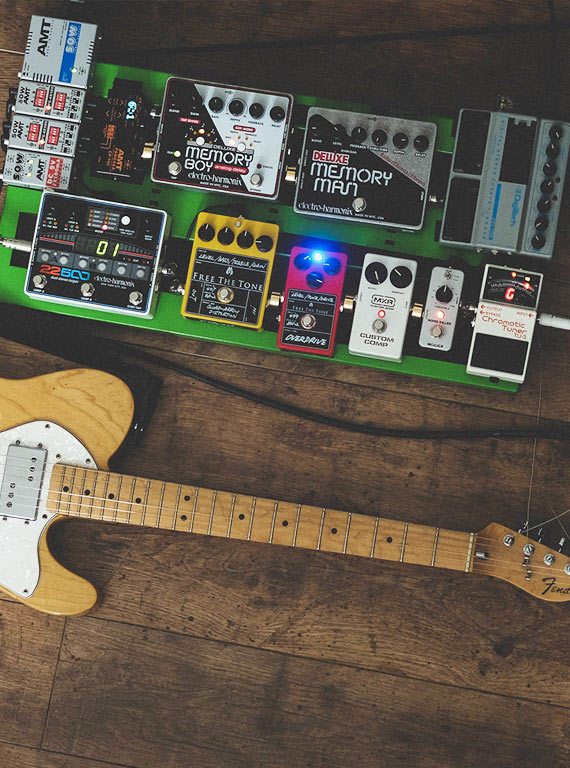
As a guitarist, you may have come across the terms “overdrive” and “distortion” when discussing guitar effects pedals. While these terms are often used interchangeably, there are distinct differences between the two effects. In this article, we will explore the characteristics and usage of overdrive and distortion to help you understand which effect suits your musical needs.
Comparison between Overdrive and Distortion Effects
Overdrive
Distortion
Produces a milder, smoother sound
Creates a more aggressive, heavier sound
Preserves the guitar’s dynamics and tone
Compresses the guitar’s dynamics and alters the tone
Ideal for blues, rock, and country genres
Suits heavy metal, hard rock, and punk genres
Used to push tube amplifiers into natural breakup
Simulates the sound of an overdriven tube amplifier
Often has a more responsive touch sensitivity
Offers more sustain and sustain control options
Credit: www.pmtonline.co.uk
Understanding Overdrive
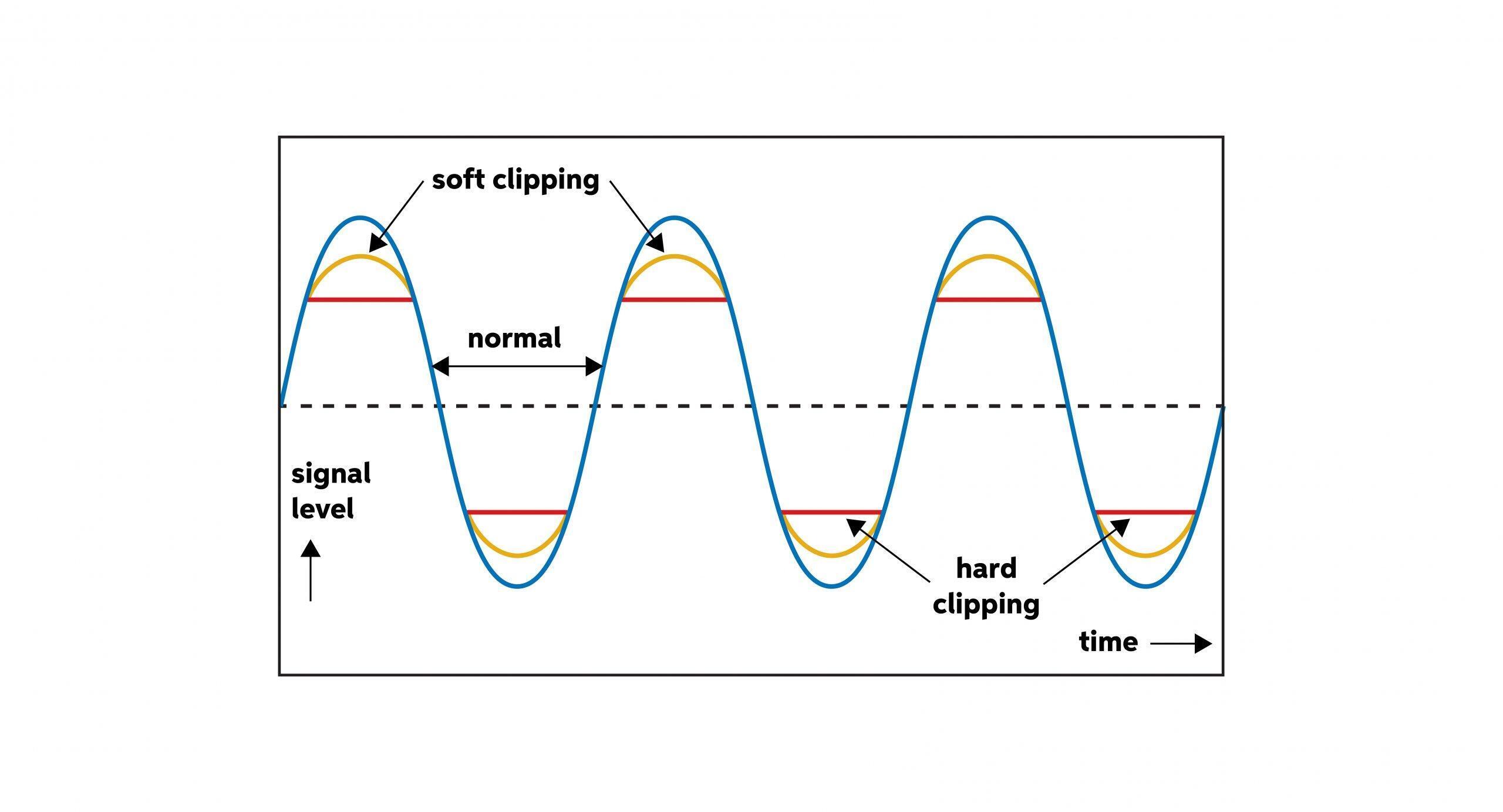
Overdrive, as the name suggests, is meant to provide a mild distortion effect that emulates the natural breakup of a tube amplifier. It adds warmth and richness to the guitar’s tone while preserving the instrument’s dynamics.
Overdrive pedals are commonly used by guitarists playing blues, rock, and country music. They are great for achieving a vintage, textured sound that is slightly overdriven but still maintains clarity. The overdrive effect complements well with the natural tone of the guitar and amp, providing a sweet, singing sustain.
Notable overdrive pedals include the legendary Ibanez Tube Screamer and the Fulltone OCD. These pedals are often placed at the beginning of a signal chain to push the amp into a natural breakup.
Credit: www.sweetwater.com
Exploring Distortion
Distortion pedals, on the other hand, provide a heavier, more aggressive sound compared to overdrive. They are commonly used in genres such as heavy metal, hard rock, and punk, where a more pronounced and compressed tone is desired.
Distortion pedals often simulate the sound of an overdriven tube amplifier, but with added sustain and more control options. They compress the guitar’s dynamics, resulting in an even, sustained tone that can cut through the mix. Distortion also offers a wide range of gain levels, allowing for heavier and more intense sounds.
Popular distortion pedals include the Boss DS-1 and the Pro Co RAT. These pedals are typically placed after overdrive or fuzz pedals in the signal chain, as they tend to amplify and shape the overdriven or distorted sound.
Making the Right Choice
When choosing between overdrive and distortion, it’s important to consider the genre of music you play, the desired sound, and the characteristics of your amp and guitar. If you’re into blues, rock, or country, and want a warmer, harmonically rich sound, overdrive is the way to go.
On the other hand, if you’re into heavy genres like metal or hard rock, and require a more aggressive, sustained tone, distortion will fulfill your needs. Experiment with different combinations of pedals and find the right balance that suits your playing style and preferences.
Ultimately, your choice between overdrive and distortion will depend on the sound you want to achieve and the musical genre you’re playing. Both effects have their unique characteristics and can add depth and expressiveness to your guitar tone. It’s all about finding the right balance and enjoying the sonic possibilities that these effects pedals offer.
Frequently Asked Questions On What Is The Difference Between Overdrive And Distortion In Guitar Effects?
What Is Overdrive In Guitar Effects?
Overdrive is a mild distortion effect that adds warmth and harmonic richness to the guitar tone.
How Does Overdrive Differ From Distortion?
Overdrive produces a smoother, more natural saturation, while distortion creates a more aggressive and intense tone.
Which Styles Of Music Suit Overdrive Effects?
Overdrive is ideal for blues, classic rock, and genres requiring a dynamic and touch-sensitive response.
What Makes Distortion Different From Overdrive?
Distortion delivers a more compressed and heavily saturated sound, suitable for heavier rock and metal genres.
To kickstart your songwriting process, consider using prompts like writing about personal experiences or emotions. Another effective prompt is to create a story or explore a specific theme.
These prompts can inspire unique lyrics and melodies that resonate with listeners. By tapping into your creativity and emotions, you can craft compelling songs that connect with your audience on a deeper level. Whether you draw from your own life or let your imagination run wild, songwriting prompts offer a structured approach to getting started on your next musical masterpiece.
Unlock your potential and unleash your creativity with these effective prompts.
Credit: speedsongwriting.com
Exploring Songwriting Prompts
When you are looking to kickstart your songwriting process, exploring different prompts can be highly beneficial. From tapping into your emotions to drawing inspiration from real-life experiences, there are various ways to ignite your creativity and pen down compelling lyrics.
Tapping Into Your Emotions
Begin by reflecting on your feelings and emotions. Utilize your personal experiences to connect with your audience on a deeper level.
Drawing Inspiration From Experiences
Revisit significant events or moments in your life to cultivate authentic storytelling in your songs. Your own experiences often provide the richest source of inspiration.
Consider crafting a list of songwriting prompts to serve as a starting point for your creative journey. These prompts can range from exploring a specific emotion to narrating a personal anecdote.
Credit: www.amazon.com
Using Imagery And Metaphors
Spark your songwriting creativity with effective prompts that incorporate imagery and metaphors. By visualizing emotions and abstract concepts, you can craft compelling lyrics that resonate with your audience at a deeper level. Experiment with vivid descriptions and symbolic language to bring your songs to life with evocative imagery and thought-provoking metaphors.
Creativing Vivid Pictures With Words
Using imagery and metaphors in songwriting can enhance the vividness of your lyrics.
Paint a picture with your words to immerse listeners into your song’s world.
Evoke emotions through descriptive language that captures the imagination.
Elevating Emotions Through Metaphors
Crafting metaphors in your songs helps to createdepth and complexity in the emotions conveyed.
Compare feelings to objects or actions to intensify emotional impact.
Use metaphors toconvey abstract concepts in a palpable way.
Experimenting With Different Song Structures
When it comes to songwriting, experimenting with different song structures can significantly impact the outcome of a song. By utilizing various song structures, songwriters can add depth and complexity to their compositions, ultimately engaging and captivating their listeners. Let’s delve into some effective songwriting prompts that revolve around experimenting with different song structures.
Utilizing Verse-chorus-verse
One of the most common yet effective song structures is the verse-chorus-verse format. This structure provides a balanced framework for songwriters to convey their message. Utilizing this structure allows for the creation of memorable and catchy melodies and lyrics. It establishes a pattern that keeps the audience engaged and connected with the song’s message.
Exploring Bridge And Middle 8
Exploring the inclusion of a bridge or a middle 8 section in a song can introduce variety and intrigue. Adding a bridge or a middle 8 after the second chorus can offer a new perspective or emotion, enhancing the overall impact of the song. This structural shift keeps the listener captivated and adds a refreshing element to the composition.
Collaborating And Co-writing
Embark on collaborative songwriting ventures with effective prompts like exploring personal experiences, experimenting with unique melodies, or drawing inspiration from nature. Engage in co-writing sessions that spark creativity and lead to unforgettable musical compositions.
Fostering Creativity With Others
Collaboration and co-writing have been proven to be incredibly effective in igniting creativity and taking songwriting to new heights. When you work with other musicians or songwriters, you bring together a diverse range of ideas, skills, and experiences, resulting in a powerful and dynamic creative process. Co-writing allows you to bounce ideas off each other, building on each other’s strengths and pushing the boundaries of what you can achieve individually. It’s a chance to feed off each other’s energy and enthusiasm, pushing each other to write the best songs possible. When you collaborate with others, there’s an exchange of perspectives, creating a rich tapestry of creativity. Each person brings their unique style, musical taste, and life experiences to the table, adding depth and complexity to the songwriting process.
Leveraging Different Perspectives
One of the greatest benefits of collaborating and co-writing is the opportunity to leverage different perspectives. When you work with others, you have the chance to step outside of your own musical bubble and explore new territories. Having a fresh set of ears can shed light on areas of improvement in your songwriting. Others may identify elements that you’ve overlooked or offer solutions to challenges you’ve been struggling with. Furthermore, collaborating with different musicians and songwriters can expose you to new genres, styles, and techniques that you may not have considered before. This exposure opens up a world of possibilities and expands your musical horizons. Additionally, working with others cultivates a supportive and encouraging environment, fueling your creativity and bringing out the best in you. This positive energy and camaraderie can create an atmosphere where ideas flow freely, leading to breakthroughs and innovative songwriting. In conclusion, collaborating and co-writing not only fosters creativity but also leverages different perspectives, creating a synergy that results in exceptional songwriting. Embrace the opportunity to work with others, and watch as your songs soar to new heights.
Overcoming Writer’s Block
Writer’s block is a common challenge that songwriters face. It can be frustrating when the creative flow seems to dry up, and you’re left staring at a blank page. The good news is that there are effective strategies to overcome writer’s block and kickstart your songwriting process. In this blog post, we explore some of the most helpful techniques for overcoming writer’s block, such as utilizing writing prompts and embracing freewriting and stream of consciousness.
Utilizing Writing Prompts
Writing prompts are a wonderful tool for sparking inspiration and breaking free from writer’s block. They provide a starting point or an idea to explore, helping you to tap into your creativity and find new angles for your songs. Here are some effective ways to utilize writing prompts:
Create a list of songwriting prompts that resonate with you. These prompts can be based on emotions, personal experiences, or even random words that catch your attention. Having a bank of prompts to choose from can help when you’re feeling stuck.
Set a timer and challenge yourself to write non-stop for a set amount of time, using a writing prompt as your guide. This exercise encourages you to let go of your inner critic and simply let your ideas flow.
Combine different prompts to create unique and unexpected songwriting ideas. The beauty of prompts is that they can be mixed and matched, opening up a world of possibilities for your songwriting.
Embracing Freewriting And Stream Of Consciousness
Freewriting and stream of consciousness are techniques that allow you to write without judgment or restraint. They promote a sense of freedom and can help you overcome writer’s block by bypassing your inner critic. Here’s how you can embrace these techniques:
Set a timer for 10 to 15 minutes and write continuously, without worrying about grammar, structure, or coherence. Let your thoughts flow onto the page, embracing whatever comes to mind.
If you’re feeling stuck, start by writing about your surroundings or your current emotions. This process can help you get into the writing mindset and free up your creative energy.
Use freewriting as a warm-up exercise before diving into your songwriting sessions. It can help clear your mind and prepare you to write with more focus and clarity.
Overcoming writer’s block is possible with the right strategies and mindset. By utilizing writing prompts and embracing freewriting and stream of consciousness, you can break through the barriers and unlock your creative potential. Remember, the most important thing is to keep writing, even when it feels challenging. With persistence and practice, you’ll find yourself consistently in the flow of songwriting inspiration.
Credit: speedsongwriting.com
Frequently Asked Questions For What Are Some Effective Songwriting Prompts To Get Started?
How Do Beginners Start Songwriting?
To start songwriting as a beginner, begin by jotting down your thoughts and feelings. Experiment with melodies and lyrics. Practice regularly to improve your skills. Seek feedback from others and don’t be afraid to revise your work. Keep honing your craft with passion and dedication.
What Are Some Good Song Starters?
Good song starters include personal experiences, emotions, and catchy choruses. Memorable melodies and interesting lyrics can also inspire. Experimenting with different musical styles and collaborating with other artists can provide fresh ideas.
What Is A Good Topic To Write A Song About?
A good topic for a song can be anything that evokes emotions, such as love, heartbreak, or personal experiences.
What Are Songwriting Prompts?
Songwriting prompts are creative cues or ideas that inspire and guide songwriters in the process of writing songs. They help spark inspiration, overcome writer’s block, and encourage exploration of different themes and styles.
Conclusion
Exploring these songwriting prompts can spark creativity and overcome writer’s block. From using visual prompts to trying different perspectives, each method offers a unique approach to generate new ideas. By incorporating these prompts into your songwriting process, you can enhance your creativity and develop a more diverse repertoire of songs.
When it comes to mixing drums in a song, it is crucial to achieve a balanced and dynamic sound that complements the overall mix. Whether you are a beginner or a seasoned producer, here are some tips to help you effectively mix drums in your songs:
1. Start with Proper Recording
Before you begin mixing, ensure that the drums are well-recorded with good mic placement and sound quality.
2. Set Levels and Balance
Adjust the levels of each drum component, ensuring that they blend well together without overpowering one another.
3. Use EQ to Shape the Sound
Experiment with EQ settings to enhance the tonal characteristics of each drum element and remove unwanted frequencies.
4. Add Compression for Impact
Apply compression to drums to control dynamics and add punch and presence to the overall sound.
5. Utilize Reverb and Delay
Use reverb and delay effects to add depth and ambience to the drums, creating a more immersive sound.
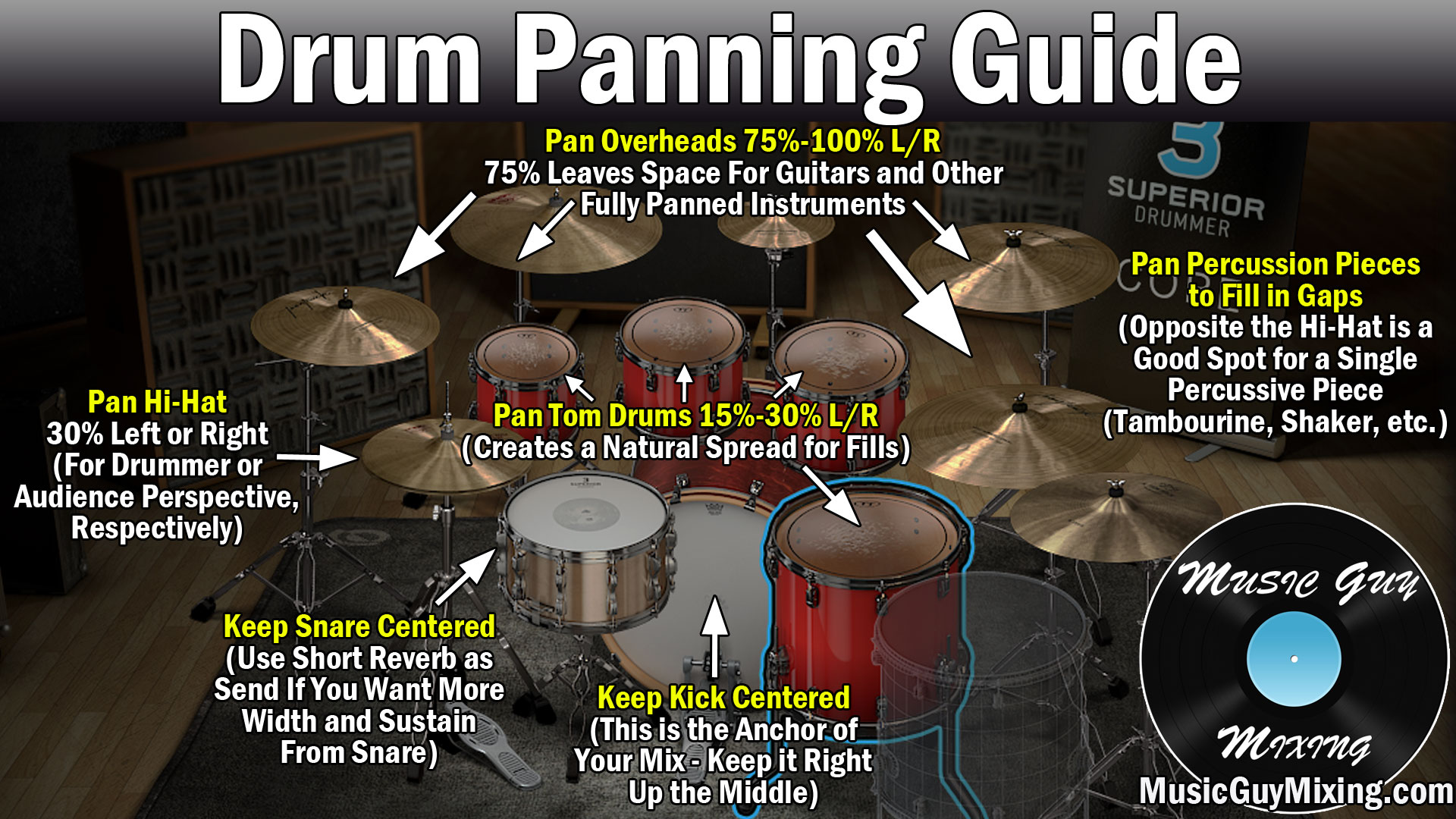
6. Pan Drums for Spatialization
Pan drums across the stereo field to create a sense of space and width within the mix.
7. Layer Drum Samples
Consider layering drum samples to add depth and texture to the drum mix, enhancing the overall impact.
Credit: www.masteringthemix.com
8. Pay Attention to Transients
Adjust the attack and release times of transient shapers to control the impact and sustain of drum hits.
9. Enhance Low-End with EQ and Compression
Boost low frequencies with EQ and compress the kick and bass drum to enhance the low-end presence.
Credit: www.musicguymixing.com
10. Reference Other Tracks
Compare your mix with professional tracks to ensure your drum sound is on par with industry standards.
By following these tips and techniques, you can effectively mix drums in your songs and achieve a professional and polished sound that enhances the overall musical experience.
Frequently Asked Questions Of How Can I Effectively Mix Drums In A Song?
How Do I Prepare My Drums For Mixing?
To prepare your drums for mixing, start by organizing your tracks and ensuring they are properly recorded.
What Are Some Common Mistakes In Drum Mixing?
Common mistakes in drum mixing include over-compression, improper EQ, and not addressing phase issues.
Which Mixing Techniques Work Best For Drums?
Mixing techniques like parallel compression, buss processing, and transient shaping can enhance the sound of drums.
What Is The Importance Of Room Sound In Drum Mixing?
Room sound adds depth and natural ambience to the drums, contributing to a more authentic and immersive sound.
Welcome to the fascinating world of music scales! In music, scales are the foundational building blocks that give structure and harmony to musical compositions. Various music scales are used across different genres and cultures, each providing a unique sound and mood. Let’s dive into the diverse world of music scales and uncover their beauty and significance.
Credit: www.amazon.com
Understanding Music Scales
A music scale is a sequence of notes arranged in ascending or descending order, with a specific pattern of intervals between each note. Scales form the basis of melodies and harmonies in music, defining the tonal framework within which a piece of music operates. Different scales evoke different emotions and create distinct musical atmospheres.
Types Of Music Scales
There are several types of music scales used in Western and non-Western music traditions. Here are some of the most common music scales:
Name
Structure
Characteristics
C Major Scale
C-D-E-F-G-A-B-C
Bright, Happy, Basic
Minor Pentatonic Scale
1-b3-4-5-b7
Bluesy, Soulful, Versatile
Dorian Scale
1-2-b3-4-5-6-b7-1
Jazzy, Mysterious, Cool
Harmonic Minor Scale
1-2-b3-4-5-b6-7-1
Exotic, Dramatic, Tense
Navigating The Musical Landscape
Each music scale has its own distinct sound and feel, offering musicians a palette of colors to paint their musical creations. By exploring different scales, musicians can convey a range of emotions and styles in their music. Whether it’s the bright and cheerful C Major Scale or the exotic and dramatic Harmonic Minor Scale, each scale brings its unique flavor to the musical landscape.
Experimenting with Music Scales
As a musician, experimenting with different music scales can enhance your musicality and creativity. By incorporating various scales into your playing or compositions, you can add depth and dimension to your music. Try improvising using different scales or weaving multiple scales together to create intricate and captivating musical textures.
Credit: www.facebook.com
The Endless Possibilities of Music Scales
The world of music scales is vast and diverse, offering endless possibilities for musical exploration and expression. Whether you’re a seasoned musician or just starting your musical journey, understanding and experimenting with different scales can open up a world of creativity and inspiration. So, let the magic of music scales guide you on a melodic adventure filled with harmony and beauty!
Frequently Asked Questions For What Are The Different Music Scales? : Unlocking The Harmonious World Of Musical Structures
What Are Music Scales In Theory?
Music scales are a sequence of musical notes in ascending or descending order, determining the pitch.
How Many Types Of Music Scales Exist?
There are various types of music scales, including major, minor, chromatic, pentatonic, and blues scales.
Why Are Music Scales Important In Music?
Music scales form the foundation of melody and harmony, providing structure and creating musical tension and resolution.
What Is The Significance Of Knowing Music Scales?
Understanding music scales enhances improvisation, composition, and a deeper understanding of musical patterns and structures.
Modeling microphones are designed to replicate the sound of various classic microphones to achieve different tonal qualities. They work by using advanced electronic processing to alter the signal in real-time.
Modeling microphones have become a popular choice among musicians and recording engineers for their ability to provide flexibility and versatility in capturing different sound characteristics. By emulating the characteristics of famous microphones, they allow users to achieve a wide range of sounds without the need for multiple physical microphones.
This enables users to experiment with various tones and textures, making the recording process more creative and efficient. We will explore the functionality of modeling microphones and their role in modern audio production.
Credit: www.amazon.com
The Evolution Of Microphones
Modeling microphones are a revolutionary type of microphone that uses advanced algorithms to digitally emulate the sound of various classic microphones. These microphones are able to replicate the unique characteristics and tonal qualities of vintage studio microphones, providing versatility and convenience to users looking for a specific sound without needing to invest in multiple physical microphones.
The Evolution of Microphones Early Microphone Development Transition to Modeling Microphones Modeling microphones are intricate devices that replicate classic microphone characteristics digitally. In the early stages, microphones were simply transducers converting sound waves into electrical signals. With technological advancements, early microphones evolved from dynamic to condenser types, enhancing sound capture. Transition to modeling microphones paved the way for emulating various microphone sounds and characteristics digitally. These microphones utilize advanced algorithms and processing techniques to simulate the unique qualities of vintage microphones.
Understanding Modeling Microphones
A modeling microphone is a type of microphone that uses advanced technology to emulate the characteristics of various vintage microphones.
These microphones offer versatility and flexibility in capturing different tones and textures, making them popular choices among professional audio engineers.
What Sets Modeling Microphones Apart
Versatility: Can replicate the sound of multiple classic microphones in one device.
Flexibility: Easily switch between different microphone models to suit various recording needs.
Cost-Effective: Eliminates the need to invest in multiple physical microphones.
The Technology Behind Modeling Microphones
Modeling microphones utilize advanced digital signal processing (DSP) algorithms to capture and replicate the sonic characteristics of vintage microphones.
This technology allows users to control various parameters such as polar patterns, frequency response, and proximity effect.
Applications Of Modeling Microphones
Modeling microphones are cutting-edge devices that have revolutionized the audio recording industry. These microphones are designed to emulate the sound characteristics of various high-end microphone models, offering exceptional versatility and adaptability for different recording purposes. From studio recording to live performances, modeling microphones excel in a wide range of applications, making them a valuable asset for professional audio engineers, musicians, and content creators.
Studio Recording
In studio recording, modeling microphones are prized for their ability to capture the distinct tonal qualities of vintage and modern microphones. Whether capturing vocals, acoustic instruments, or electric guitars, these microphones allow engineers to select and modify the microphone model after the recording process. This flexibility provides endless creative possibilities and enables producers to achieve the desired sonic characteristics for their projects.
Live Performance
During live performances, modeling microphones offer unmatched versatility and reliability. With the ability to emulate the sound profiles of renowned microphones, artists can achieve consistent and high-quality audio reproduction in a live setting. This ensures that the nuances of the performers’ voices and instruments are accurately captured and presented to the audience, enhancing the overall auditory experience.
Credit: www.amazon.com
Benefits Of Modeling Microphones
Modeling microphones offer versatility by emulating various microphone characteristics digitally. They function by capturing sound and applying modeling algorithms to replicate diverse mic types, giving users a range of options within a single device. This enables flexibility in sound capture and production, enhancing creativity in audio recording.
Versatility
Modeling microphones offer a level of versatility that is unmatched by traditional microphones. These innovative devices are capable of emulating the sound characteristics of several different microphones, all in one compact unit. This means that with just one modeling microphone, you can achieve the sound of a range of microphones, allowing you to adapt to different recording situations and achieve the perfect sound for any application. Whether you need a crisp and clear sound for vocals, a warm tone for instruments, or a specific sound characteristic for a particular genre, modeling microphones have got you covered.
Customization
One of the key benefits of modeling microphones is the high level of customization they offer. With traditional microphones, you are limited to the sound characteristics that the microphone itself provides. However, with modeling microphones, you have the ability to adjust and fine-tune the sound to suit your preferences and the requirements of your recording. By using the accompanying software or hardware, you can easily modify the microphone’s frequency response, polar patterns, and other parameters to achieve the exact sound you desire. This level of customization ensures that each recording session is tailored to your specific needs, resulting in optimal audio quality and a more satisfying listening experience.
Benefits of Modeling Microphones
Versatility
Customization
Modeling microphones can emulate the sound characteristics of several different microphones.
They allow you to adapt to different recording situations and achieve the perfect sound for any application.
With modeling microphones, you can adjust and fine-tune the sound to suit your preferences.
By modifying the microphone’s frequency response, polar patterns, and other parameters, you can achieve the exact sound you desire.
Each recording session can be tailored to your specific needs, resulting in optimal audio quality.
Challenges And Considerations
Modeling microphones are highly specialized tools that capture sound with precision for professional audio recording. They operate by replicating the characteristics of various iconic microphones to enhance versatility and performance in a single device. These microphones present unique challenges in usage and require thoughtful considerations for optimal results.
Compatibility With Equipment
Choosing the right modeling microphone for your setup involves considering its compatibility with your existing equipment. Different microphones may have varying output levels and impedance, which can impact the quality of the sound recorded.
It is essential to ensure that the microphone you choose is compatible with your audio interface, preamp, and other gear. This compatibility not only saves you from potential technical issues but also guarantees better sound reproduction.
Additionally, keep in mind the connection type of the microphone. Some modeling microphones use XLR connections, while others may have USB or other digital connections. Take into account the inputs available on your audio interface and choose a microphone that can be easily integrated into your existing setup.
Learning Curve
Like any new piece of equipment, modeling microphones come with a learning curve. Learning how to optimize the microphone’s settings and utilize its features to achieve the desired sound can be a challenge for beginners.
It is important to familiarize yourself with the microphone’s manual and explore different techniques and recording methods to fully unleash its potential. Experimentation and practice will help you understand how to capture different instruments and vocal performances using the modeling microphone.
Keep in mind that each modeling microphone may have its own set of controls and features, so taking the time to understand and adjust these settings can significantly improve the quality of your recordings.
Credit: news.fordham.edu
Frequently Asked Questions On What Are Modeling Microphones And How Do They Work?
Are Modeling Microphones Worth It?
Yes, modeling microphones are worth it for achieving different tonal qualities for recording. They offer versatility and can replicate the characteristics of various high-end microphones. This allows for flexibility in the studio and can enhance the overall sound quality of recordings.
What Is A Microphone And How Does It Work?
A microphone is a device that captures sound waves and converts them into electrical signals. It consists of a diaphragm that vibrates when exposed to sound, and this vibration is converted into an electrical current. The current is then amplified and processed to produce the desired audio output.
How Do Virtual Microphones Work?
Virtual microphones work by using advanced software algorithms to simulate the characteristics of different microphones. These algorithms manipulate the recorded audio signal to mimic the sound qualities of various microphones, allowing users to easily switch between different microphone models without physically changing the hardware.
How Did The Microphone Work?
A microphone converts sound waves into electrical signals. When sound hits the diaphragm, it moves, causing a coil to move within a magnetic field and create an electrical signal. This signal can then be amplified and converted back into sound.
Conclusion
Modeling microphones are versatile tools for capturing high-quality audio. Their design and technology enhance sound reproduction and are essential for professional audio recordings. Understanding their functionality and differences from other types of microphones can help you choose the right equipment for your specific needs.
Whether you’re a musician, podcaster, or content creator, modeling microphones offer an advanced and reliable solution for exceptional sound quality.