Categories
Archive

How To Promote Your Music On TikTok: Viral Strategies!

Promote your music on TikTok by creating engaging content and leveraging hashtags. Collaborate with influencers and TikTok creators to expand your reach.


Harnessing the power of TikTok for music promotion offers an unparalleled opportunity due to its viral nature and the vibrant community eager for fresh sounds. As emerging artists or established musicians, TikTok provides a dynamic platform where creativity intersects with opportunity, enabling users to showcase their music to a global audience quickly.


Unlike other social media platforms, TikTok’s algorithm can make any video go viral, regardless of the user’s follower count, which means every piece of content has the chance to gain significant exposure. Crafting catchy snippets, aligning with the latest trends, and engaging directly with the community can propel your music to new heights. The key is to consistently deliver compelling, relatable, and visually appealing content that resonates with TikTok users and encourages them to share your sound across their networks.


The Rise Of Tiktok

Imagine a world where music and video collide, creating a symphony of trends and hits. This is the world that TikTok has crafted. Moving from a niche app to a global stage, TikTok is reshaping how music reaches the masses.

From Obscurity To Mainstream

TikTok’s journey begins as a small platform. Creatives and music lovers join, seeking an outlet to share their art. Suddenly, the platform grows. Teens and adults alike are now swiping through videos looped with catchy tunes.

Stars are born overnight. Unsigned musicians see their tracks go viral. TikTok turns obscurity into fame. Artists use creativity, tapping into challenges and trends to boost their music.

Impact On The Music Industry

TikTok has become a music powerhouse. Record labels now scout for talent on the app. Hit songs often start as background tracks for viral videos. Here’s how TikTok changes the game for musicians:

  • Discoverability: Small artists get noticed.
  • Engagement: Fans create videos with their favorite songs, amplifying reach.
  • Marketing: New releases can explode in popularity through creative TikTok campaigns.
  • Viral Hits: Songs often climb charts after trending on TikTok.

Charts now reflect TikTok’s influence. A catchy hook can dominate global playlists. TikTok has shifted power back into the hands of the creators.

Tiktok’s Unique Ecosystem

TikTok shines as the go-to stage for music promotion with its viral trends and global reach. To stand out in TikTok’s unique ecosystem, artists must grasp the platform’s fast-paced environment.

Understanding The Algorithm

TikTok’s algorithm is like a talent scout. It discovers and showcases fresh music to eager audiences around the world. To make the most of it:

  • Post regularly to stay visible.
  • Use trending hashtags and sounds to increase discoverability.
  • Engage with followers to boost interaction.
  • Collaborate with other TikTokers to tap into new audiences.

The Power Of Short-form Content

Short-form content rules TikTok. Its magic lies in its brevity, making every second count. Tips to leverage short-form content:

  • Create snappy, addictive clips that capture attention instantly.
  • Hook viewers in the first few seconds.
  • Use captivating visuals and editing tricks to keep eyes glued.
  • Encourage user-generated content with challenges and hashtags.

Creating Captivating Content

TikTok is a land of opportunity for musicians. Getting noticed, however, demands unique and engaging content. Let’s dive into how you can create content that resonates and captures the TikTok audience’s attention.

Crafting Your Tiktok Persona

Your TikTok success starts with your persona. Think of it as your musical brand. It should reflect who you are as an artist. Keep it consistent across your videos. This helps followers to recognize you instantly. Here are some tips to define your persona:

  • Choose a style: Pick a theme that suits your music genre.
  • Show personality: Let your unique traits shine through.
  • Be relatable: Connect with viewers by being yourself.

Quality Over Quantity

It’s tempting to post as often as possible on TikTok. Yet, quality can’t take a back seat. Focus on creating high-quality videos that leave a lasting impression. Here’s what to keep in mind:

  • Invest in good equipment: Use a good camera and clear audio.
  • Plan your content: Take time to brainstorm creative ideas.
  • Edit for impact: Trim and polish your videos for maximum effect.

Great videos stand out. They can turn viewers into fans and fans into ambassadors for your music. Keep it high-quality, and you’ll see greater engagement and growth.
How To Promote Your Music On TikTok: Viral Strategies!


Credit: bandzoogle.com


Music Promotion Basics

In the world of social media, TikTok stands out as a vibrant platform. Artists can showcase their music creatively. TikTok’s algorithm favors engaging, original content. Mastering the basics of music promotion on TikTok can make a difference. Discover how to elevate your music and connect with millions of users. Use smart strategies to boost your presence.

Leverage Hashtags Wisely

Hashtags are TikTok’s road signs, guiding users to your music. Select the right hashtags for better visibility. Blend popular and niche hashtags for a wider reach. Focus on three types of hashtags:

  • General Tags: Broad and trending, for large audiences.
  • Niche Tags: Specific to your music genre or theme.
  • Branded Tags: Personalized for your brand or release.

Monitor hashtag performance. Adjust your strategy for the best results.

Engage With Your Audience

Building a relationship with your followers is key. Interact with fans to instill loyalty. Respond promptly to comments and messages. Create content that sparks conversation. Use features like duets and stitches to collaborate with users.

Consider these tips for engagement:

  1. Host Q&A sessions to answer fan questions.
  2. Post behind-the-scenes content to share your process.
  3. Launch a challenge or contest with your music.

Recognize and appreciate your supporters. This fosters a loyal community around your music.

Collaboration Is Key

When diving into the vibrant world of TikTok, remember that Collaboration is Key. No musician is an island, and this platform thrives on shared creativity. Leveraging connections can turn your tune into a viral sensation.

Networking With Influencers

Building relationships with TikTok influencers can magnify your reach. Influencers have large followings, and they can introduce your music to a broader audience. Start by engaging with their content. Then, reach out for potential collaborations. Here’s how:

  • Comment regularly on their videos to get noticed.
  • Send a direct message with a personalized pitch.
  • Offer exclusive snippets of your music.

Duet And Stitch Features

TikTok’s Duet and Stitch features let you interact with content in creative ways. They can showcase your music alongside other creators’. This is perfect for reaching new ears.

Feature How It Helps Tips
Duet Song reactions, collaborations, or split-screen performances Use trending songs for greater exposure. Engage with fans and fellow musicians.
Stitch Clip and integrate scenes from other videos with your track Create a story or challenge involving your music. Invite participation.

Remember, staying active with these features keeps you visible and enhances engagement.

Hacking The Trends

Welcome to the electrifying world of TikTok promotion, where the key to viral success lies in mastering the ebb and flow of trends. Artists can hack TikTok’s trend-driven algorithm to rocket their music to stardom. Let’s break down strategies in ‘Hacking the Trends’ for musicians looking to amp up their TikTok game.

Jumping On The Bandwagon

Spotting a trend early can propel your music to TikTok fame. Use these tips:

  • Watch trending pages daily.
  • Listen to trending sounds cycling through the platform.
  • Analyze patterns in viral content.
  • Sync your track with a trend fast.

Remember, your track should meld seamlessly with the trend. A mismatch may hinder your reach.

Creating Original Challenge

Originality nets attention. Inspire TikTokers with your unique challenge:

  1. Combine catchy music with a simple dance or task.
  2. Name your challenge for easy sharing.
  3. Tag top creators to join in.
  4. Use hashtags to boost visibility.

Craft your challenge to be fun, shareable, and brand-aligned for the best results.

The Role Of Consistency

The Role of Consistency in promoting music on TikTok cannot be overstated. Like waves that continually shape the shoreline, consistent engagement with your audience can help carve out a significant presence on the platform. Musicians who succeed on TikTok don’t just appear overnight; they grow their fan base by regularly sharing their art. If you’re ready to take your music to new heights on TikTok, understanding the nuance of consistency is your starting block.

Maintaining A Posting Schedule

Setting up a regular posting schedule is a cornerstone of TikTok success. Think of your music as a series on television. Fans should know when to tune in. Here’s how to maintain a solid schedule:

  • Plan your content in advance.
  • Use TikTok’s scheduling feature to automate posts.
  • Track peak user times and align your posts accordingly.
  • Stay consistent but don’t sacrifice quality for quantity.

Consistency breeds familiarity, and familiarity breeds trust. Trust leads to a loyal following for your music on TikTok.

Staying True To Your Brand

Consistency isn’t just about frequency; it’s also about brand coherence. Your audience should recognize your unique style instantly. Here’s what to keep in mind:

  1. Define your musical and visual aesthetic.
  2. Ensure all content aligns with this aesthetic.
  3. Connect with your audience through storytelling.
  4. Be authentic; your fans can spot a fake.

Sticking to your brand builds an identity. An identity cultivates a community. A community catapults your music into the TikTok limelight.


Credit: blog.groover.co


From Tiktok To Other Platforms

Mastering TikTok is just the start. A smart move can take your music from TikTok fame to multi-platform success. Let’s explore powerful tactics that get your tunes buzzing everywhere!

Cross-promotion Strategies

Spread your TikTok magic across all social media. Snippets of your viral TikTok content can tease followers on Instagram, Twitter, or Facebook. Use these steps:

  • Share TikTok links on your social bios.
  • Post previews on Instagram Stories with a ‘Swipe Up’ to the full TikTok video.
  • Create Twitter threads that invite fans to discuss your TikTok content.

Always adapt your content for each platform’s unique style and audience. A great TikTok video could become a cool tweet or a catchy Instagram post.

Utilizing Analytics For Growth

Understand your audience with TikTok’s analytics. Here’s how to grow your fanbase:

  1. Check your TikTok analytics regularly.
  2. Identify which songs and videos gain the most traction.
  3. Analyze the demographics of your top viewers.

Then, use this data to shape campaigns on other platforms. If a dance challenge works on TikTok, a YouTube tutorial could catapult its popularity.

Platform Action Goal
Instagram Repurpose TikTok content for Reels Engage a broader audience
YouTube Create extended versions of TikTok videos Provide in-depth content
Twitter Tweet your TikTok video highlights Spark conversations


Dealing With Virality

TikTok has taken the world by storm, and musicians are getting viral overnight. One moment you’re making music in your bedroom, and the next, you’re a TikTok sensation. Dealing with virality can be thrilling yet overwhelming. Let’s discuss strategies for managing sudden fame and building a sustainable career keeping TikTok in the mix.

Managing Sudden Fame

Overnight fame on TikTok feels like a dream. You must stay grounded. Here’s how:

  • Engage with your audience: Always respond to comments and messages. It makes fans feel valued.
  • Consistency is key: Keep uploading content regularly to maintain interest.
  • Stay true to yourself: Don’t lose your originality in the chase for views.
  • Collaborate with other artists: It increases visibility and shows versatility.
  • Maintain quality: Your content represents you. Never compromise on it.

Building A Sustainable Career

To make a long-term career, plan beyond virality.

Strategy Benefits
Branch out to other platforms This diversifies your audience.
Create merchandise It’s an additional revenue stream.
Release on multiple music stores It improves accessibility to your music.
Play live shows This enhances fan experience.
Collaborate with brands It offers financial support and reaches new audiences.

Remember, success on TikTok is only the start. Build strong foundations with these strategies. Your music career will thank you for it.

Success Stories

TikTok has become a launchpad for many musicians around the world. It’s a place where a catchy tune paired with creative visuals can explode in popularity overnight. In the ‘Success Stories’ section, we share inspirational journeys of artists who found fame through TikTok. This glimpse into their soaring careers can teach hopeful musicians how to harness the platform’s power for their own success.

Artists Who Made It Big

  • Lil Nas X: His hit ‘Old Town Road’ went viral, breaking music records.
  • Doja Cat: TikTok users loved her song ‘Say So,’ leading to chart-topping fame.
  • Olivia Rodrigo: ‘drivers license’ became an instant success story on the app.

Learning From Their Strategies

What can aspiring artists learn from these TikTok success stories? Here are key strategies:

  1. Be Authentic: Show your true self to connect with your audience.
  2. Engage with Fans: Respond to comments and duet with followers.
  3. Create Challenges: Encourage users to create content with your music.

Troubleshooting Common Challenges

Are you facing roadblocks while promoting your music on TikTok? You’re not alone. Many artists encounter snags, but don’t worry. This guide is here to help you tackle common challenges and keep your music journey on track!

Overcoming Algorithmic Hurdles

Navigating TikTok’s algorithm can seem daunting. The platform’s algorithm favors content with high engagement. Here’s what you can do to boost your chances:

  • Post regularly to keep your audience engaged.
  • Use trending hashtags to increase visibility.
  • Collaborate with other users to reach a wider audience.
  • Engage with your followers by replying to comments.
  • Optimize the timing of your posts by analyzing peak hours.

Experiment with these strategies to discover what resonates with your audience and the TikTok algorithm.

Navigating Copyright Issues

TikTok has strict copyright rules. Protect your music while respecting others’ work with these tips:

  1. Verify you own the rights to the music you post.
  2. Use original sounds or obtain permission for covers.
  3. Report unauthorized use of your music immediately.
  4. Understand TikTok’s policies on fair use and copyright.
  5. Consider working with a music lawyer for complex issues.

Remember, prevention is better than cure. Secure your music’s rights to avoid setbacks.


Looking Ahead: The Future Of Music On Tiktok

As TikTok maintains its reign as a music powerhouse, understanding the platform’s trajectory can give artists the edge they need. The app’s evolving algorithms and user behaviors suggest a dynamic landscape for creators. Artists should keep a keen eye on TikTok’s future to harness its full potential for music promotion.

Emerging Trends

The music industry is witnessing a shift with TikTok at the fore. Here are key trends:

  • Micro-trends rise and fall quickly, demanding prompt utilization.
  • User engagement metrics influence the virality of songs.
  • Algorithms prioritize content with high interaction rates.
  • Collaborations with influencers can amplify reach.
  • Niche hashtags connect tracks to target audiences.
  • Artists create visual identifiers to make sounds memorable.

Preparing For The Next Big Thing

For musicians, staying ahead on TikTok involves strategic steps:

  1. Monitor TikTok analytics to understand audience preferences.
  2. Engage with fans to build a loyal community.
  3. Experiment with content to find the right formula for virality.
  4. Collaborate with other creators to expand reach.
  5. Train in TikTok’s tools, making the most of each feature.
  6. Watch for new features TikTok may roll out and adapt quickly.

Successful artists will blend trend-spotting with creativity. This forward-looking approach ensures music finds its listeners, establishing a presence that persists beyond fleeting trends.

Frequently Asked Questions Of How To Promote Your Music On Tiktok


What Is Tiktok’s Role In Music Promotion?


TikTok is a powerful platform for music promotion, capable of rapidly increasing a song’s visibility. Its algorithm favors engaging content, potentially giving any song a vast audience if it becomes tied to a popular video or challenge.


How Do Artists Go Viral On Tiktok?


Artists can go viral on TikTok by creating catchy, shareable content that encourages user interaction, like dances or challenges. Collaboration with popular TikTok creators and timely use of trending hashtags also boost virality chances.


Can Tiktok Influence Music Industry Success?


Absolutely, TikTok can drive songs to top charts and streaming platforms due to its massive reach and youth-oriented user base. Music that resonates with TikTokers often experiences increased downloads, streams, and mainstream media attention.


What Are Tiktok Music Promotion Best Practices?


Best practices include frequently posting original content, engaging with followers, leveraging trending sounds, and being authentic. Utilizing TikTok’s duet and stitch features can also facilitate collaboration and amplify reach.


Conclusion


Embracing the power of TikTok can catapult your music into the viral realm. Start by crafting engaging, authentic content and harness hashtags to broaden your reach. Network with influencers and stay consistent with your posts. Remember, each video could be your breakout moment, so keep creating and sharing your passion on TikTok.


Let the world hear your rhythm!

Categories
Archive

How Does Spotify Pay Artists: Unveiling the Secrets

Spotify pays artists and rights holders based on their share of total streams. Payments vary, influenced by factors like user subscriptions and ad revenues.


Understanding Spotify’s payment structure is key for artists looking to monetize their music on the platform. The streaming giant uses a royalty system, which allocates payments not at a fixed rate per stream, but as a proportion of the total revenue generated by subscriptions and advertising.


This model ensures that as the Spotify user base grows and more revenue comes in, the pool of money available for distribution to artists also increases. As creators compete for listeners’ attention, those who manage to secure more streams increase their potential earnings. Artists need to know how this system operates to maximize their profits and develop effective strategies to boost their presence on the service.


Spotify’s Business Model

Understanding how Spotify earns money is like uncovering the rhythms that keep the music streaming world in tune. With a melody composed of varied revenue sources and a chorus of different subscription plans, Spotify’s business model plays well in the fast-paced symphony of digital entertainment. Let’s turn up the volume and explore the financial tracks that make Spotify a hit.

Revenue Streams

Spotify’s revenue flows from multiple streams, harmonizing into a solid income. Primarily, there are two large streams. One comes from the premium subscribers who pay for ad-free listening. Another flows from ad-supported listening, where non-paying users hear advertisements between songs.

Companies pay Spotify to feature their ads. Such ads reach millions of ears weekly. These fees switch into a significant part of Spotify’s wallet. Here’s a quick look at how Spotify balances these streams:

  • Premium subscriptions infuse the bulk of Spotify’s income.
  • Ad-supported free tier contributes a smaller, yet impactful share.
  • Exclusive deals and partnerships add a melody to the mix.

Subscription Tiers And Advertisements

Spotify’s subscription model offers listeners choice. Each tier sings to a different audience. Below, the subscription tiers break down:

Tier Description Price
Free Limited skipping, ads play $0
Premium Individual No ads, unlimited skips Variable
Premium Family Multiple accounts, no ads Higher than Individual
Premium Student Discounted rate, no ads Less than Individual

Advertisements serve as the stage for the free tier. Companies keen to reach Spotify’s audience place ads. Each ad played sends a small payment to Spotify. Over millions of plays, this amasses to hefty earnings. Spotify smartly integrates ads, ensuring a smooth user experience while securing a steady flow of revenue.

Premium subscribers enjoy uninterrupted music for a monthly fee. User convenience supports this model while the income from it sustains Spotify’s extensive music library. It’s a simple yet effective tune. Spotify weaves together a melody of earnings, which funds its vast music collection and technological innovation.

Paying no mind to silence, Spotify creates a symphony of earnings through its cleverly constructed business model, which promises to keep the streaming giant humming along to the beat of a profitable drum.

Royalty Calculation

Understanding how Spotify calculates royalties is crucial for artists and enthusiasts alike. The system seems complex, but it breaks down into clear components. Each play of a song generates revenue, which then enters a collective pot. Spotify distributes this money based on specific models. This process ensures artists receive payment for their creative work. Let’s examine the components that affect this calculation.

Royalty Pool

The Royalty Pool represents the total sum available for payout. All subscription fees and ad revenues contribute to this pool. Every month, Spotify collects these earnings to share among rights holders. Geographic region, user subscriptions, and advertising rates influence this pool’s size. Here is a simple breakdown:

  • Subscription Revenue: Fees from Premium users.
  • Ad Revenue: Money from ad-supported tier.
  • Geographic Adjustments: Rates based on country economics.

Stream Share Model

The Stream Share Model dictates an artist’s slice of the Royalty Pool. Spotify calculates this by dividing an artist’s total streams by the global streams. This percentage determines their royalty share. More streams mean a larger slice. Here is a quick look at the factors:

Total Artist Streams Total Global Streams Artist’s Share (%)
Artist’s monthly streams Monthly global streams on Spotify Calculated percentage

Artist Payouts Breakdown

Spotify’s Artist Payouts Breakdown extends beyond just the artist. It includes labels, producers, and songwriters. An artist’s take-home pay is the final step in the royalty path. It involves contracts, rights ownership, and negotiations. Here’s a simplified payout process:

  1. Identify total royalty share from Stream Share Model.
  2. Divide royalty share among all rights holders.
  3. Deduct agreed contractual percentages.
  4. Artists receive their net payout.

Factors Influencing Payouts

Understanding Spotify’s payment structure is key for artists and labels. Multiple factors determine how much money flows from Spotify to those who own the music. Spotting what affects payouts leads to better insights into streaming earnings. Let’s explore these factors in detail.

Payouts from Spotify hinge on various elements. These factors shape the earnings from each stream. It’s not just about the number of plays. It’s about who listens, where they’re from, and their Spotify plan.

User’s Country And Subscription Plan

The location of listeners affects payouts. Every country has different streaming rates due to its economy. Countries with higher subscription fees typically yield higher payouts per stream. Moreover, the type of subscription plan impacts earnings. Premium subscribers generate more revenue than those on free plans due to ad support.

  • Location matters: Higher payouts often come from wealthier countries.
  • Plan type: Premium plans contribute more to artist earnings.

Number Of Streams

More streams usually mean more money. But it’s not as simple as a fixed rate per play. Spotify uses a pro-rata system where total payout pools are divided by the total number of streams. Your share depends on your stream count compared to others.

Streams Artist Share
Higher streams Greater share of payout pool
Lower streams Smaller share of payout pool

Rights Holders

Payouts also depend on agreements between Spotify and rights holders. Artists, songwriters, and labels all have a stake. They agree on payment terms with Spotify. These deals vary, influencing how much goes to each party.

  • Artists: Individual contracts with Spotify or labels determine their cut.
  • Songwriters: Royalties come from separate arrangements for compositions.
  • Labels: A label’s deal with Spotify can affect the artist’s payment.


The Role Of Record Labels

Record labels play a critical role in the music industry, especially when it comes to how artists earn money on platforms like Spotify. These labels are not just talent scouts and marketers; they are crucial in the business end of music, navigating the complex world of streaming revenues and ensuring that artists get paid. Let’s dive into how labels interact with Spotify and their artists.

Label Contracts

When an artist signs with a label, they enter into a contract that often defines royalties. It’s the label’s job to negotiate terms that benefit the artist while maintaining their own profit margins. These contracts can vary widely but typically include:

  • Advances
  • Recording costs
  • Marketing and promotion
  • Royalty percentages

Distribution Of Earnings

Spotify pays royalties based on streaming share. This means the total pool of money made from subscriptions and ads gets divided by total streams. Music labels collect these earnings and distribute them to artists, according to their contracts. Let’s break down how a dollar earned on Spotify might be split:

Party Percentage
Spotify 30%-50%
Record Label 50%-70%
Artist 10%-30%

The actual payment to artists can be complex, involving recoupment of advances, production costs, and more. Record labels use their experience to manage these finances, allowing artists to focus on creating great music.

Independent Vs. Signed Artists

Music streams like a river in the digital age, reaching every shore from the independent artist to the signed megastar. The way Spotify pays these creators can differ, much like the paths they carve in the industry. Let’s dive into the world of independent versus signed artists and uncover the intricacies behind their earnings on Spotify.

Differences In Payments

Independent and signed artists see different figures in their Spotify paychecks. Signed artists work with record labels, which take a portion of their earnings. Independents, or “indie” artists, often use aggregators to get their music on Spotify, which also requires a cut. However, the amount taken by aggregators is typically less than a record label’s share.

Artist Type Payment Recipient Revenue Share
Signed Artists Record Label Higher percentage
Independent Artists Aggregators Lower percentage

Advantages Of Independence

  • Creative Control: Independent artists maintain full creative direction over their music.
  • Ownership Rights: Indies keep the rights to their music, a significant long-term benefit.
  • Flexible Deals: Indie artists can choose from various distribution deals that suit their needs.

Independence breeds opportunity. Fans directly support their favorite indie artists, often leading to a more intimate fan-artist relationship.

While signed artists’ payouts may be subject to industry standards and contractual agreements, indie artists can often negotiate their own rates and keep a closer eye on their financial success. The right strategies and digital tools level the playing field, allowing indie musicians to thrive on platforms like Spotify.

Challenges Artists Face

For many artists, Spotify stands as a beacon of opportunity. Yet beneath the surface, challenges await. Discover the complexities artists must navigate to reap rewards from the streaming giant.

Payment Transparency

Understanding spills into complexity as artists attempt to dissect Spotify’s payment system. Notoriously intricate, it hides a maze of factors that determine payouts. Here’s a snapshot:

  • Total streams: A piece in the payout puzzle.
  • Subscriber revenue: Plays a part in the split.
  • Artist’s contract: Variances affect the final cut.

Artists are often in the dark about the per-stream rate they earn. This cloak of uncertainty breeds frustration. Moreover, changes in Spotify’s algorithms or policies can shift the ground without warning.

Streaming Fraud

Fraud in streaming is an escalating concern. Fake streams manipulate counts, muddling the pool of royalty distribution. Artists face a battle:

  1. Protecting their work from exploitation.
  2. Ensuring they’re paid for authentic streams.

Unscrupulous actors inflate numbers to siphon off money rightfully owed to genuine creators. Spotify fights such fraud, yet its prevalence remains a thorn for artists.

Evolution Of Streaming Payments

The way we experience music has changed drastically over the years, and nowhere is this more evident than in the evolution of streaming payments. Once, buying albums or singles was the norm, but today streaming services like Spotify have transformed not only how we listen to music but also how artists earn revenue. Below, we delve into the historical trends that shaped the current streaming payment models and ponder what the future might hold.

Historical Trends

Streaming services began altering the music industry’s financial landscape in the early 2000s. As these platforms flourished, a new revenue system emerged, forming the foundation for contemporary streaming payments.

Historical payment trends can be outlined as follows:

  • Per-Stream Model: Initially, artists were paid per stream, a fixed amount every time someone played their song.
  • Subscription Revenue: Over time, platforms shifted towards a subscription-based model where monthly fees fuel the revenue pot divided among artists.
  • User Centric Payment System: Debated but not widely implemented, this model proposes that payments should directly reflect the listening habits of paying subscribers.

These methods, while not exhaustive, highlight the primary mechanisms through which the streaming industry has operated.

Future Projections

With technology and user habits constantly evolving, so too will the methods through which streaming platforms compensate artists. The trajectory indicates a move towards more personalized and fair approaches.

Key projections for the future include:

  1. Blockchain Technology: Utilizing blockchain may lead to transparent, immediate royalty payments.
  2. Dynamic Pricing: Pay rates could become flexible based on factors like geographic location, artist popularity, or exclusive content deals.
  3. Direct User Payments: Concept of “tipping” or direct payments to artists by listeners could become more prevalent, providing additional revenue streams.

These potential advancements reveal an intriguing and promising future for artists and consumers in the music streaming economy.


Improving Artist Revenues

Artists always seek new ways to increase their earnings from music platforms. With digital streaming becoming the norm, it’s crucial to understand how platforms like Spotify contribute to improving artist revenues. Let’s delve into innovative strategies and technological advancements that can boost financial returns for musical talents around the world.

Alternative Revenue Sources

In today’s digital age, relying solely on streaming revenue is not enough. Artists must tap into various income streams to sustain their careers. Below are some effective strategies to enhance artists’ earning potential:

  • Merchandising: Selling branded items can significantly increase income.
  • Live Performances: Gigs and tours offer substantial revenue opportunities.
  • Fan Subscriptions: Exclusive content can encourage fans to pay a premium.
  • Licensing Deals: Use of music in ads or movies can be lucrative.

Tech Innovations In Royalty Distribution

Technology drives the future of royalty payments. As the digital landscape evolves, so do the methods of tracking and disbursing royalties to artists. Explore how tech innovations revolutionize payout systems:

  • Streamlined Payment Systems: Faster and more accurate royalty processing.
  • Blockchain Technology: Ensures transparency and fair distribution of revenue.
  • Data Analytics: Helps artists understand the performance and optimize earnings.
  • User-Centric Payment Models: More revenue for artists based on user listening habits.

Adopting these technological advancements will not only benefit artists but also empower the entire music ecosystem.


How Does Spotify Pay Artists: Unveiling the Secrets


Credit: www.analyticsvidhya.com


Frequently Asked Questions On How Does Spotify Pay


How Much Does Spotify Pay Per Stream?


Spotify generally pays between $0. 003 and $0. 005 per stream. This amount can vary based on factors such as the listener’s country and the artist’s royalty agreements. It’s important to note the pay-per-stream rate is subject to change.


What Factors Influence Spotify’s Payout Rates?


Spotify’s payout rates are influenced by the user’s subscription plan, the artist’s music streaming agreements, geographical location of streams, and the total number of streams. Ad-supported listens typically earn less than premium subscription listens.


Does Spotify Have A Uniform Payment System For Artists?


No, Spotify’s payment system for artists is not uniform. It operates on a streamshare model where payouts are based on the artist’s share of total streams. This can result in variations in payments to different artists.


Can Artists Negotiate Their Spotify Streaming Rates?


Artists, especially those signed with labels, may have some leverage to negotiate better rates. However, independent artists receive the standard payout. Negotiations are typically handled by record labels or distribution companies rather than the artists directly.


Conclusion


Understanding Spotify’s payment system enlightens artists and listeners alike. This platform compensates through a blend of streams and subscriber models. As we unravel the intricacies of Spotify royalties, it’s crucial for musicians to engage fans and maximize their streaming potential.


Knowledge empowers artists to thrive in the digital music landscape.

Categories
Archive

Can You Change Your Spotify Artist Name on DistroKid? Unveiling Secrets

You cannot change your Spotify artist name directly through DistroKid. To alter it, you must contact Spotify via their Spotify for Artists platform.


Navigating the music industry’s digital distribution can often feel complex and uncharted, especially when it comes down to managing your artist profile across different streaming platforms. One of the most frequent issues that artists encounter is the desire to change their artist name on Spotify.


While DistroKid streamlines the distribution of your music to platforms such as Spotify, it does not provide the functionality to update your artist name directly. This is because your artist name is a crucial part of your identity on streaming services, tied to many other factors such as your followers, play counts, and playlist placements. Changing your name can disrupt this data, which is why Spotify handles such requests with care to ensure a smooth transition for both artists and listeners.


Spotify Artist Name Significance

Your Spotify artist name is more than just a label. It’s a crucial aspect of how fans discover and identify your music. On platforms such as Spotify, your artist name stands as the defining beacon amongst the sea of musical talents. Working with services like DistroKid ensures your music is accessible, but the name you choose influences your entire music journey.

Impact On Branding And Recognition

The right Spotify artist name creates a lasting impression. It is the cornerstone of your brand identity in the music industry. A unique and memorable artist name can captivate potential listeners, prompting them to explore your music further. It’s the tag that will appear on every album, promotional material, and social media post. It is how fans recommend you to friends.

  • It defines how you are perceived.
  • It aids in marketing and promotions.
  • It propels your music’s shareability.

Consistency Across Music Platforms

A consistent name across all platforms, including Spotify, enhances your credibility and streamlines the search process for your audience. When your Spotify artist name aligns with those on Apple Music, YouTube, and other sites, you create a cohesive presence. This not only fosters brand loyalty but also eases your management tasks, letting you focus on creating amazing music.

  1. Fans can easily find you on any platform.
  2. It reduces confusion if there are similar names.
  3. It simplifies your digital presence management.

Remember, choosing a great name on Spotify can be game-changing. Through distributors like DistroKid, every artist should deliberate carefully when selecting that name that will be seen and heard across the globe.

Distrokid’s Role In Music Distribution

As a digital music service, DistroKid functions as a bridge between musicians and the world. This platform allows artists to upload their music easily, swiftly, and at an affordable rate. By doing so, DistroKid has revolutionized how music reaches fans globally.

How Distrokid Facilitates Artists

DistroKid streamlines the process of getting music into online stores and streaming platforms. They offer a single stop for distribution, making it simpler for artists to manage their tracks. Benefits include:

  • Unlimited uploads to major platforms
  • One-time fees for annual access to services
  • Simplified royalty collection and earnings tracking
  • Instant verification on streaming services like Spotify
  • Capability to change artist names directly via DistroKid’s dashboard

Distrokid And Streaming Services

DistroKid has partnerships with leading streaming services like Spotify. This allows for fast and reliable integration of new music. Artists can:

  1. Update their artist profile
  2. Customize the appearance of their catalog
  3. Change their artist name, subject to platform policies

Updating an artist name on Spotify through DistroKid involves a simple process. However, artist name changes are not instant and may need approval from Spotify.

To ensure brand consistency, artists should consider the impact of a name change. Aligning the artist name across all platforms is key to maintain a solid presence and fanbase connection.

Common Reasons For Name Changes

Artists often find themselves at a crossroads where changing their Spotify artist name on DistroKid becomes a strategic move. Let’s explore some of the key motivations behind such changes.

Rebranding And Artistic Evolution

Embarking on a new musical direction or refreshing one’s image can be crucial for continued success. The desire for a fresh start motivates many artists to rebrand. Artists evolve, and so too must their names. Consider the transformation of musical icons who shifted genres or matured stylistically.

  • New genre exploration
  • Artist growth
  • Reflecting a new artistic phase

Careful consideration is necessary to ensure that a new name truly reflects this evolution and appeals to both existing and potential fans.

Legal Issues And Trademarks

Legal complications often necessitate a name change. Artists must steer clear of names that are already trademarked to avoid infringement issues.

Legal Concern Action Required
Trademark conflicts Select a unique name
Disputes with former band members Choose a new moniker

Registering the new name as a trademark is a crucial step to secure an artist’s brand identity and avoid future legal issues.

The Process Of Changing Your Artist Name

Deciding to rebrand and change your artist name on Spotify can be a pivotal moment in your music career. Whether you are opting for a fresh start or correcting a creative direction, it is crucial to know how the process works, especially when using a distribution platform like DistroKid. Let’s dive into the steps involved and key considerations.

Before taking action, it’s vital to consider several points. Your artist name is your identity and changing it involves more than just updating a profile. Spotify links your name to your music, playlists, and monthly listeners. It affects your branded materials and marketing efforts. Think about these impacts. Weigh the pros and cons carefully.

  • Brand Consistency: Ensure your new name matches all your artistic material.
  • Market Research: Confirm the new name does not infringe on existing trademarks.
  • Fan Communication: Plan how to inform your following of the change to avoid confusion.

Ready to rebrand? Follow these simple steps to modify your artist name on DistroKid.

  1. Log into DistroKid: Access your account where your music is managed.
  2. Review Your Music: Identify all songs and albums associated with your old name.
  3. Contact Support: DistroKid requires you to reach out through their contact form.
  4. Specify Changes: Provide clear details on the current and new artist name.
  5. Wait for Confirmation: DistroKid will process your request and update Spotify.

It’s important to note that updates can take time to reflect on streaming platforms. Additionally, ensure you update all other social profiles and marketing materials to maintain brand uniformity. This process secures your new identity across all platforms and keeps your image consistent for fans and new listeners alike.

Challenges In Changing Your Spotify Name

Artists often ponder about altering their Spotify name. DistroKid facilitates this change. Yet, challenges may arise.

Potential Risks And Confusions

Changing a Spotify Artist name through DistroKid isn’t straightforward. A new moniker could lead to several risks:

  • Searchability Issues: Fans might struggle to find the artist’s music.
  • Algorithmic Setbacks: Spotify’s algorithm might not easily connect the new name with past data.
  • Branding Inconsistencies: Other platforms must sync with the new Spotify name to maintain brand coherence.
  • Verification Loss: Artists might have to re-apply for verification badges.
  • Playlist Drops: Curated playlists featuring the old name might not update automatically.

Impact On Existing Fans And Catalogue

A name switch impacts current followers and the music collection. Artists must consider:

  • Fan Confusion: Listeners could get confused, affecting loyalty and streams.
  • Marketing Materials: Promotional assets require updates to reflect the new name effectively.
  • Historical Data: Previous data associated with the old name may become harder to track.
  • Strategy Overhaul: A major rebranding campaign is essential for a smooth transition.

Distrokid’s Policies On Name Changes

As an artist, you’ve chosen a name that resonates with your brand and music. But, what if you decide it’s time for a change? If you’re using DistroKid for distributing your tracks, you’ll need to understand the nuances of their name change policies. This part of the blog post will guide you through everything you need to know about tweaking your artist name on DistroKid.

Understanding Terms And Conditions

Before you decide to alter your artist name, it’s critical to read DistroKid’s terms and conditions. These rules set the stage for what’s possible and what’s not. For instance, DistroKid restricts frequent changes to artist names to avoid confusion and misuse.

  • Name changes may affect your existing music catalogue.
  • Your music might be removed from playlists if you change your name.
  • Profile verification can be lost after a name update.

How To Navigate Policy Restrictions

To navigate policy restrictions, you need a clear strategy. If a name change is necessary, contact DistroKid support first. They can clarify the effects the change will have on your music and distribution. Provide valid reasons for the requested change, as this can help expedite the process.

  1. Gather all your music details and the proposed new name.
  2. Ensure no other artists are using your new name.
  3. Communicate your change clearly to your audience.

Success Stories: Artists Who Changed Names Successfully

Many Spotify artists have successfully changed their names by using DistroKid. This powerful tool helps artists update their brand across music platforms. Let’s explore some real-life success stories.

Case Studies

Artist transformations can lead to incredible success.

  • Artist A went from 1,000 to 100,000 monthly listeners after a name change.
  • Artist B gained a record deal thanks to a fresh identity and branding.

Lessons Learned From Artist Experiences

Changing an artist name is more than just a cosmetic update.

  1. Consistency across platforms creates a stronger presence.
  2. Rebranding can breathe new life into an artist’s career.
  3. Timing is crucial; coincide your name change with a new release for maximum impact.

Key takeaways include planning and strategy for a successful transition.


Alternatives To Name Changes

Changing your Spotify artist name on DistroKid might not always be the best choice. Instead, you could consider releasing new music under a different name. This opens up a fresh start without losing your existing fanbase. Before making this big decision, let’s delve into the pros and cons of this approach and discuss strategies for building a new artist identity.

Pros And Cons Of Releasing New Music Under A Different Name

Choosing a new artist name for your music is a significant step. Let’s look at what this entails.

Pros Cons
  • Fresh branding opportunities
  • New target audience engagement
  • Separation of musical genres
  • Divide existing fanbase
  • Extra marketing efforts
  • Slow initial growth

Strategies For Building A New Artist Identity

Creating a new persona in music requires careful planning and execution. Below are some actionable steps:

  1. Define your music brand’s vision and values.
  2. Design a distinctive visual image that resonates with this new identity.
  3. Develop a consistent and engaging social media presence.
  4. Collaborate with other artists and influencers to widen reach.
  5. Create a compelling story about your artist journey and share it with your fans.

Conclusion: A Well-thought-out Decision

Choosing your artist name on Spotify via DistroKid is an important step in your music career. It’s not just a name. It’s a brand that will define you in the world of music. Thus, ensuring it reflects your music style and persona is essential. Many artists ponder whether they can change their Spotify artist name on DistroKid. It’s a choice that demands careful consideration and strategizing.

Final Tips For Aspiring Artists

Before you settle on a name, remember these tips:

  • Research: Ensure the name is unique and not in use.
  • Keep it simple: Easy to remember and spell names stick better.
  • Future-proof: Consider how the name will grow with your music.
  • Availability: Check for domain and social media handle availability.
  • Future Considerations For Name Branding

    As you evolve as an artist, your brand does too. Keep these points in mind:

    • Consistency: Use the same name across all platforms.
    • Professionalism: A professional name helps with industry credibility.
    • Marketing: Your name should align with marketing efforts.
    • Visuals: Ensure your name complements your visual branding.


Frequently Asked Questions On Can You Change Your Spotify Artist Name On Distrokid

How To Modify Spotify Artist Name Through Distrokid?

DistroKid does not allow direct edits to your Spotify artist name. You must contact Spotify directly for such a change. DistroKid can assist if your music is incorrectly matched to another artist profile.

Is It Possible To Rebrand On Spotify Via Distrokid?

Rebranding on Spotify requires changing your artist name, which is not directly editable through DistroKid. You’ll need to create a new DistroKid account and release music under your new name. Consult Spotify for profile updates.

Can Distrokid Update Artist Information On Spotify?

DistroKid cannot update your artist bio, photos, or name directly on Spotify. Such updates are done through Spotify for Artists. DistroKid primarily distributes your music to platforms, including Spotify.

What Steps Are Required For Spotify Profile Changes?

To change your Spotify profile, use Spotify for Artists. There, you can edit your bio, photos, and playlists. For name changes, contact Spotify support directly.

Conclusion

To sum it up, changing your Spotify artist name through DistroKid is a fairly straightforward process. Follow their guidelines, and your artist profile will reflect your new name promptly. Embrace this fresh start and keep crafting the music that defines you.


Remember, a name change could reignite your brand, inviting new listeners to discover your sound.

Categories
Archive

Using the Sampler in Ableton Live for Sampling: Master Sampling Techniques

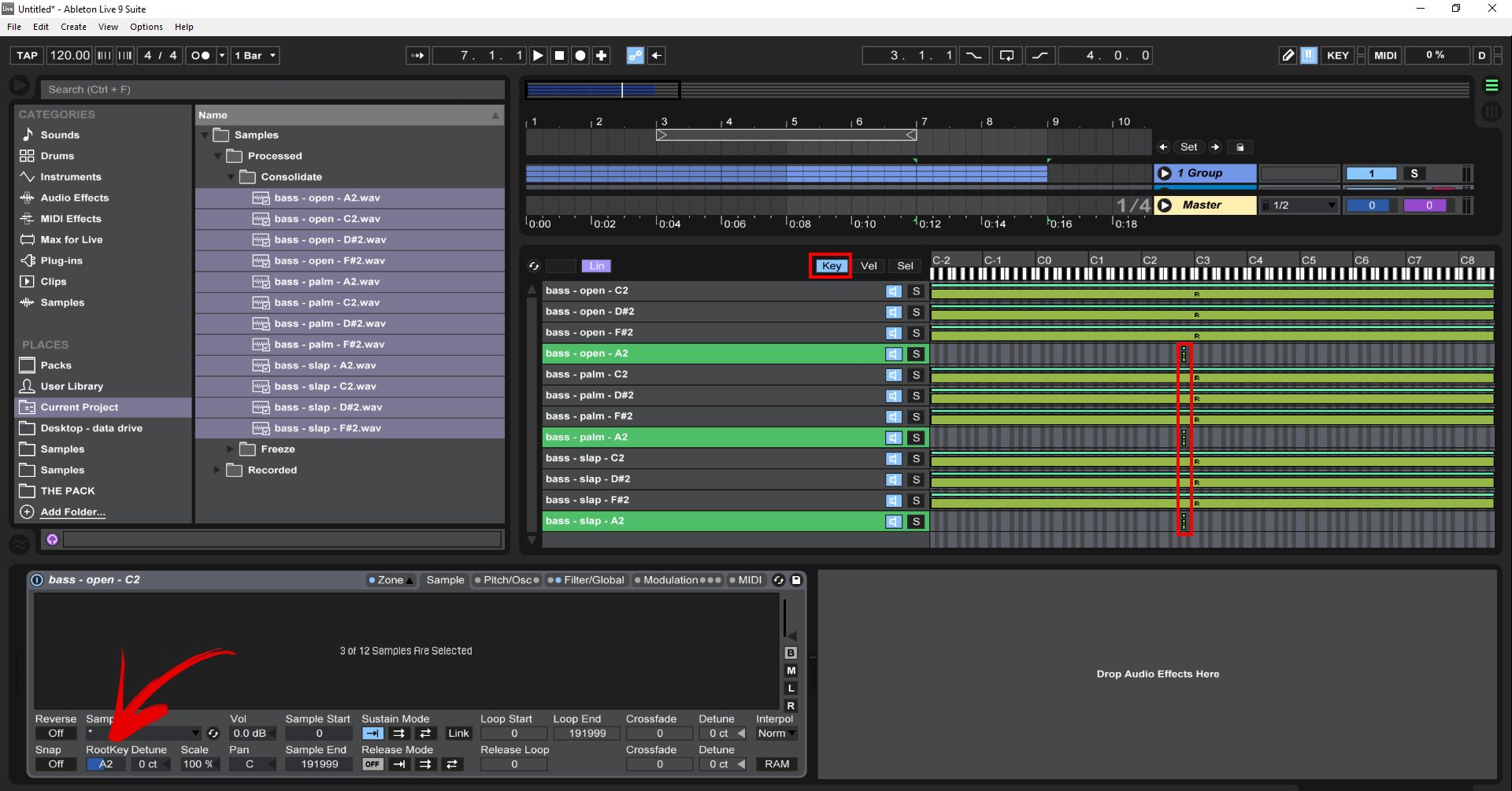
Sampling is a fundamental technique used in music production to capture and manipulate sounds from various sources. One of the most versatile and powerful sampling tools available is the Sampler in Ableton Live. Whether you’re a beginner or an experienced music producer, the Sampler can open up a world of creative possibilities.

Using the Sampler in Ableton Live for Sampling: Master Sampling Techniques

Credit: ask.video

Using the Sampler in Ableton Live for Sampling: Master Sampling Techniques

Credit: www.youtube.com

What is the Ableton Live Sampler?

The Sampler is a software instrument in Ableton Live specifically designed for sampling. It allows you to take small snippets of audio, or entire recordings, and transform them into playable instruments within your music. With the Sampler, you have full control over pitch, time, and other parameters, enabling you to shape and mold your samples to fit your sonic vision.

How to Use the Sampler in Ableton Live

First, let’s take a look at the main components of the Sampler:

Component Description
Sample Display Allows you to visualize your sample and set start and end points for playback.
Filter and Envelope Used to shape the frequency content and amplitude envelope of your sample.
Zone Editor Enables you to divide your sample into different zones and map them to different keys on your MIDI controller.
Modulation and FX Provides a variety of modulation options and effects to enhance your sample.

Once you have a sample loaded into the Sampler, you can start manipulating it. Here are some key features and techniques to get you started:

Adjusting Pitch And Time

The Sampler allows you to change the pitch of your sample while maintaining its original tempo or adjust the tempo without affecting the pitch. This can be useful for creating melodic elements or time-stretching loops to fit a particular BPM. Simply use the Pitch and Detune parameters to achieve the desired effect.

Applying Filters And Envelopes

The Filter and Envelope sections of the Sampler give you control over the frequency spectrum and volume contour of your sample. Experiment with different filter types, such as low-pass, high-pass, or band-pass, to shape the tonal characteristics. Adjust the attack, decay, sustain, and release parameters of the envelope to control the dynamic behavior of the sound over time.

Creating Multisampled Instruments

The Sampler allows you to create multisampled instruments by dividing your sample into multiple zones and assigning them to different keys on your MIDI controller. This enables you to play different parts of the sample across the keyboard, giving you a more expressive and realistic performance. Use the Zone Editor to define the key ranges and fine-tune the playback settings for each zone.

Modulating And Adding Effects

The Modulation and FX sections of the Sampler offer a range of options to further shape and modulate your samples. From LFOs and envelopes to chorus, reverb, and distortion, you can add depth, movement, and character to your samples. Experiment with different modulation sources and effects parameters to create unique and captivating sounds.

Tips for Working with the Sampler

Now that you have a basic understanding of how to use the Sampler in Ableton Live, here are a few tips to help you get the most out of this powerful tool:

  • Experiment with different sample sources and genres to explore new sonic territories.
  • Try layering multiple samples in the Sampler to create rich and textured sounds.
  • Use the Warp feature in Ableton Live to ensure your samples stay in time with your project’s tempo.
  • Explore the modulation and automation options in Ableton Live to add movement and variation to your samples.
  • Take advantage of the built-in effects and plugins in the Sampler to further enhance your sound.

Remember, practice and experimentation are key to mastering the art of sampling with the Sampler in Ableton Live. So dive in, tweak knobs, and let your creativity flow!

Frequently Asked Questions On Using The Sampler In Ableton Live For Sampling: Master Sampling Techniques


How Can I Use The Sampler In Ableton Live For Sampling?


You can use the Sampler by dragging and dropping audio directly onto its interface.


What Are The Key Features Of The Sampler In Ableton Live?


The Sampler in Ableton Live allows you to creatively manipulate and sample audio in real time.


Can I Adjust The Parameters Of The Sampler In Ableton Live?


Yes, you can adjust various parameters such as pitch, volume, and play mode to customize your samples.


Is It Possible To Slice And Re-sequence Samples In The Sampler Of Ableton Live?


Absolutely, you can easily slice samples and rearrange them to create unique and dynamic musical compositions.

Categories
Archive

The Haas Effect: How To Use It For Stereo Mixes : Enhance Your Mix

The Haas Effect enhances stereo mixes by introducing a slight delay between left and right audio channels. It creates a sense of spaciousness and directional cues for the listener.


The Haas Effect, also known as the precedence effect, is an intriguing psychoacoustic phenomenon that audio engineers and producers leverage to add depth and width to stereo sound. By carefully delaying one channel slightly (generally by 5 to 35 milliseconds), they craft a sonic illusion where the sound appears to emanate from the side that reaches the ears first.


This technique enriches the stereo image and can help localize instruments within the mix. Mastering the Haas Effect opens up a new dimension in audio mixing, allowing for more immersive and dynamic sonic experiences. Perfect for both studio work and live performance mixes, it’s a tool that, when used wisely, can transform a flat, two-dimensional mix into a three-dimensional auditory landscape.


Origins Of The Haas Effect

In the world of music production, the Haas Effect plays a crucial role. It’s all about creating a sense of space and depth in stereo mixes. This phenomenon takes its name from a key figure in audio engineering, Helmut Haas. Let’s dive into the early discoveries and the psychoacoustics that define this fascinating effect.

Early Discoveries By Helmut Haas

Helmut Haas unveiled this effect in 1949. He was a German audio engineer working on how we perceive sound.

His study shed light on a new dimension of auditory perception. It was simple but impactful:

  • Delays between sounds affect how we hear them.
  • Short gaps can create a single, rich audio experience.
  • These delays can make sounds seem to come from different directions.

Listeners were unaware that it was, in fact, a trick played by the timing of sounds.

Psychoacoustics Behind The Phenomenon

The psychoacoustic principle is central to the Haas Effect.

Our brains use timing cues to locate sounds. With precise timing, engineers can manipulate sound location.

The Haas Effect relies on a time window of up to 35 milliseconds. Within this window:

  1. When one ear hears a sound slightly earlier than the other,
  2. The brain perceives the sound as coming from the direction of the first ear.
  3. The sound must be identical and within the 35ms timing.

The effect can be used to create a sense of width and space in stereo sound.


Technical Breakdown Of The Haas Effect

Understanding the Haas Effect unlocks the potential to craft compelling stereo mixes. It’s a technique that manipulates the way we perceive sound direction and space, based on small timing differences. Below, we delve into the technical components that make this auditory illusion so powerful for mix engineers.

Time Delay And Spatial Perception

Our brains determine where a sound comes from by the timing of audio waves reaching our ears. The Haas Effect, also known as the Precedence Effect, relies on this natural process. It uses a simple but effective trick:

  • A sound is played into both ears.
  • One ear hears it slightly later than the other.
  • This delay causes us to sense depth and direction.

When sounds are delayed between 1 to 35 milliseconds, they appear to come from the direction of the first sound we hear. This can be expertly used in stereo mixes to create a sense of three-dimensional space without moving the sound sources themselves.

Thresholds Of Human Hearing

The effectiveness of the Haas Effect hinges on the sensitivity of human hearing. A tiny delay in the arrival of sounds can trick our brains into perceiving a sound stage. Key thresholds to note:

  • Below 1 millisecond: delay undetectable, sounds like one source.
  • Between 1 to 5 milliseconds: subtle, creates richness and fullness.
  • Between 5 to 35 milliseconds: the sweet spot for the Haas Effect, creating directional cues.
  • Above 35 milliseconds: delay evident as an echo.

Knowing these thresholds allows mixers to precisely shape the listeners’ sound experience. An understanding of this sensitivity can transform flat mixes into dynamic ones with careful timing adjustments.

Practical Applications In Music Production

The Haas Effect is magical in music production. It tricks our ears with slight delays. This creates a richer, fuller sound. Producers use it for lively and immersive tracks. Let’s explore practical uses of the Haas Effect in stereo mixing.

Widening Stereo Images

Creating a spacious stereo mix is essential for dynamic tracks. The Haas Effect comes in handy here. By delaying one channel slightly, a sound feels wider. Let’s break down how to use this technique:

  • Pick a mono track, like a vocal or a guitar riff.
  • Duplicate it to create a twin.
  • Pan one left and the other right. This sets the stage for the ‘wideness’.
  • Add a slight delay (5-30ms) to one channel. Listen for the change.

Be sure to keep things subtle for the best effect. Too much delay will cause the sound to feel disconnected.

Creating Depth In Mixes

A mix isn’t just left and right; it’s also front and back. The Haas Effect helps with depth. Here’s how to implement this technique:

  1. Add a delay to a track you want farther back in the mix.
  2. Dial the delay between 15-35ms to avoid echoing.
  3. Adjust the volume of the delayed track. The quieter it is, the further back it will seem.

The key is to experiment with delay and volume. This will place sounds at different depths, creating a 3D effect in the stereo field.


Implementing The Haas Effect In Your Daw

Exciting mixes often rely on the art of creating a sense of space. The Haas Effect, also known as the Precedence Effect, is a powerful tool for achieving stereo width. It involves slightly delaying a sound in one channel to trick the brain into perceiving a sense of direction and depth.

To harness this auditory illusion in your mix, follow these simple steps:

  1. Create duplicate tracks: Take the mono track you want to widen and duplicate it.
  2. Pan each track: Pan one version hard left, and the other hard right.
  3. Apply a delay: Insert a simple delay plugin on one of the tracks.
  4. Adjust delay settings: Set the delay to a range between 10 to 35 milliseconds. Higher values can make the effect more pronounced, but too much can lead to unwanted echo.
  5. Bypass feedback: Make sure the feedback parameter is set to 0% to avoid any repeating echoes.
  6. Blend to taste: Mix the delayed signal with the original until you achieve the desired spatial effect.

Remember, subtlety is key; even small adjustments can have a big impact on your track’s stereo image.

While most DAWs have stock delay plugins that can achieve the Haas Effect, some third-party plugins offer enhanced control and features:

  • Waves H-Delay: Offers a wide range of delay times and modulation options.
  • Soundtoys EchoBoy: Includes an array of delay styles and a dedicated ‘Haas’ preset.
  • Valhalla Delay: Provides versatile delay modes including unique spatial textures.
  • FabFilter Timeless: A modern take on delay with extensive modulation capabilities.

Equipped with these tools and a step-by-step guide, you can now transform your static mono track into a dynamic stereo soundscape.

Common Pitfalls When Using The Haas Effect

The Haas Effect is a powerful tool for creating stereo width in mixes. But it requires careful handling to avoid potential problems. Let’s explore some common pitfalls you might encounter.

Phase Cancellation Issues

Phase issues can ruin a mix. They occur when two sounds combine, leading to a loss of punch and clarity. With the Haas Effect, delays between left and right channels can cause this problem. To prevent phase cancellation:

  • Check your mix in mono. If sounds disappear, you likely have phase issues.
  • Use tools to visualize stereo imaging and phase relationships.
  • Apply minimal delay times, usually under 35 milliseconds, to lessen risks.

Overuse And Listener Fatigue

Too much of a good thing can be bad. Overusing the Haas Effect can lead to listener fatigue. Sounds may appear unnatural and tiring over time. Balance is key:

  • Use the effect sparingly and only where it enhances the mix.
  • Pay attention to feedback from fresh ears to gauge fatigue levels.
  • Audit the mix after a break to ensure the effect still serves the song.

The Haas Effect: How To Use It For Stereo Mixes  : Enhance Your Mix


Credit: www.avid.com

Creative Techniques For Enhanced Mixes

Unlock the secret behind engulfing stereo mixes using The Haas Effect. Producers and audio enthusiasts apply this sound phenomenon to create depth and movement. Let’s dive into how you can use The Haas Effect to take your mixes to another dimension.

Automation For Dynamic Movement

Bring your tracks to life with automation. It mimics the natural ebb and flow of sounds. Here’s how:

  • Automate Delays: Apply slight time variations to channels.
  • Vary Intensity: Gradually change the delay time for a moving audio sensation.
  • Diverse Patterns: Implement unique delay patterns on different instruments.

Combining With Eq And Panning

Integrate EQ and panning for a rich and spacious mix. Follow these steps:

Action Effect on Mix
EQ Tweaking Clarify and separate instruments.
Panning Adjustments Create a wider stereo image.
Cut and Boost Balances frequencies and adds space.

Tip: Use EQ to sculpt frequencies and pan to place sounds in the stereo field.

The Role Of The Haas Effect In Different Genres

The Haas Effect, or precedence effect, is a powerful audio tool for creating stereo width in mixes. Each music genre has unique characteristics in its mix. Understanding how to apply the Haas Effect can take a mix from good to great. Recognizing the role it plays across various genres is crucial. Let’s explore how to tailor the Haas Effect for distinctive genre-specific sounds.

Adjusting Techniques For Genre-specific Sounds

Applying the Haas Effect hinges on knowing your genre’s needs. In fast-paced genres, you want clarity. In more ambient ones, a sense of space is key. Precision is essential to maintain the genre’s integrity while using this technique. Here, we’ll break down these adaptations:

  • Pop and Hip-Hop: Subtle use enhances vocals.
  • Jazz and Blues: It adds depth to live-sounding instruments.
  • Electronic: It can exaggerate stereo effects for a dramatic feel.

Case Studies: Rock, Edm, And Classical

Genre Instrument Haas Effect Application
Rock Guitars, Drums Create a larger-than-life sound without muddying riffs and beats.
EDM Synths, Bass Broaden the soundscape for a more immersive dance experience.
Classical Strings, Winds Inject space while preserving the natural ambience of orchestral arrangements.

With rock, the Haas Effect can turn a flat mix into a dynamic listening experience. EDM tracks leverage the effect to make listeners feel surrounded by sound. In classical music, the technique must be applied with care to avoid losing the genre’s essence.

Beyond The Studio: The Haas Effect In Live Sound

Live sound takes on a new dimension with the Haas Effect. This powerful tool enhances listener experiences by adding depth and spatial awareness to performances. Let’s explore how engineers harness the Haas Effect to create immersive live soundscapes.

Adapting To Larger Spaces

Larger venues pose unique challenges. Sound waves travel further, causing potential delays. Employing the Haas Effect becomes pivotal. It ensures that the sound from speakers arrives at listeners’ ears with a natural sense of space. Here are key considerations:

  • Speaker placement: Proper alignment reduces phase issues.
  • Delay settings: These should compensate for speaker distance.
  • Reflection control: It’s vital to minimize echo.

Tips For Live Engineers

Live engineers can create stellar auditory experiences with the Haas Effect. Depth and clarity in live mixes become achievable. Follow these tips:

  1. Understand the space: Study the venue’s acoustics beforehand.
  2. Use subtle delays: Small delay differences can have huge impacts.
  3. Check levels persistently: Balance volumes for uniform sound coverage.
  4. Observe audience reactions: Adjust settings for the best live experience.

With the right approach, the Haas Effect transforms live sound, making every seat the best in the house.

Future Of Spatial Audio And The Haas Effect

Spatial audio is changing how we experience sound. The Haas Effect, or precedence effect, plays a big role. It makes sounds seem to come from one side by playing them slightly earlier in one ear.

Emerging Technologies In 3d Audio

New tech makes 3D sound better. It lets sounds move around us in all directions. Advanced headphones and speakers give a real-life feel to movies and music. We will see more uses in virtual reality (VR) and augmented reality (AR).

  • Virtual Reality Sound
  • Augmented Reality Environments
  • 3D Audio for Home Entertainment
  • Improvements in Headphone Technology

Incorporating The Haas Effect In Immersive Experiences

Creators use the Haas Effect to craft amazing virtual worlds. It helps match visuals and sounds in VR. This tricks our brains into thinking sounds are coming from different places.

Tech Use Benefit
Game Design Enhanced Soundscapes Real Presence
Music Production Layered Mixes Deep Immersion
Movie Soundtracks Directional Audio Cues Realistic Scenes

Expect more interactive experiences with sound. The Haas Effect will become key. Sound will make us feel like we are inside the story.

Frequently Asked Questions For The Haas Effect How To Use It For Stereo Mixes

What Is The Haas Effect In Audio Mixing?

The Haas Effect, also known as the precedence effect, is a psychoacoustic phenomenon where delay differences in stereo sound create a sense of spatial location. By delaying one channel slightly, audio engineers emulate natural sound cues, enhancing stereo width in mixes.

How Can You Apply The Haas Effect In Your Mix?

To apply the Haas Effect, duplicate a mono track and pan each one left and right. Then, delay one side by roughly 10-30 milliseconds. This creates a sensation of broader spatial presence without significantly altering pitch or timbre, adding depth to stereo mixes.

When Should You Avoid Using The Haas Effect?

Avoid using the Haas Effect when clarity and mono compatibility are critical. Excessive delay can cause phase issues, making tracks sound blurred or hollow, especially in a mono playback environment. This effect is also less suitable for low-frequency elements.

Does The Haas Effect Work On All Instruments?

The Haas Effect works best on percussive and mid to high-frequency instruments. It is less effective on low-frequency sounds, like bass and kick drums, as it can lead to muddiness and phase cancellation, potentially weakening the mix’s impact.

Conclusion

Exploring the Haas Effect transforms stereo mixing. It adds depth and dimension, captivating listeners with immersive sound. Embrace this technique to stand out in the audio production realm. Remember, subtlety is key—overuse can muddy your mix. Now, harness the Haas Effect and elevate your tracks to professional heights.

Categories
Archive

Why Can’t I Create a Fade in Ableton? Easy Fixes!

You may not be able to create a fade in Ableton if you lack understanding of the software’s envelope controls or haven’t selected the correct tools. Confusion might also stem from an outdated version of Ableton or disabled automation features.


Creating music involves not only talent but also a strong grasp of your chosen digital audio workstation (DAW). Ableton Live, a favorite among electronic music producers, offers a plethora of features, one being the ability to create smooth transitions in your tracks with fades.


Understanding this function is critical for seamless song creation. New users or those transitioning from other DAWs might face challenges while navigating the interface and utilizing the fade feature. This article helps musicians understand the potential stumbling blocks in creating fades within Ableton Live and provides insights into mastering this crucial production skill. With the right knowledge and a bit of practice, any Ableton user can deftly implement fades to polish their musical projects.


Introduction To Ableton’s Limitations

Ableton Live, known for its powerful music production tools, also has boundaries. One feature that may puzzle users is the act of creating fades. Fades are crucial for smoothing out transitions and ending tracks gracefully. Yet, users sometimes struggle to execute this seemingly simple task. Understanding Ableton’s constraints brings clarity to this issue.

Breaking Down The Fade Issue

Beginners often face a fade conundrum in Ableton Live. Creating a fade should be straightforward, yet there’s complexity hidden beneath the surface. It’s vital to dive into the specific conditions under which Ableton operates. This sheds light on why users might find it tricky.

  • Fades can’t be applied on the master track directly.
  • Audio clips have fade handles, but they’re not always obvious.
  • Automation might be necessary for certain fade effects.

Let’s unfold the factors that contribute to this fade dilemma.

Common Misconceptions Around Fades

Users think that there’s a one-click fade tool. In reality, Ableton requires a different approach.

Misconception Reality
Fades are automatic. User must manually adjust fade handles.
Fades work on all tracks equally. Fade options vary by track and clip type.
Any audio clip can be faded out. Some clips, especially MIDI, require extra steps.

The truth about fades in Ableton is less about limitations and more about learning how to use the tools provided effectively.

Why Can't I Create a Fade in Ableton?: Easy Fixes!


Credit: www.ac3filter.net


Is Your Ableton Version Current?

Is your Ableton version current? This might be the question lingering in your head as you attempt to add a seamless fade to your track. Fades are essential for blending and transitioning between sounds. Yet, they can prove elusive if your Ableton is not up-to-date or lacks the feature set you require. Let’s delve into ensuring your software is ready to give you the fading functionality you need for your projects.

Checking For Updates

To ensure optimal performance and feature access, updating Ableton is key.

  • Open Ableton Live on your computer.
  • Go to the ‘Help’ menu at the top.
  • Select ‘Check for Updates’.

This built-in feature makes it easy to determine whether you have the latest version or if an update is necessary. Keeping Ableton Live current is the first step to unlocking its full potential, including the ability to create smooth fades.

Version-specific Fade Capabilities

Different versions of Ableton Live come with varying features. Knowing your version’s capabilities is crucial. The fade feature became a native function in Ableton Live 10. Users with previous versions may need to find alternative methods.

Ableton Version Fade Capability
Live 9 and Earlier Manual fades with volume automation
Live 10 and Later Integrated fades with handle

If your project needs a fade and you are not seeing the options, it could be due to an outdated Ableton version. In that case, an upgrade might be the answer.

Audio Clip Essentials

Audio Clip Essentials are the backbone of creating seamless music experiences in Ableton. Before diving into the nuances of fades and transitions, understanding the types of audio clips and their preparation is a must. Let’s unravel the process step by step.

Understanding Audio Clip Formats

Different audio clip formats come with unique properties. To ensure smooth editing and transitioning, here’s what you need to know:

  • WAV – High-quality, uncompressed audio; ideal for professional mixing.
  • AIFF – Similar to WAV in quality, primarily used on Apple computers.
  • MP3 – Compressed format; maintains smaller file size at the expense of quality.
  • Ableton Live Pack – Ableton’s own packaged sets, perfect for integration into projects.

Bearing these formats in mind will guide your fading techniques and final sound output.

Clip Preparation For Fading

Proper clip preparation sets the stage for flawless fading. Follow these steps for readying your audio:

  1. Select your clip in the Arrangement View or Session View.
  2. Ensure the clip is warp-free; warping can affect the sound during fading.
  3. Check the clip’s start and end points; these define the fade’s range.
  4. Activate the fade handles by clicking on the clip’s top corners.
  5. Drag handles to create the desired fade-in or fade-out effect.

Simple procedures lead to powerful results in your audio production journey.

Arrangement View Versus Session View

When working in Ableton Live, two different views are at your disposal – Arrangement View and Session View. Each serves a unique purpose. Arrangement View offers a linear approach to music production, ideal for laying out entire tracks. Session View, on the other hand, provides a space for improvisation and live performance, where clips launch independently.

Choosing The Right View For Fades

To create seamless fades in Ableton, you must choose the right view. Let’s explore:

  • Arrangement View: This view allows for precise fades over time.
  • Session View: It doesn’t support traditional fades.
  • Technique: Opt for Arrangement to drag fade handles.

Selecting Arrangement View is crucial for traditional crossfading techniques. Fades become simple with drag-and-drop handles that appear on audio clips. In Session View, fading requires workarounds like automation.

Navigating View-specific Limitations

Understanding the limitations of each view ensures smooth workflow:

View Fades Capability Workaround
Arrangement Direct fades with handles N/A
Session Not Supported Volume Automation or use of effects

In Session View, fading isn’t intuitive.

Create fades with volume automation or effect racks.


Revealing Hidden Fade Handles

Revealing Hidden Fade Handles in Ableton Live can sometimes feel like searching for a needle in a haystack. These elusive controls are essential for smooth transitions and professional-sounding tracks. But fear not! Let’s uncover the mystery of the missing fade handles and empower you to take charge of your audio editing in Ableton.

Zooming Techniques For Better Visibility

Fade handles might remain out of sight due to zoom level issues. The key to bringing hidden fades into view? Zoom in closer!

  • Use the magnifying glass tool to get a closer look at your track.
  • Press ‘Z’ and click on your track to zoom in on a specific part.
  • Hold ‘ALT’ and use your mouse scroll to zoom in and out quickly.

Remember, navigation is key—after zooming in, use the horizontal scroll bar to find your fade handles.

Adjusting Automation Lane Displays

Another trick to reveal fade handles involves playing with the automation lanes.

  • Activate the automation view by pressing ‘A’ or clicking the automation button.
  • Choose the right automation lane—volume or track volume will usually house your fades.
  • Expand the lane to get a better view by dragging the lane’s border.

With automation lanes in full view, those fade handles won’t stand a chance of staying hidden.

Why Can't I Create a Fade in Ableton?: Easy Fixes!


Credit: www.groove3.com


The Role Of Automation In Fading

Mastering the art of creating perfect fades in Ableton can truly elevate your music production. Automation plays a pivotal role in manipulating the volume to smoothly transition between tracks or parts of your song. Understanding how to manipulate these features can remove any issues with adding fades and give you total control over the dynamics of your production.

Drawing Fade-in And Fade-out Envelopes

Drawing fade envelopes is a simple yet powerful technique to tailor the onset or conclusion of your sounds. Ableton’s arrangement view allows you to draw precise volume adjustments directly onto the audio track. Use these steps to create your fade:

  • Choose the audio track you want to fade.
  • Select the ‘Envelope’ section located in the clip view.
  • Search for the Volume envelop to adjust fades.
  • Create a point at the start and end of where you want your fade.
  • Drag points to craft the initial rise in volume for fade-ins or the reducing volume for fade-outs.

Fine-tuning Fade Curves

Once your fade envelope is in place, perfecting the curve is essential for a natural-sounding fade. Ableton provides the flexibility to tweak this to your heart’s content. To fine-tune your fade curves:

  1. Hover over the line between the two points of your fade.
  2. Click and hold to grab the line.
  3. Bend the curve by moving the mouse up or down.
  4. Experiment with different curves to suit the audio material.

Note that different curve shapes can infuse a unique feel into your transitions, so spend time discovering what works best for your track.

Utilizing Audio Effects For Enhanced Fades

Fades in Ableton are essential for smooth transitions. They help blend tracks or elements, creating a professional finish to your production. While the basic fade functionalities cover primary needs, sometimes the project requires something more customized. This is where audio effects come into play.

Advanced users might notice that default fades might not offer the precision or variation needed for certain scenarios. But don’t worry! There are ways to enhance your fades using different techniques and tools within Ableton, including audio effects and third-party plugins.

Selecting Third-party Fade Plugins

Finding the right third-party plugin can elevate your fades to the next level. Many plugins are specially designed to provide advanced fading capabilities. Here are some points to consider:

  • Compatibility: Ensure the plugin is compatible with Ableton.
  • User reviews: Look for plugins with positive feedback.
  • Features: Prioritize plugins with extensive fade options.

Crafting Advanced Fades With Audio Effects

Not ready to download new plugins? No problem! Ableton’s built-in audio effects can be your toolkit for crafting intricate fades. Check out these steps:

  1. Use Utility for precise volume control.
  2. Apply Equalization to fade specific frequencies.
  3. Experiment with Reverb for a natural-sounding fade-out.

Incorporating these methods with Ableton’s automation features creates custom fade effects tailored to your needs.

Why Can't I Create a Fade in Ableton?: Easy Fixes!


Credit: forums.steinberg.net


Troubleshooting Technical Glitches

Creating fades in Ableton is usually straightforward. But, sometimes technical glitches can occur. You may find yourself unable to create a fade. Don’t worry, there are a few steps that can help you identify and fix the issue.

Addressing Software Bugs

Software bugs can interrupt your music production flow. If you can’t create a fade in Ableton, try these steps:

  • Check for updates: Ensuring you have the latest Ableton version can resolve unseen issues and improve performance.
  • Reinstall: A fresh install of Ableton might be necessary if updates don’t fix the problem. Remember to back up your projects first.
  • Default settings: Return Ableton to its original settings. Sometimes, custom configurations can conflict with functionality.

If these steps fail, dig deeper into Ableton’s help resources. Their guides can be very fruitful.

Seeking Help From The Community

Many producers use Ableton, and some have faced your issues before. Reach out to the community online for insight:

  1. Visit Ableton user forums.
  2. Search for related threads or start a new one with your problem.
  3. Connect with other users on social media groups.
  4. Check out tutorial videos that might give you a clue.

Remember to share specific details. This helps others to provide accurate advice.

Strengthening Your Fading Skills

Strengthening Your Fading Skills in Ableton is essential for producing smooth transitions and dynamic changes in your tracks. While Ableton is a powerhouse for music producers, sometimes artists struggle to master the art of fading. By practicing consistently and experimenting with various techniques, you can enhance the emotional impact of your music and keep your listeners engaged.

Practice Exercises For Perfect Fades

Becoming proficient at fading requires practice. Here is a list of exercises:

  • Start simple: Create short clips and practice basic fades in and out.
  • Combine sounds: Overlap tracks and work on crossfading.
  • Vary duration: Experiment with the length of fades to feel their effect.
  • Use automation: Draw fade curves and listen to the results.

Exploring Creative Fade Techniques

To stand out, try these creative fade methods:

Fade Technique Description
Reverse Fades Apply a fade in the reverse direction to build tension.
Frequency Fades Fade certain frequencies using EQ automation.
Rhythmic Fades Sync your fades with the tempo for a rhythmic feel.
Envelope Tricks Manipulate volume envelopes for unique sound textures.

With consistent practice and a bit of creativity, your fade techniques will drastically improve, taking your production to the next level.

Frequently Asked Questions For Why Can’t I Create A Fade In Ableton


Why Does Ableton Fade Not Work?


Ableton Live may not allow fading if there’s no audio clip boundary. To create a fade, ensure you’re working with a distinct audio clip. Select the clip, then hover at its edge to access the fade handles. Drag these handles inwards to apply the fade.


How To Add Fade-in In Ableton Live?


To add a fade-in in Ableton Live, first select your audio clip. Then, hover over the clip’s start edge to reveal the fade handle. Click and drag the handle towards the clip’s center. Adjust the length to control the fade duration.


Can You Automate Fades In Ableton?


Yes, in Ableton Live, you can automate fades using the track’s automation feature. Show the automation lanes, find the volume control, and draw an automation curve at the beginning or end of the audio clip for a fade-in or fade-out effect.


What’s The Shortcut For Fade In Ableton?


Ableton Live doesn’t have a specific shortcut for fades. Instead, manually adjust fades by clicking and dragging the fade handles that appear at the edges of audio clips. Use the “A” key to toggle automation mode for more complex fading.


Conclusion


Mastering fades in Ableton can elevate your audio projects to new heights. Remember, initial hurdles are common, but they stem from manageable issues. Check your version, explore the manual, and practice diligently. Your persistence will soon result in seamless, professional-sounding fades that enhance your tracks beautifully.


Keep experimenting, and happy mixing!

Categories
Archive

Which is Better for Artists: Spotify or Apple Music? Unveiling the Top Pick!

The best platform for artists between Spotify and Apple Music depends on their specific needs and goals. Spotify excels with its user-friendly interface and larger user base, while Apple Music offers better pay rates and integration for Apple users.


Choosing the right streaming service is crucial for artists aiming to maximize their exposure and revenue. Spotify, with over 345 million active users, provides a vast audience and social sharing capabilities that can significantly boost an artist’s reach. Its algorithmic playlists and discovery features also help in promoting new music to listeners.


On the other hand, Apple Music is known for its slightly higher streaming payouts and its seamless ecosystem for users deeply embedded in Apple’s products. This can be beneficial for artists targeting a demographic loyal to the Apple brand. Each platform has its merits, and artists often distribute their music on both to reap the combined benefits. Selecting the optimal service is an individual decision that artists must make based on their distribution strategy, target audience, and personal preferences for music promotion.


The Rise Of Music Streaming

The music industry has experienced a colossal transformation. The way artists share their music and how fans listen to their favorite tunes has evolved. This shift has brought music streaming to the forefront.

Evolution From Physical Albums To Digital Era

The journey of music consumption is fascinating. It began with vinyl records, transitioned through cassettes and CDs, and has now settled into the digital realm.

  • Vinyl Records: Vintage charm that spun melodies.
  • Cassettes: Portable tunes that moved with listeners.
  • Compact Discs (CDs): Digital clarity with a physical touch.
  • MP3 Files: Music turned into data, filling pockets and hard drives.

Today, streaming services lead the way making vast libraries of music accessible instantly.

Streaming Giants: Spotify And Apple Music In Focus

Two dominant players emerge in today’s streaming landscape: Spotify and Apple Music. Each offers incredible features for artists and listeners alike.

Feature Spotify Apple Music
User Base Global reach with millions of subscribers. Strong following among Apple device users.
Artist Exposure Artist-friendly tools like Spotify for Artists. Connect feature for engaging with fans.
Music Discovery Algorithm-driven playlists personalized for users. Human-curated playlists and radio shows.

Deciding which is better depends on an artist’s goals and where their fans are.

Spotify At A Glance

Choosing the right platform can shape an artist’s career. Let’s look closely at Spotify and what it offers.

Subscription Models And User Base

Spotify caters to various listeners through its subscription models. Here’s a quick overview:

  • Free Version: Ad-supported with shuffle play.
  • Premium: Ad-free listening, offline play, and better sound quality.

With a massive user base, Spotify stands out. The numbers tell the story:

Subscription Type Users
Free Over 200 million
Premium Over 155 million

Features And Tools For Artists

Spotify equips artists with powerful tools:

  • Spotify for Artists: Analytics and fan insights.
  • Spotify Codes: Share music with a unique code.
  • Release Radar: New music reaches followers promptly.
  • Discover Weekly: Personalized playlists feature new artists.

Revenue Generation And Royalty System

Monetizing music on Spotify:

  1. Artists earn royalties based on streams.
  2. A pro-rata payment system distributes earnings.

The royalties depend on:

  • Country rates: Vary with each location.
  • User subscription: Premium streams pay more than free ones.


Apple Music’s Offering

Within the dynamic landscape of music streaming platforms, artists face the task of choosing the right home for their music. Apple Music’s offering stands out through its artist-centric approach, comprehensive ecosystem, and attractive monetization options. As we delve into what Apple Music brings to the table, it’s clear this platform tailors its services to nurture and reward artists’ creative efforts.

The Ecosystem Advantage

Apple’s vast ecosystem is a significant force. It seamlessly integrates numerous devices and services, offering artists unparalleled exposure. This advantage drives more listeners to their music, leveraging the brand’s global reach and loyal customer base.

  • iTunes music purchases
  • Siri voice commands to play tracks
  • Compatibility with HomePod and other Apple devices
  • Integration with Apple Watch for on-the-go streaming

Artist-friendly Features

Apple goes beyond just streaming. They focus on features that empower artists to connect with their fans. With Apple Music for Artists, you can analyze your music’s performance and learn about your listeners.

Feature Description
Apple Music Connect Post behind-the-scenes photos and stories
Analytics Dashboard View detailed listening data
Curated Playlists Get featured by Apple Music editors

Monetization And Earnings

Earning potential on Apple Music proves competitive. Artists benefit from the platform’s higher payout per stream, as compared to other services. This translates into more revenue as their tracks gain popularity.

Royalty Payments:
– Fair compensation for streams and downloads
Apple Digital Masters:
– High-quality audio earns premium rates

With consistent efforts and marketing, artists can utilize these benefits to build a sustainable income from their music.

Comparing Algorithms And Discoverability

For artists eager to get their music heard, the choice between Spotify and Apple Music can be pivotal. These platforms use unique algorithms to shape user experience and artist discoverability. Weighing their features is essential for artists aiming to boost their reach and grow their fanbase.

The Role Of Playlists In Artist Exposure

Playlists are a powerful tool for music exposure. Spotify shines with its playlist-centric ecosystem. Curated playlists like “Discover Weekly” and “Release Radar” are tailored to individual tastes, pushing new artists directly to listeners who are likely fans. Apple Music offers expert-curated playlists, yet Spotify’s user-generated playlists add a communal edge, amplifying an artist’s reach through social sharing.

Personalization And User Experience

Both Spotify and Apple Music engage listeners with algorithm-driven personalization. Spotify’s algorithm excels in learning from user behavior to suggest songs, creating an addictive, personalized user journey. Apple Music’s recommendations are less aggressive but are deeply integrated with its ecosystem, providing a smooth experience for users loyal to Apple’s brand. This leads to meaningful engagements for artists, as fans might stumble upon new tracks while enjoying their tailored music selection.

Comparing Algorithm and Features
Feature Spotify Apple Music
Algorithmic Playlists Highly Personalized Curated Selections
User Engagement Strong social sharing options Integration with Apple ecosystem
Discovery Feature Discover Weekly New Music Mix

In artist discoverability, Spotify’s algorithm tends to lead with data-driven insights, while Apple Music banks on its curated approach. This results in a diverse listening experience where one platform may benefit certain artists more than the other.

Analyzing The Financials

Understanding the financial side is vital for artists choosing between Spotify and Apple Music. Let’s dive into the numbers and see which platform might be more profitable for musicians.

Pay Per Stream Rates

Artists often wonder what they’ll earn from their streams. Here’s a comparison:

Service Average Pay Per Stream
Spotify $0.003 to $0.005
Apple Music $0.005 to $0.01

Apple Music generally offers higher rates, but Spotify’s user base may lead to more overall streams. Finding a balance is key.

Other Avenues For Artist Income

Streaming isn’t the only way artists can make money. Consider these additional income sources:

  • Merchandise sales
  • Live performances
  • Music licensing for TV, films, and ads

Both platforms offer opportunities for exposure leading to these revenue streams. Apple connects well with listeners, while Spotify’s playlists can help artists reach new fans.

Which is Better for Artists: Spotify or Apple Music? Unveiling the Top Pick!


Credit: kfor.com


Social Impact And Brand Building

For today’s artists, choosing between Spotify and Apple Music isn’t just about streaming. It’s about building a brand and making a splash on social media. Both platforms offer unique tools and audiences. Choosing the right one could define your career. Let’s explore how Spotify and Apple Music empower artists to thrive socially and develop their unique brand.

Integrations With Social Media Platforms

Spotify excels with social media integrations. It allows easy sharing of songs and playlists on nearly all platforms. This boosts artist visibility. Apple Music isn’t far behind, but its integrations are more limited.

  • Spotify:
    • Direct Instagram Stories sharing
    • Seamless Facebook integration
    • Collaborative playlist creation
  • Apple Music:
    • Sharing via the Apple ecosystem
    • Apple Music to Stories feature

Developing A Brand As An Artist On Each Platform

Both platforms offer brand development tools, but they work differently. Spotify provides Spotify for Artists which helps in analyzing audience data, creating custom playlists, and promoting new music. Apple Music’s Connect works as a platform for artists to share exclusive content with fans.

Use these tools to grow your brand:

Tool/Feature Spotify Apple Music
Artist Profile Customization Highly customizable Standard customization
Analytics Detailed listener data Basic performance metrics
Exclusive Content Limited options Better opportunities

Spotify is robust for engaging fans. Apple Music allows unique ways to share content. Choose based on where your audience is and what aligns with your brand.

Exclusivity And Platform Loyalty

For artists navigating the streaming landscape, Exclusivity and Platform Loyality play pivotal roles. Spotify and Apple Music lead the pack, each offering distinct advantages and challenges when it comes to exclusive releases. Exploring these can help artists decide which platform aligns best with their goals.

Pros And Cons Of Exclusive Releases

Exclusive content can lure dedicated fans to a single platform. Let’s evaluate the benefits and drawbacks:

Pros Cons
  • Increased visibility: Spotlight for featured artists.
  • Potential financial incentives: Higher pay-per-stream rates.
  • Marketing support: Platforms promote exclusive content.
  • Limiting audience reach: Non-users can’t access music.
  • Platform dependency: Risk of alienating non-platform listeners.
  • Potential backlash: Fans may dislike exclusivity practices.

The Impact On Fan Accessibility

Exclusivity also affects how easily fans can enjoy their favorite tunes. Consider these angles:

  • User experience: Exclusive deals might frustrate fans who prefer using other services.
  • Music discovery: New listeners might miss out if they aren’t platform subscribers.
  • Artist-fan connection: Limits engagement across different listener bases.
Which is Better for Artists: Spotify or Apple Music? Unveiling the Top Pick!


Credit: smartphones.gadgethacks.com


Real Artist Testimonials

Choosing between Spotify and Apple Music can be tricky, especially for artists who want to share their music with the world. Artist experiences reveal a lot about these two giants of streaming.

Success Stories From Both Platforms

Artists have found success on both Spotify and Apple Music. These platforms offer distinct advantages, but what matters is how they match an artist’s goals.

  • Spotify’s vast user base leads to greater exposure.
  • Apple Music’s high-quality audio appeals to audiophiles.

Some have leveraged Spotify’s playlists for a surge in streams, while others have benefited from the Apple Music exclusives to stand out.

Qualitative Experiences Shared By Musicians

Real stories from musicians highlight the pros and cons of each platform.

Platform Artist Experience
Spotify Artists enjoy its user-friendly interface and discoverability features.
Apple Music Its exclusivity deals and branding opportunities are a plus for many.

Musicians praise Spotify for its algorithm that recommends songs to listeners. Artists also appreciate Apple Music for its payout per stream, which is often higher.

Concluding The Best Platform For Artists

Artists often ponder which streaming service will amplify their music. Both Spotify and Apple Music are giants. The right platform can skyrocket an artist’s reach. Let’s delve into the details to decide which one stands out.

Summing Up The Features And Benefits

Spotify and Apple Music each offer unique features:

  • Spotify excels with its user base, algorithmic playlists, and social tools.
  • Apple Music shines with its integration on Apple devices, audio quality, and music locker service.

Benefits for artists appear in diverse ways:

Platform Features Benefits
Spotify
  • Algorithmic discovery
  • Collaborative playlists
  • Spotify for Artists dashboard
  • Broader audience reach
  • Real-time listener data
Apple Music
  • Beats 1 Radio
  • High-fidelity audio
  • Connect feature for artists
  • Engagement with Apple’s loyal customer base
  • High-quality streaming for audiophiles

Making The Ultimate Choice: Spotify Or Apple Music?

The decision hinges on specific needs:

  • Consider Spotify for its active discovery features and social aspects.
  • Choose Apple Music for its high-resolution audio and niche audience.

Both platforms guarantee exposure and tools for artists. Understand your target audience and artistic goals first. Weigh each service’s offerings against these parameters. Acknowledging these factors leads to an informed choice.


Credit: www.facebook.com


Frequently Asked Questions Of Which Is Better For Artists Spotify Or Apple Music


Which Platform Pays Artists More, Spotify Or Apple Music?


Spotify typically pays artists between $0. 003 and $0. 005 per stream. In contrast, Apple Music pays about $0. 01 per stream. However, actual earnings can vary based on agreements, listener locations, and subscription plans.


Do Spotify And Apple Music Offer Exclusive Content To Artists?


Both platforms occasionally offer exclusive releases, but Apple Music is known to secure more exclusive deals. This strategy attracts fans to the platform for content they can’t find elsewhere. Each artist’s exclusivity varies and changes over time.


How Does Playlist Inclusion Differ Between Spotify And Apple Music?


Spotify is renowned for its algorithmic and curated playlists, which can significantly increase an artist’s exposure. Apple Music also offers curated playlists, but Spotify’s user-generated playlists add another avenue for artists to be discovered and heard.


What’s The User Base Size Comparison Of Spotify Vs. Apple Music?


Spotify has a larger user base with over 345 million active users and 155 million paid subscribers. Apple Music, on the other hand, has over 72 million subscribers as of June 2021. A larger user base may offer more exposure opportunities for artists.


Conclusion


Deciding between Spotify and Apple Music is choosing your musical companion wisely. Ultimately, your preferences dictate the winner. Do you value personalized playlists, or is ecosystem integration pivotal? Whichever you choose, both platforms tune-in to an artist’s success. Embrace the one that strikes a chord with your creative soul and audience reach goals.

Categories
Archive

How To Promote Your Music On Twitter: Amplify Your Tunes!

To promote music on Twitter, engage with your followers and use relevant hashtags. Share links to your songs, and collaborate with influencers to widen your reach.


Establishing a successful presence on Twitter can be instrumental for musicians looking to expand their audience. The platform offers a direct line of communication to fans, potential collaborators, and industry influencers. By crafting bite-sized, attention-grabbing content, artists can generate buzz around their brand and drive listeners to their music.


Quick, regular updates alongside multimedia elements like images, short clips, and direct links to songs ensure that content is both discoverable and shareable. Strategic use of Twitter’s features, including Twitter Spaces for live audio chats and Twitter Polls to engage an audience, can further enhance a musician’s promotional activities. Consistent interaction and authentic conversation with fans help in building a dedicated community around your music on this fast-paced platform.


Setting The Stage: Your Twitter Presence

Welcome to the digital stage where your Twitter presence can make or break your music promotion efforts. Before you can share your tunes with the world, it’s essential to ensure that your Twitter profile is not just a placeholder, but a platform that truly resonates with your audience.

Crafting A Captivating Profile

A stellar profile is your first act in the Twitter music scene. It’s not just a face, but a passport into your musical world.

  • Profile Picture: Choose an image that captures your essence as an artist. This could be an album cover, a professional headshot, or a shot of you performing.
  • Bio: Your bio is a snapshot of who you are. Keep it punchy, include genres, accolades, and a sprinkle of personality.
  • Header Image: This larger space is perfect for promoting your latest release or tour. Make it vibrant, professional, and current.
  • Link: Don’t forget to link to your music streaming platform, website, or landing page that directs followers to more of your content.

Remember, consistency is key. Use similar branding across all your social media for instant recognition.

Tweeting With Authenticity

Your tweets are your voice in the digital concert hall that is Twitter. Authenticity is the instrument that will help your message resonate.

  • Be Genuine: Share your story, your successes, your struggles. Fans love getting to know the real person behind the music.
  • Engage: Twitter is a two-way street. Respond to messages, retweet fans, and participate in conversations. Interactions matter.
  • Content Variety: Mix it up with behind-the-scenes looks, updates, personal thoughts, and of course, your music.
  • Hashtags: Use relevant tags wisely to increase your tweets’ visibility. Do some research to find what’s trending among your target audience.

Create a rhythm with your tweets. Regular updates keep your audience tuned in to what’s next.

Creating Share-worthy Content

Creating Share-Worthy Content on Twitter isn’t just about what you say, but how you say it. Your music can echo across the platform with the right visuals and teasers. Engage your audience with content they cannot help but share.

Engaging Visuals: Beyond Album Art

  • Breathe life into your tweets with stunning visuals that go beyond your album art. Think photos from recent gigs, behind-the-scenes shots, or exclusive artwork.
  • Use animated GIFs or short video loops to grab attention quickly. These can depict emotions or themes from your tracks.
  • Graphical interpretations of your lyrics can drive intrigue and discussion.
  • Capture moments in the studio — they’re as shareable as the final product itself.

Sneak Peeks: Leveraging Video Clips

  1. Upload short, captivating video clips from new or upcoming tracks to entice listens.
  2. Provide exclusive previews only to your Twitter followers before official release.
  3. Feature behind-the-scenes footage from music video shoots, revealing the process behind the polish.
  4. Announce teaser trailers for upcoming releases, sparking conversation and anticipation.

The Art Of Storytelling

Engaging fans on Twitter goes beyond just updating them about new releases. It’s about narrating a story, your story. Every tweet is a verse in the epic of your musical journey. By mastering storytelling, you transform followers into a dedicated audience, immersed in every note of your career. Let’s delve into how you can share your chapters compellingly through Twitter’s bustling platform.

Musical Journeys: Personal Anecdotes

Tweets that share personal stories connect deeply with followers. These brief narratives reflect authenticity and foster a sense of closeness. Consider sharing tales from your earliest performances, the emotions felt when you wrote your first song, or the adventures encountered while on tour. Relatable experiences resonate and can inspire engagement and sharing.

  • First gig memories: “Playing at the local cafe, shaky hands but the applause was gold!”
  • Songwriting epiphanies: “Wrote ‘Sunny Days’ during a power outage, found light in the darkness!”
  • Tour surprises: “A fan drove 5 hours just to hear us play! #roadtrip #fanlove”

Behind The Scenes: The Creation Process

Invite followers into your world with behind-the-scenes views of music creation. These sneak peeks can spark curiosity and a feeling of exclusivity among your audience. Reveal draft recordings, early lyrics, or the joyous chaos of studio sessions. It opens up a window for fans to see the effort and passion that goes into every track.

  1. Showcase draft versions of upcoming singles.
  2. Reveal lyric snippets and ask for feedback.
  3. Post studio session videos to highlight collaboration.

Both anecdotes and studio insights have the power to enrich the relationship between artists and listeners. By infusing your tweets with vivid storytelling, you create a compelling narrative that could turn casual listeners into devoted fans.


Collaboration And Networking

The music journey thrives on connections. Twitter offers a digital stage where collaboration and networking elevate your presence. Engage with key players and forge alliances. Spotlight your work in the vibrant Twitter music scene.

Connecting With Industry Influencers

Make your mark by mingling with the big names. Industry influencers can amplify your tunes to a wider audience. Start by following their accounts. React to their tweets with meaningful comments. Introduce yourself with direct messages.

  • Engage authentically in their discussions.
  • Retweet their content with your music perspective.
  • Request for insights and be open to advice.

Tweeting With Fellow Musicians

Partner with peers for new sounds and audiences. Find musicians in your genre or experiment with cross-genre collaborations. Use hashtags to discover artist conversations. When you engage, be supportive and kind.

  1. Collaborate on Twitter-hosted music events.
  2. Invite fellow artists for joint Twitter Spaces chats.
  3. Share sneak peeks of joint projects.

Showcase camaraderie and collective talent. These harmonies could become your next big hit.

Leveraging Hashtags And Trends

Twitter is a stage that shines bright for musicians eager to share their art. Using hashtags and trends right makes your music trend too. Let’s dive into how you can use these features effectively to promote your music.

Choosing The Right Hashtags

Hashtags make your music discoverable. Pick hashtags that match your music style. See what’s trending in music on Twitter and align it with your genre.

  • #NewMusic – attracts listeners looking for fresh tracks.
  • #IndieArtist – connects you with fans of independent artists.
  • #MusicMonday – engage users looking for week-start tunes.

Use tools like TweetDeck or Hashtagify to find popular music hashtags.

Genre Hashtag Examples
Pop #PopMusic, #PopHits
Rap #Rap, #HipHop
EDM #EDMLife, #DanceMusic

Joining Music Conversations

Twitter is full of music talks. Join in to make your voice heard. Engage in conversations about new releases or music events. Use relevant hashtags to be a part of the bigger dialogue.

Look for:

  1. Trending music topics.
  2. Twitter chats related to music.
  3. Threads by popular music influencers.


Reply to tweets, share opinions and include your music link if it’s relevant.

Twitter Chats And Spaces

Twitter is more than just 280-character updates. It’s a powerful tool for musicians to engage audiences. Twitter Chats and Spaces offer unique ways to connect with fans. These platforms help create live and intimate experiences. Use them to your advantage. Below are some effective strategies to promote music on Twitter.

Hosting Live Q&a Sessions

Interactive Q&A sessions build a personal rapport with your audience. Fans love getting personal insights. Hosting these sessions on Twitter creates a bond.

  • Announce the Q&A in advance.
  • Create a unique hashtag for your session.
  • Encourage fans to ask anything, keeping the conversation lively.
  • Answer questions authentically and share stories or upcoming projects.
  • Use this chance to promote new tracks or gigs.

Participating In Music Twitter Spaces

Twitter Spaces are live audio conversations on Twitter. They’re perfect for in-depth discussions. Join these to network and share your music journey.

  1. Find Spaces related to music and your genre.
  2. Request to speak and introduce your music.
  3. Share your experiences, tips, or discuss the music industry.
  4. Listen and engage with others to build connections.
  5. Promote your own Space to establish thought leadership.

Use both strategies to boost your music’s visibility. Remember to be consistent and genuine in your interactions. Fans value authenticity.


Paid Promotions: Twitter Ads

Gaining traction for your music on Twitter can be a game-changer. It’s not just about sharing tweets; Twitter Ads can amplify your reach. They allow you to put your music in front of the exact audience you want. With strategic investment in Twitter Ads, your songs could trend, your following could grow, and your music career could soar.

Creating Effective Ad Campaigns

Before launching into the ad space, know what works. A catchy ad with a memorable hook or video can spark viral trends. Keep these tips in mind for stellar ad campaigns:

  • Identify Your Audience: Target listeners who love your genre.
  • Choose Engaging Content: Use eye-catching images or snippets from your latest track.
  • Strong Call-to-Action (CTA): Encourage users to listen, share, or follow your Twitter for more tunes.
  • Optimize Your Budget: Start small, measure success, and then scale up.

Measuring Ad Performance

Success in your ad campaigns means not just launching ads but learning from them. Twitter provides analytics to gauge your ad’s impact. Key metrics include:

Metrics Importance
Impressions How many times your ad was seen.
Engagements Clicks, retweets, replies, follows, and likes.
Conversion Rate How often a view leads to a desired action.
Cost Per Action (CPA) What you pay for each interaction.

Use these metrics to tweak your campaigns for better performance. For instance, experiment with different CTAs or try targeted ads for different regions. Each campaign brings new data, helping to refine your strategy and get your music heard. Twitter Ads aren’t just a platform for promotion; they’re a tool for growth and engagement.

How To Promote Your Music On Twitter: Amplify Your Tunes!


Credit: www.rollingstone.com


Engagement: React, Respond, Reward

Thriving on Twitter isn’t just about sharing music; it’s about creating relationships. The mantra of ‘Engagement: React, Respond, Reward’ revolutionizes the way musicians connect with their audience. By being active and attentive, artists can build a loyal fanbase, one tweet at a time. Let’s dive into strategies that can help artists stand out in the bustling Twitterverse.

Interacting With Fans

Engaging with fans is crucial. Here’s how to do it right:

  • Always reply to messages and comments.
  • Use hashtags to reach out.
  • Host Q&A sessions to share insights.

Fans appreciate artists who listen. It makes each fan feel seen. Their loyalty grows with every like and reply they get.

Running Contests And Giveaways

Contests and giveaways are exciting ways to engage. Here are some tips:

  1. Announce a giveaway
  2. Set clear rules
  3. Ask fans to retweet and engage

These events bring the community together. They create buzz around your music. They also reward fans for their support.

Consistency Is Key

Consistency Is Key when promoting your music on Twitter. Regular engagement can transform your profile from a mere presence into a vibrant community hub. A constant stream of content keeps you in the feeds – and minds – of your fans. Let’s explore how a structured approach to tweeting amplifies your music promotion efforts.

Frequency Of Tweets

Mastering the Frequency of Tweets is a balancing act. Too few and you’ll fade into obscurity; too many and you risk overwhelming your followers. Aim for a happy medium – regular updates without spamming.

  • Share daily: music snippets, behind-the-scenes, or thoughts.
  • Engage weekly: with fans, sharing user-generated content.
  • Highlight milestones: as they happen to maintain momentum.

Maintaining A Content Calendar

A Content Calendar is your strategic tool for consistency. It helps plan your tweets and keeps your messaging on target. Start with key dates relevant to your music and build out from there.

  1. Plan: Set objectives for your Twitter activity.
  2. Schedule: Set dates for your content; use tools like Hootsuite or TweetDeck.
  3. Track: Monitor what works and tweak your calendar accordingly.

Analyzing And Improving

As an artist on Twitter, it’s not just about sharing your music. It’s important to know if your efforts are hitting the right note.

Tracking Your Twitter Metrics

Start with the basics: Know your numbers. Understand what each metric means.

  • Impressions: How many times your tweet shows up on a screen.
  • Engagements: Total number of interactions including clicks, retweets, replies, follows, and likes.
  • Follower growth: How many new followers you get over time.

Use Twitter’s analytics to track these metrics regularly. Set specific goals for each metric.

Adjusting Strategy For Better Outreach

Review your metrics. See what works and what doesn’t.

Engage more with followers. Respond to their tweets and messages.

Share diverse content. Post behind-the-scenes clips, teasers, and personal stories.

Change things up if a strategy falls flat. Test new tweet times or hashtags. Stay flexible and open to changes.


Frequently Asked Questions On How To Promote Your Music On Twitter


How To Start Promoting Music On Twitter?


To begin promoting your music on Twitter, create a dedicated artist profile and optimize your bio with relevant hashtags. Regularly tweet engaging content, share behind-the-scenes looks, and use Twitter’s multimedia features to post short audio/video clips of your music.


What Hashtags Increase Music Visibility On Twitter?


Use genre-specific hashtags, such as #indierock or #hiphop, along with broader ones like #NewMusic, #MusicMonday, and #NowPlaying. Tailoring hashtags to events, trends, or album release dates can also boost your content’s reach and visibility on Twitter.


Can Twitter Ads Help Musicians?


Yes, Twitter Ads can significantly help musicians target potential fans based on interests, demographics, and behaviors. Promoted tweets with snippets of your music can drive traffic to your page, increase your following, and enhance engagement with your content.


Best Time To Tweet Music Content?


The best time to tweet your music content is when your target audience is most active. This typically includes late afternoons and evenings on weekdays, and throughout the afternoons on weekends. Analyze your followers’ activity to determine the most effective times for engagement.


Conclusion


To sum up, mastering the art of Twitter promotion can elevate your music’s reach. Engage with followers, leverage hashtags, and share compelling content. Remember, consistency is key to growing your audience. Start applying these strategies and watch your fanbase soar.


Now’s the time to tweet your tune to the top!

Categories
Archive

Using the Drum Rack in Ableton Live : The Ultimate Beat-Making Tool

The Drum Rack is an essential feature in Ableton Live, offering a powerful and efficient way to create and organize drum sounds and patterns. In this article, we will explore how to get the most out of this versatile tool and enhance your music production workflow.

Getting Started with the Drum Rack

To access the Drum Rack in Ableton Live, simply create a new MIDI track and then drag and drop a Drum Rack from the Instruments section of the Browser. Once the Drum Rack is loaded, you’ll notice that it contains multiple sample slots or pads, each representing a different drum sound or percussion element.

Now, let’s take a closer look at some of the key features and functionality of the Drum Rack:

1. Loading And Assigning Drum Sounds

The first step in utilizing the Drum Rack is to load your desired drum samples into the respective slots. You can either drag and drop audio files directly onto the pads or use the browser within the Drum Rack to browse and load samples. Once a sample is loaded, you can easily trigger it by playing the corresponding pad.

2. Sound Manipulation And Effects

The Drum Rack offers a range of sound manipulation possibilities. Each pad within the Drum Rack has its own individual set of controls, including volume, pan, tuning, and ADSR envelope. Additionally, you can apply audio effects to individual pads or the entire Drum Rack by dragging and dropping effects from the browser onto the desired slot or the Rack itself.

3. Creating Drum Patterns

One of the most powerful features of the Drum Rack is its ability to create and arrange drum patterns. You can simply draw in your desired pattern directly in the Drum Rack’s built-in MIDI editor, or record patterns in real-time using a MIDI controller. The Drum Rack also allows you to set up different velocity layers and articulations for a more dynamic and realistic drum performance.

4. Drum Rack Macros

Drum Rack Macros are an incredibly useful feature in Ableton Live, as they allow you to control multiple parameters simultaneously using a single knob or fader. You can assign macros to various parameters within the Drum Rack, such as volume, filter cutoff, or effect parameters, and then map them to your MIDI controller for hands-on control.

Credit: www.facebook.com

Advanced Tips and Tricks

Now that you’re familiar with the basics, let’s explore some advanced tips and tricks to take your Drum Rack skills to the next level:

1. Layering Sounds

Experiment with layering multiple drum sounds on the same pad to create unique and complex sounds. You can stack different samples or even create your own layered drum synthesis using Ableton Live’s built-in instruments like Operator or Tension. This can add depth and richness to your drum patterns.

2. Choke Groups

Choke groups enable you to create realistic and tight drum grooves by grouping together sounds that should cut each other off. For example, if you have an open hi-hat sample and a closed hi-hat sample, assigning them to the same choke group ensures that when you trigger one, it cuts off the sound of the other.

3. Drum Rack Chains

Drum Rack Chains allow you to create dynamic and evolving drum patterns by stacking multiple drum racks within each pad slot. This is an excellent way to experiment with different sound variations and create complex drum textures.

4. Utilizing Midi Effects

Take advantage of Ableton Live’s extensive collection of MIDI effects to further enhance your drum patterns. MIDI effects like Arpeggiator, Random, or Velocity can add complexity and variation to your drum sequences, helping you achieve unique and interesting rhythmic patterns.

Using the Drum Rack in Ableton Live  : Mastering The Ultimate Beat-Making Tool

Credit: www.productionmusiclive.com

Frequently Asked Questions On Using The Drum Rack In Ableton Live : Mastering The Ultimate Beat-making Tool


What Is The Drum Rack In Ableton Live?


The Drum Rack in Ableton Live is a powerful tool for creating and arranging drum sounds.


How Can I Use The Drum Rack In Ableton Live?


You can use the Drum Rack in Ableton Live to build and customize drum kits for your music production.


Why Is The Drum Rack Useful For Music Producers?


The Drum Rack is useful for music producers as it allows easy organization and manipulation of drum samples.


What Are The Key Features Of Drum Rack In Ableton Live?


The Drum Rack features include individual processing, sample layering, and MIDI controls for each drum pad.

Conclusion

The Drum Rack in Ableton Live is a powerful and essential tool for any music producer. With its intuitive workflow, you can easily create, manipulate, and arrange drum sounds and patterns. By following the tips and tricks shared in this article, you’ll be able to elevate your drum production skills and bring a new level of creativity to your music.

Categories
Archive

What is the Difference: Ableton Standard vs Suite Showdown

Ableton Live Standard and Suite differ mainly in their range of features and instruments. Suite offers more effects, instruments, samples, and capabilities than Standard.


Ableton Live revolutionizes music production with two primary versions: Standard and Suite. Choosing between them depends on a user’s needs, experience level, and creative aspirations. Ableton Live Standard provides an extensive toolkit for music creation, including MIDI sequencing, audio recording, and an array of effects.


Professional musicians and producers often gravitate towards Ableton Live Suite, which boasts an even richer library of sounds, a suite of advanced instruments, and a full spectrum of audio effects. The Suite version also includes Max for Live, giving users a platform for customizing devices and experiencing a whole new level of musical experimentation. For those who seek a comprehensive music production suite that offers endless creative possibilities, Ableton Live Suite is the ideal choice, while Ableton Live Standard serves as a robust starting point for aspiring creators.


Ableton Standard Vs Suite: Choosing Your Musical Canvas

Every music producer faces a crucial choice. They pick tools that shape their sound. Ableton Live is a top choice. This post sheds light on two versions: Standard and Suite. Your future music projects hinge on this decision. Let’s explore how each fits differently into the music-making puzzle.

Assessing Your Music Production Needs

Do you craft beats for fun or make tracks for the world? Knowing this shapes your choice. Ask yourself some questions. What is your skill level? What are your goals? Do you perform live? Need more instruments and effects?

  • Home studios often choose Standard.
  • Pros may lean towards Suite.

The Basics: Standard And Suite Side By Side

Compare the two Ableton versions. Check what fits your music journey. Both are powerful. They have key features. We’ll list them side by side.

Feature Ableton Standard Ableton Suite
Audio & MIDI tracks Unlimited Unlimited
Scenes Unlimited Unlimited
Audio effects 41 59+
MIDI effects 8 17
Software instruments 5 17
Max for Live Not Included Included

Suite offers more. It packs Max for Live. Standard offers the basics, with a lower price tag. Suite brings endless possibilities, with more tools. Pick the one that meets your demands.


Setting The Stage: The History Of Ableton Live

Ableton Live is a powerhouse in the world of music production. Its journey, vibrant and steeped in innovation, paints a picture of a software that revolutionized the digital audio workstation landscape. Let’s dive into the story of Ableton Live, exploring its origins and understanding how it became a beloved tool for musicians and producers around the globe.

From Humble Beginnings To Industry Standard

In 2001, a small Berlin-based company released Ableton Live. It began as a simple tool for live performances. The idea was groundbreaking: a software that could handle on-the-fly music creation and manipulation. Over the years, Ableton Live has transformed. It’s now not just a performance tool but also a full-fledged music production suite—the choice of countless artists and producers.

The Evolution Of Ableton’s Offerings

Ableton’s ecosystem has grown significantly with each version. The introduction of two distinct editions, Standard and Suite, allowed users to choose a package that suited their needs. The Standard edition offers a wide range of features, perfect for many artists. The Suite edition, however, takes it further. It includes everything in Standard and adds extra sound libraries, instruments, and effects. Below is a comparison:

Feature Standard Suite
Track Count Unlimited Unlimited
Scenes Unlimited Unlimited
Audio Effects 31 59
MIDI Effects 16 16
Software Instruments 3 15
Sound Library Standard Expanded
Max for Live Not included Included

Choosing between Standard and Suite depends on your musical requirements. While Standard gives you the essentials, Suite unlocks a world of creative opportunities with its vast array of sounds and instruments. Each release of Ableton Live further cements this dynamic software as an essential tool for the music industry.

The Core Experience: What Standard And Suite Share

Exploring Ableton Live’s landscape, users often ponder the line between the Standard and Suite versions. Both editions empower musicians with a platform for music creation and performance. This segment delves into the shared DNA of these two powerhouses. A common foundation underpins the creative journey in both versions.

Common Ground: Features Found In Both

Let’s uncover the essentials Standard and Suite users enjoy alike:

  • Audio & MIDI Recording: They both offer tools for recording high-quality audio.
  • Effects and Instruments: A set of native effects and instruments are accessible, ensuring the creation of diverse sounds.
  • NON-destructive editing: You can make changes to audio or MIDI without ruining the original files.
  • Software compatibility: VST and Audio Unit plugin support is included.

Cross-version Workflow Consistencies

Workflow ease is key, and both versions share these consistencies:

  • Session & Arrangement Views: Flexible interfaces cater to your workflow.
  • Automation: Real-time automation is accessible in clips.
  • Warping: Advanced algorithms allow for seamless time-stretching.
  • Push Integration: Hardware seamlessly interfaces with the software.


Feature Face-off: Suite’s Exclusive Offerings

Welcome to the Feature Face-Off: Suite’s Exclusive Offerings where we delve into the differing worlds of Ableton Live Standard and Suite. Making the right choice between Ableton Live editions can massively influence your music production workflow. Let’s explore what makes Suite the premium pick for producers and sound designers, focusing on its unique instruments and advanced audio effects.

Unpacking Suite’s Added Instruments

Ableton Live Suite comes packed with exclusive instruments, providing a vast sonic palette for creative expression.

  • Wavetable: A versatile synthesizer for sculpting new sounds.
  • Operator: An FM synthesizer perfect for classic or cutting-edge tones.
  • Analog: Emulates the warm sounds of vintage analog synthesizers.
  • Tension: A string physical modeling instrument for organic sounds.
  • Collision: Ideal for mallets and creative percussive timbres.
  • Electric: Brings the sounds of electric pianos to your music.

The Suite edition enriches your sound design toolkit, leading to unparalleled creative potential.

Advanced Audio Effects In The Suite Edition

Ableton Live Suite boosts your projects with effects that can take your productions to the next level.

Effect Name Description
Glue Compressor Analog-modeled compressor, perfect for “gluing” your mix together
Echo Delivers lush soundscapes with delay and analog tape effects
Drum Buss An all-in-one workstation for dynamic drum processing
Pedal Brings analog stompbox-style effects to your production
Spectral Resonator Breaks down sound into partials for advanced resonance control
Spectral Time Transforms sound by freezing and manipulating its spectral information

Suite’s exclusive effects bring depth, control, and refinement that can elevate your audio projects well beyond the basics.

Integration Possibilities: Standard Vs Suite

Ableton Live comes in different flavors: Standard and Suite. For music producers, the choice between Standard and Suite can be crucial. Integration with external devices and software extends a DAW’s capabilities. Standard offers core features while Suite takes it to the next level. Let’s explore the enhanced integration possibilities Suite delivers.

Max For Live: The Game Changer In Suite

Suite unleashes the full potential of Max for Live. It’s not just an add-on but an integrated platform within Ableton Suite.

  • Create custom devices: Synths, effects, and tools.
  • Modify Live: Connect devices for unique interactions.
  • Community resources: Access to a trove of user-made content.

This integration empowers musicians and producers to dive deeper. Push the boundaries of audio production with limitless creativity.

External Hardware Compatibility And Control Scripts

Both versions support external hardware, but Suite gives more control. Control scripts bridge the gap between Live and your external gear.

  • Extensive MIDI support enables wide-ranging device compatibility.
  • Precise hardware control through MIDI mapping and scripts.

In Suite, deeper integration with leading hardware manufacturers is key. It ensures seamless performance and studio workflows.

Standard is robust but Suite goes beyond. The choice can define your musical journey’s scope. From live performance integration to complex studio setups. Consider your needs, and let your creativity decide.


Credit: www.subaqueousmusic.com


Library And Sounds: A Comparison Of Audio Resources

When diving into the realm of music production, the expansive possibilities can captivate any creator. Two giants in this playground are Ableton Live Standard and Suite. These versions may seem similar, yet they host different treasures in their libraries and sound capabilities. The Standard and Suite editions offer distinct collections of sounds and instruments, each serving unique creative needs.

The Quantity And Quality Of Sounds In Standard

Ableton Live Standard might be the starting point for many producers. It provides a solid foundation with its sound library. Let’s explore what this version has in store:

  • Over 1,500 sounds – enough to kickstart any musical journey.
  • Quality samples – crisp and clear.
  • 5+ GB of loops and samples – variety across genres.

This version suits those who crave a sleek collection that covers essential grounds. It fulfills the basic needs of modern production without overwhelming the user.

The Expansive Sound Library Exclusive To Suite

On the flip side, Ableton Live Suite is the treasure chest for audio resources. The Suite edition is packed with a vast array of sounds:

  • Over 5,000 sounds cater to every stylistic need.
  • Exceptional quality – rich and refined audio.
  • 70+ GB of loops and samples – an ocean of audio to dive into.

This all-inclusive package is the dream of any sound designer or music producer. It holds an extensive library that fuels endless creativity.

Pros And Cons: Workflow Impacts And User Experiences

Choosing between Ableton Live Standard and Suite influences music creation journeys. Each version contains unique features shaping workflow. Both cater to different user needs. Let’s dive into the pros and cons, considering workflow impacts and user experiences.

The Learning Curve Dichotomy

Embarking on the Ableton Live adventure starts with mastering its tools. The learning curve differs markedly between Standard and Suite.

  • Standard offers essentials, easing beginners into production.
  • Suite boasts a vast library, which may overwhelm newcomers.

Users often find Standard’s simplicity leads to quicker proficiency. Conversely, Suite’s complexity can unlock greater creative potential over time.

Professional And Amateur Perspectives

  Standard Suite
Amateurs Cost-effective choice; provides a solid foundation. May offer more than required; potentially steeper initial investment.
Professionals Limits with advanced features may hinder project complexity. Access to a full spectrum of tools facilitates intricate production.

Workflows in Standard allow beginners and hobbyists to produce music without unnecessary complexity. Professional artists often prefer Suite for its advanced features, empowering expansive creativity and detail.

Cost Considerations: Investment And Value Analysis

Understanding the cost implications when choosing between Ableton Live Standard and Suite is crucial for music creators. Determining the best investment depends on features needed, future goals, and budget constraints. Let’s delve into the financial aspects and value provided by both versions to help you make an informed decision.

Pricing Differences And Financial Planning For Artists

The first step in deciding between Ableton Live Standard and Suite is to consider the pricing differences. This information allows artists to plan financially:

  • Ableton Live Standard is less expensive than Suite.
  • Artists with a limited budget might prefer Standard.
  • Choosing Suite means a higher upfront cost.
Version Price
Standard $449
Suite $749

Prices are as of the time of writing and could change. Check Ableton’s website for the latest pricing.

Long Term Value: Suite’s Advantage Over Time

Investing in Ableton Live Suite provides long-term value despite its higher initial cost:

  1. More built-in instruments and effects are included.
  2. With Suite, creative possibilities expand greatly over time.
  3. Regular updates and new features often come to Suite first.

A breakdown shows that Suite’s cost-per-feature may ultimately offer more value to serious artists invested in their music production journey.

Making The Choice: Which Version Suits You?

Choosing between Ableton Live Standard and Suite feels tricky. Both versions offer amazing features for music production. Yet, they cater to different needs and skills. Knowing what sets them apart helps make the right choice. Let’s explore what each version offers and find out which suits you best.

Scenarios That Favor Standard

Ableton Live Standard shines for many users. Consider the Standard if you:

  • Are starting out: New to music production? Get familiar without too many extras.
  • Have budget constraints: It’s more affordable than Suite.
  • Use external instruments: Standard integrates well with hardware.
  • Seek essential features: It has all needed for high-quality tracks.

Standard’s feature set supports growth without overwhelming beginners.

When To Leap Into Suite

The Ableton Live Suite takes music creation further. Jump into Suite if you:

  • Aim for complex productions: Unlimited tracks and scenes give freedom.
  • Crave sound variety: Suite boasts over 5000 sounds and 70+ instruments.
  • Love experimenting: Suite’s effects and devices inspire innovation.
  • Need Max for Live: Custom devices and tools tailor your experience.

Suite is perfect when standard no longer fits your expansive workflow.

Beyond The Purchase: Community And Support For Users

Ableton Live offers two main editions: Standard and Suite. Choosing between them is just the beginning. After your purchase, you join a thriving world of users. The community and support for both versions are plentiful. It helps you grow and thrive as a music producer.

Tapping Into Ableton’s User Community

Ableton’s user community is a goldmine for networking, tips, and inspiration. Users share their experiences, tracks, and projects. They take part in forums and social media groups dedicated to both Standard and Suite users.

Resources And Support Networks For Standard And Suite

Support networks are robust for Ableton users. You have access to:

  • Official Ableton Resources: Tutorials, guides, and a knowledge base.
  • User Forums: Places to ask questions and get advice from fellow users.
  • Ableton Certified Trainers: Experts who offer one-on-one training sessions.

Both Standard and Suite owners tap into these resources. The community ensures you’re never alone on your music production journey.

Remember: The edition you choose comes with its own unique features. Yet, the community support is universal. Whether you select Standard or Suite, the Ableton community is there for you.

Frequently Asked Questions For What Is The Difference Between Ableton Live Standard And Suite


What Features Distinguish Ableton Live Suite From Standard?


Ableton Live Suite offers all the features of Standard, plus additional instruments, sounds, and effects. It includes a wider range of synthesizers, an expanded sound library, and advanced audio manipulation tools. Suite also offers Max for Live for custom device creation.


Is Max For Live Exclusive To Ableton Suite?


Yes, Max for Live is exclusive to Ableton Live Suite. This feature enables users to create their own instruments and effects, customize existing ones, and connect Live with the world of electronic devices. It is a platform for building custom tools and extensions.


Can Ableton Live Standard Upgrade To Suite?


It is possible to upgrade from Ableton Live Standard to Suite. Users can purchase an upgrade package from the official Ableton website, granting access to Suite’s extensive features. The upgrade process is straightforward and maintains existing projects and settings.


How Does Midi Editing Compare In Live Standard Vs Suite?


MIDI editing capabilities are robust in both versions. However, Ableton Live Suite provides a broader range of MIDI effects and instruments, enhancing MIDI sequencing and manipulation. The Standard version has essential tools, while Suite offers more creative potential.


Conclusion


Navigating the choice between Ableton Live Standard and Suite can shape your music production journey. Each version offers unique features tailored to different needs. Remember, your decision hinges on the complexity of your projects and the tools you require. Choose wisely to elevate your creative process.


Ready to make some waves?