Categories
Archive

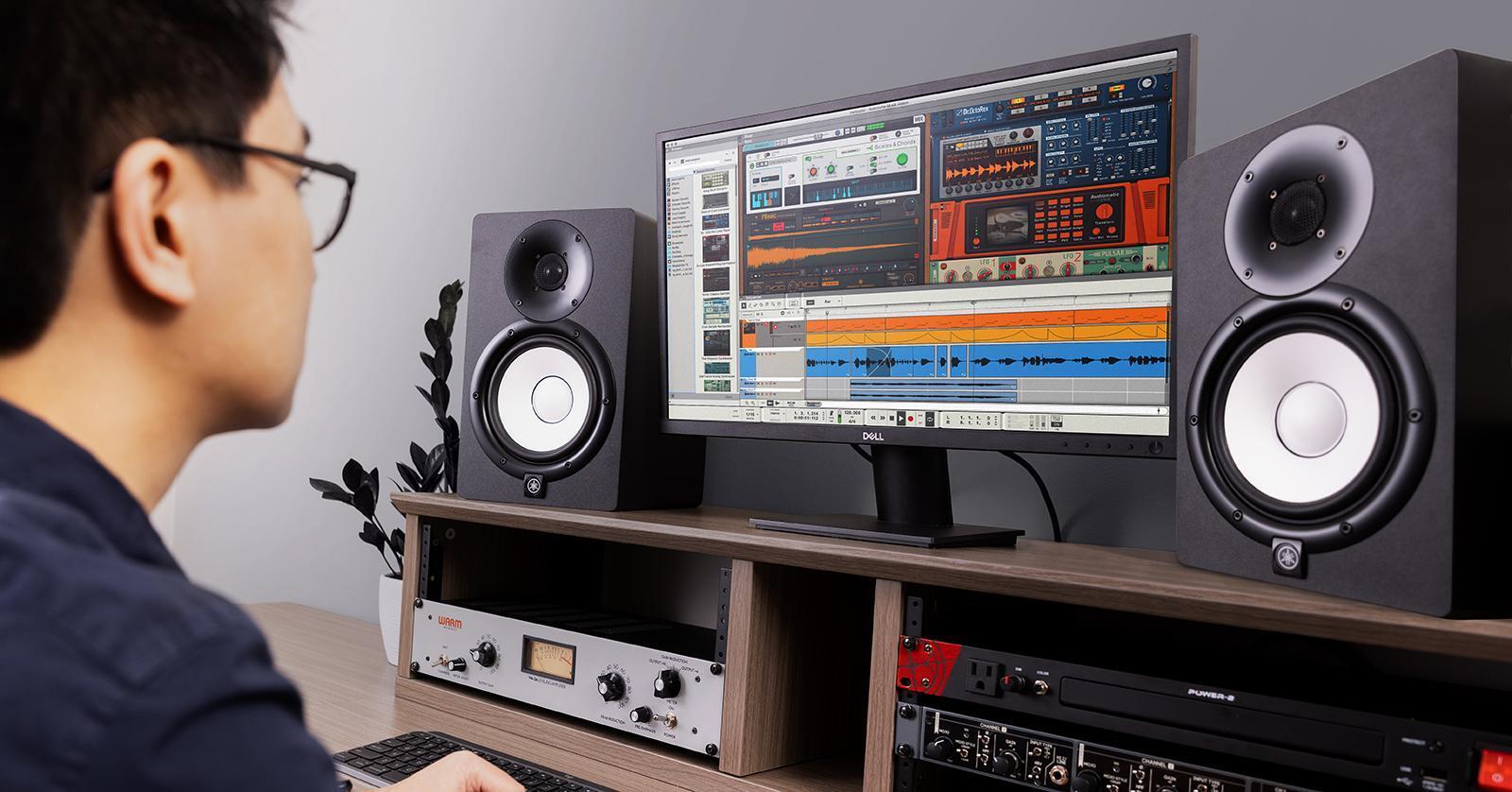
Cubase Pro 9 Review

Cubase Pro 9 is a professional music production software with advanced features and innovative tools. It provides a comprehensive solution for recording, editing, mixing, and mastering audio tracks.

With its user-friendly interface, Cubase Pro 9 is suitable for both novice and experienced users. It offers a vast library of instrument sounds and effects, making it an excellent choice for music composers, producers, and engineers. The software’s integrated plugins and virtual instruments allow users to create unique sounds and add creative effects to their tracks.

It also features a variety of remote-control options, making it easy to operate in a studio or live environment. With its powerful editing and mixing capabilities, Cubase Pro 9 is a top contender in the music production software market.

Cubase Pro 9 Review

Credit: m.youtube.com

User Experience And Interface

Cubase Pro 9 offers an intuitive user interface, making it easy for users to navigate and operate the software. The incorporation of user-friendly features results in an excellent user experience, allowing musicians to focus on their creativity.

User Experience and Interface: Cubase Pro 9 is a popular choice for audio producers and music enthusiasts, thanks to its innovative features and user-friendly interface. In this section, we’ll delve into the user experience and interface of Cubase Pro 9, exploring some of the key features that make it stand out from the crowd. Clean and Modern Design: One of the first things you’ll notice about Cubase Pro 9 is its sleek and sophisticated design. The interface is clean and minimalistic, making it easy to navigate even for first-time users. The main window is divided into several sections, each displaying a different aspect of your project. Additionally, the layout is fully customizable, allowing you to create a workspace that perfectly suits your needs. Customizable Workspace: Customizability is one of Cubase Pro 9’s biggest strengths, enabling you to tailor the interface to your specific workflow. The program comes with a range of predefined workspaces, each designed for a particular type of project, such as recording, mixing, and mastering. You can also create your own custom workspace, selecting the tools and features that you use most often. And with drag-and-drop functionality, rearranging elements of your workspace is easy and intuitive. Improved Window Handling: Cubase Pro 9 features an improved window handling system, which ensures that each window stays where it is supposed to be. This means that you’ll spend less time resizing and relocating different windows, and more time working on your project. You can also choose to display different windows across multiple display screens, making it easier to keep track of different parts of your project at once. In conclusion, the user experience and interface of Cubase Pro 9 are top-notch, providing a seamless and intuitive workflow for audio producers and music enthusiasts alike. From its clean and modern design to its customizable workspaces and improved window handling, Cubase Pro 9 is a powerful and user-friendly tool for any music project.

Features And Capabilities

Cubase Pro 9 offers advanced features and capabilities for music production, editing, and mixing. With improved user interface and enhanced audio quality, it provides a professional platform for musicians and producers to create their desired sound.

Cubase Pro 9 is state-of-the-art music production software designed for professional music production. It is well-known for its versatility, innovative features, and advanced functionalities. In this post, we will delve into the features and capabilities of Cubase Pro 9 and understand why it has become a popular software among digital music producers.

Added Plugins And Virtual Instruments

Cubase Pro 9 includes a vast library of over 90 high-quality audio plugins and virtual instruments. The library includes the Retrologue 2 virtual-analog synthesizer for fat, warm analog sounds, the Padshop granular synthesizer for glitchy textures, and the Groove Agent SE 4 drum machine to create great beats. There is also a host of other plugins ranging from EQs, compressors, and limiters to effects such as reverb, delay, and modulation. These plugins and virtual instruments offer a wealth of creative possibilities to music producers to bring their sounds to life.

Enhanced Audio Effect Plugins

Cubase Pro 9 has a range of enhanced audio effect plugins that deliver professional-grade results. The Frequency EQ plugin allows users to adjust the pitch and frequency of a sound, and there is also a dynamic EQ plugin that can adjust EQ settings based on audio input. Other plugins include a multiband expander and a spectral comparison EQ. All these audio effect plugins together make it easy to create custom effects and tailor sounds to perfection.

Advanced Mixing And Editing Tools

Cubase Pro 9 has an impressive range of editing tools to allow users to manipulate audio tracks to their liking. It includes advanced editing tools such as the unique Audio Warp Quantize which allows producers to quantize audio in real-time, the VariAudio 2.0 plugin which enables pitch adjustment for individual notes. Cubase Pro 9 has also introduced an Extended Channel Strip which has updated EQ, compressor, gate and limiter modules, adding more flexibility to the mixing process. Overall, Cubase Pro 9 is a high-quality music production software with a wide range of features to cater to all digital music producers. From its vast library of plugins and virtual instruments to its advanced effects and editing tools, Cubase Pro 9 offers a seamless workflow and is a game-changer for digital music production.

Workflow Efficiency

Cubase Pro 9 is praised for its workflow efficiency which enhances the creative process. Its user-friendly design and comprehensive yet easy to use features make it a favourite among professionals.

Cubase Pro 9 is a popular digital audio workstation that comes packed with a plethora of features and improvements. Among them, the workflow efficiency improvements stand out as they impact the ease and speed of using the software. In this article, let’s dive deep into how Cubase Pro 9 enhances workflow efficiency for audio recording, editing, and mixing.

New Track Handling Options

Cubase Pro 9 offers a revamped track handling system that promises to save time. The track list view now shows more information, including track icons, record-enabling, and monitoring states. Additionally, you can perform various track-related actions directly from the track list view, such as routing, arming, and soloing tracks. The inspector panel also saw some changes, bringing more parameters and customizability options at your fingertips. These new track handling options allow you to navigate through the project faster and adjust your settings quickly.

Improved Multi-track Editing

Editing multiple tracks simultaneously in Cubase Pro 9 has become easier. You can now group individual audio events into a larger group called a folder track, complete with its own editing options. This feature is especially useful when dealing with complex projects that require many layers of audio tracks. The folder tracks also function as a parent container for child tracks, enabling you to edit them collectively. You can quickly enable and disable editing for specific tracks, making it easier to focus on what you need when editing.

Streamlined Audio Recording Process

The audio recording process is also smoother in Cubase Pro 9, the software brings a hands-free recording experience. The new on-screen control panel allows you to start and stop recording hands-free while leaving your hands on the musical instrument. You can also assign custom shortcuts to commonly used commands, making the process quicker and more efficient. Moreover, the user interface also got a facelift that makes it easier to navigate and view your tracks, events, and markers. In conclusion, Cubase Pro 9 is a significant improvement over its predecessor, with many workflow-related enhancements that streamline your audio recording, editing, and mixing experience. The new track handling options, improved multi-track editing, and streamlined audio recording process make it easier to focus on the creative process and spending less time navigating through the software. With these improvements, Cubase Pro 9 has become a more compelling option for audio professionals.
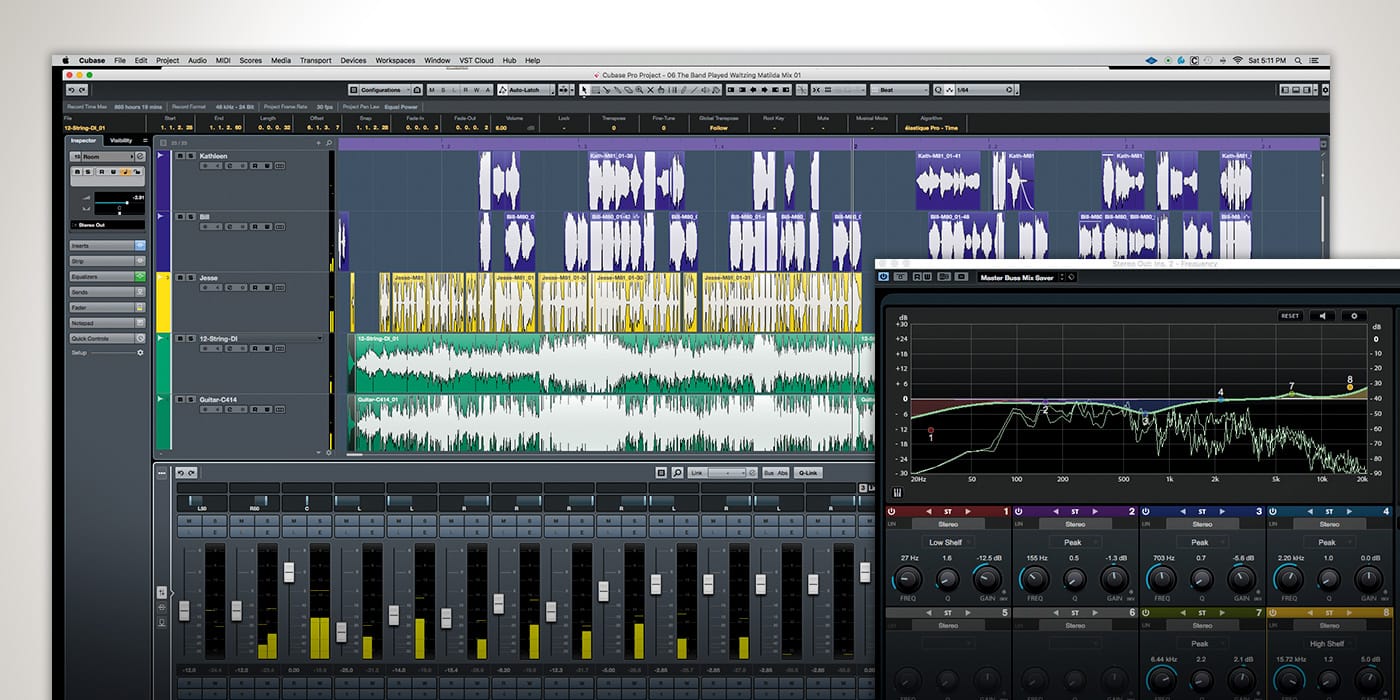
Cubase Pro 9 Review

Credit: www.recordingmag.com

Compatibility And Integration

Cubase Pro 9 boasts excellent compatibility and integration with various hardware and software systems, making it easy to collaborate with musicians and producers remotely. This powerful music production software seamlessly integrates with popular plugins and VST instruments.

Compatibility With Multiple Operating Systems

Cubase Pro 9 is highly compatible with various operating systems. Whether you’re running on Windows, Mac, or Linux, this software is designed to work seamlessly with your system without any compatibility issues. This eliminates the stress of having to worry about purchasing or upgrading your OS to ensure that your software runs smoothly. This compatibility feature allows for a smooth workflow, ensuring that you can focus more on creating and mixing, rather than worrying about system compatibility.

Integration With Various Midi Controllers

Cubase Pro 9 has an intuitive MIDI controller integration which enables the software to work effortlessly with any compatible hardware controllers. This feature ensures that your workflow remains smooth and that you have the maximum control over your music production. With this feature, you can automate almost every aspect of your production process using your preferred MIDI controller, making it a highly efficient production tool.

Collaboration And File Sharing Features

One of the standout features of Cubase Pro 9 is its collaboration and file sharing capabilities. This feature makes it easy to work on projects with multiple collaborators who can access and work on the same project in real-time, regardless of their location. This makes it possible to work with anyone, anywhere around the globe. Cubase Pro 9 also allows you to send parts of a project to other collaborators, so that they can make adjustments or edits, making it a perfect platform for creative collaboration. In conclusion, Cubase Pro 9 is a complete software that prioritizes compatibility, integration and collaboration when it comes to music production. It eliminates many of the limitations of previous versions and sets the benchmark for software compatibility. Whether you are a beginner or a professional, Cubase Pro 9 is designed to make your production process efficient and easy, ensuring that you can focus more on the creative process rather than the technicalities.

Pros And Cons

Cubase Pro 9 offers a wide range of audio editing tools and plugins. However, the software can be complicated for beginners, and the price point may not be ideal for everyone.

One important aspect of any DAW software is identifying its pros and cons before investing in it. Cubase Pro 9 is one of the prominent digital audio workstations in the market currently. It has numerous features that distinguish it from its competitors. In this section, we will provide a detailed description of the pros and cons of using Cubase Pro 9, which will help you determine if it is suitable for your music production needs:

Pros

  • Cubase Pro 9 has an extensive range of features that are user-friendly, convenient, and easy to navigate. This makes music production considerably smooth and less time-consuming.
  • It has high-end sound quality, making it a solid software for mixing and mastering soundtracks or entire albums.
  • One of the most significant perks of using Cubase Pro 9 is its flexibility in terms of customizations. Users can personalize their editing and composing with the software’s expansive features.
  • Cubase Pro 9 has excellent MIDI capabilities, recording quality, and dynamic processing that allows users to achieve exceptional results with music production.
  • The software’s efficient media features, including a variety of built-in MIDI and drum editors, render Cubase Pro 9 a worthy investment

Cons

The software, despite its strengths, also has a few downsides. Consider the following:

  • One of the significant issues users face while working with Cubase Pro 9 is its high system requirements, which may make it difficult to run smoothly on some setups.
  • Its complexity may be overwhelming to new users or beginners who may find it challenging to find their way around the software.
  • Cubase Pro 9 is a paid software, making it expensive for some users.
  • Recently, some users have reported experiencing bugs and crashes that may affect their workflow.
Summary
ProsCons
Easy to navigateHigh system requirements
High-end sound qualityMay be overwhelming to new users
Flexible customizationsExpensive
Excellent MIDI capabilitiesBugs and crashes
Efficient media features

In conclusion, Cubase Pro 9 is a popular DAW software that excels in several aspects. However, its high system requirements and complexity may make it difficult for some users, and it’s also not very affordable for everyone. Nonetheless, the software’s versatility, flexibility, and powerful features make it a feasible choice for music producers and professionals alike.
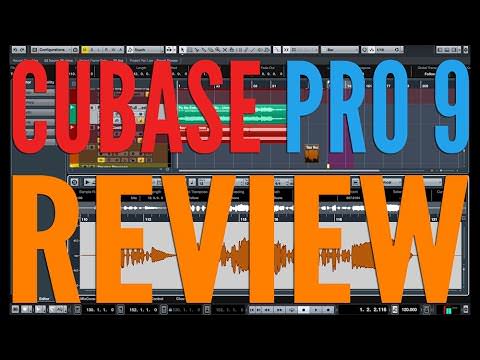
Cubase Pro 9 Review

Credit: bunker8.com

Frequently Asked Questions On Cubase Pro 9 Review

Which Version Of Cubase Is The Best?

Cubase 11 is the latest version and is considered the best by many due to its advanced features such as multiple sidechain inputs and improved workflow. However, the best version ultimately depends on personal preferences and needs.

What Are The Cons Of Cubase?

Cubase has a steep learning curve, is expensive, and requires a powerful computer. Its user interface can be overwhelming for beginners and it doesn’t offer as many third-party plugins as other DAWs. Additionally, its MIDI editing capabilities are not as advanced as some competitors.

Why Is Cubase So Expensive?

Cubase is a highly advanced digital audio workstation that provides numerous features, making it the preferred choice for professionals. The software undergoes extensive research and development, which results in its high-quality standard and exceptional functionalities hence the high price.

What Is Better Than Cubase?

It’s subjective, as it depends on user preference and needs. Some alternatives to Cubase are Ableton Live, Logic Pro, and Pro Tools.

Conclusion

After thorough research and hands-on experience with Cubase Pro 9, we can confidently say that it is a powerful tool for professional music production. Its user-friendly interface, advanced features, and high-quality sound make it stand out among its competitors. With Cubase Pro 9 in hand, music producers can easily bring their creative ideas to life.

Overall, we highly recommend Cubase Pro 9 to anyone looking for a top-notch music production software.
Categories
Archive

How To Eliminate Plosives

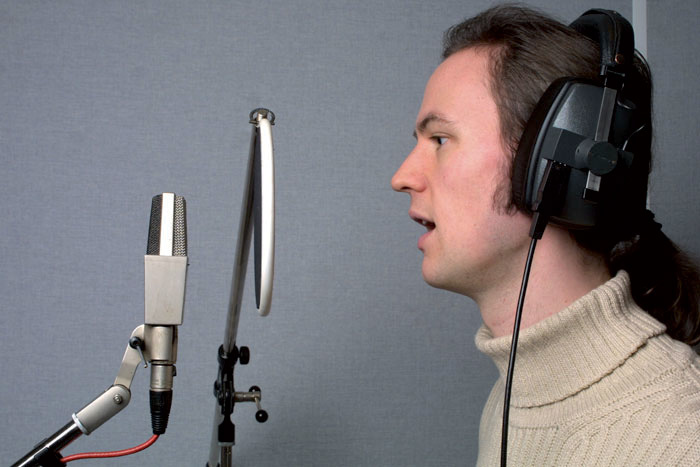
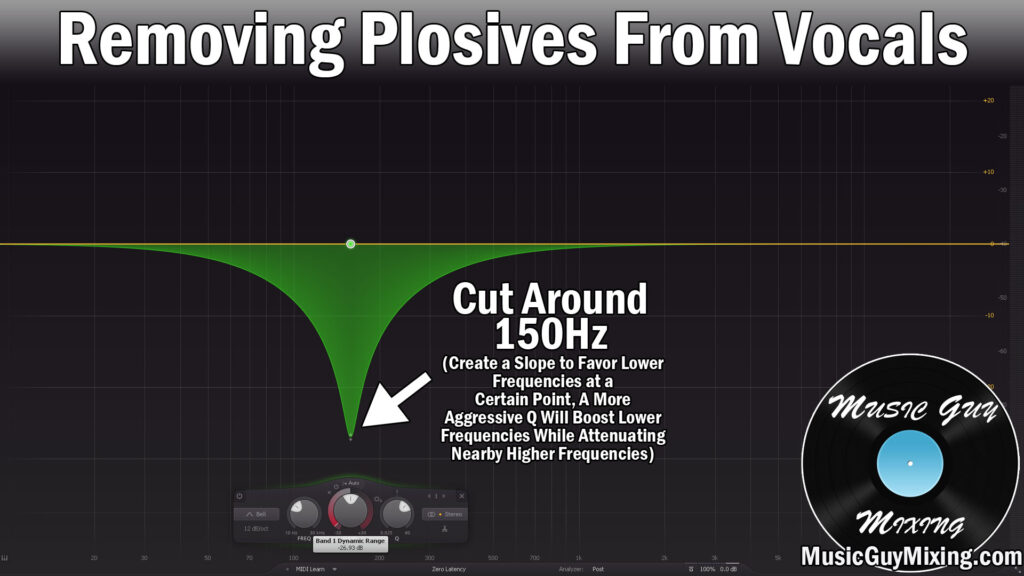
Eliminating plosives can be achieved using a pop filter or moving the microphone slightly off-axis. Plosives are explosive sounds that occur when pronouncing certain letters, like P, B and T, and can cause distortion in audio recordings.

When recording audio, one of the biggest challenges is removing plosives. These are explosive sounds that occur when pronouncing certain letters, like P, B and T. These sounds can cause unwanted distortion, making it difficult to deliver clear and professional audio.

To overcome this challenge, you will need to understand how to eliminate plosives. We will show you some effective ways to eliminate plosives and deliver clear audio recordings.

How To Eliminate Plosives

Credit: www.soundonsound.com

How To Eliminate Plosives

Credit: www.musicguymixing.com

Frequently Asked Questions For How To Eliminate Plosives

What Is The Best Way To Remove Plosives?

Use a pop filter while recording to reduce plosive sounds. Also, adjust your microphone placement, levels, and EQ settings to reduce plosives. Lastly, if necessary, you can use audio editing software to manually remove plosive sounds using equalization or spectral editing techniques.

Can You Eq Out Plosives?

Yes, you can EQ out plosives by using a high-pass filter or a de-esser to reduce the low-frequency energy caused by plosives such as “p” or “b” in vocals. But it’s important to use these tools carefully and not overuse them to avoid affecting the natural sound of the vocals.

How Do You Minimize Plosives?

To minimize plosives, speak slightly off-axis to the microphone. Use a pop filter, foam windscreen or microphone cover. Adjust the input level on your audio interface or use a compressor to reduce loud bursts. Experiment with mic placement, distance and angle to find the sweet spot.

Keep a consistent distance between you and the mic.

How Do You Speak Without Plosives?

To speak without plosives, avoid using hard consonant sounds such as “p,” “b,” and “t. ” Instead, use softer sounds like “s,” “f,” and “h. ” Practice speaking slowly and enunciating each sound carefully. Using a pop filter or speaking slightly off-center from the microphone can also help reduce plosive sounds.

Conclusion

Eliminating plosives is a crucial aspect of audio production that can make a significant impact on the quality of the final product. With the right tools and technique, anyone can achieve a smooth and professional sound. Remember to identify the source of the problem, use a pop filter or windscreen, and adjust the mic position.

Additionally, it is important to stay consistent with your microphone technique and practice proper breathing when recording. Follow these steps and say goodbye to unwanted plosives in your audio recordings. Happy recording!

Categories
Archive

Studio Monitor Placement

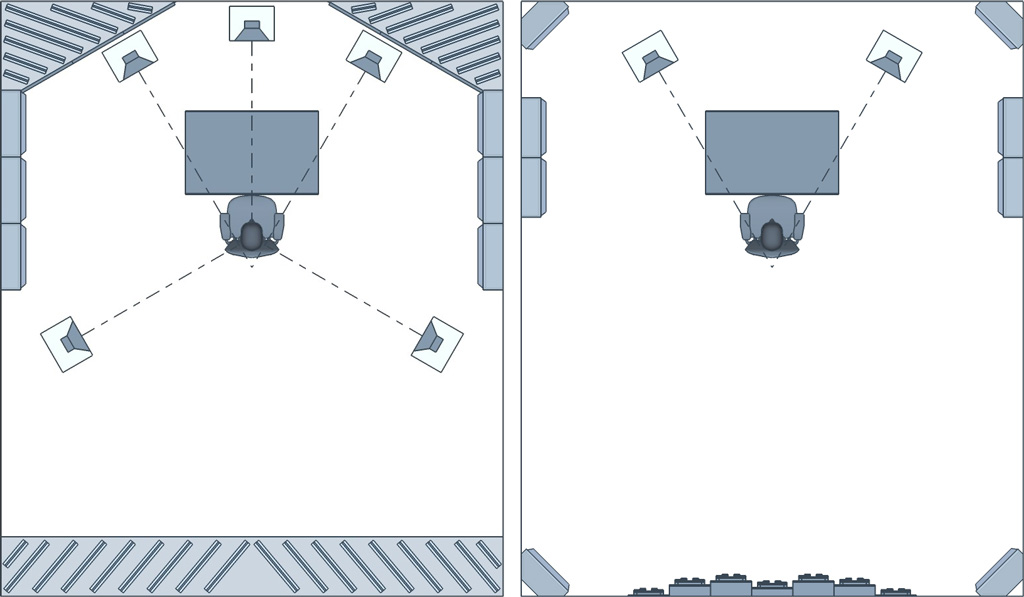
Proper studio monitor placement is crucial for achieving accurate sound reproduction. Placing the monitors at an equal distance from each other and creating an equilateral triangle with the listener are key factors to consider.

When setting up a professional recording studio or a home studio, the placement of studio monitors cannot be overlooked. Studio monitor placement plays a vital role in achieving accurate sound reproduction. It is not just about the size or quality of the speakers, but where they are placed in relation to the room and the listener.

By properly placing the studio monitors, the sound engineer or producer can hear a true representation of the audio source. This allows for better mixing decisions that can positively impact the final outcome of the recording. We will discuss the importance of proper studio monitor placement and how to achieve the best sound results.

Studio Monitor Placement

Credit: mixbutton.com

Optimizing Sound With Studio Monitor Placement

The placement of studio monitors plays a crucial role in optimizing your sound. Proper monitor positioning can affect the accuracy of the audio reproduced, reducing unwanted reflections and improving the stereo imaging. Follow some basic guidelines to position your studio monitors correctly, and you’ll be on your way to achieving a better sonic experience.

Studio Monitor Placement is critical for achieving the best results in music production and recording. Correct studio monitor placement enhances sound quality, making it easier to hear what is being recorded, while also providing a comfortable working experience for the producer. In this article, we’ll discuss finding the ideal listening position and the factors that affect monitor placement for achieving optimal sound with studio monitor placement.

Finding The Ideal Listening Position

The ideal listening position is where the producer sits when working on music production or recording. Finding the right listening position is critical because it allows the audio engineer to hear an accurate representation of the music. The position should be along the equilateral triangle, with the distance between the listener and both studio monitors being the same. Here are some ways for finding the ideal listening position:

  • Mark a point at ear height.
  • Place the studio monitors at the same distance from the point.
  • Sit at the marked point.
  • Now, adjust the distance between the monitors till they form an equilateral triangle with you.

Factors That Affect Monitor Placement

Several factors affect monitor placement, and it’s important to pay attention to all of them while positioning studio monitors. Here are the key factors that affect monitor placement:

FactorDescription
Room ReflectionsAvoid placing the monitors near hard surfaces that can reflect sound, as it will lead to time-delay and a poor listening experience.
Room SizeThe room size impacts the bass response. Ensure that the monitor placement is precise to avoid bass frequencies from building up in corners or unusually dead spots in the room.
Monitor SeparationPlacing the studio monitors too close to each other will cause overlapping of sound waves. Leave enough space between two monitors to achieve stereo separation.
Headrest ReflectionsAvoid placing the monitors facing a window or desk or any equipment that can reflect sound back towards the main listening position.

When it comes to studio monitor placement, the goal is to create a consistent and authentic sound experience for the listener. Finding the ideal listening position and considering factors such as room size, monitor separation, and room reflections ensure an optimal studio monitor placement and improves sound quality.

Best Practices For Studio Monitor Placement

Proper studio monitor placement is crucial for achieving accurate and consistent sound in your mixing and recording sessions. Consider the room dimensions, listening position, and monitor angle and height to ensure the best sound possible.

Studio monitor placement is one of the crucial steps in achieving accurate and quality sound production. In this digital age, anyone can set up a studio, but getting the best out of your monitors requires strategic placement. In this article, we will explore the best practices for studio monitor placement, addressing relevant factors such as horizontal vs. vertical placement, distance from wall, and height of monitors.

Horizontal Vs Vertical Placement

One of the first steps in studio monitor placement is to decide on the orientation – vertical or horizontal. The correct orientation depends on your studio setup and the type of work you do. For instance, if you are mixing audio, it’s best to position your monitors vertically as this mimics the traditional speaker placement in theaters. This orientation provides a clear center image and helps you judge the balance of sound in stereo signals. On the other hand, if you are working with widescreen video content, it may be best to go for horizontal positioning as it provides better imaging. But, regardless of the orientation you choose, ensure that the monitors are positioned at an angle of 60 degrees apart and directly aimed at the listening position.

Distance From Wall

The distance between the monitors and the walls is another important factor to consider when setting up studio monitors. You need to ensure that the monitors are positioned far enough away from the wall to prevent bass buildup and low-end resonance. At the same time, they shouldn’t be too far away to avoid a loss in bass response, especially if you have a small room. A good starting point is at least two feet from the wall, but you can experiment with the distance to find the best position for your studio setup.

Height Of Monitors

The height of your studio monitors is equally important. Ideally, the tweeters should be at ear level, creating an equilateral triangle with your listening position. Some suggest that you measure the distance from the tweeters to the floor and use this measurement to elevate your monitors from your workstation’s surface. However, this may vary depending on your furniture height and, of course, personal preference. To avoid ear fatigue, ensure that the monitors are not too close to your ears. The distance between your ears and the monitor should be at least three feet. This helps avoid ear fatigue and maintains clarity of sound for extended periods of listening. To avoid any unwanted coloration, try to keep a clear line of sight between the monitors and your ears. Implementing these best practices for studio monitor placement will provide the most accurate and reliable sound output. Remember, getting the best studio monitor placement will help you achieve quality audio that will enhance your audio production work.

Room Acoustics And Studio Monitors

Proper studio monitor placement is crucial to achieving optimal sound quality. Consider the distance between the monitors, the height, and angle of placement, as well as the room’s acoustics to achieve the best results.

How Room Acoustics Impact Monitor Placement

Room acoustics play a critical role in determining the quality of sound produced by studio monitors. Understanding this impact is paramount for every sound engineer who aspires to produce high-quality mix tracks. Variations in the shape, size, and surface properties of a room can interfere with the sound produced by studio monitors. With that said, it’s crucial to consider the effect of the room on monitor placement to produce accurate sound. One key consideration is the distance between the walls and studio monitors. Placing studio monitors close to walls can result in bass build-up and other distortions. On the other hand, positioning studio monitors too far away from walls can result in uneven bass distribution. These issues can be addressed by utilizing appropriate room treatment measures.

Recommended Approaches For Treating Room Acoustics

Treating room acoustics entails addressing reflections and absorptions that result from variations in room surfaces. One approach is to install sound absorbers on the walls. These absorbers can either be in the form of foam pads or bass traps, and they work by absorbing sound waves before they reflect across the room. Additionally, you can use diffusers to help distribute the reflected sound waves evenly across the room. Another approach is to use furniture and other objects in the room to disperse sound waves. For example, a bookshelf can help with absorption while also providing a surface for the sound waves to reflect from. A rug or carpet can also help to absorb sound waves while simultaneously providing a different surface for sound waves to reflect from. In conclusion, every sound engineer needs to understand the impact of room acoustics on monitor placement. Proper treatment of room acoustics will ensure that studio monitors produce high-quality sound for accurate mixing and mastering.

Studio Monitor Placement

Credit: www.sweetwater.com

Placement For Different Studio Environments

When it comes to setting up a studio, a major factor to consider is the placement of studio monitors. It’s crucial to place the monitors correctly to ensure that you’re getting an accurate sound from your recorded tracks. In this article, we will focus on the subheading: Placement for Different Studio Environments. Depending on whether you’re setting up a home studio or a large professional studio, the monitor placement can vary.

Home Studios

Setting up a home studio is a great way to get started with music production. However, it’s important to remember that most home studios have limited space. This means that you will have to work with what you have, and be creative with your monitor placement. Here are some tips for placing your studio monitors in a home studio:

  • Place the monitors at ear level, forming an equilateral triangle with your head at the apex
  • Keep the monitors at least 1-2 feet away from any walls to avoid unwanted reflections
  • If you have limited space, consider getting wall mounts to save on desk space
  • Make sure to angle the monitors to face your listening position

Large Professional Studios

If you’re lucky enough to have a large professional studio space, monitor placement won’t be as much of an issue. However, it’s still important to place your monitors correctly to ensure the best possible sound. Here are some tips for placing your studio monitors in a large professional studio:

  1. Place the monitors at a distance from your listening position that is 1.5 times the distance between your monitors
  2. Try to place the listening position and the monitors one-third of the length of the room to avoid standing waves
  3. Keep the monitors at least 3 feet away from any walls to avoid unwanted reflections
  4. Consider investing in acoustic treatment to improve the sound quality in the room

Tools And Technology

Proper studio monitor placement is crucial in achieving the best sound quality. Using tools such as monitor pads and stands and positioning them at ear level can optimize sound accuracy, making a big difference in your audio production.

Optimizing your studio monitor placement is crucial for achieving accurate sound reproduction. Fortunately, there are tools and technology available to help you achieve the best possible placement for your studio monitors. This section will cover using software to optimize monitor placement as well as recommended resources for further research.

Using Software To Optimize Monitor Placement

There are various software options available that can assist with optimizing your studio monitor placement. Using software can help you determine the best location for your monitors in relation to your listening position and room dimensions. A few popular software options include:

  • Room EQ Wizard: A free, open-source software that helps you analyze and optimize your room acoustics.
  • Sonarworks Reference 4: A paid software that uses DSP correction to calibrate your studio monitors to your specific room.
  • Dirac Live: Another paid software that uses room correction technology to optimize the sound of your studio monitors in your specific room.

Using software to optimize your monitor placement can help you achieve a more accurate and balanced sound, ultimately leading to better mixes.

Recommended Resources For Further Research

If you’re looking to further your knowledge on studio monitor placement, there are plenty of resources available. Here are a few recommended resources:

  • Sound on Sound: A popular music production magazine that covers a range of topics, including studio monitor placement.
  • Genelec: A leader in professional studio monitor technology, offering resources and articles on monitor placement and room acoustics.
  • AES: The Audio Engineering Society offers articles and papers on a variety of audio-related topics, including monitor placement.

By researching and understanding best practices for studio monitor placement, you can ensure that you’re getting the most out of your equipment and producing high-quality mixes.

Maintenance And Care Of Studio Monitors

Studio monitors are an essential tool for artists, producers, and engineers to create high-quality music productions. However, they require regular maintenance to ensure their optimal performance. Regular care of your studio monitors can significantly increase their lifespan and improve sound quality. In this article, we will discuss the importance of regular maintenance and cleaning of studio monitors.

Cleaning Monitors

Cleaning studio monitors is an essential part of their maintenance. Dust, dirt, and other debris can get inside the cones, affecting the sound quality. Here are some tips to clean the studio monitors:

  • Use a soft-bristled brush: A soft-bristled brush can be used to clean the dust and other debris that might otherwise settle on the cones, affecting the sound quality.
  • Use a soft, dry cloth: Wipe the surface of the monitors with a dry, soft cloth to remove the dust and fingerprints. Avoid using any cleaning solutions that could damage the monitor’s surface.
  • Keep monitors free from moisture: Keep your monitors in a dry place to prevent moisture damage that might affect the speaker’s voice coil, magnetic structure, and other driver components.

The Importance Of Regular Maintenance

Maintenance of studio monitors is essential to ensure optimal sound performance. Regular inspection of cones, speaker cabinets, and connectors can help prevent issues. To avoid replacing a monitor that could have been preserved, ensure regular maintenance. Regular maintenance helps to avoid problems that can contribute to a shortened lifespan.

Studio Monitor Placement

Credit: arqen.com

Frequently Asked Questions For Studio Monitor Placement

Where Should You Position Studio Monitors?

Position studio monitors at an equal distance from each other and at ear level with the listener’s head forming an equilateral triangle with the speakers. Place them away from any walls, and use acoustic treatment to minimize reflections. Also, use the same surface for both speakers.

What Is The 38% Rule?

The 38% rule is a guideline used in real estate to determine the maximum amount someone should spend on housing. This rule suggests that a person should spend no more than 38% of their gross income on housing costs, such as rent or mortgage payments, property taxes, and homeowners insurance.

How High Up Should Studio Monitors Be?

The ideal height for studio monitors is at ear level when seated in your listening position. This helps in achieving clear sound without any distortion. It’s important to also position them at an equal distance from each other and from the listener, forming an equilateral triangle.

Should Studio Monitors Be At Ear Level?

Yes, studio monitors should be placed at ear level to ensure accurate sound reproduction. This ensures that the sound waves hit your ears directly, reducing the impact of room acoustics or other factors that can alter the sound. This allows for a more precise mix and better overall sound quality.

Conclusion

Proper studio monitor placement is a crucial factor in producing a great audio experience. It should not be overlooked as it can greatly affect the overall quality of the recording or playback. Correctly positioning your monitors can help you hear all the nuances of your music and make informed decisions on adjustments.

Follow the above guidelines, and your studio monitor placement will undoubtedly enhance your audio experience.

Categories
Archive

Peak Vs Rms Compression

Peak compression targets peak levels, and RMS compression targets average levels in audio signals. Choosing between peak and RMS compression depends on the ultimate goal and desired effect in the audio.

Compression is a fundamental tool in audio processing that helps with leveling of loud and soft sounds, and enhances the overall sound quality and loudness. Peak and RMS compression are two different types of compressors that audio engineers use when processing audio signals.

Peak compression targets the peak levels in an audio signal, while RMS compression targets the average levels. The difference lies in how they respond to the audio signal, and the effects they produce. The choice of which compression type to use depends on the nature of the audio and the intended effect. This article provides an in-depth look at peak vs. RMS compression, their pros and cons, and when to use them.

Peak Vs Rms Compression

Credit: m.youtube.com

Understanding Peak Compression

Peak compression is different from RMS compression in terms of how they measure audio signal levels. RMS compression takes into account the average signal level, while peak compression measures the highest signal level. Understanding the difference is crucial for audio engineers in achieving the desired sound.

Understanding Peak Compression When it comes to audio mixing and mastering, compression is a crucial tool for achieving a polished and professional sound. However, there are different types of compression, each with its own unique characteristics and applications. One of these is peak compression, which is a type of dynamics processing commonly used to control the loudest peaks in a track. In this section, we will explore peak compression: what it is, how it works, and some techniques for using it effectively. What is Peak Compression? Peak compression is a type of audio compression that specifically targets the loudest parts of a track. Unlike RMS compression, which compresses based on the average level of the signal, peak compression only compresses when the signal exceeds a certain threshold level. This threshold is typically set to correspond to the maximum peak level of the signal. Peak compression is useful for preventing distortion and for controlling the dynamic range of a track. By reducing the level of the loudest peaks, it allows the overall level of the track to be raised without clipping. It can also help make a track sound more consistent and controlled by reducing the difference between the loudest and softest parts. Peak Compression Techniques There are several techniques for using peak compression effectively: 1. Setting the threshold: The threshold determines when the compression kicks in. For peak compression, it should be set to just above the highest level of the audio signal. This ensures that only the loudest peaks are being compressed. 2. Adjusting the ratio: The ratio determines how much gain reduction is applied when the signal exceeds the threshold. For peak compression, a low ratio of around 2:1 or 3:1 is typically used. This provides subtle compression that still allows some dynamic range. 3. Using a fast attack time: The attack time determines how quickly the compressor starts to compress the signal after it exceeds the threshold. For peak compression, a fast attack time is usually best to catch the transient peaks. 4. Adjusting the release time: The release time determines how quickly the compressor stops compressing the signal after it falls below the threshold. For peak compression, a relatively fast release time is often used to prevent pumping or distortion. Conclusion Peak compression is a powerful tool for controlling the loudest peaks in an audio signal. By reducing the level of these peaks, it can help prevent distortion and allow the overall level of a track to be increased without clipping. However, it is important to use peak compression in moderation and in conjunction with other types of compression to achieve a balanced and natural sound. With the right techniques and settings, it can be a valuable asset in any audio engineer’s toolkit.

Peak Vs Rms Compression

Credit: www.pianoforproducers.com

Understanding Rms Compression

RMS compression deals with managing the level of audio signals to achieve a consistent sound output. While peak compression adjusts only the loudest peaks, RMS compression analyzes the overall level of an audio signal and adjusts accordingly, making it an effective tool for mastering audio tracks.

Understanding RMS Compression Compression is one of the most important tools in audio production, whether you are a musician, producer, or sound engineer. It is the process of reducing the dynamic range of an audio signal, making the quiet parts louder and the loud parts quieter. Peak and RMS are the two most commonly used compression techniques. Peak compression acts on the loudest peaks of an audio signal, while RMS compression acts on the overall level of the signal. In this section, we will focus on RMS compression techniques, starting with the question: What is RMS Compression? What is RMS Compression? RMS stands for Root Mean Square, which is a mathematical method used to calculate the average volume of an audio signal. Unlike peak compression, which only reacts to the loudest parts of a signal, RMS compression measures the overall level of an audio signal. It works by setting a threshold that the audio signal must exceed before compression is applied. As an audio signal crosses the threshold, the compressor reduces the overall volume of the signal. RMS Compression Techniques There are several techniques for applying RMS compression, including: 1. Ratio – This determines how much compression is applied to the signal. For example, a ratio of 2:1 means that for every 2 dB the signal exceeds the threshold, the compressor will only allow 1 dB through. 2. Attack and Release – These control how quickly the compressor kicks in and how quickly it releases the signal, respectively. A slower attack time allows some of the transients through, whereas a faster attack time reduces the initial impact of the signal. 3. Knee – This determines how smoothly the compressor starts to reduce the volume of the signal as it approaches the threshold. A hard knee applies compression immediately, while a soft knee gradually increases the compression. 4. Makeup Gain – This restores the overall level of the signal after compression to ensure that it matches the original level. In conclusion, RMS compression is a powerful tool for controlling the dynamic range of an audio signal. With the right settings, it can help bring out the best in your recordings and ensure that they stand out in a crowded market. By understanding the various techniques involved in RMS compression, you can achieve a more polished and professional sound for your music or audio productions.

Differences Between Peak And Rms Compression

Peak and RMS compression are two types of audio compression used in music production. Peak compression reduces the loudest parts of the audio signal, while RMS compression reduces the average level of the audio signal. Each type of compression has its own unique benefits and drawbacks.

Peak Vs Rms In Terms Of Loudness

In audio processing, compression is used to reduce the dynamic range of a track and bring the quietest parts closer in volume to the loudest parts. Peak and RMS compression are two types of compression used in audio engineering. Peak compression works by reducing the dynamic range based on the highest peak level of the audio signal, while RMS compression takes an average of the audio signal over a period of time and compresses it based on that average. Peak compression is ideal for reducing sudden, loud peaks that can cause distortion. RMS compression, on the other hand, is better for controlling the overall loudness of a track. This is because it looks at the overall sound, rather than just the loudest parts. As a result, RMS compression tends to create a more consistent sound, especially in music with a lot of dynamic range.

Peak Vs Rms In Terms Of Dynamic Range

Dynamic range refers to the difference between the quietest and loudest parts of a track. Peak compression tends to reduce dynamic range more heavily than RMS compression because it focuses on the highest peak levels. Although reducing dynamic range may help make a track sound more consistent, doing so can also remove some of the natural dynamics that give a track its character. RMS compression works better for maintaining the natural dynamics of a track. This is because it considers the audio signal over a longer period of time, rather than just the loudest parts. As a result, it can be used to create a more balanced sound that still retains the dynamics of the original recording. In conclusion, both peak and RMS compression have their uses depending on the desired result. Peak compression is ideal for controlling sudden, loud peaks, while RMS compression is better for overall loudness control and maintaining the natural dynamics of a track. As an audio engineer, it is important to understand the differences between the two and choose the appropriate method for each situation.

Peak Vs Rms Compression

Credit: www.mixinglessons.com

When To Use Peak Compression

Peak and RMS compression are two different techniques that a sound engineer can use to compress audio. Peak compression works by reducing the peaks in audio signals, while RMS compression reduces the overall level of the audio. When it comes to deciding when to use peak compression, there are a few things to consider.

Music Genres That Benefit From Peak Compression

Some music genres benefit more from peak compression than others. For instance, genres like rock, metal, and pop rely heavily on dynamic sound, which means that the difference between the softest and loudest part of a song should be noticeable. Using peak compression in these genres can help emphasize the impact of musical hits and make the sound more exciting.

Pros And Cons Of Using Peak Compression

Like any audio technique, peak compression has its pros and cons. Here are a few of them:

ProsCons
Enhances the impact of musical hitsCan cause distortion in some audio signals
Makes the sound more exciting and dynamicCan reduce the overall level of the audio
Helps to emphasize instrumental solos and vocalsCan negatively affect the tone and mood of a track
  • Remember that peak compression is not suitable for all audio material.
  • It is best to use it in moderation and only when necessary.
  • If you want your audio to sound more natural, you may want to avoid peak compression altogether.

Music Production Tips

As with any mixing technique, it is crucial to experiment with peak compression and see how it affects the overall sound. Work with the mix and make sure it complements the style of music you are working on.

  1. Consider the genre of music you are working on and evaluate whether peak compression will enhance or detract from its sound.
  2. Use peak compression sparingly, testing different levels of compression and observing how they affect the mix.
  3. Work carefully with threshold and ratio settings, as these controls affect how much compression is applied to the audio.
  4. Avoid excessive use of peak compression, as it can lead to audio distortion and negatively impact the sound quality.

When To Use Rms Compression

RMS compression should be used if you want to control the overall volume of a sound with less distortion, while peak compression is better if you need to maintain the dynamic range of the sound. Understanding when to use each type of compression can greatly improve the quality of your audio production.

RMS Compression is a technique used in audio mastering to control the dynamics of a mix. It measures the average level of the audio signal and reduces the volume according to that level. While Peak Compression focuses on the loudest parts of the audio signal, RMS Compression is more subtle, making it a popular choice for genres that require more dynamic range.

Music Genres That Benefit From Rms Compression

RMS Compression is ideal for certain music genres such as jazz, classical, and acoustic. These genres have a lot of dynamic range, which can make it challenging to balance the levels of the different instruments in a mix. RMS Compression helps keep the overall level of the mix consistent, making it easier to hear each instrument and prevent any single instrument from overpowering the others.

Pros And Cons Of Using Rms Compression

There are several advantages to using RMS Compression. For one, it can help keep the overall volume of a mix consistent, which can make it more enjoyable to listen to. Additionally, it can help improve the clarity of the different instruments in a mix by preventing any single instrument from overpowering the others. However, there are also a few downsides to using RMS Compression. For one, it can be time-consuming to set up, especially if you are new to the technique. Additionally, if you overuse RMS Compression, it can cause the mix to sound squashed and lose its natural dynamics. Like any tool, it’s important to use it judiciously and with care.

Choosing The Right Type Of Compression For Your Needs

Peak and RMS are two types of compression commonly used in audio production. Peak compression reduces the level of transient peaks, while RMS compression reduces the overall level of a signal to make it sound louder. Each type has its own purpose and can be chosen based on the specific needs of the project.

When it comes to audio production, compression is an essential tool that can help shape and control the dynamic range of your sounds. With so many different types and settings available, it can be challenging to know which one to use, especially when it comes to the debate between peak and RMS compression. In this article, we’ll explore these two types of compression, the factors to consider when choosing between them, and some tips for using compression effectively.

Factors To Consider When Choosing Between Peak And Rms Compression

Dynamic Range: Peak compression is ideal when you need to reduce sudden spikes in volume, such as on percussive hits or other loud sounds. RMS compression, on the other hand, is better suited for controlling more consistent volume levels, such as on vocal or guitar tracks. Attack and Release Times: The settings you choose for the attack and release times will have a significant impact on the way the compression affects your audio. With peak compression, you’ll want to use fast attack and release times to catch the spikes quickly. With RMS compression, you’ll typically use slower attack and release times to smooth out the sound more gradually. Transients: If you need to preserve the transients in your audio, such as on drum tracks or other percussion elements, then peak compression will be the better choice. If you’re working with more sustained sounds, such as pads or strings, then RMS compression can work well. Tonal Balance: Keep in mind that compression can affect the tonal balance of your sound, making it brighter or more subdued depending on your settings. With peak compression, you might notice a more upfront and aggressive sound, while RMS compression can result in a smoother and warmer sound.

Tips For Using Compression Effectively

  • Start with a low ratio and work your way up. It’s always better to have too little compression than too much.
  • Use your ears to guide your compression settings. Don’t rely too heavily on visual indicators or technical specs.
  • Try using compression in parallel to maintain the natural dynamics of your audio while still getting the benefits of compression.
  • Experiment with different settings and types of compression to see what works best for your specific sound.
  • Consider using multiple stages of compression on complex sounds to gain more control over the dynamics.

Whether you need to tame harsh transients or smooth out inconsistent levels, understanding the differences between peak and RMS compression can help you make informed decisions when it comes to your audio production. With these tips and factors in mind, you’ll be able to choose the right type of compression and use it effectively to shape your sounds in all the right ways.

Frequently Asked Questions Of Peak Vs Rms Compression

What Is The Difference Between Peak And Rms?

Peak refers to the highest point of a signal’s waveform, while RMS is the root mean square of the signal’s voltage. Peak measures the maximum amplitude of a signal, while RMS measures the effective voltage of a signal over time.

What Is The Difference Between Rms And Peak Limiter?

An RMS limiter reduces the average level of audio while a peak limiter limits the highest level. Unlike a peak limiter, an RMS limiter can make the overall sound louder. A peak limiter is more suited for loud and percussive audio while an RMS limiter is better for speech and vocals.

What Does Rms Stand For Compressor?

RMS stands for root mean square in compressor. It is the peak level of the compressor’s output signal that is averaged over a specific period of time. RMS is used to measure the compressor’s output power and is often a more accurate indicator of a compressor’s loudness compared to measuring its peak level alone.

What Is Rms Size In Compression?

RMS size, also known as Root Mean Square, refers to the measurement of the average energy contained in an audio signal. It is a statistical calculation that gives an accurate representation of the amplitude of a signal and is commonly used in audio compression to ensure balanced and consistent output levels.

Conclusion

Overall, understanding the difference between peak and RMS compression is crucial to achieving high-quality audio production. While peak compression is great for controlling sudden loud sounds, RMS compression is ideal for RMS levels. It’s important to consider the music genre and mix when choosing between them.

By using the correct type of compression, you can make sure the final mix is polished, dynamic, and professional. Keep in mind that both methods can be adjusted and combined to achieve the desired result, and always trust your ears during the production process.

Categories
Archive

Bass Guitar Eq

Bass guitar EQ allows you to adjust the frequency response of your bass guitar to improve its sound quality. EQ settings can enhance specific frequencies and create a unique sound for your bass guitar.

As a bassist, you want your instrument to sound its best, and EQ settings can help you do just that. EQ, short for equalization, is the process of modifying the frequency response of your bass guitar to create a better balance of sound.

By adjusting the EQ settings, you can emphasize or reduce certain frequencies and create a unique sound that suits your style. EQ can also help you cut through the mix when playing with a band, allowing your bass to be heard clearly. Knowing how to properly use bass guitar EQ is an essential skill for any bassist looking to improve their sound.

Bass Guitar Eq

Credit: www.reddit.com

Understanding Bass Guitar Eq

Bass guitar EQ is the process of adjusting the frequencies produced by the bass guitar to achieve the desired sound. Understanding the principles of EQ can help bass players create a balanced, clear and powerful tone that complements the music they are playing.

Eq stands for equalization, which is an essential tool for guitar players looking to refine their tone. It is particularly important for bass players because the lowest octave of the bass guitar’s frequency range has a profound impact on the overall sound. Eq helps to control the sound of your bass guitar, and this article will help you understand the basics of bass guitar Eq.

Frequency Range

Before we dive into Eq, it is essential to understand the frequency range of a bass guitar. The frequency range of a bass guitar is 41 Hz to 987 Hz. The lowest frequency, 41 Hz, is the open E string on a four-string bass guitar. The highest frequency, 987 Hz, is approximately four octaves above middle C. Understanding the frequency range of a bass guitar will help you focus on how you can use Eq to shape the sound of your bass.

Different Types Of Filters

There are several types of filters that you can use in bass guitar Eq, including high-pass filters, low-pass filters, and band-pass filters. High-pass filters allow only frequencies above a certain point to pass through, while low-pass filters only allow frequencies below a specific point to pass through. A band-pass filter only allows a specific range of frequencies to pass through. Using filters in Eq allows you to eliminate unwanted frequencies or enhance desired frequencies in your tone. By using different types of filters in Eq, you can further customize the sound of your bass guitar.

Conclusion

In conclusion, understanding bass guitar Eq is essential for creating a refined, customized tone. By understanding the frequency range of your bass guitar and the different types of filters, you can begin using Eq to shape your sound. With practice, you can refine your tone, and create a unique sound that stands out in any musical genre.

Bass Guitar Eq

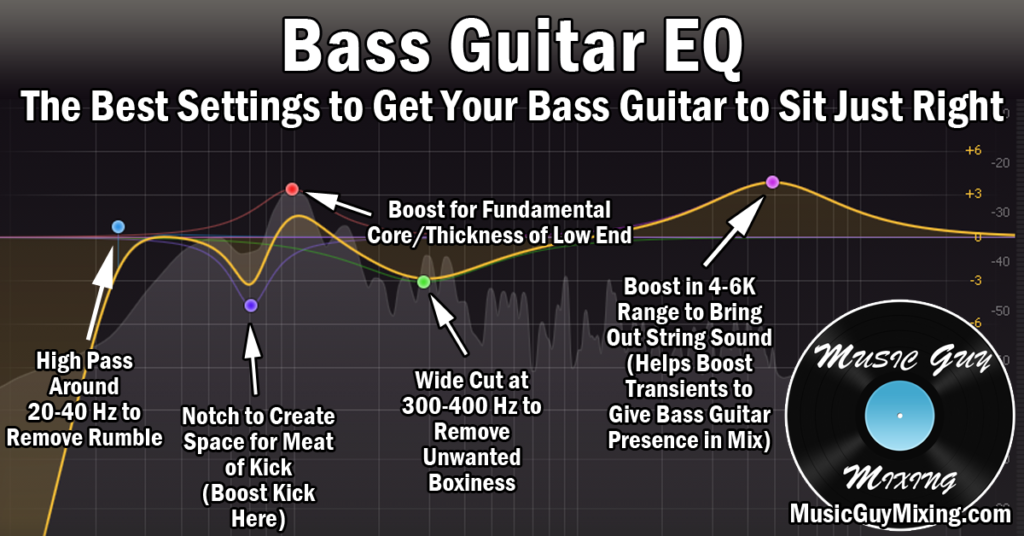
Credit: www.musicguymixing.com

Adjusting Bass Guitar Eq

Adjusting bass guitar EQ can significantly enhance the sound of your instrument. By properly adjusting the EQ settings, you can emphasize or reduce specific frequencies to achieve a balanced and pleasing sound.

Adjusting Bass Guitar Eq is a crucial task for every bassist because it can greatly improve the sound quality of your bass guitar. Two important processes in bass guitar Eq are cutting and boosting frequencies and balancing frequencies. Cutting and Boosting Frequencies Cutting frequencies means reducing or eliminating certain frequencies that are unpleasant to the ear. Some frequencies can create harsh or muddy sounds in your bass guitar. Cutting these frequencies can make your bass sound clearer. One way to cut frequencies is by using a high-pass filter that removes low-frequency sounds that are not necessary for your bass guitar. Boosting frequencies means increasing certain frequencies that can enhance the sound quality of your bass guitar. Boosting frequencies can make your bass guitar sound more aggressive, punchy, or warm, depending on the frequencies that you boost. You can boost frequencies such as the low-end, mid-range, or high-end sounds to suit your playing style and musical genre. Balancing Frequencies Balancing frequencies is all about finding a sweet spot where your bass guitar sounds well-balanced. This process requires careful listening and experimentation to ensure that all the frequencies are in their proper levels. Balancing frequencies involves setting the right volume for each frequency range without overemphasizing any particular range. Using Dynamic Eq Dynamic Eq is a powerful tool that allows you to control the balance and level of your bass guitar’s frequencies. Unlike traditional Eq, which applies a fixed correction to all frequencies, Dynamic Eq adjusts the Eq settings according to the dynamic range of each frequency. This ensures that each frequency range receives the right amount of Eq boost or cut, depending on the volume and intensity of each note. In conclusion, understanding the process of adjusting Bass Guitar Eq is essential for every bassist. The above-discussed processes like cutting and boosting frequencies, balancing frequencies, and using Dynamic Eq all play a vital role in achieving the desired sound quality of your bass guitar.

Common Eq Settings For Bass Guitar

Achieving a balanced mix is crucial for bass guitar EQ, and there are some common settings to consider. Boosting the low frequencies will add warmth, while cutting the highs can reduce harshness. Compressing the signal can also help to even out the overall sound.

If you’re a bassist, you know that one of the keys to getting a great sound is EQ. Equalization, or EQ, involves adjusting specific frequency bands in your bass signal to achieve the best tonal balance. There is no one-size-fits-all rule for EQ settings for bass guitar, but there are some common approaches to keep in mind.

Slap Bass

Slap bass is a popular technique used in funk, rock, and other genres. To achieve a good slap bass sound, boosting the midrange frequencies can help bring out the percussive sound of the strings. Try boosting the frequencies around 500 Hz to 700 Hz. However, excessive boosting in this range might lead to harshness or unwanted feedback.

Fingerstyle Bass

Fingerstyle bass relies more on the attack and character of the player’s fingers, as opposed to slapping or picking. For fingerstyle bass, a gentle boost to the treble range can enhance the clarity and articulation of the notes. A boost of 2-3 dB around 1.5 kHz to 2.5 kHz can be an excellent starting point. You might also want to try cutting some of the low frequencies below 100 Hz to get a cleaner sound.

Picked Bass

For a picked bass sound, it’s important to strike a balance between the attack and warmth of the bass tone. Try adding a modest boost to the low-mid frequencies around 200 Hz to 400 Hz. This range can help bring out the fundamental tone of the instrument while retaining some warmth. A slight cut in the 800 Hz to 1 kHz range can help prevent the sound from getting too honky or nasal. In conclusion, the EQ settings for bass guitar depend on various factors like genre, playing style, room acoustics, and personal preferences. Experiment with different EQ settings to find the sweet spot that works best for you. Remember to make small adjustments and listen carefully to the changes in tone. With the right EQ settings, you can enhance the sound and impact of your bass playing.

Using Eq With Amp Simulators

One of the most significant advantages of having an amp simulator is the ability to access different tones easily. Eq or equalization, on the other hand, allows you to fine-tune your sound by adjusting the frequency response. Amp simulators have the capabilities of modifying the tone, just like an actual amplifier. The difference is, with an amp simulator, you can record and modify your guitar track as many times as you want until you achieve the desired tone. But, just as you would with an amp, you must learn how to use EQ with an amp simulator properly to refine your sound.

Matching Tones With Amp Simulators

Match the tonal qualities of a specific track or song by comparing it with the presets available in the amp simulator. Doing this will get you fairly close to the desired tone. Afterward, adjust the amp simulator’s controls and add or remove EQ according to your preference until you get a tone that sounds similar to the original track.

Using Eq Before Or After Amp Simulation

When using eq with the amp simulator, you can choose to either add EQ before or after the amp simulation. The choice is highly dependent on your personal preference. However, if you aim to produce a specific sound, the techniques vary. If you are going for a classic tone, adding EQ before Simulator has a better outcome. However, if you want a synth-like effect, add EQ after the simulator.

Eq adds an extra layer of detail to your guitar tone. Furthermore, amp simulators allow you to modify and refine your sound until you are satisfied with the result. When using eq with an amp simulator, always choose the frequency range to adjust according to the desired outcome.

Before SimulationAfter Simulation
Frequency Matching for Classic ToneSynth-like Effect
Balancing Frequencies For A More Natural SoundAdjusting To Get The Desired Sound On Top Of The Simulator’s Tone
  • Match the tonal qualities first with the presets
  • Adjust the Simulator’s Controls according to preference
  • Choose to add Eq before or after the amp simulation
  • Frequency Range to adjust according to the desired outcome
  • Before simulation – Frequency matching for classic tone
  • After simulation – Synth-like effect
  • Before simulation- Balancing frequencies for a more natural sound
  • After simulation- adjusting to get the desired sound on top of the Simulator’s tone

In conclusion, using eq with an amp simulator is an excellent way to modify and refine your sound. By following the techniques provided, you will be able to achieve the desired tone quickly and efficiently. Time spent using different methods until you discover the perfect fit for your music style is well worth it.

Bass Guitar Eq

Credit: www.reddit.com

Frequently Asked Questions For Bass Guitar Eq

What Is The Best Eq Setting For Bass Guitar?

For bass guitar, the best EQ setting depends on the individual player’s preference, the type of bass, pick-ups, and the genre of music played. However, a popular starting point is to boost frequencies between 80 Hz and 120 Hz for a fuller sound, and cut frequencies between 400 Hz and 800 Hz to remove any mud.

Experiment with different settings until you find what works best for you.

What Are The Bass Frequencies On An Eq?

Bass frequencies on an EQ refer to the lower range of frequencies that can be adjusted on an equalizer. These are typically between 20 and 250 Hz and can be boosted or cut to achieve a desired sound balance.

How Do I Boost My Bass With Eq?

To boost your bass with EQ, follow these steps: 1. Start with flat EQ settings 2. Use a low shelf filter to boost the bass frequencies 3. Adjust the frequency and gain to your desired level 4. Use a high pass filter to remove unwanted low-frequency noise 5.

Test and adjust until you achieve the desired bass boost.

Do You Need To Eq Bass?

Yes, you need to EQ bass to achieve a balanced and well-mixed sound. However, the amount of EQ needed depends on the individual track and the type of music. It’s important to use EQ sparingly, as too much can result in a muddy or distorted sound.

Conclusion

Bass guitar EQ is a crucial aspect of producing great music. Understanding the different types of EQ and how they affect your sound can take your playing to the next level. EQ enables you to shape your tone, clean up muddy frequencies, and emphasize specific elements.

Using EQ correctly is a skill that can be honed with practice and experimentation. Take some time to explore the various types of EQ and discover how to use them to your advantage. Ultimately, a well EQ’d bass guitar can make all the difference in a great mix.

Categories
Archive

Audio Effects Explained

Audio effects enhance the sound quality of recorded audio. We will explain the various types of audio effects and how they affect the sound of music, movies, and other media.

Audio effects are a crucial aspect of audio production and post-production. They allow producers and engineers to manipulate recorded audio to achieve a desired sound or effect. Audio effects can include adding reverb, echo, distortion, compression, and equalization, among others.

Each effect adds its unique characteristic to the sound, and combining them can create complex and dynamic audio. The use of audio effects is prominent in the music, film, and gaming industries, where effects are often used to enhance the experience for the listener or viewer. Understanding audio effects is essential for anyone looking to create high-quality audio content.

Introduction To Audio Effects

Audio effects are essential tools for music production used to modify and shape sound. They allow producers and sound engineers to alter the tone, pitch, and frequency of a track to create unique sounds or enhance a recording. A mix of different audio effects can help to add depth and dimension to a song and make it more engaging and interesting for the listener. In this post, we’ll explain what audio effects are and why they are important in music production.

What Are Audio Effects?

Audio effects are tools and techniques used to alter the sound of an audio signal. They allow engineers and producers to manipulate the sound in various ways, such as modifying its frequency, tone, and adding different effects like reverb, delay, and distortion. Audio effects can be applied to a single track or an entire mix, changing the overall sound of the recording. They help to add creativity and uniqueness to a track and can be used to create special audio effects for TV, movies, or video games.

Why Are They Important In Music Production?

Audio effects have always played a significant role in music production. They are used to enhance the quality of a sound recording, mix and master tracks, and create unique textures and tones. Without audio effects, songs and tracks would sound flat, lifeless, and uninteresting to listeners. Audio effects help to add depth and dimension to tracks, making them more engaging and immersive. They also help to mask flaws, correct errors, and improve the overall sound quality of the recording.

Audio Effects Explained

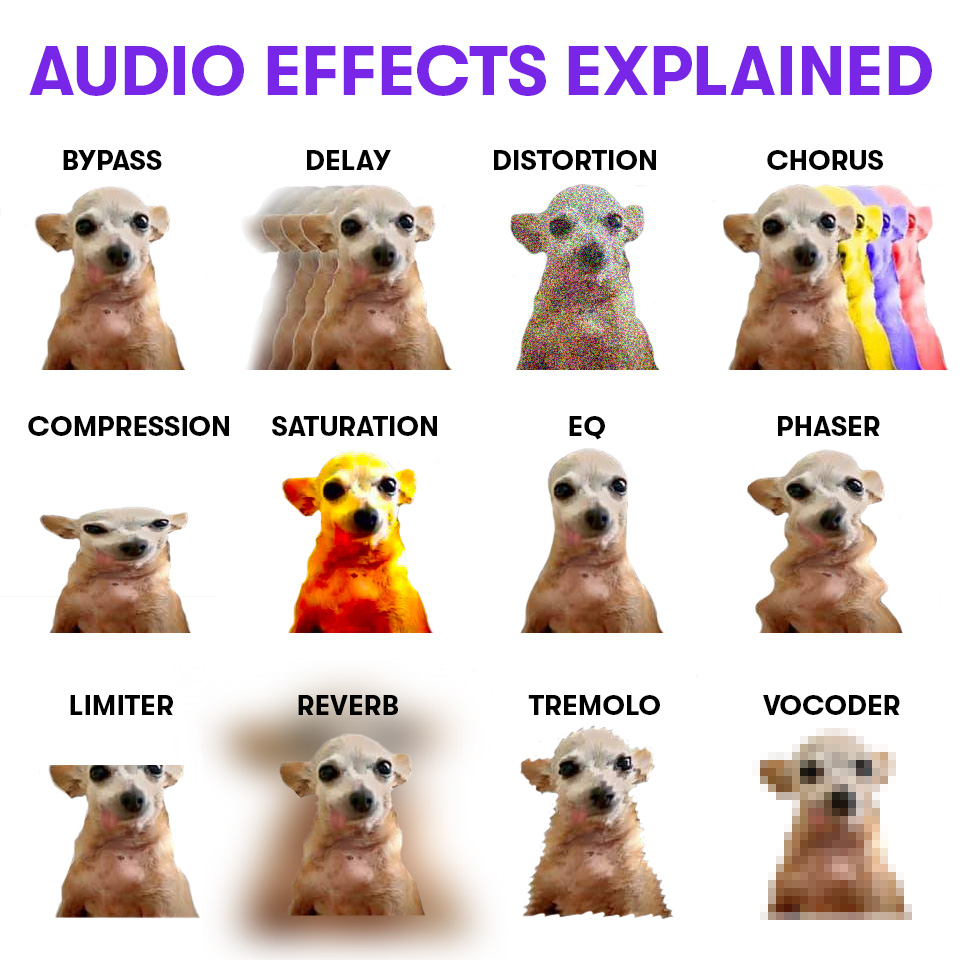
Credit: www.facebook.com

Types Of Audio Effects

Audio effects are a crucial element in music production. There are various types of audio effects, including reverb, delay, distortion, EQ, and compression. Each effect serves a specific purpose in manipulating sound to achieve the desired outcome.

Audio effects are powerful tools that help musicians and sound engineers achieve the perfect sound they are looking for. Each type of effect can transform the overall tone, texture, and space of a piece of audio. Below, we discuss several essential audio effects and their uses.

Equalization (eq)

Equalization, or EQ, is a type of audio effect that adjusts the balance of frequencies in an audio signal. By boosting or cutting specific frequency ranges, an EQ can help remove unwanted frequencies or add richness and depth to a recording. Parametric EQs provide more precise control than graphic EQs, allowing the user to adjust the center frequency and bandwidth of each band.

Reverb

Reverb is an effect that simulates the natural acoustic environment of a physical space, adding depth and dimension to a recording. There are various types of reverb, including convolution, algorithmic, and plate reverb. Each type of reverb has different characteristics that can be used creatively in different contexts.

Delay

Delay is an effect that produces echos of the original audio signal, creating a sense of space and dimension. Echoes can be repeated, changed or manipulated to create a range of effects, from a simple slapback to a trippy, psychedelic effect. Digital delays allow users to specify precise delay times and are powerful tools for creative sound design.

Compression

Compression is an effect that reduces the dynamic range of an audio signal, making loud sounds quieter and boosting softer sounds. By minimizing the difference between the loudest and softest parts of a recording, compression helps to make the audio more consistent without clipping or distorting the signal. Compression is an essential tool when recording vocalists or controlling the level of individual tracks.

Chorus

Chorus is a modulation effect that creates a thick, lush sound by duplicating an audio signal and adding subtle variations in pitch and timing. The resulting effect resembles several musicians playing the same part simultaneously and can add depth and richness to a recording. More extreme chorus effects can create a wobbly, detuned sound.

Flanger

Flanger is an effect that produces a sweeping, jet-like sound by adding a delayed version of the audio signal and varying the delay time. The result is a metallic, swooshing sound that resembles a long takeoff or landing of a plane. Flanger is often used in guitar effects and can add a unique and interesting sound to a recording.

Phaser

Phaser is an effect that produces a sweeping, swooshing sound by splitting an audio signal into two paths, delaying one path, and modulating the delay time. The delayed and modulated signal is then mixed back with the original signal, creating a “phasing” effect. Phaser adds a unique dimension to a recording, and can be used on a range of instruments. In summary, audio effects are a powerful tool for musicians, sound engineers, and amateur producers. Each type of audio effect can be used creatively to shape the sound of a recording, and understanding their uses is an essential part of producing high-quality audio.

How Audio Effects Work

Audio effects manipulate sound waves to create unique and interesting sounds. From reverb to distortion, each effect alters the frequency, amplitude, or timing of the original audio signal, resulting in a vast array of possibilities for creative expression in music production.

Audio effects are tools used by audio engineers to manipulate soundwaves in a recording. These effects can be applied during the recording phase or in post-production to enhance the audio quality. Audio effects can be used to create a range of different sounds from modulation, delay and reverb to distortion and compression. In this post, we’ll discuss how audio effects work, the role of plugins, and creating custom effects versus using presets.

Signal Processing

Signal processing is the foundation of audio effects. It involves making changes to the soundwave of the audio signal. Audio effects work by processing the incoming audio signal through a series of algorithms that alter its waveform. Signal processing involves a range of techniques like filtering, EQ, compression, and distortion. The effects can be added to the entire recording or applied to specific sections of the audio.

The Role Of Plugins

Plugins are software add-ons that can be used with audio software to add extra functionality. Many audio effects available are usually built into audio software, but with plugins, audio effects can be added that are not available by default. Plugins come in a range of different types such as modulation, time-based, and distortion, among others. They can be purchased or downloaded from the internet.

Creating Custom Effects Vs Using Presets

Creating custom audio effects can be time-consuming, but it enables you to create sounds that are unique to your needs. You can start by experimenting with different types of effects and adjust the parameters to achieve specific sounds. Additionally, you can create your audio effects library that you can use in future productions. On the other hand, using presets can save time, especially when you have a tight deadline. Most audio software comes with a variety of presets ready to use, but they are often generic and may not suit your specific needs. In conclusion, understanding how audio effects work, and the role of plugins, is essential for any audio engineer. Knowing when to use presets and creating custom effects are both valuable skills that can improve the quality of the audio produced.

Common Applications Of Audio Effects

Audio effects are an essential part of creating high-quality audio content. They can be utilized in a number of applications such as music production, film and television sound design, and podcasting soundscapes. Audio effects such as reverb, delay, compression, and EQ are just a few examples of the many tools available to enhance and transform audio recordings.

Audio effects are tools used to modify the sound of audio recordings and are essential in music production, sound design, and post-production work. Audio effects can be used for various purposes, from mixing and balancing audio to adding depth and dimension to sound, and creating specific moods and emotions in music. In this article, we will discuss the most common applications of audio effects, which include mixing and balancing audio, adding depth and dimension to sound, and creating specific moods and emotions in music.

Mixing And Balancing Audio

Mixing and balancing audio are critical aspects of the music production process. It is essential to ensure that each instrument or sound in a mix is distinguishable and clear to the listener. Audio effects such as EQ, compression, and reverb can help control and shape the sound of individual tracks in a mix, giving them their place in the mix’s overall balance. Proper mixing and balancing can make a recording sound more polished and professional, improving its chances of success.

Adding Depth And Dimension To Sound

Audio effects can add depth and dimension to sound, making it more interesting and engaging. Effects such as reverb, delay, and chorus can create a sense of space and movement, enhancing the sound’s ambiance and making it feel more alive. These effects can also be used to create unique sounds, such as a guitar with a slapback delay or a vocal track with a huge reverb tail.

Creating Specific Moods And Emotions In Music

Audio effects can play a vital role in setting the mood and emotional tone of a piece of music. Effects like EQ, compression, and distortion can make a recording sound aggressive and intense, while effects like reverb, delay, and chorus can make it sound softer and more spacious. Using audio effects creatively can help convey the intended mood or emotion of a musical piece, creating an emotional connection with the listener and enhancing the overall impact of the recording.

Using Audio Effects In Music Production

Audio effects are essential tools in music production, allowing producers to sculpt and shape sound to their liking. From EQ and compression to reverb and delay, these effects play a crucial role in creating a polished and professional sound. Understanding how each effect works is key to mastering the art of music production.

Audio effects are an essential part of music production. They can take a track from good to great, making it stand out and grabbing the listener’s attention. However, it’s important to use audio effects strategically and not overload a track with unnecessary effects. In this section, we’ll cover choosing the right effects for a particular track, applying effects strategically to enhance the listener’s experience, and avoiding common mistakes when using audio effects.

Choosing The Right Effects For A Particular Track

When choosing which effects to use on a track, it’s important to consider the genre, mood, and tone of the music. For example, if you’re producing a melancholic ballad, a reverb effect may work well to create a sense of depth and emotion. On the other hand, if you’re creating an energetic dance track, you may want to use a delay effect to add a rhythmic bounce to the music. It’s important to experiment with different effects and find what works best for the track.

Applying Effects Strategically To Enhance The Listener’s Experience

When applying effects to a track, it’s important to use them strategically and not overload the track with too many effects. You want to enhance the listener’s experience rather than distract from it. For example, you may want to use a chorus effect on a vocal track during a chorus section to add richness and depth. However, using the effect on the entire vocal track may make it sound muddy and hard to understand. It’s important to use effects sparingly and with intention.

Avoiding Common Mistakes When Using Audio Effects

One of the most common mistakes when using audio effects is using too many effects on a track. Instead of enhancing the track, it can make it sound cluttered and confusing. Another mistake is not understanding how each effect works and what it does to the track. It’s important to take the time to learn about the effects you’re using and experiment with them to understand how they can enhance your music. Finally, it’s essential to balance the level of each effect and ensure they don’t overpower the rest of the track. In conclusion, using audio effects in music production can transform a good track to a great one. Choosing the right effects, using them strategically and avoiding common mistakes can enhance the listener’s experience and make your music stand out. Take the time to experiment with different effects and understand how they work to create music that grabs the listener’s attention.

Audio Effects Explained

Credit: twitter.com

Advanced Audio Effects Techniques

Learn advanced audio effects techniques in this informative guide. Enhance your audio production with detailed explanations of different effects and how to use them effectively. Discover new ways to create unique sounds and elevate your audio projects.

As you become more experienced in producing audio, you’ll start to discover more advanced techniques that can help take your audio quality to the next level. In this section, we will explore some of the key techniques you can use to create professional-grade audio effects, including multi-band compression, frequency modulation, sidechain compression, and stereo width with panning and reverb.

Multi-band Compression

Multi-band compression is an advanced audio effect that helps control the dynamics of different frequency ranges within a mix. With multi-band compression, you can adjust how the different frequency ranges interact with each other, allowing you to create a more balanced and controlled audio mix.

Frequency Modulation

Frequency modulation, or FM synthesis, is a popular audio technique that involves using one audio signal to modulate the frequency of another signal. This technique can create a wide range of complex and interesting sounds, making it perfect for use in electronic music production.

Using Sidechain Compression

Sidechain compression is an essential technique in audio production, helping you to create a more dynamic and professional-sounding mix. With sidechain compression, you can control the volume of one audio signal based on the level of another signal, allowing you to create that classic ‘ducking’ effect that you hear in a lot of modern music.

Creating Stereo Width With Panning And Reverb

Lastly, panning and reverb can be combined creatively to create a sense of stereo width and depth in your audio mixes. By panning different parts of a mix to the left, right, or center, and adding reverb to some sounds but not others, you can create a more interesting and dynamic audio experience for your listeners. Overall, these advanced audio effects techniques can help take your audio production to the next level, allowing you to create more dynamic, interesting and professional-sounding audio mixes.

The Future Of Audio Effects

Audio effects technology is constantly evolving and the future looks bright. With advancements in machine learning and AI, the ability to create unique sounds will become more accessible to everyone. From pitch correction to reverbs and delays, audio effects will continue to enhance the listener’s experience.

Audio effects have come a long way since their inception. From using physical instruments and amps, we have come to rely on digital effects to enhance our music. With the proliferation of emerging technologies, AI-assisted music production, and evolving trends in music genres, the future holds infinite possibilities for audio effects.

Emerging Technologies In Audio Effects

We are witnessing a technological revolution in the music industry. There have been significant advancements in Audio Effects technology such as Machine Learning, Artificial Intelligence, and Virtual Reality, which have revolutionized the creation of music and sound. So far, our experience with audio effects has been of mimicking the sounds of real-world instruments. Today, with advancements in AR and VR technology, we can create new and exciting audio effects that can transport the listener to a completely different world.

The Intersection Of Ai And Music Production

Artificial Intelligence has a profound impact on the music industry, from songwriting and composition to enhancing the quality of audio effects in music. AI can analyze the structure of existing audio files and create new sound effects and instruments. For instance, Google’s NSynth project creates unique sounds by blending characteristics of two different instruments. With AI, the future of audio effects looks promising as it can generate entirely new sounds and effects previously unheard-of in music.

Evolving Trends In Music Genres And The Impact On Audio Effects

Music is continually evolving, and so are its genres. With the growth of new and unique music styles such as electronica, dubstep, and hip hop, the expectations from audio effects are continuously changing. The demand for newer and more up-to-date audio effects that can keep up with the current trends is more significant than ever. Audio engineers and sound designers must keep in tune with evolving trends in music genres to provide the best possible audio effects to their audience. In conclusion, the future of audio effects is looking incredibly promising, with the emergence of new technologies and AI-assisted music production. With evolving trends and ever-changing music genres, the demand for newer and more innovative audio effects will never fall.

Audio Effects Explained

Credit: m.facebook.com

Frequently Asked Questions On Audio Effects Explained

What Different Audio Effects Do?

Audio effects enhance the sound quality of music, voice-over, and other audio recordings. They modify the signal by changing the tone, pitch, timbre, or volume of the sound. Common effects include equalization, reverb, delay, chorus, and distortion. These effects can create a unique sound, add depth and dimension to the recording, and improve overall quality.

What Is The Purpose Of Audio Effects?

Audio effects are used to enhance the sound quality of audio files. They can be used to create different moods and emotions. These effects can change the pitch, tone, and volume of the audio, and can also add special effects like echo, reverb, and distortion.

Overall, audio effects help to improve the listening experience for the audience.

Which Audio Effect Is Best?

The best audio effect depends on the specific need or goal. For example, compression is great for balancing audio levels, while reverb can add depth. It’s important to experiment with different effects to find the right one for your project.

What Are The 4 Time-based Effects?

The 4 time-based effects are Delay, Echo, Chorus, and Flanger.

Conclusion

Using audio effects is crucial in music production, as it can add depth to the sound and enhance the listening experience. With so many different types of audio effects available, it can be overwhelming to choose what to use and when.

Understanding the basics of audio effects, such as equalization and reverb, can help you make informed decisions when producing music. Remember to experiment and trust your ears, as there is no right or wrong way to use audio effects. Incorporating them creatively into your music can set you apart and make your tracks stand out.

Happy producing!

Categories
Archive

Save Time Editing Audio

To save time editing audio, use tools such as EQ presets, noise reduction, and automation features. These can quickly clean up your audio and enhance its quality for better results.

Editing audio can be a time-consuming task, especially if you don’t have the right tools and knowledge. Whether you’re a podcaster, musician, or video editor, you can use various techniques to streamline the process and create high-quality content. One of the most effective ways to save time editing audio is to use EQ presets to adjust the frequency of your tracks.

You can also apply noise reduction to remove unwanted background noise, such as hissing or humming sounds. Additionally, automation features can help you adjust volume levels, pan, and effects over time, saving you the hassle of manually adjusting each track. We’ll explore these techniques and more to help you edit audio more efficiently.

Save Time Editing Audio

Credit: www.instagram.com

Automated Audio Editing Tools

Automated audio editing tools are becoming increasingly popular, and for good reason – they can save you a lot of time when it comes to editing audio. With features such as noise reduction and audio enhancement, these tools can help you achieve professional-quality results in a fraction of the time it would take to do everything manually.

Audio editing is a crucial process for anyone involved in the music, podcasting, or video production industry. However, it can be a time-consuming and challenging task, especially for those with little to no technical knowledge. Fortunately, automated audio editing tools are available to help ease the burden and simplify the process.

Benefits Of Using Automated Tools

Using Automated Audio Editing Tools offers several benefits, including:

  • Efficient Editing: Automated audio tools can help you save time and effort by completing repetitive tasks for you, such as removing unwanted noises, adjusting volume, and equalizing audio.
  • Consistency: Automated editing tools can ensure the audio levels and quality are consistent throughout your audio file or project, creating a seamless listening experience for your audience.
  • Improved Productivity: By automating repetitive tasks, audio editing professionals can focus on more creative tasks such as mixing, mastering, and adding effects.
  • Cost-Effective: As audio designers and editors save time, it translates into cost savings, making automated tools a cost-effective solution for busy professionals.

Top Audio Editing Tools

There are numerous Automated Audio Editing Tools available on the market, offering a host of features and benefits. Here are some of the top-rated audio editing tools that professionals can consider using:

SoftwareKey Features
Audacity– User-friendly interface – Cross-platform compatibility- The enormous range of editing tools
Adobe Audition– Audio Restoration- Multitrack support- Comprehensive Mixing and Mastering tools
Izotope RX 8– Advanced audio repair technology- AI-powered music rebalance- Spectral Recovery
Sonarworks– Personalized Sound Calibration – Headphone Correction- Detailed Room Analysis
Logic Pro X– Flex Time and Flex Pitch- Industry-standard plugins and effects- Easy-to-use interface

In conclusion, If you are an audio editor, automated audio editing tools are perfect for simplifying the editing process while improving efficiency. Remember that these tools come with various features and benefits, so it is essential to choose the best option that is suitable for your needs and budget.

Audio Editing Best Practices

To save time editing audio, it’s best to first properly organize your files and make a plan before starting the process. Additionally, using keyboard shortcuts and setting up templates can speed up the editing process and increase efficiency. Cutting out unnecessary sections and applying effects sparingly can also save time and improve the overall quality of the audio.

When it comes to audio editing, following best practices can save both time and effort. From preparing audio files for editing to effective audio editing techniques, there are several steps you can take to ensure a smooth and efficient editing process. Let’s take a closer look at some Audio Editing Best Practices.

Preparing Audio Files For Editing

Before diving into audio editing, it’s important to prepare your audio files for the process. This involves checking the audio quality and ensuring that the files are in the correct format. Here are some best practices to consider when preparing audio files for editing:

  • Check for any unwanted noises or distortions in the audio recordings.
  • Use high-quality microphones and recording equipment to capture clear audio.
  • Ensure that the audio files are in a compatible format for your editing software.
  • Organize all audio files in a clear and easy-to-follow file structure.

Effective Audio Editing Techniques

Once you’ve prepared your audio files for editing, it’s time to start the actual editing process. While every project is different, there are several effective editing techniques that can help streamline the process. Here are some best practices to keep in mind:

  1. Clean your audio: Remove any unwanted noises or disruptions in the audio recordings, such as background noise or mouth clicks.
  2. Set the right levels: Adjust the volume levels of individual tracks to ensure a balanced and consistent sound.
  3. Use crossfades: Smooth out any transitions between audio clips by using crossfades to reduce clicks and pops.
  4. Pay attention to timing: Ensure that all audio elements are properly synced up to create a seamless and polished final product.

By following these best practices, you can save time and effort when editing audio files. Whether you’re working on a short podcast episode or a longer audio project, taking the time to properly prepare your files and use effective editing techniques can help ensure a professional and high-quality end result.

Common Audio Editing Mistakes

Audio editing is an essential part of creating great audio content, and it can take up a lot of time if not done correctly. However, some common audio editing mistakes can waste your time and affect the outcome of the final product. In this article, let’s have a closer look at these mistakes and how to avoid them.

Over-editing Audio

Over-editing audio is one of the most common mistakes. Trying to make the audio perfect can lead to cutting out natural pauses, breaths, and room ambience, which can make the audio sound robotic. It’s important to keep in mind that perfection isn’t always ideal, and a more natural sound is often better.

Ignoring Audio Quality

Audio quality is a crucial element of any audio content, and it should be a priority when editing. Many editors focus too much on making the audio sound perfect that they forget to check the quality of the audio itself. Poor quality audio is not only unpleasant to listen to but can also affect the overall message of the content. Make sure that you check and correct any issues with the audio quality first.

Not Using Reference Tracks

When editing audio, it’s essential to use reference tracks. A reference track is a professionally produced audio file that can be used as a guide for enhancing the final sound quality. It gives a clear idea of what the audio should sound like after the editing process is complete. Without a reference track, it’s easy to get lost in the editing process and lose sight of the final outcome.

In conclusion, avoiding these mistakes can save you a lot of time and make your audio content sound better. Keep in mind that editing is a balance between perfection and natural sound, check the audio quality, and use reference tracks for guidance.

Save Time Editing Audio

Credit: www.youtube.com

Collaborative Audio Editing

Collaborative audio editing allows multiple individuals to edit audio simultaneously, drastically reducing editing time. With streamlined tools and features, working together to perfect sound quality has never been easier.

Collaborative audio editing is a game-changer in the world of audio editing. It allows multiple users to work together on the same project simultaneously, increasing efficiency and productivity. The advantages of collaborative audio editing are numerous. Below, we will discuss the benefits of collaborative editing and the tools and techniques used to make it happen.

Advantages Of Collaborative Editing

The advantages of collaborative editing are twofold. Firstly, it saves time. Collaborative editing allows multiple users to work on the same project at the same time, which speeds up the editing process significantly. No longer do editors need to wait for their colleagues to finish up with a section before moving on to the next. Secondly, it improves the quality of the final product. Collaborative editing means that multiple sets of eyes and ears are working on the project, which leads to better decisions and fewer mistakes.

Collaborative Tools And Techniques

There are several collaborative tools and techniques that can be used to ensure a seamless editing experience. One such tool is cloud-based editing software. Cloud-based editing software allows multiple users to work on the same project in real-time, from anywhere in the world. Another tool is version control software. Version control software allows editors to keep track of revisions and changes made to a project, ensuring that everyone is working on the most up-to-date version. When it comes to techniques, communication is key. Editors should establish clear communication channels before beginning a collaborative project, whether it be through email, chat, or video conferencing. It’s also important to establish a clear workflow and assign tasks to each editor to ensure that everyone is on the same page. In conclusion, collaborative audio editing is a valuable tool for any audio editor. It saves time, improves the quality of the final product, and allows for more efficient and productive work. By utilizing the right tools and techniques, editors can take advantage of collaborative editing and take their work to the next level.

Finalizing Audio Edits

Finalizing audio edits can be a tedious task that often takes up more time than necessary. However, by utilizing audio editing shortcuts and tools, you can save time and speed up the process while still maintaining high-quality results.

After putting in hours of work into editing audio, the final step is to ensure that the quality is up to the mark and export the files in appropriate formats. This is where quality control and assurance come into play.

Quality Control And Assurance

Quality control is crucial in ensuring that the audio is of high standard and free from errors. It involves checking the overall sound quality, removing unwanted noises and glitches, and enhancing the audio where necessary. You should also make sure that the audio aligns with the intended message, as well as confirm that the length is appropriate for its purpose. Quality assurance involves double-checking to ensure that the final product meets the required standards and is error-free. It is highly recommended to take a final listen to the audio before exporting to confirm all the edits are in place and the overall quality is satisfactory.

Exporting And Archiving Audio Files

Exporting the edited audio files is the final step of the audio editing process. After ensuring the quality and appropriateness of the audio, you have to choose the file format and export settings. Always keep in mind the purpose of the audio and where it will be used when exporting it. This will ensure that the audio is in the correct format and is optimized for its intended function. It is also highly recommended to archive audio files after exporting. Archiving helps to ensure that the raw audio files and edited versions are stored safely for future reference or reuse. This creates a backup and enables easy retrieval of previous works. In conclusion, finalizing audio edits is an essential step in producing audio content. Quality control and assurance are crucial for maintaining high standards of audio quality, while exporting and archiving audio files guarantees the preservation of audio for future use.

Save Time Editing Audio

Credit: logicstudiotraining.com

Frequently Asked Questions On Save Time Editing Audio

How Long Should It Take To Edit Audio?

The time it takes to edit audio can vary depending on the length and complexity of the recording, as well as the editing software being used. However, as a rough guide, it can take approximately 30 minutes to edit one minute of audio.

How Long Does It Take To Edit A One-hour Podcast?

Editing a one-hour podcast can take around 2 to 3 hours depending on the level of editing needed. Factors like the number of speakers, background noises, and other editing requirements can impact the editing time. Nonetheless, it is important to carefully review the podcast to produce high-quality output that meets the desired objectives.

How Do I Edit A Long Audio File?

To edit a long audio file, you can use audio editing software such as Audacity or Adobe Audition. First, import the audio file and then use the editing tools such as cutting, trimming, and fading to remove any unwanted sections and enhance the sound quality.

Finally, export the edited audio file in the desired format.

How Hard Is Podcast Editing?

Podcast editing can be challenging, but it depends on the complexity of the audio content. Basic editing tasks like cutting out mistakes or adding music can be straightforward, but more advanced tasks like editing multiple tracks or removing background noise can be time-consuming.

With the right skills and software, anyone can learn to edit a podcast, but it may take practice to master.

Conclusion

Streamlining your audio editing process is crucial, not only in terms of efficiency but also in achieving high-quality output. With these time-saving tips, you can now focus on the more important aspects of your audio editing tasks. Remember that investing in the right equipment and learning new techniques can make a big difference in your workflow.

Keep on practicing and experimenting to find what works best for you. Ultimately, with a bit of patience and persistence, you can minimize the stress of audio editing and produce exceptional results in no time.

Categories
Archive

Reggae Mixing And Mastering

Reggae mixing and mastering is the process of enhancing the audio quality and balancing the levels of instruments and vocals in a reggae music track. In this process, the goal is to achieve a balanced sound with clarity, depth, and warmth.

Reggae music has been a popular genre since the 1960s, and it has become a recognizable sound worldwide. Mixing and mastering play a crucial role in the success of a reggae music track. The mixing stage involves combining individual tracks, adjusting levels and panning, EQ, compression, and other effects to create a harmonious and well-balanced sound.

Mastering, on the other hand, is the final stage of production, where the finished mix is fine-tuned for optimum playback across all devices. This includes dynamics processing, stereo enhancement, EQ, and limiting. The mixing and mastering process bring the reggae music track to life, setting it apart from other music genres.

The Fundamentals Of Reggae Mixing

Welcome to the exciting world of reggae mixing! As an essential part of the reggae music production process, mixing plays a crucial role in creating that signature sound which makes reggae so captivating. By combining elements like vocals, instrumentation, and effects in the right way, you can enhance and showcase the unique characteristics of this genre.

Balancing The Vocals And Instrumentation

Reggae is all about balance. Ensuring that the vocals and instrumentation are well-balanced is key to achieving a professional and polished mix. The vocals should be prominent enough to convey the message and emotions of the lyrics, while the instrumentation provides the infectious rhythm and melodic elements that drive the reggae sound.

Here are a few tips for achieving the perfect balance:

  • Start by setting the vocals at an appropriate level, making sure they stand out without overpowering the rest of the mix.
  • Pay attention to the dynamic range of the vocals and adjust them accordingly to maintain clarity and articulation.
  • Place the lead vocal in the center of the stereo field to create focus, while panning backing vocals and instrumentation to give a sense of depth and space.
  • Use EQ to carve out a frequency range for each element, allowing them to sit well together in the mix. Attentively address any frequency clashes between the vocals and instrumentation.

Creating A Solid Bottom End

The foundation of reggae music lies in its powerful and punchy basslines. A solid bottom end is crucial in driving the rhythm and danceability of a reggae track. Here’s how you can achieve a strong and impactful bass sound:

  • Choose the right bass sound: Opt for a bass instrument or synth with a rich and deep tone that complements the overall vibe of the track.
  • EQ and Compression: Use EQ to shape the bass frequencies, cutting any unwanted rumble or muddiness. Apply compression to control the dynamics and add sustain if necessary.
  • Blend with the kick drum: The bass and kick drum are the driving force of reggae music. Ensure they work together seamlessly by EQing and side-chaining if needed.
  • Monitor on multiple systems: Test your mix on different playback systems to ensure the bass translates well across various speakers and headphones.

Using Effects For Emphasis

A well-placed effect can make a reggae mix come alive. Effects can add depth, texture, and emphasis to specific elements, enhancing the overall listening experience. Here are a few ways to use effects creatively:

  • Reverb: Apply reverb to create a sense of space and add a lush, immersive feel to vocals and instruments.
  • Delay: Use delay to add echoes and repeats, giving a distinct reggae flavor to guitars, horns, and even vocals.
  • Modulation: Experiment with modulation effects like chorus and flanger to add movement and character to guitars, keys, and other instruments.
  • Automation: Automate effects parameters to make certain sections of the song stand out or create interesting transitions.

Mastering the fundamentals of reggae mixing is an exciting journey that requires experimentation, practice, and a keen ear. As you delve deeper into the world of reggae sound engineering, remember to keep the unique characteristics of this genre in mind, while also embracing your own creativity and style. So grab your mixing console, get in the groove, and let the reggae vibes flow!

Reggae Mixing And Mastering

Credit: www.fiverr.com

Mixing Drums And Percussion

When it comes to reggae music mixing and mastering, it’s essential to focus on the drums and percussion sounds. The drums and percussion are the backbone of the reggae rhythm, and they need to be mixed and mastered correctly to achieve the classic reggae sound.

Full Kit And Percussion Sounds

The main elements of the drum kit are the kick, snare, and hi-hat, and these are the essential building blocks of reggae rhythm. The percussion sounds consist of instruments such as bongos, tambourine, and congas, which add depth and complexity to the rhythm.

When mixing the drums and percussion, it’s important to pay attention to each instrument’s levels and panning.

Adjusting Levels And Panning

The levels of each instrument should be adjusted to make sure they blend well with each other and create a balanced sound. Panning is also important for creating separation and depth in the mix. By panning the instruments in different directions, you can create a sense of space and make the mix sound more open and dynamic.

Creating Space With Reverb And Delay

Reverb and delay are essential tools for creating space and depth in the mix. By applying reverb to the drums, you can create a sense of space that makes the drums sound more natural and organic. Delay can also be used to create space and rhythm by adding a subtle echo to certain instruments.

Overall, mixing and mastering reggae drums and percussion require a delicate balance of technical skill, creativity, and understanding of the genre. By paying attention to the details and using the right techniques, you can achieve a classic reggae sound that’s powerful, dynamic, and engaging.

Working With Basslines And Synths

Basslines and synths play a crucial role in Reggae Mixing and Mastering. These two elements add depth and richness to the music, creating a unique and distinct sound that is associated with the genre. As a content writer, it’s important to understand the importance of these elements to create engaging and informative pieces for Reggae music enthusiasts.

As a mixing and mastering engineer, working with basslines and synths can be a challenging task. They form the backbone of reggae music, and their proper management is crucial in delivering a captivating final sound. In this post, we will delve into how to establish a strong bassline, manage synth parts and leads, and build a rich sound field.

Establishing A Strong Bassline

The bassline is the foundation of any reggae track. When mixing and mastering, it’s essential to establish a powerful and coherent bassline that forms the backbone of the entire song. Here are some tips to ensure a strong bassline in your mix:

  • Use a high-quality bass guitar sample
  • Apply EQ and compression to the bassline to tighten it up
  • Incorporate the right amount of reverb and delay to add space to the mix
  • Use sidechain compression to duck the bassline when the kick drum hits

Managing Synth Parts And Leads

Synth parts and leads play an essential role in reggae music. They serve to fill gaps in the mix, add interest and texture, and create a fuller sound. Here’s how to manage synth parts and leads in your mix:

  • Ensure that synth sounds are distinct and not clashing with other instruments in the mix
  • Use EQ to sweep frequencies and cut any that aren’t needed to create space for other elements
  • Use reverb and delay to create a sense of depth and distance in synth leads
  • Use automation to build anticipation by gradually increasing the volume of the synth lead

Building A Rich Sound Field

The sound field is the space in which all the elements of a mix exist. A rich and cohesive sound field can be achieved by balancing the different elements and creating a sense of unity and movement. Here’s how to build a rich sound field in your mix:

  • Use panning to create a sense of width and space in the mix
  • Ensure that all elements sit in their frequency range, avoiding overlap and muddiness
  • Apply the right amount of reverb and delay to create a sense of depth and space
  • Use automation to create movement and interest by varying the volume and panning of different elements

In conclusion, working with basslines and synths requires skill and creativity. With these tips, you can achieve a rich and captivating mix that highlights the unique qualities of reggae music. By establishing a strong bassline, managing synth parts and leads, and building a rich sound field, you can create a mix that transports listeners to another world.

Reggae Mixing And Mastering

Credit: soundbetter.com

Mastering Reggae Tracks For Maximum Impact

Mastering a reggae track is an essential step to ensure the final mix reaches its full potential with maximum impact. Reggae, with its complex rhythms and intricate layering, can be a challenge to master. However, with the right tools and techniques, achieving a clean, crisp, and balanced track is achievable. In this post, we will discuss some of the basic mastering tools and techniques required to create a high-quality reggae track. We will also touch upon how to balance frequency and EQ, understand loudness and compression to maximize its impact.

Basic Mastering Tools And Techniques

Mastering is the process of enhancing and preparing the final mix for distribution. It involves using several tools and techniques that help in enhancing the overall sound quality of the track. Here are some of the basic tools required for mastering a reggae track:

Mastering ToolPurpose
Equalization (EQ)Adjust frequency balance.
CompressionSmooth out dynamics between different sections of the mix.
Stereo wideningEnhance the stereo width of the mix, adding depth and space.
Loudness meteringMeasure perceived loudness of track.

These tools form the foundation for mastering any track, and it is essential to have a good understanding of how they work.

Understanding Loudness And Compression

Loudness is one of the most critical aspects of any reggae track. It refers to how loud a track sounds to the listener. The human ear perceives sounds differently, and the same track can sound quieter or louder depending on the frequency range. Compression is a tool that helps to even out the dynamic range of the track, ensuring that quieter parts are more audible while still maintaining their integrity. Here are some of the compression techniques for mastering reggae:

  1. Use a slow attack time to allow the initial transient to pass through the compressor.
  2. Set the release time to appropriate levels to match the track’s tempo.
  3. Apply multi-band compression to control specific frequency ranges.

Balancing Frequency And Eq

Using EQ, one can adjust the frequency balance of the track to avoid any unpleasant frequency clashes. EQ allows the engineer to remove unwanted frequencies and enhance the overall sound quality.

  • Start by identifying the essential elements of the track, such as vocals, drums, and bass.
  • Use a spectrum analyzer to identify problematic frequencies.
  • Reduce any unwanted frequencies and enhance the frequencies that enhance the track’s overall sound.
  • Use a high-pass filter to remove some of the low-end muddiness from the mix.

By keeping these basic mastering tools and techniques in mind, one can create a polished and professional reggae track. Remember, mastering is an art that takes time and experience to perfect, but the effort put in is well worth it in the end result—a clean and crisp reggae track that leaves a lasting impact on listeners.

Advanced Reggae Mixing Strategies

Reggae is known for its various elements such as the bass, drums, guitar skanks, and most notably, the vocals. Utilizing advanced mixing strategies can take your reggae tracks to the next level. Let’s explore some key techniques from processing and layering vocals to adding creative sound design elements to mixing reggae dub tracks.

Processing And Layering Vocals

Vocals are the heart and soul of many reggae tracks. A key technique in advanced reggae mixing is to process and layer vocals to make them stand out and create a more dynamic impact. Some effective techniques are to:

  • Use EQ to reduce muddiness and boost clarity
  • Add compression to control the dynamics of the vocals
  • Layer and pan duplicate vocal tracks to create a wider sound
  • Use delay and reverb to add depth and ambience to the vocals

Adding Creative Sound Design Elements

Incorporating sound design elements into your reggae mix can enhance the overall listening experience. Here are some ways to add creative sound design elements:

  • Use atmospheric sound effects such as birds, rain, or crowd noise to create a sense of environment
  • Add percussive elements like shakers, claps, and congas to fill out the rhythm section
  • Incorporate instrument samples like horns or strings to enhance the melody
  • Use filters and modulation effects to create unique and interesting sounds

Mixing Reggae Dub Tracks

Reggae dub tracks are known for their heavy use of effects and unique mixing techniques. Here are some key elements to keep in mind when mixing reggae dub tracks:

  • Focus on the bass and drum tracks to create a solid foundation for the track
  • Experiment with delay and echo effects on individual tracks to create a sense of space and depth
  • Create space in the mix by panning tracks left and right
  • Utilize frequency filters to carve out space for each element in the mix

By using these advanced reggae mixing strategies, you can turn a good reggae track into a great track that stands apart from the crowd. So grab your mixing tools and give it a try!

Achieving Clarity And Presence In Your Mix

Achieving clarity and presence in your Reggae mix is crucial to making it stand out. With proper mixing and mastering techniques, you can ensure that every element in the track is balanced and heard clearly, while keeping the authentic sound and vibe of Reggae music.

If you’re into producing reggae music, you know that achieving clarity and presence in your mix is crucial. It’s the defining factor that makes your mix stand out from the rest. You want your mix to sound clean and crisp, allowing each element to shine through without getting cluttered. In this post, we’ll explore some essential mixing and mastering techniques to help you achieve that clarity and presence you’re after.

Keeping Elements Separated And Distinct

One mistake that many newbie mixers make is cluttering their mix with too many elements, making it difficult to distinguish each component. It’s essential to keep each element separated and distinct from one another. For instance, if you’re dealing with a bassline and a kick drum, ensure that both are occupying different frequency ranges, not competing for the same space. Eq your bassline to make sure it’s not sharing the same frequency as your kick.

Crafting A Compelling Stereo Image

Another significant aspect of achieving clarity in your mix is to create a compelling stereo image. A well-crafted stereo image can add depth and dimension to your mix, giving each element more space. Like keeping elements separated, panning left to right can add more depth to your mix. Reverb and delay can also give your mix that desired sense of space, making it sound larger.

Avoiding Common Mixing Mistakes

Producing reggae music might seem simple at first, but it’s a delicate process that requires patience and attention to detail. Common mixing mistakes can ruin your mix, making it sound flat and lifeless. One of the most fundamental mistakes is not having proper gain staging, which can result in distortion and uneven levels. Compression is another tool that can either make or break your mix. Overusing compression can flatten your mix, removing all the dynamics and making it sound lifeless. In conclusion, achieving clarity and presence in your mix requires attention to detail, patience, and knowledge of mixing and mastering techniques. Keep each element separated and distinguished, create a compelling stereo image, and avoid common mixing mistakes. Follow these tips, and you’ll be on your way to producing top-notch reggae music that stands out from the rest.

Mixing Reggae For Different Applications

Achieving top-notch Reggae mixing and mastering is fundamental for different purposes. Whether you are recording a tune, mixing live sound, or creating a podcast, the right mix is crucial to producing the desired results. Explore the different applications of Reggae mixing and learn some basic tips for achieving excellent results.

Reggae music is known for its smooth bass lines, soulful vocals, and laid-back rhythms. However, when it comes to mixing and mastering, there are several considerations to make depending on the application. Mixing reggae for club and dance can differ significantly from editing tracks for radio or broadcast. Additionally, mixing for streaming and online platforms presents its own unique set of challenges.

Preparing Tracks For Club And Dance

When preparing reggae tracks for the club, the emphasis is on creating a lively and energetic mix that will keep the dance floor moving. To achieve this, the mixing engineer needs to ensure that the bass is punchy and that the drums are crisp and clear. Additionally, high-frequency elements such as keyboard stabs and FX should be prominent in the mix. One way to achieve this is by using compression and EQ to emphasize specific elements of the track.

Editing Tracks For Radio Or Broadcast

Editing tracks for radio or broadcast involves preparing a shorter version of the original song that meets specific time constraints. The mixing engineer needs to ensure that the radio edit maintains the integrity and essence of the original track while also meeting the station’s requirements. This could involve removing certain sections of the song, adjusting the arrangement, or trimming the intro and outro. The key is to ensure that the flow and vibe of the song remain intact.

Mixing For Streaming And Online Platforms

Mixing for streaming and online platforms requires special attention to ensure that the mix translates well on different devices and platforms. For instance, mixing engineers need to ensure that the mix is not overly compressed or limited to allow for optimal streaming quality. Additionally, when mixing for headphones, it’s important to ensure that the stereo imaging is well-balanced and that the mix is not too wide. In summary, mixing and mastering reggae for different applications require various techniques and approaches. Preparing tracks for club and dance, editing tracks for radio or broadcast, and mixing for streaming and online platforms, all require unique considerations. By understanding these requirements, mixing engineers can ensure that their reggae mixes sound great across multiple applications and platforms.

Reggae Mixing And Mastering

Credit: soundbetter.com

The Art Of Collaboration And Feedback

Reggae mixing and mastering are complex processes that involve collaboration between musical artists, producers, and mixing engineers. One of the key elements in achieving exceptional sound quality is effective communication and feedback during the mixing process. In this article, we will look at how to work with musical artists and producers, communicate effectively during the mixing process, and apply feedback to polish your mixes.

Working With Musical Artists And Producers

When working with talented musical artists and producers, it is essential to establish clear lines of communication from the outset. This involves setting realistic expectations and understanding the artist or producer’s vision for the final product. Once you have established this foundational understanding, you can delve into the details of the mixing process. This may involve deciding on specific instruments to highlight, adding effects, and optimizing volume levels.

Communicating Effectively During The Mixing Process

Communication is key during the mixing process, and it is essential to keep the lines of communication open throughout. This may involve providing regular updates to the artist or producer and soliciting feedback and suggestions for improvement. In addition, it is crucial to maintain an open-minded approach to feedback and to remain flexible in your approach to mixing and mastering. Finally, by using specialized software, you can share your work in progress with your clients to receive instant and productive feedback.

Applying Feedback To Polish Your Mixes

One of the most crucial aspects of reggae mixing and mastering is effectively applying feedback to refine and perfect your mixes. This involves listening closely to your client’s feedback and making adjustments as necessary. Some of the common adjustments may be related to the tonal balance, levels, dynamics, EQ, and stereo imaging. Continuously improving the mix with tweaks and adjustments based on feedback can ensure it achieves the desired results, meets client expectations, and is ready to provide optimal value to both the client and the listener.

Frequently Asked Questions On Reggae Mixing And Mastering

How Much Does It Cost To Mix And Master A Song?

The cost of mixing and mastering a song varies based on factors such as the complexity of the project, the expertise of the engineer, and the desired level of quality. Generally, you can expect to pay anywhere between $50 to $500 per song for a professional mix and master job.

What Makes A Reggae Beat?

A reggae beat is characterized by a strong emphasis on the off-beat, with a syncopated rhythm that includes accents on the 2nd and 4th beats of each measure. The bass guitar and drums provide the foundation of the beat, while other instruments such as the guitar, keyboard, and brass add layers of melody and harmony.

The tempo is typically slow and relaxed, with a groove that encourages dancing and swaying to the rhythm.

What Key Is Reggae Played In?

Reggae is typically played in the key of B flat major.

Which Software Is Best For Mixing And Mastering?

There is no single software that’s best for mixing and mastering. It depends on your needs and preferences. Some popular options include Logic Pro, Ableton Live, Pro Tools, and FL Studio. Ultimately, it’s up to you to find the software that’s right for you and your music.

Conclusion

In essence, mixing and mastering reggae music is an art that requires knowledge and professionalism. The process can be time-consuming, but the end product is worth the effort. By following the outlined techniques and best practices, you can produce high-quality reggae music that will have your listeners grooving to the beat.

Remember to take your time, be patient, and always aim for the best. With these tips, you are ready to take your reggae production game to the next level. So go ahead and create some amazing tunes!

Categories
Archive

Eq Tips Tricks

These EQ tips and tricks are aimed at producers who already know what an equalizer does and want faster, cleaner results in a real mix. None of them need special plugins. A good stock EQ in any DAW will handle every technique below.

Start With the Right EQ Type

Different EQ designs suit different jobs:

  • Parametric EQ gives full control over frequency, gain and bandwidth (Q). It’s the best choice for surgical cuts and precise shaping.
  • Shelving EQ raises or lowers everything above or below a point. It’s ideal for broad tone changes like adding air or weight.
  • Filters (high-pass and low-pass) remove content beyond a cutoff, which is useful for clearing space.
  • Dynamic EQ only acts when a frequency range crosses a threshold. It’s perfect for problems that come and go.
  • Analog-modeled EQs often have broad, musical curves and some saturation, which makes them good for color rather than repair.

If you’re new to the topic, start with what EQ is in music production.

Tip 1: Sweep to Find Problems, Then Cut

Set a narrow bell with a big boost, about 8-10 dB, and slowly sweep it across the spectrum. Problem frequencies, such as ringing, honk or whistle, will jump out. Once you find one, flip the boost into a modest cut. Avoid sweeping everything, though, or you’ll start cutting frequencies that were never a problem.

Tip 2: Use Wide Boosts and Narrow Cuts

Broad boosts sound natural and musical. Narrow boosts sound resonant and artificial. Save narrow bandwidths for removing specific problems.

Tip 3: High-Pass With Care

A high-pass filter on vocals, guitars and overheads removes rumble that eats headroom. Raise it with the mix playing, and stop when the sound starts to thin out. A gentle slope, such as 12 dB per octave, is often more natural than a steep one.

Tip 4: Carve Space With Complementary EQ

When two instruments compete, give each one its own area. For example, if the kick’s punch sits around 60 Hz and the bass’s body around 100 Hz, a small dip in each at the other’s focus helps both come through. The same idea works for a vocal and a guitar around the presence range.

Tip 5: Tame Harshness Dynamically

Sibilance and harsh peaks often only appear on certain words or notes. A dynamic EQ or de-esser targets those moments without dulling the whole performance. Our guide to dynamic EQ plugins explains how they work.

Tip 6: EQ Your Reverbs and Delays

Effects returns build up low mids and harsh highs quickly. High-pass your reverb return and roll off some top end to keep the space without clouding the mix. Try it and you’ll often find you can use more reverb without losing clarity. There’s more on this in how to EQ your reverbs.

Tip 7: Use Mid/Side EQ for Width

Many EQs can process the mid (center) and side (stereo) signals separately. A small high shelf on the sides can open up a mix. A high-pass on the sides keeps the low end centered and mono-compatible. Use small amounts, because side boosts can make a mix sound hollow in mono.

Tip 8: Match Levels Before Judging

Boosts make things louder, and louder sounds better. Use the EQ’s output gain so the processed and bypassed signals are the same level, then compare.

Tip 9: Know Rough Frequency Zones

  • Sub (about 20-60 Hz): felt more than heard, so check it on a reliable system.
  • Bass (60-250 Hz): warmth and weight, where buildup sounds boomy.
  • Low mids (250-500 Hz): body, and the common source of mud.
  • Mids (500 Hz-2 kHz): character and honk.
  • Upper mids (2-5 kHz): presence and intelligibility, and also where harshness lives.
  • Highs (5 kHz and up): brightness, sibilance and air.

These are guides, not rules. Every source is different.

Tip 10: Fix the Source First

Mic choice, placement, sample selection and arrangement have a bigger effect on tone than any EQ. If you’re fighting a sound, try replacing it before stacking more bands.

Tip 11: Automate Your EQ

A static EQ setting is a compromise across the whole song. Automating a filter or a band lets a sound change with the arrangement. For example, you might thin out a pad during the verse so the vocal has room, then open it up in the chorus. Many producers also automate a low-pass filter on the whole beat for a build-up into a drop.

Tip 12: Check in Mono

Summing to mono shows masking that stereo width can hide. If the vocal disappears in mono, the competing parts probably need EQ space carved out, not just wider panning.

Putting the Tips Together

You don’t need every trick on every track. A practical routine is to balance levels, clean up problems with filters and narrow cuts, carve space between competing parts, then add gentle tone shaping. Finally, check everything against a reference in mono and stereo. Working in that order keeps EQ decisions simple and makes your mixes easier to revise.

Frequently Asked Questions

Is a stock EQ good enough?

Yes. Stock parametric EQs in modern DAWs are clean and precise. Third-party EQs mainly add workflow features or analog color.

What Q value should I use?

Wide Q values (around 0.5-1) are good for tonal boosts. Narrow values (around 5-10 or higher) are good for cutting specific resonances.

Should I trust a spectrum analyzer?

Use it to confirm what you hear, not to replace your ears. Analyzers are especially handy for checking sub-bass you can’t hear well on small speakers.

Can EQ fix a bad recording?

It can improve one, but it can’t fully fix poor mic placement, room problems or a weak performance. Getting the source right is always easier.

Categories
Archive

How To Balance Your Drums

To balance your drums, start by adjusting the height of each cymbal stand until each cymbal is level. Then, adjust the legs of your drum throne until your drum set is level.

Now you can play without your drums moving around or falling over during performances or practice sessions. When setting up your drum set, proper balance is crucial for the sound quality of your playing. Improper balance can hinder your playing and be potentially hazardous.

Taking the time to adjust each component of your drum set correctly can make all the difference in the quality of your drumming. Whether you are a beginner or a professional drummer, the importance of balanced drums cannot be overstated. We will give you some tips and tricks for balancing your drums, so you can make the most out of your drumming experience.

How To Balance Your Drums

Credit: m.youtube.com

Why Balanced Drums Are Important

Balancing your drums is crucial to achieving proper sound quality and preventing excessive wear and tear on your equipment. Properly balanced drums can also reduce the risk of injuries from playing for extended periods of time. Follow these steps for optimal drum balance.

Balancing your drums is a crucial step in achieving optimal sound quality and preventing damage to your drums. It ensures that every part of the drum set is operating at the same level, which produces a consistent and harmonious sound. In this guide, we will focus on why balanced drums are essential for any performance or recording, and how to achieve a balanced drum set using simple techniques.

Improved Sound Quality

When your drums are balanced, the sound quality is significantly improved. Each drum resonates evenly, producing a consistent tone across the drum set. The bass drum will not overpower the other drums, and the cymbals will complement the overall sound. When your drums are balanced, you will notice that your playing becomes more intuitive, and your technique improves. To achieve a balanced drum set, check the tension of the drumheads and the placement of the drums. Proper tension ensures that the drumheads vibrate at the same rate, producing the same pitch. Placing the drums in the right position, so they are not interfering with each other, is also imperative.

Prevent Damage To Drums

Balancing your drums also prevents damage to your equipment. Unbalanced drums create tension on the hardware and can cause it to wear out faster. The hardware may loosen, and the drumheads may become misshapen if they are not under proper tension. Besides, unbalanced drums cause the drums to vibrate more, which creates more stress on the hardware. Over time, this stress can lead to cracks in the drum shells or the heads. By ensuring that your drums are balanced, you can extend the lifespan of your equipment. In conclusion, balancing your drums is critical to achieving excellent sound quality and preventing damage to your drums. By following the tips we’ve provided, you can achieve a balanced drum set that sounds incredible and lasts a long time. So, take your time to balance your drums and enjoy the real power of sound.

Things You’ll Need

To balance your drums, you will need a drum key, a level, and possibly a felt strip or muffling material. Use the drum key to adjust the tension rods on the drumhead until the pitch is consistent around the entire drum.

Use the level to ensure the drum is evenly balanced.

When it comes to playing drums, one of the most important things to keep in mind is balance. If your drums are not balanced correctly, you may encounter a number of problems, from uneven sound to physical strain. In order to balance your drums properly, there are a few things you will need. These include a drum key, a drum dial, and a tuning app or tuning fork.

Drum Key

A drum key is an essential tool for any drummer. It is used to adjust the tension on the drumheads, which is necessary for achieving proper balance. The drum key fits onto the tuning lugs on the drumheads and allows you to turn them to adjust the tension. It is important to have a good quality drum key that is comfortable to hold and easy to use.

Drum Dial

A drum dial may not be as essential as a drum key, but it can be incredibly useful in achieving balance for your drums. A drum dial is a device that measures the tension on the drumheads, allowing you to get an accurate reading of the tension on each lug. This can help you achieve an even tone across the drumhead and ensure that your drum kit is properly balanced.

Tuning App Or Tuning Fork

While a drum dial can be a useful tool for achieving balance, it is not always necessary. You can also use a tuning app or a tuning fork to help you tune your drums. A tuning app can be downloaded onto your smartphone or tablet and will provide you with a range of different tuning options. Alternatively, a tuning fork can be used to produce a specific pitch, which can help you tune your drums by ear. In conclusion, balancing your drums is essential for achieving optimal sound and comfort while playing. Make sure you have the right tools such as a drum key, drum dial, and tuning app or fork to help you achieve the perfect balance for your drum kit. Happy drumming!

Steps To Balance Your Drums

Balancing your drums is essential for a smooth and even sound. To balance your drums, follow these steps: first, adjust the position of the drumheads. Second, adjust the tension of the drumheads. Finally, check the sound of each drum to ensure a balanced tone.

Playing drums for extended periods can become tiresome if the drums are not balanced. Imbalanced drums can cause a lot of strain on the arms, causing repetitive stress injuries. Hence, balancing is crucial while tuning drums. Here are the steps to balance your drums:

Start With The Bass Drum

The bass drum is the most significant drum in the drum kit, and it is the foundation of the rhythm. Begin by placing the bass drum at the center of your drum kit and adjust the height and angle to your preference. The drum should not wobble or move around when you hit it.

Tune The Top Head

Tuning the top head is crucial to balance the drum, and it determines the pitch of the drum. Tighten the top head with a drum key while striking it with your drumstick. Tighten the lug until you hear a crisp and clear tone. Once all the lugs have been tightened, tap the head slightly with a drumstick and listen to the sound. If it sounds uneven, tune it until you get a clear and even sound.

Tune The Bottom Head

After tuning the top head, move onto the bottom head. Tighten the lugs on the bottom head, ensuring they are aligned with the lugs on the top head. Once you have tuned the bottom head, tap it with a drumstick and listen to the sound. The sound should be clear and in harmony with the top head.

Repeat For The Toms And Snare Drums

After balancing the bass drum, it’s time to balance the toms and snare drum. Follow similar tuning steps as mentioned above. Make sure to tune the top head of each tom drum first and then move onto the bottom head.

Check The Balance Of The Drums

Once you have balanced all the drums individually, it’s time to check the overall balance of the drum kit. Play through all your drums, one by one, and see how they sound together. If any drum sound is not balanced with the rest of the kit, go back to that drum and adjust it until it sounds right. In conclusion, the key to tuning and balancing drums is patience and practice. Keep practicing until you get the sound you desire. Following these steps can help you get started with balancing your drums.

How To Balance Your Drums

Credit: www.beatsource.com

Tips For Achieving Balanced Drums

Having a balanced drum kit is crucial to delivering a high-quality performance. However, achieving this balance can be quite challenging. In this article, we will outline some tips that can help you achieve that perfect balance that you are looking for. Here are some tips to get you started:

Consistency Is Key

Consistency is crucial when you want to achieve a balanced sound on your drum set. You should try to make sure that the tension on the drumheads is consistent across all drums. This helps ensure that the sound produced by each drum is of equal quality. You can use a tension meter to help you measure the tension on each drumhead. This will help ensure that all drums produce a uniform sound.

Practice Makes Perfect

Practice is key when it comes to achieving a balanced drum set. You should spend some time practicing on different surfaces to identify any variations in sound. This will help you understand how to make adjustments to the individual drums so that they all produce an equal sound. Try practicing with earplugs in so that you can focus solely on the sound of your drums.

Listen To The Drum’s Natural Pitch

Each drum has a unique “sweet spot” – the pitch at which it sounds best. It’s important to identify this pitch and tune the drum to it. You can do this by tapping on the drum and listening carefully to the sound it produces. You can also use an electronic tuner to help you get the perfect pitch. Tuning your drums to their natural pitch will help ensure they all produce an equal and balanced sound.

Experiment With Different Tuning Techniques

There are various tuning techniques you can use to help achieve a balanced sound. For example, you can try the “interval tuning” technique where you tune one drum to the same pitch as the drum next to it. This helps create a consistent sound across multiple drums. You can also try the “bottom tuning” technique where you tighten the bottom head of the drum to a higher pitch than the top head. This helps produce a deeper, punchier sound. Experiment with different techniques until you find the one that works best for you.

By following these tips, you should be able to achieve a well-balanced drum set. Remember, practice, experimentation, and consistency are key. With a little effort and some adjustments, you’ll be well on your way to the perfect sound.

Maintaining Balanced Drums

Drumming is not only about playing; it’s about maintaining your equipment too. When it comes to balancing your drums, you need to adjust the tension of each drumhead until they have an equal pitch. Proper balancing of drums will enhance their tone and sound quality.

Maintaining Balanced Drums is crucial for optimal performance and longevity. Regular upkeep is key to achieving balanced drums. This can be achieved through regularly checking the tension of drumheads, tuning drums before each performance, and storing drums in a safe and secure place. In this post, we’ll explore each of these steps in detail to help ensure your drums remain balanced and sounding great.

Regularly Check The Tension Of The Drumheads

The tension of drumheads can change with regular use, temperature changes, and humidity. It’s essential to check the tension of the drumheads regularly to ensure balanced drums. You can do this by gently tapping the center of the drumhead and then tapping closer to the edge. If the sound is consistent, the drum is balanced. If there is a difference in sound, then the drumhead should be adjusted for even tension.

Tune Drums Before Each Performance

Before each performance, it’s vital to tune your drums to ensure they’re in perfect working order. Tuning should be done using a drum key to achieve the desired pitch and tone for each drum. Start with the bass drum, then the snare, rack toms, and finally, the floor tom. Proper tuning ensures your drums will sound their best during each performance.

Store Drums In A Safe And Secure Place

Storing your drums in a safe and secure place ensures they remain in top condition. When not in use, store your drums in a humid-free, temperature-controlled environment. Avoid storing them in damp or humid areas as this can cause damage to the drumheads and shell. Also, never stack one drum on top of another as this may cause warping or cracking. In conclusion, maintaining balanced drums is essential to ensure optimal performance and longevity. To achieve balanced drums, regularly check the tension of drumheads, tune drums before each performance, and store drums in a safe and secure place. By following these steps, you’ll maximize the potential of your drums, resulting in great sound and better overall performance.

How To Balance Your Drums

Credit: m.youtube.com

Frequently Asked Questions Of How To Balance Your Drums

How Do You Equalize A Drum Set?

Equalizing a drum set involves adjusting the volume and tone of each drum to achieve a balanced sound. Start by tuning each drum to the same pitch, adjusting the height and position of each drum, and then using an equalizer to adjust each drum’s frequencies until they complement each other.

It may take some experimentation to get the right sound.

How Do You Make Drums Sound Cohesive?

To make drums sound cohesive, you need to ensure consistent timing, tuning, and volume throughout. Use EQ and compression to balance the different elements, and avoid overprocessing. Additionally, consider the arrangement and how the drums fit in with the other instruments.

How Do You Make Drums Sit In The Mix?

To make drums sit well in a mix, focus on EQ, compression, and volume balance. Use EQ to cut any frequencies that clash with other instruments and boost the desired frequencies. Compression can even out the levels and add punch to the drums.

Set appropriate levels for each drum and ensure there’s enough space in the mix for all instruments.

How Do You Mix Drum Levels?

Mixing drum levels involves adjusting the individual tracks that make up the drum kit to create a balanced and cohesive sound. Start by listening to each track individually and adjusting the volume, panning, and EQ as needed. Then, bring all the tracks together and fine-tune the overall levels until the drums sit well within the mix.

Conclusion

Balancing your drums is an essential skill that every drummer should take seriously. It helps to produce a great sound, prolong the lifespan of your instrument, and improve your overall playing experience. By following these steps, you can easily achieve a balanced drum set and take your music to the next level.

So, practice consistently, adjust your drum heads accordingly, and experiment with different settings until you find the perfect balance for your playing style. Happy drumming!