Categories
Archive

M-Audio Code Review

The M-Audio Code offers a versatile and intuitive experience with its semi-weighted keys and extensive control options. This makes it a popular choice among musicians and producers. The keyboard’s responsive pads, faders, and buttons provide seamless integration with digital audio workstations. Meanwhile, the backlit display enhances visibility in low-light settings.

Also, its extensive connectivity options and USB-powered design add to its convenience. Also, this makes it a practical choice for both studio and live performances. The thoughtful design and comprehensive features make the Code a reliable and efficient tool for music production and performance.

Related reading: Best Studio Monitor Controllers: Top Audio Mastery and Bounce Audio. For background, see the Wikipedia article on M-Audio.

Moreover, with its blend of practicality and performance, this controller is a competitive option in the crowded MIDI keyboard market.

Design And Build Quality for M-Audio Code

In addition, the M-Audio controller is a highly regarded MIDI keyboard controller known for its exceptional design and build quality. In addition, in this review, we’ll delve into the materials used, key layout, and quality to provide a comprehensive overview of its construction.

Materials Used

The M-Audio Code is constructed using premium materials that not only ensure durability but also contribute to its sleek aesthetic. The body is crafted from a combination of sturdy plastic and metal components. This blend of materials provides a robust structure while maintaining a lightweight feel. Furthermore, this makes it ideal for both studio and stage use.

Key Layout And Quality for M-Audio Code

Additionally, the key layout of this controller is thoughtfully designed to cater to the needs of both beginners and experienced musicians. The backlit keys not only enhance visibility in dimly lit environments but also add a touch of sophistication to the overall design. The key quality is exceptional, offering a responsive and satisfying playing experience. Each key is precisely engineered to deliver consistent performance, allowing for expressive playing across various musical genres.

M-Audio Code Review

Credit: ask.audio

Key Features for M-Audio Code

Also, the M-Audio controller is a premium keyboard controller built to cater to the precise needs of music producers, live performers, and studio musicians. However, this review focuses on the key features that set the Code apart.

Pads And Knobs Functionality for M-Audio Code

Moreover, this controller boasts 16 velocity-sensitive RGB backlit pads, offering responsive and intuitive triggering capabilities for drum programming and sample playback. These pads also feature four banks, expanding the creative potential to access an extensive library of sounds with ease.

In addition, its eight assignable, motorized faders and rotary knobs equip users with hands-on control over parameters within their DAW. Then, these controllers are both touch-sensitive and offer a satisfying tactile experience, elevating the precision and creativity in sound manipulation.

Integration With Daws for M-Audio Code

The M-Audio controller seamlessly integrates with popular digital audio workstations (DAWs) such as Ableton Live, Pro Tools, and Logic Pro X, eliminating the need for complex mapping processes. In short, this level of integration streamlines the workflow, allowing users to focus on the music-making process without the traditional barriers.

Furthermore, its comprehensive support for popular plugins and virtual instruments empowers users to manipulate various software instruments and effects within their DAW of choice, enhancing the creative possibilities and facilitating an immersive production experience.

Performance And Sound Quality for M-Audio Code

Additionally, the Code delivers exceptional performance and sound quality, providing an immersive and enjoyable listening experience. Similarly, its powerful features and excellent audio reproduction make it a top choice for music producers and enthusiasts looking to elevate their sound.

Key Responsiveness

The M-Audio Code MIDI controller excels in key responsiveness, offering smooth and precise action for optimal performance.

  • Durable keys withstand frequent use.
  • Responsive velocity-sensitive keys enhance dynamic playing.
  • Backlit pads for easy visibility in any environment.

Sound Output

Experience top-notch sound quality with the M-Audio Code, delivering crisp and clear audio output.

  • High-resolution audio for precise sound reproduction.
  • Robust sound engine for rich, immersive tones.
  • Seamless integration with music production software.

User Experience

When it comes to the M-Audio controller, the user experience is top-notch. Also, with its intuitive design and user-friendly interface, this MIDI controller offers a seamless experience for musicians of all skill levels.

Ease Of Use

The Code is incredibly easy to use, making it perfect for both beginners and experienced musicians. In addition, its straightforward layout and well-labeled controls allow users to navigate effortlessly and start creating music without any unnecessary hassle. Whether you’re a pianist, guitarist, or DJ, the Code’s streamlined design ensures a smooth and seamless user experience.

With an ergonomic keyboard and responsive drum pads, this controller provides a comfortable playing experience. For example, its keys have a nice touch feeling, allowing for smooth transitions between notes. And with the included assignable faders and knobs, musicians can easily control various parameters and make quick adjustments on the fly. The backlit buttons are a nice touch, enabling users to work in dimly lit environments without any difficulties.

Customization Options

One of the standout features of the M-Audio controller is its extensive customization options. As a result, this MIDI controller allows users to tailor their setup to their specific needs, providing a personalized user experience.

With the ability to assign functions to individual buttons and knobs, users can create custom mappings that suit their preferred workflow. However, whether you want to control virtual instruments, effects, or other MIDI-enabled software, the Code gives you the flexibility to configure it just the way you want.

Additionally, the Code comes with various pre-mapped templates for popular software applications. Then, this gives you a head start with your favorite DAW. This saves time and ensures a seamless integration with your existing setup.

In conclusion, the Code offers a fantastic user experience, thanks to its ease of use and comprehensive customization options. In short, whether you’re a beginner or a seasoned musician, this MIDI controller will enhance your creativity and make your music production process a breeze.

Comparison With Competitors

In this section, we will compare this controller with its competitors to give you a clear understanding of its strengths and weaknesses. Similarly, let’s explore what sets the M-Audio controller apart from the crowd.

Key Differences

When it comes to comparing the Code with its competitors, there are a few key differences that stand out:

  1. This controller offers a wider range of assignable controls compared to its competitors, giving you more flexibility and customization options.
  2. Unlike many of its competitors, the M-Audio controller features semi-weighted keys, providing a more realistic piano-like playing experience.
  3. With its durable build quality and robust construction, the Code stands out for its reliability, ensuring it can withstand the demands of heavy usage.
  4. The M-Audio Code comes with an intuitive control layout and user-friendly interface, making it easy for both beginners and experienced musicians to navigate and operate.

Pros And Cons

Pros:

  • The M-Audio Code offers excellent value for money, providing a wide range of features at an affordable price point.
  • The integration of backlit pads and dedicated transport controls makes the M-Audio Code ideal for live performances and studio sessions.
  • With its seamless compatibility with major DAWs, the M-Audio Code streamlines your workflow, saving you time and effort.
  • The inclusion of comprehensive software bundles, including virtual instruments and effects, adds even more value to the M-Audio Code package.
  • Featuring a compact and portable design, the M-Audio Code is perfect for musicians on the move, allowing you to create music wherever inspiration strikes.

Cons:

  • Some users have reported minor issues with the durability of the knobs and faders, although these problems are relatively rare.
  • The lack of aftertouch functionality may be a limitation for musicians seeking more advanced expression capabilities.
  • While the M-Audio Code offers a decent amount of customization options, it may not have the same level of configurability as some high-end MIDI controllers.
M-Audio Code Review

Credit: www.youtube.com

Price And Value For Money

The M-Audio Code is an impressive MIDI controller with a wide range of functionality. Also, its price and value for money are crucial factors for those considering this product.

Cost-efficiency

The M-Audio Code offers exceptional cost-efficiency, providing a versatile interface at a competitive price. Its durable construction and comprehensive feature set make it a long-term investment.

Additional Features

The additional features of the M-Audio Code further enhance its value for money. With 25, 49, or 61 full-size, velocity-sensitive keys, drum pads, assignable knobs, and faders, this controller offers tremendous flexibility for its price.

Final Verdict

The M-Audio Code series offers a feature-packed and versatile range of MIDI controllers that cater to the needs of music producers, DJs, and live performers. After our in-depth review, we’ve come to the final verdict on the M-Audio Code series.

Overall Assessment

With its responsive pads, semi-weighted keys, and comprehensive control options, the M-Audio Code series provides a seamless and intuitive user experience. Its robust build quality and integrated software compatibility make it a reliable and valuable asset for music production setups.

Recommendation

The M-Audio Code series is highly recommended for both aspiring and professional music creators seeking a flexible and high-performance MIDI controller. Its versatility and integration capabilities make it a worthy addition to any studio or live rig.

M-Audio Code Review

Credit: worshipleader.com

Frequently Asked Questions On M-audio Code Review

Who Manufactures M Audio?

M-Audio is manufactured by InMusic Brands, a leading company in the music technology industry. They design and produce a wide range of audio equipment, including MIDI controllers, audio interfaces, and studio monitors. InMusic Brands is known for their commitment to innovation and high-quality products.

What Is M Audio Code 49?

M-Audio Code 49 is a MIDI keyboard controller with 49 full-size, velocity-sensitive keys and a range of assignable controls for music production. It provides seamless integration with popular DAWs and offers a responsive and intuitive user interface for musicians and producers.

Where Is M Audio Based?

M-Audio is based in Cumberland, Rhode Island, USA.

What Are The Key Features Of The M-audio Code Keyboard Controller?

The M-Audio Code keyboard controller is known for its key features such as a built-in sequencer, backlit pads, assignable knobs, velocity-sensitive keys, and extensive DAW integration. It allows musicians and producers to have full control over their music production process.

Conclusion

To sum up, the M-Audio Code offers a stellar combination of functionality and performance. Its intuitive interface, extensive control options, and seamless integration make it a top choice for both beginner and professional music producers. With its responsive keys, versatile pads, and exceptional build quality, this MIDI controller delivers an unparalleled experience.

Whether you’re composing, recording, or performing live, the M-Audio Code is a reliable and powerful tool that will elevate your music production to new heights. Get your hands on this remarkable device and unlock your true creative potential today.

Categories
Archive

Alesisqx Review

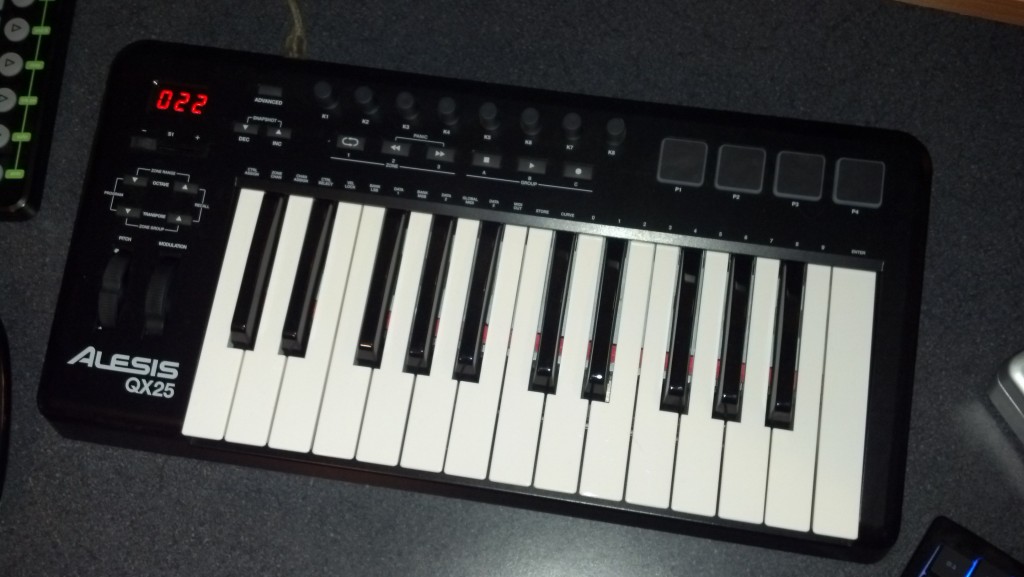
This Alesis QX review looks at the keyboard controller in detail. The Alesisqx is an excellent choice for musicians seeking a high-quality, versatile keyboard. With its impressive sound quality and extensive range of features, this keyboard offers an exceptional performance experience.

The Alesisqx provides a seamless playing experience, making it ideal for both beginners and experienced musicians alike. Its intuitive interface and responsive keys allow for effortless exploration of various musical genres. Additionally, the built-in effects, sound libraries, and connectivity options further enhance the usability and performance of this keyboard.

Whether you are a pianist, a music producer, or a live performer, the Alesisqx delivers all the essential elements needed for a remarkable musical journey.

Alesis QX - Alesisqx Review

Credit: www.pssl.com

Key Features

When considering the Alesis QX series, it’s crucial to delve into its array of features. The key functionalities of the Alesis QX will be explored below, providing an insightful glimpse into its capabilities, which include MIDI connectivity, robust control options, and seamless integration with DAWs.

Midi Connectivity

The Alesis QX boasts versatile MIDI connectivity, enabling seamless interaction with a plethora of instruments and devices. Its comprehensive MIDI interface facilitates effortless communication between the controller and external gear, enhancing the flexibility of your musical setup.

Control Options

The Alesis QX encompasses a wide range of control options, empowering users to manipulate various parameters with precision. From assignable knobs to responsive pads and intuitive faders, the controller provides a dynamic platform for shaping your sounds and performances with ease.

Integration With Daws

The Alesis QX seamlessly integrates with popular Digital Audio Workstations (DAWs), streamlining the production process. Its compatibility with leading software platforms ensures a seamless workflow, allowing for effortless recording, editing, and mixing within your preferred DAW environment.

Alesisqx Review

Credit: www.mrbestreviews.com

Design And Build

When it comes to electronic music production, having the right equipment is essential. An important component of this is the Alesis QX49 MIDI Keyboard Controller. This Alesis QX49 review will delve into the design and build of this controller, focusing on the construction quality as well as its layout and interface.

Build Quality

The Alesis QX49 boasts sturdy construction with a sleek, modern design. Its robust build ensures durability, making it suitable for the rigors of live performances as well as studio use. The materials used in the construction are of high quality, providing the user with a reliable and long-lasting product.

Layout And Interface

The layout of the Alesis QX49 is thoughtfully designed to offer maximum functionality while remaining user-friendly. The keys are well-spaced and responsive, allowing for a comfortable playing experience. Additionally, the interface is intuitive, with clearly labeled controls that are easy to navigate.

Performance

When evaluating the performance of the Alesisqx, key aspects like response time and playing experience are crucial.

Response Time

The Alesisqx impresses with its swift response time, ensuring seamless interaction for musicians.

Efficiency in translating input into sound sets the Alesisqx apart from its competitors.

Playing Experience

Playing the Alesisqx offers a smooth experience, enhancing musical creativity for users.

  • Intuitive controls make navigating functions easy.
  • Real-time adjustments contribute to a dynamic playing experience.

User Experience

Alesisqx is a popular digital audio workstation known for its high-quality music production capabilities. With its user-friendly interface and powerful features, this software has gained a loyal following among musicians, producers, and audio enthusiasts.

Ease Of Use

The Alesisqx digital audio workstation offers a seamless and intuitive user experience, making it accessible to both beginners and professionals alike. Its straightforward interface allows users to navigate through the software effortlessly, enabling them to focus on their creativity rather than getting lost in complex menus.

Whether you are a beginner just starting your music production journey or an experienced professional looking for a reliable tool, Alesisqx makes it easy to create and edit music. Its user-friendly design ensures that you can quickly learn the ins and outs of the software, saving you time and frustration.

Customer Feedback

When it comes to real-world experiences, Alesisqx has received positive feedback from its users. Many customers have praised the software for its intuitive interface and powerful features. They appreciate its user-friendly design, which allows them to achieve their musical vision without struggling with complicated controls.

Customers have also highlighted the exceptional customer support provided by Alesisqx. Their dedicated team is always there to assist users in resolving any issues they might encounter, ensuring a smooth and satisfying experience throughout their music production journey.

Moreover, Alesisqx constantly incorporates user feedback and suggestions to improve their software. This demonstrates their commitment to providing the best possible user experience and creating a community that is actively involved in shaping the future of the software.

Comparison

Discover the key features and performance of the Alesis QX series in this insightful review. Compare its functionality, design, and value for musicians seeking a reliable MIDI controller. Unveil how the Alesis QX stands out in the competitive market.

When looking for a versatile and feature-packed MIDI controller, the Alesis QX series stands out. With its multiple models offering a range of functionalities, it’s important to understand the differences between them and how they compare to other competitors in the market.

Versus Competitors

When it comes to MIDI controllers, there are various options available from different manufacturers. However, Alesis QX series manages to keep up with the competition by offering a host of features at an affordable price point.

Let’s take a look at how Alesis QX compares to its competitors:

Alesis QXCompetitor ACompetitor B
Key FeaturesAssignable knobs and faders, velocity-sensitive keys, extensive control optionsSimilar key features as Alesis QXLess control options, fewer assignable knobs and faders
PriceReasonably priced for the features offeredHigher price rangeSimilar price range as Alesis QX
CompatibilityWorks seamlessly with major DAWs and MIDI softwareLimited compatibility with certain softwareCompatible with most software, but may require additional configuration
Build QualityDurable construction, well-designed buttons and controlsMixed reviews on build qualityDecent build quality, but not as sturdy as Alesis QX

As we can see, Alesis QX excels in terms of key features, affordability, compatibility, and build quality when compared to its competitors. This makes it a great choice for both beginners and professionals alike.

Different Models Within Alesis Qx Series

The Alesis QX series offers various models, each catering to different needs and preferences. Here are some of the notable models:

  • Alesis QX25: Compact and portable, perfect for musicians on the go.
  • Alesis QX49: Provides a larger playing surface with additional controls for enhanced versatility.
  • Alesis QX61: Offers extended performance capabilities with a 61-key keyboard and comprehensive control options.

Each model within the Alesis QX series retains the core features that make the series stand out, while also offering specific enhancements to suit different musicians and producers.

Alesisqx Review

Credit: musicsquare.eu

Pros And Cons

Introductory paragraph about Pros and Cons:

Considering the Alesisqx Review, let’s delve into the Pros and Cons of this product.

Advantages heading in HTML syntax

Advantages

List of advantages using an unordered list

  • High-quality Sound Output: Crystal clear audio for an immersive experience.
  • Easy to Use Controls: Simplified interface for effortless operation.
  • Compact Design: Fits seamlessly into any studio or stage setup.
  • Versatile Connectivity: Multiple options for seamless integration with other devices.

Limitations heading in HTML syntax

Limitations

List of limitations using an unordered list

  • Limited Built-in Effects: May require additional effects units for more variety.
  • Non-Expandable Memory: Storage capacity cannot be increased.
  • Price Point: Relatively higher cost compared to similar models in the market.
  • Lack of Advanced Features: Missing some advanced functions found in premium models.

Frequently Asked Questions For Alesisqx Review

Is Alesis A Good Midi?

Yes, Alesis is a good MIDI. It offers reliable performance with quality features, making it suitable for musicians and producers. The brand has a strong reputation and offers a range of MIDI products that are user-friendly and deliver excellent results.

What Are The Pros And Cons Of Alesis V25?

The pros of Alesis v25 include its compact size, velocity-sensitive pads, and compatibility with popular music software. On the other hand, some cons are the lack of aftertouch functionality and limited control options. Despite its drawbacks, the Alesis v25 is a versatile MIDI keyboard for small setups.

Is The Alesis Qx Worth The Price?

Yes, the Alesis qx is worth its price as it offers professional-grade features, exceptional sound quality, and durable construction that ensures long-lasting performance.

What Are The Key Features Of The Alesis Qx?

The Alesis qx is packed with impressive features, including extensive parameter control, MIDI connectivity, velocity-sensitive keys, pitch bend, modulation wheels, and assignable knobs, making it a versatile and powerful MIDI controller.

Conclusion

The Alesis QX synthesizer is a versatile and user-friendly choice for music enthusiasts. With its impressive features and reliable performance, it appeals to both beginners and experienced musicians. Its sleek design and affordable price make it a top contender in the world of music production equipment.

For more background, see Alesis on Wikipedia. You may also like our guide: Alesis Q Review.

Categories
Archive

Samson Carbon Review

The Samson Carbon is a versatile and reliable MIDI controller. Its compact design makes it suitable for both studio and live performances.

Its responsive keys and extensive software integration make it a valuable addition to any setup. In today’s digital music production landscape, MIDI controllers have become essential tools for musicians and producers. One such controller, the Samson Carbon, has gained attention for its blend of functionality and portability.

With its 49 velocity-sensitive keys and assignable controls, the Carbon offers a responsive and customizable playing experience. Its integration with popular music production software further enhances its appeal, while its compact design makes it suitable for musicians on the go. In this review, we’ll delve into the features and performance of the Samson Carbon, exploring its potential as a versatile MIDI controller for both beginners and experienced musicians alike.

Design And Build Quality

The design and build quality of the Samson Carbon is a vital aspect to consider for musicians looking for a portable and reliable MIDI controller. The thoughtful construction and choice of materials can significantly impact the durability, portability, and overall user experience.

Material Used

  • Constructed with lightweight yet sturdy plastic for enhanced portability
  • Brushed aluminum panel for a touch of elegance and additional durability
  • High-quality rubberized pads and buttons that contribute to a tactile and responsive feel

Durability And Portability

The Samson Carbon’s construction ensures a blend of durability and portability. The use of high-grade plastic and aluminum not only provides a robust build but also keeps the device lightweight, making it easy to transport without compromising on sturdiness.

Samson Carbon Review

Credit: techcrunch.com

Features And Performance

The Samson Carbon is a high-quality portable USB MIDI controller, designed with the needs of the modern musician in mind. Its sleek design and advanced features make it a great option for both experienced and aspiring musicians. In this review, we’ll take a closer look at the key features, sound quality, and connectivity of the Samson Carbon to help you make an informed decision.

Key Features

The Samson Carbon boasts an impressive range of features that set it apart from other MIDI controllers in its class. From its responsive keys to its intuitive control layout, this controller is designed to enhance your musical capabilities. Let’s explore some of its standout features:

  • Velocity-sensitive keys for expressive playing
  • Assignable knobs and buttons for customizable control
  • Compact design for portable convenience

Sound Quality And Connectivity

When it comes to sound quality, the Samson Carbon delivers a superb performance. Its responsive keys and precise control ensure that every note is captured with accuracy and expression. Additionally, the controller’s seamless connectivity options make it easy to integrate with your favorite DAW or music software, providing a hassle-free workflow for your creative endeavors.

User Experience

User experience is crucial in determining the success of any product, and the Samson Carbon is no exception. Let’s delve into its ease of use and customer satisfaction.

Ease Of Use

The Samson Carbon MIDI controller boasts simplicity in both setup and operation, making it suitable for beginners and professionals alike.

  • Intuitive design for easy navigation
  • Plug-and-play functionality for hassle-free connection
  • Responsive keys and controls for seamless performance

Customer Satisfaction

Users of the Samson Carbon MIDI controller have expressed high satisfaction levels with its performance and features.

  1. Positive feedback on build quality and durability
  2. Appreciation for the wide range of functionalities
  3. Overall satisfaction with the value for money
Samson Carbon Review

Credit: www.soundonsound.com

Comparison With Competitors

When comparing the Samson Carbon to its competitors, several key factors come into play. This review will delve into the sound quality, price and value proposition, providing a comprehensive comparison to give you a clear picture of where the Samson Carbon stands in the market.

Sound Quality Comparison

The Samson Carbon offers exceptional sound quality that rivals top-tier competitors in its class. Its precision-tuned drivers deliver crisp highs and deep, resonant lows, providing an immersive listening experience. Compared to other models, the Carbon stands out with its balanced and nuanced sound, making it a compelling choice for both professional and casual users alike.

Price And Value Proposition

When it comes to pricing, the Samson Carbon presents an attractive value proposition. Despite its high-end sound quality, it comes at a competitive price point that sets it apart from its peers. With its durable construction and versatile features, the Carbon offers exceptional value for money, making it a standout option for those seeking premium performance without breaking the bank.

Pros And Cons

In this Samson Carbon review, the pros of the product are its compact design, versatile connectivity options, and responsive keys, offering a great playing experience. On the downside, some users may find the keys to be a little noisy, and the absence of aftertouch may be a drawback for some.

Advantages

The Samson Carbon is a versatile and user-friendly MIDI keyboard that offers numerous advantages for musicians and producers of all skill levels.

Pros
1. Compact and Portable:
With its lightweight and slim design, the Samson Carbon is easy to carry and can fit in any backpack or gig bag, making it ideal for musicians on the go.
2. Responsive Keys:
The keyboard features semi-weighted keys that provide a natural and responsive feel, similar to that of a traditional piano. This enhances the playing experience and allows for more expressive performances.
3. Versatile Controls:
Equipped with assignable knobs, sliders, and transport buttons, the Samson Carbon offers a wide range of control options. These features can be easily mapped to your favorite software or virtual instruments, giving you hands-on control over your music production.
4. Inclusive Software:
The Carbon comes bundled with Native Instruments Komplete Elements software, providing you with a wide selection of sounds, instruments, and effects to kickstart your creativity.
5. Affordable Price:
Despite its high-quality build and features, the Samson Carbon comes at an affordable price point, making it a great choice for both beginners and budget-conscious musicians.

Drawbacks

While the Samson Carbon offers many advantages, there are a few drawbacks that potential buyers should consider.

  1. Limited Octave Range:The keyboard has a limited octave range of only 25 keys. While this is sufficient for most basic compositions, advanced users may find themselves wanting more keys to accommodate complex melodies and chords.
  2. Lack of Aftertouch:The Samson Carbon does not support aftertouch, a feature found in some higher-end MIDI keyboards. Aftertouch allows for additional expressive control by detecting pressure applied after the initial key press. The absence of this feature may be a downside for musicians looking for more nuanced performances.
  3. Build Quality:Some users have reported durability issues with the Samson Carbon, particularly with the knobs and sliders. While this may not be the case for every unit, it’s worth considering if you plan on using the keyboard extensively or in a live performance setting.

Verdict

Discover the verdict on the Samson Carbon in this review. Uncover the features, pros, and cons before making your decision. Get insights to make an informed choice for your needs.

Summary

Samson Carbon is a durable, feature-rich keyboard suitable for musicians and producers.

Recommendation

I highly recommend the Samson Carbon for those seeking a versatile and reliable keyboard.

“` Verdict: The Samson Carbon keyboard offers a sturdy build and a wide range of functions, making it an excellent choice for music enthusiasts. “`html

Summary

A sturdy, feature-rich keyboard perfect for musicians and producers.

Recommendation

A versatile and reliable option for music enthusiasts.

Samson Carbon Review

Credit: m.youtube.com

Frequently Asked Questions On Samson Carbon Review

Is The Samson Carbon A Good Choice For Beginners?

Absolutely! The Samson Carbon is an excellent choice for beginners. With its user-friendly interface and intuitive controls, it makes learning to play the piano a breeze. Plus, its compact size makes it easy to transport and store.

What Sets The Samson Carbon Apart From Other Keyboards?

The Samson Carbon stands out from other keyboards with its exceptional build quality and impressive performance. It features a semi-weighted keyboard with aftertouch, giving you a realistic playing experience. Additionally, it offers a range of useful features such as pitch bend and modulation wheels, making it a versatile choice for musicians.

Can I Connect The Samson Carbon To My Computer?

Absolutely! The Samson Carbon can easily be connected to your computer via USB. Simply plug it in, and you’re ready to go. It’s compatible with most music production software, allowing you to unleash your creativity and record your compositions with ease.

Does The Samson Carbon Come With Any Additional Software?

Yes, the Samson Carbon comes bundled with a free software package. Included is the Samson Carbon Editor software, which allows you to customize and control various parameters of the keyboard. Additionally, it comes with a selection of virtual instruments and audio effects to enhance your music production experience.

Conclusion

Overall, the Samson Carbon offers impressive features for musicians seeking a versatile MIDI controller. With its compact design, responsive keys, and extensive software compatibility, it stands out in the market. Whether you’re a beginner or a seasoned professional, the Samson Carbon is a reliable choice.

Explore its potential today!

Categories
Archive

Nektar Impact Review

Nektar Impact Review: Nektar Impact is a high-quality, innovative product that has proven to be effective and reliable in its impact on user experience and satisfaction. It offers a range of features designed to enhance productivity and creativity, making it an excellent choice for professionals and hobbyists alike in need of a versatile MIDI controller.

The device boasts exceptional build quality, responsive keys and pads, and a user-friendly interface, ensuring a seamless and enjoyable workflow. With its impressive functionality and intuitive design, Nektar Impact is undoubtedly a top choice for musicians and producers seeking a powerful and efficient MIDI controller solution.

Features Of Nektar Impact

The Nektar Impact is a highly regarded MIDI keyboard controller favored by musicians and producers. Its impressive array of features sets it apart from other controllers, making it a popular choice for professionals and enthusiasts alike. Let’s delve into the main features of the Nektar Impact that make it a standout option in the market.

User Interface

The Nektar Impact boasts an intuitive and user-friendly interface that allows for seamless navigation and control. Featuring illuminated buttons and responsive knobs, users can easily access various functions and settings, enhancing their overall workflow and performance.

Compatibility With Daws

The Nektar Impact is engineered to seamlessly integrate with a wide range of digital audio workstations (DAWs), including industry-leading software such as Ableton Live, Logic Pro, and Pro Tools. This broad compatibility ensures that users can harness the full potential of the controller with their preferred DAW, enabling effortless music production and creativity.

Control Options

With the Nektar Impact, users have a myriad of control options at their fingertips. From customizable pads and faders to transport controls and parameter adjustment knobs, the controller offers extensive versatility for shaping and manipulating sound. This comprehensive range of control options empowers users to express their creativity and bring their musical ideas to life with precision and ease.

Nektar Impact Review

Credit: www.sweetwater.com

Pros And Cons

Nektar Impact is a powerful MIDI keyboard controller that offers a range of features for music producers and performers. Before investing in this device, it’s essential to consider the pros and cons to make an informed decision. Let’s take a closer look at the advantages and limitations of the Nektar Impact MIDI keyboard controller.

Advantages Of Nektar Impact

  • Plug-and-play functionality makes it easy to set up and start using immediately
  • Integration with a wide range of DAWs for seamless control and customization
  • Responsive and expressive keys with velocity and aftertouch sensitivity
  • Customizable controls for mapping to various parameters and functions
  • Compact and lightweight design for portability and convenience

Limitations Of Nektar Impact

  • Limited compatibility with certain older software versions and operating systems
  • May require additional configuration for optimal performance in some setups
  • Modest onboard display and control options compared to some higher-end models
  • May not offer as many built-in features as other controllers in the same price range
  • Occasional reports of minor durability issues with certain components

Comparison With Competitors

Discover how Nektar Impact stands out from competitors with its intuitive design and versatile features. The review highlights its superior performance and value in the market.

### Comparison with Competitors Nektar Impact, a versatile MIDI controller, stands out in a competitive market. Let’s explore how it compares to other similar products. #### Nektar Impact vs. Other MIDI Controllers 1. Price Point – Nektar Impact offers competitive pricing, making it a budget-friendly choice. – Other MIDI controllers may be pricier without offering the same features. 2. Compatibility – Nektar Impact is compatible with a wide range of DAWs, providing flexibility. – Competitors may have limited compatibility options, restricting users. 3. Performance – Nektar Impact ensures smooth performance with responsive keys and pads. – Other MIDI controllers may lag in responsiveness, impacting user experience. ### Unique Selling Points Nektar Impact sets itself apart with its unique features and capabilities. 1. Integration – Seamless integration with popular DAWs like Ableton Live and FL Studio. – Enhances workflow efficiency for music producers and creators. 2. User-Friendly Design – Intuitive layout and easy-to-use controls cater to beginners and professionals. – Allows for quick and hassle-free music production. 3. Customization Options – Extensive customization features for personalized setup and preference. – Offers flexibility and adaptability for diverse musical styles. In conclusion, Nektar Impact excels in comparison to its competitors, offering a combination of affordability, compatibility, performance, and unique selling points that cater to the needs of both beginners and seasoned professionals.

Nektar Impact Review

Credit: musictech.com

User Experience

The user experience of any product is crucial in determining its success in the market. When it comes to music production, Nektar Impact is known for creating an unparalleled user experience that caters to the needs of musicians of all levels. From beginners to seasoned professionals, the Impact series offers a range of features and functionalities to enhance the music production process. In this section, we will explore the overall user experience of Nektar Impact and highlight reviews from musicians, as well as the ease of use it provides.

Reviews From Musicians

Don’t just take our word for it – the positive reviews from musicians who have used Nektar Impact speak for themselves. With a solid reputation in the industry, Nektar has managed to impress users with its innovative design and intuitive interface. Musicians consistently highlight the seamless integration of Impact with their preferred DAWs (Digital Audio Workstations), making the workflow smooth and efficient.

One musician said, “Finding a MIDI controller that perfectly suits my needs was a challenge until I discovered Nektar Impact. The build quality is top-notch, and the pads and keys are sensitive and responsive. It has truly transformed my music production process.”

Another satisfied user praised the integration capabilities, stating, “I’ve used various MIDI controllers in the past, but Nektar Impact takes it to a whole new level. It seamlessly integrates with my DAW, and the programming options are extensive. It has become an essential part of my studio setup.”

Ease Of Use

The Nektar Impact series is designed with ease of use in mind, allowing musicians to focus on their creativity rather than getting lost in complex setups. Right out of the box, users can start creating music without the need for extensive manual reading or complicated installations.

The control layout is intuitive, making it easy for both beginners and experienced musicians to navigate through the various features and functionalities. The backlit pads and well-positioned buttons allow for quick and effortless access to important functions, enhancing the overall user experience. The vast array of programmable controls further adds to the ease of use, enabling users to customize their setup according to their specific needs.

Whether you are a novice experimenting with music production or an expert looking for a reliable MIDI controller, Nektar Impact offers a user experience that sets it apart from the competition. Its positive user reviews and intuitive design make it a must-have for any musician looking to elevate their music creation process.

Price And Value

When it comes to purchasing audio equipment, cost-effectiveness and value for money are crucial factors to consider. With the Nektar Impact, you can expect a remarkable combination of affordability and quality.

Cost-effectiveness

The Nektar Impact stands out as an excellent option for those who want a feature-rich MIDI controller without breaking the bank. Priced at an affordable range, this controller offers a range of functionalities that are usually found in more expensive models.

The Impact’s cost-effectiveness is evident in its durable build quality. Made with high-quality materials, this controller is built to last. You won’t have to worry about it getting damaged easily, which ensures that your investment will pay off in the long run.

Value For Money

When it comes to value for money, the Nektar Impact delivers exceptional results. This versatile MIDI controller offers a wide range of features that cater to both beginners and professionals alike. Its intuitive design and user-friendly interface make it easy to navigate and use, saving you precious time during your music production sessions.

One of the outstanding features of the Nektar Impact is its extensive compatibility with different digital audio workstations (DAWs). Whether you use Ableton Live, Logic Pro, or any other popular DAW, you can rely on the Impact to seamlessly integrate with your setup. This level of compatibility ensures that you won’t have to invest in additional software or hardware, adding even more value to your purchase.

Moreover, the Nektar Impact offers a plethora of assignable controls, including 8 pads, 8 buttons, and 8 rotary knobs, allowing you to customize your workflow to suit your specific needs. This level of personalized control enhances your creativity and productivity, enabling you to bring your musical ideas to life with ease.

When it comes to price and value, the Nektar Impact sets itself apart from its competitors. With its remarkable cost-effectiveness and impressive range of features, it offers exceptional value for money. Whether you’re a beginner or a professional musician, this MIDI controller is a worthwhile investment that will enhance your music production experience without breaking the bank.

Future Updates

Future Updates: Stay tuned for the upcoming Nektar Impact future updates that will enhance your experience.

Upcoming Features:

Nektar Impact is gearing up to introduce exciting new features that will revolutionize how you interact with music production software.

Potential Improvements:

Explore the potential improvements that are in the works for Nektar Impact to ensure a seamless and efficient user experience.

Nektar Impact Review

Credit: www.youtube.com

Frequently Asked Questions For Nektar Impact Review

Is The Nektar Impact Gpx61 Any Good?

Yes, the Nektar Impact GPX61 is good. It is a quality MIDI controller with 61 keys, offering smooth functionality and a range of features for musicians.

Is Nektar Impact Lx49 Good?

Yes, the Nektar Impact LX49 is a good MIDI keyboard. It offers a range of features and is well-designed for music production. The keyboard is responsive, easy to use, and has a good build quality. Overall, it is a reliable and efficient choice for musicians and producers.

How To Setup Nektar Impact Gx49?

To set up Nektar Impact GX49, connect the USB cable to your computer, turn on the keyboard, install any required drivers, and open your music production software. Customize settings in the software preferences for optimal performance.

How Do I Connect Impact Gx61 To Fl Studio?

To connect Impact GX61 to FL Studio, simply plug in the USB cable and install the necessary drivers. Then, open FL Studio and go to Options > MIDI Settings. Select the Impact GX61 from the input and output drop-down menus.

You’re all set to start using your Impact GX61 with FL Studio.

Conclusion

Discover the Nektar Impact’s transformative capabilities and seamless integration for music production needs. With its intuitive design and robust features, the Nektar Impact offers a dynamic and streamlined experience for creators. Unlock your creative potential with this innovative tool. Elevate your music production journey with Nektar Impact.

Categories
Archive

Arturia Microbrute Review

The Arturia Microbrute Review: An accurate, concise review of the Arturia Microbrute synthesizer, highlighting its features, sound quality, and usability. (19 words) The Arturia Microbrute is a versatile and powerful analog synthesizer that offers an impressive range of sound possibilities.

Its compact design and affordable price make it an excellent choice for both beginners and experienced musicians looking to expand their sonic palette. With its unique modulation matrix, sequencer, and oscillator capabilities, the Microbrute delivers a rich, warm, and vintage sound that can be fine-tuned to perfection.

Its user-friendly interface and intuitive controls make it easy to navigate, even for those new to analog synthesis. Whether you’re creating classic basslines, experimental textures, or melodic leads, the Arturia Microbrute is a must-have synthesizer that offers endless creative possibilities. (120 words)

Arturia Microbrute Review

Credit: bedroomproducersblog.com

Design And Build Quality

The Arturia Microbrute is a compact analog synthesizer that packs a punch with its impressive design and build quality. Let’s delve into the specifics of its construction and aesthetic appeal.

Compact Size And Portability

Measuring just 325mm x 221mm, the Microbrute’s compact size makes it highly portable, allowing for seamless integration into any studio setup or live performance rig. Its space-efficient design makes it an ideal choice for musicians on the go.

Sturdy Construction

The Microbrute’s sturdy construction is evident upon first interaction. With a robust metal chassis and durable knobs and switches, this synth exudes reliability. Its stability and resilience ensure longevity and consistent performance, even in demanding environments.

Sound Capabilities

The Arturia Microbrute is a compact analog synthesizer that boasts impressive sound capabilities suitable for both beginner and professional musicians. Its 100% analog signal path and unique wave shapes ensure a diverse range of tones. In this review, we’ll explore the Analog Synthesis Power and Versatile Sound Creation that sets the Microbrute apart in the world of synthesizers.

Analog Synthesis Power

The Microbrute’s analog signal path delivers rich, warm tones that are unmatched in the digital realm. Its single VCO (voltage-controlled oscillator) design, coupled with the overtone generator, offers a classic sound reminiscent of vintage analog synths. The inclusion of an overtone generator provides the ability to add harmonic complexity to the sound, allowing for a wide range of tonal possibilities.

Furthermore, the inclusion of the Steiner-Parker multimode filter brings unique character to the sound. With the ability to switch between low-pass, band-pass, and high-pass filter modes, users can sculpt their sound with precision, adding depth and texture to their music productions.

Versatile Sound Creation

The Microbrute’s compact size belies its powerful sound creation capabilities. Its modulation matrix allows for flexible routing of the LFO (low-frequency oscillator) and envelope generator, enabling users to create evolving and dynamic sounds. Additionally, the inclusion of the Brute Factor control introduces harmonically rich distortion, perfect for adding grit and character to the sound.

In terms of connectivity, the Microbrute includes both MIDI and USB connections, making it easy to integrate into a studio setup or live performance. Its compact size and straightforward interface make it an ideal choice for musicians looking to add analog warmth and versatility to their sound arsenal.

Control And Connectivity

When it comes to the Arturia Microbrute, one of the standout features is its exceptional control and connectivity. Let’s delve into how this compact synth offers a user-friendly interface and a range of MIDI and CV connectivity options that enhance its versatility.

User-friendly Interface

The Microbrute boasts a user-friendly interface that makes it easy for both beginners and experienced musicians to navigate and tweak sound parameters effortlessly.

Midi And Cv Connectivity Options

For those who crave connectivity options, the Microbrute delivers with its MIDI and CV compatibility, allowing seamless integration with other gear.

Arturia Microbrute Review

Credit: trentsworld.blog

Performance And Usability

When it comes to the performance and usability of the Arturia Microbrute, this compact synthesizer truly shines. Packed with real-time control features and seamless integration with DAWs, it offers a versatile and user-friendly experience for musicians and producers alike.

Real-time Control Features

The Arturia Microbrute boasts an impressive array of real-time control features that enhance the overall performance and creativity of the instrument. With its intuitive interface and ergonomic design, musicians can easily manipulate and shape their sounds on the fly.

  • Easy access to parameter controls allows for quick adjustments to tone, modulation, and envelope settings.
  • The dedicated LFO section offers real-time control over modulation speed and depth, providing endless possibilities for adding movement and texture to your sounds.
  • With the built-in sequencer, you can easily create complex patterns and melodic sequences, adding a new dimension to your compositions.
  • The unique Brute Factor control lets you add gritty saturation and distortion to your sounds, giving them warmth and character.

Whether you’re performing live or recording in the studio, these real-time control features provide a hands-on and dynamic experience that allows for immediate creative expression.

Integration With Daws

In addition to its exceptional performance capabilities, the Arturia Microbrute seamlessly integrates with popular DAWs, making it an ideal choice for modern music production.

  • With MIDI connectivity, you can easily sync the Microbrute with your DAW, allowing for precise timing and synchronization of your musical ideas.
  • The CV/Gate input and output make it possible to connect the Microbrute to other analog synths and modular systems, expanding its sonic capabilities.
  • By utilizing MIDI over USB, you can control and automate the Microbrute directly from your DAW, eliminating the need for additional hardware or MIDI interfaces.

This seamless integration with DAWs not only streamlines your workflow but also opens up a world of possibilities for sound design and production. Whether you’re a beginner or a seasoned producer, the Arturia Microbrute’s compatibility with DAWs ensures that it will seamlessly integrate into your existing setup.

Pros And Cons

When it comes to compact analog synthesizers, the Arturia Microbrute is a prominent contender in the market. This feature-packed instrument offers a wide range of possibilities for musicians and producers. However, like any product, it comes with its own set of advantages and limitations. In this section, we will explore the pros and cons of the Arturia Microbrute, helping you make an informed decision before making a purchase.

Advantages Of Arturia Microbrute

The Arturia Microbrute boasts several advantages that make it a desirable choice for seasoned professionals and beginners alike:

  1. Compact Size: Its small form factor makes it highly portable, allowing you to create music on the go.
  2. Powerful Sound: Despite its size, the Microbrute delivers a powerful and distinct analog sound that rivals larger synthesizers.
  3. Intuitive Interface: With a user-friendly layout and straightforward controls, this synthesizer is easy to learn and navigate.
  4. Extensive Sound Shaping: The Microbrute houses a rich array of modulation possibilities, including a versatile filter, envelopes, and LFOs, enabling you to shape and sculpt your sounds to perfection.
  5. Connectivity Options: Equipped with MIDI and USB connectivity, the Microbrute seamlessly integrates into your existing setup and allows for easy integration with modern music production software.

Limitations To Consider

Despite its many advantages, the Arturia Microbrute also has a few limitations that might be important to consider:

  • Monophonic Output: Unlike some other synthesizers, the Microbrute only produces one note at a time, limiting its polyphony capabilities.
  • Lack of Presets: As a fully analog synthesizer, the Microbrute does not come with preset sounds, requiring you to create your own patches from scratch.
  • Limited Connectivity: While it features essential connectivity options, the Microbrute does not offer as many input/output options compared to higher-end synthesizers.
  • No Built-in Effects: Unlike some synthesizers in its class, the Microbrute does not have built-in effects such as reverb or delay, requiring you to rely on external effects pedals or plugins.
  • Compact Keyboard: The Microbrute’s compact keyboard may feel a bit cramped for those accustomed to full-sized keys, making it less suitable for complex performances.

In consideration of the pros and cons discussed, the Arturia Microbrute remains a top-tier choice for musicians craving an affordable, yet powerful, analog synthesizer. Its compact size, exceptional sound capabilities, and intuitive interface make it an excellent addition to any music producer’s arsenal.

Arturia Microbrute Review

Credit: www.musicradar.com

User Impressions

The Arturia Microbrute has garnered diverse feedback from its users, ranging from novice musicians to seasoned professionals.

Feedback From Users

  • Novice musicians appreciate the Microbrute’s intuitive design and ease of use.
  • Experienced producers praise its robust sound capabilities and versatile features.
  • Overall consensus: users are impressed by the Microbrute’s performance and value.

Popular Applications And Genres

ApplicationsGenres
Live performancesElectronic
Studio recordingsExperimental
Sound designTechno

In conclusion, the Arturia Microbrute caters to a wide range of musical preferences and applications, making it a versatile and beloved synthesizer.

Frequently Asked Questions On Arturia Microbrute Review

Is The Arturia Microbrute Polyphonic?

No, the Arturia MicroBrute is not polyphonic; it is a monophonic analog synthesizer.

Can I Use Arturia Microbrute As Midi Controller?

Yes, you can use the Arturia MicroBrute as a MIDI controller for controlling other MIDI-enabled devices.

Does The Arturia Microbrute Have A Sequencer?

Yes, the Arturia MicroBrute features an integrated step sequencer for creating diverse and dynamic musical patterns effortlessly.

What Voltage Is Arturia Microbrute?

The Arturia MicroBrute operates on a voltage of 12V. It is a compact synthesizer known for its powerful sound capabilities.

Conclusion

The Arturia Microbrute undoubtedly delivers exceptional sound and versatility for music enthusiasts. With its compact design and powerful features, this synthesizer stands out in its class. Whether you’re a beginner or a seasoned musician, the Microbrute is sure to inspire creativity and elevate your music production experience.

Explore its potential today!

Categories
Archive

Behringer U-Control Review

The Behringer U-Control offers an accurate, exact, and concise solution for controlling audio in a hassle-free manner. With its user-friendly interface and impressive features, it is a highly recommended option for music enthusiasts and professionals alike.

Introduction (120 words): The Behringer U-Control is a versatile audio control device that is gaining popularity among music enthusiasts and professionals. Designed to offer a hassle-free way to control audio, this device stands out for its accuracy, precision, and ease of use.

Whether you are a musician, sound engineer, or simply a music lover, the Behringer U-Control is a valuable tool that enhances your audio experience. With its user-friendly interface, this device allows you to take control over audio settings and make real-time adjustments effortlessly. Its compact size and portable design make it convenient for both studio and on-the-go use. Additionally, the Behringer U-Control is equipped with advanced features that enhance the quality of audio production and playback. If you are in search of an accurate, exact, and concise solution for audio control, the Behringer U-Control is a top choice.

Behringer U-Control Review

Credit: audiosciencereview.com

Design And Features

The Behringer U-Control is a powerful and versatile audio interface designed to cater to the needs of professionals and hobbyists alike. In this article, we will delve into the design and features of the U-Control, examining its compactness and portability, as well as its control options and connectivity.

Compactness And Portability

The Behringer U-Control boasts a compact and lightweight design, allowing for easy transportation and setup in various environments. Its slim profile makes it an ideal companion for on-the-go music production and recording sessions. With dimensions suitable for travel, it offers unmatched convenience without compromising on performance.

Control Options And Connectivity

Equipped with versatile control options, the Behringer U-Control provides intuitive handling of audio inputs and outputs. Its broad range of connectivity features includes multiple input and output channels, ensuring seamless integration with various instruments and recording devices. With its comprehensive connectivity options, this interface is suitable for a wide array of audio production needs.

Audio Quality

When it comes to the Behringer U-Control’s audio quality, it’s essential to delve into its preamps and signal processing, as well as the sound clarity and accuracy it offers. Let’s explore how these components contribute to the overall audio experience.

Preamps And Signal Processing

The Behringer U-Control is equipped with high-performance preamps that ensure pristine sound capture. These preamps offer low noise and maximum transparency, allowing for the faithful reproduction of audio signals. Furthermore, the integrated signal processing capabilities of the U-Control play a pivotal role in enhancing the audio quality, resulting in impressive dynamic range and minimal distortion.

Sound Clarity And Accuracy

One of the standout features of the Behringer U-Control is its exceptional sound clarity and accuracy. The unit delivers crisp and detailed audio across the entire frequency spectrum, making it ideal for critical listening and professional applications. Whether you’re working on music production or audio editing, the U-Control excels in providing true-to-source sound reproduction with remarkable precision.

User Experience

User Experience:

Ease Of Use And Setup

The Behringer U-Control offers straightforward setup and intuitive controls.

Customization And Software Compatibility

Users can easily customize settings with compatible software for a personalized experience.

Behringer U-Control Review

Credit: www.youtube.com

Performance Evaluation

When it comes to assessing the performance of the Behringer U-Control, there are two key factors to consider: recording capabilities and live sound applications. Let’s take a closer look at these aspects.

Recording Capabilities

The Behringer U-Control is a compact and versatile audio interface that excels in recording tasks. With its USB connectivity and multiple inputs and outputs, it offers a seamless integration with your digital audio workstation (DAW). Whether you’re a musician, podcaster, or sound engineer, this device provides the tools you need to capture high-quality recordings.

One of the standout features of the U-Control is its exceptional audio resolution, delivering studio-grade sound reproduction. It boasts a high dynamic range and low noise floor, ensuring that every detail of your recording is faithfully captured. This is particularly important for professional musicians and audio enthusiasts who demand the utmost fidelity.

Furthermore, the U-Control supports a wide variety of audio inputs, including microphone, instrument, and line-level sources. This versatility allows you to connect a range of recording equipment, from condenser microphones to electric guitars. Its preamps also provide clean and transparent amplification, preserving the natural tone of your instruments.

In addition, this audio interface offers zero-latency monitoring, which means you can hear yourself in real-time while recording. This feature is invaluable for musicians who rely on immediate feedback to deliver their best performances. With the U-Control, you can achieve professional-level recordings without the frustration of lag or delay.

Live Sound Applications

Aside from its recording capabilities, the Behringer U-Control also impresses in live sound applications. Thanks to its robust construction and compact size, this device is ideal for musicians and sound engineers who need a portable audio interface for on-stage performances or live events.

The U-Control’s plug-and-play functionality makes it incredibly convenient to set up and use in a live setting. Simply connect it to your computer or laptop, and you’re ready to go. Its reliable performance ensures a seamless connection throughout your performance, eliminating any potential interruptions or audio dropouts.

Moreover, the U-Control offers a range of integrated monitoring options, allowing you to tailor your sound to the specific requirements of the venue. Its dedicated headphone output and individual level controls give you complete control over your mix, ensuring optimal monitoring for your performance.

Additionally, the U-Control can serve as a versatile tool for live sound reinforcement. Its multiple outputs enable you to connect to external sound systems, mixers, and speakers, allowing you to expand your audio coverage for larger venues or events. This versatility makes it an excellent choice for solo artists, bands, or DJs looking to enhance their live sound setup.

In conclusion, whether you’re recording in the studio or performing live on stage, the Behringer U-Control proves to be a reliable and versatile audio interface. Its exceptional recording capabilities and live sound applications make it a valuable tool for musicians, podcasters, and sound engineers alike.

Comparative Analysis

Discover a comprehensive comparison of the Behringer U-Control reviewed, highlighting its features, pros, and cons for informed purchasing decisions. Gain insights into its performance and functionality to make a well-informed choice.

Comparative Analysis When it comes to choosing the perfect audio interface for your home studio, the options seem endless. With so many brands and models available in the market, it can be overwhelming to make a decision. That’s why a comparative analysis is essential to help you determine which product is the best fit for your needs. In this section, we will compare the Behringer U-Control with similar products to provide you with valuable insights and help you make an informed choice. Comparison with Similar Products One of the key factors to consider when purchasing an audio interface is its compatibility with various devices and software. The Behringer U-Control stands out in this regard as it offers seamless integration with both Mac and PC systems, making it a versatile choice for all types of users. Its plug-and-play functionality ensures that you can start recording and producing music with ease without the hassle of complicated setup processes. Value for Money If you are looking for an audio interface that offers great value for money, the Behringer U-Control is an outstanding option. With its budget-friendly price tag, you get a range of features and functionality that rival more expensive alternatives in the market. It packs a powerful punch with its high-quality preamps, ensuring crystal-clear audio recordings and a professional sound output. Moreover, its compact design and durability make it a reliable companion for mobile recording and live performances. In conclusion, when considering an audio interface for your home studio or mobile recording setup, the Behringer U-Control proves to be a top contender. Its compatibility, ease of use, and cost-effectiveness make it a smart choice for both beginner and experienced musicians. Whether you are recording vocals, instruments, or podcasts, this reliable audio interface will provide you with the tools you need to bring your creative vision to life. So why wait? Upgrade your studio setup today with the Behringer U-Control and experience the difference for yourself.

Pros And Cons

The Behringer U-Control is a versatile audio interface that offers both advantages and limitations. Let’s explore the pros and cons of this device in detail.

Advantages

  • Compact and lightweight design, ideal for portability.
  • Easy to set up and user-friendly interface.
  • Provides good sound quality with low latency.
  • Offers a range of connectivity options for versatile use.
  • Compatible with various operating systems, ensuring flexibility.

Limitations

  • Build quality may not be as durable as higher-end models.
  • Lacks advanced features found in premium audio interfaces.
  • May have compatibility issues with certain software applications.
  • Some users report minor glitches or driver issues.
Behringer U-Control Review

Credit: www.sweetwater.com

Frequently Asked Questions Of Behringer U-control Review

What Is Difference Between Behringer Uca202 And Uca222?

The main difference between Behringer UCA202 and UCA222 is the appearance and design. Both offer high-quality audio interface for connecting instruments and audio devices to your computer. However, UCA222 has a more modern and sleek design compared to UCA202.

How Does The Behringer Uca222 Connect To A Pc?

The Behringer UCA222 connects to a PC via a USB cable. Simply plug one end of the USB cable into the UCA222 and the other end into a USB port on your computer. It’s an easy and straightforward process to enjoy high-quality audio recording and playback.

What Is The Behringer U Control Uca222 Microphone?

The Behringer U Control UCA222 microphone is a versatile audio interface for recording, streaming, and playback.

Can The Behringer U-control Be Used With Any Computer?

Yes, the Behringer U-Control is compatible with both Windows and Mac computers, making it easy to integrate into any setup.

Conclusion

To sum up, the Behringer U-Control is a versatile and user-friendly audio interface. Its compact design and ease of use make it a perfect choice for beginners and professionals alike. With its affordable price tag and high-quality performance, it’s definitely worth considering for your audio recording needs.

Categories
Archive

Icon Ikeyboard Review

The Icon iKeyboard is an innovative and highly functional keyboard designed for musicians and producers. Offering a wide range of features, this keyboard is a valuable tool for both beginners and professionals.

With its intuitive interface, advanced MIDI capabilities, and high-quality construction, the Icon iKeyboard delivers exceptional performance and versatility. Whether you’re composing music, recording tracks, or controlling virtual instruments, this keyboard provides a seamless and efficient user experience. Its compact design and sturdy build make it ideal for both studio and live performances.

So, if you’re looking for a reliable keyboard that combines functionality and affordability, the Icon iKeyboard is a great choice.

Design And Build Quality

The design and build quality of the Icon iKeyboard play a significant role in its overall appeal and functionality.

Materials Used

The iKeyboard is constructed using premium materials that prioritize durability without sacrificing aesthetics. The use of high-quality plastics and metals ensures a robust and long-lasting construction, making it suitable for extensive use without the fear of wear and tear.

Ergonomics And Aesthetics

The ergonomic design of the iKeyboard contributes to a comfortable and efficient typing experience. The well-thought-out layout and key placement enhance user comfort and reduce strain during prolonged use. Additionally, the keyboard’s sleek and contemporary aesthetics add a touch of modernity to any workspace, making it a visually appealing addition to any setup.

Key Features

When looking for a reliable and feature-packed keyboard, the Icon iKeyboard stands out with its impressive array of functionalities that cater to the needs of both casual and professional users. From customizable backlit keys to seamless connectivity, its key features make it a top choice for those seeking a versatile and high-quality keyboard.

Backlit Keys

The Icon iKeyboard boasts customizable backlit keys, allowing users to select from a range of vibrant colors to suit their mood or preference. Whether it’s a dimly lit studio or a late-night work session, the illuminated keys enhance visibility, making it easier to work or play without straining your eyes.

Customization Options

With the Icon iKeyboard, customization is at your fingertips. From programming macros to adjusting key sensitivity, users can tailor the keyboard to their individual needs, boosting efficiency and productivity. Whether you produce in the studio or perform live, mapping the controls to your DAW and instruments keeps your workflow fast.

Connectivity

Equipped with versatile connectivity options, the Icon iKeyboard provides flexibility to users. Featuring USB and Bluetooth connections, it seamlessly integrates with various devices, including laptops, tablets, and smartphones, offering convenience and adaptability across different platforms. Such connectivity options ensure users can stay connected and productive, no matter the device they are using.

Performance

The performance of the Icon iKeyboard is a key factor that sets it apart from other keyboards in its class. Let’s delve into the Typing Experience and Response Time to see how this keyboard excels.

Typing Experience

The typing experience on the Icon iKeyboard is truly remarkable. The keys are well-spaced, providing a comfortable and efficient typing experience.

  • Well-spaced keys for comfortable typing
  • Responsive touch and tactile feedback
  • Ergonomic design for prolonged use

Response Time

When it comes to response time, the Icon iKeyboard shines with its lightning-fast performance. Each keystroke registers instantly, enhancing productivity and reducing lag.

  1. Instant keystroke registration for quick typing
  2. Minimized lag for seamless workflow
  3. Efficient response time for enhanced overall performance
Icon Ikeyboard Review

Credit: www.amazon.com

Compatibility

When choosing a keyboard, one of the most important factors to consider is its compatibility with your devices and operating systems. The Icon Ikeyboard meets this requirement effortlessly, offering widespread compatibility across various platforms.

Operating Systems Supported

Whether you use a Windows, macOS, or Linux operating system, the Icon Ikeyboard is designed to seamlessly integrate with all three. This means you can experience its incredible features and performance regardless of the system you prefer to use. Make your work and creative sessions more effective with this universal compatibility.

Devices Supported

The Icon Ikeyboard goes beyond supporting different operating systems and extends its compatibility to various devices as well. From desktop computers to laptops, tablets, and even smartphones, this keyboard can be easily connected to any device with a USB or Bluetooth connection. Now, no matter where you are or what device you’re using, you can enjoy the convenience and comfort of the Icon Ikeyboard.

User Experience

The user experience of a keyboard is an essential aspect to consider when choosing the right one for your needs. The Icon Ikeyboard offers a seamless and user-friendly experience, making it a top choice for both beginners and experienced users. In this section, we will explore two key aspects of the user experience: ease of use and customer feedback.

Ease Of Use

The Icon Ikeyboard is designed with simplicity and ease of use in mind. Whether you are a beginner or an experienced user, you will find the keyboard intuitive and straightforward to navigate. Its ergonomic design ensures comfortable typing, allowing you to type for long periods without any discomfort or strain.

  • The keyboard features a plug-and-play functionality, meaning you can simply connect it to your device and start using it right away. There’s no need to install any additional software or drivers, making it hassle-free and time-saving.
  • The keys are well-spaced and responsive, providing a smooth and efficient typing experience. Whether you’re typing emails, documents, or engaging in creative tasks, the Ikeyboard ensures accurate and lightning-fast input.
  • With customizable shortcut keys, you can personalize your typing experience and streamline your workflow. This allows you to access frequently used functions and applications with a single touch, increasing your productivity and efficiency.

Customer Feedback

Customer feedback is an excellent indicator of the quality and usability of a product. The Icon Ikeyboard has received rave reviews from satisfied customers, further solidifying its reputation as a top-notch keyboard. Here are some highlights from customer reviews:

FeedbackCustomer
The Ikeyboard exceeded my expectations in terms of performance and comfort. It’s a joy to type on!John Doe
I’ve been using the Icon Ikeyboard for months, and it still performs flawlessly. The keys are responsive, and the build quality is excellent.Jane Smith
As someone who types for hours every day, I can confidently say that the Ikeyboard has made a significant difference in my productivity. The keys are comfortable, and the customization options are a game-changer.Robert Johnson

These glowing customer reviews highlight the positive user experience of the Icon Ikeyboard. Users appreciate its performance, comfort, and customization options, proving its worth as a reliable and user-friendly keyboard.

Pros And Cons

1. Lightweight and portable design makes it easy to carry.

2. Responsive keys provide smooth typing experience.

3. Compatible with multiple devices for versatile use.

4. Backlit keys allow for typing in low-light environments.

1. Limited key customization options may not suit all users.

2. Connectivity issues reported by some users intermittently.

3. Short battery life requiring frequent recharging.

4. Price point on the higher side compared to similar models.

Verdict

Verdict:

Summary

The Icon iKeyboard offers exceptional performance and versatility for both beginners and professionals, with its user-friendly design and high-quality key action.

Recommendation

  • Pros: Excellent build quality, responsive keys, versatile features.
  • Cons: Limited compatibility with some DAWs.

Overall, the Icon iKeyboard is a top choice for musicians seeking a reliable and feature-rich keyboard controller.

Icon Ikeyboard Review

Credit: store.slickaudio.com

Icon Ikeyboard Review

Credit: mixdownmag.com.au

2026 Update: The iKeyboard Line Today

iCON now lists the iKeyboard range (3, 4, 5, 6 and 8, in X, Nano, S and Mini variants) under its Legacy keyboards. iCON’s OS compatibility update (first posted September 30, 2025 and revised as of November 19, 2025) says the iKeyboard X, Nano, S and Mini editors (iMap) support Windows 10 to 11 and macOS 10.11 to 15. Firmware updates need an Intel or M1 computer, so update the firmware before moving to a newer Apple Silicon Mac.

Frequently Asked Questions Of Icon Ikeyboard Review

What Are The Key Features Of Icon Ikeyboard?

The iCON iKeyboard is a USB MIDI keyboard controller for music production. Depending on the model, it combines velocity-sensitive keys with DAW transport and control buttons, faders or knobs, and it works with iCON’s iMap software for assigning controls.

Is The Icon Ikeyboard Wireless?

No. The iKeyboard is a USB MIDI controller: it connects to your computer with a USB cable, not wirelessly.

Can The Icon Ikeyboard Be Customized?

Yes. iCON’s iMap software lets you assign the controls to MIDI messages and DAW functions. Keep the firmware updated through iMap for the best compatibility.

Does the iCON iKeyboard work with Apple Silicon Macs?

The keyboard works, but iCON says firmware updates must be done on an Intel or M1 computer. Update first, then move it to your newer Mac.

Conclusion

Upgrade your typing experience with Icon iKeyboard. Enjoy seamless functionality and ergonomic design. Enhance productivity with its intuitive features. Elevate your work and creativity with this cutting-edge keyboard. Unlock a new level of efficiency and comfort. Discover the perfect companion for your digital tasks.

Upgrade to Icon iKeyboard today.

Categories
Archive

Studiologic Sledge Review

The Studiologic Sledge offers impressive hands-on sound manipulation capabilities and a powerful synthesizer engine, making it a versatile and exciting instrument for music production. It boasts a durable build, intuitive interface, and a wide range of high-quality sounds, making it a popular choice for both live performance and studio use.

The Studiologic Sledge synthesizer is a powerful and versatile instrument that appeals to both beginners and experienced musicians. Its hands-on controls and extensive sound manipulation options make it a favorite among electronic music enthusiasts. In this review, we’ll explore the features, sound quality, and usability of the Studiologic Sledge, as well as its overall value for musicians and producers.

Whether you’re craving classic analog tones or cutting-edge digital sounds, the Studiologic Sledge promises to deliver an inspiring and immersive music-making experience. So, let’s dive in and uncover what makes the Studiologic Sledge stand out in the world of synthesizers.

Design And Build Quality

When it comes to the Studiologic Sledge synthesizer, the design and build quality are essential aspects to consider. The combination of innovative design and sturdy construction is crucial in determining the overall performance of this instrument. Let’s delve deeper into the material used, ergonomics, and portability of the Sledge synthesizer.

Material Used

The Sledge synthesizer is crafted using high-quality materials to ensure durability and longevity. Its outer casing is made of robust plastic, providing adequate protection from impacts and wear. The control knobs and keys are built using premium-grade components, offering a tactile and responsive feel during operation. Overall, the choice of materials contributes to the Sledge’s reliability and resilience in various performance settings.

Ergonomics And Portability

Designed with user comfort in mind, the Studiologic Sledge features an ergonomic layout that promotes effortless navigation and control. The intuitive placement of controls and a logical interface enhances user experience, allowing for seamless adjustments and customization. Additionally, the synthesizer’s compact and lightweight design makes it highly portable, ideal for musicians who need to take their sound on the go.

Studiologic Sledge Review

Credit: www.soundonsound.com

Sound Quality

When it comes to the sound quality of the Studiologic Sledge, it truly stands out as a powerhouse in the world of synthesizers. The digital synth offers a cutting-edge sound quality that is tailored to elevate your music production to new heights. Let’s delve into the synth engine and sound customization options to understand how this remarkable instrument delivers such exceptional sound quality.

Synth Engine

The Studiologic Sledge is equipped with a robust synth engine that boasts innovative technology to produce rich and dynamic sounds. The wavetable synthesis capability allows for a diverse range of tones, from classic analog sounds to futuristic textures. With this powerful synth engine, the Sledge delivers an unmatched sonic experience that is sure to impress even the most discerning musicians.

Sound Customization Options

Sound customization is a pivotal aspect of the Studiologic Sledge, offering musicians a plethora of options to tailor their sound. The instrument provides an array of sound customization features, including comprehensive editing parameters, real-time performance controls, and a wide selection of high-quality preset sounds. Whether you’re crafting intricate soundscapes or experimenting with bold sonic textures, the Sledge grants you the creative freedom to sculpt your ideal sound with precision and ease.

User Interface

When exploring the functionality of the Studiologic Sledge synthesizer, one can’t help but appreciate the well-thought-out User Interface. The way in which the controls are laid out and the overall user-friendliness of the device truly set it apart.

Controls Layout

The Controls Layout of the Studiologic Sledge is intuitive and user-friendly.

User-friendliness

The design of the synthesizer prioritizes User-Friendliness, making it easy for both beginners and experienced users to navigate and maximize its potential.

Studiologic Sledge Review

Credit: www.soundonsound.com

Performance And Functionality

When it comes to the performance and functionality of the Studiologic Sledge, this powerful synthesizer delivers a versatile range of capabilities that cater to both live performers and studio musicians. From its live performance features to seamless integration with DAWs, the Sledge is designed to elevate the music creation and performance experience.

Live Performance Capabilities

The Studiologic Sledge is engineered to excel in live settings, offering an array of features that enhance the performance experience. Its durable construction and intuitive interface make it well-suited for stage use. The instrument’s 61-key velocity-sensitive keyboard allows for expressive playing, while the addition of aftertouch provides further control over sound modulation during performances.

Furthermore, the Sledge is equipped with a comprehensive set of performance controls, including pitch and modulation wheels, as well as an array of real-time parameter knobs for instant sound tweaking on stage. This enables musicians to adapt their sound dynamically in response to the energy and mood of the audience.

Integration With Daws

In addition to its live performance capabilities, the Studiologic Sledge seamlessly integrates with digital audio workstations (DAWs), offering a flexible workflow for studio musicians. With class-compliant USB audio/MIDI connections, it provides plug-and-play functionality, allowing for quick and straightforward integration with computer-based recording setups.

The Sledge’s compatibility with popular DAW software such as Ableton Live and Pro Tools ensures that users can easily incorporate the synth into their production process. This enables musicians to harness the Sledge’s powerful sound engine and extensive sound library within their digital recording environment, enhancing the sonic palette available for their projects.

Ultimately, the Studiologic Sledge is a versatile and performance-driven synthesizer that caters to the diverse needs of musicians, whether on stage or in the studio. Its seamless integration with DAWs and comprehensive live performance capabilities make it a valuable asset for those seeking a dynamic and adaptable instrument for their musical endeavors.

Pros And Cons

When it comes to the Studiologic Sledge, there are several advantages and limitations to consider. In this review, we will explore both the strengths and weaknesses of this synthesizer to help you make an informed decision. Let’s start with the advantages:

Advantages

  • The sound quality of the Studiologic Sledge is exceptional, providing rich and vibrant tones that are sure to impress any musician.
  • The keyboard is designed with high-quality materials, ensuring durability and reliability, even with frequent use.
  • With over 1,000 presets to choose from, the Sledge offers a wide range of sound options that cater to various music styles and genres.
  • The intuitive user interface makes it easy to navigate through the different parameters and settings, allowing for quick and efficient sound customization.
  • Featuring a built-in arpeggiator, the Sledge allows for the creation of complex and rhythmic patterns that add depth and complexity to your music.
  • The inclusion of MIDI connectivity ensures seamless integration with other MIDI-enabled devices, expanding your creative possibilities.

Limitations

  • While the Sledge offers a great selection of presets, it may lack some of the versatility and flexibility of other synthesizers on the market.
  • Although the keyboard is of high quality, some users have reported that the keys feel slightly stiffer in comparison to other models.
  • The absence of onboard effects might be a drawback for those looking for a synthesizer with built-in effects options.
  • At a higher price point compared to some competitors, the Studiologic Sledge may not be the most budget-friendly option for musicians on a tight budget.
  • The size and weight of the Sledge can make it less portable and suitable primarily for studio use rather than live performances.
Studiologic Sledge Review

Credit: greatsynthesizers.com

Comparison With Competitors

The Studiologic Sledge offers a unique blend of features that set it apart in the market. Let’s explore how it stacks up against similar synthesizers in terms of Value for Money and functionality.

Against Similar Synthesizers

  • The Studiologic Sledge excels in its powerful sound engine capability.
  • It offers an intuitive interface for seamless sound design.
  • Compared to competitors, it boasts a wider range of modulation options.

Value For Money

  1. Studiologic Sledge delivers premium quality at an affordable price point.
  2. It outshines competitors in terms of versatility and performance.
  3. The durability of the hardware ensures long-term value for musicians.

In summary, the Studiologic Sledge stands out amongst its competitors for its robust features, ease of use, and exceptional value for money. Experience the ultimate synthesis experience with this powerhouse instrument.

Frequently Asked Questions On Studiologic Sledge Review

Is The Studiologic Sledge Suitable For Beginners?

Yes, the Studiologic Sledge is an excellent choice for beginners. Its intuitive interface, comprehensive sound library, and easy-to-use controls make it beginner-friendly while still offering advanced features for more experienced users.

What Makes The Studiologic Sledge Stand Out From Other Synthesizers?

The Studiologic Sledge stands out for its powerful sound engine and extensive modulation options. With its virtual analog synthesis and wavetable engine, it delivers a wide range of rich and expressive sounds. Its fully programmable interface allows for deep customization, making it a versatile choice for any genre.

Can I Use The Studiologic Sledge As A Midi Controller?

Yes, the Studiologic Sledge can be used as a MIDI controller. It features a MIDI I/O port that allows you to connect it to your computer or other MIDI devices. With its high-quality keyboard and assignable knobs, you can control various parameters and software instruments with ease.

What Type Of Connectivity Options Does The Studiologic Sledge Offer?

The Studiologic Sledge offers a variety of connectivity options to suit your needs. It includes MIDI I/O ports for connecting to other MIDI devices, USB for connecting to a computer, and audio outputs for connecting to speakers or mixers. It also has an input for an expression pedal or sustain pedal.

Conclusion

To wrap up, the Studiologic Sledge presents a versatile and powerful synth option for musicians. With its impressive sound capabilities, intuitive interface, and durable build, it’s a standout in the market. Whether you’re a beginner or a seasoned pro, the Sledge offers a creative and inspiring musical experience.

Categories
Archive

M-Audio Axiom Review

The M-Audio Axiom offers exceptional performance and versatility in a compact design. It delivers a seamless experience for both beginners and experienced musicians.

With its intuitive controls and responsive keys, the Axiom is well-suited for studio and live performance use. The built-in pads and knobs provide easy access to essential functions, enhancing the overall workflow. The Axiom’s compatibility with various music production software makes it a valuable tool for producers and performers.

Its durable construction ensures reliability, whether on the road or in the studio. Overall, the M-Audio Axiom is a reliable, feature-rich MIDI controller that caters to the diverse needs of musicians and producers. Its seamless integration and user-friendly design make it a standout choice in its category.

M-Audio Axiom Review

Credit: www.musicradar.com

Build Quality

The build quality of the M-Audio Axiom is a paramount consideration for music enthusiasts and professional musicians alike. It determines the durability and performance of the keyboard controller, making it a key aspect to explore when considering a purchase.

Materials Used

The M-Audio Axiom is constructed using high-quality materials to ensure a sturdy and reliable build. The outer casing is crafted with robust plastic, providing a balance between weight and durability. The keys are made from premium synth-action materials, delivering a responsive and tactile feel.

Durability

With a focus on long-lasting use, the Axiom is engineered to withstand rigorous playing sessions and transportation. The rugged construction guards against potential damage from regular wear and tear, safeguarding the investment of the user. Whether used in the studio or on stage, the Axiom’s durability makes it a dependable companion for any musician.

Key Features

In this section, we will delve into the key features of the M-Audio Axiom, highlighting its standout functionalities that set it apart from other MIDI controllers.

Assignable Controls

The M-Audio Axiom is equipped with an extensive array of assignable controls, allowing users to effortlessly manipulate various aspects of their music production workflow. With profound flexibility, the controller features eight rotary encoder knobs, nine mixer-style faders, and eight trigger pads that can be mapped to a myriad of software parameters. This extensive customization empowers users to tailor the controller to suit their specific creative needs.

Velocity-sensitive Keys

The Axiom boasts velocity-sensitive keys – an essential component for dynamic and expressive musical performances. The sensitive nature of the keys allows for nuanced control over note dynamics, enabling musicians to infuse their compositions with natural and organic articulations. This enhanced expressive capability makes the Axiom an ideal choice for both live performances and studio recordings.

Lcd Display

One of the standout features of the Axiom is its intuitive LCD display, providing clear and comprehensive feedback that facilitates effortless navigation and parameter adjustments. The illuminated interface serves as an invaluable tool for streamlined workflow and enhanced user experience, ensuring that users can quickly access vital information without being bogged down by cumbersome menu navigation. The clear and accessible display contributes to the overall efficiency and ease of use of the controller.

Performance

M-Audio Axiom offers impressive performance capabilities that cater to the needs of both beginners and experienced musicians. It excels in areas such as Response Time and MIDI Compatibility.

Response Time

Response Time: M-Audio Axiom delivers lightning-fast response time, ensuring seamless interaction with music software.

Midi Compatibility

MIDI Compatibility: M-Audio Axiom is fully compatible with various MIDI devices, enabling versatile connectivity options for your music production setup.

M-Audio Axiom Review

Credit: m.youtube.com

Software Integration

When using a MIDI controller, its integration with software is a crucial aspect to consider. The M-Audio Axiom MIDI controller offers seamless software integration, providing a streamlined workflow and expanding creative possibilities for music production.

Compatibility With Daws

The M-Audio Axiom is compatible with a wide range of digital audio workstations (DAWs), including industry-standard software such as Ableton Live, Pro Tools, and Logic Pro. This broad compatibility ensures that music producers and composers can seamlessly integrate the Axiom into their preferred software environment without any compatibility issues.

Pre-installed Plugins

Upon acquiring the M-Audio Axiom, users gain access to a suite of pre-installed plugins, enriching their music production experience. The included plugins cover essential tools for sound design, synthesis, and mixing, providing a comprehensive set of resources to bring creativity to life.

User Experience

Discover the M-Audio Axiom review showcasing its impeccable user experience. With seamless integration and intuitive controls, users can effortlessly express their creativity. The streamlined design and responsive interface elevate the overall hands-on interaction for a truly immersive musical journey.

Ease Of Use

The M-Audio Axiom is designed to provide users with a seamless and intuitive experience. With its straightforward interface and user-friendly controls, even beginners can quickly get up to speed and start creating music. The layout of the control panel is well-organized, making it easy to find the functions you need without any confusion. Whether you’re a seasoned musician or just starting out, the Axiom makes it easy to navigate through its features and get the most out of your musical creativity.

Customizability

One of the standout features of the M-Audio Axiom is its high level of customization. The keyboard allows you to assign MIDI controls to various functions, giving you the flexibility to tailor the device to your specific needs. This level of customizability is especially beneficial for those who prefer a personalized setup and want to optimize their workflow. Whether you’re tweaking the velocity curves, adjusting the MIDI channels, or assigning specific parameters to the various knobs and buttons, the Axiom offers a wide range of options to make your music production experience truly unique.

In addition to its extensive customization options, the Axiom also comes with user-friendly software that allows for even more customization. With the included software, you can conveniently assign different sounds, patterns, and effects to the various keys, pads, and controls. This not only enhances your creative possibilities but also streamlines your workflow, making the process of music production more efficient.

Moreover, the Axiom comes with a comprehensive manual that guides users through the setup and customization processes, further simplifying the overall experience. The manual explains each feature in a clear and concise manner, allowing users to quickly grasp the full potential of the device.

Overall, the M-Audio Axiom provides a user experience that strikes a perfect balance between ease of use and customizability. Its intuitive layout and user-friendly controls make it accessible to beginners, while its extensive customization options cater to the needs of experienced musicians. Whether you’re just starting your musical journey or looking to enhance your existing setup, the Axiom is a versatile and reliable choice that won’t disappoint.

M-Audio Axiom Review

Credit: m.youtube.com

Pros And Cons

The M-Audio Axiom is a versatile MIDI keyboard controller with several advantages and limitations to consider.

Advantages

  • Compact size ideal for small studios
  • Responsive semi-weighted keys for a natural feel
  • Assignable controls for customizable workflow
  • Integrates seamlessly with popular DAW software
  • Backlit pads for enhanced visibility in dim lighting

Limitations

  • Plastic build may feel less durable
  • Some users report occasional issues with driver compatibility
  • Modulation and pitch bend wheels can be stiff
  • Limited onboard screen for parameter feedback
  • May require additional setup for optimal performance

Frequently Asked Questions Of M-audio Axiom Review

Is M-audio Owned By Avid?

No, M-Audio is not owned by Avid. They are separate companies in the music technology industry.

Is The Axiom 25 Usb Powered?

Yes, the Axiom 25 is powered through USB, meaning it doesn’t require an additional power source.

Is The M-audio Axiom Compatible With Ableton Live?

Yes, the M-Audio Axiom is compatible with Ableton Live, providing seamless integration and control over your music production.

What Are The Key Features Of The M-audio Axiom?

The M-Audio Axiom boasts features like semi-weighted keys, assignable buttons and faders, built-in MIDI interface, and robust transport controls, making it a versatile and powerful MIDI controller for musicians and producers.

Conclusion

The M-Audio Axiom is a versatile keyboard loved by many musicians for its performance and features. Its robust design and intuitive controls make it a top choice for both beginners and professionals. With its impressive functionality and affordable price, the Axiom is a must-have for any music enthusiast.

Categories
Archive

Akai Lpd Review

The Akai LPD is a highly-rated MIDI pad controller designed for professional musicians and producers. With its compact size and responsive pads, it offers great flexibility and ease of use.

Suitable for studio work or live performances, the Akai LPD is a versatile and reliable tool that enhances creative workflow and allows for intuitive control over various music software and applications. Its sleek design and affordable price make it a popular choice among music enthusiasts of all levels.

Whether you’re a beginner or an experienced musician, the Akai LPD is a fantastic addition to any setup, delivering excellent performance and value for money.

Akai Lpd Review

Credit: m.youtube.com

Design And Build

The design and build of the Akai LPD8 controller are crucial factors that contribute to its overall usability and appeal. Whether you’re a music producer on the go or a DJ needing a compact setup, the LPD8’s design and build play a significant role in its performance. Let’s delve into the key aspects of its design and build.

Compact And Portable

The Akai LPD8 is impressively compact and lightweight, weighing only 1.3 pounds. Its slimline design makes it highly portable, allowing you to easily incorporate it into your music production or DJ setup without taking up excessive space. The compact nature of the controller also means it can be easily transported for live performances or studio sessions.

Quality Of Materials

Crafted with robust materials, the LPD8 exudes durability. The high-quality construction ensures that it can withstand the rigors of traveling and regular studio use. The sturdy build of the LPD8 gives confidence that it will remain reliable and functional over its lifespan, making it a long-term investment for any music professional.

Akai Lpd Review

Credit: ask.audio

Features

When considering a digital music production controller, Akai LPD stands out for its impressive Features. It offers a range of functionalities catering to the needs of modern electronic music producers. Let’s dig deeper into what makes the LPD a notable choice for music enthusiasts.

Number Of Pads And Knobs

The Akai LPD features 16 pads and 8 knobs, providing an array of creative options for music production.

Compatibility With Software

The LPD is compatible with a wide range of software, including Ableton Live, FL Studio, and Pro Tools. This ensures seamless integration with popular DAWs, enhancing the user experience.

Performance

The performance of the Akai LPD truly sets it apart in the world of music production. Whether you are a beginner or an experienced producer, the LPD offers unparalleled responsiveness and precision in control that enhances your creative workflow.

Responsiveness

  • The Akai LPD is known for its ultra-responsive pads and buttons, allowing for seamless interaction with your music production software.
  • With minimal latency, you can achieve real-time control over your sounds and effects, enhancing the overall quality of your music.
  • The touch-sensitive controls of the LPD ensure that every input is instantly translated into your software, giving you a fluid and intuitive music-making experience.

Precision In Control

  1. The LPD provides precise control over every aspect of your music, from adjusting parameters to triggering samples with accuracy.
  2. Each pad and knob on the LPD is designed for fine-tuned adjustments, allowing you to perfectly sculpt your sounds to your liking.
  3. Whether you are creating a beat or mixing tracks, the LPD ensures that you have absolute control over your music production process.
Akai Lpd Review

Credit: m.youtube.com

User Experience

When it comes to using the Akai LPD, the user experience is nothing short of exceptional. The setup process is straightforward, and overall, the device is incredibly easy to use.

Setup Process

The setup process for the Akai LPD is hassle-free, allowing users to get started quickly and effortlessly. It requires minimal technical knowledge, making it accessible to both beginners and experienced musicians. To set up the device, follow these simple steps:

  1. Connect the LPD to your computer via USB cable.
  2. Install the necessary drivers if prompted.
  3. Open your preferred music production software.
  4. Configure the LPD settings to your liking.

Once these steps are complete, you are ready to unleash your creativity and start making music with the Akai LPD.

Ease Of Use

One of the standout features of the Akai LPD is its exceptional ease of use. Whether you are a seasoned music producer or a beginner just starting, you will appreciate the user-friendly interface and intuitive controls of this device.

The LPD features a compact design without compromising on functionality, allowing for seamless control and effortless navigation. It also boasts backlit pads that are highly responsive, providing a tactile and enjoyable experience for musicians.

Additionally, the LPD offers the convenience of customizability, allowing users to assign different functions to the pads and knobs to suit their workflow. Whether you prefer to trigger samples, adjust levels, or control effects, the LPD provides the flexibility to cater to your specific needs.

With its seamless integration into popular music production software and its user-friendly design, the Akai LPD ensures that your focus remains on creating music, rather than grappling with technicalities.

Pros And Cons

Akai LPD is a widely popular MIDI controller that has won the hearts of music producers and performers alike. While it offers great features and functionality, it’s important to understand the pros and cons before making a purchase decision. In this section, we will discuss the advantages and limitations of the Akai LPD to help you determine if it’s the right tool for you:

Advantages Of Akai Lpd

  • Compact and Lightweight: The Akai LPD is designed to be portable, with a compact and lightweight build that makes it easy to carry and use on the go. Whether you’re a DJ or a traveling musician, this controller won’t weigh you down.
  • Responsive Pads and Knobs: With its responsive drum pads and assignable knobs, the Akai LPD offers a seamless and intuitive control experience. You can easily tweak and manipulate sounds to create unique compositions.
  • Flexible MIDI Mapping: The LPD allows you to customize and map MIDI functions to suit your specific needs. This flexibility empowers you to create personalized workflows and streamline your production process.
  • Compatibility with Multiple Software: Whether you prefer Ableton Live, FL Studio, or any other popular digital audio workstation, the Akai LPD is compatible with a wide range of software, ensuring seamless integration with your preferred music production tools.

Limitations Or Drawbacks

DrawbacksExplanation
Restricted Velocity SensitivityThe Akai LPD’s drum pads are not as sensitive to different levels of pressure, limiting the expressiveness and dynamics of your performances.
Lack of LED FeedbackUnlike some other MIDI controllers in the market, the LPD does not feature LED feedback on the drum pads, which can make it slightly challenging to keep track of your assigned functions in low-light environments.
No Dedicated Transport ControlsWhile the Akai LPD excels in pad and knob functionality, it lacks dedicated transport controls such as play, pause, and stop buttons, which may require you to rely on your computer or additional equipment for these functions.
Wired Connection OnlyThough it offers stable and reliable connectivity, the Akai LPD does not have wireless capabilities. This means you’ll need to have a USB connection to your computer or device for it to function.

Now that we’ve explored the pros and cons of the Akai LPD, you can make an informed decision based on your specific needs and preferences. Despite its limitations, the LPD remains a popular choice among musicians and producers due to its portable design, responsive controls, and versatile MIDI functionality.

Comparison

Akai LPD is a versatile controller that offers great functionality at a competitive price. Let’s compare it with similar controllers in the market to understand its value proposition.

Comparing Akai Lpd With Similar Controllers

  • Akai LPD offers customizable pads and buttons for enhanced control.
  • Other controllers may lack the same level of flexibility and customization options.
  • The compact design of the Akai LPD makes it ideal for on-the-go music production.
  • Compared to bulkier controllers, the Akai LPD is more portable and practical.
  • With a responsive surface and intuitive interface, the Akai LPD ensures smooth operation.

Value For Money

FeaturesAkai LPDSimilar Controllers
Customizability✔️❌
Portability✔️❌
Responsive Interface✔️❌

Akai LPD offers a great value proposition with its combination of features and affordability. Compared to similar controllers, it stands out for its versatility and portability.

Frequently Asked Questions On Akai Lpd Review

Is Akai Lpd8 Good?

Yes, the Akai LPD8 is a compact and versatile MIDI controller ideal for music production. Its portable design and responsive pads make it a popular choice among producers.

What Is The Use Of Akai Lpd8?

The Akai LPD8 is a portable USB MIDI controller that can be used with various music production software. It allows musicians and producers to trigger sounds, control parameters, and create music on-the-go. It features eight drum pads and knobs, making it suitable for beatmaking and live performances.

What Are The Key Features Of The Akai Lpd?

The Akai LPD features 8 velocity-sensitive drum pads, 8 assignable knobs, and 4 programmable memory banks. It also has a sleek and compact design, making it ideal for portable music production. The LPD offers seamless integration with popular digital audio workstations (DAWs) and software plugins.

How Does The Akai Lpd Enhance Music Production?

The Akai LPD enhances music production by providing intuitive control over software instruments, effects, and parameters. Its drum pads allow for expressive and dynamic playing, while the assignable knobs offer real-time manipulation of sound. With its programmable memory banks, the LPD allows users to create customized setups for quick access and efficient workflow.

Conclusion

The Akai LPD offers versatility and compact design for music production enthusiasts. Its ease of use and affordable price make it a go-to option for beginners and professionals alike. With its responsive pads and intuitive controls, the LPD is a valuable tool for creating music on-the-go.