When it comes to music production, one of the most crucial aspects is the mixing process. Mixing in mono is a technique that has been used for decades, and it continues to be a valuable tool for modern music producers. In this article, we will explore the benefits of mixing in mono and how it can improve the overall quality of your music productions. Whether you’re a seasoned pro or just starting out, understanding the advantages of mixing in mono can take your music to the next level.
What Is Mixing In Mono?
Mixing in mono simply means that all the audio signals are combined into a single channel, as opposed to being separated into left and right stereo channels. Instead of experiencing the spread of sound in the stereo field, you hear everything in the center. While this might seem like a step backward, it actually offers numerous benefits for the mixing process.
Credit: www.amazon.com
The Benefits of Mixing In Mono
1. Improved Clarity and Balance: Mixing in mono allows you to focus on the core elements of your mix, helping you achieve a balanced sound with better clarity. Without the distraction of stereo imaging, you can pinpoint any issues in the frequency spectrum and make precise adjustments to achieve a cleaner mix.
2. Enhanced Mono Compatibility: In today’s music industry, where music is consumed across a wide range of devices, mono compatibility is crucial. By mixing in mono, you ensure that your music will translate well across different playback systems, including mono speakers and devices that sum stereo tracks to mono.
3. Better Focus on Levels and Panning: Mixing in mono highlights the relative levels and panning positions of individual tracks. This helps you make informed decisions about the placement of each element in the mix, ensuring that no instrument or sound gets lost in the stereo field.
4. Identifying Phase Issues: When working in mono, phase issues become more apparent. This allows you to identify and correct any phase cancellation problems that may arise when stereo tracks are summed to mono, ensuring a more cohesive and impactful mix.
How to Start Mixing In Mono
If you’re new to mixing in mono, here are some tips to help you get started:
1.
Begin by setting your master output to mono. This can be done in your digital audio workstation (DAW) or on your audio interface.
2.
Listen to your mix in mono and pay attention to how the individual elements are balanced and positioned.
3.
Use EQ and compression to address any frequency and dynamic imbalances that become more apparent in mono.
4.
Check for phase issues by listening for any noticeable changes in the sound when switching between stereo and mono.
5.
Regularly A/B test your mix in stereo and mono to ensure that it translates well across different playback systems.
Credit: www.levelsmusicproduction.com
Frequently Asked Questions Of Mixing In Mono: Master Your Tracks With The Power Of Simplicity
What Is Mixing In Mono?
When mixing in mono, audio is combined into a single channel for better clarity.
Why Is Mixing In Mono Important?
Mixing in mono helps in balancing elements and creating a more coherent sound.
How Does Mixing In Mono Benefit The Sound?
Mixing in mono can reveal masking issues and improve overall balance of instruments.
Is Mixing In Mono Recommended For All Genres?
Mixing in mono is particularly useful for ensuring a mix translates well across different playback systems.
Conclusion
While mixing in stereo has its advantages, incorporating mono mixing into your workflow can lead to significant improvements in your music productions. By focusing on the essentials of your mix and addressing potential issues in mono, you can create music that sounds great on any system. So, don’t overlook the power of mixing in mono – it might just be the secret ingredient your next production needs.
When it comes to digital audio, the sample rate plays a crucial role in determining the quality of the audio output. Understanding the significance of sample rate is essential for anyone working with digital audio, whether it’s music production, sound engineering, or any other audio-related field. In this article, we will explore the importance of sample rate, the factors that influence the choice of the best sample rate, and how to determine the optimal sample rate for your specific needs.
Credit: unison.audio
What is Sample Rate?
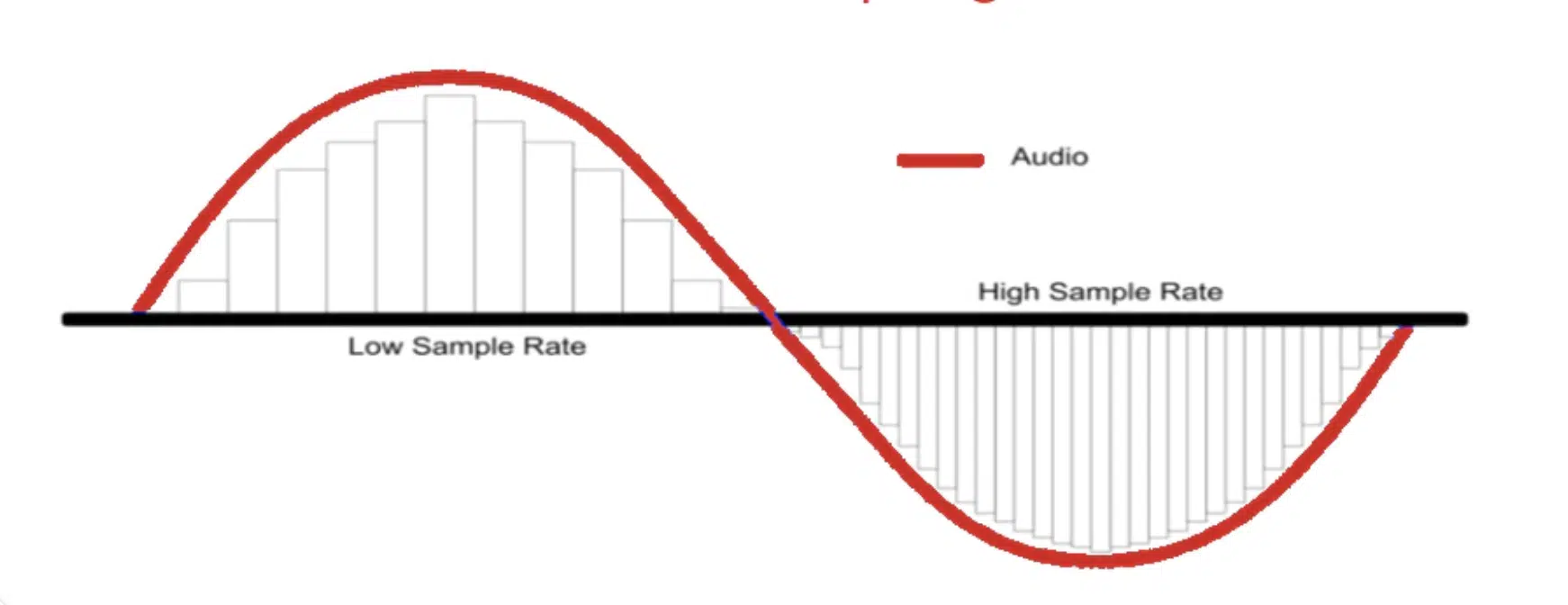
Sample rate refers to the number of samples of audio carried per second. It is measured in hertz (Hz), and higher sample rates result in higher sound quality. Essentially, the sample rate determines the frequency at which the audio is sampled, which in turn affects the fidelity and accuracy of the digital representation of the original analog sound.
Common sample rates include 44.1 kHz, 48 kHz, 88.2 kHz, 96 kHz, and higher. The standard sample rate for audio CDs is 44.1 kHz, while higher rates such as 48 kHz, 88.2 kHz, and 96 kHz are often used in professional audio production and high-definition audio formats.
Credit: www.amazon.com
The Importance of Choosing the Best Sample Rate
Choosing the best sample rate is crucial for ensuring high-quality audio reproduction. The sample rate directly affects the frequency range that can be accurately reproduced, as well as the level of detail and clarity in the audio. A higher sample rate allows for a wider frequency response and more accurate representation of the original sound, resulting in a more natural and authentic listening experience.
Factors Influencing The Choice Of Sample Rate
When determining the best sample rate for a particular audio project, several factors must be taken into consideration:
Factor
Consideration
Audio Source
The quality and frequency range of the original audio source.
Playback System
The capabilities of the playback system or device.
Storage and Bandwidth
The impact of higher sample rates on file size and data transfer requirements.
Production Requirements
The specific needs of the audio production or project, such as compatibility with other equipment or industry standards.
Determining the Optimal Sample Rate
To determine the optimal sample rate for a given audio project, it is essential to consider the intended use of the audio, the capabilities of the playback system, and the desired balance between audio quality and practical considerations such as file size and storage requirements. In general, higher sample rates are preferred for professional audio production and high-fidelity audio playback, while lower sample rates may be sufficient for certain applications where file size and data transfer are significant concerns.
Choosing The Best Sample Rate For Different Applications
For various audio applications, different sample rates may be more suitable:
Music Production and Mastering: In professional music production and mastering, higher sample rates such as 88.2 kHz or 96 kHz are often preferred to capture the full range of musical frequencies and nuances.
High-Fidelity Audio Playback: For audiophile-grade audio playback systems, higher sample rates can provide a more immersive and detailed listening experience.
Streaming and Online Distribution: When considering online distribution or streaming platforms, the balance between audio quality and efficient data streaming must be taken into account, making 44.1 kHz or 48 kHz common choices.
Voice Recording and Podcasting: For speech-focused content, lower sample rates such as 32 kHz or 44.1 kHz may be sufficient while conserving storage space and bandwidth.
Frequently Asked Questions On Best Sample Rate : Unlocking The Power Of Exceptional Audio Quality
What Is The Best Sample Rate For Audio Recording?
The ideal sample rate for audio recording is 44. 1 kHz, commonly used in the industry.
Why Is Choosing The Right Sample Rate Important?
Selecting the correct sample rate is crucial to maintain high audio quality and minimize loss.
How Does Sample Rate Affect Audio Quality?
Higher sample rates capture more detail and result in better audio fidelity and clarity.
What Happens If The Sample Rate Is Too Low?
A low sample rate can lead to loss of audio quality, producing a less detailed sound.
Conclusion
The sample rate is a critical factor in digital audio, influencing the fidelity, accuracy, and overall quality of the audio output. By understanding the importance of sample rate and considering the influencing factors, you can make informed decisions about choosing the best sample rate for your specific audio needs. Whether it’s music production, audio mastering, streaming, or speech-focused content creation, the right sample rate plays a crucial role in delivering the best possible audio experience.
Embracing the charm of bygone eras in music production is a captivating journey that many modern music makers are drawn to. Vintage emulation plugins offer an incredible opportunity to transport your sound back in time, evoking the warmth, character, and nostalgia of classic recording equipment. Let’s delve into the fascinating world of vintage emulation plugins and discover how they can elevate your music production to new heights.
Credit: www.facebook.com
Understanding Vintage Emulation Plugins
Vintage emulation plugins are designed to replicate the sonic characteristics of classic analog audio gear from the past, including iconic hardware such as analog equalizers, compressors, tape machines, and preamps. They aim to capture the distinctive sonic signatures and imperfections that contributed to the legendary sounds of vintage recordings, enabling modern producers to infuse their digital audio with the essence of analog warmth and color.
The Appeal of Vintage Sound
What makes vintage sound so captivating? It’s the organic, raw, and often imperfect nature of analog equipment that imparts a unique sonic identity to the recordings. Vintage gear is renowned for its musicality, harmonics, and subtle nonlinearities that breathe life into audio, resulting in a rich, captivating sound that modern producers strive to recreate in their digital setups. Vintage emulation plugins offer a glimpse into this sonic allure, providing a means to harness the timeless charm of classic gear within the convenience of a digital audio workstation.
Replicating Analog Warmth and Character
One of the most sought-after elements of vintage analog gear is its ability to impart warmth and character to audio signals. Emulation plugins meticulously model the sonic behaviors of vintage equipment, faithfully recreating the saturation, harmonics, and coloration that define the analog sound. By incorporating these plugins into your mixing and mastering processes, you can infuse your recordings with the distinct tonal qualities that define the vintage aesthetic, adding depth, dimension, and character to your music.
Reviving Classic Recording Techniques
Vintage emulation plugins also enable producers to revive classic recording techniques that were once synonymous with analog recording studios. From the unmistakable sonic imprint of tape saturation to the musical compression characteristics of legendary hardware, these plugins empower modern producers to capture the essence of timeless recording methods, breathing authenticity and heritage into their creative endeavors. Emulating the signature workflow and sonic attributes of vintage gear allows producers to tap into a rich tapestry of sonic traditions, creating a bridge between past and present in their music production process.
Versatility and Creativity
Beyond the realm of strict vintage reproduction, emulation plugins offer a playground for experimentation and innovation. They provide a versatile toolkit for sound shaping, enabling producers to push sonic boundaries and sculpt their audio in distinct, creative ways. With a plethora of vintage emulation plugins at their disposal, producers can explore a kaleidoscope of sonic flavors and textures, infusing their music with character and depth that transcends the limitations of digital precision. Whether it’s imparting subtle coloration, introducing harmonically rich saturation, or harnessing the musical dynamics of vintage compressors, these plugins serve as a catalyst for artistic exploration and sonic discovery.
The Evolution of Vintage Emulation Technology
It’s noteworthy to acknowledge the remarkable advancements in vintage emulation technology. With cutting-edge algorithms and meticulous attention to detail, emulation plugins continue to push the boundaries of authenticity and sonic accuracy. The latest iterations of these plugins showcase an unparalleled level of realism, capturing the nuances and idiosyncrasies of classic gear with astonishing fidelity. As a result, producers are presented with a dazzling array of tools that faithfully capture the essence of vintage sound, allowing them to weave a tapestry of sonic nostalgia in their music.
Integrating Vintage Emulation into Your Workflow
As a modern music producer, the integration of vintage emulation into your workflow can elevate the sonic quality and emotive impact of your productions. Whether you’re seeking to infuse soulful warmth into your mix, replicate the sonic magic of iconic records, or explore new sonic frontiers, vintage emulation plugins offer a treasure trove of sonic possibilities. By incorporating these plugins judiciously within your production process, you can imbue your music with the timeless essence of vintage sound, fostering a deep emotional connection with your listeners while adding a touch of nostalgia to your sonic palette.
Credit: www.production-expert.com
Frequently Asked Questions On Vintage Emulation Plugins: Unleash The Timeless Power
What Are Vintage Emulation Plugins?
Emulation plugins mimic classic audio gear, providing vintage sound characteristics in digital audio workstations.
How Do Vintage Emulation Plugins Work?
These plugins replicate analog equipment to add warmth, saturation, and unique tonal qualities to digital recordings.
Why Are Vintage Emulation Plugins Popular?
Artists and producers value the nostalgic tones and sonic characteristics that vintage emulation plugins offer.
Where Can You Use Vintage Emulation Plugins?
Vintage emulation plugins can be used in music production, post-production, podcasting, and audio mastering processes.
Conclusion
In an era where technology continues to redefine the landscape of music production, vintage emulation plugins serve as a bridge to the past, allowing modern producers to enrich their sonic creations with the soul, character, and warmth of vintage sound. By embracing these plugins, you embark on a transformative sonic journey, unlocking a world of timeless sounds that resonate with the heritage of classic audio gear. As you delve into the enchanting realm of vintage emulation, you’ll discover that the magic of bygone eras can be beautifully recreated, offering a limitless canvas for artistic expression and sonic storytelling in your music.
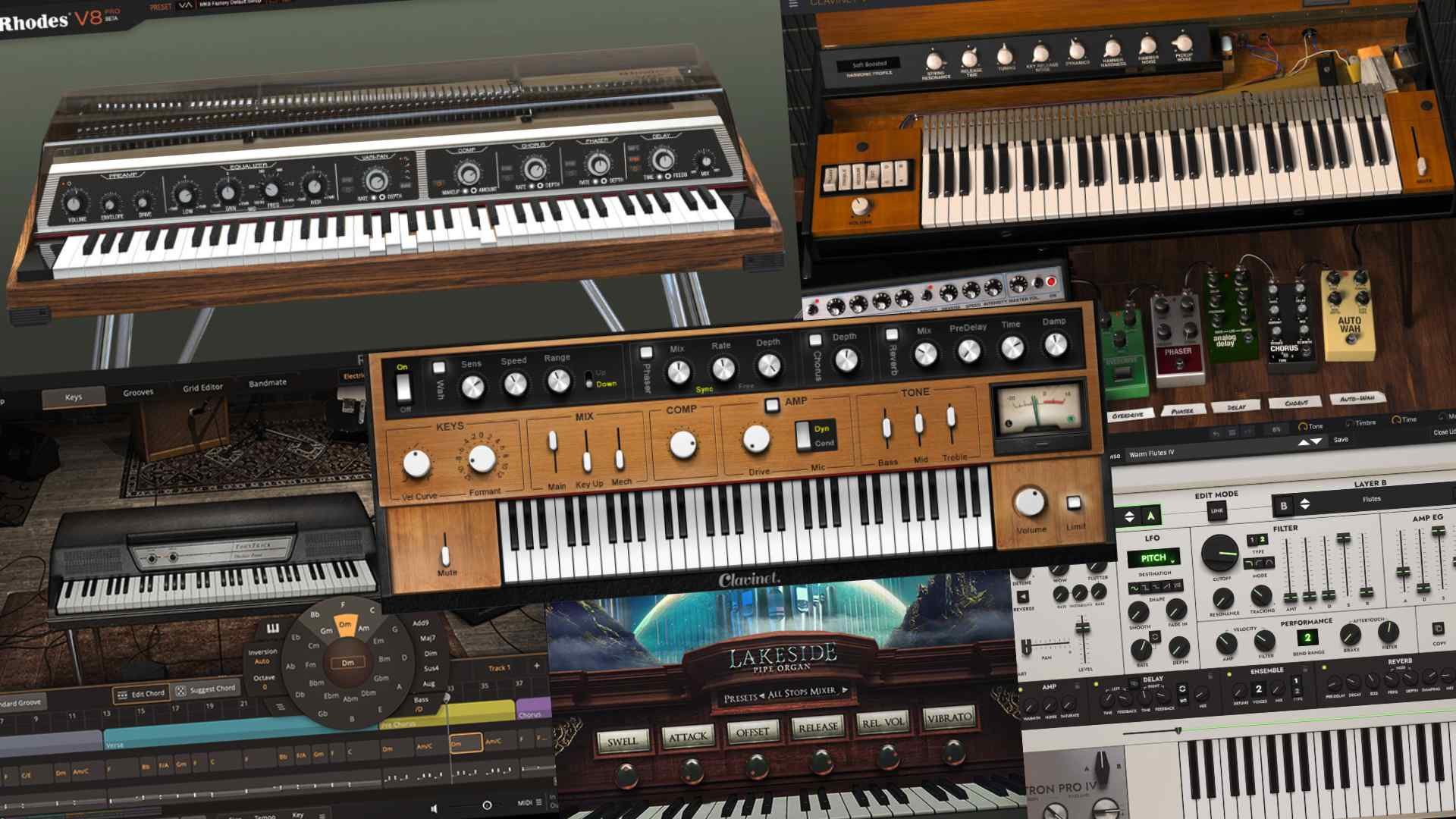
To make MIDI sound realistic, utilize high-quality virtual instruments, add humanizing elements like velocity and timing variations, and incorporate expressive articulations for a more natural sound. Achieving a realistic MIDI sound is crucial for creating authentic-sounding music that resonates with the listener.
By using these three methods, you can enhance the realism of your MIDI compositions and achieve professional-sounding results. Creating realistic-sounding MIDI music can be a challenging task, but with the right techniques and attention to detail, you can elevate your compositions to a new level.
Whether you’re a composer, producer, or musician, understanding how to make MIDI sound more realistic is essential in today’s digital music landscape. We’ll explore three effective methods for achieving a lifelike sound in your MIDI productions. Whether you’re working on orchestral arrangements, electronic music, or any other genre, these techniques will help you breathe life into your MIDI performances and captivate your audience. Let’s dive in and discover how to make your MIDI sound more authentic.
Credit: www.practical-music-production.com
Unleashing The Magic Of Midi
MIDI, short for Musical Instrument Digital Interface, has revolutionized music production by providing a powerful tool for creating and manipulating musical sounds. Unleashing the magic of MIDI involves tapping into its potential to produce realistic, lifelike sound. Here, we explore the evolution of MIDI technology and the challenges faced in creating authentic sound using this versatile platform.
The Evolution Of Midi Technology
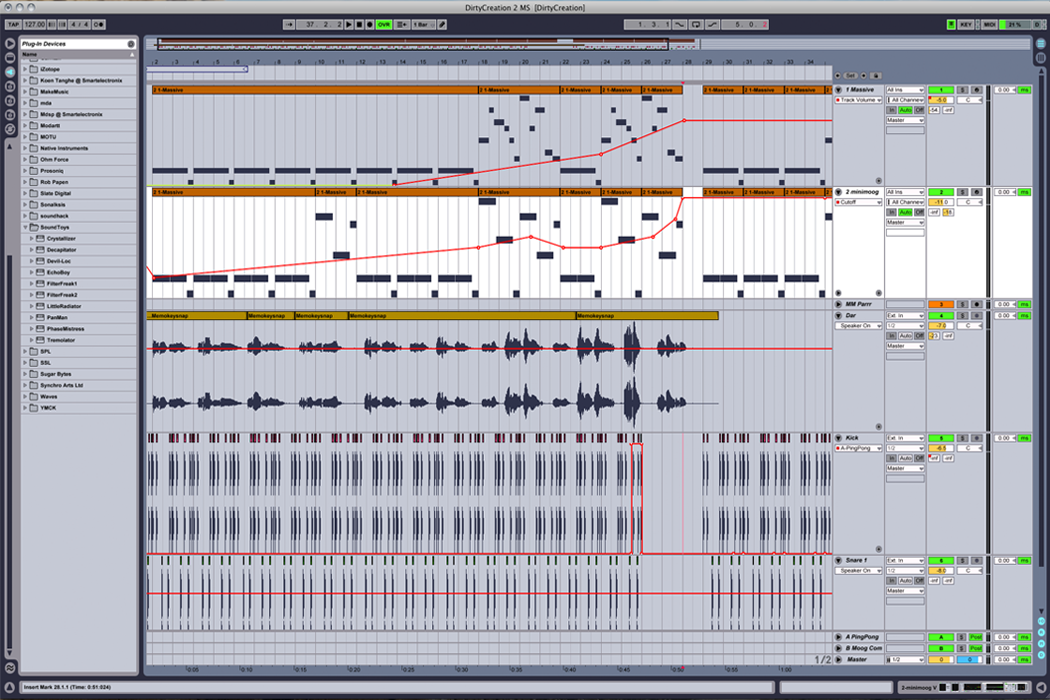
MIDI technology has come a long way since its inception in the early 1980s. The introduction of General MIDI (GM) and later, GM2, standardized the way musical instruments communicate with each other, enabling seamless compatibility between different devices. The development of Digital Audio Workstations (DAWs), such as Ableton Live and FL Studio, has further expanded MIDI’s capabilities, allowing for intricate control over every aspect of a musical composition.
Challenges In Creating Realistic Midi Sound
Despite its versatility, generating realistic sound with MIDI presents several challenges. One major hurdle is the lack of natural variability found in live performances, which can make MIDI sequences sound robotic and repetitive. Additionally, emulating the nuances of acoustic instruments, such as the subtle changes in timbre and expression, requires meticulous attention to detail and advanced programming techniques.
Credit: www.halowaypoint.com
Crafting Realism In Midi
Crafting Realism in MIDI involves implementing various techniques to enhance the musical quality and make it sound more lifelike. By utilizing these methods, your MIDI compositions can achieve a level of realism that captures the nuances and expressive characteristics of live performances. In this post, we will explore three effective ways to make MIDI sound realistic.
Utilizing Humanization Techniques
Utilizing humanization techniques consists of adding subtle variations to the timing, velocity, and subtle pitch of individual notes to mimic the idiosyncrasies of a human performance. By introducing slight deviations in the timing of notes, adjusting the velocity to emulate the dynamics of a live instrument, and incorporating small variations in pitch, you can infuse your MIDI composition with an organic, human touch.
Layering And Texturing Sounds
Layering and texturing sounds involve combining different instrument patches, using multiple MIDI channels, and incorporating effects to create a rich, complex sonic landscape. By layering different instrument sounds and textures, you can achieve a more realistic and full-bodied sound that simulates the depth and richness of an ensemble performance. Additionally, applying effects such as reverb, chorus, and delay can further enhance the authenticity of the MIDI composition.
Applying Dynamic Expression And Control
Applying dynamic expression and control encompasses the manipulation of MIDI controllers, such as modulation wheel, pitch bend, and expression pedal, to emulate the nuances of human performance. By using these controllers to modulate parameters such as volume, timbre, and pitch in real-time, you can inject a sense of expressiveness and realism into your MIDI compositions, replicating the subtleties and emotive qualities present in live performances.
Fine-tuning Midi Performances
When it comes to fine-tuning MIDI performances, there are various techniques that can enhance the realism and expressiveness of the music. By manipulating velocities and dynamics and adding expressive controllers, you can breathe life into your MIDI compositions.
Manipulating Velocities And Dynamics
Adjust velocities to reflect varying playing intensities. Vary dynamics for a more natural sound.
Adding Expressive Controllers
Utilize modulation wheels, pitch bend, and aftertouch to add nuances. Experiment with different controllers.
Credit: flypaper.soundfly.com
Frequently Asked Questions Of 3 Ways Make Midi Sound Realistic
How Do You Make Midi Sound Real?
To make MIDI sound real, use expressive MIDI techniques like adding modulation and velocity changes, humanizing the timing, and using realistic instrument samples. Pay attention to details such as note velocities, vibrato, and slight timing variations. Fine-tuning these elements will help create a more realistic MIDI sound.
How Do I Make My Midi Keyboard Sound Real?
To make your MIDI keyboard sound real: 1. Use high-quality virtual instruments and samples. 2. Add subtle dynamics and variations in your playing. 3. Utilize modulation and expression controls. 4. Apply realistic articulations and phrasing. 5. Consider adding effects like reverb and delay for more depth.
How Can We Make A Midi File Sound Good?
To make a MIDI file sound good, adjust instrument settings, use quality samples, ensure proper timing, add expression, and mix well.
What Are Three Advantages To Using Midi?
MIDI allows easy digital music creation, offers flexibility in composition, and enables effortless editing and manipulation of musical data.
Conclusion
Achieving realistic MIDI sounds is key for music production success. By implementing techniques like layering instruments, using quality samples, and adjusting velocity and timing, you can elevate your music to a professional level. Remember, attention to detail is crucial in creating authentic and engaging MIDI tracks.
Keep experimenting and refining your skills to master the art of realistic MIDI production.
To make cheap drums sound good, tune them properly using a drum key and ensuring proper drumhead tension. Enhance the sound further by experimenting with drum dampening techniques and using quality drumsticks.
By following these steps, you can achieve a professional sound without breaking the bank. Whether you’re a beginner or a seasoned drummer, optimizing the sound of your drums can elevate your playing experience and impress your audience. With the right adjustments and techniques, you can make the most out of your budget-friendly drum set and produce quality sounds that rival more expensive options.
Let’s explore how you can improve the sound of your affordable drums and enjoy high-quality results without splurging on expensive equipment.
Credit: evo.audio
Choose The Right Drum Kit
In creating a quality sound, selecting the right drum kit is crucial. Below are essential factors to consider:
Consider Drum Shell Material
Focus on drum shell materials such as maple, birch, or mahogany.
Check for solid construction and resonance within the shells.
Opt For Quality Drum Heads
Invest in high-quality drum heads for improved sound.
Choose thicker heads for durability and better tone.
Upgrade Drum Hardware And Cymbals
Upgrade drum hardware like stands and pedals for stability.
Invest in quality cymbals to enhance overall sound quality.
“` Note: Please copy the above HTML content and paste it into a WordPress post. This content is SEO-optimized and structured for easy readability.
Credit: www.zdnet.com
Tune The Drums Properly
Properly tuning your drums is crucial to getting the best sound out of them. Understanding the basics of drum tuning, using tools or apps for assistance, and experimenting with different tunings can make a significant difference in how your cheap drums sound.
Understand Drum Tuning Basics
Start by learning the basic principles of drum tuning. Tighten or loosen the drumheads using a drum key to achieve the desired pitch. Make sure all lugs are tuned evenly to avoid uneven tension.
Use A Drum Tuning App Or Tool
Utilize drum tuning apps or tools to ensure precision in tuning. Apps like Drumtune PRO or Tune-bot can help guide you through the tuning process and provide accurate readings for each lug.
Experiment With Different Drum Tunings
Don’t be afraid to experiment with various drum tunings to find the sound that suits your style. Try higher or lower tunings to see how it affects the overall tone and resonance of your drums.
Strategically Place Drum Mics
If you want to make cheap drums sound good, one of the most important factors to consider is how you strategically place your drum mics. Proper mic placement can greatly enhance the quality and clarity of your drum recordings, giving your tracks a professional sound even on a tight budget.
Know The Best Mic Placements
Knowing the best mic placements for each drum element is crucial for achieving great drum sound. Here are some tried and tested mic placements for different parts of the drum kit:
Drum Element
Mic Placement
Kick Drum
Place a dynamic microphone just inside the sound hole, slightly off-center. This captures the punch and low-end frequencies while minimizing unwanted bleed.
Snare Drum
Position a dynamic mic above the rim of the snare drum, angled towards the center. This captures the punch and snap of the snare perfectly.
Toms
Use dynamic mics or condenser mics placed just above the center of each drumhead. Experiment with distances to achieve the desired balance between attack and resonance.
Overhead Cymbals
Place a pair of condenser mics in a stereo configuration above the drum kit, capturing the entire sound stage. This adds depth and space to your drum sound.
Use Proper Mic Techniques
Aside from knowing the best placements, using proper mic techniques further enhances the sound quality of your drums. Here are some important techniques to keep in mind:
Proximity Effect: When miking the kick drum and snare drum, position the mic closer to the sound source to enhance low-frequency response.
Tilt for Balance: Adjust the angle of the mic to capture a balanced sound, avoiding excessive bass or treble frequencies.
Polar Pattern Selection: Experiment with different microphone polar patterns (such as cardioid or omnidirectional) to capture the desired sound characteristics.
Consider Room Acoustics
While mic placements and techniques play a significant role, the room’s acoustics also have an impact on the overall drum sound. Here are a few considerations:
Avoid Reflective Surfaces: Reduce unwanted reflections by using absorptive panels or positioning the drums away from reflective surfaces.
Experiment with Mic Placement: Move the mic around the room to find the best spot that captures the desired balance of direct sound and room ambience.
Add Room Mic: To capture the natural reverb of the room, you can add a room mic at a distance from the drum kit.
By strategically placing your drum mics, using proper techniques, and considering the room acoustics, you can make your cheap drums sound surprisingly good. These simple tips and tricks will help you achieve professional-sounding drum recordings without breaking the bank.
Use Drum Dampening Techniques
When it comes to achieving a professional sound on a budget, utilizing drum dampening techniques can make a significant difference. By controlling the resonance and overtones, you can enhance the overall tone of your drums and make them sound good without breaking the bank.
Add Drum Muffling Options
One way to achieve good sound from cheap drums is to use drum muffling options. By adding material such as gaffers tape, moongel, or drum mutes to the surface and interior of the drumhead, you can control the resonance and eliminate unwanted overtones, resulting in a tighter and more focused sound.
Try Drum Dampening Pads
Drum dampening pads are an effective solution to modify the sound of cheap drums. These pads, usually made of rubber or foam, are placed on the drumhead to reduce the sustain and control the resonance, resulting in a clean and controlled sound. Additionally, they are reusable and cost-effective, making them a great option for achieving a desirable drum sound on a budget.
Explore Diy Drum Dampening Solutions
For those looking for budget-friendly alternatives, DIY drum dampening solutions offer a creative approach. Items such as towels, fabric, or even pillow stuffing can be used to muffle and control the drum’s sound. By experimenting with different materials and placements, you can discover unique ways to achieve the desired sound without the need for expensive equipment. Moreover, DIY solutions allow for customization and personalization of the drum’s sound, adding a unique touch to your music.
Experiment With Drum Mixing And Eq
Experimenting with drum mixing and EQ is crucial to achieving a professional sound from inexpensive drums. By adjusting the levels, applying EQ and creative effects, you can enhance the overall sound quality and create a more balanced, polished result.
Balance Drum Levels
Begin by balancing the levels of each drum component to create a cohesive sound. Adjust the volume of the kick, snare, toms, and cymbals to ensure they blend well together.
Enhance Drum Sounds With Eq
Utilize EQ to refine the individual characteristics of each drum. Boost the fundamental frequencies of the kick drum for added impact, sculpt the snare’s mid-range presence, and attenuate any harsh frequencies in the cymbals.
Apply Creative Effects And Processing
Experiment with reverb, delay, and compression to add depth and character to the drum mix. Use subtle room reverb to create a natural space, apply a touch of tape saturation for warmth, and employ parallel compression to bring out the drum’s transients.
Credit: www.facebook.com
Frequently Asked Questions For How To Make Cheap Drums Sound Good
How Can I Make My Cheap Drum Set Sound Better?
To improve the sound of your cheap drum set: 1. Replace the drumheads with higher-quality ones for better tone and resonance. 2. Tune the drums correctly to achieve a good sound. 3. Upgrade the cymbals for a cleaner and more professional sound.
4. Add dampening materials like drum muffling pads or pillows to control the resonance. 5. Experiment with different drumstick types to find the ones that produce the desired sound.
How Can I Make My Drumming Sound Better?
To improve drumming sound, focus on practicing regularly, working on timing and dynamics, experimenting with different drumming techniques, tuning your drums correctly, using quality drumsticks and heads, and recording yourself to identify areas for improvement.
How To Upgrade A Cheap Drum Kit?
To upgrade a cheap drum kit, consider replacing drum heads, upgrading cymbals, and improving hardware. Enhance sound quality by swapping out stock parts with higher-quality components.
How Can I Make My Sampled Drums Sound Better?
To make your sampled drums sound better, try these tips: 1. Adjust the EQ to enhance the desired frequencies. 2. Add compression for more punch and control. 3. Experiment with reverb to create depth and space. 4. Layer different drum samples for a fuller sound.
5. Use transient shaping to tighten or lengthen the drum hits.
Conclusion
Enhancing the sound quality of cheap drums is an achievable goal for any drummer. By following the tips mentioned in this post, such as tuning the drums properly, experimenting with different drum heads, and utilizing dampening techniques, you can significantly improve the sound of your drums without breaking the bank.
Remember, it’s not always about the cost of the equipment but how you use and manipulate it. With a little bit of patience and experimentation, your cheap drums can sound just as good as their expensive counterparts. Happy drumming!
When it comes to the music industry, royalties are the lifeblood of artists, songwriters, and publishers. In the United States, music royalties play a crucial role in compensating creators for the use of their music across various platforms. This comprehensive guide will delve into the different types of music royalties, how they are collected, and the organizations responsible for distributing these royalties.
Types of Music Royalties
There are several types of music royalties that artists and creators are entitled to:
Performance Royalties: These royalties are earned when a song is performed or played publicly, including on the radio, TV, in a public venue, or via online streaming services.
Mechanical Royalties: Paid to songwriters and publishers when a song is reproduced or distributed, often collected through sales of physical media, digital downloads, and interactive streams.
Synchronization Royalties: Earned when a song is used in conjunction with visual media, such as in movies, TV shows, commercials, or video games.
Print Music Royalties: Compensates writers and publishers when their music is used in printed form, such as sheet music or music books.
Collection of Music Royalties
Collecting music royalties involves a complex process to ensure that creators are fairly compensated for the use of their work. In the US, several organizations are responsible for collecting and distributing these royalties:
Performance Rights Organizations (pros)
PROs such as ASCAP, BMI, and SESAC are tasked with collecting performance royalties on behalf of songwriters and publishers. They monitor the public performance of music and distribute the collected royalties to their members.
Soundexchange
SoundExchange is responsible for collecting and distributing digital performance royalties for sound recordings. It ensures that recording artists and record labels receive fair compensation for the use of their music on non-interactive digital platforms such as internet radio and streaming services.
Harry Fox Agency
The Harry Fox Agency specializes in the collection of mechanical royalties. It facilitates the licensing and distribution of mechanical royalties for physical and digital formats, ensuring that songwriters and publishers are paid for the reproduction and distribution of their work.
Credit: soundcharts.com
Impact of Music Royalties
Music royalties have a significant impact on the livelihoods of creators, as they provide a source of income for their creative work. Whether it’s through radio airplay, music streaming, or licensing for film and television, royalties ensure that artists and songwriters are compensated for their contributions to the industry.
Challenges and Opportunities
While music royalties are essential for creators, the evolving landscape of digital music consumption has posed challenges in accurately tracking and collecting royalties. As music distribution continues to shift towards digital platforms, collective management organizations and rights holders are presented with opportunities to improve royalty collection and distribution processes.
Credit: www.protokol.com
Frequently Asked Questions On Music Royalties Usa: Unlock The Power Of Lucrative Music Licensing Opportunities
What Are Music Royalties In The Usa?
Music royalties in the USA are payments made to the rights holders based on music usage.
How Are Music Royalties Calculated?
Music royalties are calculated based on various factors such as usage type, platforms, and agreements.
Who Receives Music Royalties In The Usa?
Artists, songwriters, producers, and record labels receive music royalties in the USA.
Why Are Music Royalties Important For Artists?
Music royalties provide artists with earnings from their creations and compensate for their work.
Conclusion
In conclusion, music royalties in the USA are a vital aspect of the music industry, playing a crucial role in compensating creators for the use of their music. Understanding the different types of royalties and the organizations involved in their collection is key to ensuring that artists and songwriters receive fair compensation for their work.
The Blue Yeti Pro is a versatile USB and XLR microphone. It boasts high-resolution audio recording capabilities and professional features.
Designed for aspiring artists, podcasters, and audio enthusiasts, the Blue Yeti Pro is the bridge between consumer and professional audio equipment. With its tri-capsule technology and multiple pattern settings, users can capture audio in stereo, cardioid, omni, or bidirectional modes, suiting any recording situation.
The Yeti Pro also supports a sample rate of 192 kHz/24 bit, ensuring studio-quality sound. Its built-in headphone amplifier allows for zero-latency monitoring, and direct controls provide instant adjustments for volume, pattern selection, and microphone gain. Easy to set up and compatible with both Windows and Mac, the Blue Yeti Pro is an ideal choice for those seeking impeccable sound quality in a home studio or on-the-go.
Credit: www.amazon.com
Introducing The Blue Yeti Pro
Introduction to the Blue Yeti Pro
Podcasters, musicians, and streamers rejoice! The Blue Yeti Pro is here, with unmatched features that elevate your audio. It’s a versatile mic, perfect for professional-grade recordings at home or in the studio. Embrace crystal-clear sound with the Yeti Pro for your next project.
Tech Specs at a Glance
Tech Specs At A Glance
The Blue Yeti Pro boasts impressive specifications:
24-bit/192kHz audio resolution for studio-quality recordings
Tri-capsule array for capturing sound in multiple patterns
USB and XLR capabilities for versatility
Unique onboard gain control, mute button, and zero-latency headphone output
Design and Build: Standing Tall and Sturdy
Design And Build: Standing Tall And Sturdy
The Yeti Pro stands out with a sleek design. Its robust metal construction ensures durability. The microphone features a custom base, allowing for easy positioning. Your setup will look professional.
Audio Performance Breakdown
When delving into the Audio Performance Breakdown of the Blue Yeti Pro, it’s clear that this microphone stands out. Its exceptional sound capture brings studio-quality to your workspace. Let’s explore the nuances of how the Yeti Pro delivers crystal-clear audio, whether you’re recording a podcast, music, or conducting an interview.
Capturing Sound: Clarity Meets Versatility
The Blue Yeti Pro excels in delivering pristine sound. Using a tri-capsule array, it captures audio with pinpoint accuracy. This design ensures that your recordings are not only loud and clear but also free of unwanted noise. Musicians appreciate the depth and intricacies that the Yeti Pro captures. It’s a favorite among podcasters for its vocal clarity. Whether soft whispers or booming voices, this microphone doesn’t miss a beat.
Pattern Pick-up: From Interviews To Instruments
The Yeti Pro’s versatility is highlighted by its four different pattern settings. These are the Cardioid, Bidirectional, Omnidirectional, and Stereo patterns. Each serves a unique purpose:
Cardioid Mode: Ideal for podcasts and voice-overs, capturing sound directly in front of the microphone.
Bidirectional Mode: Perfect for interviews, capturing sound from both the front and back of the mic.
Omnidirectional Mode: Captures all surrounding noises, suitable for immersive ambient sounds or conference calls.
Stereo Mode: Accurately captures a wide soundscape, great for recording instruments or sound effects in movies.
These patterns make the Yeti Pro a Swiss Army knife for audio professionals. It adapts to your needs, whether you are solo or with a group, ensuring quality captures for every scenario.
Ease Of Use: Plug, Play, And Professionalism
The Blue Yeti Pro embodies the essence of simplicity and expert-level functionality. For users seeking a microphone that marries ease of use with professional quality, the Yeti Pro stands out. Its plug-and-play feature sets the stage for seamless audio recording. Whether you’re podcasting, streaming or laying down musical tracks, you’ll find the Yeti Pro a reliable companion.
Seamless Setup Process
Getting started with the Yeti Pro doesn’t require a technical manual. Follow these simple steps:
Unbox the microphone and place it on your desk.
Connect it to your computer using the provided USB cable.
Choose the Yeti Pro as your input device in your computer’s sound settings.
Hit record in your favorite audio software.
The microphone is instantly recognized by both Windows and Mac systems. No extra drivers to install means you’re ready to record in minutes.
Software Synergy For Streamlined Recording
The Yeti Pro isn’t just easy to set up, it’s also designed to work harmoniously with your recording software. Enjoy features like:
Direct monitoring through headphones with zero latency.
Compatibility with both standard recording and advanced audio workstations.
Access to built-in controls for pattern selection, headphone volume, and microphone gain.
With the Blue Yeti Pro, your workflow remains fluid and intuitive. The combination of high-quality hardware and intelligent design ensures your recordings will always sound exceptional.
Accessories And Add-ons
Exploring the world of recording goes beyond just your microphone. Accessories and add-ons play a critical part in creating that perfect setup. The Blue Yeti Pro, a versatile USB and XLR microphone, offers amazing quality on its own. Yet, to truly elevate your recordings, it’s worth considering the various accessories and custom add-ons available.
Must-have Accessories For The Yeti Pro
Maximizing your Blue Yeti Pro’s potential means accessorizing smartly. There are several key accessories you shouldn’t overlook:
Pop Filter – Minimize pesky plosives and keep those recordings clear.
Shock Mount – Reduce vibrations and keep your audio undisturbed.
Boom Arm – Adjust and secure your mic for the perfect position.
Windscreen – Shield your mic from unwanted breath and wind noise.
These accessories ensure your audio quality stays pristine in various recording environments.
Customizing Your Setup With Add-ons
Beyond essentials, a range of add-ons let you personalize your recording space. With the right add-ons, your Blue Yeti Pro transforms into a powerhouse:
Add-On
Function
USB Hub
Connect multiple devices and manage cables neatly.
Headphones
Monitor your audio live with zero latency.
Cable Management Clips
Organize wires and avoid tangles.
Acoustic Panels
Enhance your room’s acoustics for superior sound.
Customizing with add-ons gives you control over your recording environment, leading to professional results. These selections aim to bolster productivity and audio quality.
Comparative Analysis
Unveiling the strengths and weaknesses of a product requires a deep dive into its performance against its kin and rivals. This comparative analysis shines a spotlight on the Blue Yeti Pro microphone, setting it against its brand sibling and other market players. Discover what sets the Yeti Pro apart from its family and competitors.
Yeti Pro Vs. Yeti: The Battle Of Blue Mics
Blue Mics offers a symphony of quality audio devices, and the Yeti Pro and Yeti are two coveted models. The Yeti Pro is an upscale version of the classic Yeti, and each possesses distinct features tailored to different needs.
Resolution: The Pro version boasts a higher resolution of 24-bit/192kHz, compared to the Yeti’s 16-bit/48kHz.
Connectivity Options: Yeti Pro provides an XLR and a USB connection, enhancing its versatility for studio use.
Build Quality: The Yeti Pro sports a sturdier build with a stronger metal construction.
Both models offer four polar patterns, allowing for a range of recording scenarios, from solo podcasts to ensemble music sessions. Users must consider their individual recording needs and budget when making a choice between these two exceptional mics.
Competitors In The Market: How Does Yeti Pro Hold Up?
In the bustling market of microphones, the Yeti Pro faces tough competition. It stands out with its unique blend of features and performance.
Feature
Yeti Pro
Competitors
Resolution
24-bit/192kHz
Varies
Input Options
XLR and USB
Mostly USB
Onboard Controls
Mute, Gain, Pattern
Varies, often less versatile
Build Quality
Metal construction
Plastic/Metal combination
The Yeti Pro delivers crisp, studio-quality recordings. Its direct competitors might offer similar features but often at differing prices. The Yeti Pro remains a solid choice for professionals seeking fidelity and flexibility in their recordings.
Credit: digitalfilmmaker.net
The Verdict: Is The Yeti Pro Worth It?
Deciding on the right microphone is crucial for crisp, professional audio. The Blue Yeti Pro stands as a contender. In this section, we dissect its value.
Pros And Cons: A Balanced View
Every gadget has its highs and lows. Below, find what shines and what might not for the Blue Yeti Pro.
Pros
Cons
Versatile polar patterns
Quite bulky
High-resolution audio
Higher price point
USB and XLR compatibility
Requires careful handling
Onboard gain control
Might pick up background noise
Ideal Scenarios For Yeti Pro Use
The Blue Yeti Pro excels in multiple settings:
Podcasting: Captures voice clearly
Music recording: Handles instruments well
Streaming: Great for live broadcasts
Voice-overs: Delivers a rich tone
Conference calls: Ensures everyone is heard
Given its features and versatility, the Blue Yeti Pro proves to be a solid choice. It fits well in studios and home setups alike. The question remains—does it meet your specific needs? Weigh the pros and cons and consider if the scenarios align with your use. The Blue Yeti Pro is a true asset for those seeking quality and versatility in audio recording.
Credit: www.amazon.com
Frequently Asked Questions Of Blue Yeti Pro
Is Blue Yeti Pro Discontinued?
Yes, the Blue Yeti Pro microphone has been discontinued by its manufacturer. Users can opt for other models in the Blue Yeti lineup as alternatives.
What Is The Difference Between Blue Yeti And Blue Yeti Pro?
The Blue Yeti Pro offers higher resolution audio at 24-bit/192kHz compared to the Blue Yeti’s 16-bit/48kHz. The Yeti Pro also features XLR capabilities, allowing for professional studio connectivity, which the standard Blue Yeti lacks.
Is Blue Yeti High End?
The Blue Yeti is a popular USB microphone regarded as mid-range, offering good quality at an accessible price point for amateur and semi-professional users.
Is The Blue Yeti Pro Good For Gaming?
Yes, the Blue Yeti Pro is a solid choice for gaming with its high-quality audio, multiple pattern settings, and professional sound clarity.
Conclusion
The Blue Yeti Pro stands as a formidable choice for crystal-clear audio recordings. Its versatility and professional quality cater to both budding podcasters and seasoned musicians. Embracing this mic means elevating your sound game significantly. Invest in your audio journey; the Yeti Pro awaits.
Yes, a guitar amp can be used for electronic drums to amplify the sound effectively. Electronic drums generate signals similar to those of an electric guitar, making them compatible with guitar amps.
Using a guitar amp with electronic drums can provide a unique sound and allow for personalization through the amp’s settings. It is important to consider the wattage and input options of the guitar amp to ensure optimal performance with electronic drums.
Additionally, using effects pedals with the guitar amp can further enhance the sound quality and create a more dynamic experience for the player. Overall, experimenting with different setups can lead to innovative and exciting musical outcomes.
Credit: www.guitarcenter.com
Understanding Electronic Drums
Understanding Electronic Drums:
Electronic drums are instruments that create drum sounds using digital technology. They consist of drum pads, triggers, and a sound module.
Components Of Electronic Drums:
The main components of electronic drums include:
Drum Pads
Triggers
Sound Module
Benefits Of Electronic Drums:
Electronic drums offer several advantages:
Compact and portable design
Versatile sound options
Quiet practice with headphones
Can a Guitar Amp Be Used for Electronic Drums?
Using a guitar amp for electronic drums is possible, but it may not provide the optimal sound quality due to differences in audio output requirements.
The Role Of A Guitar Amp
What Is A Guitar Amp?
A guitar amp is an electronic device that amplifies the sound of an electric guitar through speakers.
How A Guitar Amp Works
A guitar amp takes the electrical signal from the guitar, increases its power, and outputs it through a speaker.
What Is A Guitar Amp?
A guitar amp is an electronic device that amplifies the sound of an electric guitar through speakers.
How A Guitar Amp Works
A guitar amp takes the electrical signal from the guitar, increases its power, and outputs it through a speaker.
Using A Guitar Amp For Electronic Drums
Yes, a guitar amp can be used for electronic drums. By connecting the output of an electronic drum module to the input of a guitar amp, the drums can be amplified for practice or small performances. However, it’s important to consider the power and frequency response of the amp to ensure optimal sound quality.
Compatibility Of Electronic Drums With Guitar Amps
Electronic drums have gained immense popularity among musicians and drum enthusiasts due to their versatility and convenience. However, when it comes to amplifying the sound of electronic drums, one may wonder if a guitar amp can be used for this purpose. Let’s explore the compatibility of electronic drums with guitar amps.
Benefits And Limitations Of Using A Guitar Amp For Electronic Drums
Using a guitar amp for electronic drums can have both benefits and limitations. Let’s delve into them:
Benefits
Versatility: Guitar amps are designed to handle a wide range of frequencies, allowing electronic drums to produce a balanced sound.
Cost-effectiveness: If you already own a guitar amp, utilizing it for electronic drums eliminates the need for purchasing a separate drum amplifier, saving you money.
Portability: Guitar amps are generally compact and lightweight, making them easier to transport for gigs or practice sessions.
Limitations
Frequency response: While guitar amps can handle lower frequencies, they might not deliver the same depth and power as dedicated drum amplifiers.
Equalization: Guitar amps tend to have limited equalization options compared to drum amplifiers, potentially restricting your ability to fine-tune the sound.
Volume: Guitar amps may not provide sufficient volume for larger venues or band performances, as they are primarily designed for guitar amplification.
Before connecting your electronic drums to a guitar amp, it is essential to consider these benefits and limitations. Assess your specific requirements and intended usage to determine whether a guitar amp meets your needs adequately. If you’re primarily using your electronic drums for personal practice or smaller venues, a guitar amp might be a suitable option. However, for professional performances or larger venues, investing in a dedicated drum amplifier would ensure optimal sound quality and volume.
Credit: www.gearnews.com
Alternative Options For Amplifying Electronic Drums
Electronic Drum Amplifiers
An electronic drum amplifier is specifically designed to provide clear and accurate sound reproduction for electronic drum kits. These amplifiers are tailored to complement the unique tonal characteristics of electronic drums, delivering a crisp and punchy sound that enhances the overall performance.
Pa Systems
PA systems, commonly used for live performances and public address, can also serve as excellent amplification options for electronic drums. With their versatility and power, PA systems are capable of providing ample sound reinforcement for electronic drum kits, making them suitable for larger venues and outdoor performances.
Credit: www.sweetwater.com
Frequently Asked Questions For Can A Guitar Amp Be Used For Electronic Drums
Can I Play A Drum Machine Through A Guitar Amp?
Yes, you can play a drum machine through a guitar amp. It’s a common setup for musicians to add drums to their performances or recordings. Just connect the drum machine’s output to the guitar amp’s input using the appropriate cables.
Adjust the volume and tone settings to suit your needs.
Can I Use The Same Amp For Guitar And Drums?
Yes, you can use the same amp for both guitar and drums, but be mindful of volume levels to avoid damage.
What Is The Difference Between A Guitar Amp And A Drum Amp?
A guitar amp is for electric guitars, while a drum amp is for electronic drum kits. Both amplify sound differently.
What Is The Best Way To Amplify Electronic Drums?
To amplify electronic drums, use a quality drum amplifier or PA system. Connect the drums directly to the amplifier through a mixer for optimal sound control. Experiment with different amplifier settings and EQ adjustments to achieve the desired sound. Additionally, consider using drum triggers to enhance the drum sounds during live performances or recordings.
Conclusion
A guitar amp can indeed be used for electronic drums, but it may not provide the optimal sound quality and functionality compared to a dedicated drum amplifier or PA system. While the guitar amp can amplify the electronic drum sound, it may not accurately reproduce the nuances and range of the drum sounds.
Therefore, if you want the best sound experience, investing in a drum amplifier or PA system specifically designed for electronic drums is recommended.
To make your acoustic guitar sound full, consider using heavier gauge strings and experimenting with different techniques. You can also try adjusting the action and intonation for a richer tone.
Mastering the art of making your acoustic guitar sound full can greatly enhance your playing experience. By using the right strings and understanding how to optimize your instrument’s setup, you can achieve a deep, resonant sound that fills the room.
We’ll explore various methods to help you achieve a fuller acoustic guitar sound, including string selection, setup adjustments, and playing techniques. Whether you’re a beginner or a seasoned player, these tips will help you unlock the full potential of your acoustic guitar and elevate your musical performances. So, let’s delve into the techniques that can transform your acoustic guitar sound from thin and weak to full and captivating.
Choosing The Right Strings
When it comes to getting the fullest sound from your acoustic guitar, the strings you choose play a crucial role. From the gauge to the materials and coatings, the right strings can make a significant difference in the overall sound quality of your instrument.
Selecting The Right Gauge
The gauge of the strings refers to their thickness, and it heavily influences the sound and playability of your guitar. Lighter gauge strings are easier to play and produce a brighter sound, while heavier gauge strings offer a fuller tone with more sustain. It’s important to consider your playing style and preferences when selecting the gauge to ensure it suits your needs.
Considering Materials And Coating
The materials used in the construction of acoustic guitar strings, such as bronze, phosphor bronze, or coated strings, can affect the tone and longevity. Bronze strings offer a bright, crisp sound, while phosphor bronze strings produce a warmer, more balanced tone. Coated strings are designed to last longer and resist corrosion, making them ideal for those who play frequently or live in humid environments.
Credit: www.amazon.com
Optimizing Guitar Setup
When it comes to making your acoustic guitar sound full, one of the most important aspects is optimizing the guitar setup. Properly setting up your guitar can significantly improve its tone and playability. By focusing on adjusting action and neck relief as well as properly humidifying the guitar, you can achieve a fuller and richer sound.
Adjusting Action And Neck Relief
Adjusting the action and neck relief of your acoustic guitar is crucial for achieving a full and balanced sound. The action refers to the height of the strings above the fretboard, while neck relief pertains to the curvature of the neck. Optimal action and neck relief ensure that the strings are easy to press down without causing buzzing or intonation issues. When the action is too high, it can make playing difficult and lead to a thin sound. Conversely, excessively low action can cause fret buzz. Similarly, improper neck relief can also affect the playability and sound of the guitar.
Properly Humidifying The Guitar
Properly humidifying your guitar is essential for maintaining the structural integrity and sound quality of the instrument. Acoustic guitars are susceptible to changes in humidity, which can cause the wood to swell or shrink, leading to various issues such as cracking, warping, and changes in tone. Using a humidifier or a dehumidifier is necessary to keep the guitar within the ideal humidity range, typically around 45-55%. Keeping the guitar properly humidified ensures that it maintains its full and resonant sound.
Techniques For Enhanced Sound
Techniques for Enhanced Sound: Making Your Acoustic Guitar Sound Full is all about exploring new ways to elevate your guitar’s tone. Enhancing your playing with Perfecting fingerstyle and strumming, and Exploring alternate tunings can truly make your guitar sing.
Perfecting Fingerstyle And Strumming
Practice using different intensities to create varying tones.
Experiment with fingerpicking patterns to add depth to your sound.
Focus on maintaining a consistent rhythm to enhance your guitar’s fullness.
Exploring Alternate Tunings
Try open tunings like Open D or Open G for a rich, resonant sound.
Experiment with dropped tunings to achieve a deeper, fuller tone.
Explore DADGAD tuning for a unique, ethereal sound quality.
Utilizing Accessories
When it comes to getting the best sound out of your acoustic guitar, utilizing accessories can make a significant difference. The right accessories can enhance the tone and playability of your instrument, allowing you to create a full and rich sound. In this section, we will explore the effect of picks on tone and the importance of quality capos and tuners.
Effect Of Picks On Tone
The type of pick you use can have a profound impact on the tone of your acoustic guitar. Different picks produce different sounds, so it’s important to choose the right one for the style of music you play.
Thinner picks: Thinner picks, usually made of nylon or celluloid, produce a bright and crisp tone. They are ideal for strumming and playing fast lead lines, as they allow for quick and precise picking. If you’re looking to add brightness to your sound, a thin pick might be the right choice for you.
Thicker picks: Thicker picks, often made of materials like tortoiseshell or delrin, produce a warmer and fuller tone. They offer more control and allow for a greater dynamic range. If you prefer a mellower sound or play fingerstyle, a thicker pick will provide the depth and richness you’re looking for.
Importance Of Quality Capos And Tuners
A high-quality capo is an essential accessory for any acoustic guitar player. It allows you to change the pitch of your guitar quickly and easily, opening up a wide range of possibilities for your playing. A cheap or poorly-made capo can negatively impact the tone and intonation of your instrument. Investing in a quality capo will ensure that your guitar rings out with clarity and stays in tune.
Similarly, a reliable tuner is essential for keeping your guitar in tune. Accurate tuning is crucial for achieving the best sound and maintaining proper intonation. A good tuner will not only help you tune your guitar quickly and accurately but also ensure that your instrument stays in tune for longer periods of time.
When choosing a capo or tuner, look for brands that are known for their quality and durability. Investing in these accessories will not only improve the sound of your acoustic guitar but also enhance your overall playing experience.
Mastering Recording And Amplification
In order to make your acoustic guitar sound full and rich, it is crucial to master the art of recording and amplification. By understanding the key factors that contribute to the quality of sound capture and utilizing the right tools and techniques, you can take your guitar playing to the next level.
Positioning For Optimum Sound Capture
When it comes to recording your acoustic guitar, the positioning of the microphone plays a vital role in capturing the full spectrum of sound. Placing the microphone at the right distance and angle relative to the guitar can make a significant difference in the sound quality.
Here are a few tips for optimal microphone placement:
Position the microphone about 6-12 inches away from the guitar’s soundhole or where the neck meets the body.
Experiment with different angles to find the sweet spot that captures the balanced sound of your guitar.
Consider using multiple microphones to capture different aspects of the guitar’s sound, such as the body resonance and the string clarity.
Avoid placing the microphone too close to the soundhole, as it can result in an overpoweringly boomy sound.
Understanding Eq And Effects Pedals
To achieve a full and well-rounded sound, it is important to understand the role of EQ and effects pedals in the amplification process. EQ (equalization) allows you to adjust the frequency response of your guitar’s sound, while effects pedals add color and texture to your tone.
Consider the following tips when using EQ and effects pedals:
Start with a flat EQ setting and gradually make adjustments to enhance the natural tone of your guitar.
Use a higher frequency boost to bring out the shimmer and sparkle in your guitar’s sound.
Experiment with different effects pedals to add depth and dimension to your playing, such as reverb, delay, and chorus.
Remember to use EQ and effects pedals sparingly and tastefully, as too much can result in a muddy or artificial sound.
By mastering the art of recording and amplification, you can unlock the full potential of your acoustic guitar and achieve a professional-sounding performance. Experiment with different techniques, trust your ears, and let your creativity soar.
Credit: www.stewmac.com
Credit: www.westgateresorts.com
Frequently Asked Questions On Making Your Acoustic Guitar Sound Full
How Can I Make My Acoustic Guitar Sound Fuller?
To make your acoustic guitar sound fuller, try using thicker gauge strings and adjusting your playing technique. Experiment with different guitar picks and consider adding a soundhole cover. Lastly, ensure your guitar is properly set up and maintained for optimal sound quality.
How Do I Get A Full Guitar Tone?
To get a full guitar tone, use quality pickups, amp, and pedals. Experiment with different settings and effects. Adjust the tone and volume knobs on the guitar. Consider the room acoustics and microphone placement. Finally, practice to achieve your desired sound.
How Can I Fatten Up My Guitar Sound?
To fatten up your guitar sound, try using a thicker pick for more resonance. Adjust the tone knobs on your guitar and amp for fuller sound. Experiment with different types of strings for a warmer tone. Consider adding a booster or overdrive pedal for added depth and richness.
Regularly maintain your guitar for optimal sound quality.
How Can I Increase The Volume Of My Acoustic Guitar?
To increase the volume of your acoustic guitar, try using heavier gauge strings and adjusting the action at the bridge for more resonance and projection. Experiment with a pick or hybrid picking to enhance the sound. Additionally, consider upgrading the guitar’s saddle and nut for better tone and volume.
Conclusion
Achieving a fuller sound on your acoustic guitar is rewarding. Experiment with different techniques and settings. Remember, practice makes perfect. Embrace the journey of exploring new sounds. Keep strumming and trying new things to enhance your guitar’s tone. Enjoy the process and let your creativity flow.
The Audio-Technica AT4053B is a hypercardioid condenser microphone ideal for professional recording and critical applications. It excels in capturing audio in a controlled studio environment or for live sound reinforcement.
Designed specifically with versatility and flexibility in mind, the AT4053B microphone from Audio-Technica boasts exceptional off-axis rejection and low self-noise, making it a superb choice for capturing audio with precision and clarity. Its modular design ensures that it can adapt to various recording situations easily.
The microphone’s robust construction can withstand the demands of both studio and field work, while its consistent performance is appreciated by sound engineers and audio professionals. The AT4053B’s excellent transient response ensures that it captures the nuances of instrumental and vocal performances, making it a reliable tool for those who seek top-notch audio quality in their recordings.
Credit: www.harrygreenmusicworld.co.za
The Essence Of Audio-technica At4053b
Embrace the heart of pristine audio capturing with the Audio-Technica AT4053B microphone. This hypercardioid condenser microphone stands out in professional settings. Its precise sound reproduction makes it a favorite for crisp vocals and instruments. The AT4053B is a tool that brings both innovation and tradition to the table, perfect for the expert sound engineer or the passionate audiophile.
Craftsmanship Behind The At4053b
Attention to detail defines the AT4053B’s construction. Every component reflects Audio-Technica’s commitment to quality. The microphone’s rugged design ensures durability for studio and field work alike. Inside, the meticulously crafted electronics lay the foundation for unparalleled audio clarity.
All-metal construction for lasting durability
Modular design for easy maintenance and repair
Hand-assembled components for personalized care
Key Features For Superior Sound
The AT4053B combines advanced technology with user-friendly features. Enhanced sound capture is achieved through its hypercardioid polar pattern. This focuses on the sound in front, minimizing side and rear noise. The microphone’s capacity to handle high sound pressure levels without distortion is another highlight.
Feature
Benefit
Hypercardioid polar pattern
Isolates desired sound source
High SPL handling
Captures loud sounds with clarity
Transformerless circuitry
Minimizes low-frequency noise
Design Philosophy
The Audio-Technica AT4053B embodies a design philosophy that marries innovation with practicality. Crafted for the discerning audio professional, this microphone stands out with its precision. Its construction reflects a deep understanding of studio and field recording needs. Audio-Technica focuses on delivering clarity, versatility, and durability through this exceptional model.
Hypercardioid Polar Pattern Explained
A hypercardioid polar pattern is central to the AT4053B’s performance. It ensures focused audio capture with minimal interference from sides and rear. This pattern narrows the field of sensitivity, targeting the sound source with precision. Ideal for isolating voices or instruments in a mix, the AT4053B excels in controlled environments and challenging acoustic spaces.
Modular Design For Versatile Use
The AT4053B’s modular design is a game-changer. With interchangeable capsules, it adapts to various recording conditions and requirements. This feature enables the microphone to transition effortlessly between different types of audio capture. From indoor dialogue to outdoor ambiance, this microphone offers flexibility and ease in all scenarios.
Performance In Different Environments
The Audio-Technica AT4053B is a versatile microphone that delivers consistent, high-quality audio in a variety of settings. Its hypercardioid condenser design ensures it excels in different environments. Capture every nuance in the studio or collect crystal-clear sound on the fly out in the field.
Studio Recording Brilliance
In the controlled environment of a recording studio, the AT4053B shines. Expect nothing less than exceptional audio fidelity. The mic’s low self-noise makes it a top pick for professionals.
Precise sound – captures each detail with accuracy.
Versatile – ideal for vocals, acoustic instruments, and more.
Isolation – hypercardioid pattern concentrates on the sound source.
The AT4053B’s high-SPL handling makes it perfect for recording both subtle and explosive sounds.
On-location Sound Capture
Outstanding performance isn’t limited to the studio. This microphone adapts to on-location demands.
Robust construction – endures the rigors of field use.
Environmental resistance – reduced pickup of wind and handling noise.
Portability – lightweight and easy to set up anywhere.
Whether you’re recording an interview or sounds of nature, trust the AT4053B for professional-grade audio.
Credit: www.harrygreenmusicworld.co.za
Comparisons With Competitors
Exploring how the Audio-Technica AT4053B stacks up against its competition is key. This hypercardioid condenser microphone is a favorite among professionals. Let’s dive into comparisons to see how it holds up in the market.
At4053b Vs. Other Shotgun Mics
The AT4053B is not your typical shotgun mic. Its hypercardioid pattern is tighter than most shotguns. This means it captures sound with precision. It is great in controlled environments.
Audio clarity: The AT4053B shines with its crisp audio capture.
Noise rejection: It excels in rejecting side and rear noise.
Competitors like the Rode NTG3 and Sennheiser MKH 416 have their perks. The NTG3 is known for its durability and long-range recording. The MKH 416 is a benchmark in film due to its reliability and sound quality. Yet, the AT4053B’s detailed sound makes it a tough competitor.
Price-to-quality Ratio
Microphone
Price
Sound Quality
Build Quality
Audio-Technica AT4053B
Mid-range
Excellent
Robust
Rode NTG3
Higher
Very Good
Very Durable
Sennheiser MKH 416
High
Outstanding
Very Reliable
The AT4053B’s price sits comfortably in the mid-range. It delivers quality above its cost. Consumers see it as a value-for-money option. It balances cost with premium build and exceptional sound. This gives it an edge over pricier models.
User Experiences And Testimonials
Audio-Technica AT4053B, a microphone beloved for its versatility, attracts a broad spectrum of users. From professionals in broadcasting to passionate home studio owners, many have shared their experiences. Here’s a dive into user testimonials that showcase its real-world performance.
Professionals’ Choice In Various Industries
Industry professionals use the AT4053B for its exceptional sound quality and reliability. Whether for film, television, or music production, it’s a top pick among experts.
Filmmakers say the AT4053B captures dialogue with clarity.
Music producers appreciate its accuracy for instruments.
Podcasters love the rich tones it gives voices.
Amateur Audiophiles’ Rave Reviews
Home studio enthusiasts often lack pro gear. Yet, the AT4053B’s ease of use and pro-level sound make it a favorite. These audiophiles report dramatic improvements in their recordings.
User
Experience
John Doe
“Sounds great on vocals and acoustic guitars.”
Jane Smith
“It’s my go-to mic for all my projects now!”
The AT4053B is not just a mic. It’s a key player in every audio story. User reviews highlight its role in creating professional-quality sound, regardless of expertise levels.
Maintaining Your At4053b
To keep your Audio-Technica AT4053B microphone performing at its best, proper maintenance is key. Boldly venture into the world of sound with your AT4053B, knowing you have the know-how to maintain it.
Cleaning And Care Tips
Regular cleaning ensures your microphone remains in top condition. Start with these simple steps:
Gently dust the microphone body with a soft brush.
Use a damp cloth to wipe the exterior. Avoid liquids near the diaphragm.
Detach the grille and foam filter to clean separately.
For grille and filter, use soapy water, rinse well, and dry thoroughly before reassembling.
Long-term Storage Solutions
Proper storage prevents damage when the microphone isn’t in use. Follow these tips:
Store in a dry, cool place to avoid moisture and temperature extremes.
Keep the mic in its original case or a padded container.
Remove batteries from the device to prevent corrosion.
Use silica gel packets in the storage area to control humidity.
Credit: www.harrygreenmusicworld.co.za
Frequently Asked Questions Of Audio-technica At4053b
What Is The Frequency Response Of At4053b?
The frequency response of the Audio-Technica AT4053B is 20 Hz to 20 kHz. This range ensures accurate audio reproduction across a wide spectrum.
What Is A Hypercardioid Mic?
A hypercardioid mic is a type of microphone with a highly directional pickup pattern. It captures sound primarily from the front and minimizes noise from the sides and rear. Hypercardioid mics are ideal for isolating sound sources in live and studio settings.
What Is The Difference Between Cardioid And Condenser Microphones?
Cardioid microphones capture sound predominantly from the front, minimizing noise from the sides and rear. Condenser microphones, known for sensitivity and precision, use a capacitor to convert acoustic signals into electrical ones, suitable for studio-quality recordings.
What Is The Audio-technica At4053b Best Used For?
The Audio-Technica AT4053B excels in professional recording settings, particularly for capturing acoustic instruments, vocals, and overhead drum micing. Its hypercardioid pickup pattern reduces ambient noise, making it ideal for studio and live use.
Conclusion
Wrapping up, the Audio-Technica AT4053B stands out for its exceptional clarity and versatility. Ideal for professionals and enthusiasts, this hypercardioid condenser microphone excels in both studio and field recording. Choosing the AT4053B means investing in crisp audio quality for your projects.