Categories
Archive

D Minor Chord Scale

The D minor chord scale is a collection of notes that are used to create chord progressions in the key of D minor. It consists of the notes D, E, F, G, A, Bb, and C, and is commonly used in a variety of musical genres, including rock, pop, and classical music.

Whether you’re a beginner or an experienced musician, understanding the D minor chord scale is an essential part of developing your skills as a guitarist or pianist. We’ll explore the basics of the D minor chord scale, including how it’s constructed, how it can be used in different musical contexts, and some tips for incorporating it into your playing.

By the end of this article, you’ll have a solid grasp of this important musical concept and be ready to start exploring its applications in your own music.
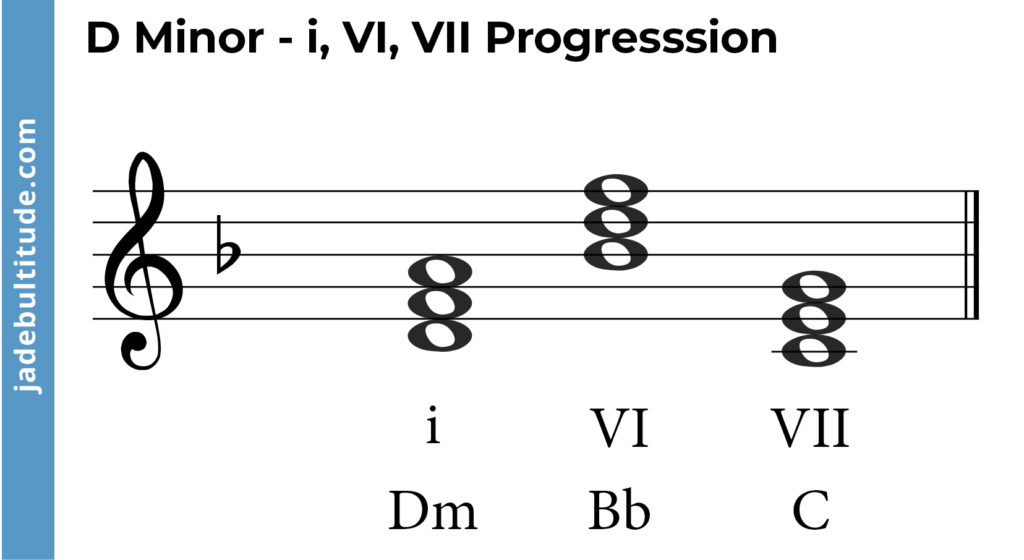
D Minor Chord Scale

Credit: jadebultitude.com

Playing The D Minor Chord Scale On Guitar

If you’re a guitar player looking to expand your knowledge and skills, you might want to learn how to play the D Minor Chord Scale on your guitar. This scale covers a wide range of musical notes and can be used in numerous songs and styles. In this guide, we’ll take you through a few easy steps to playing the D Minor Chord Scale on your guitar, starting with the basics.

Start With The Basic D Minor Chord

NoteString 1String 2String 3String 4String 5String 6
DX0221X
FXX321X
AXX023X

To play the D Minor Chord Scale, first, you’ll need to know the basic D Minor Chord. Place your fingers on the guitar strings as shown in the table above to get started. This will produce the D Minor Chord for your guitar.

Learn The Dorian Scale

  • Play the D note on string 5 and fret 5.
  • Play the E note on string 4 and fret 5.
  • Play the F note on string 3 and fret 3.
  • Play the G note on string 2 and fret 5.
  • Play the A note on string 1 and fret 5.
  • Play the B note on string 1 and fret 8.
  • Play the C note on string 2 and fret 8.
  • Play the D note on string 3 and fret 7.

Once you’ve mastered the D Minor Chord, move onto the Dorian Scale. Think of this as the basic minor scale for your guitar. To play it, start with the D note on string 5 and fret 5. Then move onto the E note on string 4 and fret 5. Keep following the scale through to the end, playing each note in the order listed above.

Practice The Melodic Minor Scale

  1. Play the D note on string 6 and fret 10.
  2. Play the E note on string 6 and fret 12.
  3. Play the F note on string 5 and fret 10.
  4. Play the G note on string 5 and fret 12.
  5. Play the A note on string 4 and fret 10.
  6. Play the B note on string 4 and fret 12.
  7. Play the C# note on string 3 and fret 11.
  8. Play the D note on string 3 and fret 12.

The final step is to practice the Melodic Minor Scale, which is a bit more advanced. To play this scale, start with the D note on string 6 and fret 10. Then keep following through the scale, playing each note in the order listed above. Make sure to practice this scale regularly until you can play it smoothly and seamlessly on your guitar.

By following these simple steps, you can master the D Minor Chord Scale on your guitar. So, go ahead and practice these techniques until you become a pro at playing different guitar scales and notes.
D Minor Chord Scale

Credit: jadebultitude.com

Advanced D Minor Chord Scale Techniques

Explore advanced techniques to master the D minor chord scale and elevate your musical skills to the next level. Discover new ways to incorporate this powerful chord progression in your compositions and performances.

The D minor chord scale is a fundamental scale for musicians who want to play in the key of D minor. While the scale itself is easy to learn, it’s important to understand the advanced techniques that can enhance your playing. In this post, we will explore the advanced D minor chord scale techniques that will take your playing to the next level.

Adding Arpeggios To The Scale

One advanced technique to try when playing the D minor chord scale is to add arpeggios to the scale. An arpeggio is a sequence of notes that are played one after another to create a chord. To add arpeggios to the D minor chord scale, you can play each note of the scale as an arpeggio. For example, if you’re playing the D minor chord scale, you can add an arpeggio by playing the D minor chord (D F A) as you play the D note.

Playing The Scale In Different Positions

Another way to advance your playing with the D minor chord scale is to play the scale in different positions. Playing the scale in different positions means starting and ending on different notes of the scale. This technique will give your playing a unique sound and also improve your finger dexterity. For example, you can start the D minor chord scale on the 5th fret of the guitar and end on the 8th fret.

Using Alternate Picking Techniques

Alternate picking is a technique used by many guitarists to play fast and accurately. When playing the D minor chord scale, incorporating alternate picking will create a more dynamic and engaging sound. To use alternate picking, you can alternate between your upstroke and downstroke with each note of the scale. This technique will help improve your rhythm and timing while playing the D minor chord scale. To conclude, these advanced D minor chord scale techniques can elevate your playing and bring a new level of depth to your music. Adding arpeggios to the scale, playing the scale in different positions, and using alternate picking techniques are just a few examples of the many techniques that can be explored to take your playing to the next level.

Famous Songs That Use The D Minor Chord Scale

Songs in the D Minor chord scale have an aura of melancholy and sadness, making them a popular choice for musicians who want to evoke deep emotions in their listeners. Famous examples include Adele’s “Someone Like You”, Pink Floyd’s “Another Brick in the Wall”, and Mozart’s “Requiem in D Minor”.

If you’re a fan of music, you’ve likely heard the beautiful and melancholic sounds of the D minor chord scale. This scale is a powerful addition to any musician’s repertoire and has been used in countless famous songs across different genres. Here, we’ll highlight three iconic songs that make great use of this scale.

Stairway To Heaven By Led Zeppelin

Arguably one of the greatest rock songs of all time, Stairway to Heaven, by Led Zeppelin, is a classic example of the use of the D minor chord scale. This song’s opening riff, which continues throughout the song, uses notes from the D minor pentatonic scale, giving the song a haunting yet euphoric feeling. As the song builds in intensity, the D minor chords are accompanied by other chords from the same family, adding depth and complexity.

Tears In Heaven By Eric Clapton

Tears in Heaven is an emotional ballad written by Eric Clapton, following the tragic death of his four-year-old son. The song’s melody is based entirely around the D minor chord scale, with the chords supporting and enhancing the powerful lyrics. The use of the D minor scale gives the melody an almost lullaby-like quality, adding to the emotional weight of this heart-wrenching song.

Nothing Else Matters By Metallica

Nothing Else Matters, by Metallica, is a song that showcases the beauty and versatility of the D minor scale. The song’s gently strummed opening chords give way to a melodic guitar solo, with many of the notes coming from the D minor scale. The use of the D minor scale gives the song a dark and brooding quality, adding depth to the lyrics and vocals. In conclusion, the D minor chord scale is a staple in music and has been used in countless famous songs across different genres. Whether it’s the haunting riff of Stairway to Heaven, the emotional ballad of Tears in Heaven, or the brooding melody of Nothing Else Matters, this scale has the power to evoke a range of emotions.
D Minor Chord Scale

Credit: piano-music-theory.com

Creating Your Own Music With The D Minor Chord Scale

Learn how to create your own music with the D Minor Chord Scale. This scale is perfect for those wanting to add a melancholic or haunting feel to their music. Experiment with different combinations to find what works for you.

Learning the D Minor Chord Scale is the first step towards creating your own music. With this scale, you can experiment with different chords and progressions, and come up with melodies that are unique and expressive. In this article, we will explore the basic music theory required to understand the D Minor Chord Scale, along with the techniques for composing music using this scale.

Learning Basic Music Theory

Before we dive into composing our own music, it’s important to understand some basic music theory concepts. The D Minor Chord Scale is a collection of notes that are played in a specific order to create a unique sound or mood. Each note is represented by a letter, from A to G, with specific intervals between them. By understanding these intervals, we can create chords and progressions that sound harmonious. It’s important to learn the intervals between the notes, as well as the chords that can be formed from those notes.

Experimenting With Different Chord Progressions

Once you have a basic understanding of the D Minor Chord Scale, you can start experimenting with different chord progressions. A chord progression is simply a sequence of chords played in a specific order. By using the chords from the D Minor Chord Scale, you can create unique progressions that sound great together. Try playing around with different chord combinations to see what sounds best. You can also experiment with the rhythm and tempo to create a unique and expressive melody.

Using The Scale To Compose Melodies

Finally, once you have created a chord progression, you can use the D Minor Chord Scale to compose a melody that complements the chords. The melody should be simple yet expressive, using notes from the D Minor Chord Scale to create a unique sound. You can experiment with different note combinations, rhythms, and tempos to create a melody that expresses your unique style and personality. In conclusion, learning the D Minor Chord Scale is the first step towards creating your own music. By understanding the basic music theory, experimenting with different chord progressions, and using the scale to compose melodies, you can create a unique and expressive piece of music. So start exploring the D Minor Chord Scale today and unlock your inner musician!

Frequently Asked Questions On D Minor Chord Scale

How To Do The D Minor Scale?

To play the D minor scale on a piano or guitar, start on the D note and play the following sequence: whole step to E, half step to F, whole step to G, whole step to A, half step to B flat, and a whole step to C, ending on D.

Repeat this sequence an octave higher to complete the scale.

What Are The 4 Chords In D Minor?

The four chords in D minor are Dm, G, A, and F.

What Is The Scale Of The D Chord?

The scale of the D chord is the D major scale. It consists of the notes D, E, F#, G, A, B, and C#. These notes can be played on various instruments such as guitar, piano, or any other instrument capable of producing sound.

What Are The Diatonic Chords In D Minor?

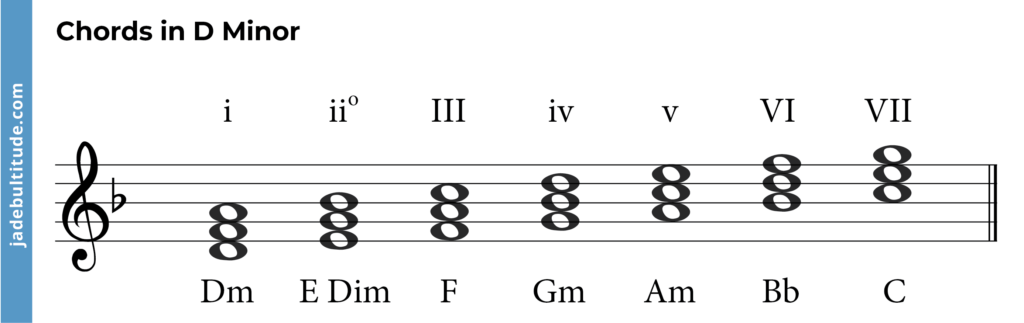
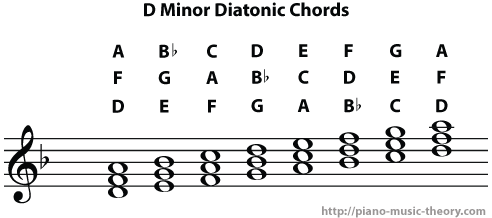
The diatonic chords in D minor are D minor, E diminished, F major, G minor, A minor, Bb major, and C major.

Conclusion

To sum up, the D minor chord scale is an essential tool for any musician looking to explore the depth and versatility of the minor key. With the knowledge of how to form and use this scale, you can add a new dimension to your music composition and improvisation.

By playing around with different scales and chord progressions, you can bring your music to life in new and exciting ways. So, keep practicing, keep exploring, and most importantly, keep the music alive.
Categories
Archive

Steps to Become a Musician

To become a musician, learn to play an instrument and develop your skills through practice, take music lessons or attend a music school, perform in public, and network with other musicians and professionals in the music industry. Becoming a musician requires dedication, hard work and perseverance.

There are several steps you can take to achieve your dream of becoming a successful musician. First, you need to choose an instrument that you would like to play and start learning how to play it. It’s important to practice regularly and work on developing your skills.

Taking music lessons or attending a music school can help you learn the fundamentals and refine your techniques. You should also perform in public to gain experience and exposure, and network with other musicians and professionals in the music industry to find opportunities for growth and advancement. With determination and hard work, you can turn your passion for music into a successful career.

Developing Musical Interest

To become a musician, start by choosing an instrument to focus on and finding a teacher or mentor. Practice regularly and seek out performance opportunities to hone your skills. Immerse yourself in music by attending concerts and listening to a wide variety of genres.

If you want to become a successful musician, the first and most important step is to develop your musical interest. Without passion and enthusiasm for music, achieving success in this field is difficult. In this post, we will discuss how you can explore different genres of music and listen to various artists to build your interest.

Explore Musical Genres

There are numerous genres of music to choose from, and exploring them can help you identify the one that resonates with you the most. Some popular genres include rock, pop, jazz, classical, hip-hop, country, and electronic dance music (EDM), among others. Each genre can be further divided into sub-genres, and it is essential to learn about each of them to understand the nuances of musical expression.

GenreSub-genres
RockAlternative, Metal, Punk, Indie, Classic Rock
PopElectro Pop, Synth Pop, Power Pop, Bubblegum Pop, Dance Pop
JazzSwing, Bebop, Cool Jazz, Fusion, Free Jazz
Hip-HopEast Coast, West Coast, Gangsta Rap, Trap, Old School

Listen To Different Artists

Once you have explored different genres of music, it is crucial to listen to various artists within each genre. Each artist has a unique style, sound, and message they convey through their music, and it is essential to listen to their work to appreciate and learn from it. You can create playlists, browse music streaming platforms, attend live concerts, and even talk to other music enthusiasts to discover new artists.

Conclusion

Developing your musical interest is not only the first step towards becoming a great musician; it is also a continuous process. By exploring various genres and listening to different artists, you will discover new styles, techniques, and musical ideas that will inspire you and help you grow as a musician. Keep an open mind and stay curious; the possibilities are endless.

Steps to Become a Musician

Credit: www.bennysutton.com

Creating Your Voice

Learn how to become a musician by creating your unique voice. Follow these steps: practice daily, study your favorite artists, surround yourself with supportive musicians, find your niche, network, and perform as often as possible.

Music allows individuals to express themselves freely and creatively. As an aspiring musician, you must create your own unique sound to stand out from the rest. Creating your voice involves finding your preferred instrument and practicing regularly to master it. Let’s get into the steps needed to create your sound.

Choose Your Preferred Instrument

The first step to creating your voice is choosing an instrument that you enjoy playing. Whether it’s a guitar, piano, drums, or any other instrument, it’s crucial to find one that you connect with. Determine which instrument suits your personality and interests the most. It’s important to choose an instrument that you’re passionate about, as it will motivate you to put in the hard work required to become proficient.

Practice Regularly

Now that you have chosen your instrument, it’s time to practice regularly. Regular practice ensures that you improve your skills and perfect your sound. Make a schedule that allows you to practice for a specific duration each day. You can start with a few minutes each day and gradually increase the time as you progress. During practice, ensure you learn new pieces and practice scales, arpeggios, and various music techniques. This will help you improve your skills and gain confidence in playing your instrument. You could also practice with other musicians to improve your playing skills and learn from each other.

Experiment And Find Your Own Sound

While you learn from others and practice, it’s essential to experiment with different sounds, techniques, and styles. This experimentation is necessary as it provides you with the opportunity to find your sound and style. You can learn from different musicians, styles, and genres and incorporate them into your unique mix, creating a sound that is yours alone. In conclusion, creating your voice requires you to find your preferred instrument, practice regularly, and experiment to find your sound. With hard work and dedication to your craft, you will eventually create a unique, identifiable sound that will make you stand out as a musician.

Learning The Fundamentals

Learning the fundamentals is an important step to becoming a successful musician. This step involves acquiring knowledge about the basics, including theory and notation, ear training, and instrument proficiency. By mastering these fundamentals, musicians can lay a strong foundation for their music career and continue to improve their skills. In this blog post, we will provide an overview of the fundamentals of music and how to learn them.

Theory And Notation

Theory and notation form the foundation of music. Music theory is the study of how music works, including the understanding of notes, chords, and rhythm. Notation is the system used to write music on a score. Learning to read and write music using notation is a fundamental skill that every musician should possess.

There are many resources available for learning music theory and notation, including online courses, books, and videos. It is also possible to take music theory and notation classes at a local community college or music school.

Ear Training

Ear training is the process of developing the ability to hear and recognize notes, intervals, and chords. It is an essential skill for any musician, as it helps them to play by ear and improvise. Ear training can be learned by practicing exercises such as listening to different types of music and identifying the notes and chords played.

There are also many online resources available for ear training, including apps, websites, and courses. Many musicians also recommend playing along with recordings and practicing improvisation to develop ear training.

Instrument Proficiency

Instrument proficiency is the ability to play a chosen instrument fluently. This involves understanding the techniques and mechanics of the instrument, as well as developing the physical coordination required to play it. Instrument proficiency can be learned through practice and lessons with a skilled teacher.

There are a variety of online resources available for learning how to play an instrument, including instructional videos, online courses, and apps. Many musicians recommend finding a teacher who specializes in the instrument you want to learn and taking private lessons.

Overall, learning the fundamentals of music is an essential step towards becoming a musician. Whether you are a beginner or an experienced musician, it is important to continue to develop your skills and build on your knowledge of music theory, ear training, and instrument proficiency.

Collaborating With Peers

To become a successful musician, collaborating with peers is crucial. Joining a band or performing with other musicians can help improve your skills, gain exposure, and build connections in the industry. Don’t be afraid to reach out and collaborate with others to enhance your musical career.

Collaborating with peers is vital for an aspiring musician to develop their skills and grow their professional network. It provides an opportunity to exchange ideas, learn new techniques, and gain experience in the music industry. Here are some H3 headings that can help you collaborate with peers and propel your music career forward:

Join Ensembles And Bands

Joining an ensemble or a band is an excellent way to collaborate with other musicians while enhancing your skills. You can leverage these opportunities to learn from seasoned musicians, explore new genres, and showcase your talent. Consider reaching out to local ensembles and bands and requesting an audition. Many groups welcome new members. By working with a group, you can enhance your social skills, learn how to harmonize with other musicians, and build your confidence as a performer.

Network With Other Musicians

Networking helps you build relationships with other musicians, which can open doors to future collaborations and gigs. Attend open mic nights, shows, and concerts to meet other musicians in your area. Consider volunteering at music festivals and conferences to meet new people in the industry. Connect with other musicians on social media platforms such as LinkedIn, Instagram, and Facebook. Building these relationships can help you find new performance opportunities, receive valuable feedback, and gain exposure to new audiences.

Participate In Jam Sessions

Jam sessions are an excellent way to collaborate and improvise with other musicians. They can help you develop your creativity and improve your improvisation skills. Consider attending jam sessions hosted by local music stores or cafes. Alternatively, organize your own jam sessions with other musicians in your area. These sessions can provide a relaxed environment to experiment with new techniques and learn from other musicians.

Take Music Lessons

Taking music lessons can be a great way to collaborate with musicians who are more experienced or have different expertise than you. You can leverage this opportunity to learn new techniques and get feedback from a teacher and peers. Consider taking private lessons or enrolling in music schools and institutions. By doing so, you can network with other students and teachers, who might provide you with performance opportunities or collaborate with you on projects.

Collaborate On Music Projects

Collaborating on music projects with other musicians can help you create unique and diverse creations, while also providing valuable networking opportunities. Consider collaborating on open-source projects or user-generated content websites such as SoundCloud or YouTube. Alternatively, initiate your own music production projects and invite other musicians to collaborate with you. These collaborations can help you develop new skills, increase your exposure, and build your portfolio. Collaborating with peers is a critical step to becoming a successful musician. By joining ensembles and bands, networking with other musicians, participating in jam sessions, taking music lessons, and collaborating on music projects, you can enhance your skills, build your network, and propel your music career forward.

Recording Your Music

Recording your music is a vital step in becoming a musician. Start by having a clear idea of your music style, then find a good recording studio or invest in equipment for home recording. Practice and hone your skills until you’re ready to share your music with the world.

As a musician, the recording process is a crucial step in making your music heard. It involves capturing the essence of your performance and translating it into a format that listeners can enjoy. Whether you’re recording in a professional studio or setting up a home studio, there are several things to consider when recording your music. In this blog post, we will explore the steps you need to take to record your music successfully, including setting up a home studio and working with producers and sound engineers.

Setting Up A Home Studio

Setting up a home studio can be a cost-effective alternative to recording in a professional studio. It allows you to record your music at any time and experiment with different sounds without the time constraints of a studio rental. To set up a home studio, you will need the following:

  • A computer with enough processing power to run recording software and plugins
  • A digital audio interface to connect your instruments and microphones to your computer
  • A microphone and headphones for monitoring
  • A recording software such as Pro Tools, Logic Pro X, or Ableton Live

Ensure that your recording environment is acoustically treated, meaning that sounds from outside the room are minimized, and the room’s reflections are controlled. This can be achieved through the use of acoustic panels or foam insulation.

Working With Producers And Sound Engineers

When it comes to recording your music professionally, working with producers and sound engineers can make a significant difference in the quality of your recording. They can help you achieve the sound you desire and bring out the best in your performance. Here are some tips for working with producers and sound engineers:

  • Communicate your vision clearly, so they understand what you want to achieve with your music
  • Listen to their feedback and suggestions, as they have experience and knowledge that can benefit your recording
  • Be flexible and open to experimentation, as they may suggest ideas that you may not have considered
  • Give constructive feedback, so they can make the necessary adjustments to meet your expectations.

With these tips, you can work with producers and sound engineers to create recordings that showcase your musical talents and connect with your audience.

Promoting Yourself

If you are aspiring to become a musician, there are several essential steps you must take to promote yourself. These include building your social media presence, creating and sharing quality content, networking with industry professionals, playing live shows, and reaching out to music blogs and publications.

With these steps, you can increase your visibility and build a fanbase to support your musical career.

One of the most important steps towards becoming a successful musician is to promote yourself and your work. It is essential to create your own fan base to attract more people and increase your reach. There are many ways to promote yourself, but the most effective ones are building an online presence, performing live shows, and collaborating with other musicians.

Building An Online Presence

In today’s digital age, having an online presence is crucial to promote your music. Creating a website and social media accounts gives you the platform to showcase your work and reach a wider audience. Posting your music, pictures, and videos on social media platforms like Facebook, Instagram, and Twitter is an excellent way to interact with your fans and build a fan base. You can also collaborate with other musicians or content creators to promote your music. Building an email list and sending regular newsletters is another effective way to keep your fans updated and engaged.

Performing Live Shows

Performing live shows is an excellent way to promote your music and reach new fans. It can take your career to the next level and open up new opportunities. You can start by performing at local venues and events, like bars, cafes, and open mic nights. And eventually, you can work your way up to larger venues and festivals. Don’t be afraid to make mistakes during your live performances, as it’s a learning experience, and it shows your authenticity and humanity.

Collaborating With Other Musicians

Collaborating with other musicians can help you reach new audience demographics and create unique sounds. You can collaborate on songs, perform together, or even create a joint album. It’s a win-win situation since both parties benefit from each other’s fan base. Collaborating with more experienced musicians can also help you gain insight into the industry and improve your skills. Overall, promoting yourself is a crucial part of becoming a musician. Building an online presence through social media and a website, performing live shows and collaborating with other musicians can take your career to the next level. Keep practicing, networking, and promoting yourself persistently, and you’ll soon see the desired results.

Growing Your Fanbase

Maximizing your fanbase as a musician requires consistent efforts and building a strong online presence. Engaging with your fans on social media, creating quality content and networking with fellow musicians are some of the key steps to take in order to grow your fanbase and establish a successful career in music.

As a musician, building a fanbase is key to your success. The more fans you have, the more people you can share your music with, and ultimately, the more opportunities you’ll have to grow as an artist. Here are some steps you can take to grow your fanbase effectively.

Engage With Your Audience

One of the best ways to grow your fanbase is to engage with your audience. When people feel like they have a personal connection with you, they’re more likely to become fans and follow your career. Here are some ways you can engage with your audience:

  • Respond to comments on social media and in your blog
  • Offer exclusive content and behind-the-scenes updates to your followers
  • Thank fans for their support and acknowledge milestones like hitting a certain number of followers or streams
  • Invite fans to vote on your next single or album name and ask for their input on other creative decisions

Use Social Media Strategically

Social media can be a powerful tool for growing your fanbase. However, it’s important to use social media strategically to get the most out of it. Here are some tips for using social media effectively:

  • Identify which platforms your fans are most active on and focus your efforts there
  • Post regularly and consistently to keep your fans engaged
  • Use hashtags and keywords to make your content discoverable to new fans
  • Partner with other artists or influencers to reach new audiences
  • Run contests and giveaways to incentivize your fans to engage with your content and share it with their friends

By engaging with your audience and using social media strategically, you can grow your fanbase and take your music career to the next level. Remember to stay true to your brand and focus on creating quality music that your fans will love.

Steps to Become a Musician

Credit: www.wikihow.com

Sustaining A Career In Music

Aspiring musicians can take steps such as honing their skills through practice and performance, networking with other musicians and industry professionals, creating and promoting their own music, and building a strong online presence. A dedication to continuous improvement, persistence, and passion for the craft are also important factors in sustaining a career in music.

If you love music and have a passion for it, then becoming a musician might be your calling. But making a name for yourself as a musician can be challenging. Sustaining a career in music requires hard work, dedication, and perseverance. Here are some steps to take to turn your passion for music into a successful career.

Diversify Your Income Streams

As a musician, you can’t rely entirely on your music sales to sustain your career. It’s important to diversify your income streams by exploring different avenues that generate revenue. Some ways to do this include:

  • Performing live shows
  • Selling merchandise like t-shirts, posters, and CDs at shows and online
  • Online streaming royalties and ads revenue
  • Teaching music lessons
  • Collaborating with other musicians and getting paid for featured verses and choruses

By diversifying your income streams, you can ensure that you’ll have a steady flow of income to keep your career going.

Manage Your Finances

Financial management is another crucial aspect of sustaining a career in music. You must be able to manage your finances efficiently to stay afloat. Some key tips to keep in mind include:

  1. Create a budget and stick to it
  2. Avoid unnecessary expenses and reinvest your earnings in your career
  3. Set financial goals and create a plan to achieve them
  4. Seek professional financial advice when needed

By managing your finances well, you’ll be able to sustain your career in music in the long run. In conclusion, sustaining a career in music requires more than just making good music. You have to be strategic, creative, and disciplined to make a name for yourself in the industry. By diversifying your income streams and managing your finances wisely, you can build a successful and sustainable career in music.

Steps to Become a Musician

Credit: www.facebook.com

Frequently Asked Questions Of Steps To Become A Musician

How Do Musicians Start Their Career?

Musicians can start their careers by gaining experience through performing in public places or at small gigs, creating a portfolio of their work, networking with other people in the industry, building a fanbase through social media, creating and sharing their music online, and seeking professional assistance from music managers or agents.

How Long Does It Take To Become A Musician?

The time it takes to become a musician varies depending on the individual’s natural talent, dedication, and training. However, it typically takes several years of consistent practice, performance, and networking to establish a professional career in music. With hard work, passion, and persistence, anyone can become a successful musician.

How Do I Start Myself As A Music Artist?

To start yourself as a music artist, you should first focus on building your talent and developing your unique sound. Invest in quality equipment and invest time in practicing and writing your own music. Network with other musicians and industry professionals, and consider creating a social media presence to promote yourself and build your fanbase.

Finally, consider recording and releasing your music independently or with a label.

What Qualifications Do I Need To Be A Musician?

There are no specific qualifications required to become a musician, but a formal education or certification in music can help in building skills and credibility as a musician. Additionally, passion, dedication, and practice are key qualities necessary for success in this field.

Conclusion

Becoming a musician requires dedication, hard work, and persistence. By following these steps, including learning an instrument, practicing regularly, networking, creating original material, and performing, you can begin your journey towards success. It’s important to remember that a career in music is not easy, but it can be fulfilling and rewarding.

With patience and passion, you can achieve your dreams and make a meaningful impact in the industry. Best of luck on your musical journey!

Categories
Archive

How To Play Scales Piano

To play scales piano, place your hand in a comfortable position and play each note one after the other. Playing scales is a fundamental skill for pianists, helping to develop finger strength, dexterity, and muscle memory.

Scales are a sequence of notes, usually consisting of eight notes, that follow a specific pattern and are played with the same finger placement for each hand. Practicing scales regularly can help you improve your playing ability and prepare you for learning more complex pieces of music.

Before starting to play, ensure your piano is in tune, and you are seated in a comfortable position with proper posture. With practice, you can master playing piano scales and progress to playing more advanced pieces of music.

How To Play Scales Piano

Credit: www.piano-play-it.com

Understanding Scales On Piano

Start of HTML code Start of body

Understanding Scales On Piano: Scales are one of the fundamental building blocks of playing the piano. They are a series of notes arranged in ascending or descending order, and they serve as a basis for all the music you will play on the piano. Here is some information to help you understand scales on piano.

Introduction paragraph

What Are Scales?

H3 heading “What are scales?” in HTML syntax

Scales on the piano are a set of notes played in succession either ascending or descending, usually from one key to the other. They form the foundation of every piano piece and are like the alphabet of music. The most commonly used scales in music are the major and minor scales, which consist of seven notes each.

Paragraph about what scales are

Importance Of Learning Scales On Piano

H3 heading “Importance of learning scales on piano” in HTML syntax

Learning scales on the piano is essential and should be the first thing you learn as a beginner because it lays a solid foundation for all other techniques. Here are some reasons why learning scales on the piano is important for every pianist:

Paragraph about the importance of learning scales

  • Unordered list of bullet points about the importance of learning scales
  • Improves finger dexterity and agility
  • Helps in understanding music theory
  • Trains your ears to recognize each note
  • Improves hand-eye coordination
  • Increases speed and accuracy

By learning scales on the piano, you will develop a better understanding of music and become a better pianist overall.

Conclusion about the importance of learning scales on the piano End of body

The Basics Of Playing Scales On Piano

Learning how to play scales on the piano is essential for mastering the instrument. Start with the basic major and minor scales, and gradually progress to more complex ones. Practicing regularly will improve finger dexterity, hand position, and overall technique.

Playing scales on the piano is an essential part of learning how to play this instrument. It is important to understand the basics of playing scales as it will improve your finger placement, hand position, and tempo. In this post, we will discuss the fundamentals of playing scales on the piano, including finger placement, hand position, and playing with the right tempo.

Finger Placement

Finger placement is crucial when playing scales on the piano. It is important to use the correct fingers for each note to ensure smooth and efficient playing. Here’s a breakdown of finger placement for a basic C Major scale:

NoteThumbIndex FingerMiddle FingerRing FingerPinky Finger
C1
D12
E123
F1234
G12345
A12345
B12345
C12345

In this example, the thumb indicates the first finger of your right hand, while the pinky refers to your fifth finger. The correct finger placement ensures smooth and accurate playing.

Hand Position

Hand position is another important aspect of playing scales on the piano. Your hands should be in a relaxed, natural position, with your wrists slightly raised. You can follow these steps while practicing:

  1. Sit at the piano with good posture
  2. Let your arms hang naturally by your sides
  3. Place your hands on the keyboard with your fingers curved naturally
  4. Keep your wrists relaxed and slightly raised

By following these steps, you can ensure that your hand position is correct and will help you play more efficiently.

Playing With The Right Tempo

The tempo of your playing can impact the overall quality of your scales. A consistent, steady tempo is vital when playing scales. It is important to start slow and gradually increase the tempo as you become more comfortable. You can use a metronome to help you keep the right tempo while playing scales. In conclusion, playing scales on the piano requires correct finger placement, hand position, and playing with the right tempo. By following these basics, you can improve your piano playing skills and become a more confident musician.

Major Scales On Piano

Learning major scales on piano is an important part of mastering the instrument. Practice each scale individually, starting with C, using the correct fingerings and hand positions. Gradually increase your speed and accuracy to achieve a smooth and fluid sound.

Major Scales On Piano Playing scales is one of the primary skills for any pianist. Not only does it help in developing good finger technique but also contributes to understanding the fundamentals of music theory. Major scales, in particular, are the foundation of many known pieces and compositions. In this article, we will guide you on how to play eight different major scales on piano and provide some helpful tips to make your experience easier and more enjoyable. C Major Scale The C major scale is the most basic and easiest scale to learn and play on the piano. It requires only the white keys and covers an octave range. Start by placing your right thumb on the C note (the first white key to the left of two black keys) and your other fingers on the subsequent white keys. Play each key in ascending order until you reach the next C note, then reverse and play each key in descending order. G Major Scale Similar to the C major scale, the G major scale also uses only the white keys and has an octave range. Begin by placing your right thumb on the G note (the first white key to the left of three black keys) and the rest of your fingers on the subsequent white keys. Play each key in ascending order until you reach the next G note, then reverse the order and play each key in descending order. D Major Scale The D major scale uses both white and black keys and also covers an octave range. Start by putting your right thumb on the D note (the first white key to the left of two black keys) and follow the finger placement for each key until you reach the next D note. Then, play each key in descending order. A Major Scale The A major scale, like the D major scale, also uses both white and black keys and covers an octave range. Put your right thumb on the A note (the first white key to the left of three black keys) and continue playing each key following the finger placement until you reach the next A note. Then, play each key in descending order. E Major Scale The E major scale uses both white and black keys and covers an octave range. Begin by placing your right thumb on the E note (the first white key to the left of two black keys) and play the subsequent keys following the finger placement until you reach the next E note. Reverse the order and play each key in descending order. B Major Scale The B major scale uses five black keys and two white keys. Start by putting your right thumb on the B note (the first white key to the left of three black keys) and follow the correct finger placement for each key until you reach the next B note. Then, play each key in descending order. F# Major Scale The F# major scale is similar to the B major scale, using the same five black keys and two white keys. Begin by putting your right thumb on the F# note (the first white key to the left of three black keys) and play each key following the correct finger placement until you reach the next F# note. Then, reverse the order and play each key in descending order. C# Major Scale The C# major scale uses seven black keys and no white keys. It has a unique pattern of finger placement. Begin by placing your right thumb on the C# note (the first black key to the left of three black keys) and follow the correct finger placement for each key until you reach the next C# note. Then, play each key in descending order. With some regular practice, playing the major scales on the piano becomes effortless. Incorporating these scales into your daily practice routine will help enhance your finger coordination, train your ears to recognize different tonalities, and improve your overall piano playing abilities.

How To Play Scales Piano

Credit: www.quora.com

Minor Scales On Piano

Playing minor scales on the piano can enhance a pianist’s musical skills. Learning the fingering and practicing regularly can improve finger dexterity and help with hand positioning.

Learning minor scales is an essential aspect of playing the piano. They serve as the foundation for playing complex melodies and improvising in a wide range of genres. In this post, we will explore some of the commonly used minor scales on the piano, including A Minor Scale, E Minor Scale, B Minor Scale, F# Minor Scale, C# Minor Scale, G# Minor Scale, D# Minor Scale, and F Minor Scale.

A Minor Scale

The A minor scale is one of the most fundamental minor scales on the piano. It is a natural minor scale, meaning it has no sharps or flats. To play the A minor scale, start with your right thumb on the A note. Play the notes in the following order: A – B – C – D – E – F – G – A

E Minor Scale

The E minor scale is another natural minor scale that has no sharps or flats. It starts with the E note and follows the same pattern as the A minor scale. To play the E minor scale, start with your right thumb on the E note, and play the following notes: E – F# – G – A – B – C – D – E

B Minor Scale

The B minor scale is a sharp minor scale and has two sharps: F# and C#. To play the B minor scale, start with your right thumb on the B note, and play the following notes: B – C# – D – E – F# – G – A – B

F# Minor Scale

The F# minor scale is another sharp minor scale that also has two sharps: F# and C#. To play the F# minor scale, start with your right thumb on the F# note, and play the following notes: F# – G# – A – B – C# – D – E – F#

C# Minor Scale

The C# minor scale is a sharp minor scale that has four sharps: F#, C#, G#, and D#. To play the C# minor scale, start with your right thumb on the C# note, and play the following notes: C# – D# – E – F# – G# – A – B – C#

G# Minor Scale

The G# minor scale is another sharp minor scale with five sharps: F#, C#, G#, D#, and A#. To play the G# minor scale, start with your right thumb on the G# note, and play the following notes: G# – A# – B – C# – D# – E – F# – G#

D# Minor Scale

The D# minor scale is a sharp minor scale with six sharps: F#, C#, G#, D#, A#, and E#. To play the D# minor scale, start with your right thumb on the D# note, and play the following notes: D# – E# – F# – G# – A# – B – C# – D#

F Minor Scale

The F minor scale is a flat minor scale and has four flats: Bb, Eb, Ab, and Db. To play the F minor scale, start with your right thumb on the F note, and play the following notes: F – G – Ab – Bb – C – Db – Eb – F In conclusion, learning minor scales are essential to mastering piano playing skills. Practicing minor scales regularly improves finger dexterity and helps with playing complex pieces. Incorporate these minor scales into your piano practice, and you will see significant progress in no time.

Different Types Of Piano Scales

Playing different types of piano scales is essential to mastering the instrument. Scales help to build finger technique, dexterity, and familiarity with the instrument. Major and minor scales are the most common types of scales, but there are many others that can be explored for more advanced playing.

If you’re learning to play the piano, understanding scales is crucial. Scales are the building blocks of music and are simply a series of notes played in a specific order. Scales help you to develop your technique and understand the structure of music better. There are different types of piano scales, and each type has its unique sound and character. Here are some of the most common types of piano scales:

Chromatic Scales

A chromatic scale is a 12-note scale that includes all the notes in an octave. The chromatic scale is useful for developing finger independence and speed. Playing the chromatic scale entails playing each successive key on the piano with both hands.

Pentatonic Scales

The pentatonic scale is a five-note scale that is commonly used in blues and rock music. Pentatonic scales can be a great starting point for improvisation as they sound good over most chord progressions.

Blues Scales

The blues scale is similar to the pentatonic scale, but it includes the addition of a “blue note,” which adds a unique and distinct sound. Blues scales can be used in blues but also in rock, jazz, and other styles.

Whole-tone Scales

The whole-tone scale is a six-note scale that sounds cheerful and dreamy. This scale is commonly used in jazz and creates a unique and modern sound. In conclusion, understanding different types of piano scales is essential for any pianist. Learning and practicing each of these scales will provide you with a strong foundation of musical knowledge and enhance your playing technique.

Exercises To Improve Your Scale Playing

One of the keys to becoming a skilled pianist is to work on improving your scale playing. Fortunately, there are several exercises you can practice to help sharpen your skills. In this article, we will explore some effective exercises to help you take your scale playing to the next level.

Playing With A Metronome

When practicing scales, one of the most helpful tools you can use is a metronome. This tool ensures that you are playing at a consistent tempo and can help you develop better timing. Start by playing your scales at a slow tempo, gradually increasing the speed as you become more comfortable. Focus on keeping your fingers perfectly in sync with the metronome’s beat.

Practicing In Different Octaves

Another effective exercise to improve your scale playing is to practice playing scales in different octaves. This helps you become more comfortable with the entire keyboard and trains your fingers to work fluidly across different ranges. Begin by playing scales in the lower octave then gradually move to higher octaves.

Using The Correct Fingering

Correct finger usage is essential when playing scales. Using the correct fingering technique can help you increase the speed of your playing and optimize your hand movements, thereby enabling you to perform faster and more accurately. Be sure to memorize the correct fingering for each scale and practice executing it repeatedly to develop muscle memory.

Practicing Legato And Staccato Scales

Finally, practicing legato and staccato scales is another helpful technique to improve your scale playing. Legato scales require smooth and connected finger movements, while staccato scales require each note to be played short and distinct. These techniques help to ensure that you are playing every note with clarity and precision, which boosts the consistency, flow, and accuracy of your scale playing.

Tips To Mastering Scales On Piano

Mastering scales on the piano takes practice and patience. Start with the basic major and minor scales, using proper hand positioning and finger placement. Gradually increase speed and always aim for accuracy in your playing.

Learning how to play scales on piano is a crucial part of becoming a skilled pianist. While it may seem daunting at first, with these practical tips and consistent practice, you can improve your scale-playing abilities and take your piano skills to the next level.

Take Your Time

Rushing through scales can lead to mistakes and uneven playing. Instead, take your time and focus on accuracy and evenness. Start by playing the scales at a slow tempo and gradually increase the speed as you get more comfortable. Remember, playing at a slower pace and focusing on precision is better than playing quickly with mistakes.

Practice Regularly

Consistency is key to mastering any skill, and playing scales on piano is no exception. Practice regularly, even if it’s just for a short period of time each day. Create a schedule that works for you and stick to it. Doing so will help build muscle memory and improve your finger dexterity, allowing you to play faster and more accurately.

Break Scales Down Into Smaller Parts

Instead of trying to play a whole scale in one go, break the scale down into smaller parts. For example, play just the first five notes of the scale, then move on to the next five. Once you feel comfortable with each section, put them together and play the entire scale. This technique will help you to learn the scale more efficiently and accurately.

Record Yourself Playing To Identify Areas To Improve On

Recording yourself playing can help you identify areas where improvement is needed. Listen back to the recording and take note of where mistakes were made or where the playing was uneven. This will help you to focus your practice on specific areas that need improvement, ultimately leading to smoother playing and better performances. Incorporating these tips into your practice routine will help you to master scales on piano and grow your piano skills. Remember to take your time, practice regularly, break scales down into smaller parts and record yourself playing to identify areas to improve on. With diligent practice and patience, you’ll soon be playing scales with confidence and ease.

How To Play Scales Piano

Credit: www.hoffmanacademy.com

Frequently Asked Questions For How To Play Scales Piano

How Do You Play Scales On The Piano?

To play scales on the piano, start by placing your fingers on the keys in the correct position. Play each note in the scale one at a time, moving up or down the keys depending on the scale. Practice playing the scale slowly at first, gradually increasing speed.

Repeat until you can play the scale smoothly and with ease.

Which Piano Scales To Learn First?

Beginners should learn basic major and minor scales in all 12 keys first. These scales include C major, A minor, G major, and E minor. After getting familiar with these scales, they can move on to more complex scales like the blues scale, pentatonic scale, and melodic minor scale.

What Is The Formula For Piano Scales?

The formula for piano scales involves playing a specific sequence of whole and half steps, depending on the type of scale. For a major scale, the formula is W W H W W W H (W=whole step, H=half step). For a minor scale, the formula is W H W W H W W.

What Are The Steps In A Piano Scale?

The steps in a piano scale are the individual notes played in sequence, either ascending or descending, following a specific pattern of whole and half steps. The major scale is the most common and follows the pattern of whole-whole-half-whole-whole-whole-half. Other scales, such as the minor scale, follow different patterns of whole and half steps.

Conclusion

Mastering scales on the piano is an essential step for any pianist, whether you are a beginner or an expert. It requires patience, practice, and dedication to master scales and apply them in your music. Remember to start slow and gradually increase your tempo, use correct fingerings, and practice with a metronome.

By following these tips, you will be able to play scales piano seamlessly and take your piano skills to the next level. Keep practicing, and Happy playing!

Categories
Archive

What Is Stem Mixing

Stem mixing is a process of audio mixing where a track is divided into individual parts. These parts are mixed independently and then combined to create a final mix.

This technique is commonly used in electronic and dance music genres to give more control over the sound and create a more intricate mix. In stem mixing, each part of a track, such as drums, bassline, and melody, is exported as a separate audio file.

Each file is then mixed and processed separately, using effects and automation to adjust volume, EQ, and other parameters for each track. Once the separate mixes are complete, they are combined into a final mix, allowing for greater control and precision over the overall sound. Stem mixing is often used by producers and engineers to achieve a more detailed and polished sound, particularly in genres that require complex arrangements and layered sounds. It is a popular technique in electronic dance music, hip-hop, and pop music, and has become increasingly common in other genres as well.

What Is Stem Mixing

Credit: www.adt-audio.com

How Stem Mixing Works

Stem mixing is the process of isolating specific audio tracks in a song before the final mixdown. This technique allows for greater control and manipulation of individual elements, resulting in a more polished and cohesive final mix.

Stem mixing is a process of mixing music tracks together. But instead of blending them all together into one file, the audio is separated into individual components or “stems.” This allows the audio engineer to have greater control over each element of the mix and to make adjustments as needed.

Separating The Audio Into Stems

The first step in stem mixing is separating the audio into stems. This is typically done using specialized software that can isolate different components of the mix. For example, a stereo track might be separated into four stems: drums, bass, vocals, and everything else. These stems can then be imported into a mixing program for further processing.

Processing The Stems

Once the stems are imported, the audio engineer can begin processing each one individually. This might involve adding EQ, compression, reverb, or other effects to enhance or modify the sound. By processing each stem separately, the engineer can create a more balanced and polished overall mix.

Mixing The Stems

The final step in stem mixing is combining all the processed stems into a final mix. This involves adjusting levels, panning, and other parameters to ensure that all the different elements of the mix blend together seamlessly. The goal is to create a cohesive and dynamic-sounding final product that showcases the strengths of each individual stem. Stem mixing can be time-consuming and complex, but it can also lead to superior sound quality and greater flexibility in the mixing process. By separating the audio into stems, audio engineers can achieve a more refined and polished final mix that truly highlights the strengths of each individual component.

What Is Stem Mixing

Credit: www.masteringthemix.com

Preparing For Stem Mixing

Stem mixing involves separating audio recordings into individual tracks, or stems, before mixing them together. This technique offers greater control and flexibility during the mixing process, allowing engineers to adjust individual elements of the recording without affecting the overall sound.

When it comes to preparing for stem mixing, organizing your tracks, editing your audio, and preparing your mix are important steps. Stem mixing involves creating a final mix using stems, or submixes, of your individual tracks to give you greater control over the final sound.

Organizing Your Tracks

The first step in preparing for stem mixing is to ensure your tracks are organized. This involves labeling your tracks, grouping related tracks together, and removing any unwanted tracks. By organizing your tracks, you can easily identify individual elements of your mix during stem mixing.

Editing Your Audio

Before you begin stem mixing, it’s important to edit your audio. This involves cleaning up any unwanted noise, adjusting levels, and applying any necessary effects. By editing your audio prior to stem mixing, you can ensure that each stem is as clean and polished as possible.

Preparing Your Mix

Once your tracks are organized and your audio is edited, you’re ready to start preparing your stems. Begin by grouping your tracks into stems, such as drums, bass, vocals, and instruments. Then, export each stem as an audio file. When exporting your stems, be sure to use the same settings for each, including sample rate, bit depth, and volume levels. In conclusion, preparing for stem mixing requires careful organization of your tracks, thorough editing of your audio, and proper preparation of your mix. By following these steps, you can create a mix that sounds polished and professional.

Gear Needed For Stem Mixing

Stem mixing, done right, can bring out the best in your music. But to create a polished final product, you need the right gear. Here’s what you should have:

Audio Interface

An audio interface is the heart of your home recording setup. It allows you to connect your instruments and microphones to your computer for recording, and also routes the sound back out for mixing and monitoring. Look for an interface with enough inputs and outputs for your needs, and make sure it’s compatible with your computer.

Daw Software

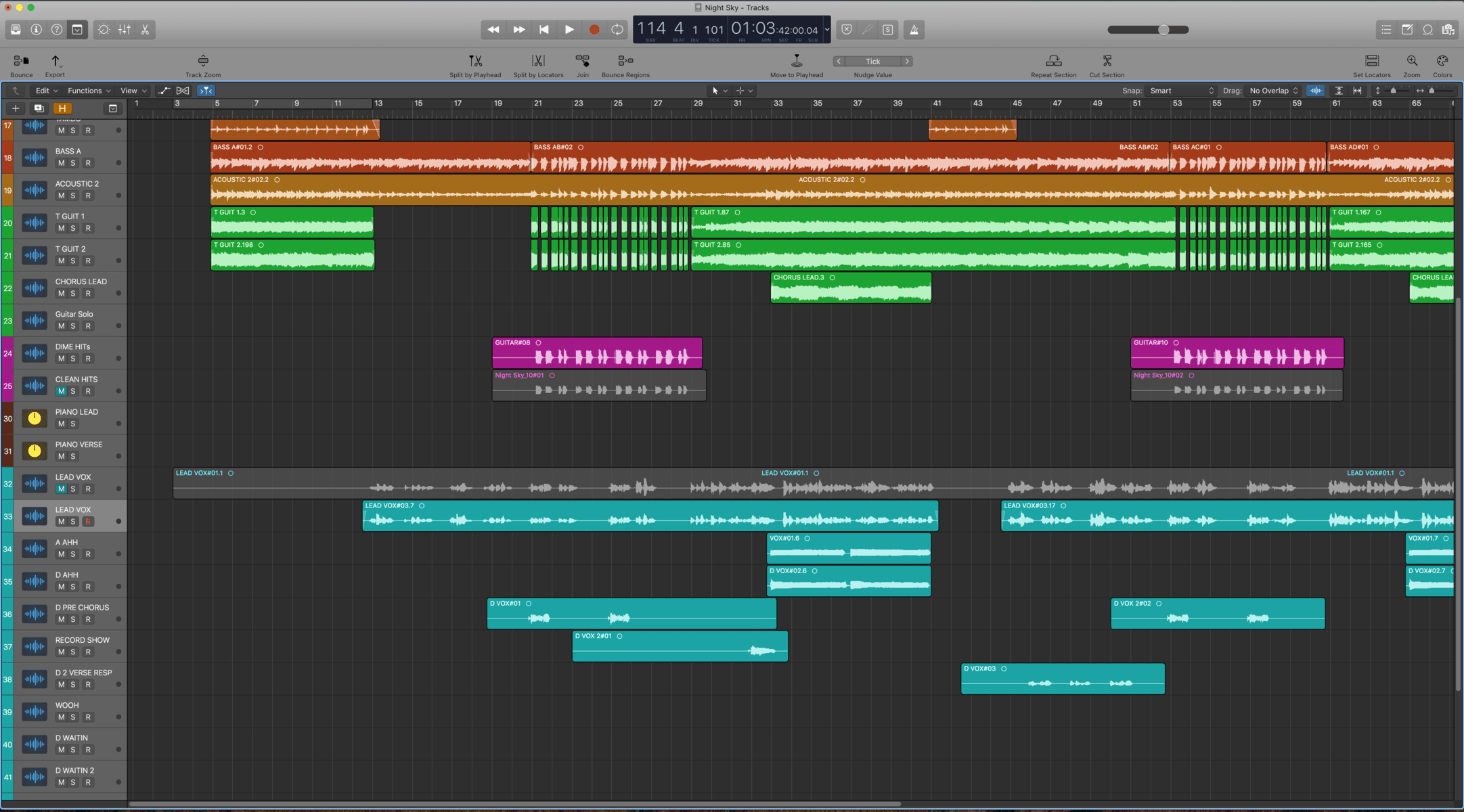
Your digital audio workstation (DAW) is your mixing command center. It’s where you’ll import your individual tracks, adjust levels and pans, and add effects. Whether you prefer a professional-level program like Pro Tools or Logic Pro, or a more affordable option like Audacity or GarageBand, choose a software that suits your skill level and workflow.

Plugins And Effects

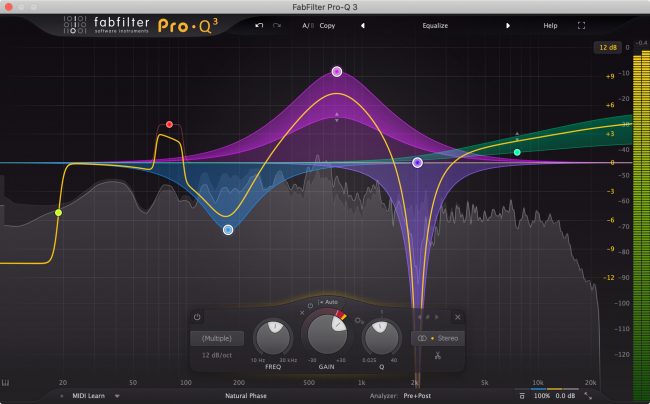
Plugins and effects are additional software that can be used within your DAW to enhance your tracks. These can include EQ, compression, reverb, delay, and many others. Choose plugins based on your specific needs, budget, and the genre of music you’re mixing.

With these essential tools in place, you’ll be well on your way to creating top-quality mixes. Don’t skimp on the hardware or software for your home studio – investing in quality gear can make all the difference in the final product.

What Is Stem Mixing

Credit: www.soundonsound.com

Best Practices For Stem Mixing

Stem mixing is the process of creating submixes of a song’s components, such as drums, vocals, and guitars, to facilitate greater control during the final mixing phase. By mixing multiple stems together, a more polished and professional sound can be achieved.

Best Practices for Stem Mixing: Balancing Levels, Using EQ Effectively, and Compressing Your Tracks Effective stem mixing involves a combination of technical expertise and artistic skill. To achieve the best possible sound quality, you need to balance your levels, use EQ effectively, and compress your tracks. Balancing Levels One of the most important aspects of stem mixing is balancing levels. This involves adjusting the volume of each track so that they all blend together harmoniously. To achieve this, you will need to use your ears and make adjustments until you find the right balance. Using EQ Effectively EQ is an essential tool for stem mixing that allows you to create space for each track in the mix. It involves adjusting the frequency range of each track so that it occupies a different space in the mix. To use EQ effectively, you need to listen carefully to each track and make subtle adjustments until they all sound clear and balanced. Compressing Your Tracks Compression is another important tool for stem mixing, allowing you to create a more consistent sound across all tracks. It involves reducing the dynamic range of each track so that the quiet parts are boosted and the loud parts are reduced. Compression helps to ensure that your tracks sound cohesive and professional. To get the best out of your stem mixing, always remember to balance your levels, use EQ effectively, and compress your tracks. Keep listening and making adjustments until you achieve the sound you want. With practice and patience, you can create amazing mixes that will stand out from the rest.

Frequently Asked Questions On What Is Stem Mixing

What Is A Stem In Mixing?

Stems in mixing refer to individual audio tracks that make up a final mix. These tracks can be grouped and edited separately, allowing for more precise control and adjustments in the mixing process.

Is It Better To Mix With Stems?

Yes, it is better to mix with stems as it allows the sound to have more depth and texture. Stems can give you more control over each element of a track which can help you bring out elements that might be lost in a mix.

Mixing with stems can also help with the overall balance and clarity of the track.

What Does Stem Mean In Music?

In music, stem refers to the individual elements or components of a track, such as vocals, drums, or guitars, that can be isolated and manipulated separately. These stems allow for greater control and flexibility in mixing and editing the final version of the song.

What Is The Difference Between Stem Mixing And Stem Mastering?

Stem mixing involves mixing individual stems of a track, while stem mastering involves applying mastering techniques to pre-mixed stems. Mixing involves balancing levels, panning, and EQ adjustments, while mastering implements compression, limiting, and EQ to create a cohesive final track.

Conclusion

Stem mixing is a technique that allows for greater control and flexibility in the mixing process. With stem mixing, individual elements of a song or track can be isolated and adjusted as needed, resulting in a more professional and polished final product.

Whether you are a musician, producer, or engineer, learning how to use stem mixing effectively can greatly enhance your work and help you achieve your desired sound. So, why not give it a try and see how it can elevate your music to the next level?

Categories
Archive

Best Daws For Beginners

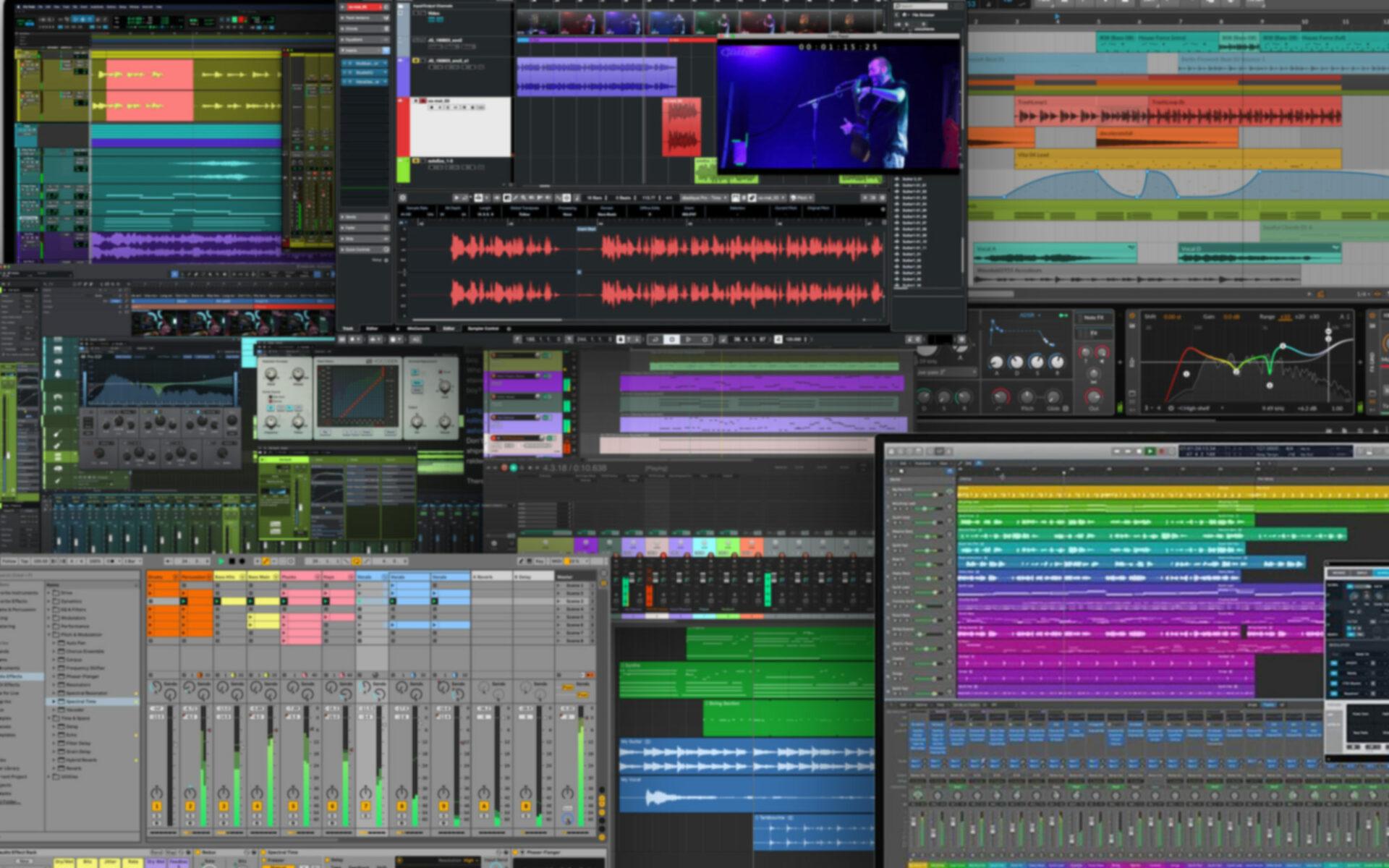
For beginners, the best DAWs are FL Studio and GarageBand. If you are a beginner, there are a lot of options when it comes to choosing a DAW or Digital Audio Workstation.

A DAW is a program that allows you to create, edit, and mix audio on your computer. With the right DAW, you can record and edit tracks, add effects, and create entire songs. However, with so many DAWs on the market, it can be overwhelming to choose the right one.

That’s why we have narrowed down the two best options for beginners: FL Studio and GarageBand. These DAWs are affordable, user-friendly, and offer a lot of features that make them ideal for those who are new to the world of music production. We will take a closer look at these two DAWs and help you decide which one is right for you.

Best Daws For Beginners

Credit: www.audio-issues.com

The Top 5 Best Daws For Beginners

Beginner music producers need an affordable and user-friendly digital audio workstation (DAW) to kick-start their music production journey. Here are the top 5 best DAWs for beginners in 2021: FL Studio, Ableton Live, Logic Pro X, Cubase, and Garageband.

If you’re new to music production, one of the first things you’ll need to invest in is a Digital Audio Workstation (DAW). A DAW is software that allows you to record, edit, and mix music on your computer. With so many options available, it can be overwhelming to know where to start. But don’t worry, we’ve got you covered with the top 5 best DAWs for beginners. Audacity is a free and open-source DAW that’s perfect for beginners. Its user-friendly interface makes recording and editing audio a breeze, and it supports a wide range of audio formats. It also has a range of built-in effects and tools, including noise reduction and equalization. Plus, there are plenty of tutorials available online to help you get started. GarageBand comes pre-installed on all Macs and is also available for free on iOS devices. It’s a great option for beginners because of its simplicity and user-friendly interface. GarageBand supports recording and editing audio and MIDI, and it comes with a range of built-in virtual instruments and effects. It’s also compatible with third-party plugins and has plenty of online tutorials and resources available. If you’re a Linux user, LMMS is a great free and open-source DAW option. It supports recording and editing MIDI and also comes with a range of virtual instruments and effects. LMMS has a user-friendly interface and allows for customization and advanced features like automation. Cakewalk by BandLab is a free, professional-grade DAW that’s perfect for beginners. It supports recording and editing audio and MIDI, and comes with a range of virtual instruments and effects. It also offers advanced features like automation and supports third-party plugins. Plus, there are plenty of online tutorials and resources available. FL Studio Fruity Edition is a great option for beginners who are willing to invest in a DAW. It’s affordable and user-friendly, and comes with a range of virtual instruments and effects. FL Studio supports recording and editing audio and MIDI and has a range of advanced features like automation, time-stretching, and pitch-shifting. Plus, it’s compatible with a wide range of third-party plugins.

Best Daws For Beginners

Credit: majormixing.com

Audacity

Audacity is a free and popular DAW for beginners, offering a range of features like view modes, playback, recording and editing. It is easy to use, intuitive and compatible with both Mac and Windows.

As a beginner in the music production industry, it is crucial to find the right Digital Audio Workstation (DAW) to kick-start your music production journey. One of the most popular DAWs for beginners is Audacity. With its simple interface and extensive feature set, Audacity is a go-to choice for many aspiring music producers. In this article, we’ll dive into the features and benefits, limitations, and price of Audacity.

Features And Benefits

Audacity is a free, open-source software that is compatible with all major operating systems like Windows, macOS, and Linux. Audacity boasts a wide range of features that cater to both novice and expert users alike. One of the standout features of Audacity is its multi-track editing capability, which allows users to record multiple audio sources simultaneously. Audacity also supports a wide range of file formats, including WAV, MP3, and AIFF, providing you with the flexibility to use any audio file format of your choice. Furthermore, Audacity comes equipped with various editing tools and effects like noise reduction, pitch correction, and equalization, making it easy to polish your recordings until they sound perfect. Audacity’s user-friendly interface and intuitive controls make it easy for beginners to navigate through the software. Additionally, Audacity offers a comprehensive set of online tutorials and forums for users to seek help and improve their skills.

Limitations

While Audacity does have many useful features, it has its fair share of limitations that users should be aware of. One such limitation is its inability to natively support MIDI files, which are an essential component of many modern music productions. However, this isn’t always a deal-breaker as it’s easy to work around this limitation by using third-party plugins such as Virtual MIDI Piano Keyboard. Another limitation of Audacity is its lack of built-in virtual instruments, which means users have to rely on external instruments to create music tracks.

Price

Audacity is entirely free to download and use, which makes it an excellent choice for beginners who don’t want to spend money on a DAW. When it comes to the price, Audacity easily exceeds expectations. In conclusion, Audacity is an excellent choice for novice music producers. While it has its limitations, it’s a powerful DAW that allows users to record, edit, and polish their audio tracks with ease. Additionally, its intuitive interface and extensive feature set make it easy for beginners to dive right into music production. With Audacity, you can create your music and produce professional-quality recordings, all without breaking the bank.

Garageband

GarageBand is a popular digital audio workstation (DAW) and is an excellent choice for beginners. It comes with a user-friendly interface, plenty of virtual instrument options, and a wide range of audio effects.

GarageBand is one of the most popular Digital Audio Workstations (DAW) amongst beginners due to its user-friendly interface and free availability for Mac and iOS devices. It offers a range of features, including virtual instruments, pre-loaded loops, and MIDI editing tools that make it capable of producing professional-sounding tracks. In this section, we will discuss the Features and Benefits, Limitations and Price of GarageBand.

Features And Benefits

GarageBand’s notable features include its ability to record live instruments, connect MIDI controllers for automation and input, and a diverse range of virtual instrument sounds, including drums, guitars, and synthesizers. Additionally, GarageBand supports third-party Audio Units plug-ins, allowing users to expand their capabilities further. Its intuitive interface, complete with interactive tutorials, makes learning the application easy.

Limitations

Though GarageBand is great for beginners, it does come with some limitations. It lacks advanced mixing and mastering tools, making it less desirable for advanced users. Additionally, it’s exclusive to Mac OS and iOS users, limiting its access to PC users, and doesn’t support VST plug-ins, which are widely used in many other DAWs.

Price

GarageBand is free on all iOS devices and Macs, making it an attractive starting point for those who don’t want to invest in a DAW. However, as an entry-level DAW, it does have limitations, and users looking for more advanced functionality may look towards paid alternatives like Logic Pro X. Overall, GarageBand offers an excellent starting point for beginners in music production, providing a solid foundation in the world of digital audio workstations. Its user-friendly interface, vast instrument library, and affordability make it a great option to get started on refining your music production skills.

Lmms (linux Multimedia Studio)

LMMS is a free and open source digital audio workstation (DAW) for Linux, Windows, and macOS. As a beginner-friendly DAW, LMMS offers a user-friendly interface, powerful features, and a wide range of plugins and presets to create music.

LMMS (Linux Multimedia Studio) is a free and open-source digital audio workstation that has been gaining popularity as one of the best DAWs for beginners. It is compatible with Windows, macOS, and Linux operating systems. With LMMS, you can create and produce your own music from scratch.

Features And Benefits

LMMS provides users with a variety of features and benefits that make it an excellent choice for beginners who are just starting out in music production.

  • LMMS has a user-friendly interface that is easy to navigate, making it simple for beginners to get started.
  • The software includes a variety of built-in instruments, loops, and samples for users to experiment with.
  • LMMS supports various plugins that allow users to expand their music production capabilities.
  • The software includes a powerful piano roll editor that allows users to create complex melodies and harmonies with ease.
  • Users have the ability to export their music into different formats, including MP3, WAV, and OGG.

Limitations

While LMMS offers a lot of great features and benefits for beginners, it also has some limitations that users should be aware of.

  • LMMS lacks some of the advanced features found in paid DAWs, such as time-stretching and pitch-shifting.
  • The software can be prone to crashing, especially if you have a lot of plugins installed.
  • The built-in instruments, loops, and samples are not as high-quality as those found in paid software.

Price

The best thing about LMMS is that it is completely free to download and use. This makes it an excellent choice for beginners who are just starting out and don’t want to invest a lot of money into a DAW. Overall, LMMS is a great choice for beginners who are looking for a free and easy-to-use DAW. While it may have some limitations, the extensive list of features and benefits make it worth considering for anyone who wants to produce their own music.

Cakewalk By Bandlab

BandLab’s Cakewalk is one of the best DAWs for beginners looking to get started in music production. Its user-friendly interface and features make it easy to create high-quality tracks without a steep learning curve.

Cakewalk by BandLab is a digital audio workstation (DAW) software that has quickly gained popularity among music enthusiasts. It is designed to offer beginners a simplified yet effective DAW that is easy to use without compromising on professional-grade tools. Here’s a breakdown of the features, benefits, limitations, and price of Cakewalk by BandLab.

Features And Benefits

Cakewalk by BandLab offers a range of features and benefits for its users. One of the notable features is the unlimited audio and MIDI tracks that allow you to work on elaborate projects without compromising on quality. The software also has a user-friendly interface that makes it easy to navigate and has a variety of plugins and virtual instruments to choose from. If you’re looking for an all-in-one DAW, then Cakewalk by BandLab has got you covered with built-in mixing and mastering tools.

Limitations

As much as Cakewalk by BandLab has an impressive set of features, it comes with a few limitations. For one, its compatibility with third-party plugins is limited, which may hinder your creative potential. Additionally, the software may experience occasional bugs and crashes, which can be frustrating, especially if you’re working on tight deadlines.

Price

The best part about Cakewalk by BandLab is that it’s absolutely free. Yes, you read that right, it’s completely free of charge. This means that as a beginner, you can enjoy all the features and benefits of a professional-grade DAW without having to spend a cent. Plus, frequent updates mean that you get to enjoy improved features without having to pay for upgrades. In conclusion, Cakewalk by BandLab is an excellent choice for beginners looking for an affordable and comprehensive DAW. It may have its limitations, but the fact that it’s free makes it a great option for anyone looking to get started in music production. If you’re interested in giving it a try, head over to the BandLab website and download it today.

Best Daws For Beginners

Credit: mastering.com

Fl Studio Fruity Edition

FL Studio Fruity Edition is an excellent option for beginner music producers searching for a DAW with a user-friendly interface. With a variety of features for creating high-quality music, this software is a perfect choice for those just starting in the world of music production.

FL Studio, previously known as FruityLoops, is one of the most popular Digital Audio Workstations (DAWs) on the market. The FL Studio Fruity Edition is the entry-level version of this software. This edition is perfect for beginners who are new to music production. It has many features and benefits that make it an ideal choice for beginners who are looking to create music. However, it also has some limitations that you should be aware of. Let’s take a closer look.

Features And Benefits

FL Studio Fruity Edition comes with many features that make it an excellent choice for beginners. Here are some of the most notable features:

  • Intuitive user interface
  • Step sequencer for easy pattern creation
  • Virtual instruments and effects
  • Sampler with pre-loaded sound library
  • Audio recording and editing tools
  • MIDI controller support
  • Automation capabilities for precise control over your music
  • Free updates for life

In addition to these features, the FL Studio Fruity Edition also has several benefits that make it a great choice for beginners:

  • Easy to learn and use
  • Affordable price
  • Flexible workflow for different musical styles
  • Compatible with both Windows and macOS
  • Supportive online community and tutorials

Limitations

While the FL Studio Fruity Edition has many great features and benefits, it also has some limitations that you should keep in mind:

  • Limited track count (up to 125 audio tracks and 125 instrument channels)
  • No audio export to MP3 or WAV
  • No support for third-party plugins or VSTs
  • No live performance mode

Price

The FL Studio Fruity Edition is reasonably priced at $99. This affordable price point makes it an affordable option for beginners who may not have a large budget. In conclusion, the FL Studio Fruity Edition is an excellent choice for beginners who are looking to create music. It has many features and benefits that make it easy to use and affordable. However, it also has some limitations that you should be aware of. Despite its limitations, it’s still a great choice for beginners who want to start making music.

Frequently Asked Questions Of Best Daws For Beginners

What Is The Simplest Daw To Learn?

GarageBand is commonly considered the easiest DAW to learn due to its simple interface and user-friendly features. It’s available for Mac users and offers basic audio recording, MIDI editing, and various built-in virtual instruments and effects. Beginners can easily create music using the drag-and-drop feature and pre-made loops.

What Is The Best Daw To Start Producing With?

The best DAW for starting producers is subjective. However, popular options include Ableton Live, FL Studio, and Logic Pro X. These DAWs have intuitive interfaces, extensive libraries, and various tutorials available, making them excellent choices for beginners. Ultimately, it comes down to personal preference and the type of music one wishes to create.

Is Ableton A Good Daw For Beginners?

Ableton can be a good DAW for beginners due to its user-friendly interface, built-in tutorials, and easy-to-use audio effects. Its session view can also help with experimentation and creativity, while its arrangement view can aid in structuring a song. However, other DAWs may also be suitable, depending on personal preference and needs.

What Is The Easiest Music Studio To Use?

The easiest music studio to use depends on your skill level and budget. For beginners, GarageBand and Ableton Live Lite are popular options. FL Studio and Logic Pro X are great choices for intermediate users, while professionals prefer Pro Tools and Cubase.

Ultimately, it’s best to research and try out different studios to find the one that works best for you.

Conclusion

To sum up, choosing the right digital audio workstation (DAW) is crucial for beginners to kickstart their music production journey. With all the options available, it can be overwhelming, but considering factors like price, ease of use and available features will help narrow down the search.

Ultimately, the best DAW for beginners is one that complements their workflow and creative needs. Happy producing!

Categories
Archive

How To Mix Crisp Vocals

To mix crisp vocals, adjust EQ settings and use compression. Start by cutting out unwanted frequencies, boost the high-end, and then use compression to balance the audio levels.

To get the perfect vocal mix, you need to focus on the specific frequencies that make your vocals crisp and clear. By adjusting your EQ settings, you can cut out any unwanted low-end frequencies that muddle up your vocals. Then, boost the high-end frequencies to help bring out the clarity of the vocals.

Finally, adding compression to the mix will create a more balanced audio level and bring out consistency in each vocal take. We will cover some tips and tricks on how to mix crisp vocals using EQ, compression, and other essential tools.

How To Mix Crisp Vocals

Credit: m.youtube.com

Understanding Vocal Mixing

When it comes to music production, mixing vocals is an essential part of the process. Whether you’re working on a pop song or a hip hop track, mixing crisp vocals can make all the difference. But, understanding vocal mixing can be a little tricky for beginners. In this article, we’ll take a closer look at the importance of vocal mixing and the differences between vocal mixing and instrumental mixing.

Importance Of Vocal Mixing

Proper vocal mixing can make or break a track. A well-mixed vocal can add emotion and depth to a song, making it more compelling for the listener. On the other hand, a poorly mixed vocal can sound dull and lifeless, ruining the impact of an otherwise excellent production.

When mixing vocals, it’s crucial to ensure that they sit well in the mix. They should be clear and balanced with the instrumental elements of the track, without getting lost or overpowering. Achieving the right balance requires careful EQing, compression, reverb, and other effects that give the vocal its unique character.

Vocal Mixing Vs. Instrumental Mixing

While vocal and instrumental mixing might seem similar, there are some significant differences. When mixing instruments, the goal is to ensure that each sound has enough space in the mix to stand out. In contrast, when mixing vocals, the goal is to make sure that the vocal sits well in the track without getting lost or overpowering the instrumental elements.

Another key difference is the way in which effects are applied. For example, reverb is often used on instruments to create a sense of space and depth; whereas, on vocals, reverb is used to enhance the singer’s performance and give it a natural feel. Compression is also used differently to manage the levels of the vocal.

Preparing Vocals For Mixing

Preparing vocals for mixing is crucial to achieving crisp, clear vocals in your final mix. This process involves several steps, starting with recording considerations to make sure your raw vocal tracks are the best they can be. Once recorded, you’ll need to edit vocals, clean up audio, and organize tracks before you can start mixing.

Recording Considerations

When recording vocals, it’s important to keep in mind certain considerations to ensure the best possible outcome. To begin, make sure your recording environment is as quiet as possible to minimize unwanted background noise. Set up your microphone and test it to make sure it’s capturing the vocals as intended. It’s also essential to ensure the vocalist is positioned correctly in relation to the microphone and to take breaks as needed to avoid vocal fatigue.

Editing Vocals

Your raw vocal tracks will likely require editing to get rid of mistakes and unwanted noise. Use a digital audio workstation (DAW) to zoom in and cut out unwanted breaths, pops, and clicks. You can also use tools such as EQ, compression, and gating to fine-tune the vocals and create a more uniform sound. It’s important to do this editing before moving onto the mixing stage, to ensure a clean and polished final mix.

Cleaning Up Audio

In addition to editing, it’s also important to clean up the audio for the best result. This involves removing background noise, hums, and hisses that might be present in the recording. Use noise reduction tools in your DAW to reduce these elements without negatively affecting the quality of the vocals. Be careful not to remove too much, however, as this can make the vocals sound unnatural.

Organizing Tracks

Finally, it’s important to organize your vocal tracks before beginning the mixing process. Label each track with the name of the vocalist or the part they’re playing, and color-code them for ease of use. Use a consistent naming convention for your files and make sure all tracks are in the correct order. This will make the mixing process much smoother and ensure you can find what you need quickly and efficiently.

Conclusion

Following these steps will ensure that your vocals are polished, clean, and ready to be mixed to create a crisp final product. Taking the time to prepare your vocals for mixing is an essential step in producing professional-level recordings, and one that should not be skipped or rushed.

Eq For Vocals

Achieving crisp vocals in a mix requires proper EQing. Start by cutting any unwanted frequencies and boosting the desired ones. Use a high-pass filter on the low end and a low-pass filter on the high end to eliminate unwanted noise.

When it comes to mixing vocals, EQ (equalization) is one of the most important tools in your arsenal. It allows you to boost or cut certain frequencies to make the vocals sound brighter, warmer, or more present in the mix. In this section, we’ll cover some key concepts and techniques for using EQ effectively on vocals.

Identifying Problem Frequencies

Before you start boosting or cutting frequencies, it’s important to identify any problem areas in the vocal sound. These could be frequencies that sound harsh, muddy, or boxy, for example. One way to do this is to use a narrow Q (bandwidth) on your EQ and sweep it slowly through the frequency spectrum. Listen carefully for any areas where the vocals sound unbalanced or unpleasant. Once you’ve identified these problem frequencies, you can use EQ to address them.

Boosting And Cutting Frequencies

Boosting or cutting frequencies can help you balance the sound of the vocals and make them fit better in the mix. Here are some general guidelines for boosting and cutting different frequency ranges:

  • Low frequencies (100Hz and below): Use a high-pass filter to remove any rumble or unwanted low-end noise.
  • Low-mid frequencies (100Hz to 500Hz): These frequencies can make the vocals sound muddy or boxy. Try cutting them slightly to clean up the sound.
  • Mid frequencies (500Hz to 2kHz): This is where the main body of the vocals lives. Use a gentle boost to add warmth and presence, or a cut to reduce harshness.
  • High frequencies (2kHz and above): Boosting high frequencies can add air and sparkle to the vocals. Be careful not to overdo it, though, as this can make the vocals sound sibilant or harsh.

Using High-pass And Low-pass Filters

In addition to boosting and cutting frequencies, you can also use high-pass and low-pass filters to shape the overall sound of the vocals. A high-pass filter removes low frequencies below a certain point, which can help clean up the mix and prevent low-end rumble. A low-pass filter does the opposite, cutting off high frequencies above a certain point. This can be useful if you want to give the vocals a warmer, more vintage sound. Ultimately, using EQ effectively on vocals is about finding the right balance between boosting and cutting frequencies, addressing problem areas, and shaping the overall sound using filters. With a little practice, you’ll be able to create crisp, clear vocal mixes that sound great on any system.

Compression Techniques

Compression techniques are essential when it comes to mixing crisp vocals. Utilize a compressor to control the dynamic range of the vocals and achieve a more balanced sound. Experiment with attack and release settings to find the perfect compression for your mix.

Compression is an essential technique in mixing crisp vocals for music production. By compressing the vocal track, you can control the dynamic range and level out any inconsistencies in the performance. In this post, we will delve deeper into compression techniques for mixing clear and distinct vocal tracks. Specifically, we will highlight threshold and ratio settings, parallel compression, and multiband compression. Let’s get started. ###Threshold and Ratio Settings The first step in compression is setting the threshold and ratio. The threshold sets the level at which the compressor starts attenuating the vocal signal. The ratio determines how much attenuation will be applied to the signal once it crosses the threshold. A higher ratio results in more compression, while a lower ratio results in less compression. For vocals, a good starting point for the threshold is around -20dB to -10dB, while the ratio can be set between 2:1 to 4:1. These settings can vary depending on the vocal performance, but they work well for most scenarios. In general, vocal compression should be subtle to avoid unnatural sounding results. ###Using Parallel Compression Parallel compression, also known as New York compression, is a technique used to add more color and warmth to the vocals while maintaining the dynamics. This technique involves duplicating the vocal track and applying heavy compression to the duplicate track. The compressed track is then blended with the original track at a lower volume. This approach can make the vocal sound more present while retaining the natural dynamics of the performance. To do this, you need to route both tracks to a bus and adjust the levels until you find the sweet spot. The amount of compression to apply to the duplicate track can vary depending on the desired outcome, but a ratio of 6:1 to 10:1 works well. ###Multiband Compression Multiband compression is a technique that involves dividing the frequency spectrum of the vocal track into different bands and applying compression to each band independently. This technique is useful when dealing with specific frequency ranges that need more control or enhancement. For example, you might want to apply compression to the mid-range frequencies to control harshness or increase the bass frequencies to add warmth and thickness. Multiband compression allows you to target specific frequency ranges and apply different settings to each band. To do this, you need to insert a multiband compressor plugin on the vocal track and divide it into different frequency bands. Each band should have its threshold, ratio, attack, and release settings. This enables you to dial in the right amount of compression for each frequency range accurately. In conclusion, compression is a crucial technique for mixing clear and distinct vocals in music production. By adjusting the threshold and ratio, using parallel compression, and multiband compression, you can control the dynamics, add warmth and thickness to the vocal, and target specific frequency ranges. With these techniques, your vocal mixes will sound more professional and polished.

Effects Processing

To achieve crisp vocals, effects processing is key. Start by using a compressor to even out the levels and remove unwanted peaks. Then, use equalization to boost the high frequencies and cut out any muddiness. Finally, add a touch of reverb to give the vocals a sense of space and depth.

Effects Processing: Adding Reverb

Reverb is an essential effect when it comes to mixing vocals. It helps to create a sense of space as if the vocal is recorded in a physical room. Adding some reverb to the vocals can make them sound more polished and professional. But don’t go overboard with it, or else the vocal will sound like it’s drowning in a sea of reverb. A light touch is all that’s needed. A good rule of thumb is to set the decay time to around 1 to 2 seconds, with a wet/dry mix of around 20 to 30%. This should give the vocal a sense of space without overwhelming it.

Effects Processing: Delays And Echoes

Delays and echoes are great effects that can add depth and dimension to vocals. They can create an impression of a larger space without overloading the track with reverb. Echo effects can be used to emphasize specific words or phrases, adding a subtle emphasis that makes the vocal more interesting to listen to. When it comes to delay, try experimenting with the timing and feedback settings to achieve interesting effects. A ping-pong delay can make vocals sound wide and spacious, while a slapback delay can give them a sense of urgency and momentum.

Effects Processing: Tuning With Autotune Or Pitch Correction

Autotune or pitch-correction plugins are useful tools to ensure that the vocals are in tune. No matter how good the singer is, sometimes they might miss a note or two. With the help of these plugins, you can correct those pitch deviations and make the vocal sound more polished. However, make sure not to overdo it – too much correction can make the vocal sound robotic and lifeless. Try to use these plugins sparingly and make sure the vocal still retains its natural personality.

Effects Processing: Harmonies And Doubling

Harmonies and doubling are effects that can add richness and depth to the vocal. Harmonies are additional vocal tracks sung in harmony with the lead vocal. Doubling, on the other hand, is duplicating the lead vocal and panning one slightly left and one slightly right. These effects are great for adding a sense of fullness to the track, but make sure they are well-balanced with the lead vocal. Too many harmonies or doubling can make the vocal sound cluttered and messy. Always aim for a balanced mix that highlights the lead vocal while adding color and depth with harmonies and doubling.

How To Mix Crisp Vocals

Credit: www.sweetwater.com

Advanced Techniques

Achieving crisp vocals in a mix can be challenging, but advanced techniques can help. One approach is to use equalization to remove unwanted frequencies from the vocal track and enhance the desired ones, as well as to add compression and reverb to shape the sound.

Advanced Techniques for Mixing Crisp Vocals When it comes to mixing vocals, it’s important to have a good understanding of the basic techniques. However, advanced techniques such as creating space with panning, automation for fine tuning, dealing with sibilance, and bussing and group processing can take your vocals to the next level. Creating Space with Panning Panning is an essential technique that can be used to create space in your mix. By panning vocals to the left or right, you can create a sense of depth and help the vocal sit well with the other elements in your mix. For example, panning backing vocals to the sides can help to create a wide stereo image. Automation for Fine Tuning Automation is another advanced technique that can be used to fine-tune your vocal mix. By automating the volume, pan, and EQ of the vocals, you can make sure that every phrase is perfectly balanced and fits well with the other elements in your mix. For example, automating the volume of a vocal track during a chorus can help it stand out in the mix and create a sense of excitement. Dealing with Sibilance Sibilance is a common problem in vocal recordings, particularly with female vocals. Sibilance refers to the harsh “s” and “sh” sounds that can make a vocal sound harsh and unpleasant. To deal with sibilance, you can use a de-esser plugin, which will help to tame these harsh sounds and make the vocal sound smoother. Bussing and Group Processing Bussing and group processing is another advanced technique that can help to create a cohesive vocal mix. By bussing all the vocal tracks together and applying processing such as compression and EQ to the group, you can make the vocals sound like they belong together and sit well in the mix. For example, using a bus compressor on all the vocal tracks can help to glue them together and create a more unified sound. In conclusion, advanced mixing techniques such as creating space with panning, automation for fine tuning, dealing with sibilance, and bussing and group processing can take your vocal mixes to a whole new level. By mastering these techniques, you can create a professional-sounding vocal mix that stands out from the crowd.

Mastering Vocals

Mastering crisp vocals takes technique and skill, but with the right tools and approach, it can be achieved. To mix crisp vocals, pay attention to mic placement, EQ, compression, and effects. Experiment until you find the perfect balance that makes the vocals stand out and enhance the overall mix.

After recording and mixing vocals, it’s time to master them to achieve a crisp sound. Mastering involves enhancing the overall sound of the vocals by adjusting the levels, EQ, and dynamics to make them sound more polished. Here are some steps to follow when mastering vocals.

Preparing For Mastering

Before mastering, it’s crucial to create a backup of the raw and mixed vocals, to avoid losing any important data. Then, check the levels and EQ to confirm that they are consistent across all the tracks. If necessary, adjust the levels so that they all peak at the same level, making it easier to master.

Limiting And Saturation

Limiting and saturation are two of the most crucial steps in mastering vocals. Limiting involves adjusting the dynamics of the vocals to give them a balanced and uniform sound. It’s achieved by adding compression and limiting to the vocals to prevent peaks and loudness from exceeding a specific limit. Saturation, on the other hand, is the process of adding harmonics to the vocals to give them a warmer sound and more character. It’s achieved by adding distortion to the vocals to create a pleasing harmonic distortion.

Balancing Levels And Eq

Balancing levels and EQ involves adjusting the levels of individual tracks to ensure they are consistent across the whole song. EQ is used to tweak the tonal balance of the vocals so that they sound clear and crisp. It’s based on the cut and boost of different frequency ranges, such as the high, mid and low frequencies.

Exporting And Sharing

Once you’re satisfied with the sound of the mastered vocals, export them to a high-quality format such as WAV or FLAC. Then, share your work with others to get feedback and fine-tune it further if necessary. In conclusion, mastering vocals involves preparing for mastering, limiting and saturation, balancing levels and EQ, and exporting and sharing. By following these steps, you can achieve a crisp, polished sound that will impress your listeners.

How To Mix Crisp Vocals

Credit: m.youtube.com

Frequently Asked Questions On How To Mix Crisp Vocals

How Do You Make Your Vocals More Crisp?

To make your vocals more crisp, you need to do the following: 1. Use a pop filter to eliminate plosives 2. Stay hydrated 3. Use proper microphone technique 4. Process your vocals with EQ and compression 5. Practice good singing habits and experiment with different microphone and recording setups.

How Do You Mix Perfect Vocals?

To mix perfect vocals, pay attention to the EQ, compression, reverb, and delay. Cut any frequency clashes, compress to even out the levels, add reverb to give space, and delay to create depth. Don’t overdo any of these effects, and always trust your ears rather than relying solely on numbers and meters.

How Do You Mix Clean Vocals?

To mix clean vocals, first ensure that the recording is of good quality. Use EQ to enhance the vocal’s natural sound and cut unwanted frequencies. Apply subtle compression to control volume levels. Reverb and delay can be added for depth, but use them sparingly.

Finally, use automation to adjust levels and create a cohesive performance.

How Do You Fit Vocals Perfectly In Mix?

To fit vocals perfectly in a mix, ensure the vocals are recorded cleanly with minimal background noise. Use EQ to remove unwanted frequencies, compress them to even out the levels, and add reverb or delay to create space. Use a reference track to check the vocal levels and ensure they sit well in the mix.

Conclusion

Mixing crisp vocals can be a daunting task, but by implementing the tips discussed you can achieve a professional sound. Remember to focus on EQ, compression, reverb, and automation techniques to bring out the best in your vocals. With practice and patience, you can master the art of mixing vocals and take your music productions to the next level.

Keep experimenting and refining your techniques to continue improving. Happy mixing!

Categories
Archive

Cubase Won’t Record Audio

Cubase not recording audio? Check your audio interface settings and cables.

If you’re experiencing the frustration of trying to record audio in Cubase and finding that it’s not working, there could be a few reasons for this. One of the most common is an issue with the configuration of your audio interface settings or possibly a problem with connectivity between your interface and computer.

While it might be tempting to jump on forums and search for detailed solutions, the key to fixing the issue is often a simple one. We’ll take a closer look at some of the things you can do if you find yourself unable to record audio in Cubase.

Cubase Won'T Record Audio

Credit: forums.steinberg.net

Check Audio Interface

Check your audio interface if Cubase won’t record audio. This could be caused by a faulty connection or incorrect settings.

Ensure Audio Interface Is Connected

If Cubase isn’t recording audio, the best thing to do is to check if your audio interface is properly connected. Ensure that all cables are plugged in their respective ports and make sure the interface is powered on. If your audio interface has multiple input/output channels, double-check if the correct channels are configured in Cubase’s preferences. If everything looks alright, but you’re still not getting any audio, try replacing the interface’s USB/FireWire cable as it might be faulty.

Update Audio Interface Drivers

An outdated audio interface driver can cause compatibility issues with your computer and cause Cubase to malfunction. Therefore, it’s important to check if there are any new updates for your audio interface’s driver and install them immediately. You can find the latest driver version from the manufacturer’s website or from Cubase’s website. Once you’ve downloaded the driver, install it on your computer following the provided instructions. Furthermore, you can try troubleshooting the audio driver from the Windows Device Manager or the Mac’s Audio MIDI Setup. If any issues are found, you can attempt to resolve them from there. If the problem persists even after updating the driver, consider contacting the manufacturer’s customer support for further assistance. In summary, if Cubase won’t record audio, you should start by checking if your audio interface is connected and configure the correct input/output channels. If everything seems fine, proceed to update your audio interface’s driver to ensure compatibility and eliminate the chance of malfunction. Keeping your audio drivers updated is a crucial task as they will ensure the smooth running of your audio interface and Cubase.

Check System Settings

Introductory paragraph

If you are experiencing audio recording problems in Cubase, checking the system settings is the first step to troubleshooting the issue. In this section, we will explore the important system settings to check when Cubase won’t record audio and provide some solutions to the problem.

H3 Heading 1

Check Input And Output Settings

Ensure that your input and output settings are correctly configured. To do this, go to the “Devices” menu and click “Device Setup.” Then, make sure that the proper input and output devices are selected. If you are using an external audio interface, ensure that it is properly connected to your computer and is selected as your audio device in the device setup menu.

H3 Heading 2

Check Sample Rate And Bit Depth

Another important system setting to check is the sample rate and bit depth of your audio interface. Cubase requires that your audio interface matches the sample rate and bit depth of your project. To check your computer’s sample rate and bit depth settings, go to the “VST Audio System” menu under the “Devices” tab. If the settings do not match, adjust your interface settings to match your project settings.

Check Cubase Settings

To troubleshoot Cubase’s failure to record audio, checking the settings is crucial. Ensure that the selected audio input device and input channels match the one connected to the computer. Also, check the audio driver and sample rate settings under the device setup menu.

If you are facing issues with recording audio in Cubase, the problem may lie with the settings. To fix the issue, you need to check the Cubase settings and ensure that they are configured correctly. Here are a few things to check.

Check Audio Connections In Vst Connections

The VST Connections window is where Cubase manages all inputs and outputs. If your audio interface is not connected properly, you won’t be able to record any audio in Cubase. To fix this, open the VST Connections window and check if your audio inputs and outputs are configured correctly.

Check Input And Output Buses In Audio Connections

In the VST Connections window, you will also find Input and Output Buses. Each input and output bus must be correctly assigned to an audio interface, and audio channels must be activated for recording. If you are trying to record audio from an external device, such as a microphone or guitar, make sure that it is selected as the input source.

Check Sample Rate And Bit Depth

The sample rate and bit depth also play a critical role in recording audio in Cubase. Make sure that both are correctly set in Cubase and your audio interface. Using the wrong settings can result in distorted audio or no audio at all.

Restart Your Computer And Audio Interface

If all else fails, restarting your computer and audio interface may help. This simple fix can resolve any conflicts that may be causing Cubase not to record audio. By checking the Cubase settings, you can resolve most issues with recording audio in Cubase. Follow these steps, and you’ll be recording audio in no time.

Cubase Won'T Record Audio

Credit: forums.steinberg.net

Check Track Settings

If you are a fan of using Cubase for recording audio and you are experiencing an issue where Cubase won’t record audio, there could be various reasons why. However, one of the most common reasons for this issue is due to the incorrect settings on your track. Therefore, to resolve this problem, you should start by checking the track settings to ensure they are correctly configured.

Check Track Input Routing

The first thing you need to consider when checking your track settings is the input routing. You need to make sure that you have selected the appropriate input routing for your device. Cubase allows you to select from different input options like mono, stereo, and group channels. Therefore, if you have selected the wrong input option, your audio won’t get recorded. To check the input routing of your track, follow the steps below:

  1. Click on the track where you want to check the input routing.
  2. Open the mixer view by clicking on the mixer icon on the left-hand side of the screen.
  3. From the mixer view, locate the input routing selector, and ensure you have selected the right option for your device.

Check Track Monitoring

The second track setting you need to check is the monitoring settings. Monitoring allows you to hear the live input from your device. If you have not enabled the monitoring settings, you won’t be able to hear any sound when you are trying to record. To check the monitoring settings of your track, follow these steps:

  1. Click on the track where you want to check the monitoring settings.
  2. Locate the monitoring section and check if the monitor button is activated.
  3. If it’s not activated, click on it to enable monitoring.

By doing the above checks, you should be able to sort out any configuration issues with your track settings and start recording audio in Cubase.

Check Recording Settings

To troubleshoot Cubase not recording audio, make sure to check your recording settings. It’s possible that the input source or audio interface is not configured properly, which can prevent audio recording.

If Cubase won’t record audio, it’s essential to check the recording settings. The issue may arise if the settings are not configured correctly. You can begin by checking the record enable and arming the track for recording.

Check Record Enable

The first thing to do when you encounter recording problems is to check if the record enable button is activated for the track. The record enable button is akin to the record arm button on other DAWs, but this button is specific to Cubase. The record enable button must be active for the audio track you intend to record. To verify this, you can access the track via the Cubase mixer, then navigate to the track that is not recording. Next, locate the record enable button, which is usually found on the left-hand side of the mixer channel. If the button is not activated, click on it to enable it.

Check Arm Track For Recording

Another reason why Cubase may not be recording audio is if the track is not armed for recording. Arming a track for recording is a necessary step to ensure that audio can be recorded on that track. To arm a track for recording, click the “Arm for Record” button, which is typically located near the Track Visibility Settings. You can also arm a track by pressing the record enable button on your device controller. You can ensure that the track is recording by looking at the level meters next to the track. If you see a signal when making sound into the microphone, then the track is recording, and you’re good to go. In summary, when encountering issues with Cubase not recording audio, check if the recording settings are correctly configured. Ensure that the record enable button is activated, and the track is armed for recording. Following these steps will likely fix the problem.

Check Signal Flow

To troubleshoot Cubase not recording audio, it’s important to check signal flow. Make sure your microphone and audio interface are properly connected, and check that your input and output routing is correct in Cubase’s mixer. Double-check your settings and restart your computer if necessary.

If you are trying to record audio with Cubase and you are facing issues with no audio being recorded or recorded audio is silent or cuts out then the first step in troubleshooting should be to check the signal flow. Signal flow refers to the path of audio from your audio source all the way to Cubase for recording. It is essential to ensure that the audio signals are traveling in the right direction and connections are established properly.

Check Instrument Or Mic Cables

Check the cables that connect your musical instrument or microphone with the audio interface if the audio interface recognizes your instrument or microphone, but the sound is not being captured or is too low. Ensure that all cables are plugged in properly and no cables are obstructed or damaged. Ensure that the appropriate input is being used for your instrument or microphone type.

Check Audio Signal Chain

The audio signal chain from your instrument or microphone to Cubase is crucial, and a break in the chain may result in errors. Check your audio interface if it is correctly set up and responds appropriately. Ensure that all input and output levels are optimal, and that the correct input is being used on the audio interface. Check the routing of signals from the audio interface to Cubase. Ensure that the signal is routed to the correct channel and that the correct channel is selected for recording in Cubase. In summary, when dealing with Cubase issues, the most crucial first step is to check the audio signal flow. Check your cables, audio interface, and routing in Cubase, and you should be able to isolate any signal flow glitches and rectify the issue.

Check Cubase Version Compatibility

To ensure proper recording of audio on Cubase, always check compatibility with your software version. This step can help you avoid any technical issues that may arise from running an unsuitable version of the program.

Are you encountering issues with Cubase not recording audio? One possible cause could be an incompatibility with your system’s audio interface or Cubase version. Before delving into more complex solutions, it’s wise to first cross off compatibility issues.

Check If Audio Interface Is Compatible

The audio interface is the hardware that permits audio input and output from your computer. For Cubase to record audio, it needs to have access to the audio interface. If your audio interface isn’t compatible with your version of Cubase, this can be the root of the problem. Before checking if your Cubase version supports the audio interface, make sure you have the latest version of the audio interface drivers installed and properly configured.

Check If Cubase Version Is Supported

Another compatibility issue that can impact Cubase’s ability to record audio is whether your version of Cubase is supported. This can occur if you’re using an older version of Cubase with a more modern audio interface or vice versa. Confirm whether your version of Cubase is suitable for recording audio or if it requires additional updates or upgrades. Additionally, ensure your hardware and operating system meet the required specifications for your version of Cubase. In conclusion, Cubase not recording audio can be caused by a variety of reasons, starting with compatibility issues. Be sure to check if your audio interface is compatible and if your Cubase version is supported by reviewing the system specifications and updating drivers and software.

Check For Software Conflicts

To troubleshoot Cubase not recording audio, check for software conflicts in the system. Make sure there are no other audio software programs running at the same time. This can cause conflicts and prevent Cubase from recording audio.

When Cubase won’t record audio, it can be a frustrating experience. However, one of the reasons this error occurs is due to software conflicts. Check for software conflicts by following these simple steps.

Close Other Audio Applications

The first step is to ensure that any other audio applications are closed. If multiple audio applications are open simultaneously, they can cause conflicts and prevent Cubase from recording audio correctly. Close any audio applications that might be running in the background before you try to record audio in Cubase.

Check For Audio Plug-in Conflicts

The next step is to check for audio plug-in conflicts. Audio plug-ins can cause issues if they are not compatible with Cubase or if they conflict with other plug-ins in use. To resolve such conflicts, you need to check the plug-ins and see which one is causing the problem. One way to do this is to disable all third-party plug-ins in the “Plug-In Information” window. Once disabled, test to see if Cubase records audio correctly. If the problem persists, then try disabling any other VST instruments, effects, or MIDI devices that you’re not using. This can help isolate the issue and determine which plug-in is causing problems. In summary, when Cubase won’t record audio, it’s essential to check for software conflicts to get to the root of the problem. By closing other audio applications and checking for audio plug-in conflicts, you can ensure that Cubase works correctly and records your audio without any issues.

Cubase Won'T Record Audio

Credit: forums.steinberg.net

Frequently Asked Questions Of Cubase Won’t Record Audio

Why Can’t I Record In Cubase?

You may not be able to record in Cubase due to incorrect audio device settings, unavailable inputs or outputs, or incompatible driver updates. Check your audio settings and ensure that your device is properly connected and selected in Cubase’s device setup.

Additionally, update your audio drivers and try resetting your preferences if necessary.

Why Is Cubase Not Making Sound?

Cubase may not be making sound due to various reasons such as incorrect audio device settings, faulty cables or speakers, or audio driver issues. Check the device settings, connections, and update the audio drivers to resolve the issue.

Why Can’t I Hear Sound When I Record?

If you can’t hear sound when recording, check if your audio is properly plugged in, and your device isn’t muted. Ensure that the microphone is not obstructed and has sufficient battery life. Moreover, allow microphone access to your device and ensure that your recording software settings are correct.

How Do I Enable Recording In Cubase?

To enable recording in Cubase, follow these steps: 1. Open a new project in Cubase. 2. Go to “Devices” and select “Audio Device Settings”. 3. Ensure that your audio interface is selected. 4. Go to “Devices” again and select “VST Connections”.

5. Configure your input and output buses, then select a stereo or mono bus for recording.

Conclusion

Troubleshooting Cubase’s audio recording problems can be a daunting task, but it is not impossible to fix. With the proper knowledge and expertise, one can identify and solve the root cause of the issue. Whether it is a hardware or software issue, do not hesitate to seek technical support or consult online resources for more information.

By doing so, you can get back to making music without any interruptions.

Categories
Archive

Do You Need A Drum Bus

Yes, a drum bus is essential for any music producers to create a cohesive mix. A drum bus is a crucial element in music production that allows music producers to enhance the overall sound of their drum tracks.

It’s a group channel where all the drum sounds are routed to so they can be processed as one unit. The bus allows music producers to apply equalization, compression, and other effects to the drums more effectively. This helps to create a more cohesive mix, where all the drum sounds are working together rather than competing for space in the mix.

Without a drum bus, the drum sounds’ individual processing will result in conflicting sounds, causing clashing in the mix. We’ll dive into why you need a drum bus and how to set it up in your music production system.

Do You Need A Drum Bus

Credit: www.noizemusic.io

Benefits Of Using A Drum Bus

Using a drum bus can greatly benefit your mixing process, providing a cohesive sound that ties together all the drum elements. It is an essential tool for achieving a professional sound and can also help save valuable mixing time.

Using a drum bus can help improve your drum sound significantly. A drum bus is a technique where all the drum tracks in a mix are combined into a single track, allowing you to apply the same processing to all drums collectively. This process has several benefits, including improved clarity and punchinessbetter control over individual drum levelsease of processing.

Improved Clarity And Punchiness

One of the essential benefits of using a drum bus is that it helps achieve better clarity and punchiness in your drum mix. By combining all the drum tracks into one, you can apply a compressor and EQ to all the drums collectively, eliminating inconsistencies in the mix. By doing so, you can make sure that none of the drums stand out too much or clash with each other.

Better Control Over Individual Drum Levels

With a drum bus, you have better control over each drum’s levels. Instead of adjusting levels for each individual drum track, you can use the bus fader to adjust the levels of all the drums collectively. This allows for greater precision in mixing, ensuring that the drums sit well together in the mix.

Ease Of Processing

Another benefit of using a drum bus is that it simplifies the processing chain. Instead of applying multiple plugins to each individual drum track, you can apply plugins to the drum bus. This saves time, streamlines your workflow, and makes it easier to achieve a cohesive drum sound. Additionally, it allows for quicker adjustments to the drum sound, should the need arise. In conclusion, using a drum bus can help achieve a more professional and polished drum sound. This technique provides better clarity and punchiness, better control over individual drum levels, and ease of processing. By utilizing a drum bus, you can create a more cohesive and balanced drum mix that will enhance your overall sound.

When Should You Use A Drum Bus?

When it comes to mixing drums, a drum bus is a powerful tool that can help glue all the individual drum tracks together and give your drums a more cohesive sound. It allows you to apply processing to all the drums at once, giving you more control over the overall drum sound. But when should you use a drum bus? Here are a few scenarios:

Mixing Live Drums

If you’re working with a recording of live drums, a drum bus can help you get a more natural sound by simulating how the drums were recorded together. This is especially useful if you’re dealing with multiple microphones on the kit. For example, if you have separate mics on the kick, snare, toms, and overheads, a drum bus can help you balance the levels and apply processing to all the tracks at once.

Working With Virtual Drums

If you’re using virtual drum instruments in your music production, a drum bus can help you make the drums sound more like they were played by a real drummer. By applying processing to all the drum tracks at once, you can create a more cohesive sound and add some character to the drums.

Creating Punchier Drum Sounds

If you want your drums to have more impact and punch, a drum bus can help you achieve that. By applying compression, EQ, and other processing to all the drums at once, you can create a more unified and powerful sound. You can also use parallel processing techniques, such as parallel compression or distortion, to further enhance the impact of the drums.

In conclusion, a drum bus can be a valuable tool in your mixing arsenal. Whether you’re working with live drums or virtual drums, or trying to create a punchier drum sound, a drum bus can help you achieve your goals. So give it a try and see what kind of results you can get!

Setting Up A Drum Bus In Your Daw

Setting up a drum bus in your DAW is essential to achieve a cohesive drum sound. It allows you to group all your drum tracks together and apply the same processing to them. Whether you are working on a project with live drums or using virtual instruments, a drum bus can add depth and character to your mix.

If you’re looking to give your drums more presence and impact in your mix, setting up a drum bus can be a great technique to achieve this. By routing multiple drum tracks to a single bus, you can apply processing to the drums as a whole, rather than on an individual track basis. In this article, we’ll guide you through how to create a drum bus in your DAW, route your drum tracks to it, and add processing to it.

Creating A Bus Channel

Before you can set up a drum bus, you need to create a new bus channel in your DAW. This is simply a new audio channel that acts as a bus, allowing multiple tracks to be routed to it. Different DAWs will have different ways of creating a bus channel, but the basics are the same. Here’s an example of how to create a new bus channel in Ableton Live:

  1. Right-click on an empty area in the mixer and select “Insert Audio Track”.
  2. Click on the “Audio To” drop-down menu on your drum tracks and select the new bus channel you just created.
  3. Play your drum tracks and make sure their audio is now routing through the new bus channel.

Routing Your Drum Tracks

Once you’ve set up your bus channel, you need to route your individual drum tracks to it. This will vary depending on your DAW, but the basic idea is the same. Here’s how to route your drum tracks to your newly created bus channel in Logic Pro X:

  • Click and hold on the output of a drum track in the mixer and drag it to your new bus channel.
  • Repeat this for all your drum tracks.
  • Play your drum tracks and make sure their audio is now routing through the new bus channel.

Adding Processing To The Bus

Now that you’ve set up your bus channel and routed your drum tracks to it, it’s time to apply processing to the bus. This is where you can really start to shape the overall sound of your drums. Here are a few examples of processing you might want to apply to your drum bus:

ProcessingExplanation
EQCut or boost specific frequencies to shape the overall sound.
CompressionEven out the dynamics of your drums and add sustain.
SaturationAdd warmth and character to your drums.
ReverbAdd a sense of space and depth to your drums.

By applying processing to your drum bus, you can really make your drums stand out in your mix. Experiment with different types of processing and find what works best for your particular drum sound. In conclusion, a drum bus can be a powerful tool in your mixing arsenal. By combining multiple drum tracks into a single bus, you can apply processing that affects the overall sound of the drums, giving them more presence and impact in your mix. Follow these steps to create a drum bus in your DAW, route your drum tracks to it, and add processing to it, and take your drum sound to the next level!

Do You Need A Drum Bus

Credit: mixandmastermysong.com

Tips For Using A Drum Bus

If you are struggling with getting your drums to sound tight and cohesive, using a drum bus can be a great solution. It allows you to process all of your drum tracks collectively and apply EQ, compression, and other effects.

By doing this, you can achieve a more balanced and professional sound.

If you want to take your drum tracks to the next level, a drum bus can be a powerful tool. This technique involves routing all of your individual drum tracks to a single bus track, allowing you to process them as a group. Here are some tips for getting the most out of your drum bus:

Using Parallel Compression

Parallel compression is a technique that involves mixing a heavily compressed version of your drums with the dry signal. This can help to bring out the quieter elements of your drum mix, while still maintaining the punch and impact of the original tracks. To use parallel compression on your drum bus, follow these steps:

  1. Create a new aux/auxiliary track
  2. Route all of your individual drum tracks to the new aux track
  3. Apply heavy compression to the aux track
  4. Blend the compressed and dry signals to taste

Using Eq To Enhance The Mix

EQ can be a powerful tool for shaping the sound of your drum bus. By cutting or boosting certain frequencies, you can create more clarity and separation between the different elements of your drum mix. Here are some tips for using EQ on your drum bus:

  • Cut any frequencies that clash with other elements in the mix (e.g. guitar, bass, vocals)
  • Boost the high-end for more sparkle and presence
  • Use a low-pass filter to roll off any unwanted high-end noise
  • Sculpt the midrange to highlight the most important elements of your drum mix (e.g. kick and snare)

Using Saturation Or Distortion For Character

If you want to add some extra character and warmth to your drum bus, consider using a saturation or distortion plugin. This can help to add some grit and texture to your sound, and can be particularly effective for genres like rock and metal. To use saturation or distortion on your drum bus, try these tips:

StepDescription
1Insert a saturation or distortion plugin onto your drum bus track
2Adjust the amount of saturation/distortion to taste
3Use the plugin’s EQ controls to shape the sound further

Overall, the drum bus can be a powerful tool for enhancing the impact and clarity of your drum tracks. By using techniques like parallel compression, EQ, and saturation, you can achieve a more professional and polished sound for your mix.

Common Mistakes When Using A Drum Bus

When it comes to mixing drums, using a drum bus is a popular technique to achieve a cohesive sound. However, not everyone uses it correctly, leading to common mistakes that can negatively impact the mix. In this blog post, we will discuss the most common mistakes when using a drum bus and how to avoid them.

Overprocessing The Bus

One of the biggest mistakes when using a drum bus is overprocessing it. It’s easy to get carried away with plugins, such as EQ and compression, and apply them heavily to the bus. But this can result in a muffled or distorted sound, which defeats the purpose of using a drum bus in the first place.

Instead, start with minimal processing and make small adjustments until the mix sounds balanced. Use a light touch with EQ and compression, and remember that less is often more. You can always add more processing later if needed.

Neglecting Individual Drum Track Levels

Another common mistake when using a drum bus is neglecting the individual drum track levels. It’s essential to balance the levels of each drum track before sending them to the bus. If one drum track is too loud or soft, it will affect the overall sound of the drums.

Use a reference track or listen critically to each drum track to make sure they’re balanced. Adjust the levels accordingly, and then send them to the drum bus. This will ensure a coherent and punchy drum sound.

Not Balancing The Mix Properly

Finally, not balancing the mix properly can lead to a weak or unbalanced drum sound. It’s important to balance all elements of the mix, including vocals, guitar, bass, and drums. Neglecting one element can result in the other elements overpowering it.

Use panning, EQ, and volume faders to balance the mix. Pay attention to the drum bus’s level and adjust it until it fits perfectly with the rest of the mix. This will result in a well-balanced mix with a cohesive drum sound.

In conclusion, using a drum bus can be an effective technique for achieving a cohesive drum sound. However, it’s important to avoid common mistakes such as overprocessing the bus, neglecting individual drum track levels, and not balancing the mix properly. By following these guidelines, you can achieve a powerful and punchy drum sound in your mix.

Do You Need A Drum Bus

Credit: www.youtube.com

Frequently Asked Questions Of Do You Need A Drum Bus

What Is The Point Of A Drum Bus?

A drum bus allows you to group multiple tracks together and apply effects and processing to all of them simultaneously, resulting in a more cohesive and polished sound. It helps in enhancing the overall dynamics and tonality of the drums.

What Does Drum Buss Do In Ableton?

The drum buss in Ableton is a plugin that helps enhance and shape the sound of drum tracks. It adds warmth and punch, while also giving control over the individual elements of the drums for better mixing. It includes a variety of processing options such as compression, saturation, and transient shaping.

What Kind Of Compressor Do I Need For A Drum Bus?

For a drum bus, you’ll need a compressor that can handle fast transient peaks and has a fast attack/release time. A FET or VCA compressor would be a good choice. Look for a compressor with a high ratio and a low threshold.

This will prevent the drums from overpowering the rest of the mix.

Should I Put Reverb On Drum Bus?

Adding reverb to drum bus can enhance the overall sound and create a more cohesive mix. However, it depends on the type of music or the specific track. You should experiment with the amount of reverb and find the right balance that complements the drum and the rest of the instruments in the mix.

Conclusion

A drum bus can make a significant impact on your music production. Whether you are a professional or a bedroom producer, utilizing a drum bus can enhance the overall sound and energy of your drums. By adding depth, clarity, and punch to your mix, the drum bus can take your tracks to the next level.

Don’t underestimate the power of this tool and consider incorporating it into your workflow. Happy producing!

For more background, see Audio mixing (recorded music) on Wikipedia. You may also like our guide: Setting Up Drum Bus Guitar Bus Vocal Bus.

Categories
Archive

Finishing Your Recordings

To finish your recordings, start by organizing your files, editing out any mistakes, and applying the right mastering techniques. From there, use the right distribution channels to get your music heard by your target audience.

Music production is a challenging yet fulfilling endeavor, and one of the most critical stages is finishing your recordings. Whether you’re a seasoned producer or just starting, the final stages of producing music can be overwhelming, with numerous steps that require more attention than ever before.

You need to ensure that the sound quality is top-notch, the tracks are well-organized, and all the elements work well together without any flaws. Furthermore, the tracks need to be appropriately mastered, and you need to select the right distribution channels to share your music with your audience. We will provide you with some tips to finish your recordings professionally and get them out to the world.

Credit: learningandteaching.byui.edu

Choosing The Right Tools

Recording music is an art that requires skill, patience, and the right tools. If you want to create high-quality recordings that resonate with your audience, you need to choose the right tools. This includes selecting the right software, using high-quality monitors, and having the right audio equipment. In this article, we’ll explore some of the essential tools you need to finish your recordings and take your music to the next level.

Selecting The Right Software

The right software is essential when it comes to finishing your music recordings. It should be easy to use and have the features you need to create the sound you want. There are a variety of software options available, from free open-source programs to professional-grade software. Some popular options include:

Software NameDescription
AudacityA free, open-source audio editing software with basic editing functionalities suitable for beginners.
Adobe AuditionA professional-grade editing tool with advanced features for audio mixing, mastering and editing.
Pro ToolsA widely used audio production software, ideal for advanced audio professionals in music, film, and TV post-production.

It’s important to research and compare different software options and choose one that suits your needs and budget.

Importance Of High-quality Monitors

High-quality monitors are another crucial tool for finishing your recordings. They allow you to hear the subtle nuances and details in your music, which helps you to make better mixing and mastering decisions. Good monitors should have a flat frequency response to accurately represent the sounds in your recordings. Some popular monitor brands include:

  • Yamaha HS8
  • Adam Audio A7X
  • Genelec 8020D

It’s also recommendable to calibrate your studio monitors to your room. This will help to eliminate any acoustic issues and to ensure accurate sound reproduction. Tools like Sonarworks Reference4 can help you with monitor calibration.

By selecting the right software and using high-quality monitors, you can apply the final touches to your music recordings and bring out the best sound possible.

The Bottom Line

Choosing the right tools for finishing your recordings is essential for creating high-quality music that resonates with your audience. Invest in suitable software, high-quality monitors, and audio equipment to ensure your music sounds as good as possible.

Finishing Your Recordings

Credit: diymusician.cdbaby.com

Mastering Your Tracks

Mastering your tracks is an essential step in finishing your recordings. It involves fine-tuning the sound quality to achieve a professional result that will impress your listeners. With the right skills and tools, you can master your tracks and take your music to the next level.

Mastering is the final step to make your tracks sound polished and ready for release. It involves a series of processing techniques to balance the mix, enhance its tonal and dynamic characteristics, and adjust its loudness. In this post, we will discuss four essential mastering techniques – equalization, compression, limiting, and stereo widening – that can significantly improve the sound quality of your recordings.

Equalization

Equalization or EQ is the process of adjusting the frequency response of a mix or a track. It helps to enhance or reduce certain frequency ranges to achieve a balanced and pleasing tonal balance. EQ can be used to remove unwanted resonances or harshness, boost the clarity or warmth, or shape the tone of individual instruments or the entire mix. To use EQ effectively, start by listening to your mix and identifying the frequency ranges that need attention. Use a parametric or graphic EQ to adjust the gain or cut of those frequencies and monitor the changes in real-time. Avoid over EQ-ing as it can result in unnatural or phasey sounds.

Compression

Compression is a dynamic processing technique that reduces the dynamic range of a mix or a track by attenuating the louder parts and boosting the quieter parts. It helps to bring out the details, control the peaks, and glue the mix together. Compression can also enhance the sustain and punch of individual instruments or the entire mix. To use compression effectively, start by setting the threshold, ratio, attack, release, and makeup gain according to the mix’s dynamic characteristics. Use a moderate ratio and attack time to avoid pumping or breathing artifacts. Avoid over compressing as it can result in a dull or lifeless sound.

Limiting

Limiting is a dynamic processing technique that prevents the mix or track from exceeding a certain maximum level. It helps to increase the perceived loudness while avoiding distortion or clipping. Limiting can also enhance the impact and presence of the mix or track. To use limiting effectively, start by setting the threshold and ratio according to the desired output level and the mix’s dynamic characteristics. Use a transparent limiter with a fast attack and release time to avoid distortion or pumping artifacts. Avoid over limiting as it can result in a compromised dynamic range or an unnatural sound.

Stereo Widening

Stereo Widening is a spatial processing technique that expands the stereo image of a mix or a track beyond its original width. It helps to create a sense of space, depth, and dimensionality in the mix and enhance the separation and clarity of individual instruments. Stereo widening can also make the mix more engaging and immersive. To use stereo widening effectively, start by listening to your mix and identifying the elements that need to be widened. Use a stereo imager or a mid-side processing tool to adjust the stereo width of those elements without affecting the mono compatibility or the phase coherence. Avoid over widening as it can result in a diffused or unnatural sound. In conclusion, mastering is a crucial step in the recording process that can make a significant difference in the sound quality of your tracks. By using the essential mastering techniques of equalization, compression, limiting, and stereo widening in a balanced and creative way, you can achieve a polished and professional sound that stands out from the crowd.

Exporting Your Recordings

After completing your recording, it’s important to export it in a usable format. Select your preferred export settings and save your recording to your desired location. With the right exporting process, your recording will be ready to be shared or edited for final touches.

After spending countless hours recording your music, the final step is to export your recordings. Exporting your recordings is a crucial part of the process because it determines the quality of your music’s sound when distributed to various platforms. In this section, we will discuss different technical aspects of exporting your recordings such as file formats, bit rates, naming conventions, and metadata, along with the preparation for distribution.

File Formats And Bit Rates

File format and bit rate are crucial considerations when exporting your recordings. The file format determines the type of audio file you will be exporting, whereas the bit rate represents the quality of the audio file. Generally, the higher the bit rate, the better the quality of your recording. However, higher bit rates also result in larger file sizes, which could take longer to upload and cause compatibility issues with some platforms. Here are a few popular audio file formats and their recommended bit rates:

Audio File FormatBit Rates (kbps)
MP3128-320
WAV1411 (CD-Quality)
FLAC500-1000 (Lossless)

Naming Conventions And Metadata

When exporting your recordings, it is important to maintain consistent naming conventions and add accurate metadata about your songs, including title, artist name, album name, and genre. Naming conventions are vital because they make it easier to organize and identify your recordings, whereas metadata provides important information about your recordings and helps improve your music’s discoverability. Here are a few tips for naming conventions and metadata that you should follow when exporting your recordings:

  • Use consistent naming conventions for tracks, such as “Track Number – Song Title – Artist Name”.
  • Include accurate metadata such as song title, artist name, album name, year of release, and genre.
  • Ensure that your metadata is standardized and consistent across all your recordings.
  • Use a reliable Tag Editor software to accurately add your Metadata

Preparing For Distribution

Before you distribute your music, take a few extra steps to ensure that your recordings are ready for distribution. Ensure that you have confirmed the right to distribute all the samples and instrumental samples you have used in the recording, agreed on with the artist name spelling with all features and have proper cover art. Here are a few steps you can take to ensure that you are ready for distribution:

  1. Preview your recordings to check for errors or potential quality issues.
  2. Confirm that you have obtained the necessary rights for any samples or instrumental tracks used in your music.
  3. Proper agreements with Artists that featured on your recording
  4. Create and upload your album art in the right dimensions and with relevant information.
  5. Identify and research different music streaming platforms available for distribution, and choose the one that best suits your needs.

In conclusion, exporting your music recordings in the right format and bitrate, maintaining proper naming conventions and metadata, and preparing for distribution are all vital steps to ensure that your music has the best possible chance of reaching your target audience. By following these steps carefully, you can make sure that your final music output is of high-quality standards and is ready for the world to hear.

Finishing Your Recordings

Credit: www.mixinglessons.com

Quality Control

To ensure the quality control of your recordings, it is important to finish them with a critical ear. Listen to each track and make adjustments to levels, EQ, and compression where necessary. Pay particular attention to the timing, pitching, and dynamics of your tracks to achieve a polished final product.

Once all the recording is done, the next step is ensuring the quality of the final product. Quality control is an important part of the recording process, ensuring that the recording is polished and error-free. Here are three key steps to quality control: listening for issues, fixing technical problems, and final checks.

Listening For Issues

The first step in quality control is listening to the final recording from start to finish. Pay close attention to any inconsistencies or mistakes that need to be addressed. Listen carefully for any audio distortion or background noise. Ensure that the volume levels are consistent throughout the recording.

Fixing Technical Problems

Once the technical issues are identified, it’s time to fix them. This step includes removing any distortion or background noise, ensuring the volume levels are level throughout the recording, and adjusting the overall EQ levels for better clarity.

Final Checks

Once the audio is polished and free of technical errors, it’s time to perform final checks. This includes checking the metadata of your project, ensuring that the title, artist name, and other details are correct. You should also confirm that the files are properly formatted for the desired output, such as mp3 or CD. Finally, have a listen to the final mix to ensure the highest-quality sound. To conclude, quality control is essential in the recording process, ensuring that the recording is flawless and professional. By following the three steps: listening for issues, fixing technical problems, and final checks, you can guarantee that your recording is of the highest quality.

Frequently Asked Questions Of Finishing Your Recordings

What Makes A Great Recording?

A great recording is defined by its clear sound quality, with minimal background noise or distortion. A great recording captures the authenticity and emotion of the performance, with balanced levels and harmonious tones throughout. It should also be well-mixed and mastered to ensure consistency across all devices and platforms.

Overall, a great recording relies on the technical ability of the recording engineer and the artistry of the performer.

How Do You Finish A Music Project?

To finish a music project, carefully plan your schedule, create a project plan, and stick to deadlines. Be open to changes and feedback during the creative process and know when to stop tweaking and let go. Finally, master the final mix and deliver the product on time.

What Are Some Common Mistakes To Avoid When Finishing Recordings?

Common mistakes to avoid when finishing your recordings include improper EQ, overcompression, using too much reverb or delay, poor timing/alignment issues, improper stereo image, and over-processing. It’s important to make sure your recordings sound balanced and cohesive before finishing them.

How Can I Improve The Overall Sound Quality Of My Recordings?

To improve the overall sound quality of your recordings, you can start by making sure you’re using high-quality equipment and microphones. Pay attention to your recording environment and try to minimize any unwanted noise or interference. Additionally, make sure to properly EQ each track to ensure a well-balanced mix.

Conclusion

Congratulations on completing your recordings! By implementing these tips and techniques, you can put the finishing touches on your tracks to create a polished and professional sound. Remember to prioritize sound quality, use your ears as your guide, and trust your instincts when it comes to processing and optimizing your recordings.

With a little dedication and attention to detail, you can produce exceptional recordings that will captivate and engage your audience. Happy recording!

Categories
Archive

Understanding Music Rights

Music rights refer to the legal ownership of a piece of music, granting exclusive rights to use and profit from it. Understanding music rights is crucial for those who use, create or distribute music.

Music rights are often confusing for musicians, producers and other music industry professionals. The music industry is incredibly complex, with several different rights holders who can all claim ownership of a single piece of music. This complexity can lead to legal battles and disputes over royalties, licensing and other issues.

Understanding music rights is essential for any artist, songwriter or label looking to monetize their work and protect their interests. We’ll explore the different types of music rights, who owns them, and how they can be managed and enforced.

Understanding Music Rights

Credit: www.linkedin.com

What Are Music Rights?

Music rights refer to the legal ownership and control of music, allowing musicians and songwriters to earn money from their work. Understanding music rights is crucial for protecting intellectual property and ensuring fair compensation in the music industry.

Definition

Music is one of the most important aspects of human culture. It is a form of expression that has the power to transcend language barriers and bring people together. However, with the widespread use of music in various mediums, there arises a need to protect the rights of those who create and own music. This is where music rights come into play. In simple terms, music rights are the legal rights that dictate who has the right to use, distribute, and profit from a piece of music. These rights can be owned by individuals, groups, or organizations, and they are designed to protect the intellectual property of the creator of the music.

Importance

Understanding music rights is crucial for anyone involved in the music industry. Whether you are an artist, a songwriter, a producer, or a music label, knowing your rights and how to protect them is essential for the success and longevity of your career. Music rights protect the creators and owners of music from unauthorized use, reproduction, and distribution. They ensure that the rightful owners of the music receive fair compensation for their work, and that their work is not exploited for someone else’s gain. Moreover, having a clear understanding of music rights also helps in preventing legal disputes and protects the integrity of the music industry as a whole. In conclusion, music rights are an essential part of the music industry, and understanding them is crucial for anyone involved in creating or distributing music. By protecting the intellectual property of those who create and own music, we ensure that the music industry remains fair and equitable for everyone involved.

Types Of Music Rights

Music rights are various types of legal ownership and protections for the creation and distribution of music. These include copyright, mechanical, synchronization, and performance rights. Understanding music rights is essential for anyone involved in the music industry.

Understanding music rights is crucial in the music industry, as it can determine the success of an artist’s career. Music rights refer to the legal rights an artist has over their original music compositions. There are three types of music rights that an artist needs to understand, and they include performance, mechanical, and synchronization rights.

Performance Rights

Performance rights refer to the legal rights an artist has when their music is played or performed publicly. This includes live performances, radio airplay, and streaming services. The artist is entitled to receive royalties for their music’s public performance, and these royalties are collected by performance rights organizations such as ASCAP, BMI, and SESAC.

Mechanical Rights

Mechanical rights refer to the legal rights an artist has when their original music is reproduced or distributed. This includes physical copies such as CDs and vinyl records, as well as digital downloads and streaming services. A mechanical license is required to use an artist’s music, and the artist is entitled to receive royalties for the use of their music.

Synchronization Rights

Synchronization rights refer to the legal rights an artist has when their music is used in audiovisual productions such as television shows, movies, and advertisements. A synchronization license is required to use an artist’s music in these productions, and the artist is entitled to receive royalties for its use. In conclusion, understanding the types of music rights is crucial for an artist’s success in the music industry. By knowing their rights, artists can ensure they receive the appropriate compensation for their original music compositions.

Who Owns Music Rights?

Music rights are owned by the individuals who created the music, such as composers, lyricists, and recording artists. These rights typically include the right to perform and receive payment for the use of their music in various formats such as streaming, download, and physical sales.

Understanding music rights is essential for both creators and users of music.

Understanding music rights is crucial for anyone involved in the music industry. From songwriters and composers to record labels and publishers, each stakeholder has a specific role to play when it comes to owning and monetizing music. In this section, we will discuss who owns Music Rights and their respective roles.

Songwriters And Composers

As the creators of musical compositions and lyrics, songwriters and composers hold the original copyright to their works. This means they have exclusive rights to reproduce, distribute, and perform their music. However, to receive royalties for their works, songwriters and composers need to be affiliated with a Performing Rights Organization (PRO). A PRO is a membership-based organization that collects and distributes royalties to its members for the use of their music.

Publishers

Publishers act as a liaison between songwriters and composers and the music industry. They promote and license the works of their clients to artists and record labels. Publishers also collect and distribute royalties on behalf of songwriters and composers. In return, they take a percentage of the revenue generated from the music.

Record Labels

Record labels are responsible for the production and distribution of music recordings. They sign and promote artists, and support them in making and releasing music. Record labels also negotiate with streaming services and radio stations to ensure that their music is played and listened to by audiences. In exchange, the record label takes a percentage of the revenue generated from the sales and streaming of the music. In conclusion, understanding music rights is key to success in the music industry. Songwriters and composers, publishers, and record labels all play an essential role in owning and monetizing music. By working together, they can ensure that music is produced, promoted, and enjoyed by audiences around the world.

Understanding Music Rights

Credit: www.rabbeats.com

How Are Music Rights Licensed?

Music rights are owned by the creator or their publishing company. In order to legally use a piece of music, a license must be obtained from the copyright holder. The licensing process varies depending on the type of use, such as in a film or on a streaming service.

Music rights licensing is the process by which the owner of a copyrighted song grants permission for others to use the song in exchange for payment. Music licensing can be a complicated process, and it is essential that artists and anyone using music in their work understand the different types of licenses available and how they work.

Overview Of Licensing

There are several types of music licenses that can be obtained, depending on the nature of the use. In general, music licenses fall into two categories: synchronization licenses and mechanical licenses. A synchronization license is required if you want to use a song in conjunction with video or film footage. This type of license gives you the right to use the music in your video production. A mechanical license, on the other hand, is required if you want to reproduce a song in an audio-only format, such as a CD or digital download.

Types Of Licenses

There are different types of music licenses, and it’s important to choose the right one based on the intended use of the music. Some of the types of licenses include:

  • Public performance rights: This license is required if you want to play a song in public, such as in a restaurant, store, or on the radio.
  • Master use license: This license gives you the right to use a specific recording of a song.
  • Compulsory mechanical license: If you want to release a cover version of a song, you can obtain a compulsory mechanical license. This license is a set fee that allows you to legally reproduce the song.
  • Print rights: If you want to print sheet music or lyrics to a song, you will need to obtain a print rights license.

Conclusion

Understanding music rights is crucial, especially in the era of online content creation where music plays a significant role. By having the right license, you can avoid legal issues, and the rightful owner of the song receives compensation for the use of their music. With the knowledge of different types of licenses, choosing the right one will become easy.

Issues And Controversies Related To Music Rights

Understanding music rights can be a complex topic with various issues and controversies arising, including disputes over copyright and royalty payments. It is important for individuals and businesses in the music industry to stay informed and up-to-date on these matters to ensure the fair treatment of all involved parties.

Music rights have been a topic of discussion and debate for decades. With the emergence of digital technology, the issues and controversies have increased manifold. This article will shed light on the major issues and controversies related to music rights that are affecting the music industry in today’s world.

Copyright Infringement

One of the major issues that artists and musicians face today is copyright infringement. With the rise of the internet and music-sharing platforms, it has become relatively easy for people to share and access music. Unfortunately, this has also led to a rise in piracy and the unauthorized use of copyrighted music. This not only hurts the artist financially but also undermines their creative efforts. To prevent copyright infringement, many artists are now resorting to using digital watermarks and other technological solutions to protect their music.

Streaming And Digital Revenue

Another issue that has emerged in recent years is the low revenue generated from digital streaming services such as Spotify and Apple Music. While these platforms have made it easier for people to access music, they have also significantly reduced the amount of money that musicians can earn from their music. This has led to an ongoing debate over fair compensation for artists and whether the existing revenue-sharing models are adequate. Some artists are now trying to bypass these platforms and connect directly with their fans through platforms like Patreon and Bandcamp.

In Conclusion

In summary, music rights issues and controversies are complex and multi-faceted. Copyright infringement and revenue generation are just two of the many issues that artists and musicians face today. It is important to have a deeper understanding of these issues and to work towards building a fair and sustainable music industry that benefits both artists and consumers.

Understanding Music Rights

Credit: www.waterandmusic.com

Recent Developments In Music Rights

Recent developments in music rights have brought about an increased focus on understanding the complex world of music licensing and ownership. With the rise of digital streaming platforms and the ongoing debate over fair compensation for artists, it is more important than ever to have a clear understanding of music rights and the legal frameworks that govern them.

Music rights refer to the legal ownership of musical content, which includes sound recordings, lyrics, and compositions. In recent years, there have been significant developments in music rights brought about by advances in technology. These advancements have not only impacted the way music is created, produced, and distributed but also how artists are compensated for their work. In this blog, we will discuss two of the most crucial recent developments in music rights: The Music Modernization Act (MMA) and the impact of technology on music rights.

Music Modernization Act

The MMA was signed into law in October 2018 with the aim of improving music rights management. The act made significant changes to the way that mechanical royalties, which are paid to songwriters and publishers for the use of their music, are determined. Under the MMA, the process of obtaining licenses for music rights has been streamlined, making it easier for digital service providers to obtain the necessary rights to stream music online. Another important provision of the MMA is the creation of the Mechanical Licensing Collective (MLC), a non-profit organization responsible for administering mechanical licenses for streaming services. The MLC also manages the distribution of mechanical royalties to songwriters and publishers, ensuring that they are paid accurately and on time.

Impact Of Technology

With the increasing use of technology in the music industry, the traditional methods of music rights management have been disrupted. The emergence of streaming services, social media platforms, and digital downloads has made it necessary for music rights holders to adapt quickly to these changes. The rise of user-generated content has also created new challenges for music rights management, as it can be challenging to identify and track the use of copyrighted material on these platforms. However, technology has also made it easier for music artists to connect with their fans and promote their work. Social media platforms such as Instagram and TikTok have become essential tools for artists to reach wider audiences and create new revenue streams. At the same time, technology has also enabled music rights holders to track how their music is being used and identify cases of infringement. In conclusion, recent developments in music rights have created both opportunities and challenges for the music industry. While advancements in technology have made it easier for music artists to promote their work and reach new audiences, it has also necessitated a new approach to music rights management. The Music Modernization Act and the emergence of new technologies are just two examples of the ongoing evolution of music rights management.

Future Of Music Rights

Music rights are a complex issue that requires a deeper understanding from creators, publishers, and platforms. As the industry advances, it is important to maintain a clear distinction between performance, mechanical, and sync rights to ensure fair distribution of royalties.

Understanding music rights has become increasingly important in today’s digital age where music can be accessed and utilized in various ways. With the evolution of technology and the rise of different platforms, there has been a significant shift in the way artists and the music industry as a whole are compensated for their work. In this blog post, we will be discussing the future of music rights and how emerging technologies and new business models are changing the industry.

Impact Of Ai And Blockchain

Artificial Intelligence (AI) and Blockchain technology have been making waves in the music industry with their potential to improve the way music rights are managed. AI-powered systems can help identify and track music usage across different platforms, making it easier for artists to be compensated for their work. On the other hand, Blockchain technology offers a decentralized, secure, and transparent system that allows for fair compensation and tracking of music rights. Some companies have already started using these technologies. For instance, a music streaming service could use AI-powered systems to identify which songs are being played the most and then distribute the royalties accordingly. Similarly, Blockchain could be used to create a smart contract that would ensure that artists are paid promptly and transparently for their creative work.

Emerging Business Models

The music industry is also seeing the emergence of new business models that are focused on creating a fairer and more sustainable industry for artists. One example is the rise of the sharing economy, where artists can monetize their creative talents by offering music services like sample packs, loops, and instrumentals on platforms like Splice and Beatstars. These platforms allow artists to retain ownership of their work and receive a percentage of the revenue generated when their music is used. Another emerging business model is the use of crowdfunding platforms. These platforms allow artists to raise funds from fans to create new music or finance their tours. Crowdfunding has given artists more flexibility, control, and autonomy in how they fund their careers. In conclusion, the future of music rights looks promising with the emergence of new technologies and business models that prioritize fairness, transparency, and sustainability. The music industry is a dynamic and ever-evolving field, and it’s important that we continue to understand and adapt to the changes happening within it.

Frequently Asked Questions On Understanding Music Rights

How Does Music Rights Work?

Music rights refer to the legal ownership and control of music compositions and recordings. These rights include the right to reproduce, distribute, perform, and make derivative works of the music. They are typically owned by the songwriter, composer, or recording artist and are managed through organizations like ASCAP, BMI, and SESAC.

Licensing is required to use music in various settings and for different purposes, such as in films, TV shows, and commercials.

What Are The 4 Types Of Music Royalties?

The 4 types of music royalties are mechanical, performance, synchronization, and print. Mechanical royalties are paid for the reproduction of a song on an album or single. Performance royalties are paid for live performances or radio airplay. Synchronization royalties are paid for music used in TV shows and movies, while print royalties are paid for sheet music sales.

What Does Owning The Rights To Music Mean?

Owning the rights to music means having exclusive control over the use of that music. This includes the ability to sell, distribute, and use the music in various ways. It also means that others cannot use the music without permission or payment.

What Are The Copyright Rules For Music?

Copyright rules for music protect the original creator’s work from being played, distributed, or used without their permission. Music copyright laws apply to both the composition and the sound recording and usually last for the artist’s lifetime plus 70 years.

It is illegal to use copyrighted music without proper licensing or permission.

Conclusion

As a music creator, understanding music rights is crucial. It is essential to know the types of music rights available and the proper way to monetize your work. Copyright infringement is detrimental to your creative business. Therefore, it is essential to be knowledgeable about music rights and how to protect them legally.

By following the above practices, you can improve your music career, avoid legal issues, and ensure that you get appropriate rewards for your efforts. Stay informed about music rights and keep creating!