Categories
Archive Audio Production

Boost Your Sound: Essential Tips from a Music Mastering Pro

Mastering your music is crucial for high-quality sound. Learn essential tips from a mastering professional to enhance your music production process.


Understanding the importance of mastering your music can take your tracks to the next level, ensuring they sound polished and professional. With the right techniques and tools, you can achieve a well-balanced mix that translates well across different playback systems.


We will explore the key aspects of mastering music and provide valuable insights from an experienced mastering engineer. By implementing these tips, you can elevate the overall quality of your music and make it stand out in today’s competitive music industry landscape.


Mastering Your Music

Mastering your music is a crucial step in the production process that ensures your final product sounds polished and professional.

The Importance Of Mastering

Mastering enhances the overall sound quality of your music by balancing levels and frequencies.

It ensures consistency across tracks and maximizes the impact of your music.

Steps In The Music Mastering Process

  • Start by ensuring all tracks have been mixed correctly.
  • Apply equalization and compression to balance the sound.
  • Utilize stereo widening and limiting to enhance the dynamics.
  • Finalize the overall loudness and prepare the music for distribution.
Boost Your Sound: Essential Tips from a Music Mastering Pro


Credit: www.shure.com


Setting The Stage

In the world of music production, setting the stage for mastering your tracks is crucial to achieving professional sound quality. Here, we will delve into the key aspects of ‘Setting the Stage’, such as creating an ideal workspace and selecting the right equipment, essential for any aspiring mastering pro.

Creating The Ideal Workspace

For optimal results, your mastering workspace should be free from distractions and acoustically treated, ensuring accurate sound reproduction. Choose a quiet room with minimal external noise and install acoustic panels to reduce reflections.

Selecting The Right Equipment

Invest in quality studio monitors, ensuring they are accurate and balanced to make informed mastering decisions. Select high-resolution audio interfaces to capture the nuances of your music accurately.

Enhancing The Audio

Enhancing the audio through mastering is a crucial step in perfecting your music. It involves optimizing the dynamics and balancing the frequencies to ensure the track sounds its best when played on various systems.

Optimizing The Dynamics

Mastering helps in optimizing the dynamics of the audio, ensuring that the quiet and loud parts are balanced to create a more cohesive and impactful sound. By carefully adjusting the levels and dynamics, the music can maintain a consistent energy level throughout.

Balancing The Frequencies

Another essential aspect of mastering involves balancing the frequencies. This process ensures that the bass, midrange, and treble frequencies are appropriately balanced, resulting in a more pleasant and harmonious listening experience.

Perfecting The Final Touches

When it comes to creating professional music, mastering is the key to achieving that polished, radio-ready sound. The final touches you apply during the mastering process can make a world of difference in how your music is perceived by listeners. It is crucial to pay attention to details and employ specific techniques to ensure your tracks sound their best.

Adding Depth With Reverb And Effects

Reverb and effects are powerful tools that can add depth and dimension to your music, making it sound more full and immersive. By carefully applying reverb and effects to individual tracks or the overall mix, you can create a sense of space and ambiance that enhances the overall listening experience.

  • Experiment with different types and settings of reverb to find the one that complements your music the most.
  • Consider using modulation effects like chorus or phaser to add movement and interest to certain elements of your tracks.
  • Don’t overdo it – subtlety is often key when it comes to using reverb and effects. Too much can muddy the mix and distract from the main elements of your music.

Ensuring Consistency Across Tracks

Consistency is essential when mastering music, especially if you’re working on an album or EP. You want all the tracks to sound cohesive and harmonious when played back-to-back. Here are some tips for achieving consistency:

  1. Pay attention to the overall volume levels of each track, making sure they are balanced and consistent.
  2. Use EQ to ensure the tonal balance is similar across all tracks. This helps avoid sudden shifts in frequencies that can be jarring to the listener.
  3. Check for any noticeable differences in dynamics and apply compression or limiting where necessary to even out the levels.

By following these tips, you can master your music with confidence, knowing that you’ve perfected the final touches and created a cohesive, professional-sounding result.

Delivering A Polished Product

Mastering your music is the final step in the production process that elevates your tracks to a professional level. It’s a crucial stage where the audio is refined and enhanced, ensuring a polished product that sounds great across various platforms and formats. In order to achieve this, there are a few key elements to consider.

Exporting In Various Formats

When delivering your mastered music, it’s essential to export it in different formats to cater to a wide range of platforms and playback mediums. This ensures that your music can be enjoyed by listeners on different devices, from phones and computers to car stereos and club sound systems.

Below are some common formats to consider:

  • MP3: This is the most widely used format for online distribution and streaming.
  • WAV: This format is uncompressed and offers high-quality audio suitable for CD production and professional use.
  • FLAC: Similar to WAV, FLAC is a lossless format that retains the full fidelity of the original audio, making it ideal for audiophiles.

By exporting your music in various formats, you ensure that it can be played and enjoyed by a wider audience, regardless of their preferred platform or device.

Best Practices For Quality Assurance

Quality assurance is crucial in mastering to ensure that your final product meets the highest standards. Here are some best practices to follow:

  1. Double-check your work: Listen to your mastered tracks multiple times to catch any potential errors or inconsistencies.
  2. Test on different systems: Play your music on different speakers, headphones, and audio systems to ensure it sounds great across various setups.
  3. Check for distortion: Keep an eye (and ear) out for any distortion, clipping, or unwanted artifacts that may have been introduced during the mastering process.
  4. Compare with reference tracks: A/B testing against professionally mastered tracks in a similar genre can help you gauge the overall quality and ensure your music stands up to industry standards.

Implementing these quality assurance practices will help you deliver a polished product that meets your own expectations and satisfies the discerning ears of your audience.
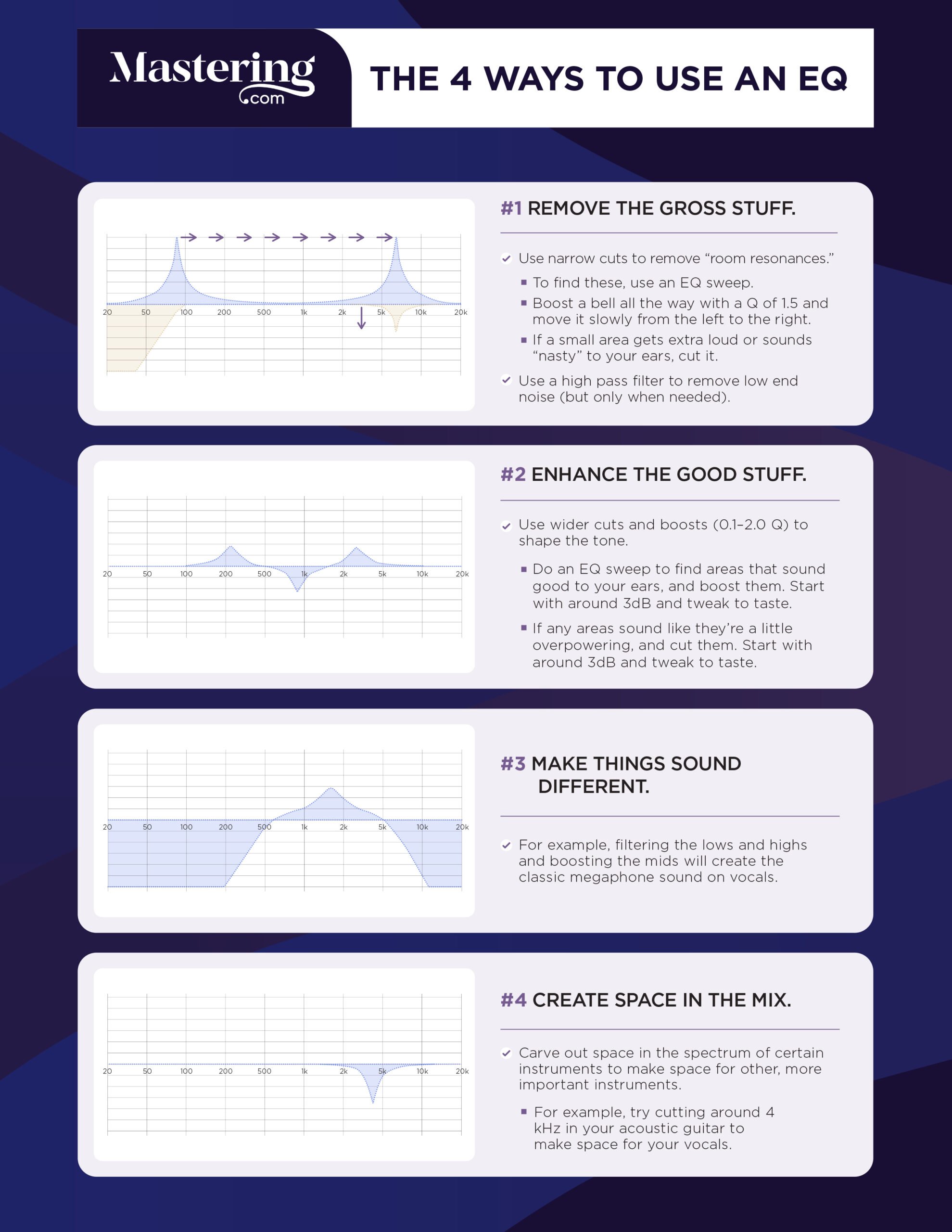
Boost Your Sound: Essential Tips from a Music Mastering Pro


Credit: mastering.com


Boost Your Sound: Essential Tips from a Music Mastering Pro


Credit: www.izotope.com


Frequently Asked Questions Of Mastering Your Music Is Important Tips From A Mastering Pro


How Does Mastering Improve The Quality Of Your Music?


Mastering enhances the overall sound quality, improves clarity, and balances the frequencies of your music. It brings out the best in your tracks, making them sound polished, professional, and ready for distribution.


What Is The Role Of A Mastering Engineer?


A mastering engineer is responsible for putting the final touches on your music. They ensure the tracks have consistent levels, optimize the stereo image, and apply various techniques to enhance the overall sonic characteristics. They also make sure your music sounds great on different playback systems.


Can I Master My Own Music?


While it’s possible to master your own music, it’s advisable to work with a professional mastering engineer. They have the expertise, specialized tools, and an unbiased perspective that can take your music to the next level. Their objective viewpoint ensures that your tracks sound their best in any environment.


How Does Mastering Affect The Loudness Of My Music?


Mastering helps to optimize the loudness of your music. A mastering engineer ensures that the tracks are balanced and have an appropriate loudness level. They use techniques such as compression and limiting to achieve a competitive and consistent volume across all your songs.


Conclusion


Mastering your music is an essential step in ensuring your music sounds its best. By implementing the tips shared by a mastering professional, you can enhance the overall quality and impact of your music. Paying attention to detail and utilizing the right techniques will elevate your sound to new heights, setting you apart in the competitive music industry.
 

https://www.youtube.com/watch?v=ntbh3qkCOlA


Categories
Archive Audio Production

Pc Specs For Music Production: Unlocking Your Ultimate Sound

For music production, you need a powerful processor, ample RAM, SSD storage, and a good audio interface. When setting up a PC for music production, the key components you require are a high-speed processor, at least 16GB of RAM, a solid-state drive with sufficient storage capacity, and an audio interface for high-quality sound processing.


Creating music demands significant computing power to handle complex software and multiple tracks, while fast data access speeds and minimal latency are crucial for real-time recording and processing tasks. With the right PC specs, you can efficiently run digital audio workstations and plugins, allowing you to produce professional-quality music seamlessly.


Choosing The Right Processor

When selecting a processor for music production, consider factors that directly impact performance.

Multicore Performance

A multicore processor can handle multiple tasks simultaneously, essential for running music software efficiently.

Clock Speed And Turbo Boost

Clock speed determines how quickly the processor can execute instructions, while Turbo Boost provides extra power when needed.

Selecting Sufficient Ram

Memory Capacity

RAM capacity crucial for music production to handle multiple tracks and plugins.

8-16 GB RAM recommended for beginners, 32 GB for intermediate users.

For professional music producers, 64 GB or more is ideal for large projects.

Memory Speed And Bandwidth

Speed impacts how fast data is processed; higher speeds lead to better performance.

Look for DDR4 RAM with speeds of at least 2400 MHz for optimal performance.

Choose RAM modules with high bandwidth to ensure data can be transferred quickly.

Optimizing Storage Solutions

Optimizing Storage Solutions:

In music production, having the right storage solution is crucial for handling large audio files and sample libraries efficiently. Optimizing your storage setup can help enhance the speed and performance of your digital audio workstation (DAW), ensuring seamless playback and uninterrupted creativity.

Solid State Drive (ssd) Vs. Hard Disk Drive (hdd)

When considering storage for music production, the choice between SSD and HDD is an essential factor to consider. SSDs are generally faster, more reliable, and quieter than traditional HDDs, making them ideal for storing project files, sample libraries, and software applications.

Nvme Vs. Sata

For SSDs, choosing between NVMe and SATA interfaces is significant. NVMe drives offer faster data transfer rates and reduced latency compared to SATA SSDs, making them an excellent choice for handling real-time audio processing and intensive music production tasks.

Pc Specs For Music Production: Unlocking Your Ultimate Sound


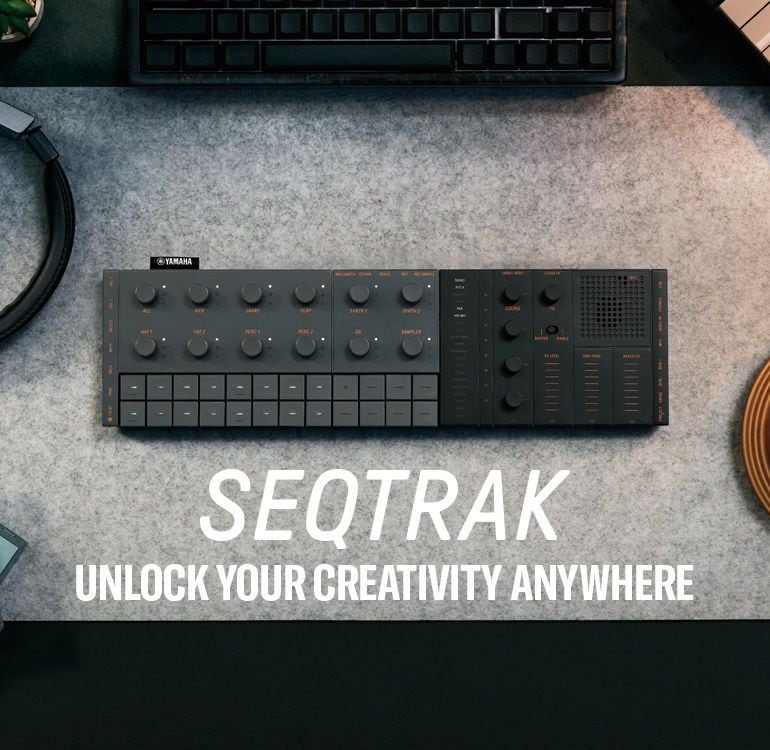
Credit: usa.yamaha.com


Graphics Card Considerations


When considering PC specs for music production, it’s important to prioritize a good graphics card to handle intensive audiovisual tasks. Look for a card with ample memory and a high core count to ensure seamless processing and smooth performance during music production.

When it comes to music production, having the right PC specs is essential for creating and editing tracks with ease. While many focus on getting a powerful CPU and ample RAM, the importance of a good graphics card should not be overlooked. The graphics card plays a crucial role in handling visual elements and can greatly impact the performance of music production software.

Graphics Processing Unit (gpu) Memory

The first consideration when choosing a graphics card for music production is the GPU memory. This memory is utilized to handle the rendering of visual elements within your digital audio workstation (DAW). The larger the GPU memory, the more visual elements your card can handle at once, resulting in smoother performance.

When deciding how much GPU memory you need, consider the complexity of your music projects. If you work with multiple tracks, virtual instruments, and effects, opting for a graphics card with at least 4GB of GPU memory is recommended. This should provide enough power to handle most music production tasks effectively.

Cuda And Opencl Support

Another important factor to consider is the GPU’s support for CUDA and OpenCL. CUDA and OpenCL are parallel computing platforms used by many music production software to offload processing tasks from the CPU to the GPU. GPU acceleration can significantly improve the performance of your DAW, allowing for quicker rendering and processing times.

When selecting a graphics card, ensure that it supports CUDA and OpenCL. This compatibility will enable you to take full advantage of GPU acceleration in your music production workflow. Many popular graphics card manufacturers, such as NVIDIA and AMD, offer drivers with CUDA and OpenCL support.

Conclusion

Choosing the right graphics card for music production is crucial for ensuring smooth performance when working with complex projects. By considering factors such as GPU memory and CUDA/OpenCL support, you can select a graphics card that will enhance your music production workflow and provide a seamless experience.

https://www.youtube.com/watch?v=ayt8-s77cQs


Audio Interface Compatibility

In the world of music production, having the right PC specs is crucial for creating high-quality audio. One important factor to consider is the compatibility of your audio interface. Your audio interface serves as the bridge between your computer and your musical instruments or microphones, allowing you to record and playback audio. Understanding the key aspects of audio interface compatibility ensures smooth communication between your hardware and software, ultimately enhancing your music production process.

Input And Output Channels

An important consideration when choosing an audio interface for music production is the number of input and output channels it provides. Input channels allow you to connect instruments or microphones to your computer for recording, while output channels enable you to hear the playback of your creations. The number of channels you require depends on the complexity of your music production setup and the number of sources you need to record simultaneously. It’s crucial to choose an audio interface that offers sufficient channels for your specific needs.

Latency And Driver Quality

Latency refers to the delay between when you play a musical instrument or sing into a microphone and when you hear the sound through your monitors or headphones. A low latency ensures a smoother and more natural recording experience. When selecting an audio interface, consider the quality of the drivers it uses. High-quality drivers can significantly reduce latency and provide better overall performance. Reliable drivers also guarantee compatibility with your Recording Software, ensuring seamless integration and optimal audio performance.

Summary

Choosing the right audio interface is crucial for effectively harnessing your PC’s potential in music production. Make sure your audio interface offers the necessary input and output channels to accommodate your recording needs. Additionally, consider the latency and driver quality to minimize delays and improve overall performance. By prioritizing audio interface compatibility, you’ll be well on your way to creating professional-grade music with your PC.

Pc Specs For Music Production: Unlocking Your Ultimate Sound


Credit: www.izotope.com


Pc Specs For Music Production: Unlocking Your Ultimate Sound


Credit: m.youtube.com


Frequently Asked Questions Of Pc Specs For Music Production What Do You Actually Need


Can I Use Any Ordinary Computer For Music Production?


No, an ordinary computer may not have the necessary processing power or sufficient RAM to handle the demands of music production software and effects.


What Are The Minimum Pc Specs For Music Production?


For music production, you will need at least an Intel Core i5 processor, 8GB of RAM, and a solid-state drive (SSD) for faster data access and storage.


Does The Sound Card Matter For Music Production?


Yes, a good quality sound card is essential for accurate audio playback and recording. Look for sound cards with low latency, high-resolution audio, and multiple inputs/outputs for a professional music production setup.


Conclusion


To sum up, choosing the right PC specs for music production is crucial for a seamless creative process. With the proper CPU, RAM, and storage, you can optimize your workflow and achieve high-quality results. By considering your specific needs and budget, you can build a powerful setup that supports your music production endeavors.

Categories
Archive Audio Production

Get Your Music On Tidal: Amplify Your Reach Now!

To get your music on TIDAL, distribute it through a digital distribution service. Choose a distributor that partners with TIDAL and upload your tracks.


Artists seeking exposure on global streaming platforms often target TIDAL for its high-fidelity streaming service and artist-friendly policies. TIDAL, known for its superior sound quality and exclusive content, attracts a dedicated audience that appreciates music at its best. Getting your tracks on TIDAL can help you reach an audience that values quality and is invested in supporting the creators behind the music.


For independent artists, navigating the digital space can be challenging, but by using an established distributor, you can simplify the process. These services not only facilitate your TIDAL submission but also ensure your music is available across all major platforms, increasing your visibility and potential for growth.


Tidal’s Place In The Music Streaming Universe

Let’s delve into the vibrant world of music streaming, where Tidal shines with exclusivity. It stands out as a haven for audiophiles.

High-fidelity Streaming: Tidal’s Unique Selling Proposition

Tidal brings music to life with its premium sound quality. This platform caters to those craving studio-like sound experiences. Unlike standard streaming services, Tidal offers High-Fidelity streaming. This means listeners enjoy lossless audio, preserving the crispness and richness of original recordings.

  • CD-quality sound streams at 1411 kbps.
  • Master Quality Authenticated (MQA) tracks offer high-resolution audio.
  • Exclusive content and early access to releases.

True-to-life audio puts Tidal on the map for discerning music lovers.

Comparing Tidal With Other Music Streaming Platforms

Versatility in music streaming sets Tidal apart. We find Spotify, Apple Music, and Amazon Music as chief competitors. Let’s look at how Tidal compares:

Feature Tidal Spotify Apple Music Amazon Music
Sound Quality High-Fidelity, MQA Standard, High Quality Standard, High Quality Standard, HD, Ultra HD
Music Catalog 70+ million tracks 70+ million tracks 75+ million tracks 75+ million tracks
Exclusives Yes Limited Limited Some
Price (monthly) Standard and Hi-Fi plans Free and Premium plans Single plan Prime and Unlimited plans

Tidal appeals to those who value superior sound and unique music collections. It may come at a higher price, yet the quality justifies the cost for many. Followers of niche artists and genres find a musical sanctuary in Tidal.

Benefits Of Featuring Your Music On Tidal

Featuring your music on Tidal can be a game-changer for artists. With its high-fidelity sound quality and artist-first approach, Tidal offers unique benefits. Let’s explore why landing your tracks on this platform could elevate your music career.

Premium Audience: Catering To Audiophiles And Quality Seekers

Tidal stands out for its high-quality streaming service. This attracts a discerning audience, who prioritize sound fidelity above all. They are often willing to support artists who deliver top-tier audio experiences.

  • Access to a niche market of dedicated listeners
  • Engagement with fans who value superior sound quality
  • Opportunity to stand out among peers by offering a premium listening experience

Financial Incentives: Understanding Tidal’s Royalty Model

Tidal is known for its artist-friendly approach to music streaming. It provides fair compensation compared to other platforms. This can translate to better earnings for you as an artist.

Feature Benefit to Artist
Higher Payouts More money per stream
Transparent Reporting Clear breakdown of earnings
Credit to Creators Supports all contributors in the music creation process

By understanding Tidal’s royalty model, you can make informed decisions about your music distribution and revenue generation strategies.

Preparing Your Music For Tidal Submission

So you’re ready to elevate your music career with Tidal? Smart move! Tidal’s high-fidelity streaming service means your music reaches fans in the best quality. First, let’s ensure your tracks make a splash. Follow these steps for a successful Tidal submission.

Mastering Tracks For High-quality Streaming

Mastering your tracks is like giving them a final polish. It’s crucial for Tidal’s quality standard. Here’s how to get started:

  • Check Your Levels: Aim for a consistent volume across songs.
  • Balance Your EQ: This ensures clear playback on all devices.
  • Consider a Professional: A mastering engineer can work wonders.

Remember, Tidal supports lossless formats like FLAC. So, provide the highest resolution files possible.

Metadata Essentials: Making Your Music Discoverable

Metadata is the secret to being found and recognized on Tidal. Pay attention to these details:

Metadata Type Description Why It’s Important
Track Title Exact name of your song It’s how fans find your track.
Artist Name Your or your band’s name Lets listeners explore more of your work.
Album Art Visual representation of your album Creates a visual hook for listeners.
Genre Category of your music Helps fans find your music in their preferred style.

Include relevant keywords in your title and description to boost searchability. Correct metadata ensures your tracks show up for the right audience.

Get Your Music On Tidal: Amplify Your Reach Now!


Credit: m.facebook.com


Navigating Tidal’s Submission Process

Getting your music on Tidal amplifies your reach and revenue. With high-fidelity streaming, Tidal prioritizes quality. This guide simplifies Tidal’s submission process. Follow these steps to elevate your music to a global audience on Tidal.

Step-by-step Guide To Uploading Your Tracks

  1. Create your account. Sign up at Tidal’s artist portal.
  2. Gather your audio files. Ensure they are high-quality and in the correct format.
  3. Fill in metadata carefully. This includes song titles, credits, and genres.
  4. Upload artwork. Your image should be striking and meet the required specifications.
  5. Review everything. Double-check for accuracy before submission.
  6. Send your tracks. Submit your music for the Tidal team to review.
  7. Verify and wait. Tidal will contact you once your music is live.

Partnering With Distributors: Simplifying Tidal Inclusion

Using distributors makes getting on Tidal easier. They handle formatting and metadata. Here are popular Tidal partners:

  • DistroKid: Fast and offers unlimited uploads for a yearly fee.
  • TuneCore: Provides strong analytics and charges per release.
  • CD Baby: Distributes to Tidal and offers promotional tools.
  • LANDR: Offers mastering services alongside distribution.
  • AWAL: Selective and targeted towards more established artists.

Select a distributor that aligns with your music career goals.


Marketing Your Music On Tidal

Embarking on your Tidal music journey requires impactful marketing strategies. Tidal, known for its high-fidelity sound and exclusive content, offers a unique platform for artists to showcase their music. Successful marketing on Tidal can help you reach a wider audience and grow your fan base. To maximize your music’s potential, explore the creative methods to engage listeners and personalize their experience with your sound.

Creating Playlists And Engaging With The Tidal Community

Creating captivating playlists on Tidal can significantly boost your music’s visibility. Curate playlists with your tracks alongside popular songs that resonate with your sound. This not only increases your reach but also showcases your taste and influences. Use intriguing titles and descriptions for your playlists to attract listeners and keep them hooked. Regular updates keep your playlists fresh and maintain listener interest.

  • Connect with other Tidal users by sharing your playlists.
  • Create themed playlists to match moods, seasons, or events.
  • Engage with your followers by asking for their input on your next playlist.

Building a community on Tidal helps establish a loyal fan base. Participate in forums, comment on other artists’ tracks, and share music to show your presence. Offering exclusive content or early releases to your Tidal followers can also encourage engagement.

Leveraging Tidal’s Exclusive Features For Artists

Tidal provides artists with exclusive features designed to promote their music effectively. Use these tools to enhance your presence and extend your reach within the Tidal community.

  1. Highlight new releases with Tidal’s promotional spots to grab listener attention.
  2. Explore Tidal’s artist dashboard for insights into your listeners’ behaviors and preferences.
  3. Submit your tracks for playlist consideration to increase your music’s exposure.

Use Tidal’s artist radios to feature your music alongside similar tracks, broadening your audience base. Collaborate with Tidal on live events or exclusive launches to create buzz and attract more listeners. The key is to stay active, innovative, and engaged with the features Tidal offers to support artist growth.

Get Your Music On Tidal: Amplify Your Reach Now!


Credit: tidal.com


Analyzing The Impact

Getting your music on Tidal paves a path to success. The platform’s advanced tools turn raw data into valuable insights. They guide artists in shaping their musical careers. Learn how to use Tidal’s analytics and read about artists who’ve thrived there.

Tidal’s Analytics: Gleaning Insights From Stream Numbers

Tidal’s analytics provide more than mere numbers. They reveal fans’ listening habits. Discover where your top listeners are. Know when they play your tunes the most. This data helps plan tours and releases. Artists get empowered to make data-driven decisions.

  • Track Plays: See which songs get the most love.
  • Geographical Data: Identify where your music is hot.
  • User Engagement: Learn how fans interact with your content.

Artists get tailored dashboards. These dashboards show real-time listening stats. They highlight how well different tracks perform. Use these findings to tailor marketing strategies and hone your sound.

Success Stories: Independent Artists Making Waves On Tidal

Many independent artists find a home on Tidal. They reach global audiences. They also maintain their creative control.

Success stories inspire and instruct upcoming talents. Artists demonstrate the art of leveraging Tidal’s platform.

Artist Name Genre Key Accomplishment
Luna Wave Pop Landed on Tidal Rising with debut single
The Green Project Jazz Featured in Tidal’s Master Quality Audio Playlist
IndieA Electronic Million streams milestone on first EP

These artists used Tidal’s features to their advantage. They reached milestones. Their stories show the potential of this music platform.

Get Your Music On Tidal: Amplify Your Reach Now!


Credit: m.facebook.com


Frequently Asked Questions For Get Your Music On Tidal


How To Upload Music To Tidal?


To get your music on Tidal, you’ll need to use a digital music distribution service. These platforms, like DistroKid or TuneCore, handle the submission of your tracks to Tidal and other streaming services, ensuring your music reaches a wide audience.


Is Self-distribution Possible On Tidal?


Tidal does not allow direct uploads from individual artists. Instead, artists must distribute their music through approved third-party distributors that have partnerships with Tidal, ensuring a smooth integration of their tracks into the platform.


What Are Tidal’s Music Guidelines?


Tidal emphasizes high-fidelity sound quality and requires music to be uploaded in a lossless format like FLAC or WAV. Furthermore, artwork and metadata must comply with their specifications, which your chosen distributor can assist you with.


How Long Does Tidal Approval Take?


Once submitted via a distributor, it can take anywhere from a few days to a week for your music to appear on Tidal. This timeline varies depending on the distributor’s processing time and Tidal’s content review process.


Conclusion


Elevate your sound by featuring it on Tidal. Embrace the platform’s high-fidelity advantage and connect with a discerning audience. Remember, your music deserves top-tier exposure. Dive in, navigate the waves of the music industry, and watch your tracks make a splash on Tidal’s vibrant stage.

Categories
Archive Audio Production

11 Power Tips to Make Guitars Sound Bigger in a Mix

To make guitars sound bigger in a mix, focus on EQ adjustments, layering multiple guitar tracks, and using reverb and delay effects strategically. Incorporate panning techniques and consider the arrangement of other instruments for a balanced sound.


Employ compression to enhance the guitar’s presence without overpowering the mix. Additionally, experiment with different microphone placements and amp settings to capture the desired tone. Remember to adjust levels and frequencies carefully to prevent muddiness and maintain clarity in the mix.


With these tips, you can achieve a larger-than-life guitar sound that stands out in your music production.

11 Power Tips to Make Guitars Sound Bigger in a Mix


Credit: www.izotope.com


Choosing The Right Guitar

A crucial factor in making guitars sound bigger in a mix is choosing the right type of guitar. Different types of guitars have unique tones and characteristics that can greatly impact the overall sound.

Picking The Right Type

When selecting a guitar for a mix, consider factors like the body shape, wood type, and construction. Acoustic guitars provide a warm and organic sound, while electric guitars offer versatility and the ability to experiment with different tones.

Selecting The Best Pickup

The pickup is a critical component that picks up the vibrations of the strings and converts them into electrical signals. Choose pickups that complement the guitar’s tonal qualities and enhance its sound in the mix.

Enhancing The Sound With Effects

Enhancing the sound of guitars in a mix can greatly impact the overall quality and depth of the music. Utilizing effects such as reverb, delay, chorus, and flanger can elevate the guitar’s presence and make it sound bigger and more captivating.

Utilizing Reverb And Delay

  • Reverb: Adds depth and space to the guitar sound.
  • Delay: Creates a sense of dimension and richness to the guitar tones.

Adding Texture With Chorus And Flanger

  • Chorus: Thickens the guitar sound and creates a shimmering effect.
  • Flanger: Adds a swirling, sweeping texture to the guitar notes.

Layering Techniques

Layering techniques are crucial in making guitars sound bigger in a mix. By utilizing different layering methods, you can create a richer and more dynamic sonic landscape for your guitar tracks.

Double Tracking Guitars

Double tracking guitars involves recording the same performance twice and panning each take to opposite sides of the stereo spectrum. This creates a wider sound, giving the impression of a larger guitar presence in the mix. It adds depth and fullness to the guitar and helps prevent it from getting lost in the overall mix.

Using Multiple Amps Or Simulations

Using multiple amps or simulations is another effective technique. By recording the same guitar part through different amplifiers or amp simulations and blending the signals, you can achieve a thicker and more massive guitar sound. Each amp or simulation can contribute unique tonal characteristics, enriching the overall sonic texture.

Eq And Compression Tricks

When it comes to making guitars sound bigger in a mix, using EQ and compression techniques can make all the difference. By carefully sculpting the guitar’s tone and applying dynamic control, you can enhance its presence and impact. In this section, we will explore two essential tricks to achieve this: Carving Space with EQ and Applying Dynamic Control with Compression.

Carving Space With Eq

Carving space with EQ involves adjusting the frequency content of each element in the mix to create a balanced and open sonic landscape. Here are a few techniques to achieve this:

  • Use high-pass filters to remove unnecessary low-end rumble in the guitar tracks. This helps to clean up the mix and make space for other instruments, such as the bass and kick drum.
  • Identify frequency clashes between the guitars and other instruments, particularly in the midrange. By cutting or boosting specific frequencies in the guitars, you can create separation and clarity.
  • Experiment with gentle shelving or peak filters to add or reduce presence in the guitar tracks. This can help to bring out the desired tonal characteristics and make the guitars stand out in the mix.

Applying Dynamic Control With Compression

Compression is a powerful tool for controlling the dynamics of the guitar tracks and making them sound more consistent and polished. Here are some tips to effectively apply compression:

  1. Start by setting the attack and release times based on the characteristics of the guitar performance. Faster attack times can tame transient peaks, while slower releases can retain sustain and natural decay.
  2. Set an appropriate ratio to achieve the desired amount of compression. A lower ratio allows for more dynamic range, while a higher ratio provides tighter control.
  3. Experiment with the threshold to find the right balance between compression and the natural dynamics of the guitars. The threshold determines the level at which the compression begins to take effect.
  4. Consider using parallel compression to retain the dynamics of the original signal while adding sustain and presence to the guitars. Blend the compressed signal with the dry signal for a more powerful sound.

By employing these EQ and compression tricks, you can make your guitars sound bigger and more impactful in a mix. Remember, experimentation and careful listening are key to finding the perfect balance. Use these techniques as starting points and adapt them to suit the specific needs of your mix.

Mixing Strategies

When it comes to mixing guitars in a mix, there are several strategies you can employ to make them sound bigger and more impactful. In this section, we will explore two key aspects of mixing guitars: placing them in the stereo field and balancing their levels in the mix.

Placing Guitars In The Stereo Field

One effective technique for creating a bigger sound is to place guitars in the stereo field. By spreading the guitars across the stereo image, you can achieve a wider and more immersive soundstage. Here are a few ways to accomplish this:

  1. Use panning to position each guitar part in the stereo field. For example, you can pan a rhythm guitar part slightly to the left and a lead guitar part slightly to the right. This separation will make each part more distinct and enhance the overall width of the mix.
  2. Experiment with stereo effects such as chorus or stereo delay. These effects can add depth and spaciousness to the guitars, making them sound bigger and more enveloping.
  3. Consider layering multiple guitar tracks. By recording multiple takes of the same part and panning them differently, you can create a thick and immersive guitar sound.

Balancing Levels In The Mix

In addition to placing guitars in the stereo field, it’s crucial to balance their levels in the mix. Proper leveling ensures that each guitar part contributes to the overall sound without overpowering other elements. Here are some tips to help you achieve a balanced mix:

  • Start by setting the level of the rhythm guitar, which forms the foundation of the guitar sound. Adjust its volume until it sits well with the drums and bass.
  • Next, bring in the lead guitar. You can raise its level slightly above the rhythm guitar to give it more prominence and emphasis.
  • Consider using automation to fine-tune the guitar levels throughout the song. This allows you to emphasize certain parts or create dynamics that enhance the overall impact.

Remember, the goal is to create a balanced mix where each guitar part contributes to the bigger picture. By combining careful positioning in the stereo field with balanced levels, you can make your guitars sound bigger and more powerful in the mix.

11 Power Tips to Make Guitars Sound Bigger in a Mix


Credit: www.amazon.com


11 Power Tips to Make Guitars Sound Bigger in a Mix


Credit: www.sweetwater.com


Frequently Asked Questions Of 11 Tips To Make Guitars Sound Bigger In A Mix


Q: How Can I Make Guitars Sound Bigger In A Mix?


A: One way to make guitars sound bigger in a mix is to use double-tracking. Record the guitar part twice and pan each track to opposite sides to create a wider stereo image. Additionally, you can use reverb and delay effects to add depth and create a sense of space around the guitar.


Q: What Eq Settings Should I Use To Make Guitars Sound Bigger?


A: To make guitars sound bigger in a mix, boost the low end slightly to add warmth and presence. Cut any frequencies that are causing muddiness or harshness. Boost the high end to add sparkle and clarity. Experiment with different EQ settings to find the right balance for your mix.


Q: Should I Use Compression On Guitars To Make Them Sound Bigger?


A: Compression can help make guitars sound bigger in a mix by bringing out the sustain and controlling the dynamics. Use a moderate compression ratio to even out the levels and add sustain. Be careful not to over-compress, as it can squash the natural dynamics and make the guitars sound lifeless.


Q: Is It Important To Use The Right Amp Settings For Big Guitar Sounds?


A: Yes, using the right amp settings is crucial for achieving big guitar sounds. Experiment with different amp models, gain levels, and EQ settings to find the tone that fits the mix. Pay attention to the balance between the low, mid, and high frequencies to ensure the guitars cut through and fill up the mix.


Conclusion


Mastering the art of making guitars sound bigger in a mix can significantly enhance the overall impact of your music. By implementing the tips discussed in this blog post, you can effectively create a powerful and professional sound for your recordings.


Experimenting with these techniques will undoubtedly elevate the quality of your music production and leave a lasting impression on your audience.


https://www.youtube.com/watch?v=Dy-2ygVaW7M


Categories
Archive Audio Production

Mastering FL Studio: The Ultimate Guide to Becoming a Pro Music Producer

To learn FL Studio, start by watching tutorials and experimenting with the software. Practice regularly to improve skills.


Music production forums are also helpful for tips and advice on mastering FL Studio. Join online communities to connect with fellow producers and share knowledge. Experiment with different genres and techniques to refine your style and develop your unique sound.


Taking online courses or attending workshops can also provide structured learning and guidance. Remember, practice and persistence are key to mastering FL Studio.

Mastering FL Studio: The Ultimate Guide to Becoming a Pro Music Producer


Credit: www.packtpub.com


Getting Started With Fl Studio


Learn the best way to master FL Studio with comprehensive tutorials, interactive guides, and practical tips. Get started with hands-on projects, explore advanced features, and unlock your music potential. Take your music production skills to the next level and create stellar beats and tracks effortlessly.

Choosing The Right Version

Consider FL Studio editions like Fruity, Producer, or Signature to match your needs.

Each version offers varied features; choose the one that aligns with your workflow.

Setting Up Your Workspace

  • Organize tracks by color coding for better visual clarity.
  • Customize hotkeys to speed up your production process.
  • Adjust screen layout and window configurations for optimal functionality.

Embark on your FL Studio journey by selecting the right version and optimizing your workspace.

Explore edition differences to determine the best fit for your music production needs.

Personalize your workspace through color coding and hotkey adjustments for efficiency.

Begin by selecting the ideal edition and tailoring your setup to enhance workflow.

Understanding The Interface

The interface is the first thing you should familiarize yourself with when learning FL Studio.

Navigating The Browser

The Browser in FL Studio is where you can access all your sounds, samples, and presets.

Using The Channel Rack

The Channel Rack is where you manage your instruments and patterns in FL Studio.

Creating And Editing Beats


Discover the most effective method to learn FL Studio through creating and editing beats. Master the software’s features and interface to enhance your music production skills. Dive into hands-on practice to unleash your creativity and produce professional-quality beats.

Creating and editing beats is a fundamental aspect of music production in FL Studio. Utilizing the Step Sequencer is a great way to start building beats. The Step Sequencer allows you to sequence sounds and create patterns by adding notes for different instruments or samples. Working with the Piano Roll is another essential technique for beat creation in FL Studio. The Piano Roll enables you to visually manipulate notes, adjust their timing, and tweak their pitch for precise control over your beat. ### Utilizing the Step Sequencer When utilizing the Step Sequencer, start by selecting the instrument or sample you want to work with. Next, add steps to the grid representing the beats or notes you want to include in your pattern. You can easily adjust the length, velocity, and panning of each step to fine-tune your beats and create dynamic patterns. ### Working with the Piano Roll To work with the Piano Roll, simply open it for the instrument you are using and start placing notes on the grid. You can adjust the length and position of each note to create variations in rhythm and melody. Additionally, the Piano Roll offers advanced features such as quantization, scaling, and strumming for more intricate beat editing. By mastering these techniques, you can transform your musical ideas into polished beats within FL Studio. With precision and creativity, you’ll be able to elevate your production skills and craft professional-sounding beats that stand out.

Mastering FL Studio: The Ultimate Guide to Becoming a Pro Music Producer


Credit: imusician.pro


Sampling And Audio Recording

Sampling and audio recording are fundamental aspects of FL Studio that allow you to add your own unique touch to your music production. Whether you want to experiment with different sounds, create your own beats, or record vocals, FL Studio provides powerful tools to help you achieve your goals.

Importing And Manipulating Samples

One of the key features in FL Studio is the ability to import and manipulate samples, allowing you to incorporate various sounds into your music. To import a sample, simply navigate to the browser section and drag the desired audio file into the playlist or channel rack.

Once you’ve imported your sample, FL Studio offers a range of options for manipulating it. You can adjust the pitch, tempo, and volume of the sample to fit the overall composition. Additionally, you can apply various effects such as reverb, delay, or distortion to transform the sound and add more depth and character.

Recording And Editing Audio

FL Studio also provides powerful tools for recording and editing audio directly within the software. To record audio, simply connect your microphone or instrument to your computer and select the appropriate input in the mixer section.

Once you’ve recorded your audio, FL Studio offers a range of editing options to refine your recordings. You can cut, trim, and rearrange audio clips to create seamless transitions and remove any unwanted parts. Additionally, you can apply effects, adjust the volume, and even integrate automation to add dynamic changes to your recordings.

FL Studio’s intuitive interface and comprehensive set of tools make it an ideal platform for learning and mastering the art of sampling and audio recording. With a little practice and experimentation, you can elevate your music production to new heights.

So, whether you’re a seasoned producer or just starting out, don’t miss out on exploring the exciting world of sampling and audio recording in FL Studio. Let your creativity run wild and unleash your unique sound.

Advanced Techniques And Tools


Discover advanced techniques and tools to master Fl Studio efficiently. Elevate your skills with the best learning methods available. Unlock your creative potential and produce high-quality music effortlessly.

When it comes to taking your FL Studio skills to the next level, mastering advanced techniques and tools is essential. By delving into the world of advanced tools and features, you can unlock a whole new level of control and creativity in your music production journey.

Mastering Mixer And Effects

The FL Studio mixer is a powerful tool that allows you to blend and shape the sounds in your project to perfection. With its extensive range of effects and processing options, the mixer enables you to add depth, polish, and professional-quality sound to your tracks.

When it comes to mastering the mixer, exploring its various features and understanding how they work together is key. Here are a few tips:

  • Arrange the mixer channels according to your preference for easier navigation.
  • Experiment with different effects such as EQ, compression, reverb, and delay to enhance the sonic characteristics of each sound.
  • Use automation clips to create dynamic changes in volume, panning, and effect parameters over time.
  • Group related sounds using mixer tracks to apply effects and processing collectively.

In addition to mastering the basics of the mixer, understanding advanced routing options can take your production skills even further. By using sends and sidechain techniques, you can create intricate soundscapes and achieve professional-level mixing in your tracks.

Automation And Midi Control

Automation is a powerful tool in FL Studio that allows you to control various parameters over time. This technique gives you the ability to add movement, expressiveness, and creativity to your music.

Here are some ways to make the most of automation:

  1. Create smooth transitions and build-ups by automating the volume, panning, and effects.
  2. Experiment with automating synth parameters such as filter cutoff, resonance, and LFO rate to add movement and variation to your sounds.
  3. Utilize automation clips to control the parameters of third-party plugins and virtual instruments.
  4. Employ MIDI control to record and manipulate live performances, such as modulating effects using MIDI controllers or playing melodies on a MIDI keyboard.

Mastering automation and MIDI control gives you the freedom to create complex and evolving sound designs, adding a unique touch to your music productions.

Mastering FL Studio: The Ultimate Guide to Becoming a Pro Music Producer


Credit: www.amazon.com


Frequently Asked Questions On Best Way To Learn Fl Studio


What Is The Best Way To Learn Fl Studio?


The best way to learn FL Studio is by starting with the basic tutorials provided by Image-Line, the creators of FL Studio. Additionally, practicing regularly, experimenting with different features, and joining online communities can help improve your skills.


Are There Any Online Courses Available For Learning Fl Studio?


Yes, there are various online courses available for learning FL Studio. Websites like Udemy, Coursera, and LinkedIn Learning offer comprehensive courses taught by professionals. These courses cover everything from the basics to advanced techniques, allowing learners to master FL Studio at their own pace.


How Can I Improve My Music Production Skills In Fl Studio?


To improve your music production skills in FL Studio, it is recommended to study music theory, experiment with different genres and styles, and actively listen to music created by professionals. Additionally, practicing regularly, learning from tutorials and courses, and seeking feedback from other producers can also enhance your skills.


Conclusion


To sum up, learning FL Studio is a dynamic journey that requires dedication and practice. By utilizing online tutorials, experimenting with different features, and seeking feedback, you can develop your skills and gain confidence. Remember to stay patient, persistent, and open-minded throughout your FL Studio learning experience.


With time and dedication, you can master this powerful music production software.


https://www.youtube.com/watch?v=BUjdnxgBgzM


Categories
Archive Audio Production

Easily Connect Keyboard to Computer Without Midi: Simple Steps

To connect a keyboard to a computer without using MIDI, use a USB connection. Simply plug in the USB cable from the keyboard to the computer for instant connection.


Keyboards can greatly enhance your music production experience, allowing you to play, record, and edit musical compositions with ease. When connecting a keyboard to your computer, it’s essential to ensure a seamless and straightforward setup process. By following the right steps and utilizing the appropriate cables, you can seamlessly integrate your keyboard into your digital workstation.


Whether you’re a beginner looking to explore music production or a seasoned professional seeking to streamline your workflow, connecting your keyboard to your computer opens up a world of creative possibilities. Let’s delve deeper into the process of connecting a keyboard to a computer without using MIDI.

Easily Connect Keyboard to Computer Without Midi: Simple Steps


Credit: www.amazon.com


Getting Started

Check Compatibility

Ensure your keyboard and computer are compatible before proceeding.

Gather Necessary Cables

Collect all the cables required to establish the connection.

Connecting The Keyboard


To connect a keyboard to a computer without using MIDI, you can simply use a USB connection. Plug the USB cable from the keyboard into a USB port on your computer, and your keyboard will be ready for use without any additional setup.

Locate Usb Port

USB port on your computer. It is usually located on the back or side.

Plug In The Keyboard

USB port on your computer. Make sure it is secure. Ensure the keyboard is connected properly before turning it on. If the keyboard requires any drivers or software, install them before using it. Once connected, you can start using your keyboard to play music or control software on your computer.

Configuring The Computer

Configuring the computer is a crucial step in connecting a keyboard without MIDI. By following the right steps, you can ensure that your computer can recognize the keyboard and adjust its settings effectively.

Recognizing The Keyboard

To start, ensure that your computer recognizes the keyboard. Follow these steps to do so:

  1. Connect the keyboard to your computer using the appropriate USB cable.
  2. Once connected, wait for the computer to detect the new device.
  3. If the keyboard is not automatically recognized, go to the device manager on your computer and look for the keyboard under the “HID-compliant devices” section.
  4. If the keyboard is not listed, try using a different USB port or cable, and ensure that the keyboard is powered on.

Adjusting Keyboard Settings

After ensuring that the computer recognizes the keyboard, the next step is to adjust its settings. Here’s how to do it:

  1. Go to the “Control Panel” on your computer and open the “Devices and Printers” section.
  2. Find your keyboard in the list of devices and right-click on it to access the keyboard settings.
  3. Check the “Properties” of the keyboard and make sure that it is enabled and set as the default input device.
  4. Adjust any additional settings such as key response time, sensitivity, or custom key mappings according to your preferences.

Easily Connect Keyboard to Computer Without Midi: Simple Steps


Credit: www.wikihow.com


Testing The Connection

Once you have successfully connected your keyboard to your computer without MIDI, it is important to test the connection to ensure everything is working smoothly. In this section, we will go over how to test the connection and troubleshoot any potential issues that may arise.

Open Music Software

To begin, open your preferred music software on your computer. It could be a digital audio workstation (DAW) or a simple piano software. Make sure the software is compatible with your operating system and supports the keyboard you are using. Most music software today support various keyboard models and can easily detect the connection.

If you haven’t installed any music software yet, you can find a wide range of options available online. Some popular choices include Ableton Live, FL Studio, Logic Pro, and GarageBand. Choose the one that best suits your needs and install it following the instructions provided by the software’s official website.

Play A Few Notes

Once you have opened the music software, it’s time to play a few notes on your keyboard to ensure it is properly connected. Begin by pressing a few keys on the keyboard. As you press the keys, you should see the corresponding notes being displayed on the software’s interface. This confirms that the keyboard is successfully sending MIDI signals to the software.

If you don’t see any response from the software when you press the keys, double-check the connection between the keyboard and the computer. Ensure that the USB cable is securely plugged into both the keyboard and the computer’s USB port. Additionally, make sure the keyboard is powered on and receiving power.

If the connection is still not working after verifying these factors, try reconnecting the keyboard by unplugging and plugging it back in. Sometimes, the connection may become loose, causing a temporary interruption. If the issue persists, consult the user manual or contact the keyboard manufacturer’s support for further assistance.

Now that you have successfully tested the connection and verified that your keyboard is working properly, you can proceed with exploring various features and capabilities offered by the music software. Enjoy creating music with your keyboard and let your creativity flow!

Troubleshooting

While connecting a keyboard to your computer without using MIDI can unlock countless possibilities, occasional technical glitches may occur. Fear not, as troubleshooting is here to save the day! Let’s delve into some common issues and how to resolve them.

Checking Power

If your keyboard fails to connect to your computer, the first step is to check the power source. Ensure that both your keyboard and computer are receiving power by plugging them into functioning electrical outlets. Sometimes, a simple lack of power can cause connection problems.

Rechecking Connections

When your keyboard still refuses to cooperate, it’s time to investigate the connections. Start by examining the USB cable that links your keyboard to the computer. Ensure that it is securely plugged into both devices. If possible, try a different USB port on your computer to rule out port-related issues. Additionally, inspect the cable for any signs of damage or fraying, as this can also lead to connection problems.

If the USB cable appears to be in good condition and securely connected, move on to inspecting the keyboard itself. Look for any loose or damaged ports that may be hindering the connection. If necessary, consult the keyboard’s user manual for further guidance on identifying potential issues with the ports.

Easily Connect Keyboard to Computer Without Midi: Simple Steps


Credit: productionden.com


Frequently Asked Questions For Connect Keyboard To Computer Without Midi


How Can I Connect A Keyboard To A Computer Without Midi?


To connect a keyboard to a computer without MIDI, you can use a USB connection. Most modern keyboards have a USB port that allows direct connection to a computer. Simply plug the USB cable into the keyboard and the other end into a vacant USB port on your computer.


Are There Other Ways To Connect A Keyboard To A Computer Without Midi?


Yes, there are other ways to connect a keyboard to a computer without MIDI. Some keyboards have Bluetooth capability, allowing wireless connection to your computer. Additionally, you can use specialized audio interfaces or adapters to connect your keyboard to your computer’s audio inputs for recording or MIDI conversion purposes.


Can I Connect An Older Keyboard To A Computer Without Midi?


If you have an older keyboard without USB or Bluetooth capabilities, you may still be able to connect it to your computer without MIDI. Look for legacy ports like MIDI or serial ports on your computer. Then use the appropriate cables and adapters to connect your keyboard to these ports, enabling communication between your keyboard and computer.


Are There Any Limitations When Connecting A Keyboard To A Computer Without Midi?


When connecting a keyboard to a computer without MIDI, there may be limitations depending on the connectivity options available. For example, using a USB connection allows for direct communication and full functionality, while using audio interfaces or adapters may have some limitations in terms of MIDI functionality and data transfer speed.


Conclusion


Connecting a keyboard to your computer without MIDI is a simple process that can be done using a standard USB connection. This method allows you to enjoy the benefits of using your keyboard with music production software without needing additional hardware.


With these easy steps, you can start creating music without any hassle.


https://www.youtube.com/watch?v=LVepVs0qeWI


Categories
Archive Audio Production

What is Mixing in Fl Studio: Master the Art of Audio Engineering

Mixing in FL Studio refers to the process of blending and adjusting individual audio tracks to create a polished and cohesive sound. It involves adjusting volume levels, panning, EQ, compression, and effects to enhance the overall audio quality.


Mixing is essential in music production to ensure all elements work together harmoniously for a professional and balanced final product. In today’s digital age, technology has made it easier for musicians and producers to create music from the comfort of their own homes.


FL Studio, a popular digital audio workstation, offers a wide range of tools and features to facilitate the mixing process. Whether you’re a beginner or a seasoned producer, understanding how to effectively mix your tracks in FL Studio is crucial for achieving professional-sounding results. Let’s delve deeper into the world of mixing in FL Studio and explore the techniques and tools that can help elevate your music to the next level.


The Basics Of Mixing In Fl Studio

Mixing in FL Studio is the process of combining different audio tracks to create a balanced and cohesive sound. It involves adjusting levels, panning, and applying effects to each track to ensure they blend harmoniously. Let’s delve into the fundamental aspects of mixing in FL Studio.

The Importance Of Mixing

Mixing is crucial for achieving professional-sounding music. It harmonizes individual elements, enhances clarity, and ensures each sound has its place in the mix. Without proper mixing, audio can sound cluttered and lack impact.

The Role Of Mixing In Audio Engineering

  • Mixing in FL Studio is a fundamental skill that every audio engineer should master.
  • It involves balancing volume levels, adjusting frequencies, and spatial placement of sound sources.
  • Good mixing can transform a raw recording into a polished, radio-ready track.
What is Mixing in Fl Studio: Master the Art of Audio Engineering


Credit: www.careersinmusic.com


Fundamental Principles Of Mixing

Mixing in FL Studio is a crucial part of the music production process where various audio elements are combined, balanced, and enhanced to create a polished final product.

Understanding Equalization

Equalization, often referred to as EQ, is the process of adjusting the balance between different frequency components in an audio signal to achieve clarity and tonal balance.

Balancing Levels And Panning

Setting the right levels for individual tracks and adjusting the placement of sound elements within the stereo field through panning are essential for creating a well-balanced mix.

Advanced Techniques In Fl Studio

Advanced Techniques in FL Studio require an in-depth understanding of mixing, effects, and automation. In this article, we will explore advanced mixing techniques, such as utilizing effects and automation, and creating space with reverb and delay, to elevate your music production in FL Studio.

Utilizing Effects And Automation

FL Studio offers a wide array of powerful effects and automation tools to enhance the quality of your mixes. By utilizing effects such as EQ, compression, reverb, and delay, you can shape the tonal quality, add depth, and bring out the dynamics of your individual tracks. Automation allows you to control the parameters of these effects over time, providing precision and creativity in your mix.

Creating Space With Reverb And Delay

Reverb and delay are essential tools for creating a sense of space and depth in your mix. In FL Studio, you can experiment with different reverb types, pre-delay settings, and decay times to add ambiance and create a natural-sounding environment for your instruments and vocals. Similarly, delay effects can be used to produce rhythmic patterns, stereo width, and a sense of spaciousness within your mix.

Mastering The Art Of Audio Engineering

Audio engineering is a creative and technical field that requires a deep understanding of sound, music, and the tools used to manipulate and enhance audio. One crucial aspect of audio engineering is mixing – the process of combining individual audio tracks into a cohesive and balanced final product.

Developing A Critical Ear

Developing a critical ear is an essential skill for any audio engineer. It involves training your ears to discern subtle nuances in sound and identify areas that need improvement. To develop a critical ear, engage in active listening sessions where you focus solely on the sound, paying attention to details such as dynamics, tonal balance, and spatial positioning.

Additionally, regularly reference your mixes against professional recordings to understand the differences and strive for the best possible sound quality. This practice will help you develop a discerning ear and make informed decisions during the mixing process.

Understanding The Emotional Impact Of Mixing

Mixing is not just about achieving technical excellence; it’s also about creating an emotional impact on the listener. A well-executed mix can evoke specific emotions and enhance the overall musical experience.

To achieve the desired emotional impact, consider the arrangement of the song and how different elements interact with each other. Use techniques such as panning to create a wide stereo image and dynamic processing to convey a sense of energy and intensity.

Moreover, pay attention to the frequency balance of the mix to ensure that each instrument occupies its own sonic space and contributes to the overall emotional narrative of the song.

Putting It All Together

Mastering the art of audio engineering requires a combination of technical knowledge, creativity, and a critical ear. By developing a critical ear and understanding the emotional impact of mixing, you can take your mixes to the next level and create captivating soundscapes that resonate with listeners.

https://www.youtube.com/watch?v=ZHXD-BlKyL8


Navigating Fl Studio’s Mixing Tools

In FL Studio, mixing is a crucial step in the music production process. It allows you to balance the different elements of your track, enhance their sonic qualities, and create a polished final product. To achieve professional-sounding results, it’s essential to become familiar with FL Studio’s mixing tools and know how to navigate them effectively. In this blog post, we will explore the different aspects of FL Studio’s mixer interface and introduce you to various plugins and tools that can take your mixing skills to the next level.

Exploring The Mixer Interface

The mixer interface is where the magic happens in FL Studio’s mixing process. It provides a comprehensive view of all the tracks in your project, allowing you to control their volume, panning, effects, and routing. Here’s a breakdown of the key elements you’ll encounter:

  1. Mixer Channels: Each track in your project is represented by a mixer channel, which provides control over individual audio and MIDI elements. These channels are displayed vertically in the mixer interface, allowing you to adjust their settings independently.
  2. Volume and Panning Controls: Each mixer channel includes sliders for adjusting the volume and panning of the corresponding track. By adjusting these controls, you can create a balanced mix and position your sounds precisely in the stereo field.
  3. Effect Slots: FL Studio’s mixer provides various effect slots for adding plugins to your tracks. These slots allow you to apply EQ, compression, reverb, delay, and other effects to shape the sound and add depth to your mix.
  4. Sends and Returns: Sends and returns are additional routing options available in the mixer. You can use sends to route a portion of a track’s audio signal to an auxiliary channel, while returns allow you to process and combine multiple signals together, such as reverb or delay effects.
  5. Master Channel: The master channel is the final destination for all the audio in your project. It allows you to apply global effects and controls to the overall mix, ensuring consistency and coherence.

Using Plugins And Tools For Enhanced Mixing

FL Studio offers a vast range of plugins and tools that can significantly enhance your mixing capabilities. Here are some essential ones to explore:

Plugin/Tool Function
VST Plugins Extend FL Studio’s sonic possibilities by adding third-party virtual instruments and effects.
Fruity Parametric EQ 2 Shape the frequency response of individual tracks and remove unwanted frequencies.
Fruity Compressor Control the dynamic range of tracks and achieve a more balanced mix.
Fruity Reverb Add realistic space and depth to your sounds by applying various reverb algorithms.
Maximus A versatile multi-band compressor that allows precise control over the dynamics of your mix.
Fruity Limiter Prevent clipping and keep your mix within a desirable volume range.

These plugins and tools are just the tip of the iceberg in FL Studio’s vast arsenal. Experimenting with different plugins and workflows can unlock new creative possibilities and help you achieve your desired mix.

What is Mixing in Fl Studio: Master the Art of Audio Engineering


Credit: www.amazon.com


What is Mixing in Fl Studio: Master the Art of Audio Engineering


Credit: www.crutchfield.com


Frequently Asked Questions For What Is Mixing In Fl Studio


Faq 1: What Is Mixing In Fl Studio?


Mixing in Fl Studio refers to the process of blending and balancing multiple audio tracks to create a harmonious and professional-sounding output. It involves adjusting levels, equalization, panning, and adding effects to enhance the overall sound quality and clarity of a music production.


Faq 2: Why Is Mixing Important In Fl Studio?


Mixing is crucial in Fl Studio as it allows you to achieve a polished and balanced sound by bringing out the best elements of each track. It helps in removing unwanted noise or frequencies, improving the overall dynamics, and creating a cohesive and enjoyable listening experience for your audience.


Faq 3: How Do I Start Mixing In Fl Studio?


To start mixing in Fl Studio, you can begin by organizing your tracks and creating a clear audio hierarchy. Adjust individual track levels, apply EQ to shape the frequency balance, use compression to control dynamics, add effects to enhance the audio, and make use of automation to add movement and variation to your mix.


Faq 4: What Are Some Common Mixing Techniques In Fl Studio?


Some common mixing techniques in Fl Studio include proper gain staging, using plugins for EQ and compression, creating a balanced stereo image through panning, applying time-based effects like reverb and delay, utilizing sidechain compression for better separation, and referencing your mix on different speakers and headphones.


Conclusion


Understanding mixing in FL Studio is crucial for creating professional, high-quality music. With the right techniques and tools, you can achieve a balanced and polished sound. By applying these principles and experimenting with different effects, you can elevate your music to new heights and stand out in the competitive music industry.

Categories
Archive Audio Production

Master the Art of Vocal Tuning: Pitch Correction Plugins Unveiled!

Pitch correction plugins are used in vocal tuning to correct pitch inaccuracies in recordings effectively. By adjusting the pitch manually or using automatic tools, vocal performances can be enhanced.


These plugins are essential for achieving professional-sounding vocals in music production. Vocal tuning is a crucial step in the post-production process, ensuring that the final mix is polished and pitch-perfect. Whether you are a beginner or an experienced producer, understanding the basics of vocal tuning with pitch correction plugins is essential for creating high-quality tracks.


In this guide, we will explore the key principles and techniques of vocal tuning using pitch correction plugins, helping you achieve studio-quality vocals in your music projects.


The Importance Of Vocal Tuning


Mastering the art of vocal tuning using pitch correction plugins is crucial for achieving polished and professional-sounding vocals in music production. Proper vocal tuning can enhance the overall quality and tone of a vocal performance, helping to attain the desired pitch and timbre for a seamless and captivating listening experience.

The Importance of Vocal Tuning:

Achieving Perfect Pitch

The pitch correction plugins help achieve perfect pitch by correcting vocal inaccuracies.

Enhancing Vocal Performance

The plugins enhance vocal performance by ensuring a polished and professional sound. Vocal tuning is crucial for perfect pitch and enhancing vocal performance. These plugins can help singers achieve perfect pitch effortlessly. They enhance the overall vocal performance quality, making the vocals sound more polished. Using pitch correction plugins is essential for achieving perfect pitch and enhancing vocal performance.

Master the Art of Vocal Tuning: Pitch Correction Plugins Unveiled!


Credit: www.musicradar.com


Understanding Pitch Correction Plugins

How Pitch Correction Works

Pitch correction adjusts the pitch of vocals to the nearest correct note.

Plugins analyze incoming audio, detect pitch, and make corrections.

Types Of Pitch Correction Plugins

  • Automatic: Instantly corrects pitch inaccuracies.
  • Manual: Allows manual adjustments and fine-tuning.
  • Graphic: Visually represents pitch for precise editing.

Choosing The Right Pitch Correction Plugin

Choosing the right pitch correction plugin is crucial for achieving professional-sounding vocal performances. With a multitude of options available in the market, it’s essential to consider key features, compatibility, and integration when making this decision.

Key Features To Look For

When selecting a pitch correction plugin, it’s important to prioritize certain key features. A user-friendly interface, real-time processing capabilities, pitch and time correction controls, and natural-sounding results should be at the forefront of your considerations.

Compatibility And Integration

Compatibility and integration play a significant role in the effectiveness of a pitch correction plugin. Ensure that the plugin is compatible with your digital audio workstation (DAW) and operating system. Additionally, check if the plugin seamlessly integrates with your existing workflow and other audio processing tools.

Master the Art of Vocal Tuning: Pitch Correction Plugins Unveiled!


Credit: www.macprovideo.com


Mastering Vocal Tuning Techniques

Vocal tuning is an essential part of the music production process. It involves correcting the pitch of a vocal performance to ensure it sounds polished and professional. Pitch correction plugins are widely used in the industry to achieve this. In this article, we will explore some basic vocal tuning techniques that will help you master the art of pitch correction.

Subtle Adjustments For Natural Sound

When it comes to vocal tuning, subtlety is key. You want to correct the pitch errors without sacrificing the natural sound and emotion of the performance. Here are some techniques to achieve a natural-sounding result:

  • Audition the raw vocal: Before applying pitch correction, listen to the raw vocal carefully. Identify the areas that need improvement and make note of the specific pitch issues.
  • Use a gentle correction approach: Avoid excessive correction. Start by making small adjustments to the problem areas. This will help you maintain the natural fluctuations in pitch and keep the vocal performance sounding genuine.
  • Adjust formants if needed: Formants are the resonant frequencies that give a voice its unique timbre. If pitch correction affects the overall tone of the vocal, you can use formant shifting tools to retain the original character while correcting the pitch.
  • Pay attention to timing: Correcting pitch errors can sometimes impact the timing of the vocal. Make sure to check the timing after making adjustments and fix any issues that may arise.

Dealing With Extreme Pitch Issues

In some cases, vocals may have extreme pitch issues that require more intensive tuning. Here are some techniques to handle such situations:

  1. Segment the problematic regions: Identify the specific sections of the vocal that have severe pitch errors. Breaking down the vocal into segments makes it easier to focus on the most challenging parts.
  2. Apply stronger correction settings: Extreme pitch issues typically require stronger correction settings. Increase the correction strength in the pitch correction plugin to address these errors effectively. However, be cautious not to overdo it.
  3. Gradual correction for better results: Correcting extreme pitch issues in one step can produce unnatural artifacts. Instead, apply gradual correction over multiple passes. This approach allows for more precise adjustments and maintains a more natural sound.
  4. Fine-tune manually if necessary: Pitch correction plugins can achieve great results, but they are not infallible. Use manual editing tools to fine-tune problematic areas if needed. This way, you can ensure a perfect pitch while preserving the natural character of the vocal.

By implementing these vocal tuning techniques, you can achieve professional-sounding results while preserving the authenticity of the vocal performance. Remember, practice and a good ear are essential for mastering the art of vocal tuning using pitch correction plugins.

Best Practices For Vocal Tuning


Discover effective techniques for vocal tuning using pitch correction plugins. Learn the essentials of achieving precise pitch correction while maintaining the natural sound of the vocalist. Implement best practices for seamless vocal tuning in your music production workflow.

When it comes to vocal tuning, using pitch correction plugins can be a game-changer. These powerful tools offer the ability to enhance and perfect a vocalist’s pitch, ensuring a polished and professional sound. However, it’s important to approach vocal tuning with care, preserving the artist’s unique style and avoiding common pitfalls. In this article, we’ll discuss best practices for vocal tuning to help you achieve outstanding results while maintaining the artistic integrity of your recordings.

Preserving Artistic Integrity

Preserving the artistic integrity of a vocal performance should be a top priority when using pitch correction plugins. While these tools are designed to improve pitch accuracy, they must never compromise the natural expression and emotion conveyed by the singer. Here are some best practices to keep in mind:

  1. Use a light touch: When applying pitch correction, aim for subtle adjustments that enhance the vocals without sounding artificial. Avoid excessive correction that may flatten the dynamics and remove the essence of the singer’s performance.
  2. Focus on timing: Pay attention to the timing of the vocal performance while using pitch correction. Bringing the notes into perfect pitch might lead to robotic-sounding vocals if the timing remains unaddressed. Ensure that the vocals stay in sync with the rest of the music.
  3. Respect vocal nuances: Each singer has unique vocal nuances and inflections that contribute to their artistic expression. Allow these subtle variations to shine through by avoiding excessive correction that strips away the individuality of the vocalist.

Avoiding Over-tuning Pitfalls

While pitch correction plugins can work wonders, overusing them can result in an overly processed and robotic vocal sound. To avoid these pitfalls, consider the following:

  • Set realistic expectations: Understand that vocal tuning is meant to enhance, not completely transform, the original recording. Strive for a natural and organic sound rather than an artificially perfect one.
  • Retain imperfections: Imperfections in a vocal performance can add character and emotion. It’s important to retain some of these imperfections to maintain the authenticity and genuineness of the singer’s delivery.
  • Listen critically: Continuously listen to the result of your vocal tuning efforts to ensure that the corrections are not overpowering or unnatural sounding. Make adjustments as necessary to strike the right balance between a polished sound and a believable vocal performance.

By adhering to these best practices, you can harness the benefits of pitch correction plugins while still maintaining the natural beauty and artistic integrity of the vocal performance. Remember that the goal is not to achieve perfection, but rather to enhance the overall quality and impact of the vocals in your recordings.

Master the Art of Vocal Tuning: Pitch Correction Plugins Unveiled!


Credit: mixandmastermysong.com


Frequently Asked Questions For Basics Of Vocal Tuning Using Pitch Correction Plugins


How Do Pitch Correction Plugins Work?


Pitch correction plugins are software tools used to adjust the pitch of audio recordings, correcting any off-key notes. These plugins analyze the pitch of the recorded vocals and make precise adjustments to bring them into perfect tune. They are widely used in music production to achieve professional-sounding vocals.


Which Pitch Correction Plugin Should I Use?


There are several popular pitch correction plugins available, each offering unique features and capabilities. Some well-known options include Auto-Tune, Melodyne, and Waves Tune. It’s important to consider factors such as ease of use, compatibility with your recording software, and the specific features you require when choosing a plugin.


Can Pitch Correction Plugins Fix Every Off-key Note?


While pitch correction plugins are powerful tools, they have limitations. They work best with small pitch adjustments and correcting subtle imperfections. They may not be as effective in fixing major pitch problems or completely transforming a poorly sung performance. It’s important to use pitch correction plugins judiciously and rely on proper vocal technique and recording practices for the best results.


Conclusion


In the realm of music production, vocal tuning plays a critical role in achieving a polished and professional sound. Understanding the basics of using pitch correction plugins is essential for any producer or engineer. By implementing the techniques discussed in this post, you can enhance the quality and impact of your vocal recordings, ultimately elevating the overall production quality.


Categories
Archive Audio Production

How to Master Fl Studio for Beginners: Unlock the Power

To use FL Studio for beginners, start by familiarizing yourself with the interface and basic functions. Practice by creating simple projects.


FL Studio is a powerful music production software that beginners can quickly master with the right guidance. With its intuitive interface and extensive features, FL Studio offers a user-friendly experience for those new to music production. By following these steps, beginners can start creating music in no time and unlock the full potential of this versatile software.


This guide will provide you with the essential tips and tricks to get started with FL Studio as a beginner and kick-start your music production journey. Let’s dive in and discover how easy it is to create music using FL Studio.

How to Master Fl Studio for Beginners: Unlock the Power


Credit: www.alfred.com


Understanding Fl Studio

Features And Interface

FL Studio offers a plethora of features for music production, catering to both beginners and professionals alike. The interface is user-friendly, allowing easy navigation and customization to suit individual preferences.

Workflow And Navigation

  • FL Studio provides a seamless workflow, enhancing creativity and productivity.
  • Navigation within the software is intuitive, with various tools and functions easily accessible.

Setting Up Your Studio

Choosing The Right Equipment

Evaluate your needs based on music production style and budget.

  • Consider a computer with ample memory and processing power.
  • Invest in quality studio monitors and headphones for accurate sound.
  • Choose a MIDI keyboard controller for easy input of musical notes.

Optimizing Your Workspace

Design your studio for efficiency and creativity.

  1. Position your desk and equipment ergonomically for comfort.
  2. Organize cables and accessories to avoid clutter and distractions.
  3. Set up proper lighting to reduce eye strain during long sessions.

Getting Started With Fl Studio

Welcome to the exciting world of FL Studio! If you’re a beginner eager to delve into music production, FL Studio is an excellent digital audio workstation to start with. In this section, we’ll guide you through the essential steps to kick start your journey with FL Studio. Let’s explore the fundamental aspects of using this powerful software.

Creating Your First Project

Setting up your first project in FL Studio is a thrilling experience. To begin, launch the software and click on “File” to create a new project. When the interface appears, you’ll be greeted with an array of options, including templates, demo projects, and empty project options. Select the ‘Empty’ template to start fresh.

Understanding Basic Functions

FL Studio provides a wide range of basic functions that are crucial for your production journey. Familiarize yourself with the primary tools including the playlist, piano roll, mixer, and browser. The playlist is where you piece together different musical elements, the piano roll is essential for creating and editing melodies, while the mixer allows you to control the volume, panning, and effects of individual sounds.

How to Master Fl Studio for Beginners: Unlock the Power


Credit: www.amazon.com


Exploring Advanced Techniques


Tips For Efficient Workflow


For beginners using FL Studio, efficient workflow is crucial. To improve productivity, organize your workspace, use keyboard shortcuts, and utilize templates for frequently used settings. Plan your project and stay organized, working on one task at a time to avoid feeling overwhelmed.

Efficiency is key when using FL Studio as a beginner. By implementing the following tips, you can save time and improve your overall workflow.

Keyboard Shortcuts And Time-saving Methods

Learning and utilizing keyboard shortcuts is a game-changer when it comes to working efficiently in FL Studio. By mastering these shortcuts, you can quickly navigate through the software and perform various tasks without wasting precious seconds. Here are some essential keyboard shortcuts:

Action Shortcut
Select all Ctrl+A
Copy Ctrl+C
Paste Ctrl+V
Undo Ctrl+Z
Redo Ctrl+Y

In addition to keyboard shortcuts, there are several time-saving methods you can implement in your FL Studio workflow. Here are a few:

  • Use templates: Create and save templates with your preferred settings, plugins, and instruments. This allows you to start new projects quickly without having to set everything up from scratch each time.
  • Utilize project folders: Keep your files organized by creating separate project folders for each song. This makes it easy to find and access your project files later on.
  • Optimize audio settings: Adjust the buffer size and sample rate according to your computer’s capabilities. This can help reduce latency issues and improve overall performance.

Organization And File Management

Efficient organization and file management are crucial to maintaining a smooth workflow in FL Studio. Here are a few tips to keep your projects organized:

  1. Consistent naming conventions: Develop a naming system for your tracks, patterns, and mixer channels. This will make it easier to locate specific elements within your project.
  2. Color coding: Assign different colors to tracks or patterns to visually differentiate them. This can be especially helpful when working with larger projects.
  3. Utilize folders: Group related tracks or patterns into folders to keep your project visually organized and reduce clutter in the playlist.
  4. Backup regularly: Ensure you frequently save and create backups of your projects to avoid losing any valuable work.

By implementing these organization and file management techniques, you can streamline your workflow and focus more on the creative aspects of music production.

How to Master Fl Studio for Beginners: Unlock the Power


Credit: m.facebook.com


Frequently Asked Questions On How To Use Fl Studio For Beginners


How Do I Download And Install Fl Studio On My Computer?


To download and install FL Studio on your computer, visit the official website and click on the “Download” button. Follow the on-screen instructions to complete the installation process. FL Studio offers both Windows and Mac versions, so make sure to choose the right one for your operating system.


What Are The Basic Features Of Fl Studio?


FL Studio offers a wide range of features for beginners to create music. Some of the basic features include a step sequencer, piano roll, mixer, playlist, and a vast library of sounds and plugins. These features allow you to compose melodies, arrange your tracks, mix and master your music, and experiment with various effects.


How Can I Start Making Music In Fl Studio As A Beginner?


To start making music in FL Studio as a beginner, you can begin by exploring the different features and experimenting with different sounds and samples. Familiarize yourself with the step sequencer and piano roll to create melodies, and use the mixer and effects to enhance your tracks.


Practice and experimentation are key to mastering FL Studio.


Conclusion


In essence, FL Studio provides a user-friendly platform for aspiring music producers to unleash their creativity. With its myriad of features and intuitive interface, beginners can easily grasp the basics of music production. As you continue to explore and experiment, FL Studio will become an indispensable tool in your musical journey.


Let your passion for music flourish with FL Studio!

Categories
Archive Audio Production

How to Mix Your Own Music Like a Pro: A Step-by-Step Guide

To mix your own music, use a digital audio workstation like Ableton Live or FL Studio. Experiment with levels, effects, and panning for a professional sound.


Are you ready to take your music production skills to the next level? Mixing your own music can be a rewarding and creative process that allows you to bring your vision to life. By learning the basics of audio mixing and using the right tools, you can enhance the quality of your tracks and make them stand out.


We will explore some essential tips and techniques to help you mix your own music like a pro. Whether you are a beginner or have some experience in music production, these tips will help you elevate your sound and create professional-quality mixes.


Choosing The Right Equipment

Good music production requires the right tools. Let’s delve into the crucial aspects of selecting the equipment.

Selecting A Digital Audio Workstation

A Digital Audio Workstation (DAW) is the heart of your music production setup.

  • Consider popular options like Ableton Live or FL Studio.
  • Check compatibility with your operating system and workflow.

Investing In Quality Microphones And Headphones

Quality microphones and headphones are essential for capturing clean sound.

  1. Opt for condenser microphones for studio recording.
  2. Choose closed-back headphones for accurate monitoring.
How to Mix Your Own Music Like a Pro: A Step-by-Step Guide


Credit: www.amazon.com


Understanding Music Theory

  • Start by learning fundamental elements like notes, scales, and chords.
  • Understand rhythm, tempo, and dynamics to enhance your musical compositions.
  • Recognize key signatures and how they impact the overall sound of your music.
  1. Utilize chord progressions to build melodies that flow harmoniously.
  2. Experiment with different time signatures to create unique rhythms in your music.
  3. Apply music theory principles to arrange and mix tracks effectively.
https://www.youtube.com/watch?v=yRzMby4PXzc


Recording Techniques

Recording techniques play a crucial role in creating professional-grade music from the comfort of your own home. Utilizing the right methods for setting up your recording space, and capturing clean and balanced audio tracks can make a significant difference in the quality of your final mix. Here are some essential recording techniques to help you achieve the best results:

Setting Up Your Recording Space

Creating an optimal recording environment is essential for producing high-quality music. When setting up your recording space:

  • Choose a quiet room with minimal echo and background noise.
  • Position your equipment to minimize reflections and unwanted sound interference.
  • Use acoustic panels or soundproofing materials to improve the acoustics of the room.

Capturing Clean And Balanced Audio Tracks

Obtaining clean and balanced audio tracks forms the foundation for a polished mix. To capture the best audio:

  1. Use reliable microphones and audio interfaces to ensure high-quality sound capture.
  2. Pay attention to microphone placement to capture the ideal sound from your instruments or vocals.
  3. Consider using pop filters and shock mounts to reduce unwanted sounds and vibrations.
  4. Employ proper gain staging to prevent audio distortion and ensure balanced levels.

How to Mix Your Own Music Like a Pro: A Step-by-Step Guide


Credit: www.canva.com


Editing And Mixing


Learn to mix your own music by mastering the art of editing and mixing. Achieve the perfect balance and blend of instruments and vocals, making your tracks stand out with professional sound quality. Experiment with different effects and techniques to create a unique and captivating sound that resonates with your audience.

Utilizing Effects And Plugins

When it comes to mixing your own music, utilizing effects and plugins is a crucial step. These tools allow you to enhance and shape the sound of your tracks, giving them a professional and polished finish. By applying various effects and plugins strategically, you can add depth and dimension to your mix, making it more interesting and engaging for your audience. There are numerous effects and plugins available, both free and paid, that cater to different aspects of sound manipulation. Some popular ones include reverb, delay, EQ, compression, and distortion. Reverb adds a sense of space and natural ambience to your mix, while delay creates echoes and repetitions. EQ allows you to shape the frequency balance of individual tracks, while compression controls the dynamics and evens out the volume levels. Distortion, on the other hand, adds grit and character to your sounds. When using effects and plugins, it’s important to use them sparingly and purposefully. Avoid overloading your mix with excessive effects, as this can lead to muddiness and a lack of clarity. Instead, consider the role each effect plays in enhancing the overall sound and use them judiciously. Experiment with different settings and parameters to achieve the desired results, and always trust your ears to make the final adjustments.

Balancing Levels And Creating Depth

Another crucial aspect of editing and mixing is balancing levels and creating depth within your mix. This involves ensuring that each track is properly balanced in relation to the others and that there is a sense of dimensionality in the overall sound. Balancing levels is the process of adjusting the volume of each track so that they all sit well together in the mix. Start by setting the volume levels of your individual tracks to an appropriate level, making sure none of them overpower or get drowned out by the others. By carefully adjusting the faders or gain controls, you can achieve a balanced mix where each element is audible and contributes to the overall sound. In addition to balancing levels, creating depth in your mix is essential for a more immersive listening experience. This can be done by utilizing techniques such as panning, stereo imaging, and spatial effects. By placing different elements in the stereo field, you can create a sense of width and space. Use panning to position instruments and vocals in the left or right channels, and experiment with stereo imaging to give your mix a three-dimensional feel. Furthermore, using spatial effects like reverb and delay can help create depth by simulating the perception of distance and placement within a virtual space. These effects can be applied to individual tracks or to the mix as a whole, depending on the desired effect. Overall, editing and mixing your own music involves utilizing effects and plugins to enhance your sound, and balancing levels while creating depth for a more engaging and professional mix. By understanding the purpose and usage of each tool, and taking the time to experiment and fine-tune your mix, you can achieve a result that sounds polished and captivating to your audience.

Mastering Your Tracks


Discover the art of mixing your own music and elevate your tracks to professional quality. Learn how to master your music for a polished sound that captivates listeners. Unleash your creativity through the power of mastering your tracks with expert techniques and tips.

Mastering Your Tracks When it comes to mixing your own music, the final step to achieving a professional sound quality is mastering your tracks. Mastering is the process of enhancing and fine-tuning your mixed tracks to make them sound consistent, balanced, and polished. It involves adjusting the overall volume, equalizing the frequencies, compressing the dynamics, and adding final touches to make your music ready for distribution. The mastering stage is crucial as it ensures that your tracks sound great across different playback systems and maintain their integrity during the distribution process.

Achieving Professional Sound Quality

To achieve a professional sound quality during the mastering process, it is important to follow these key steps:

  1. Start with a high-quality mix: Before you begin mastering your tracks, make sure that your mix is well-balanced and each element is properly EQ’d and panned.
  2. Control the dynamics: Use compression and limiting techniques to control the dynamic range of your tracks. This helps to even out the volume levels and ensure that no part of your music becomes too loud or too soft.
  3. Enhance the tonal balance: Utilize EQ to adjust the frequencies of your tracks and ensure that they sound balanced and cohesive across different playback systems. Pay attention to the low-end, midrange, and high-end frequencies.
  4. Add final touches: Apply subtle effects like reverb, stereo widening, or harmonic excitation to add depth, width, and warmth to your tracks. Make sure not to overdo it and detract from the original mix.

Preparing Your Tracks For Distribution

Once you have achieved a professional sound quality through mastering, it’s time to prepare your tracks for distribution. Here are the essential steps to ensure your music is ready to be shared with the world:

  • Normalize the volume: Normalize the volume of your tracks to an optimal level to avoid any distortion or clipping. This ensures that your music is played back at a consistent volume across different platforms.
  • Create master file formats: Generate high-quality master file formats, such as WAV or AIFF, that retain the full audio quality of your tracks. These formats are ideal for online distribution, streaming platforms, or physical copies.
  • Add metadata: Include relevant metadata, such as track names, artist name, album title, and genre, to provide valuable information about your music. This helps with organization and ensures proper categorization on various platforms.
  • Create different versions: Consider creating alternate versions of your tracks, such as radio edits, instrumental versions, or extended mixes. This allows for more flexibility in marketing and licensing opportunities.

By mastering your tracks and properly preparing them for distribution, you can ensure that your music sounds professional, cohesive, and ready to captivate your audience.

How to Mix Your Own Music Like a Pro: A Step-by-Step Guide


Credit: www.techsmith.com


Frequently Asked Questions For How To Mix Your Own Music


How Do I Set Up My Own Home Recording Studio?


Setting up a home recording studio involves choosing the right equipment, such as a microphone, audio interface, and digital audio workstation. Find a quiet space, apply soundproofing techniques, and arrange your equipment for optimal recording quality.


What Are Some Essential Tools For Mixing Music?


To mix your own music, you’ll need tools like digital audio workstations (DAWs), plugins, equalizers, compressors, and reverbs. These tools help you adjust the levels, add effects, and create a balanced mix that sounds professional.


How Can I Improve The Clarity Of My Music Mix?


To improve clarity in your music mix, focus on EQing each instrument to remove muddiness and boost desired frequencies. Use panning and stereo imaging techniques to create separation among instruments. Additionally, pay attention to the dynamic range and ensure there is no excessive compression or limiting applied.


Conclusion


Mixing your own music can be an exciting and rewarding process. By following the basic principles of audio mixing and experimenting with different techniques, you can achieve professional-sounding results. Remember to trust your instincts and have fun while creating your music.


With practice and patience, you can develop your unique style and produce high-quality mixes that resonate with your audience. Happy mixing!