Categories
Archive

Are You Getting All Your Royalties? Discover the Power of Maximizing Your Income

Ensuring you receive all your royalties is crucial for maximizing your earnings and protecting your intellectual property. Understanding the royalty rates, tracking revenue streams, and utilizing royalty collection agencies can help safeguard your income and ensure you are properly compensated for your creative work.

With the rise of digital platforms and varied revenue sources, staying vigilant about your royalties is more important than ever. We will explore key strategies and tips to help you navigate the complex world of royalty payments and ensure you are getting all the royalties you deserve.

Let’s dive in and empower you to take control of your financial rights as a content creator.

The Importance Of Maximizing Your Royalties

Maximizing your royalties is crucial for profiting from your creative work.

Understanding Your Royalties

Know the different types of royalties you are entitled to as a content creator.

Study your royalty agreements to ensure you grasp the specifics of your compensation.

  • 1. Lack of transparency in royalty reporting
  • 2. Difficulty in tracking digital sales and streaming royalties
  • 3. Unauthorized use of your content impacting royalty earnings

Common Challenges In Maximizing Royalties

Transparency issues and digital tracking hurdles often hinder royalty optimization.

Unauthorized content usage can lead to revenue loss, underscoring the need for vigilance.

Strategies For Maximizing Your Royalties

Utilizing Multiple Revenue Streams

As a content creator, maximizing your royalties involves diversifying income sources.

  • Explore opportunities in merchandising and licensing to broaden revenue streams.
  • Consider collaborating with brands or other artists to reach new audiences.

Negotiating Favorable Terms And Contracts

Effective negotiation is key to optimizing your royalties and securing your financial interests.

  1. Seek legal guidance to ensure contracts are fair and protect your rights.
  2. Ensure clear terms regarding royalties, exclusivity, and usage rights.

Leveraging Technology And Data Analysis

Leverage tech tools and data analysis to track earnings and identify growth opportunities.

  • Utilize analytics platforms to monitor sales trends and consumer behavior.
  • Implement automated royalty tracking systems for real-time insights.

Tools And Resources For Managing Your Royalties

When it comes to managing your royalties, it’s crucial to have the right tools and resources in place to ensure you’re getting all the income you deserve. Whether you’re a musician, author, or artist, knowing how to track and manage your royalties is essential for maximizing your earnings.

Royalty Tracking Software

One of the most efficient ways to manage your royalties is by using dedicated royalty tracking software. These programs are designed to help you keep track of your earnings from various sources, including streaming platforms, downloads, and licensing agreements. With features such as automated tracking, detailed reporting, and customized dashboards, royalty tracking software can simplify the process and provide you with accurate insights into your earnings.

Professional Support Services

For those who prefer personalized assistance, professional support services can be an invaluable resource for managing royalties. These services often include individualized assistance from experts in royalty management, who can help you navigate complex royalty structures, negotiate deals, and maximize your earnings. Whether you’re an independent creator or part of a larger organization, professional support services can provide the expertise and support you need to ensure you’re getting all your royalties.

Legal And Financial Considerations

When it comes to receiving royalties, it’s crucial to understand the legal and financial considerations associated with these payments. Royalty agreements can be complex, and failing to grasp the intricacies could result in missed opportunities and potential financial pitfalls. In this blog post, we will explore two key aspects of managing your royalties: Understanding Royalty Agreements and Tax Implications and Financial Planning.

Understanding Royalty Agreements

Before delving into the world of royalties, it’s essential to have a clear understanding of the agreements governing these payments. A royalty agreement is a legal contract between a content creator or intellectual property owner and a licensee, granting the licensee the right to use the content or intellectual property in exchange for royalty payments. It is crucial to carefully review and comprehend the terms and conditions outlined in the agreement to ensure that you are receiving all the royalties you are entitled to.

Here are a few key points to consider when understanding your royalty agreements:

  1. Terms and Conditions: Read the agreement thoroughly and pay close attention to the terms and conditions that dictate the royalties owed to you. Ensure that the agreement clearly defines the scope of the licensed content and the duration of the royalty payments.
  2. Royalty Calculation: Understand how the royalties are calculated to ensure accuracy. royalties can be based on various factors such as sales volume, usage, or a fixed percentage. It is important to verify that the calculations are executed correctly to avoid any discrepancies in your royalty payments.
  3. Payment Schedule: Familiarize yourself with the payment schedule outlined in the agreement. Ensure that it specifies when payments will be made, how often they will be distributed, and the method of payment. Having a clear understanding of the payment timeline will help you plan your finances effectively.

Tax Implications And Financial Planning

Receiving royalties may have implications on your taxes and financial planning. It is crucial to consider the following aspects:

  1. Taxation of Royalties: Royalties are generally considered taxable income, which means you may be required to report them to the tax authorities. Consult with a tax professional to understand your specific tax obligations and ensure compliance with the relevant tax laws.
  2. Financial Planning: Royalty payments can fluctuate, and it’s important to plan your finances accordingly. Consider setting aside a portion of your royalties for taxes, savings, and future investments. Developing a solid financial plan can help you mitigate financial risks and maximize the benefits of your royalty earnings.

Remember, legal and financial considerations are crucial when it comes to managing your royalties. Understanding your royalty agreements and staying informed about tax implications and financial planning can help you make the most of your earnings. By taking the time to educate yourself about these key areas, you’ll be well-equipped to ensure that you are getting all the royalties you deserve.

Case Studies Of Successful Royalty Maximization

One of the best ways to learn about effective strategies for maximizing royalties is by studying real-life examples. In this section, we will explore some case studies of successful royalty maximization from the industry. These examples will give you insights into the strategies used by industry leaders and the lessons you can learn from their success.

Real-life Examples Of Effective Strategies In Action

Example 1: Music Artist A

Music Artist A, known for their chart-topping hits, implemented a strategic approach to maximize their royalties. They focused on diversifying their revenue streams by not only releasing albums but also creating merchandise, partnering with brands, and licensing their music for commercials and films. By doing so, Music Artist A was able to tap into multiple income sources, thus increasing their overall royalties.

Effective Strategies Results
Merchandise creation Increased fan engagement and additional revenue
Brand partnerships Expanded reach and exposure for the artist
Music licensing Generated income from commercials and films

Example 2: Author B

Author B, a best-selling author, adopted a proactive approach to maximize their royalties from book sales. They leveraged social media platforms to build a loyal fan base and engage with readers. Additionally, Author B made smart use of email marketing campaigns to keep their audience informed about new releases and promotional offers. By nurturing a strong relationship with their readers, Author B was able to drive more sales, resulting in higher royalties.

Lessons Learned From Industry Leaders

  • Diversify your revenue streams: Instead of solely relying on one source of income, explore different avenues such as merchandise, partnerships, and licensing opportunities.
  • Leverage digital platforms: Utilize social media and email marketing to connect with your audience, build a loyal following, and drive sales.
  • Nurture customer relationships: Engage with your readers or fans, offer exclusive content, and keep them informed about new releases to encourage repeat purchases.
  • Stay adaptable: Keep up with market trends and be willing to embrace new strategies and technologies that can help maximize your royalties.
  • Collaborate: Seek out collaborations with other industry professionals, such as brands or fellow artists, to expand your reach and tap into new markets.

By studying these case studies and learning from industry leaders, you can gain valuable insights into effective strategies for maximizing your royalties. Apply these lessons to your own creative endeavors and take your royalty earnings to the next level!

Frequently Asked Questions On Are You Getting All Your Royalties

How Can I Ensure I Receive All My Royalties?

To ensure you receive all your royalties, make sure you register your works with a performance rights organization (PRO) and a mechanical licensing agency. Keep accurate records of your works, and regularly check your royalty statements for any discrepancies.

What Are Some Common Reasons For Missing Royalties?

Common reasons for missing royalties include unregistered works, incomplete or inaccurate song information, outdated contact information, and errors in the royalty distribution process. It is important to be proactive in ensuring your works are properly registered and your information is up to date.

How Can I Track My Royalty Payments?

You can track your royalty payments by monitoring your royalty statements from your PRO and mechanical licensing agency. Additionally, there are various digital platforms and services available that can help you track your streaming and download revenues from online platforms like Spotify, Apple Music, and Amazon Music.

Conclusion

In sum, ensuring you receive all your royalties is paramount for every creator. By staying informed, seeking legal advice, and utilizing technology, you can safeguard your rights and maximize your earnings. Remember, knowledge is power, and staying proactive is essential in protecting your intellectual property and ensuring you receive proper compensation for your work.

Categories
Archive

Why Master Audio : Unleash the Full Potential

Master Audio provides high-quality sound systems that enhance audio experiences for various events and venues. Master Audio’s products are known for their reliability and exceptional performance.


With a focus on innovation and customer satisfaction, Master Audio stands out in the audio equipment industry, making it a preferred choice for professionals and enthusiasts alike. Whether it is for concerts, conferences, or installations, Master Audio offers a wide range of products tailored to meet the diverse needs of its customers.


By prioritizing quality and cutting-edge technology, Master Audio continues to be a leader in the sound equipment market, ensuring that every audio experience is truly memorable and immersive.


The Power Of Mastering Audio

The Power of Mastering Audio:

Enhancing Sound Quality

By fine-tuning various elements, mastering audio elevates sound quality to its peak potential.

Balancing Audio Levels

Mastering ensures balanced audio levels across different tracks for a harmonious listening experience.

Understanding Audio Mastering Tools

Mastering audio is essential for achieving professional sound quality. Using mastering tools helps to refine the overall audio texture, enhance clarity, and balance the elements within a track. It ensures that the final sound is polished and consistent, ready for distribution across different platforms.

Understanding Audio Mastering Tools

Audio mastering is a crucial step in the music production process. Mastering tools like Equalization and Compression play a significant role in enhancing the overall sound quality of a track.

Equalization

Equalization allows for adjusting the balance of frequencies in a track, enhancing clarity, and tonal balance.

Compression

Compression helps control the dynamic range of a track, ensuring a more consistent and polished sound.

Utilizing these mastering tools effectively can elevate the quality and impact of your music.

Importance Of Audio Mastering

Audio mastering is a crucial step in the music production process, where the final mix is polished to enhance the overall sound quality. It plays a vital role in ensuring that the audio is consistent, professional, and optimized for different playback platforms. Understanding the importance of audio mastering is essential for any content creator or musician looking to deliver high-quality sound to their audience.

Professional Sound Production

Mastering audio contributes to a professional sound production by refining the mix and optimizing it for various playback systems. Through mastering, the audio engineer can address inconsistencies, adjust levels, and correct any imperfections present in the mix. This process results in a polished and cohesive sound, ensuring a high-quality listening experience for the audience.

Consistency Across Platforms

Mastering ensures consistency across platforms by tailoring the audio to meet the technical requirements of different mediums, such as streaming services, CDs, vinyl, and digital downloads. By optimizing the audio for these platforms, mastering helps maintain a consistent sonic identity regardless of where and how the music is being played, enhancing the overall listening experience.

Why Master Audio : Unleash the Full Potential


Credit: www.fullpatientperspective.com

Steps To Master Audio Effectively

Mastering audio is an essential step in creating a professional and polished sound for any audio project. Whether you’re working on a podcast, music track, or audio book, mastering audio can greatly enhance its quality. In this post, we will explore the steps to master audio effectively, ensuring that your final product sounds amazing and captivates your audience.

Preparation And Organization

Before you begin the audio mastering process, it’s important to prepare and organize your material. This will help streamline the process and ensure that you have all the necessary elements in place. Here are some steps you can take to effectively prepare and organize your audio:

  1. Gather all the audio files: Collect all the audio files that you will be working with and organize them in a dedicated folder. This will make it easier to access and work with the files during the mastering process.
  2. Review and clean up: Take the time to review each audio file and make any necessary edits or clean up any unwanted noise or artifacts. This can include removing clicks, pops, or background noise to ensure a clean and professional sound.
  3. Set the correct levels: Ensure that all audio files have appropriate levels to prevent distortion or clipping. Adjust the volume levels for consistency throughout the project, so that all audio elements blend together seamlessly.
  4. Organize your sessions: If you are using a digital audio workstation (DAW), organize your sessions by labeling tracks appropriately and creating folders for different audio elements. This will make navigation and editing much easier as you move through the mastering process.

Utilizing Reference Material

Using reference material during the audio mastering process can provide valuable insights and help you achieve the desired sound. Here are some tips for effectively utilizing reference material:

  • Select high-quality reference tracks: Choose reference tracks that are similar in genre, style, and sound to what you are working on. These tracks will serve as a benchmark for your own mastering process, allowing you to compare and modify your audio accordingly.
  • Analyze the frequency spectrum: Use spectrum analyzers or visualizers to analyze the frequency spectrum of your reference tracks. Pay attention to the balance of bass, midrange, and treble frequencies, and compare them to your own audio. Make adjustments as needed to achieve a similar frequency balance.
  • Pay attention to dynamics: Use the reference tracks to analyze the dynamics and overall loudness levels. This will help you ensure that your audio maintains a consistent and pleasing level of dynamics throughout.
  • Aim for a competitive sound: While it’s important to achieve a unique sound for your audio project, it’s also beneficial to reference commercially successful tracks in your genre. This will help you understand the industry standards and ensure that your audio stands out and competes with other similar productions.

By following these steps to master audio effectively, you can elevate the quality of your audio projects and captivate your audience with a professional and polished sound. Remember to always listen critically to your audio and make adjustments as needed to achieve the desired results. Happy mastering!

Common Audio Mastering Mistakes

Mastering audio is crucial for achieving professional sound quality. Common mistakes to avoid include improper EQ settings, over-compression, and lack of reference tracks for comparison. Take time to master your audio correctly to enhance its overall clarity and depth.

Over-processing

One of the most common audio mastering mistakes is over-processing the audio. The temptation to apply a multitude of effects and processors to achieve a “better” sound can be hard to resist. However, this often leads to a cluttered and unnatural-sounding mix.

When masters are over-processed, individual elements in the audio blend together, resulting in a loss of clarity and separation. This can make it difficult for listeners to distinguish between different instruments or vocals, ultimately diminishing the overall impact of the music.

To avoid this, it’s crucial to exercise restraint when applying effects and processors. Carefully consider the purpose of each tool and its impact on the sound. Remember, less is often more when it comes to audio mastering. Focus on enhancing the natural qualities of the audio, rather than overpowering them with excessive processing.

Neglecting Monitoring Environment

An often overlooked aspect of audio mastering is the monitoring environment. Neglecting to create an accurate and calibrated listening environment can result in inaccurate judgments about the audio and ultimately lead to poor mastering decisions.

When the monitoring environment is not properly set up, the frequency response of the speakers and the acoustics of the room can introduce coloration and inaccuracies. This means that the audio may sound different when played back on other systems, such as car speakers or headphones.

To ensure a consistent and accurate listening experience, it’s important to invest in quality studio monitors, position them appropriately, and employ acoustic treatment to minimize reflections and resonances. Regularly calibrating the monitoring system with tools like reference tracks and frequency response measurement software can also help maintain accuracy.

By addressing the monitoring environment, you can make more informed decisions during the audio mastering process, resulting in a final mix that translates well across a variety of playback systems.


Frequently Asked Questions For Why Master Audio

Why Should I Master Audio For My Projects?

Mastering audio is crucial for achieving professional sound quality in your projects. It ensures that the audio is balanced, polished, and optimized for different playback systems. By mastering audio, you can enhance clarity, dynamics, and overall impact, making your projects more enjoyable to listen to.

What Are The Benefits Of Audio Mastering?

Audio mastering offers several benefits, including improved sound quality, increased loudness, and enhanced overall balance. It also helps eliminate any potential issues like background noise, clicks, or pops. Furthermore, mastering ensures that your audio is compatible with different playback systems, guaranteeing a consistent and high-quality listening experience for your audience.

Is Audio Mastering Necessary For All Types Of Audio Recordings?

Yes, audio mastering is important for all types of audio recordings. Whether you’re working on music, podcasts, films, or any other audio project, mastering ensures that the final product is polished and sounds professional. It helps bring out the best qualities of your audio, regardless of the genre or content, resulting in an engaging and captivating listening experience for your audience.

Conclusion

Embracing mastering audio is crucial for a polished and professional sound. By understanding the importance of audio mastering, you can enhance the quality of your music or podcast, stand out in a competitive industry, and captivate your audience. It’s an essential step in achieving a professional and impactful audio production.

Categories
Archive

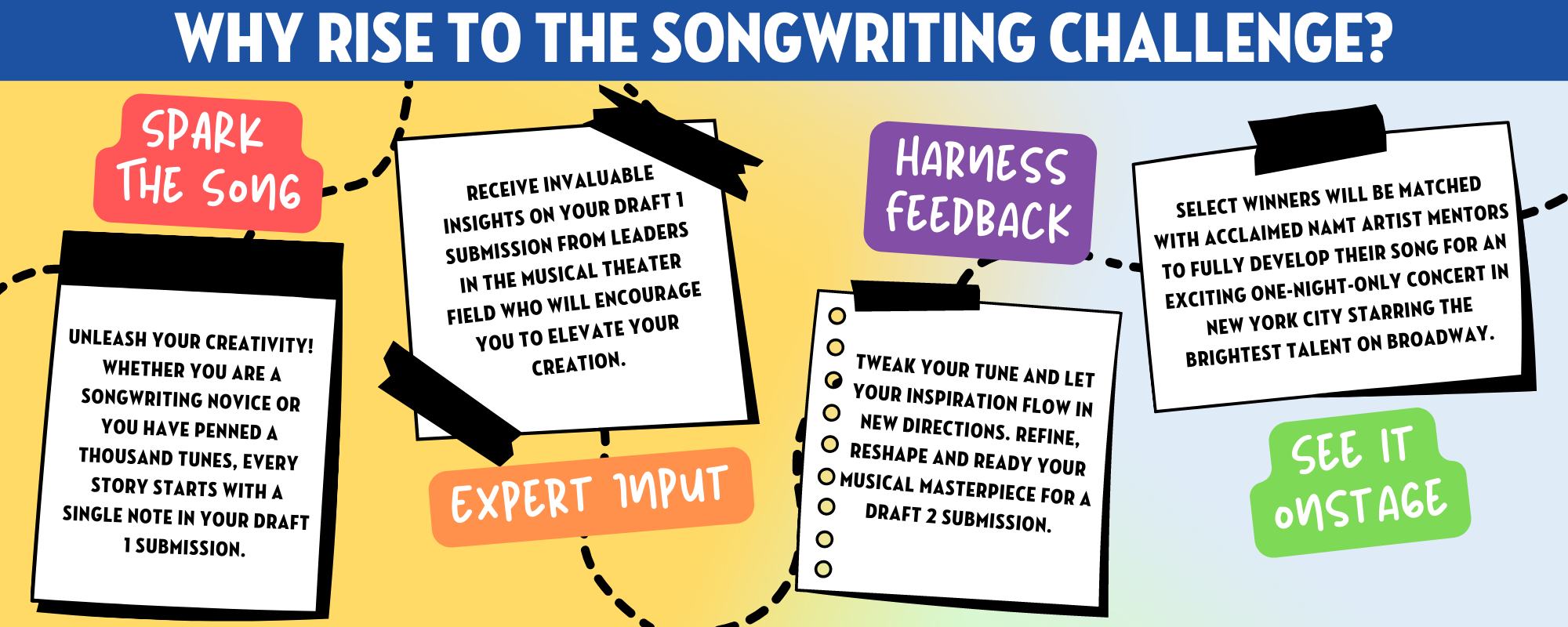
How to Win a Songwriting Competition: Unleash Your Creative Potential

To win a songwriting competition, focus on originality, emotional connection, strong lyrics, and memorable melodies. Crafting a unique song that resonates with listeners and showcases your talent is key to standing out in a competition.

Engaging with the audience’s emotions and creating a lasting impact through your music will increase your chances of success. Entering a songwriting competition can be a great opportunity to gain recognition for your artistic abilities. By following a few key strategies, you can enhance your chances of winning and making a name for yourself in the music industry.

In this guide, we will explore effective tips and techniques to help you excel in songwriting competitions and achieve your musical aspirations. Whether you’re a seasoned songwriter or a newcomer looking to break into the industry, these insights will help you create compelling and award-winning compositions. Let’s dive in and discover how you can elevate your songwriting skills and increase your chances of winning a songwriting competition.

Crafting Memorable Lyrics

When entering a songwriting competition, it’s crucial to focus on crafting memorable lyrics. To stand out, you need to capture emotions with vivid imagery and use catchy hooks and phrases that resonate with the listeners.

Capture Emotions With Vivid Imagery

  • Paint pictures with words to evoke feelings.
  • Use sensory language to create a connection.
  • Appeal to the audience’s emotions through storytelling.

Use Catchy Hooks And Phrases

  1. Create a memorable chorus that sticks in the mind.
  2. Repeat key phrases to reinforce the message.
  3. Infuse your lyrics with unexpected turns of phrase.
How to Win a Songwriting Competition: Unleash Your Creative Potential

Credit: namt.org

Melody And Harmony

Melody and harmony are fundamental elements in creating a winning song. Crafting a catchy melody and incorporating harmonious elements can set your song apart in a songwriting competition.

Create A Catchy Melody

  • Start by creating a simple, memorable tune that captures listeners’ attention.
  • Repeat and vary the melody to create a sense of familiarity and interest.
  • Consider the lyrics when crafting the melody to ensure they flow smoothly together.

Incorporate Harmonious Elements

  1. Choose complementary chords that enhance the mood of your song.
  2. Experiment with chord progressions to add depth and emotion to your composition.
  3. Balance melody and harmony to create a cohesive and impactful musical piece.

Structuring Your Song

When it comes to winning a songwriting competition, one of the most crucial aspects is the structure of your song. Properly structuring your song can make it stand out from the competition, capturing the judges’ attention and increasing the likelihood of winning. In this section, we will delve into the key components of structuring your song to give you the competitive edge you need to succeed.

Build Strong Verse-chorus Dynamics

Creating a captivating verse-chorus dynamics is essential to the success of your song in a competition. To achieve this, ensure that your verses and chorus have a clear distinction in terms of melody, lyrics, and emotional impact. The chorus should be the most memorable part of the song, with a catchy hook and strong emotional resonance. Verses, on the other hand, should build momentum and lead effectively into the chorus.

  • Distinct Melody
  • Memorable Lyrics
  • Emotional Impact
  • Catchy Chorus Hook

Create An Engaging Bridge

Introducing an engaging bridge can elevate your songwriting to the next level. The bridge acts as a refreshing break from the repetition of verses and choruses, adding depth and complexity to the song. When crafting the bridge, aim to introduce new melodies, lyrics, or a different emotional perspective that adds a fresh dimension to the overall composition.

  1. New Melodies
  2. Unique Lyrics
  3. Different Emotional Perspective
How to Win a Songwriting Competition: Unleash Your Creative Potential

Credit: www.facebook.com

Arrangement And Production

Arrangement and production are crucial elements when it comes to winning a songwriting competition. A well-polished arrangement can make your song stand out and leave a lasting impression on the judges. Additionally, a high-quality production can showcase your song in the best possible light, highlighting its strengths and capturing the attention of the audience. In this section, we will explore two essential aspects: polishing your arrangement and producing a high-quality demo.

Polish Your Arrangement

  • Start by analyzing your song’s structure and ensure it flows smoothly.
  • Consider the balance between verses, chorus, bridge, and other sections to create a captivating arrangement.
  • Experiment with different instrumentations and voicings to enhance the overall sound.
  • Focus on dynamics, ensuring that the song has contrasting moments to keep the listener engaged.
  • Simplify complex sections and eliminate any unnecessary elements that might detract from the song’s impact.
  • Pay attention to transitions between sections, making them seamless and coherent.

Produce A High-quality Demo

  • Invest in a good recording setup or consider working with a professional studio to achieve a polished sound.
  • Ensure that all instruments and vocals are recorded with precision and clarity.
  • Use suitable effects and processing techniques to enhance the overall sound without overpowering the song.
  • Mix your demo meticulously, ensuring that each instrument has its rightful place in the arrangement.
  • Pay attention to the overall balance, EQ, and levels to create a well-rounded and professional-sounding mix.
  • Master your demo to ensure it translates well across different playback systems and maintains its quality.

Performance And Delivery

In a songwriting competition, it’s not just about the lyrics and melody – performance and delivery play a crucial role in capturing the judges’ attention. Your ability to engage the audience and bring your song to life on stage can make all the difference. To help you stand out and leave a lasting impression, here are some tips to consider:

Embody Authenticity On Stage

To truly connect with your audience, it is essential to embody authenticity on stage. This means being genuine and true to yourself, allowing your emotions to shine through your performance. By immersing yourself in the song and expressing your personal experiences, you create a powerful connection with the listeners.

  • Be genuine: Tap into your own emotions and translate them into your performance.
  • Connect with your lyrics: Understand the meaning behind the words and convey that through your stage presence.
  • Show vulnerability: Don’t be afraid to expose your vulnerable side; it adds depth and relatability to your performance.

Master Stage Presence

Stage presence involves more than just standing on stage and singing; it’s about captivating the audience and keeping them engaged throughout your performance. Here are some key aspects to focus on:

  • Command the stage: Take ownership of the space, use the entire stage, and showcase confidence in your performance.
  • Use body language: Your body language can convey emotions and enhance the impact of your performance. Make use of gestures, facial expressions, and movements that complement the song.
  • Engage with the audience: Establish a connection with the listeners by making eye contact, interacting in between songs, and making them feel involved in your performance.
  • Work on your stage presence: Practice performing in front of a mirror or with friends to improve your stage presence and ensure you’re comfortable with your movements and expressions.

By embodying authenticity on stage and mastering your stage presence, you can create a captivating performance that resonates with both the judges and the audience. Remember, it’s not just about singing the song; it’s about delivering a memorable experience that leaves an impact.

How to Win a Songwriting Competition: Unleash Your Creative Potential

Credit: m.facebook.com

Frequently Asked Questions For How To Win A Songwriting Competition

What Are The Benefits Of Entering A Songwriting Competition?

Entering a songwriting competition can provide valuable exposure for your music, help you connect with industry professionals, and potentially open doors for career opportunities. It also allows you to receive feedback on your work, gain confidence as a songwriter, and measure your skills against other talented musicians.

How Do I Choose The Right Song To Enter In A Competition?

When selecting a song to enter in a songwriting competition, consider its originality, overall structure, and emotional impact. Choose a song that showcases your unique style and strengths as a songwriter. Pay attention to the competition’s guidelines and criteria to ensure that your chosen song meets their requirements.

What Should I Include In My Song Submission?

In your song submission for a competition, include a high-quality recording or performance of your song, well-written lyrics, and any additional information required by the competition organizers. Provide a brief biography highlighting your musical background and accomplishments. Make sure to follow the submission instructions carefully to increase your chances of success.

How Can I Improve My Chances Of Winning A Songwriting Competition?

To improve your chances of winning a songwriting competition, it’s important to continually refine your songwriting skills. Seek feedback from fellow musicians, attend workshops or songwriting classes, and learn from successful songwriters. Pay attention to past winners and analyze what makes their songs stand out.

Also, make sure to carefully read and follow the competition guidelines to maximize your chance of success.

Conclusion

Winning a songwriting competition begins with honing your craft and understanding the competition guidelines. By focusing on originality, emotional connection, and strong storytelling, you can set yourself apart from the competition. Remember, persistence and continuous improvement are key to achieving success in the music industry.

Good luck!

Categories
Archive

Unlock Your Music Success: 6 Strategies For Releasing Singles

Releasing singles involves strategies like promoting on social media and collaborating with influencers. It’s crucial to create engaging content and build anticipation for the release.


Crafting a strong marketing plan and leveraging platforms to reach a wider audience can increase the visibility of the single. Engaging with fans through interactive content and offering exclusive previews can generate excitement and build momentum leading up to the release date.


Building relationships with music bloggers and seeking out press coverage can also help drive attention to the single. By implementing these strategies effectively, artists can maximize the impact of their single release and increase chances of reaching a larger audience.


Crafting Compelling Singles

Creating singles that resonate with your audience is essential for a successful music release. By implementing effective strategies, you can captivate your listeners and make a lasting impression. Let’s delve into the key strategies for crafting compelling singles.

Identifying Your Audience

Understand the preferences and demographics of your audience to tailor your single to their tastes.

Choosing The Right Genre

Select a genre that aligns with your artistic vision and connects with your target listeners.


Credit: blog.bandlab.com

Building Anticipation

Excite your audience with these 6 effective strategies for promoting upcoming music releases. From engaging social media teasers to exclusive sneak peeks, build anticipation and generate buzz around your singles. Master the art of anticipation and keep fans eagerly awaiting your next hit.

Building Anticipation

Building anticipation for your singles release is crucial for a successful launch. Engaging with your fan base and creating teasers are effective strategies.

Creating Teasers

– Craft short video clips and snippets from the upcoming single to tease your fans.
– Utilize social media platforms to share sneak peeks and behind-the-scenes content.
– Keep the teasers concise and intriguing to spark curiosity among your audience.

Engaging with Your Fan Base

– Interact with your fans through social media polls, Q&A sessions, and contests.
– Provide exclusive updates and insights about the single to keep your fan base engaged.
– Collaborate with influencers or fan communities to expand your reach and create buzz.

Implementing these strategies will help generate excitement and anticipation for your singles release.

Strategic Release Timing

Strategic release timing is crucial for maximizing the impact of your single. Effective planning based on the audience’s behavior and market dynamics can significantly enhance the success of your release. Below are essential strategies to consider when determining the best time to release your single.

Identifying Peak Times

It’s essential to analyze data to identify peak times when your target audience is most active. Utilize analytic tools to understand the peak times when your audience engages with music. This can include studying streaming patterns, social media activity, and music consumption trends.

Leveraging Seasonal Trends

Capitalizing on seasonal trends can greatly impact the success of your music release. Consider aligning your single with festive seasons, holidays, or events that resonate with your audience. For example, releasing an upbeat, energetic single ahead of summer can enhance its appeal and relevance.

Unlock Your Music Success: 6 Strategies For Releasing Singles


Credit: amplifyyou.amplify.link

Optimizing Digital Platforms

When it comes to releasing your singles, optimizing digital platforms is crucial for reaching a wider audience and gaining attention in the competitive music industry. With so many talented artists vying for attention, it’s important to make sure your music stands out and reaches the right ears. This section will explore two key strategies for maximizing your reach and impact: maximizing streaming services and utilizing social media effectively.

Maximizing Streaming Services

Streaming services have revolutionized the way we consume music, making it easier than ever for artists to share their work with a global audience. To ensure your singles reach as many listeners as possible, it’s essential to optimize your presence on these platforms.

Here are some effective strategies to consider:

  1. Create compelling and eye-catching visuals for your streaming profiles. Use high-resolution album artwork, professional photos, and engaging banners to make a strong first impression.
  2. Make use of playlists to increase your exposure. Submit your singles to popular playlists within your genre or create your own playlist featuring your music alongside similar artists. Collaborating with curators and influencers can lead to more listens and followers.
  3. Regularly update your artist profile with new releases, behind-the-scenes content, and upcoming shows. Keeping your audience informed and engaged will help build a loyal fan base.
  4. Encourage your fans to follow you on streaming platforms. Include links to your profiles in your social media bios, website, and email newsletters.

Utilizing Social Media Effectively

Social media plays a crucial role in promoting and connecting with your audience. By utilizing these platforms effectively, you can boost the visibility of your singles and engage with your fan base on a more personal level.

Consider the following strategies:

  • Create a cohesive and visually appealing social media presence. Use consistent branding, such as your logo or album artwork, across all platforms to establish a strong and recognizable identity.
  • Engage with your audience by responding to comments, direct messages, and mentions. Showing genuine interest in your fans will strengthen your relationship with them and encourage them to continue supporting your music.
  • Promote your singles organically by sharing behind-the-scenes moments, sneak peeks of upcoming releases, and personal stories. This gives your followers a sense of exclusivity and keeps them excited about your music.
  • Collaborate with other artists and industry influencers to expand your reach. Engaging in cross-promotion or featuring other artists on your social media can introduce your music to new audiences and create valuable connections.

Promotion And Marketing

Promoting and marketing your singles is crucial for gaining visibility and building an audience. Effective promotion can make a significant impact on the success of your releases. To help you get started, here are some strategies you can implement:

Creating Visual Assets

Visual assets play a critical role in captivating your audience and promoting your singles. Creating eye-catching album covers, professional press photos, and engaging visuals for social media can make a lasting impression. Investing in high-quality visual content will make your singles stand out and attract potential listeners. Consider hiring a graphic designer or photographer to help you create compelling visuals that accurately represent your music.

Collaborating With Influencers

Collaborating with influencers can widen your reach and expose your singles to a larger audience. Identify influencers in your genre or niche who have a significant following and align with your brand. Partner with them to create content that promotes your singles, such as sponsored posts or shoutouts. Their endorsement can help establish credibility and trust among their followers, ultimately driving more traffic and streams to your music.

Unlock Your Music Success: 6 Strategies For Releasing Singles


Credit: blog.groover.co

Measuring Success

Measuring success is crucial for determining the impact of your single release. Analyzing data metrics and assessing audience feedback are two fundamental strategies for evaluating the success of your release.

Analyzing Data Metrics

Utilize data analytics tools to track and analyze key metrics such as streams, downloads, and listener demographics. Creating a spreadsheet to organize this data can help identify patterns and trends.

Assessing Audience Feedback

Engage with your audience through social media, surveys, and direct communication to gather valuable feedback. Incorporate this feedback to refine your future strategies and enhance the quality of your releases.

Frequently Asked Questions Of 6 Strategies For Releasing Singles

How Can I Effectively Release A Single As An Independent Artist?

Releasing a single as an independent artist involves planning, promotion, and strategic timing. Start by creating buzz around your release through social media and engaging with your audience. Utilize platforms like Spotify and SoundCloud to gain exposure. Consider collaborating with other artists or influencers to expand your reach.


Finally, don’t forget to plan a release date that aligns with your target audience’s preferences.

Is It Better To Release Singles Or Albums?

It depends on your goals and audience. Releasing singles allows you to consistently engage with your audience and build momentum. It’s a great strategy for gaining new fans and getting your music heard. On the other hand, albums allow you to showcase a more cohesive body of work and can establish you as an artist.


Consider your marketing strategy, audience preferences, and long-term goals when deciding whether to release singles or albums.

How Can I Promote My New Single?

Promoting your new single involves a multi-faceted approach. Start by utilizing social media platforms and engaging with your followers. Create captivating content, such as behind-the-scenes footage, lyric videos, or teasers. Collaborate with influencers, music blogs, and playlists to gain exposure.


Leverage email marketing to reach your existing fan base. Don’t forget to contact local and online radio stations for airplay opportunities.

Conclusion

Incorporating these strategies when releasing singles can significantly enhance your chances of success. Building a strong online presence, leveraging social media, and nurturing connections with your audience are vital for gaining momentum in the music industry. By embracing these tactics, you can effectively promote your singles and set the stage for greater recognition and success.

Categories
Archive Audio Production

How to Connect Pre Amp to Audio Interface USB: A Step-by-Step Guide

To connect a preamp to an audio interface via USB, simply plug the preamp outputs into the audio interface inputs. When setting up your audio equipment, connecting a preamp to an audio interface using a USB connection is a straightforward process that enhances the overall sound quality of your recordings.


By integrating the preamp with the interface, you can capture clean and clear audio signals with minimal interference or signal loss. This setup offers more flexibility and control over the sound input levels, allowing you to fine-tune your recordings to achieve professional-grade results.


In this guide, we will walk you through the steps to connect your preamp to the audio interface via USB for seamless integration and optimal performance.

How to Connect Pre Amp to Audio Interface USB: A Step-by-Step Guide


Credit: www.amazon.com


Choosing The Right Pre Amp


When connecting a preamp to an audio interface via USB, choose the right preamp that matches your interface’s input requirements and offers the desired sound quality. Ensure compatibility and optimal signal transfer by following the manufacturer’s guidelines and using appropriate cables for a seamless connection.

Considerations For Compatibility

ensurecompatible with your audio interface’s USB connection.

Understanding Input And Output Connections

input and output connections between the preamp and audio interface for proper functionality. Choosing the Right Pre Amp To connect a preamp to an audio interface via USB, selecting the correct preamp is crucial for optimal performance. When picking a preamp, it’s essential to ensure compatibility with your audio interface’s USB connection. Understanding input and output connections between the preamp and audio interface is key for seamless integration.

Connecting The Pre Amp To The Audio Interface


To connect a preamp to an audio interface via USB, simply use a USB cable. Plug one end into the preamp’s USB port and the other into the audio interface. Ensure both devices are powered on for successful connectivity.

Gathering The Necessary Cables

Gather a USB cable, TRS or XLR cables, and the audio interface with preamp.

Connecting The Inputs And Outputs

1. Connect XLR or TRS cables from preamp outputs to audio interface inputs.

2. Use a USB cable to connect the audio interface to your computer.

Setting Up The Audio Interface Software

Setting up the audio interface software is crucial for ensuring a seamless connection between your preamp and audio interface via USB. Proper configuration and adjustment within the software are essential to achieve high-quality audio recordings and monitoring capabilities. To optimize your setup, follow these steps to adjust input levels and configure monitor mixes effectively:

Adjusting Input Levels

Adjusting input levels is a critical step to ensure that the audio signal from your preamp is adequately captured by the audio interface. Follow these simple steps to set the input levels:

  1. Launch the audio interface software on your computer.
  2. Locate the input level controls within the software interface.
  3. Connect your preamp to the designated input channel on the audio interface.
  4. Gradually increase the input level while monitoring the audio signal’s amplitude.
  5. Avoid clipping by ensuring that the input level remains within the designated range.

Configuring Monitor Mixes

Configuring monitor mixes enables you to control the balance of input sources and playback audio, providing flexibility and control over what you hear during recording and playback. Follow these steps to configure monitor mixes:

  • Access the monitor mix settings within the audio interface software.
  • Adjust the levels of input sources and playback audio according to your preference.
  • Consider utilizing headphone outputs or separate monitor mix outputs, if available, for added flexibility.
  • Ensure that the monitor mix settings are optimized for your specific recording and monitoring requirements.

How to Connect Pre Amp to Audio Interface USB: A Step-by-Step Guide


Credit: bpmskills.com


Testing And Troubleshooting

Testing and troubleshooting are essential steps when connecting a preamp to an audio interface via USB. These steps ensure that the signal flow is proper and that any common issues are resolved to achieve the best audio quality. In this section, we will discuss how to check the signal flow and how to resolve common issues that may arise during the connection process.

Checking Signal Flow

In order to ensure that the signal flows correctly from the preamp to the audio interface, follow these steps:

  1. Check the connections: Make sure that the preamp is properly connected to the audio interface using the appropriate cables. Ensure that the USB cable is securely plugged in.
  2. Verify the power supply: Ensure that the preamp is turned on and receiving power. Check if the audio interface is also powered on.
  3. Adjust the gain levels: Set the appropriate gain levels on the preamp and audio interface to control the input signal. Ensure that the levels are not too low or too high, as this can result in poor audio quality.
  4. Test the signal: Play some audio through the preamp and monitor the input levels on the audio interface. Check if the levels are within the desired range. Adjust the gain levels if necessary.

Resolving Common Issues

While connecting a preamp to an audio interface via USB, you may come across some common issues. Here are some troubleshooting tips to resolve them:

Issue Solution
No sound or low volume
  • Check if the volume levels are set correctly on the preamp and audio interface.
  • Ensure that the audio source is playing and the output level is sufficient.
Audio distortion or noise
  • Check the cables for looseness or damage and try replacing them if necessary.
  • Ensure that the gain levels are set appropriately and not causing clipping or distortion.
USB connection issues
  • Try connecting to a different USB port on your computer to rule out any port-specific issues.
  • Make sure that the USB cable is not damaged and try using a different cable if available.
  • Update the drivers for both the preamp and the audio interface.

By following these steps and troubleshooting tips, you can confidently connect your preamp to an audio interface via USB. Remember to check the signal flow, adjust the gain levels, and resolve any common issues that may arise. This will ensure that you achieve the best audio quality for your recordings or music production.

https://www.youtube.com/watch?v=u_qCh3TIk8w


Optimizing Performance

Connecting a preamp to an audio interface via USB is a great way to enhance your sound recording capabilities. However, to truly optimize the performance of this setup, there are a few key considerations to keep in mind. By fine-tuning gain staging and exploring additional features, you can achieve the best possible audio quality and ensure a seamless recording experience.

Fine-tuning Gain Staging

Gain staging refers to the process of setting the appropriate gain levels at each stage of the signal chain to avoid unwanted distortion or noise. When connecting a preamp to an audio interface via USB, it’s crucial to pay attention to gain staging to achieve optimal results.

To fine-tune gain staging, follow these steps:

  1. Begin by setting the input gain on your preamp to a low level.
  2. Play your audio source and gradually increase the input gain until the signal reaches an optimal level without clipping.
  3. Next, adjust the output level on your preamp to ensure it matches the input level of your audio interface.
  4. Check the input level on your audio interface and make any necessary adjustments to avoid overloading the signal.
  5. Regularly monitor the signal’s level throughout your recording session to ensure consistent and distortion-free audio.

Exploring Additional Features

When connecting a preamp to an audio interface via USB, you may also have access to several additional features that can further enhance your recording setup. These features can vary depending on the specific preamp and audio interface you are using. Here are a few notable features to explore:

Feature Description
Phantom power Enable phantom power if you are using condenser microphones that require it to operate properly.
High-pass filter Activate the high-pass filter to eliminate low-frequency rumble or unwanted noise.
Pad Engage the pad option to reduce the input level when recording particularly loud sound sources.
Polarity switch Flip the polarity switch to correct phase-related issues and ensure a balanced sound.
Show-metering Utilize the metering options on your audio interface to monitor signal levels and avoid clipping.

How to Connect Pre Amp to Audio Interface USB: A Step-by-Step Guide


Credit: www.amazon.com


Frequently Asked Questions On How To Connect Pre Amp To Audio Interface Usb


How Do I Connect A Preamp To An Audio Interface Via Usb?


To connect a preamp to an audio interface via USB, simply connect the preamp’s USB output to one of the USB ports on the audio interface. Make sure both devices are powered on and check your computer’s audio settings to ensure the preamp is recognized as an input device.


What Is The Purpose Of Connecting A Preamp To An Audio Interface?


Connecting a preamp to an audio interface allows you to amplify and improve the quality of your audio signal. A preamp boosts the signal from microphones or instruments to line level, making it suitable for recording or mixing. This ensures cleaner, more professional sound recordings.


Can I Connect Multiple Preamps To An Audio Interface Via Usb?


Yes, most audio interfaces allow multiple preamp connections. Simply connect each preamp’s USB output to separate USB ports on the audio interface. Check the manufacturer’s specifications to ensure compatibility and make sure your computer’s processor can handle the additional inputs.


Do I Need A Preamp If My Audio Interface Already Has Built-in Preamps?


It depends on your specific needs and the quality of the built-in preamps. While many audio interfaces have decent built-in preamps, external preamps can offer superior audio quality and more control over sound shaping. Consider your recording goals and the types of microphones or instruments you plan to use.


Conclusion


Connecting a preamp to an audio interface via USB opens up a world of possibilities for capturing high-quality sound. With the right cables and settings, you can easily enhance your recording setup and produce professional-grade audio. Take your music production or podcasting to the next level with this simple yet effective method.

Categories
Archive

Hit Songwriting Formula: Unlock the Secrets of Creating Chart-Topping Hits

Want to craft a hit song? Start with catchy hook, relatable lyrics, and memorable melody.


Crafting a hit song requires a winning formula that combines catchy hooks, relatable lyrics, and a memorable melody. Understanding the key elements that make a song successful can significantly increase your chances of creating a hit. From the initial hook that grabs listeners’ attention to the infectious melody that sticks in their minds, each component plays a crucial role in the songwriting process.


By following a structured approach and incorporating these essential elements into your songs, you can increase your chances of creating a standout track that resonates with audiences. Let’s dive deeper into the hit songwriting formula to uncover the secrets behind crafting chart-topping hits.


The Anatomy Of A Hit Song

Crafting a hit song is an art that blends creativity and science seamlessly. Elements of a Chart-Topping Song are carefully orchestrated to captivate audiences and make a lasting impact. Let’s dissect the essential components that contribute to the success of a song.

Elements Of A Chart-topping Song

  • Memorable melody that sticks in the listener’s mind
  • Compelling lyrics that evoke emotion or tell a story
  • Catchy hook that grabs attention instantly
  • Strong and relatable themes that resonate with listeners

Structuring A Hit Song

Structuring a Hit Song involves arranging these elements in a cohesive manner to keep the audience engaged from start to finish. A well-crafted song typically follows a verse-chorus-verse-chorus-bridge-chorus pattern, ensuring a dynamic progression that builds tension and release.

Understanding The Music Industry

Delving into the intricate dynamics of the music industry reveals a captivating maze of hit songwriting formulas. Understanding the nuances of crafting a chart-topping song involves an amalgamation of lyrical prowess, infectious melodies, and resonating hooks. Unraveling the secrets to creating that perfect blend of artistry and commercial appeal unlocks boundless opportunities in the competitive realm of music.

Understanding the Music Industry

To create hit songs, it’s crucial to understand the music industry landscape. This involves recognizing trends and patterns in hit songs and grasping the significance of lyrics and melody in songwriting.

Trends And Patterns In Hit Songs

Analysis of trends and patterns in hit songs reveals common elements that resonate with audiences. Incorporating these aspects in your songwriting can increase the likelihood of creating a successful track.

The Role Of Lyrics And Melody

Lyrics and melody play a central role in crafting a memorable song. Compelling lyrics and catchy melodies can capture listeners’ attention and evoke emotions, making your music more impactful and engaging.

Crafting Memorable Lyrics

When it comes to crafting memorable lyrics, it’s crucial to write emotionally resonant content that connects with the audience. Creating catchy hooks and choruses can elevate a song to hit status, making it essential to nail down these aspects of songwriting. Let’s delve deeper into the Hit Songwriting Formula by focusing on the subheading: Crafting Memorable Lyrics.

Writing Emotionally Resonant Lyrics

Writing emotionally resonant lyrics is vital for creating a lasting impact on the listeners. The key is to convey genuine emotions through words, making the audience feel a deep connection to the message being portrayed.

Creating Catchy Hooks And Choruses

A catchy hook or chorus can make a song memorable and instantly recognizable. Crafting hooks that stick in the minds of listeners is a hallmark of successful songwriting. By utilizing simple yet powerful phrases, songwriters can create memorable and catchy hooks that resonate with the audience.

Hit Songwriting Formula: Unlock the Secrets of Creating Chart-Topping Hits


Credit: faroutmagazine.co.uk

Melody And Harmony

Discover the secret to crafting hit songs through the perfect blend of melody and harmony. By mastering this songwriting formula, you can create music that captivates audiences and stands the test of time. Embrace the power of melody and harmony in your songwriting journey.

Building Melodies That Stick

When it comes to crafting a hit song, a catchy melody is essential. A strong melody has the power to captivate listeners and leave a lasting impression in their minds. To build melodies that stick, there are a few key elements to consider:

  1. Simplicity: Keeping melodies simple and easy to follow allows them to be more memorable. Complex melodies can often be difficult for listeners to grasp, resulting in them quickly forgetting the tune.
  2. Catchy Hooks: Incorporating catchy hooks within the melody can instantly grab the listener’s attention. These hooks are memorable phrases or musical motifs that stick with the audience long after the song has ended.
  3. Repetition: Repetition is a powerful tool in songwriting. Repeating certain melodic phrases or motifs throughout the song helps to reinforce the melody in the listener’s mind, increasing its memorability.

By focusing on simplicity, incorporating catchy hooks, and utilizing repetition, you can create melodies that have the potential to become undeniable earworms.

Harmonizing For Impact

Harmony is the musical element that accompanies the melody, providing depth and emotional impact to a song. When harmonizing for impact, there are a few key techniques to consider:

  • Chord Progressions: Choosing the right chord progressions can enhance the emotional impact of the melody. Certain chord changes can create tension and resolution, evoking different moods and emotions within the listener.
  • Layering: Adding multiple layers of harmonies to the melody can create a rich and full sound. This can be achieved through the use of backing vocals, additional instrumental tracks, or even vocal harmonies.
  • Dynamics: Incorporating dynamic changes in the harmony can add excitement and interest to the song. Playing with volume, instrumentation, or chord voicings can create variations in intensity, keeping the listener engaged.

By carefully selecting chord progressions, layering harmonies, and incorporating dynamic changes, you can create harmonies that elevate your melodies to new heights and make a lasting impact on your audience.

Production Techniques For Hit Songs

Unveiling the coveted Hit Songwriting Formula involves mastering intricate production techniques that resonate with audiences. Crafting every element strategically leads to creating music that captivates and stands out in the crowded music industry landscape.

Introduction

When it comes to creating hit songs, production techniques play a crucial role in bringing the music to life and capturing the attention of listeners. The right instrumentation, along with skillful mixing and mastering, can give your songs that radio-ready sound that makes them stand out from the crowd. In this article, we will explore two essential production techniques for hit songs: choosing the right instrumentation and mastering for radio-ready sound.

Choosing The Right Instrumentation

Instrumentation forms the backbone of any song, and selecting the right instruments is key to creating a hit. Here are a few tips to consider:

  • Identify the genre: Different genres require different instrumentation. For example, a pop song might benefit from catchy synthesizers and upbeat drum beats, while a rock song might call for an electric guitar and powerful drumming.
  • Experiment with combinations: Don’t be afraid to mix and match instruments to create unique sounds. Combining traditional instruments with electronic elements can help your song sound fresh and captivating.
  • Consider the mood: The instrumentation should match the mood of your song. If you want to convey a sense of mysticism, you might opt for ethereal sounds like a flute or a celestial synth. Similarly, if you aim for an energetic vibe, electric guitars and punchy drums might be the way to go.

Mixing And Mastering For Radio-ready Sound

Mixing and mastering are crucial steps in the production process that ensure your song has that professional and polished sound. Pay attention to the following:

  1. Create a balanced mix: Each instrument and vocal should have its place in the mix, allowing them to be heard clearly and harmoniously. Keep in mind that a cluttered mix can be distracting and take away from the impact of your song.
  2. Use equalization (EQ) effectively: EQ helps to refine the tonal balance of your mix. Consider using EQ to eliminate any harsh frequencies or to highlight important elements in your song.
  3. Compress for dynamics: Compressors help control the dynamic range of your song, which is essential for radio-ready sound. Properly applying compression can make your song sound punchier and more consistent.
  4. Add tasteful effects: Reverbs, delays, and other effects can add depth and dimension to your mix. However, be careful not to overdo it. Using effects sparingly and purposefully can enhance the overall production quality of your song.
  5. Master with care: The final stage of production, mastering, ensures that your song sounds its best across different playback systems. Consider hiring a professional mastering engineer to fine-tune your mix and achieve that radio-ready sound.

By paying attention to these production techniques – choosing the right instrumentation and mastering for radio-ready sound – you can give your songs the extra edge they need to become hit sensations. Remember, practice and experimentation are key in finding what works best for your unique musical vision. So, grab your instruments, fire up your mixing software, and get ready to create that next chart-topping hit!

Hit Songwriting Formula: Unlock the Secrets of Creating Chart-Topping Hits


Credit: www.billboard.com


Hit Songwriting Formula: Unlock the Secrets of Creating Chart-Topping Hits


Credit: www.independent.co.uk

Frequently Asked Questions Of Hit Songwriting Formula

What Is The Hit Songwriting Formula?

The hit songwriting formula is a combination of catchy melodies, relatable lyrics, and a strong emotional connection with the audience. It involves studying successful songs, understanding song structures, and finding unique ways to express emotions and experiences.

How Can I Find Inspiration For Songwriting?

You can find inspiration for songwriting by observing the world around you, reflecting on personal experiences, reading books, listening to music, and exploring different genres. Collaborating with other songwriters and attending live performances can also spark creativity and offer fresh perspectives.

Is It Important To Know Music Theory For Songwriting?

While having knowledge of music theory can be helpful, it is not essential for songwriting. Many successful songwriters have created hit songs without formal music training. However, understanding basic concepts like chord progressions and song structures can enhance your songwriting skills and give you more creative options.

How Do I Write Catchy Melodies?

To write catchy melodies, focus on creating memorable hooks, using repetition and variation, and balancing familiarity with surprise. Experiment with different scales, intervals, and rhythms. Listen to popular songs in your genre to grasp the elements that make their melodies catchy, and try incorporating similar techniques into your own compositions.

Conclusion

Innovative creativity is vital for crafting memorable hit songs. By understanding the vital components of songwriting, incorporating personal experiences, and tapping into emotions, you can stand out in the competitive music industry. Utilize these proven strategies to create captivating songs that resonate with your audience and propel your music career to new heights.

Categories
Archive Audio Production

Using the Midi Mapping Function in Ableton Live : Mastering Music Production

Ableton Live is a popular digital audio workstation (DAW) that offers a range of powerful features for music production. One of the key features that sets Ableton Live apart is its MIDI mapping function. This function allows users to assign MIDI controls, such as knobs, buttons, and sliders, to various parameters in their music projects. In this article, we will explore how to use the MIDI mapping function in Ableton Live to enhance your workflow and creativity.

Step 1: Setting up your MIDI controller

The first step in using the MIDI mapping function is to ensure that your MIDI controller is properly connected and recognized by Ableton Live. Connect your MIDI controller to your computer via USB or MIDI cables, and make sure it is powered on. Open Ableton Live and go to the preferences menu, select the “MIDI” tab, and choose your MIDI controller from the list of available devices. Enable the input and output options for your controller to establish a bi-directional connection.

Step 2: Identifying the parameters you want to control

Once your MIDI controller is set up, you need to identify the parameters within Ableton Live that you want to control. These could be anything from volume levels, filter cutoff frequencies, or effect parameters. Familiarize yourself with the different elements of your Ableton Live project and make a note of the parameters you wish to map to your MIDI controller.

Parameter Description
Volume Controls the level of audio output for a specific track or channel.
Pan Adjusts the stereo position of the audio signal.
Filter Cutoff Determines the frequency at which the filter attenuates the audio signal.
Effect Amount Controls the intensity of an audio effect applied to a track or channel.

Step 3: Accessing the MIDI mapping mode

To start mapping MIDI controls to your desired parameters, you need to enable the MIDI mapping mode in Ableton Live. This can be done by clicking on the MIDI button located in the top right corner of the Ableton Live interface. Once enabled, the MIDI mapping mode will be active, and any MIDI input received from your controller will be recognized by Ableton Live for mapping.

Step 4: Mapping MIDI controls

With the MIDI mapping mode activated, you can now start mapping the controls on your MIDI controller to the desired parameters in Ableton Live. Simply click on the parameter you want to control, and then move the corresponding control on your MIDI controller. Ableton Live will automatically detect the MIDI signal and assign the control to the selected parameter. You can repeat this process for multiple parameters to create complex mappings.

Using the Midi Mapping Function in Ableton Live  : Mastering Music Production

Credit: pyramind.com

Step 5: Fine-tuning and editing mappings

Once you have mapped your MIDI controls, you may want to fine-tune and edit the mappings to suit your preferences. By clicking on the MIDI map button again, you can enter the MIDI mapping mode and make adjustments. To remove a mapping, simply right-click on the control in Ableton Live and select “Unmap.” This will remove the MIDI association and restore the parameter to its default state.

Credit: www.amazon.com

Step 6: Saving and recalling your MIDI mappings

After you have created your MIDI mappings, it is a good practice to save them for future use. Ableton Live allows you to save your MIDI mapping configurations as presets, which can be easily recalled whenever needed. To save a preset, go to the MIDI mapping menu and select “Save Mapping” or use the shortcut “Ctrl+S” (Windows) or “Cmd+S” (Mac). You can also load existing presets or create new ones to organize your MIDI mappings efficiently.

Frequently Asked Questions On Using The Midi Mapping Function In Ableton Live : Mastering Music Production


How Do I Use Midi Mapping In Ableton Live?


To use midi mapping in Ableton Live, first select the parameter you want to control, press Cmd+M, then move the MIDI controller knob or fader.


What Is The Purpose Of Midi Mapping In Ableton Live?


Midi mapping in Ableton Live allows you to control software parameters using an external MIDI controller, enhancing live performance and workflow efficiency.


Can I Assign Multiple Parameters To One Midi Controller?


Yes, you can assign multiple parameters to a single MIDI controller, enabling simultaneous control of different functions for seamless performance.


Are There Any Limitations To Midi Mapping In Ableton Live?


While midi mapping is a powerful tool, there are limitations on the number of parameters that can be mapped and the range of MIDI controllers supported.

Conclusion

The MIDI mapping function in Ableton Live is a powerful tool that enhances your music production workflow by giving you hands-on control over various parameters within your projects. By following the steps outlined in this article, you can easily set up your MIDI controller, identify the parameters you want to control, map your MIDI controls, and fine-tune the mappings to suit your needs. Take advantage of the MIDI mapping function in Ableton Live and unlock new levels of creativity and expressiveness in your music.

Remember to experiment with different mappings and explore how they affect your music. With practice, you’ll become adept at using the MIDI mapping function to create dynamic and engaging performances or studio recordings. Have fun exploring the possibilities of MIDI mapping in Ableton Live!

Categories
Archive Audio Production

Using the Midi Editor in Ableton Live : Mastering Midi Magic

Ableton Live is a popular digital audio workstation (DAW) used by musicians, producers, and DJs for creating and performing music. One of the key features of Ableton Live is its powerful Midi editor, which allows users to create and edit Midi notes with ease. In this article, we will explore the various functionalities of the Midi editor in Ableton Live and how to make the most of this tool.

Getting Started with the Midi Editor

Once you have opened a Midi track in Ableton Live, you can access the Midi editor by clicking on the “MIDI” button located at the bottom of the arrangement view window. The Midi editor will open up, displaying a grid-like interface where you can create and manipulate Midi notes.

Credit: www.youtube.com

Creating and Editing Midi Notes

To create a Midi note, simply click and drag on the grid to draw the note of your desired length. You can adjust the start and end points of the note by dragging the edges, and change the pitch by dragging the note up or down. This allows for precise control over the timing and pitch of each individual note.

Additionally, the Midi editor provides a range of editing tools such as cutting, copying, pasting, and deleting Midi notes. These tools can be accessed from the toolbar located at the top of the Midi editor. When selecting multiple notes, you can also apply batch editing operations, making it efficient to manipulate large sections of Midi data.

Quantization and Groove

Ableton Live’s Midi editor also offers powerful quantization and groove features. Quantization allows you to align Midi notes to a specified grid, ensuring that they fall precisely on the beat. This is especially useful for tightening up performances and achieving a more polished sound.

The groove function, on the other hand, allows you to apply swing and groove patterns to Midi notes. By adjusting the timing and velocity of selected notes, you can introduce a human-like feel to your music, making it sound more organic and groovy.

Using Automation in the Midi Editor

In addition to creating and editing Midi notes, the Midi editor in Ableton Live also allows for automation. Automation is the process of controlling and manipulating various parameters over time. To automate a parameter, simply click on the automation button located next to the parameter you wish to manipulate, and draw in the desired automation curve using the pencil tool.

With the Midi editor’s automation features, you can add dynamic changes to your music, bringing it to life and adding depth and expression to your compositions.

Looping and Iterations

The ability to loop and iterate sections is another powerful feature of the Midi editor in Ableton Live. By highlighting a section of Midi notes, you can easily loop it to repeat and create variations. This allows for experimentation and exploration, helping you to find interesting musical ideas and develop them further.

Using the Midi Editor in Ableton Live  : Mastering Midi Magic

Credit: www.soundonsound.com

Frequently Asked Questions For Using The Midi Editor In Ableton Live : Mastering Midi Magic


What Are The Main Features Of The Midi Editor In Ableton Live?


The Midi Editor in Ableton Live allows you to create, edit, and arrange MIDI data with precision and flexibility.


How Can I Navigate And Edit Midi Notes In The Midi Editor?


Using the Midi Editor, you can easily navigate and edit MIDI notes by selecting, moving, lengthening, shortening, and duplicating them.


Can I Quantize Midi Notes And Adjust Their Velocities In The Midi Editor?


Absolutely, the Midi Editor enables you to quantize MIDI notes to the grid and adjust their velocities for precise and polished performances.


Is It Possible To Create And Edit Midi Automation In The Midi Editor?


Yes, the Midi Editor offers the functionality to create and edit MIDI automation, allowing for detailed and dynamic control over your music.

Conclusion

The Midi editor in Ableton Live is a versatile and powerful tool for creating and editing Midi notes. With its intuitive interface, extensive editing capabilities, and integrated automation features, it enables musicians, producers, and DJs to craft intricate and expressive musical compositions. Whether you are a beginner or an experienced user, the Midi editor in Ableton Live offers endless possibilities to bring your creative ideas to life.

Categories
Archive Audio Production

Using Distortion in Ableton Live: Boost Your Sound Quality

Distortion is a powerful audio effect that can add character, warmth, and edge to your productions. It is commonly used in various genres such as rock, metal, electronic, and hip-hop to give sounds a gritty and distorted quality. In this article, we will explore how to use distortion in the popular digital audio workstation (DAW), Ableton Live.

Overview of Distortion

Distortion is an audio processing technique that alters the shape of a sound wave by amplifying the signal beyond its normal limits. This results in the creation of harmonic overtones and the introduction of new frequencies, adding richness and complexity to the original audio source.

In Ableton Live, you can find distortion effects in the Audio Effects Rack section of the software. There are several distortion devices available, each offering unique sonic characteristics and controls:

Device Description
Saturator A versatile distortion unit offering a wide range of analog-style saturation effects.
Overdrive Simulates the warm, gritty sound of overdriven guitar amplifiers.
Redux Quantizes and bit-reduces the audio signal, creating lo-fi, digital distortion.
Using Distortion in Ableton Live: Boost Your Sound Quality

Credit: www.ableton.com

Using Distortion in Ableton Live

To apply distortion in Ableton Live, follow these steps:

  1. Select the audio or MIDI track you wish to add distortion to.
  2. Click on the “Audio Effects” category in the “Browser” panel on the left side of the screen.
  3. Expand the “Audio Effects Rack” folder.
  4. Drag and drop the desired distortion device onto the track.
  5. Adjust the parameters of the distortion device to achieve your desired effect.

While each distortion device in Ableton Live has its own set of controls, there are some common parameters to keep in mind:

  • Drive: Controls the amount of distortion applied to the audio signal.
  • Tone: Adjusts the frequency response of the distorted signal, allowing you to shape its character.
  • Output Level: Sets the overall volume of the distorted signal.

Experimenting with these parameters will help you achieve different types of distortion, ranging from subtle saturation to extreme fuzziness.

Credit: www.amazon.com

Tips for Using Distortion Creatively

While distortion is often associated with guitars and aggressive music styles, it can be an effective tool in any genre. Here are some creative ways to use distortion in your music:

  • Layering: Apply distortion to specific elements of your mix, such as vocals or drums, to add grit and presence.
  • Sound Design: Use distortion to transform ordinary sounds into unique and interesting textures.
  • Automation: Automate the parameters of the distortion device over time to create dynamic and evolving sonic effects.
  • Parallel Processing: Blend the distorted signal with the original clean signal using parallel processing techniques to achieve a balanced mix.

Remember, the key to using distortion effectively is to use it tastefully and in moderation. It can enhance your music, but overusing it can result in a harsh and unpleasant listening experience.

Frequently Asked Questions For Using Distortion In Ableton Live: Boost Your Sound Quality


What Are The Basic Types Of Distortion Effects In Ableton Live?


The basic types of distortion effects in Ableton Live include overdrive, fuzz, and saturation. Each type adds its own unique tonal characteristics to the sound.


How Can Distortion Be Used To Enhance Audio In Ableton Live?


Distortion can be used to add warmth, richness, and character to audio in Ableton Live. It can also be used to create a gritty, edgy texture or to make sounds more aggressive and impactful.


What Are Some Recommended Distortion Plugins For Ableton Live?


Some recommended distortion plugins for Ableton Live include CamelCrusher, Audio Damage FuzzPlus 3, and Soundtoys Decapitator. Each plugin offers its own distinct features and sonic possibilities.


In What Ways Can Distortion Be Incorporated Into Music Production In Ableton Live?


Distortion can be incorporated into music production in Ableton Live by layering it subtly to add harmonics, by driving high-energy synth lines, or by adding depth and character to drums and percussion.

Conclusion

Distortion is a versatile audio effect that can add character and energy to your productions. Ableton Live provides a wide range of distortion devices, allowing you to shape your sound with precision. By experimenting with different parameters and applying distortion creatively, you can take your music to the next level.

So why wait? Start exploring the power of distortion in Ableton Live and unleash your creativity!

Categories
Archive

Prevent Vocal Plosives: Say Goodbye to Embarrassing Pops and Bursts

To prevent vocal plosives, adjust microphone angle and distance, use pop filter, and practice proper mic technique. Vocal plosives can be minimized effectively by implementing these simple techniques.


Vocal plosives are common nuisances in both professional and amateur audio recordings. Plosives often occur when pronouncing consonants like “p” and “b,” leading to unwanted popping sounds in recordings. By understanding how vocal plosives occur and utilizing practical solutions, you can significantly improve the quality of your audio recordings.


This article will explore various strategies to prevent vocal plosives and offer tips on achieving clear and professional audio quality. Whether you are a podcaster, voice-over artist, or musician, mastering methods to minimize vocal plosives is crucial for producing top-notch audio content.

Understanding Vocal Plosives

Learn how to prevent vocal plosives by understanding the causes and techniques to avoid them. Vocal plosives can be minimized by using pop filters, adjusting microphone placement, and practicing proper breathing techniques. Understanding the dynamics of vocal plosives is essential for clear and professional audio recording.

Definition

Vocal plosives are sudden bursts of air produced when certain sounds are articulated. They can cause distortion in vocal recordings if not managed properly.

Causes

  • Mic Distance: Placing the microphone too close to the mouth can exaggerate plosive sounds.
  • Pronunciation: Certain consonants like “P” and “B” are more likely to produce plosives.
  • Breath Control: Inadequate control of breath while speaking can lead to excessive plosives.

Managing vocal plosives is crucial for achieving clear and professional audio recordings. By understanding the causes and implementing appropriate techniques, you can minimize their impact and enhance the quality of your vocal recordings.

Tips For Preventing Vocal Plosives

Vocal plosives can disrupt your audio quality, but with the right techniques, you can minimize them effectively.

Mic Technique

  • Position your mic slightly to the side to avoid direct airflow.
  • Use a pop filter to diffuse the air and reduce plosive sounds.
  • Maintain a consistent distance from the mic while speaking.

Pronunciation Techniques

  1. Practice effective consonant pronunciation techniques.
  2. Focus on gentle articulation to prevent harsh plosive sounds.
  3. Try to relax your lips and jaw to reduce impact on the mic.

Choosing The Right Equipment

When it comes to preventing vocal plosives, choosing the right equipment is essential. The right tools can make a significant difference in minimizing and eliminating unwanted pops and plosives in your vocal recordings. In this guide, we will explore the key equipment you need to consider to prevent vocal plosives effectively.

Pop Filters

Pop filters are essential accessories for preventing vocal plosives. These circular mesh screens are designed to diffuse the force of plosive sounds, such as the harsh breath that occurs when pronouncing ‘P’ and ‘B’ sounds.

  • Choose a pop filter with a double-layer mesh to provide enhanced protection against plosives.
  • Ensure the pop filter is adjustable and can be easily positioned in front of the microphone for optimal results.
  • Consider a pop filter that attaches securely to the microphone stand to maintain a stable position during recording sessions.

Microphone Selection

Investing in the right microphone is crucial for minimizing vocal plosives. The design and type of microphone can significantly impact the amount of plosive sounds captured during recordings.

  • Choose a microphone with a built-in pop filter or a microphone that is compatible with external pop filters for added protection against plosives.
  • Consider dynamic microphones as they are less sensitive to plosives compared to condenser microphones.
  • Look for microphones with a cardioid or supercardioid polar pattern, as they are effective in minimizing plosive sounds by focusing on capturing sound from the front of the microphone.

Vocal Warm-ups And Exercises

Vocal warm-ups and exercises are essential for preventing vocal plosives. These exercises can help improve your breathing technique and enhance articulation, leading to clear and precise vocal delivery. In this section, we will explore two key types of warm-ups and exercises that can significantly reduce vocal plosives: breathing exercises and articulation drills. Let’s dive in!

Breathing Exercises

Proper breath control is crucial for reducing vocal plosives. Here are some simple yet effective breathing exercises that you can incorporate into your warm-up routine:

  1. Belly Breathing: Lie down comfortably on your back. Place one hand on your chest and the other on your belly. Take a deep breath in through your nose, expanding your belly while keeping your chest relatively still. Exhale slowly through your mouth, feeling your belly lower. Repeat this exercise, focusing on deep, diaphragmatic breathing.
  2. 4-7-8 Technique: Sit up straight and relax your shoulders. Inhale deeply through your nose for a count of 4, hold your breath for a count of 7, and exhale slowly through your mouth for a count of 8. Repeat this cycle a few times, paying attention to maintaining a steady and controlled flow of air.
  3. Straw Breathing: Take a regular drinking straw and place it between your lips. Inhale deeply through the straw, ensuring that the breath enters from your diaphragm. Exhale through pursed lips, visualizing the flow of air moving smoothly without any sudden bursts. This exercise helps to control your breath and prevent vocal plosives.

Articulation Drills

Clear and precise articulation plays a crucial role in preventing vocal plosives. Here are some exercises to help improve your articulation:

  • Tongue Twisters: Tongue twisters are excellent for warming up your tongue and improving articulation. Repeat challenging phrases such as “Peter Piper picked a peck of pickled peppers” or “She sells seashells by the seashore” multiple times, ensuring each word is enunciated clearly.
  • Lip Trills: Gently press your lips together and blow air through them to create a vibrating sound. Start with a simple “brrr” sound and gradually move to longer and more complex phrases. Lip trills engage your articulators, helping you produce smooth and controlled vocal sounds.
  • Articulation Exercises: Practicing specific articulation drills can further enhance your vocal clarity. Try exercises like repeating sounds such as “pa”, “ta”, “ka” with exaggerated enunciation, gradually increasing speed and precision as you progress.

Integrating these breathing exercises and articulation drills into your vocal warm-up routine can help you prevent vocal plosives and improve the overall quality of your vocal performance. Remember, consistent practice is key to develop solid vocal technique. Now, let’s move on to the next section where we will discuss additional tips and techniques for preventing vocal plosives.

Improving Audio Post-production

To enhance audio post-production quality, focus on minimizing vocal plosives during recording to avoid distracting bursts of air that can impact the overall audio clarity. Using a pop filter or adjusting microphone placement can effectively prevent these plosive sounds from affecting your final audio output.

Improving Audio Post-Production

When it comes to creating high-quality audio recordings, one of the most common challenges is dealing with vocal plosives. These are the harsh popping sounds that can occur when certain consonant sounds, like “p” and “b,” are pronounced too forcefully. Vocal plosives can be a major distraction and can significantly reduce the overall clarity and professionalism of your audio. Fortunately, there are several techniques you can employ during the audio post-production phase to prevent and minimize vocal plosives. In this article, we will explore two effective methods for achieving this: Equalization Techniques and De-essing Methods.

Equalization Techniques

Equalization, also known as EQ, is a powerful tool that enables you to manipulate the frequency balance of an audio recording. By making targeted adjustments to the frequencies that are causing the vocal plosives, you can effectively minimize their impact. Here are some EQ techniques that you can use to achieve this:

  • Identify the problem frequencies: Start by listening closely to your audio recording and identifying the specific frequencies that are causing the vocal plosives. These frequencies typically fall within the range of 100Hz to 200Hz. Once you have identified them, make a note of their exact values.
  • Apply a narrow cut: Using a parametric EQ, apply a narrow cut to the problem frequencies. Start with a cut of around -6dB and adjust as needed. The goal is to reduce the volume of the plosives without affecting the overall quality of the voice.
  • Experiment with different settings: Each recording is unique, so it’s important to experiment with different EQ settings to find the right balance. Try adjusting the cut frequency, bandwidth, and overall gain until you achieve a clear and natural-sounding result.

De-essing Methods

De-essing is another effective technique for preventing vocal plosives. De-essing specifically targets the harsh “s” and “sh” sounds that can contribute to plosive issues. Here are some de-essing methods you can employ:

  • Use a dedicated de-esser plugin: Many digital audio workstations (DAWs) come with built-in de-esser plugins that are specifically designed to reduce sibilance. These plugins allow you to set the threshold and intensity of the de-essing effect, enabling you to effectively tame the harsh frequency peaks.
  • Manual de-essing: If you prefer a hands-on approach, you can manually de-ess your audio recordings. This involves identifying the problem areas with excessive sibilance and using a spectral editing tool, such as a waveform editor or a plugin, to reduce the volume of the offending frequencies.
  • Combine with EQ: To achieve optimal results, consider combining equalization techniques with de-essing methods. By using both techniques in tandem, you can address a broader range of plosive issues and achieve a cleaner, more balanced vocal sound.

By employing these equalization and de-essing techniques during the audio post-production phase, you can effectively prevent and minimize vocal plosives. Remember to carefully listen to your recordings, experiment with different settings, and find the right balance to achieve a clear and professional-sounding result. With consistent practice and attention to detail, you’ll be able to create audio recordings that are free from distracting vocal plosives.

Prevent Vocal Plosives: Say Goodbye to Embarrassing Pops and Bursts


Credit: opensea.io


Prevent Vocal Plosives: Say Goodbye to Embarrassing Pops and Bursts


Credit: opensea.io

Frequently Asked Questions For Prevent Vocal Plosives

How Can I Prevent Vocal Plosives When Speaking Or Singing?

Vocal plosives, such as “p” and “b” sounds, can disrupt your audio recordings. To prevent them, use a pop filter or foam windscreen on your microphone. Additionally, practice proper microphone technique by speaking slightly off-axis or at a slight angle to minimize plosive sounds.

Can Vocal Plosives Be Fixed In Post-production?

Yes, vocal plosives can be reduced or removed in post-production using audio editing software. Use waveform editing tools to identify plosive peaks and apply a de-esser or frequency cut to reduce the harshness. Remember, it’s always best to prevent plosives during recording for cleaner audio quality.

What Causes Vocal Plosives?

Vocal plosives occur when a burst of air hits the microphone during pronunciation of certain sounds, like “p” or “b”. This can happen when speaking or singing close to a microphone without a pop filter, windscreen, or proper technique. Plosives can create unwanted distortion or clicking sounds in audio recordings.

Why Do Vocal Plosives Sound Harsh?

Vocal plosives sound harsh because they produce a sudden burst of energy that can overload the microphone. This overload causes distortion, resulting in the harsh sound. By using proper techniques and equipment, you can minimize plosives and ensure a smoother, more natural audio recording.

Conclusion

In preventing vocal plosives, understanding the causes and implementing the recommended techniques is crucial. By addressing the issue at its root and employing proper microphone placement and filtration, you can significantly diminish the impact of vocal plosives on your recordings or live performances.


Remember to practice proper speech technique to further minimize the occurrence of these disruptive sounds.