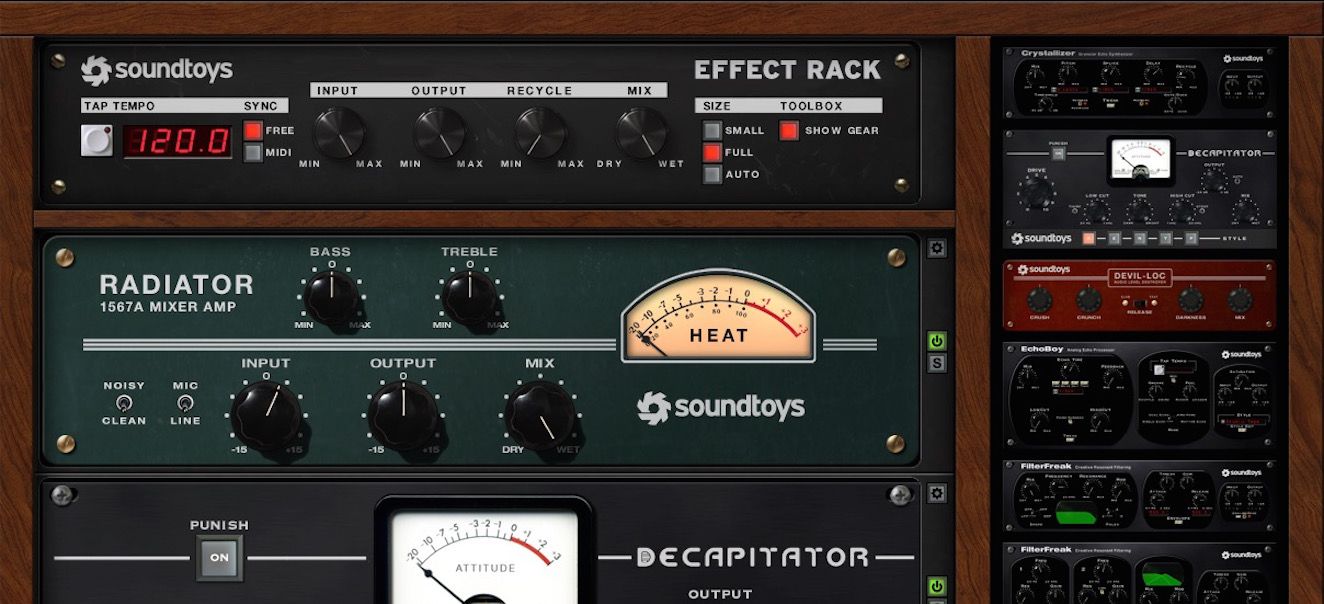
Soundtoys 5 is an excellent bundle of audio effects plugins, offering a wide array of creative processing options. Soundtoys 5 is a comprehensive collection of audio effects plugins.
It features a suite of 21 plugins that covers everything from creative sound processing to classic analog emulations. The company behind Soundtoys is renowned for its high-quality plugins that offer some of the best-sounding effects available in the market. Soundtoys 5 is a favorite among music producers, sound designers, and audio engineers due to its intuitive interface, great sound quality, and immense creative potential.
With Soundtoys 5, you can harness the power of the past while exploring the future of audio production. It is an ideal tool for anyone looking to add depth, character, and personality to their audio production.
Credit: www.youtube.com
Key Features Of Soundtoys 5
The Soundtoys 5 is a much-awaited bundle of audio effects plugins that has been creating buzz in the world of sound engineers and music producers. Now, it’s finally here and has been causing quite a stir in the music production industry. The collection of effects plugins is perfect for those who are looking to create some unique soundscapes, textures, and tones that will help to elevate their music productions. What really sets it apart from other bundles on the market is its Analog Sound Emulation, Intuitive Interface, and vast Collection of Effects Plugins. Let’s dive into them one by one.
Analog Sound Emulation
If you are someone who values the warm sound of analog equipment, you will be happy to know that the Soundtoys 5 has Analog Sound Emulation. This feature emulates the warmth and characteristic sound of analog equipment. It makes the digital plugins sound like they’re coming out of an old-school analog mixing desk or tape machine. Soundtoys 5’s emulation of the classic SoundBlender gives you the unique and rich sound of the classic hardware. This feature is especially great for those who want to achieve the warmth of tape saturation, or the grit and dirt of analog distortion.
Collection Of Effects Plugins
The Soundtoys 5’s collection of effects plugins is an extensive toolbox for any sound engineer or music producer. It offers more than 20 sound-altering plugins that include everything from delays and reverbs to distortion and filtering. The collection combines all the favorites from the Soundtoys range into one complete package. It includes some unique and new plugins such as Sie-Q, Echo Boy Jr, Devil-Loc Deluxe, and Little AlterBoy which can help create a dynamic and sonic soundscape.
Intuitive Interface
Soundtoys 5’s intuitive interface makes it easy for beginners and professionals to use. The interface has an organized flow that will help you achieve your desired sound easily. You will not have to fumble around with the settings to get the sound that you want. There are presets available that offer quick and made to use sound settings. The interface is modern, easy on the eye, and organized correctly so that one can know where each knob and fader is located.
In conclusion, the Soundtoys 5 is a collection of top-notch plugins that have taken Soundtoys range to the next level. Its Analog Sound Emulation, Collection of Effects Plugins, and Intuitive Interface make it a must-have for any sound engineer or music producer. It guarantees to elevate your music production game with its unique soundscapes, textures, and tones.
Soundtoys 5 In Action
If you’re a music producer, mixer or sound engineer, you might have come across Soundtoys 5- a popular collection of audio effects plug-ins. With Soundtoys 5, you can transform plain audio tracks into professional-quality, polished sound, giving your music compositions life and character. But how do you use Soundtoys 5 in action? In this article, we demonstrate various ways to using Soundtoys 5- from applying effects on individual tracks to advanced techniques and tips.
Using The Effects On Individual Tracks
Using Soundtoys 5 effects on individual tracks is an excellent way to experiment and add unique sonic flavors to a mix. For instance, you can apply the EchoBoy plugin on drums to create a vintage, distorted sound, or the Decapitator on bass guitar to produce a warm, saturated tone. Additionally, the Little AlterBoy can transform boring vocals into robotic and funky sounds. With various parameters like mix, rate, and modulation, you can adjust the effect to blend harmoniously with the original sound.
Applying Effects To An Entire Mix
Soundtoys 5 is not only suitable for individual tracks but also for applying effects to an entire mix. For instance, you might want to make your final mix sound more spacious and atmospheric by adding a reverb plugin like the Little Plate. You can use the PanMan to create a moving stereo effect that follows the beat of your music, or use the FilterFreak to add a unique filter to your master track. The key is to experiment with different plugins and effects until you find the right sound.
Advanced Techniques And Tips
Soundtoys 5 also allows you to use more advanced techniques and tips to achieve your desired sound. For example, you can parallel process your track by duplicating it and adding Soundtoys 5 effects to the duplicate. By mixing the dry signal with the processed one, you can create a more controlled version of the effect. Another advanced technique is using automation to change the parameters of a plugin like EchoBoy over time. This technique creates dynamic transitions in your audio and keeps your listener engaged.
Overall, Soundtoys 5 is a must-have audio plugin that every music producer should try for their tracks. By using the effects on individual tracks, applying effects to an entire mix, and using advanced techniques and tips, you can create a professional sound and take your music compositions to the next level.
Cost And Value Of Soundtoys 5
Cost and value are significant factors to consider when shopping for music production tools. In this Soundtoys 5 review, we will delve into different aspects of the plugin, but first, let’s focus on the pricing tiers and subscription programs to understand how it stacks up against other similar tools in the market.
Various Pricing Tiers
Soundtoys 5 pricing comes in three tiers. The first is the Effects Rack bundle, which contains 14 plugins that cost $299. The second tier is the Individual Plugins bundle, which features the same plugins but at a lower price point of $99 per plugin. Lastly, the Soundtoys 5 bundle, which can be purchased for $499, comes with the full suite of Soundtoys plugins. Whichever bundle you choose, you’re certainly getting your money’s worth.
Comparing To Other Plugins
Compared to other similar plugins available in the market, Soundtoys 5 offers excellent value for money. Other plugins may offer similar features, but the comprehensive bundle, high-quality sound, and user-friendly interface that Soundtoys 5 provides to make it worth every penny. In addition, there is no denying that Soundtoys 5 has been gaining popularity among producers and sound engineers all over for its expansive plugin offering, from reverb to distortion, and every effect in between.
Subscription Programs
In addition to the tiered pricing structure, Soundtoys 5 offers a subscription plan, which includes the Soundtoys 5 bundle for just $19.99 per month or individual plugins for $9.99 per month. Subscribing to Soundtoys 5 is a great way to access their entire collection of plugins without breaking the bank
Credit: www.soundonsound.com
Credit: www.macprovideo.com
Frequently Asked Questions Of Soundtoys 5 Review
What Is The Difference Between Soundtoys 5 And Effect Rack?
Soundtoys 5 is a plugin bundle that includes Effect Rack. Effect Rack is a standalone plugin that allows you to combine multiple Soundtoys plugins. Effect Rack offers a flexible way to create, save, and recall complex effect chains. Soundtoys 5 has a wider range of plugins to choose from.
How To Get Soundtoys 5 For Free?
Unfortunately, Soundtoys 5 is a paid software and cannot be obtained for free legally. Using cracked or pirated versions can lead to legal and software issues. To access the software, you can purchase it from the official website or wait for promotional offers.
Remember to support the developers and encourage ethical use of software.
What Does Soundtoys 5 Include?
Soundtoys 5 is a collection of top-notch audio plugins with versatile sound design capabilities including the classic Decapitator, EchoBoy, PrimalTap, and Little AlterBoy. It offers a wide range of effects, filters, and modulation tools for comprehensive audio manipulation.
Are Soundtoys Plugins Cpu Intensive?
Yes, Soundtoys plugins are known to be CPU intensive. However, the amount of CPU usage may vary depending on the specific plugin and the computer system being used. It’s recommended to have a powerful processor and enough RAM to handle the plugins effectively.
Conclusion
To wrap up, Soundtoys 5 is a comprehensive plugin bundle that provides a wide range of audio effects to enhance your music production. With its vintage-inspired aesthetics and easy-to-use interface, it’s a game-changer for both beginners and professionals. Whether it’s creating a dynamic chorus or adding a unique element to your sound, Soundtoys 5 has got you covered.
So, if you’re looking for a versatile set of tools to elevate your audio game, Soundtoys 5 is definitely worth checking out.
Audio saturation is the phenomenon of intentionally overdriving an analog or digital audio signal to produce a pleasant distortion effect. Audio saturation improves the perceived loudness, warmth, and fullness of audio recordings.
It can be achieved using analog devices such as tape machines, tube preamps or digital plugins that model their characteristics. The amount of saturation can be tailored to suit different applications or styles, ranging from subtle warmth to heavy distortion.
Audio saturation is often used in music production, particularly in genres such as rock, blues, and hip-hop. We will discuss different types of audio saturation and how they can be used to enhance your audio recordings.
Credit: www.sageaudio.com
Defining Audio Saturation
Audio saturation is a type of harmonic distortion that happens when an audio signal is overdriven. In simpler terms, it’s what makes audio sound warm and fuzzy rather than clean and digital. If you’ve ever heard the classic rock music of the 70s, then you’ve experienced audio saturation.
The Basics Of Audio Saturation
Audio saturation occurs when a signal exceeds the maximum level that it can handle. When this happens, the signal compresses and clips, leading to an increase in the harmonic content of the audio. This increase in harmonic content is what gives audio the warm and distorted sound that is often associated with analog recordings.
Types Of Audio Saturation
Type of Audio Saturation
Description
Tape Saturation
Tape saturation occurs when audio is recorded onto magnetic tape. The magnetic particles on the tape add a slight distortion to the audio signal, making it warmer and more pleasing to the ear.
Tub Saturation
Tub saturation happens when audio passes through a tube amplifier. The vacuum tubes in the amplifier have a unique way of distorting the signal, which results in a warm and natural sound.
Transformer Saturation
Transformer saturation occurs when audio passes through a transformer. The transformer adds a slight distortion to the audio signal, resulting in a warmer and more pleasant sound.
Other types of audio saturation include:
Hardware saturation
Software emulation saturation
Solid-state saturation
All of these types of saturation can be used to add warmth and character to digital recordings, making them sound more like analog recordings.
Credit: www.iconcollective.edu
How Audio Saturation Works
Audio saturation is a phenomenon that occurs when the input level of a recording device exceeds its maximum capacity. This results in a warm, analog-like distortion that can add character and depth to recordings. Saturation can be applied to individual tracks or to an entire mix, and can be controlled to achieve various levels of distortion.
The Physics Of Sound
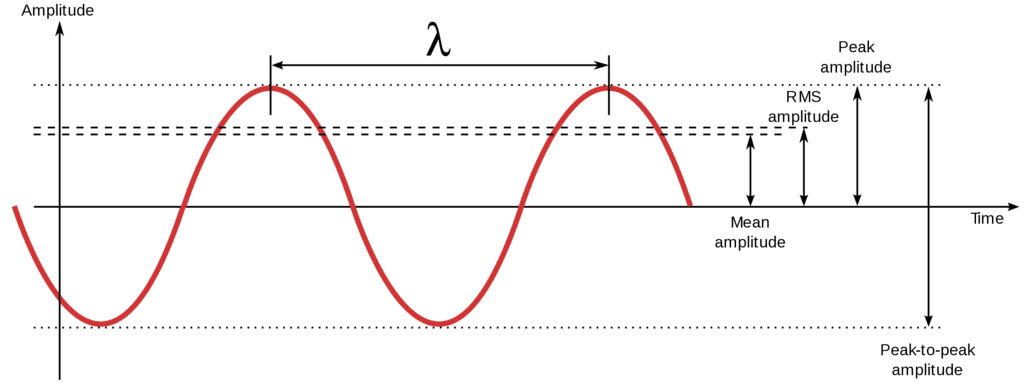
Sound is measured in decibels, which is a logarithmic scale. The human ear can typically hear sounds ranging from 0 to 140 decibels. When sound waves enter a microphone, they are translated into an electrical signal. This signal is then processed, amplified, and sent to a speaker, which converts the electrical signal back into physical vibrations that we can hear. One important aspect of sound is its harmonic content. Harmonics are additional frequencies that appear above the fundamental frequency of a sound. These harmonics give music its rich and complex sounds. However, when compressed or processed digitally, these harmonics can be lost, resulting in a flat and lifeless sound.
Analog Saturation Vs Digital Saturation
Audio saturation is the process of adding harmonic content to a sound signal. This can be achieved through analog saturation, which involves running the sound through a physical circuit with magnetic tape or vacuum tubes, or through digital saturation, which involves using software to simulate the effects of analog equipment. Analog saturation adds warmth, depth, and richness to a sound. It also adds distortion, which can create a gritty or edgy sound. Digital saturation, on the other hand, is more precise and can be easier to control. However, it can also sound sterile or artificial. In both cases, the goal is to add harmonic content to a sound, resulting in a more vibrant and dynamic audio experience. By manipulating the harmonic content of an audio signal, audio saturation can bring out the best in a recording and enhance the emotional impact of the music. In conclusion, audio saturation is a vital tool for creating high-quality and engaging audio experiences. By understanding the physics of sound and the differences between analog and digital saturation, you can create the perfect sound for your project.
Benefits Of Audio Saturation
Audio saturation is the process of adding harmonic distortion to audio signals. The benefits of using audio saturation include a warmer, fuller and more dynamic sound. Saturation can help bring out the best in your recordings, adding character and depth to your music.
Audio saturation is a technique used to add warmth and depth to audio signals. It involves adding harmonic distortion to a signal to create a more pleasing sound. Saturation can improve the overall quality of audio recordings in various ways.
Added Warmth And Depth
Saturation can add warmth and depth to tracks, resulting in a more natural, analog-like sound. By adding distortion to a signal, it simulates the sound of vintage analog equipment and can make recordings sound warmer and fuller. This effect is particularly useful for digital recordings, which can often sound sterile and lack the warmth of analog recordings.
Improved Dynamics And Harmonics
Saturation can also improve the dynamics and harmonics of a track. By adding subtle distortion to a signal, saturation can add richness to the harmonic content of a recording. This can make instruments sound more full and realistic, with more detail and nuance. Additionally, saturation can smooth out the peaks and troughs of a track’s dynamic range, resulting in a more consistent sound that is easier on the ears. Using saturation techniques can help to make your audio recordings more engaging and stand out from the crowd. By adding warmth, depth, and improving dynamics and harmonics, saturation can take your recordings to the next level. So, the next time you are mixing a sound or working on a recording, don’t forget to use some saturation to enhance the quality of your work.
Credit: www.pitchbends.com
Applications Of Audio Saturation
Applications of audio saturation are varied and span several different industries. Audio saturation is an essential tool in music production, but it is also used in other fields such as live sound, film, and TV sound. Below are some specific areas where audio saturation comes in handy:
Mixing And Mastering
Audio saturation finds extensive use in mixing and mastering music. During the mixing process, saturation is applied to add warmth and character to the individual tracks and bring out the fullness of the sound. On the other hand, in the mastering process, saturation is applied to glue all individual tracks to form an overall cohesive sound.
Live Sound
Audio saturation can also be used in live sound reinforcement. A typically sterile sounding live sound can benefit from saturation as it can add personality and warmth to the overall sound of the band playing live. It can also add depth and clarity, even in a noisy environment.
Film And Tv Sound
Saturation is also a useful tool in film and TV sound production. When used correctly, it can add an intimate, realistic, and full-bodied sound to various elements such as dialogue, music score, and sound effects. Saturation is used in sound design to provide depth and enhance the overall movie watching experience for the audience.
Popular Audio Saturation Tools
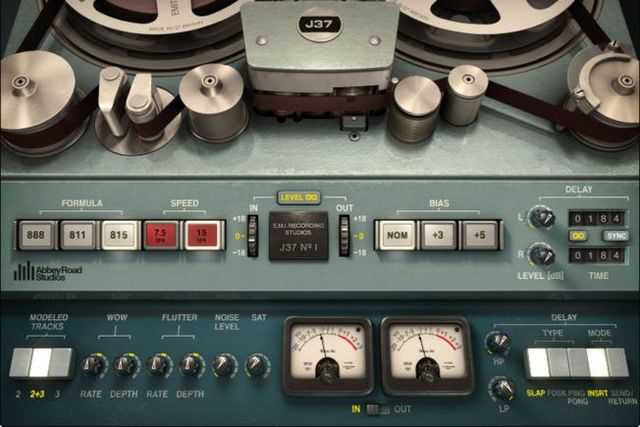
Audio saturation is the process of adding harmonics to sound. Popular audio saturation tools include plugins such as the Waves J37 and the Softube Tape, which emulate the warm, rich sound of analog tape. These tools are commonly used in music production to add character and depth to recordings.
When it comes to music production, audio saturation is an essential tool to enhance the sound of your recordings. The process of audio saturation mimics the effects of analog equipment, adding warmth, and character to the sound. With the increasing popularity of digital audio workstations, audio saturation tools have become vital to achieving a vintage sound in modern productions.
Tube Saturation Plugins
Tube saturation plugins mimic the warm, harmonic distortion that occurs when an audio signal passes through a vacuum tube. They add depth and character to the sound, making it more vibrant and dynamic. Popular tube saturation plugins include:
Waves PuigChild Compressor
Softube Tube-Tech CL 1B
Soundtoys Decapitator
Tape Saturation Plugins
Tape saturation plugins emulate the sound of audio recorded onto analog tape machines, adding warmth and character to the sound. They simulate the subtle distortion, saturation, and compression that occurs when audio passes through magnetic tape. Popular tape saturation plugins include:
Slate Digital Virtual Tape Machines
Universal Audio Ampex ATR-102
Waves Kramer Master Tape
Transistor Saturation Plugins
Transistor saturation plugins emulate the distortion and harmonics caused by analog transistor circuits. They are commonly used to add warmth and dynamic range to digital recordings, creating a more vintage sound. Popular transistor saturation plugins include:
Soundtoys Radiator
Universal Audio Thermionic Culture Vulture
Softube Saturation Knob
Using these audio saturation tools in your music production can take your sound to new heights. Experiment with different plugins and find the best ones for your sound!
Using Audio Saturation In Your Music
Audio saturation is a technique used to add warmth and character to recorded audio. It involves overdriving an analog or digital signal to produce harmonics and distortion that can enhance the sound quality and make it more interesting. Using audio saturation in your music can take your mix to the next level by giving it a certain level of “vibe” or “attitude”. Here are some tips on how to use audio saturation effectively in your music:
Experimenting With Different Saturation Types
Before you start using saturation in your music, it’s important to understand the different types of saturation. There are various types of analog and digital emulations that can be used, each with their unique characteristics. Make sure to experiment with different types of saturation to find the one that fits your genre and style.
Knowing When To Use Saturation
Saturation can be used in different ways depending on the purpose. You can use it to add warmth to a mix, to enhance specific instruments, or to give a particular track a vintage feel. Knowing when to use saturation is essential to achieving the desired effect without overdoing it. For instance, adding too much saturation could make the mix sound muddy and unnatural. Therefore, it’s important to use it in moderation.
Dos And Don’ts
Here are some dos and don’ts when using audio saturation:
Dos
Don’ts
Use saturation to add warmth and character to your mixExperiment with different types of saturation to find the desired effectUse saturation sparingly to avoid making the mix sound muddy or unnaturalUse saturation to enhance specific instruments or tracksUse saturation to give a vintage feel to your mix
Overdo saturation, which can lead to a distorted and unpleasant soundUse saturation on every element of your mixUse saturation as a fix for poor recording or mixing qualityUse saturation in genres where it’s not appropriateUse saturation without considering the context or purpose
By following these dos and don’ts, you can use audio saturation effectively and elevate the sound quality of your music.
Frequently Asked Questions Of What Is Audio Saturation
What Does Saturation Effect Do?
The saturation effect is used in audio processing to add harmonics and warmth to a sound signal by increasing its amplitude. This effect is achieved by overdriving analog or digital circuits, amplifiers, or tape machines to produce a unique distortion that adds a richness to the original sound.
Is Distortion And Saturation The Same Thing?
No, distortion and saturation are not the same things. Distortion occurs when the audio signal is altered, resulting in added harmonics and a rougher tone. Saturation, on the other hand, happens when the audio signal is pushed too hard, resulting in a warmer, richer tone with increased dynamic range.
They both affect an audio signal, but in different ways.
Does Saturation Increase Loudness?
Saturation can increase the perceived loudness of a sound by introducing harmonic distortion. However, it also can introduce unwanted artifacts and reduce clarity in the signal. It is important to use saturation judiciously and in the context of the overall mix.
What Is The Difference Between Compression And Saturation?
Compression reduces the dynamic range of an audio signal, while saturation adds harmonic distortion to the signal. Compression reduces the difference between the loudest and softest parts, while saturation adds warmth and thickness to sound. Both can be used for creative effects and to control levels and peaks in a mix.
Conclusion
Audio saturation is a key element that can help you achieve a professional level of sound. Saturation techniques can add warmth, depth, and clarity to your tracks, making them sound fuller and richer. By understanding how saturation works, you can create unique sounds that stand out from the crowd.
Whether you’re a professional audio engineer or a passionate music producer, you can use saturation to enhance your work and bring your creativity to new heights. Start experimenting with different saturation techniques today and take your sound to the next level.
To mix vocals, set levels, EQ, compress, and use effects such as reverb and delay. Mixing vocals is a critical part of producing a polished and professional song.
It involves adjusting the levels of individual tracks, using EQ to remove unwanted frequencies, compressing to control dynamics, and using effects such as reverb and delay to add depth and dimension. Proper vocal mixing can make or break a recording, and it takes a certain level of skill and practice to get it right.
With some basic knowledge and experimentation, however, anyone can learn how to mix vocals effectively. We will explore the best techniques and tools for mixing vocals, whether you are working with a full band recording or a solo artist.
Credit: mastering.com
Preparing Your Mix
Achieving a well-mixed vocal recording takes patience, technique, and practice. Start by equalizing each vocal track and adjusting the levels to ensure there are no clashing frequencies. Then, apply compression to even out the dynamics and add some reverb or delay to create a cohesive sound.
Eliminate Unwanted Sounds
Before starting to mix vocals, it’s important to get rid of any unwanted sounds that might interfere with the clarity and quality of the vocals. These sounds can include anything from background noise to mouth clicks and pops. To eliminate these sounds, you can use a noise gate or a de-esser plugin. A noise gate helps to silence any sounds below a certain threshold, while a de-esser plugin specifically targets and reduces harsh sibilance sounds.
Adjust Eq
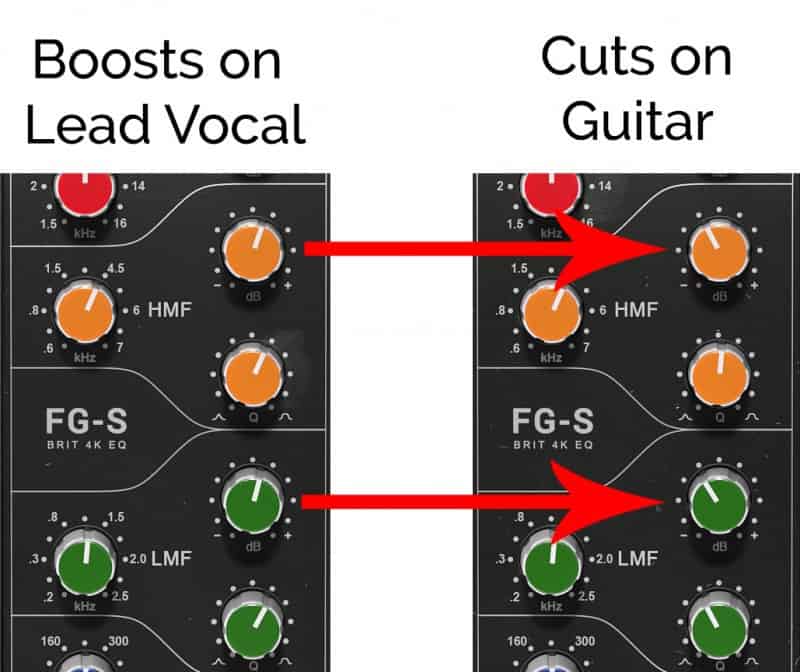
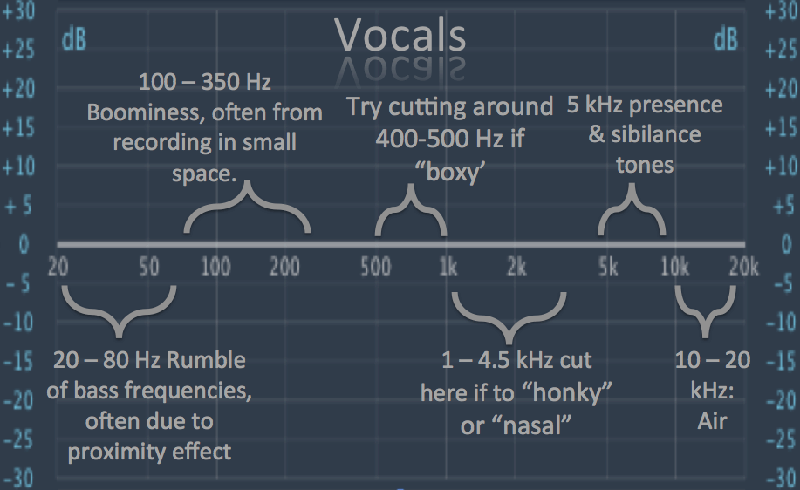
Equalization is important when mixing vocals as it helps to balance out the different frequencies of the voice. Start by using a high-pass filter to remove any low-end rumble or unwanted bass frequencies. Then, use a parametric EQ to boost or cut specific frequencies that may be either too prominent or dull in the mix. Be sure not to overdo it with EQ as it can lead to unnatural and unpleasant sounding results.
Reduce Sibilance
Sibilance refers to the harsh “s” and “sh” sounds that can occur in vocals. To reduce sibilance, use a de-esser plugin mentioned earlier. Another way to minimize sibilance is to use proper mic technique during recording. Having the singer sing slightly off-axis from the mic can help reduce sibilance and produce a smoother sound. It’s important to note, however, that completely removing sibilance can lead to a dull and lifeless vocal sound. By following these tips for preparing your mix, you can achieve a clearer and more polished vocal sound. Eliminating unwanted sounds, adjusting EQ, and reducing sibilance are essential steps in achieving a professional-sounding vocal mix.
Setting Up Your Track
Mixing vocals is an art that requires a good ear for music and technical expertise in using different tools and software. Before you get started with mixing, you need to set up your track in the right way. This includes importing vocals properly, creating different bus tracks and adjusting different levels and effects. Here is a detailed guide on how to set up your track for mixing vocals:
Import Vocals
The first step for mixing vocals is to import vocals into your DAW (Digital Audio Workstation). You can do this by dragging and dropping audio files, or by importing them directly from the menu. Make sure to select the right format, sample rate, and bit depth to ensure the best quality sound. You should also label each track properly to avoid confusion and make it easy to locate your files later on.
Create A Bus
One of the most important steps when it comes to mixing vocals is to create bus tracks. Bus tracks are used to group different elements of your mix, such as vocals and instruments, so that you can apply effects and adjustments to them all at once. The most popular way to group vocal tracks is to create a stereo bus, which will allow you to add reverb, delay, and other effects. You can do this by selecting “create bus” option from the menu and selecting the number of channels you need.
When you have created a bus, you can route all your vocal tracks to it by selecting the right input. This will allow you to control the overall level and effect of your vocals by adjusting the bus settings. You can also add compression, equalization, and other effects to the bus to enhance the overall sound quality.
By following these simple steps, you can set up your track properly and start mixing vocals like a pro. Whether you’re a beginner or an experienced sound engineer, these tips and tricks will help you to achieve the perfect mix every time.
Setting Levels
Achieving the perfect vocal mix involves setting levels. This process helps balance the volume of each vocal track in relation to the others and the instrumental track. Start by adjusting the volume of each vocal track until they blend well together.
When it comes to mixing vocals, setting the levels is crucial for achieving a balanced and professional sound. Without proper level settings, the vocals may get buried under other instruments or overpowering, causing the listener to lose interest. This section will cover how to set initial levels and adjust volume to ensure each element of the mix fits together seamlessly.
Setting Initial Levels
Before mixing vocals, it’s important to have a clear plan on how the vocals will fit in with the rest of the instrumental elements. To achieve this, it’s essential to set the initial levels of each track before making any adjustments. Here are the steps to set initial levels:
Start by muting all tracks except for the lead vocal track to ensure you are not distracted by other elements.
Set the fader of the lead vocal track to unity gain, which is the same level as the original recording.
Play the vocal track and adjust the levels until they reach a comfortable and consistent volume.
Once the lead vocal track is at an appropriate level, unmute other tracks to see how they fit in with the vocals and make necessary adjustments.
Adjust Volume
After initial levels are set, adjusting the volume is the next step in mixing vocals. It’s essential to ensure that each element of the mix fits together seamlessly without masking or overpowering each other. Here are the steps to adjust the volume:
Start by listening to the instrumental tracks, including drums, bass, keyboards, and guitar, to determine any elements that mask or overpower the vocals.
Adjust the volume of each instrumental track to create a balance with the lead vocal track.
Make sure the lead vocal track is still at the appropriate level and adjust its volume if necessary.
Listen to the mix as a whole and adjust the volume of individual tracks if needed.
When adjusting the volume, it’s crucial to use your ears and not rely too much on visual cues such as meters. A mix that sounds good to your ears is more essential than one that looks good on a meter. In conclusion, setting levels is a crucial step when mixing vocals. Following the steps outlined above will help achieve a balanced and professional sound. Remember, the most important factor is to use your ears and not rely solely on visual cues. Happy mixing!
Credit: ekmixmaster.com
Panning And Stereo
To get the best mix for vocals, using panning and stereo techniques is essential. Panning helps in placing vocals in the mix while stereo creates width and depth, allowing the vocals to stand out. With the right balance, your vocals can sound clear and impactful, making your music stand out from the rest.
Pan Vocals
Panning is when you move the position of a recording in a mix from left to right. It allows you to isolate the vocals and place them in the center of your mix, while the other instruments are panned to the left or right. To pan the vocals, use the mixer panel in your recording software. Most mixers have a panning knob next to each track. You can use this to manually adjust the position of each track. It is important to keep in mind that too much panning can make your mix sound unbalanced. Avoid hard-panning the vocals too far to one side or the other.
Adding Stereo Width
In addition to panning, stereo width refers to the amount of space that a recording takes up in the stereo field. Adding stereo width to your vocals can greatly enhance the overall sound of your mix. There are several ways to add stereo width to your vocals, including using stereo widening plugins or doubling the vocal track and panning each track to opposite sides. Another option is to use a stereo reverb effect on the vocals. When using stereo effects, be sure to use them very sparingly and in moderation. Too much stereo width can make the mix sound too busy and cluttered. In conclusion, panning and adding stereo width to your vocals can take your mix to the next level. By using these techniques, you can create a more dynamic and interesting mix that highlights the vocals and brings out the full potential of your recording.
Applying Effects
To mix vocals, applying effects is crucial. EQing can help remove unwanted frequencies, while compression and reverb can add depth and character to the vocals. Experiment with different effects and settings to achieve the desired sound.
Adding effects to vocals is a crucial step in crafting an authentic and high-quality mix. While effects can enhance the sound of a vocal track, applying them correctly is crucial. Three primary effects used when mixing vocals are compression, delay, and reverb. Let’s dig into each of these effects and how to use them effectively.
Compression
Compression is essential in vocal mixing to keep the vocal from being too dynamic and out of control. Compression levels out the volume of the vocals, making them more consistent and easier to hear. Here are basic steps to apply compression to your vocal track:
Set the ratio at 2:1 to 4:1
Set the attack time at around 10-30ms
Set the release time to auto or at 100-200 ms
Adjust the threshold to where you see gain reduction of around 3-6dB
Delay
Delay is another popular effect used in vocal mixing, which adds depth and dimension to the vocal. With delay, you can create a sense of space, and it can also function as a subtle effect to fatten up the vocal. Here’s how to apply a simple vocal delay:
Set the delay time to a musical interval or to match the song’s tempo
Use a feedback level of between 10-30%
Adjust the wet-to-dry ratio to taste, to make the delay more apparent or subtle
Reverb
Reverb is a popular effect used in vocal mixing to add space and dimension to the vocal. It’s essential to apply it correctly to avoid making the vocal sound too washed out or distant. Here is how to use it effectively for vocals:
Choose a reverb plugin with a predelay control
Set the predelay to 10-20ms to create space or to match the song’s tempo
Select an appropriate reverb type such as plate, hall, or chamber
Adjust the reverb decay time, size, and diffusion to taste
In conclusion, applying the right effects to your vocal track will go a long way in creating a professional mix. Compression, delay, and reverb are popular effects; however, you can experiment with others such as chorus, distortion, and phasers. Remember that it’s essential to use effects in moderation and to use your ears when applying them.
Credit: www.waves.com
Automating Your Mix
Automating your mix can be a useful technique when it comes to mixing vocals. Plugins such as EQ filters, dynamic processors, and time-based effects can do the job for you. When setting up your automation, take note of the overall volume, frequency balance, and soundstage of the vocals.
When mixing vocals, it can be a challenge to balance them with the other elements in your track. One way to achieve a more consistent sound and save time is to automate your mix. This technique involves setting specific parameters for individual tracks, like volume and effects, and then programming those changes to occur automatically throughout the song. Here are some ways to automate your mix successfully:
Automate Volume
Controlling the volume of your vocals is an essential part of mixing. You can use volume automation to create smooth transitions between different parts of the song, like verses and choruses. Start by drawing in automation points on the volume fader for each vocal track. Then, adjust each point to create the desired volume level. By automating the volume of your vocals, you can ensure they are heard clearly and consistently throughout the track.
Automate Effects
Effects like delay, reverb, and compression can enhance the sound of your vocals and make them stand out in the mix. Automating these effects allows you to add variation and interest to your vocals without having to adjust them manually. For example, you could automate the reverb on a vocal track to increase in the chorus, creating a more spacious sound. To automate effects, you will need to use a plugin that has automation capabilities or use the built-in automation features of your DAW.
Conclusion
Automating your mix can save you time and help you achieve a more consistent and professional sound. By automating the volume and effects of your vocals, you can create smooth transitions and add variation to your mix without having to adjust them manually throughout the song. Experiment with different automation techniques to find the perfect balance for your vocals and make your mix stand out.
Frequently Asked Questions For How Can I Mix Vocals
What Is The Best Way To Mix Vocals?
The best way to mix vocals is to ensure each vocal track is clear and balanced in terms of volume, tone, and effects. Use compression, EQ, and reverb to enhance the vocals and avoid clashing frequencies. Make sure the vocals sit well within the mix without overpowering other elements.
Finally, monitor the mix on different speakers to ensure it sounds good on a range of systems.
In What Order Do You Mix Vocals?
Mixing vocals typically follows these steps: First, focus on the lead vocal and balance it with the instrumental mix. Second, address the harmonies and background vocals. Third, use equalization to adjust the frequencies. Fourth, add time-based effects like reverb and delay.
Finally, adjust the volume and overall level.
How Do You Edit And Mix Vocals?
To edit and mix vocals, you should start by cleaning up recordings for background noise and breathe sounds. Then, use EQ to balance frequencies and adjust levels to create a smooth sound. Compression, reverb, and delay can also enhance the vocals.
Finally, adjust the stereo image and volume levels to match the song.
How Do You Send Vocals To Be Mixed?
To send vocals to be mixed, you can either send the raw audio file or export the vocals as individual stems. Make sure to label and organize the files properly, and communicate any specific mixing requests to the audio engineer.
You can use cloud storage or file-sharing platforms to send the files securely.
Conclusion
To sum up, mixing vocals is all about balance and experimentation. It requires a deep understanding of how to enhance the singer’s performance and make their voice stand out in the mix. Remember to use EQ, compression, reverb, and other effects in moderation to avoid over-processing the vocal track.
Keep a clear objective in mind, trust your ears, and don’t be afraid to try new techniques. With practice and patience, you can achieve professional-sounding vocal mixes that elevate your music production to the next level.
Antares Autotune EFX is a vocal processing tool that enhances pitch accuracy. Antares Autotune EFX is designed to offer quick and easy pitch correction while remaining accessible to users with a limited understanding of music theory.
Vocal processing has become an integral part of music production, enabling artists to correct pitch inaccuracies and enhance their voice’s tonal quality. Autotune EFX by Antares is a go-to tool for both professional producers and beginners alike. The plugin has been designed to make the pitch correction process straightforward and effortless, resulting in a better-sounding vocal performance.
We’ll be reviewing Antares Autotune EFX with an in-depth exploration of its features, functionality, and how it can benefit your music production.
Credit: www.sweetwater.com
Features Of Antares Autotune Efx
Antares Autotune EFX is a powerful software that enables real-time pitch correction and gives a natural, realistic vocal effect. With features such as humanization and vibrato, it’s perfect for both studio and live performances.
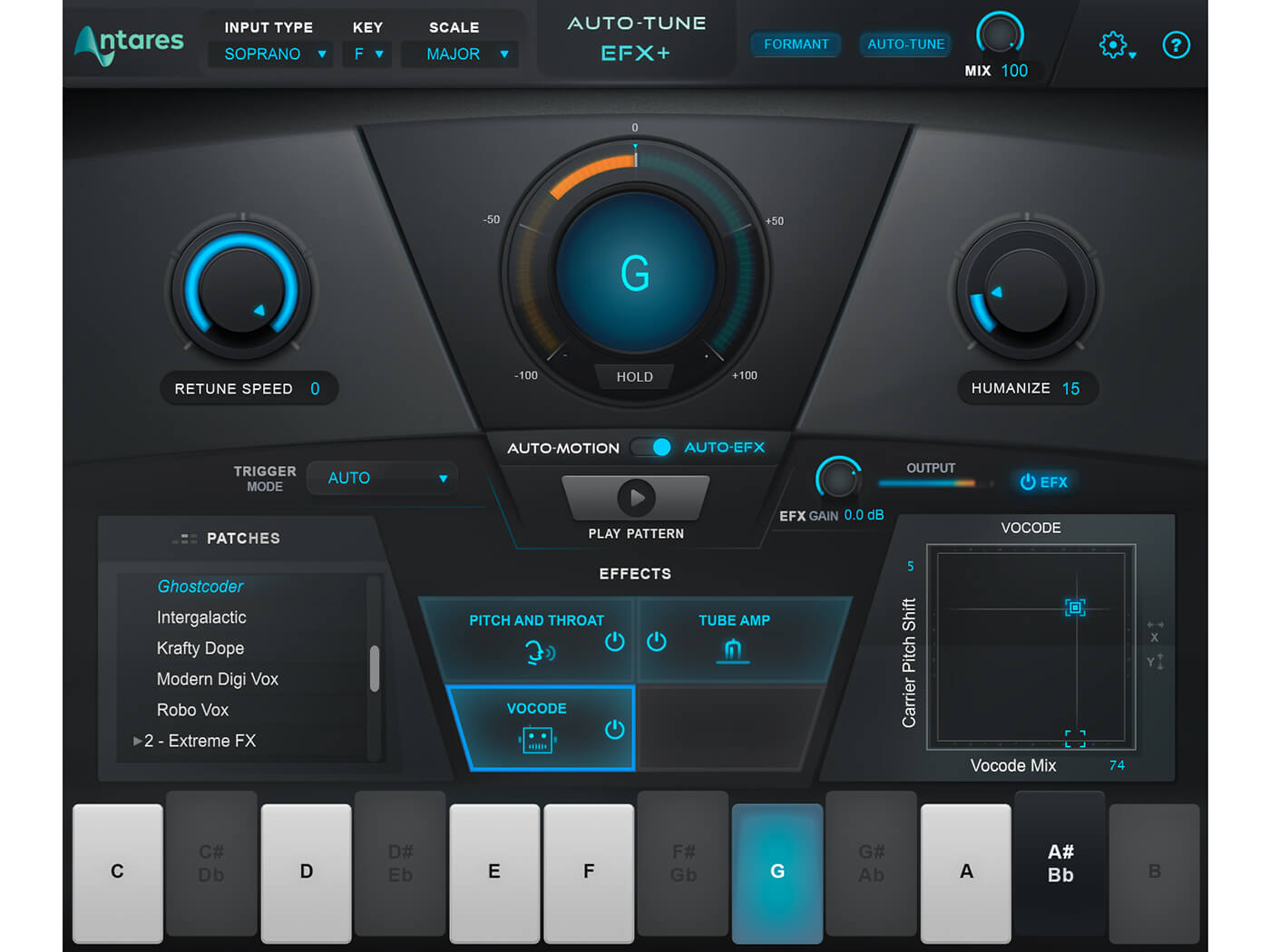
Antares Autotune EFX is a popular tool among musicians and producers, known for its ability to correct pitch and create professional-sounding vocal tracks. It offers a range of features that not only enhance the performance but also allow for more creative possibilities. Let us explore the Features of Antares Autotune EFX, which makes it stand out from the rest. Real-time Pitch Correction: Antares Autotune EFX offers Real-time Pitch Correction, which means that it corrects pitch on the fly, as the singer is performing. This feature enables the singer to hear the pitch correction in their headphones, making it easier for them to stay in tune. In addition, it allows producers to make corrections while recording, reducing the need for re-recording or post-production editing. Flex-Tune Natural Pitch Correction Technology: The Flex-Tune technology is unique to Antares Autotune EFX, making it a favorite among users. Unlike other pitch correction software, it uses a natural method of pitch correction that retains the original character and style of the singer’s voice. It does not sound robotic or over-processed, giving a more natural and polished final product. Humanize Function: Antares Autotune EFX also boasts the Humanize function, which adds more realism and depth to the pitch correction. This function allows for more control and customization over the pitch correction, making it sound more like an actual human. The result is a more organic, human-like sound that creates an emotional connection with the listener. Automatic Formant Correction: Another feature of Antares Autotune EFX is the Automatic Formant Correction. The formant is the shape and tone of the singer’s vocal tract that gives their voice a distinct sound. This feature helps to ensure that the formant remains consistent even when the pitch is being corrected, resulting in a more natural and coherent vocal performance. Low Latency Mode: The Low Latency Mode in Antares Autotune EFX ensures minimal delays between the vocal input and the output processing. This feature is beneficial for live performances, allowing for real-time pitch correction without any noticeable delay or lag in the sound. In conclusion, Antares Autotune EFX is a powerful and versatile tool for pitch correction that offers a range of unique features. Its natural sounding pitch correction, humanized function, and automatic formant correction allow for professional-sounding vocal tracks that are both emotionally engaging and polished. The low latency mode makes it a valuable asset for live performances, and the real-time pitch correction mode simplifies the recording process. All these features make Antares Autotune EFX a must-have tool for any producer or musician.
Credit: www.musicradar.com
Benefits Of Using Antares Autotune Efx
Are you tired of struggling to achieve the perfect pitch in your vocals? Look no further than Antares Autotune EFX. This powerful plugin allows users to effortlessly correct and enhance their vocal performances, resulting in a polished and professional sound.
Professional-sounding Vocals
With Antares Autotune EFX, anyone can achieve a professional-sounding vocal performance. This plugin corrects pitch automatically, ensuring that all notes are perfectly in tune. Additionally, Autotune EFX features a variety of settings that allow users to customize the vocal effect to suit their needs.
Whether you are recording a demo or laying down tracks for a commercial release, Antares Autotune EFX will give your vocals the polished, studio-quality sound you need.
Easy To Use Interface
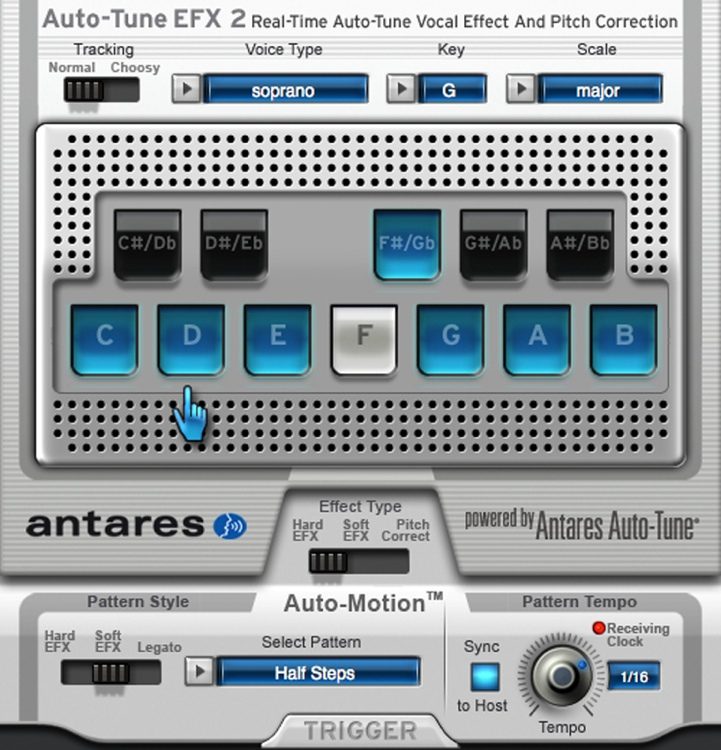
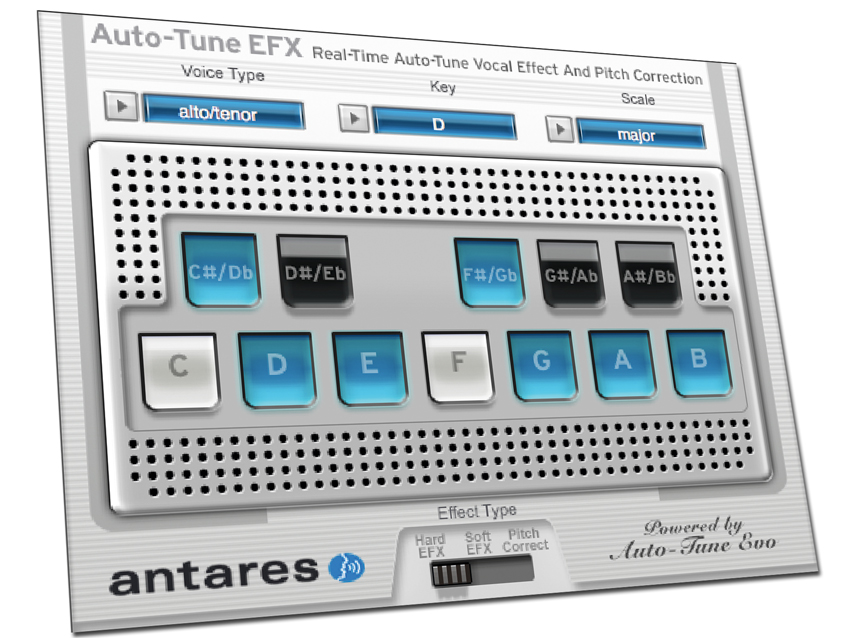
One of the most appealing aspects of Antares Autotune EFX is its simplicity. The easy-to-use interface makes it accessible to experienced professionals and beginners alike.
The plugin’s interface features a clean, intuitive design that allows users to adjust settings and correct pitch with ease. This means that you can focus on delivering a great vocal performance, without worrying about complicated technical details.
Compatibility With Popular Daws
Antares Autotune EFX is compatible with a wide variety of popular digital audio workstations (DAWs), including Pro Tools, Logic Pro, Ableton Live, and FL Studio. This means that users can seamlessly integrate Autotune EFX into their existing music production workflow and enjoy its benefits without interruption.
Customizable Settings
One of the most impressive features of Antares Autotune EFX is its customizable settings. Users can adjust a range of parameters, including retune speed, humanization, and vibrato, to tailor the vocal effect to their liking.
This flexibility ensures that every user can achieve the perfect vocal sound for their project. Whether you want to create a natural, transparent pitch correction effect or an exaggerated, robotic sound, Antares Autotune EFX has got you covered.
Overall, Antares Autotune EFX is an excellent choice for anyone looking to achieve professional-quality vocals in their music production projects. Its ease of use, compatibility with popular DAWs, and customizable settings make it a must-have plugin for any serious musician or producer.
Comparing Antares Autotune Efx To Other Autotune Software
Antares Autotune EFX stands out when compared to other autotune software due to its ease of use and affordability. With its intuitive interface and quick processing power, it has become a go-to tool for both professional and amateur music producers alike.
Comparing Antares Autotune EFX to Other Autotune Software When it comes to pitch correction software, Antares Autotune EFX is undoubtedly one of the most popular choices. However, how does it stack up against other autotune software on the market? Let’s take a deeper look.
Antares Autotune Vs Celemony Melodyne
Melodyne is a popular alternative to Antares Autotune EFX. While they both have pitch correction capabilities, they differ in some key ways. Where Antares is primarily used for minor pitch correction, Melodyne offers greater control over the pitch, timing, and formant of a vocal recording. Additionally, Melodyne allows for pitch correction of individual notes within a chord, which Antares cannot do.
Antares Autotune Vs Waves Tune
Waves Tune is another popular autotune software that is comparable to Antares Autotune EFX. Both have similar pitch correction capabilities, although Waves Tune offers more flexibility for fine-tuning the pitch correction than Antares. Waves Tune also offers natural-sounding vibrato control, which Antares does not.
Antares Autotune Vs Logic Pro X Autotune
Logic Pro X Autotune is a pitch correction software that is included in the popular Logic Pro X DAW. While it is not as capable as Antares Autotune EFX, it is a great alternative for those who are on a budget. Logic Pro X Autotune is a simple and straightforward pitch correction plugin that offers basic pitch correction capabilities. In conclusion, Antares Autotune EFX is a popular choice for those who are looking for a straightforward and effective pitch correction software. However, there are other options on the market that offer greater control and flexibility, such as Celemony Melodyne and Waves Tune. Logic Pro X Autotune is also a great alternative for those who are on a budget. It’s important to consider your specific needs and budget when choosing an autotune software.
Credit: musictech.com
Frequently Asked Questions For Antares Autotune Efx Review
Is Antares Auto-tune Artist Good?
Yes, Antares Auto-Tune is a professional and famous pitch correction software used in the music industry. Many popular artists use it to enhance their vocal performances. It is effective in correcting pitch issues and has become a standard tool for music producers.
What Is The Difference Between Auto-tune Efx And Artist?
Auto-Tune EFX is a software designed for real-time pitch correction while the artist version is a more advanced tool that offers more control over pitch and timing. Auto-Tune EFX is ideal for quick and easy corrections while artist provides greater flexibility for more precise editing.
What Auto-tune Do Professionals Use?
Professionals use a variety of Auto-Tune software, but some of the most popular ones include Antares Auto-Tune Pro, Waves Tune, and Melodyne. These tools allow for precise pitch correction and creative manipulation of vocal performances.
Is Antares Auto-tune Better Than Waves?
Both Antares Auto-Tune and Waves plugins have unique features that make them indispensable to audio production. Antares Auto-Tune is commonly used for pitch correction, while Waves plugins offer a comprehensive range of audio processing tools. Choosing which one is better depends on your specific needs and preferences.
Conclusion
To sum it up, Antares Autotune Efx is a versatile and powerful plugin for music producers, singers, and anyone who wants to add a professional touch to their sound. With advanced features like real-time pitch correction and creative FX, Autotune Efx is a must-have tool for anyone serious about music production.
Whether you’re recording in the studio or performing live, this plugin is easy to use and delivers great results. Give it a try and take your music to the next level.
To reverb drums, add reverb effects to the drum track. Reverb plugins can be used to add different levels of reverb to create a desired effect.
Creating a great drum sound is crucial in music production. And reverb plays a significant role in getting there. It can add a sense of space, depth and warmth to the drums, making them sound more alive and natural. However, reverb can be tricky.
Too much or too little can ruin the mix. To reverb drums effectively, one must choose the right type of reverb, determine the level of wetness, decide on the decay time and pre-delay, and EQ the reverb if necessary. Additionally, it is important to listen critically and make adjustments based on the context of the song. With these tips, you’ll be well on your way to achieving a professional-sounding drum mix.
Credit: www.youtube.com
Types Of Reverb
If you’re a drummer or a music producer, you know the impact of reverb on your sound. Reverb is a crucial element in music production, providing an ambient effect to the audio and adding depth, space, and dimension to the drums. But if you’re new to the process, it can be tough to determine which type of reverb to use. Here are the four main types of reverb:
Room Reverb
Room reverb is the sound of drums that are played in a small or large room. The sound bounces off the walls, and it creates a natural and realistic sound. This sound is best suited for drums that require a clean and natural sound, such as jazz, country or pop music.
Plate Reverb
Plate reverb is created by using a thin sheet of metal placed in front of a speaker. The sound waves from the drum kit vibrate the metal, creating a distinct sound that is rich and smooth. Plate reverb is best suited for drums that require a warmer and smoother sound, such as rock or blues.
Spring Reverb
Spring reverb is created when the sound is passed through a set of springs by a pickup. The sound waves travel up and down the metal springs, creating a unique and recognizable sound. Spring reverb is best suited for drums that require a bright and snappy sound, such as surf, rockabilly or punk rock.
Hall Reverb
Hall reverb replicates the sound of drums that are played in a large hall or auditorium. The sound bounces off the walls, creating an expansive and spacious sound. This reverb is best suited for larger-than-life drums, such as orchestral percussion or bombastic rock tracks.
Credit: m.youtube.com
How To Add Reverb To Your Drums
Reverb is an important element to add depth and dimension to your drums, making them sound more natural and full. There are various ways to add reverb to your drums, including using plugins or recording techniques to achieve the desired sound.
Drums without reverb can sound flat and lifeless. Adding reverb to your drums can help bring them to life and add depth to your mix. There are various ways to add reverb to your drums, including using a plugin, using a hardware processor, or creating a reverb send. Here’s a closer look at each option.
Using A Plugin
One of the easiest ways to add reverb to your drums is by using a plugin. Most digital audio workstations (DAWs) come with built-in reverb plugins that you can use to add different types of reverb to your drums. These plugins come with a variety of settings and presets that you can adjust to get the desired sound. To use a plugin, simply insert it onto the track or bus where your drums are. Then, adjust the settings until you get the desired reverb effect. You can adjust the decay time, pre-delay, wet/dry mix, and more. Be sure to experiment with the different parameters to find the sound that works best for your mix.
Using A Hardware Processor
Another way to add reverb to your drums is by using a hardware processor. This can be a bit more complicated than using a plugin, but it can also yield better results. A hardware processor allows you to add analog warmth and character to your drums that you can’t get with a digital plugin. To use a hardware processor, you’ll need to connect it to your DAW via an audio interface. Then, route your drum track or bus to the processor and adjust the settings until you get the desired reverb effect. You can adjust the decay time, pre-delay, EQ, and more.
Creating A Reverb Send
Finally, you can add reverb to your drums by creating a reverb send. This involves creating a separate aux track in your DAW and inserting a reverb plugin onto it. Then, you can send your drum track or bus to the aux track using a send. Creating a reverb send allows you to add different amounts of reverb to different parts of your mix. For example, you can add more reverb to the snare drum than to the kick drum. This can help create a more natural and cohesive sound. In conclusion, adding reverb to your drums is essential for bringing them to life and adding depth to your mix. Whether you choose to use a plugin, a hardware processor, or a reverb send, be sure to experiment with the different settings and parameters to find the sound that works best for your mix.
Reverb Tips And Tricks
Achieving the perfect reverb on your drums can be a challenging task. However, with the right techniques, such as utilizing EQ and adjusting the decay time, you can create a natural and immersive sound that adds depth and dimension to your mix.
If you want to add depth and character to your drum tracks, then using reverb is a great choice. However, it’s not just about adding reverb, but also about using it correctly to get the desired outcomes. In this section, we will discuss some reverb tips and tricks to help you get the most out of your drum mixes.
Using Pre-delay
Pre-delay refers to the time gap between the original sound and the onset of reverb. This parameter can significantly impact the sound of your drums. A shorter pre-delay time will make your drums sound closer, while a more extended pre-delay will make them sound farther away. Try experimenting with different values to get a suitable pre-delay time that compliments the tempo and mood of your track.
Adjusting The Decay Time
Decay time defines how long the reverb lasts after the initial sound has stopped. Longer decay times will create a more spacious sound that will add to the overall depth of the track. On the other hand, shorter decay times will produce tighter and more focused drum sounds that sit well in the mix. Depending on the genre of your track, you should be able to find a suitable decay time that blends well with your drums.
Mixing Reverb With Dry Drums
When you add reverb to your drums, it is essential to ensure that they still sound natural and coherent with the rest of the mix. One way to do this is by balancing the level of reverb with the level of the dry drums. A good starting point is to set the reverb level at around -18dB and then adjust it as necessary. Also, you can try using a sidechain compressor to duck the level of the reverb when the drums hit. This technique can help maintain clarity in the mix while still applying reverb to the drums. In conclusion, using reverb effectively can make or break your drum tracks. By following these tips and tricks, you can create drum mixes that sound natural and have depth and character. Remember to experiment and try out different values until you get the desired sound.
Credit: www.izotope.com
Frequently Asked Questions Of How To Reverb Drums
Should You Reverb Drums?
Yes, reverb can be used for drums to add depth and space to the sound. However, the technique should be used with caution and in moderation, as too much reverb can muddy the sound and reduce clarity. It ultimately depends on the desired style and effect of the drums in the mix.
What Is Reverb In Drumming?
Reverb in drumming refers to the echo or resonance of the sound produced by the drums. It is the result of sound waves reflecting off surfaces in the environment, creating a sense of space and depth in the sound. Reverb can be adjusted with different drumming techniques or through the use of effects pedals.
Should You Put Reverb On Toms?
Yes, adding reverb to toms can enhance their sound by providing depth and sustain. However, the amount of reverb applied should be balanced and not overpower the natural sound of the toms. Adjusting the decay time and pre-delay can also help create a more natural-sounding reverb.
How Do You Gated Reverb Drums?
Gated reverb drums are achieved by adding reverb to a drum track and then using a noise gate to shorten the duration of the reverb. This creates a distinct and powerful sound that is commonly used in the production of popular music tracks.
Conclusion
After following these helpful steps on how to reverb drums, you can now achieve a professional and high quality sound in your tracks. Remember to experiment with different reverb types and settings to find the best fit for your music style.
By taking the time to properly reverb your drums, you will give your music a more polished and dynamic sound. Don’t forget, practice makes perfect, so keep testing and refining your sound until you achieve your desired result.
When mixing jazz music, prioritize balance, clarity, and warmth. Create space for each instrument and highlight the unique characteristics of the performers.
Jazz mixing requires an ear for detail and a deep understanding of the genre’s conventions. Begin by examining the individual tracks and assessing their needs. Use compression, EQ, and reverb to enhance the sound, and avoid over-processing. Make sure to leave room for improvisation and spontaneity in the final mix.
With careful attention to detail and a passion for jazz, anyone can create a dynamic and engaging mix that captures the essence of this timeless genre.
Overview Of Jazz Music Mixing
Jazz music mixing requires a delicate balance of instruments and vocals for a cohesive sound. Tips for successfully mixing jazz music include proper balancing of frequencies, utilizing panning techniques, and adding subtle effects to enhance the overall sound.
Mixing is a vital aspect of producing a quality jazz music track. It involves combining various elements, including instruments, effects, and vocals, to create a cohesive and balanced sound. The process of mixing jazz music requires a lot of patience and attention to detail. Therefore, it is essential to have an understanding of the fundamental principles of mixing for jazz music to get the best results. This blog post provides an in-depth overview of jazz music mixing, including the importance of mixing, factors to consider while mixing, and some popular mixing techniques used in jazz music.
Importance Of Mixing In Jazz Music
Mixing is essential in jazz music to blend the different instruments, vocals, and effects into a cohesive and balanced sound. Creating a good mix involves considering elements such as volume, dynamics, panning, and frequency balance. A well-mixed jazz music track has all the instruments and vocals audible and well-balanced, creating a pleasant listening experience for the audience. Mixing helps in creating emotional depth and expression in jazz music.
Factors To Consider While Mixing Jazz Music
Mixing jazz music requires attention to a few essential factors to produce a high-quality track. Some of these factors include:
Arrangement of the song
Instruments and vocals used
Recording techniques and equipment
Automated mixing tools and plugins
Volume levels, EQ, and FX settings
Other essential factors to consider are the ambient noise, the acoustics of the recording room, and the target audience.
Popular Mixing Techniques In Jazz Music
Mixing techniques vary depending on the type of music, equipment used, and personal preferences. However, some popular mixing techniques used in jazz music include:
The use of compression to control dynamics
Applying reverb to create depth and ambience
Frequency equalization to balance the sound
Panning to position sounds within the stereo field
Noise reduction to eliminate unwanted sounds
In conclusion, mixing jazz music is a complex yet exciting process that requires skill, patience, and attention to detail. By following the tips outlined in this blog post, you can produce a high-quality jazz music track that engages your audience.
Equalization Techniques For Jazz Music Mixing
Achieving a balanced sound when mixing jazz music requires the implementation of proper equalization techniques. By utilizing the right EQ settings, you can enhance each instrument’s presence and clarity while maintaining an overall cohesive sound. With careful attention to detail, your jazz mixes can truly shine.
Jazz music is a dynamic and complex genre that requires a unique approach when mixing and mastering. Equalization, or EQ, is a critical tool that can help enhance the quality of jazz music in the mixing process. It can help achieve better frequency balance and adjust the clarity of each instrument. In this post, we’ll discuss some essential equalization techniques for mixing jazz music that can help you achieve a professional sound.
Adjusting The Frequencies To Fit Jazz Music Standards
Jazz music is characterized by its unique blend of harmonies, melodies, and rhythms that require a proper frequency mix to achieve ideal sound quality. Here are some tips for adjusting the frequencies to fit jazz music standards:
Use a high-pass filter to cut off low-end frequencies for instruments such as drums and bass
Boost the high frequencies for instruments such as horns, cymbals, and vocals to achieve clarity
Cut extra frequencies for each instrument to prevent masking of other instruments
Balancing The Frequency Spectrum
Properly balancing the frequency spectrum in jazz music can give it a smooth and balanced tone. Here are some tips for balancing the frequency spectrum:
Use a spectrum analyzer to visualize the frequencies of each instrument
Adjust the levels of each instrument to make sure they complement each other in the mix
Pay attention to the stereo image and ensure that each instrument is appropriately placed in the mix
Tips For Using Eq While Mixing Jazz Music
Here are some tips for using EQ while mixing jazz music:
Start by cutting before boosting: Try to cut problem frequencies before increasing the desirable range for smoother results
Don’t overdo it: Avoid over-EQing and trust your ears. It’s easy to remove too much out of the mix in the quest to reach perfection
Use EQ as a problem solver, not a coloration tool: EQ should be used to solve frequency issues in instruments and not to color them with artificial frequencies
In conclusion, EQ is an essential tool for mixing jazz music effectively. We hope that these equalization techniques have provided you with a better understanding of the challenges involved in jazz music mixing and have helped you learn how to use EQ to your advantage. With practice, you’ll be able to achieve a professional sounding jazz mix.
Panning Techniques For Jazz Music Mixing
Jazz music mixing requires a unique set of skills to achieve the perfect balance and depth in a mix, and panning plays an important role in this process. Panning involves placing individual instruments or groups of instruments in the stereo field, which helps to create a well-balanced mix that sounds natural and pleasing to the ears. In this blog post, we will explore some of the best panning techniques for jazz music mixing, including achieving a balanced stereo image, creating depth, and tips for using panning.
Achieving A Balanced Stereo Image
One of the most important aspects of panning in jazz music mixing is achieving a balanced stereo image. A balanced stereo image ensures that the mix sounds natural and that individual instruments aren’t overly dominant in either the left or right channels. As a general rule of thumb, it’s best to place the more important instruments, such as the lead instruments, in the center of the stereo field. Supporting instruments, such as rhythm instruments, can be panned to the left or right to create balance and depth in the mix.
Creating Depth In The Jazz Mix
Panning can also help to create depth in a jazz mix, which is crucial for recreating the natural sound of a live performance. To create depth, you can place instruments that are loud or high-pitched, such as cymbals, horns, or vocals, closer to the center of the stereo field. This helps to create the illusion that these instruments are closer to the listener. Instruments that are quieter or lower-pitched, such as bass or drums, can be panned to the sides, creating a sense of space and distance.
Tips For Using Panning While Mixing Jazz Music
Don’t be afraid to experiment with panning. There are no hard and fast rules when it comes to panning, so try different combinations until you find what works best for each particular song.
Avoid panning too many instruments to the center. This can create clutter and result in a muddy mix.
Use different panning techniques throughout the song to keep the mix interesting. For example, you can pan a solo instrument to the center during a solo and then pan it back to its original position afterward.
Use automation to create movement in the mix. For example, you can gradually pan an instrument from the left to the right over the course of a song.
Consider the context of the mix. Think about how the mix will be played back, whether it’s on headphones or speakers, and how the panning will sound in those scenarios.
In conclusion, panning plays an important role in achieving a well-balanced and natural-sounding jazz mix. By using the right techniques and following the tips outlined above, you can create a mix that sounds great on any playback system and captures the essence of a live jazz performance.
Credit: majormixing.com
Compression Techniques For Jazz Music Mixing
Learn the best compression techniques for jazz music mixing with these helpful tips. When mixing jazz, it’s important to focus on the nuances of each instrument while maintaining a cohesive sound. By utilizing compression techniques, you can achieve a balanced and professional mix.
Jazz music can be one of the most challenging genres to mix. It requires skill, precision, and a deep understanding of the genre to create a cohesive sound. One technique that can greatly assist in achieving a professional and polished jazz mix is compression. Compression is a powerful tool that can help reduce dynamic range and create a more uniform sound. In this post, we will explore some tips and techniques for using compression while mixing jazz music.
Achieving A Cohesive Jazz Sound
Achieving cohesion in a jazz mix is critical. Jazz music is complex and intricate, and every instrument needs its own space in the mix. Good compression can help keep all the instruments in check and create a balanced mix. When mixing jazz, it’s important to understand the dynamics of the individual instruments and how they relate to each other. By using compression, you can create more space in the mix and allow each instrument to shine.
Reducing Unwanted Dynamics
One of the biggest challenges when mixing jazz is managing dynamics. Jazz music can be incredibly dynamic, and if not handled correctly, it can easily become overwhelming. Compression can help reduce unwanted dynamics and bring the quieter parts of the mix up while keeping the loud parts in check. When compressing jazz music, it’s important not to overcompress as it can easily remove the natural dynamics and nuances of the music.
Tips For Using Compression While Mixing Jazz Music
When using compression while mixing jazz music, there are several tips and techniques to keep in mind. Below are some best practices for using compression in jazz mixing:
Start with a low ratio – A ratio of 2:1 or 3:1 is a good starting point for jazz music. You can always increase the ratio if necessary, but it’s important not to overcompress.
Use a slow attack time – A slow attack time can help maintain the transient of the instruments, preserving the natural attack and decay of the sound.
Watch the release time – A release time that is too fast can lead to pumping and a lack of natural dynamics. A slower release time can help maintain the natural flow of the music.
Be mindful of the threshold – Setting the threshold too low can lead to overcompression, while setting it too high can result in no compression at all. It’s important to find the sweet spot that works for each instrument and the overall mix.
Use parallel compression – Parallel compression can help retain the natural dynamics of the music while still providing control and cohesion to the mix.
Listen to the mix – The most important tip for using compression while mixing jazz music is to listen carefully to the mix. Use your ears to determine what sounds good and what doesn’t. Be mindful not to overcompress and remove the essence of the music.
In conclusion, compression is a valuable tool for mixing jazz music. By understanding the dynamics of the individual instruments and how they relate to each other, you can create a balanced and cohesive mix. Remember to use compression sparingly and to always listen to the mix to ensure that you are preserving the natural dynamics and nuances of the music.
Reverb Techniques For Jazz Music Mixing
Learn the art of using reverb techniques to mix jazz music to perfection. Add depth and space to your tracks with subtle reverb effects that enhance the overall sound while keeping the jazz vibe intact. Mastering these techniques can elevate your music production skills to the next level.
Reverb is an essential ingredient for jazz music mixing. It helps create a sense of space and ambience, taking the listener on a journey. However, not using it effectively can ruin the flavor of jazz music. Therefore, it’s crucial to understand the techniques of using reverb while mixing jazz music. In this blog post, we will explore the important tips for mixing jazz music, focusing on the ‘Reverb Techniques for Jazz Music Mixing’ subheading.
Creating Ambience In Jazz Mix
Creating an ambiance is crucial for jazz music mixing. It sets the mood and creates the perfect feel for a particular track. The ambiance can range from a small, confined room to a big, spacious jazz club. To create the ambiance, use reverb, delay, and other effects tastefully. However, while using these effects, it is important to use them in moderation and not overdo them. Remember, less is always more.
Creating A Sense Of Space
Creating a sense of space is another crucial aspect of jazz music mixing. Using reverb, you can create a sense of distance between the instruments and the listener, adding depth to the track. You can achieve this by setting different decay times for different instruments. For instance, drums have a shorter decay time compared to horns, which have longer decay times. This simple tip will help you create a sense of space and separation in your jazz mix.
Tips For Using Reverb While Mixing Jazz Music
Here are some important tips for using reverb while mixing jazz music:
Use pre-delay: Set a pre-delay timing between 5-25 ms on the reverb. It will help keep the initial hits of the instrument dry, and then the reverb will add its space.
Choose the right room size: Choose the right room size by adjusting the reverb time. Jazz music requires a spacious sound, so choose a longer reverb time to create a sense of space.
Balance the dry and wet signals: Achieving the right balance between the dry and wet signals is crucial while mixing jazz music. Too much dry signal can make it sound flat and too much wet signal can make it sound washy.
Emphasize the fundamental frequency: Emphasize the fundamental frequency with an equalizer while mixing jazz music. This technique will help you to cut any unwanted resonance and get more clarity.
Conclusion: Mixing jazz music requires attention to detail and knowledge of techniques like reverb. Creating the right ambiance, sense of space, and balance of dry and wet signals can take your jazz mix to the next level. With these tips, you are well on your way to mixing great jazz tracks.
Credit: majormixing.com
The Importance Of Dynamics In Jazz Mixes
The Importance of Dynamics in Jazz Mixes:
Balancing Dynamics While Mixing Jazz Music
It is important to balance dynamics while mixing jazz music because the genre is characterized by its dynamics, which means changes in volume and intensity are what makes jazz music interesting. Dynamics can range from soft and mellow to loud and intense, so it is crucial to balance them to create a natural flow and make sure that all the instruments are heard clearly.
Tips For Achieving A Smooth Jazz Sound
To achieve a smooth jazz sound, it is important to start with a clean recording. Remove any background noise or hiss before beginning the mixing process. Another key factor is to pay attention to the levels of the instruments and ensure they all blend harmoniously. Use EQ to shape the sound of the instruments, and employ compression to control dynamic range. Build the mix around the drums, as they are the rhythmic backbone of jazz music. Additionally, add reverb to create space in the mix, but be careful not to overdo it.
When mixing jazz music, the importance of dynamics cannot be overstated. Balancing dynamics while mixing jazz music enables you to create a rich and engaging mix that showcases each instrument’s strengths. By following the above tips, you can achieve a smooth and professional-sounding jazz mix that your audience will enjoy.
Achieving Clarity In Jazz Mixes
Achieving clarity in jazz mixes requires careful attention to instrument balance, panning, and room acoustics. Using specialized techniques such as parallel compression and side-chain EQ can help achieve a professional and cohesive sound.
Tips For Clear Jazz Mixes
Achieving clarity in jazz mixes is an essential component of producing high-quality jazz music. Jazz is a complex genre that typically involves multiple instruments, each playing different melodies and improvisations. It requires a delicate balance of tonal variations and harmonies to create a seamless and enjoyable listening experience. In this section, we discuss some valuable tips for achieving clear jazz mixes that enhance the overall quality of your music.
The Impact Of Clarity On Jazz Music
The clarity of your jazz mixes can significantly impact the overall quality of your music. A well-mixed jazz track highlights the intricate nuances of each instrument, allowing them to complement one another. It draws the listener into the music, creating a more immersive experience. Achieving clarity in your mix not only enhances the listening experience but also showcases your creative talent as a jazz musician.
Tips For Clear Jazz Mixes
Below are some tips for achieving clarity in your jazz mixes and improving the overall quality of your music.
Start by cleaning up the individual tracks and removing any unwanted noise or artifacts that may distract from the mix
Use equalization to balance the frequencies of each instrument, ensuring that they fit together seamlessly
Avoid over-compression, which can create distortion and make the mix sound crowded
Pay attention to the stereo field and use panning to create a sense of depth and space in the mix
Use reverb and delay to add texture and dimension to each instrument, but be careful not to overdo it
Ensure that the mix is properly leveled and that no instrument is too loud or too quiet relative to the rest of the mix
By incorporating these tips, you can achieve a clear and balanced jazz mix that enhances the overall listening experience and showcases your creative talent as a jazz musician.
Credit: www.audio-issues.com
Frequently Asked Questions On Tips For Mixing Jazz Music
How To Mix Jazz Songs?
To mix jazz songs, follow these steps: 1. Listen to the tracks multiple times to get a feel for them. 2. Determine the songs’ tempos and keys, and ensure they match. 3. Use EQ, panning, and volume adjustments to balance the tracks.
4. Determine where to make transitions, such as breaks or fades. 5. Experiment, but stay consistent with the overall tone and feel of the music.
What Are The Techniques Used In Jazz Music?
Jazz music techniques include improvisation, syncopation, swing rhythm, call and response, and blue notes. Improvisation is the creation of new melodies and harmonic structures on the spot, while syncopation refers to playing offbeat rhythms. Swing rhythm is a style of playing that creates a “groove” feel, and call and response involves musicians trading musical statements.
Blue notes are the use of flattened third, fifth or seventh notes in a scale, creating a unique sound.
What Is The Most Important Element In A Traditional Jazz Mix?
In a traditional jazz mix, the most important element is the improvisation. Improvisation emphasizes the individuality of the musician and allows for creative expression. It also creates a unique and dynamic performance for each rendition of a song.
How Can I Get Better At Mixing Music?
Practice regularly, listen to different types of music, learn about signal flow, use quality headphones/speakers, experiment with effects and EQ. Attend workshops, study online tutorials, and gain feedback from your peers. Enhance your skills in beat-matching, timing, and song structure.
Overall, keep mastering your craft and stay patient throughout the learning process.
Conclusion
To sum it up, mixing jazz music requires a great ear and patience. The process should not be rushed, and one should thoroughly experiment with different instruments, levels, and effects to achieve the desired result. Keeping the human element in the music is also crucial, as jazz is all about expression and emotion.
By following these tips and guidelines, you can create a beautifully mixed jazz masterpiece that will impress even the most discerning of listeners. Happy mixing!
Mixing gospel music requires a thorough understanding of Christian lyrics and music production techniques. To create a balanced gospel mix, you must pay attention to the dynamics, vocal arrangements, and instrumentation.
Gospel music is a unique genre that requires special considerations during mixing. Unlike other genres, gospel prioritizes the message in its lyrics over the instrumentals. Therefore, it’s essential to understand the message the artist is trying to convey and ensure that it’s delivered clearly without overpowering the music.
The vocal arrangements in gospel music are also crucial and require attention to every detail to bring out the desired effect. The instrumentation needs to be carefully balanced to ensure that each element works harmoniously within the mix. We’ll explore essential tips for mixing gospel music and producing a well-balanced mix that adequately delivers the message to the listener.
Elements Of Gospel Music
Gospel music includes various elements, such as chorus, lyrics, melody, and rhythm, that are mixed to create a unique sound. Mixing gospel music requires attention to detail and expertise to achieve a balanced and sonically pleasing result that will uplift listeners.
Gospel music is a genre that has evolved over time, but its core elements remain the same. These elements are what makes Gospel music unique and inspiring. Here are the three essential elements of Gospel music:
Soulful Vocals
Gospel music is known for its soaring vocals that touch the soul. The power of Gospel music lies in the ability of the vocalist to convey the emotion and message of the lyrics. The vocal performance is critical in Gospel music as it delivers the message of hope, faith, and love. The soulful vocals in Gospel music come from a place of deep emotion and spiritual connection. It’s this connection that allows the vocalist to bring the listener to a place of understanding and inspiration.
Powerful Lyrics
The lyrics of Gospel music are powerful and uplifting. They often tell stories of overcoming adversity and finding hope in difficult situations. The lyrics of Gospel music are filled with biblical references and spiritual messages that resonate with listeners. The lyrics are designed to inspire and uplift the listener. They offer hope, encouragement, and a sense of belonging to a community of faith.
Emotional Instrumentation
The instrumentation in Gospel music is designed to complement the vocals and lyrics. The music is often emotional and moves the listener on a deep level. The instrumentation can range from simple piano accompaniment to a full gospel choir and band. The emotional instrumentation in Gospel music helps to create an atmosphere of worship and connection with the divine. In conclusion, the elements of Gospel music work together to create a powerful and uplifting musical experience. The combination of soulful vocals, powerful lyrics, and emotional instrumentation creates an atmosphere of hope, faith, and love that resonates with listeners. Gospel music continues to inspire and uplift people around the world.
Credit: m.youtube.com
Importance Of Mixing Gospel Music
Gospel music is known for its powerful and emotional impact on listeners. Whether it is the uplifting lyrics, soulful melodies or powerful harmonies, gospel music has a way of reaching deep into the soul. However, the impact of gospel music can only be fully realized when it is mixed properly.
Balancing Vocals And Instrumentals
One of the most important aspects of mixing gospel music is balancing vocals and instrumentals. Gospel music often features strong vocal performances supported by a range of instruments. Therefore, to create a balanced sound, it is crucial to ensure that neither the vocals nor the instruments overpower each other. The key is to strike a delicate balance so that both the vocals and instruments can be heard clearly and distinctly.
Striking Emotional Chords
Another reason why mixing gospel music is important is that it helps to strike emotional chords with the listener. A well-mixed gospel track has the ability to evoke powerful emotions and create a strong connection with the listener. Mixing allows for the manipulation of various elements such as the volume of the vocals, the tone of the instruments, and the overall sound quality, all of which play a crucial role in creating an emotional impact.
Creating A Smooth Sound
Finally, mixing gospel music is essential to create a smooth sound that is pleasing to listen to. Gospel music is characterized by its rich layers of sound, and it is the job of the mixer to ensure that each layer blends seamlessly into the next. A well-mixed gospel track should sound smooth and effortless, as if the various elements were always meant to be heard together.
Overall, the importance of mixing gospel music cannot be overstated. To create a powerful and emotional impact on the listener, it is essential to ensure that vocals and instruments are balanced, emotional chords are struck, and a smooth sound is achieved.
Preparation For Mixing Gospel Music
Preparing for mixing gospel music requires a deep understanding of vocals, instruments, and emotional connection. To create a polished and balanced mix, you need to organize your tracks, use proper EQ and effects, and adjust levels to bring out the song’s message and impact.
Setting Up Your Equipment
Before mixing gospel music, it’s crucial to make sure your equipment is set up correctly. Ensure that your mixing console, speakers, and headphones are all working correctly and are well-maintained. It’s also important to check that your cables are functioning correctly. Faulty equipment can lead to suboptimal sound quality and can derail the mixing process, so be sure to test everything ahead of time.
Importance Of Acoustic Treatment
Acoustic treatment is essential when mixing gospel music. This refers to treating your workspace, so it has optimum sound quality. A well-treated space will have minimal reflection and absorption, translating to a better end-product. Consider using various techniques such as covering the walls with acoustic panels, bass traps in corners, and diffusers. Acoustic treatment ensures that the gospel music sounds pleasing to the ear, and acoustics don’t distort the mix.
Understanding The Genre
Gospel music is a unique genre, and it’s essential to understand its characteristics. Gospel music has powerful voices with heavy instrumentation such as organs, pianos, and guitars. Gospel music has a signature vocal range and harmonies that characterize the genre. Understanding the genre helps you to focus on specific areas, such as the lead vocals, that require more attention. With this in mind, ensure all instruments, including percussions, are balanced, so the mix is well-rounded. In conclusion, mixing gospel music requires attention to detail. Therefore, preparing your equipment, treating your workspace, and understanding the genre and its signature sound are all critical. With these tips, you can produce a sublime sound, ensuring that the gospel message is conveyed effectively.
Credit: majormixing.com
Mixing Techniques For Gospel Music
Achieving a balanced mix of instruments and vocals is a crucial aspect of gospel music production. Utilizing techniques such as gain staging, EQ, and compression can help create a cohesive and powerful sound. Incorporating subtle effects like reverb and delay can also add depth and emotion to the final product.
If you want your gospel music to sound polished, well-balanced, and professional, mixing is a crucial step in the production process. Here are some essential mixing techniques for gospel music that can take your tracks to the next level.
Eq Techniques For Vocals And Instrumentals
Equalization is a vital tool for balancing the frequencies of your mix. Here are some EQ techniques for vocals and instrumentals in gospel music:
Use high-pass filters to remove low-frequency rumble and mud.
Boost the presence range to add clarity and brightness to vocals.
Use shelving EQ to cut or boost the low or high end of instruments.
Use subtractive EQ to remove any harsh frequencies in vocals or instruments.
Use Of Reverb And Delay
Reverb and delay are essential tools in gospel music mixing that can add depth, space, and dimension to your tracks. Here are some tips for using reverb and delay effectively:
Apply reverb and delay to vocals to create depth and space in the mix.
Use short delays on instruments like pianos and guitars to create a sense of space without causing clashes with the vocals.
Experiment with different types of reverb and delay to find the sound that fits your track.
Panning And Spatial Effects
Panning and spatial effects are critical in gospel music mix as they create the illusion of space and stereophonic soundscape. Here are some tips for panning and spatial effects:
Pan instruments to different positions in the stereo field to create separation.
Use stereo wideners to add width to narrow-sounding instruments or vocals.
Use spatial effects like chorus, flanger, and phaser to create a sense of movement in your tracks.
In conclusion, mixing gospel music requires attention to detail and an ear for balancing frequencies and spatial effects. Apply these essential mixing techniques to your tracks, and you’ll be amazed at the difference it can make in taking your music to the next level.
Common Mistakes In Mixing Gospel Music
When it comes to mixing gospel music, there are common mistakes that many audio engineers make. One of the biggest mistakes is not giving the vocal enough presence in the mix, leading to a lack of clarity. To avoid these mistakes, it’s important to pay close attention to the balance of the different elements in the song and ensure that each element is heard clearly.
Mixing gospel music is an art that calls for a unique approach. As a gospel music producer, you want to create a sound that resonates with your listeners, engages them, and sends a message of hope. Unfortunately, many mixing engineers make mistakes that compromise the quality of the final product. Here are some common mistakes in mixing gospel music that you should avoid.
Overuse Of Effects
Effects such as reverb, delays, and chorus can add depth and character to your mix, but overusing them can lead to a cluttered and indistinct sound. For instance, too much reverb can make the vocals sound like they are in a hall, and this can make it hard for the listener to decipher the lyrics. Similarly, the overuse of chorus and delay can create a dizzying effect that distracts the listener from the message of the song. A good rule of thumb is to use effects sparingly, only where necessary, and in a way that enhances the natural sound of the instruments and vocals.
Compromising Dynamic Range
Dynamic range refers to the difference between the loudest and softest parts of a song. Many mixing engineers compress the dynamic range of a gospel track to make it sound louder, but this can lead to a loss of clarity, detail, and impact. Compressors are essential tools in mixing, but they should be used judiciously. When compressing a gospel track, strike a balance between preserving the dynamics and making the song sound full and powerful. Avoid compressing the vocals too much, as this can make them sound unnatural and pitchy.
Neglecting The Importance Of Levels
The levels of each instrument and vocal track in a gospel mix are critical to the overall sound and balance of the song. Neglecting the importance of levels can result in muddy or overpowering tracks that detract from the clarity and beauty of the music. Start by setting the levels of the drums and bass and building the mix from there. Pay attention to the levels of the vocals and ensure that they are clear and distinct. Use panning to create space for each instrument in the stereo field, and EQ to ensure that each instrument occupies a different frequency range. In conclusion, mixing gospel music requires skill, creativity, and attention to detail. Avoid these common mistakes in mixing gospel music, and you are on your way to producing a sound that inspires, encourages, and uplifts your listeners.
Credit: majormixing.com
Frequently Asked Questions Of Mixing Gospel Music
What Were The 4 Elements Of Gospel Music?
The four key elements of Gospel music are call and response, improvisation, rhythmic intensity, and emotional expression. These elements work together to create the unique and powerful sound associated with Gospel music.
What Are The 2 Basic Types Of Gospel Music?
The two basic types of gospel music are traditional and contemporary. Traditional gospel music is characterized by hymns and spirituals, often performed with a choir or a cappella. In contrast, contemporary gospel music features more modern and varied musical elements and structures.
What Are 2 Elements Of Gospel Music?
Gospel music typically incorporates two key elements: religious lyrics and a focus on vocal harmony. The lyrics often center around themes of faith, redemption, and worship. Vocal harmony, meanwhile, is used to create a sense of unity and synergy among the performers, helping to amplify the message of the lyrics.
What Worship Songs Go Together?
Worship songs that go together can vary based on preferences and themes. However, a good way to choose songs is by looking at the key and tempo, as well as their message. Songs that have similar keys and tempos, and share a message of praise or adoration to God are a good fit.
Conclusion
To conclude, mixing Gospel Music requires understanding and appreciation for the genre’s unique sound. From adjusting EQs to utilizing the right effects and using the right plugins, there are many elements that need consideration to deliver the desired results. The mastering process also plays a vital role in ensuring that the entire mix is cohesive and sounds excellent across different platforms.
However, by adopting these best practices and experimenting with new techniques, you can create a mix that elevates Gospel music to a new level and leaves your listeners captivated.
Cubase Pro 9 is a professional music production software with advanced features and innovative tools. It provides a comprehensive solution for recording, editing, mixing, and mastering audio tracks.
With its user-friendly interface, Cubase Pro 9 is suitable for both novice and experienced users. It offers a vast library of instrument sounds and effects, making it an excellent choice for music composers, producers, and engineers. The software’s integrated plugins and virtual instruments allow users to create unique sounds and add creative effects to their tracks.
It also features a variety of remote-control options, making it easy to operate in a studio or live environment. With its powerful editing and mixing capabilities, Cubase Pro 9 is a top contender in the music production software market.
Credit: m.youtube.com
User Experience And Interface
Cubase Pro 9 offers an intuitive user interface, making it easy for users to navigate and operate the software. The incorporation of user-friendly features results in an excellent user experience, allowing musicians to focus on their creativity.
User Experience and Interface: Cubase Pro 9 is a popular choice for audio producers and music enthusiasts, thanks to its innovative features and user-friendly interface. In this section, we’ll delve into the user experience and interface of Cubase Pro 9, exploring some of the key features that make it stand out from the crowd. Clean and Modern Design: One of the first things you’ll notice about Cubase Pro 9 is its sleek and sophisticated design. The interface is clean and minimalistic, making it easy to navigate even for first-time users. The main window is divided into several sections, each displaying a different aspect of your project. Additionally, the layout is fully customizable, allowing you to create a workspace that perfectly suits your needs. Customizable Workspace: Customizability is one of Cubase Pro 9’s biggest strengths, enabling you to tailor the interface to your specific workflow. The program comes with a range of predefined workspaces, each designed for a particular type of project, such as recording, mixing, and mastering. You can also create your own custom workspace, selecting the tools and features that you use most often. And with drag-and-drop functionality, rearranging elements of your workspace is easy and intuitive. Improved Window Handling: Cubase Pro 9 features an improved window handling system, which ensures that each window stays where it is supposed to be. This means that you’ll spend less time resizing and relocating different windows, and more time working on your project. You can also choose to display different windows across multiple display screens, making it easier to keep track of different parts of your project at once. In conclusion, the user experience and interface of Cubase Pro 9 are top-notch, providing a seamless and intuitive workflow for audio producers and music enthusiasts alike. From its clean and modern design to its customizable workspaces and improved window handling, Cubase Pro 9 is a powerful and user-friendly tool for any music project.
Features And Capabilities
Cubase Pro 9 offers advanced features and capabilities for music production, editing, and mixing. With improved user interface and enhanced audio quality, it provides a professional platform for musicians and producers to create their desired sound.
Cubase Pro 9 is state-of-the-art music production software designed for professional music production. It is well-known for its versatility, innovative features, and advanced functionalities. In this post, we will delve into the features and capabilities of Cubase Pro 9 and understand why it has become a popular software among digital music producers.
Added Plugins And Virtual Instruments
Cubase Pro 9 includes a vast library of over 90 high-quality audio plugins and virtual instruments. The library includes the Retrologue 2 virtual-analog synthesizer for fat, warm analog sounds, the Padshop granular synthesizer for glitchy textures, and the Groove Agent SE 4 drum machine to create great beats. There is also a host of other plugins ranging from EQs, compressors, and limiters to effects such as reverb, delay, and modulation. These plugins and virtual instruments offer a wealth of creative possibilities to music producers to bring their sounds to life.
Enhanced Audio Effect Plugins
Cubase Pro 9 has a range of enhanced audio effect plugins that deliver professional-grade results. The Frequency EQ plugin allows users to adjust the pitch and frequency of a sound, and there is also a dynamic EQ plugin that can adjust EQ settings based on audio input. Other plugins include a multiband expander and a spectral comparison EQ. All these audio effect plugins together make it easy to create custom effects and tailor sounds to perfection.
Advanced Mixing And Editing Tools
Cubase Pro 9 has an impressive range of editing tools to allow users to manipulate audio tracks to their liking. It includes advanced editing tools such as the unique Audio Warp Quantize which allows producers to quantize audio in real-time, the VariAudio 2.0 plugin which enables pitch adjustment for individual notes. Cubase Pro 9 has also introduced an Extended Channel Strip which has updated EQ, compressor, gate and limiter modules, adding more flexibility to the mixing process. Overall, Cubase Pro 9 is a high-quality music production software with a wide range of features to cater to all digital music producers. From its vast library of plugins and virtual instruments to its advanced effects and editing tools, Cubase Pro 9 offers a seamless workflow and is a game-changer for digital music production.
Workflow Efficiency
Cubase Pro 9 is praised for its workflow efficiency which enhances the creative process. Its user-friendly design and comprehensive yet easy to use features make it a favourite among professionals.
Cubase Pro 9 is a popular digital audio workstation that comes packed with a plethora of features and improvements. Among them, the workflow efficiency improvements stand out as they impact the ease and speed of using the software. In this article, let’s dive deep into how Cubase Pro 9 enhances workflow efficiency for audio recording, editing, and mixing.
New Track Handling Options
Cubase Pro 9 offers a revamped track handling system that promises to save time. The track list view now shows more information, including track icons, record-enabling, and monitoring states. Additionally, you can perform various track-related actions directly from the track list view, such as routing, arming, and soloing tracks. The inspector panel also saw some changes, bringing more parameters and customizability options at your fingertips. These new track handling options allow you to navigate through the project faster and adjust your settings quickly.
Improved Multi-track Editing
Editing multiple tracks simultaneously in Cubase Pro 9 has become easier. You can now group individual audio events into a larger group called a folder track, complete with its own editing options. This feature is especially useful when dealing with complex projects that require many layers of audio tracks. The folder tracks also function as a parent container for child tracks, enabling you to edit them collectively. You can quickly enable and disable editing for specific tracks, making it easier to focus on what you need when editing.
Streamlined Audio Recording Process
The audio recording process is also smoother in Cubase Pro 9, the software brings a hands-free recording experience. The new on-screen control panel allows you to start and stop recording hands-free while leaving your hands on the musical instrument. You can also assign custom shortcuts to commonly used commands, making the process quicker and more efficient. Moreover, the user interface also got a facelift that makes it easier to navigate and view your tracks, events, and markers. In conclusion, Cubase Pro 9 is a significant improvement over its predecessor, with many workflow-related enhancements that streamline your audio recording, editing, and mixing experience. The new track handling options, improved multi-track editing, and streamlined audio recording process make it easier to focus on the creative process and spending less time navigating through the software. With these improvements, Cubase Pro 9 has become a more compelling option for audio professionals.
Credit: www.recordingmag.com
Compatibility And Integration
Cubase Pro 9 boasts excellent compatibility and integration with various hardware and software systems, making it easy to collaborate with musicians and producers remotely. This powerful music production software seamlessly integrates with popular plugins and VST instruments.
Compatibility With Multiple Operating Systems
Cubase Pro 9 is highly compatible with various operating systems. Whether you’re running on Windows, Mac, or Linux, this software is designed to work seamlessly with your system without any compatibility issues. This eliminates the stress of having to worry about purchasing or upgrading your OS to ensure that your software runs smoothly. This compatibility feature allows for a smooth workflow, ensuring that you can focus more on creating and mixing, rather than worrying about system compatibility.
Integration With Various Midi Controllers
Cubase Pro 9 has an intuitive MIDI controller integration which enables the software to work effortlessly with any compatible hardware controllers. This feature ensures that your workflow remains smooth and that you have the maximum control over your music production. With this feature, you can automate almost every aspect of your production process using your preferred MIDI controller, making it a highly efficient production tool.
Collaboration And File Sharing Features
One of the standout features of Cubase Pro 9 is its collaboration and file sharing capabilities. This feature makes it easy to work on projects with multiple collaborators who can access and work on the same project in real-time, regardless of their location. This makes it possible to work with anyone, anywhere around the globe. Cubase Pro 9 also allows you to send parts of a project to other collaborators, so that they can make adjustments or edits, making it a perfect platform for creative collaboration. In conclusion, Cubase Pro 9 is a complete software that prioritizes compatibility, integration and collaboration when it comes to music production. It eliminates many of the limitations of previous versions and sets the benchmark for software compatibility. Whether you are a beginner or a professional, Cubase Pro 9 is designed to make your production process efficient and easy, ensuring that you can focus more on the creative process rather than the technicalities.
Pros And Cons
Cubase Pro 9 offers a wide range of audio editing tools and plugins. However, the software can be complicated for beginners, and the price point may not be ideal for everyone.
One important aspect of any DAW software is identifying its pros and cons before investing in it. Cubase Pro 9 is one of the prominent digital audio workstations in the market currently. It has numerous features that distinguish it from its competitors. In this section, we will provide a detailed description of the pros and cons of using Cubase Pro 9, which will help you determine if it is suitable for your music production needs:
Pros
Cubase Pro 9 has an extensive range of features that are user-friendly, convenient, and easy to navigate. This makes music production considerably smooth and less time-consuming.
It has high-end sound quality, making it a solid software for mixing and mastering soundtracks or entire albums.
One of the most significant perks of using Cubase Pro 9 is its flexibility in terms of customizations. Users can personalize their editing and composing with the software’s expansive features.
Cubase Pro 9 has excellent MIDI capabilities, recording quality, and dynamic processing that allows users to achieve exceptional results with music production.
The software’s efficient media features, including a variety of built-in MIDI and drum editors, render Cubase Pro 9 a worthy investment
Cons
The software, despite its strengths, also has a few downsides. Consider the following:
One of the significant issues users face while working with Cubase Pro 9 is its high system requirements, which may make it difficult to run smoothly on some setups.
Its complexity may be overwhelming to new users or beginners who may find it challenging to find their way around the software.
Cubase Pro 9 is a paid software, making it expensive for some users.
Recently, some users have reported experiencing bugs and crashes that may affect their workflow.
Summary
Pros
Cons
Easy to navigate
High system requirements
High-end sound quality
May be overwhelming to new users
Flexible customizations
Expensive
Excellent MIDI capabilities
Bugs and crashes
Efficient media features
In conclusion, Cubase Pro 9 is a popular DAW software that excels in several aspects. However, its high system requirements and complexity may make it difficult for some users, and it’s also not very affordable for everyone. Nonetheless, the software’s versatility, flexibility, and powerful features make it a feasible choice for music producers and professionals alike.
Credit: bunker8.com
Frequently Asked Questions On Cubase Pro 9 Review
Which Version Of Cubase Is The Best?
Cubase 11 is the latest version and is considered the best by many due to its advanced features such as multiple sidechain inputs and improved workflow. However, the best version ultimately depends on personal preferences and needs.
What Are The Cons Of Cubase?
Cubase has a steep learning curve, is expensive, and requires a powerful computer. Its user interface can be overwhelming for beginners and it doesn’t offer as many third-party plugins as other DAWs. Additionally, its MIDI editing capabilities are not as advanced as some competitors.
Why Is Cubase So Expensive?
Cubase is a highly advanced digital audio workstation that provides numerous features, making it the preferred choice for professionals. The software undergoes extensive research and development, which results in its high-quality standard and exceptional functionalities hence the high price.
What Is Better Than Cubase?
It’s subjective, as it depends on user preference and needs. Some alternatives to Cubase are Ableton Live, Logic Pro, and Pro Tools.
Conclusion
After thorough research and hands-on experience with Cubase Pro 9, we can confidently say that it is a powerful tool for professional music production. Its user-friendly interface, advanced features, and high-quality sound make it stand out among its competitors. With Cubase Pro 9 in hand, music producers can easily bring their creative ideas to life.
Overall, we highly recommend Cubase Pro 9 to anyone looking for a top-notch music production software.
Eliminating plosives can be achieved using a pop filter or moving the microphone slightly off-axis. Plosives are explosive sounds that occur when pronouncing certain letters, like P, B and T, and can cause distortion in audio recordings.
When recording audio, one of the biggest challenges is removing plosives. These are explosive sounds that occur when pronouncing certain letters, like P, B and T. These sounds can cause unwanted distortion, making it difficult to deliver clear and professional audio.
To overcome this challenge, you will need to understand how to eliminate plosives. We will show you some effective ways to eliminate plosives and deliver clear audio recordings.
Credit: www.soundonsound.com
Credit: www.musicguymixing.com
Frequently Asked Questions For How To Eliminate Plosives
What Is The Best Way To Remove Plosives?
Use a pop filter while recording to reduce plosive sounds. Also, adjust your microphone placement, levels, and EQ settings to reduce plosives. Lastly, if necessary, you can use audio editing software to manually remove plosive sounds using equalization or spectral editing techniques.
Can You Eq Out Plosives?
Yes, you can EQ out plosives by using a high-pass filter or a de-esser to reduce the low-frequency energy caused by plosives such as “p” or “b” in vocals. But it’s important to use these tools carefully and not overuse them to avoid affecting the natural sound of the vocals.
How Do You Minimize Plosives?
To minimize plosives, speak slightly off-axis to the microphone. Use a pop filter, foam windscreen or microphone cover. Adjust the input level on your audio interface or use a compressor to reduce loud bursts. Experiment with mic placement, distance and angle to find the sweet spot.
Keep a consistent distance between you and the mic.
How Do You Speak Without Plosives?
To speak without plosives, avoid using hard consonant sounds such as “p,” “b,” and “t. ” Instead, use softer sounds like “s,” “f,” and “h. ” Practice speaking slowly and enunciating each sound carefully. Using a pop filter or speaking slightly off-center from the microphone can also help reduce plosive sounds.
Conclusion
Eliminating plosives is a crucial aspect of audio production that can make a significant impact on the quality of the final product. With the right tools and technique, anyone can achieve a smooth and professional sound. Remember to identify the source of the problem, use a pop filter or windscreen, and adjust the mic position.
Additionally, it is important to stay consistent with your microphone technique and practice proper breathing when recording. Follow these steps and say goodbye to unwanted plosives in your audio recordings. Happy recording!
Proper studio monitor placement is crucial for achieving accurate sound reproduction. Placing the monitors at an equal distance from each other and creating an equilateral triangle with the listener are key factors to consider.
When setting up a professional recording studio or a home studio, the placement of studio monitors cannot be overlooked. Studio monitor placement plays a vital role in achieving accurate sound reproduction. It is not just about the size or quality of the speakers, but where they are placed in relation to the room and the listener.
By properly placing the studio monitors, the sound engineer or producer can hear a true representation of the audio source. This allows for better mixing decisions that can positively impact the final outcome of the recording. We will discuss the importance of proper studio monitor placement and how to achieve the best sound results.
Credit: mixbutton.com
Optimizing Sound With Studio Monitor Placement
The placement of studio monitors plays a crucial role in optimizing your sound. Proper monitor positioning can affect the accuracy of the audio reproduced, reducing unwanted reflections and improving the stereo imaging. Follow some basic guidelines to position your studio monitors correctly, and you’ll be on your way to achieving a better sonic experience.
Studio Monitor Placement is critical for achieving the best results in music production and recording. Correct studio monitor placement enhances sound quality, making it easier to hear what is being recorded, while also providing a comfortable working experience for the producer. In this article, we’ll discuss finding the ideal listening position and the factors that affect monitor placement for achieving optimal sound with studio monitor placement.
Finding The Ideal Listening Position
The ideal listening position is where the producer sits when working on music production or recording. Finding the right listening position is critical because it allows the audio engineer to hear an accurate representation of the music. The position should be along the equilateral triangle, with the distance between the listener and both studio monitors being the same. Here are some ways for finding the ideal listening position:
Mark a point at ear height.
Place the studio monitors at the same distance from the point.
Sit at the marked point.
Now, adjust the distance between the monitors till they form an equilateral triangle with you.
Factors That Affect Monitor Placement
Several factors affect monitor placement, and it’s important to pay attention to all of them while positioning studio monitors. Here are the key factors that affect monitor placement:
Factor
Description
Room Reflections
Avoid placing the monitors near hard surfaces that can reflect sound, as it will lead to time-delay and a poor listening experience.
Room Size
The room size impacts the bass response. Ensure that the monitor placement is precise to avoid bass frequencies from building up in corners or unusually dead spots in the room.
Monitor Separation
Placing the studio monitors too close to each other will cause overlapping of sound waves. Leave enough space between two monitors to achieve stereo separation.
Headrest Reflections
Avoid placing the monitors facing a window or desk or any equipment that can reflect sound back towards the main listening position.
When it comes to studio monitor placement, the goal is to create a consistent and authentic sound experience for the listener. Finding the ideal listening position and considering factors such as room size, monitor separation, and room reflections ensure an optimal studio monitor placement and improves sound quality.
Best Practices For Studio Monitor Placement
Proper studio monitor placement is crucial for achieving accurate and consistent sound in your mixing and recording sessions. Consider the room dimensions, listening position, and monitor angle and height to ensure the best sound possible.
Studio monitor placement is one of the crucial steps in achieving accurate and quality sound production. In this digital age, anyone can set up a studio, but getting the best out of your monitors requires strategic placement. In this article, we will explore the best practices for studio monitor placement, addressing relevant factors such as horizontal vs. vertical placement, distance from wall, and height of monitors.
Horizontal Vs Vertical Placement
One of the first steps in studio monitor placement is to decide on the orientation – vertical or horizontal. The correct orientation depends on your studio setup and the type of work you do. For instance, if you are mixing audio, it’s best to position your monitors vertically as this mimics the traditional speaker placement in theaters. This orientation provides a clear center image and helps you judge the balance of sound in stereo signals. On the other hand, if you are working with widescreen video content, it may be best to go for horizontal positioning as it provides better imaging. But, regardless of the orientation you choose, ensure that the monitors are positioned at an angle of 60 degrees apart and directly aimed at the listening position.
Distance From Wall
The distance between the monitors and the walls is another important factor to consider when setting up studio monitors. You need to ensure that the monitors are positioned far enough away from the wall to prevent bass buildup and low-end resonance. At the same time, they shouldn’t be too far away to avoid a loss in bass response, especially if you have a small room. A good starting point is at least two feet from the wall, but you can experiment with the distance to find the best position for your studio setup.
Height Of Monitors
The height of your studio monitors is equally important. Ideally, the tweeters should be at ear level, creating an equilateral triangle with your listening position. Some suggest that you measure the distance from the tweeters to the floor and use this measurement to elevate your monitors from your workstation’s surface. However, this may vary depending on your furniture height and, of course, personal preference. To avoid ear fatigue, ensure that the monitors are not too close to your ears. The distance between your ears and the monitor should be at least three feet. This helps avoid ear fatigue and maintains clarity of sound for extended periods of listening. To avoid any unwanted coloration, try to keep a clear line of sight between the monitors and your ears. Implementing these best practices for studio monitor placement will provide the most accurate and reliable sound output. Remember, getting the best studio monitor placement will help you achieve quality audio that will enhance your audio production work.
Room Acoustics And Studio Monitors
Proper studio monitor placement is crucial to achieving optimal sound quality. Consider the distance between the monitors, the height, and angle of placement, as well as the room’s acoustics to achieve the best results.
How Room Acoustics Impact Monitor Placement
Room acoustics play a critical role in determining the quality of sound produced by studio monitors. Understanding this impact is paramount for every sound engineer who aspires to produce high-quality mix tracks. Variations in the shape, size, and surface properties of a room can interfere with the sound produced by studio monitors. With that said, it’s crucial to consider the effect of the room on monitor placement to produce accurate sound. One key consideration is the distance between the walls and studio monitors. Placing studio monitors close to walls can result in bass build-up and other distortions. On the other hand, positioning studio monitors too far away from walls can result in uneven bass distribution. These issues can be addressed by utilizing appropriate room treatment measures.
Recommended Approaches For Treating Room Acoustics
Treating room acoustics entails addressing reflections and absorptions that result from variations in room surfaces. One approach is to install sound absorbers on the walls. These absorbers can either be in the form of foam pads or bass traps, and they work by absorbing sound waves before they reflect across the room. Additionally, you can use diffusers to help distribute the reflected sound waves evenly across the room. Another approach is to use furniture and other objects in the room to disperse sound waves. For example, a bookshelf can help with absorption while also providing a surface for the sound waves to reflect from. A rug or carpet can also help to absorb sound waves while simultaneously providing a different surface for sound waves to reflect from. In conclusion, every sound engineer needs to understand the impact of room acoustics on monitor placement. Proper treatment of room acoustics will ensure that studio monitors produce high-quality sound for accurate mixing and mastering.
Credit: www.sweetwater.com
Placement For Different Studio Environments
When it comes to setting up a studio, a major factor to consider is the placement of studio monitors. It’s crucial to place the monitors correctly to ensure that you’re getting an accurate sound from your recorded tracks. In this article, we will focus on the subheading: Placement for Different Studio Environments. Depending on whether you’re setting up a home studio or a large professional studio, the monitor placement can vary.
Home Studios
Setting up a home studio is a great way to get started with music production. However, it’s important to remember that most home studios have limited space. This means that you will have to work with what you have, and be creative with your monitor placement. Here are some tips for placing your studio monitors in a home studio:
Place the monitors at ear level, forming an equilateral triangle with your head at the apex
Keep the monitors at least 1-2 feet away from any walls to avoid unwanted reflections
If you have limited space, consider getting wall mounts to save on desk space
Make sure to angle the monitors to face your listening position
Large Professional Studios
If you’re lucky enough to have a large professional studio space, monitor placement won’t be as much of an issue. However, it’s still important to place your monitors correctly to ensure the best possible sound. Here are some tips for placing your studio monitors in a large professional studio:
Place the monitors at a distance from your listening position that is 1.5 times the distance between your monitors
Try to place the listening position and the monitors one-third of the length of the room to avoid standing waves
Keep the monitors at least 3 feet away from any walls to avoid unwanted reflections
Consider investing in acoustic treatment to improve the sound quality in the room
Tools And Technology
Proper studio monitor placement is crucial in achieving the best sound quality. Using tools such as monitor pads and stands and positioning them at ear level can optimize sound accuracy, making a big difference in your audio production.
Optimizing your studio monitor placement is crucial for achieving accurate sound reproduction. Fortunately, there are tools and technology available to help you achieve the best possible placement for your studio monitors. This section will cover using software to optimize monitor placement as well as recommended resources for further research.
Using Software To Optimize Monitor Placement
There are various software options available that can assist with optimizing your studio monitor placement. Using software can help you determine the best location for your monitors in relation to your listening position and room dimensions. A few popular software options include:
Room EQ Wizard: A free, open-source software that helps you analyze and optimize your room acoustics.
Sonarworks Reference 4: A paid software that uses DSP correction to calibrate your studio monitors to your specific room.
Dirac Live: Another paid software that uses room correction technology to optimize the sound of your studio monitors in your specific room.
Using software to optimize your monitor placement can help you achieve a more accurate and balanced sound, ultimately leading to better mixes.
Recommended Resources For Further Research
If you’re looking to further your knowledge on studio monitor placement, there are plenty of resources available. Here are a few recommended resources:
Sound on Sound: A popular music production magazine that covers a range of topics, including studio monitor placement.
Genelec: A leader in professional studio monitor technology, offering resources and articles on monitor placement and room acoustics.
AES: The Audio Engineering Society offers articles and papers on a variety of audio-related topics, including monitor placement.
By researching and understanding best practices for studio monitor placement, you can ensure that you’re getting the most out of your equipment and producing high-quality mixes.
Maintenance And Care Of Studio Monitors
Studio monitors are an essential tool for artists, producers, and engineers to create high-quality music productions. However, they require regular maintenance to ensure their optimal performance. Regular care of your studio monitors can significantly increase their lifespan and improve sound quality. In this article, we will discuss the importance of regular maintenance and cleaning of studio monitors.
Cleaning Monitors
Cleaning studio monitors is an essential part of their maintenance. Dust, dirt, and other debris can get inside the cones, affecting the sound quality. Here are some tips to clean the studio monitors:
Use a soft-bristled brush: A soft-bristled brush can be used to clean the dust and other debris that might otherwise settle on the cones, affecting the sound quality.
Use a soft, dry cloth: Wipe the surface of the monitors with a dry, soft cloth to remove the dust and fingerprints. Avoid using any cleaning solutions that could damage the monitor’s surface.
Keep monitors free from moisture: Keep your monitors in a dry place to prevent moisture damage that might affect the speaker’s voice coil, magnetic structure, and other driver components.
The Importance Of Regular Maintenance
Maintenance of studio monitors is essential to ensure optimal sound performance. Regular inspection of cones, speaker cabinets, and connectors can help prevent issues. To avoid replacing a monitor that could have been preserved, ensure regular maintenance. Regular maintenance helps to avoid problems that can contribute to a shortened lifespan.
Credit: arqen.com
Frequently Asked Questions For Studio Monitor Placement
Where Should You Position Studio Monitors?
Position studio monitors at an equal distance from each other and at ear level with the listener’s head forming an equilateral triangle with the speakers. Place them away from any walls, and use acoustic treatment to minimize reflections. Also, use the same surface for both speakers.
What Is The 38% Rule?
The 38% rule is a guideline used in real estate to determine the maximum amount someone should spend on housing. This rule suggests that a person should spend no more than 38% of their gross income on housing costs, such as rent or mortgage payments, property taxes, and homeowners insurance.
How High Up Should Studio Monitors Be?
The ideal height for studio monitors is at ear level when seated in your listening position. This helps in achieving clear sound without any distortion. It’s important to also position them at an equal distance from each other and from the listener, forming an equilateral triangle.
Should Studio Monitors Be At Ear Level?
Yes, studio monitors should be placed at ear level to ensure accurate sound reproduction. This ensures that the sound waves hit your ears directly, reducing the impact of room acoustics or other factors that can alter the sound. This allows for a more precise mix and better overall sound quality.
Conclusion
Proper studio monitor placement is a crucial factor in producing a great audio experience. It should not be overlooked as it can greatly affect the overall quality of the recording or playback. Correctly positioning your monitors can help you hear all the nuances of your music and make informed decisions on adjustments.
Follow the above guidelines, and your studio monitor placement will undoubtedly enhance your audio experience.