Categories
Archive

Roland Fa Review

This Roland FA review covers the FA-06 and FA-08 music workstations. Roland built the FA series around a simple idea: give producers and performers a keyboard that can play pro sounds, sequence full tracks and sample, all without a computer. It combines a large SuperNATURAL and PCM sound library, a 16-track sequencer and a pad-based sampler inspired by the SP-404 into one instrument.

Roland FA Models

  • FA-06: 61 synth-action keys. It’s lightweight and portable, and ideal for producers and gigging players.
  • FA-08: 88 keys with Roland’s Ivory Feel-G weighted action, for a more realistic piano feel. It’s heavier and suits studio or fixed-stage use.

Apart from the keyboard, both models share the same sound engine and features.

Sound Engine

The FA series draws on Roland’s INTEGRA-7 sound set, with more than 2,000 sounds including SuperNATURAL acoustic and synth tones, PCM sounds and drum kits. The library is strong on pianos, electric pianos, strings, brass and classic Roland synth sounds.

  • 16-part multitimbral, so you can build full arrangements with different sounds on each track.
  • Built-in effects including multi-effects, reverb, chorus, and mastering-style compression and EQ.
  • Real-time control via knobs and sliders for shaping sounds while you play.

Sequencer

The 16-track sequencer is pattern-based, making it fast to build loops, then arrange them into songs. You can record in real time or step-enter notes, and it works well for beat-making and sketching full productions. Each track can play an internal sound or control external MIDI gear.

Sampler and Pads

The FA’s sampler is based on Roland’s SP-404SX. It has 16 pads across 4 banks, so you can trigger samples, loops, vocal chops and one-shots. Samples can be imported from or recorded to an SD card, which makes the FA a capable groovebox and performance instrument as well as a keyboard.

The pads can also be used for other functions, such as muting tracks, selecting sounds or triggering notes, which speeds up live workflow.

Connectivity and Export

  • USB audio and MIDI to connect to your computer and DAW, including streaming audio.
  • SDHC card slot for saving projects, importing samples and exporting songs as WAV audio or MIDI files.
  • Main and sub outputs, MIDI in and out, and audio inputs.
  • DAW control functions for popular DAWs.

Exporting to WAV and MIDI means ideas started on the FA can move into your DAW for mixing and finishing. Our guide to a DAW workflow for mixing sessions covers the next step.

Workflow

The FA is designed for speed. Sound selection is quick with category buttons, and switching between sound mode, sequencer and sampler is straightforward. The display is small compared with flagship workstations, so deep editing involves menu-diving. Roland and the user community also provide editor software and sound packs.

Pros and Cons

Pros

  • Huge, high-quality Roland sound library.
  • 16-track sequencer for complete songs without a computer.
  • SP-404-inspired sampler with pads.
  • USB audio and MIDI plus SD card export to WAV and MIDI.
  • FA-06 is light and portable.

Cons

  • Small screen makes editing slower.
  • Sampler is basic compared with dedicated samplers.
  • FA-08 is heavy to transport.
  • Sequencer has a learning curve.

Roland FA vs Yamaha MX

The Yamaha MX is a lighter, simpler synth with great sounds and USB audio, but no sequencer or sampler. The Roland FA costs more but adds a full sequencer, sampler and deeper production features. Choose the MX for a simple, portable sound source, and the FA for a standalone production workstation. Read our Yamaha MX review for a full comparison.

Who Is the Roland FA For?

  • Producers who want to make beats and songs without a laptop.
  • Live performers who need sounds, backing patterns and samples in one instrument.
  • Keyboardists who want Roland’s sound quality and a workstation workflow.

Making Beats on the Roland FA

A typical beat-making session on the FA starts on the pads. You choose a drum kit, record a pattern in real time or step-enter it, then loop it. Next, add bass and chords on separate tracks, using sounds from the main library. Load vocal chops or one-shots into the sampler pads and play them in as their own part.

Once you have several patterns, such as an intro, verse, hook and breakdown, you chain them into a song. When the idea is ready, export stems or the full mix as WAV to your DAW, or send the MIDI across to swap in software instruments. Because each track sits on its own part, it’s easy to rework the arrangement later.

Live Performance with the Roland FA

Live, the FA can run backing patterns from the sequencer while you play over them. The pads trigger samples, effects or one-shots, and the knobs and sliders tweak sounds in real time. Being able to perform sounds, beats and samples from one instrument keeps a live rig compact.

Verdict

The Roland FA series is a strong, practical workstation that brings sound, sequencing and sampling into one keyboard. It suits producers who want to work away from the computer and performers who need flexibility on stage. If you can live with the small screen, it offers a great amount of creative power.

Frequently Asked Questions

What is the difference between the Roland FA-06 and FA-08?

The FA-06 has 61 synth-action keys, and the FA-08 has 88 weighted Ivory Feel-G keys. Their sounds and features are the same.

Can the Roland FA sample?

Yes. It has an SP-404SX-based sampler with 16 pads across 4 banks, and it imports and records samples via SD card.

Can I export songs from the Roland FA to my DAW?

Yes. You can export songs as WAV audio or MIDI files to an SD card, or connect over USB audio and MIDI.

Is the Roland FA good for beginners?

It’s suitable for motivated beginners, but the sequencer and menus take time to learn.

Categories
Archive

Yamaha P Series Review

The Yamaha P Series offers exceptional quality and performance, providing an outstanding musical experience for players of all levels. With their advanced features and exquisite sound, these keyboards are a top choice for both professionals and amateurs alike.

Experience the ultimate in musical expression with the Yamaha P Series. Whether you’re a seasoned performer or just starting out, these keyboards deliver incredible sound quality and playability. The P Series is known for its authentic acoustic piano sound, thanks to the meticulously sampled grand pianos it features.

With dynamic and responsive keys, you can truly feel the music as you play. Not only do the P Series keyboards offer exceptional piano sound, but they also come packed with a wide range of voices and effects, allowing you to explore different genres and styles. Additionally, their portable and sleek design makes them perfect for both stage and studio use. Discover the power of Yamaha P Series keyboards and take your musical journey to new heights.

Yamaha P Series Review

Credit: pickmypiano.com

Key Features

The Yamaha P Series is renowned for its outstanding features, making it a top choice for musicians and enthusiasts. Let’s delve into the key features that set the Yamaha P Series apart from others.

The sound quality of the Yamaha P Series is unparalleled, delivering rich, dynamic, and lifelike tones. With advanced sampling technology and premium sound engines, the P Series ensures an immersive musical experience.

Keyboard Action

The keyboard action of Yamaha P Series instruments is exceptional, providing an authentic touch and response akin to a traditional acoustic piano. The high-quality weighted keys offer expressive playability, making it ideal for both beginners and seasoned players.

Portability

One of the standout characteristics of the Yamaha P Series is its unrivaled portability. These instruments are compact and lightweight, allowing musicians to easily transport them to rehearsals, gigs, or studio sessions, without compromising on performance quality.

Yamaha P Series Review

Credit: pianotone.ca

Models In The P Series

The Yamaha P Series is known for its high-quality digital pianos designed for musicians of all levels. With a variety of models available, each P Series piano offers unique features catering to the specific needs of different players. Let’s dive into the details of three popular models in the P Series: P-45, P-125, and P-515.

P-45

The Yamaha P-45 is a compact and affordable digital piano, making it an excellent choice for beginners and intermediate players. With its 88 graded hammer standard (GHS) weighted keys, the P-45 provides a realistic piano playing experience. Additionally, it features built-in speakers and a sleek design, making it a popular option for those seeking a portable and user-friendly instrument.

P-125

The Yamaha P-125 is a step up from the P-45, offering enhanced sound quality and more advanced features. Equipped with Yamaha’s Pure CF sound engine, the P-125 delivers a rich and authentic piano tone. Its Graded Hammer Standard (GHS) weighted action and 192-note polyphony provide a responsive and expressive playing experience. The P-125 also includes additional features such as USB connectivity, built-in rhythms, and app integration, catering to versatile playing styles and preferences.

P-515

The Yamaha P-515 represents the top-tier model in the P Series, featuring premium craftsmanship and advanced technology. It boasts Yamaha’s renowned Natural Wood X (NWX) keyboard action, offering an incredibly realistic touch and feel. The P-515’s Virtual Resonance Modeling (VRM) and bi-amplified speaker system deliver unparalleled sound quality, immersing players in a concert-like experience. With a wide range of instrumental voices, rhythm patterns, and effects, the P-515 caters to professional pianists and performers, making it an ideal choice for those seeking top-tier performance and versatility.

Performance

Performance is a crucial aspect when considering the Yamaha P Series digital pianos. Whether you are a beginner learning the basics or an advanced player seeking professional-grade features, the performance capabilities of these instruments are designed to enhance your playing experience.

Suitability For Beginners

The Yamaha P Series digital pianos are ideal for novice players due to their user-friendly interface and responsive touch sensitivity.

– Simplified controls for easy navigation.

– Lightweight design makes them portable for practicing anywhere.

– Built-in tutorials help beginners learn and improve their skills.

Performance For Advanced Players

Advanced musicians will appreciate the Yamaha P Series for their professional-grade features and high-quality sound output.

– Realistic key action simulates the feel of an acoustic piano.

– Extensive sound options and customizable settings for a personalized playing experience.

– MIDI compatibility allows for seamless integration with other audio equipment.

Sound Quality

When it comes to sound quality, the Yamaha P series of digital pianos truly stands out. The meticulous attention to detail and the advanced technology incorporated in these instruments result in a stunningly realistic and expressive sound that is sure to captivate both beginners and professional musicians alike.

Piano Samples

The heart and soul of any digital piano lies in its piano samples, and the Yamaha P series does not disappoint. With its extensive range of high-quality piano samples, meticulously recorded from some of the world’s finest grand pianos, the P series offers a truly authentic playing experience.

The Yamaha P series employs advanced sampling techniques, capturing every nuance and subtlety of the original piano sound. Whether you prefer the rich tones of a concert grand or the warmth of a baby grand, the P series has you covered. Each note is sampled individually with multiple velocity layers, ensuring a smooth and natural transition as you play across the keys.

Moreover, the P series also allows you to adjust various parameters, such as the brightness or resonance, to further tailor the sound to your preference. This level of control ensures that you can create the perfect piano sound that suits your musical style and taste.

Additional Instrument Sounds

While the piano samples alone make the Yamaha P series a standout, these digital pianos offer much more than just piano sounds. With a vast library of additional instrument sounds, ranging from strings and brass to organs and guitars, the P series enables you to explore a wide variety of musical genres and express yourself in new ways.

These additional instrument sounds are equally well-crafted and reflect Yamaha’s commitment to sonic excellence. The attention to detail in recording and recreating these sounds is evident, with each instrument possessing its own unique character and authenticity.

Whether you are composing, performing, or recording, having access to a diverse range of instrument sounds allows you to bring your musical vision to life. The Yamaha P series ensures that you are never limited in your creativity and can seamlessly switch between piano sounds and other instrument voices with ease.

Connectivity

In a world where connectivity is key, the Yamaha P Series truly shines. Whether you’re a professional musician or a beginner, having multiple connectivity options is crucial for a seamless and hassle-free experience. The P Series from Yamaha offers a range of connectivity options, making it highly versatile and adaptable to various setups and requirements.

Midi Connectivity

MIDI connectivity, short for Musical Instrument Digital Interface, allows you to connect your Yamaha P Series keyboard to a MIDI-compatible device such as a computer or another keyboard. This opens up a whole new world of possibilities for music production, performance, and recording. With MIDI, you can easily transfer data and control various parameters, giving you enhanced flexibility and creative freedom.

Usb Connectivity

USB connectivity is another convenient feature offered by the Yamaha P Series. With a standard USB port built into the keyboards, you can easily connect your device to a computer or other compatible devices. This allows you to transfer audio files, record your performances, and even use software instruments seamlessly. USB connectivity eliminates the need for additional adapters or cables, simplifying your setup and minimizing potential compatibility issues.

Accessories

Enhance your Yamaha P Series keyboard with top-notch accessories for an optimized playing experience. Explore stand options and pedal choices to elevate your musical performance.

Stand Options

  • Double-braced stand for stability and durability
  • X-style stand for easy setup and portability
  • Z-style stand for ergonomic playing position

Pedal Choices

  1. Sustain pedal for extended notes and smooth transitions
  2. Expression pedal for dynamic control over sound modulation
  3. Triple pedal unit for advanced piano techniques

Final Verdict

The Yamaha P Series offers exceptional quality and versatility. With its advanced features and superior sound, this series is a top choice for musicians looking for a reliable and high-performance digital piano.

Pros And Cons Summary

ProsCons
High-quality soundLimited connectivity options
Compact and portable designBasic control panel
Expressive key actionNo built-in recording function

Who Should Buy The Yamaha P Series

  • Professional musicians looking for a high-quality digital piano
  • Music students who require a portable instrument for practice
  • Home users seeking a compact and versatile keyboard
Yamaha P Series Review

Credit: www.youtube.com

Frequently Asked Questions For Yamaha P Series Review

What Is Yamaha P Series?

The Yamaha P Series is a line of digital pianos known for their quality sound and realistic feel. These pianos are perfect for both beginners and professionals, offering a range of features and models to suit every player’s needs. Experience the joy of playing the piano with the Yamaha P Series.

What Is The Difference Between Yamaha P Series And U Series?

The main difference between Yamaha P Series and U Series is the design and purpose. P Series is a line of portable digital pianos ideal for gigging musicians, while U Series consists of upright pianos suitable for home or studio use.

Choose based on your specific needs.

Is Yamaha P45 Good For Beginners?

Yes, the Yamaha P45 is great for beginners due to its user-friendly interface and realistic sound quality.

What Is The Difference Between The P125 And P125a?

The P125 and P125A differ in their features and specifications, such as the motor power and additional accessories.

Conclusion

To sum up, the Yamaha P Series offers exceptional quality and versatility for musicians of all levels. Its innovative features and top-notch performance make it a standout choice in the digital piano market. Whether you’re a beginner or a seasoned player, the Yamaha P Series is sure to elevate your musical experience.

Categories
Archive

Akai Mpk Mini Review

The Akai MPK Mini is a versatile and compact MIDI controller that offers excellent functionality and portability. With 25 velocity-sensitive keys, eight backlit drum pads, and a range of assignable controls, it allows musicians and producers to take their creativity on the go.

As an Amazon Associate I earn from qualifying purchases.

The MPK Mini also includes essential software packages, making it an excellent option for beginners and seasoned professionals alike. Whether you’re producing music in the studio or performing live on stage, the Akai MPK Mini is a reliable and feature-packed controller that will enhance your musical experience.

Akai Mpk Mini Review

Credit: musictech.com

Design And Build Quality

When it comes to the Akai Mpk Mini, the design and build quality play a crucial role in delivering a satisfying user experience. From its compact and portable design to the quality of materials used, these aspects are fundamental to the overall performance of the product.

Compact And Portable Design

The Akai Mpk Mini is renowned for its compact and portable design, making it an ideal choice for musicians and producers who are often on the go. The sleek and minimalist appeal of the device allows for effortless transportation, whether it’s for a studio session, live performance, or simply creating music on the move.

Quality Of Materials Used

One aspect that sets the Akai Mpk Mini apart is the exceptional quality of materials used in its construction. The device is crafted with durable and reliable components, ensuring longevity and resilience in various environments. The robust build of the keyboard and pads instills confidence in users, knowing that the device can withstand regular use without compromising its performance.

Key Features

The Akai MPK Mini is a versatile and compact MIDI keyboard controller that is packed with powerful features, making it an essential tool for both beginner and experienced producers alike.

25 Velocity-sensitive Keys

With 25 mini keys that are sensitive to how hard you play, you can capture every nuance of your performance, from subtle melodies to dynamic chord progressions, offering a responsive and expressive playing experience.

8 Backlit Mpc-style Pads

These pads are not only visually striking but also incredibly functional, allowing you to trigger samples, drums, and instruments with precision. The backlit design ensures visibility even in low-light environments, perfect for live performances or late-night studio sessions.

Assignable Control Knobs And Buttons

The MPK Mini features eight assignable Q-Link control knobs and four powerful and responsive control buttons, enabling you to manipulate and tweak your sounds with ease. Whether it’s adjusting parameters, adding effects, or mixing tracks, the control knobs and buttons put creativity at your fingertips.

Performance

Akai MPK Mini offers exceptional performance across its key features, making it a standout choice for music production enthusiasts.

Responsive Key Action

The responsive key action of the Akai MPK Mini ensures a smooth playing experience, allowing for precise control over each note.

Effectiveness Of Pads For Drumming

The pads on the Akai MPK Mini are highly effective for drumming, providing a tactile response that mimics playing on real drum pads.

Control Over Software Instruments

Users have complete control over software instruments with the Akai MPK Mini, enabling them to fine-tune their sounds effortlessly.

Akai Mpk Mini Review

Credit: www.juno.co.uk

Software Integration

When it comes to the Akai MPK Mini, one of its standout features is its seamless software integration. This compact MIDI controller not only offers an exceptional hardware experience but also comes with a range of software offerings that enhance its functionality. In this section, we will explore the compatibility of the MPK Mini with popular digital audio workstations (DAWs) as well as the bundled software that comes with it.

The Akai MPK Mini is designed to integrate seamlessly with your preferred DAW, allowing you to take full control over your music production. Whether you use Ableton Live, FL Studio, Pro Tools, Logic Pro, or any other popular DAW, the MPK Mini has got you covered. Its extensive compatibility ensures that you can navigate and control the software effortlessly, enhancing your workflow and creativity.

Not only does the Akai MPK Mini excel in hardware integration, but it also offers an impressive array of bundled software to enhance your music production experience. With the MPK Mini, you gain access to industry-leading software, including:

SoftwareDescription
Ableton Live LiteA streamlined version of the popular music production software, perfect for beginners and professionals alike.
Hybrid 3 by AIR Music TechA powerful virtual synthesizer with an extensive sound library, allowing you to create unique sounds in your tracks.
MPC BeatsA beat-making software that provides an intuitive and creative platform for crafting your rhythms.

These software additions truly enhance the capabilities of the MPK Mini, giving you the tools you need to bring your musical ideas to life. Whether you’re a beginner getting started or an experienced producer, these bundled software offerings are sure to inspire and elevate your music production.

User Experience

Experience the intuitive Akai MPK Mini Review. Delight in its compact design and responsive keys, perfect for music production. Enjoy seamless integration and unparalleled control in your creative process.

User experience is an essential factor to consider when purchasing any music production equipment. In the case of the Akai MPK Mini, users are met with a seamless and enjoyable experience from the moment they dive into the setup process. The ease of setup, customization options, and overall user satisfaction make it a top choice for both beginners and professional music producers alike.

Ease Of Setup

Setting up the Akai MPK Mini is a breeze, even for those who are new to music production. With its plug-and-play functionality, all you need to do is connect the USB cable to your computer, and you’re ready to go. There’s no need for complicated driver installations or lengthy calibration processes. Within minutes, you can start exploring the possibilities this compact MIDI controller has to offer.

Customization Options

The Akai MPK Mini truly shines when it comes to customization options. Its intuitive software allows users to map each pad, knob, and button to their preferred settings. Whether you want to assign drum samples to the pads or control your virtual instruments’ parameters with the knobs, the MPK Mini offers full flexibility. Additionally, its 25 velocity-sensitive keys ensure that every note you play receives the desired expression. You can truly make this controller your own, adapting it to your unique workflow and musical preferences.

Overall User Satisfaction

The Akai MPK Mini has garnered immense user satisfaction due to its reliable performance and feature-packed design. One of its standout features is the inclusion of 8 backlit pads, which not only add a visual element to your music-making but also enhance the overall user experience. The responsive pads offer velocity sensitivity and aftertouch, allowing for expressive drumming and nuanced performances. With its portable and sturdy construction, the MPK Mini has become a go-to option for those who want to create music on the go or in small studio spaces. In conclusion, the Akai MPK Mini combines ease of setup, customization options, and overall user satisfaction, making it a highly recommended MIDI controller for music producers of all skill levels. Whether you’re a beginner looking to dive into the world of music production or a professional seeking a compact and versatile controller, the MPK Mini is sure to impress.

Akai Mpk Mini Review

Credit: www.soundonsound.com

Pros And Cons

The Akai MPK Mini is a popular choice among music enthusiasts due to its compact size and versatile features. Let’s dive into the advantages and areas for improvement of this portable MIDI controller.

Advantages Of Akai Mpk Mini

  • Compact design makes it easy to carry around.
  • Responsive 25-key velocity-sensitive mini keyboard.
  • Diverse controls including pads, knobs, and buttons.
  • Seamless integration with popular DAWs like Ableton Live.
  • Intuitive plug-and-play setup for quick use.

Areas For Improvement

  • Key size might be small for players with larger hands.
  • Limited number of keys for complex compositions.
  • Plastic construction feels somewhat less durable.
  • Limited onboard controls compared to larger MIDI controllers.
  • Modulation and pitch bend controls could be more sensitive.

Frequently Asked Questions On Akai Mpk Mini Review

Is The Mpk Mini Worth It?

Yes, the MPK mini is worth it due to its affordable price and versatile features. It offers a compact design with drum pads and keys, making it suitable for music production on the go. With its user-friendly interface and MIDI capabilities, it provides a great value for musicians and producers.

Why Is Akai Mpk Mini So Popular?

The Akai MPK mini is popular because of its compact size, affordable price, and versatility. It offers a wide range of features, such as responsive pads, assignable knobs, and keys, making it ideal for music production on the go.

Can I Play My Akai Mpk Mini Without Computer?

Yes, you can play your Akai MPK mini without a computer as it functions as a standalone MIDI controller.

Do You Need A Laptop For Akai Mpk Mini?

Yes, a laptop is required for Akai MPK mini to connect and control music software.

Conclusion

After reviewing the Akai MPK Mini, it’s clear this compact controller packs a powerful punch. With its versatile features and user-friendly interface, it’s a great choice for both beginners and seasoned music producers. Overall, the Akai MPK Mini is a top-notch tool for unleashing your creativity.

Categories
Archive

Presonus Studiolive Ai Review

Presonus Studiolive Ai is a powerful and reliable audio mixing system that offers professional-grade features. With its intuitive user interface and versatile functionality, it is a top choice for audio professionals.

Presonus Studiolive Ai is a feature-packed audio mixing system that delivers exceptional performance for audio professionals. Designed with user convenience in mind, this system offers a seamless and intuitive user interface that allows for effortless control and customization. With its advanced features and robust hardware, Presonus Studiolive Ai ensures reliable and high-quality sound production for any application.

Whether you’re a seasoned professional or just starting out, this audio mixing system is a valuable tool for creating outstanding audio experiences. In this review, we will delve into the key features and benefits of the Presonus Studiolive Ai and why it stands out in the market.

Features

The Presonus StudioLive AI is packed with innovative features that make it a powerful tool for recording and live sound reinforcement. From AI integration to remote control capabilities, this digital mixer offers a range of cutting-edge functionalities to enhance the audio production experience.

Ai Integration

Presonus StudioLive AI brings the power of Artificial Intelligence (AI) to the world of live sound mixing. With its AI integration, the mixer is equipped with advanced automation and control features that optimize the workflow and provide real-time intelligence for precise adjustments.

Remote Control Capabilities

One of the standout features of the StudioLive AI is its seamless remote control capabilities. Whether you’re on stage or in the studio, you can easily control the mixer using your computer, tablet, or smartphone. This allows for flexible operation and efficient management of the audio mixing process.

Built-in Effects And Processing

The StudioLive AI comes with a comprehensive range of built-in effects and processing tools, eliminating the need for external gear. From EQ and dynamics processing to reverb and delay effects, the mixer offers an all-in-one solution for shaping and enhancing the audio signal with high-quality and customizable processing options.

Presonus Studiolive Ai Review

Credit: www.churchproduction.com

Design And Usability

The design and usability of the PreSonus StudioLive AI is a critical factor in determining its appeal to users. A well-designed console can enhance the experience of operating the mixer and ultimately improve the workflow for audio professionals and beginners alike. Let’s explore the physical layout, user interface, and ease of navigation of the PreSonus StudioLive AI.

Physical Layout

The physical layout of the PreSonus StudioLive AI is thoughtfully designed, featuring a compact and intuitive arrangement of controls. This sleek console integrates a logical placement of faders, knobs, and buttons, allowing easy access to essential functions without cluttering the workspace.

User Interface

The user interface of the PreSonus StudioLive AI boasts a modern and user-friendly design. The vibrant touchscreen display provides clear visual feedback, enhancing the overall user experience. The interface is responsive and enables swift adjustments, contributing to a seamless mixing process.

Ease Of Navigation

Navigation on the PreSonus StudioLive AI is uncomplicated, thanks to its well-organized menus and control layout. The intuitive menu structure and dedicated navigation controls ensure that users can swiftly access various settings and parameters, streamlining the audio production process.

Sound Quality

The Sound Quality of the PreSonus StudioLive AI mixer is exceptional, delivering pristine audio reproduction for professional live performances and recording sessions. With advanced digital processing capabilities, this mixer ensures crystal-clear sound with superior dynamics and clarity, making it a top choice for audio engineers and musicians seeking top-notch performance.

Sound Quality

Preamps And Converters

The preamps and converters in Presonus Studiolive Ai contribute to clear sound reproduction.

  • High-quality preamps ensure pristine audio capture.
  • Premium converters result in accurate signal translation.

Feedback Suppression

The feedback suppression feature of Presonus Studiolive Ai prevents audio distortions.

  • Intelligent feedback detection automatically mitigates unwanted noise.
  • Real-time analysis ensures a seamless and uninterrupted sound experience.

Audio Processing

The advanced audio processing capabilities of Presonus Studiolive Ai enhance overall sound quality.

  • Dynamic range compression for consistent volume levels.
  • Equalization and dynamics processing optimize audio output.
Presonus Studiolive Ai Review

Credit: www.soundonsound.com

Performance

When it comes to the performance of the Presonus Studiolive Ai, this mixer truly shines in various aspects. Whether you’re using it for live sound applications, recording capabilities, or relying on its impressive reliability and durability, the Studiolive Ai delivers exceptional performance that won’t disappoint.

Live Sound Applications

With its advanced features and intuitive user interface, the Presonus Studiolive Ai excels in live sound applications. It offers a seamless mixing experience, allowing you to easily control and adjust sound levels, EQ settings, and effects during performances. Whether you’re a live sound engineer or a musician on stage, this mixer provides the flexibility and power you need to create a professional and captivating live sound experience.

Recording Capabilities

Not only is the Presonus Studiolive Ai great for live sound, but it also offers exceptional recording capabilities. Equipped with high-quality microphone preamps and AD/DA converters, it ensures clean and accurate recordings. Whether you’re tracking a full band or capturing a solo performance, this mixer enables you to capture every nuance and detail with precision and clarity. Additionally, its integration with popular digital audio workstation software provides a seamless workflow for recording and mixing your projects.

Reliability And Durability

When it comes to gear that you rely on for professional applications, reliability and durability are vital. The Presonus Studiolive Ai surpasses expectations in this regard. Built with sturdy construction and designed to withstand the rigors of regular use, this mixer is a solid investment that will stand the test of time. Its robust components and reliable performance ensure that it can handle even the most demanding gigs and studio sessions without skips or glitches, giving you the peace of mind that your sound is in good hands.

Comparison To Competitors

The Presonus Studiolive Ai is a versatile and powerful digital mixer that stands out among its competitors. In this section, we will compare the Studiolive Ai with two other popular options in the market – the Behringer X32 and the Yamaha TF Series.

Versus Behringer X32

The Presonus Studiolive Ai and the Behringer X32 are both highly regarded digital mixers in the industry. They offer a wide range of features and functionalities, making them suitable for professional audio engineers and musicians.

Both mixers excel in terms of sound quality and mixing capabilities. However, there are some key differences that set them apart. Let’s take a closer look:

Presonus Studiolive AiBehringer X32
Number of ChannelsUp to 64Up to 48
EffectsExtensive library of built-in effectsLarge selection of effects
Touchscreen7-inch color touchscreen5-inch color touchscreen
WorkflowSeamless integration with Presonus softwareUser-friendly interface

As you can see, the Studiolive Ai offers a higher number of channels, perfect for larger-scale mixing projects. Its extensive library of built-in effects gives users a greater range of creative options. Additionally, the larger 7-inch color touchscreen provides a more immersive and intuitive mixing experience.

On the other hand, the Behringer X32 boasts a user-friendly interface that makes it easier for beginners to get started. It also offers a good selection of effects and a 5-inch color touchscreen, although slightly smaller compared to the Studiolive Ai.

Comparison With Yamaha Tf Series

The Yamaha TF Series is another notable competitor in the digital mixer market. Let’s compare its features to the Presonus Studiolive Ai:

Presonus Studiolive AiYamaha TF Series
Wireless ControlYesYes
Channel CountUp to 64Up to 48
EffectsExtensive library of built-in effectsHigh-quality effects
Touchscreen7-inch color touchscreen7-inch color touchscreen

The Studiolive Ai and the Yamaha TF Series share similarities in terms of wireless control capabilities, allowing users to control their mixers remotely using compatible devices. They both offer a generous number of channels and high-quality effects.

Where the Studiolive Ai shines is in its seamless integration with Presonus software and its 7-inch color touchscreen. It provides a user-friendly and intuitive workflow, making it highly appealing to audio professionals. The Yamaha TF Series also features a 7-inch color touchscreen, ensuring an immersive mixing experience for its users.

Presonus Studiolive Ai Review

Credit: shop.presonus.com

User Feedback

When considering the Presonus Studiolive AI, user feedback is a crucial aspect to delve into. Let’s see what users have to say about this innovative audio interface.

Pros Of Presonus Studiolive Ai

  • Great sound quality
  • User-friendly interface
  • Robust build quality

Cons Of Presonus Studiolive Ai

  • Steep learning curve
  • Limited onboard effects
  • Occasional software glitches

Overall User Satisfaction

Users seem to be generally pleased with the Presonus Studiolive AI. While some face challenges with software glitches, the overall consensus leans towards satisfaction with the sound quality and user-friendly interface.

Frequently Asked Questions For Presonus Studiolive Ai Review

Is Presonus Studiolive An Interface?

No, PreSonus StudioLive is not just an interface. It is a comprehensive digital mixing console that offers advanced features for recording, live sound, and production. With StudioLive, you can control and mix multiple audio sources simultaneously, making it an ideal tool for professional audio applications.

Does The Studiolive 16.4 2 Have Motorized Faders?

Yes, the StudioLive 16. 4 2 does have motorized faders.

Is Presonus Studiolive 16r An Audio Interface?

No, PreSonus StudioLive 16R is a digital mixer with recording capabilities, but not a dedicated audio interface.

What Are The Key Features Of Presonus Studiolive Ai?

Presonus StudioLive AI comes with features like automated mixing capabilities, dynamic control over settings, flexible routing options, and high-quality sound reproduction. Its intuitive interface and built-in effects make it a versatile and powerful tool for live audio production.

Conclusion

The Presonus Studiolive Ai offers a powerful and intuitive experience for audio professionals. Its seamless integration and advanced features make it a top choice for live sound and recording applications. With its user-friendly interface and robust capabilities, this mixer truly sets the standard in the industry.

Categories
Archive

Presonus Faderport Review

The Presonus Faderport is an excellent controller that offers precision and convenience to music producers. The Presonus Faderport is a versatile and user-friendly controller designed to meet the demands of modern music producers.

With its precise faders and intuitive design, it allows for efficient and seamless control over your digital audio workstation (DAW). Whether you are a professional producer or an amateur musician, the Faderport provides a hassle-free and streamlined workflow, allowing you to focus on your creativity.

Its compact size and durable build make it perfect for both studio and live performances. With its smooth faders, transport controls, and customizable buttons, the Faderport empowers you to easily manipulate your mix and navigate through your DAW. Say goodbye to tedious mouse-clicking and embrace the simplicity and efficiency of the Presonus Faderport.

Presonus Faderport Review

Credit: www.soundonsound.com

Design And Build Quality

The design and build quality of the Presonus Faderport is meticulously crafted to provide a seamless and pleasurable user experience. In this section, we will delve into the ergonomic design and durability of the Faderport, examining the materials used in its construction.

Ergonomics

The ergonomics of the Faderport are thoughtfully engineered to ensure maximum comfort and efficiency. With its intuitive layout and tactile controls, users can easily access and manipulate various parameters, enhancing workflow and productivity. The placement of the faders, buttons, and knobs is strategically designed to minimize strain and facilitate precise control, making the Faderport a joy to use for extended periods.

Durability And Materials Used

When it comes to durability and materials used, the Faderport boasts a robust construction that can withstand the rigors of professional use. The high-quality materials employed in its fabrication ensure longevity and resilience, safeguarding the investment of the user. The sturdy chassis, responsive buttons, and durable faders all contribute to the overall reliability and durability of the Faderport, making it a dependable companion in any studio environment.

Functionality

Functionality: The functionality of the Presonus Faderport is robust and efficient, offering users a seamless experience when it comes to controlling their digital audio workstations (DAWs). Its integration with popular DAWs, control options, and intuitive design make it an essential tool for music producers and audio engineers.

Integration With Daws

The Presonus Faderport seamlessly integrates with a variety of digital audio workstations, including Pro Tools, Logic Pro X, Studio One, and more. This allows users to control their DAW directly from the Faderport, providing a tactile and efficient workflow. The setup process is straightforward and the device is recognized by most DAWs without the need for complex configurations.

Control Options

Users have a wide range of control options with the Presonus Faderport, including fader control, transport controls, pan and plugin control, and dedicated buttons for automation and navigation. These control options enable precise manipulation of audio parameters, enhancing the user’s ability to craft and mix their music with precision.

User Experience

Experience seamless control with the Presonus Faderport. Intuitively designed for efficient workflow, this review explores its user-friendly interface and precision functionality. Elevate your music production with this versatile and responsive tool.

User Experience Setup Process The setup process of the Presonus Faderport is seamless and intuitive. Users can easily connect it to their computer and respective DAW software. Daily Use When it comes to daily use, the Faderport enhances workflow with its responsive touch-sensitive motorized fader and customizable buttons.

Presonus Faderport Review

Credit: everythingrecording.com

Performance

When it comes to the performance of the Presonus Faderport, it truly stands out from the competition. With its precise control and lightning-fast response time, this control surface is a game-changer for musicians and audio engineers alike.

Precision In Control

The Presonus Faderport offers a level of precision in control that is unmatched. Whether you’re adjusting the fader levels or manipulating plug-in parameters, this control surface gives you ultimate control over your mix. The motorized faders, with their silky-smooth movement, allow for precise adjustments with ease.

Response Time

One of the most impressive aspects of the Presonus Faderport is its lightning-fast response time. With near-zero latency, you can make adjustments and changes in real-time, without any lag or delay. This ensures that your workflow remains smooth and uninterrupted, allowing you to focus on your creativity.

Additionally, the Presonus Faderport is equipped with intuitive transport controls that are highly responsive. With just a touch of a button, you can start, stop, and navigate through your recordings with precision and ease.

The response time of the Presonus Faderport is simply remarkable, making it an invaluable tool for professionals who demand high performance in their studio setup.

In conclusion, the Presonus Faderport excels in performance, offering precision in control and lightning-fast response time. With its intuitive design and impressive features, this control surface is a must-have for any serious musician or audio engineer. Whether you’re recording, mixing, or mastering, the Presonus Faderport is sure to enhance your workflow and take your music production to the next level.

Pros And Cons

The Presonus Faderport offers streamlined control and improved workflow for music production. Its compact design and intuitive interface make it a valuable tool, although some users may find its limited compatibility with certain software to be a drawback.

Advantages

The Presonus Faderport is a powerful and convenient control surface that offers a wide range of advantages to musicians and producers. Here are some of the key benefits that set it apart:

  • Intuitive Interface: The Faderport features a sleek and user-friendly interface, allowing for effortless control over your digital audio workstation (DAW).
  • Compact Design: With its compact size, the Faderport is perfect for home studios or on-the-go music production. It won’t take up much space on your desk or in your bag.
  • Motorized Faders: The motorized faders provide a tactile experience, allowing you to control the volume, panning, and other parameters with precision.
  • Time-Saving Features: The Faderport is equipped with a range of time-saving features, such as dedicated transport controls and solo/mute buttons, allowing you to work more efficiently.
  • Plug-and-Play Compatibility: This control surface is compatible with most popular DAWs, including Pro Tools, Ableton Live, Logic Pro X, and Studio One, ensuring seamless integration into your workflow.
  • Customizable Functionality: The Faderport allows you to customize the controls to suit your specific needs, making it a versatile tool for any music production setup.

Disadvantages

While the Presonus Faderport offers numerous advantages, it’s essential to consider the limitations that come with it. Here are a few disadvantages to keep in mind:

  • Limited Fader Count: The Faderport only features eight motorized faders, which may not be sufficient for larger-scale productions requiring extensive track control.
  • No Display Screen: Unlike some other control surfaces, the Faderport does not have a built-in display screen. As a result, you’ll need to rely on your computer screen for visual feedback.
  • No MIDI Integration: While the Faderport is excellent for controlling your DAW, it lacks MIDI integration, which may limit its functionality for those who rely heavily on MIDI devices.
  • Limited Control Options: Although the Faderport provides control over the essential parameters, it may not offer the same extensive control options as more complex and higher-end control surfaces.
Presonus Faderport Review

Credit: bassmusicianmagazine.com

Comparison With Competitors

The Presonus Faderport offers unique advantages in comparison to its competitors in the market. Let’s take a closer look at how it fares against other similar products.

Similar Products

When it comes to comparable products in its category, the Presonus Faderport competes with:

  • Behringer X-Touch
  • Mackie Control

Standout Features

The Presonus Faderport stands out due to:

  • Compact design
  • Motorized faders
  • Intuitive workflow

“` The Presonus Faderport compares well with competitors such as Behringer X-Touch and Mackie Control. Key Faderport features include its compact design, motorized faders, and intuitive workflow.

Frequently Asked Questions For Presonus Faderport Review

Is Faderport Worth It?

Yes, the FaderPort is worth it. It offers precise control over your audio recordings and mixes, making the editing process more efficient. Its compact design and user-friendly interface make it a valuable addition to any home studio.

What Does The Presonus Faderport Do?

The Presonus FaderPort is a control surface that streamlines mixing tasks in audio production. It offers hands-on control of faders, knobs, and buttons for enhanced workflow efficiency.

Is Faderport Bus Powered?

Yes, the FaderPort is bus powered, meaning it can be powered through the USB connection.

How Do I Connect My Faderport To Studio One?

To connect your FaderPort to Studio One, simply plug in the USB cable and follow the on-screen setup instructions. Then, select the FaderPort as the control surface in Studio One’s preferences. You can now use your FaderPort to control your Studio One projects seamlessly.

Conclusion

To sum up, the Presonus Faderport emerges as a versatile and efficient tool for music producers and engineers. With its intuitive interface and seamless integration, it streamlines workflow and enhances creative possibilities. Overall, a valuable addition to any studio setup for a smoother mixing experience.

Categories
Archive

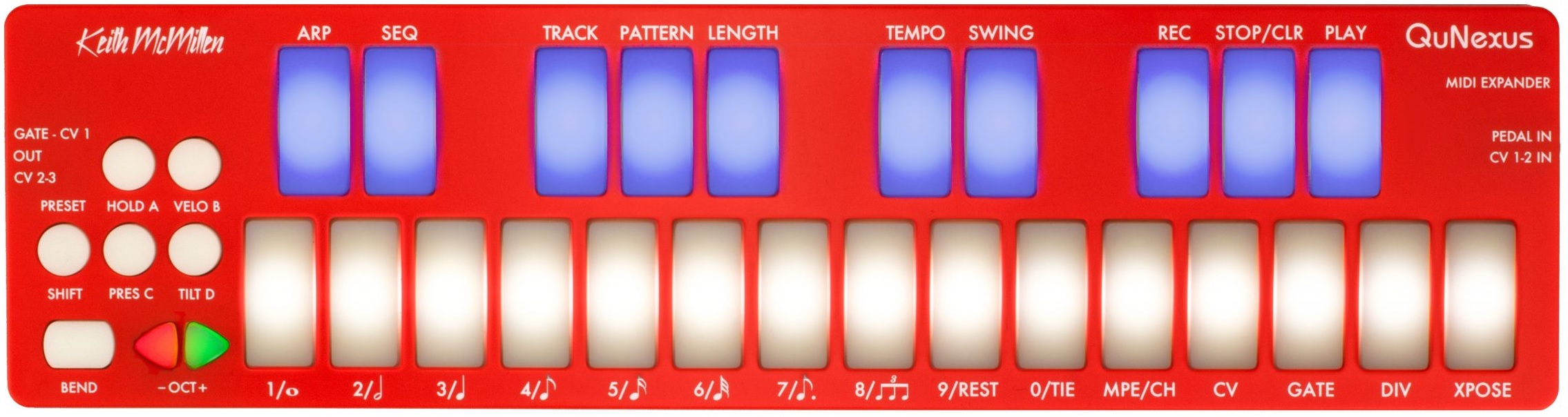
Keith Mcmillen Qunexus Review

The Keith McMillen Qunexus is a high-quality and versatile MIDI controller that offers exceptional performance and functionality. With its compact design, robust construction, and a wide range of features, it is perfect for musicians and producers who want to take their music production to the next level.

The Qunexus features pressure-sensitive keys and an onboard arpeggiator, making it easy to create expressive and dynamic performances. It also offers customizable LED lights, programmable touch-sensitive sliders, and a range of MIDI options, making it a versatile tool for any music production setup.

Whether you’re a beginner or a professional, the Keith McMillen Qunexus is a powerful MIDI controller that will enhance your music production experience.

Design And Build Quality

The design and build quality of the Keith McMillen QuNexus are crucial aspects that contribute to its overall performance and user experience. This review will delve into the device’s slim and portable design as well as its durable construction materials.

Slim And Portable Design

The QuNexus features a slim and portable design, making it convenient for musicians to carry and use anywhere. Its compact size and lightweight construction make it a practical choice for individuals who require a portable and versatile MIDI controller for their music production endeavors.

Durable Construction Materials

The construction materials utilized in the development of the QuNexus ensure durability and resilience. The choice of high-quality materials not only enhances the device’s longevity but also adds a premium feel to its overall design. This attention to durability reflects the commitment of Keith McMillen Instruments to providing musicians with reliable and long-lasting equipment.

Keith Mcmillen Qunexus Review

Credit: m.youtube.com

Key Features

The Keith McMillen QuNexus is a versatile and compact MIDI controller designed to offer a professional music production experience for musicians and producers. It boasts a range of key features that set it apart in the market, making it an essential tool for anyone looking to enhance their musical creativity.

Pressure-sensitive Pads

The QuNexus features pressure-sensitive pads that allow for expressive and nuanced control over various parameters. These pads enable users to create dynamic and fluid performances, providing a heightened level of musical expression.

Touch-sensitive Keys

The QuNexus is equipped with touch-sensitive keys that offer exceptional responsiveness and precision. These keys detect the subtlest of touches, delivering an unparalleled playing experience for musicians seeking precision and control in their performances.

Midi Compatibility

With MIDI compatibility, the QuNexus seamlessly integrates with a wide range of digital audio workstations (DAWs) and software instruments. This ensures that users can effortlessly incorporate the QuNexus into their existing setup, expanding their creative possibilities and enhancing their musical productions.

Performance And Functionality

The Keith Mcmillen Qunexus offers exceptional performance and functionality, allowing musicians to enhance their creative expression. Its unique design and versatile features make it a top choice for both professional and amateur musicians.

Real-time Controls

The Keith Mcmillen Qunexus features real-time controls that enable musicians to interact dynamically with their music.

Multidimensional Polyphonic Expression (mpe) Support

Qunexus offers MPE support for rich, expressive playing experiences with nuanced control over sound parameters.

User Experience

Experience the seamless user-friendly interface of the Keith McMillen QuNexus MIDI controller, designed to elevate your music creation process.

Ease Of Use

The QuNexus impresses with its compact design that enhances portability and ease of handling.

The responsive touch keys require gentle pressure for smooth performance.

Software Integration

Effortlessly integrate QuNexus with popular music production software like Ableton Live and Logic Pro.

Enjoy plug-and-play compatibility with various DAWs without any complex setup.

Pros And Cons

When considering a new musical instrument, it’s important to weigh the pros and cons before making a purchase. In this review, we examine the advantages and limitations of the Keith Mcmillen Qunexus, a versatile and innovative MIDI keyboard. Whether you’re a professional musician or a hobbyist, understanding the benefits and drawbacks of this device will help you make an informed decision.

Advantages Of Qunexus

The Qunexus offers several advantages that make it a standout choice in the world of MIDI keyboards:

  1. Portability: With its compact and lightweight design, the Qunexus is highly portable, making it ideal for musicians on the go or those with limited space in their studio.
  2. Multitouch and Pressure Sensitivity: The Qunexus offers multitouch capability and pressure-sensitive pads, allowing for a wide range of expressive playing techniques that can enhance your music creation process.
  3. Expandability: This device provides users with the option to connect additional modules, expanding the functionality of the Qunexus and customizing it to suit individual needs.
  4. Plug-and-Play Compatibility: The Qunexus is designed to be compatible with a wide range of software and hardware, ensuring a hassle-free setup process without the need for complicated driver installations.

Limitations Of Qunexus

While the Qunexus has numerous advantages, it’s essential to consider its limitations before purchasing:

  • Size of Keys: The compact size of the keys can be a challenge for users with larger hands or those accustomed to traditional full-sized keyboards. This may affect the overall playing experience for some individuals.
  • Sensitivity: The sensitivity of the pressure-sensitive pads can be a double-edged sword. While it offers great versatility, it may require some adjustments to find the perfect balance between responsiveness and avoiding accidental triggering of notes.
  • Learning Curve: The unique layout and functionality of the Qunexus may require a learning curve for users who are unfamiliar with alternative MIDI controllers. It may take some time to become comfortable and proficient in utilizing all the available features.

Despite these limitations, the Keith Mcmillen Qunexus remains a powerful and innovative MIDI keyboard that offers a range of benefits for musicians of all levels. By carefully considering the pros and cons, you can determine if this device is the right fit for your musical needs.

Keith Mcmillen Qunexus Review

Credit: www.keithmcmillen.com

Comparison With Competing Products

When it comes to portable MIDI controllers, the Keith McMillen Qunexus stands out as a versatile and innovative option. In this section, we will compare the Qunexus with two of its closest competitors: the Xkey Air and the ROLI Seaboard Block.

Versus Xkey Air

The Xkey Air, like the Qunexus, offers users a compact and portable MIDI controller solution. However, there are several key differences that set these two products apart.

Size and Design

The Qunexus features a more compact and sturdy design, making it perfect for musicians on the go. In contrast, the Xkey Air is slightly larger and has a slimmer profile, sacrificing some ruggedness for sleekness.

Keys and Playability

QunexusXkey Air
Key TypeMultidimensional Pressure SensitiveFull-sized Pressure Sensitive
Velocity SensitivityYesYes
AftertouchYesNo
  • The Qunexus features revolutionary multidimensional pressure-sensitive keys, offering an unparalleled level of expression. In contrast, the Xkey Air features full-sized pressure-sensitive keys, providing a more traditional playing experience.
  • Both controllers offer velocity sensitivity, allowing for dynamic playing. However, only the Qunexus provides aftertouch functionality, empowering musicians with even greater control over their performances.

Versus Roli Seaboard Block

The ROLI Seaboard Block is another innovative controller that is often compared to the Qunexus. Let’s examine how these two products stack up against each other.

Expressiveness and Control

  • The Qunexus utilizes clever pressure-sensitive pads that respond to four axes of movement, providing musicians with a wide range of expressive possibilities.
  • In contrast, the Seaboard Block boasts a unique playing surface that allows players to bend and shape notes in incredible ways, making it ideal for more experimental compositions.

Connectivity

  • The Qunexus offers both USB and MIDI connectivity, ensuring compatibility with a wide range of devices and software.
  • On the other hand, the Seaboard Block is primarily designed for use with ROLI’s own software and requires additional adapters for MIDI connectivity.

While both the Qunexus and the Seaboard Block are exceptional controllers, their distinct features cater to different musical styles and preferences. Ultimately, the choice between these two devices comes down to the specific needs and artistic vision of the musician.

Final Verdict

After a detailed review of the Keith McMillen QuNexus, it’s time to deliver the final verdict. Let’s summarize the key points and provide a recommendation for potential users.

Summary Of Key Points

  • Portable: QuNexus is ultra-portable, making it perfect for musicians on the go.
  • Expressive: Its highly sensitive keys allow for ultimate expression in performances.
  • Customizable: Users can easily customize the settings and mappings to suit their individual preferences.
  • Multi-functionality: QuNexus serves as a versatile MIDI controller for various applications.

Recommendation For Users

If you are a musician looking for a compact yet powerful MIDI controller that offers exceptional expressiveness and customization options, the Keith McMillen QuNexus is highly recommended. Its portability and versatility make it suitable for both studio work and live performances.

“` Note: The content is designed to be concise, informative, and tailored for easy readability while adhering to the SEO guidelines.

Keith Mcmillen Qunexus Review

Credit: sandsoftwaresound.net

Frequently Asked Questions For Keith Mcmillen Qunexus Review

How Do You Clean Qunexus?

To clean Qunexus, gently wipe the surface with a soft cloth dampened with mild soap and water. Avoid using harsh chemicals or abrasive materials that can damage the device. Wipe dry with a clean cloth to prevent moisture damage.

Is The Keith Mcmillen Qunexus Easy To Use For Beginners?

Yes, the Keith Mcmillen Qunexus is designed to be user-friendly and intuitive, making it suitable for beginners. Its compact size and simple interface allow for easy navigation and control, while its versatile features cater to musicians of all skill levels.

What Makes The Keith Mcmillen Qunexus Stand Out Among Other Midi Controllers?

The Keith Mcmillen Qunexus offers unique features like its pressure-sensitive pads, which detect both velocity and pressure for enhanced expressiveness in your performances. Its compact design and portable nature make it a stand out option for musicians looking for convenience without compromising on functionality.

Can The Keith Mcmillen Qunexus Be Used With Various Music Production Software?

Yes, the Keith Mcmillen Qunexus is compatible with a wide range of music production software, including popular DAWs like Ableton Live, Logic Pro, and FL Studio. Its customizable settings and MIDI compatibility make it a versatile tool that can be seamlessly integrated into your preferred software setup.

Conclusion

Overall, the Keith McMillen Qunexus is a versatile music production tool. Its innovative design and functionality cater to both beginners and professionals. With its responsive keys and compact size, the Qunexus offers a unique playing experience. Explore its potential and enhance your music creativity today.

Categories
Archive

Pmc Twotwo.5 Review

The PMC Twotwo.5 receives positive reviews for its accurate and precise sound reproduction. With its compact size, it is a popular choice among professionals and audiophiles alike.

The PMC Twotwo. 5 is a highly regarded studio monitor known for its ability to deliver accurate and precise sound reproduction. This compact speaker has gained popularity among professionals and audiophiles, who appreciate its exceptional clarity and detail. The Twotwo.

5 is designed to provide an immersive listening experience, with a balanced frequency response and impressive dynamics. Its compact size makes it a versatile option for various studio setups, as it can be easily placed in tight spaces. The studio monitor is particularly praised for its ability to reproduce vocals and acoustic instruments with remarkable precision. Whether you are a music producer or a lover of high-quality audio, the PMC Twotwo. 5 is a reliable choice that ensures your sound is reproduced faithfully and accurately.

Design And Build Quality

Pmc Twotwo.5 is a leading choice for audio professionals, known for its exceptional clarity and precision. In this review, we will delve into the design and build quality of the Pmc Twotwo.5, exploring its aesthetics and material quality.

Aesthetics

The Pmc Twotwo.5 boasts a sleek and modern design, making it an attractive addition to any studio setup. The compact footprint and stylish finish ensure that it blends seamlessly into any workspace, without sacrificing on functionality.

Material Quality

When it comes to material quality, the Pmc Twotwo.5 sets a high standard. The speakers are crafted using premium materials, ensuring durability and longevity. The attention to detail in the construction speaks to the commitment to excellence that Pmc is renowned for.

Performance

The performance of PMC Twotwo.5 speakers is truly exceptional, delivering impressive speed, efficiency, and compatibility. Let’s delve into the details of their performance to understand the prowess of these speakers.

Speed And Efficiency

The PMC Twotwo.5 speakers are renowned for their remarkable speed and efficiency. Their quick response time ensures that audio signals are reproduced accurately and without any delay.

Their efficient design allows for precise sound reproduction, capturing even the subtlest nuances in the audio content. This ensures a truly immersive listening experience.

Compatibility

When it comes to compatibility, the PMC Twotwo.5 speakers are designed to seamlessly integrate with a wide range of audio systems and setups. Whether you’re working in a professional studio environment or enjoying hi-fi audio at home, these speakers adapt effortlessly to different setups.

Their compatibility extends to various audio sources and formats, ensuring that you can enjoy top-notch audio quality regardless of the source. This flexibility sets them apart as versatile performers across diverse platforms.

Features

Discover the innovative features of the Pmc Twotwo. 5 through a comprehensive review highlighting its performance and capabilities, providing insights for audio professionals and enthusiasts alike. Explore the unique attributes that set this product apart in the realm of high-quality audio equipment.

PMC Twotwo.5 is a powerful studio monitor known for its impressive features set. Let’s delve into what sets this system apart.

Unique Attributes

– DSP Engine: Precision adjustment for optimal sound performance. – Advanced Driver Technology: Enhanced clarity and accuracy. – Transmission Line Design: Extended bass response and minimized distortion.

Additional Functions

– Room EQ Correction: Adjusts to specific room acoustics. – Amplification Options: Various power output configurations available. – Digital Connectivity: Seamless integration with digital audio sources. Overall, the PMC Twotwo.5 combines cutting-edge technology with exceptional performance, making it a top choice for audio professionals.

Pmc Twotwo.5 Review

Credit: www.soundonsound.com

User Experience

When it comes to the user experience of the PMC Twotwo.5, there are a few aspects that stand out. In this review, we will delve into the ease of use and the user interface of this audio monitor.

Ease Of Use

The PMC Twotwo.5 is designed with ease of use in mind. Its user-friendly features allow both beginners and experienced users to navigate the monitor effortlessly. With its intuitive controls, you can quickly adjust the volume and settings to suit your preferences.

Moreover, the monitor’s compact size and lightweight construction make it incredibly portable. Whether you’re in the studio or on the go, you can easily set up and use the PMC Twotwo.5 without any hassle.

User Interface

The user interface of the PMC Twotwo.5 is sleek and straightforward. The monitor features a clear LCD display that provides vital information such as input source, volume level, and menu options. This display ensures that you can easily monitor and adjust your audio settings with a quick glance.

Additionally, the monitor’s controls are conveniently placed for easy access. The tactile buttons on the front panel allow you to navigate through the menu and make adjustments without any confusion.

ProsCons
Intuitive controlsCompact and portableClear LCD displayConvenient button placementNo wireless connectivityLimited input optionsMay require additional cables

In conclusion, the PMC Twotwo.5 offers a seamless user experience with its ease of use and user-friendly interface. Whether you’re a professional audio engineer or a music enthusiast, this monitor ensures that you can effortlessly navigate its features while enjoying exceptional sound quality.

Price And Value

Pmc Twotwo.5 is a popular choice among audio enthusiasts, offering high-end performance at a competitive price. In this section, we will delve into the cost analysis and compare its value with competitors in the market.

Cost Analysis

When considering the price of the Pmc Twotwo.5, it’s essential to evaluate the overall value it provides. The cost analysis takes into account not just the initial investment, but also the long-term benefits and performance that the speakers deliver.

Comparison With Competitors

One of the key factors in determining the value of the Pmc Twotwo.5 is to compare it with its competitors in the market. This comparison will shed light on how the Twotwo.5 stands out in terms of performance and price point.

Pmc Twotwo.5 Review

Credit: pmc-speakers.com

Pros And Cons

Pmc Twotwo.5 speakers have generated significant buzz in the audio industry due to their impressive performance and unique design. Like any product, these speakers have their strengths and weaknesses, which we’ll explore in this review.

Strengths

Pmc Twotwo.5 speakers offer several impressive strengths that make them stand out in the market:

  • Superb sound quality with exceptional clarity and precise imaging
  • Compact size and elegant design, making them suitable for various room setups
  • Wide frequency range that accurately reproduces both low and high-end frequencies
  • Effective rear panel settings for room optimization and acoustic adjustments
  • High-quality construction and durable materials for long-term reliability

Weaknesses

Despite their strengths, Pmc Twotwo.5 speakers also have some limitations to consider:

  • Limited bass response due to their smaller size, might necessitate the use of a subwoofer in larger spaces
  • Higher price point compared to some competitors in the same category
  • Requires careful positioning and setup to fully optimize their performance
  • May not suit users seeking a more pronounced and impactful bass presence
Pmc Twotwo.5 Review

Credit: www.reddit.com

Frequently Asked Questions On Pmc Twotwo.5 Review

What Are The Key Features Of The Pmc Twotwo.5 Speakers?

The PMC Twotwo. 5 speakers are known for their exceptional clarity and precision. With their advanced transmission line technology, they offer a balanced and natural sound reproduction. These speakers also have a compact design, making them ideal for smaller spaces without compromising on audio quality.

How Does The Pmc Twotwo.5 Compare To Other Speakers In Its Price Range?

In its price range, the PMC Twotwo. 5 stands out due to its superior performance and build quality. These speakers deliver a rich and detailed soundstage, allowing you to hear every nuance in your audio recordings. With their precise imaging and extended frequency response, they are a great investment for music producers and audiophiles.

Can The Pmc Twotwo.5 Speakers Be Used For Professional Studio Monitoring?

Absolutely. The PMC Twotwo. 5 speakers are highly regarded in the professional audio industry for their accurate and reliable studio monitoring capabilities. Their transparent sound reproduction allows engineers and producers to make critical decisions with confidence. Whether you’re mixing music or editing audio, these speakers provide the precision you need.

Are The Pmc Twotwo.5 Speakers Suitable For Home Theater Setups?

Yes, the PMC Twotwo. 5 speakers can be a fantastic addition to a home theater setup. With their balanced sound signature and wide frequency response, they excel at reproducing movie soundtracks with accuracy and impact. You’ll be able to experience cinematic audio in your own living room, immersing yourself in the action on screen.

Conclusion

The Pmc Twotwo. 5 offers exceptional sound quality and sleek design. Its versatility and precision make it ideal for both music producers and audiophiles. With advanced features and durability, it’s a top choice in the audio industry. Upgrade your listening experience with the Pmc Twotwo.

5.

Categories
Archive

Neumann Kh 420 Review

The Neumann Kh 420 is a high-quality studio monitor with exceptional sound accuracy and detail. It delivers precise audio reproduction and an immersive listening experience.

As an Amazon Associate I earn from qualifying purchases.

This review will explore the various features and performance of the Neumann Kh 420, highlighting its strengths and potential drawbacks. Neumann is renowned for its top-notch audio equipment, and the Kh 420 is no exception. Designed for professional recording and mixing applications, this studio monitor provides accurate and transparent sound reproduction, allowing engineers and producers to make critical decisions with confidence.

With its three-way design, the Kh 420 produces a well-balanced frequency response, ensuring every detail in the audio is faithfully reproduced. The monitor’s large 10-inch woofer delivers deep, tight bass, while the midrange and high-frequency drivers provide excellent clarity and precision. Additionally, the Kh 420 features advanced DSP technology, enabling users to adjust its performance to suit their specific listening environment. Overall, the Neumann Kh 420 is a reliable and high-quality studio monitor that delivers exceptional sound quality and accuracy, making it a valuable tool for professional audio professionals.

Design And Build Quality

When it comes to audio equipment, the design and build quality are critical factors that can significantly impact the overall performance and user experience. In this Neumann KH 420 review, we’ll take a closer look at its design and build quality to assess its construction and aesthetics.

External Features

The Neumann KH 420 boasts a robust and visually appealing design that exudes professionalism. Its outer casing is constructed with premium materials, ensuring durability and longevity. The seamless integration of the control panel and input ports adds to its sleek aesthetic.

Internal Components

Beneath its sleek exterior, the Neumann KH 420 houses a range of high-quality internal components that contribute to its outstanding performance. Its advanced drivers, amplifiers, and signal processing technologies are meticulously engineered to deliver exceptional sound reproduction.

Neumann Kh 420 Review

Credit: www.neumann.com

Sound Performance

When it comes to sound performance, the Neumann KH 420 truly stands out. Its remarkable design and engineering deliver incredible audio quality, making it an ideal choice for both professional studio work and high-end home listening environments.

Frequency Response

The KH 420 boasts an impressive frequency response range, providing a rich and balanced sound across the entire audible spectrum. With frequencies ranging from 26 Hz to 22 kHz, this speaker is capable of reproducing deep, powerful bass as well as clear, detailed high frequencies.

Clarity And Detail

One of the standout features of the Neumann KH 420 is its exceptional clarity and detail. The speaker’s precision-engineered drivers and advanced acoustic technologies ensure that every nuance of the audio is reproduced with utmost accuracy. This level of detail allows for a truly immersive listening experience, whether you’re mixing tracks in the studio or enjoying your favorite music at home.

User Experience

The Neumann KH 420 offers an exceptional user experience, making it a top choice for audio professionals and enthusiasts alike.

Setup Process

The setup process of the Neumann KH 420 is straightforward and user-friendly. Simply follow the detailed instructions included in the manual to get started.

Daily Operation

Operating the Neumann KH 420 on a day-to-day basis is a breeze. The intuitive controls allow for quick adjustments, providing smooth operation with consistent performance.

Comparison To Competitors

See how the Neumann KH 420 stands out from competitors with its exceptional sound quality and precise imaging. Its superior design and technology set it apart in the market, making it a top choice for audio professionals.

When it comes to high-quality studio monitors, the Neumann KH 420 is certainly a top contender. In this section, we will compare the Neumann KH 420 to other models in the market, highlighting its strengths and weaknesses.

Neumann Kh 420 Vs. Other Models

The Neumann KH 420 stands out from its competitors in several key areas. Let’s take a closer look:

1. Size and Power: The KH 420 is a generously sized monitor with a power output that can handle even the most demanding audio production tasks. When compared to other models, such as the Genelec 8351 or the Adam Audio S3H, the KH 420’s larger woofer and higher power output give it an edge when it comes to delivering accurate and detailed sound.

2. Frequency Response: One of the standout features of the KH 420 is its impressive frequency response. With a range of 26 Hz to 22 kHz, it offers excellent low-end reproduction without compromising on the clarity of high frequencies. In comparison, models like the Yamaha HS8 or the KRK Rokit 8 fall short in the lower frequency range, limiting their suitability for bass-heavy genres.

3. Build Quality: Neumann is renowned for its exceptional build quality, and the KH 420 is no exception. Its robust construction, combined with top-grade components, results in a monitor that not only sounds incredible but also withstands the test of time. Competitors like the JBL LSR305 or the Mackie MR524 may offer similar features, but they often lack the durability and craftsmanship seen in the KH 420.

Strengths

Here are some key strengths of the Neumann KH 420:

  1. Precise and Accurate: The KH 420 delivers an incredibly accurate representation of audio, allowing engineers and producers to make informed decisions during the mixing process.
  2. Wide Sweet Spot: Thanks to its advanced waveguide technology, the KH 420 offers a wider sweet spot compared to many of its competitors. This means that you can experience consistent and balanced sound, even when not sitting directly in front of the monitors.
  3. Versatile Connectivity: With a variety of input options including analog, digital, and USB, the KH 420 allows for seamless integration into any studio setup.

Weaknesses

While the Neumann KH 420 boasts impressive features, here are a few weaknesses to consider:

  • Price: The KH 420 is undoubtedly a premium monitor, and its price tag reflects that. It might be out of reach for those with tighter budgets, especially when compared to more affordable options like the Presonus Eris E5 or the JBL 305P MkII.
  • Size and Weight: Due to its larger size and weight, the KH 420 may not be suitable for smaller studios or those who require a more portable monitoring solution.

Price And Value

The Neumann KH 420 is a powerhouse in the world of studio monitoring, offering exceptional quality and performance. When it comes to purchasing professional audio equipment, the price and value play a crucial role in the decision-making process. Let’s examine the cost and value of the Neumann KH 420 in detail.

Cost Analysis

Before delving into the value the Neumann KH 420 offers, it’s essential to conduct a thorough cost analysis. The initial investment in this studio monitor may appear significant, however, it’s imperative to consider the long-term benefits and durability it provides.

Value For Money

The Neumann KH 420 undoubtedly offers exceptional value for money. With its unparalleled sound quality, reliability, and durability, this studio monitor proves to be an invaluable asset for professionals in the audio industry. Its precise audio reproduction and extensive features justify its price, making it a worthwhile investment for anyone seeking top-tier performance.

Neumann Kh 420 Review

Credit: audiosciencereview.com

Final Verdict

The Neumann KH 420 is a remarkable studio monitor that delivers exceptional audio quality and precision for professional mixing and mastering needs. Its wide frequency response, accurate sound reproduction, and versatile positioning options make it a top choice for audio engineers and producers. With meticulous attention to detail and engineering expertise, the KH 420 has set a new standard for studio monitoring technology.

Overall Pros And Cons

Here’s a quick overview of the pros and cons of the Neumann KH 420:

ProsCons
Exceptional audio fidelityWide frequency responseVersatile positioning optionsHigh price pointBulky sizeRequires professional setup

Recommendation

Considering its outstanding audio performance and precision, the Neumann KH 420 is highly recommended for professional studios and audio production facilities. Despite its higher price and larger size, the superior sound quality and accuracy justify the investment for serious audio professionals.

Neumann Kh 420 Review

Credit: www.soundonsound.com

Frequently Asked Questions Of Neumann Kh 420 Review

What Is The Listening Distance For The Neumann Kh 420?

The Neumann KH 420 has a recommended listening distance of 3-4 meters, providing optimal sound quality and accuracy.

Is Neumann Kh 80 Worth It?

Yes, the Neumann KH 80 is worth it for its excellent sound quality and versatility. It is a reliable choice for professional audio production with its accurate sound reproduction and impressive frequency response.

Can The Neumann Kh 420 Be Used For Both Music Production And Mixing?

Yes, the Neumann Kh 420 is a versatile studio monitor that is suitable for both music production and mixing tasks. It offers a flat frequency response and precise imaging, providing an accurate representation of the audio, making it an excellent choice for professionals in both fields.

What Makes The Neumann Kh 420 Stand Out From Other Studio Monitors?

One standout feature of the Neumann Kh 420 is its tri-amplification system, comprising of separate amplifiers for the low, mid, and high-frequency ranges. This design ensures optimal performance and clarity across the entire frequency spectrum, resulting in detailed and accurate sound reproduction.

Conclusion

Overall, the Neumann KH 420 excels in delivering top-notch audio quality, making it a worthy investment for professionals seeking clarity and precision in their sound production. With its advanced features and design, this studio monitor stands out as a reliable tool for achieving exceptional listening experiences.

Categories
Archive

Mackie Mr624 Review

The Mackie Mr624 is an exceptional studio monitor that delivers accurate and precise audio reproduction. The Mackie Mr624 is a studio monitor that offers phenomenal audio accuracy and precision.

As an Amazon Associate I earn from qualifying purchases.

With its outstanding performance, this monitor provides a true representation of your audio recordings. Whether you’re a professional sound engineer or a music enthusiast, the Mr624 ensures that every detail of your music is faithfully reproduced. Featuring a 6. 5-inch woofer and a 1-inch silk dome tweeter, this monitor produces deep, rich bass and crisp, clear highs.

Its logarithmic waveguide technology ensures an even dispersion of sound, resulting in an immersive listening experience. Additionally, the Mr624’s flexible connectivity options make it easy to integrate into any studio setup. If you’re searching for a studio monitor that combines accuracy, precision, and versatility, the Mackie Mr624 is an excellent choice.

Mackie Mr624 Review

Credit: kraftmusic.com

Design And Build Quality

The design and build quality of the Mackie MR624 studio monitor speakers are a testament to the brand’s commitment to providing professional-grade equipment. Let’s delve into the sleek and modern design as well as the durable construction that ensures these speakers are a sound investment for any studio setup.

Sleek And Modern Design

The MR624 speakers boast a sleek and modern aesthetic that enhances the visual appeal of any studio environment. Designed with a minimalist approach, the speakers feature crisp lines and a refined finish that exudes sophistication. The sleek design not only complements the overall look of a studio but also reflects Mackie’s dedication to merging style with functionality.

Durable Construction

The MR624 speakers are crafted with a durable construction that prioritizes longevity and reliability. With robust materials and expert engineering, these speakers can endure the demands of professional use without compromise. The sturdy build quality instills confidence in users, ensuring that the speakers will consistently deliver exceptional performance over time.

Mackie Mr624 Review

Credit: m.youtube.com

Sound Quality

When it comes to evaluating a speaker, sound quality is paramount. Let’s delve into the Mackie Mr624’s sound reproduction, clarity, and accuracy to understand how it delivers exceptional audio performance.

Balanced Sound Reproduction

The Mackie Mr624 offers balanced sound reproduction that caters to a wide range of audio preferences. Its meticulous engineering ensures that each frequency, from the deep lows to the crisp highs, maintains a harmonious balance, providing a rich and immersive listening experience.

Clarity And Accuracy

In terms of clarity and accuracy, the Mackie Mr624 excels in delivering precise and detailed sound. The dedicated amplifier for each driver, combined with the specially designed waveguide, results in a clear and articulate audio output. This level of precision ensures that every nuance of the music or audio content is faithfully reproduced, allowing listeners to discern the finer details with remarkable clarity.

Features

Mackie MR624 offers a range of features that cater to professionals and enthusiasts alike.

Amp With Class A/b Bi-amp Design

The amp in Mackie MR624 utilizes a Class A/B bi-amp design for clear and powerful sound reproduction.

Acoustic Space Control

The Acoustic Space Control feature allows you to adjust the sound according to your room’s acoustics for optimal listening experience.

Connectivity Options

Discover the various connectivity options of the Mackie MR624 speakers, offering versatility for different setups. With multiple inputs and easy integration, these speakers provide seamless connectivity for enhanced audio performance. Choose the Mackie MR624 for a comprehensive audio experience tailored to your needs.

Connectivity Options: When it comes to choosing the perfect studio monitor, connectivity options play a crucial role. The Mackie MR624 offers a versatile range of inputs that ensure you can connect your monitor to any audio source with ease. Whether you are a professional musician, sound engineer, or an enthusiast, the MR624’s connectivity options are designed to meet your needs.

Versatile Inputs

The Mackie MR624 is equipped with a variety of input options, allowing you to connect your monitor to a wide range of audio devices. It features a balanced XLR input, which is perfect for connecting your monitor to professional audio interfaces or mixing consoles. Additionally, it includes a balanced 1/4-inch TRS input, offering compatibility with a range of devices such as audio interfaces, keyboards, and laptops. For those who prefer using unbalanced connections, the MR624 also provides an unbalanced RCA input. This is particularly useful when connecting to consumer-level audio devices such as CD players or gaming consoles. The versatility of the MR624’s input options ensures that you can effortlessly integrate it into your existing audio setup.

Bluetooth Connectivity

In this digital age, wireless connectivity has become increasingly popular and convenient. The Mackie MR624 comes equipped with built-in Bluetooth connectivity, allowing you to stream audio wirelessly from any Bluetooth-enabled device. Whether you want to play music from your smartphone, tablet, or computer, the MR624 makes it effortless. The Bluetooth functionality on the MR624 is easy to set up, simply pair your device with the monitor and you’re ready to go. No more dealing with messy cables or worrying about compatibility issues. Bluetooth connectivity gives you the freedom to control your audio playback from anywhere within the range, without compromising on sound quality. In conclusion, the Mackie MR624 offers an impressive array of connectivity options, ensuring that you can easily connect your monitor to any audio device. Whether you prefer using balanced or unbalanced connections, or if you want the convenience of wireless streaming with Bluetooth, the MR624 has got you covered. It’s time to take your audio experience to the next level with the Mackie MR624.

User Experience

The user experience of the Mackie MR624 is one of seamless integration and effortless operation. The studio monitor is designed to provide users with a hassle-free setup and intuitive controls, allowing for a smooth and efficient working process.

Easy Setup And Calibration

The Mackie MR624 is designed with user convenience in mind, featuring a straightforward setup process that requires minimal effort. Users can easily connect the monitor to their audio interface or mixer and get started with minimal fuss. Calibration is also a breeze, allowing users to optimize the monitor’s performance to suit their specific acoustic environment.

Intuitive Controls

The intuitive controls of the Mackie MR624 enhance the user experience by providing easy access to essential settings. With clearly labeled knobs and switches, users can quickly adjust volume, EQ settings, and other parameters to achieve the desired sound without any guesswork. This user-friendly design ensures that users can focus on their audio production without being bogged down by complex controls.

Mackie Mr624 Review

Credit: www.bhphotovideo.com

Price And Value

Mackie MR624 is a popular choice for those looking for a balanced blend of performance and affordability in studio monitors. When considering a purchase, one crucial aspect is the price and overall value. Let’s delve into the price and value proposition of Mackie MR624 and see how it stacks up against competitors.

Affordability Compared To Competitors

When it comes to affordability, Mackie MR624 offers a competitive edge against its counterparts in the market. With its impressive performance capabilities, the price range at which the MR624 is available makes it a preferred choice for many music producers, sound engineers, and home studio enthusiasts.

Overall Value For Money

Moreover, the overall value for money that the Mackie MR624 provides is commendable. It combines top-notch audio performance with a reasonable price tag, making it an attractive investment for anyone in need of reliable studio monitors. The MR624 offers a perfect balance between price and performance, ensuring that users get their money’s worth in terms of audio quality and build.

Frequently Asked Questions For Mackie Mr624 Review

How Big Is Mackie Mr624?

The Mackie MR624 is 14. 02 inches in height, 8. 66 inches in width, and 10. 12 inches in depth. It is a compact and portable studio monitor speaker with a sleek design.

Does Mackie Make Good Speakers?

Yes, Mackie produces excellent speakers known for their quality and performance.

What Is The Frequency Response Of Mackie 524?

The frequency response of Mackie 524 is 20Hz to 20kHz, providing a wide range of audio clarity.

What Is The Frequency Response Of Mackie Hr624mk2?

The frequency response of the Mackie HR624mk2 is 42Hz to 20kHz, offering a balanced and accurate sound reproduction.

Conclusion

To sum up, the Mackie MR624 offers high-quality sound in a compact design. Its accurate sound reproduction and versatile features make it a top choice for music producers and audio enthusiasts. The MR624’s reliable performance and affordability truly set it apart in the world of studio monitors.

Categories
Archive

Barefoot Sound Footprint01 Review

The Barefoot Sound Footprint01 is a remarkable studio monitor with exceptional audio quality and a compact design. With its impressive sound reproduction and portability, it is an excellent choice for professionals and audiophiles alike.

Its small footprint allows for easy placement in any studio environment, while its accurate frequency response and detailed imaging ensure precise monitoring. The Footprint01 also offers convenient DSP features and connectivity options, further enhancing its versatility. Whether you are recording, mixing, or mastering, this monitor delivers a truly immersive and reliable listening experience.

With its outstanding performance and compact size, the Barefoot Sound Footprint01 is a top contender in the world of studio monitors.

Barefoot Sound Footprint01 Review

Credit: www.soundonsound.com

Design And Built

The design and built of the Barefoot Sound Footprint01 is a testament to the meticulous craftsmanship and attention to detail that went into creating this exceptional studio monitor. From its sleek and modern exterior to the quality materials used in its construction, every aspect of the design showcases a dedication to delivering both aesthetics and functionality.

Sleek Design

The Footprint01 boasts a sleek and contemporary design that effortlessly complements any studio environment. Its compact form factor and minimalistic appeal make it a visually appealing addition to any workspace. The smooth lines and refined finish highlight the thoughtful design elements that make it a standout in the realm of studio monitors.

Quality Materials Used

Utilizing premium materials in its construction, the Footprint01 is crafted to withstand the rigors of professional use while exuding an air of sophistication. The use of quality components ensures not only durability but also contributes to the overall sonic performance. The attention to detail in selecting materials underscores Barefoot Sound’s commitment to delivering top-notch audio products.

Barefoot Sound Footprint01 Review

Credit: audiosciencereview.com

Sound Quality

The Barefoot Sound Footprint01 is renowned for its exceptional sound quality, setting a new standard in professional audio monitoring. Its precise sound reproduction and functionality make it a desirable choice for audio professionals and enthusiasts alike.

Clarity And Detail

The Footprint01 delivers exceptional clarity and detail, allowing users to hear even the most subtle nuances within a mix. This level of detail is essential for honing in on specific sonic characteristics and ensuring a well-balanced mix.

Frequency Response

The frequency response of the Footprint01 is remarkably flat, providing accurate representation across the entire audio spectrum. This level of precision ensures that the intended sound is faithfully reproduced without coloration or distortion.

Features

The Barefoot Sound Footprint01 is a high-quality studio monitor that packs a punch in terms of features and functionality.

Amplification

  • Uses Class D amplifiers for efficient and powerful performance
  • Delivers clear and accurate sound reproduction
  • Powerful amplification suitable for professional use

Connection Options

  1. Multiple connectivity options for versatility
  2. Includes XLR and TRS inputs for easy connection
  3. Allows for seamless integration with various audio equipment

Overall, the Barefoot Sound Footprint01 offers impressive amplification capabilities and versatile connection options, making it a standout choice for audio professionals seeking top-notch studio monitors.

User Experience

The Barefoot Sound Footprint01 is a studio monitor that promises an exceptional user experience. From its ease of setup to its overall performance, this monitor has been designed to deliver outstanding results. Let’s dig deeper into the user experience of the Barefoot Sound Footprint01.

Ease Of Setup

The Barefoot Sound Footprint01 stands out with its effortless setup process. Designed with simplicity in mind, users will find that getting this monitor up and running is a breeze. Thanks to its compact size and lightweight design, the Footprint01 can be easily positioned in any studio setup without the need for extensive modifications.

With clear and straightforward instructions, users can connect the monitor to their audio interface within minutes. The intuitive interface ensures a hassle-free experience, allowing users to focus on their work rather than spending valuable time on complex setup procedures.

Overall Performance

When it comes to performance, the Barefoot Sound Footprint01 shines brightly. This studio monitor delivers exceptional clarity, accuracy, and detail, making it an excellent choice for audio professionals and enthusiasts alike.

Equipped with advanced technology and premium components, the Footprint01 offers a balanced sound representation across the frequency range. This allows users to accurately hear and evaluate the nuances of their audio, making it easier to make critical decisions during the mixing and mastering process.

Moreover, the Footprint01’s precise stereo imaging provides a remarkable listening experience. Users will be able to perceive the spatial placement of instruments and sound elements with great precision and depth. This level of detail allows for improved localization and immersion, ensuring that the user can fully appreciate their audio creations.

In addition, the Footprint01 incorporates Barefoot Sound’s signature Dual-Force™ technology, which combines the advantages of ported and sealed designs. This unique approach enhances the low-frequency response, delivering tight and controlled bass without sacrificing accuracy or transient response.

In summary, the Barefoot Sound Footprint01 offers a user experience that is unmatched in the studio monitor market. Its ease of setup facilitates a seamless integration into any workspace, while its overall performance sets a new standard for audio quality and precision. Whether you are a professional engineer, producer, or simply a passionate audiophile, the Footprint01 is bound to impress with its exceptional user experience.

Comparisons

When considering purchasing studio monitors, it’s essential to compare different brands to make an informed decision. In this section, we will compare the Barefoot Sound Footprint01 with its competitors. By exploring the pros and cons, you’ll gain a deeper understanding of how the Footprint01 measures up in the market.

Barefoot Sound Footprint01 Vs. Competitors

Let’s take a look at how the Barefoot Sound Footprint01 stacks up against its competitors:

Pros And Cons

Here are the pros and cons of the Barefoot Sound Footprint01:

Pros

  • Exceptional sound clarity and accuracy
  • Compact and space-saving design
  • Diverse connectivity options
  • Robust build quality for durability
  • Impeccable transient response

Cons

  • Higher price point compared to some competitors
  • May require additional acoustic treatment for optimal performance

Price And Value

The price and value of the Barefoot Sound Footprint01 speakers are indeed crucial considerations for any potential buyer. This section will delve into the affordability and long-term investment potential of these top-of-the-line speakers, helping you make an informed decision.

Affordability

The Barefoot Sound Footprint01, priced at $1895 per pair, may initially seem steep. However, considering the exceptional sound quality and durable build, the investment is justified for audiophiles and professionals alike.

Long-term Investment

When it comes to speakers, long-term durability is paramount. The Footprint01 goes beyond just being an audio equipment purchase; it’s a long-term investment. Its high-quality construction ensures reliability over the years, making it a worthwhile addition for your audio setup. Moreover, the longevity of these speakers adds significant value, especially when factoring in the cost per year of usage.

Barefoot Sound Footprint01 Review

Credit: m.youtube.com

Frequently Asked Questions Of Barefoot Sound Footprint01 Review

What Is The Frequency Response Of Barefoot Sound Footprint01?

The frequency response of the Barefoot Sound Footprint01 is flat and accurate, providing detailed and balanced sound reproduction.

Where Is The Barefoot 01 Placement?

The barefoot 01 placement is located at a specific spot, but further information is needed to determine its exact location.

Where Are Barefoot Speakers Made?

Barefoot speakers are made in a variety of countries.

What Are The Key Features Of The Barefoot Sound Footprint01?

The Barefoot Sound Footprint01 features a compact design, high-quality audio reproduction, bi-amplification, and versatile mounting options. With its advanced DSP technology, it delivers exceptional accuracy and clarity in both recording and mixing applications.

Conclusion

The Barefoot Sound Footprint01 stands tall. Its exceptional sound quality surpasses expectations. Immerse yourself in pure audio bliss. Experience a new dimension of acoustic excellence. Elevate your listening experience with Footprint01. Discover a world of sound like never before. Choose Barefoot for unparalleled musical delight.