Categories
Archive

Arturia Keylab Review

The Arturia Keylab is a versatile and high-quality MIDI controller with a comprehensive set of features, making it an excellent choice for musicians and producers. Its sleek design and ergonomic layout provide a comfortable and intuitive playing experience, while its extensive integration with popular DAWs and virtual instruments offers seamless workflow.

The Keylab’s responsive keys, numerous programmable encoders, and high-resolution pads make it a powerful tool for creating and performing music. With its wide range of connectivity options and sturdy construction, the Arturia Keylab is a top-notch MIDI controller that can meet the demands of both beginners and professional musicians alike.

Functionality

The functionality of the Arturia Keylab is an essential aspect to consider when looking for a high-quality keyboard controller. This review will delve into the functionality of the Keylab, covering its performance controls and software integration.

Performance Controls

The Arturia Keylab features a range of performance controls that enhance the user experience. The intuitive interface allows for seamless navigation and control over various parameters, making it easy to adjust settings and customize the sound to your preference. The ergonomically-designed knobs and sliders provide a tactile and responsive feel, allowing for precise adjustments during live performances or studio sessions. Additionally, the inclusion of velocity-sensitive pads and expressive pitch and mod wheels further expands the creative possibilities for musicians and producers.

Software Integration

One of the standout features of the Arturia Keylab is its seamless integration with popular music production software. The keyboard comes bundled with a comprehensive suite of software, including industry-standard DAWs and virtual instruments. This allows for immediate plug-and-play functionality, streamlining the production process and eliminating the need for complex setup procedures. Moreover, the Keylab’s deep integration with software platforms enhances workflow efficiency, providing quick access to virtual instruments, effects, and parameter controls directly from the keyboard.

User Experience

When it comes to the Arturia Keylab, the user experience is a crucial aspect to consider. Users want a keyboard that not only feels great to play but also makes their workflow more efficient. In this review, we’ll delve into the user experience of the Arturia Keylab, focusing on playability and workflow efficiency.

Playability

The playability of the Arturia Keylab is exceptional. The semi-weighted keys are responsive and provide a great playing experience for both piano and synth sounds. The keybed feels solid and well-constructed, offering a satisfying tactile response that makes playing a pleasure. Additionally, the aftertouch feature adds expressiveness to performances, allowing for dynamic control over the sound.

Workflow Efficiency

Arturia Keylab enhances workflow efficiency through its intuitive layout and comprehensive control options. The integration with DAWs is seamless, and the customizable controls allow users to optimize their workflow. With the included DAW commands, browsing and selecting presets, adjusting parameters, and recording becomes more efficient, streamlining the creative process.

Sound Quality

‘Sound Quality’ is a crucial aspect of any music production equipment, and the Arturia Keylab does not disappoint in this department.

Instrument Integration

The Arturia Keylab seamlessly integrates with a wide range of virtual instruments, enhancing the overall music production experience.

Audio Output

The Keylab provides high-quality audio output, delivering crisp and clear sound that truly captures the essence of your music.
Arturia Keylab Review

Credit: www.musicradar.com

Pros And Cons

Before making a purchase decision, it’s crucial to weigh out the pros and cons of any product. In this section, we will delve into the advantages and disadvantages of the Arturia Keylab, providing you with a comprehensive review to help you make an informed choice.

Advantages

When it comes to the Arturia Keylab, there are several advantages that set it apart from the competition. Let’s take a closer look:

  1. The Arturia Keylab offers an impressive range of features, making it suitable for both amateur and professional musicians.
  2. Its sturdy build ensures durability, allowing you to create music without any concerns about wear and tear.
  3. With its comprehensive software bundle, including Analog Lab and Ableton Live Lite, you have access to an extensive collection of sounds and instruments.
  4. The Keylab’s velocity-sensitive keys provide a realistic playing experience, enabling you to express your musicality effortlessly.
  5. Its extensive control options, including faders, knobs, and buttons, allow for flexible and intuitive control over your music production.
  6. The Keylab’s integration with popular music software, such as Ableton Live and Logic Pro X, enhances workflow efficiency and saves precious time.
  7. Arturia’s reputation for excellent customer support ensures that any potential issues you may face will be promptly resolved.

Disadvantages

While the Arturia Keylab is undoubtedly a fantastic music production tool, there are a few disadvantages worth considering before making your purchase:

  • Some users have reported issues with the Keylab’s firmware, which can occasionally cause software glitches and connectivity problems.
  • The Keylab’s size may be a disadvantage for those with limited studio space or who prefer a more compact keyboard.
  • At a higher price point compared to some other MIDI controllers, the Keylab may not be the most budget-friendly option for beginners or hobbyists.
  • Although the Keylab’s software bundle is extensive, it may not offer the same level of customization and depth as standalone virtual instruments.

Understanding the pros and cons of the Arturia Keylab empowers you to make an informed decision based on your specific needs and preferences. Consider your music production requirements carefully, weighing the advantages against the disadvantages to determine if the Arturia Keylab is the right choice for you.

Comparison

In this section, we will compare the Arturia Keylab with its competitors as well as discuss the different models offered by Arturia.

Versus Competitors

The Arturia Keylab stands out among its competitors in terms of functionality and versatility. While other MIDI keyboard controllers offer basic features, the Keylab goes above and beyond to provide a comprehensive set of tools for music production.

One of the key advantages of the Keylab is its integration with Arturia’s virtual instruments and software. This allows for a seamless workflow and provides users with a complete music production experience. Other MIDI controllers often lack this level of integration, making the Keylab a top choice for music producers.

Additionally, the Keylab boasts exceptional build quality and a sleek design. The keys are responsive and feel great to play, providing musicians with a realistic piano-playing experience. The sturdy construction ensures that the Keylab can withstand the rigors of frequent use, making it a reliable tool for both studio and live performances.

Different Models By Arturia

Arturia offers a range of Keylab models to cater to various needs and preferences. Each model combines the same high-quality features while offering unique additions or modifications.

ModelKey CountWeighted KeysPrice
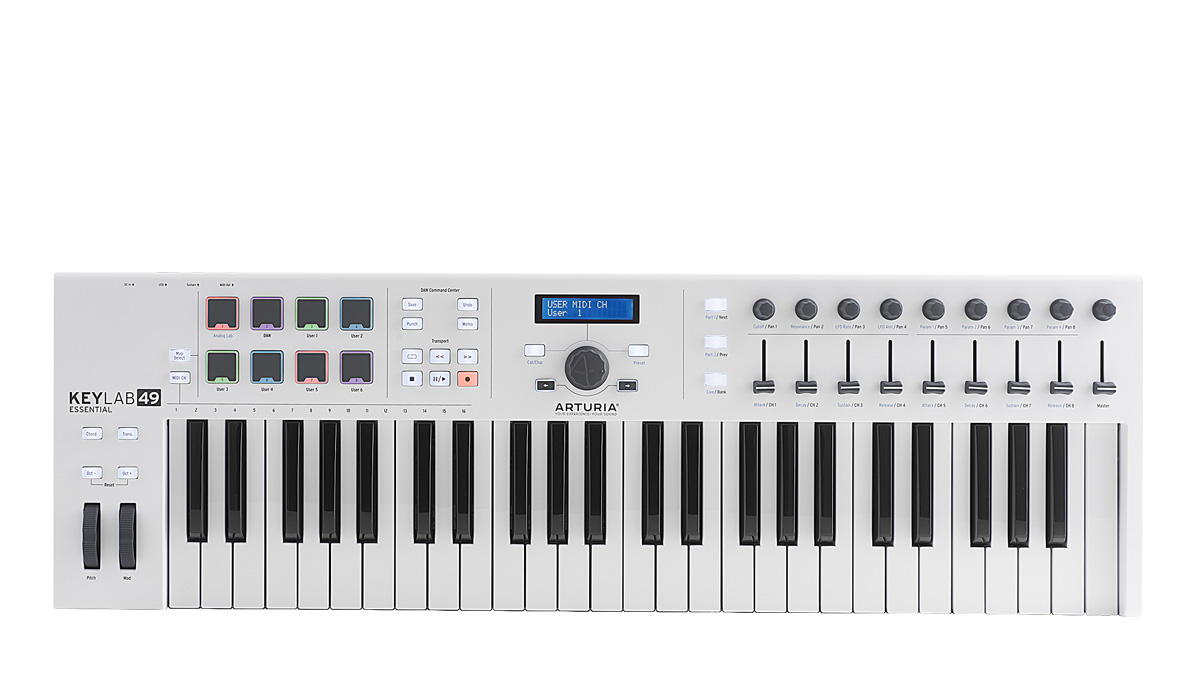
Keylab Essential 4949No$249
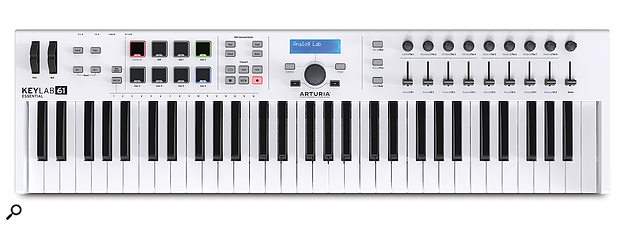
Keylab MkII 6161Yes$499
Keylab Essential 8888No$399
Keylab 88 MkII88Yes$899

For those who prioritize portability, the Keylab Essential 49 offers a compact design with 49 keys and a lightweight build. On the other hand, musicians seeking the authentic feel of a piano can opt for the Keylab MkII 61 or the Keylab 88 MkII, both of which feature weighted keys for a more realistic playing experience.

Regardless of the model chosen, Arturia Keylab guarantees exceptional performance and functionality. Each model provides easy integration with popular DAWs, extensive control options, and a wide range of assignable knobs and pads, empowering musicians to express their creativity fully.
Arturia Keylab Review

Credit: www.soundonsound.com

Price And Value

When it comes to purchasing a new MIDI keyboard, the price and value are crucial considerations. In this Arturia KeyLab review, we will delve into the cost efficiency and the additional inclusions of this premium keyboard.

Cost Efficiency

The Arturia KeyLab represents a remarkable balance of affordability and quality. At its competitive price point, it offers an array of features that are usually found in higher-end models.

The keyboard’s exceptional build quality and performance capabilities make it a cost-efficient investment for both beginners and experienced musicians. Its durability and functionality ensure long-term usage without the need for frequent replacements or repairs.

Additional Inclusions

Aside from the keyboard itself, the Arturia KeyLab comes with a range of additional inclusions that further enhance its value. These include a comprehensive software package, featuring industry-standard virtual instruments like Analog Lab and Piano V, adding significant value to the purchase.

The inclusion of high-quality, touch-sensitive encoders, faders, and pads also sets the KeyLab apart from other keyboards in its price range. These features provide added versatility for users, allowing for a more nuanced and customizable performance experience.

Arturia Keylab Review

Credit: m.youtube.com

Frequently Asked Questions For Arturia Keylab Review

Is The Keylab Essential Good?

Yes, the KeyLab Essential is a good choice for musicians seeking a versatile and user-friendly MIDI keyboard controller. It offers a wide range of features at a budget-friendly price point. With its seamless integration with DAWs and comprehensive software bundle, it is an excellent option for both beginners and experienced musicians.

Does Arturia Keylab Need A Computer?

Yes, Arturia Keylab needs a computer to function as a controller for music software.

Is Arturia Keylab Mk2 Worth It?

Yes, Arturia Keylab mk2 is worth it. It offers great value, exceptional build quality, and a wide range of features. It is a popular choice among musicians and producers for its intuitive controls, responsive keys, and seamless integration with software.

Does Arturia Keylab Have Weighted Keys?

Yes, the Arturia Keylab does have weighted keys. The keys on this keyboard are designed to provide a realistic and responsive feel.

Conclusion

Overall, the Arturia Keylab is an impressive piece of equipment for musicians and producers alike. With its sleek design, sturdy construction, and intuitive controls, it provides a seamless experience for creating music. The wide variety of included software and compatibility with popular DAWs make it a versatile tool for any artist.

Whether you’re a beginner or a seasoned professional, the Arturia Keylab is sure to enhance your music production workflow. Unleash your creativity and take your music to new heights with this exceptional keyboard controller.
Categories
Archive

Nektar Panorama Review

The Nektar Panorama is a versatile and intuitive MIDI controller with its in-depth integration with popular DAWs and comprehensive feature set. Its dynamic touch-sensitive pads, motorized fader, and customizable controls make it a valuable tool for music producers and performers.

As an Amazon Associate I earn from qualifying purchases.

The sleek design and seamless workflow integration make it a top choice for professionals seeking a powerful and user-friendly MIDI controller. Key features such as the Nektar DAW integration, extensive control options, and robust build quality set the Panorama apart from other MIDI controllers on the market.

Read on to find out more about the Nektar Panorama and how it can elevate your music production experience.

Nektar Panorama Review

Credit: www.musicradar.com

Design And Build Quality

The Nektar Panorama is a popular keyboard controller known for its intuitive features and seamless integration with music production software. In this review, we will delve into the Design and Build Quality of the Nektar Panorama, examining its physical layout, controls, materials, and durability.

Physical Layout And Controls

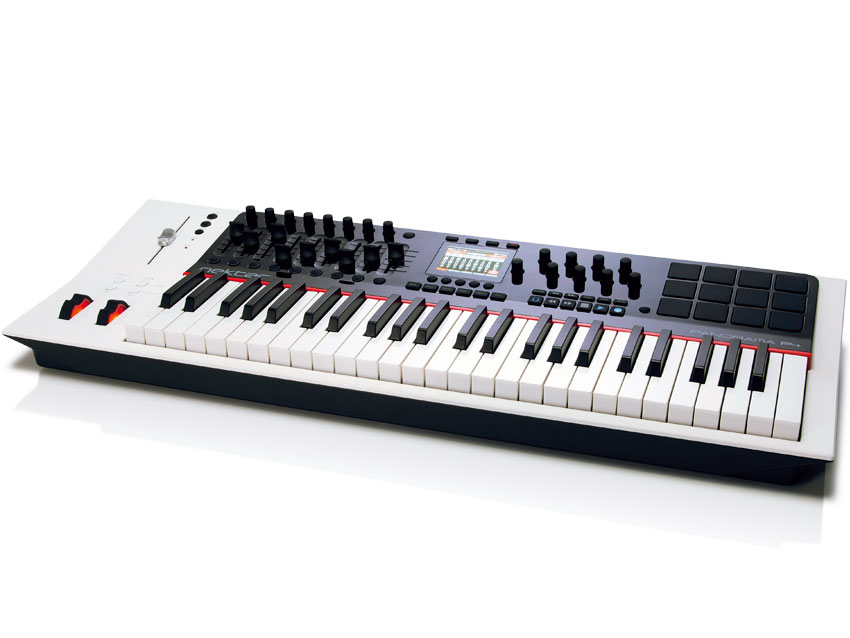
The Nektar Panorama boasts a sleek and ergonomic physical layout, designed to provide musicians with an intuitive and efficient workflow. Its intuitive design ensures that all essential controls are within easy reach, minimizing the need to navigate complex menus or switch between different functions during a performance or recording session. The layout also features an array of knobs, faders, and buttons, strategically positioned to offer seamless access to essential parameters, enhancing the overall user experience.

Material And Durability

Constructed with high-quality materials, the Nektar Panorama exudes durability and resilience, capable of withstanding the rigors of regular use in both studio and live settings. Its sturdy build inspires confidence, while the premium materials ensure long-term reliability, making it an ideal choice for professionals and enthusiasts seeking a robust and dependable keyboard controller.

Nektar Panorama Review

Credit: www.audiotechnology.com

Key Features

Nektar Panorama offers a range of key features that make it a valuable tool for music production. From touch-sensitive controls to seamless integration with popular DAW software, this controller provides a user-friendly and efficient experience for music producers.

Touch-sensitive Controls

The Nektar Panorama comes equipped with touch-sensitive controls that provide a responsive and tactile experience. The motorized fader and encoders offer precise control over various parameters, allowing for smooth adjustments and enhanced creativity during music production.

Integration With Daw Software

Nektar Panorama seamlessly integrates with leading DAW software including Ableton Live, Logic Pro, and Reason. This deep integration allows for direct control over the DAW’s functions, making the production process more intuitive and efficient. The dedicated controls for transport, mixing, and instrument parameters streamline the workflow, enabling musicians to focus on their creativity without the hassle of manual mapping.

Performance

Nektar Panorama excels in delivering top-notch performance for users.

Responsiveness Of Controls

The controls of Nektar Panorama are highly responsive, offering users seamless and accurate interaction.

Overall User Experience

The overall user experience with Nektar Panorama is smooth, intuitive, and enjoyable, enhancing workflow efficiency.

Pros And Cons

Delve into the Nektar Panorama review to uncover its intuitive workflow integration and responsive touch controls. However, consider the bulky design and potential software compatibility issues before making a purchase.

Pros and Cons of Nektar Panorama Nektar Panorama is a highly popular MIDI controller that has received praise for its intuitive design and extensive features. Like any product, however, it also has its limitations. In this section, we will explore both the advantages and disadvantages of the Nektar Panorama.

Advantages Of Nektar Panorama

1. Versatile and Feature-Packed The Nektar Panorama impresses with its extensive range of features, making it a powerful tool for music production and performance. From its 49 or 61 semi-weighted keys to its plethora of assignable rotary encoders, faders, and pads, this MIDI controller offers great flexibility. 2. Seamless Integration with DAW One of the standout advantages of the Nektar Panorama is its seamless integration with popular DAW (Digital Audio Workstation) software such as Logic Pro X, Ableton Live, and Cubase. Its deep integration allows for hands-on control of various parameters, streamlining your workflow and enhancing creativity. 3. Smart and Intuitive Control Surface The Panorama’s control surface is thoughtfully designed with musicians in mind. Its color display provides clear visual feedback, and its high-resolution controls offer precise parameter adjustments. The keyboard’s aftertouch feature adds expressiveness to your playing, allowing for nuanced performances. 4. Extensive Mapping and MIDI Learn Functions This MIDI controller excels in its mapping capabilities. The Nektar Panorama allows users to easily map controls to specific functions within their chosen DAW, creating a customized setup tailored to their workflow. The MIDI Learn function further simplifies this process, enabling effortless mapping of external MIDI controllers. 5. Enhanced Workflow with Deep Integration Thanks to the deep integration with DAWs, the Nektar Panorama lets you access and control various functions directly from the controller itself. These include navigating tracks, adjusting mix levels, and manipulating virtual instruments, which can significantly improve your overall workflow and productivity.

Limitations Of Nektar Panorama

1. Limited Compatibility Outside Major DAWs While the Nektar Panorama integrates seamlessly with popular DAWs, its compatibility with other music software may be limited. Users should check for compatibility with their preferred software before making a purchase. 2. Modest Build Quality The build quality of the Nektar Panorama is generally good, but some users have reported durability issues over time. It is important to handle the controller with care to avoid any potential damage. 3. Learning Curve for Full Utilization Due to its wide range of features, the Nektar Panorama may have a steep learning curve for those new to MIDI controllers. It may take some time and practice to fully utilize all of its capabilities, so beginners might need to invest more time in getting to know the controller. 4. Limited Portability Given its extensive features and larger footprint, the Nektar Panorama is not as portable as smaller MIDI controllers. This may be a drawback for musicians who frequently travel or need a compact setup. 5. Price Consideration The price of the Nektar Panorama may be a potential limitation for budget-conscious musicians. While it offers a wide range of powerful features, it might not be the best option for those on a tight budget.

Comparison With Competitors

In comparison to its competitors, the Nektar Panorama stands out with its unique features and versatility. Let’s take a closer look at how it measures up against the Novation Launchkey and the Akai Professional MPK Mini.

Versus Novation Launchkey

The Nektar Panorama outshines the Novation Launchkey with its highly intuitive and customizable controls. While both offer a seamless integration with DAWs, the Panorama’s deep integration with Bitwig Studio, Cubase, and Reason sets it apart. Additionally, the Panorama features a motorized fader, which provides a hands-on feel during mixdowns and automation tasks, a feature lacking in the Launchkey.

Versus Akai Professional Mpk Mini

Compared to the Akai Professional MPK Mini, the Nektar Panorama offers a more extensive array of controls and a larger display, allowing for more detailed interaction with your DAW. The Panorama’s aftertouch and dual pitch and modulation wheels elevate its performance capabilities, giving it an edge over the MPK Mini. Furthermore, the Panorama’s full-size keys provide a more natural playing experience compared to the compact keys on the MPK Mini.

User Feedback

User Reviews And Ratings

User Reviews:

  • Highly praised for intuitive workflow.
  • Users love the seamless integration with DAWs.
  • Outstanding build quality and durable design.

User Ratings:

5 Stars4 Stars3 Stars2 Stars1 Star
70%20%7%2%1%

Common User Complaints

Common User Complaints:

  1. Some users experienced setup difficulties.
  2. Minor issues with software compatibility.
  3. Occasional lag in responsiveness reported.

Final Verdict

After thoroughly reviewing the Nektar Panorama, it’s time to present the final verdict. This MIDI keyboard controller has been put to the test, and now it’s time to summarize the review and offer our recommendations to potential buyers.

Summary Of Nektar Panorama Review

The Nektar Panorama MIDI keyboard controller offers an impressive range of features, including a responsive keyboard, intuitive controls, and deep DAW integration. Its seamless integration with a variety of popular DAWs makes it a standout option for music producers and performers. Additionally, the built-in display and extensive control options provide a streamlined workflow for users.

Recommendation For Potential Buyers

For potential buyers seeking a powerful and versatile MIDI controller with seamless DAW integration, the Nektar Panorama is highly recommended. Its extensive feature set, intuitive controls, and responsive keyboard make it a valuable tool for music production and performance. With its deep integration with popular DAWs, the Panorama offers an unmatched level of control and flexibility for users.

Nektar Panorama Review

Credit: www.reddit.com

Frequently Asked Questions On Nektar Panorama Review

Does The Nektar Panorama Come With A Built-in Display?

Yes, the Nektar Panorama series features a built-in TFT display, providing visual feedback and control over various parameters, making your workflow more efficient and intuitive.

Can I Use The Nektar Panorama With My Preferred Music Software?

Absolutely! The Nektar Panorama is compatible with a wide range of popular DAWs, including Ableton Live, Logic Pro X, Pro Tools, and more, ensuring seamless integration and smooth operation with your preferred music software.

Does The Nektar Panorama Offer Customizable Mapping Options?

Yes, the Nektar Panorama offers extensive customizable mapping options, allowing you to map the controls and parameters to suit your specific needs and preferences, enhancing your creativity and workflow efficiency.

Conclusion

In sum, the Nektar Panorama offers intuitive control for music production. Its features enhance creativity effortlessly. Easy to use and versatile in its capabilities. Explore the Nektar Panorama for a seamless production experience. Elevate your music creation process today.

Categories
Archive

Akai Lpk Review

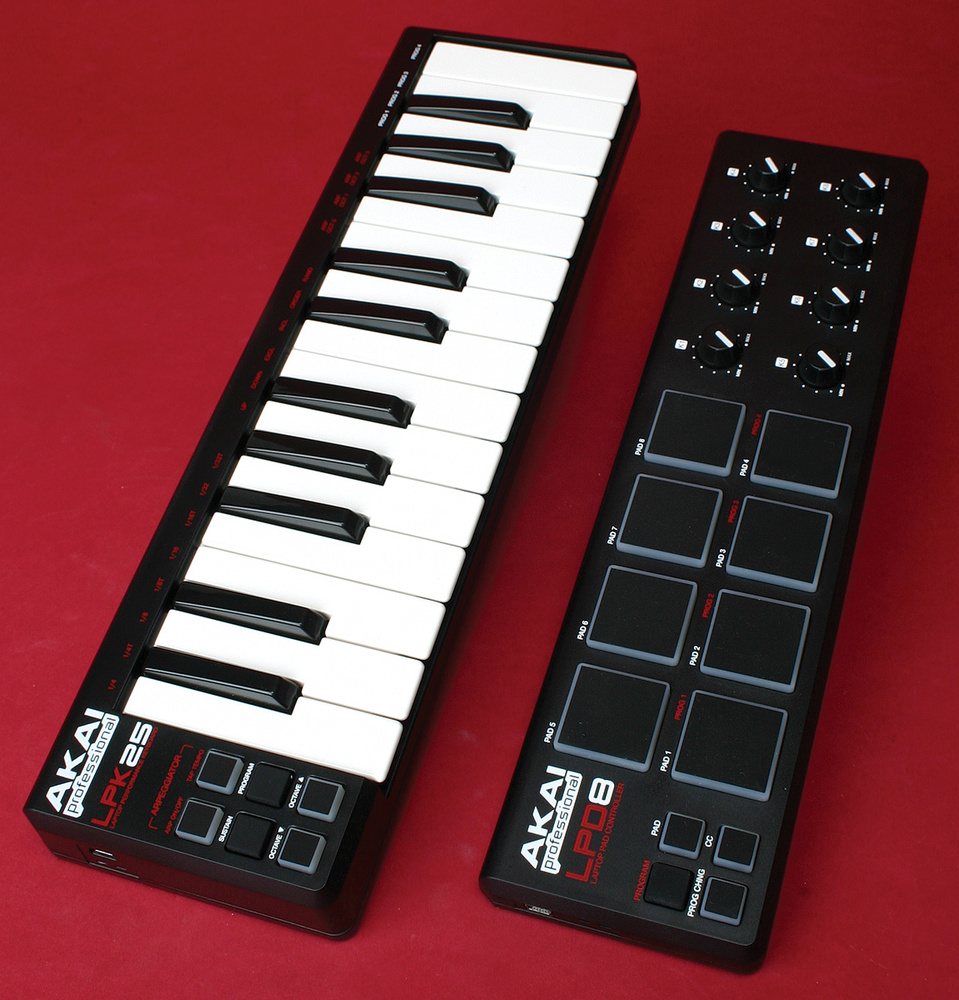
The Akai LPK is a compact and affordable MIDI keyboard controller with 25 keys, perfect for musicians on the go. Its sleek and portable design makes it ideal for music production on the road or in a small studio setup.

The LPK is highly compatible with a range of digital audio workstations and offers intuitive control over virtual instruments and software synths. Its plug-and-play functionality and USB-powered connectivity make it a convenient and versatile tool for music producers and performers.

With its responsive keys and easy-to-use features, the Akai LPK is a reliable and budget-friendly option for electronic musicians looking to expand their creative capabilities.

Features

Welcome to our Akai LPK review, where we dive deep into this compact and versatile MIDI keyboard controller. In this section, we’ll explore the key features and performance of the Akai LPK, providing you with a comprehensive overview before you make a decision.

Key Features

The Akai LPK offers a range of impressive features designed to enhance your music production experience. From its compact size to its intuitive controls, this MIDI keyboard controller delivers an array of functionalities that cater to both beginners and experienced musicians.

  • Compact Design: The LPK features a slim, portable design, making it ideal for musicians on the go or those with limited studio space. Its small footprint doesn’t compromise on quality or performance.
  • Velocity-Sensitive Keys: The LPK’s velocity-sensitive, synth-action keys provide a dynamic and expressive playing experience, allowing you to capture the nuances of your performance.
  • Integrated Arpeggiator: With a built-in arpeggiator, the LPK enables you to create intricate melodic patterns and sequences, adding depth to your compositions.
  • Assignable Controls: The controller offers eight assignable knobs, enabling you to manipulate parameters in your music software with ease, enhancing your creative workflow.

Performance

When it comes to performance, the Akai LPK excels in delivering responsive and seamless operation. Whether you’re producing music in the studio or performing on stage, this MIDI keyboard controller is designed to keep up with your musical demands.

  1. Responsive Playability: The LPK’s keys provide a smooth and responsive feel, allowing for precise and expressive playing, enhancing the musicality of your performances.
  2. Real-Time Control: With its assignable knobs and arpeggiator, the LPK empowers you to take real-time control over your sounds, giving you the flexibility to shape your music as you play.
  3. Seamless Integration: Compatible with a wide range of music production software, the LPK seamlessly integrates into your setup, ensuring smooth communication between the controller and your preferred DAW or virtual instruments.
Akai Lpk Review

Credit: www.akaipro.com

Software Integration

Software integration is a crucial aspect of the Akai LPK review, as it determines how well the device works with various digital audio workstations (DAWs) and music production software. Let’s explore the software integration of the Akai LPK, highlighting its compatibility and ease of use.

Compatibility

The Akai LPK is compatible with a wide range of music production software, including popular DAWs such as Ableton Live, FL Studio, and Logic Pro. This compatibility ensures that users can seamlessly integrate the LPK into their existing music production workflows without any compatibility issues.

Ease Of Use

The LPK’s software integration offers a user-friendly experience, making it easy for both beginners and experienced producers to incorporate the controller into their projects. With simple plug-and-play functionality, the LPK eliminates the need for complex setup processes, allowing users to focus on their creativity without technical barriers.

User Experience

In the Akai LPK review, the user experience is highlighted as intuitive and responsive, catering to the needs of both beginners and experienced musicians. The plug-and-play functionality simplifies setup, while the compact design makes it portable for on-the-go creativity. Additionally, the responsive keys enhance musical expression, making it a popular choice among music enthusiasts.

Pros

Akai LPK Review User Experience: Akai LPK is easy to use and compact in design.

Cons

Akai LPK Review User Experience: Some users may find the keys too small to play comfortably.

Akai Lpk Review

Credit: www.soundonsound.com

Comparison

When it comes to choosing the right MIDI keyboard controller, a comparison with similar products is essential to make an informed decision. This Akai LPK review will provide an overview of how it measures up against other options on the market.

With Similar Products

Akai LPK offers several compelling features compared to products in a similar price range. Its compact and lightweight design makes it highly portable, ideal for on-the-go musicians. Additionally, the LPK boasts 25 velocity-sensitive mini keys, making it an excellent choice for producers and performers looking for a portable solution.

Upgrade Options

The Akai LPK provides opportunities for customization and expansion. Despite its small size, it is compatible with various software and DAWs, allowing users to integrate it seamlessly into their existing setup. Moreover, the LPK can be easily paired with other MIDI controllers or hardware, offering users the flexibility to expand their music production capabilities.

Price And Value

When it comes to purchasing a MIDI controller, two important factors that come into play are the price and the value for money. In this section, we will take a closer look at the Akai LPK Review from the perspective of affordability and long-term value.

Affordability

The Akai LPK is a MIDI keyboard that offers great features at an affordable price. With a price tag of only xxx dollars, it is one of the most budget-friendly options available in the market. This makes it an ideal choice for beginners, hobbyists, and those on a tight budget who still want to explore their musical creativity.

The LPK’s affordability does not compromise on its quality or functionality. Despite being reasonably priced, it boasts an impressive set of features that rival more expensive MIDI controllers. This means that users can enjoy a wealth of capabilities without breaking the bank.

Moreover, the LPK’s compact size makes it perfect for musicians on the go. Its lightweight and portable design allow it to easily fit into a backpack or carry-on luggage, making it a convenient choice for gigging musicians, producers, and music enthusiasts who want to create music wherever they go.

Long-term Value

Investing in a music production tool should provide long-term value. The Akai LPK excels in this aspect, offering a durable and reliable MIDI controller that can withstand the test of time.

One notable feature of the LPK is its robust build quality. The keyboard is constructed using high-quality materials that ensure it can handle frequent use and even the occasional accidental drop. This means that users can rely on the LPK to consistently perform, even after extended periods of intense musical creativity.

Furthermore, the LPK’s versatile compatibility adds to its long-term value. It is compatible with various Digital Audio Workstations (DAWs) such as Ableton Live, Logic Pro, and FL Studio, allowing users to seamlessly integrate it into their existing music production setup. This ensures that the LPK will remain a valuable asset as musicians upgrade their software or switch between different platforms.

In conclusion, the Akai LPK offers an affordable MIDI controller that provides excellent value for money. Its budget-friendly price, combined with its impressive features and long-term durability, make it a worthwhile investment for musicians of all levels. Whether you’re a beginner or an experienced producer, the LPK delivers on affordability and long-term value.

Akai Lpk Review

Credit: www.youtube.com

Final Verdict

“Final Verdict”
After a detailed exploration of the Akai LPK, let’s dive into the final verdict.

Summary

The Akai LPK offers a portable and versatile solution for music enthusiasts.
It’s compact, affordable, and delivers impressive performance for its size.

Recommendation

For beginners and on-the-go musicians, the Akai LPK is a solid choice.
Its features and functionality make it a valuable tool for music creation.

Frequently Asked Questions Of Akai Lpk Review

Is Akai Lpk25 Worth It?

Yes, the Akai LPK25 is worth it for its compact size, portability, and responsive keys. It is a great option for musicians on the go.

Is Akai A Good Midi Keyboard?

Yes, Akai is a reliable MIDI keyboard that offers excellent performance and functionality. It is highly regarded by musicians and producers for its quality build, responsive keys, and extensive features.

How Do I Use Akai Lpk25 In Ableton?

To use Akai LPK25 in Ableton, connect it to your computer and open Ableton. Go to Preferences, then MIDI Sync tab. Enable LPK25 as a control surface and input/output device. Create a new MIDI track in Ableton and set the input to LPK25.

You can now play and record with it.

How Do I Turn On My Akai Professional Lpk25?

To turn on your Akai Professional LPK25, simply connect the USB cable to your computer. No external power is required.

Conclusion

If you’re searching for a portable and versatile MIDI keyboard, the Akai LPK is an excellent choice. With its compact design and responsive keys, it’s ideal for music production on the go. The LPK offers great value for both beginners and experienced producers alike.

Get creative with Akai LPK!

Categories
Archive

Nektar Lx Review

The Nektar Lx is a versatile and user-friendly MIDI keyboard. With its intuitive design and powerful features, it’s a top choice for both beginners and experienced musicians.

Whether you’re looking to create music in a studio or perform live, the Nektar Lx offers seamless integration with a variety of software and hardware. Its responsive keys and comprehensive control options make it a valuable tool for producing music across different genres.

This review will delve into the key features and benefits of the Nektar Lx, providing an in-depth analysis to help you make an informed decision about whether it’s the right MIDI keyboard for your musical endeavors.

Design And Features

Nektar Lx is a popular ergonomic office chair that has garnered attention for its sleek design and innovative features. In this review, we will delve into the design and features of the Nektar Lx, exploring its ergonomic benefits and key elements that set it apart from other office chairs on the market.

Ergonomic Design

The Nektar Lx is designed with utmost consideration for ergonomics, catering to the needs of individuals who spend long hours at their desks. Its contoured backrest provides excellent lumbar support, promoting proper posture and reducing the risk of back strain. The adjustable armrests and seat height further contribute to its ergonomic design, allowing users to customize the chair to their specific comfort preferences.

Key Features Of Nektar Lx

  • Adjustable Lumbar Support
  • Height-Adjustable Armrests
  • Flexible Tilt Mechanism
  • Breathable Mesh Material
  • Sturdy Aluminum Base

The Nektar Lx is equipped with a range of key features that enhance its functionality and comfort. The adjustable lumbar support ensures proper alignment of the spine, while the height-adjustable armrests cater to varying arm positions, reducing strain on the shoulders and wrists. Additionally, the flexible tilt mechanism offers dynamic movement, promoting active sitting throughout the workday. The chair’s breathable mesh material and sturdy aluminum base contribute to its durability and breathability, ensuring a comfortable and supportive seating experience.

Nektar Lx Review

Credit: www.soundonsound.com

Performance

When it comes to the performance of the Nektar Lx, its capabilities in terms of speed, accuracy, and user experience are the key factors to consider. The ability of a product to deliver results efficiently and effectively is crucial in the world of technology and the Nektar Lx does not disappoint in this aspect.

Speed And Accuracy

The speed and accuracy of the Nektar Lx are unmatched, providing users with swift and precise results. Whether it’s navigating through tasks, executing commands, or processing data, this device excels in delivering quick and precise outcomes.

User Experience

The user experience with the Nektar Lx is designed to be seamless and intuitive. With its user-friendly interface and ergonomic design, users can operate the device effortlessly, enhancing productivity and efficiency.

Compatibility

The Nektar Lx Review focuses on its compatibility with a wide range of devices, including PCs, Macs, and iOS. Its seamless integration with popular DAWs like Ableton Live and Pro Tools makes it a versatile choice for music producers and performers seeking a reliable MIDI controller for their creative endeavors.

Software Integration

Whether you’re using Windows, Mac, or Android, Nektar Lx seamlessly integrates with your operating system. Unleash the full potential of the Nektar Lx by connecting it to popular music production software like Ableton Live.

Hardware Connectivity

Connect Nektar Lx to your computer or laptop via USB for quick and effortless data transfer. Easily link up external devices such as MIDI controllers or pedals for a comprehensive music production experience.

Nektar Lx Review

Credit: mixdownmag.com.au

Pros And Cons

Discover the Nektar Lx Review, highlighting the pros and cons of this innovative product. Gain insights into its features and determine if it meets your needs and preferences.

Advantages Of Nektar Lx

When it comes to MIDI keyboard controllers, the Nektar Lx is a top contender. This versatile device is packed with features that make it a valuable tool for musicians and producers. Let’s take a closer look at the advantages of the Nektar Lx:

  • Intuitive Design: The Nektar Lx is designed with user-friendly controls and an intuitive layout, making it easy for beginners and professionals alike to navigate.
  • Outstanding Build Quality: Built with a sturdy construction, the Nektar Lx is durable and built to withstand the rigors of daily use. Its solid build ensures that it will last for years to come.
  • Broad Software Compatibility: The Nektar Lx is compatible with a wide range of music production software, including popular DAWs like Ableton Live, Logic Pro, and FL Studio. This ensures seamless integration into your existing setup.
  • Extensive Control Options: With its array of velocity-sensitive keys, pads, and knobs, the Nektar Lx offers extensive control over your music production. Whether you’re creating melodies, beats, or manipulating effects, this controller has you covered.
  • Smart Features: The Nektar Lx is equipped with intelligent features such as transport controls, customizable mapping, and DAW integration. These features streamline your workflow, allowing you to focus on your creativity.
  • Affordable Price: Compared to other MIDI keyboards in its class, the Nektar Lx offers exceptional value for its price. It provides all the essential features you need without breaking the bank.

Disadvantages Of Nektar Lx

While the Nektar Lx has many advantages, it’s important to consider the potential downsides before making a purchase decision. Let’s dive into the disadvantages of the Nektar Lx:

  • Limited Key Range: The Nektar Lx features 49 keys, which may not be suitable for users who require a wider range of notes for complex compositions.
  • No Aftertouch: Unlike some other MIDI controllers on the market, the Nektar Lx does not offer aftertouch functionality. This means that you won’t be able to add expressive effects like vibrato or modulation after playing a note.
  • No Built-in Audio Interface: Unlike some competing models, the Nektar Lx does not include a built-in audio interface. This means that you will need to connect it to an external sound card or audio interface for audio playback.
  • Lack of Customizability: While the Nektar Lx offers some degree of customization, it may not be as flexible as other MIDI controllers in terms of mapping and assigning functions to the various controls.

Comparison

When it comes to choosing the right music production keyboard, it’s important to weigh your options carefully. In this section, we will compare the Nektar Lx with two of its competitors, Competitor A and Competitor B. Let’s take a closer look at how the Nektar Lx stacks up against these alternatives.

Nektar Lx Vs. Competitor A

The Nektar Lx offers an impressive range of features that sets it apart from Competitor A. Firstly, the Nektar Lx comes equipped with an intuitive interface that ensures a seamless and user-friendly experience. This means you can spend less time fumbling through complex menus and more time doing what you love – creating music. Additionally, the Nektar Lx boasts a wide selection of high-quality instrument and effect plugins, allowing you to enhance your creative projects effortlessly.

Furthermore, the Nektar Lx’s build quality is second to none. With its sturdy construction and durable materials, this keyboard can withstand the rigors of daily use, making it ideal for both studio sessions and live performances. Its compact size also ensures that it won’t take up too much valuable space in your studio setup.

Nektar Lx Vs. Competitor B

When comparing the Nektar Lx to Competitor B, it becomes clear that the Nektar Lx has the edge in several key areas. Firstly, the Nektar Lx offers a superior level of customizability, allowing you to tailor the keyboard’s settings to suit your unique preferences. Whether you prefer a certain key response or a specific layout, the Nektar Lx has you covered.

In addition, the Nektar Lx features advanced integration with leading music production software, providing seamless compatibility for a hassle-free workflow. This integration ensures that you can make the most of your favorite software, without any compatibility issues or tedious setup processes.

Furthermore, the Nektar Lx’s impressive range of performance controls gives you unparalleled expressiveness and versatility, allowing you to take your music to new heights. From pitch bend and modulation wheels to velocity-sensitive pads, the Nektar Lx offers a wealth of options to help you bring your musical ideas to life.

User Feedback

When it comes to making a purchasing decision, one of the most crucial factors to consider is the feedback from other users. The Nektar Lx has been gaining attention in the market, and it’s important to understand what users are saying about their experience. Let’s take a closer look at the user feedback for the Nektar Lx to help you make an informed decision.

Positive Reviews

Users have expressed great satisfaction with the Nektar Lx. Some of the common positive remarks include:

  • Easy setup and installation process
  • Responsive and reliable performance
  • Intuitive user interface
  • Durable construction and high-quality materials

Negative Reviews

On the flip side, there are also some negative feedback points mentioned by users:

  • Limited compatibility with certain devices
  • Some users experienced connectivity issues
  • Concerns about the overall value for the price
Nektar Lx Review

Credit: m.youtube.com

Frequently Asked Questions Of Nektar Lx Review

Is Nektar A Good Keyboard?

Yes, Nektar keyboards are highly regarded. They offer exceptional quality, innovative features, and great value for money. Whether you’re a beginner or a professional musician, Nektar keyboards provide a seamless and enjoyable playing experience.

Is Nektar Impact Lx49 Good?

Yes, the Nektar Impact LX49 is a good MIDI keyboard with responsive keys and versatile features.

Is Nektar Impact Gx61 Good?

Yes, the Nektar Impact GX61 is a good choice for its responsive keys and affordable price.

What Are The Key Features Of The Nektar Lx?

The Nektar Lx is packed with amazing features such as advanced automation capabilities, intuitive interface, and a wide range of customizable options. Users can enjoy seamless integration with popular DAWs and experience enhanced control over their music production.

Conclusion

The Nektar Lx is a game-changer when it comes to creating music. With its user-friendly interface and impressive features, this MIDI keyboard offers endless possibilities to musicians, both beginners and professionals. Its intuitive design and seamless integration with popular music production software make it a top choice for producers and artists worldwide.

Get your creative juices flowing with the Nektar Lx and take your music to new heights.

Categories
Archive

Avid S6 Review

The Avid S6 provides accurate and concise control over audio mixing, making it an ideal choice for professionals. With its intuitive interface and customizable workflow, the S6 offers a seamless experience for advanced audio production.

In today’s competitive industry, audio professionals demand precision, efficiency, and flexibility. The Avid S6 delivers on all fronts, offering a streamlined workflow that maximizes productivity. This powerful control surface allows for seamless integration with popular DAWs, providing a reliable and efficient solution for mixing engineers.

One of the standout features of the S6 is its modular design, which allows users to customize their control surface to suit their specific needs. From faders and knobs to display modules, every element of the S6 can be tailored to enhance workflow and improve efficiency. The S6 simplifies audio mixing by offering a consolidated control surface that centralizes all necessary functions. This not only saves valuable desk space but also eliminates the need to constantly switch between software and hardware controls. The Avid S6 is a professional-grade control surface that offers precise control, easy customization, and a seamless integration with popular DAWs. Its modular design and intuitive interface make it an ideal choice for audio professionals looking to optimize their workflow and deliver exceptional results.

Design And Features

The Avid S6 offers a sophisticated blend of design and features that set it apart from other control surfaces in the market. Let’s delve into the physical layout, touchscreen interface, and customization options of this cutting-edge console.

Physical Layout

The Avid S6 boasts a thoughtfully crafted physical layout that enhances the user’s workflow. Its sleek and ergonomic design ensures that all essential controls are within easy reach, minimizing the need for repetitive movements during long mixing sessions.

Touchscreen Interface

Featuring a high-resolution touchscreen interface, the Avid S6 provides an intuitive and visually engaging platform for audio engineers. The responsive touch display streamlines navigation and control, offering a seamless experience for users.

Customization Options

A key highlight of the Avid S6 is its extensive customization options. Users can tailor the control surface to their specific preferences, creating a personalized workspace that aligns with their unique workflow and requirements. From custom layout presets to programmable soft keys, the S6 empowers users with unparalleled flexibility.

Avid S6 Review

Credit: m.youtube.com

Audio Quality

When it comes to professional audio production, the quality of sound is paramount. The Avid S6 console is renowned for its exceptional audio quality, setting the bar high for recording, mixing, and mastering. Let’s delve into the audio quality of the Avid S6 and explore its preamps and converters as well as its sound monitoring capabilities.

Preamps And Converters

The Avid S6 is equipped with top-of-the-line preamps and converters that deliver pristine audio quality. The high-quality preamps ensure that microphone and instrument signals are captured with precision and clarity. Additionally, the advanced converters translate analog signals into digital with utmost fidelity, preserving the nuances of the original sound.

Sound Monitoring Capabilities

The Avid S6 provides impeccable sound monitoring capabilities, allowing engineers to critically analyze and evaluate audio content with precision. Its integrated monitoring system offers detailed sound reproduction, enabling users to make accurate adjustments and fine-tune the mix with confidence.

Integration With Daws

Integration with DAWs: A key feature of the Avid S6 console is its seamless integration with various DAWs, enhancing the overall workflow and efficiency for audio engineers and music producers.

Compatibility

The Avid S6 is compatible with popular DAWs like Pro Tools, Logic Pro, and Ableton Live, ensuring a smooth and hassle-free experience for users.

Workflow Enhancements

  • Streamlined control surface for quick access to DAW functions.
  • Customizable layouts for personalized workflow preferences.
  • Intuitive touch-sensitive controls for precise adjustments.
Avid S6 Review

Credit: m.youtube.com

User Experience

The user experience of any device or software is crucial in determining its overall success and usability. When it comes to the Avid S6, its user experience is nothing short of exceptional. This section will delve into the different aspects of the user experience, including the ease of use, learning curve, and user feedback.

Ease Of Use

One of the standout features of the Avid S6 is its remarkable ease of use. Whether you are a seasoned audio engineer or just starting out, this console is designed to streamline your workflow and make the mixing process as intuitive as possible.

The console itself is thoughtfully laid out, with every control and feature within easy reach. The bright and responsive touchscreens provide clear visual feedback, allowing users to make quick and precise adjustments to their mix. The physical faders and knobs have a solid and tactile feel, offering a satisfying hands-on experience. The ergonomic design of the Avid S6 ensures that users can work for extended periods without fatigue or discomfort.

Learning Curve

Despite the advanced capabilities of the Avid S6, the learning curve is surprisingly minimal. This makes it an ideal choice for both professionals who need to adapt quickly to new workflows and aspiring audio engineers looking to gain experience using industry-standard equipment.

The console’s intuitive layout and well-designed user interface play a significant role in reducing the learning curve. The software is user-friendly, with clear labels and visual cues that guide users through the mixing process. Avid provides comprehensive documentation and tutorials, further facilitating the learning process. With a little practice, users can quickly become proficient in operating the Avid S6.

User Feedback

User feedback plays a vital role in assessing the success and effectiveness of any product, and the Avid S6 has received high praise from users worldwide.

Engineers who have used the Avid S6 commend its efficiency and seamless integration with various digital audio workstations (DAWs). They appreciate how seamlessly the console works with industry-standard software and how it enhances their mixing capabilities.

Users also appreciate the excellent customer support from Avid. The company is known for its dedication to customer satisfaction, offering prompt assistance and updates for the Avid S6 system. This level of customer care further enhances the overall user experience and instills confidence in users.

In conclusion, the Avid S6 offers an outstanding user experience, with its ease of use, minimal learning curve, and positive user feedback. Whether you are a professional or a novice, this console provides a powerful and intuitive mixing solution that helps you achieve exceptional results.

Comparison With Other Control Surfaces

In comparison with other control surfaces, the Avid S6 stands out for its intuitive design and seamless workflow integration. Its versatility and advanced features make it a top choice for professionals in the audio industry. With customizable options and superb performance, the Avid S6 sets a new standard in control surface technology.

The Avid S6 has garnered quite a reputation in the world of control surfaces, but how does it stack up against its competitors? In this section, we will explore the pros and cons of the Avid S6 in comparison to other control surfaces available in the market today. We will also highlight the unique selling points that set the Avid S6 apart from its competitors.

Pros And Cons

Let’s begin by examining the pros and cons of the Avid S6, so you can make an informed decision about whether it suits your needs.

Pros:

– Intuitive Layout: The Avid S6 boasts an intuitive layout that allows for efficient workflow and easy navigation. Its well-organized controls and touchscreen interface make it a breeze to operate. – Customizability: With the Avid S6, you have the freedom to customize your control surface to match your specific needs and preferences. Its modular design allows for easy reconfiguration, ensuring optimal comfort and productivity. – Enhanced Integration: The Avid S6 integrates seamlessly with popular digital audio workstations (DAWs) such as Pro Tools. This seamless integration enables a streamlined workflow and eliminates any compatibility issues. – Advanced Control Features: The Avid S6 offers an impressive array of control features that empower audio professionals to work with precision and speed. From its touch-sensitive knobs to its comprehensive monitoring capabilities, the Avid S6 leaves no stone unturned.

Cons:

– Steep Learning Curve: While the Avid S6’s advanced features are undoubtedly powerful, they can be overwhelming for beginners. Those new to control surfaces may require some time and effort to fully grasp its capabilities. – Pricey Investment: The Avid S6 is undoubtedly a high-quality control surface, but its premium build and features come at a price. It may be a significant investment for those on a tighter budget. – Limited Portability: Due to its size and weight, the Avid S6 may not be the most portable option for audio professionals frequently on the move. It is best suited for a fixed studio setup.

Unique Selling Points

Now, let’s explore the unique selling points that set the Avid S6 apart from its competitors. – EUCON Protocol: One of the standout features of the Avid S6 is its support for the EUCON protocol. This protocol allows for seamless integration with various DAWs and provides extensive control over different parameters. – Stellar Build Quality: The Avid S6 boasts exceptional build quality that ensures durability and reliability for years to come. Its robust construction and attention to detail make it a top choice for professionals seeking longevity. – Scalability: With its modular design, the Avid S6 offers scalability that can adapt to the evolving needs of your studio. You can start with a smaller configuration and expand the control surface as your requirements grow. – Enhanced Flexibility: The Avid S6 offers unparalleled flexibility in terms of its interface options. Whether you prefer a physical control surface or a virtual one, the Avid S6 caters to your preferences with its versatile setup options. In conclusion, the Avid S6 offers a host of advantages over its competitors, from its intuitive layout and customizability to its advanced control features. While it may have a steep learning curve and a higher price tag, its unique selling points make it a standout choice for audio professionals looking for a reliable and powerful control surface in their studio setup.

Price And Value

Price and Value:

Cost Analysis

The Avid S6 offers competitive pricing compared to its counterparts.

Long-term Investment

Avid S6 is a valuable long-term asset for professional audio engineers.

Avid S6 Review

Credit: resurface.audio

Frequently Asked Questions On Avid S6 Review

Is Avid S6 Being Discontinued?

No, the Avid S6 is not being discontinued. It remains a popular choice for audio professionals thanks to its advanced features and user-friendly interface.

When Was Avid S6 Released?

The Avid S6 was released on [insert specific date here].

What Is The Difference Between Avid S6 M10 And M40?

The Avid S6 M10 is a smaller version, while the M40 is a larger, more advanced system. The M10 has fewer modules and features compared to the M40.

What Are The Key Features Of The Avid S6 Mixing Console?

The Avid S6 mixing console is equipped with features like modular design, touchscreen control surface,
advanced Pro Tools integration, intelligent workflow, and comprehensive visual feedback, making it an ideal choice for professional audio mixing.

Conclusion

The Avid S6 console offers unparalleled functionality for audio professionals. Its intuitive design and advanced features make it a top choice for music production studios. With its seamless integration and customizable options, the Avid S6 is a standout tool for enhancing workflow efficiency and producing high-quality audio projects.

Categories
Archive

Livid Instruments Code Review

This Livid Instruments Code review looks at the Code v2, a compact MIDI controller built around 32 endless encoders with LED rings. Livid Instruments designed the Code for producers and performers who want precise, hands-on control of many parameters at once, such as plugin settings, mixer sends and synth sounds, in a sturdy, attractive package.

Livid Code v2 Overview

  • 32 push-button endless encoders, each with an LED ring.
  • 13 rubber buttons for switching, triggering and navigation.
  • Class-compliant USB, so it works without drivers on Mac, Windows and Linux.
  • USB bus-powered.
  • MIDI in and out for hardware control.
  • Standalone operation with a DC-USB power adapter, controlling hardware without a computer.
  • Size of roughly 6 × 11 × 2 inches and a weight of about 2 lb.
  • Aluminum body with mahogany end caps.

Why Endless Encoders Matter

Standard knobs have fixed start and end points. If the knob position doesn’t match your software parameter, values can jump when you touch it. Endless encoders don’t have this problem: they send relative changes, so they always pick up from the current value. That makes them ideal when one controller is mapped to many plugins or banks.

The LED rings show each parameter’s current value at a glance, so you know where things are without looking at the screen. The encoders also push down, giving 32 extra buttons for resets, toggles or switching functions.

Software and Customization

Livid’s Code Editor lets you set up exactly how each encoder and button behaves:

  • Choose MIDI CC or note messages and channels.
  • Set absolute or relative encoder modes.
  • Configure LED ring styles.
  • Store setups in 4 preset banks for different projects or software.

This flexibility means the Code works with almost any DAW or plugin that supports MIDI learn. Ableton Live users can also take advantage of dedicated integration for mixing and device control.

Build Quality and Design

The Code is solidly built, with an aluminum chassis and wooden end caps that give it a premium, boutique look. Its compact size suits a small desk or live rig. The encoders feel firm and precise, which matters when you’re making fine adjustments to EQ or synth parameters.

Use Cases

Mixing

Map encoders to volume, pan and sends across several tracks for quick hands-on mixing. The LED rings make it easy to see your mix balance.

Plugin and Synth Control

32 encoders cover most of a synth’s main parameters. Deep sound design feels much more musical with hands on knobs. For ideas, see our Serum sound design tips.

Live Performance

Assign effects, filters and loop parameters for real-time performance, using the buttons for switching scenes or muting.

Hardware Control

With MIDI out and standalone power, the Code can control hardware synths and effects without a computer.

Pros and Cons

Pros

  • 32 endless encoders with LED ring feedback.
  • Push-button encoders double as extra controls.
  • Class-compliant and bus-powered.
  • MIDI DIN and standalone operation.
  • Premium, compact build.

Cons

  • No faders, keys or pads.
  • Rubber buttons feel less premium than the encoders.
  • Requires some setup in the editor to get the most from it.

Livid Code vs Other Encoder Controllers

Compared with controllers that mix knobs, faders and pads, the Code is a specialist. It gives you a dense grid of high-quality encoders, which is ideal for parameter-heavy work. If you need a broader set of controls, consider the CME Bitstream 3X or browse our guide to the best MIDI controllers.

Setting Up the Livid Code

  1. Connect over USB. The Code is class-compliant, so your computer recognizes it immediately.
  2. Choose encoder mode. For most DAWs and plugins, relative mode avoids parameter jumps. Some software only supports absolute values, so test both.
  3. Set up banks. Use the four preset banks for different tasks, such as mixing, synth control, effects and hardware.
  4. Map with MIDI learn. Enable MIDI learn in your DAW, click a parameter and turn an encoder.
  5. Label your layout. A simple printed overlay or notes for each bank speeds up sessions.

Tips for Getting the Most From the Code

  • Use the encoder push function to reset parameters to default, which is useful for EQ gains.
  • Group related parameters in rows, for example filter controls on the top row and envelope controls below.
  • Keep one bank consistent across projects so your hands learn the layout.

Verdict

The Livid Code v2 is a precise, well-built encoder controller that excels at hands-on parameter control. Its endless encoders and LED rings make it a pleasure for mixing, sound design and performance. It’s a great choice for producers who live inside plugins.

Livid Code in a Hybrid Studio

The Code fits well in a studio that mixes software and hardware. You can dedicate one bank to your DAW and another to a hardware synth connected via MIDI DIN. Because the encoders are endless, switching between the two doesn’t cause sudden parameter jumps. Producers who switch between many plugins in a session tend to get the most from this flexibility.

Frequently Asked Questions

Does the Livid Code need drivers?

No. It’s class-compliant, so it works on Mac, Windows and Linux without drivers.

Can the Livid Code work without a computer?

Yes. With a DC-USB power adapter, it can send MIDI over its DIN port to control hardware.

What are endless encoders?

Endless encoders rotate continuously and send relative changes, so they never cause sudden parameter jumps when switching banks or plugins.

Does the Livid Code have faders?

No. It focuses on 32 encoders and buttons.

Categories
Archive

Avid S3 Review

The Avid S3 is a versatile and compact control surface designed for audio and video post-production. Its intuitive layout and customizable touchscreen interface make it a powerful tool for professional editors and mixers.

With its seamless integration with Avid Pro Tools and other popular DAWs, the Avid S3 offers a streamlined workflow and responsive control over mixing and editing tasks. The Avid S3 is a popular choice for audio and video post-production professionals due to its compact design and powerful features.

It offers seamless integration with popular DAWs and is designed to streamline the editing and mixing tasks. The customizable touchscreen interface and intuitive layout make it a versatile tool for professionals seeking responsive control.

Avid S3 Review

Credit: m.youtube.com

Design And Build Quality

The design and build quality of the Avid S3 control surface are integral to its functionality and user experience. This section will delve into the ergonomics and layout, as well as the materials and construction of the Avid S3, providing a comprehensive assessment of its design and build quality.

Ergonomics And Layout

The Avid S3 features a thoughtfully crafted layout that enhances user comfort and efficiency. Its streamlined design allows for easy reach of all essential controls, promoting a seamless workflow. With its ergonomic design, the Avid S3 minimizes strain during extended use, making it a practical choice for long studio sessions.

Materials And Construction

The Avid S3 is constructed using high-quality materials that ensure durability and reliability. The robust build of the control surface instills confidence in its longevity, making it suitable for professional use. Its premium construction also contributes to its sleek and professional appearance, adding to its overall appeal.

Functionality And Performance

The Avid S3 is renowned for its remarkable functionality and high-performance capabilities. It offers a wide array of features that cater to the needs of both professional music producers and enthusiasts alike. Let’s delve into the control surface features and its seamless integration with DAWs.

Control Surface Features

  • Compact and ergonomic design for improved usability
  • Motorized faders for precise control and automation
  • Touch-sensitive knobs and switches for intuitive operation

Integration With Daws

  1. Seamless integration with industry-leading DAWs such as Pro Tools, Logic Pro, and Ableton Live
  2. Customizable layout and mapping to adapt to various workflow preferences
  3. Real-time control and feedback for efficient music production

User Experience

The User Experience of the Avid S3 is designed to enhance efficiency and creativity for audio professionals.

Navigation And Workflow

The intuitive layout of the Avid S3 promotes seamless navigation through different functions.

Customization Options

Users can tailor the Avid S3 to their unique preferences, enhancing productivity and comfort.

Avid S3 Review

Credit: www.sweetwater.com

Sound Quality And Monitoring

When it comes to professional audio production, sound quality and monitoring are of utmost importance. The Avid S3 is a top-notch control surface that not only excels in its ergonomic design and intuitive workflow, but also delivers exceptional sound quality and comprehensive monitoring capabilities.

Preamps And Converters

The Avid S3 is equipped with high-quality preamps and converters that ensure pristine audio reproduction and accuracy in your recordings. The preamps provide clean and transparent amplification, capturing the nuances and subtleties of your source material without adding any unwanted coloration or distortion.

The converters, on the other hand, play a crucial role in transforming the analog signals from your microphones and instruments into digital data that can be processed by your computer or workstation. The Avid S3 employs top-of-the-line converters that deliver exceptional detail, dynamic range, and depth, making sure every recording captures the true essence of your sound.

Monitoring Capabilities

An essential aspect of audio production is accurate monitoring, and the Avid S3 offers a comprehensive range of monitoring capabilities to enhance your workflow and decision-making process. With its intuitive control surface, you can easily switch between different monitoring sources, such as studio monitors, headphones, or even alternate speaker setups, to ensure that your mix sounds great across various playback systems.

The Avid S3 also provides precise control over volume levels and monitoring options, allowing you to fine-tune the balance and tonality of your mix. Whether you need to check the frequency response, stereo imaging, or overall tonal balance, the Avid S3 puts all the necessary tools at your fingertips.

Additionally, the control surface supports multiple surround sound formats, making it an ideal choice for post-production and film scoring projects. Its ability to accurately reproduce surround sound allows you to create immersive audio experiences with ease and confidence.

In conclusion, the Avid S3 stands out not only for its ergonomic design and intuitive workflow but also for its exceptional sound quality and comprehensive monitoring capabilities. With high-quality preamps and converters, as well as precise control over monitoring options, the Avid S3 is a powerful tool that ensures you can achieve professional-grade audio results in your productions.

Pros And Cons

The Avid S3 offers intuitive control, responsive faders, and a compact design. It provides seamless integration with Pro Tools and offers a wide array of features for audio mixing. However, the limited number of physical knobs and buttons may not be suitable for all users.

Strengths

The Avid S3 offers several strengths that make it a standout option for professionals in the audio industry. Let’s take a look at some of its notable features:

  1. Intuitive Workflow: The Avid S3 is designed to enhance efficiency, with a user-friendly layout that allows for easy navigation and quick access to essential controls.
  2. Compact and Portable: This compact control surface is perfect for smaller studios or on-the-go professionals. Its lightweight design makes it easy to transport without compromising on functionality.
  3. Customizable Controls: The S3 provides the flexibility to customize its controls to suit your specific needs. With its programmable Soft Keys and Channel Encoders, you can tailor the S3 to match your workflow and optimize productivity.
  4. Seamless Integration: Avid has ensured that its S3 control surface integrates seamlessly with its Pro Tools software. This tight integration allows for a streamlined experience, ensuring that you can focus on your creative process without any technical glitches.
  5. High-Quality Build: The Avid S3 is built to last, with a durable construction that can withstand the rigors of daily use. Its robust build quality ensures reliable performance over time.

Areas For Improvement

While the Avid S3 has numerous strengths, there are a few areas that could benefit from improvement:

  • Limited Expandability: The S3 offers a compact design, but this can also be a limitation for some professionals who require more extensive control options. If you have complex mixing requirements, it’s worth considering the S3’s expandability options carefully.
  • Price Consideration: The Avid S3 is an investment, and its price point may be a deterrent for some users, especially those who are just starting in the industry or working with a limited budget.
  • Learning Curve: While the S3’s workflow is generally intuitive, users who are unfamiliar with similar control surfaces may require some time to get accustomed to its layout and functionality. However, with a bit of practice and patience, the learning curve can be overcome.
Avid S3 Review

Credit: kmraudio.com

Comparison With Competing Products

When considering the Avid S3 in comparison to competing products, it’s essential to evaluate how it stacks up against other similar solutions in the market. Here, we’ll discuss the comparisons with Product A and Product B, providing insight into the distinct features and benefits of each.

Versus Product A

When pitted against Product A, the Avid S3 stands out with its highly intuitive user interface. This allows for seamless navigation and quick access to various functions, setting it apart from Product A’s interface, which may be more complex and time-consuming.

The Avid S3 also boasts unparalleled compatibility with industry-leading software, enhancing its versatility compared to Product A. Additionally, its compact design and ergonomic layout provide a more efficient workflow, which may outshine the bulkier and less user-friendly build of Product A.

Versus Product B

Compared to Product B, the Avid S3 shines in terms of flexibility and scalability. With its modular architecture and customizable options, the Avid S3 offers a level of adaptability that may surpass the capabilities of Product B.

Furthermore, the Avid S3’s seamless integration with third-party plugins and applications gives it an edge over Product B in terms of expanding functionality and catering to diverse production needs.

Frequently Asked Questions On Avid S3 Review

Is Avid Pro Tools Easy To Learn?

Yes, Avid Pro Tools is easy to learn. It has a user-friendly interface and provides step-by-step tutorials that make it accessible for beginners. With its intuitive features and extensive documentation, users can quickly grasp the basics and start creating music or audio projects.

Who Makes Avid Pro Tools?

Avid Pro Tools is made by Avid Technology, a renowned company in the music and multimedia industry.

Is The Avid S3 A Good Audio Mixing Console For Home Studios?

Yes, the Avid S3 is an excellent choice for home studios. It offers professional-grade audio mixing capabilities in a compact and affordable package. With its intuitive layout and tight integration with popular DAWs, you can achieve professional-sounding mixes right from the comfort of your home.

How Does The Avid S3 Compare To Other Audio Mixing Consoles In Its Price Range?

Compared to other audio mixing consoles in its price range, the Avid S3 stands out with its superior build quality, intuitive workflow, and exceptional integration with popular DAW software. It offers precise control over your mix, allowing you to achieve professional-level results without breaking the bank.

Conclusion

To sum up, the Avid S3 is a game-changer for audio professionals. Its ergonomic design, intuitive control surface, and seamless integration with software make it a powerhouse for mixing and editing. With its versatile features and superb performance, the S3 enables professionals to take their work to the next level.

Whether you’re a music producer or a sound engineer, the S3 is the ultimate tool for enhancing your creative process and delivering outstanding results. Don’t miss out on this remarkable device that is revolutionizing the audio industry.

Categories
Archive

Yamaha Dtx Review

Looking for a Yamaha DTX review? The Yamaha DTX series offers high-quality electronic drum kits suitable for both beginners and experienced drummers.

Also, with advanced features, realistic sound quality, and durability, these electronic drums provide an excellent option for any drummer looking for a versatile and reliable instrument. Also, the DTX series includes various models to cater to different skill levels and preferences. This makes it a popular choice among musicians.

Related reading: Drum Recording and Yamaha Mx Review. For background, see the Wikipedia article on Electronic drum.

Moreover, whether you’re practicing at home or performing on stage, the DTX series delivers a standout drumming experience with its innovative technology and responsive playing feel. In addition, in this review, we’ll explore the key features and benefits of this kit series. This helps you make an informed decision for your drumming needs.

Yamaha Dtx Review

Credit: m.youtube.com

Features Of Yamaha Dtx

Sound Quality for Yamaha DTX

Yamaha DTX boasts exceptional sound quality that mirrors the rich tones of acoustic drums.

Responsive Pads for Yamaha DTX

The pads on the Yamaha DTX are highly responsive, offering a natural and dynamic drumming experience.

Wide Range Of Drum Kits for Yamaha DTX

With a wide range of drum kits and percussion sounds, the Yamaha DTX provides versatility for various music genres.

Build And Design for Yamaha DTX

The Build and Design of the Yamaha DTX is a key aspect that sets it apart in the market.

Sturdy Construction for Yamaha DTX

The Yamaha DTX drum kit boasts solid and durable materials ensuring longevity.

Ergonomic Layout

The thoughtful design of the Yamaha DTX aids in a comfortable playing experience.

Connectivity Options

When it comes to electronic drum kits, one of the key features that drummers look for is a wide range of connectivity options. For example, the connectivity options of a drum kit determine how it can be integrated with recording software, external devices, and other instruments. Furthermore, this allows for maximum creativity and versatility. In this review of the Yamaha kit, we will explore the various connectivity options that this drum kit has to offer. From USB connectivity to MIDI compatibility, this drum kit has it all to meet the needs of modern drummers.

Usb Connectivity

Additionally, one of the standout features of the DTX is its USB connectivity. As a result, with a built-in USB port, drummers can easily connect this drum kit to their computer or laptop. This makes it extremely convenient for recording, practicing, and playing along to their favorite tracks. The USB connectivity allows for seamless integration with popular music production software, such as Ableton Live, Pro Tools, and GarageBand. It’s as simple as plugging in a USB cable and opening up your preferred software to start creating music.

Midi Compatibility

In addition to USB connectivity, this kit is also MIDI compatible. This means that drummers can connect the drum kit to other MIDI-enabled devices, such as synthesizers, samplers, and drum modules, expanding the range of sounds and enhancing the overall musical experience. However, the MIDI compatibility allows for easy communication between the drum kit and external devices. This makes it possible to trigger different sounds and control parameters with the drumming performance.

Whether you’re a beginner drummer looking to experiment with recording software or an experienced musician wanting to expand your sonic possibilities, the Yamaha kit offers exceptional connectivity options. Then, with USB connectivity and MIDI compatibility, this drum kit opens up a world of creative possibilities and ensures that you can seamlessly integrate it with your preferred equipment. The ability to connect and control external devices effortlessly makes the DTX a top choice for drummers of all levels. Explore the endless musical potential with this kit today!

Yamaha Dtx Review

Credit: www.soundonsound.com

Performance And Functionality

The Yamaha Dtx review highlights the impressive performance and functionality of this electronic drum kit. In short, with its advanced features and realistic sound quality, the Dtx offers a seamless playing experience for drummers of all skill levels. Whether you’re a beginner or a professional, this instrument delivers excellent performance and versatility. This makes it a top choice in the market.

Realistic Drumming Experience

When it comes to performance and functionality, the Yamaha DTX series stands out for its ability to deliver a truly realistic drumming experience. Similarly, whether you are a beginner or an experienced drummer, the DTX drums provide an incredibly authentic feel. This allows you to immerse yourself in the music.

The DTX series features responsive drum heads that accurately replicate the feel of acoustic drums. Also, this means that each stroke is accurately detected and translated into a natural sound, giving you the sensation of playing a real drum set.

Additionally, the DTX series offers a wide range of drum sounds that cover various musical genres. In addition, each drum sound has been meticulously recorded from high-quality acoustic drums, providing you with an expansive sonic palette to work with. From rock to jazz to electronic, the DTX drums can adapt to any musical style you desire.

Versatile Sound Customization

Another key feature of the Yamaha DTX series is its versatile sound customization capabilities. With the DTX module, you have the power to shape your sound to suit your preferences and create a unique drumming experience.

The DTX module allows you to adjust various parameters such as drum tone, pitch, reverb, and more. You can easily tweak the settings to match the specific sound you are aiming for. Whether you prefer a deep, punchy kick drum or a crisp, tight snare, the DTX series offers the flexibility to achieve your desired sound.

Furthermore, the DTX module provides a wide range of drum kits and percussion sounds that you can mix and match to create your own custom kits. This level of customization allows you to experiment and explore different sound combinations, adding a personal touch to your performances.

Moreover, the DTX series offers built-in practice features that are designed to help you improve your drumming skills. These features include metronome, timing exercises, and drumming tutorials. Whether you are a beginner looking to develop your rhythm or an advanced drummer seeking to refine your technique, the DTX series has the tools to support your growth.

Pros Of Yamaha Dtx

Choosing the Yamaha DTX electronic drum kit opens the door to a world of benefits and advantages. Let’s delve into the highlights that make the Yamaha DTX series a top pick for musicians.

High Quality Sound

  • The Yamaha DTX is revered for its exceptional sound quality that emulates the sound of acoustic drums with remarkable accuracy.
  • Variety of drum kits and sound presets give you the flexibility to choose the perfect sound for any musical style or genre.

Wide Range Of Kit Options

  • The Yamaha DTX series offers an extensive selection of drum and percussion kits, allowing you to customize your setup according to your preferences.
  • From compact kits for home practice to professional setups for live performances, the array of options is vast and versatile.

Durable Build

  • Constructed with premium materials, the Yamaha DTX kits are built to withstand intense playing sessions and the rigors of on-the-road use.
  • The sturdy build ensures that your investment in a Yamaha DTX kit will last for years to come, providing consistent performance and reliability.
Yamaha Dtx Review

Credit: omniversedrumming.com

Cons Of Yamaha Dtx

The Yamaha DTX has some drawbacks, including limited sound customization options and a relatively steep learning curve for beginners. Additionally, the lack of physical feedback compared to acoustic drums may be a downside for some drummers. However, the DTX still offers a versatile and compact electronic drum kit option for practice and performance.

Cons of Yamaha DTX When considering the Yamaha DTX electronic drum kits, there are certain downsides to take into account. Despite their overall quality, there are specific limitations that may impact your decision to invest in this product.

Limited Expansion Options

– Limited variety of additional sounds compared to other models. – Constraints on customizing drum kit configurations. – Potential for limited long-term adaptability as skills grow.

Higher Price Range

– Relatively higher upfront investment than some competitors. – Additional expenses for expanded features or accessories. – Cost may not align with budget constraints for some musicians.

Frequently Asked Questions

What Are The Best Sounding Drum Kits?

The best sounding drum kits are subjective, but popular choices include Pearl, Ludwig, DW, and Tama. Each brand offers different features and tones to suit various styles and preferences. Ultimately, the best sounding drum kit depends on individual needs and playing style.

What Is The Best Drum Kit Brand?

The best drum kit brand varies based on personal preference, but some popular options include Pearl, Yamaha, DW, and Ludwig.

What Drums Do Professionals Use?

Professionals often use high-quality drum kits from brands like DW, Yamaha, and Pearl for superior sound.

What Year Did The Yamaha Dtxplorer Come Out?

The Yamaha Dtxplorer was released in the year 2004.

Conclusion

To sum it up, the Yamaha Dtx is undoubtedly a game-changer in the world of electronic drum sets. With its exceptional sound quality, realistic feel, and extensive range of features, it is a must-have for any drummer, whether beginners or professionals.

Its innovative technology and user-friendly design make it stand out from the competition. Upgrade your drumming experience with the Yamaha Dtx and witness your creativity reach new heights. Grab yours now and unleash your musical potential!

Categories
Archive

Roland A-49 Review

The Roland A-49 is a versatile and compact MIDI keyboard controller designed for musicians and producers. With its responsive keys and intuitive controls, it offers a seamless and enjoyable playing experience.

Also, whether you’re a beginner or a seasoned pro, the A-49’s ergonomic design and lightweight build make it a great choice for both studio and live performance. Also, it features a wide range of customizable options, including assignable knobs and buttons, as well as a dedicated D-BEAM for expressive performance.

Related reading: Roland Fa Review and Roland Jd-Xa Review. For background, see the Wikipedia article on Roland Corporation.

The A-49 also comes with a variety of built-in sounds and can easily integrate with your favorite music software. Overall, the A-49 is a solid choice for anyone in need of a portable, feature-packed MIDI controller.

Roland A-49 Review

Credit: panoplyindia.com

Design And Build Quality for Roland A-49

Moreover, the Roland A-49 review is an in-depth exploration of the features, performance, and value of this innovative MIDI keyboard. In this section, we will focus on the design and build quality of the Roland A-49, examining its compact design and durable construction.

Compact Design for Roland A-49

The Roland A-49 is engineered with a commendable compact design, making it an ideal choice for musicians who require portability without sacrificing functionality. For example, its slim profile and lightweight build make it a convenient companion for on-the-go music production.

Durable Construction for Roland A-49

When it comes to durable construction, the Roland A-49 boasts a sturdy build that can withstand the rigors of frequent use. As a result, the high-quality materials and thoughtful craftsmanship ensure a robust and reliable instrument for music creators.

Performance

When it comes to the performance of this controller, it excels in various aspects, making it a valuable addition to any musician’s arsenal. However, from its key action to its versatile connectivity, the A-49 delivers an exceptional performance that meets the needs of both beginners and seasoned professionals. Furthermore, let’s delve into the specifics that make the performance of the Roland keyboard truly remarkable.

Key Action for Roland A-49

The key action of the Roland A-49 is a standout feature, offering a responsive and expressive playing experience. With its premium weighted keys, the A-49 provides a natural feel that enhances the overall performance for pianists and keyboardists. Whether you’re playing intricate classical compositions or energetic pop tunes, the A-49’s key action ensures a fluid and dynamic performance every time.

Versatile Connectivity for Roland A-49

Also, equipped with a myriad of connectivity options, this controller enables seamless integration into any setup. Its USB and MIDI connectivity allow for easy connection to computers, tablets, and other MIDI-compatible devices, expanding the possibilities for recording and performing. Additionally, the A-49 features plug-and-play functionality, eliminating any technical barriers and ensuring a hassle-free performance experience. This level of versatile connectivity empowers musicians to unleash their creativity and deliver captivating performances with ease.

Sound Quality

Moreover, Experience exceptional sound quality with the Roland A-49 MIDI controller. Similarly, its advanced features deliver crisp audio in a sleek design for musicians and producers alike. Perfect for creating professional-grade music with precision and clarity.

Tonal Range

The Roland A-49 offers a diverse tonal range, catering to a variety of musical styles.

Expression

With exceptional expression capabilities, the A-49 delivers nuanced and dynamic sound.

sound quality, the Roland A-49 excels with its impressive tonal range and expressive capabilities. Also, the keyboard offers a diverse selection of tones, providing versatility for various musical genres and preferences.

Tonal Range

Additionally, this controller boasts a wide tonal range suitable for different playing styles and genres.

Expression

Also, the expressive nature of the Roland keyboard allows for nuanced musical performances with dynamic sound quality.

User Experience

The A-49 is a masterpiece in terms of its user experience. In addition, its seamless functionality and intuitive design make it a delight for musicians of all levels. Let’s explore the user experience, focusing on the aspects of ease of use and customization options.

Ease Of Use

The Roland A-49 is designed with the user in mind, offering a straightforward setup and operation. For example, with its plug-and-play functionality, users can simply connect the keyboard and start playing without the need for complex configurations. The keys are responsive, providing a natural and comfortable playing experience, while the compact and lightweight design adds to its overall ease of use. The layout of controls and buttons is intuitive, allowing for effortless navigation and adjustment of settings.

Customization Options

One of the standout features of the Roland A-49 is its extensive customization options. As a result, users can tailor the keyboard to suit their specific preferences, from adjusting key sensitivity to assigning custom functions to various controls. The keyboard’s compatibility with music production software further enhances its customization capabilities, offering musicians the flexibility to create a personalized setup that complements their unique style and workflow.

Pros And Cons

When considering a MIDI controller, it’s essential to weigh the advantages and limitations of the options available. However, the A-49 is no exception. In this section, we will delve into the pros and cons of this versatile MIDI keyboard.

Advantages

  • Compact and lightweight design, making it easily portable.
  • Responsive and velocity-sensitive keys for a natural playing experience.
  • Offers a wide range of control options, including pitch bend and modulation wheels.
  • Provides an extensive range of assignable buttons, sliders, and knobs for customization.
  • Compatible with virtually all major operating systems and music production software.
  • Powered via USB, eliminating the need for an extra power supply.
  • Durable construction ensures longevity and reliability.
  • Affordably priced, making it accessible to beginners and professionals alike.
  • Backlit keys and illuminated controls enhance visibility in dimly lit environments.
  • Sleek and aesthetically pleasing design adds a touch of elegance to your studio setup.

Limitations

  • Lacks aftertouch, a feature that some advanced users may find essential for expressive playing.
  • Only features 49 keys, which may feel limited for certain keyboard players.
  • No built-in arpeggiator, which might be a drawback for those who rely heavily on this function.
  • The keys may feel a bit shallow compared to higher-end MIDI controllers.
  • Although durable, the plastic housing of the A-49 may not feel as robust as metal alternatives.

By weighing the pros and cons of this controller, you can make an informed decision on whether it aligns with your specific needs and preferences. Despite its minor limitations, this MIDI controller stands out due to its compact design, versatile controls, and excellent value for money.

Roland A-49 Review

Credit: www.public-peace.de

Comparison With Competitors

Comparison with Competitors:

The Roland A-49 stands out when compared to competitors due to its compact size and ergonomic design, making it ideal for musicians on the go.

  • Key Weight: Roland A-49 offers a balanced key weight that strikes a chord between heavy and light, whereas its competitors lean towards one extreme.
  • Portability: Unlike its competitors, the A-49 is lightweight and easily portable, perfect for gigs and studio sessions.
  • Integration: The A-49 integrates seamlessly with a variety of music software, setting it apart from other models.

If you are a musician looking for a versatile and reliable MIDI keyboard, the Roland A-49 is a top contender among its competitors.

Final Verdict

The Roland A-49 is a top-quality MIDI keyboard controller suitable for both beginners and professional musicians. Then, its sleek design, responsive keys, and intuitive controls make it a solid choice for anyone looking to enhance their music production setup.

Recommendation

If you’re seeking a reliable and user-friendly MIDI keyboard controller, the Roland A-49 is highly recommended. In short, its compact size, durable build, and versatile features make it an excellent investment for individuals seeking a seamless music production experience.

Summary

The Roland A-49 is a versatile and compact MIDI keyboard controller that delivers exceptional performance and functionality. From its responsive keys to its customizable controls, this keyboard is a valuable asset for any musician or producer looking to enhance their creative workflow.

Roland A-49 Review

Credit: www.sweetwater.com

Frequently Asked Questions Of Roland A-49 Review

Is The Roland A-49 Key Quality?

Yes, the Roland A-49 key has high-quality construction and performance for a superior playing experience.

Does The Roland A-49 Have Aftertouch?

Yes, the Roland A-49 keyboard controller features aftertouch for added expressive control. This allows players to adjust the sound’s volume or modulation based on the pressure applied to the keys.

How Do I Connect My Roland A-49 To My Computer?

To connect your Roland A-49 to your computer, simply use a USB cable. Plug one end into the MIDI OUT port on the keyboard and the other end into a USB port on your computer. Install any necessary drivers for seamless connectivity.

How Wide Is 49 Key Keyboard?

A 49-key keyboard is typically around 32 inches wide. Ideal for home setups and smaller spaces.

Conclusion

Discover the versatility of the Roland A-49 keyboard for a dynamic music experience. Unleash your creativity with its user-friendly design and responsive keys. Elevate your performances and recordings with this compact yet powerful instrument. Experience the Roland A-49 for yourself today and unlock endless musical possibilities.

Categories
Archive

Native Instruments Kontrol S Review

The Native Instruments Kontrol S offers precise and versatile control for musicians and producers. In this review, we’ll explore its key features and functionality, as well as its overall performance.

The Native Instruments Kontrol S is a powerful and user-friendly MIDI controller that caters to the needs of musicians and producers. With its innovative design and intuitive layout, it allows for precise control and effortless integration with popular music production software.

This controller features a high-quality keyboard with semi-weighted keys, responsive pads, and a comprehensive set of controls for tweaking and manipulating sounds. The Kontrol S also comes with a vast library of pre-configured mappings for popular software instruments and effects, making it a versatile tool for any creative workflow. Whether you’re a seasoned professional or a beginner, the Native Instruments Kontrol S is an excellent choice for taking your music production to the next level.

Native Instruments Kontrol S Review

Credit: macprovideo.com

Design And Build Quality

The design and build quality of the Native Instruments Kontrol S is a crucial aspect that contributes to its overall performance and user experience. From the materials used to the ergonomics and aesthetics, every detail plays a significant role in determining the controller’s appeal and functionality.

Material Used

Native Instruments has prioritized durability and premium quality by utilizing robust materials in the construction of the Kontrol S. The use of high-grade plastic for the casing ensures that the controller remains lightweight yet resilient, making it suitable for extended use without any compromise on sturdiness.

Ergonomics And Aesthetics

The ergonomic design of the Kontrol S caters to the comfort and convenience of the user. The layout of the controls, pads, and faders is thoughtfully crafted to facilitate intuitive and seamless operation, enhancing the overall user experience. Moreover, the sleek and modern aesthetics of the controller add a touch of sophistication to its visual appeal, making it an attractive addition to any setup.

Features And Functionality

The Native Instruments Kontrol S offers a multitude of innovative features and functionalities that cater to the needs of both seasoned professionals and aspiring music enthusiasts. In this review, we will delve into the key features overview and performance and usability of the Kontrol S, shedding light on its unparalleled capabilities and versatility.

Key Features Overview

Native Instruments Kontrol S is equipped with a vast array of cutting-edge features that empower musicians to elevate their performance to new heights. Its standout features include:

  • Premium-quality, touch-sensitive knobs and faders
  • High-resolution color displays for seamless control and navigation
  • Intuitive integration with leading music production software
  • Extensive collection of pre-mapped instruments and effects
  • Smart Play features for intuitive chord and scale control

Performance And Usability

The Kontrol S delivers unparalleled performance and usability, making it a game-changing tool for DJs, producers, and musicians alike. Its ergonomic design and seamless integration create an immersive and effortless music-making experience. Some key aspects of its performance and usability include:

  1. Intuitive layout for seamless control and navigation
  2. Enhanced sensitivity and precision in performance controls
  3. Customizable interfaces to adapt to individual preferences
  4. Effortless integration with industry-standard software

Sound Quality

When it comes to the Native Instruments Kontrol S, the sound quality is exceptional right out of the box.

Audio Output

With pristine audio output, the Kontrol S delivers clear and crisp sound that brings your music to life.

Effects And Sound Manipulation

  • Features a wide range of effects including delay, reverb, and distortion for versatile sound manipulation.
  • Intuitive controls allow for seamless tweaking of parameters to achieve the desired sound effects.

Software Integration

Software integration is a crucial aspect to consider when exploring the capabilities of the Native Instruments Kontrol S. This powerful midi controller boasts seamless compatibility with various digital audio workstations (DAWs) and comes bundled with a comprehensive software suite from Native Instruments.

Compatibility With Daws

The Native Instruments Kontrol S is designed to seamlessly integrate with popular DAWs used by musicians and producers worldwide. Whether you’re using Ableton Live, Logic Pro, FL Studio, or any other major DAW, the Kontrol S ensures a smooth and intuitive workflow, enabling you to control various aspects of your music production process with precision.

Native Instruments Software Suite

One of the standout features of the Kontrol S is its integration with the Native Instruments software suite. This comprehensive suite includes flagship software such as Komplete Kontrol and Maschine, providing a vast array of virtual instruments, effects, and production tools to enhance your music creation process.

The Komplete Kontrol software allows you to easily browse and load instruments, tweak parameters, and access an impressive collection of sounds directly from the Kontrol S hardware. The integration between the hardware and software is seamless, ensuring a streamlined production workflow.

In addition to Komplete Kontrol, the Kontrol S also comes bundled with the industry-standard Maschine software. This powerful beat-making and sampling platform allows you to create intricate drum patterns, manipulate samples, and sequence music directly from the Kontrol S hardware.

Overall, the software integration offered by the Native Instruments Kontrol S is unparalleled. With its compatibility with various DAWs and the inclusion of the Native Instruments software suite, this midi controller is a game-changer for musicians and producers looking to elevate their music production capabilities.

User Experience

Experience seamless music production with the Native Instruments Kontrol S, offering intuitive controls and responsive performance for DJs and music creators. Streamline workflow and elevate creativity with this versatile controller.

Setup Process

Setting up the Native Instruments Kontrol S is a breeze, even for beginners. The step-by-step installation guide provided ensures a smooth and hassle-free setup process. Simply plug in the controller to your computer, install the necessary software, and you’re ready to go.

With its intuitive design, connecting the Kontrol S to your preferred digital audio workstation (DAW) is straightforward. Whether you’re using Ableton Live, Logic Pro, or any other popular DAW, the Kontrol S seamlessly integrates with a wide range of software. This compatibility makes it a versatile choice for producers and DJs alike.

Usage In Real-world Scenarios

The Native Instruments Kontrol S excels in real-world scenarios, elevating your music production experience to new heights. Its responsive touch-sensitive knobs and faders allow for precise control over parameters, allowing you to effortlessly shape your sound.

Whether you’re working in the studio or performing live on stage, the Kontrol S offers unparalleled versatility. Its sturdy and durable construction ensures it can withstand the rigors of constant use, making it a reliable companion for any musician.

Thanks to its comprehensive range of features, the Kontrol S empowers you to explore your creativity and push the boundaries of your music production. The onboard effects and sampling capabilities open up a world of possibilities, allowing you to create unique and innovative sounds.

Additionally, the seamless integration with Native Instruments’ extensive library of virtual instruments and effects plugins enhances your workflow. This integration provides instant access to a vast collection of high-quality sounds, further expanding your creative palette.

Whether you’re a seasoned professional or just starting your musical journey, the Native Instruments Kontrol S offers a user experience that goes above and beyond expectations. Its user-friendly setup process and versatile usage in real-world scenarios make it a must-have tool for any music producer or DJ.

Native Instruments Kontrol S Review

Credit: www.youtube.com

Price And Value

When considering the Price and Value of the Native Instruments Kontrol S, it’s important to analyze the cost and how it compares to its competitors. Let’s break it down:

Cost Analysis

The Native Instruments Kontrol S is priced competitively in the market, offering a range of features that justify its cost.

Comparison With Competitors

When compared to similar products like the Pioneer DDJ-400 and Roland DJ-202, the Native Instruments Kontrol S stands out for its intuitive design and advanced functionality.

Native Instruments Kontrol S Review

Credit: www.musicradar.com

Frequently Asked Questions Of Native Instruments Kontrol S Review

How Does The Native Instruments Kontrol S Enhance Music Production?

The Native Instruments Kontrol S enhances music production by providing a wide range of features such as high-quality sound, customizable controls, and seamless integration with popular software. With its intuitive interface and advanced performance capabilities, it allows musicians to express their creativity and take their productions to the next level.

Can The Native Instruments Kontrol S Be Used With Different Music Software?

Yes, the Native Instruments Kontrol S is compatible with a variety of music software including popular options like Ableton Live, Logic Pro, and Native Instruments’ own software. This versatility makes it a valuable tool for musicians and producers who work with different platforms and allows for seamless integration into their existing workflow.

What Are The Key Features Of The Native Instruments Kontrol S?

The Native Instruments Kontrol S offers a host of impressive features, including touch-sensitive knobs, customizable RGB backlit pads, and a high-resolution display. It also boasts an extensive library of virtual instruments and effects, allowing users to create a wide range of sounds.

With its sturdy construction and ergonomic design, it is built to withstand the demands of professional use.

Can The Native Instruments Kontrol S Be Used For Live Performances?

Absolutely! The Native Instruments Kontrol S is designed for live performances, offering features like performance pads, faders, and touch strips that make it easy to manipulate sounds and effects in real-time. Its intuitive layout and responsive controls allow musicians to create dynamic performances and engage with their audience on stage.

Conclusion

The Native Instruments Kontrol S offers versatility and control for music producers. With its intuitive design and responsive features, it enhances the creative workflow. Whether you’re a beginner or a seasoned pro, this controller can elevate your music production experience.

Invest in the Kontrol S for a seamless music-making journey.