Categories
Archive

How To Mix Vocals Like A Pro

To mix vocals like a pro, adjust for clarity, volume, EQ, compression, reverb for a polished sound. Achieve professional-grade vocals through proper editing and balancing techniques.


Mixing vocals professionally can elevate your sound quality, enhance the emotional impact of your music, and make your vocals stand out in the mix. By following a few key steps and techniques, you can achieve a well-balanced and professional-sounding vocal mix.


Whether you are a seasoned producer or just starting, understanding how to mix vocals effectively is crucial for creating impactful and engaging music. In this guide, we will explore some essential tips and strategies to help you mix vocals like a pro and take your music production skills to the next level.


Finding The Right Recording Environment

Setting Up A Soundproof Space

Maintain a quiet room by using soundproof materials
like heavy curtains, foam panels, or blankets.

Utilizing Acoustic Treatment

Strategically place acoustic panels to control reverb
and echo, enhancing vocal clarity in recordings.

How To Mix Vocals Like A Pro: Expert Tips and Tricks


Credit: www.youtube.com


Microphone Selection And Placement

Choosing The Right Microphone Type

When selecting a microphone, consider the type
that best suits the vocalist’s voice.

Positioning The Microphone

To capture clear vocals, proper microphone placement is crucial.


Understanding Signal Chain And Processing

Understanding the signal chain and processing is crucial when it comes to achieving professional-sounding vocal mixes. The signal chain consists of several components that process the vocal signal, enhancing its quality and ensuring it fits seamlessly in the mix. In this section, we will delve into the importance of preamp and interface, as well as the effective utilization of EQ and compression in shaping the vocal sound.

Importance Of Preamp And Interface

The preamp and interface play a pivotal role in capturing the raw vocal signal and maintaining its integrity throughout the recording process. A high-quality preamp ensures that the signal from the microphone is amplified without introducing noise or distortion. Similarly, a reliable interface converts the analog signal into digital data, preserving the nuances of the vocal performance.

Utilizing Eq And Compression

EQ and compression are essential tools for sculpting the tonal characteristics and dynamics of the vocals, respectively. EQ allows you to adjust the frequency content of the vocals, shaping their clarity and presence in the mix. Compression, on the other hand, enables you to control the dynamic range, ensuring a more consistent and balanced vocal performance.

Applying Advanced Editing Techniques


Learn to apply advanced editing techniques for professional vocal mixing. Discover tips and tricks to enhance vocal tracks using industry-standard methods, leading to high-quality, polished results. Elevate your mixing skills to rival those of seasoned professionals and achieve an impressive vocal mix.

Removing Background Noise And Plosives

One of the most important steps in mixing vocals like a pro is removing background noise and plosives. These unwanted sounds can distract listeners and diminish the overall quality of your vocal tracks. To get rid of these distractions, follow these advanced editing techniques:

  1. Use a Noise Reduction Tool: Start by identifying and isolating any background noise in your vocal recordings. From room hum to electronic interference, there are several types of noise that can be present. Luckily, you can make use of noise reduction plugins or tools to reduce or eliminate these unwanted sounds.
  2. Apply Frequency Filtering: Background noise often occupies certain frequencies, and by using EQ (equalization), you can target and reduce those specific frequencies. Experiment with a notch filter or high-pass filter to gently remove the unwanted noise without altering the quality of the vocals.
  3. Address Plosives: Plosives are the popping sounds that occur when certain consonants, such as “p” and “b,” are pronounced forcefully. They can be quite prominent in vocal recordings, affecting clarity and intelligibility. To fix this, consider using a de-esser plugin or manually reducing the level of those plosive instances using clip gain or volume automation.

Editing For Timing And Pitch

Another vital aspect of mixing vocals like a pro is editing for timing and pitch. This involves making precise adjustments to ensure that the vocals are perfectly in sync and in tune with the music. Here are a few advanced techniques to master this aspect:

  1. Align Vocal Phrases: Pay close attention to the timing of each vocal phrase and ensure they align with the rhythm of the song. Editing tools like time-stretching or chopping can be employed to move or lengthen certain phrases for greater coherence.
  2. Correct Pitch Issues: Imperfections in pitch can be corrected using pitch correction plugins, such as Auto-Tune or Melodyne. These tools allow you to make subtle adjustments to ensure the vocals are on key without sounding robotic or artificial.
  3. Use Vocal Comping: Vocal comping involves choosing the best parts from multiple takes to create a seamless and polished vocal track. By carefully splicing and editing different sections, you can develop a cohesive performance that showcases the singer’s best moments.

Implementing Creative Vocal Effects

When it comes to mixing vocals like a pro, implementing creative vocal effects can take your sound to the next level. Adding the right effects can enhance the emotion and impact of the vocals, making them stand out in your mix. In this section, we will explore two popular vocal effects: reverb and delay, and modulation and harmonization.

Adding Reverb And Delay

Reverb and delay are essential tools in creating a sense of space and depth for your vocals. Reverb adds a natural ambiance, simulating the acoustics of different environments, while delay creates echoes and repeats of the vocal sound. Properly applying reverb and delay can give your vocals a professional polish and make them sound larger than life.

Here are a few tips for using reverb and delay:

  • Choose the right reverb: Experiment with different types of reverbs, such as plate, hall, or chamber, to find the one that best complements your vocals.
  • Set the reverb’s decay time: Adjust the decay time to control how long the reverb tail lasts. Shorter decay times work well for intimate vocals, while longer decay times are suitable for more spacious and epic sounds.
  • Adjust the reverb mix: Find the perfect balance between the dry vocal and the reverb effect. Too much reverb can make the vocals sound distant and muddy, while too little can make them feel dry and lifeless.
  • Experiment with delay settings: Play around with the delay time, feedback, and wet/dry mix to create interesting rhythmic patterns or subtle echoes that enhance the vocal performance.

Exploring Modulation And Harmonization

Modulation effects, such as chorus, flanger, and phaser, add depth and movement to your vocals. They create a rich and vibrant texture that can make your vocals stand out in the mix. Harmonization effects, on the other hand, allow you to create stunning vocal harmonies and add extra layers of melody to your vocal track.

Here’s how you can use modulation and harmonization effects effectively:

  • Experiment with different modulation effects: Try out chorus, flanger, and phaser effects to add dimension and character to your vocals. Adjust the parameters like depth and rate to find the sweet spot.
  • Create vocal harmonies: Use pitch correction and harmonization plugins to generate harmonies that complement the lead vocal. Experiment with different intervals and note arrangements to find the harmony that suits your song.
  • Blend harmonies with the lead vocal: Find the right balance between the lead vocal and the harmonies. The harmonies should enhance the lead vocal without overpowering it.
  • Automate modulation and harmonization effects: Use automation to add movement and variation to your vocal effects. This can create dynamic shifts in the vocal sound and add interest to the overall mix.

By implementing creative vocal effects like reverb, delay, modulation, and harmonization, you can elevate your vocal mixes to a professional level. These effects allow you to shape the vocals to fit the mood and genre of your music, adding depth, space, and character. With experimentation and a keen ear, you can create captivating vocal sounds that captivate your listeners.

How To Mix Vocals Like A Pro: Expert Tips and Tricks


Credit: eightify.app


How To Mix Vocals Like A Pro: Expert Tips and Tricks


Credit: www.production-expert.com


Frequently Asked Questions Of How To Mix Vocals Like A Pro


How Do You Fit Vocals Perfectly In Mix?


To fit vocals perfectly in a mix, adjust levels to ensure vocals are clear. Use EQ to avoid frequency clashes. Apply reverb and delay moderately for depth. Use compression to control dynamics. Pan vocals center for focus and emotion.


How Can I Make My Voice Sound Professional?


To make your voice sound professional, practice good posture, controlled breathing, and clear enunciation. Use a moderate pace and pitch, and maintain a confident tone. Recording and analyzing your voice can also help improve your delivery.


How Do You Eq Vocals Like A Pro?


To EQ vocals like a pro, start by removing frequencies below 80Hz to reduce mud. Enhance presence around 3kHz for clarity, and cut harsh frequencies around 4-6kHz. Boost highs for sparkle, and apply a high-pass filter for a clean sound.


Use dynamic EQ to tame problem frequencies.


How Do You Mix High End Vocals?


To mix high-end vocals effectively: 1. Use EQ to enhance vocal clarity and remove unwanted frequencies. 2. Apply compression to balance the vocal dynamics and provide consistent levels. 3. Add reverb or delay to create depth and ambiance for vocals. 4.


Use automation to customize the vocal levels for different parts of the song. 5. Ensure all elements in the mix complement and support the vocals without overpowering them.


Conclusion


Mastering the art of mixing vocals takes practice and attention to detail. By following these techniques, you can elevate your vocal mixing skills and achieve professional-sounding results. Remember to experiment, trust your ears, and stay attentive to the nuances of each track.


With dedication and perseverance, you can produce exceptional vocal mixes that stand out. Keep mixing and keep refining your craft!

Categories
Archive

Which is Better: Cubase or FL Studio? Make the Right Choice!

For music production, the choice between Cubase and FL Studio depends on individual preferences and workflow. Both DAWs have their strengths and weaknesses, making it essential to consider factors like ease of use, features, and compatibility with plugins and hardware.


Cubase is known for its advanced audio editing capabilities and professional-grade features, while FL Studio is popular for its user-friendly interface and vast library of built-in sounds and instruments. Ultimately, the decision between Cubase and FL Studio comes down to personal preference and the specific requirements of each music producer.

Which is Better: Cubase or FL Studio? Make the Right Choice!


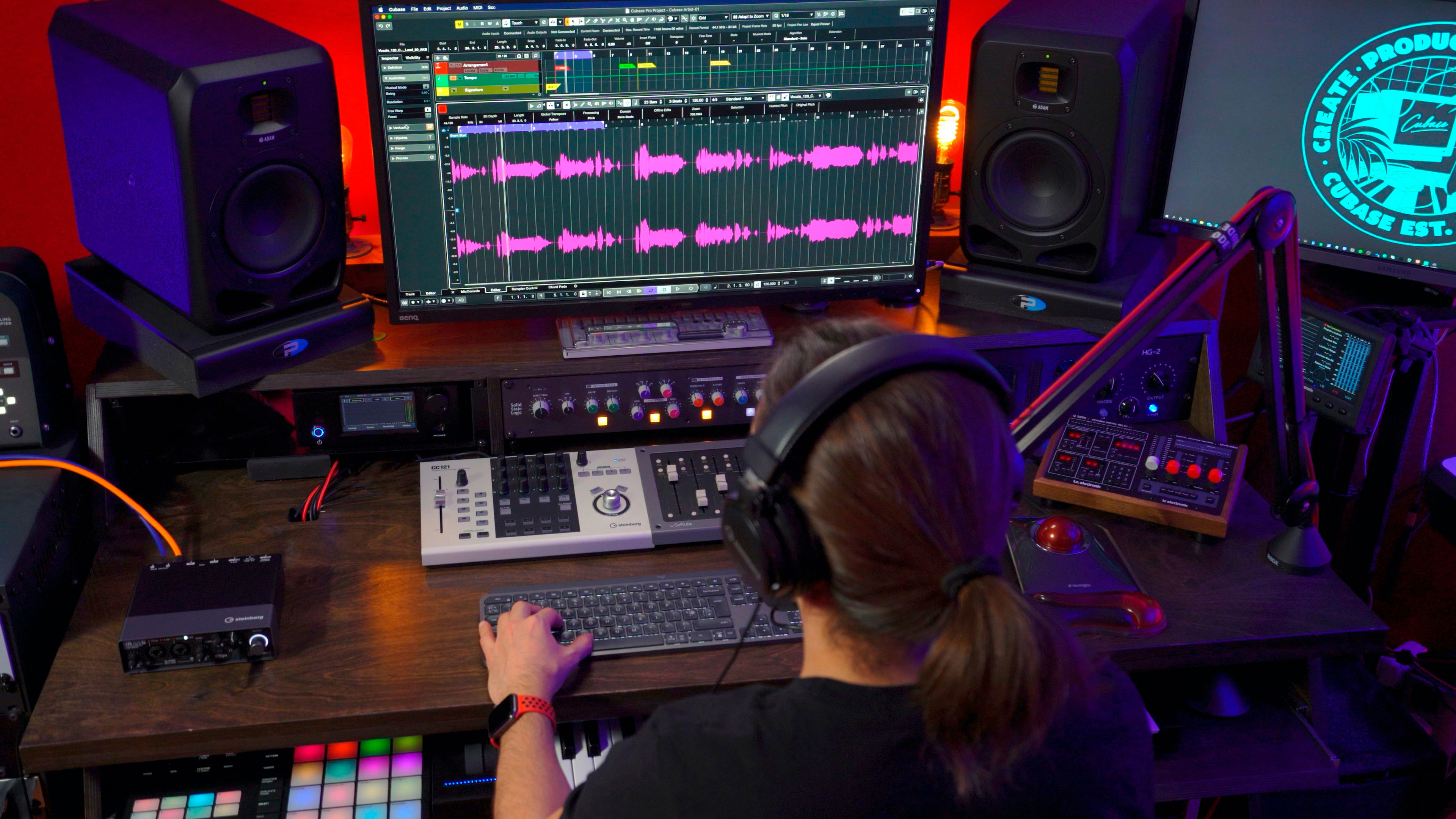
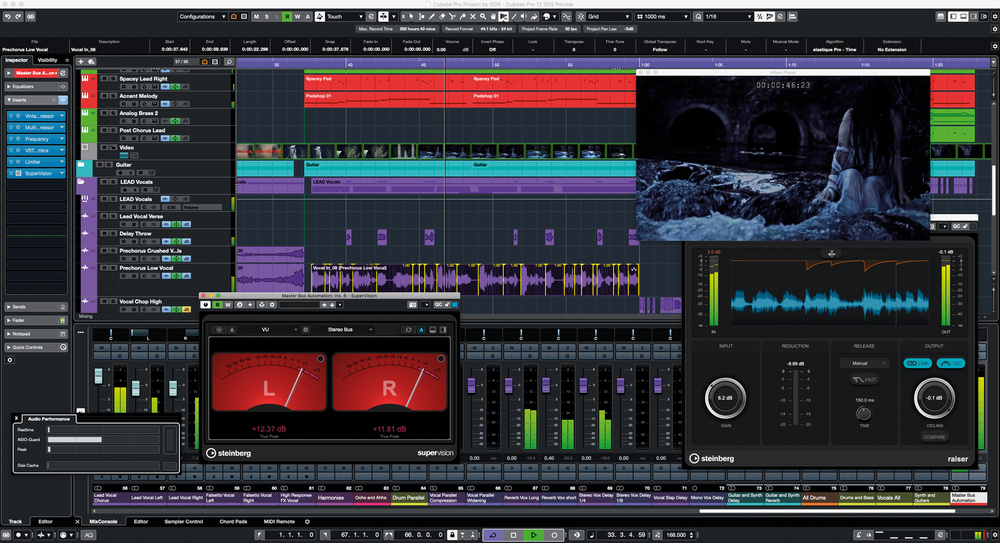
Credit: forums.steinberg.net


Comparing Features

When deciding between Cubase and FL Studio, it’s essential to compare their features. Each DAW has unique aspects that cater to different needs.

User Interface

Cubase offers a sleek and professional interface suitable for experienced users.

FL Studio is renowned for its user-friendly and intuitive interface, ideal for beginners.

Audio Recording Capabilities

Cubase provides advanced audio recording features for precise control over recordings.

FL Studio excels in quick and efficient audio recording, perfect for fast-paced workflows.

Workflow And Functionality


Deciding between Cubase and FL Studio ultimately comes down to workflow and functionality. Cubase offers a more traditional approach, while FL Studio provides a more loop-based and visually appealing interface. The choice depends on individual preferences and the specific tasks at hand.


Both platforms offer unique functionalities catering to different music production needs.

Workflow and Functionality

Ease Of Use

Cubase and FL Studio vary in simplicity, Cubase offers a polished interface while FL Studio provides a more intuitive workflow.

Available Plugins And Instruments

Cubase includes a wide array of stock plugins, suitable for professional-level music production. In contrast, FL Studio offers a diverse selection of plugins and virtual instruments.

Compatibility And Integration

When choosing between Cubase and FL Studio, considering compatibility and integration with different systems and hardware is essential. Each software has its own set of compatibilities and integrations that can impact your overall experience and workflow.

Operating Systems

Both Cubase and FL Studio are compatible with Windows and macOS operating systems. However, FL Studio also offers native support for Linux, providing a more diverse range of compatibility options for users across different platforms.

Hardware Integration

When it comes to hardware integration, Cubase and FL Studio both offer seamless connectivity with a variety of external MIDI controllers, audio interfaces, and hardware synthesizers. Cubase, known for its deep integration with Steinberg audio interfaces and control surfaces, provides a comprehensive hardware ecosystem for its users. In contrast, FL Studio is compatible with a wide range of MIDI controllers and hardware devices, allowing users to customize their setups according to their preferences.

Which is Better: Cubase or FL Studio? Make the Right Choice!


Credit: www.careersinmusic.com


Support And Community

When it comes to music production software, having a strong support system and a vibrant community can make all the difference. Whether you’re a beginner or an experienced producer, having access to user forums, tutorials, and reliable customer support can help you overcome challenges, learn new techniques, and stay inspired. In this section, we’ll explore the support and community aspects of both Cubase and FL Studio to help you make an informed decision.

User Forums And Tutorials

Being part of a community that shares your passion for music production can be invaluable. Both Cubase and FL Studio have dedicated user forums where you can connect with fellow producers, exchange ideas, ask questions, and get expert advice. These forums serve as a hub for collaboration and learning, where you can find answers to common problems, discover new techniques, and even showcase your own work.

On top of user forums, both software also provide a wealth of tutorials to help you master their features. Whether you’re a visual learner or prefer step-by-step written instructions, you’ll find a plethora of resources to enhance your skills. From beginner tutorials covering the basics to advanced techniques that push the boundaries of music production, these tutorials ensure that you have the knowledge and confidence to create your best work.

Customer Support

Technical issues can disrupt your creative flow and hinder your productivity. That’s where reliable customer support comes into play. Both Cubase and FL Studio offer responsive customer support to ensure that you have assistance when you need it. Whether you’re facing software compatibility issues, installation problems, or simply need help troubleshooting, their support teams are there to guide you through the process.

Customer support channels typically include email support, live chat features, and extensive knowledge bases. By having easy access to these resources, you can quickly resolve any technical issues and get back to doing what you love – making music. Knowing that dedicated support is just a message away can provide peace of mind, allowing you to focus on your creative process without unnecessary hurdles.

Cost And Pricing Options

When it comes to choosing between Cubase and FL Studio, one of the important factors to consider is the cost and pricing options. The investment you need to make in music production software can vary greatly depending on your budget and future plans. Let’s take a closer look at the cost and pricing options of both Cubase and FL Studio.

Initial Investment

When you are starting out in music production, the initial investment can play a significant role in your decision-making process. Cubase offers different versions, each with its own price point, allowing you to choose a version that suits your needs and budget. The pricing for Cubase ranges from the more affordable Cubase Elements to the advanced Cubase Pro.

On the other hand, FL Studio offers a slightly different approach. It follows a tiered pricing model, providing different editions such as FL Studio Fruity, FL Studio Producer, and FL Studio Signature. Each edition offers different features and comes at a different price point, allowing users to upgrade as their skills and requirements grow.

Subscription And Upgrade Plans

In addition to the initial purchase cost, it’s important to consider the subscription and upgrade plans offered by both Cubase and FL Studio. Cubase offers a subscription-based pricing option known as the Steinberg Absolute Annual Subscription. This plan includes Cubase Pro and a range of additional virtual instruments and effects, providing a comprehensive package for a yearly fee.

FL Studio, on the other hand, offers free lifetime updates, meaning you won’t have to pay for updates and bug fixes once you purchase a version. However, if you want access to major version upgrades and additional plugins, FL Studio offers a convenient Lifetime Free Updates plan, which grants you lifetime access to updates and discounted upgrade prices.

Ultimately, the cost and pricing options of Cubase and FL Studio will depend on your needs, budget, and future plans. Whether you prefer the initial investment flexibility of Cubase or the lifetime update option of FL Studio, both platforms offer diverse options to cater to various user requirements.

Which is Better: Cubase or FL Studio? Make the Right Choice!


Credit: logickeyboard.com


Frequently Asked Questions Of Which Is Better Cubase Or Fl Studio


Which One Is Better Between Fl Studio And Cubase?


FL Studio and Cubase are both popular digital audio workstations. FL Studio is known for its user-friendly interface, while Cubase is preferred for its advanced recording and editing capabilities. The better option depends on individual preferences and needs.


What Is Better Than Cubase?


Pro Tools is a popular alternative to Cubase. It offers advanced features for audio production.


Do Professionals Use Cubase?


Yes, many professionals use Cubase for its advanced features, flexible workflow, and high-quality audio production capabilities. It is widely popular in the music industry for recording, editing, and mixing music.


Is Cubase Good For Making Beats?


Yes, Cubase is excellent for creating beats. Its features and tools allow for easy beat production with high-quality sound.


Conclusion


Both Cubase and FL Studio offer unique features to suit different music production needs. The choice ultimately depends on your specific requirements and preferences. Whichever software you choose, remember to focus on honing your skills and creativity to make the most of your music production journey.


https://www.youtube.com/watch?v=_989fDNcqBQ


Categories
Archive

Why Pro Tools Is the Ultimate DAW: Unleash Your Musical Potential

Pro Tools stands out as the best DAW due to its versatile features and industry-standard status. With its powerful editing capabilities and seamless workflow, Pro Tools has become the go-to choice for professional music production and audio engineering.


Its user-friendly interface and extensive plugin support make it a top choice for music creators looking to achieve high-quality results efficiently. The intuitive design of Pro Tools allows users to focus on their creative process without getting bogged down by technical complexities.


Whether you’re a seasoned producer or a beginner, Pro Tools offers a comprehensive platform that caters to all your music production needs.

Why Pro Tools Is the Ultimate DAW: Unleash Your Musical Potential


Credit: hitnmix.com


The Evolution Of Pro Tools

Pro Tools has withstood the test of time, evolving into a powerhouse digital audio workstation for music production. Let’s delve into the journey of Pro Tools through the years.

Founding And Development

1991: Pro Tools was founded by Evan Brooks, Peter Gotcher, and Jeff Berry.

  • Initially: Focused on revolutionizing recording technology.
  • Over Time: Became the industry standard for professionals.

Key Features

Audio Editing: Pro Tools provides advanced tools for precise audio editing.

  1. Real-Time Mixing: Seamless mixing capabilities for a polished sound.
  2. Plug-In Support: Extensive library of plugins for enhanced creativity.
Why Pro Tools Is the Ultimate DAW: Unleash Your Musical Potential


Credit: medium.com


Unparalleled Tools For Audio Editing


Pro Tools stands out as the top choice for audio editing due to its unparalleled tools and features. It offers a seamless workflow and high-quality audio processing, making it the best DAW for professional music production and sound engineering projects.

Real-time Audio Suite

Pro Tools boasts a Real-Time Audio Suite for instant audio processing and effects.

Elastic Audio

With Elastic Audio in Pro Tools, you can easily manipulate the timing and pitch of audio segments.

Advanced Mixing And Mastering Capabilities

Pro Tools is revered for its advanced mixing and mastering capabilities, making it the go-to digital audio workstation (DAW) for professional music producers and sound engineers.

Automation And Control Surface Integration

Pro Tools excels in automation and control surface integration, allowing creators to streamline their workflow and achieve precise and consistent mixes. With its intuitive interface, users can easily automate various parameters, including volume, panning, and plugin settings, facilitating seamless control over the entire mixing process.

Mastering Suite

The mastering suite in Pro Tools provides a comprehensive set of tools and features tailored for refining the final sonic output. From multiband compression to sophisticated EQ modules, Pro Tools’ mastering suite empowers users to polish their tracks with exceptional precision, ensuring professional-grade mastering results.

Why Pro Tools Is the Ultimate DAW: Unleash Your Musical Potential


Credit: www.quarto.com


Seamless Integration Of Music Production Workflow


Efficiently streamline your music production workflow with Pro Tools for seamless integration and superior DAW functionality. Maximize productivity and creativity with the industry-leading software for professional audio editing and mixing. Elevate your music production experience with Pro Tools today.

Pro Tools, a widely used digital audio workstation (DAW), stands out as the best choice for music production due to its seamless integration of the music production workflow. Whether you are a professional music producer or an aspiring artist, Pro Tools offers a range of features and tools that enhance the music creation experience.

Collaboration And File Management

Pro Tools simplifies collaboration among musicians and producers, making it easier to work on projects together. With its cloud-based collaboration tools, multiple users can access and work on the same project simultaneously, regardless of their location. This real-time collaboration fosters creativity and enables efficient music production.

Moreover, Pro Tools provides smooth file management capabilities that streamline the organization of music projects. The project file management system ensures that all elements, such as audio tracks, MIDI data, and effects, are stored in a well-organized manner. This allows for easy retrieval of files, minimizing time wasted on searching for specific assets.

Compatibility And Extensibility

Pro Tools boasts exceptional compatibility with various operating systems, plugins, and hardware, making it a versatile tool for professional music production. It supports both Mac and Windows platforms, enabling users to choose their preferred operating system without limitations. Additionally, Pro Tools offers compatibility with a vast range of audio plugins, enabling producers to incorporate different sounds and effects into their projects.

Furthermore, Pro Tools’ extensibility is unmatched, allowing users to enhance their workflow with third-party plugins and additional functions. Whether you need advanced mixing tools, virtual instruments, or audio processing plugins, Pro Tools enables easy integration and customization, elevating your music production capabilities.

In conclusion, Pro Tools is undoubtedly the best DAW when it comes to seamless integration of the music production workflow. Its collaboration and file management features, combined with extensive compatibility and extensibility options, create an environment that boosts productivity and unleashes creativity. Experience the power of Pro Tools and take your music production to new heights.


Superior Support And Training Resources


When it comes to professional music production software, Pro Tools stands out as the industry leader. Besides its powerful features and intuitive interface, Pro Tools also provides superior support and training resources, making it the best Digital Audio Workstation (DAW) for both beginners and experienced users.

Tech Support And Community Forums

Pro Tools offers exceptional tech support, ensuring that you never feel alone during your music production journey. Whether you encounter a technical issue or have a question about a specific feature, their knowledgeable support team is just a click or phone call away. They guide you through troubleshooting steps, helping you resolve any problems you may face quickly.

Not only that, but Pro Tools also hosts an active community forum where users from all around the world come together to share their experiences, provide tips, and offer solutions. It’s the perfect place to connect with fellow musicians and industry professionals, expanding your network and finding inspiration for your projects.

Certification And Training Programs

Pro Tools offers comprehensive certification and training programs to help you master the software and enhance your music production skills. These programs are designed by industry experts and cover everything from the basics to advanced techniques. With Pro Tools certification, you stand out in the competitive music industry, showcasing your proficiency and dedication to your craft.

Whether you prefer in-person classes, virtual workshops, or self-paced online courses, Pro Tools has a variety of training options to suit your learning style and schedule. Their courses are tailored to musicians, producers, and audio engineers of all levels, ensuring that you receive the guidance and knowledge needed to take your music production to new heights.

Additionally, Pro Tools provides extensive documentation, tutorials, and how-to guides on their website. These resources serve as invaluable references, covering every aspect of the software and helping you navigate its features effortlessly. With their user-friendly materials, you can quickly become proficient in Pro Tools and optimize your music production workflow.

Frequently Asked Questions For Why Pro Tools Is The Best Daw


Is Pro Tools Still The Best Daw?


Yes, Pro Tools remains a leading DAW in the industry due to its powerful features and stability.


What Are The Advantages Of Pro Tools?


Pro Tools offers professional-grade audio editing, recording, and mixing capabilities. It provides a wide range of industry-standard tools and plugins. Pro Tools ensures high-quality sound production and seamless workflow integration. It also offers collaboration features for remote work and easy file sharing.


Why Would Anyone Use Pro Tools?


Pro Tools is a popular choice for audio professionals due to its advanced features and industry-standard status. It offers high-quality sound editing, mixing, and mastering capabilities, making it ideal for music production, sound design, and post-production tasks. Moreover, Pro Tools provides a seamless workflow and compatibility with various hardware and software options.


Why Is Pro Tools Better Than Logic Pro?


Pro Tools excels over Logic Pro due to its industry-standard status, advanced features, and extensive plugins. With a robust interface and superior audio editing capabilities, Pro Tools is favored for professional production. Its wide compatibility and stable performance make it a preferred choice for music professionals.


Conclusion


Pro Tools stands out as the premier choice for digital audio workstations due to its unparalleled features. With its intuitive interface and top-notch audio quality, it offers a seamless recording and editing experience. Whether you’re a professional or an aspiring music enthusiast, Pro Tools provides the tools necessary for unleashing your creativity.

Categories
Archive

Are Music Production Schools Worth It? Discover the Power of Industry-Recognized Education

Yes, music production schools can be worth it if you’re committed to learning and working in the industry. They offer structured education and industry connections, enhancing your skills and opportunities in the field.


Investing in a music production school can provide you with specialized knowledge, hands-on experience, and networking opportunities that can fast-track your career in the music industry. Additionally, the guidance and mentorship from experienced professionals in these schools can help you refine your craft and stand out in a competitive industry.

Related reading: Basics of ghost production and Music production services. For background, see Record producer.


While self-teaching is an option, attending a music production school can offer a structured learning environment that can accelerate your growth and open doors to potential career opportunities.

Are Music Production Schools Worth It? Discover the Power of Industry-Recognized Education


Credit: www.simonandschuster.com


The Value Of Music Production Schools


Considering the rapid growth and technological advances in the music industry, attending a music production school can provide essential skills and industry insights, paving the way for a successful career. The structured learning environment, access to professional equipment, and mentorship from experienced instructors make music production schools worth the investment for aspiring producers and engineers.

Industry-relevant Curriculum

Music production schools offer up-to-date and industry-specific teaching. They focus on relevant skills needed in the music production field.

Hands-on Experience

Students gain valuable practical skills through hands-on experience. This ensures they are well-prepared for real-world music production scenarios.

Attending a music production school can significantly enhance a student’s knowledge through specialized courses and expert guidance. The focused learning environment of these schools helps students stay updated with industry trends.

  • Specialized courses in music technology and production.
  • Focus on current industry software and tools.
  • Guest lectures from industry professionals.
  1. Access to professional studios and equipment.
  2. Practical projects that simulate real-world scenarios.
  3. Opportunities to collaborate with fellow students on projects.

Cost-benefit Analysis

When considering music production schools, a crucial aspect to evaluate is the cost-benefit analysis. This involves weighing the expenses associated with tuition against the potential return on investment.

Tuition And Expenses

Music production schools can vary greatly in cost. It’s essential to research tuition fees and additional expenses, such as equipment and software.

Potential Return On Investment

Students should assess the potential return on investment from attending a music production school. This includes job opportunities and income growth.

Networking Opportunities

Networking opportunities are a crucial aspect of music production schools, offering students the chance to connect with industry professionals and build a supportive community. Let’s delve into the specific benefits that come with these opportunities.

Access To Industry Professionals

Music production schools provide unique access to industry professionals. This allows students to learn directly from those with valuable experience and established success in the field. Through workshops, masterclasses, and one-on-one interactions, students can gain insights and guidance from professionals, expanding their knowledge and establishing important connections for future career prospects.

Building A Supportive Community

By enrolling in a music production school, students become part of a like-minded community where they can collaborate, share knowledge, and receive support from their peers. The network of fellow students and instructors provides a platform for mutual encouragement, feedback, and potential partnerships, bolstering the learning experience and fostering long-term relationships within the industry.

Are Music Production Schools Worth It? Discover the Power of Industry-Recognized Education


Credit: www.synthesia.io


Alternative Paths To Success


https://www.youtube.com/watch?v=SVvpkfwOgyg


Making An Informed Decision

Deciding whether or not to enroll in a music production school is a critical step towards your career in the music industry. To make the most informed decision possible, it’s vital to evaluate your personal goals and consider your individual learning style. By taking these factors into account, you can ensure that you are investing your time and resources wisely.


Evaluating Personal Goals

When contemplating the value of music production schools, it is essential to first understand your personal goals. Consider what you aim to achieve in your music career and how a formal education can help you accomplish those goals. Whether you aspire to become a renowned music producer, sound engineer, or even a performer, it is crucial to align your educational path with these ambitions.

Take the time to assess your desired level of expertise. Are you looking to gain a comprehensive understanding of music theory, sound design, and production techniques? Or are you primarily interested in hands-on experience and practical training? Identifying your specific goals will help you determine if music production school is the right choice for you.


Considering Individual Learning Styles

Learning styles can significantly impact how effectively you absorb and retain information. Some individuals thrive in structured, classroom-style settings, while others prefer a more self-paced and flexible approach. Understanding your learning style is crucial in ensuring that you choose the right educational environment.

If you are an auditory learner, music production schools can provide you with the opportunity to engage in discussions with experienced instructors and collaborate with fellow students. If you are a visual learner, you may benefit from the visual aids and demonstrations often used in classroom settings. Alternatively, if you are a hands-on learner, practical training workshops and studio sessions may be more beneficial to your learning experience.

By considering your individual learning style, you can select a music production school that caters to your preferences and maximizes your educational journey.

Are Music Production Schools Worth It? Discover the Power of Industry-Recognized Education


Credit: about.underarmour.com


Frequently Asked Questions Of Are Music Production Schools Worth It


Is It Worth Doing A Music Production Degree?


Yes, a music production degree can lead to lucrative careers in the industry with essential skills and networking opportunities.


Should I Go To School To Be A Music Producer?


Yes, going to school for music production can provide valuable skills and networking opportunities essential for success.


Should I Pursue A Career In Music Production?


Yes, if you are passionate about music and have a knack for technology. It offers creative freedom and potential for a lucrative career.


What Is The Best School For Music Production?


The best school for music production varies based on individual preferences and goals. Some top schools include Berklee College of Music, Full Sail University, and Los Angeles Recording School. It is important to research and visit different schools to find the best fit for your music production education.


Conclusion


The decision to attend a music production school is a personal one, depending on individual goals and career interests. Music production schools offer valuable knowledge and networking opportunities, but self-teaching and gaining experience through internships can also be beneficial. Ultimately, weighing the costs and benefits is key in determining if music production schools are worth the investment.

Categories
Archive

Is Gullfloss The Same As Soothe? Find Out The Truth Here!

Is Gullfoss the same as soothe? It’s a common question, because both plugins automatically and dynamically adjust frequencies to make mixes sound cleaner and more balanced. But Gullfoss by Soundtheory and soothe2 by oeksound work in different ways and solve different problems. Understanding the difference helps you pick the right tool and avoid over-processing.

Note: the plugin is spelled “Gullfoss,” after the Icelandic waterfall, though it’s often misspelled “Gullfloss.”

Quick Answer

No, they aren’t the same.

  • soothe2 is a dynamic resonance suppressor. It finds and reduces harsh, resonant peaks, and it only cuts.
  • Gullfoss is an intelligent, adaptive EQ that improves overall tonal balance and clarity based on a model of human hearing. It can both cut (Tame) and boost (Recover).

How soothe2 Works

soothe2 analyzes the incoming signal and detects resonances, which are narrow frequency peaks that stick out. These often sound harsh, nasal or boomy. It then applies dynamic cuts only when and where those resonances occur, adapting in real time.

Common uses for soothe2:

  • Taming harsh vocals and sibilance.
  • Smoothing bright cymbals and distorted guitars.
  • Reducing boxy or boomy resonances on acoustic instruments.
  • Gentle de-harshing on buses or masters.

Its controls let you set depth, sharpness, selectivity, attack and release, and focus processing on specific frequency ranges. For a deeper look, read our soothe2 review.

How Gullfoss Works

Gullfoss uses a perceptual model of hearing to work out which frequencies are masking others or are being masked, then adjusts the EQ curve continuously to improve clarity. It has two main controls:

  • Recover: boosts frequencies that are being masked, bringing out hidden detail.
  • Tame: reduces frequencies that dominate and mask other parts.

Additional controls include Bias (which shifts the balance between Recover and Tame), Brighten and Boom. Because Gullfoss can add as well as remove energy, it’s often described as making mixes sound more open, clear and balanced.

Common uses for Gullfoss:

  • Opening up a dull or cluttered mix bus.
  • Improving clarity on full mixes and masters.
  • Bringing out detail on dense buses such as drums or music.

Gullfoss vs soothe2: Key Differences

Purpose

soothe2 targets problems: resonances and harshness. Gullfoss targets overall tonal balance and clarity.

Boost vs Cut

soothe2 only cuts. Gullfoss can boost and cut.

Typical Placement

soothe2 is often used on individual tracks such as vocals, guitars and cymbals, as well as on buses. Gullfoss is most often used on buses and the master, though it can work on individual sources.

Sound

soothe2 sounds smooth and controlled, removing harshness. Gullfoss sounds clearer and more open, and can feel brighter or more detailed.

Can You Use Both?

Yes. Many engineers use soothe2 on individual tracks to clean up resonances, then Gullfoss on the mix bus or master for overall clarity. Because they solve different problems, they can complement each other. Use both with care: heavy settings on either can make a mix sound processed, lifeless or unnatural.

Tips for Using Them Well

  • Start subtle. Small amounts often give the best results.
  • Level-match when bypassing so you’re judging tone, not volume.
  • Check transients. Over-processing can dull attack and punch.
  • Fix big problems with EQ first. Neither plugin replaces good arrangement and mixing.
  • Compare with references to make sure you’re moving in the right direction.

For a manual approach to the same problems, see how to fix resonances in music.

Alternatives

Other resonance suppressors exist, such as Baby Audio’s Smooth Operator. Compare it in our Smooth Operator vs soothe2 article. You can also use a dynamic EQ for more manual control over specific frequencies.

Which Should You Buy First?

If your main problem is harshness, such as piercing vocals, fizzy guitars or bright cymbals, start with soothe2 or a similar resonance suppressor. If your mixes sound generally dull, cluttered or lacking clarity, Gullfoss may make a bigger difference.

Before buying either, try the free trials and test them on a few of your own mixes. Listen at matched levels and bypass often. Many producers find that one tool suits their workflow far better than the other, and that improved arrangement and EQ skills can reduce how much they need either.

A Simple Workflow Using Both

  1. Balance and EQ your mix as usual.
  2. Add soothe2 to harsh sources, using just enough depth to tame the problem.
  3. Add Gullfoss to the mix bus at gentle settings.
  4. Compare against references at matched levels.
  5. Reduce settings if the mix starts to sound flat or overly bright.

How Each Plugin Affects the Mix Bus

On a mix bus, soothe2 at low settings can smooth harsh upper mids and tame boomy notes without dulling the mix. Gullfoss tends to change the overall picture more, adding clarity and openness. If your mix already sounds balanced, light Gullfoss settings may be enough. If it sounds harsh, soothe2 may be the better fit. In both cases, A/B at matched levels is essential, because both plugins can trick your ears into hearing “better” when they’re just different.

Frequently Asked Questions

Is Gullfoss better than soothe2?

Neither is better overall. soothe2 is better for removing resonances and harshness, while Gullfoss is better for improving overall clarity and balance.

Can soothe2 boost frequencies?

No. soothe2 only applies dynamic cuts to resonances.

Should I put Gullfoss on my master?

It’s commonly used on the master or mix bus, but use subtle settings and compare carefully with bypass at matched levels.

Is “Gullfloss” the correct spelling?

No. The correct spelling is Gullfoss, named after the waterfall in Iceland.

Categories
Archive

5 Popular Songs In Irregular Time Signatures

“Golden Brown” by The Stranglers, “Money” by Pink Floyd, “15 Step” by Radiohead, “YYZ” by Rush, and “The Ocean” by Led Zeppelin are popular songs in irregular time signatures. These songs challenge traditional rhythmic structures, captivating listeners with their unique time signatures that deviate from the standard 4/4 beat.


The use of irregular time signatures adds complexity and intrigue to the music, showcasing the musicians’ skill and creativity. Fans appreciate the creative risk-taking and the dynamic energy that these songs bring, making them memorable and distinctive in the music landscape.


Credit: www.independent.co.uk


The Art Of Irregular Time Signatures


Explore the art of irregular time signatures through these 5 popular songs. From Radiohead’s “15 Step” to Pink Floyd’s “Money,” these tracks challenge the traditional measures, showcasing the creative power of unique rhythmic structures in music.

The Art of Irregular Time Signatures In music, unconventional beats create unique rhythms that capture listeners’ attention.

Exploring Unconventional Beats

Songs in irregular time signatures like 5/4 or 7/8 defy traditional meter patterns.

Significance In Music Composition

Artists use irregular time signatures to add complexity and depth to their compositions.


Credit: www.amazon.com


Breaking Down 5 Popular Songs

Song 1: “schism” By Tool

The intricate rhythms of “Schism” by Tool showcase complex time signatures.

Song 2: “money” By Pink Floyd

Pink Floyd’s classic “Money” features 7/4 time signature, adding a unique groove.

Song 3: “the Ocean” By Led Zeppelin

Led Zeppelin’s “The Ocean” stands out with its irregular time changes.

Song 4: “pyramid Song” By Radiohead

Radiohead’s “Pyramid Song” experiments with 5/4 time signature, creating an ethereal vibe.

Song 5: “schism” By Tool

The intricate rhythms of “Schism” by Tool showcase complex time signatures.


Impact On Audience And Music Industry

Irregular time signatures in music often create a unique and captivating experience for both the audience and the artists themselves. The impact of songs with irregular time signatures can be seen in challenging listener expectations and influencing musical innovations, which in turn have shaped the music industry. Let’s delve into the effects of these songs on the audience and music industry.

Challenging Listener Expectations

Songs in irregular time signatures challenge the traditional expectations of listeners, leading them on a musical journey that defies conventional rhythms. The unpredictability of the beats and patterns keeps the audience engaged and intrigued, offering a refreshing departure from the standard time signatures prevalent in most music. This challenge to traditional expectations sparks creativity and curiosity, pushing the boundaries of what listeners expect from a song.

Influence On Musical Innovations

The exploration of irregular time signatures in popular songs has had a profound impact on musical innovations. Artists and musicians have leveraged irregular time signatures to experiment with new sounds and rhythms, paving the way for fresh and innovative compositions. This influence extends to various genres, pushing the boundaries of what is considered musically groundbreaking. As a result, the influx of diverse rhythms and time signatures has brought an avant-garde flavor to the music industry, setting new trends and inspiring future musical creations.

Technical & Creative Approaches


Explore the innovative fusion of technical and creative approaches in these 5 popular songs featuring irregular time signatures. Unravel the musical complexity and rhythmic diversity that captivate listeners with unexpected beats and captivating melodies. Immerse yourself in a harmonious blend of artistry and precision.

Musical Versatility And Complexity

When it comes to music, time signatures play a crucial role in establishing rhythm and structure. While the common 4/4 time signature dominates most popular music, there are artists who push the boundaries by incorporating irregular time signatures into their compositions. These technical and creative approaches not only showcase the musicians’ musical versatility but also add a level of complexity to their songs that captivate listeners.

Experimental Rhythmic Structures

In the realm of irregular time signatures, experimental rhythmic structures take center stage. Artists often venture beyond traditional time signatures to create intricate patterns that challenge the listener’s musical expectations. Adele’s hit song “Skyfall” is a prime example, with its use of a 9/8 time signature in the chorus. The shifting metric feel introduces a sense of unpredictability that heightens the emotional intensity of the song. Similarly, Radiohead’s “Pyramid Song” incorporates a 3/4 + 4/4 polyrhythm, fusing multiple time signatures seamlessly. These unconventional choices not only showcase the artist’s creativity but also reinvent the possibilities of rhythm within popular music.

Technical Innovations Elevating Song Structures

Incorporating irregular time signatures requires technical prowess and innovation. Musicians often experiment with complex rhythmic ideas, pushing the boundaries of what is considered standard within their genre. One such example is Tool’s “Schism”, a progressive metal masterpiece that combines 5/4 and 7/8 time signatures. The intricate interplay between the instruments and the irregular time signatures creates a captivating sonic landscape where the technical musicianship shines through. By challenging conventional song structures, these artists bring new dimensions to their compositions, captivating the audience with their innovative approaches.

Emotional Impact Of Unconventional Rhythms

When artists venture into irregular time signatures, it can have a profound emotional impact on the listener. Bjork’s “Jóga”, which incorporates a 14/4 time signature, demonstrates the power of unconventional rhythms in conveying complex emotions. The irregular pulses create a mesmerizing flow that mirrors the ebb and flow of Bjork’s ethereal vocals, amplifying the song’s emotional depth. This blending of technical innovation and emotional expression is what makes songs in irregular time signatures so compelling, leaving a lasting impression on the listener.

Pushing Boundaries For Musical Creativity

In conclusion, the use of irregular time signatures allows artists to push the boundaries of musical creativity while also adding complexity and intrigue to their songs. From experimental rhythmic structures to technical innovations, these unconventional choices elevate the artistic expression within popular music. By venturing beyond the confines of traditional time signatures, these artists demonstrate their musical versatility and create unique compositions that captivate and inspire listeners. So why not venture into the realm of irregular time signatures and discover a whole new world of musical possibilities?

Future Of Irregular Time Signatures


Explore the latest trend in music – irregular time signatures. Dive into five hit songs showcasing this innovative rhythm, elevating music to new heights. Discover how artists are pushing boundaries and challenging traditional norms with unique time signatures.

Continued Evolution in Music Production

The future of irregular time signatures in popular music is poised for continued evolution. With advancements in music production technology, artists have more tools at their disposal to experiment with unconventional rhythmic patterns. This allows for the exploration of unique time signatures that challenge traditional musical norms.

Music production software, such as digital audio workstations (DAWs), offers musicians the ability to easily compose and arrange music in a wide range of time signatures. This flexibility in production opens the door for more artists to embrace irregular time signatures and incorporate them into their compositions.

Additionally, the accessibility of these technologies means that aspiring musicians and indie artists can also experiment with irregular time signatures without the need for expensive studio equipment. This democratization of music production empowers creators from all backgrounds to push the boundaries and explore new rhythmic possibilities.

Pushing Boundaries in Popular Music

Irregular time signatures have been integral to the evolution of popular music. From the influential jazz compositions of artists like Dave Brubeck to the progressive rock genius of bands like Rush, these unconventional rhythms have captivated listeners and pushed the boundaries of what is considered mainstream.

As artists continue to experiment with irregular time signatures, the future of popular music holds the promise of even more groundbreaking compositions. Genres such as math rock and avant-garde jazz are already celebrated for their complex rhythms, and their influence is likely to spread to a wider audience.

Embracing Complexity and Challenging Conventions

The future of irregular time signatures offers musicians an exciting opportunity to embrace complexity and challenge conventional song structures. By incorporating unconventional rhythms into their compositions, artists can create a sense of unpredictability and intrigue that captivates listeners.

Irregular time signatures not only provide a unique listening experience but also allow musicians to express themselves in new and exciting ways. The use of unusual rhythms can evoke different emotions, add depth to a song, and create a distinct sonic identity that sets an artist apart.

As the future of popular music unfolds, we can expect to hear more songs that defy the constraints of traditional time signatures. Musicians will continue to push the boundaries, embracing the diversity of rhythms and challenging our expectations of what defines a catchy and memorable song.


Credit: www.amazon.com


Frequently Asked Questions Of 5 Popular Songs In Irregular Time Signatures


What Pop Song Has An Odd Time Signature?


The pop song “Money” by Pink Floyd has an odd time signature of 7/4, making it stand out in popular music.


What Is An Example Of An Irregular Time Signature?


An example of an irregular time signature is 7/8, which has seven beats in each measure.


Which Band Was Known For Using Irregular Time Signatures?


The band known for using irregular time signatures is Tool. They are famous for their complex and unique rhythmic patterns.


What Is The Time Signature Of Popular Songs?


Popular songs typically use common time signatures such as 4/4, 3/4, or 6/8. These time signatures provide a rhythm that audiences can easily follow and dance to, contributing to the song’s appeal and memorability.


Conclusion


In this blog post, we have explored five popular songs that showcase the beauty and complexity of irregular time signatures. From the experimental sounds of Tool to the classic elegance of Dave Brubeck’s “Take Five,” these songs demonstrate the versatility and creativity that can be achieved outside of traditional time structures.


Adding songs with irregular time signatures to your playlist can expand your musical horizons and deepen your appreciation for rhythmic diversity. Embracing these unique rhythms can inspire new ideas and creativity in your own musical pursuits. So, explore these songs and let them enrich your musical journey.

Categories
Archive

Cant Find Eq Eight In Ableton : Locating Eq Eight

If you can’t find EQ Eight in Ableton, check under Audio Effects in the browser. Try restarting Ableton if it’s still missing.


Ableton Live is a popular digital audio workstation known for its versatility and powerful features, including its extensive array of audio effects. Among these effects is EQ Eight, a versatile equalizer tool that allows users to shape and mold their audio tracks with precision.


However, if you’re having trouble locating EQ Eight in your Ableton Live setup, it can be frustrating and confusing. In this guide, we will explore some common solutions to help you find EQ Eight in Ableton Live and get back to creating your music seamlessly. So let’s dive in and troubleshoot this issue together.

Cant Find Eq Eight In Ableton  : Unlocking the Secrets to Locating Eq Eight


Credit: ask.audio


The Basics Of Eq Eight

Cant find Eq Eight in Ableton? Let’s delve into What is EQ Eight and understand its functionality.

What Is Eq Eight?

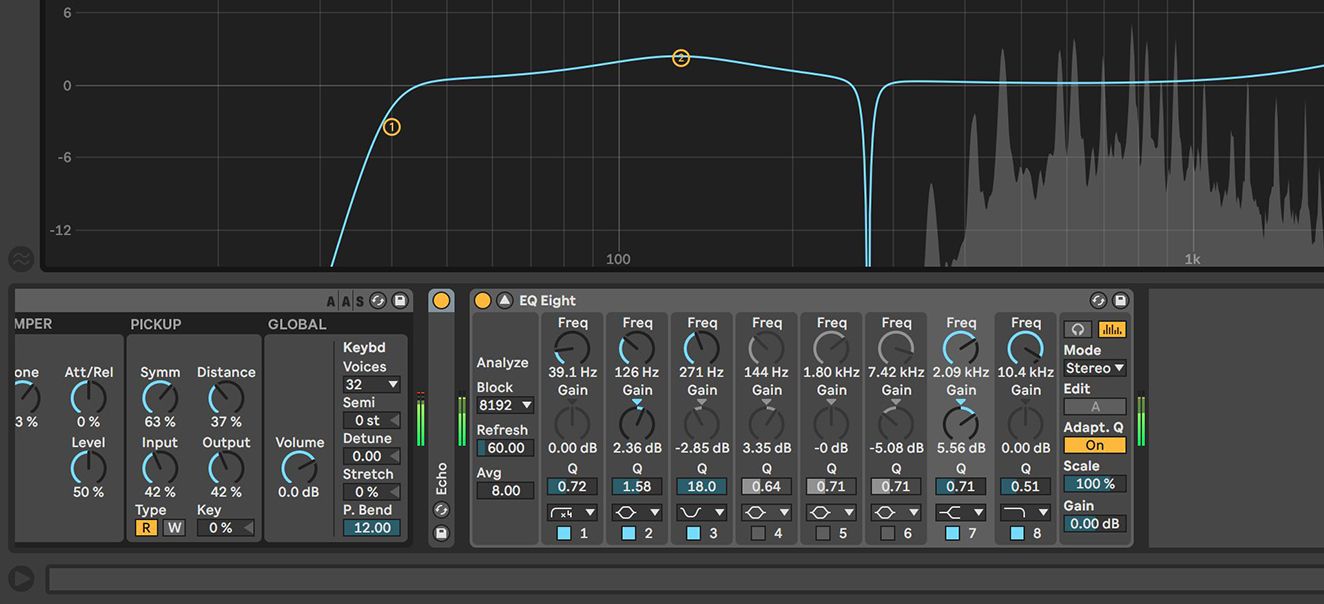
EQ Eight is an equalizer plugin in Ableton Live used for adjusting and shaping the frequencies of audio signals.

Understanding Eq Eight’s Functionality

  • EQ Eight consists of eight bands that allow precise control over different frequency ranges.
  • Each band can be adjusted individually to boost or cut specific frequencies.
  1. EQ Eight is essential for balancing the sound of your tracks.
  2. Experiment with EQ Eight to enhance the clarity and depth of your audio.


Credit: www.facebook.com


Locating Eq Eight In Ableton Live

Finding Eq Eight In The Audio Effects Browser

To find EQ Eight, navigate to the Audio Effects browser in Ableton Live.

  • Click on the “Audio Effects” tab.
  • Scroll down until you see EQ Eight.
  • Drag EQ Eight onto a track to add it.

Adding Eq Eight To A Track

To add EQ Eight, place it on the desired track for precise audio control.

  1. Open the Audio Effects browser.
  2. Locate EQ Eight and drag it onto the track.
  3. Adjust the EQ settings to shape the sound.
https://www.youtube.com/watch?v=EXTo5qwpPEk


Exploring Eq Eight’s Interface

When it comes to audio production in Ableton Live, EQ Eight is an essential tool for shaping the frequency balance of your tracks. Understanding the interface and controls of EQ Eight is crucial for achieving professional-grade sound. In this guide, we’ll explore EQ Eight’s interface, providing an overview of its controls and delving into its frequency spectrum.

Overview Of Eq Eight’s Controls

EQ Eight features a user-friendly interface, allowing musicians and producers to effortlessly sculpt their sound. The main controls include:

  • Frequency bands: EQ Eight offers eight frequency bands, enabling precise adjustments across the spectrum.
  • Gain knobs: Each frequency band is equipped with a gain knob to boost or attenuate specific frequencies.
  • Frequency and Q controls: Users can adjust the center frequency and bandwidth of each band for targeted equalization.
  • Global controls: Additional parameters such as the Low Cut, High Cut, and Output Gain provide further shaping and fine-tuning of the audio signal.

Understanding Eq Eight’s Frequency Spectrum

EQ Eight operates across the entire frequency spectrum, allowing for intricate adjustments to different frequency ranges:

  1. Low frequencies: EQ Eight enables precise shaping of the low end, essential for achieving a tight and well-defined bass response.
  2. Mid frequencies: With control over the midrange, users can balance the presence of instruments and vocals within the mix, enhancing clarity and warmth.
  3. High frequencies: Adjusting the high end is critical for controlling the brilliance and airiness of the overall sound.

Mastering Eq Eight Techniques

If you’re an Ableton user, you might have found yourself in a frustrating situation where you can’t seem to find EQ Eight, one of the most powerful plugins for audio equalization. Fear not! In this blog post, we’ll delve into mastering EQ Eight techniques, exploring how you can use this versatile tool for frequency balancing and dynamic control.

Using Eq Eight For Frequency Balancing

EQ Eight is a go-to tool for achieving balance in your audio frequencies. It allows you to refine and shape the sound of individual tracks, instruments, or the entire mix. Here are some techniques for using EQ Eight for frequency balancing:

  • Identify problem areas: Use the spectrum analyzer to visually analyze your audio and pinpoint frequency imbalances.
  • Reduce unwanted frequencies: By attenuating the frequencies that are overpowering or causing muddiness, you can create a more transparent and balanced mix.
  • Boost desired frequencies: Enhance the presence and clarity of specific elements by boosting their corresponding frequencies. This can breathe life into your mix and make it more engaging.

Utilizing Eq Eight For Dynamic Control

EQ Eight goes beyond frequency balancing; it also offers dynamic control over your audio by incorporating features like filters and dynamic processors. Here’s how you can make the most of EQ Eight for dynamic control:

  • Apply high-pass and low-pass filters: Shape the tonal character of your audio by cutting out unwanted low or high frequencies. This can give your mix more clarity and separation.
  • Use mid-side processing: EQ Eight allows you to apply different EQ settings to the center and sides of your stereo field. This enables you to enhance the focus and width of your mix.
  • Engage dynamic processing: By incorporating EQ Eight’s dynamic processors, such as the multiband dynamics and compressors, you can control the dynamics of specific frequency ranges. This helps maintain a balanced and controlled mix.

With a firm grasp of these mastering EQ Eight techniques, you’ll be able to take control of your audio, achieve a well-balanced mix, and bring out the best in your tracks. Explore the possibilities and let your creativity flow!

Advanced Tips And Tricks With Eq Eight

EQ Eight is a powerful tool in Ableton Live that allows you to shape and enhance the frequency balance of your tracks. While it may seem simple at first glance, EQ Eight is capable of much more than just basic adjustments. In this section, we will explore some advanced tips and tricks that will help you take your EQ Eight skills to the next level.

Creating Surgical Eq Adjustments

One of the most valuable features of EQ Eight is its ability to make surgical adjustments to specific frequencies. Instead of applying broad changes, you can use EQ Eight to pinpoint and tame problematic frequencies with precision. Here’s how:

  1. Analyzing the Frequency Spectrum: Before making any adjustments, it’s important to analyze the frequency spectrum of the track you’re working on. Use the Spectrum Analyzer, located in the EQ Eight interface, to identify peaks and dips in the frequency spectrum.
  2. Narrowing the Q: To make surgical adjustments, you’ll want to narrow the Q, or bandwidth, of the EQ Eight. This helps to isolate the specific frequency you want to adjust without affecting the surrounding frequencies.
  3. Applying Gain Reduction: Once you’ve identified the problematic frequency, apply gain reduction by dragging the control point down on the EQ Eight curve. Be gentle with your adjustments, as small changes can have a big impact.
  4. Using Solo Mode: Solo Mode allows you to isolate the frequency band you’re working on, making it easier to hear the effect of your adjustments. Click the ‘S’ icon next to the control point to enable Solo Mode.
  5. Fine-Tuning with Frequency Range and Gain Controls: The Frequency Range and Gain controls on the EQ Eight can further refine your surgical adjustments. Use them to specify the range of frequencies you want to target and precisely dial in the desired amount of gain reduction.

Harnessing Eq Eight For Sound Design

EQ Eight is not only useful for corrective equalization but also an invaluable tool for sound design. Its flexible features allow you to sculpt and shape sounds in innovative ways. Here are some ways you can harness EQ Eight for sound design:

  • Creating Unique Filter Effects: By automating the EQ Eight’s parameters over time, you can create intriguing filter effects. Experiment with sweeping filters, resonance adjustments, and modulation to add movement and character to your sounds.
  • Enhancing Stereo Field: Use the Mid/Side processing feature of EQ Eight to manipulate the stereo width of your tracks. Narrow the stereo image, widen it, or even create intricate stereo panning effects by independently adjusting the EQ on the mid and side channels.
  • Shaping Synth Sounds: EQ Eight can be a powerful tool when used to shape and sculpt synth sounds. Boost or cut specific frequencies to bring out the desired characteristics of your synths, helping them cut through the mix or sit back in the mix as needed.
  • Layering and Layer EQing: When layering multiple sounds or instruments together, EQ Eight can help you achieve a cohesive and balanced sound. Use EQ Eight to shape each layer individually, removing any clashing frequencies and allowing each layer to exist harmoniously.

With these advanced tips and tricks, you can unlock the full potential of EQ Eight in Ableton Live. Whether you’re making surgical adjustments or exploring sound design possibilities, EQ Eight is a versatile tool that can take your tracks to the next level.


Credit: www.tiktok.com


Frequently Asked Questions Of Cant Find Eq Eight In Ableton


How Do I Add Eq 8 In Ableton?


To add EQ 8 in Ableton, click on an audio track, then go to “Audio Effects”, and select EQ 8 from the drop-down menu.


Does Ableton Live 11 Intro Have Eq Eight?


Yes, Ableton Live 11 Intro includes EQ Eight for precise audio shaping capabilities.


Where Is Eq On Ableton?


EQ in Ableton is located in the Audio Effects section. Drag EQ Eight onto a track to access the equalizer.


How To Use Eq 3 Ableton?


To use EQ 3 in Ableton, drag and drop it onto a track. Adjust the frequency bands to modify the sound. You can boost or cut specific frequencies to enhance the audio. Remember to experiment and trust your ears to achieve the desired effect.


Conclusion


Finding EQ Eight in Ableton is a key skill for producers. Understanding its features and controls is vital for achieving professional-quality mixes. Familiarizing yourself with EQ Eight’s functionalities opens up possibilities for enhancing your music. Continue to explore and practice using this tool to elevate your production capabilities.

Categories
Archive

Find Your Target Audience As A Musician: Unlock Your Fanbase

To find your target audience as a musician, analyze your genre, research online trends, and engage with fans. Understanding demographics and interests helps tailor your content and reach the right audience effectively.


As a musician, identifying your target audience is crucial for building a loyal fan base and growing your music career. By harnessing data-driven insights and leveraging social media platforms, you can connect with fans who resonate with your music style and message.


Engaging with your audience through personalized interactions and creating targeted marketing campaigns will help you expand your reach and foster a strong relationship with your fans. In the competitive music industry, knowing your target audience is essential for success and building a sustainable fan base.


Identifying Your Target Audience

Understanding Demographics

Demographics focus on basic characteristics like age, gender, location, income, and education level.

Analyzing Psychographics

Psychographics delve deeper into values, interests, behaviors, and lifestyle choices of your audience.

Find Your Target Audience As A Musician: Unlock Your Fanbase


Credit: www.goodstorycompany.com


Building A Fanbase


As a musician, finding your target audience is crucial for building a loyal fanbase. By identifying the demographics, interests, and preferences of your potential listeners, you can tailor your music and marketing efforts to resonate with them. Engaging with your target audience through social media, live performances, and collaborations can help you expand your fanbase and connect with fans who appreciate your unique sound.

Engaging with your audience is crucial for building a strong fanbase as a musician. By understanding your target audience and utilizing social media effectively, you can grow your loyal fan following.

Utilizing Social Media

Share regular updates about your music on social media platforms where your audience is most active. Post engaging content such as behind-the-scenes videos, photos, and live performances to keep fans interested.

Engaging With Fans

Interact with your fans by responding to comments, messages, and DMs promptly. Show appreciation for their support by organizing meet-and-greet sessions or exclusive online events for your dedicated followers.

Crafting Your Image

When it comes to crafting your image as a musician, it’s essential to understand the importance of creating a strong brand and developing a unique selling point. Crafting your image is about more than just your physical appearance; it’s about defining who you are as an artist and connecting with your target audience on a deeper level. Here are some key steps to consider when it comes to crafting your image as a musician:

Creating Your Brand

Creating a brand as a musician means establishing a distinct identity that sets you apart from others in the industry. Your brand encompasses your visual aesthetics, your sound, and the overall experience you offer to your audience. Your brand should be cohesive and reflective of your music, personality, and values, allowing your audience to engage with your music on a deeper level.

Developing Your Unique Selling Point

Your unique selling point (USP) is what differentiates you from other musicians in the industry. It’s the element of your brand that gives people a reason to choose you over other artists. Your USP could be your vocal style, your stage presence, the genres you blend, or even the story behind your music. It’s crucial to identify and leverage your USP to make a memorable and impactful impression on your target audience.

Connecting Through Music


Discover the power of music to connect with your target audience as a musician. By understanding their preferences and emotions, you can create impactful content that resonates with your fans. Engage with your audience through authentic storytelling and relatable experiences to foster a strong connection through music.

Understanding Emotions

Music has the power to evoke emotions in ways that words alone cannot. It taps into the depths of our souls, connecting us on a primal level. By understanding the emotions that your music can convey, you can better connect with your target audience. Research shows that people often turn to music as a form of emotional release, seeking solace and connection through the melodies and lyrics that resonate with their own feelings. By identifying the emotions that your music elicits, you can not only connect with your audience but also create a sense of empathy and understanding that builds loyal fans.

Telling Your Story

Every musician has a unique story to tell, and sharing your story through your music is a powerful way to connect with your target audience. Whether it’s a personal struggle, a triumph, or a collective experience, your story adds authenticity and relatability to your music. By weaving your narrative into your songs, you create a connection with your listeners who can relate to your experiences. Music is a universal language that transcends cultural barriers, and by telling your story, you can reach audiences from all walks of life who have had similar emotions or experiences.

Here are some tips on how to tell your story effectively:

  1. Be honest and vulnerable. People connect with authenticity, so don’t be afraid to share your true feelings and experiences.
  2. Use vivid and descriptive language to paint a picture in the minds of your listeners.
  3. Create a sense of shared experience by highlighting common themes or struggles that your target audience can relate to.
  4. Explore different perspectives and emotions to showcase your range as an artist.
  5. Experiment with various storytelling techniques, such as narrative structures or metaphorical lyrics, to add depth and intrigue to your songs.

Remember, your story is what sets you apart from other musicians. It’s what makes you unique and relatable, so embrace it and let it shine through in your music. So, as a musician, connecting through music means understanding the emotions your music evokes and effectively telling your story. By doing so, you can build a strong bond with your target audience, creating a loyal fan base that resonates with your music and supports you on your journey. Don’t underestimate the power of music to forge connections and touch the hearts of others. Embrace it, own it, and watch as your music becomes a beacon of light for those who need it most.

Expanding Your Reach


Expand your audience reach as a musician by honing in on your target demographic. Identifying your ideal fans ensures effective marketing strategies and connection-building for long-term success in the music industry. Use data analytics and social media platforms to pinpoint and engage with your key audience.

Expanding your reach as a musician is crucial for finding and connecting with your target audience. By exploring different avenues and strategies, you can increase your visibility and attract new fans who resonate with your music. Here are two effective ways to expand your reach:

Collaborating With Other Artists

Collaborating with other artists is a powerful way to expand your audience and gain exposure to new fan bases. By teaming up with artists whose music complements yours, you can tap into their existing audience and introduce your music to a wider group of listeners.

When collaborating, make sure to choose artists whose style and values align with yours. This ensures that the collaboration is authentic and resonates with both your existing fan base and the new audience you hope to attract.

In addition to reaching new listeners, collaborating with other artists can also lead to creative growth. By working with musicians from different genres, you can explore fresh musical ideas, experiment with new sounds, and push the boundaries of your own artistry.

Engaging In Live Performances

Engaging in live performances is another effective way to expand your reach as a musician. Performing in front of a live audience allows you to create a direct and personal connection with your fans, leaving a lasting impression.

Whether it’s playing at local venues, music festivals, or even busking in public spaces, live performances give you an opportunity to showcase your talent and connect with potential fans who may not have discovered your music otherwise.

During live performances, it’s important to captivate your audience with a dynamic stage presence and memorable performances. Engage with your fans, interact with them, and make them feel like an integral part of the show. This creates a memorable experience and increases the chances of them becoming loyal followers of your music.

Benefits of Collaborating with Other Artists Benefits of Engaging in Live Performances
  • Tap into new fan bases and expand your audience.
  • Introduce your music to a wider group of listeners.
  • Gain exposure and visibility in the industry.
  • Explore new musical ideas and push creative boundaries.
  • Create authentic collaborations that resonate with fans.
  • Establish a direct and personal connection with fans.
  • Showcase your talent and leave a lasting impression.
  • Reach potential fans who may not have discovered your music.
  • Create memorable experiences that turn audiences into loyal followers.
  • Gain valuable feedback and interact with your target audience.
Find Your Target Audience As A Musician: Unlock Your Fanbase


Credit: m.facebook.com


Find Your Target Audience As A Musician: Unlock Your Fanbase


Credit: www.amazon.com


Frequently Asked Questions For Find Your Target Audience As A Musician


How Do You Find An Artist’s Target Audience?


To find an artist’s target audience, conduct market research, engage with fans on social media, and analyze demographics and interests. Use tools like Google Analytics to track website visitors and their behavior. Collaborate with influencers and use targeted advertising to reach the right audience.


How Can I Identify My Target Audience?


To identify your target audience, you can start by analyzing your existing customer base, conducting market research, and defining demographic and psychographic characteristics. Use tools like Google Analytics and social media insights to understand their preferences, behaviors, and interests. This will help tailor your content and marketing strategies to reach the right audience efficiently.


How Do You Identify Who Your Target Audience Will Be?


To identify your target audience, analyze their demographics, interests, and buying behavior. Use market research, surveys, and social media insights. Based on this data, create buyer personas to represent your ideal customers. This helps tailor your marketing strategies and messages directly to their needs and preferences.


What Is The Target Audience Of Music Production?


The target audience of music production includes musicians, recording artists, producers, and music enthusiasts. They seek tools and resources for creating, mixing, and mastering music. Music producers also cater to businesses in need of custom soundtracks, such as advertising agencies and film production companies.


Conclusion


To sum up, identifying your target audience is crucial for a musician’s success. By understanding your audience’s preferences and behaviors, you can better tailor your music and marketing efforts. Take the time to research and connect with your fans, and you’ll see improved engagement and growth in your music career.


Categories
Archive

Boost Your Music Production: Find the Best Cubase Version for Windows 7

The best Cubase version for Windows 7 is Cubase 7.5 due to its compatibility and stability. Cubase 7.5 offers a range of features and enhancements that cater to the needs of music producers and audio engineers.


With its intuitive interface and powerful tools, Cubase 7. 5 provides a seamless workflow for creating, recording, editing, and mixing music. Whether you are a beginner or an experienced professional, Cubase 7. 5 is a reliable choice for producing high-quality music on a Windows 7 system.


We will explore the key features of Cubase 7. 5 and discuss why it stands out as the preferred version for Windows 7 users.


Credit: www.bhphotovideo.com


Choosing The Right Cubase Version

Choosing the Right Cubase Version:

Consider Your Production Needs

When deciding on a Cubase version for Windows 7, consider your music production requirements

Whether you need advanced features for mixing or recording, choose a version that suits your needs.

Compatibility And System Requirements

Ensure the Cubase version is compatible with Windows 7 to avoid any technical issues.

Review the system requirements to ensure your computer meets the necessary specifications.

Exploring Cubase Versions

Cubase Elements

Cubase Elements is designed for those who are new to music production. It provides essential tools for recording, editing, and mixing music.

Cubase Artist

Cubase Artist is a step up from Cubase Elements, offering more advanced features for musicians and producers looking to enhance their creative workflow.

Cubase Pro

Cubase Pro is the top-of-the-line version of Cubase, packed with professional-grade tools and capabilities for experienced music producers and professionals.

https://www.youtube.com/watch?v=Nj20gcQ1nTQ


Key Features Of Cubase For Windows 7

Cubase is a powerful digital audio workstation that offers a wide range of features for music production, recording, editing, and mixing. When it comes to using Cubase on a Windows 7 system, it is important to consider the key features that cater to the specific needs of this operating system to ensure smooth functionality. Let’s take a closer look at the essential features of Cubase for Windows 7.

Interface And User Experience

The interface of Cubase is intuitive and user-friendly, providing easy navigation and accessibility to various tools and functions. The customizable workspace allows efficient workflow and flexible arrangement of windows, transport panels, and toolbars, enhancing the overall user experience.

Audio Recording And Editing Tools

Cubase provides advanced audio recording and editing tools, allowing users to capture high-quality sound and manipulate audio with precision. The multitrack recording capability and extensive editing functions enable seamless arrangement and enhancement of audio content.

Midi Capabilities

The MIDI support in Cubase for Windows 7 is comprehensive, offering extensive MIDI editing and manipulation features. This enables seamless integration of MIDI instruments and devices, facilitating the creation of intricate musical compositions and arrangements.

Vst Instruments And Effects

With a vast library of VST instruments and effects, Cubase provides a versatile palette for sound creation and manipulation. The seamless integration of VST plugins enhances the sonic possibilities for music production within the Cubase environment.

Mixing And Mastering Features

Cubase for Windows 7 offers sophisticated mixing and mastering features, empowering users to achieve professional-grade audio production. The mix console and mastering tools enable precise control over sound blending and finalization, ensuring exceptional audio quality.

Boost Your Music Production: Find the Best Cubase Version for Windows 7


Credit: www.steinberg.net


Optimizing Cubase For Windows 7

Are you a Windows 7 user looking to optimize your Cubase experience? Look no further! In this section, we will dive into some key system tweaks and adjustments, as well as how to maximize your audio hardware performance to get the most out of Cubase on Windows 7.

System Tweaks And Adjustments

Optimizing your system for running Cubase on Windows 7 can greatly enhance your workflow and overall performance. Here are some recommended system tweaks and adjustments to consider:

  • Update your operating system to the latest version. Regular updates can address bugs, security vulnerabilities, and improve system stability.
  • Ensure that you have sufficient RAM for running Cubase. Increasing your RAM will help prevent any performance slowdowns during intensive projects.
  • Keep your hard drive clean and organized. Remove any unnecessary files, temporary data, or unused applications that may occupy valuable space.
  • Disable unnecessary startup programs to free up system resources. You can do this by accessing the “Task Manager” and navigating to the “Startup” tab.
  • Configure your computer’s power plan to prioritize performance over energy-saving. This can be done in the “Power Options” settings.
  • Regularly defragment your hard drive to optimize data storage and retrieval speed.
  • Adjust your virtual memory settings to accommodate Cubase’s requirements. Set a custom size for both the initial and maximum size based on your system’s available disk space.

Audio Hardware Performance

To ensure that your audio hardware is performing optimally while using Cubase on Windows 7, consider the following:

  • Install the latest drivers for your audio interface. Manufacturers often release updated versions to enhance compatibility and fix any known issues.
  • Connect your audio interface to a USB port directly on your computer, rather than using a hub. This helps ensure a stable and reliable connection.
  • Enable ASIO (Audio Stream Input/Output) drivers for lower latency and improved audio performance. You can configure this in Cubase’s Audio Device Settings.
  • Adjust the sample rate and buffer size within Cubase based on the capabilities of your audio interface and the project’s requirements.
  • Consider investing in a dedicated audio card or upgrading your existing one, as they often offer better performance and audio quality compared to onboard sound cards.
  • Keep your audio drivers up to date by regularly checking the manufacturer’s website for any new releases.
  • Disable any unnecessary audio effects or plugins when not in use to reduce the strain on your system’s resources.

Upgrading To A Modern Os

Upgrading to a modern operating system is a crucial step for users who are looking to maximize the productivity and stability of their software. For Cubase users on Windows 7, making the move to a newer OS can bring a host of benefits and improvements. In this section, we will discuss the consideration of upgrading to Windows 10 or later versions and provide migration tips and compatibility checks to ensure a smooth transition.

Considering Windows 10 Or Later Versions

When it comes to upgrading from Windows 7 for optimal performance with Cubase, Windows 10 or later versions are highly recommended. These newer operating systems offer enhanced features, improved security, and greater compatibility with the latest software versions. Windows 10, in particular, has gained popularity among musicians and producers due to its stability and extensive driver support.

Migration Tips And Compatibility Checks

Before migrating to a modern OS, it is essential to ensure the compatibility of your hardware and software. Here are some useful tips and compatibility checks to consider:

  • Check system requirements: Review the minimum system requirements for the latest version of Cubase and ensure your computer meets or exceeds them. This includes the processor, memory, and storage specifications.
  • Backup your data: Prior to the upgrade, make sure to back up all your important files, projects, and settings. This will help prevent any loss or corruption of data during the migration process.
  • Update drivers and applications: Check if there are any available updates for your hardware drivers and other applications that you use in conjunction with Cubase. Updated drivers and applications can improve compatibility and performance.
  • Disable unnecessary software: Disable any unnecessary background processes or software that might interfere with the installation or running of Cubase on the new operating system.
  • Test compatibility: Before fully committing to the upgrade, it’s wise to test the compatibility of Cubase with the new operating system. Install a trial version of Cubase on the new OS and ensure that all your plugins, virtual instruments, and other components are functioning correctly.

By following these migration tips and compatibility checks, you can minimize the risk of encountering issues during the upgrade process and ensure a seamless transition to a modern operating system.

Boost Your Music Production: Find the Best Cubase Version for Windows 7


Credit: www.soundonsound.com


Frequently Asked Questions Of Best Cubase Version For Windows 7


What Version Of Cubase Works With Windows 7?


Cubase 7 is the last version compatible with Windows 7.


Which Version Of Cubase Is The Best?


Each version of Cubase offers unique features, so the best version depends on individual needs.


Can I Buy Older Versions Of Cubase?


Yes, older versions of Cubase can be purchased through authorized retailers or online platforms.


What Is The Difference Between Cubase Elements And Cubase Pro?


Cubase Pro has advanced features like advanced audio editing and mixing tools. Cubase Elements is a scaled-down version for beginners.


Conclusion


Choosing the best Cubase version for Windows 7 can greatly enhance your music production experience. With compatibility and performance being key factors, it’s important to consider your specific needs before making a decision. Keep in mind the system requirements and features of each version to ensure smooth functionality and optimal results.

Categories
Archive

Unlocking the Power: Defining The Role Of A Music Publisher

A music publisher’s role is to promote, protect, and monetize songwriters’ music through licensing and royalties distribution. Music publishers serve as liaisons between songwriters and the music industry, helping to secure placement in films, TV shows, advertisements, and other platforms, while collecting and distributing royalties.


They play a crucial role in the success and visibility of a songwriter’s work, ensuring that their intellectual property is properly managed and financially rewarded. Understanding the work of a music publisher is essential for aspiring songwriters looking to navigate the complex music industry landscape and maximize their earning potential.


By partnering with a reputable music publisher, songwriters can focus on their craft while entrusting the business aspects to capable professionals.

Unlocking the Power: Defining The Role Of A Music Publisher


Credit: www.shutterstock.com


The Role Of A Music Publisher

The Role of a Music Publisher:

What Is A Music Publisher?

In the music industry, a music publisher is a vital player responsible for managing song copyrights and ensuring that songwriters receive royalties. The publisher markets, licenses, and protects the songs.

History And Evolution

Music publishing has been around for centuries, initially focusing on manuscript reproduction. Over time, publishers began to handle all aspects of music distribution and rights management.

Unlocking the Power: Defining The Role Of A Music Publisher


Credit: www.amazon.com


Functions Of A Music Publisher

In the music industry, a music publisher plays a vital role in managing the business aspects of music compositions. Understanding the functions of a music publisher is essential for songwriters and artists looking to maximize their earning potential and protect their creative works.

Song Copyright Management

A music publisher helps songwriters secure and manage song copyright registrations to protect their intellectual property.

Royalty Collection And Distribution

A music publisher is responsible for collecting and distributing royalties generated from the use of songs in various platforms and mediums.

Challenges And Opportunities

When it comes to the role of a music publisher, it is important to understand the challenges and opportunities they face in the dynamic music industry. From adapting to digital platforms to global expansion, music publishers play a crucial role in the promotion and protection of musical works. Let’s take a closer look at the challenges and opportunities that define the role of a music publisher.

Adapting To Digital Platforms

The emergence of digital platforms has revolutionized the music industry, presenting both challenges and opportunities for music publishers. With the shift from physical sales to digital streaming, music publishers must adapt their strategies to effectively monetize music in the digital landscape. This requires a deep understanding of digital rights management and the ability to negotiate licensing deals with streaming platforms.

Global Expansion

Global expansion offers music publishers the opportunity to tap into new markets and reach a wider audience. However, it also brings about challenges such as navigating complex international copyright laws and managing royalty collections across different regions. Music publishers must develop a global mindset and establish strong partnerships to effectively expand their presence in international markets.

The Future Of Music Publishing


The role of a music publisher in the future of music publishing is crucial in protecting and monetizing artists’ works. As the industry evolves, music publishers serve as valuable partners in navigating copyright laws, licensing, and maximizing revenue streams for songwriters and composers.


Their expertise in synchronization and digital rights management remains instrumental in shaping the future landscape of music publishing.

Technological Innovations

As the music industry continues to evolve, technological innovations are revolutionizing the role of a music publisher. With the rise of digital platforms and streaming services, publishers are utilizing various tools and software to stay ahead of the game. These innovations enable music publishers to efficiently manage licensing, royalty collection, and copyright issues. They also provide in-depth data analysis, allowing publishers to make informed decisions about song placements, marketing strategies, and potential collaborations. With these technological advancements at their disposal, music publishers can adapt to the changing landscape of the industry and effectively promote their catalog to a wider audience.

Impact Of Streaming Services

Streaming services have significantly impacted the music publishing industry. With platforms like Spotify, Apple Music, and YouTube dominating the market, the way music is consumed has drastically changed. This shift has brought both challenges and opportunities for music publishers. On one hand, streaming services have made it easier for publishers to distribute music to a global audience, bridging the gap between artists and listeners. On the other hand, the decline in physical sales has forced publishers to explore new revenue streams and adapt their business models. Publishers are now focusing on negotiating favorable licensing deals with streaming platforms, maximizing royalty income, and leveraging data analytics to identify emerging trends and potential hits.

Tables:

To showcase the impact of streaming services on music publishing, we can use a table to present some key statistics:

Year Physical Sales (in millions) Streaming Revenue (in billions)
2010 325 0.5
2015 117 2.9
2020 37 15.8

The table above clearly demonstrates the shift in revenue streams, with streaming services now dominating the industry. As physical sales continue to decline, music publishers are increasingly relying on streaming revenue to sustain their operations. This data highlights the importance of adapting to new platforms and technologies in order to thrive in the ever-changing landscape of music publishing. With the rise of technological innovations and the impact of streaming services, the future of music publishing holds immense potential for growth. By embracing new tools, navigating licensing agreements, and leveraging data analytics, publishers can stay relevant in the digital era and continue to connect music creators with a global audience. The role of a music publisher is evolving, and those who embrace these changes are poised to shape the future of the industry.

https://www.youtube.com/watch?v=fzDd7RZ9xLM


Conclusion And Impact

Throughout this blog post, we have explored the vital role of a music publisher in the music industry. From influencing the success of artists to empowering creativity, their impact cannot be understated. Let’s delve into the conclusion and the lasting impact music publishers have on the industry.

Influence On Music Industry

Music publishers play a significant role in shaping the music industry landscape. They serve as a catalyst for success, helping artists navigate the complex world of music. Through their industry knowledge and expertise, publishers provide invaluable guidance to musicians, songwriters, and composers.

With their vast network of contacts, music publishers establish connections between artists, music labels, and licensing opportunities. This influence amplifies the reach of songs, contributing to their popularity and commercial success. From securing placement in films and TV shows to facilitating collaborations with other artists, music publishers leave an indelible mark on the trajectory of an artist’s career.

Empowering Creativity

A music publisher serves as a guardian of creativity. They not only protect the intellectual property rights of artists but also encourage and nurture their creative endeavors. By providing financial support through advances and royalties, publishers enable artists to focus on their craft without the added burden of financial constraints.

Additionally, music publishers work closely with artists to develop their songwriting skills and ensure their compositions reach their full potential. They assist in polishing lyrics, refining melodies, and identifying market opportunities. This collaborative process empowers creativity and allows artists to explore new avenues while maintaining artistic integrity.

Impact

The impact of music publishers extends far beyond individual artists. They contribute to the diversity and evolution of the music industry as a whole. By identifying and nurturing emerging talent, publishers play a crucial role in discovering the next generation of music icons.

The support provided by music publishers has a ripple effect on the overall economy. Through their efforts, the creation of new music generates revenue not only for artists but also for various industry stakeholders, such as songwriters, producers, and music labels.

In conclusion, the role of a music publisher is multifaceted and paramount to the success of the music industry. From their influential connections to their commitment to empowering creativity, publishers shape the industry’s landscape while amplifying the voices of artists. Their impact transcends individual careers and contributes to the cultural and economic vitality of the music world.

Unlocking the Power: Defining The Role Of A Music Publisher


Credit: www.rollingstone.com


Frequently Asked Questions On Defining The Role Of A Music Publisher


What Is The Primary Role Of A Music Publisher?


A music publisher’s primary role is to secure licensing deals, promote songs, collect royalties, and protect copyright.


What Makes A Good Music Publisher?


A good music publisher provides effective promotion, strong industry connections, fair contracts, transparent accounting, and reliable royalty payments.


Which Of These Things Does A Music Publisher Do?


A music publisher handles licensing, royalties, and promotion for songwriters and composers. They also seek opportunities for their music to be recorded or performed.


What Is The Meaning Of Music Publisher?


A music publisher is a company or individual that manages the business aspects of a song, such as licensing, collection of royalties, and promotion. They work on behalf of songwriters and composers to maximize the commercial potential of their music.


Conclusion


The role of a music publisher is multifaceted and crucial in the music industry. From securing licensing deals to protecting the rights of songwriters, music publishers play a pivotal role in the success of a song. Their expertise in marketing and promotion also ensures that a song reaches its maximum potential audience.


Overall, music publishers are integral in shaping the trajectory of an artist’s career.