Categories
Archive

Top 3 Mixing Mistakes

1. The top three mixing mistakes are over-processing, poor EQ choices, and lack of balance.

2. Mixing a song can be a daunting task. Even experienced music producers struggle with getting their tracks to sound just right. There are numerous aspects to take into account such as levels, EQ, and compression. With so many tools at our disposal, it’s easy to overdo things.

The result is often an unbalanced and unrealistic mix. We’ll cover the top three mixing mistakes that you should avoid. By adhering to these guidelines, you’ll be well on your way to creating a polished and professional mix.

Mixing Mistake #1

Mixing music is an art that requires talent, skill, and experience. You need to have a keen ear, a precise sense of timing, and a good understanding of how different sounds work together to create a seamless and harmonious musical composition. Unfortunately, even the best mixing engineers can make mistakes, with some being more common than others.

Over-eqing Tracks

Over-EQing is one of the most common mixing mistakes that audio engineers make. It involves using too much equalization on a track, resulting in an unnatural dip or boost in certain frequency ranges. Over-EQing can have a negative impact on the overall sound quality of a mix, making it sound harsh, tinny, or distorted.

Causes Of Over-eqing

There are several reasons why audio engineers may fall into the trap of over-EQing, including:

  • Lack of experience or training in EQ techniques
  • Mixing in a less than ideal environment with poor acoustics
  • Using low-quality monitoring equipment
  • Mixing too quickly or without proper concentration

Solutions To Over-eqing

Thankfully, there are several steps you can take to avoid over-EQing and ensure that your mix sounds clean and well-balanced:

  • Take a break and come back to the mix with fresh ears and a clear mind
  • Use EQ sparingly and only when necessary
  • Listen to your mix in different environments and on different types of speakers
  • Get advice and feedback from other audio engineers if possible

By following these tips, you can avoid over-EQing and give your mix the best chance of sounding great.

Top 3 Mixing Mistakes

Credit: www.youtube.com

Mixing Mistake #2

Mixing Mistake #2 is neglecting the use of EQ to balance various frequency ranges. This results in a muddy or muffled sound. It’s important to use EQ to make sure each instrument has its own space in the mix.

Over-compression is a common issue that many amateur music enthusiasts face. Although compression is essential for balancing the dynamics of a track and making it sound polished and professional, too much compression can ruin the sound quality and make the music sound flat and lifeless. In this section, we will discuss the causes of over-compression and offer some solutions to help you avoid this common mixing mistake.

Causes Of Over-compression

There are several reasons why over-compression occurs in music production. Below are some common causes:

  • Lack of experience in using a compressor
  • Fear of losing the track’s “loudness” or presence in the mix
  • Trying to make every sound in the track sound “perfect”

Learning how a compressor works is essential to avoid over-compression. A compressor works by reducing the volume of sounds that exceed a set threshold. Applying too much compression will cause excessive volume reduction across the entire track and reduce the natural dynamics that make music sound interesting.

Solutions To Over-compression

Now that we know the causes of over-compression in music production, let’s look at some solutions to prevent it from happening:

  1. Gain staging: This is a pre-mixing technique that involves adjusting the gain level of individual tracks to achieve a balanced mix before applying compression. This ensures that the compressor only affects the sounds that need it, and minimizes the potential for over-compression.
  2. Using multiple compressors: Instead of applying one heavy compressor to the entire track, using several compressors in a row allows for more nuanced and gentle compression. This technique is known as multiband compression, and it helps avoid the problem of over-compression.
  3. Using your ears: The most important solution to avoid over-compression is to trust your ears. Listen to your track carefully and adjust the compression settings based on what sounds good. Remember, music production is an art, and there are no fixed rules.

In conclusion, over-compression is a common mixing mistake that occurs when the use of compression is not adequately understood or implemented. However, with experience and a better understanding of compression techniques, this issue can be avoided, leading to a balanced and professional-sounding mix.

Mixing Mistake #3

Mixing Mistake #3 is not paying attention to levels. Overloading your mix with too many sounds can lead to a muddy and indistinct final product. It’s important to keep an ear out for any clashes in frequencies and make adjustments accordingly.

Mixing music is an art that takes time and effort to master. It requires attention to detail and a good ear for sound. Although mixing is an essential part of music production, mistakes can happen, and they can affect the final result of a song. In this blog post, we are going to discuss the top 3 mixing mistakes and ways to avoid them. In this section, we will focus on Mixing Mistake #3, which is incorrect levels and pan.

Incorrect Levels And Pan

Mixing is all about achieving the right balance between the different tracks in a song. If the levels and pan are incorrect, the song may sound unbalanced, muddy, or harsh. Incorrect levels mean that some tracks may be louder than others, which can cause clashing and make the mix sound unprofessional. Pan, on the other hand, refers to the placement of different tracks in the stereo field. If panning is not done well, tracks may sound crowded, and the mix may lack depth.

Causes Of Incorrect Levels And Pan

Various factors can cause incorrect levels and pan in a mix. These include:

  • Using headphones that do not reproduce sound accurately
  • Mixing in a room with poor acoustics
  • Improper gain staging during recording
  • Using too many effects
  • Not paying attention to the EQ of the tracks

Solutions To Incorrect Levels And Pan

To avoid incorrect levels and pan in a mix, here are some solutions:

  1. Invest in good quality monitoring equipment
  2. Mix in a room with good acoustics or use room correction software
  3. Pay attention to gain staging during recording
  4. Use effects judiciously and in moderation
  5. Make sure each track has its space in the stereo field and is not fighting for attention with others
  6. Regularly check the levels using a reference track to ensure that they are within a reasonable range
  7. Use EQ to carve out space for each track in the mix and mitigate frequency clashes

Incorrect levels and pan are common mixing mistakes that can ruin the final result of a song. By investing in monitoring equipment, good recording practices and using EQ judiciously, you can avoid these mistakes and achieve a well-balanced and enjoyable mix.
Top 3 Mixing Mistakes

Credit: producelikeapro.com

Frequently Asked Questions On Top 3 Mixing Mistakes

What Are The Basic Mixing Rules?

The basic mixing rules include keeping tracks organized, using equalization and compression, setting appropriate levels and panning, using effects sparingly, and monitoring the mix on various speakers and headphones. Remember, the goal of mixing is to balance and enhance each element of a song, creating a cohesive and polished final product.

How Do You Know If Mixing Is Bad?

To determine if mixing is bad, check for any noticeable changes in color, texture, or odor. If there is any foaming, fizzing, or heat production, it is a sign of a chemical reaction and should be avoided. Additionally, mixing incompatible substances should be avoided as it can lead to dangerous reactions.

Always follow proper handling and storage instructions to ensure safe mixing practices.

What Is The Top Down Mixing Process?

The top-down mixing process involves adding the main ingredients first and then blending them with smaller ingredients. This technique is commonly used in the food and beverage industry to ensure even distribution and consistency of the product.

What To Consider When Mixing?

Consider the balance of the elements, the equipment being used, the environment, the intended listening context, and personal preferences when mixing. Keep sentences brief and SEO-friendly, and avoid starting with certain words or phrases. Strive for human-sounding writing that passes AI detection, and stay within a 50-word limit.

Conclusion

To avoid a compromising end result, it is essential to avoid these three mixing mistakes: overcompressing, improper gain-staging, and excessive EQing. Effective mixing takes time and practice, but being mindful of these common mistakes can save a lot of frustration.

Remember to only add processing when needed and maintain a well-balanced mix throughout the process. Keep the sound authentic and realistic and your listeners will keep coming back for more. Happy Mixing!

Categories
Archive

Acoustic Guitar Eq

Acoustic guitar EQ is the process of adjusting the frequencies of the guitar’s sound using an equalizer. Achieving the desired tonal quality can be done by cutting or boosting various frequencies, depending on the player’s preferences.

One way to do this is through the use of onboard or external EQ pedals that allow players to fine-tune their sound in real-time. EQ adjustments can also be made during the recording process to achieve optimal sound quality. As such, acoustic guitar EQ is an essential skill for any serious player or recording engineer.

This article will explore various tips and techniques to help you master the art of acoustic guitar EQ and achieve the perfect tone.

Types Of Guitar Eq

Acoustic guitar EQ can be adjusted using a few different types of EQ, including graphic EQ, parametric EQ, and semi-parametric EQ. Each type provides a unique way to manipulate the sound of the guitar to achieve the desired tone.

Acoustic guitars produce a range of frequencies from its body and strings, and the tone of the guitar can be manipulated using equalization (EQ). There are two types of guitar EQs, passive and active, each with its own properties and characteristics.

Passive Eq

Passive EQ is a simple and easy way to adjust the tone of your acoustic guitar. It is a basic circuit that uses a set of resistors, capacitors, and inductors to filter certain frequencies of the guitar’s signal. A passive EQ has fixed frequency bands, which means that the user cannot adjust them. Instead, its fixed frequencies are set according to the type of guitar and its sound.

Active Eq

Active EQ is more complex in design than a passive EQ, but its flexibility is far greater. It is an electronic and powered circuit that uses a preamp to boost the guitar signal, allowing for greater control over frequency responses. Active EQs typically have a wider range of frequency bands that can be adjusted, offering more precise control over the tone of the guitar. They can also be bypassed, allowing the guitar’s natural tone to be heard. In conclusion, the type of EQ used for an acoustic guitar relies on personal preferences and sound requirements. Passive EQs are simpler in design and offer a fixed range of frequencies for tone adjustments, while active EQs allow for greater control and flexibility. Ultimately, the right EQ choice comes down to the sound and tone that the guitarist wishes to achieve.

Acoustic Guitar Eq

Credit: www.pinterest.com

Factors To Consider Before Adjusting Eq On Acoustic Guitar

Before adjusting the EQ on your acoustic guitar, there are some crucial factors that you need to consider. These factors include your playing style, the genre of music you play, the type of guitar you use, and the room acoustics.

Properly adjusting the EQ will ensure that you achieve the desired sound output.

Acoustic guitars are iconic music instruments that produce warm and captivating sounds. However, every guitarist should understand that adjusting the EQ is not a one-size-fits-all process. It requires careful consideration of various factors. Below are some of the critical elements you should keep in mind before adjusting EQ on your acoustic guitar:

The Room You Are Playing In

The room’s acoustics have a significant impact on the sound your guitar produces. It is advisable to adjust the EQ to match the room’s acoustics you are playing in. For instance, if the room is spacious with high ceilings, it could lead to reverberation, and you may consider reducing the bass response by adjusting EQ.

The Type Of Acoustic Guitar You Own

Different acoustic guitars have unique sound characteristics that you should consider when adjusting EQ. For example, dreadnought guitars produce more bass, whereas parlor guitars produce more mid-range sound. Therefore, if you have a dreadnought guitar and want to reduce the bass, set your EQ to reduce low frequencies. On the other hand, if you have a parlor guitar and want to enhance mid-range sounds, increase the mid-range frequency with your EQ settings.

The Type Of Pickups On Your Acoustic Guitar

Pickups are essential components that amplify the natural sound of your acoustic guitar. There are mainly two types of pickups: piezo and magnetic pickups. Piezo pickups produce a brighter sound, while the magnetic pickups produce a warmer sound. Consider the type of pickups on your acoustic guitar when adjusting EQ. For example, reducing the high-frequency level can significantly improve the output sound of the piezo pickup.

In conclusion, the above factors are important for every guitarist to consider before adjusting EQ on their acoustic guitar. By considering these factors, you will achieve the perfect sound and performance that will satisfy you and your audience.

Eq Settings To Enhance The Tone Of Acoustic Guitar

Achieving the perfect tone for your acoustic guitar requires careful equalization settings. Adjusting the EQ settings on your guitar amp or mixing console can enhance the tone of your acoustic guitar and bring out its unique characteristics. With the right EQ settings, you can make your acoustic guitar sound warm, full and vibrant.

Acoustic guitars are popular among musicians and music enthusiasts alike, and for good reason. The warm, rich sound produced by an acoustic guitar is hard to replicate with any other instrument. However, even the best acoustic guitars may require some tonal adjustments to enhance their sound. That’s where EQ settings come into play. EQ (equalization) is a way to adjust the balance of frequencies produced by the guitar, resulting in a customized and more well-rounded sound. Here’s a breakdown of the main EQ settings for acoustic guitar:

Bass

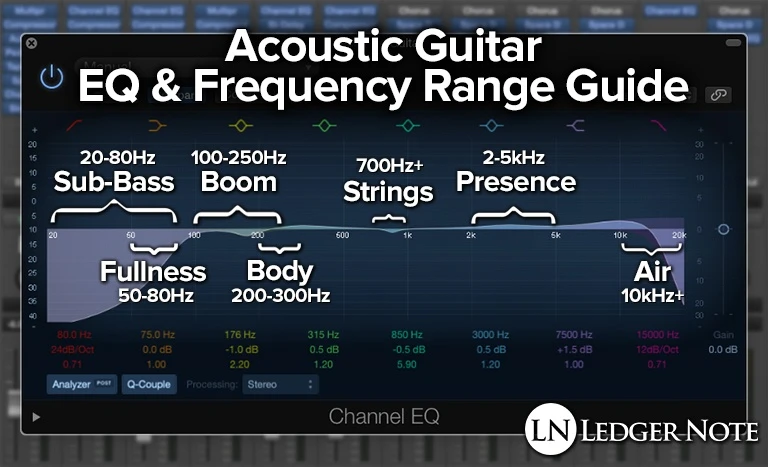
The bass frequency range of an acoustic guitar is typically between 60 Hz and 250 Hz. Adjusting the bass EQ on your guitar can help you achieve a fuller, warmer sound, particularly useful for fingerstyle playing or for playing with other instruments. However, too much bass can make your guitar sound muddy and indistinct. A general rule of thumb is to add a little bit of bass EQ, around 1-2 dB, and then adjust as needed.

Mids

The midrange frequencies of an acoustic guitar range from around 250 Hz to 2 kHz. This is where most of the guitar’s harmonics and overtone content reside. Adjusting the mids can help you achieve a more balanced tone, and is particularly useful for bringing out the sound of individual strings during fingerpicking. Too much midrange, however, can result in a harsh and nasal sound. A good starting point for mid EQ is around 2-3 dB.

Treble

The treble frequency range of an acoustic guitar is typically between 2 kHz and 5 kHz. This is where you will find the brighter, more shimmering components of the guitar’s sound. Adjusting the treble EQ can help you add clarity and definition to your sound, particularly useful for strumming or playing lead lines. However, too much treble can result in a brittle and thin sound. A good starting point for treble EQ is around 1-2 dB. In conclusion, EQ settings can help you achieve the perfect sound for your acoustic guitar. Remember to start with small adjustments and adjust incrementally until you find the sweet spot for your instrument and playing style. With a little tweaking, you can take your acoustic guitar playing to the next level and achieve a personalized and unique sound that reflects your individual style.

Acoustic Guitar Eq

Credit: www.harmonycentral.com

Eq Tips For Different Genres Of Music

Equalization (EQ) is a crucial tool for achieving the perfect guitar sound, and understanding how to use it can make a world of difference. Different genres of music require different eq settings, and setting the EQ correctly can take you from sounding flat and lifeless to full and rich. In this blog post, we will provide you with some tips on how to EQ your acoustic guitar based on some of the most popular genres.

Folk

In folk music, the guitar is often used to provide a rhythmic accompaniment to the singer. For this reason, it is important to boost the low and mid-frequencies to support the vocals. Additionally, a little boost in the high midrange can help bring out the guitar’s natural brightness.

Blues

The blues are all about soulful expression, and the guitar is central to this. To make your guitar sound bluesy, you can boost the low and mid-frequencies, while cutting a little from the high end to reduce the squeakiness. The trick is to strike a balance between the treble and bass, so the guitar doesn’t sound thin or dull.

Rock

In rock music, the guitar is featured prominently, and it generally needs to be quite loud. For this reason, many rock guitarists boost the midrange to cut through the busy mix. In addition, a little high-end boost can help make the guitar sound more aggressive and biting.

Country

Country music is known for its bright, twangy guitar sounds. To achieve this type of sound, you can boost the treble and cut the bass, while leaving the midrange flat. A little compression can also help even out the sound and make it more consistent.

Jazz

Jazz guitarists typically play with a clean sound, allowing the notes to ring out and sustain. To achieve this sound, you can cut the low frequencies and keep the midrange and high frequencies relatively flat. Some jazz guitarists also like to roll off the high end slightly to reduce harshness and add warmth.

With these eq tips for different genres of music, you can create a unique guitar sound that is tailored to your playing style and the songs you play. Remember, EQ is about finding the right balance, so take the time to experiment with different settings until you find what works best for you.

Acoustic Guitar Eq

Credit: ledgernote.com

Frequently Asked Questions Of Acoustic Guitar Eq

How Do You Set Eq On Acoustic Guitar?

To set EQ on an acoustic guitar, follow these steps: first, use a tuner to make sure each string is in tune. Next, adjust the bass frequencies by turning the bass knob, then mids with the mid knob, and finally, highs with the treble knob.

Make small adjustments and listen carefully to achieve the desired sound.

What Is The Best Eq Curve For Acoustic Guitar?

There are no fixed EQ curves that are considered to be the best for acoustic guitars as it depends on the guitar’s tone and the player’s preference. It’s recommended to start with a flat EQ curve and then adjust it according to the guitar’s sound and the player’s style.

What Is The Best Amp Eq Settings For Acoustic Guitar?

The best amp EQ settings for acoustic guitar depend on personal preference and the guitar’s tone. Generally, it’s recommended to keep the EQ balanced and avoid excessive bass or treble. Start with a flat EQ and adjust as needed for the desired sound.

Do I Need An Eq Pedal For Acoustic Guitar?

An EQ pedal can enhance the sound of your acoustic guitar by adjusting its frequencies. However, it is not necessary, especially if you’re happy with the tone of your guitar. You can still achieve great sound using other techniques like adjusting your playing style or microphone placement.

Conclusion

Proper EQing is essential to bring the best sound out of your acoustic guitar. In this blog, we have discussed the basics of acoustic guitar EQing and how you can use it to enhance the overall sound quality of your guitar.

Remember, there is no single best EQ setting that works for every guitar, but with practice and experimentation, you will find the perfect EQ setting that not only complements your guitar’s tone but also elevates your performance. Happy playing!

Categories
Archive

Top Stereo Width Plugins

Top stereo width plugins include Ozone Imager 2 and Waves S1 Stereo Imager, providing easy widening and narrowing of stereo images. These plugins are essential for mix engineers, mastering engineers, and producers looking to craft wide and dynamic stereo images.

Stereo width plugins are a crucial tool for music producers, mix engineers, and mastering engineers. They allow for easy manipulation and control of the stereo image, creating a wider or narrower sound field. With the growth of the music production industry, there are countless stereo width plugins available in the market.

However, finding the best plugins can be overwhelming and time-consuming. We will highlight the top stereo width plugins that are perfect for enhancing your audio productions. These plugins include Ozone Imager 2 and Waves S1 Stereo Imager, both offering easy and straightforward stereo manipulation.

Top Stereo Width Plugins

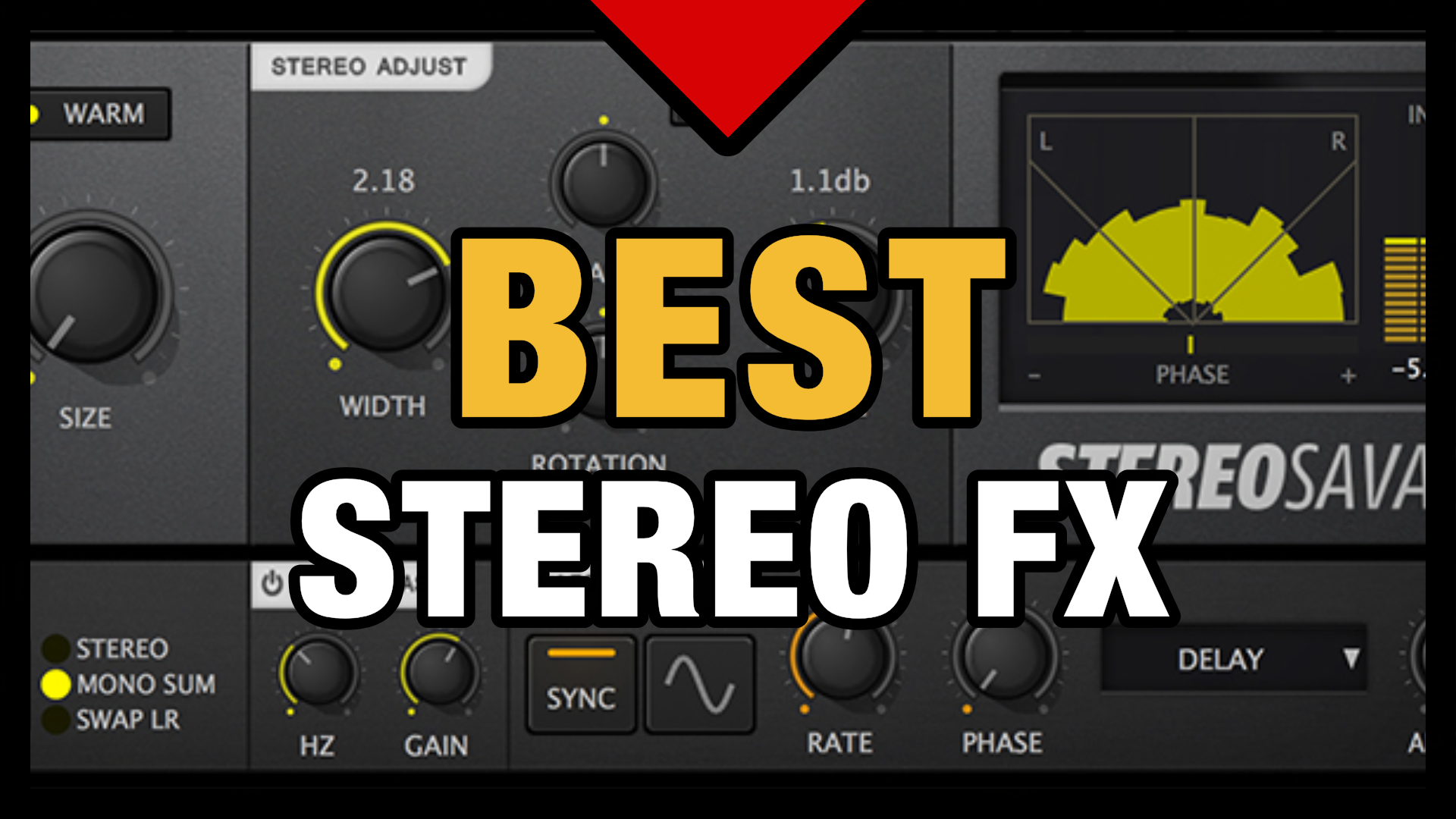
Credit: professionalcomposers.com

Top Stereo Width Plugins

If you are looking to enhance your audio productions and create a wide stereo field, using stereo width plugins can help achieve that goal. These plugins work by manipulating the stereo image of audio material, creating a wider or narrower soundstage. Here are some top stereo width plugins that can help take your audio productions to the next level.

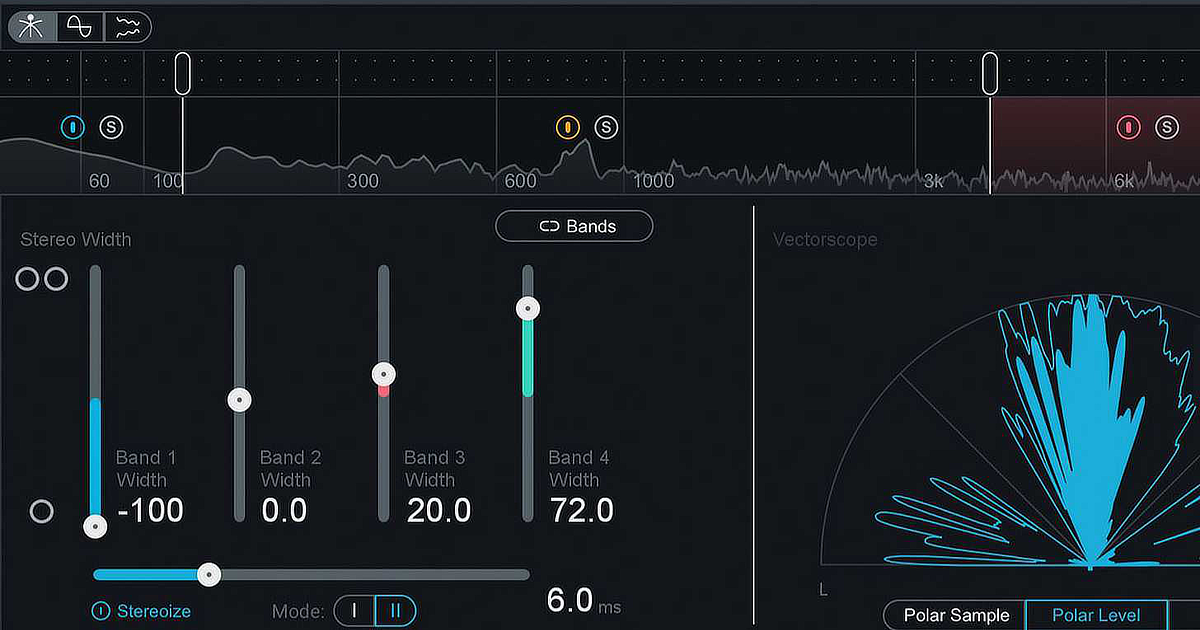
FabFilter Pro-Q 3 is a powerful equalizer plugin that includes a feature called ‘Stereo Width.’ This feature enables you to adjust the stereo width of each individual frequency band, giving you complete control over your stereo image. With its intuitive and user-friendly interface, this plugin is ideal for beginners and professionals alike.

Ozone Imager 2 is a free stereo widening plugin from iZotope that can help create a wider stereo image. This plugin features a ‘Width’ slider that allows you to increase or decrease the stereo width of your audio material. You can also adjust the ‘Stereoize’ slider to add a touch of stereo processing to mono recordings.

Waves S1 Stereo Imager is another powerful stereo widening plugin that offers precise control over the stereo image. This plugin features a ‘Shuffler’ knob that adjusts the timing differences between the left and right channels, creating a wider stereo image. The ‘Focus’ knob allows you to adjust the stereo separation in the mid and side components of the audio material.

iZotope Ozone 9 is a comprehensive mastering plugin that includes a stereo widening feature. With the ‘Stereoize II’ module, you can add stereo width to your audio material without affecting the mono compatibility. This plugin also features a ‘Stereo Width’ slider that allows you to adjust the overall stereo image of your mix.

Overall, these top stereo width plugins can help enhance your audio productions and add a wider stereo field to your mix. Whether you’re a beginner or a professional, using these plugins can help take your audio productions to the next level.

Top Stereo Width Plugins

Credit: www.production-expert.com

Fabfilter Pro-q 3

FabFilter Pro-Q 3 is a top-notch stereo width plugin that offers excellent sound quality and control over stereo sources. With its intuitive interface and versatile features, Pro-Q 3 is an ideal tool for professional audio producers and engineers looking to enhance the depth and spatial aspects of their mixes.

When it comes to audio mixing, one of the most critical aspects is stereo width. A good stereo width plugin can bring depth, dimensionality, and width to any track or mix. FabFilter Pro-Q 3 is a powerful plugin that is often considered one of the best stereo width plugins in the market. In this section, we will explore the features, pros, and cons of this popular plugin.

Features

Some of the key features of FabFilter Pro-Q 3 are:

  • Advanced Mid-Side processing for precise stereo width control
  • Linear-phase processing for transparent sound
  • Zero latency mode for real-time processing
  • Dynamic EQ feature for intricate frequency sculpting
  • Multiple filter shapes and slope options for customization
  • High-resolution spectrum analyzer with real-time spectrum grab

Pros

FabFilter Pro-Q 3 is widely loved by audio professionals for its exceptional sound quality, flexibility, and precision. Here are some of its pros:

  • Intuitive user interface that is easy to use and customize
  • Multiple filter shapes and slope options provide precise frequency control
  • Dynamic EQ feature enables intricate frequency sculpting
  • Advanced Mid-Side processing provides precise stereo width control
  • Linear-phase processing provides a transparent sound with minimal phase distortion
  • High-resolution spectrum analyzer with real-time spectrum grab allows for in-depth analysis

Cons

While FabFilter Pro-Q 3 is an incredible stereo width plugin, it does have some limitations. Here are some of its cons:

  • Expensive compared to some other stereo width plugins
  • Can be overwhelming for new users with limited audio mixing experience
  • May slow down older computers due to high processing demands

Overall, FabFilter Pro-Q 3 is an excellent stereo width plugin for advanced audio mixing professionals who prioritize sound quality and precision. While it may not be the best option for beginners, it is well worth the investment for professionals looking for a powerful and versatile audio mixing tool.

Ozone Imager 2

The Ozone Imager 2 is a popular stereo width plugin used in the mixing and mastering of tracks. Its wide range of features makes it an excellent tool for music producers and audio engineers to achieve the perfect stereo image for their mix.

Features

The Ozone Imager 2 is a powerful plugin that comes with many features to help you enhance the stereo image of your mix. Some of its key features include:

  • Standalone and plugin versions for VST, VST3, AU, and AAX formats
  • Ability to adjust stereo width, direction, and depth
  • Presets to help you get started quickly
  • Mono, stereo, and mid/side processing
  • Real-time waveform display

Pros

The Ozone Imager 2 has many pros that make it stand out from other stereo width plugins in the market. Some of its advantages include:

  • User-friendly interface for easy navigation and control
  • High-quality sound output that enhances your mix’s stereo image
  • Real-time waveform display that helps you visualize your audio processing changes
  • Ability to work with mono, stereo, and mid/side processing making it more versatile
  • Comes with presets for quick starting and achieving stereo width

Cons

The Ozone Imager 2 has a few drawbacks worth noting:

  • Costly compared to other stereo width plugins in the market
  • The standalone version does not offer as much functionality as the plugin version
  • May not be suitable for beginners who need a simple interface or a cheaper option

In conclusion, the Ozone Imager 2 is an excellent stereo width plugin that provides a range of features to help you create the perfect stereo image in your mix. Although it may be more expensive than other options in the market, its high-quality sound output, real-time waveform display, and ability to process mono, stereo, and mid/side signals make it a powerful tool for professional music production and audio engineering.

Top Stereo Width Plugins

Credit: theproaudiofiles.com

Waves S1 Stereo Imager

The Waves S1 Stereo Imager is one of the top stereo width plugins available in the market. It enhances the stereo signal, giving you a widened and more spacious audio experience.

The Waves S1 Stereo Imager is a popular stereo width plugin designed to enhance the stereo presence and imaging of audio recordings. This plugin is widely used by audio engineers and music producers around the world for its advanced features and intuitive user interface. In this blog post, we will look at the key features of the Waves S1 Stereo Imager plugin and highlight its pros and cons.

Features:

The Waves S1 Stereo Imager plugin comes packed with a range of features that make it a popular choice among music professionals. Some of its key features include:

  • Stereo Width Control: The Waves S1 Stereo Imager plugin allows you to adjust the stereo width of your audio recordings, giving you fine-grain control over the stereo image.
  • Mono Compatibility: The plugin also features a Mono Compatibility mode that ensures that your audio sounds great on all playback systems, even those that can’t play stereo sound.
  • Mix Control: The Mix control lets you balance the desired level of stereo separation by blending the original signal with the processed signal.
  • Phase Control: The Phase control enables users to invert the phase of their recordings, which can be helpful for aligning elements in mono or for correcting phase issues in stereo recordings.

Pros:

The Waves S1 Stereo Imager comes with a host of benefits, which includes:

  • Simple User Interface: The plugin features an intuitive and user-friendly interface, making it easy for beginners to understand and use it.
  • Advanced Functionality: The Waves S1 Stereo Imager plugin offers advanced functionality that can help audio professionals fine-tune their recordings to achieve the desired stereo image effect.
  • Compatibility: The plugin is available in formats that are compatible with most popular DAWs, including Ableton, Pro Tools, Cubase, and Logic Pro.
  • Reliable: The Waves S1 Stereo Imager plugin is a reliable tool for enhancing the stereo presence and imaging of audio recordings, which makes it a staple in any audio professional’s toolkit.

Cons:

While the Waves S1 Stereo Imager plugin has many benefits and features, there are a few potential drawbacks that users should be aware of, including:

  • Pricing: The plugin is relatively expensive compared to other stereo width plugins on the market.
  • Learning Curve: While the user interface is user-friendly, some of the plugin’s advanced features may require some learning to use effectively.
  • CPU Intensive: The plugin’s high processing power requirements may cause performance issues on lower-end computers.

In conclusion, the Waves S1 Stereo Imager is a powerful stereo width plugin that offers a range of advanced features and functionality. While it may come with a few drawbacks, its benefits and reliability make it an essential tool for any audio professional looking to enhance the stereo presence and imaging of their recordings.

Izotope Ozone 9

IZotope Ozone 9 is a versatile stereo width plugin that offers precise control over the stereo image of your mix. With features like Imager and Stereoize, you can widen or narrow your mix, adjust the stereo balance, and give your tracks a professional polish.

If you are looking for a stereo width plugin that can help enhance your music production, iZotope Ozone 9 is definitely worth considering. This powerful plugin offers a range of features that can help you elevate your tracks to the next level. Let’s take a closer look at what iZotope Ozone 9 has to offer:

Features

iZotope Ozone 9 comes with a range of features that are geared towards enhancing your music production. Some of the key features of this plugin include:

  • Intuitive and easy to use interface
  • Powerful stereo widening capabilities
  • Stereo independence feature for precise control over your stereo image
  • Mid/Side processing for enhanced spatial imaging
  • Multi-band options for precise control over frequency ranges

Pros

There are several pros to using iZotope Ozone 9 as your stereo width plugin of choice:

  • Easy to use: iZotope Ozone 9 comes with an intuitive interface that makes it easy to use, even for beginners.
  • Powerful stereo widening: With iZotope Ozone 9, you can achieve a wide stereo image without compromising the overall quality of your track.
  • Flexible controls: This plugin offers a range of controls that give you precise control over your stereo image.
  • Mid/Side processing: The mid/side processing feature allows you to achieve enhanced spatial imaging, resulting in a more immersive listening experience.

Cons

While iZotope Ozone 9 is a powerful plugin, there are a few cons to consider:

  • Price: iZotope Ozone 9 is not the cheapest stereo width plugin on the market, so it may not be suitable for those on a tight budget.
  • Learning curve: While the interface of iZotope Ozone 9 is intuitive, mastering all the features may take some time, especially for beginners.

In conclusion, iZotope Ozone 9 is a powerful stereo width plugin that offers a range of features that can help enhance your music production. While it may not be the cheapest option on the market and may require some time to master, the benefits it offers are definitely worth considering.

Frequently Asked Questions For Top Stereo Width Plugins

What Is The Best Stereo Imaging Plugin?

The best stereo imaging plugin is subjective and depends on personal preference and needs. However, some popular options include the Waves Center, iZotope Ozone Imager, and Brainworx bx_control V2. Ultimately, it’s important to experiment and find what works best for your specific project and workflow.

What Does Increasing Stereo Width Do?

Increasing stereo width expands the sound field creating a more immersive and spacious listening experience. It can make individual instruments or effects more prominent, creating a wider stereo image. However, excessive width can also lead to phase cancellation and mono compatibility issues.

How Do You Make A Stereo Wider?

To make a stereo wider, you can use a stereo widener plugin or effect. This works by adding a slight delay or modulation to one side of the audio signal, creating a wider stereo image. Experiment with the settings to find the perfect balance between width and clarity.

What Is Wide Stereo Sound?

Wide stereo sound is a type of audio that uses expanded stereo imaging to create a wider, more spacious soundstage. This type of sound can help create a more immersive and enjoyable audio experience for listeners.

Conclusion

The stereo width of your tracks can make or break your mixing and mastering decisions. Having the right plugin in your arsenal can enhance the depth and ambience of your music production. Our list of the top stereo width plugins includes various options to suit your style and budget.

Choose the one that works best for you and take your music to the next level. Don’t underestimate the power of stereo width in your next production.

Categories
Archive

Cd Master

CD Master is a software tool used for burning CDs. It allows users to create CDs with customized settings, including audio and data files, from their computers.

CD burning has become a popular and necessary task for a generation reliant on technology. It has become a means of sharing music and data on physical media, which can be played on older devices or in areas with poor internet connectivity.

CD Master is a software tool that allows users to create CDs with customized settings, including audio and data files, from their computers. This software is designed to provide users with the ability to burn their data onto CDs quickly and easily. With CD Master, anyone can produce their own CDs for personal or professional use, whether it be to distribute information, create a music album, or to provide backup data. This article will discuss the benefits of using CD Master and how to use it effectively.

How To Create A Cd Master?

The process of creating a CD master involves creating a digital version of your audio tracks, which is then used to create the final CD. This involves taking the highest quality versions of your audio tracks and organizing them into the correct sequence, before encoding them into a format that can be burned to the CD.

Creating a CD master is an important step in CD production. A CD master is a final version of the audio that will be used to duplicate CDs for distribution. In this article, we will take a look at the steps required to create a CD master, including preparing audio files, choosing software, importing audio files, arranging audio tracks, adjusting volume levels, adding track markers and burning the CD master. Preparing the Audio Files Before we begin creating the CD master, it is important to ensure that all audio files are in the correct format. Typically, CD masters require high-quality audio files in WAV, AIFF, or DDP format. Make sure that all audio files are properly labeled and organized, with no additional tracks or unwanted noise. Also, ensure that any edits or effects have been applied to the audio tracks. Choosing a CD Mastering Software There are several CD mastering software options available in the market. It is important to choose a software that is compatible with your computer system and offers the features you need. Popular options include WaveLab, Pro Tools, and Magix Samplitude. Importing Audio Files to CD Mastering Software Once you have selected a CD mastering software, it is time to import your audio files. Open your CD mastering software and import all of your audio tracks. Ensure that all tracks are properly labeled and organized, with the correct file format and sampling rate. Arranging the Audio Tracks After importing the audio files, you need to place them in the desired order. Arrange the tracks in a logical order that flows correctly, as you would like it heard in the final product. Most software presents the audio tracks in a waveform view, which makes it easy to drag and drop tracks to the desired location. Adjusting the Volume Levels Volume levels play a critical role in the quality of the CD master. You must ensure that all tracks are balanced, and there are no inconsistencies throughout the CD. Do not hesitate to listen to the audio multiple times to confirm that everything is okay. Adding Track Markers Track markers come in hand when the CD is played, and you need to jump to specific tracks. Add track markers to your CD master, ensuring that they are placed at the correct location. Burning the CD Master

The Final Step Is To Burn The Cd Master. Ensure That The Cd-writer Is Correctly Configured. Once Done, Burn The Cd Master And Test It On Different Devices To Ensure That It Is Functioning As Expected. as You Can See, Creating A Cd Master Is A Step-by-step Process That Requires Attention To Detail. By Following The Above Steps, You Will Create A High-quality Cd Master That Will Stand The Test Of Time.

Cd Master

Credit: www.promodiscs.co.uk

What To Consider During Cd Mastering?

CD mastering is the final process in music production, where the audio tracks are optimized for high-quality playback on CD. Before submitting the master for replication, it’s crucial to consider a few important factors to ensure the best possible outcome. Here’s what you need to consider during CD mastering:

Audio Levels And Dynamic Range

One of the most crucial aspects of CD mastering is setting appropriate audio levels and dynamic range. If your audio levels are too high, it can cause distortion or clipping, while setting levels too low can result in low volume and poor clarity. Dynamic range, on the other hand, refers to the difference between the loudest and softest parts of a track. Aim for a suitable dynamic range that enhances the listening experience but doesn’t sacrifice audio quality.

Equalization And Tonality

Equalization is used to balance the frequency spectrum of a track, ensuring each instrument and vocal is heard at the appropriate volume. Proper equalization can also help correct any frequency imbalances in the mix. Tonality refers to the overall feel of a track – make sure tonality is consistent throughout the entire record, to ensure a seamless transition between tracks.

Clarity And Punch

Clarity and punch are vital for a CD recording. Clarity ensures each sound is well-defined and clear, while punch helps create a dynamic, engaging sound. Make sure each instrument is correctly balanced and sitting well in the mix. Ensure the vocals are clear, and the bass is not overwhelming the other elements of the track.

Spacing And Transitions

The spacing between tracks and transitions from one song to the next is imperative to the overall feel of the CD. Ensure the spacing between tracks is consistent, providing the listener with the necessary pause to breathe and take in the track. Transitions should be smooth and seamless, blending into the next track with appropriate fade-ins and fade-outs.

Listening To The Master In Different Environments

Finally, when mastering a CD, it’s essential to listen to the master in different environments to ensure the audio quality doesn’t suffer during playback. Not all listeners will have access to high-end equipment, so check the CD on a variety of playback devices, including car stereos, speakers, and headphones. This will allow you to catch any anomalies early in the process, ensuring listeners will hear your tracks as intended.

Common Mistakes To Avoid During Cd Mastering

During CD mastering, there are common mistakes that you should avoid to ensure quality sound. Some of the common mistakes include using too much compression, over-limiting, and not properly balancing the EQ.

Common Mistakes to Avoid During CD Mastering CD mastering involves the process of preparing for the final version of a CD. It includes editing and enhancing the final audio and making sure it sounds great when played on various media platforms. However, it’s not as easy as it sounds, and if not done correctly, it can severely affect the quality of the music. In this blog post, we will discuss common mistakes people make during CD mastering and provide solutions to those issues. Following are the common mistakes to avoid. Over Compression Over Compression is the process of making the audio louder, and it is one of the most common mistakes people make during CD mastering. Many people think that compressing their CDs more will provide a good sound, but it can, in fact, compromise the quality of the music. To avoid over-compression, ensure that you don’t compress audio more than necessary. This way, you will maintain the clarity and high quality of the sound without any distortion. Over EQing Over EQing is another mistake musicians make during CD mastering. It is the process of tweaking an audio’s frequency to improve the sound quality, but it can affect the track’s natural sound if not done right. To avoid this error, be mindful of your EQ settings. Don’t try to adjust too many frequency bands at once, and make sure you’re not overdoing it. In this way, you will avoid unintentionally distorting the audio. Inappropriate Spacing Inappropriate spacing is a careless error people make during CD mastering, which can disrupt the overall listening experience. This mistake happens when there is either too much space between tracks or not enough of it. To fix this issue, make sure you have appropriate spacing between the tracks. Ensure that you have an equal gap between each track on your CD. This way, it will prevent your listeners from accidentally hearing the wrong song or feeling overwhelmed by too much silence. Ignoring Clipping and Distortion Clipping and distortion are two common problems that can arise when mastering CDs. They can happen when an audio’s volume is too high, causing it to clip or distort. To avoid this issue, make sure to keep an eye on the audio levels. Check your audio for distortion by looking at the waveform. If the waveform looks too extreme or spikes, this could be a sign of clipping. If you hear any clipping or distortion while previewing your tracks, adjust your levels until they’re balanced and clear. In conclusion, these are the common mistakes to avoid during CD mastering. By following the solutions provided above, you can overcome those issues without compromising audio quality. So, keep these simple tips in mind before processing your final CDs.

Cd Master

Credit: en.m.wikipedia.org

Benefits Of Using Professional Cd Mastering Services

Professional CD mastering services offer numerous benefits, such as the improvement in sound quality and the ability to ensure consistency across all tracks. By utilizing these services, you can enhance the listening experience for your audience and make sure your CD stands out.

Are you looking for high-quality CD mastering services? You are in the right place! Professional CD mastering services offer several benefits that can enhance the sound quality of your final product. In this post, we will discuss the benefits of using professional CD mastering services.

Access To High-end Equipment And Software

Professional CD mastering companies use top-of-the-line equipment and software to ensure high-quality results. They have access to specialized tools and technologies that can enhance the sound quality of your CD. They use different types of equalizers, compressors, and limiters to achieve the best possible results. By using professional CD mastering services, you can guarantee that your final product will have a professional and polished sound.

Expertise Of Professional Engineers

Professional CD mastering companies hire experienced and skilled engineers who know how to optimize the sound of your CD. These engineers have years of experience in the music industry and have worked with different genres and recording styles. They have a good ear for music and can identify any problems that need to be corrected. They can also suggest changes and adjustments to make your final product sound better.

Guarantee Of High-quality Results

Professional CD mastering services provide a guarantee of high-quality results. They use quality control processes to ensure that every CD they master meets their high standards of quality. They also provide a revision policy to ensure that you are satisfied with the final product. With professional CD mastering, you can be sure that your CD will sound its best.

Time And Cost Savings

By using professional CD mastering services, you can save time and money. The CD mastering process can be time-consuming and complex. Professional CD mastering companies have the experience and expertise to complete the process quickly and efficiently. They can also save you money by preventing costly mistakes that can occur when mastering your CD yourself. In conclusion, professional CD mastering services offer several benefits that can enhance the sound quality of your CD. They have the equipment, expertise, and guarantee of high-quality results to make your final product sound professional and polished. They can also save you time and money, allowing you to focus on other aspects of your project.

Cd Master

Credit: m.facebook.com

Frequently Asked Questions Of Cd Master

What Is A Cd Master?

A CD master is the final version of a CD that is used for duplication. It is a digital file that contains all the data and information needed to produce copies of the CD. The CD master undergoes a strict quality control process to ensure that the copies are accurate and error-free.

How Loud Is A Cd Master?

The loudness of a CD master varies based on the type of music and the mastering engineer’s preferences. Generally, CDs are mastered to have a loudness level of -8 to -10dBFS. However, some mastering engineers may opt for a more dynamic range and master at a lower level.

What Is A Master Copy Cd?

A master copy CD is the original copy of a recording that is used to produce duplicates. It contains all the necessary data and information required to replicate the content on additional CDs. This is the first and most important step in creating and distributing large-scale CD quantities.

How Do I Make A Master Cd For Duplication?

To create a master CD for duplication, follow these steps: 1. Compile your finalized audio or data files onto a recordable CD. 2. Ensure that the files are in the correct sequence and have been burned using a professional-grade burning software.

3. Verify the CD for errors and make sure it is visually flawless. 4. Label the CD with clear information about contents, track listings, and contact information. 5. Create an additional backup copy of the master CD.

Conclusion

In summation, Cd Master is an excellent tool for recording, editing and mastering CDs. Its user-friendly interface and advanced features make it the perfect choice for any audio enthusiast or professional. With its ability to burn CDs in various formats and its advanced editing capabilities, Cd Master is a must-have for anyone looking to produce high-quality music or audio content.

So why wait? Get your hands on Cd Master today and take your audio production to the next level!