Categories
Archive

Creating Space In Your Mix

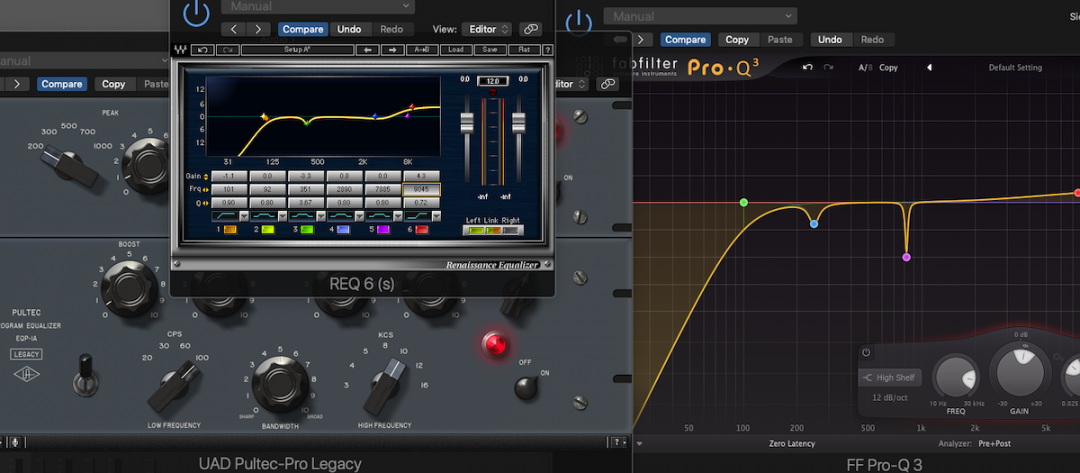
Creating space in your mix involves strategic EQ and panning adjustments. In a mix, the goal is to make sure each element can be heard clearly and contributes to the overall sound without competing for attention.

When mixing a project, there are a multitude of factors to consider in order to achieve a clean and balanced sound. It’s easy to get lost in the details, but one of the most essential aspects of the process is creating space in the mix.

This is all about ensuring each instrument or element has its own place in the sonic spectrum, without either overpowering or being drowned out by any other component. This can be accomplished through strategic use of EQ to boost or cut particular frequencies, as well as through panning adjustments to place each element in a specific location within the stereo field. In order to create a polished and professional sounding mix, careful attention to space and balance is crucial.

Creating Space In Your Mix

Credit: vintageking.com

Frequency Spectrum

One way to create space in your mix is by understanding the frequency spectrum. By analyzing and controlling the balance of frequencies within each instrument, you can avoid frequency clashing and achieve a clear and well-balanced mix.

Understanding The Frequency Spectrum

When it comes to creating space in your mix, it’s essential to understand the frequency spectrum. The frequency spectrum is the range of frequencies that humans can hear, from 20 Hz to 20 kHz. Each sound within a mix falls into a specific range within the frequency spectrum.

How To Identify Clashing Frequencies

Identifying clashing frequencies within a mix is crucial to creating space. When two sounds within a mix occupy the same frequency range, they clash and can muddy the overall mix. You can use a spectrum analyzer to visualize the frequency range occupied by each sound. This visualization makes it easier to spot clashing frequencies and make adjustments. To create space in your mix, you want to ensure that each sound occupies its own frequency range within the spectrum. For example, if you have a bass guitar and a kick drum, you want the bass guitar to occupy the lower frequencies, while the kick drum occupies the higher frequencies.

Creating Space In Your Mix

To create space in your mix, you need to identify the main elements of the mix and give each of them their own frequency space, ensuring they do not clash with one another. Table 1 shows the frequency range of common instruments in a mix. Table 1: Frequency Range of Common Instruments | Instrument | Frequency Range | | — | — | | Bass | 60-250 Hz | | Piano | 250-2000 Hz | | Guitar | 80-880 Hz | | Vocals | 1000-4000 Hz | | Cymbals | 4000-20000 Hz | Once you have identified the frequency range of each element, you can start making adjustments to create space. EQ is an essential tool to adjust the frequency range of an element. You can use a high-pass filter to remove unwanted low frequencies or a low-pass filter to remove unwanted high frequencies. In conclusion, understanding the frequency spectrum and identifying clashing frequencies are key to creating space in your mix. By giving each sound its own frequency range and using EQ to make adjustments, you can create a clean and balanced mix.

Creating Space In Your Mix

Credit: www.youtube.com

Arrangement

Arrangement is the foundation of any mix, and creating space through arrangement is an essential step for achieving a clean, balanced sound. When done correctly, arrangement can help ensure every element of the track has its own space to breathe, minimizing clutter and allowing each element to shine through. Let’s take a closer look at how to remove clutter from your arrangement to create space in your mix.

Creating Space Through Arrangement

To create space in your mix, you need to be intentional with your arrangement. A well-executed arrangement is not only about what elements are present in the track but also about where each element sits in the stereo field and how they interact with each other. To start, consider the following:

  • Group elements that belong together, such as drums or background vocals, and pan them accordingly, creating a wider and more spacious stereo field.
  • Use automation to bring elements in and out of the mix, making sure each element has its moment to shine while also giving them space to rest when necessary.
  • Avoid stacking similar-sounding elements on top of each other, such as layering multiple synths on the same frequency range, causing them to clash and muddy up the mix.
  • Blend contrasting elements carefully by paying attention to their frequency range. EQ and panning can be effective tools to keep elements from fighting for space in the mix.

Removing Clutter In Your Arrangement

Removing clutter is an essential part of creating space in your mix. With so many elements in a typical mix, it’s easy to overcrowd the mix with unnecessary sounds, creating chaos. Here are some tips to remove clutter:

  • Start with the essentials, such as the kick, snare, and lead instrument. Build the rest of the mix around them.
  • Eliminate elements that do not contribute anything essential to the mix, and mute them.
  • Be selective with your effects such as reverbs and delays. Too much reverb can make the mix sound cluttered and muddy. Dialing back on the effects can also create more space.
  • Use EQ and compression to clean up tracks that are clashing with each other, making each track sit in its own space.

By being mindful of your mix arrangement and eliminating unnecessary clutter, you can create a balanced and spacious mix that allows each element to shine. At the end of the day, the key is to know when to add elements and when to strip them down to achieve the desired sound. Remember, sometimes less is more.

Eq

As a music producer or mixer, one of the most challenging aspects of creating a great mix is ensuring that each instrument has its own space in the sonic spectrum. In other words, you need to ensure that each sound has its own frequency range and sits well in the mix, without cluttering or overpowering the others. One of the best tools to achieve this is the equalizer, commonly known as EQ. It allows you to adjust the frequency content of each sound, making it easy to create space and balance in your mix. Here’s how to use EQ to create space:

Using Eq To Create Space

If you want to create space in your mix, you need to use EQ to tailor the frequency content of each instrument. EQ lets you boost or cut specific frequencies of a sound to make it stand out or blend in with the other instruments. For instance, you can cut the low frequencies on a guitar to give the bass guitar more room to breathe, or boost the high frequencies on the hi-hat to make it sound brighter and clearer.

Cutting Frequencies To Reduce Clutter

One of the most common problems when mixing is the cluttering of sounds in the same frequency range. This often happens when you have too many instruments occupying the same frequency spectrum, causing them to compete with each other and create a muddy or chaotic sound. The solution is to use EQ to cut frequencies that are not essential to a particular instrument. For example, you can cut the low frequencies on a vocal track to remove the hum or rumble, or reduce the mid frequencies on a guitar to make it sit better with the other instruments.

Conclusion

EQ is a powerful tool that allows you to create space and balance in your mix. By using this tool correctly, you can make each instrument sound clear and distinct, without clashing with the others. Remember to cut frequencies that are not essential to a particular instrument and boost the frequencies that give it character and personality. With a little practice and experimentation, you can create a mix that sounds professional and well-balanced.

Reverb

Creating space in your mix is essential to achieving a professional sound. Reverb is a powerful tool to help create depth and dimension in your mix by placing each instrument in its own unique space.

Reverb is a powerful tool for adding depth and dimension to your mix. It is used to simulate the sound of a space, whether that be a large concert hall or a small room. Using reverb effectively can make a huge difference in the overall sound of your mix. Below are some tips on how to use reverb to create a more cohesive and spacious mix.

Using Reverb To Create Depth

One effective way to use reverb is to create a sense of depth in your mix. Imagine a band on a stage: the guitarist is playing in the front while the drummer is located at the back. Applying different amounts of reverb to each instrument can create the illusion of depth, making it sound like the drummer is farther away from the listener than the guitarist. To achieve this effect, place the reverb send on the channel for the instrument you want to move backward. Adjust the reverb time and level until it sounds like the instrument is positioned behind the other instruments in the mix. Keep in mind that the reverb should be subtle and not overpowering, otherwise, it can muddy up the mix.

Modifying Reverb Settings For A More Cohesive Mix

While reverb can add depth to a mix, it can also make it sound messy and unbalanced. To prevent this, it’s important to modify the reverb settings to integrate it more smoothly into the mix. One way to do this is by adjusting the pre-delay time, which determines how long it takes for the reverb to kick in after the initial sound. A longer pre-delay can make the reverb feel like a more distinct element in the mix, while a shorter pre-delay can make it blend in more. Another way to modify reverb settings is to use EQ to shape the reverb sound. For example, if the mix sounds too muddy, apply a high-pass filter to the reverb to remove low frequencies. Or, if the reverb is too harsh, apply a low-pass filter to smooth out the high frequencies. In conclusion, reverb is a powerful tool for creating space and depth in your mix. By using reverb effectively, you can create a cohesive and spacious mix that sounds professional and polished.

Panning

If you’re looking to take your mix to the next level, then panning is a technique that you absolutely must master. Panning allows you to create a wide, spacious soundstage in your mix, giving each instrument its own unique space in the stereo image. In this post, we’ll take a look at how to use panning effectively in your mix, and how to balance the left and right channels to create a cohesive, professional mix.

Using Panning To Create A Wider Soundstage

When it comes to creating a wide, spacious mix, panning is your best friend. By assigning different instruments to different locations in the stereo field, you can create a sense of depth and width in your mix, giving each instrument its own space to breathe. This can help to add clarity and definition to your mix, and can make your tracks sound more exciting and immersive.

Balancing Left And Right Channels

One thing you’ll need to keep in mind when panning your tracks is the balance between the left and right channels. It’s important to ensure that each channel is balanced, so that your mix doesn’t sound lopsided or uneven. To do this, start by assigning the most important elements of your mix to the center of the stereo field; typically, this will be your lead vocal, bass, and drums. Then, start panning your other elements around these central elements, making sure that your mix sounds balanced and cohesive.

Overall, panning is a crucial technique for creating a wide, spacious mix that sounds professional and engaging. By using panning effectively, you can help to add clarity, definition, and excitement to your mix, and can take your tracks to the next level.

Automation

Automation is an effective way to create space in your mix and improve the overall sound quality. With the right automation techniques, you can balance the levels of individual tracks, adjust panning, and apply dynamic processing for a more fluid and cohesive mix.

Using Automation To Create Movement And Space

Automation is an excellent way to add a sense of movement and space to your mix. By automating certain parameters in your DAW, you can create subtle or dramatic shifts in the mix, making it more interesting for the listener. The key is to use automation in a targeted way that doesn’t distract from the overall musicality of the track.

Automating Effects For Buildup And Breakdowns

One effective way to use automation is to add effects during the buildup and breakdown sections of your track. By automating effects like reverb, delay, and filter sweeps, you can create a sense of tension and anticipation as the track progresses. This can make the eventual payoff even more satisfying for the listener.

Using Sidechain Compression For Space

Another automation technique to create space in your mix is sidechain compression. By sidechaining certain elements in the mix to the kick drum or bassline, you can create a pumping effect that gives the mix more groove and energy. This can also create space in the mix, as elements that might otherwise be too dense or cluttered are pushed back in the mix during the kick or bass hits.

Conclusion

In conclusion, automation can be an incredibly powerful tool for creating movement and space in your mix. Whether you’re automating effects during the buildup and breakdown sections of your track, or using sidechain compression to create a pumping effect, targeted automation can make your mix more interesting and engaging for the listener. So don’t be afraid to experiment with automation in your mixes and see how it can enhance your music.

Creating Space In Your Mix

Credit: www.masteringthemix.com

Frequently Asked Questions Of Creating Space In Your Mix

How Do I Make More Space In My Mix?

To make more space in your mix, you can consider the following tips: 1. Start with EQ: Cut out unnecessary frequencies to avoid clutter. 2. Apply compression: Helps control volume and avoid overlapping of sounds. 3. Use panning: Spread out elements in the stereo field to avoid congestion.

4. Experiment with reverb: Applying different levels of reverb to different tracks can create depth and space. 5. Remove unnecessary sounds: Eliminate any tracks that don’t add value to the mix.

How Do You Create Separation In A Mix?

To create separation in a mix, you can make use of panning, EQ, compression, reverb, and delay. Panning helps in placing the sounds correctly in the stereo field, while EQ can be used to boost or cut certain frequencies. Compression helps in controlling the dynamics of the sounds, and reverb and delay can be used to create space and depth in the mix.

How Do You Create A Space For An Instrument In A Mix?

To create space for an instrument in a mix, you need to use EQ to carve out its frequency range and pan it to a location in the stereo field. You can also adjust the volume levels, use reverb and delay effects, and consider the arrangement and timing of the other instruments in the mix to create a balanced and cohesive sound.

How Do You Carve Space In Mix?

To carve space in a mix, you need to use a combination of EQ, volume and panning techniques. EQ allows you to cut or boost specific frequencies for each instrument or vocal track. Volume helps create foreground and background elements.

Panning can provide spatial placement for each element. Using these techniques in a strategic manner will allow for a balanced and clear mix.

Conclusion

Creating space in your mix is crucial for achieving a professional and polished sound. By using techniques like EQ, panning, and reducing unnecessary frequencies, you can ensure that each element of your mix has its own space to breathe. Keep in mind that every song is different, and experimentation is key when it comes to finding the right balance for your mix.

By taking your time and paying attention to the details, you can create a mix that is both balanced and dynamic, allowing each individual element to shine.

Categories
Archive

Easy Vocal Mixing Tips

Easy vocal mixing tips include: adjusting levels, panning, EQing, and adding effects. With these tips, you can create a well-balanced, professional-sounding mix for your vocals.

Mixing is a crucial step in creating a polished and professional sound for your music. While there are many elements to consider, it can be helpful to focus specifically on vocal mixing. Whether you’re a beginner or an experienced producer, these easy tips can help improve the quality of your vocal tracks.

By adjusting levels, panning, EQing, and adding effects, you can create a blend that complements the instrumental tracks and highlights the vocals. We’ll explore each of these elements in depth and provide tips for getting the best results.

Setting Up The Mixing Environment

Creating an optimal mixing environment is crucial for achieving great vocal mixes. Pay attention to room acoustics, speaker placement, and monitor levels. Make sure to also use high-quality headphones for precise listening.

Noise Reduction

One of the most important aspects of setting up a mixing environment is noise reduction. Even small noises can affect the quality of your mix, and so it is essential to eliminate them as much as possible. To do this, start by finding a quiet room or space where you can work. Try to choose a room that is away from any noise sources, such as traffic or appliances.

Control Room Environment

The control room environment is another important factor when it comes to vocal mixing. The goal is to create a space that is acoustically neutral, which means that there is no unwanted resonance, reflections, or reverberation. To achieve this, you can do the following:

  • Use acoustic treatment: Consider using acoustic treatments like foam panels or bass traps to minimize sound reflections.
  • Position your monitors correctly: Place your monitors at an equal distance from the listener and aim them directly at your ears. This creates the most accurate stereo image and helps to reduce unwanted reflections.
  • Check for room modes: Room modes are resonant frequencies that can create unwanted bass buildup. Use a measurement microphone and software to identify any problematic frequencies and then use acoustic treatment to reduce them.

In Conclusion

By following these simple tips for setting up your mixing environment, you can ensure that your vocal mixes sound their best. Remember that noise reduction and creating an acoustically neutral environment are the keys to achieving a great mix.

Easy Vocal Mixing Tips

Credit: m.youtube.com

Understanding Vocal Mixing

To master vocal mixing, start by understanding the three main components: volume, EQ, and compression. Adjust levels and EQ settings until the vocals sit well in the mix, then use compression to tame volume inconsistencies. Finally, add effects like reverb or delay to enhance the vocals.

Vocal mixing is an art that requires a keen ear, an understanding of sound processing techniques, and a deep understanding of the importance of vocals in a mix. A mix that lacks proper vocal treatment can leave a bad impression on listeners, whereas a well-balanced mix can elevate a mediocre track to greatness. Let’s dive into some essential tips for vocal mixing to help you create that perfect mix.

Importance Of Vocal In A Mix:

Vocals are the most important element in the majority of modern music genres, and getting them right in a mix is crucial. They’re the centerpiece of a track, the element that draws the listener’s attention to the song, and the part that delivers the message and emotion in the lyrics. Without an adequately mixed vocal, even the most intricate backing track can fall flat. This is why it’s crucial to give your vocals special attention and ensure they are balanced with the instrumentation.

Factors Affecting Vocal Mixing:

Several factors go into getting a great vocal sound in a mix. These factors extend from the vocal recording process to the final mixing stage. For instance, the quality of the recording mic, the performance of the vocalist, and selection of gain levels can make a significant difference in quality and tone. Likewise, the second stage is software processing, which involves techniques like equalization, compression, reverb, and delay. The selection and implementation of these techniques can significantly impact the final sound.

Vocal Range And Tone:

Being aware of vocal range and tone quality is the foundation for getting an excellent vocal sound in your mix. Every vocalist has their unique vocal range, which refers to the notes that they can sing comfortably. It is important to choose the right instrumentation and key so that the vocalist can sing in their natural range. Additionally, understanding the tone of the vocalist and selecting processing techniques that complement it is essential. For example, certain genres demand a more compressed and processed vocal sound, while others require a more natural tone.

In Conclusion:

Understanding vocal mixing is key to achieving excellent sound quality in your music productions. It is important to keep in mind that it’s not only about the technical aspects but also knowing the characteristics of the vocals and the genre you’re working with. By following the tips discussed above and experimenting with your mixes, you’ll be sure to create perfect vocals that make your music stand out in the crowd.

Preparing The Vocals For Mixing

Preparing the vocals for mixing can be a daunting task, but these easy vocal mixing tips can make the process smoother. Ensure the vocal tracks are properly edited, compressed, EQ’d and de-essed before mixing to achieve a polished result.

When it comes to mixing a vocal track, the preparation process can make all the difference. By taking the time to edit, clean up, and carve the EQ of the vocals, as well as apply compression, reverb, and delay, you can create a crisp, polished sound that truly shines. In this blog post, we’ll take a closer look at each step of the vocal preparation process, so you can create professional-sounding vocal tracks that stand out from the crowd.

Vocal Editing

Before you start mixing your vocal track, you’ll want to make sure that the audio is as clean and polished as possible. Vocal editing involves removing any unwanted noise, breath sounds, clicks, and pops that can detract from the overall quality of the vocal recording. This can be done using a variety of audio editing tools, such as noise reduction plugins, volume automation, and manual editing techniques.

Cleaning Up The Audio

Once you’ve edited the vocal track, it’s time to clean up any remaining imperfections. This can involve removing background noise, equalizing the audio to create a more balanced sound, and applying de-essing to reduce harsh S and T sounds. By taking the time to clean up the audio, you’ll ensure that your vocal track sounds professional and polished.

Eq Carving

EQ carving involves adjusting the frequency range of the vocal track to create a clear and balanced sound. This can involve cutting out any frequencies that are muddying the sound, boosting the highs and lows to create more clarity, and using a multiband compressor to further refine the sound. By carving the EQ of the vocals, you’ll create a clear and dynamic sound that shines through the mix.

Compression

Compression is a key tool in vocal mixing, helping to smooth out any inconsistencies in the vocal performance and create a consistent and polished sound. This can involve using a gentle compression ratio to even out the dynamics of the vocal track, as well as applying sidechain compression to create more space in the mix for other instruments.

Reverb And Delay

Finally, adding reverb and delay to the vocal track can help to create depth and space in the mix, as well as give the vocal track a more polished and professional sound. This can involve using a variety of reverb and delay effects, such as plate, room, hall, and spring reverb, as well as tape delay, ping pong delay, and reverse delay. By following these easy vocal mixing tips, you can create professional-sounding vocal tracks that stand out from the crowd. With a little bit of editing, cleaning, EQ carving, compression, and reverb/delay, you’ll be able to create polished and dynamic vocal tracks that truly shine.

Mixing The Vocals Into The Mix

Mixing vocals into a mix can be a daunting task. However, there are some easy vocal mixing tips to try out. Start with EQing to clear out the muddiness in the vocals and then use compression to smoothen out any harshness.

Adjust the levels to fit the track and finally, add some reverb for a polished sound.

Mixing the vocal tracks into the mix can be a challenging task, but with the right techniques, it can be a breeze. In this section, we’ll cover easy vocal mixing tips for setting levels, panning, and automation to help you achieve a clear and balanced mix.

Setting Levels

The first step in mixing vocals is to set the levels to achieve balance within the mix. Keep in mind that vocals should be the focus of the mix, so it’s essential to set the levels accordingly. Here are some tips to set the levels:

  • Start with the lead vocal track and set the level to an appropriate volume.
  • Adjust the levels of the other vocal tracks relative to the lead vocal track.
  • Use a reference track to ensure the levels are balanced with other commercial tracks in the same genre.

Panning

Panning is another crucial aspect of vocal mixing. Panning vocals can create an immersive experience for the listeners. Here are some tips for panning vocals:

  • Pan the lead vocal track to the center to make it the focal point of the song.
  • Experiment with panning backing vocals to create a wider soundstage.
  • Use automation to create movement in the vocals from left to right.

Automation

Automation is a powerful tool in vocal mixing. It can be used to add dynamics to the vocals and create movement in the mix. Here are some tips for using automation:

  • Automate volume levels of specific words or phrases to make them stand out.
  • Use automation to create fade-ins and fade-outs for vocal tracks.
  • Automate panning to create movement within the mix.

In conclusion, mixing vocals into the mix requires a careful balance of different techniques to achieve a clear and balanced mix. Follow these easy vocal mixing tips for setting levels, panning, and automation, and you’ll be on your way to creating professional-sounding vocal mixes.

Working With Background Vocals

When working with background vocals, it’s important to ensure they blend well with the main vocals. Here are some easy vocal mixing tips to achieve this: adjust levels to balance the sound, use panning to create space, add reverb to create depth, and EQ to differentiate the vocals.

Separating Lead And Background Vocals

The first step in working with background vocals is to separate them from the lead vocals. This can be achieved by using panning and volume adjustments. You can pan the lead vocal to the center and pan the backup vocals to the left and right. This will create a sense of space and give each vocal a place in the stereo image.

Eq And Compression

EQ and compression are essential tools for achieving a polished and professional-sounding mix with background vocals. Start by using EQ to carve out space for each vocal. Boost the high frequencies of the lead vocal to make it stand out, and cut the low frequencies of the backup vocals to prevent them from competing with the lead vocal. After you’ve balanced the frequency ranges, use compression to tighten up the dynamics of the background vocals. This will help even out the performance and make it sound more cohesive.

Image Placement

Image placement refers to the positioning of the vocals within the stereo field. While panning is a great way to create space, you can also use more advanced techniques to enhance the stereo image of the vocals. You might try using stereo wideners, chorus, or doubling to create a wider and more immersive sound.

Reverb And Delay

Finally, you can use effects like reverb and delay to give the background vocals depth and dimension. A short, subtle reverb can help blend the vocals together, while a longer, more pronounced reverb can create a sense of space. Delay effects can be used to create echoes or rhythmic patterns that complement the music. When working with background vocals, it’s important to be patient and experiment with different techniques until you find the right balance. Remember, the goal is to enhance the lead vocal and create a cohesive sound that supports the song.

Easy Vocal Mixing Tips

Credit: www.youtube.com

Applying Creative Vocal Effects

Get creative with the vocal effects in your music by experimenting with techniques such as delay, reverb, and chorus. Adding these effects will enhance your vocal mixing and give your music a unique and professional sound.

Vocal Harmonies

Vocal harmonies are used to create richer and fuller sounds in vocals, and it can be achieved in a variety of ways. One of the best ways to create harmonies is by using a plug-in. There are several plug-ins available that allow you to add harmonies to your vocals with just a few clicks. You can create harmonies in thirds, fifths, or even add a choir effect to your vocals. Just make sure not to overdo it, as too many harmonies can make your vocals sound cluttered and messy.

Pitch Correction

Pitch correction is a popular vocal effect that can be used to fix pitch issues or create robotic-sounding vocals. The most common tool used for pitch correction is Auto-Tune, which allows you to adjust the pitch of your vocals and make them perfectly in tune. While pitch correction can be helpful, it’s important not to rely on it too much. Perfectly in-tune vocals can sound unnatural and lack emotion.

Distortion

Distortion is a unique vocal effect that adds grit and edge to vocals, giving them a more aggressive and raw sound. There are several ways to add distortion to your vocals, and one of the easiest ways is by using a distortion plugin. When using distortion, make sure to experiment with your settings to find the right balance between distortion and clarity.

Modulation Effects

Modulation effects can be used to add depth and movement to your vocals, and they can create unique vocal effects like flanger and chorus. These effects work by duplicating the original vocal track and adding a slight pitch or timing variation to the duplicate tracks. By layering these tracks together, you can create a fully-realized vocal sound that sounds like multiple singers. Experiment with different settings and effect combinations to find the perfect modulation effect for your vocals.

In Conclusion:

With these easy vocal mixing tips, you can take your vocal tracks to the next level. Whether you’re looking to add harmonies, pitch correction, distortion, or modulation effects, there are plenty of tools available that can help you achieve the sound you’re looking for. Just remember to use these effects in moderation, and always listen to your vocals with fresh ears to make sure you’re achieving the right balance between effect and clarity.

Finalizing The Vocal Mix

Finalizing the vocal mix is the most important aspect of music production, as it can make or break the entire track. The vocal track is the centerpiece of any song, and it must be mixed and balanced perfectly to maximize its impact. Here, we’ve compiled a few easy vocal mixing tips that will help enhance the quality of your vocal mix. From comparing and referencing, fine-tuning the mix to automation adjustments, we’ve got you covered.

Comparing And Referencing

Comparing and referencing is key to achieving a great vocal mix. This process involves comparing your mix to other professionally mixed tracks in the same genre, listening to how each element sits in the featured tracks. By doing this, you can get a better understanding of the overall sound you’re trying to achieve and the characteristics that differentiate professional mixes.

Referencing is also crucial in identifying any flaws or imbalances in your vocal mix. A good practice is to A/B test your mix with other tracks and critically listen to the differences. Remember to keep the volume levels consistent when comparing tracks to ensure accuracy.

Fine-tuning The Mix

Fine-tuning your vocal mix involves making subtle adjustments to certain elements to achieve balance, clarity, and depth in your mix. One of the easiest ways to do this is by using EQ and compression. EQ can help you remove unwanted frequencies that mask the vocal while bringing out the natural characteristics of the singer’s voice. Compression, on the other hand, can help tame any erratic dynamics and keep the vocal track consistent in volume.

Another important factor in fine-tuning the vocal mix is using effects such as delay and reverb. These effects can help add depth and spaciousness to the vocal track, making it sound more natural and lively. Try experimenting with different amounts and types of effects to find the perfect balance for your mix.

Automation Adjustments

Automation is a powerful tool that can help you achieve a more dynamic and engaging vocal mix. This process involves making adjustments to the volume, panning, and effects of certain elements in your mix over time. By doing this, you can create a more natural and realistic sound, as well as emphasize important sections of the song.

For example, you can automate the volume of the backing vocals during the chorus to make them more prominent, or add a reverb tail to the last word of a phrase to make it sound more dramatic. Automation can be time-consuming, but it can have a significant impact on the quality of your vocal mix.

Finalizing the vocal mix requires patience, attention to detail, and a good set of ears. By following these easy vocal mixing tips, you can enhance the quality of your mix and achieve a professional sound that stands out from the crowd.

Easy Vocal Mixing Tips

Credit: producelikeapro.com

Frequently Asked Questions On Easy Vocal Mixing Tips

What Are The 6 C’s Of Vocal Mixing?

The 6 C’s of vocal mixing are clarity, consistency, coherence, compression, character, and creative effects.

How Can I Improve My Vocal Clarity Mixing?

To improve vocal clarity when mixing, use EQ to cut low frequencies that can muddy the vocals, boost high frequencies to add clarity, and use compression to even out the volume. You can also use effects like delay or reverb to help vocals stand out.

It’s important to do A/B testing and make small adjustments to find the right balance.

How Do I Get My Vocals To Sit Better In The Mix?

To improve the vocals in your mix, you can try the following techniques: adjust the EQ to reduce competing frequencies, use compression to even out levels, add reverb for depth, use panning to separate vocals from instruments, and consider adjusting the volume of the backing track.

How Do You Mix Crisp Vocals?

To mix crisp vocals, first ensure the recording is high-quality. Use EQ to remove harsh frequencies and boost clarity, then add compression to even out the levels. Apply reverb and delay as needed to add depth. Adjust the volume levels and panning to achieve balance and clarity.

Conclusion

To sum up, vocal mixing isn’t rocket science. By following these easy tips, anyone can improve their mixing skills and create studio-quality vocals. Make sure to balance the levels, use EQ to shape the sound, add effects carefully, apply compression, and don’t forget to automate.

Experimentation is key, so always test different settings to find what works best for your vocals. With these simple guidelines, you can turn any mediocre vocal into an impressive, polished track. So, go ahead and start mixing like a pro!

Categories
Archive

Best Earplugs For Musicians

The best earplugs for musicians are the Etymotic Research ER20XS. These earplugs reduce sound levels evenly while maintaining the clarity of music.

Musicians are exposed to high decibel levels on a regular basis. The constant exposure to loud noise can cause hearing loss and damage. The use of earplugs is an effective method for protecting delicate ears from the volume of amplifiers, drum sets, and loudspeakers.

However, not all earplugs are created equal. The ideal earplugs not only provide adequate protection but also preserve sound quality and accuracy. We provide comprehensive information on the best earplugs for musicians. We share the benefits and drawbacks of different types and models of earplugs to help musicians make informed decisions when it comes to buying the right earplugs.

Best Earplugs For Musicians

Credit: www.rollingstone.com

Factors To Consider When Choosing Earplugs For Musicians

Choosing the best earplugs for musicians requires considering various factors, including noise reduction level, comfort, fit, and sound quality. Musicians can benefit from specialized earplugs designed to attenuate harmful frequencies while maintaining sound clarity.

Type Of Earplug

There are three main types of earplugs: foam, silicone, and custom-molded.

Noise Reduction Rating (nrr)

Look for earplugs with a high NRR of at least 20dB to protect your hearing during loud performances.

Comfort And Fit

  • Ensure the earplugs fit snugly but comfortably in your ears.
  • Opt for earplugs with soft material that won’t cause discomfort during long hours of wear.
  • Check for different sizes or adjustable options to find the best fit for your ears.
  • Consider earplugs with filters for balanced sound reduction without distortion.
Best Earplugs For Musicians

Credit: www.sweetwater.com

Top Earplugs For Musicians

Discover the top earplugs for musicians and protect your hearing while still enjoying your performance. From custom-fit options to affordable and comfortable choices, find the best earplugs to suit your needs and keep your ears safe from damage.

As every musician knows, hearing protection is crucial to prevent hearing loss and damage while performing live. While typical foam earplugs can muffle the sound and interfere with your ability to hear music accurately, special earplugs can preserve the sound quality and provide protection. Here are our top picks for the best earplugs for musicians:

1. Etymotic Research Er20xs

The Etymotic Research ER20XS earplugs are a popular choice for musicians, DJs, and sound engineers for their excellent noise reduction without sacrificing music clarity. Made of soft and comfortable silicone material, these earplugs have a flat attenuation response that lowers the sound evenly across all frequencies, maintaining the natural sound and tonal balance. They come with a neck cord and a carrying case for easy storage and transport.

2. Alpine Musicsafe Pro

The Alpine MusicSafe Pro earplugs feature three sets of interchangeable filters that offer different levels of attenuation – low, medium, and high – depending on the environment and sound volume. They are made of hypoallergenic and durable AlpineThermoShape material that adapts to the natural shape of the ear canal for a secure and comfortable fit. They also come with a carrying case and an extra earplug.

3. Earpeace Hd

Designed with a discreet and low profile, the EarPeace HD earplugs are perfect for musicians who want to protect their hearing without looking like they are wearing earplugs. Available in multiple colors, these earplugs come with three interchangeable filters that offer high-fidelity sound attenuation and a natural sound experience. They are made of hypoallergenic silicone that is soft and flexible, and they come with a compact aluminum case.

4. Vibes High Fidelity Earplugs

The Vibes High Fidelity Earplugs are engineered with a patented VibroFilter technology that reduces the decibel levels of sound without distorting the clarity and richness of music. They come with three sizes of interchangeable ear tips that fit snugly and comfortably in any ear shape. Made of durable and reusable materials, these earplugs also come with a portable case and a keychain attachment.

5. Surefire Ep4 Sonic Defenders Plus

The SureFire EP4 Sonic Defenders Plus earplugs are designed for musicians who demand high-performance hearing protection in loud and noisy environments. They feature a unique EarLock retention ring that secures the earplug in place and prevents it from falling out during intense movements. They also have a filter cap that can be inserted or removed to adjust the noise reduction level. Made of hypoallergenic and medical-grade polymer, these earplugs are comfortable and durable. They also come with a carrying case and a lanyard.

How To Properly Use And Care For Earplugs

Proper use and care for earplugs is crucial for musicians to protect their hearing. The best earplugs for musicians should fit comfortably and provide adequate noise reduction without compromising sound quality. Regular cleaning and replacement is also important to maintain effectiveness.

Insertion Technique

Inserting earplugs correctly is essential to ensure they provide maximum protection against hearing damage while still allowing the musician to hear themselves and other band members clearly. Here’s how to properly insert earplugs:

  1. Clean your hands to prevent the introduction of dirt and bacteria in the ear canal.
  2. Roll or twist the earplug into a small, narrow shape that can fit easily into your ear canal.
  3. With one hand, reach over your head and gently pull the ear up and out to straighten the ear canal.
  4. With your other hand, gently insert the earplug into the ear canal, and hold it in place until it expands and fits snugly.
  5. Test if it has formed a seal by rubbing your hands together, and listen for any reduction in sound clarity.

Cleaning And Maintenance

Regular cleaning and maintenance can extend the life of your earplugs and ensure they remain hygienic for every use.

  • Before cleaning the earplugs, check the manufacturer’s instructions to determine whether they can be washed or not.
  • If the earplugs are washable, use mild soap and water to remove earwax or other debris.
  • After washing, rinse thoroughly, dry completely, and store them in their protective case.
  • Never share your earplugs with anyone, as this increases the risk of bacterial or viral infection.
  • Inspect your earplugs regularly for signs of wear and tear, such as cracks or tears in the foam or other materials.
  • If there are any damages, replace them immediately to ensure continued protection.

Remember to always use and care for your earplugs properly to help prevent noise-induced hearing loss. By following these tips on insertion technique, cleaning, and maintenance, you can ensure your earplugs last longer and continue to provide effective hearing protection.

Best Earplugs For Musicians

Credit: www.soundbrenner.com

Frequently Asked Questions Of Best Earplugs For Musicians

What Earplugs Do Professional Musicians Use?

Professional musicians often use custom-made earplugs that are designed specifically for their ear canal. The most popular brands among musicians are ACS, Westone, and Etymotic. These earplugs provide noise reduction while maintaining the clarity and quality of the sound.

Are Musician Earplugs Worth It?

Yes, musician earplugs are worth it. They protect your hearing from loud music, reduce the risk of tinnitus or hearing loss, and can help preserve sound quality. They are designed to attenuate harmful frequencies while preserving sound clarity, ensuring that you can still hear music accurately without damaging your ears.

Are Loop Earplugs Worth It For Musicians?

Yes, loop earplugs are worth it for musicians. They can help reduce the risk of hearing damage caused by high noise levels in live performances, rehearsals, and recording studios. Loop earplugs are specifically designed to reduce harmful frequencies, while preserving the quality of sound.

For musicians, protecting their hearing is essential for their career and overall health.

Does Music Sound Better With Earplugs?

Using earplugs can cause a reduction in the overall volume of the music which can help reduce the risk of hearing damage. However, it may also affect the quality of the sound by reducing some of the high-frequency sounds which can make the music sound less clear or a bit muffled.

It is a matter of personal preference.

Conclusion

Musicians need the right earplugs to protect their hearing and ensure that they can continue making music for years to come. Whether you’re a professional musician or an amateur, choosing the right earplugs is essential. From the earplugs reviewed above, it’s evident that there are many options to choose from.

Regardless of your preferences, you are sure to find earplugs that suit your needs. Ensure to prioritize comfort, noise reduction level, and sound quality, and you’ll be good to go.

Categories
Archive

Lofi Effect Explained

The Lofi effect is a processing technique used in music production that seeks to recreate the sound quality of old recordings through the use of specific audio effects. This technique is done by adding noise, distortion, and filtering effects in order to produce a sound that is similar to that of vintage vinyl records or analogue tapes.

In recent years, the Lofi sound has become increasingly popular in the music world, with many artists using it to create a specific vintage or nostalgic vibe in their music. As a result, it has become a key production technique for many genres, including hip hop, Lo-Fi house, and chillwave.

We will explore the Lofi effect in more detail, looking at the techniques used to achieve it, and the impact it has had on modern music production. We will also look at the tools and software required to create a Lofi sound and provide some tips and tricks for getting the most out of this popular technique.

Lofi Effect Explained

Credit: m.youtube.com

What Is The Lofi Effect?

The Lofi effect is a music production technique that creates a vintage, low-fidelity sound. It involves adding imperfections such as hisses, crackles, and vinyl pops to audio, giving it a nostalgic and warm feeling. The Lofi effect is commonly used in genres such as hip-hop, lo-fi, and chillout.

A Brief History Of Lofi Music

Lofi music originated in the 1950s as a technique for recording music on a reel-to-reel tape. It became popular in the 1990s as a subgenre of hip-hop and has since evolved as an independent genre. Initially, it was used to create a gritty and raw sound that was characterized by imperfections and noise from the recording process. Lofi music became popular with its use in television shows, movies, and video games and has recently gained popularity among people seeking a relaxing and nostalgic music experience.

The Characteristics Of Lofi Music

Lo-fi music features a distinctive sound characterized by its use of imperfections, limitations, and noise in the recording process to create a vintage and nostalgic feel. The use of old technology such as vinyl records and cassette tapes is prevalent among Lofi artists. The beat in a Lofi track is slowed down, creating a relaxing and calming effect. This style of music also features samples from old jazz, soul, and funk records that add to the nostalgic feel. Vocals are often manipulated with effects such as reverb and delay to blend with the nostalgic sound. Lofi is also known for its chilled-out vibe, making it a great genre for creating a cozy atmosphere.

Conclusion

In conclusion, Lofi music is a genre that has grown in popularity because of its unique characteristics and ability to create a relaxed and nostalgic ambiance. With its roots in hip hop and jazz, Lofi has become a genre of its own. The use of vintage technology, slowed-down beats, sample-based production, and other effects, have allowed Lofi to create a unique sound. Whether you need background music while working or a soothing environment while relaxing, Lofi music is an excellent choice.

Lofi Effect Explained

Credit: www.groove3.com

How To Create The Lofi Effect

Learn how to create the Lofi effect and add a vintage, nostalgic feel to your music production. Use techniques like vinyl noise, distortion, and tape saturation to achieve the signature Lofi sound.

The Lofi effect is a popular music style that has been gaining traction in recent years. It creates a relaxed and nostalgic atmosphere by distorting the sound quality of a recording, producing a vintage vibe. The Lofi effect is commonly used in hip hop and indie music. In this post, we will teach you how to create the Lofi effect in your music production.

Tools Needed To Create Lofi Music

The production of the Lofi effect requires specific tools, including:

ToolDescription
DAW SoftwareMusic production software like FL Studio, Ableton Live, or Logic.
VST PluginsPlugins like RC-20 Retro Color, Vinyl, Izotope Vinyl, or any plugins that gives old, vintage sound effects.
SamplesCollection of Jazz, Soul, or Funky samples which can be acquired from sample packs.

Production Techniques Used In Creating The Lofi Effect

The production techniques used in creating the Lofi effect are:

  • Static and Noise: Adding background noise to your track will create an aged sound. To do this, you can add tape hiss or record static sounds.
  • Pitch Shifting: Altering the pitch of your sample can create a vintage feel. Using pitch modulation, you can create a natural, pitch-shifted sound.
  • Low-Pass Filtering: When you reduce the high frequency of your track, it creates a muffled sound that adds to the vintage effect.
  • Warping: Time-stretching or warping your samples will distort your track’s sound and result in a volume fluctuation that affects the vintage feel.
  • Sampling: Sampling involves taking a portion of an already-made track and making it as your own beat. Using samples allows you to incorporate different genres for a more distinct and unique sound.

Using these techniques in combination and experimenting with other settings will help you achieve the Lofi effect. With the right tools and skills, you can create music that sounds as if it was recorded on old vinyl records.

Examples Of Lofi Effect In Popular Music

Lofi Effect Explained

Credit: www.groove3.com

Impact Of The Lofi Effect

The Lofi music genre has been gaining popularity in recent years due to its unique sound and its ability to evoke feelings of nostalgia in listeners. The Lofi effect refers to the use of techniques like vinyl crackles, glitches, and other imperfections, added to music to create a vintage or classic feel. Its impact has been felt in various ways, including its influence on other genres and its appeal to younger generations. In this section, we will explore the rise in popularity of Lofi music in recent years and the influence it has had on other genres.

Rise In Popularity Of Lofi Music In Recent Years

One of the most notable trends in the music industry in recent years has been the growing popularity of Lofi music. This genre has seen a surge in popularity on streaming platforms such as Spotify, with fans drawn to its relaxing and comforting sounds. Lofi music is often used as background music for studying, relaxing, or working, and its mellow vibe makes it a popular choice for many listeners.

The rise of Lofi music can be attributed to various factors, including the increasing accessibility of music-making software, the ease of sharing music online, and its appeal to younger demographics. Its straightforward production style also makes it easier for artists to create and release music on a more frequent basis, leading to a proliferation of Lofi remixes and covers.

Influence Of Lofi Music On Other Genres

The influence of Lofi music extends beyond its own genre, as it has inspired and influenced artists in other genres. The Lofi effect has been used in hip hop, R&B, and electronic music, allowing these genres to experiment with different sounds and styles. The unique atmosphere created by Lofi sounds has become a staple in many contemporary genres, with artists incorporating vinyl crackles and other imperfections to create an organic and warm feel to their music.

Moreover, Lofi music has become a source of inspiration for many emerging artists, who use the genre’s low-fi and DIY approach to create their own music. The simplicity of the genre’s production style makes it accessible to newer artists, who can experiment with Lofi sounds without having to invest in expensive equipment.

In conclusion, the Lofi effect has had a profound impact on the music industry, inspiring newer artists and influencing established genres. Its growing popularity is a testament to its appeal to younger generations and its ability to evoke nostalgia in listeners. As the popularity of Lofi music continues to rise, it will be interesting to see how it continues to influence and shape the music industry in the years to come.

Benefits And Limitations Of The Lofi Effect

The Lofi Effect, characterized by its vintage sound and imperfections, has gained popularity in music production. Its benefits include enhancing warmth and creating a nostalgic feel, while its limitations may affect clarity and detail in a track.

If you are into music production, you might have heard of the Lofi effect. The Lofi effect is a type of audio effect that can make the music sound like an old record or cassette tape. It’s a popular technique used by many music producers to give their music a vintage and nostalgic feel. However, like any other audio effect, the Lofi effect has its benefits and limitations. In this post, we’ll take a closer look at the advantages and disadvantages of using the Lofi effect in music production.

Benefits Of Using The Lofi Effect In Music Production

Using the Lofi effect in music production can bring a unique and nostalgic atmosphere to the music. Here are a few benefits of using the Lofi effect in music production:

  • It can add warmth and depth to the sound
  • It can give the music a vintage feel
  • It can make the music sound more authentic and organic
  • It can enhance the overall mood and atmosphere of the music

Limitations Of Using The Lofi Effect In Music Production

While the Lofi effect can add a unique and vintage atmosphere to the music, it also has its limitations. Here are a few limitations of using the Lofi effect in music production:

  • The effect might not be suitable for all types of music genres
  • Overusing the effect can make the music sound lo-fi and low quality
  • It can be challenging to achieve a balance between a clear, high-quality sound, and a lo-fi, vintage sound
  • The effect might not work well with modern music production techniques

In conclusion, the Lofi effect can add a unique and nostalgic feel to the music. However, it’s essential to understand the benefits and limitations of using the effect in music production to achieve the desired results. Whether you decide to use the Lofi effect or not, it’s always important to experiment and find the right audio effect that blends well with your music genre and style.

Exploring The Future Of The Lofi Effect

The Lofi effect has been around for decades and has undergone many transformations. As technology advances, we can only anticipate its future evolution with excitement. From its humble beginnings as a vinyl crackle to today’s complex digital signal processing, the Lofi Effect continues to captivate music lovers worldwide.

Lofi music has evolved to become one of the most popular genres in contemporary music. The Lofi effect, which gives Lofi music its signature sound, has been around for decades and continues to grow in popularity. But what does the future hold for the Lofi effect and Lofi music? In this article, we will explore the future of the Lofi effect and its impact on the music industry.

Predictions Of Future Trends In Lofi Music

The future of Lofi music is bright, and there are several trends that we can expect to see in the coming years. One of the trends we can expect is the integration of Lofi music with other genres, such as hip-hop and jazz. This fusion will create a unique sound that appeals to a wider audience. Another trend that we can expect is the emergence of new Lofi sub-genres. These sub-genres will be developed by Lofi artists who will push the boundaries of the Lofi effect. We can expect to see the emergence of sub-genres such as Lofi hip-hop, Lofi jazz, and even Lofi rock.

New Innovations In Creating The Lofi Effect

The Lofi effect has remained relatively unchanged for decades. However, as technology continues to advance, we can expect to see new innovations in creating the Lofi effect. One of the innovations that we can expect is the use of artificial intelligence and machine learning to create Lofi music. We can also expect to see new software and plugins that will make it easier for artists to create the Lofi effect. These tools will allow artists to experiment with different sounds and effects, resulting in a more diverse range of Lofi music. Overall, the future of the Lofi effect and Lofi music is exciting. With the integration of other genres, the emergence of new sub-genres, and new innovations in creating the Lofi effect, we can expect Lofi music to continue to grow in popularity. If you’re a Lofi fan, the future looks bright!

Frequently Asked Questions Of Lofi Effect Explained

What Is The Lo-fi Effect?

The lo-fi effect is a technique used to create a low-fidelity or vintage sound using distortion, filters, and other audio effects. It is commonly used in music production to achieve a nostalgic or raw sound that is popular in genres such as hip-hop and indie.

How Does Lofi Affect The Brain?

Lofi music has a calming effect on the brain. It helps in reducing stress, anxiety and depression. The simple melodies and repetitive rhythms induce a meditative state that promotes relaxation, focus and creativity. It also stimulates the release of dopamine, a neurotransmitter that enhances mood and motivation.

Therefore, listening to lofi music can positively affect the brain.

How Do You Get The Lofi Effect?

The LOFI effect can be achieved by using techniques such as bit reduction, vinyl crackle, sample rate reduction, and EQ adjustments. You can also use plugins and processors designed specifically for LOFI effects to enhance your sound. Experiment with different combinations of these techniques to achieve the desired effect.

How Would You Describe Lofi?

LOFI is a genre of music with a warm, nostalgic sound that’s created using imperfections in songs, like vinyl crackles or hisses. It’s often characterized by its chill, low-key beats and laid-back vibe.

Conclusion

To summarize, the lofi effect is all about capturing the essence of vintage sounds in a modern way. By adding warmth, grit and noise to the recordings, producers can create a sense of nostalgia and authenticity that resonates with listeners across different genres.

Whether you are making lofi hip hop beats or ambient soundscapes, understanding how to use the lofi effect can greatly enhance the emotional impact of your music. With the right techniques and tools, you can achieve that desired lofi sound that stands the test of time.

Categories
Archive

Audio Signal Flow

Audio signal flow refers to the path that an audio signal takes from its source to its destination. It involves the devices that the signal passes through and the connections between them.

In the world of audio engineering, understanding signal flow is crucial to producing high-quality sound. Audio signal flow can be complex, involving a variety of components such as microphones, cables, mixers, preamps, and speakers. A solid grasp of signal flow enables an engineer to troubleshoot issues quickly and efficiently, as well as making informed decisions when selecting and placing equipment.

By following the signal flow carefully and ensuring that each component is working optimally, the engineer can produce clear, rich, and detailed sound that is faithful to the source material.

Audio Signal Flow

Credit: en.wikipedia.org

Physical Audio Signal Flow

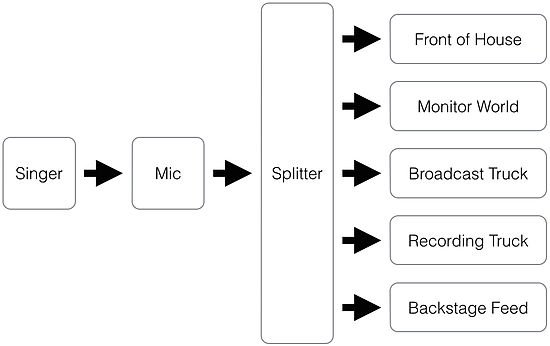
Audio signal flow refers to the path of an audio signal from the source to the output. Audio signal flow can be divided into two categories: physical and logical. Physical signal flow involves the physical components of the signal pathway such as wires, connectors, and the various audio devices that process the signal along the way. Logical signal flow refers to how a signal moves through a system in terms of processing, such as EQing, compression, and other digital audio effects.

Source

The source is where the audio signal originates. It could be a microphone, a CD player, or any other device that produces an audio signal. The audio signal is typically very weak and needs to be amplified to a useful level.

Processing

Processing refers to any manipulation of the audio signal; it can be as simple as adjusting the volume, or as complex as applying digital effects such as reverb, delay, and modulation. Processing is typically done by an analog or digital audio processor. Processors can be standalone units, or they can be built into mixing consoles, amplifiers, and other audio equipment.

Amplification

Amplification is the process of increasing the strength of the audio signal. An amplifier receives the audio signal and amplifies it to a level where it can drive a speaker or other output device. Amplifiers come in a wide range of types and sizes, from small headphone amplifiers to massive, high-powered amplifiers used in live music performances.

Output

The output is where the amplified and processed audio signal is sent for playback. This could be a pair of headphones, a speaker system, or any other device designed to reproduce audio. The quality of the output device can have a significant impact on the overall quality of the audio signal, so it’s essential to choose an output device that matches the desired quality level.

Audio Signal Flow

Credit: www.mixingmusiclive.com

Digital Audio Signal Flow

Understanding audio signal flow is vital for achieving high-quality sound recordings. It refers to the path of the audio signal from its source through processing to the final output. The digital audio signal flow relies on digital devices that transform the signal into digital data.

Digital Source

The audio signal flow originates from the source, which is usually digital in nature. The source can be a digital audio workstation, CD player, computer, or any device that produces a digital signal. The source digital signal is then sent to a digital signal processor (DSP) for processing.

Digital Signal Processor

The digital signal processor is the brain of the audio signal flow and is responsible for processing the digital signal. It performs the necessary operations such as equalization, compression, reverb, and mixing, among others. The processed signal is then sent to the digital-to-analog converter (DAC).

Digital-to-analog Converter

The digital-to-analog converter converts the digital signal into an analog signal that can be understood by speakers or headphones. It is an essential part of the digital audio signal flow as it ensures that the sound is of high quality and accurately represents the original signal.

Output

The output is the final stage of the digital audio signal flow, where the analog signal is sent to the speakers or headphones. It is crucial to ensure that the output device is of high quality to prevent any loss in sound quality.

Common Audio Signal Flow Techniques

Audio signal flow techniques are essential for any sound system operator, as they help to ensure that the audio signal travels through the system without any loss of quality or interference. The most common techniques include gain staging, EQ, compression, and reverb, which help to balance and enhance the sound.

Audio signal flow refers to the path sound takes from the source, through processing, to the final output. Understanding this flow is fundamental to creating great-sounding recordings. There are three main techniques used in audio signal flow that are essential to producing quality sound: equalization, compression, and reverb.

Equalization

Equalization, also known as EQ, is the process of adjusting the balance between frequency components of an audio signal. EQ is used to change the tone of a sound, and can be a crucial tool in crafting a specific type of sound. EQ can enhance the warmth and clarity of a vocal, for instance, by simply boosting the frequency bands that correspond to these qualities. Conversely, EQ can also be used to reduce undesirable frequencies that can detract from the overall quality of the sound.

Compression

Compression is used to reduce the dynamic range of an audio signal. In other words, it makes loud sounds quieter and quieter sounds louder, resulting in a more consistent sound level. Compression is ideal for taming peaks or controlling the dynamic range of an instrument or vocal. It can also help add sustain to guitar or bass tracks, making them sound fuller and warmer.

Reverb

Reverb refers to the effect of sound waves reflecting off surfaces and bouncing back to the listener. It adds depth and volume to a sound, making it sound more natural. Reverb is used to create a sense of space and atmosphere in a recording, and it can be adjusted to create everything from a small room to a large concert hall sound. In conclusion, mastering the use of equalization, compression and reverb in audio signal flow is essential for creating professional-sounding recordings. These common techniques are the building blocks of sound design, paving the way for countless creative possibilities.

Audio Signal Flow

Credit: en.wikipedia.org

Frequently Asked Questions On Audio Signal Flow

What Is The Correct Order Of The Audio Signal Flow?

The correct order of the audio signal flow is as follows: the audio source, the preamp, the EQ, the compressor, and the recorder or amplifier. Each component affects the signal in a specific way and is essential for a quality sound.

What Is The Basic Signal Flow In Audio?

The basic signal flow in audio starts at the source, travels through a preamp or mixer, then to the level control and EQ before being amplified by a power amplifier. The amplified signal then goes to the speakers.

What Is The Signal Flow Of A Sound System?

The signal flow of a sound system refers to the path that an audio signal takes from its source to the speakers. It starts with the audio source, which is then processed by the mixer or preamp, followed by amplification and finally output to the speakers.

What Is The Signal Flow Of An Audio Interface?

The signal flow of an audio interface begins with the analog or digital input, then goes through the preamp, AD converter, processing, DA converter, and finally output to the speakers. It’s important to ensure a high-quality signal flow to achieve optimal sound.

Conclusion

So there you have it – audio signal flow in a nutshell. Ensuring the proper signal path from start to finish can greatly enhance the quality of your audio output. Remember to keep these basic principles in mind: the input source should be the highest quality possible, avoid having multiple input levels, and always monitor your output.

By understanding and implementing these concepts, your audio projects are sure to sound better than ever before. So go ahead, experiment, and enjoy the results!