Categories
Archive

How To Make Fatter Drums

To make fatter drums, use thicker drumheads and add dampening materials. Now, let’s dive into the details.

It’s no secret that a drum set with fatter sounding drums is more desirable, but achieving that sound can be tricky. This is where the importance of drumheads and dampening materials come in. Thicker drumheads will produce a deeper and richer sound, while dampening materials such as gels or moongels can be used to control the sustain and eliminate unwanted overtones.

Tuning your drums properly is also crucial in getting the desired sound. We’ll discuss the various methods and techniques that you can use to make your drums fatter and more resonant.

Finding The Right Samples

To make fatter drums, finding the right samples is essential. Look for drum samples that have a fuller and richer sound, with more low-end frequencies and dynamic range. Experiment with layering different drum samples to create a more robust and powerful sound.

Experimentation

When it comes to making fatter drums, the most important step is finding the right samples. However, it can be difficult to know which samples will give you the desired sound. The best way to find the right samples is through experimentation. Try out different samples and see which ones work best for you. You can also alter the samples by adjusting the pitch, adding effects and manipulating the sound to get the perfect match for your track.

Layering Techniques

Layering techniques are also important when it comes to creating fatter drums. Layering involves using multiple samples to create a thicker and richer sound. When layering, it is important to choose samples that complement each other. Try layering a kick sample with a snare sample to create a fuller sound. You can also experiment with layering different types of percussion to add texture and depth to your drums.

Sample Quality

The quality of the samples that you use is also important. Using low-quality samples can result in flat and lifeless drums. It is recommended to invest in high-quality samples as they can make a huge difference in the overall sound of your drums. There are plenty of online resources where you can find premium samples to help make fatter drums.

Another way to ensure that your drums sound fat is by tweaking the EQ. Boosting the lower frequencies can give your drums a punchier sound. However, be careful not to overdo it as this can create distortion and muddiness in your mix. You can also reduce the frequency of other elements in your mix to make space for your drums.

In conclusion, making fatter drums requires a combination of experimentation, layering and EQ techniques. Finding the right samples is the first and most important step. Once you have found the right samples, try layering them with other samples to create a fuller sound. Finally, tweak the EQ to give your drums a punchier and fatter sound. With these techniques, you can take your drum sound to the next level and make your tracks stand out.

Eq Techniques

Learn EQ techniques like boosting the low and high end frequencies of drum sounds to make them fatter and stand out in your mix. Use gentle boosts to enhance or shape the tone, or try more drastic EQ adjustments to create a unique sound.

To make a drum sound fatter, it’s important to understand EQ techniques. EQ, short for equalization, allows you to boost or cut specific frequencies in your drums to achieve a better overall sound. In this post, we’ll cover three EQ techniques for making your drums sound fatter: Boosting the Low-End, Cutting the Mids, and Shelving the High-End.

Boosting The Low-end

The low-end of your drums is where the power lies. To make your drums sound fatter, it’s important to boost the low-end frequencies. This will give your drums more body and help them cut through in a mix. Here’s how to do it:

  • Find the frequency range where the kick drum sits – typically between 60Hz and 120Hz.
  • Turn up the EQ gain in this frequency range to boost the low-end of the kick drum.
  • Be careful not to overdo it, as too much boost can lead to a muddy sound.

Cutting The Mids

The mid-range frequencies in your drums can often be the cause of a thin or weak sound. By cutting these frequencies, you can give your drums more space in the mix and make them sound fatter. Here’s how to do it:

  1. Find the frequency range where the snare drum sits – typically between 200Hz and 400Hz.
  2. Turn down the EQ gain in this frequency range to cut the mids.
  3. Be careful not to cut too much, as it can make your drums sound unnatural.

Shelving The High-end

The high-end frequencies in your drums can add sparkle and clarity, but too much can make your drums sound harsh. By shelving the high-end, you can tame these frequencies and give your drums a smoother sound. Here’s how to do it:

StepInstructions
1.Find the frequency range where the cymbals sit – typically between 8kHz and 16kHz.
2.Turn down the EQ gain in this frequency range to shelf the high-end.
3.Be careful not to cut too much, as it can make your drums sound dull.

By using these EQ techniques, you can make your drums sound fatter and more powerful. Remember to experiment with different settings and listen carefully to how each change affects the overall sound. With some practice and patience, you can achieve the perfect fat drum sound for your next recording or performance.

Compression

Compression can help make drums fatter and punchier by reducing dynamic range and evening out volume levels. By applying gentle compression to individual drum tracks or the entire drum bus, you can achieve a more cohesive and powerful drum sound.

Compression is a technique that audio engineers use to even out the dynamics of a sound source. It involves reducing the volume of the loudest parts of the sound, allowing the quieter parts to be heard more easily. This makes the sound more consistent, present, and fuller. Compression is essential in making fatter drums as it helps bring out the punchiness and power of the drums. In this post, we’ll discuss two types of compression – parallel compression and sidechain compression – and how you can use them to make fatter drums.

Parallel Compression

Parallel compression, also known as New York compression, is a technique where you blend the compressed signal with the dry signal. This technique retains the original dynamics and transients of the drum hits while adding more weight to the overall sound. To achieve parallel compression:

  1. Send the drum track to an auxiliary channel
  2. Insert a compressor plugin on the auxiliary channel. Set a high ratio and low threshold to achieve heavy compression.
  3. Blend the compressed signal with the dry signal to taste, using the auxiliary channel fader or a mix knob on the compressor plugin.

Sidechain Compression

Sidechain compression involves using a separate audio signal to trigger the compressor. It is a powerful tool in shaping the drum sound and making fatter drums. Sidechain compression works by reducing the volume of the drum track when another instrument, such as the bass, kicks in. This creates more space in the mix for the bass to sit, making the drums sound fatter. To use sidechain compression on your drums:

  1. Insert a compressor plugin on the drum track
  2. Click on the sidechain option and select the instrument you want to trigger the compressor
  3. Set the compressor parameters to achieve the desired level of compression

In conclusion, compression is an essential tool in making fatter drums. By applying parallel and sidechain compression, you can achieve a fuller, more present drum sound that cuts through the mix. Use these techniques creatively and experiment with different settings to find your unique sound.

Distortion

Distortion is an essential component of creating fatter, more powerful drums. By adding distortion to your drums, you can create a fuller, more dynamic sound that will cut through the mix. There are several types of distortion, each with its own unique characteristics and benefits. In this post, we’ll explore the various types of distortion and how you can use them to make your drums fatter.

Parallel Distortion

Parallel distortion is a technique that involves blending a distorted signal with an unaltered signal. This creates a more natural-sounding distortion that allows you to maintain the clarity and punch of your original drum sound while adding some grit and character. To apply parallel distortion to your drums:

  • Send your drum track to an auxiliary send.
  • Insert a distortion plugin on the aux channel.
  • Adjust the amount of distortion to taste, using the original drum track as a reference.
  • Blend the distorted signal with the original signal until you achieve the desired effect.

Clipping

Clipping is a form of distortion that occurs when the input signal exceeds the maximum level that can be processed by a device or plugin. This results in a squared-off waveform that adds harmonics and compression to the sound. To apply clipping to your drums:

  • Insert a clipping plugin on your drum track.
  • Adjust the clipping threshold to create the desired amount of distortion.
  • Use a limiter to control the level of the clipped signal and prevent it from clipping further downstream.

By understanding the different types of distortion and how to use them, you can take your drum sound to the next level and create fatter, more powerful drums that will cut through any mix.

Reverb And Delay

Reverb and delay effects can be used to make your drums sound fatter. By adding a bit of decay and echo, you can create a fuller, more spacious sound that adds depth and dimension to your music. Experiment with different settings to find the right balance that suits your music style.

Reverb and delay are two of the most popular audio effects used to enhance the sound of drums, giving them more depth and a fatter sound. While reverb adds a sense of space to the drum sound, delay creates a sequence of echoes that can add an extra dimension to the drum beat. In this article, we’ll explore how you can use these effects to make fatter drums and create a more dynamic and exciting drum track.

Creating Depth With Reverb

One of the primary functions of reverb is to create a sense of space around the sound. When used correctly, reverb can add depth and dimension to the drums, making them sound bigger and more intense. To achieve this effect, you can apply reverb to the drum track using a reverb plug-in or effect unit. There are several types of reverb effects you can use, such as room, hall, or plate reverb. Each type of reverb has its own unique sound character, so it’s worth experimenting with different types to find the one that suits your track the best. To create depth with reverb, try increasing the reverb time and adjusting the wet/dry mix. A longer reverb time will create a more significant sense of space, while a higher wet/dry mix will emphasize the reverb effect on the drums. However, be careful not to overdo it, as too much reverb can make the sound muddy and unclear.

Creating A Fatter Sound With Delay

Delay is another popular effect that can add thickness and fullness to the drums. Unlike reverb, delay creates a series of echoes that repeat the original drum sound. By adjusting the time and feedback settings, you can create a range of different delay effects, from a subtle echo to a long, sustained tail. To create a fatter sound with delay, try using a stereo delay effect with a short delay time and a low feedback setting. A stereo delay is ideal for creating a wide and expansive soundstage, while a short delay time will add a sense of urgency and detail to the drums. You can also experiment with using multiple delay effects on the drum track, such as a short delay with a low feedback setting and a long delay with a high feedback setting. This will create a more complex and layered sound, adding depth and richness to the drum track. However, again, be careful not to overdo it, as too much delay can make the sound chaotic and confusing. In conclusion, reverb and delay are powerful tools for making fatter drums and enhancing the sound of your drum track. By adjusting the reverb and delay settings to suit your track, you can create a unique and memorable sound that will make your drums stand out from the crowd.

How To Make Fatter Drums

Credit: www.youtube.com

How To Make Fatter Drums

Credit: www.productionmusiclive.com

Frequently Asked Questions Of How To Make Fatter Drums

How Do You Fix Thin Drums?

To fix thin drums, add external muffling like gels or tapes to the drumhead’s surfaces and resonant heads. Also, try tuning the drum down, use thicker heads, and consider adding internal muffling like foam or rings. Experiment with different techniques until you find the desired sound and feel.

How Do You Fatten Up A Snare Drum?

To fatten up a snare drum, you can try adjusting the tension of the bottom head, adding a thicker batter head, or experimenting with different types of snare wires. You can also place an object like a wallet or a towel on the head to muffle the sound and create a fatter tone.

How Do I Make My Drums Fatter In Ableton?

To make your drums fatter in Ableton, try adding a compressor to your drum bus and increasing the attack and release time. Additionally, use EQ to boost the low frequencies and add reverb to give the drums more space and depth.

Experiment with different settings until you find the perfect balance.

How Do I Make My Drums Hit Harder?

To make your drums hit harder, you can try adjusting the drum tuning, using thicker drumheads, changing the drum sticks, applying more force while playing, and experimenting with mic placement and EQ settings. Practice and technique also play a crucial role in creating a powerful drum sound.

Conclusion

Finally, making your drums fatter doesn’t need to be a difficult or daunting task. With the tips and techniques we have shared in this post, you can easily improve the thickness and fullness of your drum sounds. Remember, it’s all about experimenting, testing and finding what works for you and your music.

Don’t be afraid to try new things and embrace the unique style and sound that you create. Keep producing and drumming, and have fun!
Categories
Archive

Pro Tools First Batch Fade

Pro Tools First users can quickly apply batch fades by selecting one or more clips and using the Batch Fade dialog box. With this tool, users can easily create fades in and out, crossfades, and adjusting fade curves with precision.

Pro Tools First, a digital audio workstation, comes with a range of features and tools for recording, editing, and mixing audio tracks. One of its powerful features is the Batch Fade tool, which allows users to apply fades to multiple audio clips at once.

This feature can save time and simplify the editing process, especially when working with large sessions. With the Batch Fade dialog box, users can adjust the length and shape of fades, apply crossfades, and modify the fade curves. The Batch Fade tool is a useful feature for any audio engineer or music producer looking to produce high-quality audio tracks efficiently.

Pro Tools First Batch Fade

Credit: www.soundonsound.com

How To Access Batch Fade In Pro Tools First

To access batch fade in Pro Tools First, navigate to the Edit menu and select Batch Fade. From there, you can adjust the settings to apply fades to multiple clips at once, saving you time and effort in your editing process.

How to Access Batch Fade in Pro Tools First Batch fade is an easy-to-use feature in Pro Tools First that allows users to batch fade multiple clips in a track, making the editing process much more efficient. To access Batch Fade in Pro Tools First, follow the steps below.

Accessing The Batch Fade Window

The Batch Fade window can be accessed in two ways – either through the Edit Window or the Mix Window. In the Edit Window:

  1. Select the clips you want to batch fade by holding down the “Shift” key and clicking on each clip.
  2. Right-click on any of the selected clips to open the context menu.
  3. Select “Batch Fade” from the context menu, and the Batch Fade window will appear.

In the Mix Window:

  1. Click on the desired track that you want to apply a Batch Fade to.
  2. Click the downward arrow located at the bottom of the track to access the drop-down menu.
  3. Select “Batch Fade” from the menu, and the Batch Fade window will appear.

Setting Up The Batch Fade Window

Once the Batch Fade window appears, you can set up the fade settings according to your needs. In the Batch Fade window, you can set:

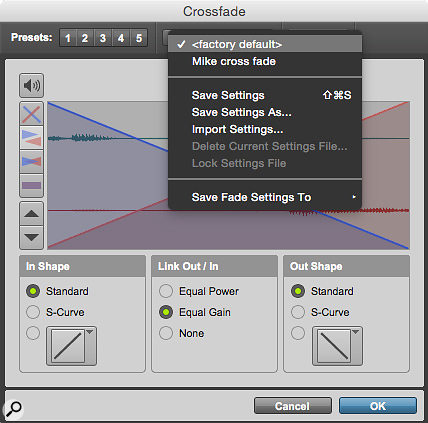
  • The Fade Shape (equal power, S-curve, or linear fade)
  • The Fade Type (in, out, or both)
  • The length of the fade

Fading With Pro Tools First Batch Fade

Using the Pro Tools First Batch Fade feature is simple once you have accessed and set up the settings in the Batch Fade window. To apply a batch fade, follow these steps:

  1. Ensure the Batch Fade window is open and set up correctly.
  2. Select the clips you want to fade.
  3. Click the “Apply” button in the Batch Fade window.

And just like that, your selected clips will be batch faded according to your chosen settings. Pro Tools First Batch Fade is an incredibly handy tool for any editor looking to speed up the editing process with ease. Accessing, setting up, and using the Batch Fade window is simple and efficient, making it an essential tool for any Pro Tools user.

Pro Tools First Batch Fade

Credit: www.soundonsound.com

Different Types Of Fades Available

Pro Tools First Batch Fade provides different types of fades to choose from, such as constant gain and constant power fades. These options allow for smooth transitions between audio clips and enhance the overall audio quality.

Different Types of Fades Available: Pro Tools First Batch Fade is an easy-to-use feature that allows you to quickly apply complex fades to multiple audio files. This feature is particularly useful when working on large audio projects with hundreds of audio clips and tracks. Batch fades can save time and increase workflow efficiency, enabling you to meet project deadlines without compromising on quality. There are different types of fades available in Pro Tools First Batch Fade, which can help to achieve the perfect balance between two audio clips when blending them together. Equal Power: Equal Power fades are commonly used when you want to fade in/out music tracks without any significant changes in volume. This type of fade equally reduces the amplitude of the audio signal at the start/end of a clip. Equal power fades produce a smooth and consistent transition from one clip to another. Equal Gain: Equal Gain fades are ideal for radio and TV broadcasting, where cutting to the next clip can disrupt the listener/viewer experience. This fade maintains a consistent level of gain between two clips, creating a seamless transition without any sudden fluctuations. S-Curve: S-Curve fades create a curved path that gradually fades the audio signals at the start/end of a clip. This type of fade is excellent for creating a natural, organic-sounding audio transition. S-curve fades can also reduce the effects of clicks and pops that may occur in audio transitions. Shape One: Shape One fades start suddenly and then gradually fade away. This type of fade is ideal for applying to drum tracks, where a quick start is essential. Shape One fades create a sharp sound, followed by a smooth fade. Shape Two: Shape Two fades gradually increase the volume of audio at start and then gradually fade away. This type of fade is perfect for creating an atmospheric sound effect, such as waves crashing onto a beach or a thunderstorm. Shape Three: Shape Three fades start with a sharp volume increase, then gradually decreases to a complete silence. This type of fade is excellent for creating a dramatic effect, such as an explosion or gunshot. By utilizing these different fade options, you can take your audio projects to the next level. Pro Tools First Batch Fade is an excellent tool for creating high-quality and professional-sounding audio mixes.

Advantages Of Using Pro Tools First Batch Fade

If you are a music producer, you understand how crucial batch fades are in your workflow. It is a time-consuming process that is critical in achieving a polished and professional sound. Fortunately, with Pro Tools First Batch Fade, you can effortlessly create batch fades to eliminate clicks, pops, and other unwanted noise from your audio recordings. Batch fades allow you to apply the same fade curve to multiple clips, which saves you time and effort. Here are some of the advantages of using Pro Tools First Batch Fade:

Time-saving

Pro Tools First Batch Fade is an incredibly efficient tool that is designed to save you time. Batch fades enable you to apply the same fade curve to multiple clips with just a few clicks. This feature saves you from the hassle of manually creating fade-ins and fade-outs, which can be a time-consuming process. Pro Tools First Batch Fade ensures that you spend less time working on fades and more time creating great music.

Precision And Consistency

When it comes to audio editing, precision and consistency are essential. Pro Tools First Batch Fade makes it easy to achieve both. With this tool, you can apply the same fade curve to multiple clips, ensuring that they all match in terms of volume and timing. Additionally, Pro Tools First Batch Fade allows you to control the length, shape, and depth of your fades, providing precision and consistency throughout your project.

Ease Of Use

Pro Tools First Batch Fade is incredibly easy to use. The tool is accessible from the Edit window, and the process of creating fades is straightforward. Additionally, the tool provides you with a visual representation of your fades, allowing you to preview them before applying them to your audio clips. This feature helps you to ensure that your fades are well-shaped and that they match the flow of your music.

In conclusion, Pro Tools First Batch Fade is an essential tool for any music producer. With its time-saving, precision, consistency, and ease-of-use features, the tool makes it easy to create professional-sounding audio recordings. If you want to take your music production to the next level, consider using Pro Tools First Batch Fade.

Tips And Tricks For Using Pro Tools First Batch Fade

Learn how to make the most out of Pro Tools First Batch Fade with these helpful tips and tricks. From selecting and editing fades to customizing your preferences, you’ll be a pro in no time!

Tips and Tricks for Using Pro Tools First Batch Fade Pro Tools First Batch Fade is a powerful tool that saves a lot of time while working on sound files. It allows users to apply a fade-in or fade-out effect to multiple clips at once, saving hours of manual work. In this post, we’ll explore some tips and tricks for using Pro Tools First Batch Fade effectively. Creating Custom Fade Shapes Pro Tools First Batch Fade has a number of preset fade shapes, such as Linear, Equal Power, and S-Curve. However, sometimes users may want to create custom fade shapes that suit their specific needs. Here’s how to do it: 1. Go to the Edit window and select the clip(s) you want to apply the fade to. 2. Click on the Batch Fade button in the toolbar. 3. In the Batch Fade window that opens up, select Custom Fade Shape from the Shape dropdown menu. 4. Drag the handles on the fade curve to create a fade shape that suits your needs. 5. Click Apply to apply the custom fade shape to the selected clips. Using Keyboard Shortcuts Keyboard shortcuts are a great way to speed up your workflow. Here are some useful shortcuts for using Pro Tools First Batch Fade: – Control + Option + F: Opens the Batch Fade window – Tab/Shift + Tab: Navigate between the fade-in and fade-out sections – Command + A: Select all clips in the session – Command + C: Copy the fade settings – Command + V: Paste the fade settings onto the selected clips Using Batch Fade with Multiple Clips If you want to apply the same fade settings to multiple clips, you can use Batch Fade with multiple clips at once. Here’s how to do it: 1. Select all the clips you want to apply the fade to. 2. Click on the Batch Fade button in the toolbar. 3. In the Batch Fade window that opens up, set the desired fade settings. 4. Click Apply to apply the settings to all the selected clips. This is a great time-saving feature for those working on long sound files that require consistent fades throughout. Conclusion: Pro Tools First Batch Fade is a must-have tool for sound editors who want to save time while working on extensive sound files. These tips and tricks can help users make the most out of the Batch Fade feature by creating custom fade shapes, using keyboard shortcuts, and applying the same fade settings to multiple clips. Using these tips, you can streamline your workflow and spend more time making your audio projects sound great!

Pro Tools First Batch Fade

Credit: www.mixinglessons.com

Frequently Asked Questions On Pro Tools First Batch Fade

How Do I Batch Fade In Pro Tools?

To batch fade audio in Pro Tools, select all the clips you want to affect and press Command+F. Then adjust the fade settings to your preference and hit apply.

How Do You Fade In Pro Tools First?

To fade in Pro Tools First, simply locate the track you wish to fade in, click on the volume line at the start of the audio clip, and draw a line upwards. This will slowly increase the volume over time, creating a fade in effect.

Alternatively, you can use the fade tool to automate the process.

What Is The Default Fade Length In Pro Tools?

The default fade length in Pro Tools is 5 milliseconds.

What Is The Shortcut For Fade All Clips In Pro Tools?

The shortcut for fading all clips in Pro Tools is Command+Option+F.

Conclusion

Creating a polished sound is an essential aspect of music production. With Pro Tools First Batch Fade, you can easily and efficiently create smooth transitions between tracks or fade-in and fade-out effects. This simple and powerful tool saves time and effort while enhancing the overall quality of your recordings.

By implementing Batch Fade into your workflow, you’ll be able to produce professional-sounding tracks in less time, ensuring your music stands out from the crowd. So why not give it a try and experience the benefits of this incredible tool for yourself?

Categories
Archive

Layering Sounds

Layering sounds involves adding multiple audio tracks to create a more intricate, textured sound. This technique is commonly used in music production and sound design to add depth and complexity to a piece of audio.

By combining different sounds, such as drums, bass, and vocals, and adjusting their panning, volume, and equalization settings, a more dynamic auditory experience can be created. The layering process requires careful attention to detail and a keen ear for how different sounds interact with each other.

When done effectively, layering can elevate a piece of audio and make it more interesting and engaging for listeners. We will explore the benefits of layering sounds and provide tips and techniques for achieving the best results.

Benefits Of Layering Sounds

Layering sounds can enhance the depth and richness of audio production, adding complexity and interest to a track. By combining different elements and tones, from drums to synths to vocals, you can create a dynamic and diverse sound that grabs the listener’s attention and makes your music stand out.

Layering sounds is a technique used in music production to create a more complex and harmonious sound. By combining multiple sounds, you can achieve a unique and rich quality that is impossible to achieve with just one sound. Here are the top three benefits of layering sounds in your music production.

Creating A Richer And Fuller Sound:

Layering sounds helps to create a fuller and richer sound by combining different instruments, synths, vocals, and other sounds. Each sound adds its unique texture and personality to the overall composition, resulting in a unique and complex sound. For example, layering a deep bass synth with a high pitched lead synth can create a more complete and balanced sound. Similarly, adding a choir to a solo vocal can create a larger and more exciting sound.

Unleashing Creativity And Unique Sound Design:

Layering sounds unlock endless creative possibilities that allow you to experiment and produce unique and original sounds. By combining different sounds, you can create your own sound that reflects your personality and style. You can use layering to create entirely new sounds by combining different audio samples. You can also layer different effects and plugins to achieve a variety of different tones and textures.

Increasing Depth And Dimension In Music Production:

Layering sounds can make your mix sound more rich and lively by adding depth and dimension. You can use multiple layers to create a wide sound stage and spacious sound. For example, layering a drum with reverb or delay, or combining a synth with a subtle pad can create an immersive and powerful sound. Layering sounds is an essential technique in music production that can help you achieve a professional and polished sound.

How To Layer Sounds

Layering sounds can enhance the depth and complexity of your audio recordings. To layer sounds effectively, start with a base sound, then gradually add additional layers of sound to create a cohesive and intricate audio experience for the listener. Experiment with different combinations of sounds to find the perfect balance.

Layering sounds is a technique used by many music producers to give their songs more depth and power. When you layer sounds, you combine multiple tracks with different timbres, frequencies, and rhythms to create a rich sound that captures the listener’s attention. In this article, we will discuss how to layer sounds and provide some pro tips for making your layers sound even better.

Selecting Appropriate Sounds

The first step in layering sounds is to choose appropriate sounds that complement each other. You want to select sounds that have different frequencies and timbres but blend well together. To do this, you can experiment with different combinations of instruments or samples until you find the right ones. For example, if you’re layering a bass line, you might want to add some high-frequency percussion that contrasts with the low-end frequencies. Alternatively, if you’re layering a melody, you might want to add a pad or string sound that fills out the mid-range.

Arranging Layers For Maximum Impact

Once you have your sounds selected, it’s time to arrange the layers for maximum impact. You can achieve this by mixing the levels of each layer to create a balance that sounds full but not cluttered. For instance, if you have three layers, you might mix the volumes like this: The main part at 70%, the supporting layer at 50%, and the third layer at 25%. This layered sound will create a more significant effect, and all the sounds will blend together seamlessly.

Using Effects To Enhance Layers

After you have arranged your layers, another essential step is to use effects to enhance the layers. Effects such as reverb, delay, or EQ can be used to shape the sound and make it more expressive. For example, you might use reverb to give a sense of space to a lead instrument, or you may use delay to create an echo effect. EQ can also be used to cut out any muddiness in the mix and make it sound clearer.

Pro Tips For Layering Sounds

Finally, here are some pro tips to help you make the most out of layering sounds:

  • Start with less and build up – it’s easier to add layers than to remove them.
  • Use stereo widening effects to give layers more width and depth.
  • Stack layers with similar sounds to create even richer textures.
  • Use EQ to make sure that each layer occupies a different sonic frequency range.
  • Apply subtle automation to make layers more dynamic and interesting.

In Conclusion

Layering sounds is an essential technique in music production and can take your tracks to the next level. Remember to choose appropriate sounds, arrange the layers for maximum impact, and use effects to enhance the layers. With these tips, you’ll be able to layer sounds like a pro and create more interesting and dynamic music.

Examples Of Layering Sounds

By layering sounds, you can create a unique and complex auditory experience. Examples of layering sounds include adding ambient background noises, additional instrument tracks, or various vocal effects. Experimentation is key to finding the perfect combination of layered sounds.

Layering sounds is a common technique used in various genres of music production. It involves blending different sounds together to create a more complex, rich, and interesting audio experience. In this article, we’ll explore some famous examples of layering sounds and how different music genres use this technique to enhance their productions. Below are the subtopics we’ll cover in this article:

Layering Synths In Electronic Music

In electronic music, layering synths is a widespread technique used to create a futuristic and otherworldly sound. Producers layer different synth sounds, including pads, leads, bass, and arpeggios. They then adjust the levels, panning, and EQ to achieve the desired sound. The result is a synth sound that is texturally complex with a range of tones, harmonics, and frequencies. Some famous examples of layering synths in electronic music include Daft Punk’s “Around the World,” Deadmau5’s “Strobe,” and The Chemical Brothers’ “Block Rockin’ Beats.”

Layering Guitars In Rock Music

Rock music is known for its edgy, distorted guitar sound. To achieve this sound, producers layer electric guitar tracks played with different guitar tones, organics, and effects like delay, chorus, and reverb. The multiple guitar layers give the track more depth and texture, creating a dense and heavy sound. Some famous examples of layering guitars in rock music include Led Zeppelin’s “Stairway to Heaven,” Pink Floyd’s “Comfortably Numb,” and Guns N’ Roses’ “Sweet Child of Mine.”

Layering Vocals In Pop Music

Pop music relies heavily on vocals to drive melody and emotion. One layer of vocals may not be enough to achieve the desired effect, so producers layer different vocals to create a richer and fuller sound. The layers can include main vocals, backing vocals, harmonies, and ad-libs. Producers tweak each layer’s levels, timing, and panning to ensure they blend well together. The result is a vocal mix that is bright, sweet, and angelic. Some famous examples of layering vocals in pop music include Michael Jackson’s “Beat It,” Beyonce’s “Halo,” and Prince’s “Kiss.”

Conclusion

Layering sounds is a technique that can enhance any music genre when used appropriately. Layering synths in electronic music, guitars in rock music, and vocals in pop music are just a few examples of how to layer sounds to add depth, texture, and complexity to a track. Producers must experiment with different combinations, levels, and effects to find the right mix for their sound. With the right mix, layering sounds can take a basic track and transform it into a masterpiece.

Layering Sounds

Credit: m.youtube.com

Mistakes To Avoid When Layering Sounds

Layering sounds can add depth and complexity to music, but it’s important to avoid certain mistakes. Some key things to keep in mind include avoiding cluttered arrangements, using contrasting sound textures, and being mindful of frequency overlap. By following these tips, you can achieve a well-balanced and effective layered sound.

Layering sounds is a technique used to add depth, interest, and complexity to music. However, it can be easy to make mistakes that can ruin the final sound. Below are some common mistakes to avoid when layering sounds.

Clashing Frequencies

When layering sounds, it’s important to consider the frequencies of each sound. If two sounds have similar frequencies, they might clash and create a muddy or indistinguishable sound. To avoid this mistake, make sure each sound has its own space in the frequency spectrum. You can use equalization (EQ) to adjust the frequency of each sound and prevent clashing.

Overcrowding Frequency Spectrum

Sometimes, it’s tempting to layer too many sounds in a mix. However, if you overcrowd the frequency spectrum, it can result in a messy and chaotic sound. To avoid this mistake, make sure to leave some breathing room between each sound in the mix. Consider using panning and volume adjustments to create space for each sound.

Using Too Many Similar Sounds

If you use too many similar sounds in a mix, it can create a boring and repetitive sound. To avoid this mistake, try to layer different types of sounds that complement each other. For example, if you have a mellow guitar sound, you might layer it with a sharp synth sound to add contrast and interest.

Ignoring The Overall Mix

When layering sounds, it’s easy to focus on each individual sound and forget about the overall mix. It’s important to listen to the entire mix and make sure each sound fits together in a cohesive way. You might need to make adjustments to the levels, EQ, or panning to create a balanced and cohesive sound.

Not Experimenting

Finally, one of the biggest mistakes you can make when layering sounds is not experimenting. Layering sounds is a creative process, and you should be willing to try new things and take risks. Don’t be afraid to mix different types of sounds or try new effects. You might stumble upon a unique and interesting sound that sets your mix apart.

Tools For Layering Sounds

Layering sounds can enhance the quality of any audio production. Using tools such as EQ, compression, and reverb can help create a full and rich audio experience that captures the listener’s attention. The combination of different sounds can transform a simple melody into a complex and layered musical masterpiece.

Layering sounds adds depth and complexity to a track, taking it from a simple loop to a sonic landscape. The key to successful layering is choosing the right tools to craft each new element. The right combination of software and hardware will give you the flexibility and control you need to create the perfect blend of sounds. Here are the essential tools for layering sounds:

Digital Audio Workstations (daws)

DAWs are the backbone of any production setup, and are used for recording, mixing, and editing audio. They also feature an array of tools that are perfect for layering sounds. With a DAW, you have access to a variety of effects such as reverb, chorus, and delay, that make it easy to sculpt and manipulate sound. Some of the popular DAWs used by professionals are Ableton Live, Logic Pro and Pro Tools.

Virtual Instruments And Sample Libraries

Virtual instruments and sample libraries help to bring your ideas to life. They contain a wide range of sounds, such as drums, synths, and orchestral instruments, which can be layered together to create rich, complex textures. Virtual instruments can be played with a MIDI keyboard or programmed directly within your DAW. Some popular virtual instruments and sample libraries are Kontakt, Omnisphere and Nexus.

Hardware Synthesizers And Sound Modules

Hardware synthesizers and sound modules will add an analog warmth and organic character to your sound. They allow you to manipulate waveforms and envelopes in real-time, making it easier to create unique, one-of-a-kind sounds. Some popular hardware synthesizer and sound modules are Roland JUNO-106, KORG MS-20, and Moog Sub 37. In conclusion, layering sounds is an art form that requires the right tools to bring it to life. With the help of DAWs, virtual instruments and sample libraries, and hardware synthesizers and sound modules, you can create a sonic palette that is uniquely yours. The possibilities are endless, so experiment with different combinations of tools to find the perfect sound for your next track.

Layering Sounds

Credit: whisperroom.com

Layering Sounds In Live Performance

Layering sounds creates a richer and more dynamic live performance. By blending different sounds and textures, musicians can elevate their music by adding depth and complexity. The process requires careful consideration and experimentation to achieve a seamless and cohesive sound.

Layering sounds is one of the most important aspects of music production. It gives depth and texture to a track and allows for the creation of complex, layered compositions. In live performance, layering sounds can take a performance to the next level, allowing you to create a more dynamic and engaging experience for your audience. Here are some ways to use layering sounds in live performance.

Using Loops To Layer Sounds

Loops are a great way to build a layered sound in live performance. A loop is a repeating section of a musical phrase that can be played over and over again. Loops can be used to layer different parts of a track, such as drums, basslines, and synths. To create a loop, you can use a loop pedal or a software program like Ableton Live. Using a loop pedal allows you to loop sounds in real-time, while Ableton Live allows you to pre-program loops before your performance.

Creating Layers With Multiple Instruments

Layering sounds with multiple instruments can create a rich and complex sound. In live performance, you can use multiple instruments to create layers of sound. For example, you could use a guitar to create a foundation, then add drums and bass to create a full rhythm section. From there, you could add keyboard or synth sounds to create a more complex texture. Each instrument should have a distinct role in the overall sound and should be carefully balanced to create a cohesive whole.

Using Effects To Enhance Layers

Effects can be a powerful tool for enhancing layered sounds. In live performance, you can use effects like reverb, delay, and distortion to add depth and texture to your sounds. For example, you could add a touch of reverb to a synth sound to make it sound more spacious, or add a bit of delay to a guitar riff to create a sense of movement. Effects should be used judiciously and should be chosen to complement the overall sound of the composition. In conclusion, layering sounds in live performance can take a performance to the next level. Using loops, creating layers with multiple instruments, and using effects are just a few ways to create a rich and complex sound that engages your audience. When done well, layering sounds can transform a simple composition into a dynamic and engaging performance.

Layering Sounds

Credit: hyperbits.com

Frequently Asked Questions Of Layering Sounds

What Is The Layering Of Sounds?

Layering of sounds refers to the technique of adding multiple audio tracks on top of each other to create a more complex and dynamic sound. This is commonly used in music production and sound design to add depth and texture to a recording.

It allows for the blending of different instruments and sounds to create a cohesive and unique composition.

What Does It Mean To Layer Sounds?

Layering sounds refers to the process of adding multiple sound elements together to create a richer, more complex audio texture. This is often done in music production, sound design, and film or video game post-production to enhance the overall sound quality and give depth to the audio experience.

What Is The Layering Of Different Sounds Called?

The layering of different sounds is called “mixing. ” It involves combining multiple audio sources into a single stereo or mono output. Mixing enables audio engineers to create a balanced and dynamic final product.

What Is The Term For Layering Music?

Layering music is commonly known as “Music Production” or “Music Layering”. It involves mixing various sounds and putting them together to create a unique and harmonious composition.

Conclusion

To sum it up, layering sounds is a powerful tool that can bring depth and richness to any audio production. By using different sound sources, effects, and processing techniques, you can create a unique and complex sonic landscape that captivates your listeners.

Whether you’re a musician, a sound designer or a filmmaker, mastering the art of layering sounds can take your projects to the next level and make them stand out from the crowd. So, experiment, be creative, and have fun exploring the endless possibilities of sound layering!

Categories
Archive

What Are My Musical Rights

Your musical rights include copyright protection, performance rights, mechanical rights and synchronization rights. As a creator and performer of music, it is important to understand these rights in order to protect your work and earn revenue from its use.

Music is an integral part of human life. It has the power to evoke emotions, trigger memories, and create an atmosphere. As a creator and performer of music, it is important to understand what your musical rights are. These rights include copyright protection, performance rights, mechanical rights, and synchronization rights.

Copyright protection ensures that you have the exclusive right to use, distribute, and profit from your original music composition. Performance rights give you the ability to earn revenue from your music being played in public performance settings. Mechanical rights cover the rights to record and distribute your music in physical or digital format. Synchronization rights allow your music to be used in TV shows, films, and other visual media. Understanding and protecting these rights is crucial for any musician’s success.

What Are My Musical Rights

Credit: quotefancy.com

Types Of Musical Rights

When it comes to the music industry, there are various rights associated with the creation and distribution of music. These rights are important for ensuring that the appropriate parties are compensated for their work and that their work remains protected. One of the main types of musical rights includes performance rights, mechanical rights, and synchronization rights.

Performance rights refer to the right to perform a musical composition publicly or to broadcast it over radio, television, or the internet. This means that anyone who wishes to perform a musical composition publicly or broadcast it must obtain permission from the appropriate parties. This permission is typically granted in the form of a license, which can be obtained from a music licensing organization such as ASCAP, BMI, or SESAC.

Mechanical rights refer to the right to reproduce and distribute a musical composition in a physical or digital format. This includes the right to create and distribute CDs, digital downloads, and other forms of media that contain a musical composition. Like performance rights, mechanical rights are typically licensed through a music licensing organization.

Synchronization rights refer to the right to use a musical composition in synchronization with visual media such as a movie, TV show, video game, or commercial. This means that anyone who wishes to use a musical composition in synchronization with visual media must obtain permission from the appropriate parties. This permission is typically granted in the form of a synchronization license.

Performance Rights

As a musician, you have the performance rights to control how your music is played, performed and distributed. These rights include the right to receive payment for the use of your work, and to allow or deny others to use it.

Make sure you understand and protect your musical rights to avoid any legal issues in the future.

As a musician, it’s important to understand your rights when it comes to your music. One important area to consider is performance rights. Performance rights refer to the right to perform your music in public, whether in a live performance or a recorded version. In this section, we will discuss what performance rights are and who collects them.

What They Are

Performance rights are the exclusive right to perform a musical work publicly. It means that no one else can perform your music in public without your permission. The right to perform music publicly includes performing it live, playing it on the radio, streaming it online, and more. If someone wants to perform your music in public, they need to obtain a license from the organization that collects performance rights.

Who Collects Them

Performance rights are typically collected by performing rights organizations (PROs). These organizations collect royalties on behalf of their members for the public performance of their music. In the United States, there are three main PROs: ASCAP, BMI, and SESAC. These organizations represent songwriters and music publishers and ensure that they receive fair compensation for public performances of their music. PROs collect performance royalties from a variety of sources. They collect fees from radio stations, television networks, and other businesses that play music publicly. They also collect royalties from live music venues, such as bars and restaurants, that host live music performances. In conclusion, understanding performance rights is essential for musicians. It’s important to know what they are and who collects them to ensure that you’re receiving proper compensation for the public performance of your music. By working with a PRO, you can ensure that your rights are protected and that you’re able to earn a fair income from your music.

Mechanical Rights

As a musician, it is important to understand the various rights associated with your music. One such right is the mechanical right, which gives a copyright holder the exclusive right to reproduce and distribute their music in the form of CDs, vinyl, or digital downloads. In this post, we will explore what mechanical rights are and who collects them.

What They Are

Mechanical rights are one of the many rights granted to a copyright holder. Under this right, the copyright holder has the exclusive right to license the reproduction and distribution of their musical works in the form of CDs, vinyl, digital downloads, and other media. Essentially, mechanical rights ensure that the copyright holder is fairly compensated for the reproduction and distribution of their music.

Who Collects Them

The mechanical rights to a musical work are usually administered by a music publisher or a mechanical licensing agency such as the Harry Fox Agency or Music Reports Inc. These organizations act as intermediaries between the copyright holder and those who wish to reproduce and distribute their music. When a song is played on the radio or streamed online, the performing rights organization (PRO) collects the performance royalties on behalf of the copyright holder. However, mechanical licensing agencies collect the mechanical royalties for the reproduction and distribution of the musical work.

When a music publisher or mechanical licensing agency licenses a song for reproduction or distribution, they issue a mechanical license. This license sets the terms for how the work can be used and the royalties that must be paid to the copyright holder. The licensee (person or company who is reproducing or distributing the work) must pay the mechanical royalty for each copy of the musical work that is produced.

Conclusion

Understanding mechanical rights is an important part of being a musician. It ensures that copyright holders are fairly compensated for the reproduction and distribution of their musical works. Music publishers and mechanical licensing agencies play key roles in administering these rights and issuing licenses for the use of musical works.

What Are My Musical Rights

Credit: www.praisecharts.com

Synchronization Rights

When it comes to the world of music, there are many different types of rights that come into play. Whether you are a musician, songwriter, or producer, it is important to have a clear understanding of these rights and how they impact your work. One type of right that you are likely to encounter is synchronization rights.

What Are Synchronization Rights?

Synchronization rights, often referred to as sync rights, refer to the right to use a piece of music in synchronization with visual media such as a film, TV show, or commercial. This means that if a filmmaker wants to use a certain song in their movie, they need to obtain synchronization rights from the owner of the song’s publishing rights.

The use of music in visual media has become increasingly important in recent years, with many people discovering new music through their favorite TV shows or movies. As such, synchronization rights are a valuable asset for musicians and songwriters.

Who Collects Synchronization Rights?

In most cases, synchronization rights are collected by performing rights organizations (PROs) such as ASCAP, BMI, and SESAC. These organizations work on behalf of songwriters and publishers to collect royalties for the use of their music in visual media.

However, it is important to note that in some cases, synchronization rights may be negotiated directly between the filmmaker and the owner of the song’s publishing rights. This can be beneficial for both parties, as it allows for more direct communication and potentially higher royalties.

Final Thoughts

Understanding synchronization rights is essential for anyone involved in the music industry. Whether you are a songwriter, musician, or producer, it is important to have a clear understanding of these rights and how they impact your work. By working with a reputable PRO and staying informed about industry developments, you can help ensure that your music is being used legally and that you are receiving the royalties that you are entitled to.

How To Protect Your Musical Rights

As a musician, it’s important to understand your rights when it comes to your music. These rights include copyright protection, performance royalties, and mechanical royalties. It’s crucial to properly register your work and work with industry professionals to protect and maximize your musical rights.

As a musician, it’s imperative to understand what your musical rights are and how to safeguard them. Every artist invests a considerable amount of time, effort, and resources into creating quality music that deserves to receive the protection it deserves. That’s where registering and copyrighting your music comes in. In this article, we’ll cover the essential steps you need to take to protect your creative property.

Registering Your Music

Registering your music is the initial step you need to take to secure your musical rights. It’s a crucial step because it establishes a public record of your ownership and allows you to legally prove your claim to your compositions. Moreover, registering your works will enable you to collect royalties for the use of your music. Here are the steps for registering your music:

  1. Visit the US Copyright Office website
  2. Create an account and login
  3. Select “Register a Copyright”
  4. Fill in the application form and pay the fee

Copyrighting Your Music

The second step to safeguard your musical rights is to copyright your music. Copyright gives you exclusive rights over who can reproduce, distribute, or perform your work or any part of it. While registration establishes ownership, copyright enables you to take legal action against anyone who infringes on your musical rights. Here’s how to copyright your music:

  1. Create and record your original composition
  2. Document the creation date
  3. Submit your application through the US Copyright Office’s website
  4. Pay the fee

Furthermore, you can increase your protection by putting a copyright notice on your music. The notice should include the symbol ©, your name as the owner, and the year your work was first published. In conclusion, registering and copyrighting your music is crucial to protect your musical rights as an artist, and it’s a straightforward process. It’s worth investing in protecting your compositions, which are the fruits of your labor and creativity.

Consequences Of Violating Musical Rights

As a musician, it’s important to understand your rights. Violating musical rights can result in legal consequences, such as fines and even imprisonment. You can protect your rights by ensuring you have permission to use any copyrighted material, and respecting the creative work of others.

Musicians spend years perfecting their craft, composing their tunes, and recording their music. Music rights protection laws exist to protect them. When these laws are violated, it can lead to serious consequences, including hefty fines and legal actions.

Fines And Legal Consequences

If you are caught violating music rights, you may face severe financial consequences. The fines for copyright infringement can cost anywhere from a few hundred to several thousand dollars per violation. Additionally, you may face jail time or community service as part of your penalty. The legal consequences of violating music rights can be more severe. You may face lawsuits and legal actions that can lead to substantial financial damages. Furthermore, your reputation as a musician or company may suffer, which can have long-term effects on your career.

What Can You Do To Ensure You Don’t Violate Musical Rights?

The first step is to understand music rights and what they entail. Establishing a licensing agreement with the owner of the music rights is crucial if you want to use someone else’s music. You can consult with a lawyer or licensing company to help you navigate the legalities. Another option is to create original music. This will ensure that you own the rights to your music, and no one else can use it without your permission. If you want to use someone else’s music, you can reach out to the copyright holder and request permission. Finally, it’s important to educate yourself and your team about music rights. By doing so, you can ensure that you don’t accidentally violate anyone’s rights while creating your music or promoting it online. In conclusion, it’s essential to take music rights seriously if you want to avoid legal consequences. By understanding music rights and following best practices, you can protect yourself, your team, and your music.

What Are My Musical Rights

Credit: www.instagram.com

Frequently Asked Questions Of What Are My Musical Rights

What Musicals Have Free Rights?

Some musicals are available for performance with no costs or royalties, such as “Godspell”, “The Fantasticks”, “Little Shop of Horrors”, “Once Upon a Mattress”, and “You’re a Good Man, Charlie Brown”. Check with licensing agencies to verify the rights and conditions.

How Do I Find Out The Rights To A Song?

To find out the rights to a song, you can search for the owner or publisher of the song on the Repertoire Database of your local Performing Rights Organization. You can also search for copyright information on the Copyright Office’s website.

Additionally, you can contact music licensing companies for assistance in obtaining rights to a song.

How Do You Get Rights To Perform A Musical?

To get the rights to perform a musical, you need to acquire the license from the publisher or rights holder. This can be done by contacting them directly or using a licensing agency. You will need to provide details about the production, such as the dates, venue, and type of performance.

Be prepared to pay a licensing fee and adhere to any restrictions or guidelines set by the rights holder.

How Long Do You Own The Rights To Your Music?

As the owner of the music, you own the rights forever. However, in some cases, you may sell the rights or transfer them to someone else. It’s essential to understand the terms and conditions of the agreement to determine how long you will own the rights.

Conclusion

It’s important for musicians to understand their rights when it comes to their music. By registering your work with a performing rights organization, obtaining licenses, and understanding copyright laws, you can protect your intellectual property and ensure that you are properly compensated for your work.

Remember, your music is valuable and deserves to be protected just like any other form of creative expression. Stay informed and advocate for your rights as a musician.

Categories
Archive

Sine Wave Trick

The sine wave trick involves using a continuous sine wave to distinguish between real and fake stereo audio. This technique is commonly used in audio engineering to detect phasing issues and ensure accurate stereo imaging.

By analyzing the waveform display, engineers can adjust the phasing of the audio signals to produce a more natural and immersive listening experience. The sine wave trick is a simple but effective method for improving the overall quality of stereo recordings, and is often used in professional music production and sound design.

Whether you are a recording engineer, music producer or audiophile, understanding this fundamental audio technique can help you achieve better results in your work.

Sine Wave Trick

Credit: www.charliemccarron.com

Real-life Applications Of Sine Wave Trick

Sine wave trick is a commonly used technique that involves the manipulation of sine waves in various applications. This technique is widely used in sound engineering, power generation, and oscilloscopes to achieve different results. In this article, we will explore the real-life applications of the sine wave trick in these different fields.

In Sound Engineering

Sine wave trick is a fundamental technique used in audio signal processing to manipulate sound waves. Sound engineers use sine waves to analyze different aspects of sound, including frequency, wavelength, and amplitude. With the sine wave trick, sound engineers can achieve various effects, such as equalization, compression, and phase cancellation. For instance, equalization involves the use of sine waves to boost or reduce specific frequencies in a sound. This technique is essential in creating balanced and pleasant sounds.

In Power Generation

Sine wave trick is also crucial in power generation. Power generators use sine waves to produce electricity. These generators work by turning mechanical energy into electrical energy by rotating a coil in a magnetic field. As the coil rotates, it generates a sine wave that is then converted into electrical energy. The frequency and amplitude of the sine waves produced by the generator determine the amount and quality of the electrical energy generated. Therefore, the sine wave trick plays a crucial role in ensuring the effectiveness and efficiency of power generation.

In Oscilloscopes

Oscilloscopes are electronic devices used to analyze and visualize electronic signals. This equipment captures electronic signals and displays them as waveforms. In this process, the sine wave trick is applied to manipulate the signals to achieve different results. For instance, the sine wave trick can be used to determine the frequency and amplitude of a signal. Additionally, oscilloscopes use the sine wave trick to correct distortions in electronic signals to create accurate measurements.

Sine Wave Trick

Credit: www.musicguymixing.com

Mathematics Behind Sine Wave Trick

The beautiful sine wave trick is an essential concept in mathematics. It is used to describe periodic phenomena and waveforms and is widely used in engineering and physics. The shape of the sine wave is determined by its amplitude, wavelength, and frequency, making it useful in many applications.

Deriving A Sine Wave From A Circle

A sine wave is a continuous oscillating signal that is periodic in nature and resembles the shape of a curve known as a sine wave. To understand the sine wave, we need to know the basic concept of a circle. We can derive a sine wave by mapping the horizontal component of a circle’s rotation to produce a wave.

Defining Amplitude, Frequency, And Phase

Amplitude, frequency, and phase are the three main characteristics of sine waves. Amplitude refers to the maximum height of the wave. Frequency refers to the number of waves that pass through a specific point within a specified time. The phase describes the starting point of the wave’s cycle, and it determines how the wave behaves in relation to other waves.

Explaining The Periodicity Of Sine Waves

Sine waves are periodic signals, which means they repeat themselves over a specific time interval. The time taken to complete one full cycle of the wave is known as the wave’s period. The frequency of the sine wave is inversely proportional to its period, meaning the higher the frequency, the shorter the period, and vice versa. In conclusion, the Sine Wave Trick is based on the mathematical concepts of the circle, amplitude, frequency, and phase. Understanding these concepts is crucial in comprehending the properties of sine waves. With that knowledge, we can decipher the periodic nature of sine waves and analyze their behavior accurately.

How To Use Sine Wave Trick

The Sine Wave Trick is a technique used to improve your cycling through consistent power output and smoother pedal strokes. By adopting a circular motion rather than pushing down on the pedals, you can take advantage of the natural motion of your legs and improve your overall efficiency on the bike.

Are you interested in waveforms and signal generation? Then the sine wave trick is worth learning. Sine waves are a type of wave with a distinctive shape and are used in different fields for various applications. In this article, we will explore how you can use the sine wave trick by generating a sine wave using math, sampling and reconstructing it, and using it as a carrier wave in communication systems.

Generating A Sine Wave Using Math

Sine waves can be generated using math, especially with trigonometric functions. The sine function accepts an angle value in radians and returns a sine value between -1 and 1. For instance, a sine wave can be generated using the equation y=sin(x), where x is a variable ranging from 0 to 2π radians. A sine wave can also be generated using the cosine function using the equation y=cos(x). Once a sine wave is generated, it can be displayed using a graph or chart.

Sampling And Reconstructing A Sine Wave

In the digital world, sine waves can be created by sampling and reconstructing analog signals. Sampling involves measuring an analog signal at regular intervals, while reconstruction involves converting the discrete samples back into a continuous, analog signal. The process of sampling is determined by the Nyquist sampling theorem, which states that to avoid aliasing, a signal must be sampled at least twice the highest frequency contained in the signal. After sampling, digital signal processing techniques are used to remove any artifacts or distortions in the signal, and the signal can then be reconstructed as a continuous sine wave.

Using Sine Wave As A Carrier Wave In Communication Systems

Sine waves are also widely used as carrier waves in communication systems such as radio and television broadcasting, wireless communication, and radar systems. The carrier wave carries the information being transmitted by modulating it on top of the sine wave. By varying the amplitude, frequency, or phase of the sine wave, the information is transmitted over long distances. Sine waves are preferred in communication systems because they are easy to generate and superpose with other waves. In conclusion, the sine wave trick is a powerful tool that can be used to generate signals, sample and reconstruct analog signals, and transmit information in communication systems. By understanding the basics of trigonometry and digital signal processing, you can create and manipulate sine waves to suit your needs.

Sine Wave Trick

Credit: blogs.solidworks.com

Advantages And Limitations Of Sine Wave Trick

Sine wave trick is a commonly used method for digital signal processing that is popular among engineers and researchers. It involves using a sine wave to perform signal analysis, allowing for more accurate measurement and manipulation of data. However, like all techniques, it has both advantages and limitations that should be considered before use.

Advantages

  • Highly accurate: The sine wave trick provides highly accurate results, as it allows for precise measurement of signals.
  • Can be used on a variety of signals: The technique can be applied to a broad range of signals, making it widely applicable.
  • Easy to implement: The sine wave trick is relatively straightforward to implement, requiring only basic knowledge of signal processing principles.
  • Cost-effective: It is cost-effective, as it requires only a simple oscillator and a few other basic components.

Limitations

LimitationsExplanation
Limited frequency rangeThe technique is limited in its frequency range, making it less suitable for certain types of signals.
Vulnerability to noiseThe sine wave trick is highly vulnerable to noise in the signal, which can lead to inaccurate results.
Requires careful calibrationProper calibration is essential for accurate measurements, which can be time-consuming and challenging.

In conclusion, the sine wave trick is a valuable tool for signal processing, but like any technique, it has its advantages and limitations. Careful consideration should be given to these factors before implementing this method.

Frequently Asked Questions For Sine Wave Trick

What Is The Formula For A Sine Wave?

The formula for a sine wave is y = A*sin(Bx + C) + D, where A is the amplitude, B is the period, and C is the phase shift.

What Is The Best Way To Generate Sine Wave?

The best way to generate sine wave is by using an electronic oscillator circuit that produces a constant amplitude waveform with a precisely controlled frequency. This circuit can be built using various components such as op-amps, transistors, or digital signal processing techniques.

The sine wave output can be used in various applications such as signal processing, communication, and audio equipment.

What Is The Sine Wave Indicator Strategy?

The Sine Wave indicator strategy is a technical analysis tool used in trading to identify market trends and generate buy/sell signals. This indicator displays a sine wave pattern which oscillates above and below a zero line, indicating price direction and momentum.

Traders use this strategy to capitalize on market movements and improve their trading results.

What’s So Special About Sine Wave?

A sine wave is a fundamental waveform in nature, characterized by its smooth and repetitive oscillation between positive and negative values. It is important in many fields, especially in electronics, where it is used as a reference for measuring and analyzing signals.

The simplicity and purity of its shape make it useful for a wide range of applications such as audio and video transmission, power generation, and control systems.

Conclusion

To conclude, the Sine Wave Trick is a powerful tool that can help in various fields, from audio engineering to electrical and mechanical engineering. It can provide a better understanding of complex mathematical concepts and make tasks simpler for professionals and enthusiasts alike.

By understanding how the sine wave works, individuals can harness its power and enhance their work processes. So, if you’re looking to improve your skills in these fields, mastering the Sine Wave Trick is a must-have in your toolkit!