Categories
Archive

Tips For Mastering Hip Hop

To master hip hop, focus on developing your rhythm, flow, vocabulary, and performance skills. Hip hop artists must work hard and aim to be original, creative, and authentic in their lyrics, beats, and style.

Hip hop is a vibrant and diverse genre of music that originated in the United States in the 1970s. Since then, it has evolved into a global cultural movement, with millions of fans, artists, and producers around the world. Hip hop encompasses a wide range of sub-genres, from gangsta rap to conscious hip hop.

However, what unites these different styles is the importance of rhythm, flow, and lyrics, which are the building blocks of every successful hip hop track. Whether you are a rapper, singer, or producer, mastering hip hop requires time, effort, and dedication. We will provide a few tips and tricks to help you improve your hip hop skills and take your music to the next level.

Find Your Groove

Hip hop is a dance style that can be mastered through practice, patience and determination. To become proficient, finding your groove is fundamental. While some people may struggle to find their rhythm at first, others may seem to have a natural talent. However, everyone can improve their hip hop dancing skills by following a few simple tips. Here are some tips that will help you discover your groove and become a more confident hip hop dancer!

Learn And Practice Different Dance Styles

Many different dance styles fall under the broad category of hip hop, including breaking, popping, locking, and krumping, among others. Each style has its own unique moves and techniques. By learning and practicing these styles, you can gain a better understanding of the hip hop culture and improve your dance skills. One great way to do this is by taking hip hop dance classes from different instructors. Each teacher is likely to teach a different style, which will help you find your own unique groove.

Listen To Various Hip Hop Genres

Hip hop music is diverse and has many different sub-genres, including rap, trap, old school, and boom bap, to name a few. Listening to these different genres will expose you to a wide range of beats and rhythms. Find music that resonates with you and make a playlist of your favorite songs. When you practice your dance moves, try to match the rhythm of the song to your movements. This will help you develop your own style and groove.

Experiment And Freestyle

One of the best ways to find your groove is to experiment with different moves and freestyle. Don’t be afraid to try new things and make mistakes. The more you experiment, the more you will discover your own style. Freestyling is also a great way to develop your musicality, which is the ability to dance in sync with the music. Start by practicing simple movements and gradually build up to more complex moves.

In conclusion, finding your groove is crucial to mastering hip hop dancing. Learning and practicing different styles, listening to a variety of hip hop genres, and experimenting with freestyle are all great ways to find your rhythm and develop your own style.

Develop Your Technique

Developing technique is an essential step in mastering hip hop. Without honing your movements, your performance may lack the precision and flair required for the genre. In this blog post, we’ll delve into some tips on how to develop your technique as a hip hop dancer.

Improve Your Isolation And Control

Isolation and control are two critical skills for a hip hop dancer that can make all the difference in your performance. Good isolation involves the ability to move each part of your body independently, making your moves look sharper and more impressive. Excellent control enables you to execute your movements with precision and a slow, smooth flow.

  • Practice isolating each part of your body, starting with small movements like your fingers, then working up to your shoulders, neck, hips, and legs.
  • Slow down your movements and ensure that each one is precise with no unnecessary jerks or extra movements.
  • Focus on your breathing control, which can help with your overall body control.
  • Record your practice sessions and watch to see where you need improvement and adjust accordingly.

Master Footwork And Toprocking

Footwork and toprocking are highly essential in hip hop dance, and mastering them can set you apart and elevate your performance. Footwork is the movement of your feet and involves intricate stepping patterns, while toprocking is the dance done from a standing position and requires a lot of balance and foot coordination.

FootworkToprocking
Start slowly and start with simple steps, so you don’t feel overwhelmed.Practice regularly to develop muscle memory.Focus on the beat and stay on rhythm.Watch and learn from other dancers or online tutorials.Master foot coordination and balance.Vary your toprocking patterns and find your unique style.Take inspiration from other dancers and incorporate into your toprocking patterns.Practice daily for improvement.

Learn To Flow And Connect Moves

In hip hop, the ability to flow from one move to the other seamlessly is an equally crucial skill to have. Your performance should look like one continuous movement without any awkward transitions. To achieve this, you need to learn to connect your moves.

  1. Break down each move and understand how it connects to the next.
  2. Practice specific transition moves that help you move seamlessly between moves.
  3. Focus on fluid movement and make sure your moves are not isolated from each other.
  4. Experiment with different moves and try to integrate them into your current routine.

Developing your technique is a continuous process, and it can take some time to get everything just right. Practice hard, seek feedback, and continue to learn and improve. With these tips, you should be well on your way to mastering hip hop and delivering stunning performances.

Study The Originators

For aspiring hip hop artists, studying the originators is essential to mastering the genre. Listening to and analyzing the pioneers of the craft can provide insight into the techniques and concepts that have shaped the culture and art form.

To become a great hip hop artist, understanding the roots of hip hop is essential. The culture and the music style of hip hop originated in Black and Latino communities during the 1970s in the Bronx, New York. It started as a form of expression and a way to tell stories of life struggles faced by marginalized communities.

Understand The Roots Of Hip Hop

Hip hop has four main elements: MCing (rapping), DJing (scratching and mixing music), breaking (breakdancing), and graffiti writing. Studying these elements will help you grasp the roots of hip hop and its cultural significance.

Research Historical Figures

One of the best ways to study hip hop is to research and learn about the historical figures who shaped it. Artists like Grandmaster Flash, DJ Kool Herc, Afrika Bambaataa, and many more played a significant role in the development of hip hop culture. Researching their contributions and achievements can provide a deeper understanding of what it takes to master hip hop.

Watch Classic Hip Hop Videos And Battles

Watching classic hip hop videos and battles is another way to study the originators of hip hop. You can learn from the classic collaborations of Tupac, Biggie, Wu-Tang Clan, and other legendary hip hop artists. These videos can also help you learn about the different styles of hip hop, such as old-school, boom-bap, and trap. In conclusion, studying the originators of hip hop is crucial to mastering the artform. By understanding the roots of hip hop, researching historical figures, and watching classic hip hop videos and battles, you can gain valuable insights and knowledge about the culture and style of hip hop. Keep these tips in mind and start exploring the world of hip hop to become a successful hip hop artist.

Tips For Mastering Hip Hop

Credit: blog.daisie.com

Collaborate And Exchange

To master hip hop, collaborating and exchanging tips with other artists is crucial. Seek out mentors, join online communities and attend workshops to learn new techniques, build connections, and hone your skills. Practice regularly and embrace constructive criticism to improve your craft.

Creating and mastering hip hop moves can be a challenging task, but performing them with others can be even more satisfying. Collaboration and exchange with other dancers can help enhance your skills as a hip hop dancer. By sharing ideas, techniques, and tips with other dancers, you can expand your knowledge and learn new moves. In this article, we will discuss the different ways to collaborate and exchange with other dancers and how it can help you dominate the dance floor.

Join Dance Groups And Communities

One of the best ways to collaborate and exchange with other dancers is by joining dance groups or communities. You can participate in events, performances, and competitions organized by these groups, which will help you improve your skills and learn from other talented dancers. These groups can provide you with a supportive learning environment where you can receive feedback on your moves and get suggestions for improvement. Also, joining these groups provides an opportunity to meet new people and build long-lasting relationships.

Attend Workshops And Classes

Attending workshops and classes is another effective way to collaborate and exchange with other dancers. When attending a workshop, you get to learn from an experienced instructor who can provide you with valuable feedback. Here, you can interact with other students and exchange ideas, discuss techniques, and even choreograph together.

Exchange Ideas And Techniques With Other Dancers

The beauty of hip hop dance is that everyone has their own unique style. Exchanging ideas and techniques with other dancers can help you expand your range of moves and improve your performance. Even if you are an experienced dancer, you can always learn something new from others. To exchange ideas, you can join an online community, attend dance sessions, or even watch dance videos.

Conclusion

Collaborating and exchanging with other dancers is a great way to enhance your skills as a hip hop dancer. It enables you to learn new techniques, exchange ideas, and share your passion for hip hop with other enthusiasts. By joining dance groups, attending workshops, and exchanging techniques with other dancers, you will be on your way to mastering hip hop dance moves.

Express Yourself

To master hip hop, it’s important to express yourself through your movements and music. Practice regularly, study the history of hip hop, and find your own unique style. Don’t be afraid to push your boundaries and show your personality in every performance.

Develop Your Own Style And Flavor

Hip Hop is all about self-expression through dance. Therefore, one of the most important things is to develop your own unique style and flavor that sets you apart from others. Take inspiration from different styles and techniques but don’t forget to incorporate your own signature moves and style to create something new.

Use Your Body To Communicate And Tell A Story

One of the essential elements of hip hop dance is storytelling. Your objective should be to convey a message or tell a story through your dance movements. Use your body to communicate, using body language and facial expressions to convey the message more effectively.

Incorporate Your Personality Into Your Moves

Hip hop dance is all about expressing who you are through dance. Therefore, it’s important to let your personality shine through your moves. Whether it’s your confidence or your quirkiness, let your uniqueness show in your dance. This is what makes each dancer stand out from the crowd.

Final Words

Mastering hip hop dance requires passion, practice, and persistence. But most importantly, it requires you to express yourself in a way that feels true to who you are. With these tips, you can take your hip hop dance skills to the next level and become an exceptional dancer.

Tips For Mastering Hip Hop

Credit: m.youtube.com

Tips For Mastering Hip Hop

Credit: www.masteringthemix.com

Frequently Asked Questions Of Tips For Mastering Hip Hop

How Do You Master A Hip-hop Song?

To master a hip-hop song, you need to follow the below steps: 1. Get a great mix that’s properly balanced. 2. Use a professional mastering engineer. 3. Master at an appropriate volume level. 4. Pay attention to dynamics and EQ. 5.

Ensure that the track is ready for mastering.

How Loud Should A Hip-hop Master Be?

The loudness of a hip-hop master should be between -8 dB to -5 dB of integrated LUFS and should not exceed -1 dBTP. The mastering engineer should also take care not to distort the sound.

What Should Compression Settings Be For Mastering Hip-hop?

Compression settings for mastering hip-hop should be based on the specific mix and desired outcome. It’s recommended to use a light to medium compression ratio with a low attack time and longer release time. This should help create an even and balanced sound without sacrificing dynamics.

It’s important to trust your ears and adjust settings accordingly.

How Can I Get Better At Hip-hop Production?

To become better at hip-hop production, you can focus on learning about music theory, audio engineering, and production software. Watch tutorials and listen to other artists for inspiration, practice consistently, and seek feedback from experienced professionals to improve your skills.

Attend industry events and connect with other producers to build your network and stay up to date on industry trends.

Conclusion

To become a master of hip hop, a deep understanding of the genre, rhythm, and flow is crucial. Remember to focus on your voice, your style, and your unique form of expression. Never forget to practice and hone your skills, collaborate with other artists, but stay true to your own style.

By following these tips, you can take your hip hop game to the next level and create music that truly resonates with your audience. Keep writing, keep creating, and never stop perfecting your craft.
Categories
Archive

Roland Tr 909 Review

The Roland TR-909 is a highly-rated drum machine that has stood the test of time, offering a classic sound that has been heard in countless iconic tracks. In this review, we dive into the features, performance, and overall quality of the TR-909 to help you decide if it’s the right drum machine for you.

Since its release in 1984, the Roland TR-909 has been one of the most influential drum machines in the music industry. It was initially created as a tool for creating drum beats for live performances, but it quickly found its way into the studio, where its unique sound helped shape the sound of dance and electronic music.

The TR-909 features a distinctive analog sound, offering a warm, punchy tone that brings a classic vibe to any track. In addition to its iconic sound, the TR-909 includes a range of features and controls that make it incredibly versatile and easy to use. Whether you’re a producer, musician, or DJ, the Roland TR-909 is a powerful tool that can take your music to the next level.

Roland Tr 909 Review

Credit: www.sweetwater.com

Features Of The Roland Tr 909

The Roland TR 909 is often described as one of the most iconic drum machines ever created. Even after decades since its first release, it still remains one of the most sought-after instruments in the music industry for its unique sounds and versatility. In this review, we’ll take a closer look at the key features of the Roland TR 909.

Design And Build Quality

The TR 909 has a classic design which has remained virtually unchanged since it was first introduced in the 1980s. The device boasts a sturdy metal construction and weighs in at just over six pounds, making it both durable and portable. Its compact size makes it an ideal tool for musicians working in smaller studio spaces or on the go.

Sound Engine

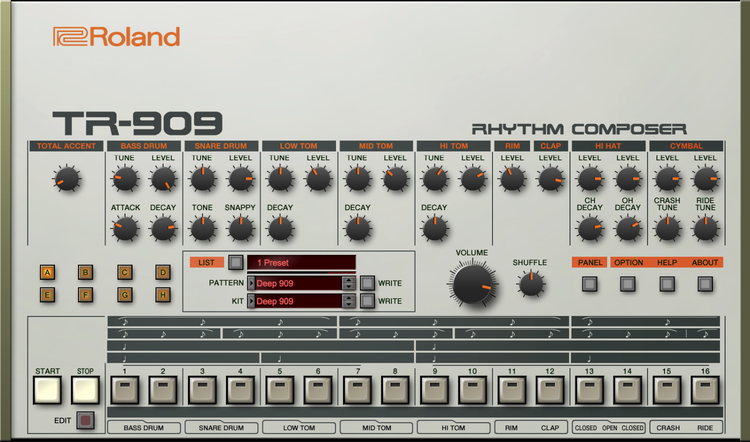
The TR 909 is known for its distinctive sound which is full of character and warmth. It features 16 drum sounds including bass drum, snare, rimshot, claps, hi-hats, cymbals, and more. Each sound has unique tuning and filtering controls that allow users to tweak the sounds to their liking. The drum machine also features individual volume controls which allow for precise mixing.

Sequencer

The TR 909 has a built-in step sequencer that allows users to create complex drum patterns with ease. The sequencer can store up to 96 patterns, and chaining patterns together creates even longer compositions. Users can also create accent variations, shuffle patterns, and even add swing to their sequences for added groove.

Connectivity Options

The TR 909 has a range of connectivity options that make it easy to integrate into any music production setup. It features MIDI in/out/thru connections, DIN sync, and trigger inputs and outputs. The device can also be synced with other instruments and computers through USB or its own sync bus.

Controls And User Interface

The TR 909 features a simple and intuitive user interface that makes it easy for users to navigate through its controls. The device has a range of knobs and buttons that provide instant access to its various functions. The interface is also backlit, making it easy to use in any lighting condition.

Pros And Cons Of The Roland Tr 909

ProsCons
– Iconic sounds
– Intuitive interface
– Durable construction
– Expensive
– Limited range of sounds
– Lacks modern features

Overall, the Roland TR 909 is a reliable and classic instrument that has stood the test of time. Its unique sound and intuitive interface make it an essential tool for music production. While it may lack some of the modern features found in newer drum machines, its enduring popularity is a testament to its enduring appeal.

Roland Tr 909 Review

Credit: www.michaelgallagher.co.uk

Sound And Performance

The Roland TR-909 is a classic drum machine that remains a popular choice for music production and performance due to its distinctive sound and reliable performance. With its analogue circuitry and versatile sequencing capabilities, the TR-909 offers endless creative possibilities for musicians and producers looking to add rhythmic depth to their compositions.

The Roland TR 909 is a drum machine that has been widely used in the music industry. It may have been created in the 1980s, but it still remains a favorite of many producers and musicians. The TR 909 is renowned for its unique sound and intuitive sequencing capabilities. In this review, we will delve into the details of the TR 909 and see why it has stood the test of time.

Drum And Percussion Sounds

The TR 909 has a distinctive sound that sets it apart from other drum machines. It boasts a diverse range of drum and percussion sounds, including kick drums, snare drums, toms, cymbals, and hi-hats. These sounds can be tweaked to create a unique mix that suits the project you’re working on. The TR 909’s sounds have a warm analog feel and are known for their punchiness and brightness, making them perfect for dance and techno music.

Sequencing Capabilities

The TR 909’s sequencing capabilities are one of the main reasons why it has remained popular over the years. Its 16-step sequencer allows for intricate programming of beats that can be easily edited on the fly. The sequencer also has a range of features such as shuffle, flam, and accent that can add complexity and dynamics to your beats. Additionally, the TR 909 has the ability to control external MIDI gear, making it an even more versatile tool in the studio.

Live Performance With The Roland Tr 909

The TR 909’s sound and sequencing capabilities make it an excellent choice for live performance. Its intuitive interface, combined with its distinctive sound, make it easy to create engaging beats on the fly. The TR 909’s rugged build quality also ensures it can withstand the rigors of live performance. Additionally, the TR 909 has a range of connectivity options such as MIDI and USB, making it easy to integrate with other gear in your setup. In conclusion, the Roland TR 909 is an outstanding drum machine that has proven its worth time and time again. Its unique sound and sequencing capabilities have made it a staple in the music industry, and its durability ensures it will remain relevant for years to come.

Impact On Music Production

The Roland TR-909 is arguably one of the most iconic drum machines ever produced. Since its introduction in 1983, this powerful beat-making machine has not only influenced generations of electronic music producers and dance music enthusiasts, but it has also shaped the sound of a vast range of popular music genres throughout the decades. In this blog post, we’ll take a closer look at the impact of the Roland TR-909 on music production and explore how it has been used in some of the most popular tracks of all time.

Influence On Electronic Dance Music

The Roland TR-909 has had a massive impact on the development of electronic dance music. Since its release, it has been used in countless classic tracks across many different genres of electronic music, from techno and house to hip hop and R&B. One of the key reasons for its popularity is its unique sound, which has become an essential component of the electronic music landscape.

The powerful kick drum and crisp snare are instantly recognizable and have become synonymous with the sound of electronic dance music. The TR-909 has also been instrumental in the development of acid house, a subgenre of house music characterized by its use of the Roland TB-303 and TR-909. The acid sound created by this combination of machines has become a standard in the world of electronic music, and it all started with the TR-909.

Usage In Popular Tracks

The Roland TR-909 has been used in countless popular tracks over the years, both within the electronic music world and beyond. One of the most famous examples of its use outside of electronic music is in Prince’s classic hit “Erotic City.” The driving rhythm of the TR-909 gives the track an infectious energy that helped make it a hit around the world.

Within the electronic music world, the TR-909 has been used in countless classic tracks. Some of the most iconic examples of its use include “Acid Trax” by Phuture, “Voodoo Ray” by A Guy Called Gerald, and “Strings Of Life” by Derrick May. Each of these tracks features the distinctive sound of the TR-909 and has helped to cement its place in electronic music history.

Track NameArtistYear
Acid TraxPhuture1987
Voodoo RayA Guy Called Gerald1988
Strings Of LifeDerrick May1987

The TR-909 has continued to be used in modern electronic music to this day. Its unique sound has become a staple of the genre, and its influence can be heard in countless tracks across a wide range of subgenres. Its legacy lives on, and it remains one of the most iconic and influential drum machines in the history of music.

Roland Tr 909 Review

Credit: www.youtube.com

Comparison With Other Drum Machines

The Roland TR-909 is frequently compared to other drum machines in terms of functionality, sound quality, and versatility. While some newer models may have more features, the TR-909 offers a unique sound that has become iconic in electronic music. Its classic analogue sound and simple workflow continue to make it a popular choice among producers today.

If you’re in the market for a high-quality drum machine, you’ve undoubtedly come across the Roland TR-909. But how does it stack up against other popular drum machines on the market, such as the Roland TR-808, Linn LM-1, and Akai MPC Series? Let’s take a closer look.

Roland Tr-808

The Roland TR-808 was introduced in the early 1980s, a few years before the TR-909. It was widely popular in the hip-hop and electronic dance music scenes and is still celebrated today. The TR-808 is known for its warm, analog sound and its distinctive kick and snare sounds. However, the TR-909 introduced new sounds and features that set it apart.

Linn Lm-1

The Linn LM-1 was released in 1980 and is often credited as the first digital drum machine. It was a game-changer for its time and provided a more realistic drum sound than its analog predecessors. However, the LM-1 had limited programming features and could only store 12 sounds. In contrast, the TR-909 introduced more programming options and the ability to store more sounds.

Akai Mpc Series

The Akai MPC series, first introduced in the late 1980s, is a sampler and sequencer that can be used as a standalone instrument or with a computer. It offers a wide variety of sounds and programming options, making it a popular choice among producers. However, the TR-909 is specifically designed for drum sounds and has a more specialized focus. Overall, the Roland TR-909 sets itself apart with its unique sound and programming features, making it a favorite among musicians and producers alike. While it may not have been the first drum machine on the market, it’s certainly one of the most beloved.

Frequently Asked Questions Of Roland Tr 909 Review

What Artists Use The Tr-909?

The TR-909 drum machine has been used by numerous artists from different genres such as Aphex Twin, Daft Punk, and Frankie Knuckles.

Is The Tr-909 Analog Or Digital?

The TR-909 is an analog drum machine produced by Roland Corporation in the 1980s. It uses analog technology to generate its sounds, including its iconic kick, snare, and hi-hats. The TR-909 has become a staple in electronic dance music and has been emulated in digital formats.

What Does Tr Mean In Roland?

TR in Roland stands for “Transistor Rhythm” and refers to the line of drum machines produced by Roland that use analog synthesis and were popular in the 1980s and 1990s.

What Does The Roland Tr-909 Do?

The Roland TR-909 is a drum machine that was first released in 1984. It is used for creating electronic music and features 16 built-in drum sounds, as well as the ability to program patterns and adjust settings to create unique beats.

Its distinctive sound has been used in many genres of music, including techno, house, and hip hop.

Conclusion

Overall, the Roland TR-909 is a classic and iconic drum machine that has stood the test of time in the music industry. Its unique sound and versatility have made it a popular choice for musicians and producers across multiple genres.

Whether you’re looking to add some 80s flair to your tracks or create fresh and modern beats, the TR-909 is a reliable tool worth considering. With its intuitive interface and undeniable charm, the Roland TR-909 is a must-have for any serious music producer or enthusiast.

Categories
Archive

How To Build A Home Studio

Building a home studio requires setting up equipment and soundproofing your space. With proper planning and quality gear, you can create a professional recording environment in your own home.

As technology continues to advance, more musicians and content creators are opting to create their own home studios. Setting up a studio may seem daunting but with the right information and guidance, it can be easier than you think. To get started, it is important to have a clear understanding of your goals, the space you have available, and the amount of money you are willing to invest.

We will guide you through building your own home studio by explaining the essential equipment you’ll need, how to treat your room as well as sharing some tips to ensure you create a high-quality recording space.

Choosing A Space

Selecting the perfect area to build a home studio is crucial for creating high-quality content. Consider factors such as natural light, proximity to main living areas, and sound insulation when choosing a space.

Building a home studio is an affordable and convenient way to have access to a private recording space. Choosing the best space is crucial, as it can affect the quality of your recordings. It is important to consider several factors when selecting the ideal location for your home studio.

Determining Your Needs

The first step in choosing a space for your home studio is determining your specific needs. This includes factors such as the volume of recording equipment, the type of music you will be composing, and the size of your band. If you are a solo artist, a small corner of a room might suffice, but if you’re in a band with drums, amplifiers, and other instruments, a larger area might be necessary.

Assessing The Acoustics

Assessing the acoustics of the space is also crucial when choosing the location of your home studio. You want a room that is not too small or too large, as both can affect the quality of the recordings. A square room with sound diffusing elements such as curtains, bookshelves, and carpets can help lessen the echo in the room.

Conclusion

Choosing the right space for your home studio is an important step in creating a productive environment where you can make amazing recordings. By determining your specific needs and assessing the acoustics of the space, you’ll be able to select a location that meets your requirements and helps bring your creative vision to life.

How To Build A Home Studio

Credit: www.soundonsound.com

Essential Equipment

Building a home studio requires some essential equipment such as a computer, audio interface, microphone, headphones, and studio monitors. By investing in quality equipment, you can create a professional sounding recording environment in the comfort of your own home.

To build an efficient home studio, you need to have the essential equipment in place. These include a computer with suitable software, audio interface, studio monitors, microphone, and cables. Investing in quality equipment can enhance the quality of your recordings and make your work easier.

Computer And Software

The first essential piece of equipment you need is a computer with the appropriate software to enable you to record, mix, and edit music. Your computer must have a powerful processor, enough storage capacity, and high RAM to support the software. You may opt for a desktop or a laptop, depending on your preferences and available space. Besides, you need software like Pro Tools, Logic Pro, or Ableton Live, among others to record and mix music.

Audio Interface

To convert analog-to-digital signals for recording, you require an audio interface. This piece of equipment is crucial in getting a clear and quality recording. It connects the musical instruments and microphones to the computer. Different audio interfaces come with varying features, such as input/output channels, headphone outputs, and different voltage preamps. Investing in a quality audio interface can enhance the quality of your recordings.

Studio Monitors

Studio monitors are specialized loudspeakers designed to deliver an impartial and clear sound representation. They are ideal for mixing, mastering, and production. Choosing high-quality studio monitors with excellent frequency response, sensitivity, and amplification is crucial. Additionally, make sure they match your room’s size and acoustic treatment.

Microphone And Cables

A suitable microphone is essential in capturing clear and accurate sound. You can choose between condenser and dynamic microphones, depending on your recording needs. Besides, investing in high-quality cables is critical in transmitting audio signals between the musical equipment and the audio interface or mixer. Ensure that you purchase the right length and type to avoid noise interference. In conclusion, having the right equipment is crucial to building an efficient and functional home studio. Investing in high-quality equipment can enhance the quality of your recordings, ease your work, and save you time and money in the long run.

Designing Your Space

Designing your space is one of the most important steps when it comes to building a home studio. A well-designed space will not only improve the quality of your recordings but it will also create a comfortable and efficient workspace. In this section, we will cover two crucial elements of designing your space: soundproofing and acoustic treatment and furniture and layout.

Soundproofing And Acoustic Treatment

Soundproofing and acoustic treatment are essential if you want to achieve professional-quality recordings. Soundproofing is the process of preventing sound from entering or leaving your studio, while acoustic treatment is used to improve the acoustic properties of your space.

When it comes to soundproofing, there are several methods you can use:

  • Seal all gaps and cracks: Gaps and cracks allow sound to leak in and out of your space. Use acoustic sealant to seal all the gaps around windows, doors, and electrical outlets.
  • Add mass: Adding mass to walls and ceilings will help prevent sound transmission. Use high-density materials such as drywall or mass-loaded vinyl to cover existing walls and ceilings.
  • Build a room within a room: Building a room within a room is one of the most effective ways to achieve complete sound isolation. This involves constructing a new frame within your existing walls and ceiling, then adding insulation and drywall.

Acoustic treatment involves manipulating the way sound behaves in your space. This can be achieved by using acoustic panels, diffusers, and bass traps. Here are some tips for acoustic treatment:

  • Add acoustic panels to your walls: Acoustic panels are designed to absorb sound waves, preventing them from bouncing around in your space.
  • Use bass traps in corners: Bass traps help absorb low-frequency sounds that tend to accumulate in corners.
  • Add diffusers to your ceiling: Diffusers help break up sound waves, creating a more natural-sounding space.

Furniture And Layout

The furniture and layout of your home studio can make a huge difference in the quality of your recordings. Here are some tips for designing your furniture and layout:

  • Invest in a comfortable chair: You will be spending a lot of time in your chair, so it’s important to invest in a comfortable, ergonomic one that won’t leave you with back pain.
  • Place your desk against a wall: This will help prevent sound from reflecting off the wall and back into your microphone.
  • Avoid placing your microphone near reflective surfaces: Reflective surfaces such as windows, mirrors, and metal objects can cause unwanted reflections and distortions in your recordings.
  • Create a designated area for your equipment: Keep your equipment organized and within reach so that you can easily adjust your settings as needed.
How To Build A Home Studio

Credit: www.shure.com

Setting Up Your Equipment

Setting up your home studio equipment is an essential step to achieving professional-quality audio recordings. To get started, it’s important to make sure that each piece of equipment is connected correctly. Additionally, you’ll need to calibrate your monitors and set up your microphone correctly to ensure that you’re capturing the best audio possible. In this guide, we’ll walk you through each step of the process to help you set up your home studio like a pro.

Connecting Your Audio Interface

Before you begin recording, you’ll need to connect your audio interface to your computer. To do this, follow these steps:

  1. Connect one end of your audio interface’s USB or Thunderbolt cable to your computer.
  2. Connect the other end of the cable to your audio interface.
  3. If your audio interface requires external power, plug it into a power outlet.
  4. Turn on your audio interface.

Calibrating Your Monitors

Once your audio interface is connected, it’s time to calibrate your monitors. Calibration is essential to ensure that you’re hearing your recordings accurately. Follow the steps below to calibrate your monitors:

  1. Use a sound pressure level meter to measure the sound pressure level at your listening position.
  2. Open your digital audio workstation and play a test tone through your monitors.
  3. Use your sound pressure level meter to measure the sound pressure level of the test tone.
  4. Adjust the volume of your monitors until the measured sound pressure level matches the target level for your listening environment.

Setting Up Your Microphone

Once your monitors are calibrated, it’s time to set up your microphone. Follow the steps below to get started:

  1. Place your microphone on a stand or shock mount to minimize noise and vibrations.
  2. Connect your microphone to your audio interface using an XLR cable.
  3. Adjust the height and position of your microphone to get the best sound possible.
  4. Test your microphone by recording and adjusting its placement as needed to get the best sound quality.

Creating Your First Recording

Learn how to build a home studio and create your first recording with these easy steps. Start by selecting the right equipment, setting up the space, and experimenting with sound until you get the perfect mix.

Creating Your First Recording: Establishing Levels: The first step in creating your first recording is to establish the levels of your recording equipment. Make sure that you have a decent microphone placed appropriately in front of your sound source. Adjust the input level of your audio interface to avoid clipping. Try to keep your recording signal level as high as possible without going into the red zone in your DAW. This will ensure that your recording doesn’t sound too quiet or too loud. Recording Technique: After setting up the levels, it’s time to focus on recording technique. If you are recording vocals, make sure that you have a pop filter in front of the microphone to avoid pops and breaths. If you’re recording an instrument, try out different mic positions to find the sweet spot. If you are recording a band, make sure everyone is positioned correctly around the microphone. If you’re recording a spoken word, make sure you pace yourself, take breaks as needed, and enunciate well. Editing Your Audio: Once you’re done recording, it’s time to edit your audio. This will involve trimming unused audio regions, splitting into individual tracks, and applying basic effects such as EQ, Compression, and Reverb. Use an EQ to remove unwanted frequency ranges and improve the perceived clarity of your sound. Apply compression to tame the dynamic range of your recording and enhance the overall loudness. Finally, add Reverb to create a sense of space and depth to your recording. Keep these techniques in mind while editing your audio. In conclusion, building a home studio and creating your first recording may seem daunting, but if you focus on these key steps and techniques, you can create a great sounding track. Establish your levels, practice proper recording techniques, and use basic editing techniques to create a more polished sound. Start with these basics, then continue learning and experimenting with your home studio setup.

How To Build A Home Studio

Credit: audient.com

Optimizing Your Workflow

When building a home studio, optimizing your workflow is crucial. It allows you to work more efficiently, save time, and produce higher-quality work. Here are three ways to optimize your workflow:

File Management

Good file management is one of the most important aspects of optimizing your workflow. It allows you to quickly find the files you need and reduces the risk of losing important data. Here are some tips for organizing your files:

  • Use clear and consistent naming conventions for your files.
  • Create a folder structure that makes sense for your workflow.
  • Keep all your files in one place, such as an external hard drive.
  • Back up your files regularly to prevent data loss.

Keyboard Shortcuts

Keyboard shortcuts are another great way to optimize your workflow. They allow you to perform tasks quickly without having to stop and use the mouse. Here are some keyboard shortcuts every content writer should know:

ActionWindows ShortcutMac Shortcut
CutCtrl + XCmd + X
CopyCtrl + CCmd + C
PasteCtrl + VCmd + V
UndoCtrl + ZCmd + Z
RedoCtrl + YCmd + Shift + Z

Custom Templates

Creating custom templates is a great way to optimize your workflow. If you find yourself writing the same type of content repeatedly, you can create a template that includes all the necessary formatting, headings, and placeholders. Here are some tips for creating custom templates:

  • Identify the types of content you write most frequently.
  • Create a template for each type of content.
  • Include all the necessary formatting, headings, and placeholders in the template.
  • Save the template in a folder where you can easily access it.

Additional Tools And Techniques

If you want to take your home studio to the next level, there are a few additional tools and techniques you can use to make your recordings sound even better. In this section, we’ll cover three important areas: virtual instruments, effects and plugins, and automation.

Virtual Instruments

Virtual instruments are software-based musical instruments that can be played using a MIDI controller or your computer keyboard. They can be used to mimic the sound of real instruments, or to create unique sounds that are impossible to achieve with traditional instruments. There are many virtual instruments available, ranging from simple synthesizers to complex orchestral libraries.

If you’re just starting out, you may want to invest in a few basic virtual instruments, such as a piano or drum kit. As you become more comfortable with them, you can experiment with more advanced instruments and learn how to program them to create the sounds you want.

Effects And Plugins

Effects and plugins are software tools that can be used to process your audio recordings and add special effects to them. Some effects are used to correct problems with the audio, such as noise reduction or EQ, while others are used to add creative effects, such as reverb or distortion.

There are many different effects and plugins available, both free and paid. When choosing which ones to use, it’s important to consider the needs of your recording and the style of music you’re creating.

Automation

Automation is the process of recording changes to your mix over time. For example, you might use automation to slowly increase the volume of a track over the course of a song, or to fade out the reverb on a vocal track at a certain point.

Most DAWs (Digital Audio Workstations) have built-in automation tools that allow you to record changes to your mix in real-time. By using automation, you can add movement and dynamics to your mix, making it more interesting and engaging.

These are just a few of the additional tools and techniques you can use to build a home studio. By experimenting with different tools and techniques, you can find the ones that work best for you and create professional-quality recordings from the comfort of your own home.

Going Pro

So, you’ve decided to take your home studio to the next level and turn it into a professional one. Congratulations! Going pro means that you’ve now taken your passion and turned it into a career. However, there are a few things you’ll need to do to ensure your success. In this section, we’ll cover some key things to keep in mind as you expand your setup, market your studio, and collaborate with other artists.

Expanding Your Setup

If you’re serious about taking your home studio to the next level, it’s essential to expand your setup. This means investing in high-quality equipment and software that will allow you to create professional-grade music, videos, or other content. Here are some things to consider:

  • Invest in a high-quality audio interface that can handle multiple inputs and outputs
  • Upgrade your recording software to a professional-grade DAW
  • Invest in high-quality microphones and headphones for recording and mixing
  • Consider adding hardware effects processors like compressors, EQs, and reverbs
  • Invest in studio monitors and acoustic treatment to ensure accurate monitoring

Marketing Your Studio

Marketing your studio is essential to its success. After all, you can’t have a successful business if no one knows you exist. Here are some ways to market your studio:

  • Create a website that showcases your services, rates, and portfolio
  • Use social media to promote your studio and engage with potential clients
  • Offer free consultations or trial recording sessions to attract new clients
  • Create business cards and flyers to distribute locally
  • Attend local music events and conferences to network with potential clients

Collaborating With Other Artists

Collaborating with other artists can be a great way to expand your network and build your reputation. Here are some tips for successful collaborations:

  • Be clear about your expectations and goals for the collaboration
  • Communicate regularly and openly with your collaborators
  • Be respectful of each other’s creative ideas and input
  • Credit each other appropriately in the final product
  • Promote each other’s work and collaborations on social media

Frequently Asked Questions For How To Build A Home Studio

How Much Will It Cost To Build A Home Studio?

The cost of building a home studio varies based on the equipment and features you require. A basic setup with a computer, audio interface, microphone, and headphones could cost around $500-$1000. However, for a more professional setup with additional equipment and soundproofing, the cost could go up to $5000 or more.

How To Build A Home Studio For Beginners?

To build a home studio for beginners, start by selecting a suitable space, investing in quality studio monitors, recording software and a microphone. You can also add acoustic treatment panels to enhance sound quality and reduce noise reflections. Finally, ensure your studio is properly set up and calibrated for optimal sound production.

Can You Build A Studio In Your House?

Yes, you can build a studio in your house. It’s a great way to have a dedicated space for your creative pursuits. However, it’s important to check local zoning laws and building codes before starting any construction. You may also need a building permit and must follow safety regulations.

What Is The Ideal Size For A Home Studio?

The ideal size for a home studio can vary depending on the type of equipment and space needed. However, it’s recommended to have a minimum space of 8 feet by 10 feet to accommodate basic equipment and allow for proper sound insulation.

The height of the room should also be at least 8 feet to reduce sound distortion.

Conclusion

Creating a home studio allows you to take control of your music production and achieve professional-sounding recordings without spending a lot of money. From selecting the right equipment to optimizing your space, building a home studio may seem like a daunting task at first.

However, with proper planning and execution, you can set up a studio that meets your unique needs and allows you to unleash your creativity. Remember to prioritize sound quality, invest in essential gear, and most importantly, have fun with the process.

Happy recording!

Categories
Archive

Tips For Mixing 808

When mixing 808, be mindful of its frequencies, levels, and stereo image. Use EQ to remove unwanted frequencies and enhance the desired ones.

Adjust the levels to blend the kick with the 808 seamlessly. Lastly, pan the 808 to enhance the stereo image and create a sense of space. Mixing 808 can be a daunting task, but the right tips and tricks can help make the process easier.

808s are the foundation of modern hip hop and trap music, and it’s crucial to get them right. We’ll explore some essential tips for mixing 808s, including how to manage their frequencies, levels, and stereo image. By following these guidelines, you’ll be able to create a powerful, tight, and well-defined bass sound that will anchor your track and get the crowd moving. So, let’s dive in!

Tips For Mixing 808

Credit: www.pinterest.com

Understanding The 808

Understanding the 808 is crucial for creating powerful and impactful music. When it comes to mixing 808, you need to make sure it’s well-balanced in terms of volume, frequency range and harmonic content. Use EQ wisely to avoid clashing with other elements in your track and always reference your mix on multiple systems.

Understanding The 808 Mixing an 808 can be a daunting task, especially if you’re new to music production. The 808 has revolutionized the music industry with its distinct bass-heavy sound and has become a staple in genres such as hip-hop, trap, and electronic music. In this section, we’ll discuss the history, characteristics, and popular genres that use the 808. History Of The 808 The Roland TR-808 Rhythm Composer, commonly known as the 808, was first introduced in 1980. It was initially a commercial failure, but it later became a game-changer in music production. The 808 was affordable and easy to use, making it accessible to aspiring musicians. It also had a unique sound that stood out from other drum machines of the time. Characteristics Of The 808 The 808 is distinct for its deep and booming bass sound. It’s also characterized by its long decay and wide frequency range, making it ideal for long sustained bass notes. The 808 can also create punchy and snappy sounds, perfect for creating percussion elements. Popular Genres That Use The 808 The 808 has become synonymous with several genres, but it’s undoubtedly most prevalent in hip-hop and trap music. In hip-hop, it’s often used to create the iconic boom-bap sound. In trap, it’s used to create the characteristic 808 kick and snare patterns. The 808 also plays a significant role in electronic dance music, where it’s used to create bass-heavy drops and build-ups. In summary, the 808 is an essential sound in modern music production. Understanding its history, characteristics, and popular genres that use it can help you create more impactful mixes. Keep these tips in mind when mixing your next 808 and experiment to find your unique sound.

Preparing The Mix

When mixing 808, it’s important to layer multiple samples to achieve a full and balanced sound. Make sure to EQ each layer to avoid frequency clashes and use compression to glue the sounds together. Experiment with different processing techniques like distortion or saturation to add character and depth to your 808.

Setting Up Your Session

Before you can start mixing your 808 track, it’s important to ensure that your session is set up correctly. Make sure that all the necessary plug-ins, instruments, and effects are loaded, and that your channels are properly routed. This will save you time and frustration later on in the mixing process.

Preparing The 808 Track

Once your session is set up, it’s time to prepare your 808 track. This means adjusting the levels to ensure that the 808 sits at the right level in the mix. You can use a spectrum analyzer to help you visualize the frequency spectrum of your track, and make sure that the lows of the 808 aren’t clashing with other elements in the mix.

Choosing Complementary Sounds

In addition to preparing the 808 track itself, it’s important to choose complementary sounds that work well with the 808. This can include other bass elements, such as a synth or a sub-bass, as well as percussion, such as a kick drum or snare. Make sure that each element in the mix has its own space in the frequency spectrum, and isn’t clashing with other elements.

Optimizing Eq And Compression

Finally, once you have your 808 track prepared and your complementary sounds in place, it’s time to optimize the EQ and compression settings. This will help to give your mix depth and definition, and ensure that each element sits in the right place in the mix. You can use a multiband compressor to adjust the levels of different frequency bands, and a sidechain compressor to help the kick drum and 808 work together. Preparing the mix for your 808 track can be a time-consuming process, but it’s essential for getting the best possible sound in your mix. By following these tips, you’ll be well on your way to creating a polished and professional 808 mix!

Achieving Clarity

To achieve clarity when mixing 808, consider following these tips: use clean samples, EQ to remove conflicting frequencies, experiment with compression and saturation, use sidechain compression to avoid muddiness, use stereo imaging to widen the sound, and listen on multiple sources to check for balance.

Remember to trust your ears, start with a solid foundation, and constantly reference other tracks to fine-tune your mix.

Mixing the 808 is a crucial part of producing any modern-day track. However, achieving clarity in the mix can be a challenging task. The 808 sound is heavy, deep, and often requires a lot of processing to cut through the mix. This section will provide tips on how to achieve clarity in 808 mixing, focusing on applying EQ, using compression, adjusting levels, and simplifying the arrangement.

Applying Eq

EQ is one of the essential tools for achieving clarity in 808 mixing. The crucial thing to remember while applying EQ is to avoid overlapping frequencies, which can cause masking and phase cancellation. Here’s how to apply EQ for clarity:

  • Remove unnecessary low-end frequencies, such as rumble, with a high-pass filter
  • Clean up the mid-range frequencies with a parametric EQ
  • Boost the harmonics to give the 808 more presence and character
  • Cut the harsh top-end frequencies to avoid ear fatigue

Using Compression

Using compression can add punch and impact to the 808 while maintaining its clarity. Here’s how to use compression for clarity:

  • Use a fast attack and release time to tame the initial transient and sustain the tail of the 808 sound
  • Avoid over-compressing, which can cause distortion and loss of dynamics
  • Use parallel compression to blend the compressed sound with the dry sound for a balanced mix

Adjusting Levels

Adjusting levels is a crucial part of achieving clarity in 808 mixing. The 808 should be loud enough to be heard but not overpowering. Here’s how to adjust levels for clarity:

  • Keep the 808 level consistent throughout the track
  • Avoid clipping by keeping the level below 0 dB
  • Use automation to adjust the level in different parts of the track, depending on the arrangement

Simplifying The Arrangement

The arrangement of the track can also affect the clarity of the 808 mix. A cluttered arrangement can cause the 808 to get lost in the mix. Here’s how to simplify the arrangement for clarity:

  • Remove unnecessary elements that clash with the 808 sound
  • Give space for the 808 to breathe in the mix by reducing the number of sounds playing together
  • Use muting or side-chain compression to make the 808 stand out in the mix

In conclusion, achieving clarity in the mix is essential for any 808-based track. Applying EQ, using compression, adjusting levels, and simplifying the arrangement can help achieve clarity and make the 808 sound punchy, impactful, and clear in the mix.

Creating Groove

Mixing 808 can be a daunting task for any music producer or audio engineer. It is essential to get the perfect balance between the 808 kick and the rest of the instruments in the mix. One crucial aspect of mixing 808 is creating groove. Groove is the rhythmic feel or swing of the music, which makes people want to dance. In this article, we will discuss tips for mixing 808 that can help create groove in your music.

Timing The 808

The timing of the 808 kick is crucial for creating groove. A well-timed 808 can make your music sound more energetic and create a sense of movement. The timing of the 808 should be precise and in sync with the other instruments in the music. A good way to check the timing is to use a metronome and adjust the 808’s timing accordingly. Also, try experimenting with different timing patterns to see which works best for your music.

Layering Percussion

Layering percussion with the 808 kick can add more depth and groove to the music. Adding percussions such as shakers, hi-hats, claps, and snares can complement the 808 kick and create a more complex rhythmic pattern. Experiment with different percussion instruments and layer them with the 808 to create unique and exciting rhythms. However, make sure not to over-layer the music as it may sound too cluttered and muddy.

Using Sidechain Compression

Sidechain compression is a technique that can help create space and groove in the mix. It involves reducing the volume of one instrument when the other is playing. Using sidechain compression on the 808 can help create more room for other instruments and give them more prominence in the mix. Also, sidechain compression can be used to create rhythmic patterns by making the 808 kick pulse to the beat.

In conclusion, creating groove is a key aspect of mixing 808. By implementing these three tips, you can enhance the rhythmic feel of your music and make it more danceable. The key is to experiment with different techniques and find the ones that work best for your music. Utilizing these tips in your mixing can take your music to the next level and make it stand out from the rest.

Adding Harmonic Depth

Adding harmonic depth to your 808 mix can greatly enhance the overall sound. By using techniques such as layering, EQing, and adding saturation, you can achieve a richer and fuller bass. Remember to experiment and trust your ears to find the perfect mix.

Using Saturation

Adding Harmonic Depth to your 808 mixes can be challenging, but with the right techniques, it can be achieved seamlessly. One technique you can use to add harmonic depth to your mix is the use of saturation. Saturation can deliver a warm and organic tone to your 808, making it sound fuller, richer and more dynamic. Saturation plugins like Decapitator, Softube Saturation and Slate Digital’s Virtual Tape Machines can help you achieve the right balance of saturation in your 808 mix. It is important, however, to be moderate in the use of saturation so as not to lose the original character of your 808 sound.

Applying Distortion

Another way to add harmonic depth to your 808 mix is by applying distortion. Distortion adds overtones to your 808 and can be used to create unique tones. When using distortion, try experimenting with multiple distortion plugins to blend the overtones seamlessly with your mix. Some distortion plugins that can be used in mixing 808s include the Decapitator, SoundToys Radiator and Waves Abbey Road J37. It is also important to note that too much distortion can make your mix sound muddy, so be sure to use it sparingly.

Mixing In Melodic Elements

Aside from using saturation and distortion, you can also add harmonic depth to your 808 by mixing in melodic elements. This can be achieved by adding melodic sounds like pads or bells that match with the key of your 808. One way to achieve this is by using a plugin like Melodyne which enables you to pitch and adjust the timing of individual notes in your melody with great ease. In adding melodic elements, ensure not to overwhelm the mix and find the right balance between the 808 and melodic sounds for a perfect blend. In summary, adding harmonic depth to your 808 mix can make a big difference in the final output, and can be achieved using a combination of techniques including saturation, distortion and mixing in melodic elements.

Tips For Mixing 808

Credit: www.waves.com

Finalizing The Mix

When it comes to mixing 808, getting the perfect balance can be challenging. Finalizing the mix requires careful attention to levels, EQ, and compression to ensure the low-end is present without overpowering the mix. Following these tips will help achieve a well-balanced, punchy 808 in your mix.

Once you have done a good job of mixing your 808 drum sounds, it is time to finalize the mix. This involves putting everything together, mastering the track, and comparing to reference tracks. Let’s explore each of these steps.

Putting Everything Together

To put everything together, start by organizing the tracks in your project. You should group similar instruments together and label each track accordingly. You can also use color-coding to make it easier to identify tracks. Once everything is organized, adjust the levels of each track to ensure that they are all audible without any distortion. The key here is to create a balance between all the elements in your mix.

Mastering The Track

The final step in the process of finalizing the mix is mastering the track. This involves enhancing the overall sound quality and making adjustments to the levels, EQ, compression, and stereo imaging. You can also add effects like reverb and delay to enhance the sound. Avoid over-processing your track as it may create unwanted artifacts that will affect the overall quality of your mix.

Comparing To Reference Tracks

Finally, it is important to compare your mix to reference tracks. Choose tracks that are similar to yours and that have achieved the sound that you want to achieve. Listen to these tracks and compare them to your own. You can use this as a guide to make adjustments to your mix until you get your desired sound. Also, ensure that the volume of your mix is equivalent to that of the reference tracks. In conclusion, finalizing your mix is an important step in music production that should not be overlooked. Putting everything together, mastering the track, and comparing to reference tracks will take your mix to the next level and help you achieve a professional sound.

Mixing Mistakes To Avoid

To achieve a well-balanced mix of 808’s, it’s important to avoid common mistakes such as overcompression, improper EQ, and not leaving enough headroom. Be sure to properly level and pan your sounds, as well as using a reference track to compare your mix.

When mixing your 808, it’s important to avoid some common mixing mistakes that can hurt the quality of your mix. In this section, we’ll discuss the mistakes you should avoid while mixing 808s.

Overusing Effects

One common mistake is overusing effects on your 808. While it may be tempting to use effects like distortion or saturation to make your 808 stand out, too much can be overwhelming and muddy. It’s best to use effects in moderation and trust that the 808 itself will provide the necessary punch and warmth.

Clashing With Other Low-end Elements

Another mistake is clashing with other low-end elements in your mix. To avoid this, it’s important to make sure your 808 fits well with the bass, kick, and any other low-end elements. If there are conflicting frequencies, adjust the EQ of one or both tracks to make sure they are not fighting for the same space.

Ignoring The Rest Of The Mix

Lastly, ignoring the rest of your mix can be a big mistake. While the 808 is an important element, it’s just one piece of the puzzle. Make sure to pay attention to the other sounds in your mix and ensure that they are balanced with the 808. This will help bring clarity and balance to your mix. To sum up, when mixing 808, avoid overusing effects, clashing with other low-end elements, and ignoring the rest of the mix. By avoiding these common mistakes, you can ensure that your 808 will sit well in the mix and help elevate your overall production.

Tips For Mixing 808

Credit: majormixing.com

Frequently Asked Questions On Tips For Mixing 808

How Can I Make My 808 Sound Better?

Improve the sound of your 808 by following these tips: 1. Try layering multiple 808 samples for a fuller sound 2. Experiment with EQ to boost or cut certain frequencies 3. Use a compressor to even out the volume 4.

Add distortion or saturation for more grit and character 5. Consider adding reverb or delay for more depth and space.

How Do You Mix 808 Drums?

To mix 808 drums, start by layering different samples and adjusting the levels until they sound cohesive. Use EQ to shape the frequency spectrum and create space for other elements in your mix. Apply compression to give the drums more punch and control their dynamics.

Experiment with additional effects, like distortion or reverb, to add character and depth to the sound. Finally, make sure to balance the volume of the drums with the rest of your track.

How Loud Should My 808 Be In The Mix?

Your 808 should sit at a suitable level in the mix, typically around -18db to -12db. Aim for a balance where it’s audible but doesn’t overpower other elements. Use EQ and compression to ensure it’s fitting comfortably within the frequency range of your track.

Experiment until your ears are content.

How To Make 808 Punchy?

To make an 808 punchy, you should consider using techniques such as adjusting the attack and decay, adding distortion or saturation, layering drums, and using compression and EQ. Experiment with the settings until you find the right balance of frequency and impact, ensuring that the 808 sits well in the mix and has enough space to cut through.

Conclusion

To sum up, mixing 808s can be a challenging task that requires a creative approach. But with these tips, you can now confidently tackle any 808 mixing project and achieve a powerful and impactful low-end sound on your music productions.

Remember to experiment with EQ, compression, and saturation, choose the right samples, adjust the levels, and always trust your ears. By following these guidelines, you will be able to make your tracks stand out and impress your listeners. So, go ahead and start mixing those 808s like a pro!

Categories
Archive

Best Noise Gate Plugins

The best noise gate plugins are by FabFilter and Waves. These plugins can be used to reduce unwanted noise within audio recordings.

Noise can be a frustrating problem when creating audio recordings, especially for musicians, podcasters, and video creators. Unwanted background noise can make a recording sound unprofessional and distract from the overall quality of the content. That’s where noise gate plugins come in handy.

These plugins can remove the background noise from recordings, leaving only the desired sounds. Two of the best noise gate plugins on the market are by FabFilter and Waves. Both of these plugins are intuitive and easy-to-use, making them great for beginners and professionals alike. We’ll discuss the features and benefits of these plugins to help you decide which one is right for you.

Best Noise Gate Plugins

Credit: emastered.com

Top 3 Noise Gate Plugins Of 2021

Discover the top 3 noise gate plugins of 2021 and banish unwanted sound with ease. From Waves NS1 to iZotope RX 8 Elements and FabFilter Pro-G 2, each plugin offers unique features and excellent performance, making them the best noise gate plugins on the market.

Are you tired of your recordings being ruined by unwanted background noise? Well, a noise gate plugin might be just what you need. A noise gate plugin helps eliminate unwanted noise by stopping the audio signal from passing through when the sound is below a certain threshold. However, with so many noise gate plugins available, it can be challenging to choose the right one for you. In this post, we’ve compiled a list of the top three noise gate plugins of 2021 to help you make an informed decision.

Plugin A

Plugin A is a popular noise gate plugin that many professionals use. It provides real-time noise reduction without significantly affecting the audio quality. Plugin A’s intuitive interface makes it easy to configure and adjust the threshold, hysteresis, and release times. You can also customize the plugin’s graphical display to suit your preferences. Plugin A offers different gating modes, including upward compression and downward expansion, to help you achieve the perfect sound.

Plugin B

If you’re looking for a noise gate plugin that’s easy to use and affordable, Plugin B is an excellent option. Though it has a limited number of controls compared to other noise gate plugins, it provides effective noise reduction and is well suited for live performances. Plugin B has a simple interface that even beginners can grasp easily. It’s also compatible with several DAWs and operating systems, making it a versatile and convenient noise gate plugin to use.

Plugin C

Plugin C has been gaining popularity among users for its advanced features and customization options. This noise gate plugin offers multiple bands, allowing precision control of the audio signal, and also provides post-filtering to reduce unwanted coloration. Plugin C has automated gain compensation, which means it maintains a consistent output level even when the noise gate is engaged. Additionally, Plugin C features sidechain processing, enabling external sound sources to trigger the gate and allowing the creation of complex gating effects that can add dynamics to your recording. So, these are the top 3 noise gate plugins of 2021. Each of them has its unique features and capabilities, so pick the one that best suits your needs. These noise gate plugins will help you eliminate unwanted background noise and improve the overall quality of your recordings.

Best Noise Gate Plugins

Credit: audiosorcerer.com

Features To Look For In A Noise Gate Plugin

A good noise gate plugin should have adjustable levels and hold times to minimize unwanted background noise, while still allowing for your desired sound to come through. In addition, look for a plugin with a visual representation of the sound threshold, as this can aid in fine-tuning the plugin’s settings.

Features to Look for in a Noise Gate Plugin A noise gate plugin is a necessary tool for anyone who aims to reduce background noise in their audio recordings. With so many noise gate plugins available, choosing the right one can be challenging. In this post, we will discuss the key features to look for in a noise gate plugin to help you narrow down the options. H3: Threshold Control Threshold control is the first feature to consider in a noise gate plugin. It allows you to set the level of input signal required to pass through the gate. A fixed threshold means all audio above that level will pass through, while an adjustable threshold allows you to set a range of acceptable input levels. H3: Attack and Release Controls Attack and release controls determine how quickly the gate opens and closes. A fast attack time removes the unwanted noise instantly, while a slower attack time keeps more of the original audio intact. Likewise, a quick release time helps fades the gate smoothly, while a slower release time keeps audio engaged. H3: Sidechain Filter A sidechain filter is a powerful tool that allows you to choose which frequencies the noise gate responds to. It means that instead of triggering the gate on every sound, you can limit its action to specific frequencies within the audio signal. H3: Hysteresis Control Hysteresis control in a noise gate plugin is responsible for maintaining a consistent gate. It prevents the gate from opening and closing due to minor changes in signal levels, resulting in a more stable sound. H3: Lookahead The lookahead feature in a noise gate plugin helps to prevent abrupt cuts in the audio signal. It allows the gate to anticipate incoming audio and opens slightly before the actual signal crosses the threshold. It helps to remove the unwanted sound smoothly, avoiding any silenced audio. H3: Stereo Linking Stereo linking means that two or more channels of audio are processed together. It ensures that the gate response remains consistent, even if the audio signal is split over two or more channels. Stereo linking is vital for recordings with multiple channels. In conclusion, when choosing a noise gate plugin, consider threshold control, attack and release controls, sidechain filter, hysteresis control, lookahead, and stereo linking. By evaluating these features, you can ensure that you are selecting a plugin that meets your specific requirements.

How To Use A Noise Gate Plugin

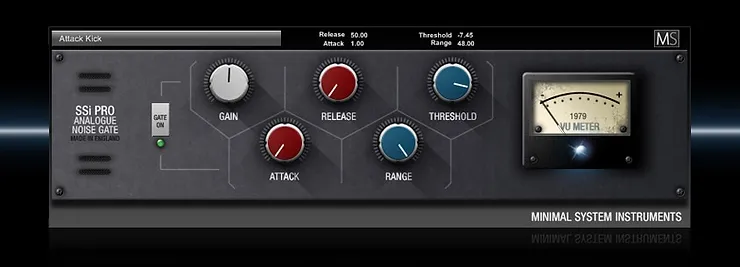
Using the best noise gate plugins is key to achieving a clean and noise-free audio recording. To use a noise gate plugin, set the threshold level to determine when the gate should open and close, adjust the attack and release times, and fine-tune the range to eliminate unwanted noise without cutting off desired audio signals.

If you often record audio, you know that noise can be a major issue. Noise gates are a popular solution for removing unwanted background noise. In this post, we’re going to talk about how to use noise gate plugins so that you can keep your recordings free from noise.

1. Setting The Threshold:

To use a noise gate plugin, you first need to set the threshold. This is the level at which the noise gate will activate and open the signal path. Setting the threshold too low can cause the gate to open unintentionally, while setting it too high can cause the gate to miss important audio signal. A good rule of thumb is to start with a high threshold and slowly lower it until the gate only opens when you want it to.

2. Adjusting The Attack And Release Controls:

The attack control determines how quickly the noise gate opens once it crosses the threshold. A fast attack is suitable for percussive sounds, while a slower attack is better for a sustained signal. The release control adjusts how quickly the noise gate closes once the signal falls below the threshold. A long release is preferable for slow attacks, while a shorter release time works well with fast attacks.

3. Choosing The Right Sidechain Filter:

Sidechain filters are used to tell the noise gate which frequency range to focus on. A high-pass filter will help you remove low-frequency noise like hums, while a low-pass filter will eliminate high-frequency noise like hissing. Use different filters for different recordings to ensure that you get the best result.

4. Using Hysteresis Control:

Hysteresis helps to prevent the noise gate from opening and closing rapidly. It keeps the noise gate open after the signal crosses the threshold, preventing the gate from closing too soon. This feature can be helpful when you have a mix of loud and quiet sounds.

5. Lookahead And Stereo Linking:

Lookahead allows the noise gate to anticipate the audio signal and apply the necessary settings before it reaches the threshold. This feature can be helpful for recordings with a lot of dynamic range. Stereo linking helps the noise gate to connect the left and right channels so that the audio gets processed in a balanced way. In conclusion, noise gate plugins are an effective tool to keep your recordings free of unwanted noise. By following the steps we’ve outlined, you can use noise gate plugins successfully to achieve the best results.

Tips And Tricks For Using A Noise Gate Plugin

Mastering a noise gate plugin is essential for any musician or audio engineer looking to achieve crystal-clear recordings. Some of the best noise gate plugins include Waves NS1, iZotope RX Elements, and FabFilter Pro-G. Follow these tips and tricks to ensure you get the most out of your chosen noise gate plugin and achieve professional-sounding results.

Noise gate plugins are extremely useful tools for recording and mixing audio. They help to eliminate unwanted noise and provide cleaner recordings. However, when it comes to using them effectively, there are a few tips and tricks that can take your recordings to the next level. In this section, we will explore some of the top tips and tricks for using a noise gate plugin.

Using The Ratio Control

One of the most important controls on a noise gate plugin is the ratio control. This control determines how much the gate will attenuate the signal once it falls below the threshold. A ratio of 1:1 will only apply a small amount of attenuation, while a higher ratio such as 4:1 or 8:1 will apply more attenuation. Tip: It’s important to find the right balance between removing the unwanted noise and preserving the natural sound of your recording. Experiment with different ratios until you find the sweet spot.

Using Keying To Trigger The Gate

Another useful feature of noise gate plugins is keying, which triggers the gate to open based on a designated input. This input can be anything from a specific frequency range to a separate audio track. Using keying can help to isolate specific elements of the recording and reduce unwanted noise. Tip: If you’re struggling to find the right key input, try soloing different tracks and frequencies to identify the source of the unwanted noise.

Dialing In The Release Time

The release time is another important parameter on a noise gate plugin. This control determines how long it takes for the gate to close once the audio signal falls below the threshold. A shorter release time will create a more pronounced gating effect, while a longer release time will provide a smoother transition. Tip: It’s important to balance the release time with the natural decay of the audio signal. Experimentation is key here, as it will vary depending on the recording environment and the audio source.

Using Multiple Gates In Series

Using multiple gates in series can be a powerful way to remove unwanted noise from a recording. This technique involves adding multiple noise gates to a single signal chain, each with a different threshold. The result is a more precise and efficient gating effect. Tip: When using multiple gates in series, start with the gate with the highest threshold and work your way down. This will help to eliminate the most obvious sources of unwanted noise first. In conclusion, noise gate plugins are powerful tools for cleaning up your audio recordings. By using these tips and tricks, you can take your recordings to the next level and achieve a cleaner, more professional sound.

Best Noise Gate Plugins

Credit: emastered.com

Frequently Asked Questions For Best Noise Gate Plugins

What Is The Best Noise Removing Plugin?

The best noise removing plugin is subjective, as it depends on the user’s needs and preferences. However, popular options include RX 8 Advanced, Accusonus ERA Bundle Pro, and iZotope Neutron 3. It’s recommended to research and test out different plugins to determine which works best for you.

What Is The Best Noise Gate For Vocals?

The Behringer MiniFex FEX800 is a great noise gate for vocals due to its ability to eliminate unwanted background noise. It features dedicated Threshold and Ratio dials, as well as an LED indicator to show when the gate is active.

This compact device is affordable and ideal for home recording studios.

Which Is Better Noise Gate Or Noise Suppression?

Noise suppression is better for general cleaning of audio signals, while a noise gate is ideal for eliminating background noise during silent or low-volume moments. However, the choice between these two depends on the user’s needs and the type of noise they want to remove.

Does Noise Gate Affect Quality?

Yes, noise gate affects quality. It can reduce unwanted sounds in a recording but can also affect the natural dynamics of the audio. If not used properly, it can cause distortion or artifacts that negatively impact the quality. Therefore, it is important to use a noise gate judiciously while recording and mixdown.

Conclusion

Noise gate plugins are essential tools for any music producer or sound engineer looking to achieve a clean and polished final product. With options ranging from free to premium, there is a noise gate plugin for every budget and level of expertise.

These plugins can significantly improve the quality of your recordings, allowing for a more professional and cohesive finished product. Whether you’re a seasoned pro or just starting out, incorporating a noise gate plugin into your production workflow is a valuable investment.